Приложение С. Описание SDP - template
По средством SDP Template происходит формирование правил, по которым медиа (RTP трафик) будет согласована между сторонами разговора. На базе заданного медиа профиля ядро формирует SDP-template, помещает его в тело сообщения INVITE и отправляет на медиа сервер. Последний на базе данного SDP-template формирует OfferSDP и отправляет его назад в ответе 200OK, тем самым со стороны ядра происходит усечение медиа секций в OfferSDP, полученных от абонента.
В текущем разделе описаны реализации:

SDP-template должен быть применен на уровне конфигурации интерфейсов виртуальной АТС.

Формирование SDP-template происходит посредством настройки медиа-профиля.
--show-sdp-template
Ключ для вывода информации о sdp-template.
Путь команды:
domain/<DOMIAN>/media-profile/info
Синтаксис:
info <MEDIA_PROFILE_NAME> --show-sdp-template
Параметры:
<MEDIA_PROFILE_NAME> — имя медиа-профиля.
Пример:
/domain/test_domain/media-profile/info example  --show-sdp-template
┌─────────────┐
│SDP-Template │
├─────────────┤
│v=0          │
│s=-          │
│c=IN * $     │
│t=$ $        │
│m=audio $ $ *│
│m=video $ $ *│
└─────────────┘
Note:
 The used wildcard characters "*", "$", etc. are formatted for SDP compatibility
 and may not correspond to the internal representation.
Legend:
 * - Corresponds to any number of parametres.
 $ - Corresponds to only one parameter.
Механизм SDP-template определяет использование подстановочных знаков (wildcards) в протоколе SDP:
- '*' — все доступные значения;
- '$' — одиночное значение параметра;
- '$1, $2, ..., $n' — взаимосвязанные значения.
В случае декларации нового медиа-профиля без настройки параметров таких как версия используемого протокола (IPv4/IPv6), используемого транспортного протокола (--media-proto), частоты дискретизации (--clock-rate ), видео/аудио-кодеков, SDP-template-ом будут использоваться подстановочные знаки '*' и '$' как в примере выше.
Взаимосвязанные значения связывают динамические номера payload type-ов в медиа-секции с кодеками в атрибуте rtpmap, в том случае, когда номер полезной нагрузки явно не указан (установлен подстановочный знак "*") в настройках медиа-профиля.
Пример:
/domain/test_domain/media-profile/codecs-add example  audio speex * G729 * G7221 * opus 77
Media-profile: example adds audio codecs successfully.
Media type configuration:
┌──────────┬────────────┬─────┐
│Codec type│  Property  │Value│
├──────────┼────────────┼─────┤
│audio     │offroad     │true │
│<other>   │offroad     │false│
│          │rtcp-enabled│true │
└──────────┴────────────┴─────┘

Codec type: audio codecs configuration:
┌───────┬─────┬──┬────────┬─────┐
│Enabled│Codec│PT│Property│Value│
├───────┼─────┼──┼────────┼─────┤
│       │speex│* │        │     │
│       │G729 │* │        │     │
│       │G7221│* │        │     │
│       │opus │77│        │     │
└───────┴─────┴──┴────────┴─────┘

Legend:
 Enabled  - is codec enabled. Empty means true.
 Codec    - list of codec names and special value <other>.
 PT       - Payload Type, * means any value.
 Property - name of attribute.
 Value    - value of attribute.
If attribute not specified in table it has Default value.
Вывод информации о сформированном SDP-template в медиа-профиле "example":
/domain/test_domain/media-profile/info example --show-sdp-template
┌───────────────────────┐
│     SDP-Template      │
├───────────────────────┤
│v=0                    │
│s=-                    │
│c=IN * $               │
│t=$ $                  │
│m=audio $ $ $1 18 $2 77│
│a=rtpmap:$1 speex/$    │
│a=rtpmap:$2 G7221/$    │
│a=rtpmap:77 opus/$     │
│m=video $ $ *          │
└───────────────────────┘
Note:
 The used wildcard characters "*", "$", etc. are formatted for SDP compatibility
 and may not correspond to the internal representation.
Legend:
 * - Corresponds to any number of parametres.
 $ - Corresponds to only one parameter.
Данный шаблон выставляет кодеки в следующем порядке: $1 - speex/$, 18 - G729/$, $2 - G7221/$, 77 - opus/$
Wildcard - $1 - связывает номер payload type-а (явно не указанного в настройках медиа-профиля, т.е когда в PT установлен подстановочный знак *), который выберет медиа-сервер с кодеком "speex" и ставит на первое место в приоритете.
18 - кодек G729 с PayloadType=18 описан в IANA. Его параметры известны, потому все дополнительные параметры опущены. Медиа-сервер, кодек G729 ставит на 2 место в приоритете.
Wildcard - $2 - связывает номер payload type-а (явно не указанного в настройках медиа-профиля, т.е когда в PT установлен подстановочный знак *), который выберет медиа-сервер, с G7221 и ставит на 3 место в приоритете.
77 - кодек "opus" с PayloadType=77, относится к динамическому/ вариативному кодеку, но мы в команде явно установили PT=77. Медиа-сервер, кодек "opus" ставит на последнее, 4-е место в приоритете.
Включение/выключение медиа-секций (m=audio/video/image)
При декларации нового медиа-профиля по умолчанию формируются audio и video секции в sdp-шаблоне.
<other> — это внутреннее (для медиа-профиля) представление состояния, при котором допустимы любые значения кодеков.
Однако данное представление отсутствует в спецификации SDP, поэтому в шаблоне оно преобразуется в набор из медиа-секций audio, video, но не image. Это связано с тем, что не все устройства поддерживают данную секцию. Фактически, сейчас единственный вариант её использования — это кодек T38 для факсов.
Пример:
/domain/test_domain/media-profile/declare example test user *
Media-profile: example declared successfully.

Media-profile detailed information:

┌───────────────┬───────┐
│   Parameter   │ Value │
├───────────────┼───────┤
│name           │example│
│description    │test   │
│codecs-priority│user   │
│addr-type      │*      │
└───────────────┴───────┘

Media type configuration:
┌──────────┬────────────┬─────┐
│Codec type│  Property  │Value│
├──────────┼────────────┼─────┤
│<other>   │offroad     │false│
│          │rtcp-enabled│true │
└──────────┴────────────┴─────┘

Codec type: <other> codecs configuration:
┌───────┬───────┬──┬────────┬─────┐
│Enabled│ Codec │PT│Property│Value│
├───────┼───────┼──┼────────┼─────┤
│       │<other>│* │        │     │
└───────┴───────┴──┴────────┴─────┘

Legend:
 Enabled  - is codec enabled. Empty means true.
 Codec    - list of codec names and special value <other>.
 PT       - Payload Type, * means any value.
 Property - name of attribute.
 Value    - value of attribute.
If attribute not specified in table it has Default value.

Вывод информации о сформированном SDP-template в медиа-профиле "example":

/domain/test_domain/media-profile/info example --show-sdp-template
┌─────────────┐
│SDP-Template │
├─────────────┤
│v=0          │
│s=-          │
│c=IN * $     │
│t=$ $        │
│m=audio $ $ *│
│m=video $ $ *│
└─────────────┘
Note:
 The used wildcard characters "*", "$", etc. are formatted for SDP compatibility
 and may not correspond to the internal representation.
Legend:
 * - Corresponds to any number of parametres.
 $ - Corresponds to only one parameter.
Если удалить секцию <other>, сформируется шаблон без медиа-секций.

В данной ситуации MSR будет усекать все медиа (audio, video, image).
Пример:
/domain/test_domain/media-profile/codecs-remove example <other> <other> *
Media-profile: example removes <other> codecs successfully.
Media type configuration:
┌──────────┬────────┬─────┐
│Codec type│Property│Value│
├──────────┼────────┼─────┤
└──────────┴────────┴─────┘

Вывод информации о сформированном SDP-template в медиа-профиле "example":

/domain/test_domain/media-profile/info example --show-sdp-template
┌────────────┐
│SDP-Template│
├────────────┤
│v=0         │
│s=-         │
│c=IN * $    │
│t=$ $       │
└────────────┘
Note:
 The used wildcard characters "*", "$", etc. are formatted for SDP compatibility
 and may not correspond to the internal representation.
Legend:
 * - Corresponds to any number of parametres.
 $ - Corresponds to only one parameter.
Для того чтобы включить audio/video--секцию, требуется добавить в медиа-профиль один или несколько аудио/видео-кодеков.
Пример:
/domain/test_domain/media-profile/codecs-add example audio G7221 *
Media-profile: example adds audio codecs successfully.
Media type configuration:
┌──────────┬────────┬─────┐
│Codec type│Property│Value│
├──────────┼────────┼─────┤
│audio     │offroad │true │
└──────────┴────────┴─────┘

Codec type: audio codecs configuration:
┌───────┬─────┬──┬────────┬─────┐
│Enabled│Codec│PT│Property│Value│
├───────┼─────┼──┼────────┼─────┤
│       │G7221│* │        │     │
└───────┴─────┴──┴────────┴─────┘

Legend:
 Enabled  - is codec enabled. Empty means true.
 Codec    - list of codec names and special value <other>.
 PT       - Payload Type, * means any value.
 Property - name of attribute.
 Value    - value of attribute.
If attribute not specified in table it has Default value.

Вывод информации о сформированном SDP-template в медиа-профиле "example":

/domain/test_domain/media-profile/info example --show-sdp-template
┌───────────────────┐
│   SDP-Template    │
├───────────────────┤
│v=0                │
│s=-                │
│c=IN * $           │
│t=$ $              │
│m=audio $ $ $1     │
│a=rtpmap:$1 G7221/$│
└───────────────────┘
Note:
 The used wildcard characters "*", "$", etc. are formatted for SDP compatibility
 and may not correspond to the internal representation.
Legend:
 * - Corresponds to any number of parametres.
 $ - Corresponds to only one parameter.
/domain/test_domain/media-profile/codecs-add example  video H264 *
Media-profile: example adds video codecs successfully.
Media type configuration:
┌──────────┬────────┬─────┐
│Codec type│Property│Value│
├──────────┼────────┼─────┤
│audio     │offroad │true │
│video     │offroad │true │
└──────────┴────────┴─────┘

Codec type: video codecs configuration:
┌───────┬─────┬────────┬─────┐
│Enabled│Codec│Property│Value│
├───────┼─────┼────────┼─────┤
│       │H264 │        │     │
└───────┴─────┴────────┴─────┘

Legend:
 Enabled  - is codec enabled. Empty means true.
 Codec    - list of codec names and special value <other>.
 PT       - Payload Type, * means any value.
 Property - name of attribute.
 Value    - value of attribute.
If attribute not specified in table it has Default value.

Вывод информации о сформированном SDP-template в медиа-профиле "example":

/domain/test_domain/media-profile/info example --show-sdp-template
┌───────────────────┐
│   SDP-Template    │
├───────────────────┤
│v=0                │
│s=-                │
│c=IN * $           │
│t=$ $              │
│m=audio $ $ $1     │
│a=rtpmap:$1 G7221/$│
│m=video $ $ $1     │
│a=rtpmap:$1 H264/$ │
└───────────────────┘
Note:
 The used wildcard characters "*", "$", etc. are formatted for SDP compatibility
 and may not correspond to the internal representation.
Legend:
 * - Corresponds to any number of parametres.
 $ - Corresponds to only one parameter.
Порты и транспорт обозначены через wildcard '$' и будут иметь значения, выбранные медиа-сервером. Список payload type номеров представлен через '*' - MSR будет использовать все поддерживаемые аудио/видео-кодеки с любыми Payload Type.
Как видно из сообщения, после создания (по умолчанию) профиль позволяет транслировать SDP напрямую от терминала А до терминала В минуя MSR (audio offroad true /video offroad true).
Media type configuration:
┌──────────┬────────┬─────┐
│Codec type│Property│Value│
├──────────┼────────┼─────┤
│audio     │offroad │true │
│video     │offroad │true │
└──────────┴────────┴─────┘
Чтобы включить данную возможность, нужно активизировать данный профиль у клиента А/В (на алиас) и изменить параметр vats_type=private(значение по умолчанию) на vats_type=transit_offroad (/domain/test_domain/properties/set vats_type transit_offroad) или через веб интерфейс
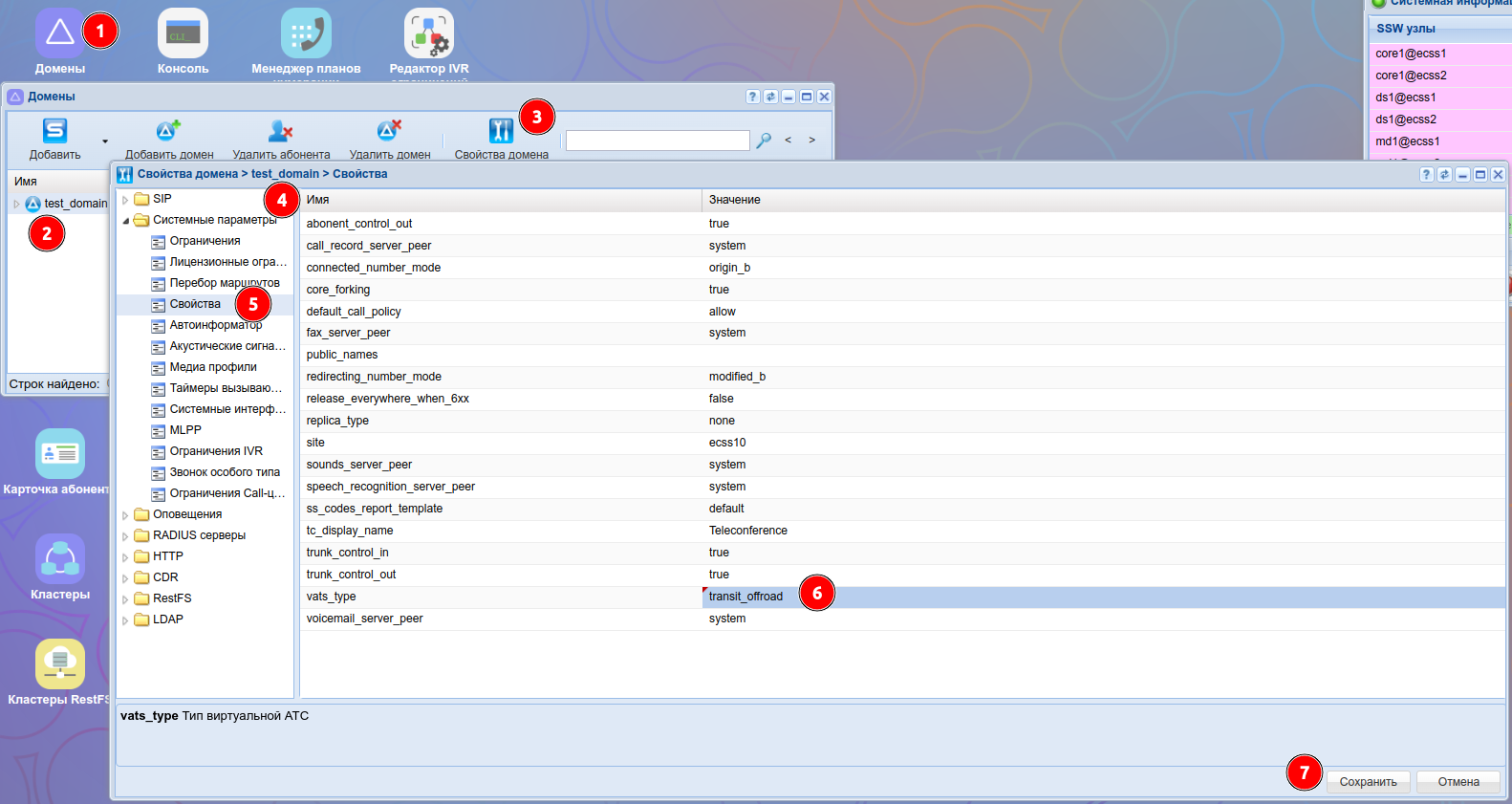 в этом случае SIP сигнализация будет обрабатываться ECSS10 , а RTP трафик будет отправляться напрямую от терминала А на терминал Б минуя MSR.
Управление медиа-транспортом
В медиа-профиле командой "codec-set" посредством параметра -- media-proto осуществляется управление медиа-транспортом. Из списка предложенных выбирается необходимый транспортный протокол (RTP/AVP или RTP/SAVP или udp или * (значение по умолчанию)).
Пример:
/domain/test_domain/media-profile/codecs-set example audio G7221 * --media-proto RTP/AVP
Media-profile: example set audio codecs successfully.
Media type configuration:
┌──────────┬────────┬─────┐
│Codec type│Property│Value│
├──────────┼────────┼─────┤
│audio     │offroad │true │
│video     │offroad │true │
└──────────┴────────┴─────┘

Codec type: audio codecs configuration:
┌───────┬─────┬──┬───────────┬───────┐
│Enabled│Codec│PT│ Property  │ Value │
├───────┼─────┼──┼───────────┼───────┤
│       │G7221│* │media-proto│RTP/AVP│
└───────┴─────┴──┴───────────┴───────┘

Legend:
 Enabled  - is codec enabled. Empty means true.
 Codec    - list of codec names and special value <other>.
 PT       - Payload Type, * means any value.
 Property - name of attribute.
 Value    - value of attribute.
If attribute not specified in table it has Default value.

Вывод информации о сформированном SDP-template в медиа-профиле "example":

/domain/test_domain/media-profile/info example --show-sdp-template
┌────────────────────┐
│    SDP-Template    │
├────────────────────┤
│v=0                 │
│s=-                 │
│c=IN * $            │
│t=$ $               │
│m=audio $ RTP/AVP $1│
│a=rtpmap:$1 G7221/$ │
│m=video $ $ $1      │
│a=rtpmap:$1 H264/$  │
└────────────────────┘
Note:
 The used wildcard characters "*", "$", etc. are formatted for SDP compatibility
 and may not correspond to the internal representation.
Legend:
 * - Corresponds to any number of parametres.
 $ - Corresponds to only one parameter.
Управление приоритетом кодеков
Управление приоритетом кодеков происходит по средством команды "codecs-priority" в настройках медиа-профиля.
Данные из таблицы "codecs configuration" будут использованы, для контроля кодеков и их приоритетов, в случае, если значение Media-profile detailed information: codecs-priority=system.
В случае если значение Media-profile detailed information: codecs-priority=user, будут применятся информация о кодеках и их приоритетах из конфигурации ТА абонента А (плечо А)/из конфигурации MSR (файл /etc/ecss/ecss-media-server/config.xml) плечо Б.
Данные из "codecs configuration" в этом случае будут использоваться только для контроля разрешен/запрещен данный кодек или нет.
Добавляется еще один аудио кодек PCMA для медиа профиля "example".
/domain/test_domain/media-profile/codecs-add example audio PCMA 8
Media-profile: example adds audio codecs successfully.
Media type configuration:
┌──────────┬────────┬─────┐
│Codec type│Property│Value│
├──────────┼────────┼─────┤
│audio     │offroad │true │
│video     │offroad │true │
└──────────┴────────┴─────┘

Codec type: audio codecs configuration:
┌───────┬─────┬──┬───────────┬───────┐
│Enabled│Codec│PT│ Property  │ Value │
├───────┼─────┼──┼───────────┼───────┤
│       │G7221│* │media-proto│RTP/AVP│
│       │PCMA │8 │           │       │
└───────┴─────┴──┴───────────┴───────┘

Legend:
 Enabled  - is codec enabled. Empty means true.
 Codec    - list of codec names and special value <other>.
 PT       - Payload Type, * means any value.
 Property - name of attribute.
 Value    - value of attribute.
If attribute not specified in table it has Default value.

Вывод информации о сформированном SDP-template в медиа-профиле "example":

/domain/test_domain/media-profile/info example --show-sdp-template
┌────────────────────┐
│    SDP-Template    │
├────────────────────┤
│v=0                 │
│s=-                 │
│c=IN * $            │
│t=$ $               │
│m=audio $ RTP/AVP $1│
│a=rtpmap:$1 G7221/$ │
│m=audio $ $ 8       │
│m=video $ $ $1      │
│a=rtpmap:$1 H264/$  │
└────────────────────┘
Note:
 The used wildcard characters "*", "$", etc. are formatted for SDP compatibility
 and may not correspond to the internal representation.
Legend:
 * - Corresponds to any number of parametres.
 $ - Corresponds to only one parameter.
В данном примере :
1) В таблице конфигурации кодеков в приоритете находится аудио кодек G7221;
2) Кодек PCMA c PayloadType описан в IANA. Его параметры известны, потому все дополнительные параметры опущены. В более вариативных кодеках, как в нашем случае G7221, дополнительные параметры мы увидим в блоке rtpmap.
Повысим приоритет для кодека PCMA :
/domain/test_domain/media-profile/codecs-priority example audio PCMA 8 up
Media-profile: example priority changed for audio codecs successfully.
Media type configuration:
┌──────────┬────────┬─────┐
│Codec type│Property│Value│
├──────────┼────────┼─────┤
│audio     │offroad │true │
│video     │offroad │true │
└──────────┴────────┴─────┘

Codec type: audio codecs configuration:
┌───────┬─────┬──┬───────────┬───────┐
│Enabled│Codec│PT│ Property  │ Value │
├───────┼─────┼──┼───────────┼───────┤
│       │PCMA │8 │           │       │
│       │G7221│* │media-proto│RTP/AVP│
└───────┴─────┴──┴───────────┴───────┘

Legend:
 Enabled  - is codec enabled. Empty means true.
 Codec    - list of codec names and special value <other>.
 PT       - Payload Type, * means any value.
 Property - name of attribute.
 Value    - value of attribute.
If attribute not specified in table it has Default value.

Вывод информации о сформированном SDP-template в медиа-профиле "example":

/domain/test_domain/media-profile/info example --show-sdp-template
┌────────────────────┐
│    SDP-Template    │
├────────────────────┤
│v=0                 │
│s=-                 │
│c=IN * $            │
│t=$ $               │
│m=audio $ $ 8       │
│m=audio $ RTP/AVP $1│
│a=rtpmap:$1 G7221/$ │
│m=video $ $ $1      │
│a=rtpmap:$1 H264/$  │
└────────────────────┘
Note:
 The used wildcard characters "*", "$", etc. are formatted for SDP compatibility
 and may not correspond to the internal representation.
Legend:
 * - Corresponds to any number of parametres.
 $ - Corresponds to only one parameter.
В этом случае кодек PCMA занял первую очередь в списке разрешенных кодеков.
Все действия можно выполнить и через Веб интерфейс
Домены/Имя домена(для примера "test_domen")/Свойства домена/Системные параметры/Медиа профили/Добавить или имя профиля
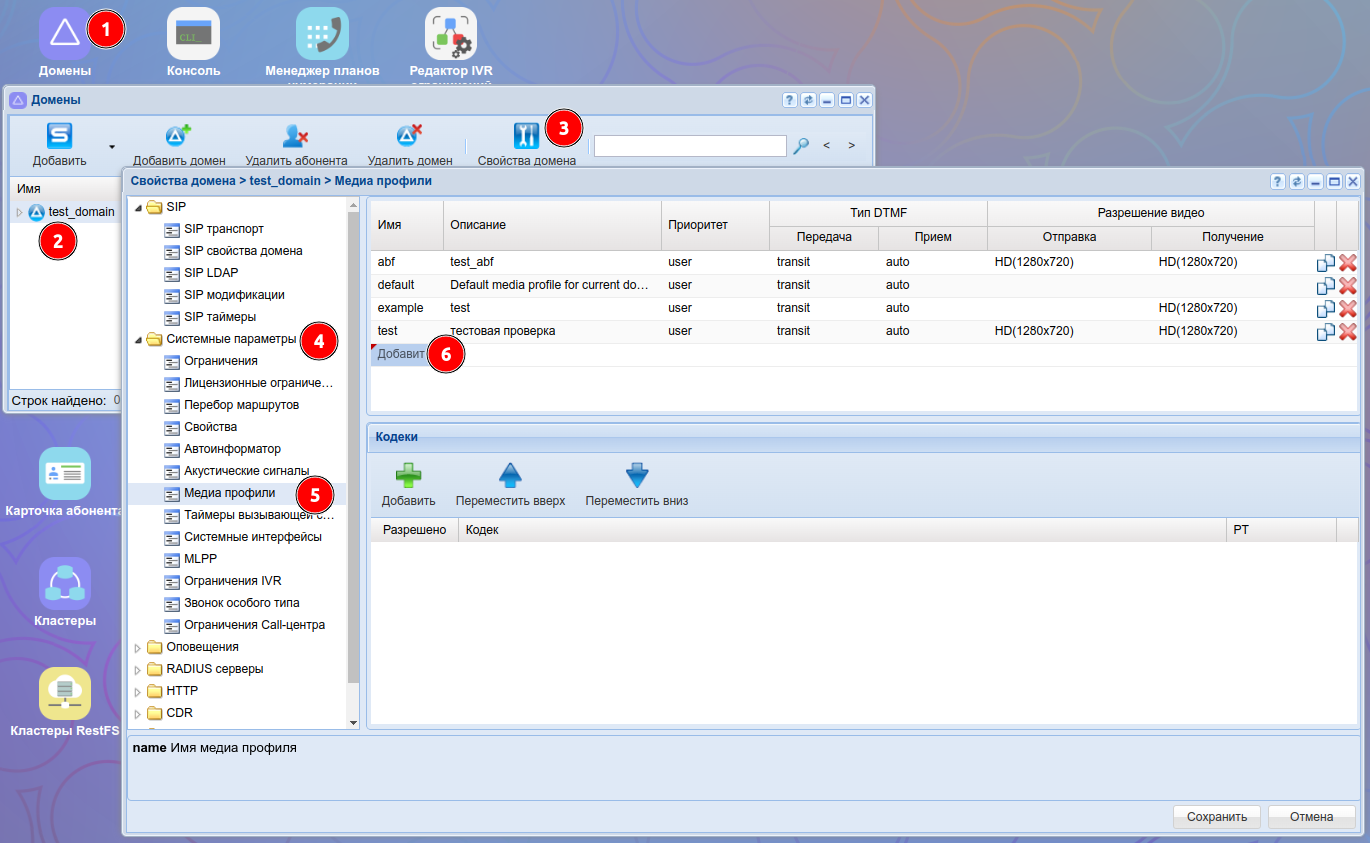
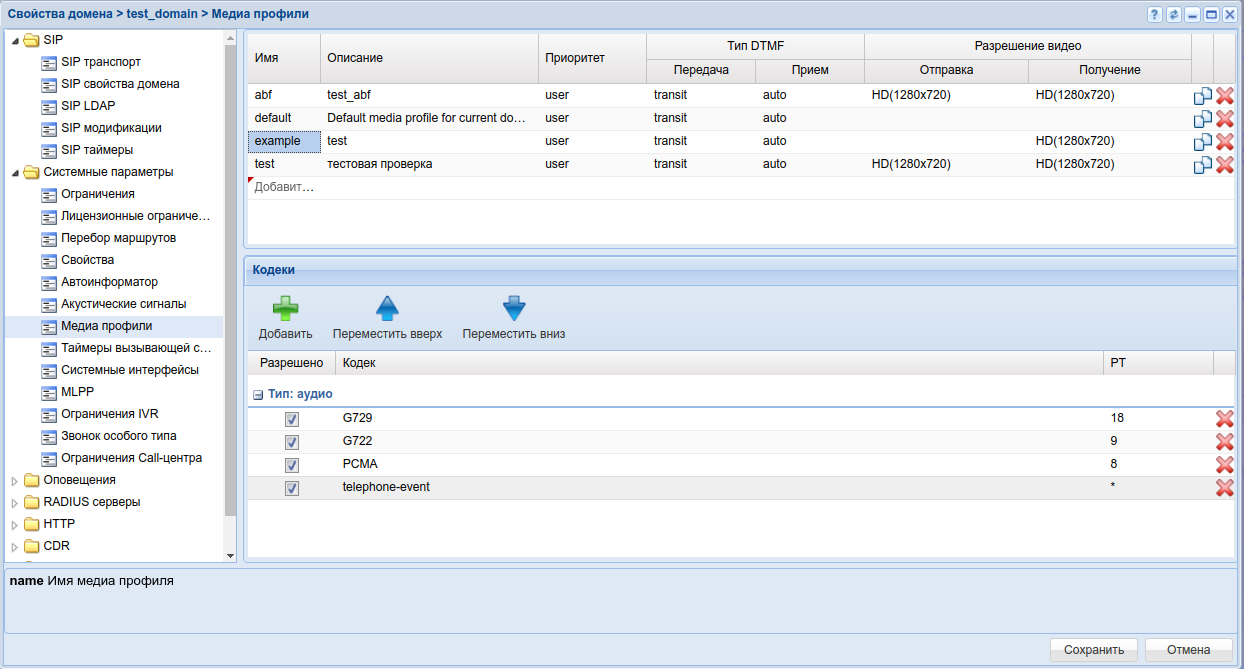
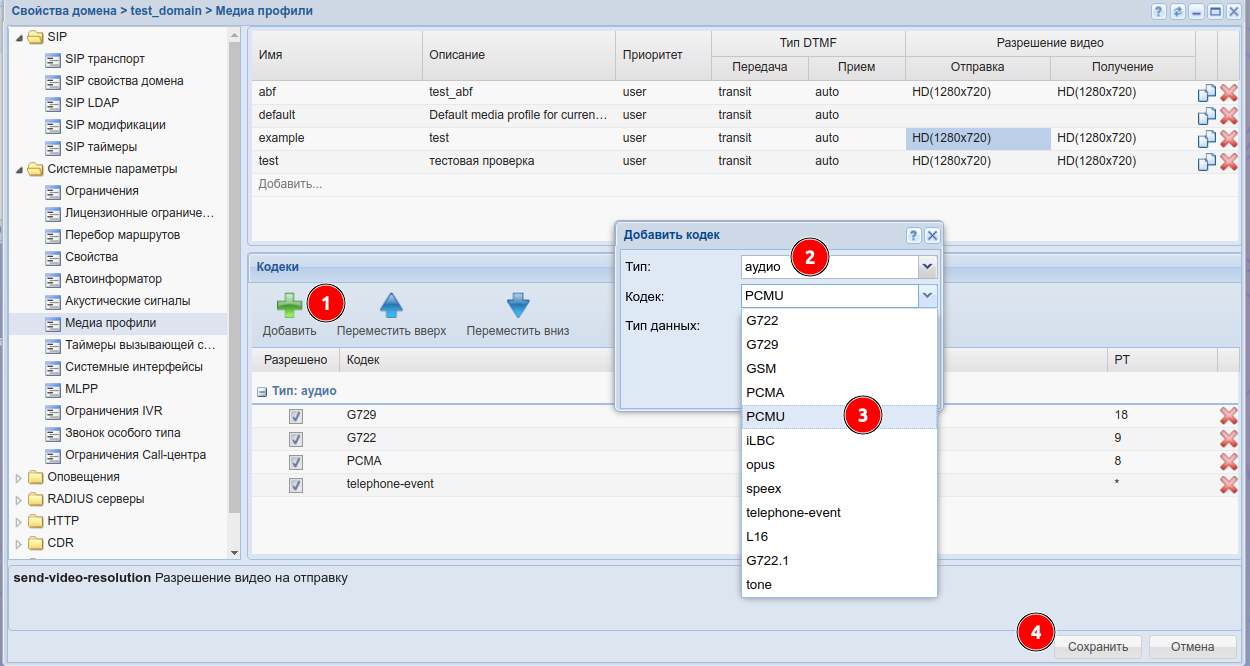
Назначение динамических payload type номеров
Payload Type для кодека, это числовой параметр, система будет предлагать автоматически стандартное PT по имени кодека согласно IANA, но можно задать свой PT, если он не стандартный в медиа-профиле командой "codecs-set" по средством параметра <codec-pt>.
Пример:
/domain/test_domain/media-profile/codecs-set example audio G7221 111
Media-profile: example set audio codecs successfully.
Media type configuration:
┌──────────┬────────┬─────┐
│Codec type│Property│Value│
├──────────┼────────┼─────┤
│audio     │offroad │true │
│video     │offroad │true │
└──────────┴────────┴─────┘

Codec type: audio codecs configuration:
┌───────┬─────┬───┬────────┬─────┐
│Enabled│Codec│PT │Property│Value│
├───────┼─────┼───┼────────┼─────┤
│       │G7221│111│        │     │
└───────┴─────┴───┴────────┴─────┘

Legend:
 Enabled  - is codec enabled. Empty means true.
 Codec    - list of codec names and special value <other>.
 PT       - Payload Type, * means any value.
 Property - name of attribute.
 Value    - value of attribute.
If attribute not specified in table it has Default value.

Вывод информации о сформированном SDP-template в медиа-профиле "example":

/domain/test_domain/media-profile/info example --show-sdp-template
┌────────────────────┐
│    SDP-Template    │
├────────────────────┤
│v=0                 │
│s=-                 │
│c=IN * $            │
│t=$ $               │
│m=audio $ $ 111     │
│a=rtpmap:111 G7221/$│
│m=video $ $ $1      │
│a=rtpmap:$1 H264/$  │
└────────────────────┘
Note:
 The used wildcard characters "*", "$", etc. are formatted for SDP compatibility
 and may not correspond to the internal representation.
Legend:
 * - Corresponds to any number of parametres.
 $ - Corresponds to only one parameter.
В данном примере указали динамический Payload Type с номером 111 для кодека G7221.
Управление разрешением видеопотока
В медиа-профиле командой "set" посредством параметра -- send-video-resolution и recv-video-resolution осуществляется управление разрешением исходящего и входящего видеопотока для всего профиля. Это позволяет настраивать видео кодеки независимо от разрешения видео.
Разрешение для отдельных кодеков не настраивается.
Пример:
/domain/test_domain/media-profile/set example recv-video-resolution  HD(1280x720)
Media-profile: example set recv-video-resolution successfully.

/domain/test_domain/media-profile/set example send-video-resolution HD(1280x720)
Media-profile: example set send-video-resolution successfully.

Media-profile detailed information:

┌─────────────────────┬────────────┐
│      Parameter      │   Value    │
├─────────────────────┼────────────┤
│name                 │example     │
│description          │test        │
│codecs-priority      │user        │
│addr-type            │*           │
│dtmf-receive-type    │auto        │
│dtmf-transmit-type   │transit     │
│recv-video-resolution│HD(1280x720)│
│send-video-resolution│HD(1280x720)│
└─────────────────────┴────────────┘

Media type configuration:
┌──────────┬────────┬─────┐
│Codec type│Property│Value│
├──────────┼────────┼─────┤
│audio     │offroad │true │
│video     │offroad │true │
└──────────┴────────┴─────┘

Codec type: audio codecs configuration:
┌───────┬─────┬───┬────────┬─────┐
│Enabled│Codec│PT │Property│Value│
├───────┼─────┼───┼────────┼─────┤
│       │G7221│111│        │     │
└───────┴─────┴───┴────────┴─────┘

Codec type: video codecs configuration:
┌───────┬─────┬────────┬─────┐
│Enabled│Codec│Property│Value│
├───────┼─────┼────────┼─────┤
│       │H264 │        │     │
└───────┴─────┴────────┴─────┘

Legend:
 Enabled  - is codec enabled. Empty means true.
 Codec    - list of codec names and special value <other>.
 PT       - Payload Type, * means any value.
 Property - name of attribute.
 Value    - value of attribute.
If attribute not specified in table it has Default value.

Вывод информации о сформированном SDP-template в медиа-профиле "example":

/domain/test_domain/media-profile/info example --show-sdp-template
┌─────────────────────────────────┐
│          SDP-Template           │
├─────────────────────────────────┤
│v=0                              │
│s=-                              │
│c=IN * $                         │
│t=$ $                            │
│m=audio $ $ 111                  │
│a=rtpmap:111 G7221/$             │
│m=video $ $ $1                   │
│a=imageattr:* recv [x=1280,y=720]│
│a=imageattr:* send [x=1280,y=720]│
│a=rtpmap:$1 H264/$               │
└─────────────────────────────────┘
Note:
 The used wildcard characters "*", "$", etc. are formatted for SDP compatibility
 and may not correspond to the internal representation.
Legend:
 * - Corresponds to any number of parametres.
 $ - Corresponds to only one parameter.
В данном примере для медиа-профиля "example" настроено входящее и исходящее разрешение видеопотока— HD (1280x720).