
...
| Блок кода |
|---|
wlc
  outside-address 192.168.1.1
  service-activator
    aps join auto
    password private-crt-key ascii-text encrypted 8CB5107EA7005AFF
    crypto private-key wlc-sa.keytesting123
    crypto cert wlc-sa.pem
  exit
  airtune
    enable
  exit
  ap-location default-location
    description default-location
    mode tunnel
    ap-profile default-ap
    ssid-profile default-ssid
    ssid-profile freeSSID_bras
  exit
  ssid-profile default-ssid
    description F.E.wlc-30_PSK
    ssid F.E.wlc-30_PSK
    vlan-id 3
    security-mode WPA2
    key-wpa ascii-text encrypted C4EC5B35E85710A3wifipass
    802.11kv
    band 2g
    band 5g
    enable
  exit
  ssid-profile freeSSID_bras
    description F.E.free
    ssid F.E.freeSSID
    vlan-id 4
    band 2g
    band 5g
    enable
  exit
  ap-profile default-ap
    password ascii-text encrypted 8CB5107EA7005AFFtesting123
    services
      ip ssh server
      ip http server
    exit
  exit
  radius-profile default-radius
    auth-address 192.168.1.1
    auth-password ascii-text encrypted 8CB5107EA7005AFFtesting123
    domain default
  exit
  ip-pool default-ip-pool
    description default-ip-pool
    ap-location default-location
  exit
  enable
exit |
...
Полная конфигурация приведена в файле:View file
Конфигурация WNAM
...
На стороне системы авторизации переходим: Конфигурация → Сервера доступа → Создать сервер.
В закладке Параметры:
- Создаётся объект Сервер доступа (тип: Eltex);
- Заполняем поля IP адрес и Внешний IP адрес (адрес вашего WLC, смотрящий в сторону WNAM);
- Имя устройства и Местоположение (произвольно).
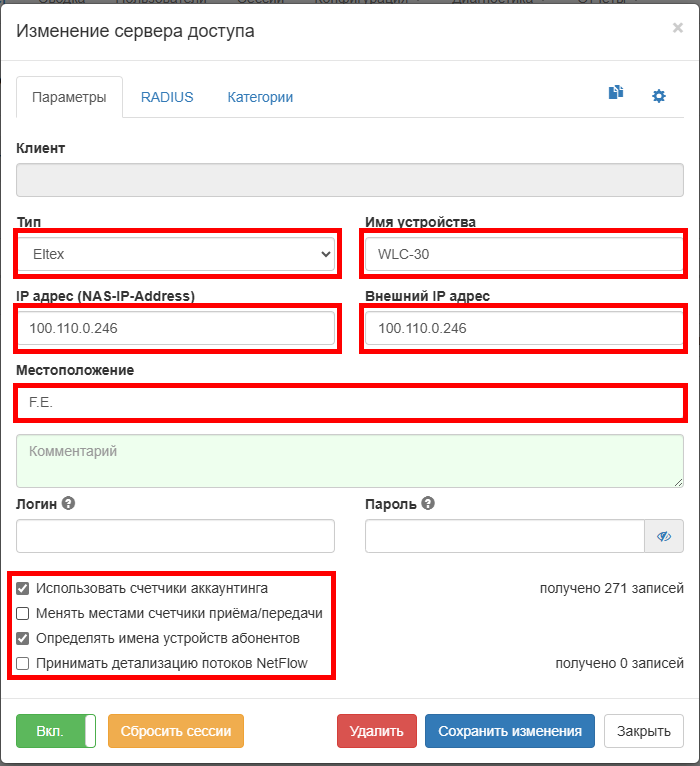
В закладе RADIUS указывается RADIUS-ключ (wnampass), в поле "Атрибуты CoA / пост-авторизации":
| Блок кода |
|---|
Cisco-AVPair=subscriber:command=account-loggon
Idle-Timeout=1200
Acct-Interim-Interval=300
Cisco-AVPair=subscriber:vrf=1 |