...
| Блок кода |
|---|
bridge 1
  description "MGMT_AP"
  security-zone trusted
  ip address 192.168.1.1/24
  no spanning-tree
  enable
exit
bridge 2
  description "Internet"
  security-zone untrusted
  ip address 100.110.0.246/23
  service-policy dynamic upstream
  no spanning-tree
  enable
exit
bridge 3
  description "BRAS-users"
  vlan 3
  mtu 1458
  history statistics
  security-zone users
  ip address 192.168.2.1/24
  service-policy dynamic downstream
  no spanning-tree
  location data10
  enable
exit |
Конфигурация Vlan:
...
| Раскрыть |
|---|
| title | Полная конифгурация WLC |
|---|
|
| Без форматирования |
|---|
#!/usr/bin/clish
#260
#1.26.1
#06/08/2024
#17:35:15
hostname F.E.wlc-30

object-group service airtune
  port-range 8099
exit
object-group service dhcp_client
  port-range 68
exit
object-group service dhcp_server
  port-range 67
exit
object-group service dns
  port-range 53
exit
object-group service netconf
  port-range 830
exit
object-group service ntp
  port-range 123
exit
object-group service radius_auth
  port-range 1812
exit
object-group service sa
  port-range 8043-8044
exit
object-group service ssh
  port-range 22
exit
object-group service http
  port-range 80
exit

object-group network wnam_servers
  ip address-range 100.110.1.44
exit
object-group network bras_users
  ip address-range 192.168.2.2-192.168.2.254
exit
object-group network local
  ip address-range 192.168.2.1-192.168.2.254
exit
exit
object-group url defaultService
  url http://100.110.1.44
exit

syslog max-files 3
syslog file-size 512
syslog sequence-numbers
syslog file tmpsys:syslog/default
  severity info
exit

radius-server local
  nas ap
    key ascii-text encrypted 8CB5107EA7005AFF
    network 192.168.1.0/24
  exit
  nas local
    key ascii-text encrypted 8CB5107EA7005AFF
    network 127.0.0.1/32
  exit
  domain default
    user admin
      password ascii-text encrypted 88B11079B10B45F2A1
    exit
    user test
      password ascii-text encrypted 88B11079A40A5BEF
    exit
  exit
  virtual-server default
    enable
  exit
  enable
exit
username admin
  password encrypted $6$VTnIOWf3fS3nGFKg$5jX72fw5eDSwVu0tToU0rv6ketJ9TxLZiFOMQfiXYpWvGsBX/Dw.9qdyll8zcYl/dM9UYXVeErSWxDLPrYbGY1
exit
username techsupport
  password encrypted $6$nrnzdr0dqFVGcBJu$fSU.9EVcpTXIcSJQmzu3R6zDRHDJPQCydg5PortfFXeKy1bAyE8hG2ptda9A.a5AnT27wU2haRk7fhyStm6yi.
exit

radius-server host 100.110.1.44
  key ascii-text encrypted 88B11079B9014FAAF7B9
  source-address 100.110.0.246
exit
radius-server host 127.0.0.1
  key ascii-text encrypted 8CB5107EA7005AFF
exit
aaa radius-profile bras_radius
  radius-server host 100.110.1.44
exit
aaa radius-profile default_radius
  radius-server host 127.0.0.1
exit

das-server das
  key ascii-text encrypted 88B11079B9014FAAF7B9
  port 3799
  clients object-group wnam_servers
exit
aaa das-profile bras_das
  das-server das
exit

line console
  exec-timeout 65535
exit
line telnet
  exec-timeout 65535
exit
line ssh
  exec-timeout 65535
exit
line web
  exec-timeout 28800
exit

tech-support login enable

boot host auto-config
boot host auto-update

vlan 3
  force-up
exit

no spanning-tree

domain lookup enable

security zone trusted
exit
security zone untrusted
exit
security zone users
exit
security zone dmz
exit

ip access-list extended BYPASS
  rule 10
    action permit
    match protocol udp
    match source-port 68
    match destination-port 67
    enable
  exit
  rule 11
    action permit
    match protocol udp
    match destination-port 53
    enable
  exit
exit
ip access-list extended WELCOME
  rule 10
    action permit
    match protocol tcp
    match destination-port 443
    enable
  exit
  rule 30
    action permit
    match protocol tcp
    match destination-port 80
    enable
  exit
exit
ip access-list extended INTERNET
  rule 10
    action permit
    enable
  exit
exit

subscriber-control
  aaa das-profile bras_das
  aaa sessions-radius-profile bras_radius
  aaa services-radius-profile bras_radius
  nas-ip-address 100.110.0.246
  session mac-authentication
  bypass-traffic-acl BYPASS
  default-service
    class-map BYPASS
    filter-name local defaultService
    filter-action permit
    default-action redirect http://100.110.1.44/cp/eltexwlc
    session-timeout 600
  exit
  enable
exit

bridge 1
  description "MGMT_AP"
  security-zone trusted
  ip address 192.168.1.1/24
  no spanning-tree
  enable
exit
bridge 2
  description "Internet"
  security-zone untrusted
  ip address 100.110.0.246/23
  service-policy dynamic upstream
  no spanning-tree
  enable
exit
bridge 3
  description "BRAS-users"
  vlan 3
  mtu 1458
  history statistics
  security-zone users
  ip address 192.168.2.1/24
  service-policy dynamic downstream
  no spanning-tree
  location data10
  enable
exit

interface gigabitethernet 1/0/1
  description "MNGT_AP"
  spanning-tree disable
  bridge-group 1
exit
interface gigabitethernet 1/0/1.1000
  description "to-WNAM"
  bridge-group 2
exit
interface gigabitethernet 1/0/2
  mode switchport
exit
interface gigabitethernet 1/0/3
  mode switchport
exit
interface gigabitethernet 1/0/4
  lldp receive
exit
interface tengigabitethernet 1/0/1
  mode switchport
  switchport access vlan 2
exit
interface tengigabitethernet 1/0/2
  mode switchport
exit

tunnel softgre 1
  mode data
  local address 192.168.1.1
  default-profile
  enable
exit


security zone-pair trusted self
  rule 10
    action permit
    match protocol tcp
    match destination-port object-group ssh
    enable
  exit
  rule 20
    action permit
    match protocol icmp
    enable
  exit
  rule 30
    action permit
    match protocol udp
    match source-port object-group dhcp_client
    match destination-port object-group dhcp_server
    enable
  exit
  rule 40
    action permit
    match protocol udp
    match destination-port object-group ntp
    enable
  exit
  rule 50
    action permit
    match protocol tcp
    match destination-port object-group dns
    enable
  exit
  rule 60
    action permit
    match protocol udp
    match destination-port object-group dns
    enable
  exit
  rule 70
    action permit
    match protocol tcp
    match destination-port object-group netconf
    enable
  exit
  rule 80
    action permit
    match protocol tcp
    match destination-port object-group sa
    enable
  exit
  rule 90
    action permit
    match protocol udp
    match destination-port object-group radius_auth
    enable
  exit
  rule 100
    action permit
    match protocol gre
    enable
  exit
  rule 110
    action permit
    match protocol tcp
    match destination-port object-group airtune
    enable
  exit
exit
security zone-pair trusted trusted
  rule 1
    action permit
    enable
  exit
exit
security zone-pair trusted untrusted
  rule 1
    action permit
    enable
  exit
exit
security zone-pair untrusted self
  rule 1
    action permit
    match protocol udp
    match source-port object-group dhcp_server
    match destination-port object-group dhcp_client
    enable
  exit
  rule 10
    action permit
    match protocol tcp
    match destination-port object-group ssh
    enable
  exit
  rule 20
    action permit
    match protocol tcp
    match destination-port object-group http
    enable
  exit
exit
security zone-pair users self
  rule 10
    action permit
    match protocol icmp
    enable
  exit
  rule 20
    action permit
    match protocol udp
    match source-port object-group dhcp_client
    match destination-port object-group dhcp_server
    enable
  exit
  rule 30
    action permit
    match protocol tcp
    match destination-port object-group dns
    enable
  exit
  rule 40
    action permit
    match protocol udp
    match destination-port object-group dns
    enable
  exit
exit
security zone-pair users untrusted
  rule 1
    action permit
    enable
  exit
exit

security passwords default-expired

nat source
  pool translate
    ip address-range 100.110.0.246
  exit
  ruleset factory
    to zone untrusted
    rule 10
      description "replace 'source ip' by outgoing interface ip address"
      action source-nat interface
      enable
    exit
  exit
  ruleset SNAT
    to interface gigabitethernet 1/0/1.1000
    rule 1
      match source-address object-group local
      action source-nat pool translate
      enable
    exit
  exit
exit

ip dhcp-server
ip dhcp-server pool ap-pool
  network 192.168.1.0/24
  address-range 192.168.1.2-192.168.1.254
  default-router 192.168.1.1
  dns-server 192.168.1.1
  option 42 ip-address 192.168.1.1
  vendor-specific
    suboption 12 ascii-text "192.168.1.1"
    suboption 15 ascii-text "https://192.168.1.1:8043"
  exit
exit
ip dhcp-server pool users-pool
  network 192.168.2.0/24
  address-range 192.168.2.2-192.168.2.254
  default-router 192.168.2.1
  dns-server 192.168.2.1
exit

ip route 0.0.0.0/0 100.110.0.1

softgre-controller
  nas-ip-address 127.0.0.1
  data-tunnel configuration wlc
  aaa radius-profile default_radius
  keepalive-disable
  service-vlan add 3
  enable
exit

wlc
  outside-address 192.168.1.1
  service-activator
    aps join auto
  exit
  airtune
    enable
  exit
  ap-location default-location
    description default-location
    mode tunnel
    ap-profile default-ap
    ssid-profile default-ssid
  exit
  ssid-profile default-ssid
    description F.E.free
    ssid F.E.freeSSID
    vlan-id 3
    802.11kv
    band 2g
    band 5g
    enable
  exit
  ap-profile default-ap
    password ascii-text encrypted 8CB5107EA7005AFF
    services
      ip ssh server
      ip http server
    exit
  exit
  radius-profile default-radius
    auth-address 192.168.1.1
    auth-password ascii-text encrypted 8CB5107EA7005AFF
    domain default
  exit
  ip-pool default-ip-pool
    description default-ip-pool
    ap-location default-location
  exit
  enable
exit

ip ssh server

lldp enable

clock timezone gmt +7

ntp enable
ntp broadcast-client enable
ntp server 194.190.168.1
exit

ip http server
|
|
...
В поле "Тип" выбираем "Площадка", в поле "Разрешенный сервер доступа" выбираем созданный ранее сервер. В поле "Присвоенная IP подсеть или МАС точек доступа" указываем наш пул IP для пользователей портала (сеть Bridge 4 3 на WLC).
| Подсказка |
|---|
|
Таким образом через привязку пулов IP можно привязать разные Площадки с разными порталами авторизации, трафик абонентов которых терминируется на одном WLC.
Разрешенный сервер соответственно на разных площадках будет один и тот же. |
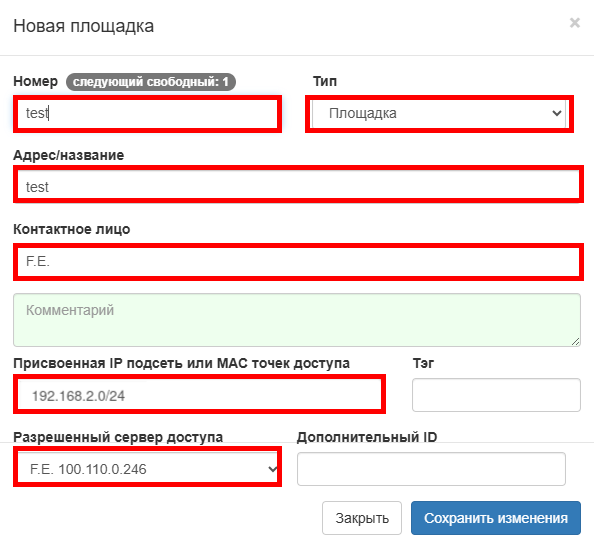 Image Added
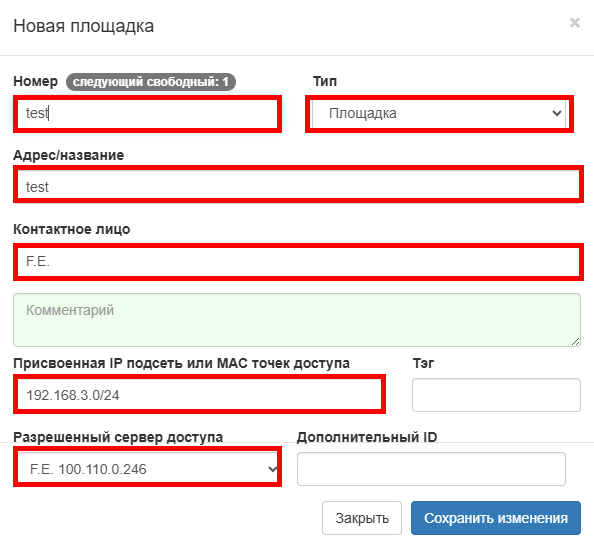 Image Removed
Далее выбираем созданную площадку.
На вкладке "Авторизация" выбираем "Метод" – "Ввод кода с ваучера". Указываем срок валидности ваучера для авторизации. В параметре "Имя страницы" выбираем "Ваучер (по умолчанию)". Данных настроек достаточно для работы Гостевого портала с авторизацией по коду из Ваучера.
Настройка других способов авторизации выходит за рамки данной статьи.
...
Переходим во вкладку: Конфигурация → Правила аутентификации.
Создаем новое правило аутентификации и настраиваем, как на скриншоте приведенном ниже. Источник запроса выбираем проводной (BRAS у нас находится на проводном интерфейсе).
В параметре "Входящий радиус атрибут" выбираем "NAS-Port-ID" равным тому "location" который указали в настройках Bridge 4 3 на WLC, на котором терминируется клиентский трафик.
Так мы привяжем данное правило к нашему SSID с гостевым доступом.
...
На этом конфигурация сервиса Netams WNAM завершена.
После конфигурирования портала и контроллера WLC при подключения к SSID с названием "F.E.wlc-30_PSKfreeSSID" будет регистрация в сети. Мы попадем на портал авторизации, где необходимо ввести один из свободных ваучеров. Посмотреть доступные ваучеры можно: Конфигурация → Гостевая авторизация → Ваучеры. Выбираем созданную группу Test_Guest-Portal и вводим свободный. После авторизации будет предоставлен доступ в интернет, а введенный ваучер привяжется
...
