
...
| Примечание |
|---|
The current version LDP only works with IPv4 addresses. |
Configuration algorithm
Step | Description | Command | Keys |
|---|---|---|---|
1 | In the context of MPLS parameters configuration, specify the interfaces involved in the MPLS switching process | esr(config-mpls)# forwarding interface { <IF> | <TUN> } | <IF> – an interface's name. <TUN> – the name of the tunnel. |
2 | Specify the router-id for LDP (not necessary if transport-address is specified). | esr(config-ldp)# router-id <ID> | <ID> – router identifier, defined as AAA.BBB.CCC.DDD where each part takes values of [0..255]. |
3 | In the context of the address family ipv4 settings, specify transport-address (not necessary if router-id is specified). | esr(config-ldp-af-ipv4)# transport-address <ADDR> | <ADDR> – defined as AAA.BBB.CCC.DDD where each part takes values of [0..255]. |
4 | In the context of the address family ipv4 settings, specify interfaces for enabling LDP process. | esr(config-ldp-af-ipv4)# interface { <IF> | <TUN> } | <IF> – an interface's name. <TUN> – the name of the tunnel. |
5 | Enable LDP process. | esr(config-ldp)# enable | |
6 | Enable explicit-null functionality (optional). | esr(config-ldp)# egress-label-type explicit-null | |
7 | In the LDP neighbor configuration mode, set the password with the password command (optional). | esr(config-ldp-neig)# password {<TEXT> | ENCRYPTED-TEXT>} | <CLEAR-TEXT> – password, sets by string of [8..16] characters; <ENCRYPTED-TEXT> – encrypted password of [8..16] bytes ([16..32] characters) in hexadecimal format (0xYYYY...) or (YYYY...). |
The following functionality is also available as part of the LDP configuration:
| |||
|
|
| Примечание |
|---|
If router-id value is changed, then the new value will be applied only after restarting this protocol. To restart mpls ldp, use the clear mpls ldp command. |
...
Algorithm for setting Hello holdtime and Hello interval in the global LDP configuration
Step | Description | Command | Keys |
|---|---|---|---|
1 | Configure the LDP (see section LDP configuration). | ||
2 | In the LDP configuration mode, set Hello holdtime. | esr(config-ldp)# discovery hello holdtime <TIME> | <TIME> — Time in seconds in the range of [3..65535]. Default value: 15. |
3 | In the LDP configuration mode, set Hello interval. | esr(config-ldp)# discovery hello interval <TIME> | <TIME> — Time in seconds in the range of [3..65535]. Default value: 5. |
Algorithm for setting Hello holdtime and Hello interval for address family
Step | Description | Command | Keys |
|---|---|---|---|
1 | Configure the LDP (see section LDP configuration). | ||
2 | In the LDP address family configuration mode, set Hello holdtime on the specified interface. | esr(config-ldp-af-ipv4-if)# discovery hello holdtime <TIME> | <TIME> — time in the range of [3..65535] seconds. Default value: 15. |
3 | In the LDP address family configuration mode, set Hello interval on the specified interface. | esr(config-ldp-af-ipv4-if)# discovery hello interval <TIME> | <TIME> — time in the range of [3..65535] seconds. Default value: 5. |
Algorithm for setting Keepalive holdtime parameter in the global LDP configuration
Step | Description | Command | Keys |
|---|---|---|---|
1 | Configure the LDP (see section LDP configuration). | ||
2 | In the LDP configuration mode, set the Keepalive parameter. | esr(config-ldp)# keepalive <TIME> | <TIME> — time in the range of [3..65535] seconds. Default value: 180. |
Algorithm for setting Keepalive holdtime parameter for the specific neighbor
Step | Description | Command | Keys |
|---|---|---|---|
1 | Configure the LDP (see section LDP configuration). | ||
2 | In the neighbor configuration mode, set the Keepalive holdtime parameter. | esr(config-ldp-neig)# keepalive <TIME> | <TIME> — time in the range of [3..65535] seconds. Default value: 180. |
Configuration example
Objective:
...
Algorithm for setting Hello holdtime, Hello interval and Keepalive holdtime for the LDP process
1 | Configure the LDP (see section LDP configuration). | ||
2 | In the LDP configuration mode, set Hello holdtime. | esr(config-ldp)# discovery targeted-hello holdtime <TIME> | <TIME> — time in the range of [3..65535] seconds. Default value: 45. |
3 | In the LDP configuration mode, set Hello interval. | esr(config-ldp)# discovery targeted- hello interval <TIME> | <TIME> — time in the range of [1..65535] seconds. Default value: 5. |
4 | In the LDP configuration mode, set Keepalive holdtime. | esr(config-ldp)# keepalive <TIME> | <TIME> — time in the range of [3..65535] seconds. Default value: 180. |
Algorithm for setting Hello holdtime, Hello interval and Keepalive holdtime for the specific neighbor
1 | Configure the LDP (see section LDP configuration). | ||
2 | In the LDP neighbor configuration mode, set Hello holdtime. | esr(config-ldp-neig)# discovery targeted-hello holdtime <TIME> | <TIME> — time in the range of [3..65535] seconds. Default value: 45. |
3 | In the LDP neighbor configuration mode, set Hello interval. | esr(config-ldp-neig)# discovery targeted- hello interval <TIME> | <TIME> — time in the range of [1..65535] seconds. Default value: 5. |
4 | In the LDP neighbor configuration mode, set Keepalive holdtime. | esr(config-ldp-neig)# keepalive <TIME> | <TIME> — time in the range of [3..65535] seconds. Default value: 180. |
Configuration example
Objective:
...
By default, routers allocate a separate label to each FEC. There are scenarios when it is necessary to allocate MPLS tags only for certain FECs.
Configuration algorithm
Step | Description | Command | Keys |
|---|---|---|---|
1 | Configure the LDP (see section LDP configuration). | ||
2 | Create network type object-group. | esr(config)# object-group network <NAME> | <NAME> – name of a subnet list being configured, set by the string of up to 31 characters. |
3 | Describe the subnets for which labels will be assigned. | esr(config-object-group-network)# ip prefix <ADDR/LEN> | <ADDR/LEN> – IP address and subnet mask, defined as AAA.BBB.CCC.DDD/EE where each part AAA-DDD takes values of [0..255] and EE takes values of [1..32]. |
4 | In the context of the LDP configuration, apply the created object-group. | esr(config-ldp)# advertise-labels <NAME> | <NAME> – name of a subnet list being configured, set by the string of up to 31 characters. |
| Примечание |
|---|
Tags will be allocated ONLY to the subnets described in the object-group, regardless of how they were learned (connected, local, IGP, etc.). |
...
L2VPN VPWS configuration algorithm
Step | Description | Command | Keys |
|---|---|---|---|
1 | Configure the LDP (see section LDP configuration). | ||
2 | Create pw-class in the system and switch to the pw-class configuration mode. | esr(config-l2vpn)# pw-class <WORD> | <WORD> — pw-class name [1..31] characters long. |
3 | Add a description for pw-class (optional). | esr(config-l2vpn-pw-class)# description <LINE> | <LINE> – description. Set by the string [1..255] characters long. |
4 | Set the MTU value for the pseudo-wire included in the pw-class (optional). | esr(config-l2vpn-pw-class)# encapsulation | <MTU> — MTU value, takes values in the range of [552..10000] Default value: 1500. |
5 | Disable status-tlv messaging (optional). | esr(config-l2vpn-pw-class)# encapsulation | Default value: status-tlv enable |
6 | Create p2p-class in the system and switch to the p2p-class configuration mode. | esr(config-l2vpn)# p2p <NAME> | <NAME> — name of the p2p service, set by the string of up to 31 characters. |
7 | Specify Attached Circuit interface. | esr(config-l2vpn-p2p)# interface | <IF> – an interface's name. <TUN> – the name of the tunnel. |
8 | Enable p2p tunnel. | esr(config-l2vpn-p2p)# enable | |
9 | Specify transport mode (optional). | esr(config-l2vpn-p2p)# transport-mode | <ethernet> — mode in which the 802.1Q tag is removed from the header when entering pseudo-wire; <vlan> — mode in which the 802.1Q tag can be saved when transmitted over pseudo-wire. Default value: ethernet. |
10 | Create a pseudo-wire and switch to its parameters configuration mode. | esr(config-l2vpn-p2p)# pw <PW_ID> <LSR_ID> | <PW_ID> — psewdowire identifier, specified in the range [1..4294967295]. <LSR_ID> — identifier of LSR to which pseudo-wire is built, specified as AAA.BBB.CCC.DDD, where each part takes values [0..255]. |
11 | Add a description for pseudo-wire (optional). | esr(config-l2vpn-pw)# description <LINE> | <LINE> – description. Set by the string [1..255] characters long. |
12 | Set pw-class for pseudo-wire. | esr(config-l2vpn-pw)# pw-class <WORD> | <WORD> — pw-class name [1..31] characters long. |
13 | Set the LSR address to which the pseudo-wire is set (optional if the neighbor address is the same as the LSR_ID). | esr(config-l2vpn-pw)# neighbor-address <ADDR> | <ADDR> – router IP address, defined as AAA.BBB.CCC.DDD where each part takes values of [0..255]. |
14 | Enable pseudo-wire. | esr(config-l2vpn-pw)# enable | |
If it is necessary to change the default settings for a targeted LDP session, see section Configuring session parameters in targeted-LDP. | |||
L2VPN VPWS configuration example
...
L2VPN VPLS configuration algorithm
Step | Description | Command | Keys |
|---|---|---|---|
1 | Configure the LDP (see section LDP configuration). | ||
2 | Create a network bridge in the system without specifying an IP address (see section Bridge configuration). | ||
3 | Create pw-class in the system and switch to the pw-class configuration mode. | esr(config-l2vpn)# pw-class <WORD> | <WORD> — pw-class name [1..31] characters long. |
4 | Add a description for pw-class (optional). | esr(config-l2vpn-pw-class)# description <LINE> | <LINE> — description. Set by the string [1..255] characters long. |
5 | Set the MTU value for the pseudo-wire included in the pw-class (optional). | esr(config-l2vpn-pw-class)# encapsulation | <MTU> — MTU value, takes values in the range of [552..10000]. Default value: 1500. |
6 | Disable status-tlv messaging (optional). | esr(config-l2vpn-pw-class)# encapsulation | Default value: status-tlv enable. |
7 | Create VPLS domain in the system and switch to the VPLS domain configuration mode. | esr(config-l2vpn)# vpls <NAME> | <NAME> — name of the p2p service, set by the string of up to 31 characters. |
8 | Enable VPLS tunnel. | esr(config-l2vpn-vpls)# enable | |
9 | Add bridge domain. | esr (config-l2vpn-vpls)# bridge-group <ID> | <ID> — bridge domain identifier, specified in the range [1..250]. |
10 | Specify transport mode (optional). | esr(config-l2vpn-vpls)# transport-mode | <ethernet> — mode in which the 802.1Q tag is removed from the header when entering pseudo-wire; |
11 | Create a pseudo-wire and switch to its parameters configuration mode | esr(config-l2vpn-vpls)# pw <PW_ID> <LSR_ID> | <PW_ID> — psewdowire identifier, specified in the range [1..4294967295]. <LSR_ID> — identifier of LSR to which pseudo-wire is built, specified as AAA.BBB.CCC.DDD, where each part takes values [0..255]. |
12 | Add a description for pseudo-wire (optional). | esr(config-l2vpn-pw)# description <LINE> | <LINE> — description. Set by the string [1..255] characters long. |
13 | Set pw-class for pseudo-wire | esr(config-l2vpn-pw)# pw-class <WORD> | <WORD> — pw-class name [1..31] characters long. |
14 | Set the LSR address to which the pseudo-wire is set (Optional if the neighbor address is the same as the LSR_ID). | esr(config-l2vpn-pw)# neighbor-address <ADDR> | <ADDR> – router IP address, defined as AAA.BBB.CCC.DDD where each part takes values of [0..255]. |
15 | Enable pseudo-wire. | esr(config-l2vpn-pw)# enable | |
16 | If the topology of the VPLS domain to be created requires more than one pseudo-wire, repeat steps 10 to 14. | ||
17 | If it is necessary to change the default settings for a targeted LDP session, see section Configuring session parameters in targeted-LDP. | ||
L2VPN VPLS configuration example
...
L2VPN VPLS configuration algorithm
Step | Description | Command | Keys |
|---|---|---|---|
1 | Configure the LDP (see section LDP configuration). | ||
2 | Create a network bridge in the system without specifying an IP address (see section Bridge configuration). | ||
3 | Create VPLS domain in the system and switch to the VPLS domain configuration mode. | esr(config-l2vpn)# vpls <NAME> | <NAME> — name of the p2p service, set by the string of up to 31 characters. |
4 | Enable VPLS tunnel. | esr(config-l2vpn-vpls)# enable | |
5 | Add bridge domain. | esr(config-l2vpn-vpls)# bridge-group <ID> | <ID> — bridge domain identifier, specified in the range [1..250]. |
6 | Switch to the autodiscovery bgp configuration context. | esr(config-l2vpn-vpls)# autodiscovery bgp | |
7 | Specify route distinguisher for the given VPLS instance. | esr(config-bgp)# rd <RD> | <RD> – Route distinguisher value, specified in one of the following forms:
|
8 | Specify route target import for the given VPLS instance. | esr(config-bgp)# route-target import <RT> | <RT> – Route-target value, specified in one of the following forms:
|
9 | Specify route target export for the given VPLS instance. | esr(config-bgp)# route-target export <RT> | <RT> – Route-target value, specified in one of the following forms:
|
10 | Specify ve id. | esr(config-bgp)# ve id <ID> | <ID> — VPLS instance identifier, specified in the range [1..16384]. |
11 | Specify vpn id. | esr (config-bgp)# vpn id <ID> | <ID> — VPN identifier, specified in the range [1..4294967295] |
12 | Specify ve range (optional). | esr (config-bgp)# ve range <RANGE> | <RANGE> — range of VPLS border device identifiers [8..100]. |
13 | Specify mtu (optional). | esr (config-bgp)# mtu <VALUE> | <VALUE> — MTU value [552..10000]. |
14 | Enable ignoring encapsulation type (optional). | esr(config-bgp)# ignore encapsulation-mismatch | |
15 | Enable ignoring MTU values (optional). | esr(config-bgp)# ignore mtu-mismatch | |
16 | In the context of address-family l2vpn vpls BGP configuration, enable extended attribute transfer. | esr(config-bgp-neighbor-af)# send-community extended |
L2VPN VPLS configuration example
...
| Примечание |
|---|
The current implementation of MP-BGP only supports VPN-IPv4 routes (AF I= 1, SAFI = 128). |
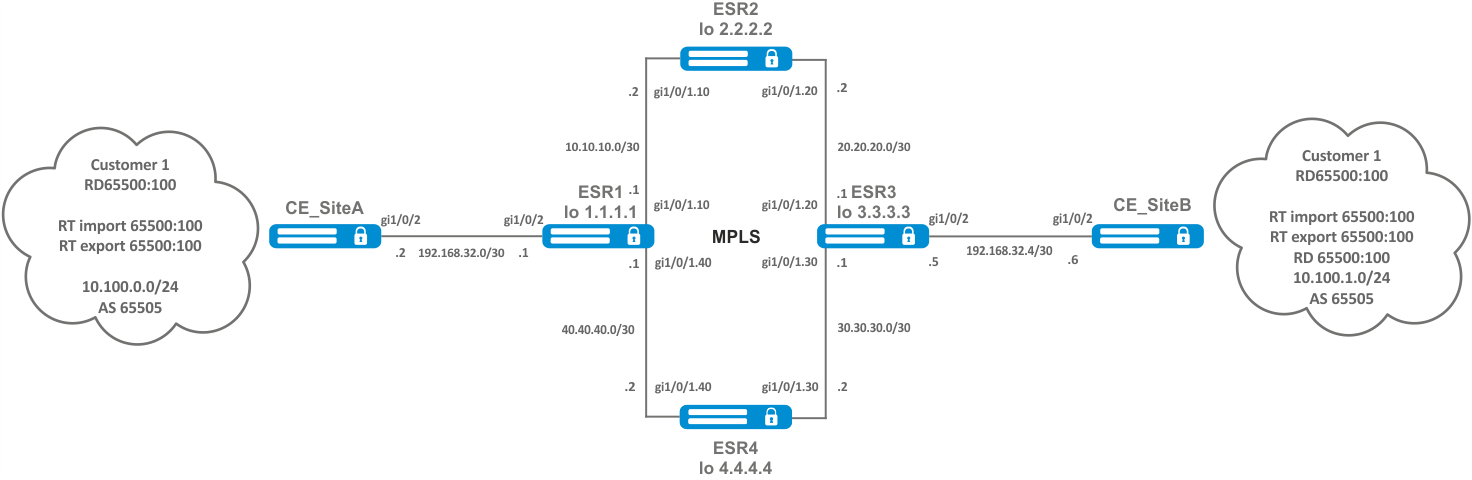
Configuration algorithm
Step | Description | Command | Keys |
|---|---|---|---|
1 | Configure addressing and one of IGP on all P and PE routers. | ||
2 | Configure LDP transport tag distribution. | ||
3 | Create VRF. | esr(config)# ip vrf <VRF> | <VRF> – VRF instance name, set by the string of up to 31 characters. |
4 | Specify route distinguisher for the given VRF. | esr(config-vrf)# rd <RD> | <RD> – Route distinguisher value, specified in one of the following forms:
|
5 | Specify route target import for the given VRF. | esr(config-vrf)# route-target import <RT> | <RT> – Route-target value, specified in one of the following forms:
|
6 | Specify route target export for the given VRF. | esr(config-vrf)# route-target export <RT> | <RT> – route-target value, specified in one of the following forms:
|
7 | Specify the allowed number of routes for this VRF. | esr(config-vrf)# ip protocols <PROTOCOLS> max-routes <VALUE> | <PROTOCOL> – protocol type, may take following values: rip (only in global mode), ospf, isis, bgp; <VALUE> – amount of routes in the routing table, takes values in the range of:
|
8 | In the context of address-family VPNv4 BGP configuration, enable extended attribute transfer. | esr(config-bgp-neighbor-af)# send-community extended |
Configuration example
Objective:
...
| Блок кода |
|---|
*GRE tunnel configuration*
ESR2# sh tunnels configuration
Tunnel             State      Description
----------------   --------   ------------------------------
gre 1              Enabled    --

ESR2# sh tunnels configuration gre 1
State:                                             Enabled
Description:                                       --
Mode:                                              ip
Bridge group:                                      --
VRF:                                               --
Local address:                                     192.0.2.2
Remote address:                                    192.0.2.1
Calculates checksums for outgoing GRE packets:     No
Requires that all input GRE packets were checksum: No
key:                                               60
TTL:                                               64
DSCP:                                              Inherit
MTU:                                               1472
Path MTU discovery:                                Enabled
Don't fragment bit suppression:                    Disabled
Security zone:                                     --
Multipoint mode:                                   Disabled
Keepalive:
    State:                                             Disabled
    Timeout:                                           10
    Retries:                                           6
    Destination address:                               --

*vpnv4 routes presence*
SR2# sh bgp vpnv4 unicast all
Status codes: * - valid, > - best, i - internal, S - stale
Origin codes: i - IGP, e - EGP, ? - incomplete

Codes Route Distinguisher   IP Prefix          Next hop        Metric     Label   LocPrf     Weight Path
----- --------------------- ------------------ --------------- ---------- ------- ---------- ------ ----------------
*>    65500:1               10.101.0.0/24      --              --         34      100        --     65502 i
*>i   65500:1               10.100.0.0/24      10.12.0.1       --         16      100        0      65501 i

*LDP state*
ESR2# sh mpls ldp neighbor
Peer LDP ID: 10.12.0.1; Local LDP ID 10.12.0.2
    State:                  Operational
    TCP connection:         10.12.0.1:646 - 10.12.0.2:46444
    Messages sent/received: 60/60
    Uptime:                 00:53:59
    LDP discovery sources:
        gre 1
ESR2# sh mpls forwarding-table
Local    Outgoing Prefix                                      Outgoing         Next Hop
label    label    or tunnel ID                                Interface
-------- -------- ------------------------------------------- ---------------- ---------------------------------------
35       imp-null 10.12.0.1/32                                gre 1            10.11.0.1

*Availability of nodes in the network*
CE2# ping 10.100.0.1 source ip 10.101.0.1 detailed
PING 10.100.0.1 (10.100.0.1) from 10.101.0.1 : 56 bytes of data.
64 bytes from 10.100.0.1: icmp_seq=1 ttl=0 time=1.32 ms
64 bytes from 10.100.0.1: icmp_seq=2 ttl=0 time=1.12 ms
64 bytes from 10.100.0.1: icmp_seq=3 ttl=0 time=1.14 ms
64 bytes from 10.100.0.1: icmp_seq=4 ttl=0 time=1.09 ms
64 bytes from 10.100.0.1: icmp_seq=5 ttl=0 time=1.15 ms
|
Scroll Pagebreak