
...
Example of creating a context and a few rules in it:
- In the left part of the window in the Context section click the Create context button;
- In the dialog box that opens, indicate the name of the context as well as the type of context — empty context:
1. In 1. In the left part of the window in the Context section click the Create context button  ;
;
2. In the dialog box that opens, indicate the name of the context, as well as the type of context — empty context:
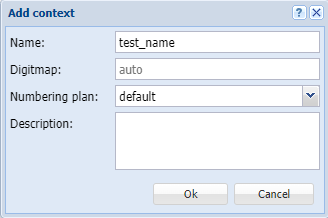
;
3. Click Ok button;
43. Click Save context  ;
;
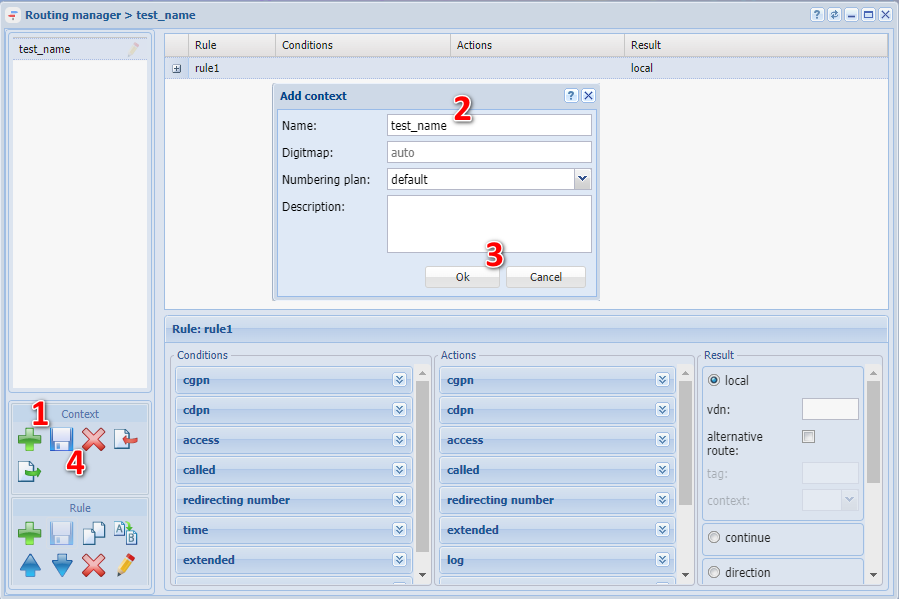
Create 4 rules in this context:
...
- In the conditions section, go to the CDPN tab. Enter the phone numbers that are assigned to the trunk in the Number field. For example, to define numbers from 42006 to 42007, enter condition 420(6-7);
- In the actions section, go to the CDPN tab. Enter a mask to change the number in the Number field. For example, to add number 4 before the number, fill in the field with the following expression 4{1,2,3,4,5};
- Click Save rule and Save Context buttons to apply changes.
...
- In CDPN tab in conditions section, enter phone numbers that are behind the trunk in "Number" field. For example, to define numbers from 42001 to 42005, enter condition 420condition 420(1-5);
- In the result section, define the result as local (e. local routing);
- Click Save rule and Save Context buttons to apply changes.
For rule 3, assume that subscribers with numbers 108, 109 and 110 get into the informant ivr script before calling further.
- In CGPN tab in conditions section, enter the phone numbers for which the selection will be in the field "Number", for example 420(10.08-09).
- Click Save rule and Save Context buttons to apply changes.
...
- By default, this rule is created in the system in default_routing context. The % symbol is written to the called number in the conditions, and the result is local routing, however, it is recommended to create this rule at the end if assigning to the subscriber a context other than default_routing.
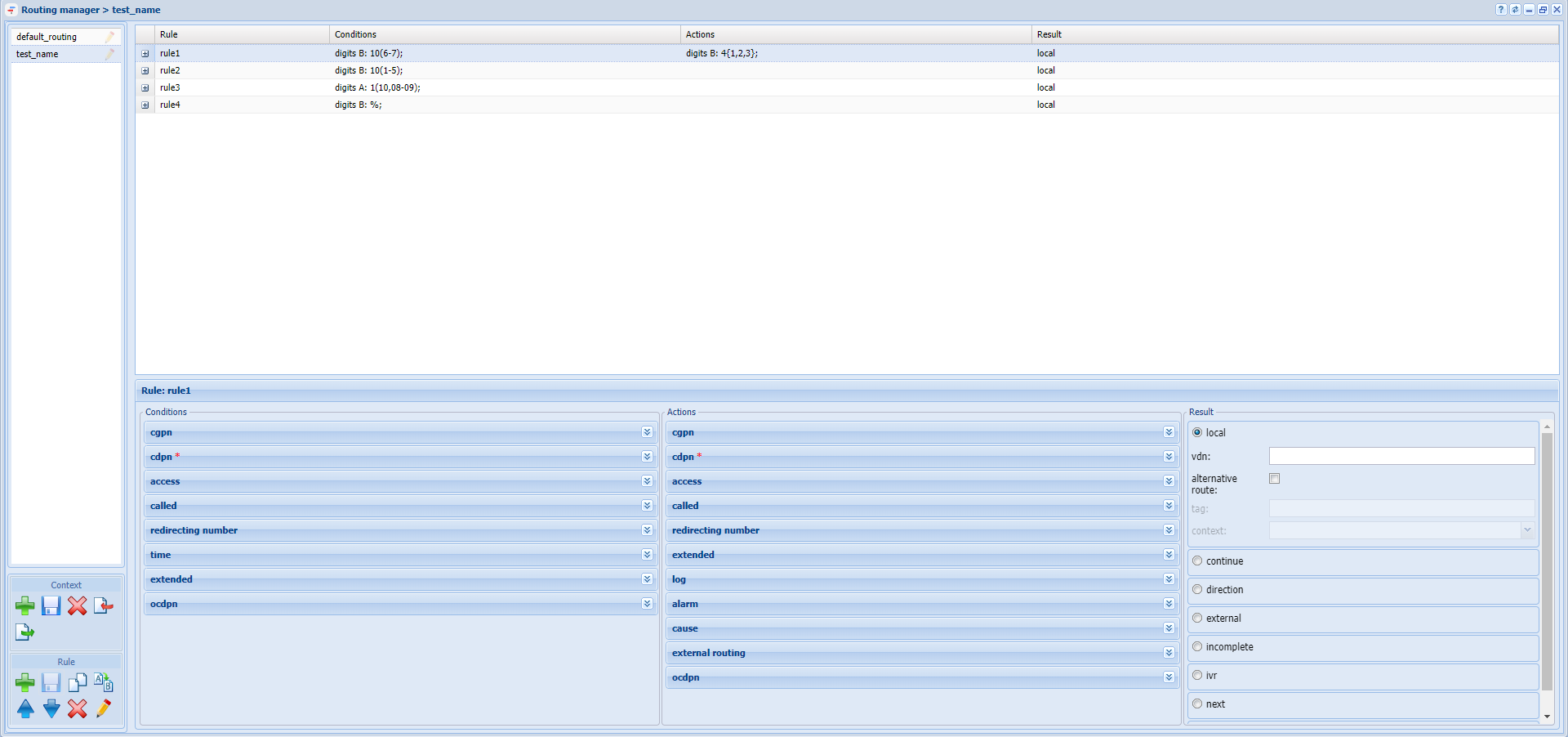
Figure 25 — Example of configuring routing context
...
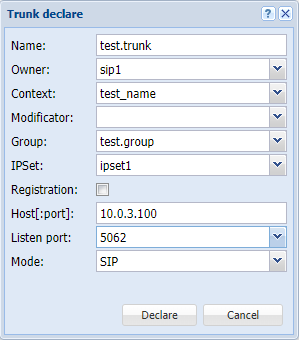
To define a trunk in the system, click on the Trunk declare button button, define parameters in the dialog box that opens:
- Name — assign trunk name by which it can be identified in the system;
- Context — apply previously created test_name routing context;
- Group — select the interface group created when defining 'test.group' subscribers;
- IP address group (IPSet) — 'ipset1' address group created on the domain;
- Registration — if trunk is used, then enable this parameter, it is not used in the example;
- Host [:port] — destination IP address of the trunk — 10.0.3.100;
- Listen port — transport port where traffic from the trunk will be listened to, corresponds to the port assigned to the IP address group.
 ↓
↓
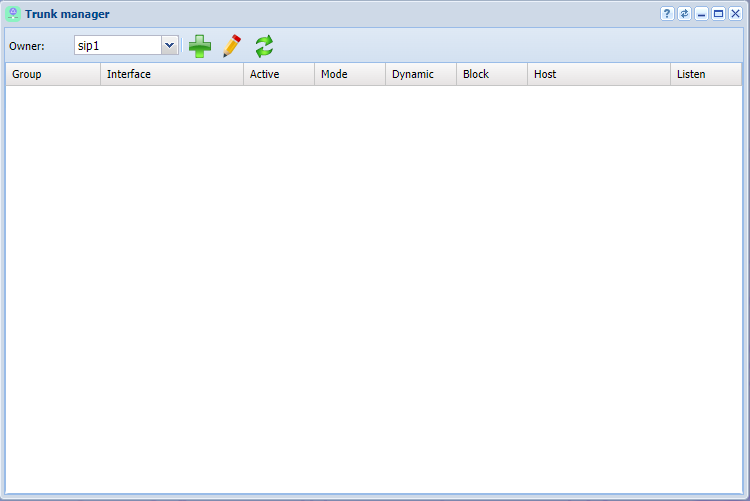
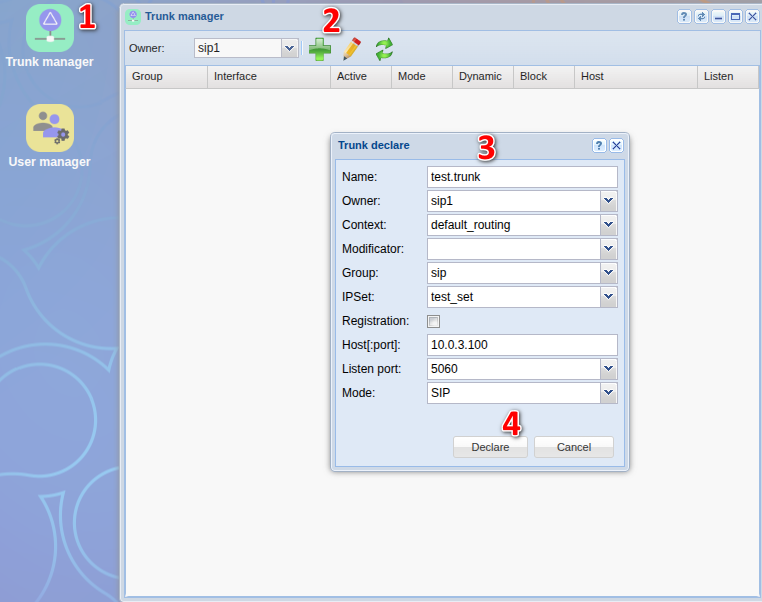
Figure 27 — Creating a trunk
...
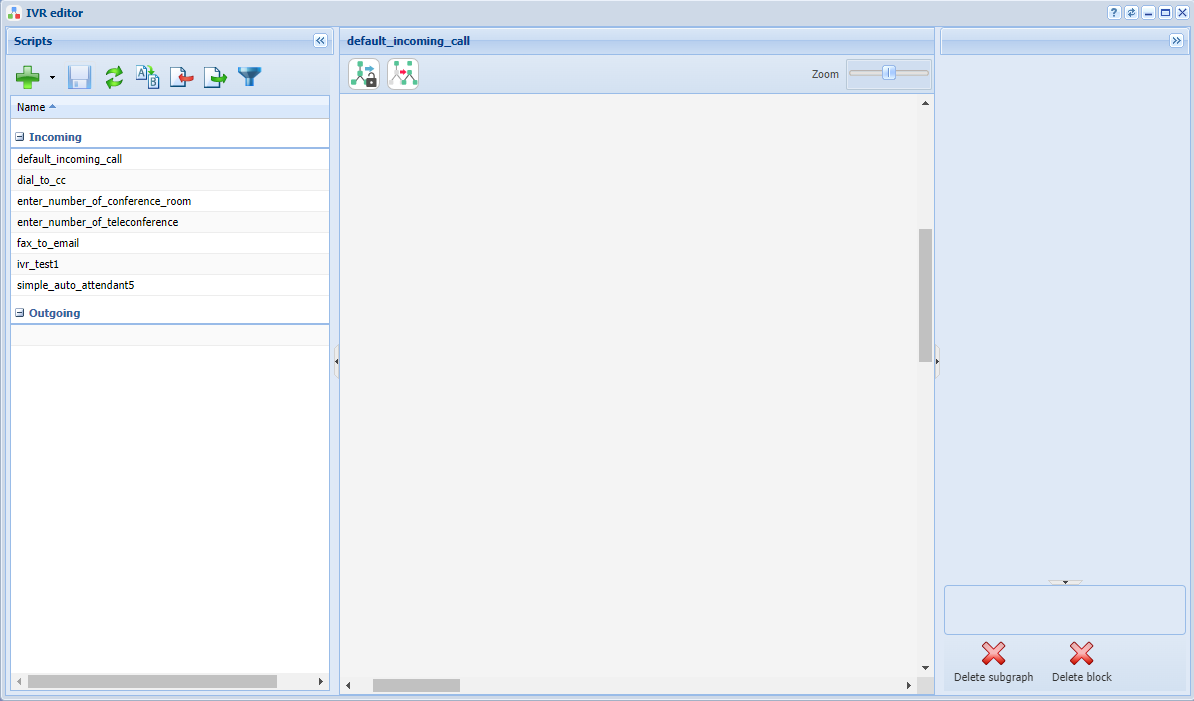
To create IVR, use the IVR editor application.
...
To create a script, click on the Add button, select script type (in this case there is a script for incoming calls), specify the name of the script in the dialog box, for example "test_ivr".
...
- Info — block that plays messages until the user responds. A tone generator is used as a recorded phrase:
...
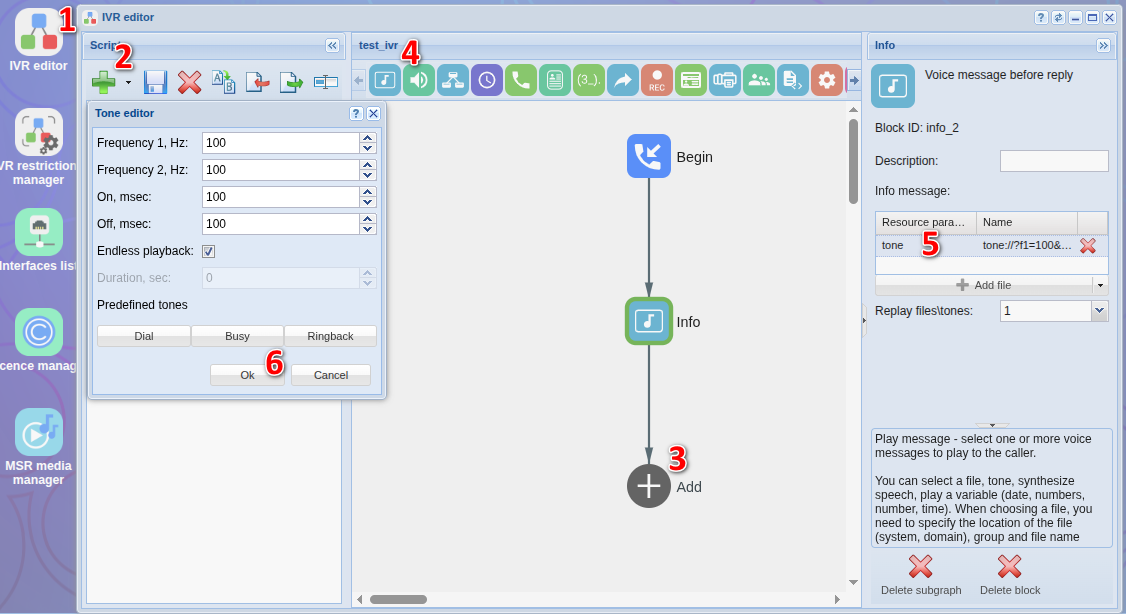
Figure 29 — View of the IVR workspace with the the Info block settings
- Dial — block that makes a call to a given number. To continue the call, apply the predefined CDPN variable:
...
- rule1: select the "external" sub-item in the Result section. In the Value field of the Directions table add the trunk created earlier, then save the rule .
- rule3: select the "ivr" sub-item in the Result section. In the script field add the previously created ivr script, then save the rule and the context .
...
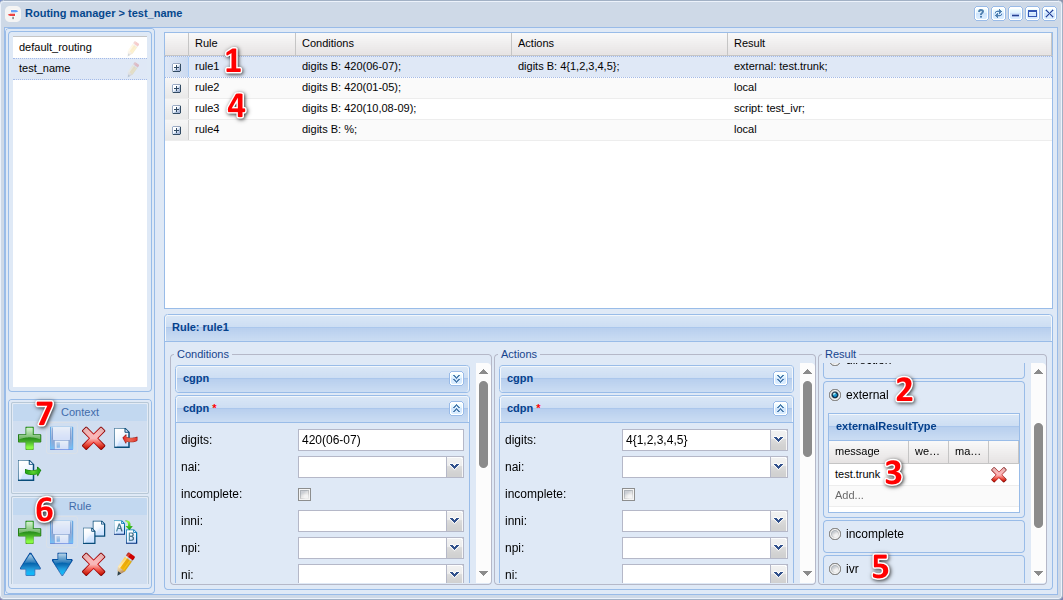
Figure 31 —Type — Type of routing context
Initial system configuration via the command-line interface (CLI)
| Раскрыть | ||||||||||||||||||||||||||||||||||||||||||||||||||||||||||||||||||||||||||||||||||||||||||||||||||||||||||||||||||||||||||||||||||||||||||||||||||||||||||||||||||||||||||||
|---|---|---|---|---|---|---|---|---|---|---|---|---|---|---|---|---|---|---|---|---|---|---|---|---|---|---|---|---|---|---|---|---|---|---|---|---|---|---|---|---|---|---|---|---|---|---|---|---|---|---|---|---|---|---|---|---|---|---|---|---|---|---|---|---|---|---|---|---|---|---|---|---|---|---|---|---|---|---|---|---|---|---|---|---|---|---|---|---|---|---|---|---|---|---|---|---|---|---|---|---|---|---|---|---|---|---|---|---|---|---|---|---|---|---|---|---|---|---|---|---|---|---|---|---|---|---|---|---|---|---|---|---|---|---|---|---|---|---|---|---|---|---|---|---|---|---|---|---|---|---|---|---|---|---|---|---|---|---|---|---|---|---|---|---|---|---|---|---|---|---|---|---|
| ||||||||||||||||||||||||||||||||||||||||||||||||||||||||||||||||||||||||||||||||||||||||||||||||||||||||||||||||||||||||||||||||||||||||||||||||||||||||||||||||||||||||||||
|
| Примечание |
|---|
Для возможности использования медиаресурса и установления соединений , необходимо выполнить активизацию в команде создания медиаресурса - /system/media/resource/declare (параметр "is active"=true) или /system/media/resource/set (параметр "active"=true), если при создании активизация не была выполнена. Так же можно выполнить активизацию через веб интерфейс , приложение - сетевые окончания MSR (MSR-registrars). |
| Раскрыть | ||
|---|---|---|
| ||
declare Для работы в режиме предварительно настроенной системы можно заранее прописать медиаресурсы, информация о которых известна. Для этого необходимо создать описание известных медиасерверов с указанием всех параметров, что позволить начать работу с медиасервером сразу после его регистрации. Команда для создания конфигурации медиасервера: Путь команды: /system/media/resource/declare Синтаксис: declare <node> by_contact <contact> <zone> <site> <is active> или declare <node> by_iface <msr> <acc_id> <iface> <zone> <site> <is active> Параметры: <node> — имя ноды core; |
| Раскрыть | ||
|---|---|---|
| ||
set Команда для изменения настроек медиаресурсов. Путь команды: /system/media/resource/set Синтаксис: set <node|*> <contact> <active|zone|site> <value> Параметры: <node|*> - имя ноды; |
Пример:
Активируем связь MSR- и Core-подсистем. Для этого пропишите команды:
| Блок кода | ||
|---|---|---|
| ||
/system/media/resource/set core1@ecss1 net.20@msr.ecss1 active true |
| Блок кода | ||
|---|---|---|
| ||
/system/media/resource/set core1@ecss2 net.20@msr.ecss2 active true |
| Блок кода | ||
|---|---|---|
| ||
/system/media/resource/set core1@ecss1 net.20@msr.ecss2 active true |
| Блок кода | ||
|---|---|---|
| ||
/system/media/resource/set core1@ecss2 net.20@msr.ecss1 active true |
| Без форматирования | ||
|---|---|---|
| ||
/system/media/resource/set core1@ecss1 net.20@msr.ecss1 active true Media resource: ┌─────────────┬──────────────────┬──────────┬───────┐ │ Node │ Contact │ Property │ Value │ ├─────────────┼──────────────────┼──────────┼───────┤ │ core1@ecss1 │ net.20@msr.ecss1 │ active │ true │ └─────────────┴──────────────────┴──────────┴───────┘ /system/media/resource/set core1@ecss2 net.20@msr.ecss2 active true Media resource: ┌─────────────┬──────────────────┬──────────┬───────┐ │ Node │ Contact │ Property │ Value │ ├─────────────┼──────────────────┼──────────┼───────┤ │ core1@ecss2 │ net.20@msr.ecss2 │ active │ true │ └─────────────┴──────────────────┴──────────┴───────┘ /system/media/resource/set core1@ecss1 net.20@msr.ecss2 active true Media resource: ┌─────────────┬──────────────────┬──────────┬───────┐ │ Node │ Contact │ Property │ Value │ ├─────────────┼──────────────────┼──────────┼───────┤ │ core1@ecss1 │ net.20@msr.ecss2 │ active │ true │ └─────────────┴──────────────────┴──────────┴───────┘ /system/media/resource/set core1@ecss2 net.20@msr.ecss1 active true Media resource: ┌─────────────┬──────────────────┬──────────┬───────┐ │ Node │ Contact │ Property │ Value │ ├─────────────┼──────────────────┼──────────┼───────┤ │ core1@ecss2 │ net.20@msr.ecss1 │ active │ true │ └─────────────┴──────────────────┴──────────┴───────┘ |
| Раскрыть | ||
|---|---|---|
| ||
info Путь команды: /system/media/resource/info Синтаксис: info <node> <contact> Параметры: <contact> — contact uri декларируемого медиаресурса; |
Пример:
| Блок кода | ||
|---|---|---|
| ||
/system/media/resource/info core1@ecss1 net.20@msr.ecss1 Media resource specific for node core1@ecss1: ┌─┬─────────────────┬─────────────────────┐ │F│ Parameter │ Value │ ├─┼─────────────────┼─────────────────────┤ │r│ Contact │ net.20@msr.ecss1 │ │r│ Status │ registered │ │r│ Cc-status │ connected │ │r│ Cc-status uptime│ 00:39:35 │ │r│ Cc-id │ db21af │ │r│ Address │ 10.0.20.51:5700 │ │r│ Register time │ 2025/12/02 16:43:07 │ │r│ Expired │ 84 │ │r│ Iface │ net.20(10.0.20.51) │ │ │ Active │ true │ │ │ Zone │ default │ │ │ Site │ local │ │r│ MSR version │ 3.18.1.0.10 │ │r│ MSR load │ 0 │ │r│ MSR perf coef │ 1.0 │ └─┴─────────────────┴─────────────────────┘ Legend: Column F - means Flag, values r - flag for readonly parameter |
| Раскрыть | ||
|---|---|---|
| ||
list Путь команды: /system/media/resource/list Синтаксис: list [active | all | register] Параметры: active — отображать только активные медиаресурсы (по умолчанию); |
Пример:
| Блок кода | ||
|---|---|---|
| ||
/system/media/resource/list all All media resource selected list specific: ┌─────────────┬───────────┬─────────────┬───────────┬──────┬────────┬───────────┬───────────┬─────────────────┬────────┬────────────┬────────┬─────────┬───────┬──────────────────┬────────────┬─────────┐ │ Node │ MSR │ MSR │ MSR │ MSR │ Cc-id │ Cc-status │ Cc-uptime │ Cc-address │ Iface │ Iface │ Active │ Zone │ Site │ Contact │ Status │ Expired │ │ │ │ version │ perf coef │ load │ │ │ │ │ name │ addr │ │ │ │ │ │ │ ├─────────────┼───────────┼─────────────┼───────────┼──────┼────────┼───────────┼───────────┼─────────────────┼────────┼────────────┼────────┼─────────┼───────┼──────────────────┼────────────┼─────────┤ │ core1@ecss1 │ msr.ecss1 │ 3.18.1.0.10 │ 1.0 │ 0 │ db21af │ connected │ 00:40:22 │ 10.0.20.51:5700 │ net.20 │ 10.0.20.51 │ true │ default │ local │ net.20@msr.ecss1 │ registered │ 156 │ │ │ msr.ecss2 │ 3.18.1.0.10 │ 1.0 │ 0 │ 263898 │ connected │ 00:40:22 │ 10.0.20.52:5700 │ net.20 │ 10.0.20.52 │ true │ default │ local │ net.20@msr.ecss2 │ registered │ 156 │ │ core1@ecss2 │ msr.ecss1 │ 3.18.1.0.10 │ 1.0 │ 0 │ db21af │ connected │ 00:41:11 │ 10.0.20.51:5700 │ net.20 │ 10.0.20.51 │ true │ default │ local │ net.20@msr.ecss1 │ registered │ 106 │ │ │ msr.ecss2 │ 3.18.1.0.10 │ 1.0 │ 0 │ 263898 │ connected │ 00:44:00 │ 10.0.20.52:5700 │ net.20 │ 10.0.20.52 │ true │ default │ local │ net.20@msr.ecss2 │ registered │ 177 │ └─────────────┴───────────┴─────────────┴───────────┴──────┴────────┴───────────┴───────────┴─────────────────┴────────┴────────────┴────────┴─────────┴───────┴──────────────────┴────────────┴─────────┘ |
Добавление управления регистратором для MSR медиа менеджера в интерфейсе командной строки (CLI)
/system/media/registrar/ - команды управления регистратором для MSR медиа менеджера
| Раскрыть | ||
|---|---|---|
| ||
set Команда для изменения общих и индивидуальных параметров. Путь команды: /system/media/registrar/set Синтаксис настройки общих параметров: set common <FIELD> <VALUE> Параметры: <FIELD> - имя настраиваемого параметра; <VALUE> - значение настраиваемого параметра Где
Cписок параметров доступных для настройки:
В общих параметрах доступна настройка времени регистрации, по умолчанию установлено 60 секунд. Пример:
Синтаксис настройки индивидуальных параметров: system/media/registrar/set private <CORE> <FIELD> <VALUE> Параметры: <CORE> - нода ядра, для которой настраивается Registrar-сервер; <FIELD> - имя настраиваемого параметра; <VALUE> - значение настраиваемого параметра. Настраиваемые параметры:
|
Установить ipадрес для приема соединений от медиасервера:
| Блок кода | ||
|---|---|---|
| ||
/system/media/registrar/set private core1@ecss1 listen-ip 10.0.20.51 |
| Блок кода | ||
|---|---|---|
| ||
/system/media/registrar/set private core1@ecss2 listen-ip 10.0.20.52 |
| Без форматирования |
|---|
/system/media/registrar/set private core1@ecss1 listen-ip 10.0.20.51 Private parameter listen-ip set to 10.0.20.51 at node core1@ecss1. /system/media/registrar/set private core1@ecss2 listen-ip 10.0.20.52 Private parameter listen-ip set to 10.0.20.52 at node core1@ecss2. |
| Раскрыть | ||
|---|---|---|
| ||
info Команда просмотра текущих настроек Registrar-сервера. Путь команды: /system/media/registrar/info |
| Без форматирования |
|---|
/system/media/registrar/info Common parameters: ┌───────────────────────────┬───────┐ │ Parameter │ Value │ ├───────────────────────────┼───────┤ │ registration-timeout, sec │ 180 │ └───────────────────────────┴───────┘ Private parameters: ┌─────────────┬────────┬───────────┬────────────┬─────────────┐ │ Node │ Status │ Is-active │ Listen-ip │ Listen-port │ ├─────────────┼────────┼───────────┼────────────┼─────────────┤ │ core1@ecss2 │ active │ true │ 10.0.20.52 │ 5000 │ │ core1@ecss1 │ active │ true │ 10.0.20.51 │ 5000 │ └─────────────┴────────┴───────────┴────────────┴─────────────┘ |
После того как все сервисы будут запущены, ноды какое-то время будут устанавливать связь. Как только все ноды загрузятся , при выполнении запроса system-status, последует вывод следующей информации:
| Без форматирования | ||
|---|---|---|
| ||
/system-status Checking... ┌─┬───────────────┬───────────────────────────┬───────────────────────────────┬─────────────────────┬───────┐ │ │ Node │ Release │ Erlang nodes │ Mnesia nodes │Uptime │ ├─┼───────────────┼───────────────────────────┼───────────────────────────────┼─────────────────────┼───────┤ │ │core1@ecss1 │ecss-core-3.18.1.0.1656 │core1@ecss1,core1@ecss2 │not running │43m 43s│ │ │core1@ecss2 │ecss-core-3.18.1.0.1656 │core1@ecss1,core1@ecss2 │not running │47m 5s │ │ │ds1@ecss1 │ecss-ds-3.18.1.0.1656 │ds1@ecss1,ds1@ecss2 │ds1@ecss1,ds1@ecss2 │43m 43s│ │ │ds1@ecss2 │ecss-ds-3.18.1.0.1656 │ds1@ecss1,ds1@ecss2 │ds1@ecss1,ds1@ecss2 │47m 4s │ │ │md1@ecss1 │ecss-mediator-3.18.1.0.1656│md1@ecss1,md1@ecss2 │md1@ecss1,md1@ecss2 │43m 43s│ │ │md1@ecss2 │ecss-mediator-3.18.1.0.1656│md1@ecss1,md1@ecss2 │md1@ecss1,md1@ecss2 │47m 5s │ │ │mycelium1@ecss1│ecss-mycelium-3.18.1.0.1656│mycelium1@ecss1,mycelium1@ecss2│not running │43m 43s│ │ │mycelium1@ecss2│ecss-mycelium-3.18.1.0.1656│mycelium1@ecss1,mycelium1@ecss2│not running │47m 4s │ │ │sip1@ecss1 │ecss-pa-sip-3.18.1.0.1656 │sip1@ecss1,sip1@ecss2 │sip1@ecss1,sip1@ecss2│43m 43s│ │ │sip1@ecss2 │ecss-pa-sip-3.18.1.0.1656 │sip1@ecss1,sip1@ecss2 │sip1@ecss1,sip1@ecss2│47m 5s │ └─┴───────────────┴───────────────────────────┴───────────────────────────────┴─────────────────────┴───────┘ All services are started. Active media resource selected list specific: ┌─────────────┬───────────┬─────────────┬───────────┬───────────┐ │ Node │ MSR │ MSR │ Cc-status │ Cc-uptime │ │ │ │ version │ │ │ ├─────────────┼───────────┼─────────────┼───────────┼───────────┤ │ core1@ecss1 │ msr.ecss1 │ 3.18.1.0.10 │ connected │ 00:42:49 │ │ │ msr.ecss2 │ 3.18.1.0.10 │ connected │ 00:42:48 │ │ core1@ecss2 │ msr.ecss1 │ 3.18.1.0.10 │ connected │ 00:43:38 │ │ │ msr.ecss2 │ 3.18.1.0.10 │ connected │ 00:46:27 │ └─────────────┴───────────┴─────────────┴───────────┴───────────┘ Alarms list on md1: ┌──────────────┬───────────────┬───────────────┬────────────────────┬────────────────────┬────────────────────┬────────────────────────────────────────────────────────────┐ │ Date │ Severity │ Location │ Cause │ Class │ Instance │ Message │ ├──────────────┼───────────────┼───────────────┼────────────────────┼────────────────────┼────────────────────┼────────────────────────────────────────────────────────────┤ └──────────────┴───────────────┴───────────────┴────────────────────┴────────────────────┴────────────────────┴────────────────────────────────────────────────────────────┘ Selected: 0 Total: 0 |
В примере выше видно, что ноды вошли в кластер и MSR зарегистрировались на ноде ecss-core.
Создание и настройка группы SIP-IP-адресов (IP-set)
Произведите настройку адаптера SIP согласно ТЗ:
| Блок кода | ||
|---|---|---|
| ||
/cluster/adapter/sip1/sip/network/set ip_set test_set node-ip node = sip1@ecss1 ip = 10.0.20.31 |
| Блок кода | ||
|---|---|---|
| ||
/cluster/adapter/sip1/sip/network/set ip_set test_set node-ip node = sip1@ecss2 ip = 10.0.20.32 |
| Блок кода | ||
|---|---|---|
| ||
/cluster/adapter/sip1/sip/network/set ip_set test_set listen-ports list = [5060] |
| Без форматирования | ||
|---|---|---|
| ||
/cluster/adapter/sip1/sip/network/set ip_set test_set node-ip node = sip1@ecss1 ip = 10.0.20.31 Property "ip_set" successfully changed from: to test_set: no ports set test_set: sip1@ecss1 10.0.20.31 test_set: dscp 0. /cluster/adapter/sip1/sip/network/set ip_set test_set node-ip node = sip1@ecss2 ip = 10.0.20.32 Property "ip_set" successfully changed from: test_set: no ports set test_set: sip1@ecss1 10.0.20.31 test_set: dscp 0 to test_set: no ports set test_set: sip1@ecss1 10.0.20.31 test_set: sip1@ecss2 10.0.20.32 test_set: dscp 0. /cluster/adapter/sip1/sip/network/set ip_set test_set listen-ports list = [5060] Property "ip_set" successfully changed from: test_set: no ports set test_set: sip1@ecss1 10.0.20.31 test_set: sip1@ecss2 10.0.20.32 test_set: dscp 0 to test_set: 5060 test_set: sip1@ecss1 10.0.20.31 test_set: sip1@ecss2 10.0.20.32 test_set: dscp 0. |
Создание Домена и подключение IP-set
Создайте Домен (виртуальную АТС) и присвойте ему созданную выше группу (IP-set) настроек SIP-адаптера:
| Блок кода | ||
|---|---|---|
| ||
/domain/declare test_domain --add-domain-admin-privileges --add-domain-user-privileges |
| Блок кода | ||
|---|---|---|
| ||
/domain/test_domain/sip/network/set ip_set [test_set] |
| Блок кода | ||
|---|---|---|
| ||
/domain/declare test_domain --add-domain-admin-privileges --add-domain-user-privileges New domain test_domain is declared /domain/test_domain/sip/network/set ip_set [test_set] Property "ip_set" successfully changed from: [] to ["test_set"]. |
После создания домена, администратор системы должен открыть доступ на управление услугами оператору Домена (виртуальной АТС). Для этого использовать команду разрешения оператору Домена (виртуальной АТС) "test_domain" управлять всеми услугами :
| Блок кода | ||
|---|---|---|
| ||
/cluster/storage/ds1/ss/access-list add test_domain * |
| Без форматирования | ||
|---|---|---|
| ||
/cluster/storage/ds1/ss/access-list add test_domain * Supplementary services successfully added in the domain test_domain. |
Для возможности применения пакета услуг у абонентов сразу после создания, необходимо настроить политику применения лицензионных пакетов услуг (детальную информацию вы можете посмотреть здесь )
Создать политику применения лицензии с именем -"new_sub"
| Блок кода | ||||
|---|---|---|---|---|
| ||||
/domain/test_domain/ss/licence/politics/declare new_sub "Задаются при создании абонента" |
| Без форматирования |
|---|
/domain/test_domain/ss/licence/politics/declare new_sub "Задаются при создании абонента" Licence politic new_sub successfully declared. |
Задать имя пакета услуг дополнительных сервисов, для этого использовать следующие команды:
| Блок кода | ||||
|---|---|---|---|---|
| ||||
/cluster/storage/ds1/licence/show-licence 1 |
нас интересует следующая информация :
| Без форматирования | ||
|---|---|---|
| ||
/cluster/storage/ds1/licence/show-licence 1
SSW ID                                                < Имя SSW ID >
Description                                           Лицензия для тестирования Локация 2.

. . .

Supplementary Services licence package(s)
 name                                                 'ECSS-ADV'
 limit                                                50000
 description                                          "Весь пакет услуг"
 SS list                                              [1,2,3,4,5]

. . .
|
имя пакета услуг в примере "ECSS-ADV".
Добавить в созданную политику пакет лицензионных услуг с именем "ECSS-ADV"(именно так он описан в лицензии):
| Блок кода | ||||
|---|---|---|---|---|
| ||||
/domain/test_domain/ss/licence/politics/package-add new_sub ECSS-ADV |
| Без форматирования |
|---|
/domain/test_domain/ss/licence/politics/package-add new_sub ECSS-ADV Licence packages ["ECSS-ADV"] successfully added to politic new_sub. |
Пакет добавлен, но в настоящий момент политика не активна (не может быть применена к абоненту). Для активации политики new_sub выполнить следующую команду:
| Блок кода | ||||
|---|---|---|---|---|
| ||||
/domain/test_domain/ss/licence/politics/activate new_sub |
| Без форматирования |
|---|
/domain/test_domain/ss/licence/politics/activate new_sub Licence politic new_sub successfully activated. |
Теперь при создании абонентов можем использовать дополнительные услуги.