The ECSS-10 system uses the "License Provider" – the ECSS ecosystem's license distribution service, consisting of ecss-license-agent and ecss-license-provider. - ECSS License Agent – An adapter for working with the ECSS License Provider (LP). It receives a list of License Provider hosts and implements the logic for connecting and reconnecting to the LP.
- Responsible for obtaining, validating, and then sending licenses to the client.
- Sends connection statuses and received licenses to the client.
- Provides an API for sending HTTP requests and WS events to the LO.
- ECSS License Provider – A service for orchestrating license parameters for ECSS nodes.
- Responsible for:
- Obtaining a license for a specific ECSS node (SSW / AuP) or device (SMG)
- Distributing license parameters between ECSS nodes and ECSS services
- Monitoring ECSS node activity and validating them to prevent license replication beyond specified limits
- Monitoring changes to specified limits on ECSS nodes and dynamically distributing them according to current load.
| Информация |
|---|
ecss-license-agent is a component of the SSW and is part of the ecss-node package. It requires no separate configuration. |
| Подсказка |
|---|
The Ecss License Provider can be installed on either the SSW or a dedicated server. If the Ecss License Provider is already installed on your project, you only need to add an entry for the new component in the LP configuration file, and the next step, "LP Installation," will not be required. |
| Раскрыть |
|---|
| title | Установка LP на installation on SSW host |
|---|
| To install the ecss-license-provider package, it is necessary to run the following command: | Блок кода |
|---|
| title | если кластер, то на обоих хостах |
|---|
| sudo apt install ecss-license-provider |
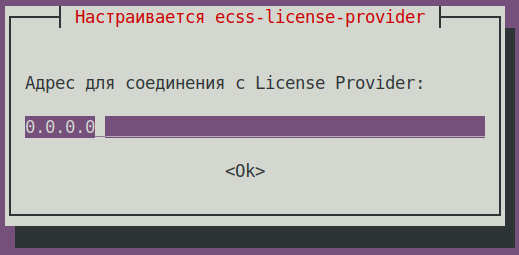
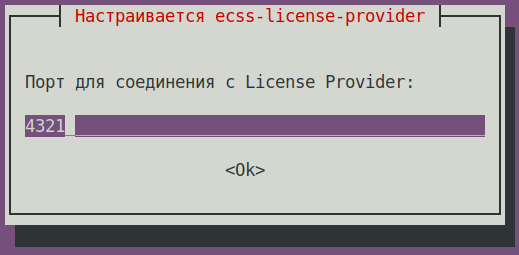
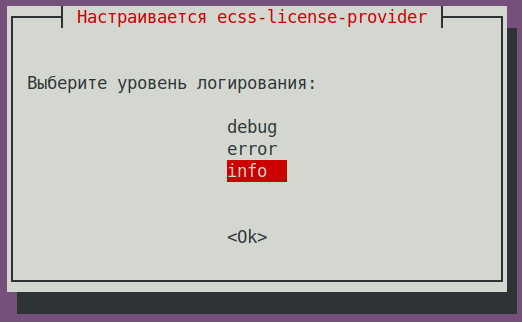
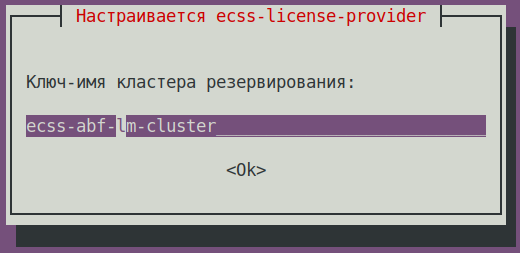
When installing the ecss-license-provider package, you will be asked the following questions: | Questions | Replies | Example |
|---|
License Provider listen ip: | 0.0.0.0 (default) | | | License provider listen port: | 4321 (default) | | | Log level: | info (default),
possible options: debug, error, info | | License Provider cluster key:
| specify a unique name
ecss-lm-cluster (default)
| Подсказка |
|---|
Managers with the same name will attempt to form a cluster and back each other up. |
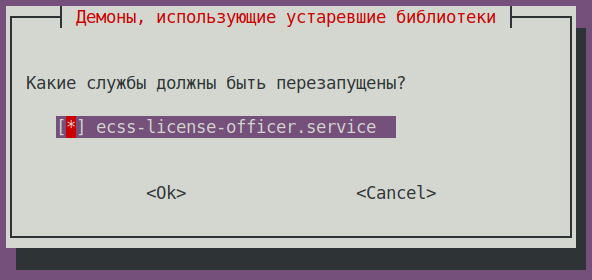
| | | Which services need to be restarted? | ecss-license-provider.service (default) | |
The data is saved in a file - /etc/ecss/ecss-license-provider/config.env: | Без форматирования |
|---|
ECSS_LM_HOST=0.0.0.0
ECSS_LM_PORT=4321
ECSS_LM_LOG_LEVEL=info
RELEASE_COOKIE=ecss-abf-lm-cluster |
|
LP configurationThe ecss-license-provider service uses two configuration files: /etc/ecss/ecss-license-provider/config.env and /etc/ecss/ecss-license-provider/config.yaml.
Information is saved in the config.env file when the ecss-license-provider package is installed. The config.yaml file contains the basic settings for connecting to the ELM server, including where to obtain licenses, which licenses to use, and where to transfer them. All of this must be configured manually. | Раскрыть |
|---|
| title | When installing LP on SSW |
|---|
| Run the command: | Блок кода |
|---|
| title | on both hosts If it is a cluster |
|---|
| sudo nano /etc/ecss/ecss-license-provider/config.yaml |
| Блок кода |
|---|
| title | information in file after installation |
|---|
| elm_addresses: []
licenses: []
ecss_nodes: [] |
In the elm_adresses field specify a list of ELM servers to which you want to connect to obtain licenses. The first address in the list is used as the primary address. Additional address lines act as backups. example:
- "elm.eltex-co.ru:8099"
- "192.168.111.22:8099"
- "elm-3.eltex.loc:8099"
Next, the licenses themselves are specified in the licenses field. - id – can be any, as long as it is unique for each license. This only affects the license address on the LP itself (e.g., 0, 1, 2, 3).
- kind – only ssw is supported for SSW.
- type – select elm if this license needs to be requested from the ELM server. If you need to use a file-based SSW license, select ecss_license.
- For elm type, you must specify the license_key and product_id fields to identify the license.
- For ecss_license type, specify the license field, which contains the static license key.
| Примечание |
|---|
The license_key and product_id parameters must match the data loaded on the ELM server. |
| Подсказка |
|---|
The value of the license_key, product_id or license, passport parameters must be obtained from the project manager. |
ecss_nodes block
Specify the details of the services that will receive the license. In our case, it is the SSW. The service is defined by three parameters: - id – the service identifier; must match the ECSS_ID of the licensed SSW.
- kind – the type of service being licensed. Similar to the license block, only ssw is supported for SSW.
- license_id – the identifier of the license that will be sent to this service. Corresponds to the license identifiers from the licenses block.
| Примечание |
|---|
Two SSWs with different ECSS_IDs cannot obtain the same license; a configuration with such a distribution will be marked as invalid.
Furthermore, two SSWs with the same ECSS_ID cannot simultaneously obtain the same license from the same LP.
Therefore, it is extremely important to correctly set your ECSS_ID and make it unique, at least within the visibility range of the LP being used. |
| Подсказка |
|---|
ECSS_ID format
It must begin and end with a Latin letter or number, while dots and dashes may be used in the body. | Без форматирования |
|---|
[A-Za-z0-9][A-Za-z0-9.-][A-Za-z0-9] |
|
| Примечание |
|---|
For SSW running in a cluster, specify only one entry in the ecss_nodes block per cluster; individual entries for each host are not allowed. Otherwise, two requests with the same ECSS_ID will be generated, which is unacceptable. |
| Блок кода |
|---|
| title | config.yaml file example |
|---|
| elm_addresses:
- "elm.eltex-co.ru:8099"
- "192.168.111.22:8099"
- "elm-3.eltex.loc:8099"
licenses:
- id: 0
kind: SSW
type: elm
license_key: "ssw1test"
product_id: "ECSS1000001"
- id: 1
kind: ssw
type: ecss_license
license: "af615ebb92d381125ff"
ecss_nodes:
- id: abf.test
kind: ssw
license_id: 0 |
Restart the ecss-license-provider.service to update the configuration from the /etc/ecss/ecss-license-provider/config.yaml file using the following command: | Блок кода |
|---|
| title | on both hosts if it is a cluster |
|---|
| sudo systemctl restart ecss-license-provider.service |
|
| Раскрыть |
|---|
| title | When connecting SSW to the previuosly installed LP |
|---|
| If LP is already installed and used on the local network, you need to add the new SSW parameters to the /etc/ecss/ecss-license-provider/config.yaml configuration file in the licenses and ecss_nodes blocks. Run the command: | Блок кода |
|---|
| title | on both hosts if it is a cluster |
|---|
| sudo nano /etc/ecss/ecss-license-provider/config.yaml |
Example: | Блок кода |
|---|
| elm_addresses:
- "elm.eltex-co.ru:8099"
- "192.168.111.22:8099"
- "elm-3.eltex.loc:8099"
licenses:
- id: 0
kind: SSW
type: elm
license_key: "ssw1test"
product_id: "ECSS1000001"
- id: 1
kind: ssw
type: ecss_license
license: "af615ebb92d381125ff"
- id: 2
kind: SSW
type: elm
license_key: "ssw2test"
product_id: "ECSS1000002"
ecss_nodes:
- id: 1.test
kind: ssw
license_id: 0
- id: 2.test
kind: ssw
license_id: 1
- id: 3.test
kind: ssw
license_id: 2 |
| Блок кода |
|---|
| elm_addresses:
- "elm.eltex-co.ru:8099"
- "192.168.111.22:8099"
- "elm-3.eltex.loc:8099"
licenses:
- id: 0
kind: SSW
type: elm
license_key: "ssw1test"
product_id: "ECSS1000001"
- id: 1
kind: ssw
type: ecss_license
license: "af615ebb92d381125ff"
- id: 2
kind: SSW
type: elm
license_key: "ssw2test"
product_id: "ECSS1000002"
- id: 3
kind: SSW
type: elm
license_key: "ssw3test"
product_id: "ECSS1000003"
ecss_nodes:
- id: 1.test
kind: ssw
license_id: 0
- id: 2.test
kind: ssw
license_id: 1
- id: 3.test
kind: ssw
license_id: 2
- id: abf.test
kind: ssw
license_id: 3 |
Restart the ecss-license-provider.service to update the configuration from the /etc/ecss/ecss-license-provider/config.yaml file using the following command: | Блок кода |
|---|
| title | on both hosts if it is a cluster |
|---|
| sudo systemctl restart ecss-license-provider.service |
|
To enable system nodes to become operational, it is necessary to configure the system by specifying the names of the hosts on which the ecss services are deployed. Command in CoCon: /system/clusters/set [<host1>, <host2>, ... <hostN>]. For an example cluster of two hosts (hostnames ecss1 and ecss2), run the command: | Блок кода |
|---|
| /system/clusters/set [ecss1, ecss2] |
Connecting the SSW to the License ProviderConfigure the SSW connection to the LP using the following command in CoCon (in this example, the LP is installed in a cluster, with IPadd hosts 10.0.10.51 and 10.0.10.52. The default port value from the /etc/ecss/ecss-license-provider/config.env file is 4321): | Блок кода |
|---|
| /system/licence/manager/set --hosts [https://10.0.10.51:4321, https://10.0.10.52:4321] |
| Подсказка |
|---|
If LP is installed on SSW hosts, specify OAM IP addresses. |
After completion, check the connection status with the command: | Блок кода |
|---|
| /system/licence/manager/show-status
┌───────────────────────┬───────┬─────┐
│ Host │Current│Alive│
├───────────────────────┼───────┼─────┤
│https://10.0.10.51:4321│* │true │
│https://10.0.10.52:4321│ │true │
└───────────────────────┴───────┴─────┘ |
All hosts must have the alive=true status. One must be "current." - Current - displays the host the SSW is connected to. If connected, * is indicated; otherwise, nothing is indicated.
- Alive - displays the host's availability status (healthcheck).
| Информация |
|---|
| title | Connection to License Provider |
|---|
| Failure to connect to the License Manager/ELM will be equivalent to a loss of access to the token, leading to critical crashes and a transition to emergency mode, after which, if the connection is not restored, the system will switch to the default license. This behavior only applies when operating in ELM mode. |
If the status of one of the LP hosts is shown as current, it is possible to send a request to download a license to the SSW using the command: | Блок кода |
|---|
| /cluster/storage/ds1/licence/request |
| Раскрыть |
|---|
| title | example of command /cluster/storage/ds1/licence/request execution |
|---|
| | Блок кода |
|---|
| /cluster/storage/ds1/licence/request
Licence received
[******* ] 6s 2ms
Success: Licence parameters applied |
| Подсказка |
|---|
In the "type=ecss_license" mode, the /cluster/storage/ds1/licence/request command will only be executed if the passport has been previously loaded. |
| Блок кода |
|---|
| /cluster/storage/ds1/licence/request
Waiting for licence...
[******* ] 6s
┌─┬─────────────────────────────────────────────────────┬─────────┬────────────────────────────────────────┐
│A│ Description │Old Value│ New Value │
├─┼─────────────────────────────────────────────────────┼─────────┼────────────────────────────────────────┤
│^│Support for reservation of call-processes │false │true │
│^│Maximum call duration (in seconds) │60 │2678400 │
│^│Maximum number of simultaneous calls │5 │10000 │
│^│Elph │ │ │
│^│ total count of members of the one Elph group │10 │100 │
│^│Subscribers limit │10 │500000 │
│^│Virtual subscribers limit │infinity │1000 │
│^│Add-on conferences │ │ │
│^│ total count │30 │1000 │
│^│Add-on conferences │ │ │
│^│ members of the one add-on conference │16 │300 │
│^│Chat rooms │ │ │
│^│ total count │30 │100 │
│^│Chat rooms │ │ │
│^│ members of the one chatroom │16 │300 │
│^│Meet Me │ │ │
│^│ total count │0 │100 │
│^│Meet Me │ │ │
│^│ members of the one Meet Me conference │0 │300 │
│^│SORM │ │ │
│^│ enabled │false │true │
│+│ channels on SORM mediator │ │64 │
│^│Sorm extractor │none │mfi │
│^│Support antifraud system │none │custom │
│+│Call center │ │ │
│+│ operator's capability for look at calls in queue │ │true │
│+│ operator's capability for use Intervension SS │ │true │
│^│Call center │ │ │
│^│ active agents │0 │1000 │
│^│Call center │ │ │
│^│ active supervisors │0 │100 │
│^│Teleconference │ │ │
│^│ channels │3 │2000 │
│^│Teleconference │ │ │
│^│ max members of one teleconference │0 │200 │
│^│Teleconference │ │ │
│^│ active count │0 │32 │
│^│TSMN system │ │ │
│^│ concurrent calls (active) │0 │50 │
│^│TSMN system │ │ │
│^│ concurrent calls (backup) │0 │50 │
│^│TSMN system │ │ │
│^│ backup mode │none │"backup" │
│^│Total count of simultaneous records voice calls │0 │200 │
│+│IVR │ │ │
│+│ customization enabled │ │true │
│+│ Automatic Speech Recognition (ASR) subsystem enabled│ │true │
│^│Channels on dialer outgoing calls │2 │5 │
│+│Supplementary Services licence package(s) │ │ │
│+│ name │ │'ECSS-ADV' │
│+│ limit │ │10000 │
│+│ description │ │"Additional services of 4 and 5 levels" │
│+│ SS list │ │[1,2,3,4,5] │
│+│ name │ │'ECSS-BAS' │
│+│ limit │ │10000 │
│+│ description │ │"Basic services of 1 and 2 levels" │
│+│ SS list │ │[1,2] │
│+│ name │ │'ECSS-BAS+' │
│+│ limit │ │10000 │
│+│ description │ │"Expansion of basic services of 3 level"│
│+│ SS list │ │[1,2,3] │
│^│GEO backup │ │ │
│^│ enabled │false │true │
│^│SIGTRAN │ │ │
│^│ SEP │false │true │
│^│ STP │false │true │
└─┴─────────────────────────────────────────────────────┴─────────┴────────────────────────────────────────┘
Legend:
'^' - Changed;
'-' - Deleted;
'+' - New.
[request] You are trying to add a license that is different from the current one by the pa
rameters in the table (other values will remain unchanged).
Licence received o ?> yes
[******* ] 1m 15s
Success: Licence parameters applied |
|
Depending on the selected license type for SSW: "type=elm" or "type=ecss_license", we will receive different output from the license viewing command: | Без форматирования |
|---|
| /cluster/storage/ds1/licence/list-licence
┌──┬───────────────────┬────────────┬──────┬────────────────┬────────────────────┬────────────────────┬─────────┐
│Id│Creation date(UTC) │ SSW ID │Active│ Description │Comm. Exp. Date(UTC)│Expiration date(UTC)│Time left│
├──┼───────────────────┼────────────┼──────┼────────────────┼────────────────────┼────────────────────┼─────────┤
│1 │12.03.2026 18:40:00│ECSS 010070 │* │ECSS TPM License│13.03.2027 06:59:59 │14.03.2026 10:44:05 │1d 6h 59m│
│0 │01.01.1990 00:00:00│ECSS DEFAULT│ │Default licence │ │ │ │
└──┴───────────────────┴────────────┴──────┴────────────────┴────────────────────┴────────────────────┴─────────┘ |
| Информация |
|---|
TPM is a complete analogue of the licensing that was used previously, with a token and passport, without connection to the LP. |
or | Без форматирования |
|---|
| /cluster/storage/ds1/licence/list-licence
┌──┬───────────────────┬────────────┬──────┬────────────────┬────────────────────┬────────────────────┬─────────┐
│Id│Creation date(UTC) │ SSW ID │Active│ Description │Comm. Exp. Date(UTC)│Expiration date(UTC)│Time left│
├──┼───────────────────┼────────────┼──────┼────────────────┼────────────────────┼────────────────────┼─────────┤
│1 │03.02.2026 16:26:34│ECSS2000009 │* │ECSS ELM License│03.02.2027 16:26:34 │14.03.2026 10:49:12 │1d 6h 59m│
│0 │01.01.1990 00:00:00│ECSS DEFAULT│ │Default licence │ │ │ │
└──┴───────────────────┴────────────┴──────┴────────────────┴────────────────────┴────────────────────┴─────────┘ |
|