
...
MAC table | MAC address table sets the correspondence between MAC addresses and device interfaces and is used for data packet routing. Routers support table capacity up to 128K of MAC addresses and reserve specific MAC addresses for the system use. |
Learning mode | MAC address table may contain either static addresses or addresses learnt during data packet transition through the device. Learning involves registration of packet source MAC addresses with their binding to ports and VLANs. Afterwards, this data is used for incoming packet routing. Registered MAC address lifetime is limited. Administrator may adjust this setting. If destination MAC address specified in the packet that was received by the device is not listed in the table, this packet will be sent further as a broadcast packet within L2 segment of the network. |
Scroll Pagebreak
Second-layer functions of OSI model
...
Security zones | All router interfaces are distributed by security areas. For each zone pair, you can set the rules that determine the possibility of data transmission between zones, data traffic filtering rules. |
Data filtering | For each zone pair, you can specify the rule set that manages the filtering process for data transmitted through the router. Device command interface provides appropriate means for detailed configuration of the traffic classification rules and to apply the resulting solution for traffic transmission. |
| Scroll Pagebreak |
|---|
Main specifications
Table 8 lists main specifications of the router.
Table 8 – Main specificationsscroll-pagebreak
General parameters | ||
|---|---|---|
Interfaces | WLC-15 | 4 × Ethernet 10/100/1000BASE-T 2 × 1000BASE-X (SFP) 1 × Console port RJ-45 1 × USB 2.0 1 × HDD slot |
| WLC-30 | 4 × Ethernet 10/100/1000BASE-T 2 × 10GBASE-R (SFP+)/1000BASE-X 1 × Console port RJ-45 1 × USB 3.0 1 × USB 2.0 1 × HDD slot 1 × microSD card slot | |
| WLC-3200 | 12 × 1000BASE-X/10GBASE-R/25GBASE-R 1 × Console RS-232 (RJ-45) 1 × OOB port 1 × USB 2.0 1 × microSD card slot | |
| ESR-3200 | 12 × 1000BASE-X/10GBASE-R/25GBASE-R 1 × Console RS-232 (RJ-45) 1 × OOB port 1 × USB 2.0 1 × microSD card slot | |
| ESR-3100 | 8 × Combo Ethernet 10/100/1000BASE-T/1000BASE-X 8 × 10GBASE-R/1000BASE-X (SFP+/SFP) 1 × Console RS-232 (RJ-45) 2 × USB 3.0 1 × SD card slot | |
ESR-1700 | 4 × Combo Ethernet 10/100/1000BASE-T/1000BASE-X 8 × 10GBASE-R/1000BASE-X (SFP+/SFP) 2 × Hard disk installation slot 1 × Console RS-232 (RJ-45) 1 × OOB port 2 × USB 2.0 | |
ESR-1511 | 4 × Combo Ethernet 10/100/1000BASE-T/1000BASE-X 4 × Ethernet 10/100/1000BASE-T (RJ-45) 4 × 10GBASE-R/1000BASE-X (SFP+/SFP) 2 × 40GBASE-X (QSFP+) 1 × Console RS-232 (RJ-45) 1 × OOB port 2 × USB 2.0 1 × SD card slot | |
ESR-1500 | 4 × Combo Ethernet 10/100/1000BASE-T/1000BASE-X 4 × Ethernet 10/100/1000BASE-T (RJ-45) 4 × 10GBASE-R/1000BASE-X (SFP+/SFP) 1 × Console RS-232 (RJ-45) 1 × OOB port 2 × USB 2.0 1 × SD card slot | |
ESR-1200 | 4 × Combo Ethernet 10/100/1000BASE-T/1000BASE-X 12 × Ethernet 10/100/1000BASE-T (RJ-45) 8 × 10GBASE-R/1000BASE-X (SFP+/SFP) 1 × Console RS-232 (RJ-45) 2 × USB 2.0 1 × SD card slot | |
ESR-1000 | 24 × Ethernet 10/100/1000BASE-T (RJ-45) 2 × 10GBASE-R/1000BASE-X (SFP+/SFP) 1 × Console RS-232 (RJ-45) 2 × USB 2.0 1 × SD card slot | |
ESR-200 | 4 × Combo Ethernet 10/100/1000BASE-T/1000BASE-X 4 × Ethernet 10/100/1000BASE-T (RJ-45) 1 × Console RJ-45 1 × USB 3.0 1 × USB 2.0 1 × SD card slot | |
ESR-100 | 4 × Combo Ethernet 10/100/1000BASE-T/1000BASE-X 1 × Console RS-232 (RJ-45) 1 × USB 3.0 1 × USB 2.0 1 × SD card slot | |
| ESR-30 | 4 × Ethernet 10/100/1000BASE-T (RJ-45) 2 × 10GBASE-R/1000BASE-X (SFP+/SFP) 1 × Console RS-232 (RJ-45) 1 × USB 3.0 1 × USB 2.0 1 × microSD card slot | |
ESR-21 | 8 × Ethernet 10/100/1000BASE-T (RJ-45) 4 × 1000BASE-X (SFP) 3 × Serial port RS-232 1 × Console RS-232 (RJ-45) 1 × USB 3.0 1 × USB 2.0 1 × SD card slot | |
ESR-20 | 2 × Combo Ethernet 10/100/1000BASE-T/1000BASE-X 2 × Ethernet 10/100/1000BASE-T (RJ-45) 1 × Console RS-232 (RJ-45) 1 × USB 3.0 1 × USB 2.0 1 × SD card slot | |
| ESR-15 | 4 × Ethernet 10/100/1000BASE-T (RJ-45) 2 × 1000BASE-X (SFP) 1 × Console RS-232 (RJ-45) 2 × USB 2.0 | |
ESR-14VF | 8 × Ethernet 10/100/1000BASE-T (RJ-45) 1 × 1000BASE-X (SFP) 1 × Console RS-232 (RJ-45) 4 × FXS 2 × USB 2.0 | |
ESR-12VF | 8 × Ethernet 10/100/1000BASE-T (RJ-45) 1 × 1000BASE-X (SFP) 1 × Console RS-232 (RJ-45) 3 × FXS 1 × FXO 2 × USB 2.0 | |
ESR-12V | 8 × Ethernet 10/100/1000BASE-T (RJ-45) 1 × Console RS-232 (RJ-45) 3 × FXS 1 × FXO 2 × USB 2.0 | |
ESR-10 | 4 × Ethernet 10/100/1000BASE-T (RJ-45) 2 × 1000BASE-X (SFP) 1 × Console RS-232 (RJ-45) 2 × USB 2.0 | |
Types of optical transceivers | WLC-15 | 1000BASE-X SFP |
| WLC-30 | 1000BASE-X SFP 10GBASE-R SFP+ | |
| WLC-3200 | 1000BASE-X SFP 10GBASE-R SFP+ 25GBASE-R SFP28 | |
| ESR-3200 | 1000BASE-X SFP 10GBASE-R SFP+ 25GBASE-R SFP28 | |
| ESR-1511 | 1000BASE-X SFP 10GBASE-R SFP+ 40GBASE-X QSFP+ | |
ESR-1700 ESR-3100 ESR-1500 ESR-1200 ESR-1000 ESR-30 | 1000BASE-X SFP 10GBASE-R SFP+ | |
ESR-200 ESR-100 ESR-21 ESR-20 ESR-15 ESR-14VF ESR-12VF ESR-10 | 1000BASE-X SFP | |
| ESR-15 | 1000BASE-R SFP+ | |
Duplex or half-duplex interface modes |
| |
Maximum bandwidth in | ESR-1700 ESR-1511 ESR-1500 ESR-1200 | 160 Gbps |
ESR-1000 | 88 Gbps | |
Data transfer rate | WLC-15 |
|
| WLC-30 |
| |
WLC-3200 ESR-3200 |
| |
| ESR-1511 |
| |
ESR-3100 ESR-1700 ESR-1500 ESR-1200 ESR-1000 |
| |
ESR-200 ESR-100 ESR-21 ESR-20 ESR-15 ESR-14VF ESR-12V(F) ESR-10 |
| |
Number of VPN tunnels | WLC-3200 ESR-3200 ESR-3100 ESR-1700 ESR-1511 ESR-1500 ESR-1200 ESR-1000 | 500 |
WLC-30 ESR-200 ESR-100 ESR-30 ESR-21 ESR-20 | 250 | |
WLC-15 ESR-15 ESR-14VF ESR-12V(F) ESR-10 | 10 | |
Number of static routes | WLC-30 WLC-3200 ESR-3200 ESR-3100 ESR-1700 ESR-1511 ESR-1500 ESR-1200 ESR-1000 ESR-200 ESR-100 ESR-30 ESR-21 ESR-20 | 11k |
WLC-15 ESR-15 ESR-14VF ESR-12V(F) ESR-10 | 1k | |
Number of concurrent sessions | WLC-3200 ESR-3200 ESR-3100 ESR-1700 ESR-1511 ESR-1500 ESR-1200 ESR-1000 | 512k |
WLC-30 ESR-200 ESR-100 ESR-30 ESR-21 ESR-20 | 256k | |
ESR-15 ESR-14VF ESR-12V(F) ESR-10 | 4k | |
VLAN support | up to 4k active VLANs according to 802.1Q | |
Number of BGPv4/BGPv6 routes | WLC-3200 ESR-3200 ESR-3100 ESR-1700 ESR-1511 ESR-1500 ESR-1200 ESR-1000 | 5M |
WLC-30 ESR-200 ESR-100 ESR-30 ESR-21 ESR-20 | 2.5M | |
WLC-15 ESR-15 ESR-14VF ESR-12V(F) ESR-10 | 1M | |
Number of OSPFv2/OSPFv3/IS-IS routes | WLC-3200 ESR-3200 ESR-3100 ESR-1700 ESR-1511 ESR-1500 ESR-1200 ESR-1000 | 500k |
WLC-30 ESR-200 ESR-100 | 300k | |
WLC-15 ESR-30 ESR-21 ESR-20 ESR-15 ESR-14VF ESR-12V(F) ESR-10 | 30k | |
Number of RIP/RIPng routes | WLC-30 WLC-3200 ESR-3200 ESR-3100 ESR-1700 ESR-1511 ESR-1500 ESR-1200 ESR-1000 ESR-200 ESR-100 ESR-30 ESR-21 ESR-20 | 10k |
WLC-15 ESR-15 ESR-14VF ESR-12V(F) ESR-10 | 1k | |
MAC address table | ESR-1700 ESR-1511 ESR-1500 ESR-1200 | 128k entries |
WLC-3200 ESR-3200 ESR-1000 | 16k entries | |
WLC-15 WLC-30 ESR-3100 ESR-200 ESR-100 ESR-30 ESR-21 ESR-20 ESR-15 ESR-14VF ESR-12V(F) ESR-10 | 2k bridge entries | |
FIB size | ESR-1700 | 3.0M |
WLC-3200 ESR-3200 ESR-3100 ESR-1511 ESR-1500 ESR-1200 ESR-1000 | 1.7M | |
WLC-30 ESR-200 ESR-100 ESR-30 ESR-21 ESR-20 | 1.4M | |
| WLC-15 | 1M | |
ESR-15 ESR-14VF ESR-12V(F) ESR-10 | 800k | |
VRF Lite | 32 | |
L3 interfaces | WLC-30 WLC-3200 ESR-3200 ESR-3100 ESR-1700 ESR-1500 ESR-1511 ESR-1200 ESR-1000 ESR-200 ESR-100 ESR-30 ESR-21 ESR-20 | 4000 |
WLC-15 ESR-15 ESR-14VF ESR-12V(F) ESR-10 | 200 | |
Compliance | IEEE 802.3 10BASE-T Ethernet IEEE 802.3u 100BASE-T Fast Ethernet IEEE 802.3ab 1000BASE-T Gigabit Ethernet IEEE 802.3z Fiber Gigabit Ethernet IEEE 802.3ba 40GBASE-SR4, 40GBASE-LR4 ANSI/IEEE 802.3 Speed autodetection IEEE 802.3x Data flow control IEEE 802.3ad LACP link aggregation IEEE 802.1q VLAN virtual local networks IEEE 802.1v IEEE 802.3ac IEEE 802.3ae IEEE 802.1D IEEE 802.1w IEEE 802.1s | |
Control | ||
Local control | CLI | |
Remote control | TELNET, SSH | |
Physical specifications and ambient conditions | ||
Power supply | ESR-1700 | AC: 176–264 V, 50–60 Hz DC: 36–72 V Power options:
|
WLC-3200 ESR-3200 ESR-3100 ESR-1511 ESR-1500 ESR-1200 ESR-1000 | AC: 100–240 V, 50–60 Hz DC: 36–72 V Power options:
| |
WLC-15 WLC-30 ESR-200 ESR-100 ESR-30 ESR-21 ESR-20 ESR-14VF ESR-12V(F) | AC: 100–264 V, 50–60 Hz | |
| ESR-15 | 220 V/12 V, 2 A DC power adapter | |
ESR-10 | 220 V/12 V, 1.5 A DC power adapter | |
Maximum power consumption: | WLC-3200 ESR-3200 | 118 W |
| ESR-3100 | 123 W | |
ESR-1700 | 250 W | |
ESR-1511 | 128 W | |
ESR-1500 | 125 W | |
ESR-1200 | 85 W | |
ESR-1000 | 75 W | |
ESR-200 | 25 W | |
ESR-100 | 20 W | |
WLC-30 ESR-30 | 26 W | |
ESR-21 | 32 W | |
ESR-20 | 25 W | |
WLC-15 ESR-15 | 18 W | |
ESR-14VF ESR-12V(F) | 22 W | |
ESR-10 | 9 W | |
Weight | WLC-15 | 2.7 kg |
| WLC-30 | 2.934 kg | |
| WLC-3200 | 6.08 kg | |
| ESR-3200 | 5 kg | |
ESR-3100 | 4.34 kg | |
| ESR-1700 | 12 kg | |
ESR-1511 ESR-1500 | 7 kg | |
ESR-1200 | 5.5 kg | |
ESR-1000 | 3.6 kg | |
ESR-200 ESR-100 | 2.5 kg | |
| ESR-30 | 1.8 kg | |
ESR-21 | 3.15 kg | |
ESR-20 | 2 kg | |
| ESR-15 | 0.325 kg | |
ESR-14VF ESR-12V(F) ESR-10 | 1 kg | |
Dimensions (W × H × D) | WLC-15 | 430 × 44 × 226 mm |
| WLC-30 | 430 × 44 × 225 mm | |
| WLC-3200 | 430 × 44 × 330 mm | |
ESR-3200 ESR-3100 | 430 × 44 × 330 mm | |
| ESR-1700 | 440 × 88 × 490 mm | |
ESR-1511 ESR-1500 | 430 × 44 × 425 mm | |
ESR-1200 ESR-1000 | 430 × 44 × 352 mm | |
ESR-200 ESR-100 | 310 × 44 × 240 mm | |
ESR-21 | 430 × 44 × 225 mm | |
ESR-30 ESR-20 | 267 × 44 × 212 mm | |
| ESR-15 | 230 × 32 × 133 mm | |
ESR-14VF ESR-12V(F) | 267 × 43.6 × 160.5 mm | |
ESR-10 | 185 × 32 × 118 mm | |
Operating temperature range | WLC-30 WLC-3200 ESR-3200 ESR-3100 ESR-1700 ESR-1511 ESR-1500 ESR-1200 ESR-1000 ESR-200 ESR-100 ESR-30 ESR-21 ESR-20 | -10 to +45 °C |
WLC-15 ESR-15 ESR-14VF ESR-12V(F) ESR-10 | 0 to +40 °C | |
Storage temperature range | -40 to +70 °C | |
Operation relative humidity (non-condensing) | up to 80 % | |
Storage relative humidity (non-condensing) | from 10 to 95 % | |
Lifetime | at least 15 years | |
...
Side panels of the device have air vents for heat removal. Do not block air vents. This may cause the components to overheat, which may result in device malfunction. For recommendations on device installation, see section Installation and connection.
Scroll Pagebreak
WLC-30 design
WLC-30 front panel
...
№ | Front panel element | Description |
|---|---|---|
1 | 110-250 V АC 50–60 Hz | Power source. |
2 | Power | Device power LED. |
Status | Current device status LED. | |
Alarm | Alarm LED. | |
User | LED used for custom scripts that can be assigned in the device configuration mode. | |
3 | F | Functional key that reboots the device and resets it to factory default configuration:
|
4 | Console | Console port RS-232 (RJ-45) for local management of the device. |
5 | microSD | microSD-card port. |
6 | USB1 | USB 2.0 port for USB devices connection. |
7 | USB2 | USB 3.0 port for USB devices connection. |
8 | [1 .. 4] | 4 ports of Ethernet 10/100/1000BASE-T. |
9 | XG1, XG2 | 2 ports of 10GBASE-R (SFP+)1000BASE-X. |
| 10 | HDD | Connector for HDD installation. |
Scroll Pagebreak
WLC-30 rear panel
The rear panel of WLC-30 is depicted in below.
...
Side panels of the device have air vents for heat removal. Do not block air vents. This may cause the components to overheat, which may result in device malfunction. For recommendations on device installation, see section Installation and connection.
Scroll Pagebreak
WLC-3200 design
WLC-3200 front panel
...
№ | Front panel element | Description |
|---|---|---|
1 | Status | Current device status LED. |
Alarm | Alarm LED. | |
| User | LED used for custom scripts that can be assigned in the device configuration mode. | |
| Flash | Activity of exchange with data storage – microSD card or USB Flash. | |
Power | Device power LED. | |
Master | Failover mode operation LED (is not supported in the current version). | |
Fan | Fan operation LED. | |
RPS | Redundant power supply LED. | |
2 | F | Functional key that reboots the device and resets it to factory default configuration:
|
| 3 | OOB | Ethernet port only used for software updates via the U-Boot boot loader. This port is not used for remote access and control. |
| Console | Console port RS-232 (RJ-45) for local management of the device. | |
4 | microSD | microSD-card port. |
| 5 | USB | USB 2.0 port for USB devices connection. |
| 6 | [1 .. 12] | Slots for 25G SFP28/10G SFP+/1G SFP transceivers. |
| 7 | HDD | Connector for HDD installation. |
Scroll Pagebreak
WLC-3200 rear panel
The rear panel of WLC-3200 is shown in the picture below.
...
Side panels of the device have air vents for heat removal. Do not block air vents. This may cause the components to overheat, which may result in device malfunction. For recommendations on device installation, see section Installation and connection.
Scroll Pagebreak
ESR-3200 design
ESR-3200 front panel
...
№ | Description |
|---|---|
1 | Main power supply. |
2 | Earth bonding point of the device. |
3 | Hot-swappable removable ventilation modules. |
4 | |
5 | Place for installation of a redundant power supply. |
Scroll Pagebreak
ESR-3200 side panels
The side panel layout of ESR-3200 is depicted in figures below.
...
Side panels of the device have air vents for heat removal. Do not block air vents. This may cause the components to overheat, which may result in device malfunction. For recommendations on device installation, see section Installation and connection.
Scroll Pagebreak
ESR-3100 design
ESR-3100 front panel
...
Table 18 lists rear panel connectors of the router. scroll-pagebreak
Table 18 – Rear panel connectors description
...
№ | Front panel element | Description |
|---|---|---|
1 | HDD1 | Connector for HDD installation. |
2 | HDD2 | Connector for HDD installation. |
3 | USB1 | Port for USB device connection. |
4 | USB2 | Port for USB device connection. |
5 | Combo Ports [1 .. 4] | 4 ports of Gigabit Ethernet 10/100/1000BASE-X (SFP). |
6 | XG1 – XG8 | Slots for 10G SFP+/1G SFP transceivers. |
7 | Status | Current device status LED. |
Alarm | Alarm LED. | |
VPN | VPN gateway operation mode LED (is not supported in the current version). | |
Flash | Activity of exchange with data storage – SD card or USB Flash. | |
Power | Device power LED. | |
Master | Failover mode operation LED (is not supported in the current version). | |
Fan | Fan operation LED. | |
RPS | Redundant power supply LED. | |
8 | F | Functional key that reboots the device and resets it to factory default configuration:
|
9 | Console | Console port RS-232 for local management of the device. |
10 | OOB | Ethernet port for router management. |
Scroll Pagebreak
ESR-1700 rear panel
The rear panel of ESR-1700 is shown in the picture below.
...
Figure 23 – ESR-1700 right side panel
Scroll Pagebreak

Figure 24 – ESR-1700 left side panel
...
№ | Front panel element | Description |
|---|---|---|
1 | Status | Current device status LED. |
Alarm | Alarm LED. | |
VPN | VPN gateway operation mode LED (is not supported in the current version). | |
Flash | Activity of exchange with data storage – SD card or USB Flash. | |
Power | Device power LED. | |
Master | Failover mode operation LED (is not supported in the current version). | |
Fan | Fan operation LED. | |
RPS | Redundant power supply LED. | |
2 | Console | Console port RS-232 for local management of the device. |
3 | OOB | Ethernet port for router management. |
4 | SD | SD-card connector. |
5 | USB1 | Port for USB device connection. |
6 | F | Functional key that reboots the device and resets it to factory default configuration:
|
7 | USB2 | Port for USB device connection. |
8 | Ethernet | 4 ports of Ethernet 10/100/1000BASE-T. |
9 | Combo Ports [1 .. 4] | 4 ports of Gigabit Ethernet 10/100/1000BASE-X (SFP). |
10 | XG1 – XG4 | Slots for 10G SFP+/1G SFP transceivers. |
...
ESR-1511, ESR-1500 rear panel
...
Side panels of the device have air vents for heat removal. Do not block air vents. This may cause the components to overheat, which may result in device malfunction. For recommendations on device installation, see section Installation and connection.Scroll Pagebreak
ESR-1200, ESR-1000 design
...
№ | Front panel element | Description |
|---|---|---|
1 | SD | SD-card connector. |
2 | USB1 | Port for USB device connection. |
3 | USB2 | Port for USB device connection. |
4 | XG1, XG2 | Slots for 10G SFP+/1G SFP transceivers. |
5 | [1 .. 24] | 24 ports of Gigabit Ethernet 10/100/1000BASE-T (RJ-45). |
6 | Status | Current device status LED. |
Alarm | Alarm LED. | |
VPN | Active VPN sessions indicator. | |
Flash | Activity indicator of exchange with data storages (SD-card or USB Flash). | |
Power | Device power LED. | |
Master | Indicator of failover modes operation. | |
Fan | Fan operation LED. | |
RPS | Redundant power supply LED. | |
7 | F | Functional key that reboots the device and resets it to factory default configuration:
|
8 | Console | Console port RS-232 for local management of the device. |
Scroll Pagebreak
ESR-1200, 1000 rear panel
...
Table 26 lists rear panel connectors of the router.
Scroll Pagebreak
...
Figure 35 – ESR-200 front panel
The front panel layout of ESR-100 is depicted in figure below.Scroll Pagebreak
...
№ | Front panel element | Description |
|---|---|---|
1 | SD | SD-card connector. |
2 | USB1, USB2 | 2 × USB-enabled devices connection port. |
3 | [1 .. 4] | 4 ports of Gigabit Ethernet 10/100/1000BASE-T (RJ-45). |
4 | Combo Ports | 4 ports of Gigabit Ethernet 10/100/1000BASE-X (SFP). |
5 | Power | Device power LED. |
Status | Current device status LED. | |
Alarm | Alarm LED. | |
Fan | Fan operation LED. | |
6 | F | Functional key that reboots the device and resets it to factory default configuration:
|
7 | Console | Console port RS-232 for local management of the device. |
8 | 110-250 VAC | Power supply. |
Scroll Pagebreak
ESR-200, ESR-100 rear panel
...
Figure 39 – ESR-100 and ESR-200 left side panel
Scroll Pagebreak
ESR-21 design
The device has a metal-enclosed design for 1U 19" racks.
...
Table 30 lists rear panel connectors of the router.
Scroll Pagebreak
Table 30 – Rear panel connectors description
...
№ | Front panel element | Description |
|---|---|---|
| 1 | F | Functional key that reboots the device and resets it to factory default configuration:
|
| 2 | 12V DC | Power supply. |
| 3 | Optical ports | 2 ports of Gigabit Ethernet – 1000BASE-X (SFP). |
| 4 | USB1, USB2 | 2 USB connectors for connecting external USB devices. |
3 | Console | Console port RS-232 (RJ-45) for local management of the device. |
9 | [3 .. 6] | 4 ports of Gigabit Ethernet 10/100/1000BASE-T (RJ-45). |
...
ESR-15 top panel
The top panel layout of ESR-10 is depicted in figure below.
...
Table 35 – Description of front panel LEDs
№ | Top panel element | Description |
|---|---|---|
1 | Power | Device power and operation status LED |
2 | - | The LED is not used |
3 | USB1, USB2 | External USB devices LED |
4 | [1 .. 2] | Ethernet ports LED |
5 | [3 .. 6] | Optical interfaces LED |
Scroll Pagebreak
ESR-14VF, ESR-12VF design
...
№ | Description |
|---|---|
1 | Earth bonding point of the device. |
...
ESR-12VF, ESR-14VF side panels
...
Table 38 lists connectors, LEDs and controls located on the front panel of ESR-12VF router.
Scroll Pagebreak
...
Table 39 lists rear panel connectors of the router.scroll-pagebreak
Table 39 – Rear panel connectors description
...
Table 40 lists connectors, LEDs and controls located on the rear panel of ESR-10.
Scroll Pagebreak
...
№ | Side panel element | Description |
|---|---|---|
1 | F | Functional key that reboots the device and resets it to factory default configuration:
|
Scroll Pagebreak
ESR-10 top panel
The top panel layout of ESR-10 is depicted in figure below.
...
Table 42 lists LEDs located on ESR-10 top panel.
Scroll Pagebreak
Table 42 – Description of front panel LEDs
№ | Top panel element | Description |
|---|---|---|
1 | Power | Device power and operation status LED. |
2 | - | The LED is not used. |
3 | USB1, USB2 | External USB devices LED. |
4 | [1 .. 4] | Ethernet ports LED. |
5 | [5 .. 6] | Optical interfaces LED. |
Scroll Pagebreak
Light Indication
| Якорь | ||||
|---|---|---|---|---|
|
ESR-1700, ESR-1200, ESR-1000 light indication
...
Figure 63 – Location of optical interface indicatorsscroll-pagebreak
Table 43 – Light indication of copper interface status
SPEED indicator is lit | LINK/ACT indicator is lit | Ethernet interface state |
|---|---|---|
Off | Off | The port is disabled or connection is not established. |
Off | Solid on | 10Mbps or 100Mbps connection is established. |
Solid on | Solid on | 1000Mbps connection is established. |
X | Flashes | Data transfer is in progress. |
Table 44 – Light indication of SFP/SFP+/QSFP+ interface status
...
Table 45 – Status of system indicators
Indicator name | Indicator function | LED State | Device State |
|---|---|---|---|
Status | Current device status LED. | Green | Device is in normal operation state. |
Red | The device is in the firmware download state. | ||
Alarm | Alarm LED. | - | - |
VPN | Active VPN sessions indicator. | - | - |
Flash | Activity indicator of exchange with data storages: SD-card or USB Flash. | Green | Read/write operation execution with 'copy' command. |
Power | Device power LED. | Green | Device power is normal. Main power supply, if installed, is operational. |
Orange | Main power supply failure, fault, or the primary network is missing. | ||
Off | Device internal power supply failure. | ||
Master | Indicator of failover modes operation. | - | - |
Fan | Cooling fan status. | Off | All fans are operational. |
Red | One or more fans has failed. Possible cause of failure: at least one of the fans has stopped or is working at lower rpm. | ||
RPS | Backup power supply operation mode. | Green | Backup power supply is installed and operational. |
Off | Backup power supply is not installed. | ||
Red | Backup power supply is missing or failed. |
WLC-3200, ESR-3200, ESR-3100, ESR-1511, ESR-1500 light indication
...
SPEED indicator is lit | LINK/ACT indicator is lit | Ethernet interface state |
|---|---|---|
Off | Off | The port is disabled or connection is not established. |
Off | Solid on | 10 Mbps or 100 Mbps connection is established. |
Solid on | Solid on | 1000 Mbps connection is established. |
X | Flashes | Data transfer is in progress. |
Table 47 – Light – Light indication of SFP/SFP+/QSFP+ status
...
Якорь table33_desc table33_desc
Scroll Pagebreak
ESR-200/ESR-100 light indication
Gigabit Ethernet copper interface and SFP interface statuses are represented by two LEDs – green LINK/ACT LED and amber SPEED LED. Location of the copper interface LEDs is depicted in figure 62. SFP interface status is depicted in figure66. For light indication meaning, see Table 49.
...
Table 57 – Light indication of copper and SFP interface status
SPEED indicator is lit | LINK/ACT indicator is lit | Ethernet interface state |
|---|---|---|
Off | Off | Port is disabled or connection is not established |
Off | Solid on | 10 Mbps or 100 Mbps connection is established |
Solid on | Solid on | 1000 Mbps connection is established |
X | Flashes | Data transfer is in progress |
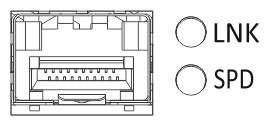
Figure 71 – Location of SFP connector indicators
...
Table 58 – Status of system indicators
Indicator name | Indicator function | LED State | Device State |
|---|---|---|---|
Power | Device power LED. | Green | Device power is normal operation state. Main power supply, if installed, is operational. The main software is uploaded. |
Red | The main software is not loaded. | ||
Off | Device internal power supply failure. | ||
Status | Current device status LED. | Green | Device is in normal operation state. |
Red | Device is booting up the software. | ||
Alarm | Alarm LED. | - | - |
User | Used for custom scripts that can be assigned in the device configuration mode | - | - |
ESR-12V(F) light indication
...
The following table lists description of system indicator statuses and meanings.
Scroll Pagebreak
Table 60 – Status of system indicators
...
Indicator name | Indicator function | LED State | Device State |
|---|---|---|---|
Power | Device power LED. | Green | Device power is normal operation state. Main power supply, if installed, is operational. The main software is uploaded. |
Red | The main software is not loaded. | ||
Off | Device internal power supply failure. | ||
| USB1, USB2 | Indicators of operation of external USB devices. | Green | USB device is connected. |
Flashes green | Read/write operation execution. | ||
| Off | No devices connected or connectivity issues. |
...
Delivery package
WLC-15 standard delivery package includes:
...
- WLC-3200 controller;
- Power cable;
- Console cable;
- 19” rack mounting kit;
- Documentation (optional);
- Technical passport.
Scroll Pagebreak
ESR-10 standard delivery package includes:
...
- ESR-14VF router;
- Power cable;
- 19” rack mounting kit;
- Documentation (optional);
- Technical passport.
ESR-15 standard delivery package includes:Scroll Pagebreak
...
- ESR-1000 router;
- Console cable;
- 19” rack mounting kit;
- Documentation (optional);
- Technical passport.
ESR-1200 standard delivery package includes:Scroll Pagebreak
...
- ESR-1700 router;
- Console cable;
- 19” rack mounting kit;
- Documentation (optional);
- Technical passport.
Scroll Pagebreak
ESR-3100 standard delivery package includes:
...