
...
Routing information advertising policy
RIP
in/out | Default policy | Advertising methods | Filtering methods | Filtering policy application levels |
|---|---|---|---|---|
Import | Route information reception is not limited | Network, Redistribute | Route-map — the last (implicit) rule denies anything that is not explicitly allowed by the previous rules. Prefix-list — the last (implicit) rule denies anything that is not explicitly allowed by the previous rules. | RIP process |
Export | Without separate advertising commands, the router/controller does not send routing information | Prefix-list — the last (implicit) rule allows anything that is not explicitly denied by the previous rules. Prefix-list — the last (implicit) rule allows anything that is not explicitly denied by the previous rules. |
OSPF protocol
in/out | Default policy | Advertising methods | Filtering methods | Filtering policy application levels |
|---|---|---|---|---|
Import | Route information reception is not limited | Network, Redistribute | Route-map — the last (implicit) rule denies anything that is not explicitly allowed by the previous rules. Prefix-list — the last (implicit) rule denies anything that is not explicitly allowed by the previous rules. | OSPF process |
Export | Information about interfaces with OSPF protocol enabled is advertised | Route-map — the last (implicit) rule allows anything that is not explicitly denied by the previous rules. Prefix-list — the last (implicit) rule allows anything that is not explicitly denied by the previous rules. Filtering of advertised route information is possible for the following types of OSPF routes: E2, E1 |
IS-IS protocol
in/out | Default policy | Advertising methods | Filtering methods | Filtering policy application levels |
|---|---|---|---|---|
Import | Route information reception is not limited | Network, Redistribute | Route-map — the last (implicit) rule denies anything that is not explicitly allowed by the previous rules. Prefix-list — the last (implicit) rule denies anything that is not explicitly allowed by the previous rules. | IS-IS process |
Export | Information about interfaces with IS-IS protocol enabled is advertised | Route-map — the last (implicit) rule allows anything that is not explicitly denied by the previous rules. Prefix-list — the last (implicit) rule allows anything that is not explicitly denied by the previous rules. |
iBPG protocol
in/out | Default policy | Advertising methods | Filtering methods | Filtering policy application levels |
|---|---|---|---|---|
Import | Route information reception is not limited | Network, Redistribute | Route-map — the last (implicit) rule denies anything that is not explicitly allowed by the previous rules. Prefix-list — the last (implicit) rule denies anything that is not explicitly allowed by the previous rules. | address-family, peer-group, neighbor |
Export | All the routes that have entered the RIB via the BGP protocol are advertised | Route-map — the last (implicit) rule denies anything that is not explicitly allowed by the previous rules. Prefix-list — the last (implicit) rule denies anything that is not explicitly allowed by the previous rules. |
eBPG protocol
in/out | Default policy | Advertising methods | Filtering methods | Filtering policy application levels |
|---|---|---|---|---|
Import | Route information reception is not limited | Network, Redistribute | Route-map — the last (implicit) rule denies anything that is not explicitly allowed by the previous rules. Prefix-list — the last (implicit) rule denies anything that is not explicitly allowed by the previous rules. | address-family, peer-group, neighbor |
Export | Routes are denied until an allowing route-map or prefix-list is applied | Route-map — the last (implicit) rule denies anything that is not explicitly allowed by the previous rules. Prefix-list — the last (implicit) rule denies anything that is not explicitly allowed by the previous rules. |
| Якорь | ||||
|---|---|---|---|---|
|
...
| Блок кода |
|---|
esr(config)# interface gi1/0/1 esr(config-if-gi)# security-zone LAN esr(config-if-gi)# ip address 192.168.1.1/24 esr(config-if-gi)# exit |
| Scroll Pagebreak |
|---|
...
| Блок кода |
|---|
esr(config)# interface gi1/0/2 esr(config-if-gi)# security-zone LAN esr(config-if-gi)# ip address 192.168.100.2/30 esr(config-if-gi)# exit |
...
Create a default route by specifying the IP address of R1 device gi1/0/2 interface (192.168.100.1) as a nexthop:
...
RIP is a distance-vector dynamic routing protocol that uses hop count as a routing metric. The maximum amount of hops allowed for RIP is 15. By default, each RIP device transmits full routing table into the network every 30 seconds. RIP operates at 3rd level of TCP/IP stack via UDP port 520.
Configuration algorithm
Step | Description | Command | Keys |
|---|---|---|---|
1 | Configure RIP precedence for the main routing table (optional). | esr(config)# ip protocols rip preference <VALUE> | <VALUE> – protocol precedence, takes values in the range of [1..255]. Default value: RIP (100). |
2 | Configure RIP routing tables capacity (optional). | esr(config)# ip protocols rip max-routes <VALUE> | <VALUE> – amount of RIP routes in the routing table, takes values in the range of[ 1..10000]; 10000. |
3 | Create IP subnets lists that will be used for further filtration of advertised and received IP routes. | esr(config)# ip prefix-list <NAME> | <NAME> – name of a subnet list being configured, set by the string of up to 31 characters. |
4 | Permit or deny the prefixes lists. | esr(config-pl)# permit {object-group <OBJ-GROUP-NETWORK-NAME > <ADDR/LEN> | <IPV6-ADDR/LEN> } [ { eq <LEN> | le <LEN> | ge <LEN> [ le <LEN> ] } ] | <OBJ-GROUP-NETWORK-NAME> – IP addresses profile name, set by the string of up to 31 characters; <LEN> – prefix length, takes values of [1..32] in prefix IP lists;
|
esr(config-pl)# deny {object-group <OBJ-GROUP-NETWORK-NAME> <ADDR/LEN> | <IPV6-ADDR/LEN> } [ { eq <LEN> | le <LEN> | ge <LEN> [ le <LEN> ] } | |||
5 | Switch to the RIP process configuration mode. | esr(config)# router rip esr(config-rip)# | |
6 | Enable RIP. | esr(config-rip)# enable | |
7 | Specify RIP authentication algorithm (optional). | esr(config-rip)# authentication algorithm { cleartext | md5 } |
|
8 | Set the password for neighbor authentication (optional). | esr(config-rip)# authentication key ascii-text { <CLEAR-TEXT> | encrypted <ENCRYPTED-TEXT> } | <CLEAR-TEXT> – password, set by the string of 8 to 16 characters; <ENCRYPTED-TEXT> – encrypted password of 8 to 16 bytes (from 16 to 32 characters) in hexadecimal format (0xYYYY ...) or (YYYY ...). |
9 | Specify the list of passwords for authentication via md5 hashing algorithm (optional). | esr(config-rip)# authentication key-chain <KEYCHAIN> | <KEYCHAIN> – key list identifier, set by the string of up to 16 characters. |
10 | Disable routes advertising on the interfaces/tunnels/bridge where it is not necessary (optional). | esr(config-rip)# passive-interface {<IF> | <TUN> } | <IF> – interface and identifier; <TUN> – tunnel name and number. |
11 | Set time interval after which the advertising is carried out (optional). | esr(config-rip)# timers update <TIME> | <TIME> – time in seconds, takes values of [1..65535]. Default value: 180 seconds. |
12 | Set time interval of route entry correctness without updating (optional). | esr(config-rip)# timers invalid <TIME> | <TIME> – time in seconds, takes values of [1..65535]. Default value: 180 seconds. |
13 | Set time interval after which the route removing is carried out (optional). | esr(config-rip)# timers flush <TIME> | <TIME> – time in seconds, takes values of [12..65535]. When setting the value, consider the following rule: 'timersinvalid + 60'. Default value: 240 seconds. |
14 | Enable subnets advertising. | esr(config-rip)# network <ADDR/LEN> | <ADDR/LEN> – subnet address, set in the following format: AAA.BBB.CCC.DDD/NN – network IP address with prefix mask, where AAA-DDD take values of [0..255] and EE takes values of [1..32]. |
15 | Add subnets filtration in incoming or outgoing updates (optional). | esr(config-rip)# prefix-list <PREFIX-LIST-NAME> { in | out } | <PREFIX-LIST-NAME> – name of a subnet list being configured, set by the string of up to 31 characters.
|
16 | Enable advertising of routes received in an alternative way (optional). | esr(config-rip)# redistribute static [ route-map <NAME> ] | <NAME> – name of the route map that will be used for advertised static routes filtration and modification, set by the string of up to 31 characters. |
esr(config-rip)# redistribute connected [ route-map <NAME> ] | <NAME> – name of the route map that will be used for filtration and modification of advertised directly connected subnets, set by the string of up to 31 characters. | ||
esr(config-rip)# redistribute ospf <ID><ROUTE-TYPE> [ route-map <NAME> ] | <ID> – process number, takes values of [1..65535]. <ROUTE-TYPE> – route type:
<NAME> – name of the route map that will be used for advertised OSFP routes filtration and modification, set by the string of up to 31 characters. | ||
esr(config-rip)# redistribute bgp <AS> [ route-map <NAME> ] | <AS> – stand alone system number, takes values of [1..4294967295]. <NAME> – name of the route map that will be used for advertised BGP routes filtration and modification, set by the string of up to 31 characters. | ||
17 | Switch to the interface/tunnel/network bridge configuration mode. | esr(config)# interface <IF-TYPE><IF-NUM> | <IF-TYPE> – interface type; <IF-NUM> – F/S/P – F frame (1), S – slot (0), P – port. |
esr(config)# tunnel <TUN-TYPE><TUN-NUM> | <TUN-TYPE> – tunnel type; <TUN-NUM> – tunnel number. | ||
esr(config)# bridge <BR-NUM> | <BR-NUM> – bridge number. | ||
18 | Set RIP routes metric value on the interface (optional). | esr(config-if-gi)# ip rip metric <VALUE> | <VALUE> – metric size, takes values of [0..32767]. Default value: 5. |
19 | Set the routes advertising mode via RIP (optional). | esr(config-if-gi)# ip rip mode <MODE> | <MODE> – routes advertising mode:
Default value: multicast. |
20 | Specify a neighbor’s IP address for establishment of a relation in routes advertising unicast mode (optional). | esr(config-if-gi)# ip rip neighbor <ADDR> | <ADDR> – IP address, defined as AAA.BBB.CCC.DDD where each part takes values of [0..255]. |
21 | Enable subnet summarization (optional). | esr(config-if-gi)# ip rip summary-address <ADDR/LEN> | <ADDR/LEN> – IP address and subnet mask, defined as AAA.BBB.CCC.DDD/EE where each part AAA-DDD takes values of [0..255] and EE takes values of [1..32]. |
RIP configuration example
...
OSPF is a dynamic routing protocol, based on link-state technology and using shortest path first Dijkstra algorithm.
Configuration algorithm
Step | Description | Command | Keys |
|---|---|---|---|
1 | Configure OSFP precedence for the main routing table (optional). | esr(config)# ip protocols ospf preference <VALUE> | <VALUE> – protocol precedence, takes values in the range of [1..255]. Default value: 150. |
esr(config-vrf)# ip protocols ospf preference <VALUE> | |||
2 | Configure OSFP routing tables capacity (optional). | esr(config)# ip protocols ospf max-routes <VALUE> | <VALUE> – amount of OSPF routes in the routing table, takes values in the range of:
Default value for the global mode:
Default value for VRF: 0 |
esr(config)# ipv6 protocols ospf max-routes <VALUE> | |||
3 | Enable the output of OSPF neighbor state information (optional). | esr(config)# router ospf log-adjacency-changes | |
esr(config)# ipv6 router ospf log-adjacency-changes | |||
4 | Create IP subnets lists that will be used for further filtration of advertised and received IP routes (optional). | esr(config)# ip prefix-list <NAME> | <NAME> – name of a subnet list being configured, set by the string of up to 31 characters. |
esr(config)# ipv6 prefix-list <NAME> | |||
5 | Permit or deny the prefixes lists (optional). | esr(config-pl)# permit [ { object-group <OBJ-GROUP-NETWORK-NAME> | <ADDR/LEN> | <IPV6-ADDR/LEN> } ] [ { eq <LEN> | le <LEN> | ge <LEN> [ le <LEN> ] } ] | <OBJ-GROUP-NETWORK-NAME> – IPv4/IPv6 addresses profile name, set by the string of up to 31 characters; <ADDR> – IP address, defined as AAA.BBB.CCC.DDD where each part takes values of [0..255]; <LEN> – prefix length, takes values of [1..32] in prefix IP lists;
|
esr(config-pl)# deny [ { object-group <OBJ-GROUP-NETWORK-NAME> | <ADDR/LEN > | <IPV6-ADDR/LEN> } ] [ { eq <LEN> | le <LEN> | ge <LEN> [ le <LEN> ] } ] | |||
6 | Add OSFP process to the system and switch to the OSFP process parameters configuration mode. | esr(config)# router ospf <ID> [vrf <VRF>] | <ID> – stand alone system number, takes values of [1..65535]. <VRF> – VRF instance name, set by the string of up to 31 characters, within which the routing protocol will operate. |
esr(config)# ipv6 router ospf <ID> [vrf <VRF>] | |||
7 | Set router identifier for the given OSFP process. | esr(config-ospf)# router-id <ID> | <ID> – router/controller identifier, defined as AAA.BBB.CCC.DDD where each part takes values of [0..255]. <IF> – interface. <TUN> – tunnel name. |
esr(config-ipv6-ospf)# router-id <ID> | |||
8 | Define OSFP process routes precedence. | esr(config-ospf)# preference <VALUE> | <VALUE> – OSFP process routes precedence, takes values in the range of [1..255]. |
esr(config-ipv6-ospf)# preference <VALUE> | |||
| 9 | Define maximum number of equivalent routes (optional). | esr(config-ospf)# maximum-path <PATHS> | <PATHS> – number of equivalent routes to the target, takes values of [1..32]. Default value: 16. |
| esr(config-ipv6-ospf)# maximum-path <PATHS> | |||
10 | Enable compatibility with RFC 1583 (optional). | esr(config-ospf)# compatible rfc1583 | |
esr(config-ipv6-ospf)# compatible rfc1583 | |||
11 | Add subnets filtration in incoming or outgoing updates (optional). | esr(config-ospf)# prefix-list <PREFIX-LIST-NAME> { in | out } | <PREFIX-LIST-NAME> – name of a subnet list being configured, set by the string of up to 31 characters.
|
esr(config-ipv6-ospf)# prefix-list <PREFIX-LIST-NAME> { in | out } | |||
12 | Enable advertising of routes received in an alternative way (optional). | esr(config-ospf)# redistribute static [ route-map <NAME> ] | <NAME> – name of the route map that will be used for advertised static routes filtration and modification, set by the string of up to 31 characters. |
esr(config-ipv6-ospf)# redistribute static [ route-map <NAME> ] | |||
esr(config-ospf)# redistribute connected [ route-map <NAME> ] | <NAME> – name of the route map that will be used for filtration and modification of advertised directly connected subnets, set by the string of up to 31 characters. | ||
esr(config-ipv6-ospf)# redistribute connected [ route-map <NAME> ] | |||
esr(config-ospf)# redistribute rip [ route-map <NAME> ] | <NAME> – name of the route map that will be used for advertised RIP routes filtration and modification, set by the string of up to 31 characters. | ||
esr(config-ospf)# redistribute bgp <AS> [ route-map <NAME> ] | <AS> – stand alone system number, takes values of [1..4294967295]. <NAME> – name of the route map that will be used for advertised BGP routes filtration and modification, set by the string of up to 31 characters. | ||
esr(config-ipv6-ospf)# redistribute bgp <AS> [ route-map <NAME> ] | |||
13 | Enable OSFP process. | esr(config-ospf)# enable | |
esr(config-ipv6-ospf)# enable | |||
14 | Create OSFP area and switch to the scope configuration mode. | esr(config-ospf)# area <AREA_ID> | <AREA_ID> – area identifier, defined as AAA.BBB.CCC.DDD where each part takes values of [0..255]. |
esr(config-ipv6-ospf)# area <AREA_ID> | |||
15 | Enable subnets advertising (optional). | esr(config-ospf-area)# network <ADDR/LEN> | <ADDR/LEN> – subnet address, set in the following format: AAA.BBB.CCC.DDD/NN – network IP address with prefix mask, where AAA-DDD take values of [0..255] and EE takes values of [1..32]. |
esr(config-ipv6-ospf-area)# network <IPV6-ADDR/LEN> | <IPV6-ADDR/LEN> – IPv6 address and mask of a subnet, defined as X:X:X:X::X/EE where each X part takes values in hexadecimal format [0..FFFF] and EE takes values of [1..128]. | ||
16 | Specify the area type (optional). | esr(config-ospf-area)# area-type <TYPE> [ no-summary ] | <TYPE> – area type:
|
esr(config-ipv6-ospf-area)# area-type <TYPE> [ no-summary ] | |||
17 | Enable the default route generation for NSSA area and its advertising as NSSA-LSA (optional). | esr(config-ospf-area)# default-information-originate | |
esr(config-ipv6-ospf-area)# default-information-originate | |||
18 | Enable the subnet summarization or hiding (optional). | esr(config-ospf-area)# summary-address <ADDR/LEN> { advertise | not-advertise } | <ADDR/LEN> – IP address and subnet mask, defined as AAA.BBB.CCC.DDD/EE where each part AAA-DDD takes values of [0..255] and EE takes values of [1..32];
|
esr(config-ipv6-ospf-area)# summary-address <IPV6-ADDR/LEN> { advertise | not-advertise } | <IPV6-ADDR/LEN> – IPv6 address and mask of a subnet, defined as X:X:X:X::X/EE where each X part takes values in hexadecimal format [0..FFFF] and EE takes values of [1..128];
| ||
19 | Enable OSFP area. | esr(config-ospf-area)# enable | |
esr(config-ipv6-ospf-area)# enable | |||
20 | Establish a virtual connection between the main and remote areas having several areas between them (optional). | esr(config-ospf-area)# virtual-link <ID> | <ID> – identifier of the router/controller with which the virtual connection is established, defined as AAA.BBB.CCC.DDD where each part takes values of [0..255]. |
esr(config-ipv6-ospf-area)# virtual-link <ID> | |||
21 | Set the time interval in seconds after which the device re-sends a packet that has not received a delivery confirmation (for example, a DatabaseDescription packet or LinkStateRequest packets) (optional). | esr(config-ospf- vlink)# restransmit-interval <TIME> | <TIME> – time in seconds, takes values of [1..65535]. Default value: 5 seconds. |
esr(config-ipv6-ospf- vlink)# restransmit-interval <TIME> | |||
22 | Set the time interval in seconds after which the device sends the next hello packet (optional). | esr(config-ospf- vlink)# hello-interval <TIME> | <TIME> – time in seconds, takes values of [1..65535]. Default value: 10 seconds. |
esr(config-ipv6-ospf- vlink)# hello-interval <TIME> | |||
23 | Set the time interval in seconds after which the neighbor is considered to be idle. This interval should be a multiple of the ‘hello interval’ value. | esr(config-ospf- vlink)# dead-interval <TIME> | <TIME> – time in seconds, takes values of [1..65535]. Default value: 40 seconds. |
esr(config-ipv6-ospf- vlink)# dead-interval <TIME> | |||
24 | Set the time interval in seconds after which the device selects DR in the network (optional). | esr(config-ospf- vlink)# wait-interval <TIME> | <TIME> – time in seconds, takes values of [1..65535]. |
esr(config-ipv6-ospf- vlink)# wait-interval <TIME> | |||
25 | Define authentication algorithm (optional). | esr(config-ospf- vlink)# authentication algorithm <ALGORITHM> | <ALGORITHM> – authentication algorithm:
|
26 | Set the password for neighbor authentication (optional). | esr(config-ospf- vlink)# authentication key ascii-text { <CLEAR-TEXT> | encrypted <ENCRYPTED-TEXT> } | <CLEAR-TEXT> – password, set by the string of 8 to 16 characters. <ENCRYPTED-TEXT> – encrypted password of 8 to 16 bytes (from 16 to 32 characters) in hexadecimal format (0xYYYY ...) or (YYYY ...). |
27 | Specify the list of passwords for authentication via md5 hashing algorithm. | esr(config-ospf- vlink)# authentication key chain <KEYCHAIN> | <KEYCHAIN> – key list identifier, set by the string of up to 16 characters. |
28 | Enable virtual connection. | esr(config-ospf- vlink)# enable | |
29 | Switch to the interface/tunnel/network bridge configuration mode. | esr(config)# interface <IF-TYPE><IF-NUM> | <IF-TYPE> – interface type; <IF-NUM> – F/S/P – F frame (1), S – slot (0), P – port. |
esr(config)# tunnel <TUN-TYPE><TUN-NUM> | <TUN-TYPE> – tunnel type; <TUN-NUM> – tunnel number. | ||
esr(config)# bridge <BR-NUM> | <BR-NUM> – bridge number. | ||
30 | Define the interface / tunnel / network bridge inherence to a specific OSPF process. | esr(config-if-gi)# ip ospf instance <ID> | <ID> – process number, takes values of [1..65535]. |
esr(config-if-gi)# ipv6 ospf instance <ID> | |||
31 | Define the interface inherence to a specific OSPF process area. | esr(config-if-gi)# ip ospf area <AREA_ID> | <AREA_ID> – area identifier, defined as AAA.BBB.CCC.DDD where each part takes values of [0..255]. |
esr(config-if-gi)# ipv6 ospf area <AREA_ID> | |||
32 | Enable the routing via OSFP on the interface. | esr(config-if-gi)# ip ospf | |
esr(config-if-gi)# ipv6 ospf | |||
33 | Enable the mode in which the OSPF process will ignore MTU interface value in incoming Database Description packets (optional). | esr(config-if-gi)# ip ospf mtu-ignore | |
esr(config-if-gi)# ipv6 ospf mtu-ignore | |||
34 | Specify OSFP authentication algorithm (optional). | esr(config-if-gi)# ip ospf authentication algorithm <ALGORITHM> | <ALGORITHM> – authentication algorithm:
|
35 | Set the password for OSPF neighbor authentication when transmitting an unencrypted password (optional). | esr(config-if-gi)# ip ospf authentication key ascii-text { <CLEAR-TEXT> | encrypted <ENCRYPTED-TEXT> } | <CLEAR-TEXT> – password, set by the string of 8 to 16 characters; <ENCRYPTED-TEXT> – encrypted password of 8 to 16 bytes (from 16 to 32 characters) in hexadecimal format (0xYYYY ...) or (YYYY ...). |
36 | Specify the list of passwords for neighbor authentication via md5 hashing algorithm (optional). | esr(config-if-gi)# ip ospf authentication key-chain <KEYCHAIN> | <KEYCHAIN> – key list identifier, set by the string of up to 16 characters. |
37 | Set the time interval in seconds after which the device selects DR in the network (optional). | esr(config-if-gi)# ip ospf wait-interval <TIME> | <TIME> – time in seconds, takes values of [1..65535]. Default value: 40 seconds. |
esr(config-if-gi)# ipv6 ospf wait-interval <TIME> | |||
38 | Set the time interval in seconds after which the device re-sends a packet that has not received a delivery confirmation (for example, a DatabaseDescription packet or LinkStateRequest packets. Optional). | esr(config-if-gi)# ip ospf restransmit-interval <TIME> | <TIME> – time in seconds, takes values of [1..65535]. Default value: 5 seconds. |
esr(config-if-gi)# ipv6 ospf restransmit-interval <TIME> | |||
39 | Set the time interval in seconds after which the device sends the next hello packet (optional). | esr(config-if-gi)# ip ospf hello-interval <TIME> | <TIME> – time in seconds, takes values of [1..65535]. Default value: 10 seconds. |
esr(config-if-gi)# ipv6 ospf hello-interval <TIME> | |||
40 | Set the time interval in seconds after which the neighbor is considered to be idle (optional). This interval should be a multiple of the ‘hello interval’ value. | esr(config-if-gi)# ip dead-interval <TIME> | <TIME> – time in seconds, takes values of [1..65535]. Default value: 40 seconds. |
esr(config-if-gi)# ipv6 dead-interval <TIME> | |||
41 | Set the time interval during which NBMA interface waits before sending a HELLO packet to a neighbor, even if the neighbor is inactive (optional). | esr(config-if-gi)# ip poll-interval <TIME> | <TIME> – time in seconds, takes values of [1..65535]. Default value: 120 seconds. |
esr(config-if-gi)# ipv6 poll-interval <TIME> | |||
42 | Set static IP address of a neighbor to establish a relation in NMBA and P2MP (Point-to-MultiPoint) networks (optional). | esr(config-if-gi)# ip ospf neighbor <IP> [ eligible ] | <IP> – neighbor’s IP address, defined as AAA.BBB.CCC.DDD where each part takes values of [0..255]. eligible – optional parameter, allows the device to take part in DR selection process in NMBA networks. The interface priority should be greater than zero. |
esr(config-if-gi)# ip ospf neighbor <IP> [ eligible ] | <IPV6-ADDR> – neighbor’s IPv6 address, defined as X:X:X:X::X where each part takes values in hexadecimal format [0..FFFF]; eligible – optional parameter, allows the device to take part in DR selection process in NMBA networks. The interface priority should be greater than zero. | ||
43 | Define the network type for OSPF neighborhood establishment (optional). | esr(config-if-gi)# ip ospf network <TYPE> | <TYPE> – network type:
Default value: broadcast. |
esr(config-if-gi)# ipv6 ospf network <TYPE> | |||
44 | Set the device priority that is used for DR and BDR selection (optional). | esr(config-if-gi)# ip ospf priority <VALUE> | <VALUE> – interface priority, takes values of [1..65535]. Default value: 120. |
esr(config-if-gi)# ipv6 ospf priority <VALUE> | |||
45 | Set the metric size on the interface or tunnel (optional). | esr(config-if-gi)# ip ospf cost <VALUE> | <VALUE> – metric size, takes values of [0..32767]. Default value: 150. |
esr(config-if-gi)# ipv6 ospf cost <VALUE> | |||
46 | Enable BFD protocol for OSPF protocol. | esr(config-if-gi)# ip ospf bfd-enable | |
esr(config-if-gi)# ipv6 ospf bfd-enable |
OSPF configuration example
...
| Якорь | ||||
|---|---|---|---|---|
|
| Scroll Pagebreak |
|---|
BGP configuration
BGP protocol is designed to exchange subnet reachability information among autonomous systems (AS), i.e. device groups united under a single technical control that uses interdomain routing protocol for defining packet delivery routes to other AS. Transmitted information includes a list of AS that are accessible through this system. Selection of the optimal routes is based on effective rules for the network.
...
| Примечание |
|---|
To establish a BGP session it is necessary to allow TCP port 179 on the firewall. |
Step | Description | Command | Keys |
|---|---|---|---|
1 | Configure BGP precedence for the main routing table (optional). | esr(config)# ip protocols bgp preference <VALUE> | <VALUE> – protocol precedence, takes values in the range of [1..255]. Default value: BGP (170). |
2 | Configure the BGP routing table capacity (not required when using the global routing table). | esr(config)# ip protocols bgp max-routes <VALUE> | <VALUE> – amount of BGP routes in the routing table, takes values in the range of:
The default value for the global routing table:
Default value for VRF: 0. |
esr(config)# ipv6 protocols bgp max-routes <VALUE> | |||
esr(config-vrf)# ip protocols bgp max-routes <VALUE> | |||
esr(config-vrf)# ipv6 protocols bgp max-routes <VALUE> | |||
3 | Enable the output of BGP neighbor state information (optional). | esr(config)# router bgp log-neighbor-changes | |
esr(config)# ipv6 router bgp log-neighbor-changes | |||
4 | Enable ECMP and define the maximum amount of equal routes to a destination point. | esr(config)# router bgp maximum-paths <VALUE> | <VALUE> – amount of valid equal routes to the target, takes the values of [1..16]. |
5 | Select the filtering method for the information transmitted between routers (mandatory when configuring eBGP to announce subnets). | ||
If route-map-based filtering method is selected, create a list of rules that will be used to filter the advertised and received IP routes in the future. | esr(config)# route-map <NAME> | <NAME> – configured routing rule name, set by the string of up to 31 characters. | |
Create rule | (config-route-map)# rule <ORDER> | <ORDER> – rule number, takes values of [1..10000]. | |
Define the list of subnets affected by the rule. | esr(config-route-map-rule)#match ip address { <ADDR/LEN> | object-group <OBJ-GRP-NETNAME> } [ { eq <LEN> | le <LEN> | ge <LEN 1> [ le <LEN 2> ] } ] | <ADDR/LEN> – IP address and subnet mask, in the format of. AAA.BBB.CCC.DDD/EE – network IP address with prefix mask, where AAA-DDD take values of [0..255] and EE takes values of [1..32]; <IPV6-ADDR/LEN> – IPv6 address and subnet mask, in the format of: X:X:X:X::X/EE, where each X part takes values in hexadecimal format [0..FFFF] and EE takes values of [1..128]; <OBJ-GRP-NETNAME> – IP addresses profile name, set by the string of up to 31 characters*; <LEN>, <LEN 1>, <LEN 2> – prefix length, may take values [1..32] in prefix IP lists for IPv4 and [1..128] for IPv6; eq – when specifying the command, the prefix length mast match the specified one; le – when specifying the command, the prefix length mast be less than or match the specified one; ge – when specifying the command, the prefix length mast be more than or match the specified one; ge <LEN 1> le <LEN 2> – When specifying a command, the prefix length must be greater than or equal to <LEN> but less than or equal to <LEN1>. * When using object-group filtering, they must be created in advance. | |
esr(config-route-map-rule)#match ipv6 address { <IPV6-ADDR/LEN> | object-group <OBJ-GRP-NETNAME> } [ { eq <LEN> | le <LEN> | ge <LEN 1> [ le <LEN 2> ] } ] | |||
Permit or deny action for the specified subnets in the rule. | esr(config-route-map-rule)# action {deny | permit} | ||
If prefix-list-based filtering method is selected, create a list of IP networks that will be used to filter the advertised and received IP routes in the future. | esr(config)# ip prefix-list <NAME> | <NAME> – name of a subnet list being configured, set by the string of up to 31 characters. | |
esr(config)# ipv6 prefix-list <NAME> | |||
Permit or deny the prefixes lists. | esr(config-pl)# permit { <ADDR/LEN> | object-group <OBJ-GRP-NETNAME>} [ { eq <LEN> | le <LEN> | ge <LEN 1> [ le <LEN 2> ] } ] | <ADDR/LEN> – IP address and subnet mask, in the format of. AAA.BBB.CCC.DDD/EE – network IP address with prefix mask, where AAA-DDD take values of [0..255] and EE takes values of [1..32]; <IPV6-ADDR/LEN> – IPv6 address and subnet mask, in the format of: X:X:X:X::X/EE, where each X part takes values in hexadecimal format [0..FFFF] and EE takes values of [1..128]; <OBJ-GRP-NETNAME> – IP addresses profile name, set by the string of up to 31 characters*; <LEN>, <LEN 1>, <LEN 2> – prefix length, may take values [1..32] in prefix IP lists for IPv4 and [1..128] for IPv6; eq – when specifying the command, the prefix length mast match the specified one; le – when specifying the command, the prefix length mast be less than or match the specified one; ge – when specifying the command, the prefix length mast be more than or match the specified one; ge <LEN 1> le <LEN 2> – When specifying a command, the prefix length must be greater than or equal to <LEN> but less than or equal to <LEN1>. * When using object-group filtering, they must be created in advance. | |
esr(config-pl)# deny {<ADDR/LEN> | object-group <OBJ-GRP-NETNAME>} [ { eq <LEN> | le <LEN> | ge <LEN 1> [ le <LEN 2> ] } ] | |||
esr(config-ipv6-pl)# permit { <IPV6-ADDR/LEN> | object-group <OBJ-GRP-NETNAME>} [ { eq <LEN> | le <LEN> | ge <LEN 1> [ le <LEN 2> ] } ] | |||
esr(config-ipv6-pl)# deny {<IPV6-ADDR/LEN> | object-group <OBJ-GRP-NETNAME> } [ { eq <LEN> | le <LEN> | ge <LEN 1> [ le <LEN 2> ] } ] | |||
6 | Add BGP process to the system and switch to the BGP process parameters configuration mode. | esr(config)# router bgp <AS> | <AS> – stand alone system number, takes values of [1..4294967295]. |
7 | Set the router identifier. | esr(config-bgp)# router-id { <ID> | <IF> | <TUN> } | <ID> – router identifier, defined as AAA.BBB.CCC.DDD where each part takes values of [0..255]. <IF> – interface. <TUN> – tunnel name. |
8 | Set the Route-Reflector identifier of the cluster to which the router BGP process belongs (if necessary). | esr(config-bgp)# cluster-id <ID> | <ID> – Route-Reflector cluster identifier, defined as AAA.BBB.CCC.DDD where each part takes values of [0..255]. |
9 | Enable generation and sending of a default route, if the default route is in the FIB routing table (optional). | esr(config-bgp)# default-information-originate | |
10 | Set the time interval after which the connection with the opposing party is checked (optional). | esr(config-bgp-af)# timers keepalive <TIME> | <TIME> – time in seconds, takes values of [1..65535]. Default value: 60 seconds. |
11 | Set time interval after which the opposing party is considered to be unavailable (optional). | esr(config-bgp-af)# timers holdtime <TIME> | <TIME> – time in seconds, takes values of [1..65535]. Default value: 180 seconds. |
12 | Set the time of minimum and maximum delay during which it is prohibited to establish a connection in order to prevent frequent disconnections (optional). | esr(config-bgp-af)# timers error-wait <TIME1> <TIME2> | <TIME1> – minimum delay time in seconds, takes values of [1..65535]. <TIME2> – maximum delay time in seconds, takes values of [1..65535]. |
13 | Define the global algorithm of neighbor authentication (if necessary). | esr(config-bgp)# authentication algorithm <ALGORITHM> | <ALGORITHM> – encryption algorithm:
Default value: encryption is not used. |
14 | Set a global password for authentication with neighbors (used in conjunction with 'authentication algorithm'). | esr(config-bgp)# authentication key ascii-text { <CLEAR-TEXT> | encrypted <ENCRYPTED-TEXT> } | <CLEAR-TEXT> – password, set by the string of 8 to 16 characters; <ENCRYPTED-TEXT> – encrypted password of 8 to 16 bytes (from 16 to 32 characters) in hexadecimal format (0xYYYY ...) or (YYYY ...). |
15 | Enable BGP process. | esr(config-bgp)# enable | |
16 | Define the type of configured routing information and switch to this configuration mode. | esr(config-bgp)# address-family { ipv4 | ipv6 } unicast | ipv 4 – IPv4 family; ipv 6 – IPv6 family; |
17 | Enable route advertising by BGP process obtained alternatively (if necessary). | esr(config-bgp-af)# redistribute static [ route-map <NAME> ] | <NAME> – name of the route map that will be used for advertised static routes filtration and modification, set by the string of up to 31 characters. |
esr(config-bgp-af)# redistribute connected [ route-map <NAME> ] | <NAME> – name of the route map that will be used for filtration and modification of advertised directly connected subnets, set by the string of up to 31 characters. | ||
esr(config-bgp-af)# redistribute rip [ route-map <NAME> ] | <NAME> – name of the route map that will be used for advertised RIP routes filtration and modification, set by the string of up to 31 characters. | ||
esr(config-bgp-af)# redistribute ospf <ID> <ROUTE-TYPE 1> [<ROUTE-TYPE 2>] [<ROUTE-TYPE 3>] [<ROUTE-TYPE 4>] [ route-map <NAME> ] | <ID> – process number, takes values of {1..65535}; <ROUTE-TYPE> – route type:
<NAME> – name of the route map that will be used for advertised OSFP routes filtration and modification, set by the string of up to 31 characters. | ||
esr(config-bgp-af)# redistribute bgp <AS> [ route-map <NAME> ] | <AS> – stand alone system number, takes values of [1..4294967295]. <NAME> – name of the route map that will be used for advertised BGP routes filtration and modification, set by the string of up to 31 characters. | ||
18 | Enable subnets advertising. | esr(config-bgp-af)# network <ADDR/LEN> | <ADDR/LEN> – subnet address, set in one of the following formats:
|
19 | Exit global BGP process route information advertisement configuration mode. | esr(config-bgp-af)# exit | |
20 | Add BGP neighbor and switch to the BGP process parameters configuration mode. | esr(config-bgp)# neighbor <ADDR>|<IPV6-ADDR> | <ADDR> – neighbor’s IP address, defined as AAA.BBB.CCC.DDD where each part takes values of [0..255]; <IPV6-ADDR> – client IPv6 address, defined as X:X:X:X::X where each part takes values in hexadecimal format [0..FFFF]. |
21 | Specify neighbor description (optional). | esr(config-bgp-neighbor)# description <DESCRIPTION> | <DESCRIPTION> – neighbor description, set by the string of up to 255 characters. |
22 | Set the time interval after which the connection with the opposing party is checked (optional). | esr(config-bgp-neighbor)# timers keepalive <TIME> | <TIME> – time in seconds, takes values of [1..65535]. Default value: 60 seconds. |
23 | Set time interval after which the opposing party is considered to be unavailable (optional). | esr(config-bgp- neighbor)# timers holdtime <TIME> | <TIME> – time in seconds, takes values of [1..65535]. Default value: 180 seconds. |
24 | Set the time of minimum and maximum delay during which it is prohibited to establish a connection in order to prevent frequent disconnections (optional). | esr(config-bgp-af)# timers error-wait <TIME1> <TIME2> | <TIME1> – minimum delay time in seconds, takes values of [1..65535]. <TIME2> – maximum delay time in seconds, takes values of [1..65535]. Default value: 60 and 300 seconds |
25 | Set the number of BGP neighbor stand alone system. | esr(config-bgp-neighbor)# remote-as <AS> | <AS> – stand alone system number, takes values of [1..4294967295]. |
26 | Allow connections to neighbors that are located not in directly connected subnets (optional). | esr(config-bgp-neighbor)# ebgp-multihop <NUM> | <NUM> – maximum amount of hops when installing EBGP (used for TTL). |
27 | Specify BGP neighbor as a Route-Reflector client (optional). | esr(config-bgp-neighbor)# route-reflector-client | |
28 | Set IP/IPv6 router address that will be used as source IP/IPv6 address in transmitted BGP route information updates (optional). | esr(config-bgp-neighbor)# update-source { <ADDR> | <IPV6-ADDR> } | <ADDR> – source IP address, defined as AAA.BBB.CCC.DDD where each part takes values of [0..255]; <IPV6-ADDR> – source IPv6 address, defined as X:X:X:X::X where each part takes values in hexadecimal format [0..FFFF]. <IF> – interface. <TUN> – tunnel name. |
29 | Enable the mode in which the reception of routes in the BGP attribute, AS Path of which includes the numbers of process stand alone system, is allowed (optional). | esr(config-bgp-neighbor)# allow-local-as <NUMBER> | <NUMBER> – threshold amount of instances of autonomous system number in the AS Path attribute at which the route will be accepted, the range of acceptable values [1..10]. |
30 | Enable the BFD protocol on the configured BGP neighbor (optional, used in conjunction with the update-source parameter). | esr(config-bgp-neighbor)# bfd-enable | |
31 | Specify neighbor authentication algorithm (optional). | esr(config-bgp-neighbor)# authentication algorithm <ALGORITHM> | <ALGORITHM> – encryption algorithm: md5 – password is encrypted by md5 algorithm. |
32 | Set the password for neighbor authentication (optional). | esr(config-bgp-neighbor)# authentication key ascii-text { <CLEAR-TEXT> | encrypted <ENCRYPTED-TEXT> } | <CLEAR-TEXT> – password, set by the string of 8 to 16 characters; <ENCRYPTED-TEXT> – encrypted password of 8 to 16 bytes (from 16 to 32 characters) in hexadecimal format (0xYYYY ...) or (YYYY ...). |
33 | Make neighborhood active. | esr(config-bgp-neighbor)# enable | |
34 | Define the type of neighbor configured routing information and switch to this configuration mode. | esr(config-bgp-neighbor)# address-family { ipv4 | ipv6 | vpnv4 } unicast | ipv 4 – IPv4 family; ipv 6 – IPv6 family; vpnv4 – VPNv4 family. |
35 | If prefix list filtering mode is selected, add subnet filtering in incoming or outgoing updates ( Mandatory when configuring eBGP for subnet advertisement). | esr(config-bgp-neighbor-af)# prefix-list <PREFIX-LIST-NAME> { in | out } | <PREFIX-LIST-NAME> – name of a subnet list being configured, set by the string of up to 31 characters. in – incoming routes filtering; out – outgoing routes filtering. |
36 | Set the mode in which the default route is always sent to the BGP neighbor in the update along with other routes (optional, none for vpnv4). | esr(config-bgp-neighbor-af)# default-originate | |
37 | Set the mode in which all updates are sent to BGP neighbor with the IP address of a local router outgoing interface as the next-hop (optional, none for vpnv4). | esr(config-bgp-neighbor-af)# next-hop-self | |
38 | Define the precedence of the routes received from a neighbor (optional). | esr(config-bgp-neighbor-af)# preference <VALUE> | <VALUE> – neighbor routes precedence, takes values in the range of [1..255]. Default value: 170. |
39 | Set the mode in which private numbers of autonomous systems are removed from the AS Path routes BGP attribute before sending an update (in accordance with RFC 6996) (optional, none for vpnv4). | esr(config-bgp-neighbor-af)# remove-private-as [ { all | nearest | replace } ] | all – remove all private AS number from AS-path; nearest – replace the nearest private AS in the AS-path with a nearby public AS; replace – replace all private AS numbers with the number of the current BGP process. Default value: all. |
40 | Enable routing information exchange. | esr(config-bgp-neighbor-af)# enable |
...
When configuring iBGP, it is common to have multiple BGP neighbors with the same parameters within a single BGP process. To avoid configuration redundancy, it is recommended to use BGP peer-group in which common parameters can be described and it is easy to identify the BGP peer-group membership in the BGP neighbor configuration.
...
By default, the session is established in the following mode:
| Protocol | Mode |
|---|---|
| iBGP | multi-hop |
| eBGP | single-hop |
| eBGP multi-hop | multi-hop |
| OSPF | single-hop |
| Static route | single-hop |
To change the behavior (mode), manually override the session parameters by specifying the required mode. Example is given below.
...
| Блок кода |
|---|
esr-200# sh bfd neighbors 10.100.0.2
Neighbor address:                   10.100.0.2
Local address:                      10.100.0.1
Interface:                          --
Remote discriminator:               3751534121
Local discriminator:                1670865501
State:                              Up
Session type:                       Control
Session mode:                       Multi-hop
Local diagnostic code:              No Diagnostic
Remote diagnostic code:             No Diagnostic
Minimal Tx Interval:                300 ms       <----  Local  Tx Interval
Minimal Rx Interval:                300 ms       <----  Local  Rx Interval
Multiplier:                         5            <----  Local  Multiplier
Actual Tx Interval:                 300 ms       <----  Calculated Tx Interval
Actual Detection Interval:          1500 ms      <----  Calculated Detection Interval
Number of transmitted packets:      21781
Number of received packets:         21804
Uptime:                             1d21h54m
Client:                             BGP
Last received packet:
    Desired Min Tx Interval:        300 ms       <----
    Required Min Rx Interval:       300 ms       <----    Remote side timers
Multiplier: 5 <---- |
Configuration algorithm
Step | Description | Command | Keys |
|---|---|---|---|
1 | Enable BFD for OSFP on the interface. | esr(config-if-gi)# ip ospf bfd-enable | |
2 | Enable BFD for BGP neighbor on the interface. | esr(config-bgp-neighbor)# bfd-enable | |
3 | Set the interval after which the BFD message is sent to the neighbor. Globally (optional). | esr(config)# ip bfd idle-tx-interval <TIMEOUT> | <TIMEOUT> – interval after which the BFD packet should be sent, takes values in milliseconds in the range of [200..65535] for ESR-1000/1200/1500/1511 Default value: 1 second. |
4 | Enable the logging of BFD protocol state changes (optional). | esr(config)# ip bfd log-adjacency-changes | |
5 | Set the minimum interval after which the neighbor should generate BFD message. | esr(config)# ip bfd min-rx-interval <TIMEOUT> | <TIMEOUT> – interval after which the BFD message should be sent by the neighbor, takes values in milliseconds in the range of [200..65535] for ESR-1000/1200/1500/1511/1700/3100/3200, WLC-3200 and [300..65535] for ESR-10/12V(F)/14V(F)/15/20/21/30/100/200 and WLC-15, WLC-30. By default:
|
6 | Set the minimum interval after which the BFD message is sent to the neighbor. Globally (optional). | esr(config)# ip bfd min-tx-interval <TIMEOUT> | <TIMEOUT> – interval after which the BFD message should be sent by the neighbor, takes values in milliseconds in the range of [200..65535] for ESR-1000/1200/1500/1511/1700/3100/3200, WLC-3200 and [300..65535] for ESR-10/12V(F)/14VF/15/20/21/30/100/200 and WLC-15, WLC-30. By default:
|
7 | Set the amount of dropped packets, at which the BFD neighbor is considered to be unavailable. Globally. | esr(config)# ip bfd multiplier <COUNT> | <COUNT> – amount of dropped packets, at which the neighbor is considered to be unavailable, takes values in the range of [1..100]. Default value: 5. |
8 | Enable BFD operation with the specified IP address. | esr(config)# ip bfd neighbor <ADDR> [ { interface <IF> | tunnel <TUN> } ] | <ADDR> – gateway IP address, defined as AAA.BBB.CCC.DDD where each part takes values of [0..255]; <IF> – interface or interface group; <TUN> – tunnel type and number. <VRF> – VRF name, set by the string of up to 31 characters. multihop – key for setting TTL=255, for BFD mechanism operation through the routed network. |
9 | Switch BFD session to the passive mode, so that BFD messages will not be sent until the messages from BFD neighbor are received. Globally (optional). | esr(config)# ip bfd passive | |
10 | Set the interval after which the BFD message is sent to the neighbor. On the interface (optional). | esr(config-if-gi)# ip bfd idle-tx-interval <TIMEOUT> | <TIMEOUT> – interval after which the BFD packet should be sent, takes values in milliseconds in the range of [200..65535] for ESR-1000/1200/1500/1511 Default value: 1 second. |
11 | Set the minimum interval after which the neighbor should generate BFD message. On the interface (optional). | esr(config-if-gi)# ip bfd min-rx-interval <TIMEOUT> | <TIMEOUT> – interval after which the BFD message should be sent by the neighbor, takes values in milliseconds in the range of [200..65535] for ESR-1000/1200/1500/1511/1700/3100/3200, WLC-3200 and [300..65535] for ESR-10/12V(F)/14V(F)/15/20/21/30/100/200 and WLC-15, WLC-30. By default:
|
12 | Set the minimum interval after which the BFD message is sent to the neighbor. On the interface (optional). | esr(config-if-gi)# ip bfd min-tx-interval <TIMEOUT> | <TIMEOUT> – interval after which the BFD message should be sent by the neighbor, takes values in milliseconds in the range of [200..65535] for ESR-1000/1200/1500/1511/1700/3100/3200, WLC-3200 and [300..65535] for ESR-10/12V(F)/14V(F)/15/20/21/30/100/200 and WLC-15, WLC-30. By default:
|
13 | Set the amount of dropped packets, at which the BFD neighbor is considered to be unavailable. On the interface (optional). | esr(config-if-gi)# ip bfd multiplier <COUNT> | <COUNT> – amount of dropped packets, at which the neighbor is considered to be unavailable, takes values in the range of [1..100]. Default value: 5. |
14 | Switch BFD session to the passive mode, so that BFD messages will not be sent until the messages from BFD neighbor are received. On the interface (optional). | esr(config-if-gi)# ip bfd passive |
BFD with BGP configuration example
...
Route-maps may serve as filters processing routing information when it is received from or sent to the neighboring device. Processing may include filtering based on various route criteria and setting attributes (MED, AS-PATH, community, LocalPreference, etc.) for the respective routes.
Step | Description | Command | Keys |
|---|---|---|---|
1 | Create a route map for IP routes filtering and modification. | esr(config)# route-map <NAME> | <NAME> – router map name, set by the string of up to 31 characters. |
2 | Create a route map rule. | esr(config-route-map)# rule <ORDER> | <ORDER> – rule number, takes values of [1..10000]. |
3 | Specify the action that should be applied for routing information. | esr(config-route-map-rule)# action <ACT> | <ACT> – allocated action:
|
4 | Set BGPAS-Path attribute value in the route for which the rule should work (optional). | esr(config-route-map-rule)# match as-path [begin | end | contain] <AS-PATH> | <AS-PATH> – list of stand alone system numbers, defined as AS,AS,AS, takes values of [1..4294967295]. Optional parameters:
|
5 | Set BGPCommunity attribute value for which the rule should work (optional). | esr(config-route-map-rule)# match community <COMMUNITY-LIST> | <COMMUNITY-LIST> – community list, defined as AS:N,AS:N, takes values of [1..4294967295]. Up to 64 communities can be specified. |
6 | BGPExtendedCommunity attribute value for which the rule should work (optional). | esr(config-route-map-rule)# match extcommunity <EXTCOMMUNITY-LIST> | <EXTCOMMUNITY-LIST> – extcommunity list, defined as KIND:AS:N, KIND:AS:N, where KIND – extcommunity type:
N – extcommunity number, takes values of [1..65535]. |
7 | Set IP addresses profile including destination subnet values in the route (optional). | esr(config-route-map-rule)# match ip address object-group <OBJ-GROUP-NETWORK-NAME> | <OBJ-GROUP-NETWORK-NAME> – name of the IP addresses profile that includes destination subnets prefixes, set by the string of up to 31 characters. |
esr(config-route-map-rule)# match ipv6 address object-group <OBJ-GROUP-NETWORK-NAME> | |||
8 | Set IP addresses profile that includes BGPNext-Hop attribute value in the route for which the rule should work (optional). | esr(config-route-map-rule)# match ip next-hop object-group <OBJ-GROUP-NETWORK-NAME> | <OBJ-GROUP-NETWORK-NAME> – name of the IP addresses profile that includes destination subnets prefixes, set by the string of up to 31 characters. |
esr(config-route-map-rule)# match ipv6 next-hop object-group <OBJ-GROUP-NETWORK-NAME> | |||
9 | Set the profile that includes IP addresses of the device having advertised the route for which the rule should work (optional). | esr(config-route-map-rule)# match ip route-source object-group <OBJ-GROUP-NETWORK-NAME> | <OBJ-GROUP-NETWORK-NAME> – name of the IP addresses profile that includes destination subnets prefixes, set by the string of up to 31 characters. |
esr(config-route-map-rule)# match ipv6 route-source object-group <OBJ-GROUP-NETWORK-NAME> | |||
10 | Specify ACL group for which the rule should work (optional). | esr(config-route-map-rule)# match access-group <NAME> | <NAME> – access control list name, set by the string of up to 31 characters. |
11 | Set BGP MED attribute value in the route for which the rule should work (optional). | esr(config-route-map-rule)# match metric bgp <METRIC> | <METRIC> – BGP MED attribute value, takes values in the range of [0..4294967295]. |
12 | Set OSPF Metric attribute value in the route for which the rule should work. | esr(config-route-map-rule)# match metric ospf <TYPE> <METRIC> | <TYPE> – OSPF Metric attribute type, takes values type-1 and type-2; <METRIC> – OSPF Metric attribute value, takes values in the range of [0..65535]. |
13 | Set RIP Metric attribute value in the route for which the rule should work. | esr(config-route-map-rule)# match metric rip <METRIC> | <METRIC> – RIP Metric attribute value, takes values in the range of [0..16]. |
14 | Set OSPF Tag attribute value in the route for which the rule should work. | esr(config-route-map-rule)# match tag ospf <TAG> | <TAG> – OSPF Tag attribute value, takes values in the range of [0..4294967295]. |
15 | Set RIP Tag attribute value in the route for which the rule should work. | esr(config-route-map-rule)# match tag rip <TAG> | <RIP> – RIP Tag attribute value, takes values in the range of [0..65535]. |
16 | Set BGP AS-Path attribute value that will be added to the beginning of AS-Path list (optional). | esr(config-route-map-rule)# action set as-path | <AS-PATH> – stand alone systems number list that will be added to the current value in the route. Set as AS, AS, AS, takes values of [1..4294967295]. <TCACK-ID> – vrrp-tracking identifier that provides the specified action execution. Changes in the range of [1..60]. |
17 | Set BGP Community attribute value that will be specified in the route (optional). | esr(config-route-map-rule)# action set community {COMMUNITY-LIST> | no-advertise | no-export } | <COMMUNITY-LIST> – community list, defined as AS:N,AS:N, where each part takes values of [1..65535].
|
18 | Set BGP ExtCommunity attribute value that will be specified in the route (optional). | esr(config-route-map-rule)# action set extcommunity <EXTCOMMUNITY-LIST> | <EXTCOMMUNITY-LIST> – extcommunity list, defined as KIND:AS:N, KIND:AS:N, where KIND – extcommunity type:
N – extcommunity number, takes values of [1..65535]. |
19 | Specify BGP Next-Hop attribute that will be set in the route when advertising (optional). | esr(config-route-map-rule)# action set ip bgp-next-hop <ADDR> | <ADDR> – gateway IP address, defined as AAA.BBB.CCC.DDD where each part takes values of [0..255]. |
esr(config-route-map-rule)# action set ipv6 bgp-next-hop <IPV6-ADDR> | <IPV6-ADDR> – gateway IPv6 address, defined as X:X:X:X::X where each part takes values in hexadecimal format [0..FFFF]. | ||
20 | Specify Next-Hop value that will be set in the route received by BGP (optional). | esr(config-route-map-rule)# action set ip next-hop {NEXTHOP> | blackhole | unreachable | prohibit} | <NEXTHOP> – gateway IP address, defined as AAA.BBB.CCC.DDD where each part takes values of [0..255];
|
esr(config-route-map-rule)# action set ipv6 next-hop <IPV6-NEXTHOP> | <IPV6-ADDR> – gateway IPv6 address, defined as X:X:X:X::X where each part takes values in hexadecimal format [0..FFFF]. | ||
21 | Specify BGP Local Preference attribute value that will be set in the route (optional). | esr(config-route-map-rule)# action set local-preference <PREFERENCE> | <PREFERENCE> – BGP Local Preference attribute value, takes values in the range of [0..255]. |
22 | Specify BGP Origin attribute value that will be set in the route (optional). | esr(config-route-map-rule)# action set origin <ORIGIN> | <ORIGIN> – BGP Origin attribute value:
|
23 | Specify BGP MED value that will be set in the route (optional). | esr(config-route-map-rule)# action set metric bgp <METRIC> | <METRIC> – BGP MED attribute value, takes values in the range of [0..4294967295]. |
24 | Add filtration and modification of routes in incoming or outgoing directions. | esr(config-bgp-neighbor)# route-map <NAME><DIRECTION> | <NAME> – name of the route map having been configured; <DIRECTION> – direction:
|
esr(config-ipv6-bgp-neighbor)# route-map <NAME><DIRECTION> |
Configuration example 1. Route-map for BGP
...
| Якорь | ||||
|---|---|---|---|---|
|
Step | Description | Command | Keys |
|---|---|---|---|
1 | Create a route map for IP routes filtration and modification. | esr(config)# route-map <NAME> | <NAME> – router map name, set by the string of up to 31 characters. |
2 | Create a route map rule. | esr(c onfig-route-map)# rule <ORDER> | <ORDER> – rule number, takes values of [1..10000]. |
3 | Specify the action that should be applied for routing information. | esr(config-route-map-rule)# action <ACT> | <ACT> – allocated action:
|
4 | Set ACL for which the rule should work (optional). | esr(config-route-map-rule)# match ip access-group <NAME> | <NAME> – access control list name, set by the string of up to 31 characters. |
5 | Set Next-Hop for the packets that meet the requirements of the specified ACL (optional). | esr(config-route-map-rule)# action set ip next-hop verify-availability <NEXTHOP><METRIC> | <NEXTHOP> – gateway IP address, defined as AAA.BBB.CCC.DDD where each part takes values of [0..255]; <METRIC> – route metric, takes values of [0..255]. |
6 | Specify ACL-based routing policy. | esr(config-if-gi)# ip policy route-map <NAME> | <NAME> – configured routing policy name, set by the string of up to 31 characters. |
| 7 | Allow filtration and modification of local traffic based on the routing policy. | esr(config)# ip local policy [ vrf <VRF> ] route-map <NAME> | <NAME> – configured routing policy name, set by the string of up to 31 characters. |
Route-map based on access control lists (Policy-based routing) configuration example
...
Rule 1 should provide traffic routing from the network 10.0.20.0/24 to address 184.45.0.150, and in case of its failure, to address 80.16.0.23. Gateway precedence is defined by metrics values – 10 and 30.
| Scroll Pagebreak |
|---|
| Блок кода |
|---|
esr(config-route-map)# rule 2 |
...
VRF (Virtual Routing and Forwarding) is a technology designed for isolation of routing information that belongs to different classes (e.g., routes of a specific client).
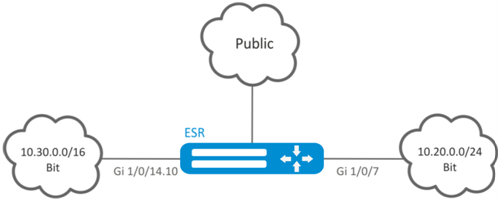
Configuration algorithm
Step | Description | Command | Keys |
|---|---|---|---|
1 | Create VRF instance and switch to the VRF instance parameters configuration mode. | esr(config)# ip vrf <VRF> | <VRF> – VRF instance name, set by the string of up to 31 characters. |
2 | Assign the description of the configured VRF instance. | esr(config-vrf)# description <DESCRIPTION> | <DESCRIPTION> – VRF instance description, set by the string of up to 255 characters. |
3 | Set the capacity of routing tables in configured VRF for IPv4/IPv6 (optional). | esr(config-vrf)# ip protocols <PROTOCOL> max-routes <VALUE> | <PROTOCOL> – protocol type, takes the following values: ospf, bgp; <VALUE> – amount of routes in the routing table, takes values in the range of:
Default value: 0. |
esr(config-vrf)#ipv6 protocols <PROTOCOL> max-routes <VALUE> | |||
4 | Enable and configure dynamic traffic routing protocols (Static/OSPF/BGP/IS-IS) in VRF instance (optional). See the related sections: Static routes configuration, OSPF configuration, and BGP configuration. | ||
5 | In the configuration mode of physical/logical interface, tunnel, DNAT/SNAT rule, DAS server or SNMPv3 user, specify the name of VRF instance for which the mode will be used (optional). | esr(config-snat-ruleset)# ip vrf forwarding <VRF> | <VRF> – VRF instance name, set by the string of up to 31 characters. |
6 | Configure LT tunnel to transmit traffic to global mode or to other VRFs (if required). |
| See LT tunnel configuration section. |
...
Configuration example
Objective:
...
| Блок кода |
|---|
esr(config)# security zone-pair vrf-sec vrf-sec esr(config-zone-pair)# rule 1 esr(config-zone-rule)# match source-address any esr(config-zone-rule)# match destination-address any esr(config-zone-rule)# match protocol udp esr(config-zone-rule)# match source-port any esr(config-zone-rule)# match destination-port any esr(config-zone-rule)# action permit esr(config-zone-rule)# enable esr(config-zone-rule)# exit esr(config-zone-pair)# rule 2 esr(config-zone-rule)# match source-address any esr(config-zone-rule)# match destination-address any esr(config-zone-rule)# match protocol tcp esr(config-zone-rule)# match source-port any esr(config-zone-rule)# match destination-port any esr(config-zone-rule)# action permit esr(config-zone-rule)# enable esr(config-zone-rule)# exit |
...
Create interface mapping, assign IP addresses, specify an inherence to a security zone:
...
MultiWAN technology establishes a fail-safe connection with redundancy of links from multiple providers and solves the problem involving traffic balancing between redundant links.
Configuration algorithm
Step | Description | Command | Keys |
|---|---|---|---|
1 | Configure interfaces through which MultiWAN will operate: set IP addresses and specify security zone. | ||
2 | Write static routes through WAN (if required). | esr(config)# ip route <SUBNET> wan load-balance rule <ID> [<METRIC>] | <ID> – identifier of the rule being created (see item 2). <METRIC> – route metric, takes values of [0..255]. |
3 | Create WAN rule and switch to the rule parameters configuration mode. | esr(config)# wan load-balance rule <ID> | <ID> – identifier of the rule being created, takes values in the range of [1..50]. |
4 | Specify interfaces or tunnels which are gateways in the route created by MultiWAN service. | esr(config-wan-rule)# outbound | <IF>– interface name; <TUN> – tunnel name; [WEIGHT] – tunnel or interface weight, defined in the range of [1..255]. If the value is equal 2, than 2 times more traffic will be transmit via the given interface than via the interface with the default value. A route with the highest weight will be active in the redundancy mode. Default value: 1 |
5 | Describe the rules (optional). | esr(config-wan-rule)# description <DESCRIPTION> | <DESCRIPTION> – wan rule description, set by the string of up to 255 characters. |
6 | This command is used to switch from the balancing mode to the redundancy mode (if necessary). | esr(config-wan-rule)# failover | |
7 | Enable wan rule. | esr(config-wan-rule)# enable | |
8 | Create a list of IP addresses to check the connection integrity and perform the switching to the list parameters configuration mode. | esr(config)# wan load-balance target-list <NAME> | <NAME> – list name, set by the string of up to 31 characters. |
9 | Specify the check target and switch to the target parameters configuration mode. | esr(config-target-list)# target <ID> | <ID> – target identifier, set in the range of [1..50]. If the 'all' parameter value is used when removing, all targets for the configured target list will be removed. |
10 | Describe target (optional). | esr(config-wan-target)# description <DESCRIPTION> | <DESCRIPTION> – target description, set by the string of up to 255 characters. |
11 | Specify the standby time via ICMP (optional). | esr(config-wan-target)# resp-time <TIME> | <TIME> – timeout, takes value in seconds [1..30]. |
12 | Specify IP address of the check. | esr(config-wan-target)# ip address <ADDR> | <ADDR> – destination IP address, defined as AAA.BBB.CCC.DDD where each part takes values of [0..255]. |
esr(config-wan-target)# ipv6 address <IPV6-ADDR> | <IPV6-ADDR> – destination IPv6 address, defined as X:X:X:X::X where each part takes values in hexadecimal format [0..FFFF]. | ||
13 | Enable target check. | esr(config-wan-target)# enable | |
Commands for 14–17 items should be applied on interfaces/tunnels in MultiWAN. | |||
14 | Enable WAN mode on the interface for IPv4/IPv6 stack. | esr(config-if-gi)# wan load-balance enable | |
esr(config-if-gi)# ipv6 wan load-balance enable | |||
15 | Set the amount of ineffective attempts to check the connection, after which, if there is not response from the opposing side, the connection is considered to be inactive (optional). | esr(config-if-gi)# wan load-balance failure-count <VALUE> | <VALUE> – number of attempts, takes values in the range of [1..10]. Default value: 1. |
esr(config-if-gi)# ipv6 wan load-balance failure-count <VALUE> | |||
16 | Set the amount of successful attempts to check the connection, after which, if successful, the connection is considered to be active again (optional). | esr(config-if-gi)# wan load-balance success-count <VALUE> | <VALUE> – number of attempts, takes values in the range of [1..10]. Default value: 1. |
esr(config-if-gi)# ipv6 wan load-balance success-count <VALUE> | |||
17 | Set a neighbor's IP address that will be indicated as one of the gateways in a static route created by MultiWAN service. | esr(config-if-gi)# wan load-balance nexthop { <IP> | dhcp enable | tunnel enable } | <IP> – destination IP address (gateway), defined as AAA.BBB.CCC.DDD where each part takes values of [0..255]. dhcp enable – if on the interface an IP address is obtained through a DHCP client, the gateway from the DHCP server is used. tunnel enable – use as nexthop – destination p-t-p address. Applicable for the interfaced being connected that operate via ppp. |
esr(config-if-gi)# ipv6 wan load-balance nexthop { <IPV6> } | <IPV6> – destination IPv6 address (gateway), defined as X:X:X:X::X where each part takes values in hexadecimal format [0..FFFF]. | ||
18 | This command will be checking the IP addresses from the integrity check list. If all (default)/at least one (using the check-all key) of the tested hosts is unavailable, the gateway is considered unavailable. | esr(config-if-gi)# wan load-balance target-list { check-all | <NAME> } | <NAME> – run check on the basis of a certain target list (specified in item 7). check-all – run check on the basis of all targets in the list. |
esr(config-if-gi)# ipv6 wan load-balance target-list { check-all | <NAME> } | |||
19 | Write static routes through WAN. | esr(config)# ip route <SUBNET> wan load-balance rule <ID> [<METRIC>] | <ID> – identifier of the rule being created (see item 2). <METRIC> – route metric, takes values of [0..255]. |
esr(config)# ipv6 route <SUBNET> wan load-balance rule <ID [<METRIC>] | |||
Configuration example
Objective:
...
IS-IS — ISO standardized dynamic routing protocol based on link-state. It provides fast convergence and excellent scalability, makes economical use of network bandwidth, and uses the Dijkstra Algorithm to calculate the best routes. A distinctive feature of the IS-IS protocol is to work on top of the data link layer of the OSI model, so it is not bound to a specific network layer protocol.
Configuration algorithm
Step | Description | Command | Keys |
|---|---|---|---|
1 | Create an IS-IS process and switch to the parameters configuration mode of this process. | esr(config)# router isis <ID> [vrf <VRF>] | <ID> – process number, takes values of [1..65535]; <VRF> – VRF instance name, set by the string of up to 31 characters. |
2 | Set NET address. | esr(config-isis)# net {<NET>} | <NET> – NET address, format: ff[.ffff.ffff.ffff.ffff.ffff.ffff].ffff.ffff.ffff.00. |
3 | Enable IS-IS process. | esr(config-isis)# enable | |
4 | Set the authentication algorithm for the L2 layer (optional). | esr(config-isis)# authentication domain algorithm <ALGORITHM> | <ALGORITHM> – authentication algorithm:
|
5 | Set the authentication password for the L2 layer (optional). | esr(config-isis)# authentication domain key ascii-text { <CLEAR-TEXT> | encrypted <ENCRYPTED-TEXT> } | <CLEAR-TEXT> – password, set by the string of 8 characters; <ENCRYPTED-TEXT> – encrypted password of 8 bytes (16 characters) in hexadecimal format (0xYYYY...) or (YYYY...). |
6 | Set a list of keys for authentication (optional). | esr(config-isis)# authentication domain key chain <KEYCHAIN> | <KEYCHAIN> – key list identifier, set by the string of up to 16 characters. |
7 | Select the authentication algorithm for the L1 layer (optional). | esr(config-isis)# authentication area algorithm <ALGORITHM> | <ALGORITHM> – authentication algorithm:
|
8 | Set the authentication password for the L1 layer (optional). | esr(config-isis)# authentication area key ascii-text { <CLEAR-TEXT> | encrypted <ENCRYPTED-TEXT> } | <CLEAR-TEXT> – password, set by the string of 8 characters; <ENCRYPTED-TEXT> – encrypted password of 8 bytes (16 characters) in hexadecimal format (0xYYYY...) or (YYYY...). |
9 | Set a list of keys for authentication (optional). | esr(config-isis)# authentication area key chain <KEYCHAIN> | <KEYCHAIN> – key list identifier, set by the string of up to 16 characters. |
10 | Enable transmission of router/controller name to the LSP (optional). | esr(config-isis)# hostname dynamic | |
11 | Set the IS-IS process operating level (optional). | esr(config-isis)# is-type {<LEVEL>} | <LEVEL> – IS-IS protocol operation level:
|
12 | Set the type of metric to be used in the IS-IS process (optional). | esr(config-isis)# metric-style { narrow | wide | transition } [<LEVEL>] | narrow — accepts and generates TLVs (on network reachability) of the old type; wide — accepts and generates TLVs (on network reachability) of the new type; transition — accepts and generates TLVs (on network reachability) of the new and old type; <LEVEL> – IS-IS protocol operation level:
|
13 | Set the route priority for the specified IS-IS process (optional). | esr(config-isis)# preference {<VALUE>} | <VALUE> – may take values [1..255]. |
14 | Enable IS-IS operation with IPv4 and/or IPv6 addresses (optional). | esr(config-isis)# address-family { ipv4 | ipv6 } | ipv4 – IPv4 family; ipv6 – IPv6 family. |
15 | Set the update interval for own LSP (optional). | esr(config-isis)# lsp-refresh-interval { min | max } <TIME> [ <LEVEL> ] | min — minimum update/generation interval; max — maximum update/generation interval; <TIME> – time in seconds, takes values of [1..65535]; <LEVEL> – IS-IS protocol operation level:
|
16 | Set the lifetime of own LSP (optional). | esr(config-isis)# max-lsp-lifetime <TIME> [<LEVEL>] | <TIME> – time in seconds, takes values of [1..65535]; <LEVEL> – IS-IS protocol operation level:
|
17 | Set a timeout before the next SPF calculation (optional). | esr(config-isis)# spf-timeout <TIME> [<LEVEL>] | <TIME> – time in milliseconds, takes values of [1..10000]; <LEVEL> – IS-IS protocol operation level:
|
18 | Enable advertising of routes received in an alternative way (optional). | esr(config-isis)# redistribute bgp <AS> [ route-map <NAME> ] [is-type <LEVEL>] | <AS> – stand alone system number, takes values of [1..4294967295]. <NAME> – name of the route map that will be used for advertised routes filtration and modification, set by the string of up to 31 characters; <LEVEL> – IS-IS protocol operation level:
|
esr(config-isis)# redistribute ipv6 bgp <AS> [ route-map <NAME> ] [is-type <LEVEL>] | |||
esr(config-isis)# redistribute ospf <ID> <ROUTE-TYPE> [ route-map <NAME> ] [is-type <LEVEL>] | <ID> – process number, takes values of [1..65535]. <ROUTE-TYPE> – route type:
<NAME> – name of the route map that will be used for advertised OSFP routes filtration and modification, set by the string of up to 31 characters; <LEVEL> – IS-IS protocol operation level:
| ||
esr(config-isis)# redistribute ipv6 ospf <ID> <ROUTE-TYPE> [ route-map <NAME> ] [is-type <LEVEL>] | |||
esr(config-isis)# redistribute isis <ID> <ROUTE-TYPE> [ route-map <NAME> ] [is-type <LEVEL>] | <ID> – process number, takes values of [1..65535]. <ROUTE-TYPE> – route type:
<NAME> – name of the route map that will be used for advertised IS-IS routes filtration and modification, set by the string of up to 31 characters; <LEVEL> – IS-IS protocol operation level:
| ||
esr(config-isis)# redistribute rip [ route-map <NAME> ] [is-type <LEVEL>] | <NAME> – name of the route map that will be used for advertised RIP routes filtration and modification, set by the string of up to 31 characters; <LEVEL> – IS-IS protocol operation level:
| ||
esr(config-isis)# redistribute static [ route-map <NAME> ] [is-type <LEVEL>] | <NAME> – name of the route map that will be used for advertised static routes filtration and modification, set by the string of up to 31 characters; <LEVEL> – IS-IS protocol operation level:
| ||
esr(config-isis)# redistribute connected [ route-map <NAME> ] [is-type <LEVEL>] | <NAME> – name of the route map that will be used for advertised connected routes filtration and modification, set by the string of up to 31 characters; <LEVEL> – IS-IS protocol operation level:
| ||
19 | Add subnets filtration in incoming or outgoing updates (optional). | esr(config-isis)# prefix-list { ipv6 <LIST_NAME> | <LIST_NAME> } {in|out} | <LIST-NAME> – name of a subnet list being configured, set by the string of up to 31 characters. in – incoming routes filtration; out – advertised routes filtration. |
20 | Add subnets filtration in incoming or outgoing updates (optional). | esr(config-isis)# route-map <NAME> {in|out} | <NAME> – name of the route map that will be used for advertised routes filtration and modification, set by the string of up to 31 characters. |
21 | Set a matching of interface to a specified IS-IS process. | esr(config-if-gi)# isis instance <ID> | <ID> – process number, takes values of [1..65535]. |
22 | Enable the IS-IS protocol on the interface. | esr(config-if-gi)# isis enable | |
23 | Enable the use of TLV#8 in hello packets (optional). | esr(config-if-gi)# isis hello-padding | |
24 | Set the priority when selecting DIS (optional). | esr(config-if-gi)# isis priority <VALUE> [<LEVEL>] | <VALUE> – number, may take values [0..127]; <LEVEL> – IS-IS protocol operation level:
|
25 | Set the metric value for the interface (optional). | esr(config-if-gi)# isis metric <VALUE> [<LEVEL>] | <VALUE> – number, may take values [1..16777215]; <LEVEL> – IS-IS protocol operation level:
|
26 | Set defines which routing layer on the interface the current IS-IS process will run on (optional). | esr(config-if-gi)# isis circuit-type {<LEVEL>} | <LEVEL> – IS-IS protocol operation level:
|
27 | Set the interval for sending hello packets (optional). | esr(config-if-gi)# isis hello-interval <TIME> [<LEVEL>] | <TIME> – time in seconds, takes values of [1..65535]; <LEVEL> – IS-IS protocol operation level:
|
28 | Set the multiplier for calculating and sending Hold Time (optional). | esr(config-if-gi)# isis hello-multiplier <VALUE> [<LEVEL>] | <VALUE> – number, may take values [3..1000]; <LEVEL> – IS-IS protocol operation level:
|
29 | Set the interface to point-to-point IS-IS protocol mode (optional). | esr(config-if-gi)# isis network point-to-point | |
30 | Set the interval for generating and sending CSNP (optional). | esr(config-if-gi)# isis csnp-interval <TIME> [<LEVEL>] | <TIME> – time in seconds, takes values of [1..65535]; <LEVEL> – IS-IS protocol operation level:
|
31 | Set the interval for generating and sending PSNP (optional). | esr(config-if-gi)# isis psnp-interval <TIME> [<LEVEL>] | <TIME> – time in seconds, takes values of [1..65535]; <LEVEL> – IS-IS protocol operation level:
|
32 | Set the interval between LSP transmissions on the Broadcast network (optional). | esr(config-if-gi)# isis lsp-interval <TIME> [<LEVEL>] | <TIME> – time in milliseconds, takes values of [1-10000]; <LEVEL> – IS-IS protocol operation level:
|
33 | Set the LSP re-distribution interval in the PtP network (optional). | esr(config-if-gi)# isis lsp-retransmit-interval <TIME> [<LEVEL>] | <TIME> – time in seconds, takes values of [1..65535]; <LEVEL> – IS-IS protocol operation level:
|
34 | Set the authentication algorithm for the hello packets (optional). | esr(config-if-gi)# isis authentication algorithm <ALGORITHM> [<LEVEL>] | <ALGORITHM> – authentication algorithm:
<LEVEL> – IS-IS protocol operation level:
|
35 | Set the password for hello packet authentication (optional). | esr(config-if-gi)# isis authentication key ascii-text { <CLEAR-TEXT> | encrypted <ENCRYPTED-TEXT> } [<LEVEL>] | <CLEAR-TEXT> – password, set by the string of 8 characters; <ENCRYPTED-TEXT> – encrypted password of 8 bytes (16 characters) in hexadecimal format (0xYYYY ...) or (YYYY ...); <LEVEL> – IS-IS protocol operation level:
|
36 | Set the key list for hello packet authentication (optional). | esr(config-if-gi)# isis authentication key chain <KEYCHAIN> [<LEVEL>] | <KEYCHAIN> – key list identifier, set by the string of up to 16 characters; <LEVEL> – IS-IS protocol operation level:
|
Configuration example
Objective:
...