
...
R1 configuration
Enable LLDP globally on the router:Блок кода esr(config)# lldp enable
Enable the receiving and transmission of LLDPDU on the gi 1/0/1 interface.
Блок кода esr(config)# interface gigabitethernet 1/0/1 esr(config-if-gi)# lldp receive esr(config-if-gi)# lldp transmit
R2 configuration
Enable LLDP globally on the router/controller:
Блок кода esr(config)# lldp enable
Enable the receiving and transmission of LLDPDU on the gi 1/0/1 interface.
Блок кода esr(config)# interface gigabitethernet 1/0/1 esr(config-if-gi)# lldp receive esr(config-if-gi)# lldp transmit
To view LLDP neighbors information, use the following command:
Блок кода esr# show lldp neighbors
To view more detailed information on the certain interface neighbor, use the following command:
Блок кода esr# show lldp neighbors gigabitethernet 1/0/1
To view LLDP statistics, use the following command:
Блок кода esr# show lldp statistics
Scroll Pagebreak
LLDP MED configuration
LLDP MED — LLDP standard enhancement which allows to transmit network policies: VLAN ID, DSCP, priority.
...
Configure STP on the router to prevent a loop with a 10 second listen and learn interval and a spanning tree lifetime of 15 seconds.
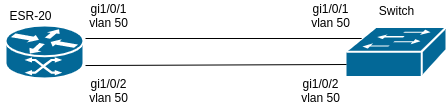
Solution:
Example of a diagram with a router and a switch connected by two links is given below.
...
Configure PPP connection to the opposite side with IP address 192address 192.0.2.2/24 via TOPGATE-WAN-E1 using 1-8 channel slots for data transmission; the clock source is the opposite side.
...
Solution:
First, configure system jumbo-frames, save changes to the configuration and reboot the router:
| Блок кода |
|---|
esr(config)# system jumbo-frames esr(config)# exit esr# commit esr# confirm esr# reload system Do you really want to reload system ? (y/N): y |
| Scroll Pagebreak |
|---|
...
| Примечание | ||
|---|---|---|
| ||
Modem Zyxel U-336E Plus. |
Scroll Pagebreak
Solution:
Configure the first ESR-21
...
| Блок кода |
|---|
esr-21-1(config)# line aux 2 esr-21-1(config-line-aux)# flowcontrol hardware esr-21-1(config-line-aux)# exit esr-21-1(config)# |
Configure the required RS-232 interfaces:Scroll Pagebreak
...
| Блок кода |
|---|
esr-21-2(config)# security zone xx esr-21-2(config-zone)# exit esr-21-2(config)# security zone-pair xx self esr-21-2(config-zone-pair)# rule 1 esr-21-2(config-zone-pair-rule)# action permit esr-21-2(config-zone-pair-rule)# enable esr-21-2(config-zone-pair-rule)# exit esr-21-2(config-zone-pair)# exit esr-21-2(config)# |
| Scroll Pagebreak |
|---|
...
| Примечание | ||
|---|---|---|
| ||
|
Solution:Scroll Pagebreak
Configure the first ESR-21
...
| Блок кода |
|---|
esr-21-1(config)# interface serial 1/0/2 esr-21-1(config-serial)# dialer string 001 modem-script dial_test esr-21-1(config-serial)# exit esr-21-1(config)# |
...
Create a line with additional modem initialization parameters for the second ESR-21:
...