
...
Предупреждение title Attention Perform a full backup - You need to mask all nodes on the server and disable node autostart:
Блок кода title on ecss1 sudo systemctl mask --now ecss-ds ecss-mycelium ecss-mediator ecss-core ecss-pa-sip ecss-sorm
Информация When the attached command is executed, a notification will be displayed.
Без форматирования Warning: The unit file, source configuration file or drop-ins of ecss-ds.service changed on disk. Run 'systemctl daemon-reload' to reload units. Warning: The unit file, source configuration file or drop-ins of ecss-mycelium.service changed on disk. Run 'systemctl daemon-reload' to reload units. Warning: The unit file, source configuration file or drop-ins of ecss-mediator.service changed on disk. Run 'systemctl daemon-reload' to reload units. Warning: The unit file, source configuration file or drop-ins of ecss-core.service changed on disk. Run 'systemctl daemon-reload' to reload units. Warning: The unit file, source configuration file or drop-ins of ecss-pa-sip.service changed on disk. Run 'systemctl daemon-reload' to reload units.
These messages are not errors. Continue with the procedure.
- Update the ssw repository:
Блок кода title on ecss1 sudo sh -c "echo deb [arch=amd64] http://archive.eltex.org/ssw/jammy/3.18 stable main extras external > /etc/apt/sources.list.d/eltex-ecss10-stable.list"
- Perform package update:
Блок кода title on ecss1 sudo apt update
Примечание If you see this system message:
Без форматирования W: http://archive.eltex.org/ssw/jammy/3.18/dists/unstable/InRelease: Key is stored in legacy trusted.gpg keyring (/etc/apt/trusted.gpg), see the DEPRECATION section in apt-key(8) for details.
Run the following command:
Блок кода title on both hosts sudo cp /etc/apt/trusted.gpg /etc/apt/trusted.gpg.d
- Updating PostgreSQL:
- Turn off the Docker container:
Блок кода title on ecss2 sudo docker compose -f /srv/ecss/ecss-postgres-bdr-ssw/docker-compose.container.yml down
Блок кода title Example: sudo docker compose -f /srv/ecss/ecss-postgres-bdr-ssw/docker-compose.container.yml down [+] down 2/2 ✔ Container ecss-postgres-bdr-ssw-postgres-container-1 Removed ✔ Network ecss-postgres-bdr-ssw_default Removed
- Remove the old deb package, since the upgrade option is not supported:
Блок кода title on ecss2 sudo apt remove ecss-postgres-bdr-ssw
Предупреждение title !!Important!! Run remove, not purge, because remove preserves the volumes directory with our database tables.
Блок кода title Example: sudo apt remove ecss-postgres-bdr-ssw Reading package lists... Done . . . The following packages will be REMOVED: ecss-postgres-bdr-ssw . . . Do you want to continue? [y/n] y Deleting ecss-postgres-bdr-ssw (17.1.0.59+ssw) …
- Install a new deb package:
Блок кода title on ecss2 sudo apt install ecss-postgres-bdr-ssw
Предупреждение title !!IMPORTANT!! During installation, you will be asked the same questions as during the initial installation:
The answers must exactly match those specified in the procedure, otherwise an attempt will be made to create a new database and the installation will fail.
Информация Question Reply Example The current IP address of the network interface.
10.0.10.41 (select) 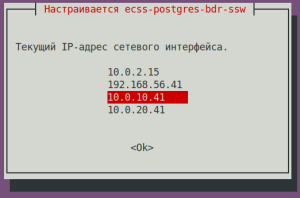
Install on a cluster?
Select <Yes> if the package is installed on a cluster node.
No (select) 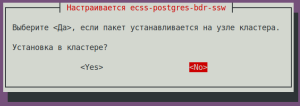
Блок кода title If the installation is successful, at the stage of raising replication we will see: sudo apt install ecss-postgres-bdr-ssw . . . ================== Create databases ================== Database ecss_storekeeper_db already exists, skipping... Database web_conf already exists, skipping... Extension btree_gist already exists, skipping... Extension bdr already exists, skipping... =================================== Creating Postgres Exporter Schema =================================== Node IP: localhost psql:/srv/ecss/ecss-postgres-bdr-ssw/schema.sql:1: NOTICE: schema "postgres_exporter" already exists, skipping CREATE SCHEMA GRANT CREATE FUNCTION CREATE VIEW GRANT CREATE FUNCTION CREATE VIEW GRANT psql:/srv/ecss/ecss-postgres-bdr-ssw/schema.sql:28: NOTICE: extension "pg_stat_statements" already exists, skipping CREATE EXTENSION CREATE FUNCTION CREATE VIEW GRANT . . . ======================================================= ======================================================= ecss-postgres-bdr-ssw successfully installed/updated! ======================================================= ======================================================= ┏┓┏┓┏┓┏┳┓┏┓┳┓┏┓┏┓ ┳┓┳┓┳┓ ┏┓┏┓┓ ┏ ┃┃┃┃┗┓ ┃ ┃┓┣┫┣ ┗┓ ┣┫┃┃┣┫ ┗┓┗┓┃┃┃ ┣┛┗┛┗┛ ┻ ┗┛┛┗┗┛┗┛ ┻┛┻┛┛┗ ┗┛┗┛┗┻┛
- After installation, check that the new image has been pulled in and Docker has started by running the command:
Блок кода title on ecss2 sudo docker ps
Блок кода title example: sudo docker ps CONTAINER ID IMAGE COMMAND CREATED STATUS PORTS NAMES bf73743d3e09 git.eltex.loc:4567/ecss/ecss-postgresbdr:3.18 "/docker-entrypoint.…" About a minute ago Up About a minute 0.0.0.0:5439->5432/tcp, [::]:5439->5432/tcp ecss-postgres-bdr-ssw-postgres-container-1
- Turn off the Docker container:
- Updating the ecss-dns-env package:
Блок кода title on ecss1 sudo apt install ecss-dns-env
After the update, you need to update the configuration by running the command. The answers to the questions are similar to the installation procedure:Блок кода title on ecss1 sudo dpkg-reconfigure ecss-dns-env
- Update the ecss-user package:
Подсказка When updating, you need to apply new configuration files (confirm with -Y).
Блок кода title on ecss1 sudo apt install ecss-user
- Update the ecss-utils package:
Блок кода title on ecss1 sudo apt install ecss-utils
Раскрыть title In case of using ELM licensing Install the License Provider package:
Блок кода title on ecss2 sudo apt install ecss-license-provider
When installing the ecss-license-provider package the following questions will be asked:
Questions Answers Examples License Provider listen ip:
0.0.0.0 (default value) 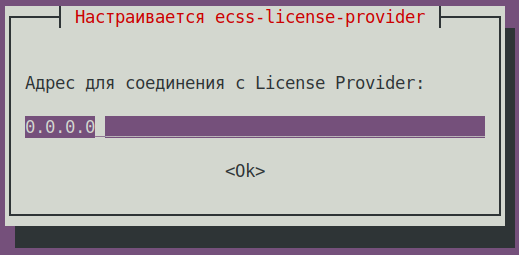
License Provider listen port: 4321 (default value) 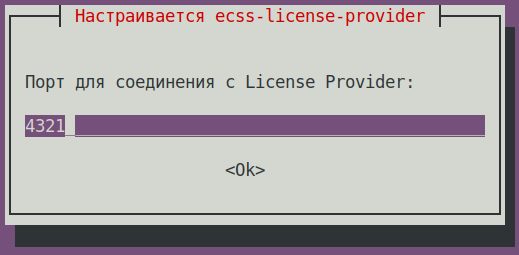
Log level: info (default value),
possible options: debug, error, info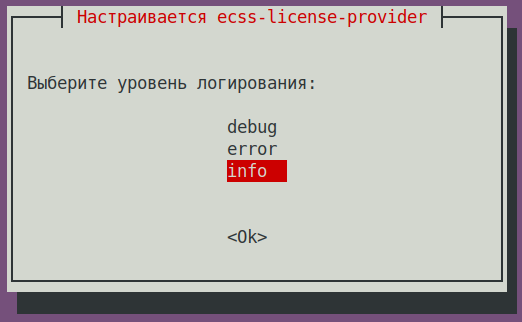
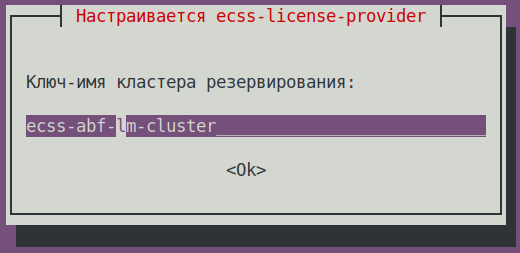
License Provider cluster key: specify a unique name
ecss-lm-cluster (default value)Подсказка Managers with the same names will attempt to form a cluster for mutual redundancy.
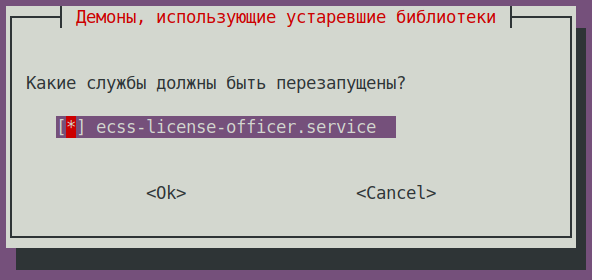
What services should be restarted? ecss-license-provider.service (default value)
The data is saved to the /etc/ecss/ecss-license-provider/config.env file:
Без форматирования ECSS_LM_HOST=0.0.0.0 ECSS_LM_PORT=4321 ECSS_LM_LOG_LEVEL=info RELEASE_COOKIE=ecss-abf-lm-cluster
Configuring License Provider (LP)
The
ecss-license-providerservice uses two configuration files:/etc/ecss/ecss-license-provider/config.envand/etc/ecss/ecss-license-provider/config.yaml.The information is saved to the
config.envfile when the ecss-license-provider is installed.The config.yaml file contains general settings for connecting to the ELM server and information about licenses: what licenses to take, where to take them from, and where to send them, all this information should be configured manually.
To fill out these fields, open theБлок кода title information in the file after installation elm_addresses: [] licenses: [] ecss_nodes: []
ecss-elm-adapterconfiguration file used in the version 3.17/etc/ecss/ecss-elm-adapter/config.env:Блок кода title on ecss2 сatcat /etc/ecss/ecss-elm-adapter/config.env ELM_HOST=elm.eltex-co.ru ELM_PORT=8099 ECSS_PRODUCT_ID=ECSS2000000 ECSS_LICENSE_KEY=ssw987654 LOG_LEVEL=info LICENCE_FAIL_TIMER_SECONDS=10 LICENCE_PULL_TIMER_SECONDS=360
In the
elm_addressesfield, you must specify a list of ELM servers to which you want to connect to obtain licenses. First address in the list is used as the main one. Additional lines contain backup addresses.
Example:
- "elm.eltex-co.ru:8099"
- "192.168.111.22:8099"
- "elm-3.eltex.loc:8099"
Then licenses in the licenses field are specified.- The id can be anything, as long as it is unique for each license. It only affects the license address on the License Provider itself (e.g., 0, 1, 2, 3).
- kind. For SSW, only SSW (in uppercase) is supported.
- type is set to elm if this license is to be requested from the ELM server. If you need to use an SSW file-based license, set the type to ecss_license.
- For the elm type, you must specify the license_key and product_id fields to identify the license.
- For the ecss_license type, specify the license field, which contains the static license key.
Примечание license_key = ECSS_LICENSE_KEY and product_id = ECSS_PRODUCT_ID parameters must match the data previously uploaded to the ELM server.
ecss_nodes block.
You must specify the details of the services that will receive the license. A service is defined by three parameters:
- id - the service identifier. In the case of SSW, this must match the ECSS_ID of the SSW being licensed.
- kind - the type of service being licensed. As with the licenses block, the SSW and AUP types are supported. For SSW, only the SSW type is supported.
- license_id - the identifier of the license that will be sent to this service. It corresponds to the license identifiers from the licenses block
Примечание Two SSWs with different ECSS_IDs cannot receive the same license; a configuration with such an assignment will be marked as invalid.
Additionally, two SSWs with identical ECSS_IDs cannot simultaneously obtain the same license from a single License Provider; therefore, it is extremely important to set your ECSS_ID correctly and ensure it is unique, at least within the scope of the License Provider being used.Подсказка ECSS_ID format.
It must begin and end with a Latin letter or a digit; periods and dashes may be used within the string.Без форматирования [A-Za-z0-9][A-Za-z0-9.-][A-Za-z0-9]
Блок кода title Example of a config.yaml file based on data from the file elm_addresses: - "elm.eltex-co.ru:8099" licenses: - id: 0 kind: SSW type: elm license_key: "ssw987654" product_id: "ECSS2000000" ecss_nodes: - id: eltex1.test kind: ssw license_id: 0
Restart the
ecss-license-provider.serviceservice to up date the configuration from the/etc/ecss/ecss-license-provider/config.yamlfile via the following command:Блок кода title on both hosts if there is a cluster sudo systemctl restart ecss-license-provider.service
- Update the ecss-node package:
Блок кода title on ecss1 sudo apt install ecss-node
During installation, you will be prompted to configure the settings required to generate the configuration files; examples of possible answers are provided below.
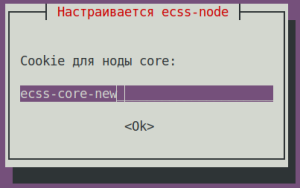
ecss-node questions Answers for ecss1 Example Cookies for the core node:
ecss-core (default value)
Подсказка It is recommended to replace this with a unique value
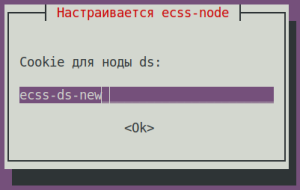
Cookies for the ds node:
ecss-ds (default value)
Подсказка It is recommended to replace this with a unique value
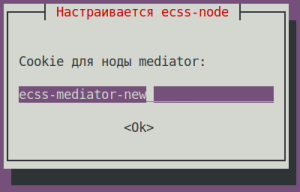
Cookies for the mediator node:
ecss-mediator (default value)
Подсказка It is recommended to replace this with a unique value
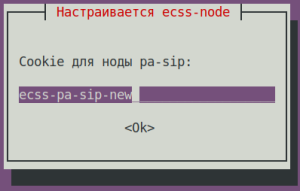
Cookies for the pa-sip node:
ecss-pa-sip (default value)
Подсказка It is recommended to replace this with a unique value
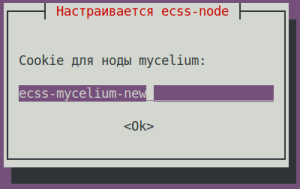
Cookies for the mycelium node:
ecss-mycelium (default value)
Подсказка It is recommended to replace this with a unique value
Use the current version of the configuration file?
No (default value)
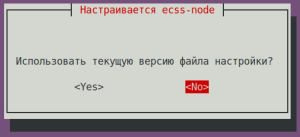
Подсказка When updating, you must apply the new configuration files (confirm with -Y).
- Enable the nodes.
Enable the SSW services using the following commands:Блок кода title on ecss1 sudo systemctl unmask ecss-ds ecss-mycelium ecss-mediator ecss-core ecss-pa-sip ecss-sorm
Блок кода title on ecss1 sudo systemctl enable ecss-ds ecss-mycelium ecss-mediator ecss-core ecss-pa-sip ecss-sorm
- Starting SSW on ecss1. Start the following services:
ecss-mycelium
ecss-dsБлок кода title on ecss1 sudo systemctl start ecss-mycelium
ecss-coreБлок кода title on ecss1 sudo systemctl start ecss-ds
ecss-mediatorБлок кода title on ecss1 sudo systemctl start ecss-core
Блок кода title on ecss1 sudo systemctl start ecss-mediator
Предупреждение Do not start PA-SIP yet
- Check the status of services by running the
system-statuscommand in CoCon:Блок кода title performed in CoCon /system-status Checking... ┌─┬───────────────┬────────────────────────┬───────────────┬────────────┬──────┐ │ │ Node │ Release │ Erlang nodes │Mnesia nodes│Uptime│ ├─┼───────────────┼────────────────────────┼───────────────┼────────────┼──────┤ │ │core1@ecss1 │ecss-core-3.18.0.271 │core1@ecss1 │not running │14m 4s│ │ │ds1@ecss1 │ecss-ds-3.18.0.271 │ds1@ecss1 │ds1@ecss1 │14m 4s│ │ │md1@ecss1 │ecss-mediator-3.18.0.271│md1@ecss1 │md1@ecss1 │14m 4s│ │ │mycelium1@ecss1│ecss-mycelium-3.18.0.271│mycelium1@ecss1│not running │14m 4s│ │ │sorm1@ecss1 │ecss-sorm-3.18.0.271 │sorm1@ecss1 │not running │14m 5s│ └─┴───────────────┴────────────────────────┴───────────────┴────────────┴──────┘ All services are started. Active media resource selected list specific: ┌─────────────┬───────────┬────────────┬───────────┬───────────┐ │ Node │ MSR │ MSR │ Cc-status │ Cc-uptime │ │ │ │ version │ │ │ ├─────────────┼───────────┼────────────┼───────────┼───────────┤ │ core1@ecss1 │ msr.ecss1 │ 3.17.1.1.7 │ connected │ 00:43:03 │ └─────────────┴───────────┴────────────┴───────────┴───────────┘
- Режимы лицензированияLicensing modes.
Раскрыть title If a file-based license is used Информация title If a file-based license is used No additional actions are required.
Без форматирования /cluster/storage/ds1/licence/list-licence ┌──┬───────────────────┬────────────────┬──────┬────────────────────────────────────────────┬────────────────────┬────────────┐ │Id│Creation date(UTC) │ SSW ID │Active│ Description │Expiration date(UTC)│ Time left │ ├──┼───────────────────┼────────────────┼──────┼────────────────────────────────────────────┼────────────────────┼────────────┤ │1 │31.10.2025 14:16:00│ECSS 010070 │* │Eltex SC softswitch │31.12.2026 23:59:59 │224d 21h 31m│ │0 │ │ECSS DEFAULT │ │Default licence │ │ │ └──┴───────────────────┴────────────────┴──────┴────────────────────────────────────────────┴────────────────────┴────────────┘
Раскрыть title If the ELM licensing is used Configure the SSW connection to the License Provider using the following command in CoCon (in this example, the License Provider is installed in the ecss1 host, hosts' IPadd is 10.0.10.41. The default port value from the
/etc/ecss/ecss-license-provider/config.envfile is 4321)Блок кода title performed in CoCon /system/licence/manager/set --hosts [https://10.0.10.41:4321]
After execution, check the connection status with the following command:
Блок кода title performed in CoCon /system/licence/manager/show-status ┌───────────────────────┬───────┬─────┐ │ Host │Current│Alive│ ├───────────────────────┼───────┼─────┤ │https://10.0.10.41:4321│* │true │ └───────────────────────┴───────┴─────┘
Teh host should have a status of alive=true and be “current.”
- Current - indicates which host the SSW is connected to. If there is a connection, * is displayed; if not, nothing is displayed.
- Alive - displays the host’s availability status (healthcheck).
Информация title Connecting to the License Manager A lack of connection to the License Provider or ELM is equivalent to a lack of access to the token, which will lead to critical failures and a transition to emergency mode; after a certain period, if the connection is not restored, the system will switch to the Default license.
This behavior applies only when operating in ELM mode.
If the status for one of the License Provider hosts is shown as “current,” you can send a request to upload the license to the SSW using the following command:
Блок кода title performed in CoCon /cluster/storage/ds1/licence/request
Блок кода title type=elm /cluster/storage/ds1/licence/request Licence received [******* ] 6s 2ms Success: Licence parameters applied
Блок кода title type=elm /cluster/storage/ds1/licence/list-licence ┌──┬───────────────────┬────────────┬──────┬────────────────┬────────────────────┬────────────────────┬─────────┐ │Id│Creation date(UTC) │ SSW ID │Active│ Description │Comm. Exp. Date(UTC)│Expiration date(UTC)│Time left│ ├──┼───────────────────┼────────────┼──────┼────────────────┼────────────────────┼────────────────────┼─────────┤ │1 │14.04.2026 11:18:34│ECSS2000000 │* │ECSS ELM License│09.04.2027 16:26:34 │06.06.2026 10:49:12 │1d 6h 59m│ │0 │01.01.1990 00:00:00│ECSS DEFAULT│ │Default licence │ │ │ │ └──┴───────────────────┴────────────┴──────┴────────────────┴────────────────────┴────────────────────┴─────────┘
- Updating the
ecss-restfspackage.Подсказка Accept all new configuration files by choosing Y.
Блок кода title on ecss1 sudo apt install ecss-restfs
- Updating the
ecss-media-serverpackage.
Perform an update:Предупреждение The Media Server analyzes the configuration in the files located in the /etc/ecss/ecss-media-server/ directory. Version 3.17 introduces a new feature for managing codec priorities. If, for any reason, multiple files contain a codec section that lists the same codec more than once, a conflict will occur after the update, and the Media Server will not function.
Therefore, there should be no conflicts regarding codec priorities in the configuration files of a single Media Server (there should be only one entry for one codec, and it should not be repeated in other files). The decision regarding which specific files need to be configured is left to the discretion of the system administrator.
Подсказка Accept all new configuration files by choosing Y.
Update the configuration:Блок кода title on ecss1 sudo apt install ecss-media-server
Блок кода title on ecss1 sudo dpkg-reconfigure ecss-media-server
- Updating the ecss-media-resources package
Блок кода title on ecss1 sudo apt install ecss-media-resources
- Updating the ecss-web-conf package
Блок кода title on ecss1 sudo apt install ecss-web-conf
Раскрыть title Updating optional service packages Updating the
ecss-teleconference-uipackage.Блок кода title on ecss1 sudo apt install ecss-teleconference-ui
Updating the
ecss-crm-serverpackage.Блок кода title on ecss1 sudo apt install ecss-crm-server
Updating the
ecss-cc-uipackage.Блок кода title on ecss1 sudo apt install ecss-cc-ui
Updating the
ecss-call-apipackage.Блок кода title on ecss1 sudo apt install ecss-call-api
Updating the
ecss-peeper-clientpackage.Блок кода title on ecss1 sudo apt install ecss-peeper-client
- Launch ecss-pa-sip:
Check the status of services by running the /system-status command:Блок кода title on ecss1 sudo systemctl start ecss-pa-sip
Verify that active registrations have been migrated to the updated host. To do this, check the registered subscribers on SSW. Execute the following command in CoCon:Блок кода title performed in CoCon /system-status Checking... ┌─┬───────────────┬────────────────────────┬───────────────┬────────────┬───────┐ │ │ Node │ Release │ Erlang nodes │Mnesia nodes│Uptime │ ├─┼───────────────┼────────────────────────┼───────────────┼────────────┼───────┤ │ │core1@ecss1 │ecss-core-3.18.0.271 │core1@ecss1 │not running │54m 27s│ │ │ds1@ecss1 │ecss-ds-3.18.0.271 │ds1@ecss1 │ds1@ecss1 │54m 27s│ │ │md1@ecss1 │ecss-mediator-3.18.0.271│md1@ecss1 │md1@ecss1 │54m 27s│ │ │mycelium1@ecss1│ecss-mycelium-3.18.0.271│mycelium1@ecss1│not running │54m 27s│ │ │sip1@ecss1 │ecss-pa-sip-3.18.0.271 │sip1@ecss1 │sip1@ecss1 │54m 27s│ │ │sorm1@ecss1 │ecss-sorm-3.18.0.271 │sorm1@ecss1 │not running │54m 27s│ └─┴───────────────┴────────────────────────┴───────────────┴────────────┴───────┘ All services are started. Active media resource selected list specific: ┌─────────────┬───────────┬──────────┬───────────┬───────────┐ │ Node │ MSR │ MSR │ Cc-status │ Cc-uptime │ │ │ │ version │ │ │ ├─────────────┼───────────┼──────────┼───────────┼───────────┤ │ core1@ecss1 │ msr.ecss1 │ 3.18.0.7 │ connected │ 00:01:17 │ └─────────────┴───────────┴──────────┴───────────┴───────────┘
Блок кода title performed in CoCon /domain/test_domain/sip/user/registered sip * 450 make users list ... [**********************************************************************] 28mks 450 users information read ... [**********************************************************************] 1ms Executed on the sip1@ecss1 ┌───────────────┐ │ elements: 436 │ └───────────────┘
- After the update is complete, verify that all SSW services are functioning properly.
...
| Блок кода | ||
|---|---|---|
| ||
free -h |
Размер Swap равен size equals 0 — значит, он выключен, which means it's disabled
| Без форматирования | ||
|---|---|---|
| ||
free -h
              total        used        free      shared  buff/cache   available
Mem:           3,9G        110M        3,2G        820K        535M        3,5G
Swap:            0B          0B          0B
|
...
| Предупреждение | |||||||||||||||||||||||||||
|---|---|---|---|---|---|---|---|---|---|---|---|---|---|---|---|---|---|---|---|---|---|---|---|---|---|---|---|
| |||||||||||||||||||||||||||
Before installing
|
...
| Раскрыть | ||||||||||||||||||||||||||||||||||||||||||||||||||||||||
|---|---|---|---|---|---|---|---|---|---|---|---|---|---|---|---|---|---|---|---|---|---|---|---|---|---|---|---|---|---|---|---|---|---|---|---|---|---|---|---|---|---|---|---|---|---|---|---|---|---|---|---|---|---|---|---|---|
| ||||||||||||||||||||||||||||||||||||||||||||||||||||||||
Install the License Provider package:
When istalling the ecss-license-provider package, the following questions will be asked:
The data is saved to the /etc/ecss/ecss-license-provider/config.env file:
License Provider (LP) configuration The ecss-license-provider service uses two configuration files: /etc/ecss/ecss-license-provider/config.env and /etc/ecss/ecss-license-provider/config.yaml. Information is saved to the config.env file during the ecss-license-provider package installation. The config.yaml file contains main settings for connecting to the ELM server: where to take licenses from, which licenses to take, and where to send them. All of this should be configured manually.
It is necessary to specify the ELM servers list to which you wnat to connect to obtain licenses. First address in the list is used as the main one. Additional lines contain backup addresses:
The ecss_nodes block. This block must specify the details of the services that will receive the license. A service is specified by three parameters:
Restart the ecss-license-provider.service service for updating configuration from the /etc/ecss/ecss-license-provider/config.yaml file using the following command:
|
...
| Раскрыть | ||||||||||||||||||||||||||||||
|---|---|---|---|---|---|---|---|---|---|---|---|---|---|---|---|---|---|---|---|---|---|---|---|---|---|---|---|---|---|---|
| ||||||||||||||||||||||||||||||
Configure the SSW connection to the License Provider using the following command in CoCon (in this example, the License Provider is installed on the ecss1 host, hosts IPadd is 10.0.10.51. Port value from the /etc/ecss/ecss-license-provider/config.env file is 4321 by default):
After execution, check the connection status with the following command:
Хост должен иметь статус The host should have the alive=true . И быть «current»status and be "current".
If the status for one of the License Provider hosts is shown as “current,” you can send a request to upload the license to the SSW using the following command:
|
...
| Блок кода | ||
|---|---|---|
| ||
abf@ecss1:/var/lib/ecss/restfs/domain$ ls -la /var/lib/ecss/restfs/domain итого8 8total drwxr-xr-x 2 www-data www-data 4096 apr 22 18:21 . drwxr-xr-x 7 www-data www-data 4096 may 28 15:07 .. abf@ecss1:/var/lib/ecss/restfs/domain$ sudo rsync -a abf@10.0.10.10:/var/lib/ecss/restfs/domain/ /var/lib/ecss/restfs/domain/ abf@ecss1:/var/lib/ecss/restfs/domain$ ls -la test_domain/records/2026_05_28 итого610 610total drwxrwxrwx 2 www-data www-data 4096 may 28 14:56 . drwxrwxrwx 3 www-data www-data 4096 may 28 14:27 .. -rw-r--r-- 1 www-data www-data 71892 may 28 14:27 2026-05-28_14-27-02_t_42009-42007.pcm -rw-rw-rw- 1 www-data www-data 86 may 28 14:27 2026-05-28_14-27-02_t_42009-42007.pcm.meta -rw-r--r-- 1 www-data www-data 71892 may 28 14:31 2026-05-28_14-31-19_o_42007-42009.pcm -rw-rw-rw- 1 www-data www-data 86 may 28 14:31 2026-05-28_14-31-19_o_42007-42009.pcm.meta -rw-r--r-- 1 www-data www-data 63904 may 28 14:55 2026-05-28_14-55-24_o_42007-42009.pcm -rw-rw-rw- 1 www-data www-data 86 may 28 14:55 2026-05-28_14-55-24_o_42007-42009.pcm.meta -rw-r--r-- 1 www-data www-data 39940 may 28 14:55 2026-05-28_14-55-31_o_42007-42009.pcm -rw-rw-rw- 1 www-data www-data 86 may 28 14:55 2026-05-28_14-55-31_o_42007-42009.pcm.meta -rw-r--r-- 1 www-data www-data 15976 may 28 14:55 2026-05-28_14-55-37_o_42007-42009.pcm -rw-rw-rw- 1 www-data www-data 86 may 28 14:55 2026-05-28_14-55-37_o_42007-42009.pcm.meta -rw-r--r-- 1 www-data www-data 79880 may 28 14:55 2026-05-28_14-55-48_o_42007-42009.pcm -rw-rw-rw- 1 www-data www-data 86 may 28 14:55 2026-05-28_14-55-48_o_42007-42009.pcm.meta -rw-r--r-- 1 www-data www-data 55916 may 28 14:56 2026-05-28_14-55-59_o_42007-42009.pcm -rw-rw-rw- 1 www-data www-data 86 may 28 14:55 2026-05-28_14-55-59_o_42007-42009.pcm.meta -rw-r--r-- 1 www-data www-data 47928 may 28 14:56 2026-05-28_14-56-04_o_42007-42009.pcm -rw-rw-rw- 1 www-data www-data 86 may 28 14:56 2026-05-28_14-56-04_o_42007-42009.pcm.meta -rw-r--r-- 1 www-data www-data 31952 may 28 14:56 2026-05-28_14-56-28_t_42009-42007.pcm -rw-rw-rw- 1 www-data www-data 86 may 28 14:56 2026-05-28_14-56-28_t_42009-42007.pcm.meta -rw-r--r-- 1 www-data www-data 31952 may 28 14:56 2026-05-28_14-56-37_t_42009-42007.pcm -rw-rw-rw- 1 www-data www-data 86 may 28 14:56 2026-05-28_14-56-37_t_42009-42007.pcm.meta -rw-r--r-- 1 www-data www-data 95856 may 28 14:56 2026-05-28_14-56-42_t_42009-42007.pcm -rw-rw-rw- 1 www-data www-data 86 may 28 14:56 2026-05-28_14-56-42_t_42009-42007.pcm.meta |
...
| Блок кода | ||
|---|---|---|
| ||
scp /tmp/postgres.tar <ваш_пользователь>@<IP_адрес_новый<your_user>@<IP_address_of_a_new_ecss1>:/tmp/postgres.tar |
...
| Блок кода | ||
|---|---|---|
| ||
sudo netplan apply |
Update an IP адрес address in the /etc/hosts file:
| Блок кода | ||
|---|---|---|
| ||
sudo nano /etc/hosts |
Update an IP адрес address in the /etc/dnsmasq.d/ecss-broker file:
...