This section describes terms and definitions used in telephone calls routing (hereinafter referred to as call routing) by the system and the principles of its configuration.
Routing rule — description of the process of converting and resolving call data and obtaining information about the alias and the interface of the called subscriber. Always exists within a specific context in the routing domain.
The routing rule is described by:
Trunk group — interface that combines several connecting lines. In the ECSS-10 system, the interface can be a display of a specific channel or a set of channels — a bundle. The properties of the "trunk interface" describe the order of channel selection in the bundle.
The purpose of the routing is to find the interface of the called subscriber to address the call to him.
An incoming call from IP trunk or from a subscriber comes at the incoming interface. By means of the RADIUS protocol (if used), the possibility of further call routing is determined. Then, in a certain routing context of the virtual PBX, which corresponds to the input interface, call processing is performed. The conditions of call selection are checked (analysis of the numbers of the called, caller, day of the week, time of day) for compliance with one of the rules of the routing context.
If necessary, the call input data is modified and routed according to the specified parameters — to the subscriber, to the external direction, to another routing context:
General scheme of telephone call flow is shown in Figure 1.
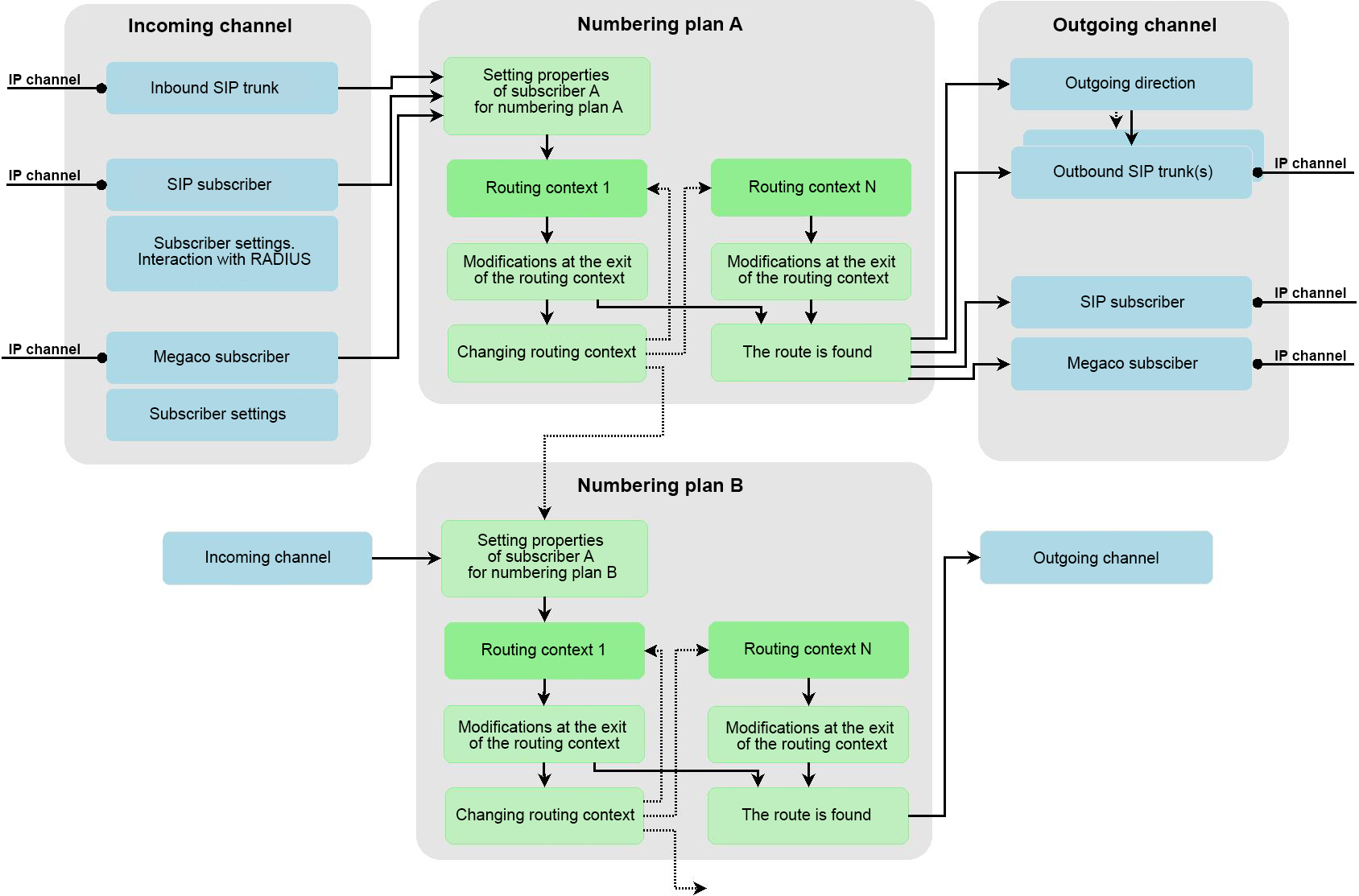
Figure 1 — General scheme of telephone call flow
An incoming call from the IP channel arrives at the inbound interface (SIP trunk). The default routing context is defined from the properties of the SIP trunk, and call routing begins in this context. When entering the routing context, its numbering plan is checked. If it differs from the numbering plan of the outgoing context, then the properties specified in the numbering plan of the new context are set for subscriber A. Next, call routing is performed directly, including modifications of the numbers and properties of subscribers A and B
transitions between routing contexts (within the same routing context) with a possible change of numbering plans.
Routing continues until an outbound route is found, or it is determined that there is no route, or the number of transitions from one rule to another does not exceed 1000 iterations. When accessing the local ECSS-10 subscriber, the properties specified in the numbering plan of the routing context in which the route was found are applied to subscriber B. After that, the call is sent to the SIP/Megaco subscriber.
When entering a set of outbound trunks, if one of the trunks is not available, the call will be directed to the next trunk in the list. Such a search will be performed as long as there is at least one trunk to which there was no attempt to send a call. When entering to the outgoing direction, a list of trunks entering this direction is determined, and the call is sent as a "set of outbound trunks" (described above).
An incoming call from a SIP subscriber arrives at the inbound SIP interface using RADIUS (if this protocol is used), the possibility of further routing of the call is determined. The default routing context is defined from the properties of the SIP trunk, and call routing begins in this context. Next, routing works out exactly the same as in the case of a call from a SIP trunk. An incoming call from a Megaco subscriber goes to the inbound Megaco interface. The default routing context is defined from the properties of the SIP trunk, and call routing begins in this context. Next, routing works out exactly the same as in the case of a call from a SIP trunk.
This section describes an example of building routing contexts for a virtual PBX, which is positioned as a PBX with access to the city via a SIP trunk or via a bridge interface.
The general scheme for creating routing contexts is shown in Figure 2.
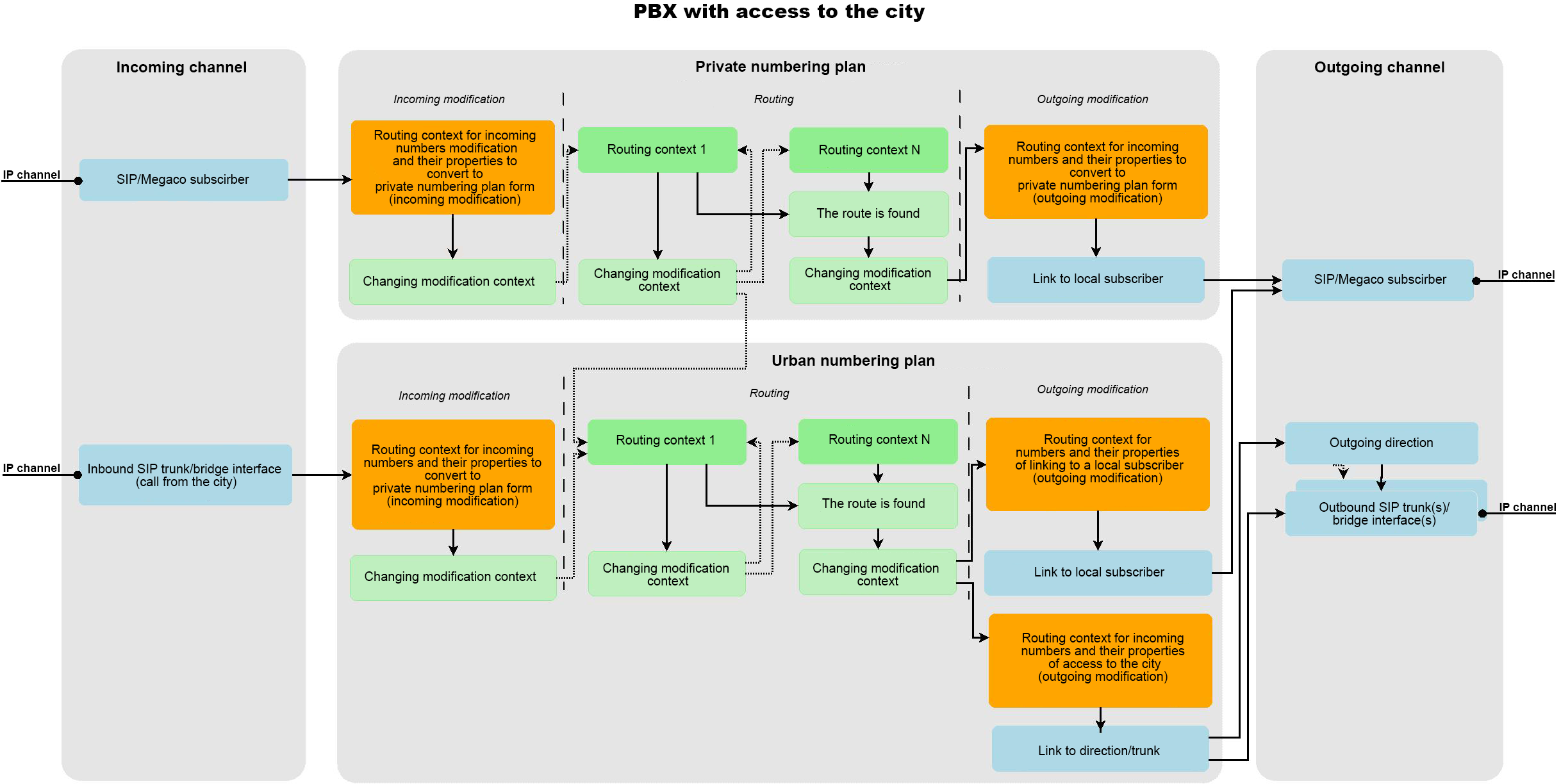
Figure 2 — General scheme of routing contexts
There are two numbering plans in this virtual PBX: the "internal numbering plan" and the "urban numbering plan". All calls within this PBX pass through the internal numbering plan. It is in it that the call routing is performed directly. Using the city numbering plan, subscribers are able to access the city under city numbers. All local subscribers, as well as trunks, have a default routing context in the internal numbering plan.
Examples of various combinations of a call flow according to this scheme are given:
General flow scheme
The call comes from a local SIP/Megaco subscriber and is routed to the default routing context in the private numbering plan. In this context, the numbers of subscribers A and B are brought to the internal format of the numbers by which calls are routed, the properties of these numbers are set. This phase of routing will be called "incoming modification".
Next, the call is routed to the root context of the private numbering plan for direct routing. During routing, it is not supposed to change the numbers A and B, as well as their properties, but transitions between contexts are possible. When routing has detected an outgoing direction, it goes into a special routing context, which is engaged in converting numbers and their properties to reach this direction. This phase of routing will be called "outgoing modification".
After exiting this context, there will be the numbers A, B and also their properties as side B understands them.
Calling from a local subscriber to a local subscriber
The call comes from a local SIP/Megaco subscriber. The call is routed to the private numbering plan, "incoming modification" is performed for subscribers A and B, and then the call is routed. During routing, it was determined that subscriber B is a local subscriber — a subscriber of this virtual PBX. Therefore, routing goes into a context designed to modify numbers when reaching local subscribers, if necessary. In this context, a modification is performed, after which the call is sent to the local subscriber.
Call from a local subscriber to the city
The call comes from a local SIP/Megaco subscriber. The call is routed to the private numbering plan, "incoming modification" is performed for subscribers A and B, and then the call is routed. During routing, it was determined that subscriber B is a city subscriber. Therefore, the numbering plan needs to be changed to urban by switching to one of the routing contexts in the urban numbering plan. When switching to the city numbering plan, the properties "apri", "nai", "ni", "npi", "screening" for the urban numbering plan will be automatically set for subscriber A, as well as the number of subscriber A, if he has a number for the city numbering plan. Further, routing continues in the urban numbering plan. When routing determines the direction (trunk, bridge interface) of the call, a transition will be made to the routing context to access this direction. In this routing context, an "outgoing modification" will be performed, and the call will be routed to the SIP trunk or bridge interface to the city.
Call from the city to a local subscriber
The call comes from the city (SIP trunk or bridge interface) to the local subscriber. The call is sent to the city numbering plan, the properties "apri", "nai", "ni", "npi", "screening" are automatically set for subscriber A, "incoming modification" is performed. Next, the call is routed. Routing determines that the call has been received by a local subscriber. Therefore, there is a transition to the routing context, designed to modify the numbers when reaching local subscribers, if necessary. In this context, an "exit modification" is performed, after which the call is sent to the local subscriber. When accessing a local subscriber, the system searches for the subscriber of this PBX by the number of subscriber B in the city numbering plan, which has the number B set in the city numbering plan, which was received as a result of routing. If there are more than one such subscriber, then the subscriber to whom this number was installed first is selected. And the call is directed to this subscriber. If the subscriber is not found, the call is rejected.
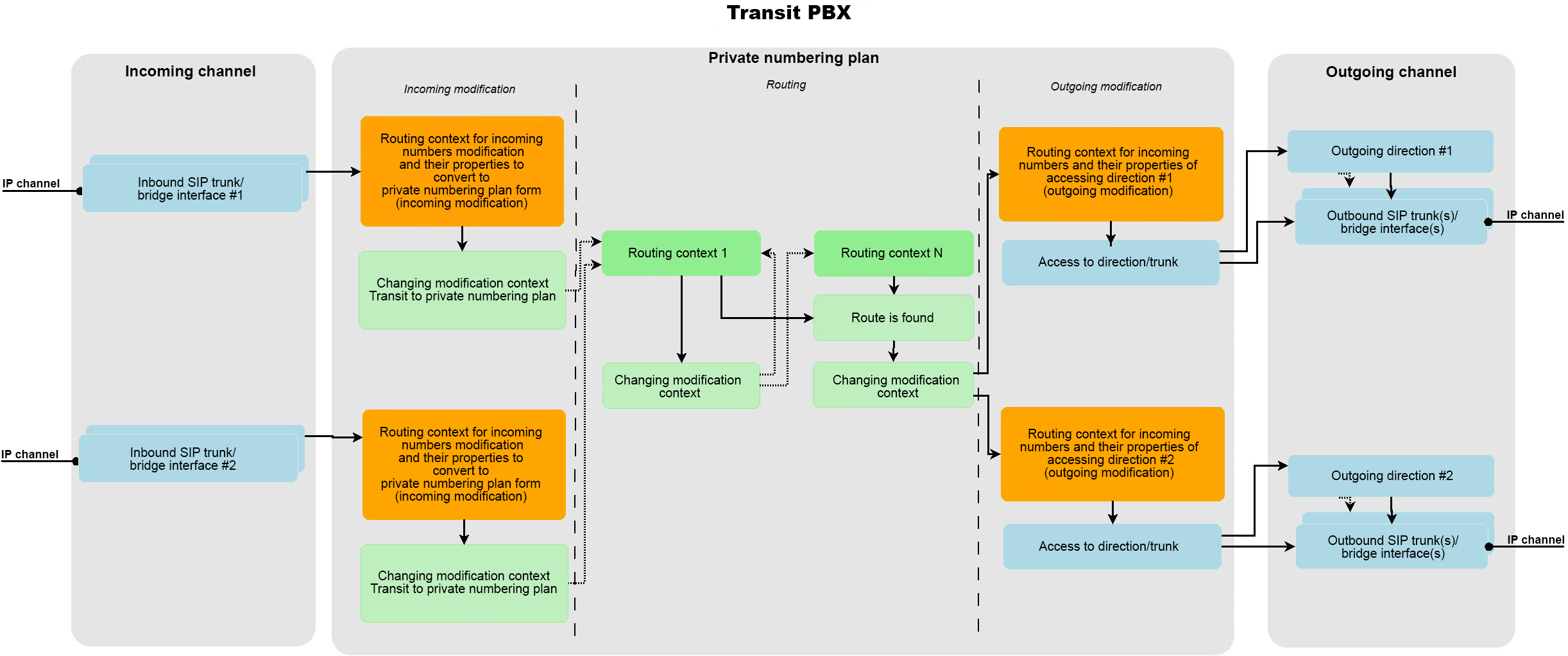
Figure 3 — Diagram of the building of routing contexts for a "Transit PBX"
In case of a transit virtual PBX, there is one "private numbering plan" within which all call routing is performed.
Example: the call comes from the incoming SIP trunk #1 and should be routed to trunk #2. First, the call enters the routing context for the SIP trunk set by default #1, where the numbers A, B, as well as their properties are brought to the internal numbering plan ("incoming modification"). Further, on the basis of the modified data, call routing is performed, according to the results of which a route to the outgoing direction #2 will be found. As soon as the route is found, the call goes to the "routing context for modifying numbers and their properties at the exit to direction #2" (modification at the exit). It converts subscriber numbers A, B, as well as their properties to a format that trunk #2 accepts. Next, the call goes in this direction.
A call from trunk #1 to trunk #2 passes in the same way.
In this example, a situation when the PBX uses a central PBX to access the city is considered (access to the central PBX is carried out via Bridge).
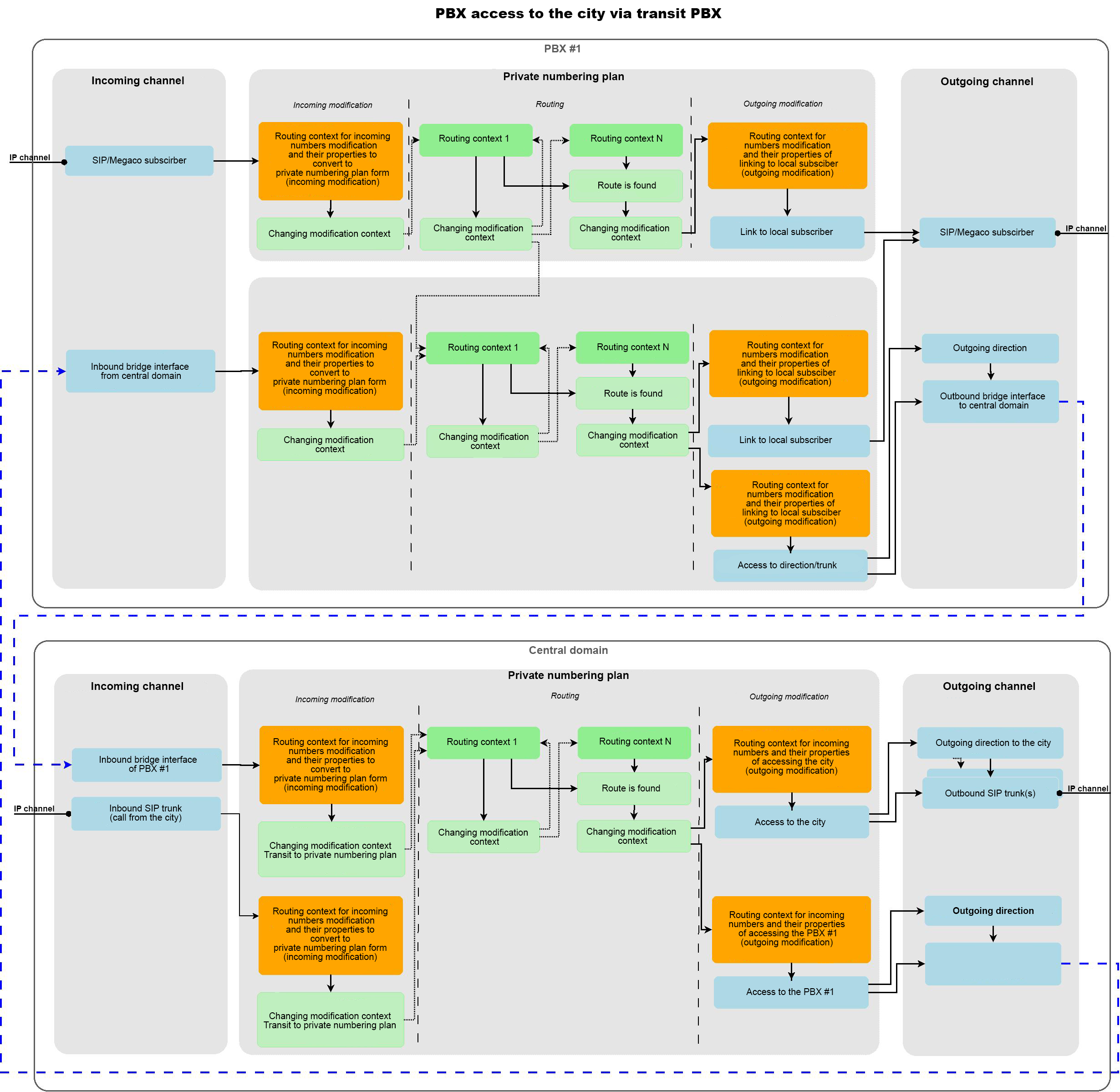
Figure 4 — The scheme of PBX connection to the city through a transit PBX
PBX subscriber #1 calls the city
The call comes from a local SIP/Megaco subscriber, then it is sent to the private numbering plan, after that incoming modification is performed for subscribers A and B, and then the call is routed. During routing, it was determined that subscriber B is a city subscriber. Therefore, the numbering plan needs to be changed to urban by switching to one of the routing contexts in the urban numbering plan. When switching to the city numbering plan, the properties "apri", "nai", "ni", "npi", "screening" for the city numbering plan will be automatically set for subscriber A, as well as the number of subscriber A, if he has a number for the city numbering plan. Further, routing continues in the urban numbering plan. When routing determines the direction of the call (finds the bridge interface), a transition will be made to the routing context to access this bridge interface. In this context of routing, an "outgoing modification" will be performed, within which the subscriber numbers A, B, as well as their properties will be brought to a form understandable in the central domain. Next, the call is routed to the found bridge interface, passing through which it enters the central domain through the "Inbound bridge interface of PBX #1". In the central domain, the call is routed to the default routing context for this bridge interface, where the numbers A, B, as well as their properties can be converted to the internal numbering plan. Also in this context, a check for the correctness of the numbers A, B that came from the bridge interface can be added. Further, on the basis of the modified data, call routing is performed, according to the results of which a route to the outgoing direction #2 will be found. After that, the call goes to the "routing context for modifying numbers and their properties at the exit to the city", where the modification at the exit is performed. The call comes in the direction to the city.
A call is received from the city to the PBX subscriber #1
A call comes to the central domain from the "inbound SIP trunk (call from the city)", gets into the default routing context in the internal numbering plan, where the numbers A and B are modified, as well as their properties to the internal numbering plan. Further, on the basis of the modified information, the call is routed, during which it is determined that the call goes to the PBX subscriber # 1. Routing goes into the "context for modifying numbers and their properties upon exiting to PBX #1", after which the call is sent to bridge to PBX #1.
In PBX #1, the call is routed through the "Inbound bridge interface from the central domain", enters the routing context in the city numbering plan set by default, where the numbers A and B, as well as their properties in the "Urban numbering plan" are modified. Next, direct routing of the call is performed, as a result of which it is determined that subscriber B is a local subscriber of this PBX. Therefore, a transition is made to the routing context, designed to modify the numbers when reaching local subscribers, if necessary. In this context, an "outgoing modification" is performed, after which the call is sent to the local subscriber. When accessing a local subscriber, the system searches for the subscriber of this PBX by the number of subscriber B in the city numbering plan, which has the number B set in the city numbering plan, which was received as a result of routing. If there are more than one such subscribers, then the subscriber to whom this number was installed first is selected. And the call is directed to this subscriber. If the subscriber is not found, the call is rejected.
Routing contexts are created and configured from under the Linux operating system or via web configurator, which allows viewing the current settings of routing contexts, create, delete and adjust their elements.
When working via web configurator, creating a routing context in the Linux operating system, as described in this section, is not necessary.
If working in the CLI management console, then to create routing contexts, exit the CLI management console using the exit command.
When installing the ECSS-10 system, the default path is automatically prescribed, under which the routing contexts /var/lib/ecss/routing/ctx/src/<DOMAIN>/ will be located.
A separate file must be created for each routing context in the /var/lib/ecss/routing/ctx/src/<DOMAIN>/ folder. The description of the routing context file is performed using the XML markup language.
The routing context is described in the file by the <context> tag and contains one or more <rule> rules. The rules include a description of the trigger conditions <conditions>, a set of operations for routing <actions> and the result of the call routing <result>.
The trigger conditions <conditions> determine by which rules routing will be carried out — by the number of the caller, by the number of the called, by the day of the week and other rules.
The set of operations for routing <actions> includes modification of the numbers of the called, calling subscribers, setting the "end of dialing" flag and other operations.
The result of the call routing <result> can be routing inside the virtual PBX, routing to the oncoming PBX, incorrect routing and other options.
All possible options for triggering conditions, sets of operations and execution results are given in Detailed description of the routing configuration file section.
The order of creating the routing context file
To create a routing context:
1. Create a file with an xml extension.
It is recommended to specify a name corresponding to the name of the routing context. |
2. Specify the xml tag version at the beginning of the file:
<?xml version="1.0"?> |
3. Create a context — opening and closing tags:
<context> </context> |
In the opening context tag, specify the parameters xmlns:xs and xs:noNamespaceSchemaLocation with the following values:
xmlns:xs="http://www.w3.org/2001/XMLSchema-instance" xs:noNamespaceSchemaLocation="ecss_routing.xsd" |
Next, specify:
Example of the context opening tag:
<context xmlns:xs="http://www.w3.org/2001/XMLSchema-instance"
         xs:noNamespaceSchemaLocation="ecss_routing.xsd"
         name="some_name"
         domain="some.domain"
         type="local"
digitmap="auto"> |
4. Create a rule inside the context — opening and closing tags:
<rule> </rule> |
In the opening tag of the rule, specify the name of the routing context:
<rule name="to_intercity"> |
5. Create a rule trigger condition — opening and closing <conditions> tags inside the rule and the rule trigger condition.
The most common conditions are based on the analysis of the digits of the number of the called and the caller. To do this, the <cdpn/> and <cgpn/> tags are used with the digits="Digits" number mask parameter. Prefix part of the rule:
<conditions> <cdpn/> <cgpn/> <calling/> <time/> <date/> <weekday/> <tag/> <final/> <cause/> </conditions> |
6. If necessary to create a set of operations to perform routing, specify the opening and closing <actions> tags inside the rule and a set of operations to perform routing.
The most common operations are based on the modification of the digits of the number of the called and the caller. The <cdpn/> and <cgpn/> tags are used for this.
<actions> <set_options/> <cgpn/> <cdpn/> <restore_cgpn/> <restore_cdpn/> <calling/> <final/> </actions> |
7) To determine the result of the call routing, create the opening and closing <result> tags inside the rule and describe the routing results.
The most common routing options are calls to the local subscriber <local> and calls to the external direction <external>. When calling to an external direction, a <direction> tag is created, which specifies the name of the interface for routing the call.
<result> <local/> <external> <direction/> </external> <no_route/> <continue/> <incomplete/> </result> |
Example of a routing context file
<context xmlns:xs="http://www.w3.org/2001/XMLSchema-instance"
         xs:noNamespaceSchemaLocation="ecss_routing.xsd"
         name="ctx_city_local"
         domain="d.city"
         type="local"
         digitmap="auto">
  <rule name="to_intercity">
    <conditions>
      <cdpn digits="8%"/>
      <cgpn digits="%"/>
    </conditions>
    <actions>
      <cdpn digits="{%}" nai="nationalNumber"/>
      <cgpn digits="383{%}"/>
    </actions>
    <result>
      <continue context="ctx_intercity"/>
    </result>
  </rule>
  <rule name="local_subscribers1">
    <conditions>
      <cdpn digits="332???"/>
    </conditions>
    <result>
      <local/>
    </result>
  </rule>
  <rule name="local_subscribers2">
    <conditions>
      <cdpn digits="77???"/>
    </conditions>
    <result>
      <local/>
    </result>
  </rule>
  <rule name="external_subscribers">
    <conditions>
      <time value="9:00 - 18:00"/>
      <date value="*.*.* - *.*.*"/>
      <weekday value="1,2,3,4,5"/>
      <cdpn digits="200??"/>
    </conditions>
    <result>
      <external>
        <direction value="port_sipt1"/>
        <direction value="port_sipt2"/>
      </external>
    </result>
  </rule>
</context> |
Example of choosing a long-distance/international communication operator in the context of routing
The definition of a pre-installed long-distance/international operator for a subscriber can be performed through prefixing in accordance with the properties of subscribers. In this case, a pre-installed telecom operator can be selected for each of the subscribers.
For example, a subscriber dials 84951234567. It is necessary to replace the number in accordance with the specified provider code. To do this, use the [calling.provider] parameter assigned in the set of operations to perform routing <actions>.
If the provider's code is defined in the subscriber's properties (the subscriber's properties are configured with the command /domain/<DOMAIN>/alias/ - alias management commands), for example provider = 1501, then as a result, the number 815014951234567 will be dialed on a long-distance call station.
Example of a routing rule using subscriber properties. And when modifying numbers:
<rule name="to_intercity">
     <conditions>
         <calling access_intercity="true"/>
         <cdpn digits="8%"/>
     </conditions>
     <actions>
         <cdpn digits="8[calling.provider]{%}"/> % Вместо [calling.provider] будет выбран номер оператора связи, прописанный в свойствах абонента
     </actions>
     <result>
         <external>
            <direction value="to_intercity"/>
         </external>
    </result>
</rule> |
After the routing contexts are created, the routing parameters are configured.
If the system configuration will be performed via the CLI command line interface, connect to the command console under the admin user.
| Default password: password. |
Command to connect to the console:
ssh admin@localhost -p 8023 |
Next, import the created routing contexts into the system with the command:
/domain/<DOMAIN>/routing/import <NODE> <FILE>
context has been successfully imported |
Imported contexts can be viewed with the command:
/domain/<DOMAIN>/routing/show <FILE>
If necessary, the routing context can be removed from the virtual PBX:
/domain/<DOMAIN>/routing/delete <FILE>
where:
Call Tracing
Call tracing is used to monitor the correctness of the routing process for certain calls and allows displaying routing steps indicating transitions between routing contexts.
/domain/<DOMAIN>/routing/trace iface=<INTERFACE> cdpn.<PARAM>=value [<OPT1>=<VALUE1> [ ... [<OPTN>=<VALUEN>]]]
where:
As a result of executing the command for the call input data (subscriber A interface, subscriber A context, time of day, day of the week, subscriber A number, subscriber B number), the following data will be received at the output: subscriber A interface, subscriber A domain, subscriber A context, subscriber A number (possibly modified), subscriber number B (possibly modified), subscriber interface B.
The routing management CLI commands are located under the path /domain/<DOMAIN>/routing/.
The Routing manager application is used to work with routing via the web configurator.
To create a routing context file via the web configurator:
1. Create a routing context in a specific virtual PBX (domain);
2. Write an arbitrary unique name of the routing context;
3. Select the type of routing context: empty, for services, default context;
4. Create a rule in a given routing context:
5. Save the routing context rule;
6. Change the routing context. Changes will be made to the system.
Files with routing contexts can be created and configured from under the Linux operating system. Using the web configurator, import the created routing contexts into the system with the import command.
To ensure that the current routing contexts are always stored on the ECSS-10 server, after creating/modifying the routing context file through the web configurator, export the file to the ECSS-10 system server.
For this:
| Default password: password. |
Command to connect to the console:
ssh admin@localhost -p 8023 |
To upload the routing context file to the ECSS-10 system server, use the command:
/domain/<DOMAIN>/routing/export <NODE> <CONTEXT_NAME>
where:
As a result of executing the command, the routing context file created/modified via the web configurator will be saved on the ECSS-10 system server with a new name. The file name will indicate the time of export.
If the routing context file has been changed, then when exporting to the ECSS-10 server, the file will be saved under a new name. Thus, the initial and modified files will be stored on the ECSS-10 server. It is recommended to delete routing context files that will not be used. The files of routing contexts are deleted from under the Linux operating system. Routing context files are saved to the /var/lib/ecss/routing/ctx/src directory. To delete files, use the rm file_name command.xml. |
A red asterisk in the routing rules (conditions, actions) marks fields that have a value other than the default value. |
It is possible to change the parameters of a passing call using commands from the RADIUS server sent in response to RADIUS-Authorization requests. The commands are transmitted in text form using the Vendor-Specific attribute with the vendor number assigned to "ELTEX Enterprise LLC" equal to 35265, and with "Eltex-AVPair" attribute name with number 1. In general, the format of the Eltex-AVPair attribute looks like the following:
Vendor-Specific(26): Eltex(35265): Eltex-AVPair(1):<$COMMAND-STRING> |
By passing various commands in the $COMMAND-STRING, it is possible to control the following parameters: modification of CgPN, CdPN numbers, as well as the tag routing parameter.
For CgPN numbers, in addition to the value of the number itself, parameters such as the following can be changed:
For CdPN numbers, in addition to the value of the number itself, parameters such as the following can be changed:
In order to call external routing on ECSS-10 in the context of routing, write a rule like the following:
<rule name="to_RADIUS_routing">
   <conditions>
     ...
   </conditions>
   <actions>
         <external_routing id="master;backup" service="radius_route_service" timeout="5000"/>
   </actions>
   <result>
      <continue context="ctx_after_radius"/>
   </result>
</rule> |
This rule states that if the conditions match, perform external RADIUS routing on servers with master IDs (and if it is unavailable, backup). At the same time, no more than 5000ms should be spent on external routing. Based on the results of the RADIUS request, ECSS routing will continue in the context of ctx_after_radius, but with CgPN, CdPN tag changed (if these fields were changed as a result of the RADIUS request).
The command consists of the following parts.
The values for the Tag parameter can be any string, which can then be used on routing within the softswitch.
In general, the format of the command looks like the following:
CallManagement:Tag=<$tag>
where:
Example
Set the value of the tag parameter to_nsk. To do this, it is enough to pass an attribute with the following value in the Access-Accept response from the RADIUS server:
Vendor-Specific(26): Eltex(35265): Eltex-AVPair(1):CallManagement:Tag=to_nsk |
The command consists of a mandatory and optional parts. The mandatory part consists of the initial text identifier of the command, the identifier of the number being modified and the modification mask.
An optional part can consist of either one parameter or several parameters separated by a semicolon. The mandatory and optional parts are also separated by a semicolon if there is an optional part of the command.
Possible parameters for the optional part:
In general, the command format looks like this (for CGPN):
CallManagement:CgPN=<$modifymask>;numtype=<$numtype>;plantype=<$plantype>;presentation=<$presentation>;displayName=<$displayName>
where:
In general, the command format looks like the following (for CDPN):
CallManagement:CdPN=<$modifymask>;numtype=<$numtype>;plantype=<$plantype>
where:
The parameters can be set in two variants — either "common designation" or in accordance with the internal names of SSW. The values of the parameters used in the commands are shown below:
ECSS-10 allows passing the parameters of the number modification command in several attributes. Thus, a set of commands:
«CallManagement:CgPN=<$modify-mask>»
«CallManagement:CgPN=;numtype=<$numtype>»
«CallManagement:CgPN=;presentation=<$presentation>»
«CallManagement:CgPN=;displayName=<$displayName>»
equivalent to one command:
«CallManagement:CgPN=<$modify-mask>;numtype=<$numtype>;presentation=<$presentation>»
If any optional parameter (numtype, plantype, presentation) does not require modification, then it should not be passed in the request, but specifying the type of number (CgPN, CdPN) to which the transmitted fields belong is mandatory at the beginning of the request. |
Example
Add the +7383 prefix to the CgPN number, change its number type to national and set presentation restricted. To do this, it is enough to pass an attribute with the following value in the Access-Accept response from the RADIUS server:
Vendor-Specific(26): Eltex(35265): Eltex-AVPair(1):CallManagement:CgPN=+7383;numtype=national;presentation=restricted;displayName=UserName |
Which is also equivalent to three attributes with values:
Vendor-Specific(26): Eltex(35265): Eltex-AVPair(1): CallManagement:CgPN=+7383 Vendor-Specific(26): Eltex(35265): Eltex-AVPair(1): CallManagement:CgPN=;numtype=national Vendor-Specific(26): Eltex(35265): Eltex-AVPair(1): CallManagement:CgPN=;presentation=restricted |
The modification rule is a set of special characters that define number changes:
The configuration file for telephone routing is a file in XML format, which is designed in accordance with the data diagram given in the attachment:ecss_routing.xsd file.
The current file with the description of the data diagram is located on the deployed system under the path /usr/lib/ecss/lib/rm_lib-x.x.x.x/priv/ecss_routing.xsd.
Each XML file is a description of one routing context (a group of rules) within a virtual PBX.
Routing context description format:
<context>
  <rule>
    <conditions>
    </conditions>
    <actions>
    </actions>
    <result>
    </result>
  </rule>
  <rule>
  </rule>
...
  <rule>
  </rule>
</context> |
The basic element of the routing file that describes the parameters of the routing context.
The structure of the <context> element has the following form:
<context name="string" domain="string" digitmap="string" np="string" description="string"> </context> |
where:
Next, within the <context> tag, there is a set of tags describing routing rules between the closing and opening tags.
The analysis of the conditions for triggering the rules is performed in the order in which they are specified in the file — from top to bottom.
One routing context cannot contain more than 1000 rules. The restriction was introduced artificially, since the number of rules affects the speed of routing processing. |
Numbering plans
When entering the routing context, the domain settings of the new numbering plan (apri, nai, ni, npi, screening) are applied to the subscriber, if the numbering plan in the current context differs from the numbering plan in the previous context (or at the beginning of routing). If subscriber A is a local subscriber, then the number can also change for him (if it is set in the alias property [numbers] for this numbering plan). Thus, in order to change the numbering plan, it is necessary to make a transition from the routing context in the original numbering plan to the routing context in the new numbering plan (this transition is performed in the result section using the <continue /> tag).
If routing ends in a numbering plan other than the default one (with the name "default"), with the result <local />, then routing looks at who the cdpn number is assigned to in the numbering plan and follows one of the following paths:
The commands for managing numbering plans are located along the /domain/<DOMAIN NAME>/np/... path. To set a number for a local subscriber in a certain numbering plan, use the command:
/domain/<DOMAIN_NAME>/np/numbers/bind <NUMBERING_PLAN_NAME> <NUMBER_IN_NUMBERING_PLAN> --alias <OWNER_NAME> <GROUP_NAME> <INTERFACE_NAME> <LOCAL_NUMBER> [--master | --passive] --master — if a call in the numbering plan comes at the <NUMBER_IN_NUMBERING_PLAN> number, then it will be redirected to this alias; |
To set a number for a bridge in a certain numbering plan, the following command can be used:
/domain/<DOMAIN_NAME>/np/numbers/bind <NUMBERING_PLAN_NAME> <NUMBER_IN_NUMBERING_PLAN> --bridge <BRIDGE_NAME> |
In this case, the bridge must come from the domain <DOMAIN_NAME> and use the numbering plan
<NUMBER_NAME>.
The <rule> element describes the routing rule.
The structure of the routing rule has the following form:
<rule name="RuleName">
    <conditions>
    </conditions>
    <actions>
    </actions>
    <result>
    </result>
</rule> |
where:
The <conditions> element describes a set of conditions, the fulfillment of which leads to the fulfillment of the rule.
The description of the <conditions> element has the following form:
<conditions> <calling/> <called> <cdpn/> <cgpn/> <rgn/> <time/> <date/> <weekday/> <timetable/> <tag/> <final/> <cause/> <ocdpn> </conditions> |
where:
Each of the above elements within <conditions> is optional and can be used no more than once.
An empty set of criteria indicates that there are no restrictions.
Caller's access parameters.
<calling access_private="booleanType"
         access_local="booleanType"
         access_zone="booleanType"
         access_intercity="booleanType"
         access_international="booleanType"
         access_emergency="booleanType"
         have_access_to="atomType"
         city="stringType"
         region="stringType"
         operator="stringType"
         category="atomType"
         caller_id="stringType"
         display_name="stringType"
         sorm_digits="stringType"
         sorm_ni="atomType"
         interface_group="stringType"
iface="binaryType"/> |
where:
Table 1 — Subscriber categories
| String value | Digital Code (ISUP) |
|---|---|
| unknownAtThisTime | 0 |
| operatorFrench | 1 |
| operatorEngish | 2 |
| operatorGerman | 3 |
| operatorRussian | 4 |
| operatorSpanish | 5 |
| reserved | 9 |
| ordinarySubscriber | 10 |
| subscriberWithPriority | 11 |
| dataCall | 12 |
| testCall | 13 |
| spare | 14 |
| payphone | 15 |
| category0 | 224 |
| hotelsSubscriber | 225 |
| freeSubscriber | 226 |
| paidSubscriber | 227 |
| localSubscriber | 228 |
| localTaksofon | 229 |
| autoCallI | 240 |
| semiautoCallI | 241 |
| autoCallII | 242 |
| semiautoCallII | 243 |
| autoCallIII | 244 |
| semiautoCallIII | 245 |
| autoCallIV | 246 |
| semiautoCallIV | 247 |
The attributes of the <calling> element are optional, but at least one attribute must be specified.
The order of specifying attributes is arbitrary.
The access parameters of the called subscriber (only for Russia).
The number parameters of the called subscriber.
<cdpn digits="Digits"
      nai="Nai"
      incomplete="boolean"
      inni="Inni"
      npi="Npi"
      ni="Ni"
in_list="listName"/> |
where:
The number parameters of the calling subscriber.
<cgpn digits="Digits"
      nai="Nai"
      incomplete="boolean"
      npi="Npi"
      apri="Apri"
      screening="Screening"
      ni="Ni"
in_list="listName"/> |
where:
Parameters of the number that performed the redirection.
<rgn digits="Digits"
     nai="Nai"
     incomplete="boolean"
     npi="Npi"
     apri="Apri"
     ni="Ni"
     empty="Empty"
in_list="listName"/> |
where:
In order to understand how a rule with this condition will be processed, it is necessary to determine where the forwarding call will come from. If the call comes to SSW already with a forwarding sign (this may be the Diversion field in sip or redirecting number in isup), then the check will be performed by the number specified in the sign. If the call was forwarded locally using any cfu service, then before re-routing, SSW verifies whether there is a route between the subscriber who made the forwarding and the number where the call is forwarded. Only if this route is found, SSW starts looking for a route between the caller and the number where the redirection was made. |
Time of day, set as: HH:MM-HH:MM
where:
<time value="TimeMask"/> |
where:
Date, set as: DD1.MM1.YYYY1-DD2.MM2.YYYY2
where:
<date value="DateMask"/> |
where:
The day of the week mask sets a set of days of the week.
The format of the description of the mask of the days of the week: "DN1,DN2,...,DNX"
where:
It works according to the Gregorian calendar.
<weekday value="WeekdayMask" day_types="DayTypes" /> |
where:
Timetable — the name of the schedule that will be used for checking during routing.
<timetable value="Timetable" /> |
where:
If the <time>, <weekdays>, and <timetable> tags are specified at the same time, then the condition must match in all parameters. Example:
|
A special parameter that can be set for calling during routing.
The parameter is valid only at the routing stage, is set in the routing rule and is subsequently used to change the routing logic.
<tag value="Tag"/> |
where:
Indicates the final routing. The dialing of number B is completed (the timer for the end of dialing is triggered) or the number is complete (it came in the "enblock" mode).
<final value="boolean"/> |
where:
The reason for disconnecting the previous call attempt.
The mechanism allows using the "Cause" routing mode. When a call from subscriber A to subscriber B has been completed with a certain termination code without a conversation phase, then re-routing is performed, the reason for disconnection is specified as one of the parameters.
If the "Cause" routing rules are correctly configured in the system, it is possible to transfer such calls to various types of autoinformers (forwarding to autoinformers with messages such as "the subscriber is temporarily unavailable", "the line is overloaded", "the subscriber does not exist" and others).
<cause value="Cause"/> |
where:
Parameters of the original number to which the call was made.
<ocdpn digits="Digits"
     nai="Nai"
     incomplete="boolean"
     npi="Npi"
     apri="Apri"
     ni="Ni"
     empty="Empty"
     category="Category"
in_list="listName"/> |
in_list — name of the list for checking numbers for occurrence. The list can be generated in the Monitoring groups web configurator application or by CLI commands. The list type must be default.
The <actions> element describes a set of actions performed when the rule is triggered.
The description of the <conditions> element has the following form:
<actions> <set_options/> <cgpn/> <cdpn/> <rgn/> <restore_cgpn/> <restore_rgn/> <empty_rgn/> <restore_cdpn/> <calling/> <called/> <final/> <alarm/> <log/> <cause/> <external_routing/> <ocdpn/> <restore_ocdpn> </actions> |
where:
Actions are indicated in the order in which they are performed. All actions are optional.
A low-level operation that can be used to modify special call properties.
It is used to transfer optional parameters from routing to the kernel, to the variables of the IVR script.
In order to define an IVR script variable, the key field must start with ivr_variable.
For example, to set an IVR variable named CARD_PLATFORM_TO_NUMBER, the key field must be equal to ivr_variable:CARD_PLATFORM_TO_NUMBER.
Example of setting the IVR variable of the CARD_PLATFORM_TO_NUMBER script. The variable is set to the characters entered after the exit number on the IVR script:
<actions>
 <set_options>
  <option key="ivr_variable:card_platform_to_number" value="{def}"/>
 </set_options>
</actions> |
Modification of the called subscriber number parameters.
<cgpn digits="Digits"
      nai="Nai"
      incomplete="boolean"
      npi="Npi"
      apri="Apri"
      screening="Screening"
ni="Ni"/> |
where:
The description of the parameters "nai", "incomplete", "npi", "apri", "screening", "ni" is similar to the description of the parameters of the element "cgpn" of the section "conditions".
Modification of the Subscriber B number parameters.
<cdpn digits="Digits"
      nai="Nai"
      incomplete="boolean"
      inni="Inni"
      npi="Npi"
ni="Ni"/> |
where:
Modification of the parameters of the number that performed the forwarding.
<rgn digits="Digits"
     nai="Nai"
     incomplete="boolean"
     npi="Npi"
     apri="Apri"
ni="Ni"/> |
where:
Restoring the original values of the caller's number parameters that were present when entering the routing context.
This element has no attributes.
Restoring the original parameter values of the number that performed the redirection, which were when entering the routing context.
This element has no attributes.
Remove the RedirectingNumber parameter from the alarm.
This element has no attributes.
Restoring the original values of the parameters of the number of the called subscriber, which were when entering the routing context.
This element has no attributes.
Modification of the caller's access parameters.
<calling category="atomType"
         caller_id="stringType"
         display_name="stringType"
         sorm_digits="stringType"
sorm_ni="atomType"/> |
The syntax of the "caller_id" attribute is similar to the "digits" field in "cgpn".
The description of the parameters is similar to the description of the "calling" parameters of the "conditions" section.
Setting the caller ID number. The syntax of the "caller_id" attribute is similar to the "digits" field in "cgpn".
Example of setting "caller_id", adding "8" to the number from "cgpn":
<conditions>
   <cgpn digits="%"/>
</conditions>
<actions>
   <calling caller_id="8{%}"/>
</actions> |
The display_name parameter allows replacing the display name of subscriber A when routing a call. This field has a test type, supports the following macro variables:
Modification of the caller's access parameters (only for Russia).
Setting the final routing flag. The dialing of number B is completed (the timer for the end of dialing is triggered) or the number is complete (it came in the "enblock" mode).
Adding an emergency event to ECSS-10.
<alarm severity="alarmSeverity" value="string"/> |
Create an entry in the system log.
<log severity="logSeverity" value="string"/> |
In order to be able to set the causes that need to be routed by goats, a section "Reasons for re-routing" should be added in the "Action" block. In this section, add three input fields:
<rule name="rule1">
  <actions>
    <cause acp="normal, bPtyBusy" isup="16,17,18" sip="401, 400"/>
  </actions>
</rule> |
Calling an external routing service (currently only external Radius routing is supported).
<external_routing id="stringType"
                             service="stringType"
timeout="positiveIntegerType"/> |
Example of calling external routing using RADIUS servers named master and backup, with a request timeout of 1 second:
<actions> <external_routing id="master;backup" service="radius_route_service" timeout="1000"/> </actions> |
The operation of parameters modification of the original number to which the call was made.
<ocdpn digits="Digits"
       nai="Nai"
       incomplete="boolean"
       npi="Npi"
       apri="Apri"
       ni="Ni"
category="Category"/> |
Restoring the original parameter values of the original number to which the call was made, which were when entering the routing context;
This element has no attributes.
Remove the OriginalCalledNumber parameter from the alarm.
This element has no attributes.
This mandatory <result> element describes the result of processing the routing rule.
<result> Result </result> |
where:
A local domain subscriber was found.
The number is complete, the subscriber is found, the router searches for the subscriber's interface by its number and stops routing, returning the found data for subscribers A and B, interfaces A and B.
Simplified syntax:
<result> <local/> </result> |
Syntax for the case of continued routing if the subscriber was not found in the database of local subscribers:
<result> <local> <continue tag="not_local"/> <local/> </result> |
Syntax for searching for a local subscriber by the entered vdn attribute:
<rule name="local_calls">
  <conditions>
    <cdpn digits="1???%"/>
  </conditions>
  <result>
    <local vdn="{1,2,3,4}"/>
  </result>
</rule> |
The following syntax is used to set the vdn attribute:
<local vdn="[CGPN|CDPN|RGN{DIGITS}]"/> |
By default, the value is taken from cdpn.
where:
The direction of exit from the domain to the ivr service (related to this domain) is found; the router stops routing, returning the found data on subscriber A, interfaces A and B.
In case of access to ivr, access groups and restriction modes are not checked on subscriber A. |
Syntax:
<result> <ivr script="IvrScript"/> </result> |
where:
The domain exit interface is found (trunk to another domain, trunk to another station, etc.), the router stops routing, returning the found data for subscribers A and B, interfaces A and B.
When the flag is set, the domain exit interface is found (trunk to another domain, trunk to another station, etc.), the router stops routing, returning the found data for subscribers A and B, interfaces A and B.
Syntax:
<result>
   <external>
      <trunk value="Interface1" weight="50" max_load="80%"/>
      <trunk value="Interface2" weight="50" max_load="80%"/>
      <trunk value="Interface3" weight="10"/>
   </external>
</result> |
where:
If the max_load and weight parameters are used simultaneously, then the directions in which the load does not exceed the maximum value are selected first, after which the call is distributed based on weight. For example, there is a rule:
and the maximum load on the ems1 trunk is set to 20. Then, as long as the load on the ems1 trunk is less than 60% (i.e. < 12 calls), a call can go to this trunk through this rule. But since weight is also set for the ems1 and ems2 trunks, this means that on average (statistically) all calls will be divided between these two trunks. If the load on the trunk has become >= 12 calls, all calls will go only to the ems2 trunk. |
The direction of exit from the domain to the direction is found; the router stops routing, returning the found data on subscriber A, interface A and direction.
Syntax:
<result> <direction value="DirectionName"/> </result> |
where:
Directions are declared via /domain/<DOMAIN>/direction/. |
The number is incomplete. Routing ends with a sign that an incomplete number has been dialed, the kernel continues to accumulate digits of the number.
Syntax:
<result> <incomplete timeout="TimeoutInMilliseconds"/> </result> |
where:
If <incomplete> is used, it is necessary to explicitly set <final value="false" /> in the <conditions> section. |
Routing error. Routing ends with a sign that an incorrect number has been dialed.
Syntax:
<result> <no_route isup_cause="ISUPCause"/> </result> |
where:
Continue routing in the current or in another context of this virtual PBX (domain).
Syntax:
<result> <continue context="ContextName" tag="Tag"/> </result> |
where:
Continue routing in the current context from the next rule. If the conditions are met, a set of actions from the <actions> element will be applied.
Syntax:
<result>
    <next tag="Tag"/>
</result> |
where:
The time mask sets a range of values for the time of day. where:
Instead of specifying specific hour or minute values, you can specify the service symbol "*", which corresponds to any value. Examples of time masks in the rules:
The condition is satisfied by calls served during the time period from 09:00 to 18:00 (working hours).
The condition is satisfied by calls served during the time period from 20 to 30 minutes of every hour in a day. |
The date mask sets the date range. where:
It is also possible to use the service symbol "*" at any position, which corresponds to any value. Examples of date masks in the rules:
The condition is satisfied by calls serviced in January (1 month).
The condition is satisfied by calls served from the 10th to the 20th of each month.
The condition is satisfied by calls served on December 13, 2011. |
The day of the week mask sets a set of days of the week. where:
It works according to the Gregorian calendar.
where:
Examples of masks of days of the week in the rules:
The condition is satisfied by calls serviced from Monday to Friday (working days).
The condition is satisfied by calls served on Saturday and Sunday (weekends). |
The number digits mask in the field of conditions for triggering the rules. Provides a convenient and flexible syntax for describing various numbers.
Regular expressions are not used intentionally, because this significantly increases the qualification threshold of an engineer, which is necessary to use the mechanism.
The number mask is set as a string in which the number is entered for comparison. The range can be specified via "-", or listed via ",". The range, or enumeration is enclosed in parentheses "(" ")" The following service characters are also possible:
To compare the common prefix of cgpn, cdpn, ocdpn, rgn parameters with each other, the following syntax is used [cgpn|cdpn|rgn|ocdpn{DIGITS}].
For the rule, the number of number masks is limited to 256. If ranges of numbers are specified in the conditions, then when compiling the context, several masks can be formed for each range of numbers. For example, masks will be formed for the range 100-400: 1??, 2??, 3??, 4??.
Examples of time masks in the rules: The condition is satisfied by numbers with a length greater than or equal to 1 and starting with the digit 8.
The condition is satisfied by numbers with a length of 10 characters starting with 345.
Any numbers satisfy the condition.
The condition is satisfied by any numbers with a length of 3 characters. The following are examples of using ranges and enumerations in number masks:
Equivalent to three rules with masks 17% 27% 37%. Any 7-digit numbers of the specified range will satisfy the condition. Equivalent to three rules with masks 17% 57% 77%. Example of comparing the common prefix of cgpn and cdpn parameters:
|
Known errors when comparing parameters:
Comparing parameters with each other:
<conditions>
 <cdpn digits="[cgpn{1,2}]??"/>
 <cgpn digits="[cdpn{1,2}]??"/>
</conditions> |
Using a parameter that does not exist:
<conditions>
 <cgpn digits="[cdpn{1,2}]??"/>
</conditions> |
Going beyond the boundaries of the compared parameter:
<conditions>
 <cdpn digits="????"/>
 <cgpn digits="[cdpn{5,6}]??"/>
</conditions> |
In the call parameter modification actions, one of the main elements for correction is to change the digits of the subscriber number A or B.
There are different approaches to the way of describing the syntax of such modification: modification on templates, regular expressions, etc.
Regular expressions are the most flexible way to do all possible conversions, but it has significant drawbacks:
To get rid of the disadvantages of regular expressions, the ECSS-10 system uses a modification of the number on the templates.
When modifying a number, the following notation is used:
Examples
Removing prefix from a ten-digit number:
<conditions>
  <cgpn digits="345???????"/>
</conditions>
<actions>
  <cgpn digits="{4,5,6,7,8,9,10}"/>
</actions> |
Removing the 345 prefix from a number of arbitrary length with prefix 345:
<conditions>
  <cgpn digits="345%"/>
</conditions>
<actions>
  <cgpn digits="{%}"/>
</actions> |
Permutation of digits 2 and 3 in a three-digit number (any digits):
<conditions>
  <cgpn digits="???"/>
</conditions>
<actions>
  <cgpn digits="{1,3,2}"/>
</actions> |
Prefixing an arbitrary three-digit number with the prefix 008:
<conditions>
  <cgpn digits="???"/>
</conditions>
<actions>
  <cgpn digits="008{1,2,3}"/>
</actions> |
Swapping cdpn and cgpn:
<conditions>
<cgpn digits="%"/>
<cdpn digits="%"/>
</conditions>
<actions>
<cgpn digits="[cdpn{%}]"/>
<cdpn digits="[cgpn{%}]"/>
</actions> |
A rule that can be used to exit to an intercity station. In particular, it can be seen that the rule will work for calls in which subscriber A has a seven-digit local number, subscriber B's number starts at 8. The task of the modification is to convert a local number to a long-distance one that understands intercity, for this the prefix is appended and "ni" and "nai" are changed. Number B does not change, the intercity is engaged in its analysis.
<conditions>
  <cgpn digits="???????" ni="local"/>
  <cdpn digits="8%"/>
</conditions>
<actions>
  <cgpn digits="8383{1,2,3,4,5,6,7}" ni="intercity" nai="nationalNumber"/>
</actions> |
With multiple routing, the result can be routing either to a local subscriber or to a trunk. To do this, add the continue section inside the local section.
If there is no actions section in the rule, and none of the ContextName or Tag parameters are set, then routing will loop. |
There are subscribers with three-digit numbers in the 7xx format. Some of these subscribers are on a third-party station, to which there is a trunk named PANASONIC_TRUNK.
Example of a context for routing either to a local subscriber or to a trunk:
  <context xmlns:xs="http://www.w3.org/2001/XMLSchema-instance" xs:noNamespaceSchemaLocation="ecss_routing.xsd" name="ctx_city_local">
    <rule name="panasonic_users">
      <conditions>
        <cdpn digits="7??"/>
        <tag value="not_local_user"/>
      </conditions>
      <result>
        <external>
          <trunk value="PANASONIC_TRUNK"/>
        </external>
      </result>
    </rule>
    <rule name="local">
      <conditions>
        <cdpn digits="7??"/>
      </conditions>
      <result>
        <local>
          <continue tag="not_local_user">
        </local>
      </result>
</rule> |
There are subscribers with three-digit numbers in the 7xx format. If the call goes to a number that does not exist, then the phrase "The subscriber with this number does not exist in our company. The call is transferred to the secretary.", and the call is transferred to the secretary. To do this, an IVR script is created with the name to_secretary (script ID: e5a8909590717068), and the following routing context is written:
  <context xmlns:xs="http://www.w3.org/2001/XMLSchema-instance" xs:noNamespaceSchemaLocation="ecss_routing.xsd" name="ctx_city_local">
    <rule name="panasonic_users">
      <conditions>
        <cdpn digits="7??"/>
        <tag value="not_local_user"/>
      </conditions>
      <result>
        <ivr script="e5a8909590717068"/>
      </result>
    </rule>
    <rule name="local">
      <conditions>
        <cdpn digits="7??"/>
      </conditions>
      <result>
        <local>
          <continue tag="not_local_user">
        </local>
      </result>
</rule> |
When creating routing contexts, it is necessary to pay attention to the fact that the call is successfully routed both in enblock mode and in overlap mode.
Usually, gateways (especially SIP gateways) work in the enblock mode, but when trying to use any service (for example, call transfer), routing of the entered number occurs in the overlap mode.
Therefore, remember that depending on the nuances in the description of the context, the same set in two different modes can lead to different results.
Sometimes it is required that a call that could not be established with a specific reason is sent to another direction or an autoinformer. For this purpose, the "Cause" routing mechanism is used. For example: there is a call from number A to number B. In the context of routing, there is a direction to subscriber B, while the "Reasons for re-routing" parameter is defined in the "actions" block, it means that if the call to subscriber B ends with one of the listed reasons, re-routing from A to number B will be performed, indicating the current reason for the end of the call. In order to use the specified reasons, in the context of routing, in the "conditions" section, the "reasons" parameter can be specified in the "additional" section. It checks whether at least one of the specified reasons coincided with the reason for disconnecting the call transmitted to the routing. If yes, then this rule will work and allow redirecting the call to another direction.
The mechanism allows using the "Cause" routing mode. When a call from subscriber A to subscriber B has been completed with a certain termination code without a conversation phase, then re-routing is performed, the reason for disconnection is specified as one of the parameters.
In case of simultaneous indication of several reasons for disconnection, the rule will work if at least one of the reasons coincides.
<cause acp="ACPCauses" isup="ISUPCauses" sip="SIPCauses"/>
where:
The mechanism allows using the "Cause" routing mode. When a call from subscriber A to subscriber B has been completed with a certain termination code without a conversation phase, then re-routing is performed, the reason for disconnection is specified as one of the parameters.
If the "Cause" routing rules are correctly configured in the system, it is possible to transfer such calls to various types of autoinformers (forwarding to autoinformers with messages such as "the subscriber is temporarily unavailable", "the line is overloaded", "the subscriber does not exist" and others).
In case of simultaneous indication of several reasons for disconnection, the rule will work if at least one of the reasons coincides.
At the moment, it is possible to analyze not only the "Cause" for which the call was rejected, but also its initiator. There are 3 causeinitiators available: system, network, user.
Example of configuration on ECSS-10:
/domain/refactor/properties/set alternate_route_sip_causes add 404/user |
The reason(s) for disconnecting this call, for which it is necessary to iterate through the routes.
The mechanism allows using the "Cause" routing mode. When a call from subscriber A to subscriber B was completed with one of the reasons specified in <cause>, the call will be re-routed, but the routing will specify the reasons with which the current call ended (routing by "Cause" works only for calls that ended before the conversation/alerting phase). How these rules are applied in the context of routing, see here: <actions>.
Important! For SIP-cause routing to work, set the domain parameters (/domain/properties/alternate_route_sip_causes). It should be noted that routing for SIP will not work unless a cause is received from the trunk. |
The effect of "Cause" routing on other subsystems:
At the moment, the maximum number of attempts to re—route a call is 10 (taking into account the first routing). |
Vendor-Specific(26): Cisco(9): Cisco-AVPair(1): xpgk-route-retries=<$ROUTE_RETRIES> Vendor-Specific(26): Cisco(9): Cisco-AVPair(1): ecss-routing-cause-isup=<$ROUTE_CAUSE_ISUP> Vendor-Specific(26): Cisco(9): Cisco-AVPair(1): ecss-routing-cause-sip=<$ROUTE_CAUSE_SIP> Vendor-Specific(26): Cisco(9): Cisco-AVPair(1): ecss-routing-cause-acp=<$ROUTE_CAUSE_ACP> |