LDP is a tag distribution protocol. To find the neighbors hello messages are sent to the multicast address 224.0.0.2. When exchanging hello messages, routers learn each other's transport addresses. A router with a bigger address initializes the TCP session. After checking the parameters, the LDP session is considered established.
ESR routers support the following LDP operation modes:
On interfaces where LDP and MPLS switching are enabled, the firewall must be disabled. |
The current version LDP only works with IPv4 addresses. |
Step | Description | Command | Keys |
|---|---|---|---|
1 | In the context of MPLS parameters configuration, specify the interfaces involved in the MPLS switching process | esr(config-mpls)# forwarding interface { <IF> | <TUN> } | <IF> – an interface's name. <TUN> – the name of the tunnel. |
2 | Specify the router-id for LDP (not necessary if transport-address is specified). | esr(config-ldp)# router-id <ID> | <ID> – router identifier, defined as AAA.BBB.CCC.DDD where each part takes values of [0..255]. |
3 | In the context of the address family ipv4 settings, specify transport-address (not necessary if router-id is specified). | esr(config-ldp-af-ipv4)# transport-address <ADDR> | <ADDR> – defined as AAA.BBB.CCC.DDD where each part takes values of [0..255]. |
4 | In the context of the address family ipv4 settings, specify interfaces for enabling LDP process. | esr(config-ldp-af-ipv4)# interface { <IF> | <TUN> } | <IF> – an interface's name. <TUN> – the name of the tunnel. |
5 | Enable LDP process. | esr(config-ldp)# enable | |
6 | Enable explicit-null functionality (optional). | esr(config-ldp)# egress-label-type explicit-null | |
7 | In the LDP neighbor configuration mode, set the password with the password command (optional). | esr(config-ldp-neig)# password {<TEXT> | ENCRYPTED-TEXT>} | <CLEAR-TEXT> – password, sets by string of [8..16] characters; <ENCRYPTED-TEXT> – encrypted password of [8..16] bytes ([16..32] characters) in hexadecimal format (0xYYYY...) or (YYYY...). |
The following functionality is also available as part of the LDP configuration:
| |||
If router-id value is changed, then the new value will be applied only after restarting this protocol. To restart mpls ldp, use the clear mpls ldp command. |
Configure LDP communication between peers.

First, IP addresses must be assigned to the interfaces, the firewall must be disabled and one of the internal routing protocols must be configured.
ESR pre-configuration:
hostname ESR
router ospf 1
  area 0.0.0.0
    enable
  exit
  enable
exit


interface gigabitethernet 1/0/1
  ip firewall disable
  ip address 10.10.10.1/30
  ip ospf instance 1
  ip ospf
exit


interface loopback 1
  ip address 1.1.1.1/32
  ip ospf instance 1
  ip ospf
exit |
ESR1 pre-configuration:
hostname ESR1
router ospf 1
  area 0.0.0.0
    enable
  exit
  enable
exit


interface gigabitethernet 1/0/1
  ip firewall disable
  ip address 10.10.10.2/30
  ip ospf instance 1
  ip ospf
exit


interface loopback 1
  ip address 4.4.4.4/32
  ip ospf instance 1
  ip ospf
exit |
ESR# config ESR(config)# mpls ESR(config-mpls)# forwarding interface gigabitethernet 1/0/1 ESR(config-mpls)# ldp ESR(config-ldp)# router-id 1.1.1.1 ESR(config-ldp)# enable ESR(config-ldp)# address-family ipv4 ESR(config-ldp-af-ipv4)# interface gigabitethernet 1/0/1 ESR(config-ldp-af-ipv4-if)# end ESR# |
ESR1# configure ESR1(config)# mpls ESR1(config-mpls)# forwarding interface gigabitethernet 1/0/1 ESR1(config-mpls)# ldp ESR1(config-ldp)# router-id 4.4.4.4 ESR1(config-ldp)# enable ESR1(config-ldp)# address-family ipv4 ESR1(config-ldp-af-ipv4)# interface gigabitethernet 1/0/1 ESR1(config-ldp-af-ipv4-if)# end ESR1# |
Enter the following commands at one of the peers:
ESR# show mpls ldp discovery detailed Local LDP ID: 1.1.1.1 Discovery sources: Interfaces: gigabitethernet 1/0/1: Hello interval: 5 seconds Transport IP address: 1.1.1.1 LDP ID: 4.4.4.4 Source IP address: 10.10.10.2 Transport IP address: 4.4.4.4 Hold time: 15 seconds Proposed hold time: 90/15 (local/peer) seconds |
The output will show the parameters of the neighboring peer obtained from the multicast hello messages.
The LDP session should be in the 'Operational' state.
ESR1# show mpls ldp neighbor Peer LDP ID: 4.4.4.4; Local LDP ID 1.1.1.1 State: Operational TCP connection: 4.4.4.4:40245 - 1.1.1.1:646 Messages sent/received: 10/11 Uptime: 00:00:58 LDP discovery sources: gigabitethernet 1/0/1 |

By default, hello messages sent out are set to the following values:
Parameter | LDP |
|---|---|
Hello interval | 5 seconds |
Hold timer | 15 seconds |
Keepalive holdtime | 180 seconds |
Hold timer is a matching parameter — the smallest is chosen. This example shows that the ESR after matching the Hold timer is 10 seconds.
ESR# sh mpls ldp discovery detailed Local LDP ID: 4.4.4.4 Discovery sources: Interfaces: gigabitethernet 1/0/4: Hello interval: 5 seconds Transport IP address: 4.4.4.4 LDP ID: 1.1.1.1 Source IP address: 10.10.10.1 Transport IP address: 1.1.1.1 Hold time: 10 seconds Proposed hold time: 15/10 (local/peer) seconds |
If after matching, the Hello interval is greater than the Hold timer, then the Hello interval will be equal to Hold timer/3.
ESR routers have the ability to flexibly configure Hello holdtime, Hello interval and Keepalive holdtime settings.
Example of configuring Hello holdtime for an LDP session:
ESR# show run mpls mpls ldp router-id 4.4.4.4 discovery hello holdtime 40 address-family ipv4 interface gigabitethernet 1/0/4 discovery hello holdtime 60 exit exit enable exit |
If the Hello Holdtime and Hello Interval parameters are not specified, the default values are used. If parameters are specified, the priority of values for address-family will be higher than for globally configured values.
ESR# show mpls ldp discovery detailed Local LDP ID: 4.4.4.4 Discovery sources: Interfaces: gigabitethernet 1/0/4: Hello interval: 5 seconds Transport IP address: 4.4.4.4 LDP ID: 1.1.1.1 Source IP address: 10.10.10.1 Transport IP address: 1.1.1.1 Hold time: 15 seconds Proposed hold time: 60 /15 (local/peer) seconds |
The parameters configured in address-family can be configured for each individual interface participating in the LDP process.
ESR# show running-config mpls mpls ldp router-id 4.4.4.4 discovery hello holdtime 50 discovery hello interval 10 address-family ipv4 interface gigabitethernet 1/0/1 discovery hello holdtime 60 discovery hello interval 20 exit interface gigabitethernet 1/0/4 discovery hello holdtime 30 discovery hello interval 10 exit exit enable exit |
For a TCP session, Keepalive holdtime is also a matching parameter similar to Hold timer. Keepalive interval is calculated automatically and equals Keepalive holdtime/3. Keepalive holdtime can be set globally as well as for each neighbor. The timer set for a particular neighbor is a higher priority.
ESR# show running-config mpls mpls ldp router-id 4.4.4.4 keepalive 30 // set in the global LDP configuration neighbor 1.1.1.1 keepalive 55// set to neighbor with the 1.1.1.1 address exit exit |
ESR# sh mpls ldp neighbor 1.1.1.1 Peer LDP ID: 1.1.1.1; Local LDP ID 4.4.4.4 State: Operational TCP connection: 1.1.1.1:646 - 4.4.4.4:56668 Messages sent/received: 401/401 Uptime: 02:00:24 Peer holdtime: 55 Keepalive interval: 18 LDP discovery sources: |
Step | Description | Command | Keys |
|---|---|---|---|
1 | Configure the LDP (see section LDP configuration). | ||
2 | In the LDP configuration mode, set Hello holdtime. | esr(config-ldp)# discovery hello holdtime <TIME> | <TIME> — Time in seconds in the range of [3..65535]. Default value: 15. |
3 | In the LDP configuration mode, set Hello interval. | esr(config-ldp)# discovery hello interval <TIME> | <TIME> — Time in seconds in the range of [3..65535]. Default value: 5. |
Step | Description | Command | Keys |
|---|---|---|---|
1 | Configure the LDP (see section LDP configuration). | ||
2 | In the LDP address family configuration mode, set Hello holdtime on the specified interface. | esr(config-ldp-af-ipv4-if)# discovery hello holdtime <TIME> | <TIME> — time in the range of [3..65535] seconds. Default value: 15. |
3 | In the LDP address family configuration mode, set Hello interval on the specified interface. | esr(config-ldp-af-ipv4-if)# discovery hello interval <TIME> | <TIME> — time in the range of [3..65535] seconds. Default value: 5. |
Step | Description | Command | Keys |
|---|---|---|---|
1 | Configure the LDP (see section LDP configuration). | ||
2 | In the LDP configuration mode, set the Keepalive parameter. | esr(config-ldp)# keepalive <TIME> | <TIME> — time in the range of [3..65535] seconds. Default value: 180. |
Step | Description | Command | Keys |
|---|---|---|---|
1 | Configure the LDP (see section LDP configuration). | ||
2 | In the neighbor configuration mode, set the Keepalive holdtime parameter. | esr(config-ldp-neig)# keepalive <TIME> | <TIME> — time in the range of [3..65535] seconds. Default value: 180. |
Override Hello holdtime (40 seconds) and Hello interval (10 seconds) parameters for the entire LDP process. For the neighbor with address 1.1.1.1 set the Keepalive holdtime to 150 seconds.
ESR(config)# mpls ESR(config-mpls)# ldp ESR(config-ldp)# discovery hello holdtime 40 ESR(config-ldp)# discovery hello interval 10 ESR(config-ldp)# neighbor 1.1.1.1 ESR(config-ldp-neig)# keepalive 150 |
To view hello parameters:
ESR# sh mpls ldp discovery detailed
Local LDP ID: 4.4.4.4
Discovery sources:
    Interfaces:
        gigabitethernet 1/0/4:
            Hello interval:       10 seconds
            Transport IP address: 4.4.4.4
            LDP ID:               1.1.1.1
                Source IP address:    10.10.10.1
                Transport IP address: 1.1.1.1
                Hold time:            15 seconds
                Proposed hold time:   40/15 (local/peer) seconds
|
To view parameter of the established TCP session:
ESR# sh mpls ldp neighbor 1.1.1.1
Peer LDP ID: 1.1.1.1; Local LDP ID 4.4.4.4
    State:                  Operational
    TCP connection:         1.1.1.1:646 - 4.4.4.4:45414
    Messages sent/received: 15/15
    Uptime:                 00:06:31
    Peer holdtime:          150
    Keepalive interval:     50
    LDP discovery sources:
|
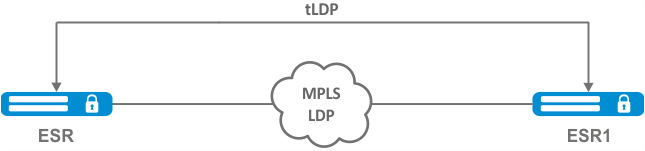
By default, the targeted LDP session is set to the following values:
Parameter | targeted-LDP |
|---|---|
Hello interval | 5 seconds |
Hold timer | 45 seconds |
Keepalive holdtime | 180 seconds |
Hold timer is a matching parameter — the smallest is chosen. This example shows that the ESR after matching set 30 seconds:
ESR1# sh mpls ldp discovery detailed ... Targeted hellos: 1.1.1.1 -> 4.4.4.4: Hello interval: 2 seconds Transport IP address: 1.1.1.1 LDP ID: 4.4.4.4 Source IP address: 4.4.4.4 Transport IP address: 4.4.4.4 Hold time: 30 seconds Proposed hold time: 30/45 (local/peer) seconds |
If after matching, the Hello interval is greater than the Hold timer, then the Hello interval will be equal to Hold timer/3.
ESR routers have the possibility to flexibly configure Hello holdtime, Hello interval and Keepalive holdtime parameters: the parameters can be set for the entire LDP process, as well as for the corresponding neighbor.
Example output for the LDP process:
ESR# sh running-config mpls mpls ldp router-id 1.1.1.1 keepalive 160 discovery targeted-hello holdtime 30 discovery targeted-hello interval 10 exit exit |
Example output for a targeted-LDP session for a particular neighbor:
ESR# sh running-config mpls mpls ldp router-id 1.1.1.1 neighbor 4.4.4.4 keepalive 160 targeted discovery targeted-hello holdtime 30 discovery targeted-hello interval 45 exit exit exit |
If parameters are set for both the LDP process and a specific neighbor, the priority will be the settings set for the neighbor.
ESR# sh running-config mpls mpls ldp router-id 1.1.1.1 keepalive 160 discovery hello holdtime 90 discovery targeted-hello interval 30 neighbor 4.4.4.4 keepalive 140 targeted discovery targeted-hello holdtime 45 discovery targeted-hello interval 15 exit exit exit |
ESR# show mpls ldp discovery detailed ... Targeted hellos: 1.1.1.1 -> 4.4.4.4: Hello interval: 15 seconds Transport IP address: 1.1.1.1 LDP ID: 4.4.4.4 Source IP address: 4.4.4.4 Transport IP address: 4.4.4.4 Hold time: 45 seconds Proposed hold time: 45/45 (local/peer) seconds ESR# show mpls ldp neighbor 4.4.4.4 Peer LDP ID: 4.4.4.4; Local LDP ID 1.1.1.1 State: Operational TCP connection: 4.4.4.4:51861 - 1.1.1.1:646 Messages sent/received: 10/10 Uptime: 00:00:09 Peer holdtime: 140 Keepalive interval: 46 LDP discovery sources: 1.1.1.1 -> 4.4.4.4: |
1 | Configure the LDP (see section LDP configuration). | ||
2 | In the LDP configuration mode, set Hello holdtime. | esr(config-ldp)# discovery targeted-hello holdtime <TIME> | <TIME> — time in the range of [3..65535] seconds. Default value: 45. |
3 | In the LDP configuration mode, set Hello interval. | esr(config-ldp)# discovery targeted- hello interval <TIME> | <TIME> — time in the range of [1..65535] seconds. Default value: 5. |
4 | In the LDP configuration mode, set Keepalive holdtime. | esr(config-ldp)# keepalive <TIME> | <TIME> — time in the range of [3..65535] seconds. Default value: 180. |
1 | Configure the LDP (see section LDP configuration). | ||
2 | In the LDP neighbor configuration mode, set Hello holdtime. | esr(config-ldp-neig)# discovery targeted-hello holdtime <TIME> | <TIME> — time in the range of [3..65535] seconds. Default value: 45. |
3 | In the LDP neighbor configuration mode, set Hello interval. | esr(config-ldp-neig)# discovery targeted- hello interval <TIME> | <TIME> — time in the range of [1..65535] seconds. Default value: 5. |
4 | In the LDP neighbor configuration mode, set Keepalive holdtime. | esr(config-ldp-neig)# keepalive <TIME> | <TIME> — time in the range of [3..65535] seconds. Default value: 180. |
Override Hello holdtime (120 seconds) and Hello interval (30 seconds) parameters for the entire targeted-LDP process. For the neighbor with address 4.4.4.4 set the Keepalive holdtime to 150 seconds.
ESR(config)# mpls ESR(config-mpls)# ldp ESR(config-ldp)# discovery targeted-hello holdtime 40 ESR(config-ldp)# discovery targeted-hello interval 10 ESR(config-ldp)# neighbor 4.4.4.4 ESR(config-ldp-neig)# keepalive 150 |
To view hello parameters of the targeted LDP session:
ESR1# sh mpls ldp discovery detailed
...
    Targeted hellos:
         1.1.1.1 -> 4.4.4.4:
            Hello interval:       10 seconds
            Transport IP address: 1.1.1.1
            LDP ID:               4.4.4.4
                Source IP address:    4.4.4.4
                Transport IP address: 4.4.4.4
                Hold time:            40 seconds
                Proposed hold time:   40/45 (local/peer) seconds
|
To view parameter of the established TCP session:
ESR# sh mpls ldp neighbor 4.4.4.4
Peer LDP ID: 4.4.4.4; Local LDP ID 1.1.1.1
    State:                  Operational
    TCP connection:         4.4.4.4:34879 - 1.1.1.1:646
    Messages sent/received: 11/11
    Uptime:                 00:01:05
    Peer holdtime:          150
    Keepalive interval:     50
    LDP discovery sources:
         1.1.1.1 -> 4.4.4.4:
            Hello interval: 10 seconds
            Holdtime:       40 seconds
... |
By default, routers allocate a separate label to each FEC. There are scenarios when it is necessary to allocate MPLS tags only for certain FECs.
Step | Description | Command | Keys |
|---|---|---|---|
1 | Configure the LDP (see section LDP configuration). | ||
2 | Create network type object-group. | esr(config)# object-group network <NAME> | <NAME> – name of a subnet list being configured, set by the string of up to 31 characters. |
3 | Describe the subnets for which labels will be assigned. | esr(config-object-group-network)# ip prefix <ADDR/LEN> | <ADDR/LEN> – IP address and subnet mask, defined as AAA.BBB.CCC.DDD/EE where each part AAA-DDD takes values of [0..255] and EE takes values of [1..32]. |
4 | In the context of the LDP configuration, apply the created object-group. | esr(config-ldp)# advertise-labels <NAME> | <NAME> – name of a subnet list being configured, set by the string of up to 31 characters. |
Tags will be allocated ONLY to the subnets described in the object-group, regardless of how they were learned (connected, local, IGP, etc.). |
Prefixes must be described in the object-group. The prefix must have an exact match with the route from the FIB. |
This functionality is supported for IPv4. |

Assign MPLS tags only to FEC 10.10.0.2/32 and 10.10.0.1/32.
On ESR_A and ESR_B create an object-group ADV_LABELS type network and add to it the prefixes 10.10.0.1/32 and 10.10.0.2/32 respectively.
esr(config)# object-group network ADV_LABELS esr(config-object-group-network)# ip prefix 10.10.0.1/32 esr(config-object-group-network)# ip prefix 10.10.0.2/32 |
esr(config)# object-group network ADV_LABELS esr(config-object-group-network)# ip prefix 10.10.0.1/32 esr(config-object-group-network)# ip prefix 10.10.0.2/32 |
Apply the created object-group on both routers:
esr(config)# mpls esr(config-ldp)# ldp esr(config-ldp)# advertise-labels ADV_LABELS |
On ESR_B make sure that the tag is assigned to the appropriate prefixes:
esr# sh mpls ldp bindings 10.10.0.1/32 10.10.0.1/32 local label: exp-null remote label: 75 lsr: 172.16.0.1 |
And not assigned to 192.168.2.0/24:
esr# sh mpls ldp bindings 192.168.2.0/24 esr# |
L2VPN allows organizing ethernet frames transmission through the MPLS domain. Allocation and distribution of tunnel labels, in this mode, is carried out by means of the LDP. In the implementation of L2VPN can be divided into two cases:
In both cases, a virtual channel (pseudo-wire) is created to transmit ethernet frames between routers. To negotiate pseudo-wire parameters, as well as to allocate and transfer tunnel labels between routers, an LDP session is established in the targeted mode.
Step | Description | Command | Keys |
|---|---|---|---|
1 | Configure the LDP (see section LDP configuration). | ||
2 | Create pw-class in the system and switch to the pw-class configuration mode. | esr(config-l2vpn)# pw-class <WORD> | <WORD> — pw-class name [1..31] characters long. |
3 | Add a description for pw-class (optional). | esr(config-l2vpn-pw-class)# description <LINE> | <LINE> – description. Set by the string [1..255] characters long. |
4 | Set the MTU value for the pseudo-wire included in the pw-class (optional). | esr(config-l2vpn-pw-class)# encapsulation | <MTU> — MTU value, takes values in the range of [552..10000] Default value: 1500. |
5 | Disable status-tlv messaging (optional). | esr(config-l2vpn-pw-class)# encapsulation | Default value: status-tlv enable |
6 | Create p2p-class in the system and switch to the p2p-class configuration mode. | esr(config-l2vpn)# p2p <NAME> | <NAME> — name of the p2p service, set by the string of up to 31 characters. |
7 | Specify Attached Circuit interface. | esr(config-l2vpn-p2p)# interface | <IF> – an interface's name. <TUN> – the name of the tunnel. |
8 | Enable p2p tunnel. | esr(config-l2vpn-p2p)# enable | |
9 | Specify transport mode (optional). | esr(config-l2vpn-p2p)# transport-mode | <ethernet> — mode in which the 802.1Q tag is removed from the header when entering pseudo-wire; <vlan> — mode in which the 802.1Q tag can be saved when transmitted over pseudo-wire. Default value: ethernet. |
10 | Create a pseudo-wire and switch to its parameters configuration mode. | esr(config-l2vpn-p2p)# pw <PW_ID> <LSR_ID> | <PW_ID> — psewdowire identifier, specified in the range [1..4294967295]. <LSR_ID> — identifier of LSR to which pseudo-wire is built, specified as AAA.BBB.CCC.DDD, where each part takes values [0..255]. |
11 | Add a description for pseudo-wire (optional). | esr(config-l2vpn-pw)# description <LINE> | <LINE> – description. Set by the string [1..255] characters long. |
12 | Set pw-class for pseudo-wire. | esr(config-l2vpn-pw)# pw-class <WORD> | <WORD> — pw-class name [1..31] characters long. |
13 | Set the LSR address to which the pseudo-wire is set (optional if the neighbor address is the same as the LSR_ID). | esr(config-l2vpn-pw)# neighbor-address <ADDR> | <ADDR> – router IP address, defined as AAA.BBB.CCC.DDD where each part takes values of [0..255]. |
14 | Enable pseudo-wire. | esr(config-l2vpn-pw)# enable | |
If it is necessary to change the default settings for a targeted LDP session, see section Configuring session parameters in targeted-LDP. | |||
Configure l2vpn so that ge1/0/2.100 interface of the CE1 router and ge1/0/2.100 interface of the CE2 router operate within the same broadcast domain.

Pre-requisite:
On the PE1 router create a sub-interface from which traffic from CE1 will be received:
PE1# configure PE1(config)# interface gigabitethernet 1/0/4.100 PE1(config-subif)# exit |
Set the MTU value on the interface towards PE2 to 9600 to avoid MTU overrun after encapsulating the MPLS header and disable the firewall:
PE1#(config)# interface gigabitethernet 1/0/1 PE1(config-if-gi)# mtu 9600 PE1(config-if-gi)# ip firewall disable PE1(config-if-gi)# exit |
Allow packets with an MPLS header to be received on the interface towards the MPLS network (in this example, the interface towards PE2):
PE1(config)# mpls PE1(config-mpls)# forwarding interface gigabitethernet 1/0/1 |
Configure the LDP protocol and enable neighbor detection on the interface towards PE2:
PE1(config-mpls)# ldp PE1(config-ldp)# router-id 1.1.1.1 PE1(config-ldp)# address-family ipv4 PE1(config-ldp-af-ipv4)# interface gigabitethernet 1/0/1 PE1(config-ldp-af-ipv4-if)# exit PE1(config-ldp-af-ipv4)# transport-address 1.1.1.1 PE1(config-ldp-af-ipv4)# exit PE1(config-ldp)# enable PE1(config-ldp)# exit |
Create a pw-class on the basis of which the virtual channel (pw) will be created later. Since, in this example, the default parameters will be applied to pw, it will be sufficient to specify the class name:
PE1(config-mpls)# l2vpn PE1(config-l2vpn)# pw-class for_p2p_VLAN100 PE1(config-l2vpn-pw-class)# exit |
Create a new l2vpn of type p2p and add pw to router PE3, take the pw identifier as VID for convenience (in this case equal to 100):
PE1(config-l2vpn)# p2p to_PE2_VLAN100 PE1(config-l2vpn-p2p)# interface gigabitethernet 1/0/4.100 PE1(config-l2vpn-p2p)# pw 100 3.3.3.3 PE1(config-l2vpn-pw)# pw-class for_p2p_VLAN100 PE1(config-l2vpn-pw)# enable PE1(config-l2vpn-pw)# exit PE1(config-l2vpn-p2p)# enable PE1(config-l2vpn-p2p)# end |
Apply the configuration:
PE1# commit PE1# confirm |
Configure the PE2 router in the same way as PE1:
PE2# configure PE2(config)# interface gigabitethernet 1/0/4.100 PE2(config-subif)# exit PE2#(config)# interface gigabitethernet 1/0/1 PE2(config-if-gi)# mtu 9600 PE1(config-if-gi)# ip firewall disable PE1(config-if-gi)# exit PE2(config)# mpls PE2(config-mpls)# forwarding interface gigabitethernet 1/0/1 PE2(config-mpls)# ldp PE2(config-ldp)# router-id 2.2.2.2 PE2(config-ldp)# address-family ipv4 PE2(config-ldp-af-ipv4)# interface gigabitethernet 1/0/1 PE2(config-ldp-af-ipv4-if)# exit PE2(config-ldp-af-ipv4)# transport-address 2.2.2.2 PE2(config-ldp-af-ipv4)# exit PE2(config-ldp)# enable PE2(config-ldp)# exit PE2(config-mpls)# l2vpn PE2(config-l2vpn)# pw-class for_p2p_VLAN100 PE2(config-l2vpn-pw-class)# exit PE2(config-l2vpn)# p2p to_PE1_VLAN100 PE2(config-l2vpn-p2p)# interface gigabitethernet 1/0/4.100 PE2(config-l2vpn-p2p)# pw 100 1.1.1.1 PE2(config-l2vpn-pw)# pw-class for_p2p_VLAN100 PE2(config-l2vpn-pw)# enable PE2(config-l2vpn-pw)# exit PE2(config-l2vpn-p2p)# enable PE2(config-l2vpn-p2p)# end PE2# commit PE2# confirm |
Make sure that the LDP neighborhood is established and display the virtual channel status (pseudowire) between PE1 and PE2:
PE2# show mpls ldp neighbor
Peer LDP ID: 1.1.1.1; Local LDP ID 2.2.2.2
    State: Operational
    TCP connection: 1.1.1.1:646 - 2.2.2.2:34625
    Messages sent/received: 12/12
    Uptime: 00:03:50
    LDP discovery sources:
2.2.2.2 -> 1.1.1.1 |
PE2# show mpls l2vpn pseudowire Neighbor PW ID Type Status --------------------------------------- ---------- ---------- ------ 1.1.1.1 100 Ethernet Up |
The LDP neighborhood is established, pseudowire has moved to 'UP' status. The l2vpn p2p type configuration is now complete.
Step | Description | Command | Keys |
|---|---|---|---|
1 | Configure the LDP (see section LDP configuration). | ||
2 | Create a network bridge in the system without specifying an IP address (see section Bridge configuration). | ||
3 | Create pw-class in the system and switch to the pw-class configuration mode. | esr(config-l2vpn)# pw-class <WORD> | <WORD> — pw-class name [1..31] characters long. |
4 | Add a description for pw-class (optional). | esr(config-l2vpn-pw-class)# description <LINE> | <LINE> — description. Set by the string [1..255] characters long. |
5 | Set the MTU value for the pseudo-wire included in the pw-class (optional). | esr(config-l2vpn-pw-class)# encapsulation | <MTU> — MTU value, takes values in the range of [552..10000]. Default value: 1500. |
6 | Disable status-tlv messaging (optional). | esr(config-l2vpn-pw-class)# encapsulation | Default value: status-tlv enable. |
7 | Create VPLS domain in the system and switch to the VPLS domain configuration mode. | esr(config-l2vpn)# vpls <NAME> | <NAME> — name of the p2p service, set by the string of up to 31 characters. |
8 | Enable VPLS tunnel. | esr(config-l2vpn-vpls)# enable | |
9 | Add bridge domain. | esr (config-l2vpn-vpls)# bridge-group <ID> | <ID> — bridge domain identifier, specified in the range [1..250]. |
10 | Specify transport mode (optional). | esr(config-l2vpn-vpls)# transport-mode | <ethernet> — mode in which the 802.1Q tag is removed from the header when entering pseudo-wire; |
11 | Create a pseudo-wire and switch to its parameters configuration mode | esr(config-l2vpn-vpls)# pw <PW_ID> <LSR_ID> | <PW_ID> — psewdowire identifier, specified in the range [1..4294967295]. <LSR_ID> — identifier of LSR to which pseudo-wire is built, specified as AAA.BBB.CCC.DDD, where each part takes values [0..255]. |
12 | Add a description for pseudo-wire (optional). | esr(config-l2vpn-pw)# description <LINE> | <LINE> — description. Set by the string [1..255] characters long. |
13 | Set pw-class for pseudo-wire | esr(config-l2vpn-pw)# pw-class <WORD> | <WORD> — pw-class name [1..31] characters long. |
14 | Set the LSR address to which the pseudo-wire is set (Optional if the neighbor address is the same as the LSR_ID). | esr(config-l2vpn-pw)# neighbor-address <ADDR> | <ADDR> – router IP address, defined as AAA.BBB.CCC.DDD where each part takes values of [0..255]. |
15 | Enable pseudo-wire. | esr(config-l2vpn-pw)# enable | |
16 | If the topology of the VPLS domain to be created requires more than one pseudo-wire, repeat steps 10 to 14. | ||
17 | If it is necessary to change the default settings for a targeted LDP session, see section Configuring session parameters in targeted-LDP. | ||
Configure l2vpn so that CE1, CE2, CE3 routers have L2 connectivity through the gi1/0/2.100 and gi1/0/4 (CE2) interfaces.
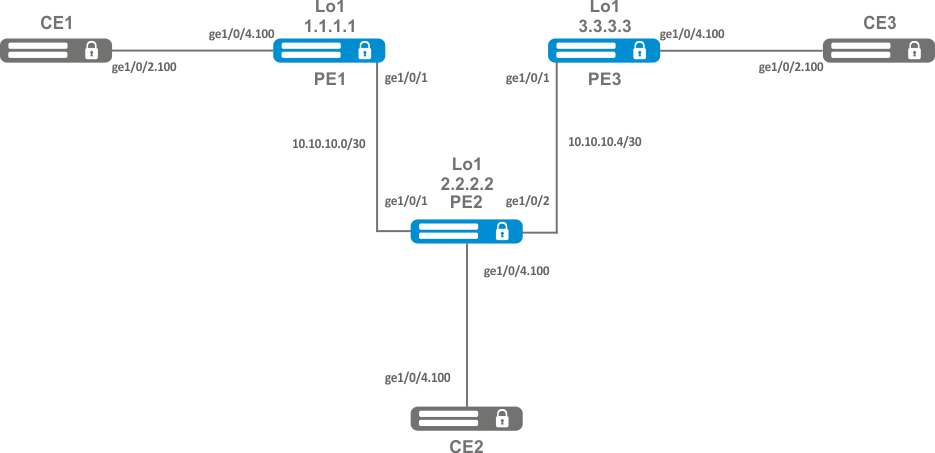
Pre-requisite:
On router PE1, create a bridge group and enable it:
PE1# configure PE1(config)# bridge 10 PE1(config-bridge)# enable PE1(config-bridge)# exit |
On the Interface to the CE1 side, include it in the created bridge group:
PE1(config)# interface gigabitethernet 1/0/4.100 PE1(config-subif)# bridge-group 10 PE1(config-subif)# exit |
Set the MTU value on the interface towards PE2 to 9600 to avoid MTU overrun after encapsulating the MPLS header and disable the firewall:
PE1#(config)# interface gigabitethernet 1/0/1 PE1(config-if-gi)# mtu 9600 PE1(config-if-gi)# ip firewall disable PE1(config-if-gi)# exit |
Allow packets with an MPLS header to be received on the interface towards the MPLS network (in this example, the interface towards PE2):
PE1(config)# mpls PE1(config-mpls)# forwarding interface gigabitethernet 1/0/1 |
Configure the LDP protocol and enable neighbor detection on the interface towards PE2:
PE1(config-mpls)# ldp PE1(config-ldp)# router-id 1.1.1.1 PE1(config-ldp)# address-family ipv4 PE1(config-ldp-af-ipv4)# interface gigabitethernet 1/0/1 PE1(config-ldp-af-ipv4-if)# exit PE1(config-ldp-af-ipv4)# transport-address 1.1.1.1 PE1(config-ldp-af-ipv4)# exit PE1(config-ldp)# enable PE1(config-ldp)# exit |
Create a pw-class on the basis of which the virtual channels (pw) will be created later. Since, in this example, the default parameters will be applied to pw, it will be sufficient to specify the class name:
PE1(config-mpls)# l2vpn PE1(config-l2vpn)# pw-class for_vpls1 PE1(config-l2vpn-pw-class)# exit |
Create a new l2vpn of vpls type and add pw to routers PE2 and PE3, take the pw identifier as VID for convenience (in this case equal to 100):
PE1(config-l2vpn)# vpls vpls1 PE1(config-l2vpn-vpls)# bridge-group 10 PE1(config-l2vpn-vpls)# pw 100 2.2.2.2 PE1(config-l2vpn-pw)# pw-class for_vpls1 PE1(config-l2vpn-pw)# enable PE1(config-l2vpn-pw)# exit PE1(config-l2vpn-vpls)# pw 100 3.3.3.3 PE1(config-l2vpn-pw)# pw-class for_vpls1 PE1(config-l2vpn-pw)# enable PE1(config-l2vpn-pw)# exit PE1(config-l2vpn-vpls)# enable PE1(config-l2vpn-vpls)# end |
Apply the created configuration:
PE1# commit PE1# confirm |
Configure PE2 and PE3 routers in the same way as PE1:
PE2# configure PE2(config)# bridge 10 PE2(config-bridge)# enable PE2(config-bridge)# exit PE2(config)# interface gigabitethernet 1/0/4.100 PE2(config-subif)# bridge-group 10 PE2(config-subif)# exit PE2(config)# interface gigabitethernet 1/0/2 PE2(config-if-gi)# mtu 9600 PE2(config-if-gi)# ip firewall disable PE2(config-if-gi)# exit PE2(config)# mpls PE2(config-mpls)# forwarding interface gigabitethernet 1/0/1 PE2(config-mpls)# forwarding interface gigabitethernet 1/0/2 PE2(config-mpls)# ldp PE2(config-ldp)# enable PE2(config-ldp)# router-id 2.2.2.2 PE2(config-ldp)# address-family ipv4 PE2(config-ldp-af-ipv4)# transport-address 2.2.2.2 PE2(config-ldp-af-ipv4)# interface gigabitethernet 1/0/1 PE2(config-ldp-af-ipv4-if)# exit PE2(config-ldp-af-ipv4)# interface gigabitethernet 1/0/2 PE2(config-ldp-af-ipv4-if)# exit PE2(config-ldp-af-ipv4)# exit PE2(config-ldp)# exit PE2(config-mpls)# l2vpn PE2(config-l2vpn)# pw-class for_vpls1 PE2(config-l2vpn-pw-class)# exit PE2(config-l2vpn)# vpls vpls1 PE2(config-l2vpn-vpls)# enable PE2(config-l2vpn-vpls)# bridge-group 10 PE2(config-l2vpn-vpls)# pw 100 1.1.1.1 PE2(config-l2vpn-pw)# pw-class for_vpls1 PE2(config-l2vpn-pw)# enable PE2(config-l2vpn-pw)# exit PE2(config-l2vpn-vpls)# pw 100 3.3.3.3 PE2(config-l2vpn-pw)# pw-class for_vpls1 PE2(config-l2vpn-pw)# enable PE2(config-l2vpn-pw)# end PE2# commit PE2# confirm PE3(config)# bridge 10 PE3(config-bridge)# enable PE3(config-bridge)# exit PE3(config)# interface gigabitethernet 1/0/4.100 PE3(config-subif)# bridge-group 10 PE3(config-subif)# exit PE3(config)# interface gigabitethernet 1/0/1 PE3(config-if-gi)# mtu 9600 PE3(config-if-gi)# ip firewall disable PE3(config-if-gi)# exit PE3(config)# mpls PE3(config-mpls)# forwarding interface gigabitethernet 1/0/1 PE3(config-mpls)# exit PE3(config)# mpls PE3(config-mpls)# ldp |
PE3(config-ldp)# enable PE3(config-ldp)# router-id 3.3.3.3 PE3(config-ldp)# address-family ipv4 PE3(config-ldp-af-ipv4)# interface gigabitethernet 1/0/1 PE3(config-ldp-af-ipv4-if)# exit PE3(config-ldp-af-ipv4)# transport-address 3.3.3.3 PE3(config-ldp-af-ipv4)# exit PE3(config-ldp)# exit PE3(config-mpls)# l2vpn PE3(config-l2vpn)# pw-class for_vpls PE3(config-l2vpn-pw-class)# exit PE3(config-l2vpn)# vpls vpls1 PE3(config-l2vpn-vpls)# enable PE3(config-l2vpn-vpls)# bridge-group 10 PE3(config-l2vpn-vpls)# pw 100 2.2.2.2 PE3(config-l2vpn-pw)# pw-class for_vpls PE3(config-l2vpn-pw)# enable PE3(config-l2vpn-pw)# exit PE3(config-l2vpn-vpls)# pw 100 1.1.1.1 PE3(config-l2vpn-pw)# pw-class for_vpls PE3(config-l2vpn-pw)# enable PE3(config-l2vpn-pw)# end PE3# commit PE3# confirm |
Make sure that the LDP neighborhood is established and display the virtual channel status (pseudowire) between PE1, PE2 and PE3:
PE3# show mpls ldp neighbor
Peer LDP ID: 1.1.1.1; Local LDP ID 3.3.3.3
    State: Operational
    TCP connection: 1.1.1.1:646 - 3.3.3.3:45979
    Messages sent/received: 22/22
    Uptime: 00:13:16
    LDP discovery sources:
        3.3.3.3 -> 1.1.1.1
Peer LDP ID: 2.2.2.2; Local LDP ID 3.3.3.3
    State: Operational
    TCP connection: 2.2.2.2:646 - 3.3.3.3:59627
    Messages sent/received: 22/22
    Uptime: 00:13:20
    LDP discovery sources:
        3.3.3.3 -> 2.2.2.2
        gigabitethernet 1/0/1
|
PE3# show mpls l2vpn pseudowire Neighbor PW ID Type Status --------------------------------------- ---------- ---------- ------ 1.1.1.1 100 Ethernet Up 2.2.2.2 100 Ethernet Up |
The LDP neighborhood is established, pseudowire has moved to 'UP' status. The l2vpn configuration is now complete.
Unlike Martini mode, where all operation is done by the LDP, in this mode the LDP does only operate with transport labels. Autodetection (not typical of LDP signaling), and the construction of a pseudowire connection is entrusted to BGP.
Step | Description | Command | Keys |
|---|---|---|---|
1 | Configure the LDP (see section LDP configuration). | ||
2 | Create a network bridge in the system without specifying an IP address (see section Bridge configuration). | ||
3 | Create VPLS domain in the system and switch to the VPLS domain configuration mode. | esr(config-l2vpn)# vpls <NAME> | <NAME> — name of the p2p service, set by the string of up to 31 characters. |
4 | Enable VPLS tunnel. | esr(config-l2vpn-vpls)# enable | |
5 | Add bridge domain. | esr(config-l2vpn-vpls)# bridge-group <ID> | <ID> — bridge domain identifier, specified in the range [1..250]. |
6 | Switch to the autodiscovery bgp configuration context. | esr(config-l2vpn-vpls)# autodiscovery bgp | |
7 | Specify route distinguisher for the given VPLS instance. | esr(config-bgp)# rd <RD> | <RD> – Route distinguisher value, specified in one of the following forms:
|
8 | Specify route target import for the given VPLS instance. | esr(config-bgp)# route-target import <RT> | <RT> – Route-target value, specified in one of the following forms:
|
9 | Specify route target export for the given VPLS instance. | esr(config-bgp)# route-target export <RT> | <RT> – Route-target value, specified in one of the following forms:
|
10 | Specify ve id. | esr(config-bgp)# ve id <ID> | <ID> — VPLS instance identifier, specified in the range [1..16384]. |
11 | Specify vpn id. | esr (config-bgp)# vpn id <ID> | <ID> — VPN identifier, specified in the range [1..4294967295] |
12 | Specify ve range (optional). | esr (config-bgp)# ve range <RANGE> | <RANGE> — range of VPLS border device identifiers [8..100]. |
13 | Specify mtu (optional). | esr (config-bgp)# mtu <VALUE> | <VALUE> — MTU value [552..10000]. |
14 | Enable ignoring encapsulation type (optional). | esr(config-bgp)# ignore encapsulation-mismatch | |
15 | Enable ignoring MTU values (optional). | esr(config-bgp)# ignore mtu-mismatch | |
16 | In the context of address-family l2vpn vpls BGP configuration, enable extended attribute transfer. | esr(config-bgp-neighbor-af)# send-community extended |
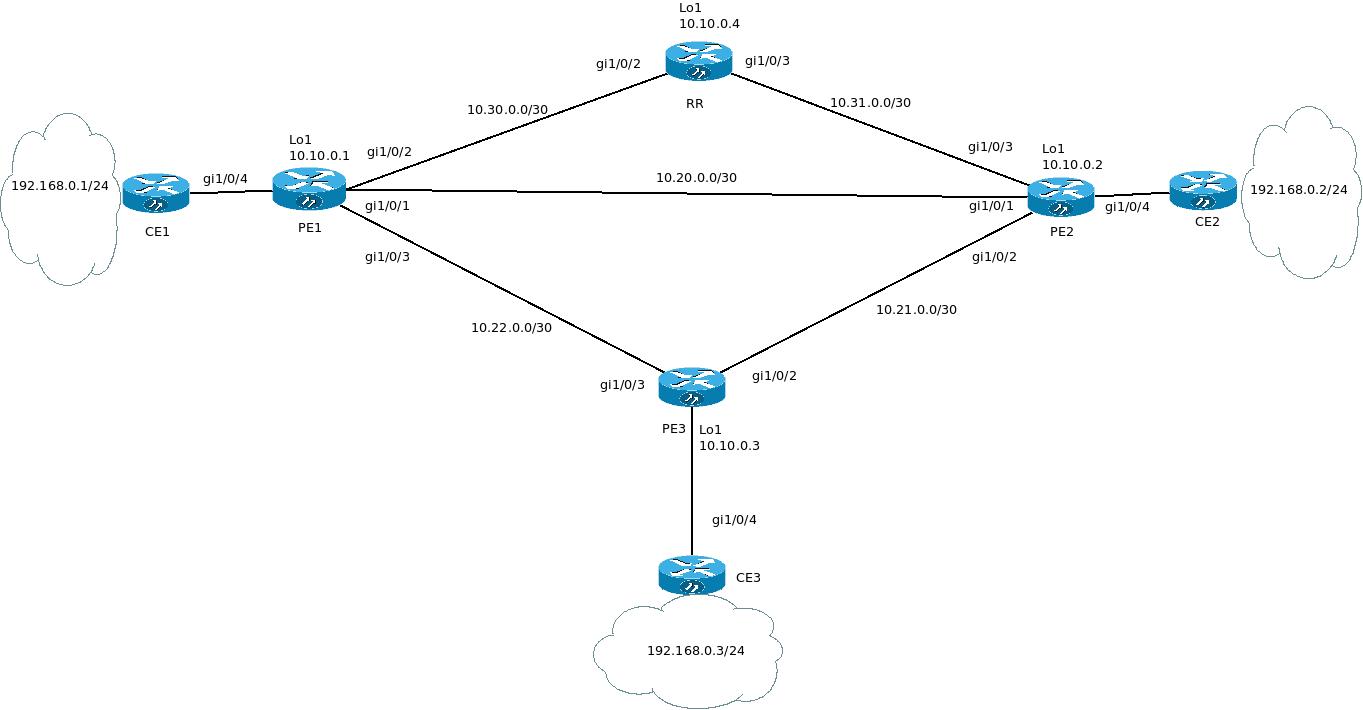
Configure L2VPN service: all CE devices must work within the same broadcast domain.
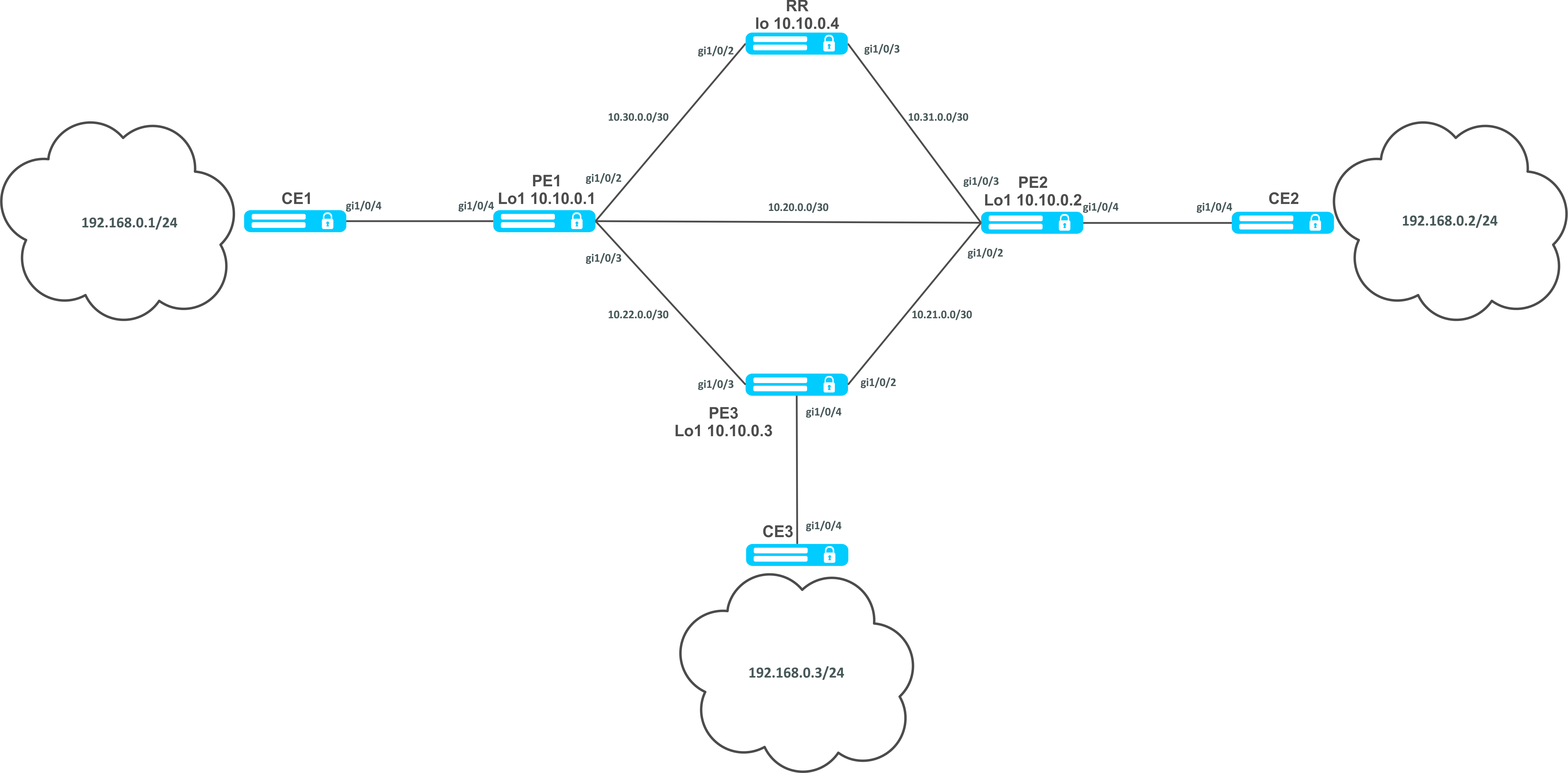
First perform the following steps:
Configure the RR router:
hostname RR system jumbo-frames router ospf 1 area 0.0.0.0 enable exit enable exit interface gigabitethernet 1/0/2 mtu 9500 ip firewall disable ip address 10.30.0.2/30 ip ospf instance 1 ip ospf exit interface gigabitethernet 1/0/3 mtu 9500 ip firewall disable ip address 10.31.0.2/30 ip ospf instance 1 ip ospf exit interface loopback 1 ip address 10.10.0.4/32 ip ospf instance 1 ip ospf exit mpls ldp router-id 10.10.0.4 address-family ipv4 interface gigabitethernet 1/0/2 exit interface gigabitethernet 1/0/3 exit exit enable exit forwarding interface gigabitethernet 1/0/2 forwarding interface gigabitethernet 1/0/3 exit |
Configure the BGP Route Reflector for the address family l2vpn:
RR(config)# router bgp 65500 RR(config-bgp)# router-id 10.10.0.4 RR(config-bgp)# neighbor 10.10.0.1 RR(config-bgp-neighbor)# remote-as 65500 RR(config-bgp-neighbor)# route-reflector-client RR(config-bgp-neighbor)# update-source 10.10.0.4 RR(config-bgp-neighbor)# address-family l2vpn vpls RR(config-bgp-neighbor-af)# send-community extended RR(config-bgp-neighbor-af)# enable RR(config-bgp-neighbor-af)# exit RR(config-bgp-neighbor)# enable RR(config-bgp-neighbor)# exit RR(config-bgp)# neighbor 10.10.0.2 RR(config-bgp-neighbor)# remote-as 65500 RR(config-bgp-neighbor)# route-reflector-client RR(config-bgp-neighbor)# update-source 10.10.0.4 RR(config-bgp-neighbor)# address-family l2vpn vpls RR(config-bgp-neighbor-af)# send-community extended RR(config-bgp-neighbor-af)# enable RR(config-bgp-neighbor-af)# exit RR(config-bgp-neighbor)# enable RR(config-bgp-neighbor)# exit RR(config-bgp)# neighbor 10.10.0.3 RR(config-bgp-neighbor)# remote-as 65500 RR(config-bgp-neighbor)# route-reflector-client RR(config-bgp-neighbor)# update-source 10.10.0.4 RR(config-bgp-neighbor)# address-family l2vpn vpls RR(config-bgp-neighbor-af)# send-community extended RR(config-bgp-neighbor-af)# enable RR(config-bgp-neighbor-af)# exit RR(config-bgp-neighbor)# enable RR(config-bgp-neighbor)# exit RR(config-bgp)# enable |
Configure BGP on the PE routers:
hostname PE1 system jumbo-frames router ospf 1 area 0.0.0.0 enable exit enable exit interface gigabitethernet 1/0/1 mtu 9500 |
ip firewall disable ip address 10.20.0.1/30 ip ospf instance 1 ip ospfexit interface gigabitethernet 1/0/2 mtu 9500 ip firewall disable ip address 10.30.0.1/30 ip ospf instance 1 ip ospf exitinterface gigabitethernet 1/0/3 mtu 9500 ip firewall disable ip address 10.22.0.1/30 ip ospf instance 1 ip ospf exit interface loopback 1 ip address 10.10.0.1/32 ip ospf instance 1 ip ospf exit mpls ldp router-id 10.10.0.1 address-family ipv4 interface gigabitethernet 1/0/1 exit interface gigabitethernet 1/0/2 exit interface gigabitethernet 1/0/3 exit exit enable exit forwarding interface gigabitethernet 1/0/1 forwarding interface gigabitethernet 1/0/2 forwarding interface gigabitethernet 1/0/3 exit |
BGP configuration:
PE1(config)# router bgp 65500 PE1(config-bgp)# neighbor 10.10.0.4 PE2(config-bgp)# router-id 10.10.0.1 PE1(config-bgp-neighbor)# remote-as 65500 PE1(config-bgp-neighbor)# update-source 10.10.0.1 PE1(config-bgp-neighbor)# address-family l2vpn vpls PE1(config-bgp-neighbor-af)# send-community extended PE1(config-bgp-neighbor-af)# enable PE1(config-bgp-neighbor-af)# exit PE1(config-bgp-neighbor)# enable PE1(config-bgp-neighbor)# exit PE1(config-bgp)# enable PE1(config-bgp)# exit |
Check that the BGP session with RR is successfully established:
PE1# show bgp neighbors BGP neighbor is 10.10.0.4 BGP state: Established Neighbor address: 10.10.0.4 Neighbor AS: 65500 Neighbor ID: 10.10.0.4 Neighbor caps: refresh enhanced-refresh restart-aware AS4 Session: internal multihop AS4 Source address: 10.10.0.1 Weight: 0 Hold timer: 110/180 Keepalive timer: 21/60 Uptime: 7375 s |
Configuration of BGP on PE2:
hostname PE2 system jumbo-frames router ospf 1 area 0.0.0.0 enable exit enable exit |
interface gigabitethernet 1/0/1 mtu 9500 ip firewall disable ip address 10.20.0.2/30 ip ospf instance 1 ip ospf exit interface gigabitethernet 1/0/2 mtu 9500 ip firewall disable ip address 10.21.0.1/30 ip ospf instance 1 ip ospf exit interface gigabitethernet 1/0/3 mtu 9500 ip firewall disable ip address 10.31.0.1/30 ip ospf instance 1 ip ospf exit interface loopback 1 ip address 10.10.0.2/32 ip ospf instance 1 ip ospf exit mpls ldp router-id 10.10.0.2 address-family ipv4 interface gigabitethernet 1/0/1 exit interface gigabitethernet 1/0/2 exit interface gigabitethernet 1/0/3 exit exit enable exit forwarding interface gigabitethernet 1/0/1 forwarding interface gigabitethernet 1/0/2 forwarding interface gigabitethernet 1/0/3 exit |
PE2(config)# router bgp 65500 PE2(config-bgp)# router-id 10.10.0.2 PE2(config-bgp)# neighbor 10.10.0.4 PE2(config-bgp-neighbor)# remote-as 65500 PE2(config-bgp-neighbor)# update-source 10.10.0.2 PE2(config-bgp-neighbor)# address-family l2vpn vpls PE2(config-bgp-neighbor-af)# send-community extended PE2(config-bgp-neighbor-af)# enable PE2(config-bgp-neighbor-af)# exit PE2(config-bgp-neighbor)# enable PE2(config-bgp-neighbor)# exit PE2(config-bgp)# enable PE2(config-bgp)# exit |
Check that the session with RR is successfully established:
PE2# show bgp neighbors BGP neighbor is 10.10.0.4 BGP state: Established Neighbor address: 10.10.0.4 Neighbor AS: 65500 Neighbor ID: 10.10.0.4 Neighbor caps: refresh enhanced-refresh restart-aware AS4 Session: internal multihop AS4 Source address: 10.10.0.2 Weight: 0 Hold timer: 113/180 Keepalive timer: 56/60 Uptime: 47 s |
Configuration of BGP on PE3:
hostname PE3 system jumbo-frames router ospf 1 area 0.0.0.0 enable exit enable exit interface gigabitethernet 1/0/2 mtu 9500 ip firewall disable ip address 10.21.0.2/30 ip ospf instance 1 ip ospf exit interface gigabitethernet 1/0/3 mtu 9500 ip firewall disable ip address 10.22.0.2/30 ip ospf instance 1 ip ospf exit interface loopback 1 ip address 10.10.0.3/24 ip ospf instance 1 ip ospf exit mpls ldp router-id 10.10.0.3 address-family ipv4 interface gigabitethernet 1/0/2 exit interface gigabitethernet 1/0/3 exit exit enable exit forwarding interface gigabitethernet 1/0/2 forwarding interface gigabitethernet 1/0/3 exit |
PE3(config)# router bgp 65500 PE3(config-bgp)# router-id 10.10.0.3 PE3(config-bgp)# neighbor 10.10.0.4 PE3(config-bgp-neighbor)# remote-as 65500 PE3(config-bgp-neighbor)# update-source 10.10.0.3 PE3(config-bgp-neighbor)# address-family l2vpn vpls PE3(config-bgp-neighbor-af)# send-community extended PE3(config-bgp-neighbor-af)# enable PE3(config-bgp-neighbor-af)# exit PE3(config-bgp-neighbor)# enable PE3(config-bgp-neighbor)# exit PE3(config-bgp)# enable PE3(config-bgp)# exit |
Check that the BGP session is successfully established:
PE3# show bgp neighbors BGP neighbor is 10.10.0.4 BGP state: Established Neighbor address: 10.10.0.4 Neighbor AS: 65500 Neighbor ID: 10.10.0.4 Neighbor caps: refresh enhanced-refresh restart-aware AS4 Session: internal multihop AS4 Source address: 10.10.0.3 Weight: 0 Hold timer: 141/180 Keepalive timer: 27/60 Uptime: 77 s |
The next step is to create a bridge domain on each PE router, and include an interface (Attachment circuit, AC) that looks towards CE:
PE1:
PE1(config)# bridge 1 PE1(config-bridge)# enable PE1(config-bridge)# exit PE1(config)# interface gigabitethernet 1/0/4 PE1(config-if-gi)# mode switchport PE1(config-if-gi)# bridge-group 1 |
Check that the interface is included into the bridge domain:
PE1# show interfaces bridge
Bridges      Interfaces
----------   --------------------------------------------------------------
bridge 1     gi1/0/4

PE1# sh interfaces status bridge 1
Interface 'bridge 1' status information:
 Description:          --
 Operational state:    Up
 Administrative state: Up
 Supports broadcast:   Yes
 Supports multicast:   Yes
 MTU:                  1500
 MAC address:          a8:f9:4b:ac:4d:15
 Last change:          4 minutes and 22 seconds
 Mode:                 Routerport
|
PE2:
PE2(config)# bridge 1 PE2(config-bridge)# enable PE2(config-bridge)# exit PE2(config)# interface gigabitethernet 1/0/4 PE2(config-if-gi)# mode switchport PE2(config-if-gi)# bridge-group 1 |
PE2# show interfaces bridge 1
Bridges      Interfaces
----------   --------------------------------------------------------------
bridge 1     gi1/0/4

PE2# sh interfaces status bridge 1
Interface 'bridge 1' status information:
 Description:          --
 Operational state:    Up
 Administrative state: Up
 Supports broadcast:   Yes
 Supports multicast:   Yes
 MTU:                  1500
 MAC address:          a8:f9:4b:ad:f2:45
 Last change:          10 seconds
 Mode:                 routerport
|
PE3:
PE3(config)# bridge 1 PE3(config-bridge)# enable PE3(config-bridge)# exit PE3(config)# interface gigabitethernet 1/0/4 PE3(config-if-gi)# mode switchport PE3(config-if-gi)# bridge-group 1 |
PE3# show interfaces bridge
Bridges      Interfaces
----------   --------------------------------------------------------------
bridge 1     gi1/0/4
PE3# sh interfaces status bridge
Interface            Admin   Link    MTU      MAC address          Last change                 Mode
                     state   state
------------------   -----   -----   ------   ------------------   -------------------------   ----------
bridge 1             Up      Up      1500     a8:f9:4b:ac:df:f0    1 minute and 21 seconds     Routerport

PE3# sh interfaces status bridge 1
Interface 'bridge 1' status information:
 Description:          --
 Operational state:    Up
 Administrative state: Up
 Supports broadcast:   Yes
 Supports multicast:   Yes
 MTU:                  1500
 MAC address:          a8:f9:4b:ac:df:f0
 Last change:          1 minute and 24 seconds
 Mode:                 Routerport
|
Next, perform the VPLS configuration:
PE1:
Switch to the L2VPN configuration context and include the previously created bridge domain.
PE1(config)# mpls PE1(config-mpls)# l2vpn PE1(config-l2vpn)# vpls l2vpn PE1(config-l2vpn-vpls)# bridge-group 1 |
Specify RD, RT, VE-ID, VPN-ID according to the network scheme and activate the service:
In some cases entering such parameters as RD and RT can be skipped: if only VPN ID is specified, they will be formed as follows: <AS number> : <vpn-id>. For example, we have an AS 65550 autonomous system number, vpn-id is 10, then the following parameters will be generated: RD - 65550: 10. RT import/export - 65550:10. |
PE1(config-l2vpn-vpls)# autodiscovery bgp PE1(config-bgp)# rd 65500:100 PE1(config-bgp)# route-target import 65500:100 PE1(config-bgp)# route-target export 65500:100 PE1(config-bgp)# ve id 1 PE1(config-bgp)# vpn id 1 PE1(config-bgp)# exit PE1(config-l2vpn-vpls)# enable |
After activating the service, check that route information appeared in the l2vpn table, and it is advertised on RR:
PE1# show ip bgp l2vpn vpls all
Status codes: * - valid, > - best, i - internal, S - stale
Origin codes: i - IGP, e - EGP, ? - incomplete

Codes Route Distinguisher   VID   VBO   VBS   Next hop   Metric     LocPrf     Weight Path
----- --------------------- ----- ----- ----- ---------- ---------- ---------- ------ ------
*>    65500:100             1     1     10    --         --         --         --


PE1# show ip bgp l2vpn vpls all neighbor 10.10.0.4 advertise-routes
Origin codes: i - IGP, e - EGP, ? - incomplete

Route Distinguisher   VID   VBO   VBS   Next hop        Metric     LocPrf     Path
--------------------- ----- ----- ----- --------------- ---------- ---------- ------
65500:100             1     1     10    10.10.0.1       --         100        i


* Detailed output of the advertised route *

PE1# show ip bgp l2vpn vpls all neighbor 10.10.0.4 advertise-routes  ve-id 1 block
-offset 1
BGP routing table entry for 65500:100 VE ID 1 VE Block Offset 1
    VE Block Size:      10
    Label Base:         86
    Next hop:           10.10.0.1
    AS path:            --
    Origin:             IGP
    Local preference:   100
    Extended Community: RT:65500:100
Layer2-info: encaps (VPLS), control flags(0x00), MTU (1500) |
Proceed to the PE2 configuration:
PE2(config-mpls)# l2vpn PE2(config-l2vpn)# vpls l2vpn PE2(config-l2vpn-vpls)# bridge-group 1 PE2(config-l2vpn-vpls)# autodiscovery bgp PE2(config-bgp)# rd 65500:100 |
PE2(config-bgp)# route-target export 65500:100 PE2(config-bgp)# route-target import 65500:100 PE2(config-bgp)# vpn id 2 PE2(config-bgp)# ve id 2 PE2(config-bgp)# exit PE2(config-l2vpn-vpls)# enable |
Check that PE2 is advertising the route information on RR:
PE2# show ip bgp l2vpn vpls all neighbor 10.10.0.4 advertise-routes Origin codes: i - IGP, e - EGP, ? - incomplete Route Distinguisher VID VBO VBS Next hop Metric LocPrf Path --------------------- ----- ----- ----- ------------- ---------- ---------- ------ 65500:100 2 1 10 10.10.0.2 -- 100 i |
In the l2vpn table you can see its routes as well as routes from PE1:
PE2# show ip bgp l2vpn vpls all Status codes: * - valid, > - best, i - internal, S - stale Origin codes: i - IGP, e - EGP, ? - incomplete Codes Route Distinguisher VID VBO VBS Next hop Metric LocPrf Weight Path ----- --------------------- ----- ----- ----- ----------- ---------- ---------- ------ ----- *> 65500:100 2 1 10 -- -- -- -- *>i 65500:100 1 1 10 10.10.0.1 -- 100 0 i |
The calculated service marks can be viewed as follows:
|
Check the service state:
PE2# show mpls l2vpn vpls l2vpn
VPLS: l2vpn
    bridge 1:
        MTU:    1500
        Status: Up
    ACs:
      gigabitethernet 1/0/4:
        MTU:    1500
        Status: Up
    PWs:
      PW ID 2, Neighbor 10.10.0.1:
        MTU:         1500
        Last change: 00:21:33
        Status:      Up
|
Proceed to the PE3 configuration:
PE3# config PE3(config)# mpls PE3(config-mpls)# l2vpn PE3(config-l2vpn)# vpls l2vpn PE3(config-l2vpn-vpls)# bridge-group 1 PE3(config-l2vpn-vpls)# autodiscovery bgp PE3(config-bgp)# rd 65500:100 PE3(config-bgp)# route-target export 65500:100 PE3(config-bgp)# route-target import 65500:100 PE3(config-bgp)# ve id 3 PE3(config-bgp)# vpn id 3 PE3(config-bgp)# exit PE3(config-l2vpn-vpls)# enable |
Check the routing information in PE3:
PE3# show ip bgp l2vpn vpls all Status codes: * - valid, > - best, i - internal, S - stale Origin codes: i - IGP, e - EGP, ? - incomplete Codes Route Distinguisher VID VBO VBS Next hop Metric LocPrf Weight Path ----- --------------------- ----- ----- ----- ----------- ---------- ---------- ------ ----- *> 65500:100 3 1 10 -- -- -- -- *>i 65500:100 2 1 10 10.10.0.2 -- 100 0 i *>i 65500:100 1 1 10 10.10.0.1 -- 100 0 i |
Check that PE3 is advertising the route information on RR:
PE3# show ip bgp l2vpn vpls all neighbor 10.10.0.4 advertise-routes Origin codes: i - IGP, e - EGP, ? - incomplete Route Distinguisher VID VBO VBS Next hop Metric LocPrf Path --------------------- ----- ----- ----- ----------- ------- -------- ----- 65500:100 3 1 10 10.10.0.3 -- 100 i |
Check that the pseudowire is built before both PEs and is in the 'UP' status:
PE3# show mpls l2vpn vpls l2vpn
VPLS: l2vpn
    bridge 1:
        MTU:    1500
        Status: Up
    ACs:
      gigabitethernet 1/0/4:
        MTU:    1500
        Status: Up
    PWs:
      PW ID 3, Neighbor 10.10.0.2:
        MTU:         1500
        Last change: 00:06:08
        Status:      Up
      PW ID 3, Neighbor 10.10.0.1:
        MTU:         1500
        Last change: 00:06:08
        Status:      Up
|
Check the network availability of client equipment (CE):
CE3# ping 192.168.0.1 PING 192.168.0.1 (192.168.0.1) 56(84) bytes of data. !!!!! --- 192.168.0.1 ping statistics --- 5 packets transmitted, 5 received, 0% packet loss, time 4004ms rtt min/avg/max/mdev = 0.173/0.208/0.290/0.045 ms CE3# ping 192.168.0.2 PING 192.168.0.2 (192.168.0.2) 56(84) bytes of data. !!!!! --- 192.168.0.2 ping statistics --- 5 packets transmitted, 5 received, 0% packet loss, time 4004ms rtt min/avg/max/mdev = 0.158/0.204/0.255/0.032 ms PE3# sh mac address-table bridge 1 VID MAC Address Interface Type ----- ------------------ ------------------------------ ------- -- a8:f9:4b:aa:11:08 gigabitethernet 1/0/4 Dynamic -- a8:f9:4b:aa:11:06 dypseudowire 3_10.10.0.1 Dynamic -- a8:f9:4b:aa:11:07 dypseudowire 3_10.10.0.2 Dynamic 3 valid mac entries |
L2VPN service configuration is now complete.
L3VPN service allows to combine distributed client IP networks, and ensure the transfer of traffic between them within a single VRF.
The current implementation of MP-BGP only supports VPN-IPv4 routes (AF I= 1, SAFI = 128). |
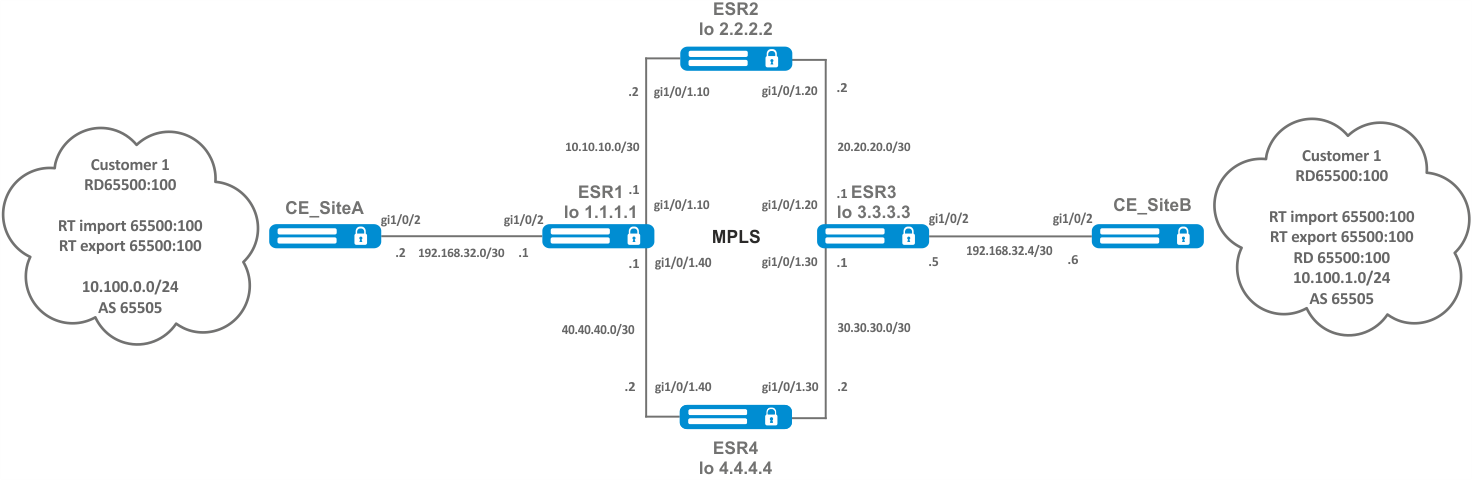
Step | Description | Command | Keys |
|---|---|---|---|
1 | Configure addressing and one of IGP on all P and PE routers. | ||
2 | Configure LDP transport tag distribution. | ||
3 | Create VRF. | esr(config)# ip vrf <VRF> | <VRF> – VRF instance name, set by the string of up to 31 characters. |
4 | Specify route distinguisher for the given VRF. | esr(config-vrf)# rd <RD> | <RD> – Route distinguisher value, specified in one of the following forms:
|
5 | Specify route target import for the given VRF. | esr(config-vrf)# route-target import <RT> | <RT> – Route-target value, specified in one of the following forms:
|
6 | Specify route target export for the given VRF. | esr(config-vrf)# route-target export <RT> | <RT> – route-target value, specified in one of the following forms:
|
7 | Specify the allowed number of routes for this VRF. | esr(config-vrf)# ip protocols <PROTOCOLS> max-routes <VALUE> | <PROTOCOL> – protocol type, may take following values: rip (only in global mode), ospf, isis, bgp; <VALUE> – amount of routes in the routing table, takes values in the range of:
|
8 | In the context of address-family VPNv4 BGP configuration, enable extended attribute transfer. | esr(config-bgp-neighbor-af)# send-community extended |
Configure L3VPN based on MPLS technology between ESR1 and ESR3. The final result of the configuration is the appearance of connectivity between nodes connected to the VRF on different routers in the network (i.e. the union of VRFs on different routers via MPLS transport). In this case, transfer of MPLS service tags for L3VPN service via MP-BGP and transfer of transport tags to reach nexthop addresses of received BGP routes must be provided.
Configuring addressing and enabling IGP and P/PE on routers:
ESR1(config)# router ospf log-adjacency-changes ESR1(config)# router ospf 1 ESR1(config-ospf)# router-id 1.1.1.1 ESR1(config-ospf)# area 0.0.0.0 ESR1(config-ospf-area)# enable ESR1(config-ospf-area)# exit ESR1(config-ospf)# enable ESR1(config-ospf)# exit ESR1(config)# ESR1(config)# interface loopback 1 ESR1(config-loopback)# ip address 1.1.1.1/32 ESR1(config-loopback)# ip ospf instance 1 ESR1(config-loopback)# ip ospf ESR1(config-loopback)# exit ESR1(config)# ESR1(config)# interface gigabitethernet 1/0/1.10 ESR1(config-subif)# ip firewall disable ESR1(config-subif)# ip address 10.10.10.1/30 ESR1(config-subif)# ip ospf instance 1 ESR1(config-subif)# ip ospf ESR1(config-subif)# exit ESR1(config)# ESR1(config)# interface gigabitethernet 1/0/1.40 ESR1(config-subif)# ip firewall disable ESR1(config-subif)# ip address 40.40.40.1/30 ESR1(config-subif)# ip ospf instance 1 ESR1(config-subif)# ip ospf ESR1(config-subif)# exit ESR1(config)# ESR1(config)# system jumbo-frames ESR1(config)# do commit ESR1(config)# do confirm |
ESR2(config)# router ospf log-adjacency-changes ESR2(config)# router ospf 1 ESR2(config-ospf)# router-id 2.2.2.2 ESR2(config-ospf)# area 0.0.0.0 ESR2(config-ospf-area)# enable ESR2(config-ospf-area)# exit ESR2(config-ospf)# enable ESR2(config-ospf)# exit ESR2(config)# ESR2(config)# interface loopback 1 ESR2(config-loopback)# ip address 2.2.2.2/32 ESR2(config-loopback)# ip ospf instance 1 ESR2(config-loopback)# ip ospf ESR2(config-loopback)# exit ESR2(config)# ESR2(config)# interface gigabitethernet 1/0/1.10 ESR2(config-subif)# ip firewall disable ESR2(config-subif)# ip address 10.10.10.2/30 ESR2(config-subif)# ip ospf instance 1 ESR2(config-subif)# ip ospf ESR2(config-subif)# exit ESR2(config)# ESR2(config)# interface gigabitethernet 1/0/1.20 ESR2(config-subif)# ip firewall disable ESR2(config-subif)# ip address 20.20.20.2/30 ESR2(config-subif)# ip ospf instance 1 ESR2(config-subif)# ip ospf ESR2(config-subif)# exit ESR2(config)# ESR2(config)# system jumbo-frames ESR2(config)# do commit ESR2(config)# do confirm |
ESR3(config)# router ospf log-adjacency-changes ESR3(config)# router ospf 1 ESR3(config-ospf)# router-id 3.3.3.3 ESR3(config-ospf)# area 0.0.0.0 ESR3(config-ospf-area)# enable ESR3(config-ospf-area)# exit ESR3(config-ospf)# enable ESR3(config-ospf)# exit ESR3(config)# ESR3(config)# interface loopback 1 ESR3(config-loopback)# ip address 3.3.3.3/32 ESR3(config-loopback)# ip ospf instance 1 ESR3(config-loopback)# ip ospf ESR3(config-loopback)# exit ESR3(config)# ESR3(config)# interface gigabitethernet 1/0/1.20 ESR3(config-subif)# ip firewall disable ESR3(config-subif)# ip address 20.20.20.1/30 ESR3(config-subif)# ip ospf instance 1 ESR3(config-subif)# ip ospf ESR3(config-subif)# exit ESR3(config)# ESR3(config)# interface gigabitethernet 1/0/1.30 ESR3(config-subif)# ip firewall disable ESR3(config-subif)# ip address 30.30.30.1/30 ESR3(config-subif)# ip ospf instance 1 ESR3(config-subif)# ip ospf ESR3(config-subif)# exit ESR3(config)# ESR3(config)# system jumbo-frames ESR3(config)# do commit ESR3(config)# do confirm |
ESR4(config)# router ospf log-adjacency-changes ESR4(config)# router ospf 1 ESR4(config-ospf)# router-id 4.4.4.4 ESR4(config-ospf)# area 0.0.0.0 ESR4(config-ospf-area)# enable ESR4(config-ospf-area)# exit ESR4(config-ospf)# enable ESR4(config-ospf)# exit ESR4(config)# ESR4(config)# interface loopback 1 ESR4(config-loopback)# ip address 4.4.4.4/32 ESR4(config-loopback)# ip ospf instance 1 ESR4(config-loopback)# ip ospf ESR4(config-loopback)# exit ESR4(config)# ESR4(config)# interface gigabitethernet 1/0/1.40 ESR4(config-subif)# ip firewall disable ESR4(config-subif)# ip address 40.40.40.2/30 ESR4(config-subif)# ip ospf instance 1 ESR4(config-subif)# ip ospf ESR4(config-subif)# exit ESR4(config)# ESR4(config)# interface gigabitethernet 1/0/1.30 ESR4(config-subif)# ip firewall disable ESR4(config-subif)# ip address 30.30.30.2/30 ESR4(config-subif)# ip ospf instance 1 ESR4(config-subif)# ip ospf ESR4(config-subif)# exit ESR4(config)# ESR4(config)# system jumbo-frames ESR4(config)# do commit ESR4(config)# do confirm |
It is necessary to make sure that the OSPF protocol is running on each router:
ESR1# show ip ospf neighbors Router ID Pri State DTime Interface Router IP --------- --- ----- ----- ------------- --------- 2.2.2.2 128 Full/BDR 00:39 gi1/0/1.10 10.10.10.2 4.4.4.4 128 Full/BDR 00:32 gi1/0/1.40 40.40.40.2 ESR1# show ip ospf O 40.40.40.0/30 [150/10] dev gi1/0/1.40 [ospf1 1970-01-08] (1.1.1.1) O * 30.30.30.0/30 [150/20] via 40.40.40.2 on gi1/0/1.40 [ospf1 1970-01-08] (3.3.3.3) O 1.1.1.1/32 [150/0] dev lo1 [ospf1 1970-01-08] (1.1.1.1) O * 4.4.4.4/32 [150/10] via 40.40.40.2 on gi1/0/1.40 [ospf1 1970-01-08] (4.4.4.4) O * 20.20.20.0/30 [150/20] via 10.10.10.2 on gi1/0/1.10 [ospf1 22:05:45] (3.3.3.3) O 10.10.10.0/30 [150/10] dev gi1/0/1.10 [ospf1 22:05:33] (1.1.1.1) O * 3.3.3.3/32 [150/20] multipath [ospf1 22:05:45] (3.3.3.3) via 40.40.40.2 on gi1/0/1.40 weight 1 O * 2.2.2.2/32 [150/10] via 10.10.10.2 on gi1/0/1.10 [ospf1 22:05:45] (2.2.2.2) |
LDP configuration on the P/PE routers :
ESR1# config ESR1(config)# mpls ESR1(config-mpls)# ldp ESR1(config-ldp)# address-family ipv4 ESR1(config-ldp-af-ipv4)# transport-address 1.1.1.1 ESR1(config-ldp-af-ipv4)# interface gigabitethernet 1/0/1.10 ESR1(config-ldp-af-ipv4-if)# exit ESR1(config-ldp-af-ipv4)# interface gigabitethernet 1/0/1.40 ESR1(config-ldp-af-ipv4-if)# exit ESR1(config-ldp-af-ipv4)# exit ESR1(config-ldp)# enable ESR1(config-ldp)# exit ESR1(config-mpls)# forwarding interface gigabitethernet 1/0/1.10 ESR1(config-mpls)# forwarding interface gigabitethernet 1/0/1.40 ESR1(config-mpls)# exit ESR1(config)# do commit ESR1(config)# do confirm |
ESR2# config ESR2(config)# mpls ESR2(config-mpls)# ldp ESR2(config-ldp)# address-family ipv4 ESR2(config-ldp-af-ipv4)# transport-address 2.2.2.2 ESR2(config-ldp-af-ipv4)# interface gigabitethernet 1/0/1.10 ESR2(config-ldp-af-ipv4-if)# exit ESR2(config-ldp-af-ipv4)# interface gigabitethernet 1/0/1.20 ESR2(config-ldp-af-ipv4-if)# exit ESR2(config-ldp-af-ipv4)# exit ESR2(config-ldp)# enable ESR2(config-ldp)# exit ESR2(config-mpls)# forwarding interface gigabitethernet 1/0/1.10 ESR2(config-mpls)# forwarding interface gigabitethernet 1/0/1.20 ESR2(config-mpls)# exit ESR2(config)# do commit ESR2(config)# do confirm |
ESR3# config ESR3(config)# mpls ESR3(config-mpls)# ldp ESR3(config-ldp)# address-family ipv4 ESR3(config-ldp-af-ipv4)# transport-address 3.3.3.3 ESR3(config-ldp-af-ipv4)# interface gigabitethernet 1/0/1.20 ESR3(config-ldp-af-ipv4-if)# exit ESR3(config-ldp-af-ipv4)# interface gigabitethernet 1/0/1.30 ESR3(config-ldp-af-ipv4-if)# exit ESR3(config-ldp-af-ipv4)# exit ESR3(config-ldp)# enable ESR3(config-ldp)# exit ESR3(config-mpls)# forwarding interface gigabitethernet 1/0/1.20 ESR3(config-mpls)# forwarding interface gigabitethernet 1/0/1.30 ESR3(config-mpls)# exit ESR3(config)# do commit ESR3(config)# do confirm |
ESR4# config ESR4(config)# mpls ESR4(config-mpls)# ldp ESR4(config-ldp)# address-family ipv4 ESR4(config-ldp-af-ipv4)# transport-address 4.4.4.4 ESR4(config-ldp-af-ipv4)# interface gigabitethernet 1/0/1.30 ESR4(config-ldp-af-ipv4-if)# exit ESR4(config-ldp-af-ipv4)# interface gigabitethernet 1/0/1.40 ESR4(config-ldp-af-ipv4-if)# exit ESR4(config-ldp-af-ipv4)# exit ESR4(config-ldp)# enable ESR4(config-ldp)# exit ESR4(config-mpls)# forwarding interface gigabitethernet 1/0/1.30 ESR4(config-mpls)# forwarding interface gigabitethernet 1/0/1.40 ESR4(config-mpls)# exit ESR4(config)# do commit ESR4(config)# do confirm |
One of the following commands can be used to check the LDP convergence:
ESR1# show mpls ldp neighbor
Peer LDP ID: 2.2.2.2; Local LDP ID 1.1.1.1
	State: Operational
    TCP connection: 2.2.2.2:33933 - 1.1.1.1:646
    Messages sent/received: 1059/1070
    Uptime: 17:32:07
    LDP discovery sources:
        gigabitethernet 1/0/1.10
Peer LDP ID: 4.4.4.4; Local LDP ID 1.1.1.1
    State: Operational
    TCP connection: 4.4.4.4:40894 - 1.1.1.1:646
    Messages sent/received: 1376/1386
    Uptime: 22:38:38
    LDP discovery sources:
gigabitethernet 1/0/1.40 |
Create VRF on ESR1 and ESR3, respectively. Specify RD, rt-export/import in accordance with the scheme. Configure interface for interaction with CE (CE-SiteA и CE-SiteB). Additionally, create a route-map to allow BGP route announcements:
Without specifying RD and RT attributes the route information will not get into the VPNv4 table. |
ESR1(config)# ip vrf Customer1 ESR1(config-vrf)# ip protocols bgp max-routes 1000 ESR1(config-vrf)# rd 65500:100 ESR1(config-vrf)# route-target import 65500:100 ESR1(config-vrf)# route-target export 65500:100 ESR1(config-vrf)# exit ESR1(config)# interface gigabitethernet 1/0/2 ESR1(config-if-gi)# ip vrf forwarding Customer1 ESR1(config-if-gi)# description "Customer1" ESR1(config-if-gi)# ip firewall disable ESR1(config-if-gi)# ip address 192.168.32.1/30 ESR1(config-if-gi)# exit ESR1(config)# route-map OUTPUT ESR1(config-route-map)# rule 1 ESR1(config-route-map-rule)# action permit ESR1(config-route-map-rule)# exit ESR1(config-route-map)# exit ESR1(config)# do commit ESR1(config)# do confirm |
ESR3(config)# ip vrf Customer1 ESR3(config-vrf)# ip protocols bgp max-routes 1000 ESR3(config-vrf)# rd 65500:100 ESR3(config-vrf)# route-target export 65500:100 ESR3(config-vrf)# route-target import 65500:100 ESR3(config-vrf)# exit ESR3(config)# interface gigabitethernet 1/0/2 ESR3(config-if-gi)# ip vrf forwarding Customer1 ESR3(config-if-gi)# description "Customer1" ESR3(config-if-gi)# ip firewall disable ESR3(config-if-gi)# ip address 192.168.32.5/30 ESR3(config-if-gi)# exit ESR3(config)# route-map OUTPUT ESR3(config-route-map)# rule 1 ESR3(config-route-map-rule)# action permit ESR3(config-route-map-rule)# exit ESR3(config-route-map)# exit ESR3(config)# do commit ESR3(config)# do confirm |
Configure iBGP between ESR1 and ESR3. Enable extended community sending on both devices.
ESR1(config)# router bgp log-neighbor-changes ESR1(config)# router bgp 65500 ESR1(config-bgp)# router-id 1.1.1.1 ESR1(config-bgp)# enable ESR1(config-bgp)# neighbor 3.3.3.3 ESR1(config-bgp-neighbor)# remote-as 65500 ESR1(config-bgp-neighbor)# update-source 1.1.1.1 ESR1(config-bgp-neighbor)# enable ESR1(config-bgp-neighbor)# address-family vpnv4 unicast ESR1(config-bgp-neighbor-af)# send-community extended ESR1(config-bgp-neighbor-af)# enable ESR1(config-bgp-neighbor-af)# exit ESR1(config-bgp-neighbor)# exit ESR1(config-bgp)# exit ESR1(config)# do commit ESR1(config)# do confirm |
ESR3(config)# router bgp log-neighbor-changes ESR3(config)# router bgp 65500 ESR3(config-bgp)# router-id 3.3.3.3 ESR3(config-bgp)# enable ESR3(config-bgp)# neighbor 1.1.1.1 ESR3(config-bgp-neighbor)# remote-as 65500 ESR3(config-bgp-neighbor)# update-source 3.3.3.3 ESR3(config-bgp-neighbor)# enable ESR3(config-bgp-neighbor)# address-family vpnv4 unicast ESR3(config-bgp-neighbor-af)# send-community extended ESR3(config-bgp-neighbor-af)# enable ESR3(config-bgp-neighbor-af)# exit ESR3(config-bgp-neighbor)# exit ESR3(config-bgp)# exit ESR3(config)# do commit ESR3(config)# do confirm |
It is necessary to make sure that BGP session is successfully established.
ESR1# show ip bgp neighbors
BGP neighbor is 3.3.3.3
    BGP state: Established
    Neighbor address: 3.3.3.3
    Neighbor AS: 65500
    Neighbor ID: 3.3.3.3
    Neighbor caps: refresh enhanced-refresh restart-aware AS4
    Session: internal multihop AS4
    Source address: 1.1.1.1
    Weight: 0
    Hold timer: 126/180
    Keepalive timer: 40/60
    Address family ipv4 unicast:
    Default originate: No
    Default information originate: No
Uptime: 88495 s |
According to topology, Customer1 advertises a BGP(AS65505) subnet 10.100.0.0/24. Configure eBGP session between CE_SiteA and PE. Configure the corresponding interfaces, eBGP between ESR1 and CE_SiteA. It is also necessary to allow the announcement of routes towards the PE.
By default the route advertising is prohibited for EBGP, an allow rule must be configured. For IBGP route advertising is allowed. |
Configuration on the CE-SiteA router:
CE-SiteA(config)# interface gigabitethernet 1/0/2 CE-SiteA(config-if-gi)# ip firewall disable CE-SiteA(config-if-gi)# ip address 192.168.32.2/30 CE-SiteA(config-if-gi)# exit CE-SiteA(config)# interface loopback 1 CE-SiteA(config-loopback)# ip address 10.100.0.1/24 CE-SiteA(config-loopback)# exit CE-SiteA(config)# route-map OUTPUT CE-SiteA(config-route-map)# rule 1 CE-SiteA(config-route-map-rule)# match ip address 10.100.0.0/24 CE-SiteA(config-route-map-rule)# action permit CE-SiteA(config-route-map-rule)# exit CE-SiteA(config-route-map)# exit CE-SiteA(config)# router bgp log-neighbor-changes CE-SiteA(config)# router bgp 65505 CE-SiteA(config-bgp)# router-id 192.168.32.1 CE-SiteA(config-bgp)# neighbor 192.168.32.1 CE-SiteA(config-bgp-neighbor)# remote-as 65500 CE-SiteA(config-bgp-neighbor)# allow-local-as 1 CE-SiteA(config-bgp-neighbor)# update-source 192.168.32.2 CE-SiteA(config-bgp-neighbor)# address-family ipv4 unicast CE-SiteA(config-bgp-neighbor-af)# route-map OUTPUT out CE-SiteA(config-bgp-neighbor-af)# enable CE-SiteA(config-bgp-neighbor-af)# exit CE-SiteA(config-bgp-neighbor)# enable CE-SiteA(config-bgp-neighbor)# exit CE-SiteA(config-bgp)# address-family ipv4 unicast CE-SiteA(config-bgp-af)# network 10.100.0.0/24 CE-SiteA(config-bgp-af)# exit CE-SiteA(config-bgp)# enable CE-SiteA(config-bgp)# exit CE-SiteA(config)# do commit CE-SiteA(config)# do confirm |
Configure eBGP on the ESR1 router.
Create eBGP session with CE_SiteA and allow routes transmission to the BGP peer:
ESR1(config)# router bgp 65500 ESR1(config-bgp)# vrf Customer1 ESR1(config-bgp-vrf)# router-id 192.168.32.1 ESR1(config-bgp-vrf)# neighbor 192.168.32.2 ESR1(config-bgp-vrf-neighbor)# remote-as 65505 ESR1(config-bgp-vrf-neighbor)# update-source 192.168.32.1 ESR1(config-bgp-vrf-neighbor)# address-family ipv4 unicast ESR1(config-bgp-neighbor-af-vrf)# route-map OUTPUT out ESR1(config-bgp-neighbor-af-vrf)# enable ESR1(config-bgp-neighbor-af-vrf)# exit ESR1(config-bgp-vrf-neighbor)# enable ESR1(config-bgp-vrf-neighbor)# exit ESR1(config-bgp-vrf)# address-family ipv4 unicast ESR1(config-bgp-vrf-af)# redistribute connected ESR1(config-bgp-vrf-af)# redistribute bgp 65500 ESR1(config-bgp-vrf-af)# exit ESR1(config-bgp-vrf)# enable ESR1(config-bgp-vrf)# exit ESR1(config-bgp)# exit ESR1(config)# do commit ESR1(config)# do confirm |
When passing routes from VRF to the VPNv4 table of only connected and/or static networks, you do not need to specify the enable command. Enabling is required only if there are BGP peers in the VRF.
|
The following commands can be used to check the accepted and advertised routes:
ESR1# show bgp vpnv4 unicast vrf Customer1 neighbors 192.168.32.2 advertise-routes
Status codes: u - unicast, b - broadcast, m - multicast, a - anycast
              * - valid, > - best
Origin codes: i - IGP, e - EGP, ? - incomplete


     Network              Next Hop             Metric  LocPrf      Weight Path
*> u 10.100.1.0/24        192.168.32.1                 100                65500 i
*> u 192.168.32.4/30 192.168.32.1 100 65500 i |
Display the advertised routes for a specific peer. The route information is displayed after the filtering is applied:
ESR1# show bgp vpnv4 unicast vrf Customer1 neighbors 192.168.32.2 routes
Status codes: u - unicast, b - broadcast, m - multicast, a - anycast
              * - valid, > - best
Origin codes: i - IGP, e - EGP, ? - incomplete


     Network              Next Hop             Metric  LocPrf      Weight Path
*> u 10.100.0.0/24 192.168.32.2 100 0 65505 |
Output received routing information from a specific peer. Route information is displayed after filtering is applied.
CE_SiteB
Perform similar steps between ESR3 and CE_SiteB routers.
Configure the corresponding interfaces and create eBGP session between ESR3 and CE_SiteB:
CE-SiteB(config)# interface gigabitethernet 1/0/2 CE-SiteB(config-if-gi)# ip firewall disable CE-SiteB(config-if-gi)# ip address 192.168.32.6/30 CE-SiteB(config-if-gi)# exit CE-SiteB(config)# CE-SiteB(config)# interface loopback 1 CE-SiteB(config-loopback)# ip address 10.100.1.1/24 CE-SiteB(config-loopback)# exit CE-SiteB(config)# CE-SiteB(config)# route-map OUTPUT CE-SiteB(config-route-map)# rule 1 CE-SiteB(config-route-map-rule)# match ip address 10.100.1.0/24 CE-SiteB(config-route-map-rule)# action permit CE-SiteB(config-route-map-rule)# exit CE-SiteB(config-route-map)# exit CE-SiteB(config)# CE-SiteB(config)# router bgp 65505 CE-SiteB(config-bgp)# router-id 192.168.32.6 CE-SiteB(config-bgp)# neighbor 192.168.32.5 CE-SiteB(config-bgp-neighbor)# remote-as 65500 CE-SiteB(config-bgp-neighbor)# allow-local-as 1 CE-SiteB(config-bgp-neighbor)# update-source 192.168.32.6 CE-SiteB(config-bgp-neighbor)# address-family ipv4 unicast CE-SiteB(config-bgp-neighbor-af)# route-map OUTPUT out CE-SiteB(config-bgp-neighbor-af)# enable CE-SiteB(config-bgp-neighbor-af)# exit CE-SiteB(config-bgp-neighbor)# enable CE-SiteB(config-bgp-neighbor)# exit CE-SiteB(config-bgp)# address-family ipv4 unicast CE-SiteB(config-bgp-af)# network 10.100.1.0/24 CE-SiteB(config-bgp-af)# exit CE-SiteB(config-bgp)# enable CE-SiteB(config-bgp)# exit CE-SiteB(config)# do commit CE-SiteB(config)# do confirm |
Configure eBGP for ESR3 and allow transmission of routing information from VRF ro VPNv4 table:
router bgp 65500 ESR3(config)# router bgp 65500 ESR3(config-bgp)# vrf Customer1 ESR3(config-bgp-vrf)# router-id 192.168.32.5 ESR3(config-bgp-vrf)# neighbor 192.168.32.6 ESR3(config-bgp-vrf-neighbor)# remote-as 65505 ESR3(config-bgp-vrf-neighbor)# update-source 192.168.32.5 ESR3(config-bgp-vrf-neighbor)# address-family ipv4 unicast ESR3(config-bgp-neighbor-af-vrf)# route-map OUTPUT out ESR3(config-bgp-neighbor-af-vrf)# enable ESR3(config-bgp-neighbor-af-vrf)# exit ESR3(config-bgp-vrf-neighbor)# enable ESR3(config-bgp-vrf-neighbor)# exit ESR3(config-bgp-vrf)# address-family ipv4 unicast ESR3(config-bgp-vrf-af)# redistribute connected ESR3(config-bgp-vrf-af)# redistribute bgp 65500 ESR3(config-bgp-vrf-af)# exit ESR3(config-bgp-vrf)# enable ESR3(config-bgp-vrf)# exit ESR3(config-bgp)# exit ESR3(config)# do commit ESR3(config)# do confirm |
The following commands can be used to view the VPNv4 table:
ESR1# show ip bgp vpnv4 unicast all
Status codes: * - valid, > - best, i - internal, S - stale
Origin codes: i - IGP, e - EGP, ? - incomplete


Codes Route Distinguisher   IP Prefix         Next hop     Metric    Label   LocPrf     Weight Path
----- --------------------- ----------------  ------------ --------- ------- ---------- ------ -----
*>    65500:100            	10.100.0.0/24     --           --        23      --         --     ?
*>i   65500:100            	192.168.32.4/30   3.3.3.3      --        84      100        0      i
*>i 65500:100 10.100.1.0/24 3.3.3.3 -- 84 100 0 i |
This command outputs all received VPNv4 routes after filtering is applied.
ESR routers have a multi-core architecture. One of the first links in processing incoming traffic is the load balancer daemon (lbd), which performs two main functions:
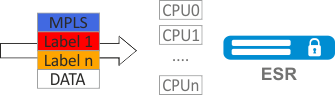
By default, lbd uses only MPLS tags to calculate the hash and then distribute the load to the different CPUs. This behavior is not always an advantage, especially when there are 'large' homogeneous streams of MPLS traffic. Additional functionality can be included to add entropy to the hash:
cpu load-balance mpls passenger ip Enables possibility to 'look beyond' the MPLS header to find the IP header, and add ip-src and ip-dst to the hash calculation. For L2VPN: search for a pair of ip-src and ip-dst in the ip header located behind the mpls header.
For L2VPN: ESR tries to look into the ethernet frame (which is behind the mpls header) and get the ip-src and ip-dst in the ip header to add to the hash calculation.
|
cpu load-balance mpls passenger ip-over-ethernet-pseudowire-with-cw cpu load-balance mpls passenger ip-over-ethernet-pseudowire-without-cw Allows to explicitly specify whether Control Word functionality is used when building L2VPN. Allows to prevent an error occurring when a package with Control Word present can be mistakenly recognized as a package without Control Word. |
When hashing MPLS labels, the following restrictions apply:
To avoid LDP session crash under heavy load on the CPU of the router on models ESR-200, ESR-1000, ESR-1200, ESR-1500, ESR-1700, after enabling the functionality, all LDP protocol packets will be processed by the control CPUs (Management CPU), which do not participate in traffic processing. For ESR-200, ESR-1000, ESR-1200, ESR-1500 is CPU 0, ESR-1700 is CPU 0-1. |
Enable L2VPN traffic balancing without using Control Word functionality.
ESR(config)# system cpu load-balance mpls passenger ip ESR(config)# system cpu load-balance mpls passenger ipoe-pw-without-cw |
To organize L2VPN service, configure a bridge domain on the device, create the required AC, PW (LDP-signaling) and link all the necessary elements with this bridge domain.
For point-to-point, a bridge domain is created automatically. |
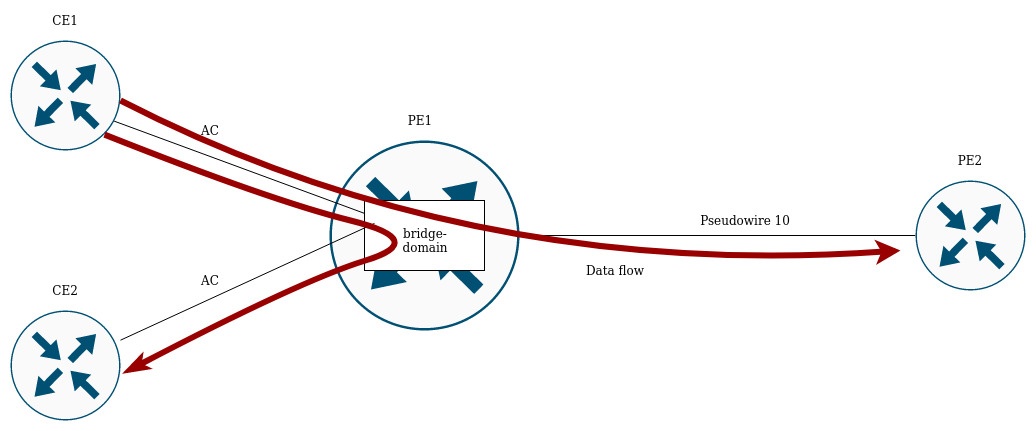
Traffic is switched between elements of the bridge domain based on the listed rules:
In the current implementation, the bridge domain does not allow traffic of data link layer protocols such as STP, LLDP, CDP, etc. |
The bridge domain can operate in two transport modes: ethernet or vlan. Transport mode sets the rules for handling traffic to and from the bridge domain.
In LDP signaling, ethernet mode (Raw mode, type 5) is used by default. A transport mode can be set for each individual VPLS instance.
In BGP signaling, the bridge domain only operate in ethernet mode.
PE1# config PE1(config)# mpls PE1(config-mpls)# l2vpn PE1(config-l2vpn)# vpls MARTINI_br PE1(config-l2vpn-vpls)# transport-mode vlan PE1# sh mpls l2vpn pseudowire Neighbor PW ID Sig Type Status --------------------------------------- ---------- --- ---------- ------ 10.10.0.2 200 LDP Eth Tagged Up |
In LDP signaling, the transport mode is matched between PEs during pseudowire creation, so it must match on both PEs. |
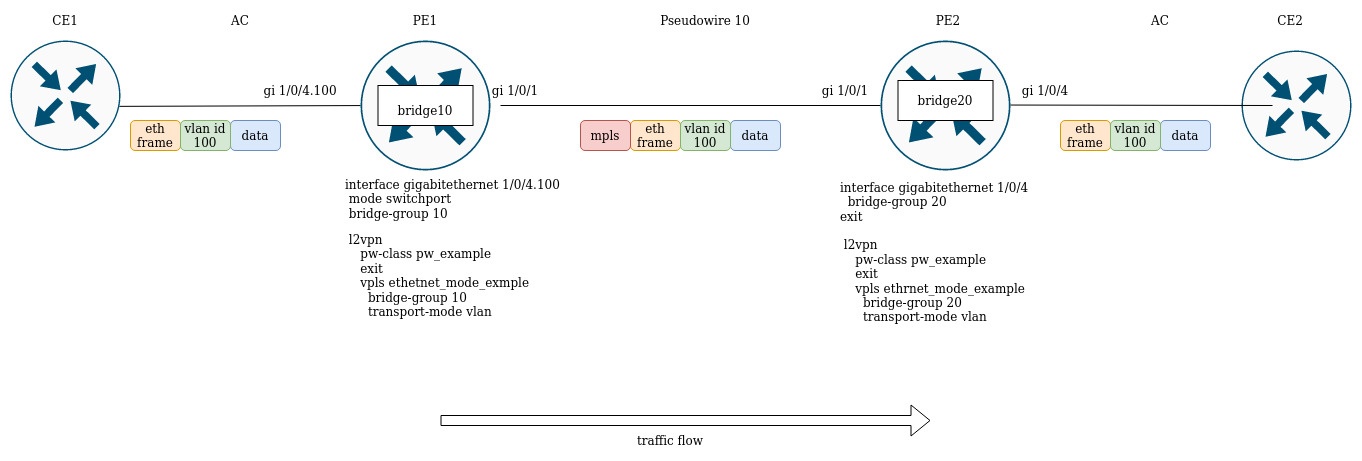
Rules of the traffic processing are given below:
1. Ethernet (Raw) mode:
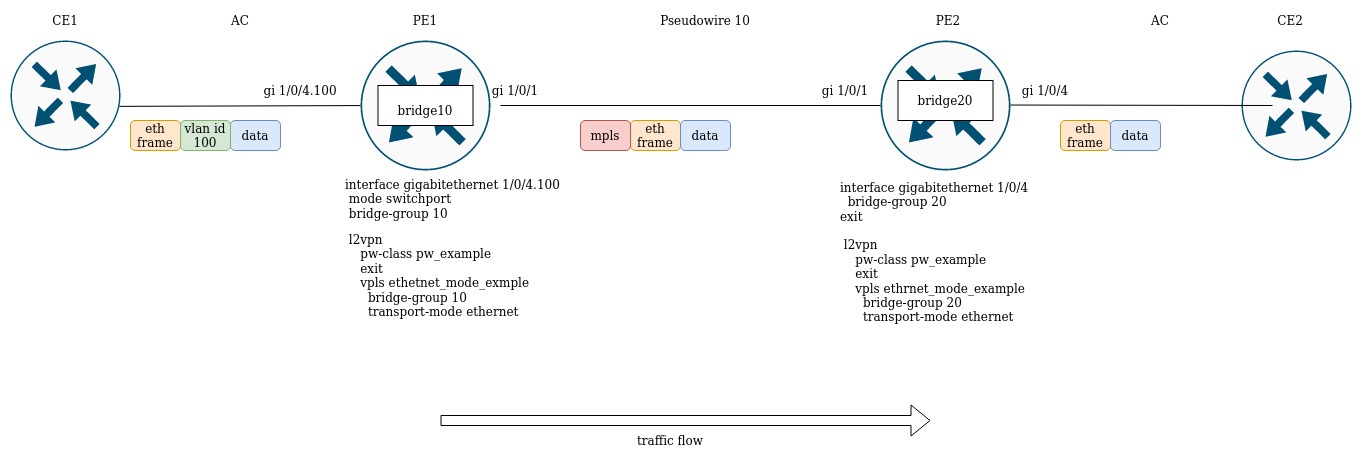
PE1 and PE2 are configured in ethernet mode (Figure 2). On the PE1 side, gigabitethernet 1/0/4.100 subinterface is included in the bridge domain, so the vlan tag (vlan id 100) from incoming traffic will be removed before being placed in Pseudowire 10 (respectively, restored when traffic to the AC side). On the other side the AC on PE2, is an interface, which means that traffic will pass through without modification in either direction.
2. Vlan (Tagged) mode:
It is very important to correctly configure the MTU parameter on the interfaces through which a packet is transmitted. This is true for the installation of the pseudowire and for the transmission of service traffic. There are two important moments:
MTU value is involved in signaling when constructing a pseudowire in both LDP-signaling and BGP-signaling. Examples for both cases are given below.
For signaling (LDP, BGP) the default MTU value is 1500. |
The MTU values involved in signaling do not affect the actual packet size passing through the pseudowire. |
In LDP-signaling, the MTU is set as part of the pw-class setting:
PE2(config)# mpls
PE2(config-mpls)# l2vpn
PE2(config-l2vpn)# pw-class MTU_example
PE2(config-l2vpn-pw-class)# encapsulation mpls mtu 9000
PE2(config-l2vpn-pw-class)# exit
PE2(config-mpls)# l2vpn
PE2(config-l2vpn)# vpls MTU_Example_PW
PE2(config-l2vpn-vpls)# pw 200 10.10.0.1
PE2(config-l2vpn-pw)# pw-class
PE2(config-l2vpn-pw)# pw-class MTU_example

*View created pw-classes*
PE2#  sh mpls l2vpn pw-class
PW-class                         Neighbor   PW ID      Status Status-tlv MTU
-------------------------------- ---------- ---------- ------ ---------- ------
MTU_example                       10.10.0.1  200        Up     Enable     9000


PE2# sh mpls l2vpn vpls  MTU_Example_PW
VPLS:  MTU_Example_PW
...
    PWs:
      PW ID 2, Neighbor 10.10.0.1:
        MTU:         9000
        Last change: 01:27:42
        Status:      Up

* For PW 2 signaling of this VPLS MTU 9000 is selected* |
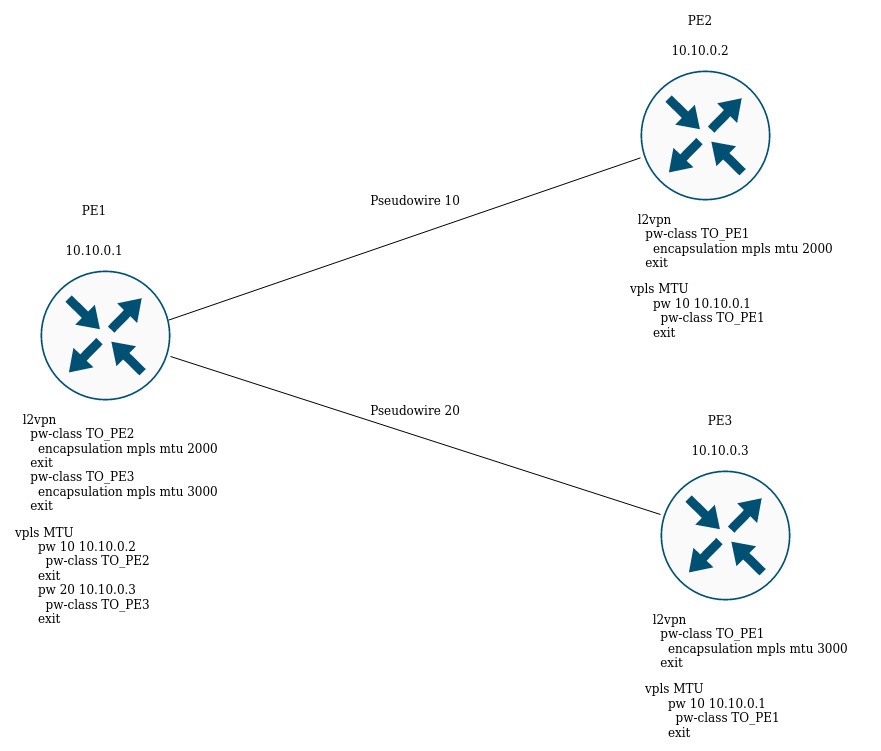
In the figure above, PE1 raises two pseudowires: pseudowire 10 to PE2, and pseudowire 20 to PE3 respectively. For signaling with PE2, the MTU will be set to 2000 (pw-class TO_PE2), for PE3 the MTU will be equal to 3000 (pw-class TO_PE3).
For BGP-signaling, the MTU is specified as part of the l2vpn service configuration:
PE1(config)# mpls
PE1(config-mpls)# l2vpn
PE1(config-l2vpn)# vpls l2vpn_MTU
PE1(config-l2vpn-vpls)# autodiscovery bgp
PE1(config-bgp)# mtu 1500

PE2# sh mpls l2vpn vpls  l2vpn_MTU
VPLS: l2vpn_MTU
...
    PWs:
      PW ID 2, Neighbor 10.10.0.1:
        MTU:         1500
        Last change: 01:27:42
        Status:      Up

* The MTU 1500 will be selected for signaling all pseudowires of this VPLS * |
If the MTU value is different when matching, the status of the pseudowire will be 'DOWN', 'Reason : MTU mismatch'.
PE1(config-l2vpn)# vpls l2vpn_MTU
PE1(config-l2vpn-vpls)# autodiscovery bgp
PE1(config-bgp)# mtu 2000

PE2# sh mpls l2vpn vpls l2vpn_MTU
...
    PWs:
      PW ID 2, Neighbor 10.10.0.1:
        MTU:         2000
        Last change: 00:00:10
        Status:      Down
        Reason:      MTU mismatch
|
MTU checking for BGP-signaling can be disabled:
Now, when matching, the MTU value will be ignored. |
By default, the bridge domain has an MTU of 1500 bytes. It is worth noting that bridge domain automatically selects the lowest MTU value based on its own MTU and the MTU of the interfaces included in the bridge domain.
* E.g., we have a bridge domain 100, which includes interfaces gi1/0/1 with MTU value 2000, and gi1/0/2 with MTU value 3000 *
CE3(config)# bridge 100
CE3(config-bridge)# enable
CE3(config-bridge)# exit
CE3(config)# interface gigabitethernet 1/0/1
CE3(config-if-gi)# mtu 2000
CE3(config-if-gi)# bridge-group 100
CE3(config-if-gi)# exit
CE3(config)# interface gigabitethernet 1/0/2
CE3(config-if-gi)# mtu 3000
CE3(config-if-gi)# bridge-group 100
CE3(config-if-gi)# do com

* The MTU of the bridge domain will be 1500, since the bridge itself has a default MTU of 1500 (the default value), which has become the lowest:
 MTU bridge 100 = 1500  <-- The lowest MTU value
 MTU gi1/0/1  = 2000
 MTU gi1/0/2 = 3000
*


CE3# sh interfaces bridge
Bridges      Interfaces
----------   --------------------------------------------------------------
bridge 100   gi1/0/1-2

CE3# sh interfaces status bridge 100
Interface 'bridge 100' status information:
 Description:          --
 Operational state:    UP
 Administrative state: Up
 Supports broadcast:   Yes
 Supports multicast:   Yes
 MTU:                  1500
 MAC address:          a8:f9:4b:aa:11:00
 Last change:          1 minute and 46 seconds
 Mode:                 Routerport

* Change the MTU on the bridge domain itself: *

CE3(config)# bridge 100
CE3(config-bridge)# mtu 6000
CE3(config-bridge)# do com

* The MTU of the bridge domain became 2000 bytes, because gi1/0/2 has the lowest MTU:
 MTU bridge 100 = 6000
 MTU gi1/0/1  = 2000 <-- The lowest MTU value
 MTU gi1/0/2 = 3000
*

CE3# sh interfaces bridge
Bridges      Interfaces
----------   --------------------------------------------------------------
bridge 100   gi1/0/1-2

CE3# sh interfaces status bridge 100
Interface 'bridge 100' status information:
 Description:          --
 Operational state:    Up
 Administrative state: Up
 Supports broadcast:   Yes
 Supports multicast:   Yes
 MTU:                  2000
 MAC address:          a8:f9:4b:aa:11:00
 Last change:          6 minutes and 42 seconds
 Mode:                 Routerport
|
Consider the example of traffic passing through the L2VPN service:
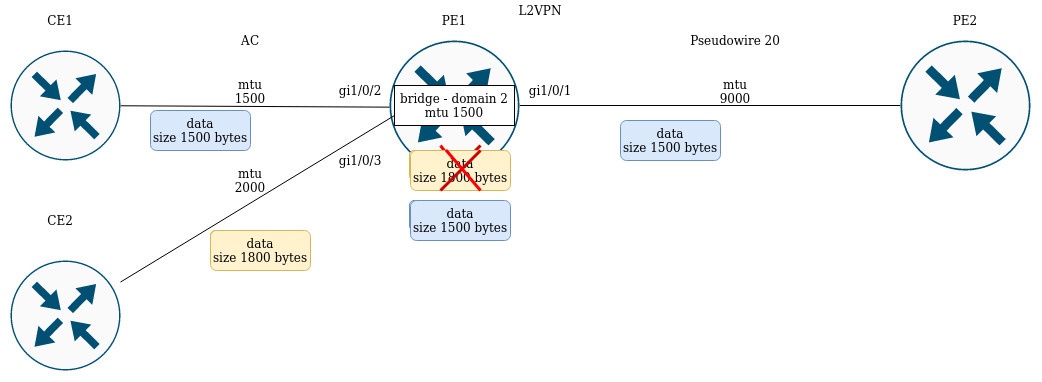
PE1 has the following MTU values on the interfaces:
PE1# sh interfaces status
Interface   Admin   Link    MTU      MAC address          Last change                 Mode
            state   state
----------  -----   -----   ------   ------------------   -------------------------   ----------
gi1/0/1     Up      Up      9000     a8:f9:4b:ac:4d:16    5 hours, 25 minutes and 2   Routerport
                                                          seconds

gi1/0/2     Up      Up      1500     a8:f9:4b:ac:4d:17    4 days, 4 hours, 49         Switchport
                                                          minutes and 40 seconds

gi1/0/3     Up      Up      1800     a8:f9:4b:ac:4d:18    4 days, 1 hour, 49          Switchport
                                                          minutes and 38 seconds

bridge 2    Up      Up      1500     a8:f9:4b:ac:4d:15    1 day, 1 hour, 27 minutes   Routerport
                                                          and 28 seconds
|
CE1 sends packets of 1500 bytes, CE2 sends packets of 1800 bytes respectively. Since the MTU of the bridge domain is smaller than the MTU of the packet from CE2, the packet from CE2 will be discarded before hitting the bridge domain. Similar will be the case if the MTU interface facing the mpls-core (gi1/0/1) is less than the MTU coming from the CE packets (taking into account the mpls header).
Similar behavior when passing traffic in the L3VPN service:
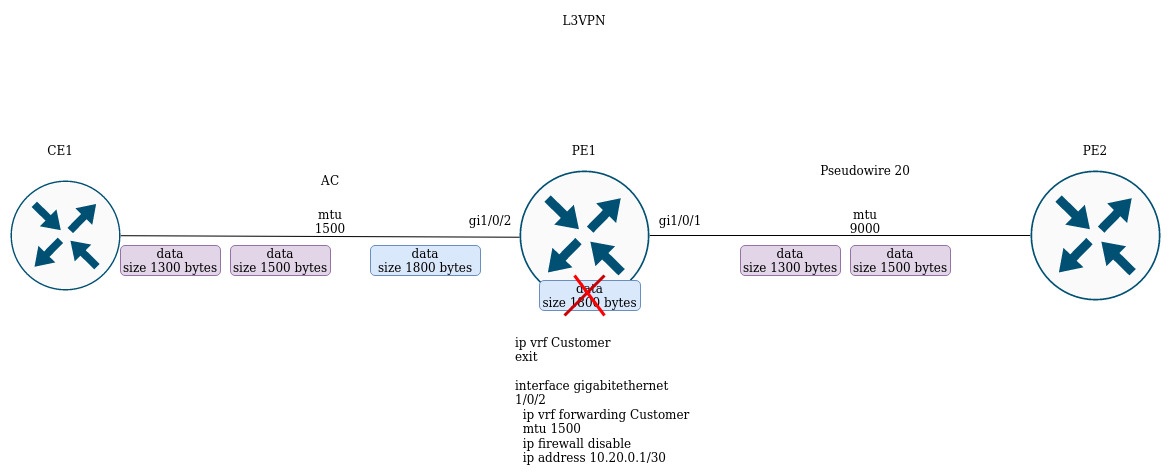
If CE1 sends a packet with a higher MTU than on the interface facing the client (gi1/0/2) or towards the mpls-core (gi1/0/1), the packet will be discarded.
This section provides examples of configuration based on the construction of l3vpn and l2vpn services. The main feature of inter-AS Option A is the absence of mpls-tags in traffic when transferring between ABSR. To separate client service traffic between ASBRs, VRF is usually used for l3vpn or tagging (dot1q, q-in-q) for l2vpn services.
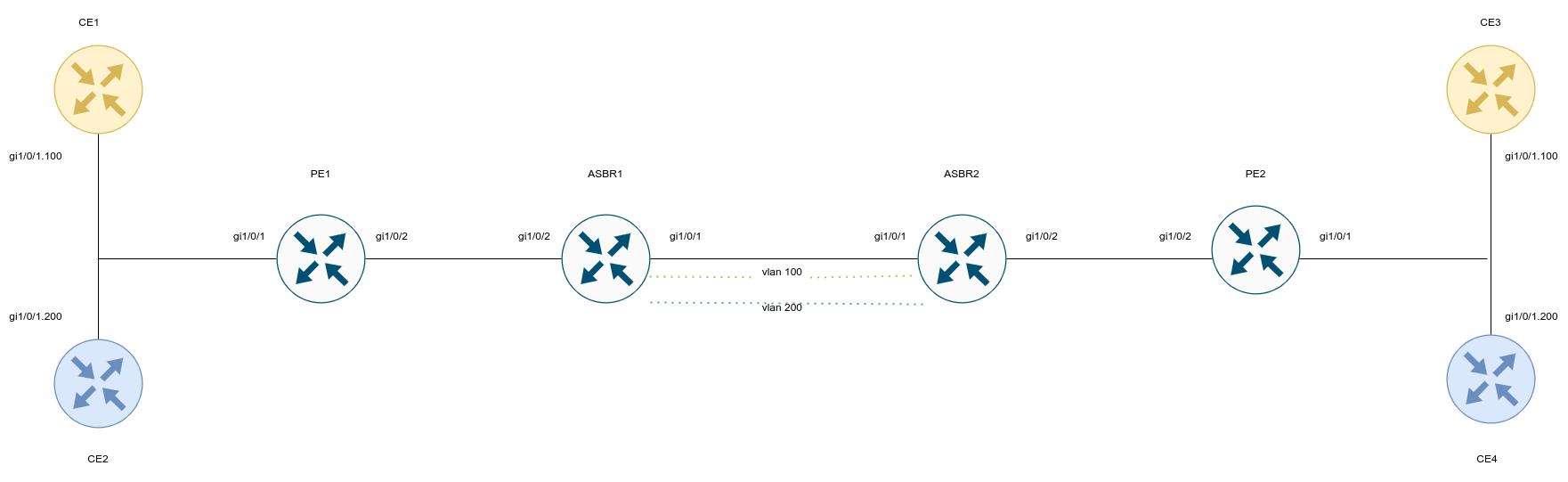
CE configuration:
ESR# config ESR(config)# hostname CE1 ESR(config)# interface gigabitethernet 1/0/1.100 ESR(config-if-gi)# ip firewall disable ESR(config-if-gi)# ip address 192.168.1.1/24 ESR(config-if-gi)# do com ESR(config-if-gi)# do conf |
ESR# config ESR(config)# hostname CE2 ESR(config)# interface gigabitethernet 1/0/1.200 ESR(config-if-gi)# ip firewall disable ESR(config-if-gi)# ip address 192.168.2.1/24 ESR(config-if-gi)# do com ESR(config-if-gi)# do conf |
ESR# config ESR(config)# hostname CE3 ESR(config)# interface gigabitethernet 1/0/1.100 ESR(config-if-gi)# ip firewall disable ESR(config-if-gi)# ip address 192.168.1.2/24 ESR(config-if-gi)# do com ESR(config-if-gi)# do conf |
ESR# config ESR(config)# hostname CE4 ESR(config)# interface gigabitethernet 1/0/1.200 ESR(config-if-gi)# ip firewall disable ESR(config-if-gi)# ip address 192.168.2.2/24 ESR(config-if-gi)# do com ESR(config-if-gi)# do conf |
Configure PE1 and PE2. Assign service labels advertising to BGP (Kompella mode):
ESR(config)# hostname PE1 ESR(config)# system jumbo-frames ESR(config)# router bgp log-neighbor-changes ESR(config)# router bgp 65500 ESR(config-bgp)# neighbor 10.10.1.2 ESR(config-bgp-neighbor)# remote-as 65500 ESR(config-bgp-neighbor)# update-source 10.10.1.1 ESR(config-bgp-neighbor)# address-family l2vpn vpls ESR(config-bgp-neighbor-af)# send-community extended ESR(config-bgp-neighbor-af)# enable ESR(config-bgp-neighbor-af)# exit ESR(config-bgp-neighbor)# enable ESR(config-bgp-neighbor)# exit ESR(config-bgp)# enable ESR(config-bgp)# exit ESR(config)# ESR(config)# router ospf 1 ESR(config-ospf)# area 0.0.0.0 ESR(config-ospf-area)# enable ESR(config-ospf-area)# exit ESR(config-ospf)# enable ESR(config-ospf)# exit ESR(config)# ESR(config)# bridge 100 ESR(config-bridge)# enable ESR(config-bridge)# exit ESR(config)# bridge 200 ESR(config-bridge)# enable ESR(config-bridge)# exit ESR(config)# ESR(config)# interface gigabitethernet 1/0/1.100 ESR(config-subif)# description "to CE1" ESR(config-subif)# bridge-group 100 ESR(config-subif)# exit ESR(config)# interface gigabitethernet 1/0/1.200 ESR(config-subif)# description "to CE2" ESR(config-subif)# bridge-group 200 ESR(config-subif)# exit ESR(config)# interface gigabitethernet 1/0/2 ESR(config-if-gi)# mtu 1522 ESR(config-if-gi)# ip firewall disable ESR(config-if-gi)# ip address 10.100.0.1/30 ESR(config-if-gi)# ip ospf instance 1 ESR(config-if-gi)# ip ospf ESR(config-if-gi)# exit ESR(config)# interface loopback 1 ESR(config-loopback)# ip address 10.10.1.1/32 ESR(config-loopback)# ip ospf instance 1 ESR(config-loopback)# ip ospf ESR(config-loopback)# exit ESR(config)# mpls ESR(config-mpls)# ldp ESR(config-ldp)# router-id 10.10.1.1 ESR(config-ldp)# address-family ipv4 ESR(config-ldp-af-ipv4)# interface gigabitethernet 1/0/2 ESR(config-ldp-af-ipv4-if)# exit ESR(config-ldp-af-ipv4)# exit ESR(config-ldp)# enable ESR(config-ldp)# exit ESR(config-mpls)# l2vpn ESR(config-l2vpn)# vpls CE1 ESR(config-l2vpn-vpls)# bridge-group 100 ESR(config-l2vpn-vpls)# autodiscovery bgp ESR(config-bgp)# vpn id 1 ESR(config-bgp)# ve id 2 ESR(config-bgp)# rd 65500:1 ESR(config-bgp)# route-target export 65500:1 ESR(config-bgp)# route-target import 65500:1 ESR(config-bgp)# exit ESR(config-l2vpn-vpls)# enable ESR(config-l2vpn-vpls)# exit ESR(config-l2vpn)# vpls CE2 ESR(config-l2vpn-vpls)# bridge-group 200 ESR(config-l2vpn-vpls)# autodiscovery bgp ESR(config-bgp)# vpn id 2 ESR(config-bgp)# ve id 2 ESR(config-bgp)# rd 65500:2 ESR(config-bgp)# route-target export 65500:2 ESR(config-bgp)# route-target import 65500:2 ESR(config-bgp)# exit ESR(config-l2vpn-vpls)# enable ESR(config-l2vpn-vpls)# exit ESR(config-l2vpn)# exit ESR(config-mpls)# forwarding interface gigabitethernet 1/0/2 ESR(config-mpls)# exit ESR(config)# do com ESR(config)# do conf |
ESR(config)# hostname ESR ESR(config)# system jumbo-frames ESR(config)# ESR(config)# router bgp log-neighbor-changes ESR(config)# router bgp 65500 ESR(config-bgp)# router-id 10.11.1.1 ESR(config-bgp)# neighbor 10.11.1.2 ESR(config-bgp-neighbor)# remote-as 65500 ESR(config-bgp-neighbor)# update-source 10.11.1.1 ESR(config-bgp-neighbor)# address-family l2vpn vpls ESR(config-bgp-neighbor-af)# send-community extended ESR(config-bgp-neighbor-af)# enable ESR(config-bgp-neighbor-af)# exit ESR(config-bgp-neighbor)# enable ESR(config-bgp-neighbor)# exit ESR(config-bgp)# enable ESR(config-bgp)# exit ESR(config)# ESR(config)# router ospf 1 ESR(config-ospf)# area 0.0.0.0 ESR(config-ospf-area)# enable ESR(config-ospf-area)# exit ESR(config-ospf)# enable ESR(config-ospf)# exit ESR(config)# ESR(config)# bridge 100 ESR(config-bridge)# enable ESR(config-bridge)# exit ESR(config)# bridge 200 ESR(config-bridge)# enable ESR(config-bridge)# exit ESR(config)# ESR(config)# interface gigabitethernet 1/0/1.100 ESR(config-subif)# description "to CE3" ESR(config-subif)# bridge-group 100 ESR(config-subif)# exit ESR(config)# interface gigabitethernet 1/0/1.200 ESR(config-subif)# description "to CE4" ESR(config-subif)# bridge-group 200 ESR(config-subif)# exit ESR(config)# interface gigabitethernet 1/0/2 ESR(config-if-gi)# mtu 1522 ESR(config-if-gi)# ip firewall disable ESR(config-if-gi)# ip address 10.101.0.1/30 ESR(config-if-gi)# ip ospf instance 1 ESR(config-if-gi)# ip ospf ESR(config-if-gi)# exit ESR(config)# interface loopback 1 ESR(config-loopback)# ip address 10.11.1.1/32 ESR(config-loopback)# ip ospf instance 1 ESR(config-loopback)# ip ospf ESR(config-loopback)# exit ESR(config)# mpls ESR(config-mpls)# ldp ESR(config-ldp)# router-id 10.11.1.1 ESR(config-ldp)# address-family ipv4 ESR(config-ldp-af-ipv4)# interface gigabitethernet 1/0/2 ESR(config-ldp-af-ipv4-if)# exit ESR(config-ldp-af-ipv4)# exit ESR(config-ldp)# enable ESR(config-ldp)# exit ESR(config-mpls)# l2vpn ESR(config-l2vpn)# vpls CE1 ESR(config-l2vpn-vpls)# bridge-group 100 ESR(config-l2vpn-vpls)# autodiscovery bgp ESR(config-bgp)# vpn id 1 ESR(config-bgp)# ve id 2 ESR(config-bgp)# rd 65500:1 ESR(config-bgp)# route-target export 65500:1 ESR(config-bgp)# route-target import 65500:1 ESR(config-bgp)# exit ESR(config-l2vpn-vpls)# enable ESR(config-l2vpn-vpls)# exit ESR(config-l2vpn)# vpls CE2 ESR(config-l2vpn-vpls)# bridge-group 200 ESR(config-l2vpn-vpls)# autodiscovery bgp ESR(config-bgp)# vpn id 2 ESR(config-bgp)# ve id 2 ESR(config-bgp)# rd 65500:2 ESR(config-bgp)# route-target export 65500:2 ESR(config-bgp)# route-target import 65500:2 ESR(config-bgp)# exit ESR(config-l2vpn-vpls)# enable ESR(config-l2vpn-vpls)# exit ESR(config-l2vpn)# exit ESR(config-mpls)# forwarding interface gigabitethernet 1/0/2 ESR(config-mpls)# exit ESR(config)# do com ESR(config)# do conf |
Configure ASBR1 and ASBR2. To separate traffic from CE1 and CE2 towards ASBR2, make the gi1/0/1 interface as trunk. Vlan 100 and 200 will be dedicated to traffic from CE1 and CE2:
ESR(config)# hostname ASBR1 ESR(config)# ESR(config)# system jumbo-frames ESR(config)# ESR(config)# vlan 100,200 ESR(config-vlan)# exit ESR(config)# ESR(config)# router bgp 65500 ESR(config-bgp)# router-id 10.10.1.2 ESR(config-bgp)# neighbor 10.10.1.1 ESR(config-bgp-neighbor)# remote-as 65500 ESR(config-bgp-neighbor)# update-source 10.10.1.2 ESR(config-bgp-neighbor)# address-family l2vpn vpls ESR(config-bgp-neighbor-af)# send-community extended ESR(config-bgp-neighbor-af)# enable ESR(config-bgp-neighbor-af)# exit ESR(config-bgp-neighbor)# enable ESR(config-bgp-neighbor)# exit ESR(config-bgp)# enable ESR(config-bgp)# exit ESR(config)# ESR(config)# router ospf 1 ESR(config-ospf)# area 0.0.0.0 ESR(config-ospf-area)# enable ESR(config-ospf-area)# exit ESR(config-ospf)# enable ESR(config-ospf)# exit ESR(config)# ESR(config)# bridge 10 ESR(config-bridge)# vlan 100 ESR(config-bridge)# enable ESR(config-bridge)# exit ESR(config)# bridge 20 ESR(config-bridge)# vlan 200 ESR(config-bridge)# enable ESR(config-bridge)# exit ESR(config)# ESR(config)# interface gigabitethernet 1/0/1 ESR(config-if-gi)# description "to ASBR2" ESR(config-if-gi)# mode switchport ESR(config-if-gi)# spanning-tree disable ESR(config-if-gi)# switchport forbidden default-vlan ESR(config-if-gi)# switchport mode trunk ESR(config-if-gi)# switchport trunk allowed vlan add 100,200 ESR(config-if-gi)# exit ESR(config)# interface gigabitethernet 1/0/2 ESR(config-if-gi)# description "to PE1" ESR(config-if-gi)# mtu 1522 ESR(config-if-gi)# ip firewall disable ESR(config-if-gi)# ip address 10.100.0.2/30 ESR(config-if-gi)# ip ospf instance 1 ESR(config-if-gi)# ip ospf ESR(config-if-gi)# exit ESR(config)# interface loopback 1 ESR(config-loopback)# ip address 10.10.1.2/32 ESR(config-loopback)# ip ospf instance 1 ESR(config-loopback)# ip ospf ESR(config-loopback)# exit ESR(config)# mpls ESR(config-mpls)# ldp ESR(config-ldp)# router-id 10.10.1.2 ESR(config-ldp)# address-family ipv4 ESR(config-ldp-af-ipv4)# interface gigabitethernet 1/0/2 ESR(config-ldp-af-ipv4-if)# exit ESR(config-ldp-af-ipv4)# exit ESR(config-ldp)# enable ESR(config-ldp)# exit ESR(config-mpls)# l2vpn ESR(config-l2vpn)# vpls CE1 ESR(config-l2vpn-vpls)# bridge-group 10 ESR(config-l2vpn-vpls)# autodiscovery bgp ESR(config-bgp)# vpn id 1 ESR(config-bgp)# ve id 1 ESR(config-bgp)# rd 65500:1 ESR(config-bgp)# route-target export 65500:1 ESR(config-bgp)# route-target import 65500:1 ESR(config-bgp)# exit ESR(config-l2vpn-vpls)# enable ESR(config-l2vpn-vpls)# exit ESR(config-l2vpn)# vpls CE2 ESR(config-l2vpn-vpls)# bridge-group 20 ESR(config-l2vpn-vpls)# autodiscovery bgp ESR(config-bgp)# vpn id 2 ESR(config-bgp)# ve id 1 ESR(config-bgp)# rd 65500:2 ESR(config-bgp)# route-target export 65500:2 ESR(config-bgp)# route-target import 65500:2 ESR(config-bgp)# exit ESR(config-l2vpn-vpls)# enable ESR(config-l2vpn-vpls)# exit ESR(config-l2vpn)# exit ESR(config-mpls)# forwarding interface gigabitethernet 1/0/2 ESR(config-mpls)# exit ESR(config)# do com ESR(config)# do conf |
ESR(config)# hostname ASBR2 ESR(config)# ESR(config)# system jumbo-frames ESR(config)# ESR(config)# vlan 100,200 ESR(config-vlan)# exit ESR(config)# ESR(config)# router bgp 65500 ESR(config-bgp)# router-id 10.10.1.2 ESR(config-bgp)# neighbor 10.10.1.1 ESR(config-bgp-neighbor)# remote-as 65500 ESR(config-bgp-neighbor)# update-source 10.10.1.2 ESR(config-bgp-neighbor)# address-family l2vpn vpls ESR(config-bgp-neighbor-af)# send-community extended ESR(config-bgp-neighbor-af)# enable ESR(config-bgp-neighbor-af)# exit ESR(config-bgp-neighbor)# enable ESR(config-bgp-neighbor)# exit ESR(config-bgp)# enable ESR(config-bgp)# exit ESR(config)# ESR(config)# router ospf 1 ESR(config-ospf)# area 0.0.0.0 ESR(config-ospf-area)# enable ESR(config-ospf-area)# exit ESR(config-ospf)# enable ESR(config-ospf)# exit ESR(config)# ESR(config)# bridge 10 ESR(config-bridge)# vlan 100 ESR(config-bridge)# enable ESR(config-bridge)# exit ESR(config)# bridge 20 ESR(config-bridge)# vlan 200 ESR(config-bridge)# enable ESR(config-bridge)# exit ESR(config)# ESR(config)# interface gigabitethernet 1/0/1 ESR(config-if-gi)# description "to ASBR1" ESR(config-if-gi)# mode switchport ESR(config-if-gi)# spanning-tree disable ESR(config-if-gi)# switchport forbidden default-vlan ESR(config-if-gi)# switchport mode trunk ESR(config-if-gi)# switchport trunk allowed vlan add 100,200 ESR(config-if-gi)# exit ESR(config)# interface gigabitethernet 1/0/2 ESR(config-if-gi)# description "to PE1" ESR(config-if-gi)# mtu 1522 ESR(config-if-gi)# ip firewall disable ESR(config-if-gi)# ip address 10.100.0.2/30 ESR(config-if-gi)# ip ospf instance 1 ESR(config-if-gi)# ip ospf ESR(config-if-gi)# exit ESR(config)# interface loopback 1 ESR(config-loopback)# ip address 10.10.1.2/32 ESR(config-loopback)# ip ospf instance 1 ESR(config-loopback)# ip ospf ESR(config-loopback)# exit ESR(config)# mpls ESR(config-mpls)# ldp ESR(config-ldp)# router-id 10.10.1.2 ESR(config-ldp)# address-family ipv4 ESR(config-ldp-af-ipv4)# interface gigabitethernet 1/0/2 ESR(config-ldp-af-ipv4-if)# exit ESR(config-ldp-af-ipv4)# exit ESR(config-ldp)# enable ESR(config-ldp)# exit ESR(config-mpls)# l2vpn ESR(config-l2vpn)# vpls CE1 ESR(config-l2vpn-vpls)# bridge-group 10 ESR(config-l2vpn-vpls)# autodiscovery bgp ESR(config-bgp)# vpn id 1 ESR(config-bgp)# ve id 1 ESR(config-bgp)# rd 65500:1 ESR(config-bgp)# route-target export 65500:1 ESR(config-bgp)# route-target import 65500:1 ESR(config-bgp)# exit ESR(config-l2vpn-vpls)# enable ESR(config-l2vpn-vpls)# exit ESR(config-l2vpn)# vpls CE2 ESR(config-l2vpn-vpls)# bridge-group 20 ESR(config-l2vpn-vpls)# autodiscovery bgp ESR(config-bgp)# vpn id 2 ESR(config-bgp)# ve id 1 ESR(config-bgp)# rd 65500:2 ESR(config-bgp)# route-target export 65500:2 ESR(config-bgp)# route-target import 65500:2 ESR(config-bgp)# exit ESR(config-l2vpn-vpls)# enable ESR(config-l2vpn-vpls)# exit ESR(config-l2vpn)# exit ESR(config-mpls)# forwarding interface gigabitethernet 1/0/2 ESR(config-mpls)# exit ESR(config)# do com ESR(config)# do conf |
Check label assignment, service status, and network availability between CEs:
ASBR2# sh bgp l2vpn vpls all Status codes: * - valid, > - best, i - internal, S - stale Origin codes: i - IGP, e - EGP, ? - incomplete Codes Route Distinguisher VID VBO VBS Next hop Metric LocPrf Weight Path ----- --------------------- ----- ----- ----- --------------- ---------- ---------- ------ ----- *>i 65500:1 2 1 10 10.11.1.1 -- 100 0 i *>i 65500:2 2 1 10 10.11.1.1 -- 100 0 i *> 65500:1 1 1 10 -- -- -- -- *> 65500:2 1 1 10 -- -- -- -- ASBR2# sh mpls forwarding-table Local Outgoing Prefix Outgoing Next Hop label label or tunnel ID Interface -------- -------- ------------------------------------------- ---------------- ----------- 56 imp-null 10.11.1.1/32 gi1/0/2 10.101.0.1 47 37 PW ID 1 -- 10.11.1.1 37 47 PW ID 2 -- 10.11.1.1 |
ASBR2# sh mpls l2vpn vpls
VPLS: CE1
    bridge 10:
        MTU:    1500
        Status: Up
    PWs:
      PW ID 1, Neighbor 10.11.1.1:
        MTU:         1500
        Last change: 00:16:59
        Status:      Up
VPLS: CE2
    bridge 20:
        MTU:    1500
        Status: Up
    PWs:
      PW ID 2, Neighbor 10.11.1.1:
        MTU:         1500
        Last change: 00:16:59
        Status:      Up
|
CE1# ping 192.168.1.2 detailed PING 192.168.1.2 (192.168.1.2) 56 bytes of data. 64 bytes from 192.168.1.2: icmp_seq=1 ttl=0 time=1.08 ms 64 bytes from 192.168.1.2: icmp_seq=2 ttl=0 time=1.06 ms 64 bytes from 192.168.1.2: icmp_seq=3 ttl=0 time=1.01 ms 64 bytes from 192.168.1.2: icmp_seq=4 ttl=0 time=0.971 ms 64 bytes from 192.168.1.2: icmp_seq=5 ttl=0 time=0.972 ms CE2# ping 192.168.2.2 detailed packets PING 192.168.2.2 (192.168.2.2) 56 bytes of data. 64 bytes from 192.168.2.2: icmp_seq=1 ttl=0 time=1.17 ms 64 bytes from 192.168.2.2: icmp_seq=2 ttl=0 time=0.972 ms 64 bytes from 192.168.2.2: icmp_seq=3 ttl=0 time=0.960 ms 64 bytes from 192.168.2.2: icmp_seq=4 ttl=0 time=1.04 ms 64 bytes from 192.168.2.2: icmp_seq=5 ttl=0 time=0.976 ms ASBR2# sh mac address-table bridge 10 VID MAC Address Interface Type ----- ------------------ ------------------------------ ------- -- e4:5a:d4:01:b9:73 vlan 100 Dynamic -- e4:5a:d4:a1:34:61 dypseudowire 1_10.11.1.1 Dynamic 2 valid mac entries ASBR2# sh mac address-table bridge 20 VID MAC Address Interface Type ----- ------------------ ------------------------------ ------- -- e4:5a:d4:01:c1:80 vlan 200 Dynamic -- e4:5a:d4:a1:34:61 dypseudowire 2_10.11.1.1 Dynamic 2 valid mac entries |
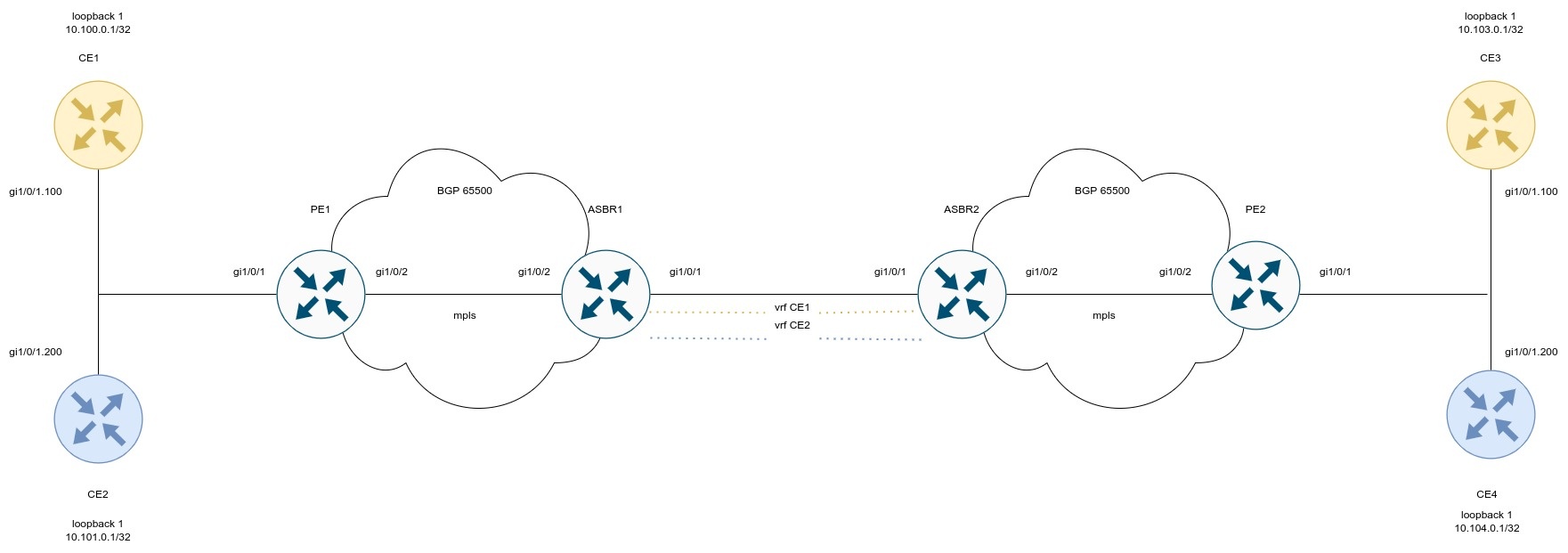
Configure CE:
ESR(config)# hostname CE1 ESR(config)# ESR(config)# route-map BGP ESR(config-route-map)# rule 1 ESR(config-route-map-rule)# exit ESR(config-route-map)# exit ESR(config)# router bgp 65501 ESR(config-bgp)# neighbor 192.168.1.2 ESR(config-bgp-neighbor)# remote-as 65500 ESR(config-bgp-neighbor)# address-family ipv4 unicast ESR(config-bgp-neighbor-af)# route-map BGP out ESR(config-bgp-neighbor-af)# enable ESR(config-bgp-neighbor-af)# exit ESR(config-bgp-neighbor)# enable ESR(config-bgp-neighbor)# exit ESR(config-bgp)# address-family ipv4 unicast ESR(config-bgp-af)# network 10.110.0.1/32 ESR(config-bgp-af)# exit ESR(config-bgp)# enable ESR(config-bgp)# exit ESR(config)# interface gigabitethernet 1/0/1.100 ESR(config-subif)# ip firewall disable ESR(config-subif)# ip address 192.168.1.1/30 ESR(config-subif)# exit ESR(config)# interface loopback 1 ESR(config-loopback)# ip address 10.110.0.1/32 ESR(config-loopback)# exit ESR(config)# do com ESR(config)# do conf |
ESR(config)# hostname CE2 ESR(config)# ESR(config)# route-map BGP ESR(config-route-map)# rule 1 ESR(config-route-map-rule)# exit ESR(config-route-map)# exit ESR(config)# router bgp 65501 ESR(config-bgp)# neighbor 192.168.2.2 ESR(config-bgp-neighbor)# remote-as 65500 ESR(config-bgp-neighbor)# address-family ipv4 unicast ESR(config-bgp-neighbor-af)# route-map BGP out ESR(config-bgp-neighbor-af)# enable ESR(config-bgp-neighbor-af)# exit ESR(config-bgp-neighbor)# enable ESR(config-bgp-neighbor)# exit ESR(config-bgp)# address-family ipv4 unicast ESR(config-bgp-af)# network 10.112.0.1/32 ESR(config-bgp-af)# exit ESR(config-bgp)# enable ESR(config-bgp)# exit ESR(config)# interface gigabitethernet 1/0/1.100 ESR(config-subif)# ip firewall disable ESR(config-subif)# ip address 192.168.2.1/30 ESR(config-subif)# exit ESR(config)# ESR(config)# interface loopback 1 ESR(config-loopback)# ip address 10.112.0.1/32 ESR(config-loopback)# exit ESR(config)# do com ESR(config)# do conf |
ESR(config)# hostname CE3 ESR(config)# ESR(config)# route-map BGP ESR(config-route-map)# rule 1 ESR(config-route-map-rule)# exit ESR(config-route-map)# exit ESR(config)# router bgp 65501 ESR(config-bgp)# neighbor 192.168.3.2 ESR(config-bgp-neighbor)# remote-as 65500 ESR(config-bgp-neighbor)# address-family ipv4 unicast ESR(config-bgp-neighbor-af)# route-map BGP out ESR(config-bgp-neighbor-af)# enable ESR(config-bgp-neighbor-af)# exit ESR(config-bgp-neighbor)# enable ESR(config-bgp-neighbor)# exit ESR(config-bgp)# address-family ipv4 unicast ESR(config-bgp-af)# network 10.113.0.1/32 ESR(config-bgp-af)# exit ESR(config-bgp)# enable ESR(config-bgp)# exit ESR(config)# interface gigabitethernet 1/0/1.100 ESR(config-subif)# ip firewall disable ESR(config-subif)# ip address 192.168.3.1/30 ESR(config-subif)# exit ESR(config)# ESR(config)# interface loopback 1 ESR(config-loopback)# ip address 10.113.0.1/32 ESR(config-loopback)# exit ESR(config)# do com ESR(config)# do conf |
ESR(config)# hostname CE4 ESR(config)# ESR(config)# route-map BGP ESR(config-route-map)# rule 1 ESR(config-route-map-rule)# exit ESR(config-route-map)# exit ESR(config)# router bgp 65501 ESR(config-bgp)# neighbor 192.168.4.2 ESR(config-bgp-neighbor)# remote-as 65500 ESR(config-bgp-neighbor)# address-family ipv4 unicast ESR(config-bgp-neighbor-af)# route-map BGP out ESR(config-bgp-neighbor-af)# enable ESR(config-bgp-neighbor-af)# exit ESR(config-bgp-neighbor)# enable ESR(config-bgp-neighbor)# exit ESR(config-bgp)# address-family ipv4 unicast ESR(config-bgp-af)# network 10.114.0.1/32 ESR(config-bgp-af)# exit ESR(config-bgp)# enable ESR(config-bgp)# exit ESR(config)# interface gigabitethernet 1/0/1.100 ESR(config-subif)# ip firewall disable ESR(config-subif)# ip address 192.168.4.1/30 ESR(config-subif)# exit ESR(config)# ESR(config)# interface loopback 1 ESR(config-loopback)# ip address 10.114.0.1/32 ESR(config-loopback)# exit ESR(config)# do com ESR(config)# do conf |
Configure PE1 and PE2:
ESR(config)# hostname PE1 ESR(config)# ESR(config)# ip vrf CE1 ESR(config-vrf)# ip protocols bgp max-routes 100 ESR(config-vrf)# rd 65500:1 ESR(config-vrf)# route-target export 65500:1 ESR(config-vrf)# route-target import 65500:1 ESR(config-vrf)# exit ESR(config)# ip vrf CE2 ESR(config-vrf)# ip protocols bgp max-routes 100 ESR(config-vrf)# rd 65500:2 ESR(config-vrf)# route-target export 65500:2 ESR(config-vrf)# route-target import 65500:2 ESR(config-vrf)# exit ESR(config)# ESR(config)# system jumbo-frames ESR(config)# ESR(config)# route-map BGP ESR(config-route-map)# rule 1 ESR(config-route-map-rule)# exit ESR(config-route-map)# exit ESR(config)# router bgp log-neighbor-changes ESR(config)# router bgp 65500 ESR(config-bgp)# neighbor 10.10.1.2 ESR(config-bgp-neighbor)# remote-as 65500 ESR(config-bgp-neighbor)# update-source 10.10.1.1 ESR(config-bgp-neighbor)# address-family vpnv4 unicast ESR(config-bgp-neighbor-af)# send-community extended ESR(config-bgp-neighbor-af)# enable ESR(config-bgp-neighbor-af)# exit ESR(config-bgp-neighbor)# enable ESR(config-bgp-neighbor)# exit ESR(config-bgp)# enable ESR(config-bgp)# vrf CE1 ESR(config-bgp-vrf)# neighbor 192.168.1.1 ESR(config-bgp-vrf-neighbor)# remote-as 65501 ESR(config-bgp-vrf-neighbor)# address-family ipv4 unicast ESR(config-bgp-neighbor-af-vrf)# route-map BGP out ESR(config-bgp-neighbor-af-vrf)# enable ESR(config-bgp-neighbor-af-vrf)# exit ESR(config-bgp-vrf-neighbor)# enable ESR(config-bgp-vrf-neighbor)# exit ESR(config-bgp-vrf)# address-family ipv4 unicast ESR(config-bgp-vrf-af)# redistribute bgp 65500 route-map BGP ESR(config-bgp-vrf-af)# exit ESR(config-bgp-vrf)# enable ESR(config-bgp-vrf)# exit ESR(config-bgp)# vrf CE2 ESR(config-bgp-vrf)# neighbor 192.168.2.1 ESR(config-bgp-vrf-neighbor)# remote-as 65501 ESR(config-bgp-vrf-neighbor)# address-family ipv4 unicast ESR(config-bgp-neighbor-af-vrf)# route-map BGP out ESR(config-bgp-neighbor-af-vrf)# enable ESR(config-bgp-neighbor-af-vrf)# exit ESR(config-bgp-vrf-neighbor)# enable ESR(config-bgp-vrf-neighbor)# exit ESR(config-bgp-vrf)# address-family ipv4 unicast ESR(config-bgp-vrf-af)# redistribute bgp 65500 route-map BGP ESR(config-bgp-vrf-af)# exit ESR(config-bgp-vrf)# enable ESR(config-bgp-vrf)# exit ESR(config-bgp)# exit ESR(config)# ESR(config)# router ospf 1 ESR(config-ospf)# area 0.0.0.0 ESR(config-ospf-area)# enable ESR(config-ospf-area)# exit ESR(config-ospf)# enable ESR(config-ospf)# exit ESR(config)# ESR(config)# interface gigabitethernet 1/0/1.100 ESR(config-subif)# ip vrf forwarding CE1 ESR(config-subif)# description "to CE1" ESR(config-subif)# ip firewall disable ESR(config-subif)# ip address 192.168.1.2/30 ESR(config-subif)# exit ESR(config)# interface gigabitethernet 1/0/1.200 ESR(config-subif)# ip vrf forwarding CE2 ESR(config-subif)# description "to CE2" ESR(config-subif)# ip firewall disable ESR(config-subif)# ip address 192.168.2.2/30 ESR(config-subif)# exit ESR(config)# interface gigabitethernet 1/0/2 ESR(config-if-gi)# mtu 1522 ESR(config-if-gi)# ip firewall disable ESR(config-if-gi)# ip address 10.100.0.1/30 ESR(config-if-gi)# ip ospf instance 1 ESR(config-if-gi)# ip ospf ESR(config-if-gi)# exit ESR(config)# interface loopback 1 ESR(config-loopback)# ip address 10.10.1.1/32 ESR(config-loopback)# ip ospf instance 1 ESR(config-loopback)# ip ospf ESR(config-loopback)# exit ESR(config)# mpls ESR(config-mpls)# ldp ESR(config-ldp)# router-id 10.10.1.1 ESR(config-ldp)# address-family ipv4 ESR(config-ldp-af-ipv4)# interface gigabitethernet 1/0/2 ESR(config-ldp-af-ipv4-if)# exit ESR(config-ldp-af-ipv4)# exit ESR(config-ldp)# enable ESR(config-ldp)# exit ESR(config-mpls)# forwarding interface gigabitethernet 1/0/2 ESR(config-mpls)# exit ESR(config)# do com ESR(config)# do conf |
ESR(config)# hostname PE2 ESR(config)# ESR(config)# ip vrf CE1 ESR(config-vrf)# ip protocols bgp max-routes 100 ESR(config-vrf)# rd 65500:1 ESR(config-vrf)# route-target export 65500:1 ESR(config-vrf)# route-target import 65500:1 ESR(config-vrf)# exit ESR(config)# ip vrf CE2 ESR(config-vrf)# ip protocols bgp max-routes 100 ESR(config-vrf)# rd 65500:2 ESR(config-vrf)# route-target export 65500:2 ESR(config-vrf)# route-target import 65500:2 ESR(config-vrf)# exit ESR(config)# ESR(config)# system jumbo-frames ESR(config)# ESR(config)# route-map BGP ESR(config-route-map)# rule 1 ESR(config-route-map-rule)# exit ESR(config-route-map)# exit ESR(config)# router bgp log-neighbor-changes ESR(config)# router bgp 65500 ESR(config-bgp)# router-id 10.11.1.1 ESR(config-bgp)# neighbor 10.11.1.2 ESR(config-bgp-neighbor)# remote-as 65500 ESR(config-bgp-neighbor)# update-source 10.11.1.1 ESR(config-bgp-neighbor)# address-family vpnv4 unicast ESR(config-bgp-neighbor-af)# send-community extended ESR(config-bgp-neighbor-af)# enable ESR(config-bgp-neighbor-af)# exit ESR(config-bgp-neighbor)# enable ESR(config-bgp-neighbor)# exit ESR(config-bgp)# enable ESR(config-bgp)# vrf CE1 ESR(config-bgp-vrf)# neighbor 192.168.3.1 ESR(config-bgp-vrf-neighbor)# remote-as 65501 ESR(config-bgp-vrf-neighbor)# address-family ipv4 unicast ESR(config-bgp-neighbor-af-vrf)# route-map BGP out ESR(config-bgp-neighbor-af-vrf)# enable ESR(config-bgp-neighbor-af-vrf)# exit ESR(config-bgp-vrf-neighbor)# enable ESR(config-bgp-vrf-neighbor)# exit ESR(config-bgp-vrf)# address-family ipv4 unicast ESR(config-bgp-vrf-af)# redistribute bgp 65500 route-map BGP ESR(config-bgp-vrf-af)# exit ESR(config-bgp-vrf)# enable ESR(config-bgp-vrf)# exit ESR(config-bgp)# vrf CE2 ESR(config-bgp-vrf)# neighbor 192.168.4.1 ESR(config-bgp-vrf-neighbor)# remote-as 65501 ESR(config-bgp-vrf-neighbor)# address-family ipv4 unicast ESR(config-bgp-neighbor-af-vrf)# route-map BGP out ESR(config-bgp-neighbor-af-vrf)# enable ESR(config-bgp-neighbor-af-vrf)# exit ESR(config-bgp-vrf-neighbor)# enable ESR(config-bgp-vrf-neighbor)# exit ESR(config-bgp-vrf)# address-family ipv4 unicast ESR(config-bgp-vrf-af)# redistribute bgp 65500 route-map BGP ESR(config-bgp-vrf-af)# exit ESR(config-bgp-vrf)# enable ESR(config-bgp-vrf)# exit ESR(config-bgp)# exit ESR(config)# ESR(config)# router ospf 1 ESR(config-ospf)# area 0.0.0.0 ESR(config-ospf-area)# enable ESR(config-ospf-area)# exit ESR(config-ospf)# enable ESR(config-ospf)# exit ESR(config)# ESR(config)# interface gigabitethernet 1/0/1.100 ESR(config-subif)# ip vrf forwarding CE1 ESR(config-subif)# description "to CE3" ESR(config-subif)# ip firewall disable ESR(config-subif)# ip address 192.168.3.2/30 ESR(config-subif)# exit ESR(config)# interface gigabitethernet 1/0/1.200 ESR(config-subif)# ip vrf forwarding CE2 ESR(config-subif)# description "to CE4" ESR(config-subif)# ip firewall disable ESR(config-subif)# ip address 192.168.4.2/30 ESR(config-subif)# exit ESR(config)# interface gigabitethernet 1/0/2 ESR(config-if-gi)# mtu 1522 ESR(config-if-gi)# ip firewall disable ESR(config-if-gi)# ip address 10.101.0.1/30 ESR(config-if-gi)# ip ospf instance 1 ESR(config-if-gi)# ip ospf ESR(config-if-gi)# exit ESR(config)# interface loopback 1 ESR(config-loopback)# ip address 10.11.1.1/32 ESR(config-loopback)# ip ospf instance 1 ESR(config-loopback)# ip ospf ESR(config-loopback)# exit ESR(config)# mpls ESR(config-mpls)# ldp ESR(config-ldp)# router-id 10.11.1.1 ESR(config-ldp)# address-family ipv4 ESR(config-ldp-af-ipv4)# interface gigabitethernet 1/0/2 ESR(config-ldp-af-ipv4-if)# exit ESR(config-ldp-af-ipv4)# exit ESR(config-ldp)# enable ESR(config-ldp)# exit ESR(config-mpls)# forwarding interface gigabitethernet 1/0/2 ESR(config-mpls)# exit ESR(config)# do com ESR(config)# do conf |
Configure ASBR1 and ASBR2. To transfer routing information between them, use the OSPF protocol in the corresponding VRFs:
ESR(config)# hostname ASBR1 ESR(config)# ESR(config)# ip vrf CE1 ESR(config-vrf)# ip protocols ospf max-routes 100 ESR(config-vrf)# rd 65500:1 ESR(config-vrf)# route-target export 65500:1 ESR(config-vrf)# route-target import 65500:1 ESR(config-vrf)# exit ESR(config)# ip vrf CE2 ESR(config-vrf)# ip protocols ospf max-routes 100 ESR(config-vrf)# rd 65500:2 ESR(config-vrf)# route-target export 65500:2 ESR(config-vrf)# route-target import 65500:2 ESR(config-vrf)# exit ESR(config)# ESR(config)# system jumbo-frames ESR(config)# ESR(config)# vlan 100,200 ESR(config-vlan)# exit ESR(config)# ESR(config)# router bgp 65500 ESR(config-bgp)# router-id 10.10.1.2 ESR(config-bgp)# neighbor 10.10.1.1 ESR(config-bgp-neighbor)# remote-as 65500 ESR(config-bgp-neighbor)# update-source 10.10.1.2 ESR(config-bgp-neighbor)# address-family vpnv4 unicast ESR(config-bgp-neighbor-af)# send-community extended ESR(config-bgp-neighbor-af)# enable ESR(config-bgp-neighbor-af)# exit ESR(config-bgp-neighbor)# enable ESR(config-bgp-neighbor)# exit ESR(config-bgp)# enable ESR(config-bgp)# vrf CE1 ESR(config-bgp-vrf)# address-family ipv4 unicast ESR(config-bgp-vrf-af)# redistribute ospf 1 intra-area inter-area external1 external2 ESR(config-bgp-vrf-af)# exit ESR(config-bgp-vrf)# exit ESR(config-bgp)# vrf CE2 ESR(config-bgp-vrf)# address-family ipv4 unicast ESR(config-bgp-vrf-af)# redistribute ospf 1 intra-area inter-area external1 external2 ESR(config-bgp-vrf-af)# exit ESR(config-bgp-vrf)# exit ESR(config-bgp)# exit ESR(config)# ESR(config)# router ospf log-adjacency-changes ESR(config)# router ospf 1 ESR(config-ospf)# area 0.0.0.0 ESR(config-ospf-area)# enable ESR(config-ospf-area)# exit ESR(config-ospf)# enable ESR(config-ospf)# exit ESR(config)# router ospf 1 vrf CE1 ESR(config-ospf)# redistribute bgp 65500 ESR(config-ospf)# area 0.0.0.0 ESR(config-ospf-area)# enable ESR(config-ospf-area)# exit ESR(config-ospf)# enable ESR(config-ospf)# exit ESR(config)# router ospf 1 vrf CE2 ESR(config-ospf)# area 0.0.0.0 ESR(config-ospf-area)# enable ESR(config-ospf-area)# exit ESR(config-ospf)# enable ESR(config-ospf)# exit ESR(config)# ESR(config)# bridge 10 ESR(config-bridge)# ip vrf forwarding CE1 ESR(config-bridge)# vlan 100 ESR(config-bridge)# ip firewall disable ESR(config-bridge)# ip address 172.16.32.1/30 ESR(config-bridge)# ip ospf instance 1 ESR(config-bridge)# ip ospf ESR(config-bridge)# enable ESR(config-bridge)# exit ESR(config)# bridge 20 ESR(config-bridge)# ip vrf forwarding CE2 ESR(config-bridge)# vlan 200 ESR(config-bridge)# ip firewall disable ESR(config-bridge)# ip address 172.16.32.5/30 ESR(config-bridge)# ip ospf instance 1 ESR(config-bridge)# ip ospf ESR(config-bridge)# enable ESR(config-bridge)# exit ESR(config)# ESR(config)# interface gigabitethernet 1/0/1 ESR(config-if-gi)# description "to ASBR2" ESR(config-if-gi)# mode switchport ESR(config-if-gi)# mtu 1522 ESR(config-if-gi)# spanning-tree disable ESR(config-if-gi)# switchport forbidden default-vlan ESR(config-if-gi)# switchport mode trunk ESR(config-if-gi)# switchport trunk allowed vlan add 100,200 ESR(config-if-gi)# exit ESR(config)# interface gigabitethernet 1/0/2 ESR(config-if-gi)# description "to PE1" ESR(config-if-gi)# mtu 1522 ESR(config-if-gi)# ip firewall disable ESR(config-if-gi)# ip address 10.100.0.2/30 ESR(config-if-gi)# ip ospf instance 1 ESR(config-if-gi)# ip ospf ESR(config-if-gi)# exit ESR(config)# interface loopback 1 ESR(config-loopback)# ip address 10.10.1.2/32 ESR(config-loopback)# ip ospf instance 1 ESR(config-loopback)# ip ospf ESR(config-loopback)# exit ESR(config)# mpls ESR(config-mpls)# ldp ESR(config-ldp)# router-id 10.10.1.2 ESR(config-ldp)# address-family ipv4 ESR(config-ldp-af-ipv4)# interface gigabitethernet 1/0/2 ESR(config-ldp-af-ipv4-if)# exit ESR(config-ldp-af-ipv4)# exit ESR(config-ldp)# enable ESR(config-ldp)# exit ESR(config-mpls)# forwarding interface gigabitethernet 1/0/2 ESR(config-mpls)# exit ESR(config)# do com ESR(config)# do conf |
ESR(config)# hostname ASBR2 ESR(config)# ESR(config)# ip vrf CE1 ESR(config-vrf)# ip protocols ospf max-routes 100 ESR(config-vrf)# rd 65500:1 ESR(config-vrf)# route-target export 65500:1 ESR(config-vrf)# route-target import 65500:1 ESR(config-vrf)# exit ESR(config)# ip vrf CE2 ESR(config-vrf)# ip protocols ospf max-routes 100 ESR(config-vrf)# rd 65500:2 ESR(config-vrf)# route-target export 65500:2 ESR(config-vrf)# route-target import 65500:2 ESR(config-vrf)# exit ESR(config)# ESR(config)# system jumbo-frames ESR(config)# ESR(config)# vlan 100,200 ESR(config-vlan)# exit ESR(config)# ESR(config)# router bgp 65500 ESR(config-bgp)# router-id 10.11.1.2 ESR(config-bgp)# neighbor 10.11.1.1 ESR(config-bgp-neighbor)# remote-as 65500 ESR(config-bgp-neighbor)# update-source 10.11.1.2 ESR(config-bgp-neighbor)# address-family vpnv4 unicast ESR(config-bgp-neighbor-af)# send-community extended ESR(config-bgp-neighbor-af)# enable ESR(config-bgp-neighbor-af)# exit ESR(config-bgp-neighbor)# enable ESR(config-bgp-neighbor)# exit ESR(config-bgp)# enable ESR(config-bgp)# vrf CE1 ESR(config-bgp-vrf)# address-family ipv4 unicast ESR(config-bgp-vrf-af)# redistribute ospf 1 intra-area inter-area external1 external2 ESR(config-bgp-vrf-af)# exit ESR(config-bgp-vrf)# exit ESR(config-bgp)# vrf CE2 ESR(config-bgp-vrf)# address-family ipv4 unicast ESR(config-bgp-vrf-af)# redistribute ospf 1 intra-area inter-area external1 external2 ESR(config-bgp-vrf-af)# exit ESR(config-bgp-vrf)# exit ESR(config-bgp)# exit ESR(config)# ESR(config)# router ospf log-adjacency-changes ESR(config)# router ospf 1 ESR(config-ospf)# area 0.0.0.0 ESR(config-ospf-area)# enable ESR(config-ospf-area)# exit ESR(config-ospf)# enable ESR(config-ospf)# exit ESR(config)# router ospf 1 vrf CE1 ESR(config-ospf)# redistribute bgp 65500 ESR(config-ospf)# area 0.0.0.0 ESR(config-ospf-area)# enable ESR(config-ospf-area)# exit ESR(config-ospf)# enable ESR(config-ospf)# exit ESR(config)# router ospf 1 vrf CE2 ESR(config-ospf)# redistribute bgp 65500 ESR(config-ospf)# area 0.0.0.0 ESR(config-ospf-area)# enable ESR(config-ospf-area)# exit ESR(config-ospf)# enable ESR(config-ospf)# exit ESR(config)# ESR(config)# bridge 10 ESR(config-bridge)# ip vrf forwarding CE1 ESR(config-bridge)# vlan 100 ESR(config-bridge)# ip firewall disable ESR(config-bridge)# ip address 172.16.32.2/30 ESR(config-bridge)# ip ospf instance 1 ESR(config-bridge)# ip ospf ESR(config-bridge)# enable ESR(config-bridge)# exit ESR(config)# bridge 20 ESR(config-bridge)# ip vrf forwarding CE2 ESR(config-bridge)# vlan 200 ESR(config-bridge)# ip firewall disable ESR(config-bridge)# ip address 172.16.32.6/30 ESR(config-bridge)# ip ospf instance 1 ESR(config-bridge)# ip ospf ESR(config-bridge)# enable ESR(config-bridge)# exit ESR(config)# ESR(config)# interface gigabitethernet 1/0/1 ESR(config-if-gi)# description "to ASBR1" ESR(config-if-gi)# mode switchport ESR(config-if-gi)# mtu 1522 ESR(config-if-gi)# spanning-tree disable ESR(config-if-gi)# switchport forbidden default-vlan ESR(config-if-gi)# switchport mode trunk ESR(config-if-gi)# switchport trunk allowed vlan add 100,200 ESR(config-if-gi)# exit ESR(config)# interface gigabitethernet 1/0/2 ESR(config-if-gi)# description "to PE2" ESR(config-if-gi)# mtu 1522 ESR(config-if-gi)# ip firewall disable ESR(config-if-gi)# ip address 10.101.0.2/30 ESR(config-if-gi)# ip ospf instance 1 ESR(config-if-gi)# ip ospf ESR(config-if-gi)# exit ESR(config)# interface loopback 1 ESR(config-loopback)# ip address 10.11.1.2/32 ESR(config-loopback)# ip ospf instance 1 ESR(config-loopback)# ip ospf ESR(config-loopback)# exit ESR(config)# mpls ESR(config-mpls)# ldp ESR(config-ldp)# router-id 10.11.1.2 ESR(config-ldp)# address-family ipv4 ESR(config-ldp-af-ipv4)# interface gigabitethernet 1/0/2 ESR(config-ldp-af-ipv4-if)# exit ESR(config-ldp-af-ipv4)# exit ESR(config-ldp)# enable ESR(config-ldp)# exit ESR(config-mpls)# forwarding interface gigabitethernet 1/0/2 ESR(config-mpls)# exit ESR(config)# do com ESR(config)# do conf |
Configuration is completed. Check distribution of routing information and network availability of nodes:
PE1# sh bgp vpnv4 unicast all Status codes: * - valid, > - best, i - internal, S - stale Origin codes: i - IGP, e - EGP, ? - incomplete Codes Route Distinguisher IP Prefix Next hop Metric Label LocPrf Weight Path ----- --------------------- ------------------ --------------- ---------- ------- ---------- ------ ---------------- *> 65500:1 10.110.0.1/32 -- -- 37 100 -- 65501 i *> 65500:1 10.111.0.1/32 -- -- 35 100 -- 65501 i *>i 65500:1 10.113.0.1/32 10.10.1.2 -- 43 100 0 ? *>i 65500:1 10.114.0.1/32 10.10.1.2 -- 48 100 0 ? CE1# ping 10.113.0.1 source ip 10.110.0.1 detailed PING 10.113.0.1 (10.113.0.1) from 10.110.0.1 : 56 bytes of data. 64 bytes from 10.113.0.1: icmp_seq=1 ttl=0 time=1.31 ms 64 bytes from 10.113.0.1: icmp_seq=2 ttl=0 time=1.14 ms 64 bytes from 10.113.0.1: icmp_seq=3 ttl=0 time=1.08 ms 64 bytes from 10.113.0.1: icmp_seq=4 ttl=0 time=1.06 ms 64 bytes from 10.113.0.1: icmp_seq=5 ttl=0 time=1.16 ms |
Unlike Option A, there is no need to use VRF between ASBRs: when passing traffic between ASBRs, an MPLS label will be assigned. This scheme has the best scalability.
In the current implementation, Option B is only supported for VPN-IPv4 routes (AFI = 1, SAFI = 128). |
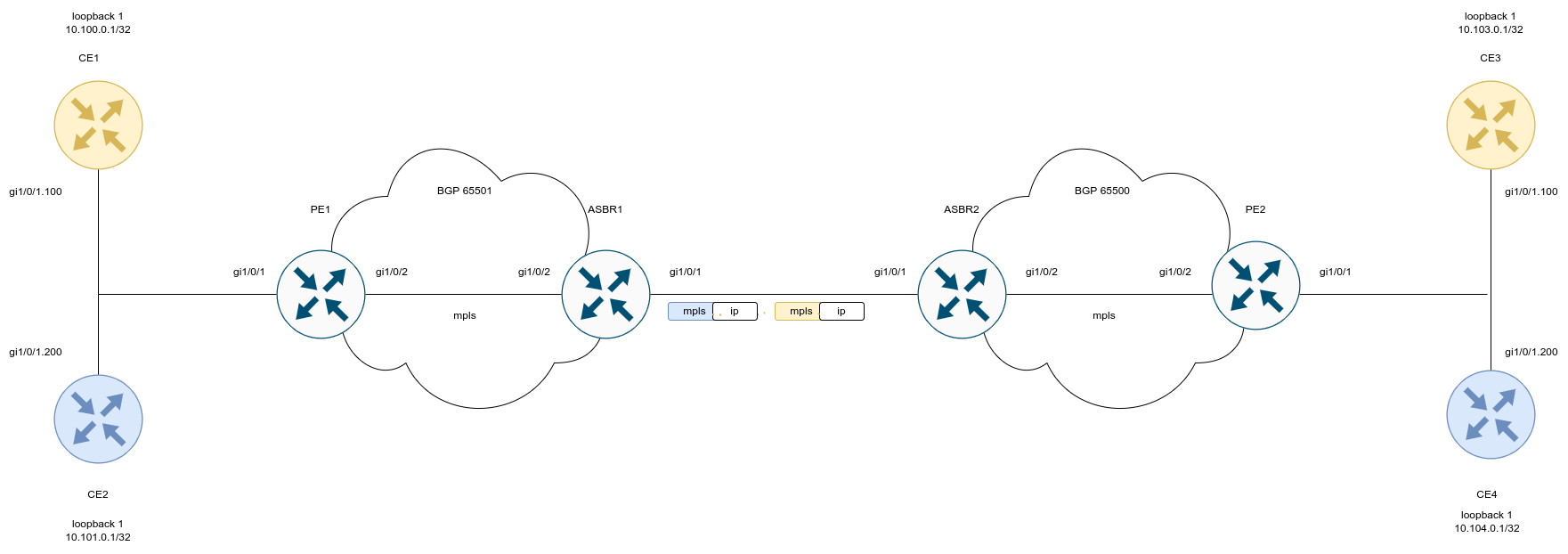
Configure CE:
ESR(config)# hostname CE1 ESR(config)# ESR(config)# route-map BGP ESR(config-route-map)# rule 1 ESR(config-route-map-rule)# exit ESR(config-route-map)# exit ESR(config)# router bgp 65501 ESR(config-bgp)# neighbor 192.168.1.2 ESR(config-bgp-neighbor)# remote-as 65500 ESR(config-bgp-neighbor)# address-family ipv4 unicast ESR(config-bgp-neighbor-af)# route-map BGP out ESR(config-bgp-neighbor-af)# enable ESR(config-bgp-neighbor-af)# exit ESR(config-bgp-neighbor)# enable ESR(config-bgp-neighbor)# exit ESR(config-bgp)# address-family ipv4 unicast ESR(config-bgp-af)# network 10.110.0.1/32 ESR(config-bgp-af)# exit ESR(config-bgp)# enable ESR(config-bgp)# exit ESR(config)# interface gigabitethernet 1/0/1.100 ESR(config-subif)# ip firewall disable ESR(config-subif)# ip address 192.168.1.1/30 ESR(config-subif)# exit ESR(config)# interface loopback 1 ESR(config-loopback)# ip address 10.110.0.1/32 ESR(config-loopback)# exit ESR(config)# do com ESR(config)# do conf |
ESR(config)# hostname CE2 ESR(config)# ESR(config)# route-map BGP ESR(config-route-map)# rule 1 ESR(config-route-map-rule)# exit ESR(config-route-map)# exit ESR(config)# router bgp 65501 ESR(config-bgp)# neighbor 192.168.2.2 ESR(config-bgp-neighbor)# remote-as 65500 ESR(config-bgp-neighbor)# address-family ipv4 unicast ESR(config-bgp-neighbor-af)# route-map BGP out ESR(config-bgp-neighbor-af)# enable ESR(config-bgp-neighbor-af)# exit ESR(config-bgp-neighbor)# enable ESR(config-bgp-neighbor)# exit ESR(config-bgp)# address-family ipv4 unicast ESR(config-bgp-af)# network 10.112.0.1/32 ESR(config-bgp-af)# exit ESR(config-bgp)# enable ESR(config-bgp)# exit ESR(config)# interface gigabitethernet 1/0/1.100 ESR(config-subif)# ip firewall disable ESR(config-subif)# ip address 192.168.2.1/30 ESR(config-subif)# exit ESR(config)# ESR(config)# interface loopback 1 ESR(config-loopback)# ip address 10.112.0.1/32 ESR(config-loopback)# exit ESR(config)# do com ESR(config)# do conf |
ESR(config)# hostname CE3 ESR(config)# ESR(config)# route-map BGP ESR(config-route-map)# rule 1 ESR(config-route-map-rule)# exit ESR(config-route-map)# exit ESR(config)# router bgp 65501 ESR(config-bgp)# neighbor 192.168.3.2 ESR(config-bgp-neighbor)# remote-as 65500 ESR(config-bgp-neighbor)# address-family ipv4 unicast ESR(config-bgp-neighbor-af)# route-map BGP out ESR(config-bgp-neighbor-af)# enable ESR(config-bgp-neighbor-af)# exit ESR(config-bgp-neighbor)# enable ESR(config-bgp-neighbor)# exit ESR(config-bgp)# address-family ipv4 unicast ESR(config-bgp-af)# network 10.113.0.1/32 ESR(config-bgp-af)# exit ESR(config-bgp)# enable ESR(config-bgp)# exit ESR(config)# interface gigabitethernet 1/0/1.100 ESR(config-subif)# ip firewall disable ESR(config-subif)# ip address 192.168.3.1/30 ESR(config-subif)# exit ESR(config)# ESR(config)# interface loopback 1 ESR(config-loopback)# ip address 10.113.0.1/32 ESR(config-loopback)# exit ESR(config)# do com ESR(config)# do conf |
ESR(config)# hostname CE4 ESR(config)# ESR(config)# route-map BGP ESR(config-route-map)# rule 1 ESR(config-route-map-rule)# exit ESR(config-route-map)# exit ESR(config)# router bgp 65501 ESR(config-bgp)# neighbor 192.168.4.2 ESR(config-bgp-neighbor)# remote-as 65500 ESR(config-bgp-neighbor)# address-family ipv4 unicast ESR(config-bgp-neighbor-af)# route-map BGP out ESR(config-bgp-neighbor-af)# enable ESR(config-bgp-neighbor-af)# exit ESR(config-bgp-neighbor)# enable ESR(config-bgp-neighbor)# exit ESR(config-bgp)# address-family ipv4 unicast ESR(config-bgp-af)# network 10.114.0.1/32 ESR(config-bgp-af)# exit ESR(config-bgp)# enable ESR(config-bgp)# exit ESR(config)# interface gigabitethernet 1/0/1.100 ESR(config-subif)# ip firewall disable ESR(config-subif)# ip address 192.168.4.1/30 ESR(config-subif)# exit ESR(config)# ESR(config)# interface loopback 1 ESR(config-loopback)# ip address 10.114.0.1/32 ESR(config-loopback)# exit ESR(config)# do com ESR(config)# do conf |
Configure PE1 and PE2:
PE1(config)# hostname PE1 PE1(config)# PE1(config)# ip vrf CE1 PE1(config-vrf)# ip protocols bgp max-routes 100 PE1(config-vrf)# rd 65501:1 PE1(config-vrf)# route-target export 65501:1 PE1(config-vrf)# route-target import 65501:1 PE1(config-vrf)# exit PE1(config)# ip vrf CE2 PE1(config-vrf)# ip protocols bgp max-routes 100 PE1(config-vrf)# rd 65501:2 PE1(config-vrf)# route-target export 65501:2 PE1(config-vrf)# route-target import 65501:2 PE1(config-vrf)# exit PE1(config)# PE1(config)# system jumbo-frames PE1(config)# PE1(config)# route-map BGP_OUT PE1(config-route-map)# rule 1 PE1(config-route-map-rule)# exit PE1(config-route-map)# exit PE1(config)# router bgp 65501 PE1(config-bgp)# neighbor 10.10.1.2 PE1(config-bgp-neighbor)# remote-as 65501 PE1(config-bgp-neighbor)# update-source 10.10.1.1 PE1(config-bgp-neighbor)# address-family vpnv4 unicast PE1(config-bgp-neighbor-af)# send-community extended PE1(config-bgp-neighbor-af)# enable PE1(config-bgp-neighbor-af)# exit PE1(config-bgp-neighbor)# enable PE1(config-bgp-neighbor)# exit PE1(config-bgp)# enable PE1(config-bgp)# vrf CE1 PE1(config-bgp-vrf)# neighbor 192.168.1.1 PE1(config-bgp-vrf-neighbor)# remote-as 65510 PE1(config-bgp-vrf-neighbor)# address-family ipv4 unicast PE1(config-bgp-neighbor-af-vrf)# route-map BGP_OUT out PE1(config-bgp-neighbor-af-vrf)# enable PE1(config-bgp-neighbor-af-vrf)# exit PE1(config-bgp-vrf-neighbor)# enable PE1(config-bgp-vrf-neighbor)# exit PE1(config-bgp-vrf)# address-family ipv4 unicast PE1(config-bgp-vrf-af)# redistribute bgp 65501 route-map BGP_OUT PE1(config-bgp-vrf-af)# exit PE1(config-bgp-vrf)# enable PE1(config-bgp-vrf)# exit PE1(config-bgp)# vrf CE2 PE1(config-bgp-vrf)# neighbor 192.168.2.1 PE1(config-bgp-vrf-neighbor)# remote-as 65511 PE1(config-bgp-vrf-neighbor)# address-family ipv4 unicast PE1(config-bgp-neighbor-af-vrf)# route-map BGP_OUT out PE1(config-bgp-neighbor-af-vrf)# enable PE1(config-bgp-neighbor-af-vrf)# exit PE1(config-bgp-vrf-neighbor)# enable PE1(config-bgp-vrf-neighbor)# exit PE1(config-bgp-vrf)# address-family ipv4 unicast PE1(config-bgp-vrf-af)# redistribute bgp 65501 route-map BGP_OUT PE1(config-bgp-vrf-af)# exit PE1(config-bgp-vrf)# enable PE1(config-bgp-vrf)# exit PE1(config-bgp)# exit PE1(config)# PE1(config)# router ospf 1 PE1(config-ospf)# area 0.0.0.0 PE1(config-ospf-area)# enable PE1(config-ospf-area)# exit PE1(config-ospf)# enable PE1(config-ospf)# exit PE1(config)# PE1(config)# interface gigabitethernet 1/0/1.100 PE1(config-subif)# ip vrf forwarding CE1 PE1(config-subif)# description "to CE1" PE1(config-subif)# ip firewall disable PE1(config-subif)# ip address 192.168.1.2/30 PE1(config-subif)# exit PE1(config)# interface gigabitethernet 1/0/1.200 PE1(config-subif)# ip vrf forwarding CE2 PE1(config-subif)# description "to CE2" PE1(config-subif)# ip firewall disable PE1(config-subif)# ip address 192.168.2.2/30 PE1(config-subif)# exit PE1(config)# interface gigabitethernet 1/0/2 PE1(config-if-gi)# description "to ASBR1" PE1(config-if-gi)# mtu 1522 PE1(config-if-gi)# ip firewall disable PE1(config-if-gi)# ip address 10.100.0.1/30 PE1(config-if-gi)# ip ospf instance 1 PE1(config-if-gi)# ip ospf PE1(config-if-gi)# exit PE1(config)# interface loopback 1 PE1(config-loopback)# ip address 10.10.1.1/32 PE1(config-loopback)# ip ospf instance 1 PE1(config-loopback)# ip ospf PE1(config-loopback)# exit PE1(config)# mpls PE1(config-mpls)# ldp PE1(config-ldp)# router-id 10.10.1.1 PE1(config-ldp)# address-family ipv4 PE1(config-ldp-af-ipv4)# interface gigabitethernet 1/0/2 PE1(config-ldp-af-ipv4-if)# exit PE1(config-ldp-af-ipv4)# exit PE1(config-ldp)# enable PE1(config-ldp)# exit PE1(config-mpls)# forwarding interface gigabitethernet 1/0/2 PE1(config-mpls)# exit PE1(config)# do com PE1(config)# do conf |
PE2(config)# hostname PE2 PE2(config)# PE2(config)# ip vrf CE1 PE2(config-vrf)# ip protocols bgp max-routes 100 PE2(config-vrf)# rd 65501:1 PE2(config-vrf)# route-target export 65501:1 PE2(config-vrf)# route-target import 65501:1 PE2(config-vrf)# exit PE2(config)# ip vrf CE2 PE2(config-vrf)# ip protocols bgp max-routes 100 PE2(config-vrf)# rd 65501:2 PE2(config-vrf)# route-target export 65501:2 PE2(config-vrf)# route-target import 65501:2 PE2(config-vrf)# exit PE2(config)# PE2(config)# system jumbo-frames PE2(config)# PE2(config)# route-map BGP_OUT PE2(config-route-map)# rule 1 PE2(config-route-map-rule)# exit PE2(config-route-map)# exit PE2(config)# router bgp 65500 PE2(config-bgp)# neighbor 10.11.1.2 PE2(config-bgp-neighbor)# remote-as 65500 PE2(config-bgp-neighbor)# update-source 10.11.1.1 PE2(config-bgp-neighbor)# address-family vpnv4 unicast PE2(config-bgp-neighbor-af)# send-community extended PE2(config-bgp-neighbor-af)# enable PE2(config-bgp-neighbor-af)# exit PE2(config-bgp-neighbor)# enable PE2(config-bgp-neighbor)# exit PE2(config-bgp)# enable PE2(config-bgp)# vrf CE1 PE2(config-bgp-vrf)# neighbor 192.168.3.1 PE2(config-bgp-vrf-neighbor)# remote-as 65512 PE2(config-bgp-vrf-neighbor)# address-family ipv4 unicast PE2(config-bgp-neighbor-af-vrf)# route-map BGP_OUT out PE2(config-bgp-neighbor-af-vrf)# enable PE2(config-bgp-neighbor-af-vrf)# exit PE2(config-bgp-vrf-neighbor)# enable PE2(config-bgp-vrf-neighbor)# exit PE2(config-bgp-vrf)# address-family ipv4 unicast PE2(config-bgp-vrf-af)# redistribute bgp 65500 route-map BGP_OUT PE2(config-bgp-vrf-af)# exit PE2(config-bgp-vrf)# enable PE2(config-bgp-vrf)# exit PE2(config-bgp)# vrf CE2 PE2(config-bgp-vrf)# neighbor 192.168.4.1 PE2(config-bgp-vrf-neighbor)# remote-as 65513 PE2(config-bgp-vrf-neighbor)# address-family ipv4 unicast PE2(config-bgp-neighbor-af-vrf)# route-map BGP_OUT out PE2(config-bgp-neighbor-af-vrf)# enable PE2(config-bgp-neighbor-af-vrf)# exit PE2(config-bgp-vrf-neighbor)# enable PE2(config-bgp-vrf-neighbor)# exit PE2(config-bgp-vrf)# address-family ipv4 unicast PE2(config-bgp-vrf-af)# redistribute bgp 65500 route-map BGP_OUT PE2(config-bgp-vrf-af)# exit PE2(config-bgp-vrf)# enable PE2(config-bgp-vrf)# exit PE2(config-bgp)# exit PE2(config)# PE2(config)# router ospf 1 PE2(config-ospf)# router-id 10.11.1.1 PE2(config-ospf)# area 0.0.0.0 PE2(config-ospf-area)# enable PE2(config-ospf-area)# exit PE2(config-ospf)# enable PE2(config-ospf)# exit PE2(config)# PE2(config)# interface gigabitethernet 1/0/1.100 PE2(config-subif)# ip vrf forwarding CE1 PE2(config-subif)# description "to CE3" PE2(config-subif)# ip firewall disable PE2(config-subif)# ip address 192.168.3.2/30 PE2(config-subif)# exit PE2(config)# interface gigabitethernet 1/0/1.200 PE2(config-subif)# ip vrf forwarding CE2 PE2(config-subif)# description "CE4" PE2(config-subif)# ip firewall disable PE2(config-subif)# ip address 192.168.4.2/30 PE2(config-subif)# exit PE2(config)# interface gigabitethernet 1/0/2 PE2(config-if-gi)# description "to ASBR2" PE2(config-if-gi)# mtu 1522 PE2(config-if-gi)# ip firewall disable PE2(config-if-gi)# ip address 10.102.0.1/30 PE2(config-if-gi)# ip ospf instance 1 PE2(config-if-gi)# ip ospf PE2(config-if-gi)# exit PE2(config)# interface loopback 1 PE2(config-loopback)# ip address 10.11.1.1/32 PE2(config-loopback)# ip ospf instance 1 PE2(config-loopback)# ip ospf PE2(config-loopback)# exit PE2(config)# mpls PE2(config-mpls)# ldp PE2(config-ldp)# router-id 10.11.1.1 PE2(config-ldp)# address-family ipv4 PE2(config-ldp-af-ipv4)# interface gigabitethernet 1/0/2 PE2(config-ldp-af-ipv4-if)# exit PE2(config-ldp-af-ipv4)# exit PE2(config-ldp)# enable PE2(config-ldp)# exit PE2(config-mpls)# forwarding interface gigabitethernet 1/0/2 PE2(config-mpls)# exit PE2(config)# do com PE2(config)# do conf |
Configure ASBR1 and ASBR2:
ASBR1(config)# hostname ASBR1 ASBR1(config)# ASBR1(config)# system jumbo-frames ASBR1(config)# ASBR1(config)# route-map VPNv4 ASBR1(config-route-map)# rule 1 ASBR1(config-route-map-rule)# exit ASBR1(config-route-map)# exit ASBR1(config)# router bgp 65501 ASBR1(config-bgp)# router-id 10.10.1.2 ASBR1(config-bgp)# neighbor 10.10.1.1 ASBR1(config-bgp-neighbor)# remote-as 65501 ASBR1(config-bgp-neighbor)# update-source 10.10.1.2 ASBR1(config-bgp-neighbor)# address-family vpnv4 unicast ASBR1(config-bgp-neighbor-af)# next-hop-self ASBR1(config-bgp-neighbor-af)# send-community extended ASBR1(config-bgp-neighbor-af)# enable ASBR1(config-bgp-neighbor-af)# exit ASBR1(config-bgp-neighbor)# enable ASBR1(config-bgp-neighbor)# exit ASBR1(config-bgp)# neighbor 10.101.0.1 ASBR1(config-bgp-neighbor)# remote-as 65500 ASBR1(config-bgp-neighbor)# address-family vpnv4 unicast ASBR1(config-bgp-neighbor-af)# route-map VPNv4 out ASBR1(config-bgp-neighbor-af)# send-community extended ASBR1(config-bgp-neighbor-af)# enable ASBR1(config-bgp-neighbor-af)# exit ASBR1(config-bgp-neighbor)# enable ASBR1(config-bgp-neighbor)# exit ASBR1(config-bgp)# enable ASBR1(config-bgp)# exit ASBR1(config)# ASBR1(config)# router ospf 1 ASBR1(config-ospf)# area 0.0.0.0 ASBR1(config-ospf-area)# enable ASBR1(config-ospf-area)# exit ASBR1(config-ospf)# enable ASBR1(config-ospf)# exit ASBR1(config)# ASBR1(config)# interface gigabitethernet 1/0/1 ASBR1(config-if-gi)# description "to ASBR2" ASBR1(config-if-gi)# ip firewall disable ASBR1(config-if-gi)# ip address 10.101.0.2/30 ASBR1(config-if-gi)# exit ASBR1(config)# interface gigabitethernet 1/0/2 ASBR1(config-if-gi)# description "to PE1" ASBR1(config-if-gi)# mtu 1522 ASBR1(config-if-gi)# ip firewall disable ASBR1(config-if-gi)# ip address 10.100.0.2/30 ASBR1(config-if-gi)# ip ospf instance 1 ASBR1(config-if-gi)# ip ospf ASBR1(config-if-gi)# exit ASBR1(config)# interface loopback 1 ASBR1(config-loopback)# ip address 10.10.1.2/32 ASBR1(config-loopback)# ip ospf instance 1 ASBR1(config-loopback)# ip ospf ASBR1(config-loopback)# exit ASBR1(config)# mpls ASBR1(config-mpls)# ldp ASBR1(config-ldp)# router-id 10.10.1.2 ASBR1(config-ldp)# address-family ipv4 ASBR1(config-ldp-af-ipv4)# interface gigabitethernet 1/0/2 ASBR1(config-ldp-af-ipv4-if)# exit ASBR1(config-ldp-af-ipv4)# exit ASBR1(config-ldp)# enable ASBR1(config-ldp)# exit ASBR1(config-mpls)# forwarding interface gigabitethernet 1/0/1 ASBR1(config-mpls)# forwarding interface gigabitethernet 1/0/2 ASBR1(config-mpls)# exit ASBR1(config)# do com ASBR1(config)# do conf |
ASBR2(config)# hostname ASBR2 ASBR2(config)# ASBR2(config)# system jumbo-frames ASBR2(config)# ASBR2(config)# route-map VPNv4 ASBR2(config-route-map)# rule 1 ASBR2(config-route-map-rule)# exit ASBR2(config-route-map)# exit ASBR2(config)# router bgp 65500 ASBR2(config-bgp)# router-id 10.11.1.2 ASBR2(config-bgp)# neighbor 10.101.0.2 ASBR2(config-bgp-neighbor)# remote-as 65501 ASBR2(config-bgp-neighbor)# address-family vpnv4 unicast ASBR2(config-bgp-neighbor-af)# route-map VPNv4 out ASBR2(config-bgp-neighbor-af)# send-community extended ASBR2(config-bgp-neighbor-af)# enable ASBR2(config-bgp-neighbor-af)# exit ASBR2(config-bgp-neighbor)# enable ASBR2(config-bgp-neighbor)# exit ASBR2(config-bgp)# neighbor 10.11.1.1 ASBR2(config-bgp-neighbor)# remote-as 65500 ASBR2(config-bgp-neighbor)# update-source 10.11.1.2 ASBR2(config-bgp-neighbor)# address-family vpnv4 unicast ASBR2(config-bgp-neighbor-af)# next-hop-self ASBR2(config-bgp-neighbor-af)# send-community extended ASBR2(config-bgp-neighbor-af)# enable ASBR2(config-bgp-neighbor-af)# exit ASBR2(config-bgp-neighbor)# enable ASBR2(config-bgp-neighbor)# exit ASBR2(config-bgp)# enable ASBR2(config-bgp)# exit ASBR2(config)# ASBR2(config)# router ospf 1 ASBR2(config-ospf)# router-id 10.11.1.2 ASBR2(config-ospf)# area 0.0.0.0 ASBR2(config-ospf-area)# enable ASBR2(config-ospf-area)# exit ASBR2(config-ospf)# enable ASBR2(config-ospf)# exit ASBR2(config)# ASBR2(config)# interface gigabitethernet 1/0/1 ASBR2(config-if-gi)# description "to ASBR1" ASBR2(config-if-gi)# ip firewall disable ASBR2(config-if-gi)# ip address 10.101.0.1/30 ASBR2(config-if-gi)# exit ASBR2(config)# interface gigabitethernet 1/0/2 ASBR2(config-if-gi)# description "to PE2" ASBR2(config-if-gi)# mtu 1522 ASBR2(config-if-gi)# ip firewall disable ASBR2(config-if-gi)# ip address 10.102.0.2/30 ASBR2(config-if-gi)# ip ospf instance 1 ASBR2(config-if-gi)# ip ospf ASBR2(config-if-gi)# exit ASBR2(config)# interface loopback 1 ASBR2(config-loopback)# ip address 10.11.1.2/32 ASBR2(config-loopback)# ip ospf instance 1 ASBR2(config-loopback)# ip ospf ASBR2(config-loopback)# exit ASBR2(config)# mpls ASBR2(config-mpls)# ldp ASBR2(config-ldp)# router-id 10.11.1.2 ASBR2(config-ldp)# address-family ipv4 ASBR2(config-ldp-af-ipv4)# interface gigabitethernet 1/0/2 ASBR2(config-ldp-af-ipv4-if)# exit ASBR2(config-ldp-af-ipv4)# exit ASBR2(config-ldp)# enable ASBR2(config-ldp)# exit ASBR2(config-mpls)# forwarding interface gigabitethernet 1/0/1 ASBR2(config-mpls)# forwarding interface gigabitethernet 1/0/2 ASBR2(config-mpls)# exit ASBR2(config)# do com ASBR2(config)# do conf |
After completing the configuration, check the distribution of routing information and the network availability of the nodes:
PE1# sh bgp vpnv4 unicast all Status codes: * - valid, > - best, i - internal, S - stale Origin codes: i - IGP, e - EGP, ? - incomplete Codes Route Distinguisher IP Prefix Next hop Metric Label LocPrf Weight Path ----- --------------------- ------------------ --------------- ---------- ------- ---------- ------ ---------------- *>i 65501:2 10.104.0.1/32 10.10.1.2 -- 23 100 0 65500 65513 i *>i 65501:1 10.103.0.1/32 10.10.1.2 -- 19 100 0 65500 65512 i *> 65501:2 10.101.0.1/32 -- -- 29 100 -- 65511 i *> 65501:1 10.100.0.1/32 -- -- 28 100 -- 65510 i ASBR1# sh bgp vpnv4 unicast all Status codes: * - valid, > - best, i - internal, S - stale Origin codes: i - IGP, e - EGP, ? - incomplete Codes Route Distinguisher IP Prefix Next hop Metric Label LocPrf Weight Path ----- --------------------- ------------------ --------------- ---------- ------- ---------- ------ ---------------- *> 65501:2 10.104.0.1/32 10.101.0.1 -- 24 100 0 65500 65513 i *> 65501:1 10.103.0.1/32 10.101.0.1 -- 20 100 0 65500 65512 i *>i 65501:2 10.101.0.1/32 10.10.1.1 -- 29 100 0 65511 i *>i 65501:1 10.100.0.1/32 10.10.1.1 -- 28 100 0 65510 i ASBR2# sh bgp vpnv4 unicast all Status codes: * - valid, > - best, i - internal, S - stale Origin codes: i - IGP, e - EGP, ? - incomplete Codes Route Distinguisher IP Prefix Next hop Metric Label LocPrf Weight Path ----- --------------------- ------------------ --------------- ---------- ------- ---------- ------ ---------------- *>i 65501:2 10.104.0.1/32 10.11.1.1 -- 19 100 0 65513 i *>i 65501:1 10.103.0.1/32 10.11.1.1 -- 18 100 0 65512 i *> 65501:2 10.101.0.1/32 10.101.0.2 -- 30 100 0 65501 65511 i *> 65501:1 10.100.0.1/32 10.101.0.2 -- 31 100 0 65501 65510 i PE2# sh bgp vpnv4 unicast all Status codes: * - valid, > - best, i - internal, S - stale Origin codes: i - IGP, e - EGP, ? - incomplete Codes Route Distinguisher IP Prefix Next hop Metric Label LocPrf Weight Path ----- --------------------- ------------------ --------------- ---------- ------- ---------- ------ ---------------- *> 65501:2 10.104.0.1/32 -- -- 19 100 -- 65513 i *> 65501:1 10.103.0.1/32 -- -- 18 100 -- 65512 i *>i 65501:2 10.101.0.1/32 10.11.1.2 -- 29 100 0 65501 65511 i *>i 65501:1 10.100.0.1/32 10.11.1.2 -- 30 100 0 65501 65510 i CE4# ping 10.104.0.1 source ip 10.101.0.1 detailed PING 10.104.0.1 (10.104.0.1) from 10.101.0.1 : 56 bytes of data. 64 bytes from 10.104.0.1: icmp_seq=1 ttl=0 time=2.25 ms 64 bytes from 10.104.0.1: icmp_seq=2 ttl=0 time=2.08 ms 64 bytes from 10.104.0.1: icmp_seq=3 ttl=0 time=2.15 ms 64 bytes from 10.104.0.1: icmp_seq=4 ttl=0 time=2.12 ms 64 bytes from 10.104.0.1: icmp_seq=5 ttl=0 time=2.09 ms CE1# ping 10.103.0.1 source ip 10.100.0.1 detailed PING 10.103.0.1 (10.103.0.1) from 10.100.0.1 : 56 bytes of data. 64 bytes from 10.103.0.1: icmp_seq=1 ttl=0 time=2.22 ms 64 bytes from 10.103.0.1: icmp_seq=2 ttl=0 time=2.11 ms 64 bytes from 10.103.0.1: icmp_seq=3 ttl=0 time=2.09 ms 64 bytes from 10.103.0.1: icmp_seq=4 ttl=0 time=2.09 ms 64 bytes from 10.103.0.1: icmp_seq=5 ttl=0 time=2.11 ms |
This section provides example of configuration of VPN services built through a GRE tunnel.
Example of configuration of EoMPLS over GRE as a l2vpn service is given below. It is also possible to build VPLS over GRE (BGP or LDP signaling).
When configuring MTU on a tunnel, consider the following:
Approximate packet structure is given in figure below: |

Configure CE1 and CE2:
hostname CE1 interface gigabitethernet 1/0/2 ip firewall disable ip address 10.100.0.1/24 exit |
hostname CE2 interface gigabitethernet 1/0/2 ip firewall disable ip address 10.100.0.2/24 exit |
Configure ESR1 and ESR2:
ESR1(config)# hostname ESR1 ESR1(config)# ESR1(config)# system cpu load-balance mpls passenger ip ESR1(config)# system cpu load-balance mpls passenger ipoe-pw-without-cw ESR1(config)# security zone trusted ESR1(config-zone)# exit ESR1(config)# security zone untrusted ESR1(config-zone)# exit ESR1(config)# ESR1(config)# router ospf 1 ESR1(config-ospf)# area 0.0.0.0 ESR1(config-ospf-area)# enable ESR1(config-ospf-area)# exit ESR1(config-ospf)# enable ESR1(config-ospf)# exit ESR1(config)# ESR1(config)# interface gigabitethernet 1/0/1 ESR1(config-if-gi)# security-zone untrusted ESR1(config-if-gi)# ip address 192.0.2.1/30 ESR1(config-if-gi)# exit ESR1(config)# interface gigabitethernet 1/0/2 ESR1(config-if-gi)# description "From CE1" ESR1(config-if-gi)# mode switchport ESR1(config-if-gi)# exit ESR1(config)# interface loopback 1 ESR1(config-loopback)# ip address 10.100.0.1/32 ESR1(config-loopback)# ip ospf instance 1 ESR1(config-loopback)# ip ospf ESR1(config-loopback)# exit ESR1(config)# tunnel gre 1 ESR1(config-gre)# key 60 ESR1(config-gre)# ttl 64 ESR1(config-gre)# mtu 1458 ESR1(config-gre)# ip firewall disable ESR1(config-gre)# local address 192.0.2.1 ESR1(config-gre)# remote address 192.0.2.2 ESR1(config-gre)# ip address 10.0.0.1/30 ESR1(config-gre)# ip ospf instance 1 ESR1(config-gre)# ip ospf network point-to-point ESR1(config-gre)# ip ospf ESR1(config-gre)# enable ESR1(config-gre)# exit ESR1(config)# ESR1(config)# mpls ESR1(config-mpls)# ldp ESR1(config-ldp)# router-id 10.100.0.1 ESR1(config-ldp)# address-family ipv4 ESR1(config-ldp-af-ipv4)# interface gre 1 ESR1(config-ldp-af-ipv4-if)# exit ESR1(config-ldp-af-ipv4)# exit ESR1(config-ldp)# enable ESR1(config-ldp)# exit ESR1(config-mpls)# l2vpn ESR1(config-l2vpn)# pw-class VPWS ESR1(config-l2vpn-pw-class)# exit ESR1(config-l2vpn)# p2p EoMPLS ESR1(config-l2vpn-p2p)# interface gigabitethernet 1/0/2 ESR1(config-l2vpn-p2p)# pw 100 10.100.0.2 ESR1(config-l2vpn-pw)# pw-class VPWS ESR1(config-l2vpn-pw)# enable ESR1(config-l2vpn-pw)# exit ESR1(config-l2vpn-p2p)# enable ESR1(config-l2vpn-p2p)# exit ESR1(config-l2vpn)# exit ESR1(config-mpls)# forwarding interface gre 1 ESR1(config-mpls)# exit ESR1(config)# security zone-pair untrusted self ESR1(config-zone-pair)# rule 1 ESR1(config-zone-pair-rule)# action permit ESR1(config-zone-pair-rule)# match protocol gre ESR1(config-zone-pair-rule)# enable ESR1(config-zone-pair-rule)# exit ESR1(config-zone-pair)# exit ESR1(config)# do com ESR1(config)# do conf |
ESR2(config)# hostname ESR2 ESR2(config)# ESR2(config)# system cpu load-balance mpls passenger ip ESR2(config)# system cpu load-balance mpls passenger ipoe-pw-without-cw ESR2(config)# security zone trusted ESR2(config-zone)# exit ESR2(config)# security zone untrusted ESR2(config-zone)# exit ESR2(config)# ESR2(config)# router ospf 1 ESR2(config-ospf)# area 0.0.0.0 ESR2(config-ospf-area)# enable ESR2(config-ospf-area)# exit ESR2(config-ospf)# enable ESR2(config-ospf)# exit ESR2(config)# ESR2(config)# interface gigabitethernet 1/0/1 ESR2(config-if-gi)# security-zone untrusted ESR2(config-if-gi)# ip address 192.0.2.2/30 ESR2(config-if-gi)# exit ESR2(config)# interface gigabitethernet 1/0/2 ESR2(config-if-gi)# description "From CE2" ESR2(config-if-gi)# mode switchport ESR2(config-if-gi)# exit ESR2(config)# interface loopback 1 ESR2(config-loopback)# ip address 10.100.0.2/32 ESR2(config-loopback)# ip ospf instance 1 ESR2(config-loopback)# ip ospf ESR2(config-loopback)# exit ESR2(config)# tunnel gre 1 ESR2(config-gre)# key 60 ESR2(config-gre)# ttl 64 ESR2(config-gre)# mtu 1458 ESR2(config-gre)# ip firewall disable ESR2(config-gre)# local address 192.0.2.2 ESR2(config-gre)# remote address 192.0.2.1 ESR2(config-gre)# ip address 10.0.0.2/30 ESR2(config-gre)# ip ospf instance 1 ESR2(config-gre)# ip ospf network point-to-point ESR2(config-gre)# ip ospf ESR2(config-gre)# enable ESR2(config-gre)# exit ESR2(config)# ESR2(config)# mpls ESR2(config-mpls)# ldp ESR2(config-ldp)# router-id 10.100.0.2 ESR2(config-ldp)# address-family ipv4 ESR2(config-ldp-af-ipv4)# interface gre 1 ESR2(config-ldp-af-ipv4-if)# exit ESR2(config-ldp-af-ipv4)# exit ESR2(config-ldp)# enable ESR2(config-ldp)# exit ESR2(config-mpls)# l2vpn ESR2(config-l2vpn)# pw-class VPWS ESR2(config-l2vpn-pw-class)# exit ESR2(config-l2vpn)# p2p EoMPLS ESR2(config-l2vpn-p2p)# interface gigabitethernet 1/0/2 ESR2(config-l2vpn-p2p)# pw 100 10.100.0.1 ESR2(config-l2vpn-pw)# pw-class VPWS ESR2(config-l2vpn-pw)# enable ESR2(config-l2vpn-pw)# exit ESR2(config-l2vpn-p2p)# enable ESR2(config-l2vpn-p2p)# exit ESR2(config-l2vpn)# exit ESR2(config-mpls)# forwarding interface gre 1 ESR2(config-mpls)# exit ESR2(config)# security zone-pair untrusted self ESR2(config-zone-pair)# rule 1 ESR2(config-zone-pair-rule)# action deny ESR2(config-zone-pair-rule)# match protocol gre ESR2(config-zone-pair-rule)# enable ESR2(config-zone-pair-rule)# exit ESR2(config-zone-pair)# exit ESR2(config)# do com ESR2(config)# do conf |
Configuration is complete. Check the service state and nodes availability:
*Tunnel configuration*
ESR2# sh tunnels configuration gre 1
State:                                             Enabled
Description:                                       --
Mode:                                              ip
Bridge group:                                      --
VRF:                                               --
Local address:                                     192.0.2.2
Remote address:                                    192.0.2.1
Calculates checksums for outgoing GRE packets:     No
Requires that all input GRE packets were checksum: No
key:                                               60
TTL:                                               64
DSCP:                                              Inherit
MTU:                                               1458
Path MTU discovery:                                Enabled
Don't fragment bit suppression:                    Disabled
Security zone:                                     --
Multipoint mode:                                   Disabled
Keepalive:
    State:                                             Disabled
    Timeout:                                           10
    Retries:                                           6
    Destination address:                               --

*Service status and selected tags*
sh mpls l2vpn p2p
P2P: EoMPLS
    gigabitethernet 1/0/2:
        MTU:    1500
        Status: Up
    PW ID 100, Neighbor 10.100.0.1:
        MTU:         1500
        Status TLV:  Enable
        Last change: 00:14:27
        Status:      Up

ESR2# sh mpls forwarding-table
Local    Outgoing Prefix                                      Outgoing    Next Hop
label    label    or tunnel ID                                Interface
-------- -------- ------------------------------------------- ----------- -----------
17       imp-null 10.100.0.1/32                               gre 1       10.0.0.1
16       16       PW ID 100                                   --          10.100.0.1

*Availability*CE1# ping 10.100.0.2 detailed
PING 10.100.0.2 (10.100.0.2) 56 bytes of data.
64 bytes from 10.100.0.2: icmp_seq=1 ttl=0 time=1.38 ms
64 bytes from 10.100.0.2: icmp_seq=2 ttl=0 time=1.22 ms
64 bytes from 10.100.0.2: icmp_seq=3 ttl=0 time=1.33 ms
64 bytes from 10.100.0.2: icmp_seq=4 ttl=0 time=1.26 ms
64 bytes from 10.100.0.2: icmp_seq=5 ttl=0 time=1.17 ms
|
When configuring MTU on a tunnel, consider the following:
Approximate packet structure is given in figure below:
|

Configure CE1 and CE2:
CE1(config)# hostname CE1 CE1(config)# CE1(config)# route-map BGP_OUT CE1(config-route-map)# rule 1 CE1(config-route-map-rule)# exit CE1(config-route-map)# exit CE1(config)# router bgp 65501 CE1(config-bgp)# neighbor 10.10.0.2 CE1(config-bgp-neighbor)# remote-as 65500 CE1(config-bgp-neighbor)# address-family ipv4 unicast CE1(config-bgp-neighbor-af)# route-map BGP_OUT out CE1(config-bgp-neighbor-af)# enable CE1(config-bgp-neighbor-af)# exit CE1(config-bgp-neighbor)# enable CE1(config-bgp-neighbor)# exit CE1(config-bgp)# address-family ipv4 unicast CE1(config-bgp-af)# network 10.100.0.0/24 CE1(config-bgp-af)# exit CE1(config-bgp)# enable CE1(config-bgp)# exit CE1(config)# CE1(config)# CE1(config)# interface gigabitethernet 1/0/2 CE1(config-if-gi)# description "to ESR1" CE1(config-if-gi)# ip firewall disable CE1(config-if-gi)# ip address 10.10.0.1/30 CE1(config-if-gi)# exit CE1(config)# interface loopback 1 CE1(config-loopback)# ip address 10.100.0.1/24 CE1(config-loopback)# exit |
CE2(config)# hostname CE2 CE2(config)# CE2(config)# route-map BGP_OUT CE2(config-route-map)# rule 1 CE2(config-route-map-rule)# exit CE2(config-route-map)# exit CE2(config)# router bgp 65502 CE2(config-bgp)# neighbor 10.10.0.5 CE2(config-bgp-neighbor)# remote-as 65500 CE2(config-bgp-neighbor)# address-family ipv4 unicast CE2(config-bgp-neighbor-af)# route-map BGP_OUT out CE2(config-bgp-neighbor-af)# enable CE2(config-bgp-neighbor-af)# exit CE2(config-bgp-neighbor)# enable CE2(config-bgp-neighbor)# exit CE2(config-bgp)# address-family ipv4 unicast CE2(config-bgp-af)# network 10.101.0.0/24 CE2(config-bgp-af)# exit CE2(config-bgp)# enable CE2(config-bgp)# exit CE2(config)# CE2(config)# CE2(config)# interface gigabitethernet 1/0/2 CE2(config-if-gi)# description "to ESR2" CE2(config-if-gi)# ip firewall disable CE2(config-if-gi)# ip address 10.10.0.6/30 CE2(config-if-gi)# exit CE2(config)# interface loopback 1 CE2(config-loopback)# ip address 10.101.0.1/24 CE2(config-loopback)# exit |
Configure ESR1 and ESR2:
ESR1(config)# hostname ESR1 ESR1(config)# ESR1(config)# ip vrf l3vpn_service ESR1(config-vrf)# ip protocols bgp max-routes 100 ESR1(config-vrf)# rd 65500:1 ESR1(config-vrf)# route-target export 65500:1 ESR1(config-vrf)# route-target import 65500:1 ESR1(config-vrf)# exit ESR1(config)# ESR1(config)# ESR1(config)# system cpu load-balance mpls passenger ip ESR1(config)# security zone untrusted ESR1(config-zone)# exit ESR1(config)# security zone trusted ESR1(config-zone)# exit ESR1(config)# ESR1(config)# route-map BGP_OUT ESR1(config-route-map)# rule 1 ESR1(config-route-map-rule)# exit ESR1(config-route-map)# exit ESR1(config)# router bgp 65500 ESR1(config-bgp)# router-id 10.12.0.1 ESR1(config-bgp)# neighbor 10.12.0.2 ESR1(config-bgp-neighbor)# remote-as 65500 ESR1(config-bgp-neighbor)# update-source 10.12.0.1 ESR1(config-bgp-neighbor)# address-family vpnv4 unicast ESR1(config-bgp-neighbor-af)# send-community extended ESR1(config-bgp-neighbor-af)# enable ESR1(config-bgp-neighbor-af)# exit ESR1(config-bgp-neighbor)# enable ESR1(config-bgp-neighbor)# exit ESR1(config-bgp)# enable ESR1(config-bgp)# vrf l3vpn_service ESR1(config-bgp-vrf)# neighbor 10.10.0.1 ESR1(config-bgp-vrf-neighbor)# remote-as 65501 ESR1(config-bgp-vrf-neighbor)# address-family ipv4 unicast ESR1(config-bgp-neighbor-af-vrf)# route-map BGP_OUT out ESR1(config-bgp-neighbor-af-vrf)# enable ESR1(config-bgp-neighbor-af-vrf)# exit ESR1(config-bgp-vrf-neighbor)# enable ESR1(config-bgp-vrf-neighbor)# exit ESR1(config-bgp-vrf)# address-family ipv4 unicast ESR1(config-bgp-vrf-af)# redistribute bgp 65500 route-map BGP_OUT ESR1(config-bgp-vrf-af)# exit ESR1(config-bgp-vrf)# enable ESR1(config-bgp-vrf)# exit ESR1(config-bgp)# exit ESR1(config)# ESR1(config)# router ospf 1 ESR1(config-ospf)# router-id 10.12.0.1 ESR1(config-ospf)# area 0.0.0.0 ESR1(config-ospf-area)# enable ESR1(config-ospf-area)# exit ESR1(config-ospf)# enable ESR1(config-ospf)# exit ESR1(config)# ESR1(config)# interface gigabitethernet 1/0/1 ESR1(config-if-gi)# security-zone untrusted ESR1(config-if-gi)# ip address 192.0.2.1/30 ESR1(config-if-gi)# exit ESR1(config)# interface gigabitethernet 1/0/2 ESR1(config-if-gi)# ip vrf forwarding l3vpn_service ESR1(config-if-gi)# description "from CE1" ESR1(config-if-gi)# ip firewall disable ESR1(config-if-gi)# ip address 10.10.0.2/30 ESR1(config-if-gi)# exit ESR1(config)# interface loopback 1 ESR1(config-loopback)# ip address 10.12.0.1/32 ESR1(config-loopback)# ip ospf instance 1 ESR1(config-loopback)# ip ospf ESR1(config-loopback)# exit ESR1(config)# tunnel gre 1 ESR1(config-gre)# key 60 ESR1(config-gre)# ttl 64 ESR1(config-gre)# mtu 1472 ESR1(config-gre)# ip firewall disable ESR1(config-gre)# local address 192.0.2.1 ESR1(config-gre)# remote address 192.0.2.2 ESR1(config-gre)# ip address 10.11.0.1/30 ESR1(config-gre)# ip ospf instance 1 ESR1(config-gre)# ip ospf ESR1(config-gre)# enable ESR1(config-gre)# exit ESR1(config)# ESR1(config)# mpls ESR1(config-mpls)# ldp ESR1(config-ldp)# router-id 10.12.0.1 ESR1(config-ldp)# address-family ipv4 ESR1(config-ldp-af-ipv4)# interface gre 1 ESR1(config-ldp-af-ipv4-if)# exit ESR1(config-ldp-af-ipv4)# exit ESR1(config-ldp)# enable ESR1(config-ldp)# exit ESR1(config-mpls)# forwarding interface gre 1 ESR1(config-mpls)# exit ESR1(config)# security zone-pair untrusted self ESR1(config-zone-pair)# rule 1 ESR1(config-zone-pair-rule)# action permit ESR1(config-zone-pair-rule)# match protocol gre ESR1(config-zone-pair-rule)# enable ESR1(config-zone-pair-rule)# exit ESR1(config-zone-pair)# exit |
ESR2(config)# hostname ESR2 ESR2(config)# ESR2(config)# ip vrf l3vpn_service ESR2(config-vrf)# ip protocols bgp max-routes 100 ESR2(config-vrf)# rd 65500:1 ESR2(config-vrf)# route-target export 65500:1 ESR2(config-vrf)# route-target import 65500:1 ESR2(config-vrf)# exit ESR2(config)# ESR2(config)# ESR2(config)# system cpu load-balance mpls passenger ip ESR2(config)# security zone untrusted ESR2(config-zone)# exit ESR2(config)# security zone trusted ESR2(config-zone)# exit ESR2(config)# ESR2(config)# route-map BGP_OUT ESR2(config-route-map)# rule 1 ESR2(config-route-map-rule)# exit ESR2(config-route-map)# exit ESR2(config)# router bgp 65500 ESR2(config-bgp)# router-id 10.12.0.2 ESR2(config-bgp)# neighbor 10.12.0.1 ESR2(config-bgp-neighbor)# remote-as 65500 ESR2(config-bgp-neighbor)# update-source 10.12.0.2 ESR2(config-bgp-neighbor)# address-family vpnv4 unicast ESR2(config-bgp-neighbor-af)# send-community extended ESR2(config-bgp-neighbor-af)# enable ESR2(config-bgp-neighbor-af)# exit ESR2(config-bgp-neighbor)# enable ESR2(config-bgp-neighbor)# exit ESR2(config-bgp)# enable ESR2(config-bgp)# vrf l3vpn_service ESR2(config-bgp-vrf)# neighbor 10.10.0.6 ESR2(config-bgp-vrf-neighbor)# remote-as 65502 ESR2(config-bgp-vrf-neighbor)# address-family ipv4 unicast ESR2(config-bgp-neighbor-af-vrf)# route-map BGP_OUT out ESR2(config-bgp-neighbor-af-vrf)# enable ESR2(config-bgp-neighbor-af-vrf)# exit ESR2(config-bgp-vrf-neighbor)# enable ESR2(config-bgp-vrf-neighbor)# exit ESR2(config-bgp-vrf)# address-family ipv4 unicast ESR2(config-bgp-vrf-af)# redistribute bgp 65500 route-map BGP_OUT ESR2(config-bgp-vrf-af)# exit ESR2(config-bgp-vrf)# enable ESR2(config-bgp-vrf)# exit ESR2(config-bgp)# exit ESR2(config)# ESR2(config)# router ospf 1 ESR2(config-ospf)# router-id 10.12.0.2 ESR2(config-ospf)# area 0.0.0.0 ESR2(config-ospf-area)# enable ESR2(config-ospf-area)# exit ESR2(config-ospf)# enable ESR2(config-ospf)# exit ESR2(config)# ESR2(config)# interface gigabitethernet 1/0/1 ESR2(config-if-gi)# security-zone untrusted ESR2(config-if-gi)# ip address 192.0.2.2/30 ESR2(config-if-gi)# exit ESR2(config)# interface gigabitethernet 1/0/2 ESR2(config-if-gi)# ip vrf forwarding l3vpn_service ESR2(config-if-gi)# description "from CE2" ESR2(config-if-gi)# ip firewall disable ESR2(config-if-gi)# ip address 10.10.0.5/30 ESR2(config-if-gi)# exit ESR2(config)# interface loopback 1 ESR2(config-loopback)# ip address 10.12.0.2/32 ESR2(config-loopback)# ip ospf instance 1 ESR2(config-loopback)# ip ospf ESR2(config-loopback)# exit ESR2(config)# tunnel gre 1 ESR2(config-gre)# key 60 ESR2(config-gre)# ttl 64 ESR2(config-gre)# mtu 1472 ESR2(config-gre)# ip firewall disable ESR2(config-gre)# local address 192.0.2.2 ESR2(config-gre)# remote address 192.0.2.1 ESR2(config-gre)# ip address 10.11.0.2/30 ESR2(config-gre)# ip ospf instance 1 ESR2(config-gre)# ip ospf ESR2(config-gre)# enable ESR2(config-gre)# exit ESR2(config)# ESR2(config)# mpls ESR2(config-mpls)# ldp ESR2(config-ldp)# router-id 10.12.0.2 ESR2(config-ldp)# address-family ipv4 ESR2(config-ldp-af-ipv4)# interface gre 1 ESR2(config-ldp-af-ipv4-if)# exit ESR2(config-ldp-af-ipv4)# exit ESR2(config-ldp)# enable ESR2(config-ldp)# exit ESR2(config-mpls)# forwarding interface gre 1 ESR2(config-mpls)# exit ESR2(config)# security zone-pair untrusted self ESR2(config-zone-pair)# rule 1 ESR2(config-zone-pair-rule)# action permit ESR2(config-zone-pair-rule)# match protocol gre ESR2(config-zone-pair-rule)# enable ESR2(config-zone-pair-rule)# exit ESR2(config-zone-pair)# exit |
After completing the configuration, check the distribution of routing information and the network availability of the nodes:
*GRE tunnel configuration*
ESR2# sh tunnels configuration
Tunnel             State      Description
----------------   --------   ------------------------------
gre 1              Enabled    --

ESR2# sh tunnels configuration gre 1
State:                                             Enabled
Description:                                       --
Mode:                                              ip
Bridge group:                                      --
VRF:                                               --
Local address:                                     192.0.2.2
Remote address:                                    192.0.2.1
Calculates checksums for outgoing GRE packets:     No
Requires that all input GRE packets were checksum: No
key:                                               60
TTL:                                               64
DSCP:                                              Inherit
MTU:                                               1472
Path MTU discovery:                                Enabled
Don't fragment bit suppression:                    Disabled
Security zone:                                     --
Multipoint mode:                                   Disabled
Keepalive:
    State:                                             Disabled
    Timeout:                                           10
    Retries:                                           6
    Destination address:                               --

*vpnv4 routes presence*
SR2# sh bgp vpnv4 unicast all
Status codes: * - valid, > - best, i - internal, S - stale
Origin codes: i - IGP, e - EGP, ? - incomplete

Codes Route Distinguisher   IP Prefix          Next hop        Metric     Label   LocPrf     Weight Path
----- --------------------- ------------------ --------------- ---------- ------- ---------- ------ ----------------
*>    65500:1               10.101.0.0/24      --              --         34      100        --     65502 i
*>i   65500:1               10.100.0.0/24      10.12.0.1       --         16      100        0      65501 i

*LDP state*
ESR2# sh mpls ldp neighbor
Peer LDP ID: 10.12.0.1; Local LDP ID 10.12.0.2
    State:                  Operational
    TCP connection:         10.12.0.1:646 - 10.12.0.2:46444
    Messages sent/received: 60/60
    Uptime:                 00:53:59
    LDP discovery sources:
        gre 1
ESR2# sh mpls forwarding-table
Local    Outgoing Prefix                                      Outgoing         Next Hop
label    label    or tunnel ID                                Interface
-------- -------- ------------------------------------------- ---------------- ---------------------------------------
35       imp-null 10.12.0.1/32                                gre 1            10.11.0.1

*Availability of nodes in the network*
CE2# ping 10.100.0.1 source ip 10.101.0.1 detailed
PING 10.100.0.1 (10.100.0.1) from 10.101.0.1 : 56 bytes of data.
64 bytes from 10.100.0.1: icmp_seq=1 ttl=0 time=1.32 ms
64 bytes from 10.100.0.1: icmp_seq=2 ttl=0 time=1.12 ms
64 bytes from 10.100.0.1: icmp_seq=3 ttl=0 time=1.14 ms
64 bytes from 10.100.0.1: icmp_seq=4 ttl=0 time=1.09 ms
64 bytes from 10.100.0.1: icmp_seq=5 ttl=0 time=1.15 ms
|