Consider a typical scheme of BRAS subscribers switching on and possible problems during configuration.
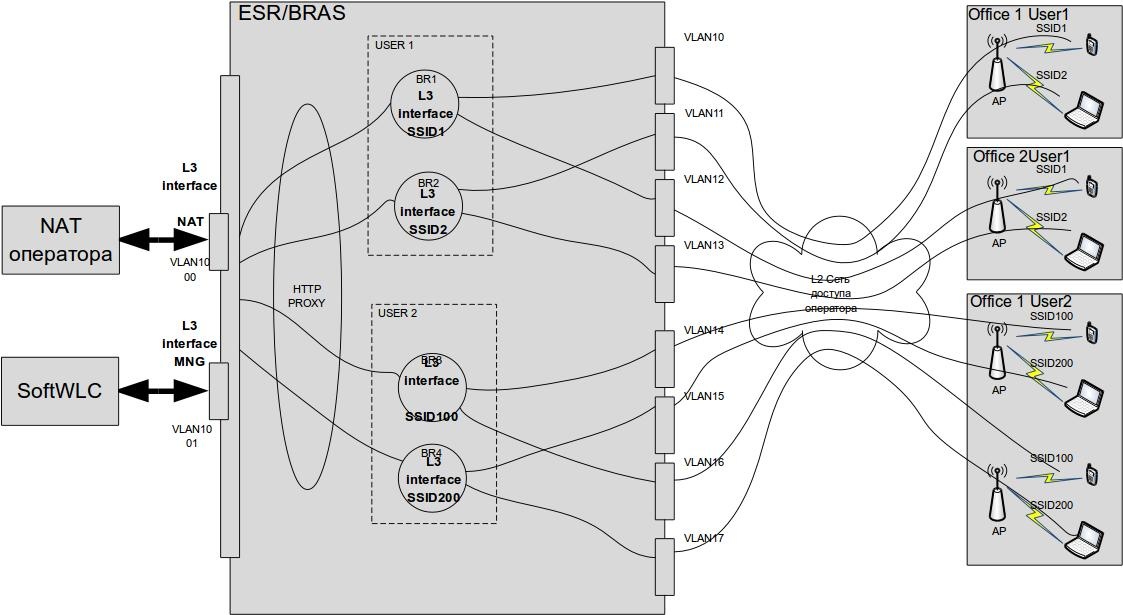
For each subscriber on BRAS a session is created for the subscriber (session id) and its services (service id), session numbers are unique. The session id number can be used to find information in the Portal and PCRF logs.
You can display the list of active sessions with the command show subscriber-control sessions status:
esr1000# show subscriber-control sessions status Session id User name IP address MAC address Interface Domain -------------------- --------------- --------------- ----------------- ------------------ --------------- 576460752303423705 -- 192.168.133.219 20:47:da:00:39:e3 gi1/0/1.2336 -- |
In the above example, the user is not authorised, no services are assigned to him.
esr1000# show subscriber-control sessions status Session id User name IP address MAC address Interface Domain -------------------- --------------- --------------- ----------------- ------------------ --------------- 576460752303423705 79123456789 192.168.133.219 20:47:da:00:39:e3 gi1/0/1.2336 eltex.root |
In the above example, the user is authorised.
To view which services are assigned to users, run the show subscriber-control services status command:
esr1000# show subscriber-control services status
Service id             Session id             Service name      User name         Quota volume     Quota time
                                                                                  (Bytes)          (Seconds)
--------------------   --------------------   ---------------   ---------------   --------------   --------------
36028797018963985 576460752303423705 A INTERNET 79123456789 -- -- |
In the above example, you can see that an INTERNET service is assigned to user, the letter A means that it is active.
You can view the list of services of a particular session with the command show subscriber-control services status session-id <session number>:
esr1000# show subscriber-control services status session-id 576460752303423705
Service id             Session id             Service name      User name         Quota volume     Quota time
                                                                                  (Bytes)          (Seconds)
--------------------   --------------------   ---------------   ---------------   --------------   --------------
36028797018963986      576460752303423705     N INTERNET        79123456789       --               --
36028797018963987 576460752303423705 A WELCOME 79123456789 -- -- |
In the above example, you can see that WELCOME and INTERNET services are assigned to user, but only the WELCOME service is active as it is marked with letter A. This means that the client is redirected to the "We recognise you" page, where he has to confirm his number by pressing the "Yes" button. After that the active service will change:
esr1000# show subscriber-control services status
Service id             Session id             Service name      User name         Quota volume     Quota time
                                                                                  (Bytes)          (Seconds)
--------------------   --------------------   ---------------   ---------------   --------------   --------------
36028797018963986      576460752303423705     A INTERNET        79123456789       --               --
36028797018963987 576460752303423705 N WELCOME 79123456789 -- -- |
You can delete all BRAS sessions with the clear subscriber-control sessions command. If you want to delete a specific session use clear subscriber-control sessions session-id <session number> command.
The subscriber connecting to the access point sends a DHCP Discover, which is transmitted via the operator's L2 access network to the BRAS ESR. The ESR performing the DHCP-relay function forwards the request to the DHCP server, which issues an address to the client based on the data in the giaddr field. The ESR address is specified as the GW. We assume that the DHCP server is configured correctly. DHCP and DNS queries should be allowed before authorisation, you should check the access list in ESR settings# show runnign-config → subscriber-control → bypass-traffic-acl unauthUSER. An example of a list allowing DHCP and DNS queries:
ip access-list extended unauthUSER rule 10 action permit match protocol udp match source-address any match destination-address any match source-port 68 match destination-port 67 enable exit rule 11 action permit match protocol udp match source-address any match destination-address any match source-port any match destination-port 53 enable exit exit |
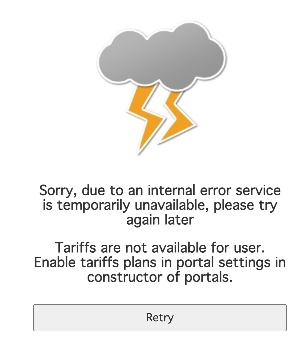
Redirect to the portal occurs at http(s) request in the browser of the subscriber. If there is no redirect when requesting URL by dns name, you can check the request by ip address, for example http://1.1.1.2, if the portal is opened, you need to check the passing of dns requests on the client, for example by executing the command
C:\Users\Administrator>nslookup eltex.nsk.ru
server google-public-dns-a.google.com
Address: 8.8.8.8
No possible answer:
name: eltex.nsk.ru
Address:94.250.248.55
If dns requests do not pass, it is necessary to check network settings on the upstream router, e.g. if there is a route to the subscribers' network.
The log is located in /var/log/eltex-portal/
In the file /var/log/eltex-portal/access.log attempts of users to connect to the portal can be viewed:
100.123.0.2 127.0.0.1 - - [16/Aug/2019:05:16:48 +0000] "GET /eltex_portal/?router=bras&clientIp=192.168.133.219&clientMac=20:47:da:00:39:e3&nasIp=100.123.0.176&sessionId=99&vrf=1&loc=data10&L2loc=gi1/0/1.2336&origUrl=http://connect.rom.miui.com/generate_204 HTTP/1.0" 200 28782 "-" "Mozilla/5.0 (Linux; Android 8.1.0; Redmi 5 Build/OPM1.171019.026; wv) AppleWebKit/537.36 (KHTML, like Gecko) Version/4.0 Chrome/76.0.3809.111 Mobile Safari/537.36" "JSESSIONID=node012voamcl3aepd1oyo47v30v62w70.node0" 36799 |
In the file /var/log/eltex-portal/auth.log user authorisation logs can be viewed (the log shows an example of successful authorisation):
2019-08-16T13:41:49,218 Index-page:success device:bras NAS_IP:100.123.0.176 BRAS_L2:SSID1 SSID_name:SSID1 SSID_domain:eltex.root portal:eltex user_name:null user_MAC:20:47:da:00:39:e3 2019-08-16T13:41:58,311 Register-form-submitted:success device:bras NAS_IP:100.123.0.176 BRAS_L2:SSID1 SSID_name:SSID1 SSID_domain:eltex.root portal:eltex user_name:null user_MAC:20:47:da:00:39:e3 2019-08-16T13:41:58,385 Registration:success device:bras NAS_IP:100.123.0.176 BRAS_L2:SSID1 SSID_name:SSID1 SSID_domain:eltex.root portal:eltex user_name:null user_MAC:20:47:da:00:39:e3 2019-08-16T13:41:58,470 Login-page:success device:bras NAS_IP:100.123.0.176 BRAS_L2:SSID1 SSID_name:SSID1 SSID_domain:eltex.root portal:eltex user_name:null user_MAC:20:47:da:00:39:e3 2019-08-16T13:41:58,732 Login-page:success device:bras NAS_IP:100.123.0.176 BRAS_L2:SSID1 SSID_name:SSID1 SSID_domain:eltex.root portal:eltex user_name:null user_MAC:20:47:da:00:39:e3 2019-08-16T13:41:59,660 Login-page-enter-button:success device:bras NAS_IP:100.123.0.176 BRAS_L2:SSID1 SSID_name:SSID1 SSID_domain:eltex.root portal:eltex user_name:null user_MAC:20:47:da:00:39:e3 2019-08-16T13:41:59,668 Authentication:success device:bras NAS_IP:100.123.0.176 BRAS_L2:SSID1 SSID_name:SSID1 SSID_domain:eltex.root portal:eltex user_name:null user_MAC:20:47:da:00:39:e3 2019-08-16T13:41:59,748 Tariffs:success device:bras NAS_IP:100.123.0.176 BRAS_L2:SSID1 SSID_name:SSID1 SSID_domain:eltex.root portal:eltex user_name:null user_MAC:20:47:da:00:39:e3 2019-08-16T13:41:59,834 Apply-tariff:success device:bras NAS_IP:100.123.0.176 BRAS_L2:SSID1 SSID_name:SSID1 SSID_domain:eltex.root portal:eltex user_name:null user_MAC:20:47:da:00:39:e3 2019-08-16T13:42:00,143 Success-redirect:success device:bras NAS_IP:100.123.0.176 BRAS_L2:SSID1 SSID_name:SSID1 SSID_domain:eltex.root portal:eltex user_name:null user_MAC:20:47:da:00:39:e3 |
In the file /var/log/eltex-portal/portal.log portal logs can be viewed. They are the main one for troubleshooting.
If there is the following in log
2019-08-16T11:47:40,873 [qtp2085002312-12] ERROR org.eltex.portal.controller.PageErrorController PageErrorController.errorPage(line:57). Handled exception: code 1101:BRAS_DISABLED . Source:org.eltex.portal.app.pipeline.stages.RouterSessionDetection.preprocess(line:58) |
It is necessary to check if the "Interaction with BRAS" setting is activated in the Portal Builder.
If there is the following in log
2019-08-16T11:53:28,147 [qtp2085002312-14] ERROR org.eltex.portal.tools.TariffTools TariffTools.notifyOnEmptyTariffs(line:67). Invalid configuration of portal eltex: Portal has no tariffs linked. Change on the Tariffs page. 2019-08-16T11:53:28,147 [qtp2085002312-14] ERROR org.eltex.portal.controller.PageErrorController PageErrorController.errorPage(line:57). Handled exception: code 1301:NO_AVAILABLE_TARIFFS . Source:org.eltex.portal.tools.TariffT ools.notifyOnEmptyTariffs(line:68) |
If the user's portal opens with error 1301 at once, then it is necessary to check whether the portal to which the redirect is performed has tariffs assigned in the Portal Builder.
If there is the following in log
2019-08-16T12:08:42,602 [qtp2085002312-107] ERROR org.eltex.portal.tools.PcrfTools PcrfTools.findL2Subnet(line:136). Failed to find L2 subnet for gi1/0/1.2336 at 100.123.0.176 (1) 2019-08-16T12:08:42,604 [qtp2085002312-107] ERROR org.eltex.portal.controller.PageErrorController PageErrorController.errorPage(line:57). Handled exception: code 2101:L2_SUBNET_NOT_FOUND . Source:org.eltex.portal.app.pipeline.specific.BrasSessionFactory.lookupSubnet(line:122) |
It is necessary to check whether there is a corresponding L2 subnet in account "PCRF Settings" → L2 and whether it is correctly configured. You should also check in the Portal Builder whether access to PCRF is correctly configured - default value host: localhost, port: 7070.
If there is the following in log
2019-08-16T12:17:05,519 [qtp2085002312-14] ERROR org.eltex.portal.app.pipeline.WrapRequestAspect WrapRequestAspect.aroundAdvice(line:98). Failed to handle request |
The key phrase is: Caused by: net.jradius.exception.TimeoutException: Timeout: No Response from RADIUS Server
You need to check the key for Radius and CoA messages, they must match. There are three places to check:
If you enable debug on ESR (debug→debug BRAS error), you can see the corresponding error in ESR console:
2019-08-16T17:31:22+07:00 %BRAS-E-ERROR: <bras_receive_message_from_socket> ESR_rc_check_reply failed! (Maybe, is shared secret incorrect?) Dropping packet without response |
Logs are located in /var/log/eltex-pcrf/. Let's view /var/log/eltex-pcrf/eltex-pcrf-shaper.log, message with error:
2019-08-16T13:55:04,917 [vert.x-eventloop-thread-2] ERROR SubnetsVerticle PcrfJsonTools.replyRxFail(line:570). {
  "key" : "PcrfErrorCode.subnetNotFound",
  "message" : "Subnet not found by query '{\"location\":\"gi1/0/1.2336\",\"nas_ip\":\"100.123.0.176\"}'",
  "code" : 29,
  "args" : [ {
    "location" : "gi1/0/1.2336",
    "nas_ip" : "100.123.0.176"
  } ]
} |
This message indicates that the L2 subnet in account is not configured or is configured with an error. You need to check if the subnet is available in "PCRF Settings" → "L2 subnets" in your personal cabinet and make sure it is configured correctly.
It is necessary to check the name of the portal in PCRF Settings→L2 Subnets in account, the portal is selected by matching NAS IP and location interface.
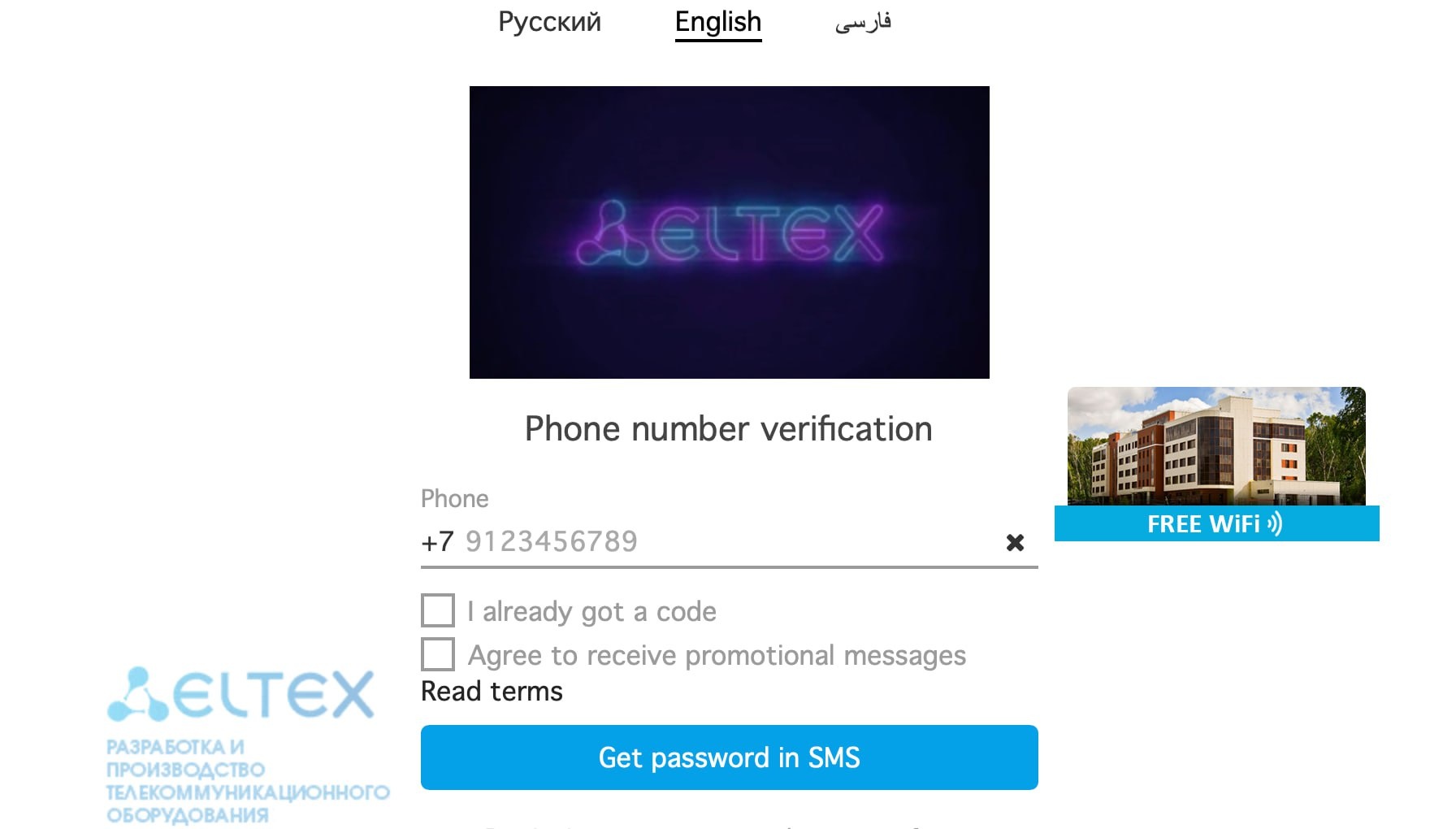
If a user opens the portal, but after entering the number and SMS code, the portal displays error 1301 - then it is necessary to check the tariff specified in the portal settings - it must belong to the BRAS category, not "work with AP".
with the error: "Error:1301 (NO_AVAILABLE_TARIFFS)"
In the portal log /var/log/eltex-portal/portal.log there will be a message:
2019-08-16T14:07:52,586 [qtp2085002312-12] ERROR org.eltex.portal.tools.TariffTools TariffTools.notifyOnEmptyTariffs(line:67). Invalid configuration of portal eltex: Portal has no tariffs linked. Change on the Tariffs page. 2019-08-16T14:07:52,586 [qtp2085002312-12] ERROR org.eltex.portal.controller.PageErrorController PageErrorController.errorPage(line:57). Handled exception: code 1301:NO_AVAILABLE_TARIFFS . Source:org.eltex.portal.tools.TariffTools.notifyOnEmptyTariffs(line:68) |
You need to configure the correct tariff plan for this portal in the Portal Builder.
One of the reasons for this error is different keys for CoA messages, you need to check the configuration of Radius and CoA keys in three places:
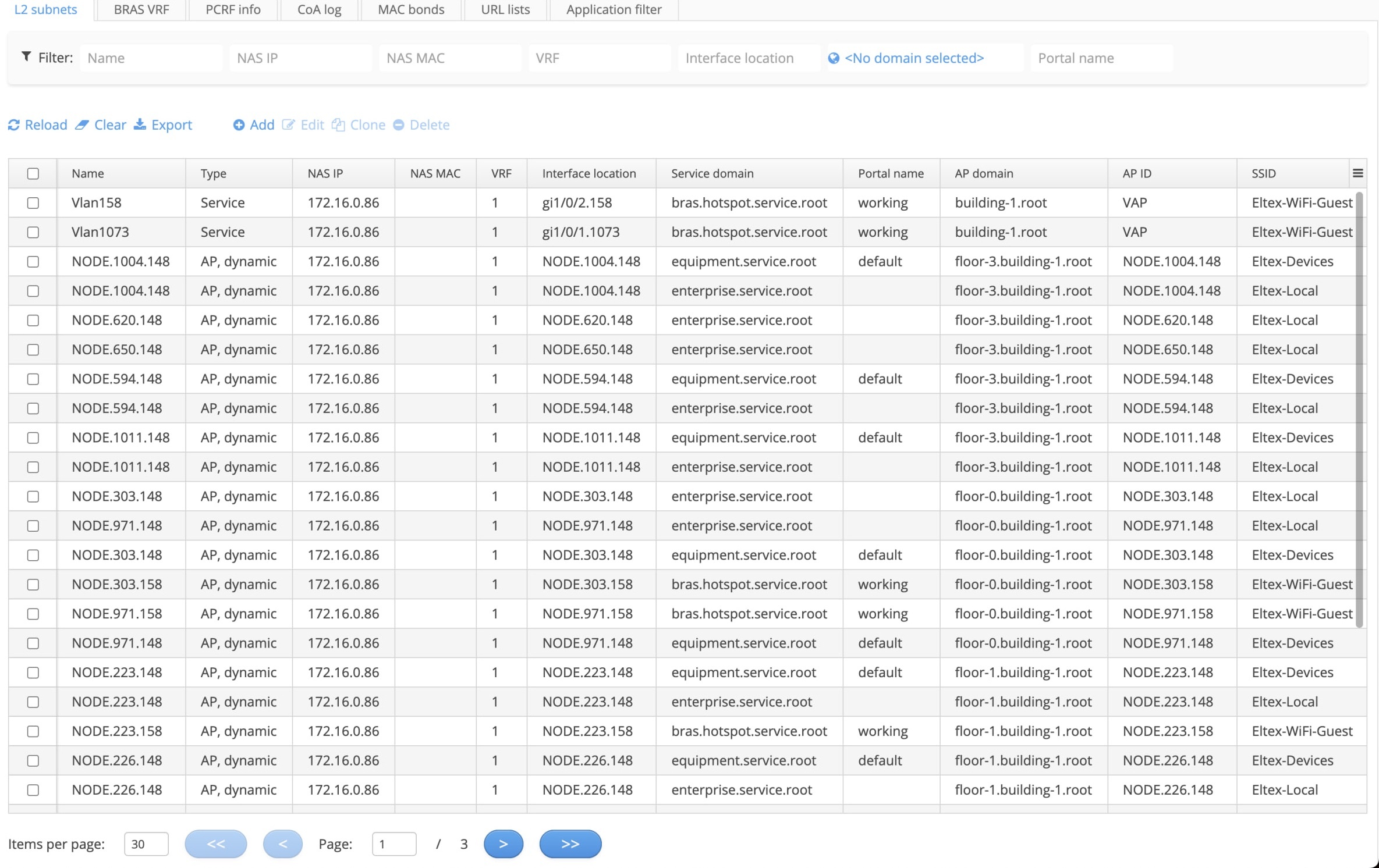
After receiving the first ip packet from a subscriber, BRAS requests from PCRF the shaper parameters for this subscriber and tries to perform mac authorisation. For successful mac authorisation in "PCRF Settings->L2 Subnets" in the Personal Office a correct entry must be configured. You can check this by finding out the name of the L2 interface to which the subscriber is connected:
esr1000# show subscriber-control sessions status Session id User name IP address MAC address Interface Domain -------------------- --------------- --------------- ----------------- ------------------ --------------- 576460752303423705 -- 192.168.133.219 20:47:da:00:39:e3 gi1/0/1.2336 -- |
Check the configuration of L2 subnet in account, namely, NAS IP must match the ESR address, interface location must match the name of the interface to which the subscriber is connected, Service domain must match the service domain of the subscriber. The service domain is set in the L2 subnet which describes which portal will be displayed to the subscriber.
After successful authorisation on the portal, redirect to the portal occurs again and authorisation is required again, no errors appear in the opening window with the portal.
It is necessary to check in account, in the service settings the spelling of "Traffic class", which should be assigned to the user after authorisation in accordance with the settings of the tariff assigned to him - it must be completely the same, including the case of letters in access-list, which is used to classify the traffic of this service on ESR BRAS:
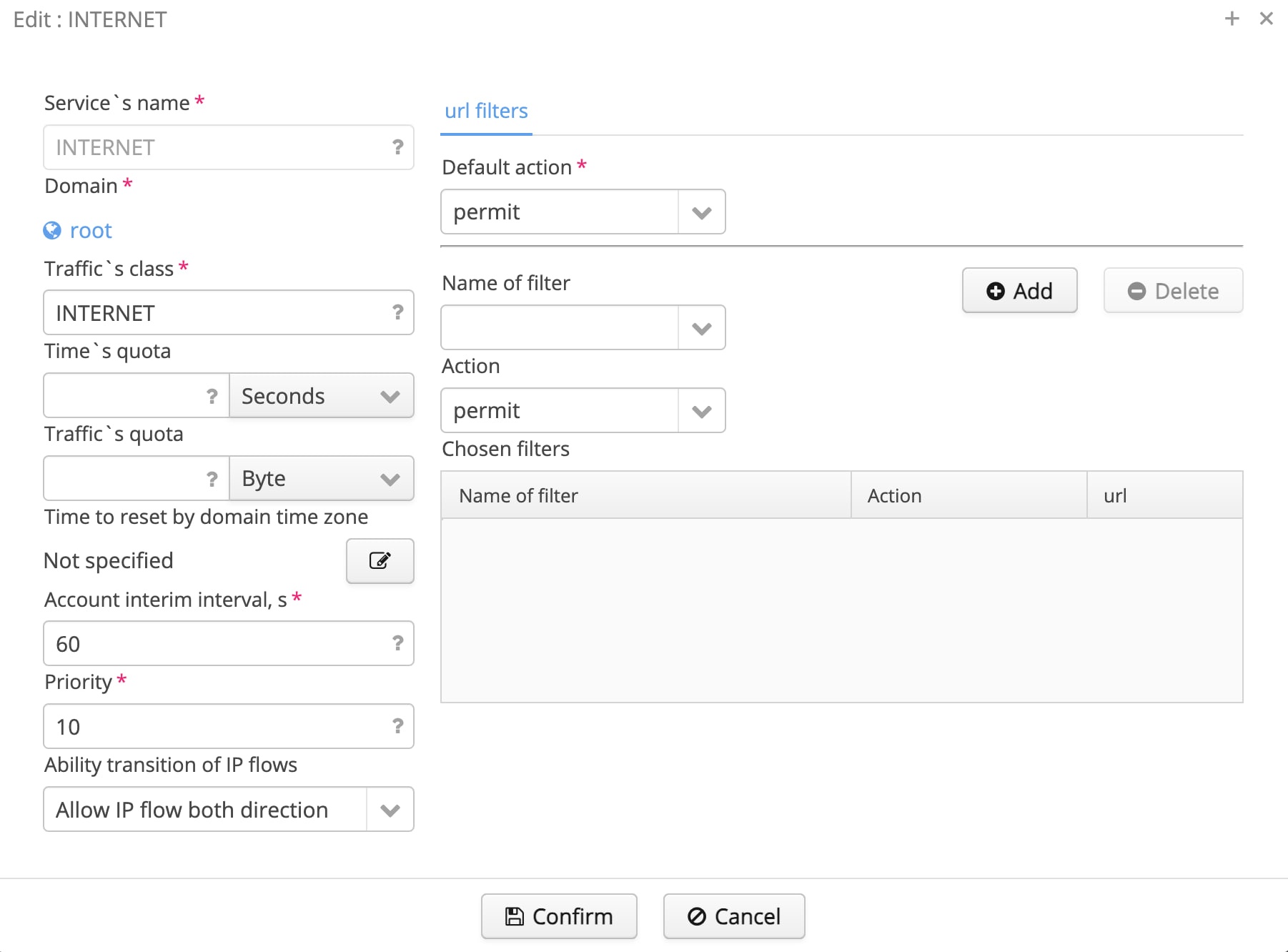
Output from ESR show running access-list:
ip access-list extended internet
  rule 1
    action permit
    enable
  exit
exit |
As it can be seen the case of letters does not match.
If debug is enabled on ESR (debug→debug BRAS error), then in ESR console that can be seen the corresponding error when user tries to authorise:
2019-08-16T17:31:22+07:00 %BRAS-E-ERROR: <bras_parse_traffic_class_attribute> class map 'INTERNET' not found |
It is necessary to correct the name "Traffic class" in the account or access-list on ESR, so that they would match. After that it is necessary to reset the sessions of users, who managed to receive the wrong service. As a rule in such a situation you can reset sessions of all users: clear subscriber-control sessions.
In this case you need to check at PCRF logs:
2021-07-29T03:42:59,587 [hz._hzInstance_1_dev.async.thread-2] ERROR AcctVerticle ?.(line:). Failed to find NAS secret for 100.123.0.55:50049 |
In case of such a log, it is necessary to check the presence of the address (the address must match the address in the logs) and the correctness of the password in the NAS table of the RADIUS server ("RADIUS" → "Access Point Management"):

When connecting, a user can see multiple redirects in the redirect bar:
As a rule, the following error is displayed at the bottom of the page: "net:ERR_TOO_MANY_REDIRECTS".
This error occurs if the service that is assigned to the client uses a white list of URL filtering and redirects, and there is an error in the filtering list in the line that allows access to the portal. In the given example, this is the WELCOME service, which uses a whitelist. You need to open "PCRF Settings" → "URL lists" in your personal cabinet, open the corresponding list and check the correctness of the portal address.
There are two BRAS L2 and L3 switching schemes - in case of using L2 switching scheme L2 subnets are created manually in account by the system administrator. If L3 scheme is used - when subscribers' traffic is transmitted through L3 operator's network inside GRE tunnels - then in this case L2 subnets are created automatically and their absence in account is a sign of incorrect ESR BRAS addition to EMS. In this case it is necessary to check whether the "BRAS service" checkbox is ticked in the "Access" settings and whether the ESR operation mode is correctly specified - "Station".