SoftWLC uses additional open-source software for its work. Description and configuration parameters of each service are given below.
snmpd service is used for EMS servers' parameters and reservation system monitoring. The service also generates alert messages if reservation system failures occur.
snmpd server starts automatically together with the server.
To stop the service, the following command is used:
service snmpd stop |
To start the service after stopping:
service snmpd start |
To check the service status, use the command:
service snmpd status |
This will be followed by a message:
* snmpd is running |
if the service is running, or by
* snmpd is not running |
if it is not.
snmpd service configuration file is located in /etc/snmp/snmpd.conf with the following contents:
# sec.name source community #com2sec paranoid default public com2sec readonly default public com2sec readwrite default private # readwrite ON for Keepalived SNMP SET support #### # Second, map the security names into group names: # sec.model sec.name group MyROSystem v1 paranoid group MyROSystem v2c paranoid group MyROSystem usm paranoid group MyROGroup v1 readonly group MyROGroup v2c readonly group MyROGroup usm readonly group MyRWGroup v1 readwrite group MyRWGroup v2c readwrite group MyRWGroup usm readwrite #### # Third, create a view for us to let the groups have rights to: # incl/excl subtree mask view all included .1 80 view system included .1.3.6.1.2.1.1 #view system included .iso.org.dod.internet.mgmt.mib-2.system #### # Finally, grant the 2 groups access to the 1 view with different # write permissions: # context sec.model sec.level match read write notif access MyROSystem "" any noauth exact system none none access MyROGroup "" any noauth exact all none none access MyRWGroup "" any noauth exact all all none syslocation Unknown (configure /etc/snmp/snmpd.conf) syscontact Root <root@localhost> (configure /etc/snmp/snmpd.conf) # For Keepalived SNMP support master agentx |
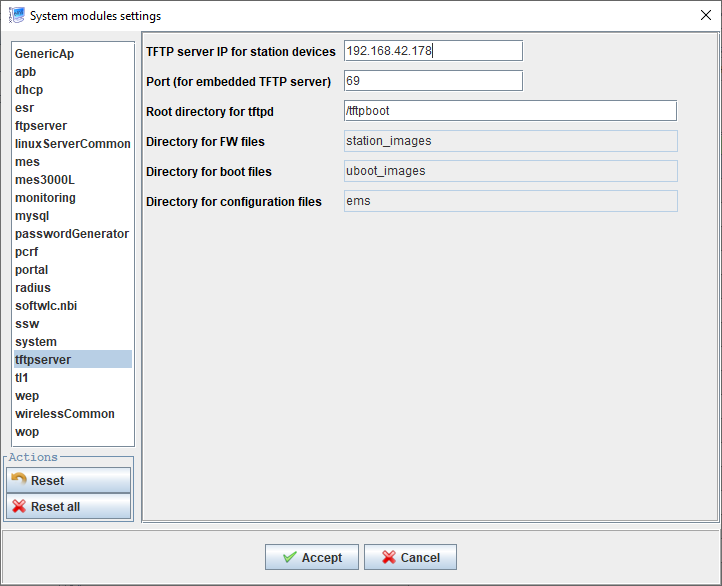
The service is intended to update access point firmware using TFTP and to get packet-capture results from an access point.
The service is configured via EMS GUI. Select Administration → EMS server configuration → System modules. In the opened window, select tftpserver in the list on the left.
NTP — time synchronization service which is used to provide correct logging.
To stop the service, the following command is used:
service ntp stop |
To start the service after stopping:
service ntp start |
To check the service status, use the command:
service ntp status |
This will be followed by a message:
* NTP server is running |
if the service is running, or by
* NTP server is not running |
if it is not.
To start synchronization manually, stop ntpd process and run the command:
ntpdate <your ntp server> |
To save the current time to the hardware clock, the following command is used:
hwclock --systohc |
/etc/ntp.conf — time synchronization configuration. Specify NTP servers in the configuration file.
Example:
# Use servers from the NTP Pool Project. Approved by Ubuntu Technical Board # on 2011-02-08 (LP: #104525). See http://www.pool.ntp.org/join.html for # more information. server 172.17.209.9 server 0.pool.ntp.org server 1.pool.ntp.org server 2.pool.ntp.org server 3.pool.ntp.org |
In the file /etc/timezone your time zone should be specified, for example:
Asia/Novosibirsk |
To configure the time zone, use the command:
dpkg-reconfigure tzdata |
select your region and time zone in the opened window.
The process sends syslog from the server to MySQL database.
To stop the service, the following command is used:
service rsyslog stop |
To start the service after stopping:
service rsyslog start |
To check the service status, use the command:
service rsyslog status |
This will be followed by a message:
* rsyslog start/running, process 793 |
if the service is running, or by
* rsyslog is not running |
if it is not.
Specify syslog message format and message processing rules in /etc/rsyslog.d/mysql.conf:
### Configuration file for rsyslog-mysql
### Changes are preserved
$template StdSQLFormat,"insert into SystemEvents (Message, Facility,FromHost, FromHostIp, Priority, DeviceReportedTime, ReceivedAt, InfoUnitID, SysLogTag) values ('%msg%', %syslogfacility%, '%HOSTNAME%', '%fromhost-ip%', %syslogpriority%, '%timereported:::date-mysql%', '%timegenerated:::date-mysql%', %iut%, '%syslogtag%')",SQL
$ModLoadommysql
### . :ommysql:localhost,,,
### создать правила обработки:
:fromhost-ip, !isequal, "127.0.0.1" :ommysql:172.17.209.6,Syslog,rsyslog,root; StdSQLFormat |
where StdSQLFormat – the format for transferring syslog from access points to the database;
172.17.209.6 – database IP address.
Allow receiving messages from access points in /etc/rsyslog.conf by uncommenting the following lines:
provides UDP syslog reception $ModLoadimudp $UDPServerRun 514 provides TCP syslog reception $ModLoadimtcp $InputTCPServerRun 514 |