Управление аутентификацией и авторизацией пользователей требует обеспечение высокой доступности NAC-системы, т. к. в случае её отказа подключение пользователей и эндпоинтов станет невозможным.
Резервирование Eltex-NAICE выполняется по схеме Active-Active с использованием VRRP-адреса, что позволяет использовать один RADIUS-сервер в настройках сетевых устройств и зарезервировать подключение для сетевых устройств, настройки которых не поддерживают указание нескольких RADIUS-серверов. Для настройки схемы с резервирование требуется выделить 4 виртуальных (или физических) сервера: 2 для функционирования сервисов Eltex-NAICE, 2 для функционирования СУБД Postgresql, отвечающей за хранение данных.
Установка обновлением схемы с резервированием на хост, который ранее использовался для работы системы в однохостовом режиме не допускается |
Порядок действий при переходе с однохостовой схемы на схему с резервированием описан: v0.8_ru_3.7.2 Обновление PostgreSQL при переходе со схемы с однохостовой установкой на схему с резервированием.
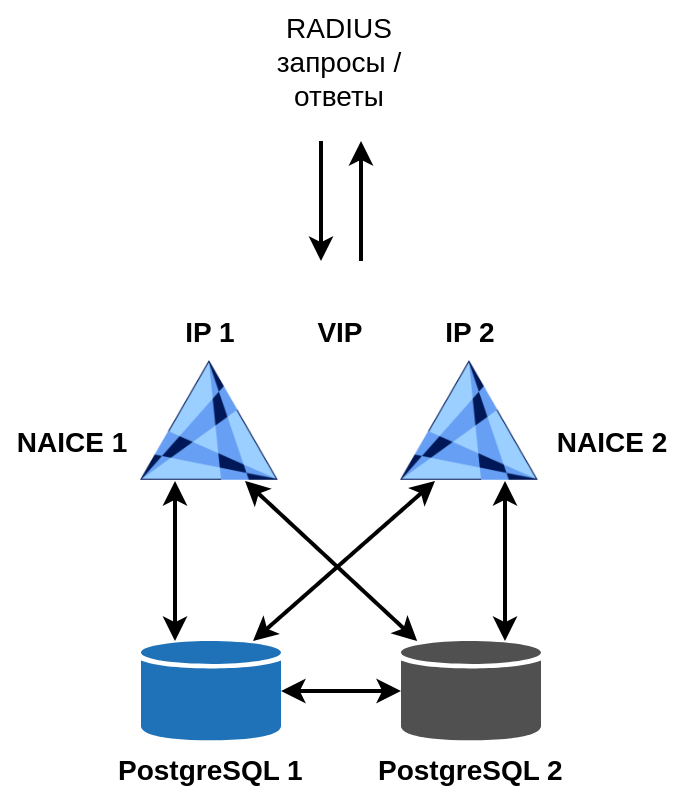
Для лицензирования схемы с резервированием требуется две лицензии для каждого из хостов NAICE. Лицензии должны иметь уникальные Product ID, но одинаковый ключ лицензии. |
| Роль | CPU | RAM | HDD | Примечания |
|---|---|---|---|---|
| NAICE 1 | 4 | 8 Gb | 100 Gb | |
| NAICE 2 | 4 | 8 Gb | 100 Gb | |
| PostgreSQL 1 | 2 | 2 Gb | 500 Gb | |
| PostgreSQL 2 | 2 | 2 Gb | 500 Gb |
| Роль | CPU | RAM | HDD | Примечания |
|---|---|---|---|---|
| NAICE 1 | 8 | 16 Gb | 100 Gb | |
| NAICE 2 | 8 | 16 Gb | 100 Gb | |
| PostgreSQL 1 | 4 | 4 Gb | 1000 Gb | |
| PostgreSQL 2 | 4 | 4 Gb | 1000 Gb |
Установка выполняется с помощью двух плейбуков ansible:
docker-postgres-cluster.yml.reservation-naice-services.yml.Адреса целевых хостов, на которых будет выполнятся установка, определяется в файле hosts-cluster.yml.
Для СУБД PostgreSQL необходимо задать адреса в разделе postgres-cluster:
# Группа хостов для установки postgres-cluster (primary + standby)
postgres-cluster:
  hosts:
    node_primary:
      forwarded_postgresql_port: 5432
      forwarded_ssh_port: 15432
      ansible_host: <IP-адрес хоста для node-1 PostgreSQL>
      ansible_user: <логин пользователя>
      ansible_ssh_pass: <пароль пользователя>
      ansible_become_password: <пароль для повышения привилегий (sudo)>
      ansible_port: 22
    node_standby:
      forwarded_postgresql_port: 5432
      forwarded_ssh_port: 15432
      ansible_host: <IP-адрес хоста для node-2 PostgreSQL>
      ansible_user: <логин пользователя>
      ansible_ssh_pass: <пароль пользователя>
      ansible_become_password: <пароль для повышения привилегий (sudo)>
ansible_port: 22 |
Для установки сервисов NAICE с резервированием необходимо задать адреса в разделе reservation:
# Группа хостов для установки NAICE с резервированием
reservation:
  hosts:
    master_host:
      ansible_host: <IP-адрес хоста 1 для NAICE>
      ansible_user: <логин пользователя>
      ansible_ssh_pass: <пароль пользователя>
      ansible_become_password: <пароль для повышения привилегий (sudo)>
      ansible_port: 22
      keepalived_interface: <наименование интерфейса, на котором будет настроен VIP-адрес, например eth0>

    backup_host:
      ansible_host: <IP-адрес хоста 2 для NAICE>
      ansible_user: <логин пользователя>
      ansible_ssh_pass: <пароль пользователя>
      ansible_become_password: <пароль для повышения привилегий (sudo)>
      ansible_port: 22
      keepalived_interface: <наименование интерфейса, на котором будет настроен VIP-адрес, например eth0>
  vars:
keepalived_vip: <VIP-адрес, без маски, например 192.168.0.11> |
Выполнить плейбук:
ansible-playbook docker-postgres-cluster.yml -i hosts-cluster.yml |
Результатом выполнения плейбука будет установка СУБД PostgreSQL в кластере на серверах, указанных в node_primary и node_standby. Мастер-нода кластера будет находиться на хосте node_primary.
Все команды необходимо выполнять из под непривилегированного пользователя через "sudo". Обращение к контейнерам на ноде node_primary и node_standby выполняется разными командами. node_primary: sudo docker exec -it naice-postgres-1 <команда> node_standby: sudo docker exec -it naice-postgres-2 <команда> |
Проверка расположения ноды "Primary".
Зайти на первую ноду, указанную в node_primary, и выполнить команду sudo docker exec -it naice-postgres-1 repmgr -f /opt/bitnami/repmgr/conf/repmgr.conf cluster show:
$ sudo docker exec -it naice-postgres-1 repmgr -f /opt/bitnami/repmgr/conf/repmgr.conf cluster show ID | Name | Role | Status | Upstream | Location | Priority | Timeline | Connection string ------+------------+---------+-----------+------------+----------+----------+----------+--------------------------------------------------------------------------------------- 1001 | postgres-1 | primary | * running | | default | 100 | 1 | user=repmgr password=repmgr host=postgres-1 dbname=repmgr port=5432 connect_timeout=1 1002 | postgres-2 | standby | running | postgres-1 | default | 100 | 1 | user=repmgr password=repmgr host=postgres-2 dbname=repmgr port=5432 connect_timeout=1 |
Зайти на вторую ноду, указанную в node_standby, и выполнить команду sudo docker exec -it naice-postgres-2 repmgr -f /opt/bitnami/repmgr/conf/repmgr.conf cluster show:
$ sudo docker exec -it naice-postgres-2 repmgr -f /opt/bitnami/repmgr/conf/repmgr.conf cluster show ID | Name | Role | Status | Upstream | Location | Priority | Timeline | Connection string ------+------------+---------+-----------+------------+----------+----------+----------+--------------------------------------------------------------------------------------- 1001 | postgres-1 | primary | * running | | default | 100 | 1 | user=repmgr password=repmgr host=postgres-1 dbname=repmgr port=5432 connect_timeout=1 1002 | postgres-2 | standby | running | postgres-1 | default | 100 | 1 | user=repmgr password=repmgr host=postgres-2 dbname=repmgr port=5432 connect_timeout=1 |
Проверка работоспособности кластера
Зайти на первую ноду, указанную в node_primary и выполнить команду:
sudo docker exec -it naice-postgres-1 repmgr -f /opt/bitnami/repmgr/conf/repmgr.conf cluster crosscheck |
Зайти на вторую ноду, указанную в node_standby и выполнить команду:
sudo docker exec -it naice-postgres-2 repmgr -f /opt/bitnami/repmgr/conf/repmgr.conf cluster crosscheck |
Результатом выполнения команд будет проверка состояния кластера, которая сопровождается выводом лога, в конце которого ожидается вывод:
debug1: Exit status 0 Name | ID | 1001 | 1002 ------------+------+------+------ postgres-1 | 1001 | * | * postgres-2 | 1002 | * | * |
worker@fa6598fefaf4:/$ repmgr -f /opt/bitnami/repmgr/conf/repmgr.conf cluster crosscheck OpenSSH_9.2p1 Debian-2+deb12u3, OpenSSL 3.0.15 3 Sep 2024 debug1: Reading configuration data /home/worker/.ssh/config debug1: /home/worker/.ssh/config line 1: Applying options for postgres-2 debug1: Reading configuration data /etc/ssh/ssh_config debug1: /etc/ssh/ssh_config line 19: include /etc/ssh/ssh_config.d/*.conf matched no files debug1: /etc/ssh/ssh_config line 21: Applying options for * debug1: Connecting to 100.110.3.151 [100.110.3.151] port 15432. debug1: Connection established. debug1: identity file /home/worker/.ssh/id_rsa type 0 debug1: identity file /home/worker/.ssh/id_rsa-cert type -1 debug1: identity file /home/worker/.ssh/id_ecdsa type -1 debug1: identity file /home/worker/.ssh/id_ecdsa-cert type -1 debug1: identity file /home/worker/.ssh/id_ecdsa_sk type -1 debug1: identity file /home/worker/.ssh/id_ecdsa_sk-cert type -1 debug1: identity file /home/worker/.ssh/id_ed25519 type -1 debug1: identity file /home/worker/.ssh/id_ed25519-cert type -1 debug1: identity file /home/worker/.ssh/id_ed25519_sk type -1 debug1: identity file /home/worker/.ssh/id_ed25519_sk-cert type -1 debug1: identity file /home/worker/.ssh/id_xmss type -1 debug1: identity file /home/worker/.ssh/id_xmss-cert type -1 debug1: identity file /home/worker/.ssh/id_dsa type -1 debug1: identity file /home/worker/.ssh/id_dsa-cert type -1 debug1: Local version string SSH-2.0-OpenSSH_9.2p1 Debian-2+deb12u3 debug1: Remote protocol version 2.0, remote software version OpenSSH_9.2p1 Debian-2+deb12u3 debug1: compat_banner: match: OpenSSH_9.2p1 Debian-2+deb12u3 pat OpenSSH* compat 0x04000000 debug1: Authenticating to 100.110.3.151:15432 as 'worker' debug1: load_hostkeys: fopen /home/worker/.ssh/known_hosts2: No such file or directory debug1: load_hostkeys: fopen /etc/ssh/ssh_known_hosts: No such file or directory debug1: load_hostkeys: fopen /etc/ssh/ssh_known_hosts2: No such file or directory debug1: SSH2_MSG_KEXINIT sent debug1: SSH2_MSG_KEXINIT received debug1: kex: algorithm: sntrup761x25519-sha512@openssh.com debug1: kex: host key algorithm: ssh-ed25519 debug1: kex: server->client cipher: chacha20-poly1305@openssh.com MAC: <implicit> compression: none debug1: kex: client->server cipher: chacha20-poly1305@openssh.com MAC: <implicit> compression: none debug1: expecting SSH2_MSG_KEX_ECDH_REPLY debug1: SSH2_MSG_KEX_ECDH_REPLY received debug1: Server host key: ssh-ed25519 SHA256:0PxxxETD7CIFDEt6Gs/tN3Nl+j4AcqhUzsYWyVF85C8 debug1: load_hostkeys: fopen /home/worker/.ssh/known_hosts2: No such file or directory debug1: load_hostkeys: fopen /etc/ssh/ssh_known_hosts: No such file or directory debug1: load_hostkeys: fopen /etc/ssh/ssh_known_hosts2: No such file or directory debug1: Host '[100.110.3.151]:15432' is known and matches the ED25519 host key. debug1: Found key in /home/worker/.ssh/known_hosts:1 debug1: ssh_packet_send2_wrapped: resetting send seqnr 3 debug1: rekey out after 134217728 blocks debug1: SSH2_MSG_NEWKEYS sent debug1: expecting SSH2_MSG_NEWKEYS debug1: ssh_packet_read_poll2: resetting read seqnr 3 debug1: SSH2_MSG_NEWKEYS received debug1: rekey in after 134217728 blocks debug1: Will attempt key: /home/worker/.ssh/id_rsa RSA SHA256:0G2jNARWuHCusgBcgUXO5X6qN9qII5KqDeYdnkXhczE debug1: Will attempt key: /home/worker/.ssh/id_ecdsa debug1: Will attempt key: /home/worker/.ssh/id_ecdsa_sk debug1: Will attempt key: /home/worker/.ssh/id_ed25519 debug1: Will attempt key: /home/worker/.ssh/id_ed25519_sk debug1: Will attempt key: /home/worker/.ssh/id_xmss debug1: Will attempt key: /home/worker/.ssh/id_dsa debug1: SSH2_MSG_EXT_INFO received debug1: kex_input_ext_info: server-sig-algs=<ssh-ed25519,sk-ssh-ed25519@openssh.com,ecdsa-sha2-nistp256,ecdsa-sha2-nistp384,ecdsa-sha2-nistp521,sk-ecdsa-sha2-nistp256@openssh.com,webauthn-sk-ecdsa-sha2-nistp256@openssh.com,ssh-dss,ssh-rsa,rsa-sha2-256,rsa-sha2-512> debug1: kex_input_ext_info: publickey-hostbound@openssh.com=<0> debug1: SSH2_MSG_SERVICE_ACCEPT received debug1: Authentications that can continue: publickey,password debug1: Next authentication method: publickey debug1: Offering public key: /home/worker/.ssh/id_rsa RSA SHA256:0G2jNARWuHCusgBcgUXO5X6qN9qII5KqDeYdnkXhczE debug1: Server accepts key: /home/worker/.ssh/id_rsa RSA SHA256:0G2jNARWuHCusgBcgUXO5X6qN9qII5KqDeYdnkXhczE Authenticated to 100.110.3.151 ([100.110.3.151]:15432) using "publickey". debug1: channel 0: new session [client-session] (inactive timeout: 0) debug1: Requesting no-more-sessions@openssh.com debug1: Entering interactive session. debug1: pledge: filesystem debug1: client_input_global_request: rtype hostkeys-00@openssh.com want_reply 0 debug1: client_input_hostkeys: searching /home/worker/.ssh/known_hosts for [100.110.3.151]:15432 / (none) debug1: client_input_hostkeys: searching /home/worker/.ssh/known_hosts2 for [100.110.3.151]:15432 / (none) debug1: client_input_hostkeys: hostkeys file /home/worker/.ssh/known_hosts2 does not exist debug1: Remote: /home/worker/.ssh/authorized_keys:1: key options: agent-forwarding port-forwarding pty user-rc x11-forwarding debug1: Remote: /home/worker/.ssh/authorized_keys:1: key options: agent-forwarding port-forwarding pty user-rc x11-forwarding debug1: Sending environment. debug1: channel 0: setting env LANG = "en_US.UTF-8" debug1: Sending command: /opt/bitnami/postgresql/bin/repmgr -f /opt/bitnami/repmgr/conf/repmgr.conf cluster matrix --csv --terse -L NOTICE Learned new hostkey: RSA SHA256:qSQaOT2Ghrx6Te/r3v9+p/mkB9tPZ+OSi3pN3GwXHJI Learned new hostkey: ECDSA SHA256:l3Jl+igKSb4uPmogLc8Ylx4MuYx2WjPPE87NrA7CIMI Adding new key for [100.110.3.151]:15432 to /home/worker/.ssh/known_hosts: ssh-rsa SHA256:qSQaOT2Ghrx6Te/r3v9+p/mkB9tPZ+OSi3pN3GwXHJI Adding new key for [100.110.3.151]:15432 to /home/worker/.ssh/known_hosts: ecdsa-sha2-nistp256 SHA256:l3Jl+igKSb4uPmogLc8Ylx4MuYx2WjPPE87NrA7CIMI debug1: update_known_hosts: known hosts file /home/worker/.ssh/known_hosts2 does not exist debug1: pledge: fork OpenSSH_9.2p1 Debian-2+deb12u3, OpenSSL 3.0.15 3 Sep 2024 debug1: Reading configuration data /home/worker/.ssh/config debug1: /home/worker/.ssh/config line 1: Applying options for postgres-1 debug1: Reading configuration data /etc/ssh/ssh_config debug1: /etc/ssh/ssh_config line 19: include /etc/ssh/ssh_config.d/*.conf matched no files debug1: /etc/ssh/ssh_config line 21: Applying options for * debug1: Connecting to 100.110.2.154 [100.110.2.154] port 15432. debug1: Connection established. debug1: identity file /home/worker/.ssh/id_rsa type 0 debug1: identity file /home/worker/.ssh/id_rsa-cert type -1 debug1: identity file /home/worker/.ssh/id_ecdsa type -1 debug1: identity file /home/worker/.ssh/id_ecdsa-cert type -1 debug1: identity file /home/worker/.ssh/id_ecdsa_sk type -1 debug1: identity file /home/worker/.ssh/id_ecdsa_sk-cert type -1 debug1: identity file /home/worker/.ssh/id_ed25519 type -1 debug1: identity file /home/worker/.ssh/id_ed25519-cert type -1 debug1: identity file /home/worker/.ssh/id_ed25519_sk type -1 debug1: identity file /home/worker/.ssh/id_ed25519_sk-cert type -1 debug1: identity file /home/worker/.ssh/id_xmss type -1 debug1: identity file /home/worker/.ssh/id_xmss-cert type -1 debug1: identity file /home/worker/.ssh/id_dsa type -1 debug1: identity file /home/worker/.ssh/id_dsa-cert type -1 debug1: Local version string SSH-2.0-OpenSSH_9.2p1 Debian-2+deb12u3 debug1: Remote protocol version 2.0, remote software version OpenSSH_9.2p1 Debian-2+deb12u3 debug1: compat_banner: match: OpenSSH_9.2p1 Debian-2+deb12u3 pat OpenSSH* compat 0x04000000 debug1: Authenticating to 100.110.2.154:15432 as 'worker' debug1: load_hostkeys: fopen /home/worker/.ssh/known_hosts: No such file or directory debug1: load_hostkeys: fopen /home/worker/.ssh/known_hosts2: No such file or directory debug1: load_hostkeys: fopen /etc/ssh/ssh_known_hosts: No such file or directory debug1: load_hostkeys: fopen /etc/ssh/ssh_known_hosts2: No such file or directory debug1: SSH2_MSG_KEXINIT sent debug1: SSH2_MSG_KEXINIT received debug1: kex: algorithm: sntrup761x25519-sha512@openssh.com debug1: kex: host key algorithm: ssh-ed25519 debug1: kex: server->client cipher: chacha20-poly1305@openssh.com MAC: <implicit> compression: none debug1: kex: client->server cipher: chacha20-poly1305@openssh.com MAC: <implicit> compression: none debug1: expecting SSH2_MSG_KEX_ECDH_REPLY debug1: SSH2_MSG_KEX_ECDH_REPLY received debug1: Server host key: ssh-ed25519 SHA256:0PxxxETD7CIFDEt6Gs/tN3Nl+j4AcqhUzsYWyVF85C8 debug1: load_hostkeys: fopen /home/worker/.ssh/known_hosts: No such file or directory debug1: load_hostkeys: fopen /home/worker/.ssh/known_hosts2: No such file or directory debug1: load_hostkeys: fopen /etc/ssh/ssh_known_hosts: No such file or directory debug1: load_hostkeys: fopen /etc/ssh/ssh_known_hosts2: No such file or directory debug1: checking without port identifier debug1: load_hostkeys: fopen /home/worker/.ssh/known_hosts: No such file or directory debug1: load_hostkeys: fopen /home/worker/.ssh/known_hosts2: No such file or directory debug1: load_hostkeys: fopen /etc/ssh/ssh_known_hosts: No such file or directory debug1: load_hostkeys: fopen /etc/ssh/ssh_known_hosts2: No such file or directory Warning: Permanently added '[100.110.2.154]:15432' (ED25519) to the list of known hosts. debug1: check_host_key: hostkey not known or explicitly trusted: disabling UpdateHostkeys debug1: ssh_packet_send2_wrapped: resetting send seqnr 3 debug1: rekey out after 134217728 blocks debug1: SSH2_MSG_NEWKEYS sent debug1: expecting SSH2_MSG_NEWKEYS debug1: ssh_packet_read_poll2: resetting read seqnr 3 debug1: SSH2_MSG_NEWKEYS received debug1: rekey in after 134217728 blocks debug1: Will attempt key: /home/worker/.ssh/id_rsa RSA SHA256:0G2jNARWuHCusgBcgUXO5X6qN9qII5KqDeYdnkXhczE debug1: Will attempt key: /home/worker/.ssh/id_ecdsa debug1: Will attempt key: /home/worker/.ssh/id_ecdsa_sk debug1: Will attempt key: /home/worker/.ssh/id_ed25519 debug1: Will attempt key: /home/worker/.ssh/id_ed25519_sk debug1: Will attempt key: /home/worker/.ssh/id_xmss debug1: Will attempt key: /home/worker/.ssh/id_dsa debug1: SSH2_MSG_EXT_INFO received debug1: kex_input_ext_info: server-sig-algs=<ssh-ed25519,sk-ssh-ed25519@openssh.com,ecdsa-sha2-nistp256,ecdsa-sha2-nistp384,ecdsa-sha2-nistp521,sk-ecdsa-sha2-nistp256@openssh.com,webauthn-sk-ecdsa-sha2-nistp256@openssh.com,ssh-dss,ssh-rsa,rsa-sha2-256,rsa-sha2-512> debug1: kex_input_ext_info: publickey-hostbound@openssh.com=<0> debug1: SSH2_MSG_SERVICE_ACCEPT received debug1: Authentications that can continue: publickey,password debug1: Next authentication method: publickey debug1: Offering public key: /home/worker/.ssh/id_rsa RSA SHA256:0G2jNARWuHCusgBcgUXO5X6qN9qII5KqDeYdnkXhczE debug1: Server accepts key: /home/worker/.ssh/id_rsa RSA SHA256:0G2jNARWuHCusgBcgUXO5X6qN9qII5KqDeYdnkXhczE Authenticated to 100.110.2.154 ([100.110.2.154]:15432) using "publickey". debug1: channel 0: new session [client-session] (inactive timeout: 0) debug1: Requesting no-more-sessions@openssh.com debug1: Entering interactive session. debug1: pledge: network debug1: client_input_global_request: rtype hostkeys-00@openssh.com want_reply 0 debug1: Remote: /home/worker/.ssh/authorized_keys:1: key options: agent-forwarding port-forwarding pty user-rc x11-forwarding debug1: Remote: /home/worker/.ssh/authorized_keys:1: key options: agent-forwarding port-forwarding pty user-rc x11-forwarding debug1: Sending environment. debug1: channel 0: setting env LANG = "en_US.UTF-8" debug1: channel 0: setting env LC_MESSAGES = "POSIX" debug1: Sending command: /opt/bitnami/postgresql/bin/repmgr -f /opt/bitnami/repmgr/conf/repmgr.conf -L NOTICE cluster show --csv --terse debug1: pledge: fork debug1: client_input_channel_req: channel 0 rtype exit-status reply 0 debug1: client_input_channel_req: channel 0 rtype eow@openssh.com reply 0 debug1: channel 0: free: client-session, nchannels 1 Transferred: sent 5068, received 4400 bytes, in 0.4 seconds Bytes per second: sent 14076.5, received 12221.1 debug1: Exit status 0 debug1: client_input_channel_req: channel 0 rtype exit-status reply 0 debug1: client_input_channel_req: channel 0 rtype eow@openssh.com reply 0 debug1: channel 0: free: client-session, nchannels 1 Transferred: sent 5588, received 12396 bytes, in 1.5 seconds Bytes per second: sent 3664.3, received 8128.6 debug1: Exit status 0 Name | ID | 1001 | 1002 ------------+------+------+------ postgres-1 | 1001 | * | * postgres-2 | 1002 | * | * |
Смена роли ноды на "Primary"
В кластере PostgreSQL можно выполнить смену роли ноды Standby на Primary.
Перед сменой роли необходимо убедиться в том, что окружение подготовлено и смена роли возможна. Для этого надо выполнить команду:
# если backup первая нода sudo docker exec -it naice-postgres-1 repmgr -f /opt/bitnami/repmgr/conf/repmgr.conf standby switchover --dry-run # если backup вторая нода sudo docker exec -it naice-postgres-2 repmgr -f /opt/bitnami/repmgr/conf/repmgr.conf standby switchover --dry-run |
В случае успеха команда должна завершиться выводом:
debug1: Exit status 0 INFO: following shutdown command would be run on node "postgres-2": "/opt/bitnami/postgresql/bin/pg_ctl -o "--config-file="/opt/bitnami/postgresql/conf/postgresql.conf" --external_pid_file="/opt/bitnami/postgresql/tmp/postgresql.pid" --hba_file="/opt/bitnami/postgresql/conf/pg_hba.conf"" -w -D "/bitnami/postgresql/data" stop" INFO: parameter "shutdown_check_timeout" is set to 60 seconds INFO: prerequisites for executing STANDBY SWITCHOVER are met |
Команда: repmgr -f /opt/bitnami/repmgr/conf/repmgr.conf standby switchover --dry-run только проверяет готовность к выполнению. Смена роли при этом не выполняется. |
Для смены роли необходимо выполнить команду на ноде имеющей роль Standby:
# если backup первая нода sudo docker exec -it naice-postgres-1 repmgr -f /opt/bitnami/repmgr/conf/repmgr.conf standby switchover # если backup вторая нода sudo docker exec -it naice-postgres-2 repmgr -f /opt/bitnami/repmgr/conf/repmgr.conf standby switchover |
В случае успешной смены роли ноды в конце лога появиться сообщение:
debug1: Exit status 0 NOTICE: current primary has been cleanly shut down at location 0/7000028 NOTICE: promoting standby to primary DETAIL: promoting server "postgres-2" (ID: 1002) using pg_promote() NOTICE: waiting up to 60 seconds (parameter "promote_check_timeout") for promotion to complete NOTICE: STANDBY PROMOTE successful DETAIL: server "postgres-2" (ID: 1002) was successfully promoted to primary [REPMGR EVENT] Node id: 1002; Event type: standby_promote; Success [1|0]: 1; Time: 2024-12-09 08:19:24.617459+00; Details: server "postgres-2" (ID: 1002) was successfully promoted to primary Looking for the script: /opt/bitnami/repmgr/events/execs/standby_promote.sh [REPMGR EVENT] will execute script '/opt/bitnami/repmgr/events/execs/standby_promote.sh' for the event [REPMGR EVENT::standby_promote] Node id: 1002; Event type: standby_promote; Success [1|0]: 1; Time: 2024-12-09 08:19:24.617459+00; Details: server "postgres-2" (ID: 1002) was successfully promoted to primary [REPMGR EVENT::standby_promote] Locking primary... [REPMGR EVENT::standby_promote] Unlocking standby... NOTICE: node "postgres-2" (ID: 1002) promoted to primary, node "postgres-1" (ID: 1001) demoted to standby [REPMGR EVENT] Node id: 1002; Event type: standby_switchover; Success [1|0]: 1; Time: 2024-12-09 08:19:27.392716+00; Details: node "postgres-2" (ID: 1002) promoted to primary, node "postgres-1" (ID: 1001) demoted to standby Looking for the script: /opt/bitnami/repmgr/events/execs/standby_switchover.sh [REPMGR EVENT] no script '/opt/bitnami/repmgr/events/execs/standby_switchover.sh' found. Skipping... NOTICE: switchover was successful DETAIL: node "postgres-2" is now primary and node "postgres-1" is attached as standby NOTICE: STANDBY SWITCHOVER has completed successfully |
При этом роль ноды ранее бывшей Primary будет понижена до Standby.
Перед установкой необходимо убедиться, что роль Primary принадлежит ноде PostgreSQL, указанной в переменной node_primary "ansible_host". При необходимости выполнить переключение роли Primary. В противном случае установка не сможет быть завершена. |
В настройках подключения к БД сервисов NAICE указываются оба адреса БД, а запись в БД возможна только через Primary-сервер, обязательным условием является использование в URL параметра
Адреса взаимодействия с БД берутся из значения ansible_host из раздела postgres-cluster файла |
Для установки необходимо выполнить плейбук:
ansible-playbook reservation-naice-services.yml -i hosts-cluster.yml |
После завершения установки на одной из нод кластера NAICE захватит мастерство VRRP и поднимет у себя на интерфейса VIP-адрес. Для того чтобы узнать на какой ноде он находится, необходимо выполнить команду на каждой ноде:
ip address show dev <имя интерфейса указанное в переменной keepalived_interface> |
$ip address show dev eth0
4: eth2: <BROADCAST,MULTICAST,UP,LOWER_UP> mtu 1500 qdisc fq_codel state UP group default qlen 1000
    link/ether 02:00:a5:a1:b2:ce brd ff:ff:ff:ff:ff:ff
    altname enp0s5
    altname ens5
    inet 192.168.0.101/24 brd 192.168.0.255 scope global eth2
       valid_lft forever preferred_lft forever
    inet 192.168.0.103/32 scope global eth2:NAICE
       valid_lft forever preferred_lft forever
    inet6 fe80::a5ff:fea1:b2ce/64 scope link
       valid_lft forever preferred_lft forever
|
$ip a show dev eth2
4: eth2: <BROADCAST,MULTICAST,UP,LOWER_UP> mtu 1500 qdisc fq_codel state UP group default qlen 1000
    link/ether 02:00:a5:a1:b2:cf brd ff:ff:ff:ff:ff:ff
    altname enp0s5
    altname ens5
    inet 192.168.0.102/24 brd 192.168.0.255 scope global eth2
       valid_lft forever preferred_lft forever
    inet6 fe80::a5ff:fea1:b2cf/64 scope link
       valid_lft forever preferred_lft forever
|
VIP-адрес должен быть только на одной ноде кластера. Если адрес отображается на обоих нодах, это как правило означает отсутствие связности между ними. Для работы протокола VRRP требуется наличие L2-связности и возможность передавать мультикаст-трафик на адреса VRRP 00:00:5E:00:01:XX (используемые для рассылки анонсов MAC-адреса определенные в RFC3768). |
На хосте зайти в папку установки и убедиться, что контейнеры запущены.
$ sudo docker compose ps -a WARN[0000] /etc/docker-naice/docker-compose.yml: the attribute `version` is obsolete, it will be ignored, please remove it to avoid potential confusion NAME IMAGE COMMAND SERVICE CREATED STATUS PORTS naice-aquila naice-release.registry.eltex.loc/naice-aquila:0.8 "java -cp @/app/jib-…" naice-aquila 9 minutes ago Up 9 minutes (healthy) 0.0.0.0:49->49/tcp, :::49->49/tcp, 0.0.0.0:8091-8092->8091-8092/tcp, :::8091-8092->8091-8092/tcp naice-gavia naice-release.registry.eltex.loc/naice-gavia:0.8 "java -cp @/app/jib-…" naice-gavia 9 minutes ago Up 8 minutes (healthy) 0.0.0.0:8080->8080/tcp, :::8080->8080/tcp naice-gulo naice-release.registry.eltex.loc/naice-gulo:0.8 "java -cp @/app/jib-…" naice-gulo 6 minutes ago Up 6 minutes (healthy) 0.0.0.0:8089-8090->8089-8090/tcp, :::8089-8090->8089-8090/tcp naice-lemmus naice-release.registry.eltex.loc/naice-lemmus:0.8 "java -cp @/app/jib-…" naice-lemmus 9 minutes ago Up 9 minutes (healthy) 0.0.0.0:8083->8083/tcp, :::8083->8083/tcp naice-lepus naice-release.registry.eltex.loc/naice-lepus:0.8 "java -cp @/app/jib-…" naice-lepus 9 minutes ago Up 9 minutes (healthy) 0.0.0.0:8087->8087/tcp, :::8087->8087/tcp, 0.0.0.0:67->1024/udp, :::67->1024/udp naice-nats naice-build-hosted.registry.eltex.loc/naice/nats:0.7.1 "docker-entrypoint.s…" nats 9 minutes ago Up 9 minutes (healthy) 0.0.0.0:4222->4222/tcp, :::4222->4222/tcp, 0.0.0.0:6222->6222/tcp, :::6222->6222/tcp, 0.0.0.0:7777->7777/tcp, :::7777->7777/tcp, 0.0.0.0:8222->8222/tcp, :::8222->8222/tcp naice-ovis naice-release.registry.eltex.loc/naice-ovis:0.8 "java -cp @/app/jib-…" naice-ovis 9 minutes ago Up 9 minutes (healthy) 0.0.0.0:5701->5701/tcp, :::5701->5701/tcp, 0.0.0.0:8084-8085->8084-8085/tcp, :::8084-8085->8084-8085/tcp naice-postgres-1 naice-build-hosted.registry.eltex.loc/naice/postgres-repmgr:0.8.4 "/opt/bitnami/script…" postgres-1 15 minutes ago Up 15 minutes (healthy) 0.0.0.0:5432->5432/tcp, :::5432->5432/tcp, 0.0.0.0:15432->22/tcp, :::15432->22/tcp naice-radius naice-release.registry.eltex.loc/naice-radius:0.8 "/docker-entrypoint.…" naice-radius 9 minutes ago Up 9 minutes (healthy) 0.0.0.0:1812-1813->1812-1813/udp, :::1812-1813->1812-1813/udp, 0.0.0.0:9812->9812/tcp, :::9812->9812/tcp naice-ursus naice-release.registry.eltex.loc/naice-ursus:0.8 "java -cp @/app/jib-…" naice-ursus 9 minutes ago Up 9 minutes (healthy) 0.0.0.0:8081-8082->8081-8082/tcp, :::8081-8082->8081-8082/tcp naice-vulpus naice-release.registry.eltex.loc/naice-vulpus:0.8 "java -cp @/app/jib-…" naice-vulpus 9 minutes ago Up 9 minutes (healthy) 0.0.0.0:5702->5702/tcp, :::5702->5702/tcp, 0.0.0.0:8086->8086/tcp, :::8086->8086/tcp, 0.0.0.0:8088->8088/tcp, :::8088->8088/tcp naice-web naice-release.registry.eltex.loc/naice-web:0.8 "/docker-entrypoint.…" naice-web 9 minutes ago Up 8 minutes (healthy) 80/tcp, 0.0.0.0:443->443/tcp, :::443->443/tcp, 0.0.0.0:80->4200/tcp, :::80->4200/tcp |
$ sudo docker compose ps -a WARN[0000] /etc/docker-naice/docker-compose.yml: the attribute `version` is obsolete, it will be ignored, please remove it to avoid potential confusion NAME IMAGE COMMAND SERVICE CREATED STATUS PORTS naice-aquila naice-release.registry.eltex.loc/naice-aquila:0.8 "java -cp @/app/jib-…" naice-aquila 11 minutes ago Up 10 minutes (healthy) 0.0.0.0:49->49/tcp, :::49->49/tcp, 0.0.0.0:8091-8092->8091-8092/tcp, :::8091-8092->8091-8092/tcp naice-gavia naice-release.registry.eltex.loc/naice-gavia:0.8 "java -cp @/app/jib-…" naice-gavia 11 minutes ago Up 9 minutes (healthy) 0.0.0.0:8080->8080/tcp, :::8080->8080/tcp naice-gulo hub.eltex-co.ru/naice/naice-gulo:0.7 "java -cp @/app/jib-…" naice-gulo 8 hours ago Exited (143) 16 minutes ago naice-lemmus naice-release.registry.eltex.loc/naice-lemmus:0.8 "java -cp @/app/jib-…" naice-lemmus 11 minutes ago Up 10 minutes (healthy) 0.0.0.0:8083->8083/tcp, :::8083->8083/tcp naice-lepus naice-release.registry.eltex.loc/naice-lepus:0.8 "java -cp @/app/jib-…" naice-lepus 11 minutes ago Up 11 minutes (healthy) 0.0.0.0:8087->8087/tcp, :::8087->8087/tcp, 0.0.0.0:67->1024/udp, :::67->1024/udp naice-nats naice-build-hosted.registry.eltex.loc/naice/nats:0.7.1 "docker-entrypoint.s…" nats 11 minutes ago Up 11 minutes (healthy) 0.0.0.0:4222->4222/tcp, :::4222->4222/tcp, 0.0.0.0:6222->6222/tcp, :::6222->6222/tcp, 0.0.0.0:7777->7777/tcp, :::7777->7777/tcp, 0.0.0.0:8222->8222/tcp, :::8222->8222/tcp naice-ovis naice-release.registry.eltex.loc/naice-ovis:0.8 "java -cp @/app/jib-…" naice-ovis 11 minutes ago Up 10 minutes (healthy) 0.0.0.0:5701->5701/tcp, :::5701->5701/tcp, 0.0.0.0:8084-8085->8084-8085/tcp, :::8084-8085->8084-8085/tcp naice-postgres-2 naice-build-hosted.registry.eltex.loc/naice/postgres-repmgr:0.8.4 "/opt/bitnami/script…" postgres-2 16 minutes ago Up 16 minutes (healthy) 0.0.0.0:5432->5432/tcp, :::5432->5432/tcp, 0.0.0.0:15432->22/tcp, :::15432->22/tcp naice-radius naice-release.registry.eltex.loc/naice-radius:0.8 "/docker-entrypoint.…" naice-radius 11 minutes ago Up 11 minutes (healthy) 0.0.0.0:1812-1813->1812-1813/udp, :::1812-1813->1812-1813/udp, 0.0.0.0:9812->9812/tcp, :::9812->9812/tcp naice-ursus naice-release.registry.eltex.loc/naice-ursus:0.8 "java -cp @/app/jib-…" naice-ursus 11 minutes ago Up 11 minutes (healthy) 0.0.0.0:8081-8082->8081-8082/tcp, :::8081-8082->8081-8082/tcp naice-vulpus naice-release.registry.eltex.loc/naice-vulpus:0.8 "java -cp @/app/jib-…" naice-vulpus 11 minutes ago Up 10 minutes (healthy) 0.0.0.0:5702->5702/tcp, :::5702->5702/tcp, 0.0.0.0:8086->8086/tcp, :::8086->8086/tcp, 0.0.0.0:8088->8088/tcp, :::8088->8088/tcp naice-web naice-release.registry.eltex.loc/naice-web:0.8 "/docker-entrypoint.…" naice-web 11 minutes ago Up 9 minutes (healthy) 80/tcp, 0.0.0.0:443->443/tcp, :::443->443/tcp, 0.0.0.0:80->4200/tcp, :::80->4200/tcp |
В нормальном состоянии системы функционируют все четыре хоста.
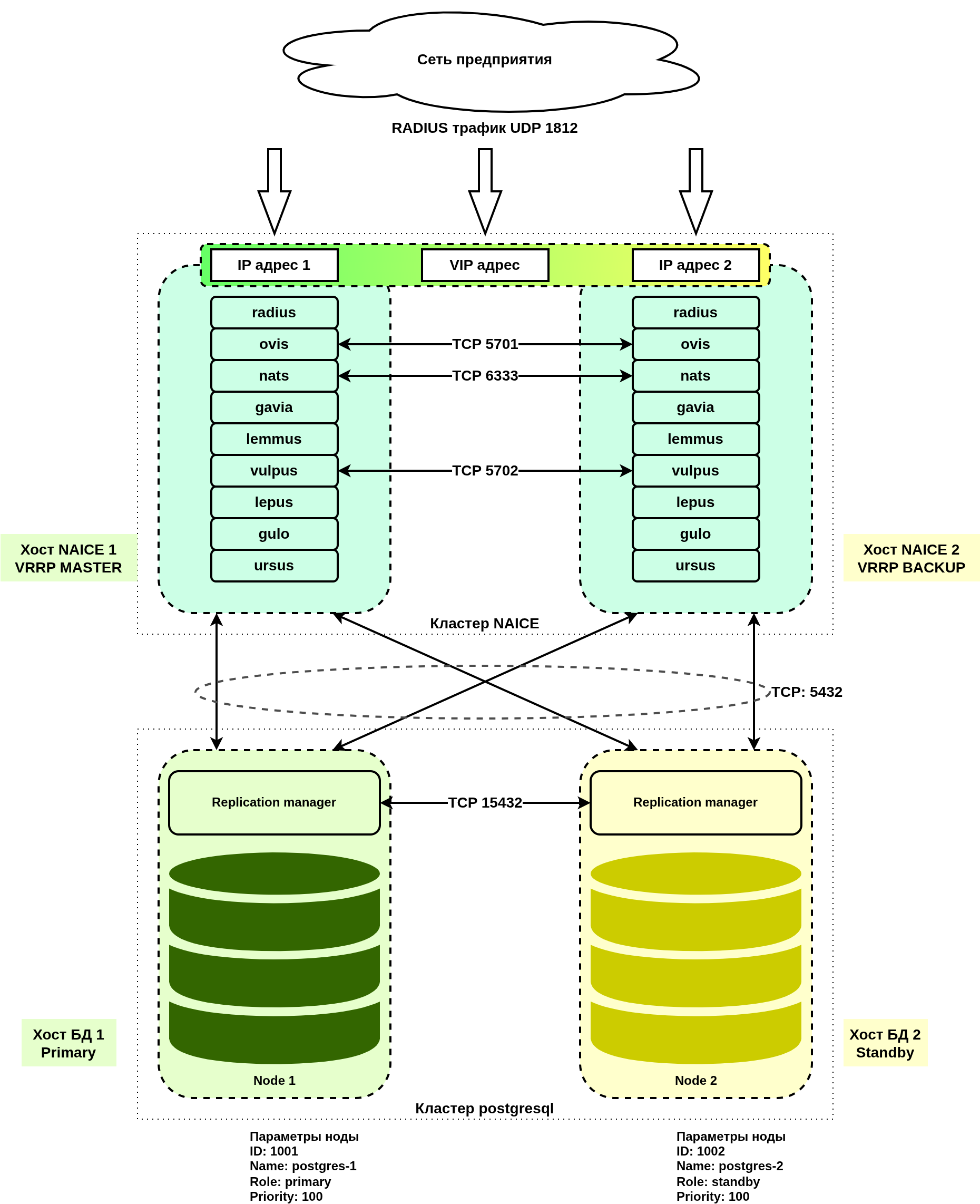
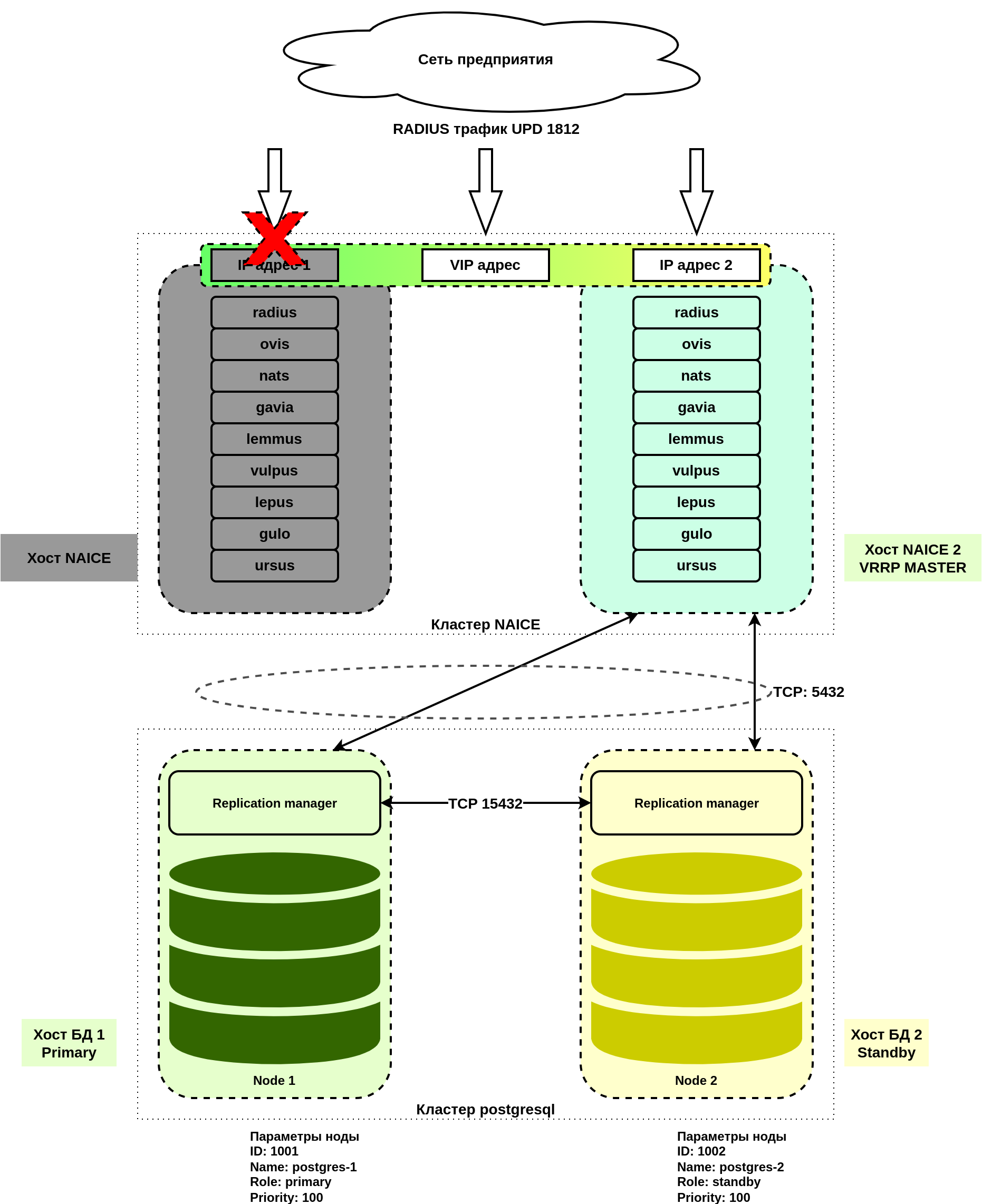
При отказе хоста NAICE 1 будут автоматически выполнены следующие действия:
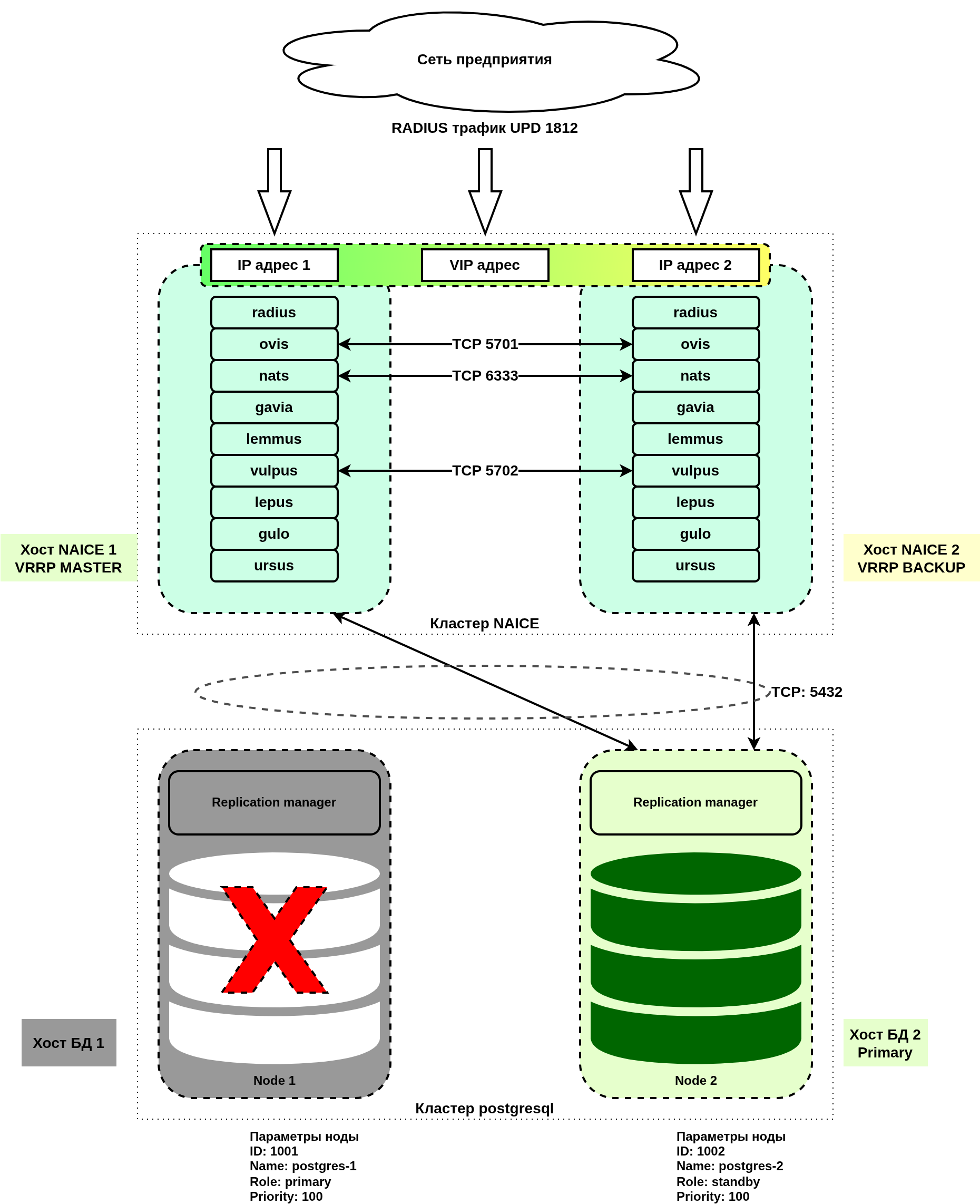
При отказе хоста БД 1 будут автоматически выполнены следующие действия:
В случае полной утраты одного из хостов требуется предварительно восстановить стартовое состояние: развернуть ОС, настроить IP-адресацию и пользователей как было ранее и выполнить процедуру восстановления.
На оставшейся в работе ноде выполнить резервное копирование данных в соответствии с инструкцией: v0.8_ru_3.8 Создание резервной копии данных БД.
Повторно развернуть хост для вышедшей из строя ноды кластера, с прежней ОС, адресацией и пользователем.
Выполнить плейбук:
ansible-playbook docker-postgres-cluster.yml -i hosts-cluster.yml |
После завершения плейбука проверить состояние кластера БД PostgreSQL, убедиться в его работоспособности и проверить работу авторизации и корректности настроек в GUI.
Повторно развернуть хост для вышедшей из строя ноды кластера, с прежней ОС, адресацией и пользователем.
Выполнить плейбук:
ansible-playbook reservation-naice-services.yml -i hosts-cluster.yml |
При повторном выполнении установки будет выполнен перезапуск всех сервисов NAICE, что приведет к кратковременному (до 5 мин) перерыву в работе комплекса. Необходимо это учитывать при проведении работ по восстановлению. Также будет выполнен перезапуск сервиса keepalived, что приведет к переходу VRRP-мастерства на более высокоприоритетный инстанс. В случае, если выполнялось восстановление первого хоста NAICE, будет выпущен новый самоподписанный сертификат HTTPS. |
После восстановления убедиться в работе авторизации и корректной работе всех сервисов.