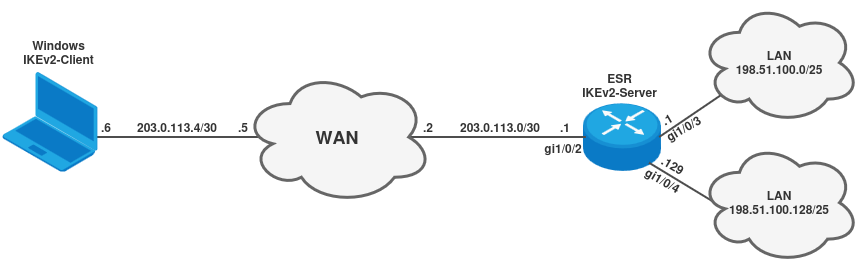
Схема:


Задача: Настроить VPN на Windows в сторону ESR для доступа к подсетями 198.51.100.0/25, 198.51.100.128/25. В кчестве VPN необходимо использовать IKEv2 с аутентификацией по EAP. Firewall выключен.

1. Загрузка сертификатов в ESR и в Windows

В качестве аутентификации IKEv2 соединения будут использоваться сертификаты. Пример генерации сертификатов есть в статье: Генерация ключей и сертификатов для туннелей IPsec

Для удачного построения IKEv2-соединения с Windows-клиентами в поле Subject Alternative Name сертификата Сервера должен быть DNS. Пример команды генерации сертификата сервера с данным полем:

user@user:~$ openssl req -config openssl.cnf -key private/server1_key.pem -new -sha256 -subj "/C=RU/ST=Siberia/L=Novosibirsk/O=Eltex/OU=Eltex SC/CN=server1.esr-test.loc/emailAddress=server1@esr-test.loc" -addext "subjectAltName = IP:203.0.113.2,DNS:203.0.113.2" -out csr/server1_req.pem
user@user:~$ openssl ca -config openssl.cnf -extensions v3_ipsec_peer -days 365 -notext -md sha256 -batch -in csr/server1_req.pem -out certs/server1_crt.pem
user@user:~$ openssl x509 -text -noout -in certs/server1_crt.pem | grep "X509v3 extensions" -A 14
        X509v3 extensions:
            X509v3 Basic Constraints: critical
                CA:FALSE
            X509v3 Subject Key Identifier: 
                02:87:7C:27:E8:A1:20:01:7D:90:92:47:96:22:E2:3D:6A:E3:1C:B2
            X509v3 Authority Key Identifier: 
                keyid:65:2A:61:6B:A1:DA:50:A2:8F:2E:F1:0C:74:33:DC:51:A8:99:96:5A
                DirName:/C=RU/ST=Siberia/L=Novosibirsk/O=Eltex/OU=Eltex SC/CN=ca.test.loc/emailAddress=ca@test.loc
                serial:47:89:08:08:1D:85:23:7F:AC:A6:BC:CE:4B:DA:EE:5B:20:10:30:08
            X509v3 Key Usage: critical
                Digital Signature, Non Repudiation
            X509v3 Extended Key Usage: 
                TLS Web Server Authentication
            X509v3 Subject Alternative Name: 
                IP Address:203.0.113.2, DNS:203.0.113.2

На ESR IKEv2-Server необходимо загрузить корневой сертификат, приватный ключ сервера и сертификат сервера. Пример:

esr# copy tftp://203.0.113.1:/ca_crt.pem crypto:cert/ca.crt
|******************************************| 100% (2390B) Crypto file loaded successfully!

esr# copy tftp://203.0.113.1:/server1_crt.pem crypto:cert/IPsec.crt
|******************************************| 100% (2061B) Crypto file loaded successfully!  

esr# copy tftp://203.0.113.1:/server1_key.pem crypto:private-key/IPsec.key
|******************************************| 100% (1704B) Crypto file loaded successfully!

Проверить загрузку сертификатов можно с помощью команды dir:

esr# dir crypto:cert/
Name                                                         Type         Size            Last modified               
----------------------------------------------------------   ----------   --------   --   -------------------------   
IPsec.crt                                                    File         2.01       KB   Thu Jun 26 10:09:13 2025
   
ca.crt                                                       File         2.33       KB   Thu Jun 26 10:08:21 2025
   
default_ca.pem                                               File         1.38       KB   Thu May 29 07:45:20 2025
   
default_cert.pem                                             File         1.22       KB   Thu May 29 07:45:28 2025


esr# dir crypto:private-key/
Name                                                         Type         Size            Last modified               
----------------------------------------------------------   ----------   --------   --   -------------------------   
IPsec.key                                                    File         1.66       KB   Thu Jun 26 10:09:36 2025
   
default_ca_key.pem                                           File         1.66       KB   Thu May 29 07:45:20 2025
   
default_cert_key.pem                                         File         1.66       KB   Thu May 29 07:45:28 2025

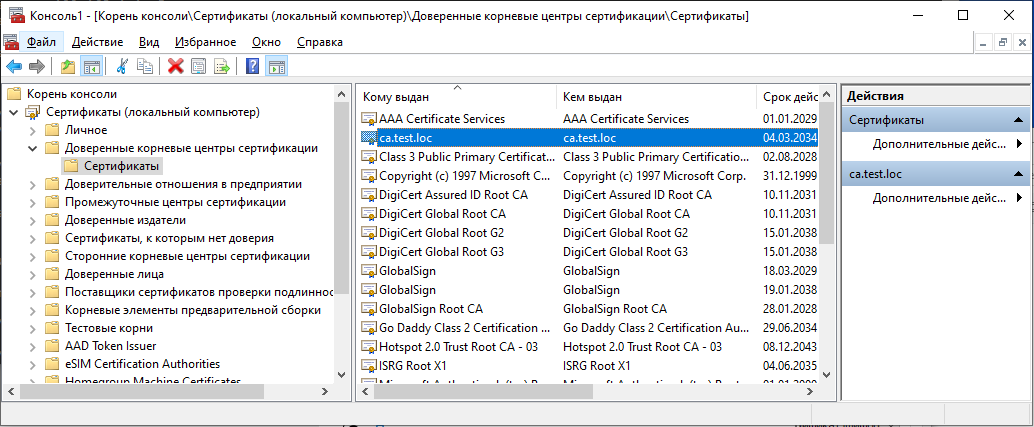
Со стороны Windows необходимо добавить корневой сертификат (ca_crt.pem) в "Доверенные корневые центры сертификации" для локального компьютера:

2. Настройка ESR и VPN на Windows

2.1 Настройка IKEv2-Server на ESR:

1) Настроим физические интерфейсы и маршрут по умолчанию в сторону WAN:

esr# configure terminal 
esr(config)# 
esr(config)# interface gigabitethernet 1/0/2
esr(config-if-gi)# description WAN
esr(config-if-gi)# ip firewall disable
esr(config-if-gi)# ip address 203.0.113.2/30
esr(config-if-gi)# exit
esr(config)# interface gigabitethernet 1/0/3
esr(config-if-gi)# description LAN
esr(config-if-gi)# ip firewall disable
esr(config-if-gi)# ip address 198.51.100.1/25
esr(config-if-gi)# exit
esr(config)# interface gigabitethernet 1/0/4
esr(config-if-gi)# description LAN
esr(config-if-gi)# ip firewall disable
esr(config-if-gi)# ip address 198.51.100.129/25
esr(config-if-gi)# exit
esr(config)# ip route 0.0.0.0/0 203.0.113.1
esr(config)# exit
esr# commit
esr# confirm

2) Настроим IKEv2-Server.
Настроим address-assignment pool <NAME>.
address-assignment pool <NAME> необходим для указания подсети, в рамках которой будут выдаваться IP-адреса IKEv2-клиентам.

esr# configure terminal 
esr(config)# 
esr(config)# address-assignment pool EAP
esr(config-pool)# ip prefix 192.0.2.0/29
esr(config-pool)# exit
esr(config)# 

Настроим  access profile <NAME>.
access profile <NAME> - база локальных пользователей (логины и пароли) для аутентификации по EAP. Для аутентификации Windows-клиента создадим пользователя user1 с паролем password:

esr(config)# 
esr(config)# access profile USERS
esr(config-access-profile)# user user1
esr(config-profile)# password ascii-text password
esr(config-profile)# exit
esr(config-access-profile)# exit
esr(config)# 

Настроим security ike proposal <NAME>, в котором укажем алгоритмы для построения ISAKMP-туннеля:

esr(config)# 
esr(config)# security ike proposal ike_proposal
esr(config-ike-proposal)# authentication algorithm sha2-256
esr(config-ike-proposal)# encryption algorithm aes128
esr(config-ike-proposal)# dh-group 2
esr(config-ike-proposal)# exit
esr(config)# 

Настроим security ike policy <NAME>, в котором укажем загруженные сертификаты, метод аутентификации IKEv2-клиентов, а также security ike proposal:

Разные платформы (например, windows, android и т.д.) могут использовать разные алгоритмы для построения ISAKMP-туннеля (1-ой фазы), поэтому в конфигурации security ike policy <NAME> можно указать несколько security ike proposal.

esr(config)# 
esr(config)# security ike policy ike_policy
esr(config-ike-policy)# crypto ca ca.crt
esr(config-ike-policy)# crypto local-crt IPsec.crt
esr(config-ike-policy)# crypto local-crt-key IPsec.key
esr(config-ike-policy)# authentication method eap
esr(config-ike-policy)# proposal ike_proposal
esr(config-ike-policy)# exit
esr(config)# 

Настроим security ike gateway <NAME>. На данном этапе укажем следующе параметры:
  - version - версия протокола IKE;
  - ike-policy - для привязки security ike policy;
  - local address - IP-адрес, к которому подключаются IKEv2-клиенты;
  - local network - подсети, которые анонсируются IKEv2-клиентам;
  - remote address any - параметр для подключения IKEv2-клиентов с любым IP-адресом;
  - remote network dynamic pool - подсеть, в рамках которой будут выдаваться IP-адреса IKEv2-клиентам. (он же address-assignment pool, который был настроен ранее);
  - mode - режим работы IPsec-туннеля;
  - access-profile - база локальных пользователей (логины и пароли) для аутентификации по EAP.

esr(config)# 
esr(config)# security ike gateway ike_gateway
esr(config-ike-gw)# version v2-only
esr(config-ike-gw)# ike-policy ike_policy
esr(config-ike-gw)# local address 203.0.113.2
esr(config-ike-gw)# local network 198.51.100.0/25
esr(config-ike-gw)# local network 198.51.100.128/25
esr(config-ike-gw)# remote address any
esr(config-ike-gw)# remote network dynamic pool EAP
esr(config-ike-gw)# mode policy-based
esr(config-ike-gw)# access-profile USERS
esr(config-ike-gw)# exit
esr(config)# 

На последнем этапе настроим security ipsec proposal <NAME>, security ipsec policy <NAME> и security ipsec vpn <NAME>.
В security ipsec proposal <NAME> укажем алгоритмы для построения IPsec-туннеля. (По умолчанию используются алгоритмы 3des и sha1, поэтому они не оторбаражтся в итоговой конфигурации и настраивать их не обязательно).
В security ipsec policy <NAME> привяжем security ipsec proposal.
В security ipsec vpn <NAME> укажем security ipsec policy, security ike gateway, а также переведем в режим by-request.

Разные платформы (например, windows, android и т.д.) могут использовать разные алгоритмы для построения IPsec-туннеля (2-ой фазы), поэтому в конфигурации security ipsec policy <NAME> можно указать несколько security ipsec proposal.

esr(config)# 
esr(config)# security ipsec proposal ipsec_proposal
esr(config-ipsec-proposal)# encryption algorithm aes256
esr(config-ipsec-proposal)# exit
esr(config)# 
esr(config)# security ipsec policy ipsec_policy
esr(config-ipsec-policy)# proposal ipsec_proposal
esr(config-ipsec-policy)# exit
esr(config)# 
esr(config)# security ipsec vpn ipsec_vpn
esr(config-ipsec-vpn)# ike establish-tunnel by-request
esr(config-ipsec-vpn)# ike gateway ike_gateway
esr(config-ipsec-vpn)# ike ipsec-policy ipsec_policy
esr(config-ipsec-vpn)# enable
esr(config-ipsec-vpn)# exit
esr(config)# exit 
esr# 
esr# commit 
esr# confirm

Итоговоя конфигурация маршрутизатора:

hostname esr

interface gigabitethernet 1/0/1
  ip firewall disable
  ip address 192.168.39.203/20
exit
interface gigabitethernet 1/0/2
  description "WAN"
  ip firewall disable
  ip address 203.0.113.2/30
exit
interface gigabitethernet 1/0/3
  description "LAN"
  ip firewall disable
  ip address 198.51.100.1/25
exit
interface gigabitethernet 1/0/4
  description "LAN"
  ip firewall disable
  ip address 198.51.100.129/25
exit

address-assignment pool EAP
  ip prefix 192.0.2.0/29
exit

access profile USERS
  user user1
    password ascii-text encrypted 8CB5107EA7005AFF
  exit
exit

security ike proposal ike_proposal
  authentication algorithm sha2-256
  encryption algorithm aes128
  dh-group 2
exit

security ike policy ike_policy
  crypto ca ca.crt
  crypto local-crt IPsec.crt
  crypto local-crt-key IPsec.key
  authentication method eap
  proposal ike_proposal
exit

security ike gateway ike_gateway
  version v2-only
  ike-policy ike_policy
  local address 203.0.113.2
  local network 198.51.100.0/25
  local network 198.51.100.128/25
  remote address any
  remote network dynamic pool EAP
  mode policy-based
  access-profile USERS
exit

security ipsec proposal ipsec_proposal
  encryption algorithm aes256
exit

security ipsec policy ipsec_policy
  proposal ipsec_proposal
exit

security ipsec vpn ipsec_vpn
  ike establish-tunnel by-request
  ike gateway ike_gateway
  ike ipsec-policy ipsec_policy
  enable
exit

ip route 0.0.0.0/0 203.0.113.1


2.2 Пример настройки VPN на Windows:

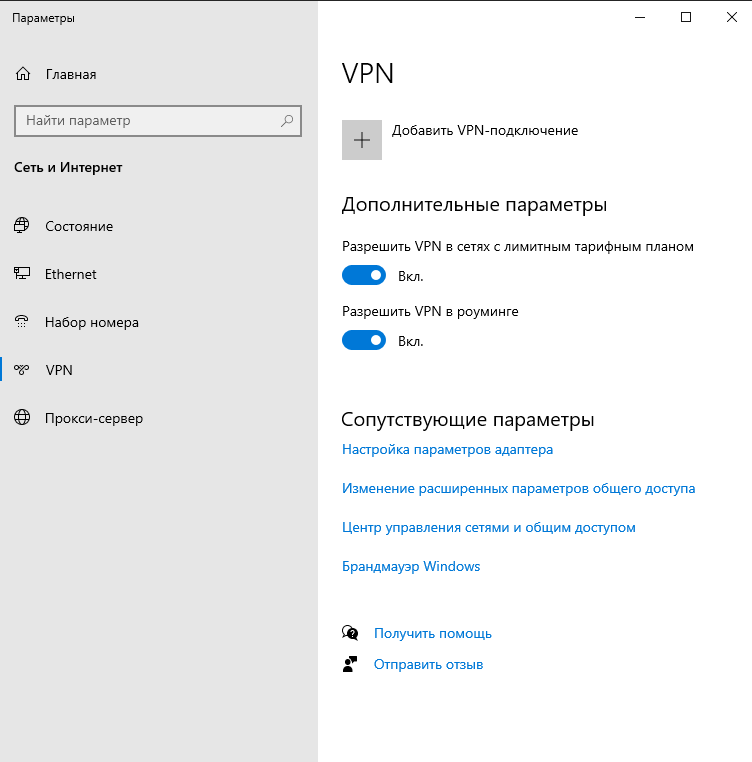
Для того, чтобы добавить VPN соединение - необходимо перейти в "Параметры сети и Интернет" и перейти во вкладку VPN:
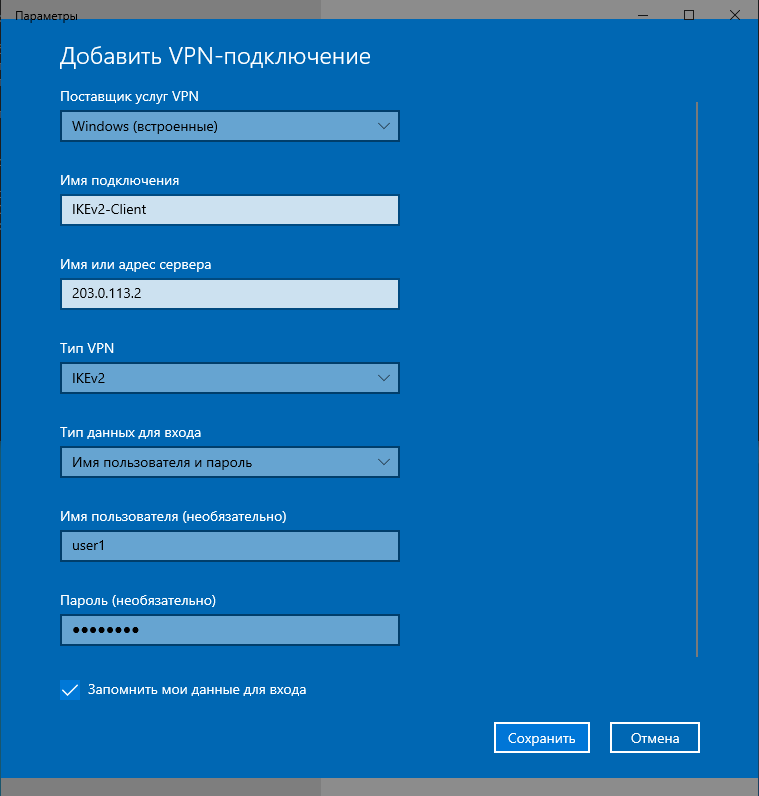
Далее выбираем "Добавить VPN-подключение", заполняем поля и сохраняем данное VPN-подключение:

3. Подключение IKEv2-client к IKEv2-server и вывод оперативной информации

После настройки IKEv2-server на маршрутизаторе ESR и IKEv2-client на Windows, организации IP-связанности между ними - можно приступить к VPN-подключению.
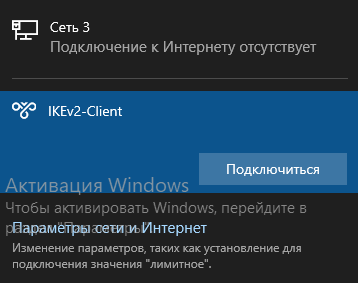
Со стороны Windows выбираем настроенное VPN-подключение и выбираем "Подключиться":


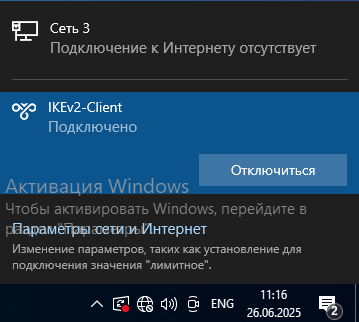
При удачном VPN-подключении будет отображаться "Подключено":
Вывод оперативной информации на ESR после подключения Windows IKEv2-Client:

esr# show security ipsec vpn status ipsec_vpn 
Currently active IKE SA:
    Name:                            ipsec_vpn
    State:                           Established
    Version:                         v2-only
    Unique ID:                       3
    Local host:                      203.0.113.2
    Remote host:                     203.0.113.6
    Role:                            Responder
    Initiator spi:                   0xdbced28f6dea953d
    Responder spi:                   0x8a355c3cb9619800
    Encryption algorithm:            aes128
    Authentication algorithm:        sha2-256
    Diffie-Hellman group:            2
    Established (d,h:m:s):           00,00:02:17 ago
    Rekey time (d,h:m:s):            00,00:00:00
    Reauthentication time (d,h:m:s): 00,02:42:54
    Child IPsec SAs:
        Name:                            ipsec_vpn-3
        State:                           Installed
        Protocol:                        esp
        Mode:                            Tunnel
        Encryption algorithm:            aes256
        Authentication algorithm:        sha1
        Rekey time (d,h:m:s):            00,00:40:50
        Life time (d,h:m:s):             00,00:57:43
        Established (d,h:m:s):           00,00:02:17 ago
        Traffic statistics: 
            Input bytes:                 240
            Output bytes:                240
            Input packets:               4
            Output packets:              4
        -------------------------------------------------------------

esr# show security ipsec vpn authentication ipsec_vpn 
Local host        Remote host       Local subnet          Remote subnet         Authentication                              State         
---------------   ---------------   -------------------   -------------------   -----------------------------------------   -----------   
203.0.113.2       203.0.113.6       198.51.100.0/25,      192.0.2.1/32          Public key / EAP login: 203.0.113.6         Established   
                                    198.51.100.128/25    

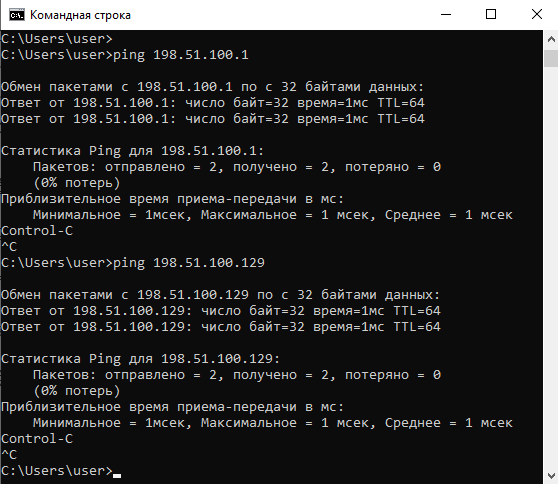
Проверим со стороны Windows IKEv2-Client доступность подсетей 198.51.100.0/25 и 198.51.100.128/25: