Initial configuration of equipment in central office
As an example of central office infrastructure, examine the topology from the "Network design in large office" design guide. Within the framework of this design document, the office network was organized with local users accessing the Internet via one of two available Internet providers. The diagram also shows a demilitarized zone segment for hosting services with the ability to publish them on the Internet using Destination or Static NAT technology.
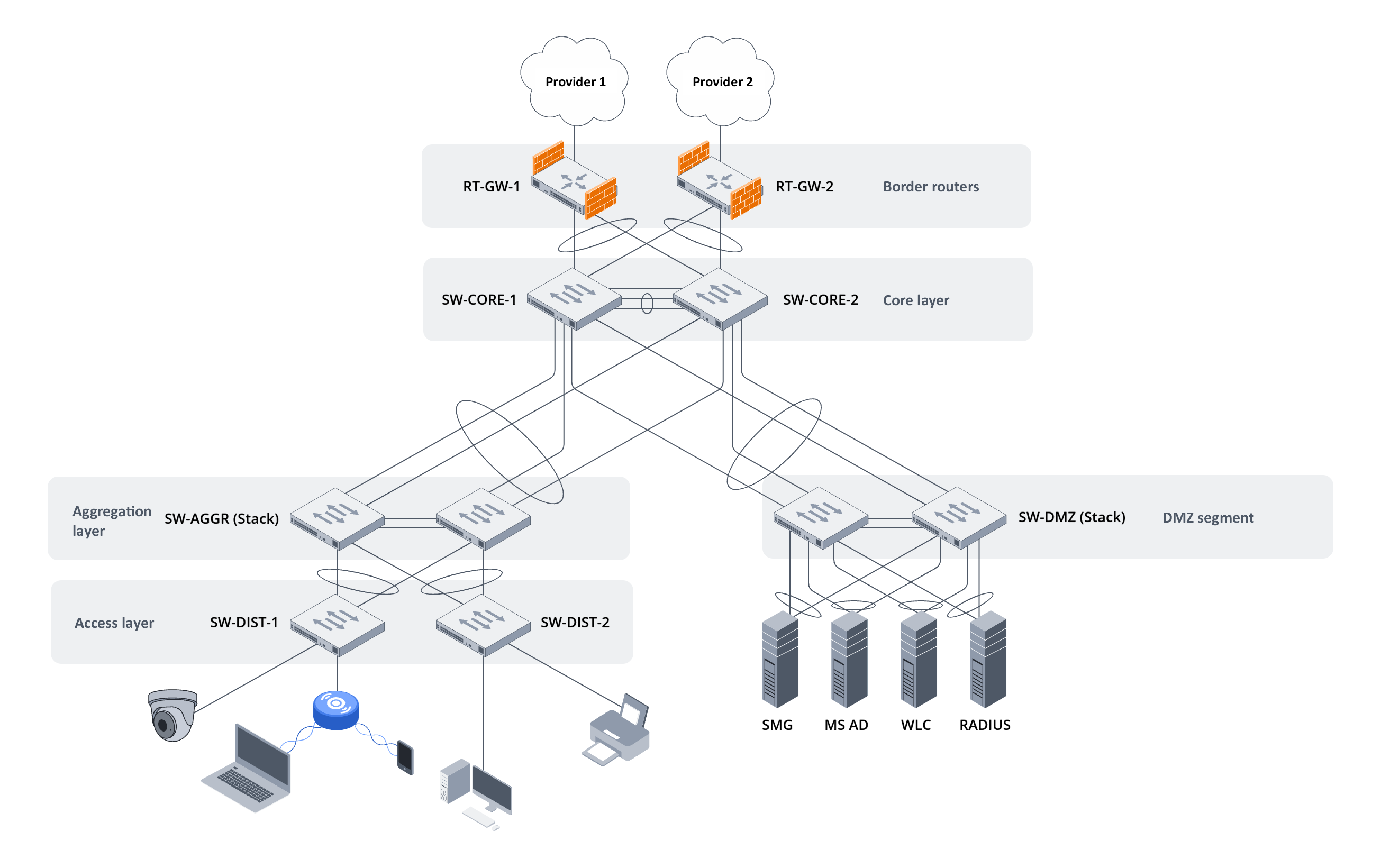
Figure 2. Central office network diagram from the "Network design in large office" design guide
The equipment configurations in this diagram are shown below:
hostname RT-GW-1

object-group network CUSTOMER_POOL
  description "LAN | CUSTOMER"
  ip prefix 10.100.0.0/24
exit
object-group network ISP_1_PROXY
  description "ISP-1 | ARP PROXY"
  ip address-range 203.0.113.3
exit

security zone UNTRUSTED
  description "ISP-1 | Uplink"
exit
security zone MGMT
  description "MGMT | Management"
exit
security zone CUSTOMER
  description "LAN | CUSTOMER"
exit

interface port-channel 1
exit
interface port-channel 1.250
  description "MGMT | Management link"
  security-zone MGMT
  ip address 10.250.0.1/24
exit
interface port-channel 1.100
  description "LAN | CUSTOMER"
  security-zone CUSTOMER
  ip address 10.100.0.253/24
  vrrp 1
    ip address 10.100.0.1/24
    priority 101
    priority track 1 decrement 10
    group 1
    preempt disable
    enable
  exit
exit
interface gigabitethernet 1/0/1
  description "ISP-1 | Uplink"
  security-zone UNTRUSTED
  ip address 203.0.113.2/25
  ip nat proxy-arp ISP_1_PROXY
exit
interface gigabitethernet 1/0/3
  mode switchport
  channel-group 1 mode auto
  lldp transmit
  lldp receive
exit
interface gigabitethernet 1/0/4
  mode switchport
  channel-group 1 mode auto
  lldp transmit
  lldp receive
exit

security zone-pair MGMT self
  rule 10
    description "Permit | ICMP | From ANY | To ANY"
    action permit
    match protocol icmp
    enable
  exit
exit
security zone-pair CUSTOMER self
  rule 10
    description "Permit | ICMP | From ANY | To ANY"
    action permit
    match protocol icmp
    enable
  exit
  rule 20
    description "Permit | VRRP | From ANY | To ANY"
    action permit
    match protocol vrrp
    enable
  exit
exit
security zone-pair CUSTOMER UNTRUSTED
  rule 10
    description "Permit | ANY | From CUSTOMER | To ISP-1"
    action permit
    match source-address object-group network CUSTOMER_POOL
    enable
  exit
exit

nat source
  pool CUSTOMER_PUBLIC_IP
    ip address-range 203.0.113.3
  exit
  ruleset SNAT
    to zone UNTRUSTED
    rule 10
      description "Source | CUSTOMER"
      match source-address object-group network CUSTOMER_POOL
      action source-nat pool CUSTOMER_PUBLIC_IP
      enable
    exit
  exit
exit

ip route 0.0.0.0/0 203.0.113.1 name ISP-1

ip sla
ip sla logging status
ip sla test 1
  description "Check Google Public DNS available"
  icmp-echo 8.8.4.4 source-ip 203.0.113.2 num-packets 5
  enable
exit
ip sla test 2
  description "Check ya.ru available"
  icmp-echo 77.88.44.242 source-ip 203.0.113.2 num-packets 5
  enable
exit
ip sla schedule all life forever start-time now

track 1
  description "Check ISP-1 available"
  track sla test 1 mode state fail
  track sla test 2 mode state fail
  enable
exit
|
hostname RT-GW-2

object-group network CUSTOMER_POOL
  description "LAN | CUSTOMER"
  ip prefix 10.100.0.0/24
exit
object-group network ISP_2_PROXY
  description "ISP-2 | ARP PROXY"
  ip address-range 203.0.113.131
exit

security zone UNTRUSTED
  description "ISP-2 | Uplink"
exit
security zone MGMT
  description "MGMT | Management"
exit
security zone CUSTOMER
  description "LAN | CUSTOMER"
exit

interface port-channel 1
exit
interface port-channel 1.250
  description "MGMT | Management link"
  security-zone MGMT
  ip address 10.250.0.2/24
exit
interface port-channel 1.100
  description "LAN | CUSTOMER"
  security-zone CUSTOMER
  ip address 10.100.0.254/24
  vrrp 1
    ip address 10.100.0.1/24
    priority 100
    group 1
    preempt disable
    enable
  exit
exit
interface gigabitethernet 1/0/1
  description "ISP-2 | Uplink"
  security-zone UNTRUSTED
  ip address 203.0.113.130/25
  ip nat proxy-arp ISP_2_PROXY
exit
interface gigabitethernet 1/0/3
  mode switchport
  channel-group 1 mode auto
  lldp transmit
  lldp receive
exit
interface gigabitethernet 1/0/4
  mode switchport
  channel-group 1 mode auto
  lldp transmit
  lldp receive
exit

security zone-pair MGMT self
  rule 10
    description "Permit | ICMP | From ANY | To ANY"
    action permit
    match protocol icmp
    enable
  exit
exit
security zone-pair CUSTOMER self
  rule 10
    description "Permit | ICMP | From ANY | To ANY"
    action permit
    match protocol icmp
    enable
  exit
  rule 20
    description "Permit | VRRP | From ANY | To ANY"
    action permit
    match protocol vrrp
    enable
  exit
exit
security zone-pair CUSTOMER UNTRUSTED
  rule 10
    description "Permit | ANY | From CUSTOMER | To ISP-1"
    action permit
    match source-address object-group network CUSTOMER_POOL
    enable
  exit
exit

nat source
  pool CUSTOMER_PUBLIC_IP
    ip address-range 203.0.113.131
  exit
  ruleset SNAT
    to zone UNTRUSTED
    rule 10
      description "Source | CUSTOMER"
      match source-address object-group network CUSTOMER_POOL
      action source-nat pool CUSTOMER_PUBLIC_IP
      enable
    exit
  exit
exit

ip route 0.0.0.0/0 203.0.113.129 name ISP-2
|
hostname SW-CORE-1 ! vlan database vlan 100,250 exit ! vpc domain 1 peer detection peer detection ipaddr 1.1.1.2 1.1.1.1 peer keepalive role priority 1 peer link port-channel 1 exit ! vpc ! vpc group 2 domain 1 vpc-port port-channel 2 exit ! vpc group 3 domain 1 vpc-port port-channel 3 exit ! vpc group 4 domain 1 vpc-port port-channel 4 exit ! vpc group 5 domain 1 vpc-port port-channel 5 exit ! vpc group 6 domain 1 vpc-port port-channel 6 exit ! vpc group 7 domain 1 vpc-port port-channel 7 exit ! ! interface TenGigabitEthernet1/0/1 ip address 1.1.1.1 255.255.255.252 exit ! interface TenGigabitEthernet1/0/2 channel-group 1 mode auto exit ! interface TenGigabitEthernet1/0/3 channel-group 1 mode auto exit ! interface TenGigabitEthernet1/0/4 channel-group 2 mode auto exit ! interface TenGigabitEthernet1/0/5 channel-group 3 mode auto exit ! interface TenGigabitEthernet1/0/6 channel-group 4 mode auto exit ! interface TenGigabitEthernet1/0/7 channel-group 5 mode auto exit ! interface TenGigabitEthernet1/0/8 channel-group 6 mode auto exit ! interface TenGigabitEthernet1/0/9 channel-group 7 mode auto exit ! interface range Port-Channel1 switchport mode general switchport general allowed vlan add 100,250 tagged exit ! interface range Port-Channel2-5 switchport mode general switchport general allowed vlan add 100,250 tagged exit ! interface range Port-Channel6-7 switchport mode general switchport general allowed vlan add 250 tagged exit ! interface vlan 100 name Internet exit ! interface vlan 250 name Management ip address 10.250.0.10 255.255.255.0 exit ! ! end |
hostname SW-CORE-2 ! vlan database vlan 100,250 exit ! vpc domain 1 peer detection peer detection ipaddr 1.1.1.1 1.1.1.2 peer keepalive role priority 1 peer link port-channel 1 exit ! vpc ! vpc group 2 domain 1 vpc-port port-channel 2 exit ! vpc group 3 domain 1 vpc-port port-channel 3 exit ! vpc group 4 domain 1 vpc-port port-channel 4 exit ! vpc group 5 domain 1 vpc-port port-channel 5 exit ! vpc group 6 domain 1 vpc-port port-channel 6 exit ! vpc group 7 domain 1 vpc-port port-channel 7 exit ! ! interface TenGigabitEthernet1/0/1 ip address 1.1.1.2 255.255.255.252 exit ! interface TenGigabitEthernet1/0/2 channel-group 1 mode auto exit ! interface TenGigabitEthernet1/0/3 channel-group 1 mode auto exit ! interface TenGigabitEthernet1/0/4 channel-group 2 mode auto exit ! interface TenGigabitEthernet1/0/5 channel-group 3 mode auto exit ! interface TenGigabitEthernet1/0/6 channel-group 4 mode auto exit ! interface TenGigabitEthernet1/0/7 channel-group 5 mode auto exit ! interface TenGigabitEthernet1/0/8 channel-group 6 mode auto exit ! interface TenGigabitEthernet1/0/9 channel-group 7 mode auto exit ! interface range Port-Channel1 switchport mode general switchport general allowed vlan add 100,250 tagged exit ! interface range Port-Channel2-5 switchport mode general switchport general allowed vlan add 100,250 tagged exit ! interface range Port-Channel6-7 switchport mode general switchport general allowed vlan add 250 tagged exit ! interface vlan 100 name Internet exit ! interface vlan 250 name Management ip address 10.250.0.11 255.255.255.0 exit ! ! end |
stack configuration unit-id 1 ! stack configuration links te1-2 ! stack nsf |
stack configuration unit-id 2 ! stack configuration links te1-2 ! stack nsf |
hostname SW-AGGR ! vlan database vlan 100,250 exit ! interface GigabitEthernet1/0/1 channel-group 1 mode auto exit ! interface GigabitEthernet1/0/2 channel-group 2 mode auto exit ! interface GigabitEthernet1/0/3 channel-group 3 mode auto exit ! interface GigabitEthernet1/0/4 channel-group 4 mode auto exit ! interface GigabitEthernet2/0/1 channel-group 1 mode auto exit ! interface GigabitEthernet2/0/2 channel-group 2 mode auto exit ! interface GigabitEthernet2/0/3 channel-group 3 mode auto exit ! interface GigabitEthernet2/0/4 channel-group 4 mode auto exit ! interface range Port-Channel1-4 switchport mode general switchport general allowed vlan add 100,250 tagged switchport forbidden default-vlan exit ! interface vlan 100 name Internet exit ! interface vlan 250 name Management ip address 10.250.0.20 255.255.255.0 exit ! ! end |
Before configuring basic settings for the aggregation layer switches (in the proposed diagram), it is necessary to configure stacking. After configuring stacking settings, the device must be rebooted for the configuration to take effect. It is recommended to start rebooting from unit 1. |
stack configuration unit-id 1 ! stack configuration links te1-2 ! stack nsf |
stack configuration unit-id 2 ! stack configuration links te1-2 ! stack nsf |
hostname SW-DMZ ! vlan database vlan 250 exit ! interface GigabitEthernet1/0/1 channel-group 1 mode auto exit ! interface GigabitEthernet1/0/2 channel-group 2 mode auto exit ! interface GigabitEthernet2/0/1 channel-group 1 mode auto exit ! interface GigabitEthernet2/0/2 channel-group 2 mode auto exit ! interface range Port-Channel1-2 switchport mode general switchport general allowed vlan add 250 tagged switchport forbidden default-vlan exit ! interface vlan 100 name Internet exit ! interface vlan 250 name Management ip address 10.250.0.40 255.255.255.0 exit ! ! end |
Before configuring basic settings for the DMZ switches (in the proposed diagram), it is necessary to configure stacking. After configuring stacking settings, the device must be rebooted for the configuration to take effect. It is recommended to start rebooting from unit 1. |
hostname SW-DIST-1 ! vlan database vlan 100,250 exit ! loopback-detection enable loopback-detection mode multicast-mac-addr loopback-detection interval 1 ! errdisable recovery cause loopback-detection ! ip dhcp snooping ip dhcp snooping vlan 100 ! ! ip arp inspection ip arp inspection vlan 100 ! ip ssh server ! no ip telnet server ! interface range gigabitethernet1/0/1-24 loopback-detection enable ip dhcp snooping limit clients 2 storm-control broadcast kbps 2048 trap storm-control unicast kbps 2048 trap storm-control multicast kbps 2048 trap spanning-tree disable spanning-tree bpdu filtering switchport mode general switchport general allowed vlan add 100 untagged switchport general pvid 100 switchport protected-port voice vlan enable exit ! interface tengigabitethernet1/0/1 channel-group 1 mode auto exit ! interface tengigabitethernet1/0/2 channel-group 1 mode auto exit ! interface Port-channel1 ip arp inspection trust ip dhcp snooping trust switchport mode general switchport general allowed vlan add 100,250 tagged switchport forbidden default-vlan exit ! interface vlan 100 name Internet exit ! interface vlan 250 name Management ip address 10.250.0.31 255.255.255.0 exit ! ! end |
hostname SW-DIST-2 ! vlan database vlan 100,250 exit ! loopback-detection enable loopback-detection mode multicast-mac-addr loopback-detection interval 1 ! errdisable recovery cause loopback-detection ! ip dhcp snooping ip dhcp snooping vlan 100 ! ! ip arp inspection ip arp inspection vlan 100 ! ip ssh server ! no ip telnet server ! interface range gigabitethernet1/0/1-24 loopback-detection enable ip dhcp snooping limit clients 2 storm-control broadcast kbps 2048 trap storm-control unicast kbps 2048 trap storm-control multicast kbps 2048 trap spanning-tree disable spanning-tree bpdu filtering switchport mode general switchport general allowed vlan add 100 untagged switchport general pvid 100 switchport protected-port voice vlan enable exit ! interface tengigabitethernet1/0/1 channel-group 1 mode auto exit ! interface tengigabitethernet1/0/2 channel-group 1 mode auto exit ! interface Port-channel1 ip arp inspection trust ip dhcp snooping trust switchport mode general switchport general allowed vlan add 100,250 tagged switchport forbidden default-vlan exit ! interface vlan 100 name Internet exit ! interface vlan 250 name Management ip address 10.250.0.32 255.255.255.0 exit ! ! end |
DMVPN Hub layout in the demilitarized segment of the central office network
Deploy routers acting as DMVPN Hubs in the DMZ segment of the central office network. They will terminate IPsec and GRE tunnels from remote DMVPN Spoke and route traffic to the central office's Internet gateways.
It is recommended to split the DMVPN Hub and corporate Internet gateway functions between different routers due to the increased load on the control plane of the router that terminates multiple DMVPN tunnels. |
Thus, the DMVPN Hub layout in the central office will look like this:
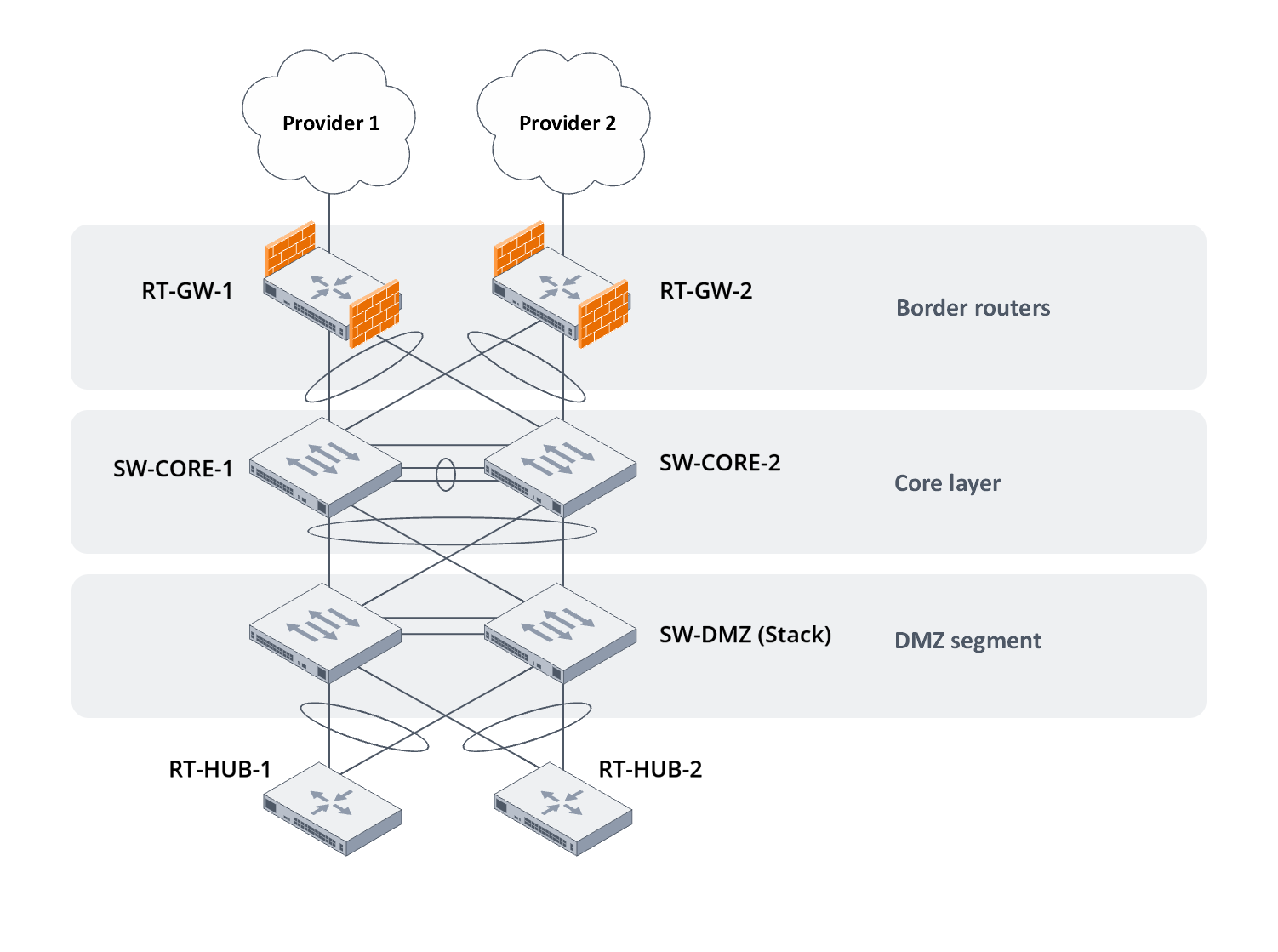
Figure 3. DMVPN Hub layout in the DMZ segment of the central office network
Connect both DMVPN Hubs to the DMZ segment switch stack using LAG technology with LACP support enabled. Since the DMZ segment switches are stacked, LAG created on different switches will be perceived by the ESR router as a single aggregated channel.
First, name DMVPN Hub routers:
hostname RT-HUB-1 |
hostname RT-HUB-2 |
Configure aggregated interfaces on DMVPN Hub side:
interface port-channel 1 exit interface gigabitethernet 1/0/1 mode switchport channel-group 1 mode auto exit interface gigabitethernet 1/0/2 mode switchport channel-group 1 mode auto exit |
interface port-channel 1 exit interface gigabitethernet 1/0/1 mode switchport channel-group 1 mode auto exit interface gigabitethernet 1/0/2 mode switchport channel-group 1 mode auto exit |
Similarly, configure aggregated interfaces in the DMZ segment switch stack:
interface GigabitEthernet1/0/3 channel-group 3 mode auto exit ! interface GigabitEthernet1/0/4 channel-group 4 mode auto exit ! interface GigabitEthernet2/0/3 channel-group 3 mode auto exit ! interface GigabitEthernet2/0/4 channel-group 4 mode auto exit ! interface range Port-Channel3-4 switchport mode general switchport general allowed vlan add 250 tagged switchport forbidden default-vlan exit |
Organizing DMVPN Hub access to the central office ISP network using Static NAT
DMVPN Hubs must be accessible for connection via the Internet for DMVPN Spokes, i.e. they must either function on public addresses provided by an Internet service provider, or access to the public network must be provided via an Internet gateway using Static NAT. The second option will be coverered in this guide.
To organize DMVPN Hub access to the Internet, establish network connectivity between DMVPN Hub and the Internet gateways of the central office. To do this, extend a VLAN for each ISP through the already existing L2 segment and add subinterfaces on the aggregated channels of Internet gateways and DMVPN Hub facing the core switches and DMZ, respectively. The network parameters shown in Table 3 will be used for configuration.
Table 3. Parameters of local networks used for DMVPN Hub access to public networks of Internet service providers of the central office
| Internet Service Provider | VLAN | Subnet |
|---|---|---|
| ISP-1 | 210 | 10.0.0.0/30 |
| ISP-2 | 220 | 10.0.0.8/30 |
First, add VLANs of the subnets to each ISP to core and DMZ switches:
vlan 210 name ISP-1 vlan 220 name ISP-2 ! interface range Port-Channel1 switchport general allowed vlan add 210,220 exit ! interface range Port-Channel2-3 switchport general allowed vlan add 210,220 exit ! interface range Port-Channel6-7 switchport general allowed vlan add 210,220 exit |
vlan 210 name ISP-1 vlan 220 name ISP-2 ! interface range Port-Channel1 switchport general allowed vlan add 210,220 exit ! interface range Port-Channel2-3 switchport general allowed vlan add 210,220 exit ! interface range Port-Channel6-7 switchport general allowed vlan add 210,220 exit |
vlan database vlan 210 vlan 220 exit ! interface range Port-Channel1-4 switchport general allowed vlan add 210,220 tagged exit |
Create subinterfaces on aggregated Internet gateway channels leading to core switches:
interface port-channel 1.210 description "DMZ | RT-HUB-1 uplink to ISP-1" ip address 10.0.0.1/30 exit |
interface port-channel 1.220 description "DMZ | RT-HUB-2 uplink to ISP-2" ip address 10.0.0.9/30 exit |
Do the same on the DMVPN Hub side, but move the created subinterface to a separate VRF.
A connection scheme in which the transport network for a virtual network is moved to a separate network namespace is called Front-Door VRF. This transport organization scheme for a virtual network offers the following advantages:
|
ip vrf ISP_1 exit interface port-channel 1.210 description "ISP-1 | Uplink" ip vrf forwarding ISP_1 ip address 10.0.0.2/30 exit ip route vrf ISP_1 0.0.0.0/0 10.0.0.1 name ISP-1 |
ip vrf ISP_2 exit interface port-channel 1.220 description "ISP-2 | Uplink" ip vrf forwarding ISP_2 ip address 10.0.0.10/30 exit ip route vrf ISP_2 0.0.0.0/0 10.0.0.9 name ISP-2 |
Create a separate security zone for these networks on the Internet gateways and DMVPN Hub and add the previously created subinterfaces of the aggregated channels to it. Allow incoming ICMP traffic incoming to the router from this security zone:
security zone DMVPN_ISP_1
  description "DMZ | RT-HUB-1 uplink"
exit

interface port-channel 1.210
  security-zone DMVPN_ISP_1
exit

security zone-pair DMVPN_ISP_1 self
  rule 10
    description "Permit | ICMP | From ANY | To ANY"
    action permit
    match protocol icmp
    enable
  exit
exit |
security zone DMVPN_ISP_2
  description "DMZ | RT-HUB-2 uplink"
exit

interface port-channel 1.220
  security-zone DMVPN_ISP_2
exit

security zone-pair DMVPN_ISP_2 self
  rule 10
    description "Permit | ICMP | From ANY | To ANY"
    action permit
    match protocol icmp
    enable
  exit
exit
|
security zone DMVPN_ISP_1
  description "ISP-1 | Uplink"
  ip vrf forwarding ISP_1
exit

interface port-channel 1.210
  security-zone DMVPN_ISP_1
exit

security zone-pair DMVPN_ISP_1 self
  rule 10
    description "Permit | ICMP | From ANY | To ANY"
    action permit
    match protocol icmp
    enable
  exit
exit
|
security zone DMVPN_ISP_2
  description "ISP-2 | Uplink"
  ip vrf forwarding ISP_2
exit

interface port-channel 1.220
  security-zone DMVPN_ISP_2
exit

security zone-pair DMVPN_ISP_2 self
  rule 10
    description "Permit | ICMP | From ANY | To ANY"
    action permit
    match protocol icmp
    enable
  exit
exit
|
Add another public address from the pool assigned by each provider to the existing IP address profile used for ARP Proxy functionality on Internet gateways:
object-group network ISP_1_PROXY ip address-range 203.0.113.4 exit |
object-group network ISP_2_PROXY ip address-range 203.0.113.132 exit |
Add a new IP address profile, in which specify the DMVPN Hub address in the local network of the central office.
For Static NAT to work, the size of the subnet to which Static NAT is applied must match the size of the subnet specified in the NAT rules. Therefore, only one entry should be specified in the IP address profile created for further use in the Static NAT rule and only using the “ip prefix” command. |
object-group network DMVPN_HUB_1 description "DMZ | RT-HUB-1" ip prefix 10.0.0.2/32 exit |
object-group network DMVPN_HUB_2 description "DMZ | RT-HUB-2" ip prefix 10.0.0.10/32 exit |
Configure a Static NAT rule in the existing Source NAT rule set:
nat source
  ruleset SNAT
    rule 20
      description "Static | RT-HUB-1"
      match source-address object-group network DMVPN_HUB_1
      action source-nat netmap 203.0.113.4/32 static
      enable
    exit
  exit
exit |
nat source
  ruleset SNAT
    rule 20
      description "Static | RT-HUB-2"
      match source-address object-group network DMVPN_HUB_2
      action source-nat netmap 203.0.113.132/32 static
      enable
    exit
  exit
exit
|
And allow transit ICMP traffic to pass from the global network to the DMVPN Hub and vice versa:
security zone-pair UNTRUSTED DMVPN_ISP_1
  rule 10
    description "Permit | ICMP | From ANY | To ANY"
    action permit
    match protocol icmp
    enable
  exit
exit
security zone-pair DMVPN_ISP_1 UNTRUSTED
  rule 10
    description "Permit | ICMP | From ANY | To ANY"
    action permit
    match protocol icmp
    enable
  exit
exit
|
security zone-pair UNTRUSTED DMVPN_ISP_2
  rule 10
    description "Permit | ICMP | From ANY | To ANY"
    action permit
    match protocol icmp
    enable
  exit
exit

security zone-pair DMVPN_ISP_2 UNTRUSTED
  rule 10
    description "Permit | ICMP | From ANY | To ANY"
    action permit
    match protocol icmp
    enable
  exit
exit |
Connecting DMVPN Hub to the local network of the central office
To route traffic between the central office Internet gateways and the DMVPN Hub, add a separate subnet with the parameters described in Table 4.
Table 4. Parameters of the local network used for DMVPN Hub access to the local network of the central office
| Purpose | VLAN | Subnet |
|---|---|---|
| Subnet for IP connectivity between DMVPN Hub and Internet gateways | 300 | 10.0.0.16/29 |
Add the VLAN of the created network to the core switches and DMZ segment:
vlan 300 name DMVPN_LAN ! interface range Port-Channel1 switchport general allowed vlan add 300 exit ! interface range Port-Channel2-3 switchport general allowed vlan add 300 exit ! interface range Port-Channel6-7 switchport general allowed vlan add 300 exit |
vlan 300 name DMVPN_LAN ! interface range Port-Channel1 switchport general allowed vlan add 300 exit ! interface range Port-Channel2-3 switchport general allowed vlan add 300 exit ! interface range Port-Channel6-7 switchport general allowed vlan add 300 exit |
vlan database vlan 300 exit ! interface range Port-Channel1-4 switchport general allowed vlan add 300 tagged exit |
Create the corresponding subinterfaces on the aggregated channels:
interface port-channel 1.300 description "DMZ | RT-HUB-1 dowlink" ip address 10.0.0.17/29 exit |
interface port-channel 1.300 description "DMZ | RT-HUB-2 dowlink" ip address 10.0.0.18/29 exit |
interface port-channel 1.300 description "DMVPN | Downlink to RT-GW" ip address 10.0.0.19/29 exit |
interface port-channel 1.300 description "DMVPN | Downlink to RT-GW" ip address 10.0.0.20/29 exit |
Create a separate security zone for these networks on the Internet gateways and DMVPN Hub and add the previously created subinterfaces of the aggregated channels to it. Allow ICMP traffic incoming to the router from this security zone:
security zone DMVPN_LAN
  description "DMZ | RT-HUB-1 downlink"
exit

interface port-channel 1.300
  security-zone DMVPN_LAN
exit

security zone-pair DMVPN_LAN self
  rule 10
    description "Permit | ICMP | From ANY | To ANY"
    action permit
    match protocol icmp
    enable
  exit
exit
|
security zone DMVPN_LAN
  description "DMZ | RT-HUB-2 downlink"
exit

interface port-channel 1.300
  security-zone DMVPN_LAN
exit

security zone-pair DMVPN_LAN self
  rule 10
    description "Permit | ICMP | From ANY | To ANY"
    action permit
    match protocol icmp
    enable
  exit
exit |
security zone DMVPN_LAN
  description "DMVPN | Downlink to RT-GW"
exit

interface port-channel 1.300
  security-zone DMVPN_LAN
exit

security zone-pair DMVPN_LAN self
  rule 10
    description "Permit | ICMP | From ANY | To ANY"
    action permit
    match protocol icmp
    enable
  exit
exit
|
security zone DMVPN_LAN
  description "DMVPN | Downlink to RT-GW"
exit

interface port-channel 1.300
  security-zone DMVPN_LAN
exit

security zone-pair DMVPN_LAN self
  rule 10
    description "Permit | ICMP | From ANY | To ANY"
    action permit
    match protocol icmp
    enable
  exit
exit
|
Configuring IKEv2 and IPsec tunneling on DMVPN Hub
Configuring IPsec for the future DMVPN cloud is an important part of this guide. Correct IPsec configuration ensures the privacy and security of traffic between offices. For further configuration, use the IKE and IPsec parameters shown in Table 5.
Table 5. IKE and IPsec parameters used to configure IPsec tunneling on DMVPN Hub routers
| RT-HUB-1 | RT-HUB-2 | ||
|---|---|---|---|
| IKE parameters | Encryption algorithm | AES-256 | AES-256 |
| Hashing algorithm | SHA2-256 | SHA2-256 | |
| Diffie-Hellman group | 19 | 19 | |
| IKE session lifetime in seconds | 86400 | 86400 | |
| IKE session identifier | hub1.company.loc | hub2.company.loc | |
| Interval for sending DPD messages | 40 | 40 | |
| Total timeout for waiting for a response to a DPD message | 160 | 160 | |
| Action when DPD times out | Closing an IKE session | Closing an IKE session | |
| IPsec parameters | Encryption algorithm | AES-256 | AES-256 |
| Hashing algorithm | SHA2-256 | SHA2-256 | |
| Diffie-Hellman group for PFS mechanism | 19 | 19 | |
| IPsec session lifetime in seconds | 28800 | 28800 | |
| IPsec session lifetime in kilobytes | 4608000 | 4608000 | |
| Early reauthentication interval for IKE sessions/Early rekeying interval for IPsec sessions in seconds | 3600 | 3600 | |
| Threshold value of IKE sessions reauthentication/Threshold value of IPsec sessions early rekeying in kilobytes | 86400 | 86400 | |
IPsec configuration begins with configuring cryptographic algorithm sets for the IKE protocol:
security ike proposal DMVPN_IKE_PROP_1 description "DMVPN | IKE proposal #1" authentication algorithm sha2-256 encryption algorithm aes256 dh-group 19 exit |
security ike proposal DMVPN_IKE_PROP_1 description "DMVPN | IKE proposal #1" authentication algorithm sha2-256 encryption algorithm aes256 dh-group 19 exit |
Next, create an IKE authentication keyring. Since domain names are going to be used as IPsec neighbor identifiers in further configuration, the domain names will also be used in the keyring:
security ike keyring DMVPN_IKE_KEYRING description "DMVPN | IKE keyring" identity dns *.company.loc pre-shared-key ascii-text password exit |
security ike keyring DMVPN_IKE_KEYRING description "DMVPN | IKE keyring" identity dns *.company.loc pre-shared-key ascii-text password exit |
Create an IKE policy. It includes sets of encryption algorithms, authentication method selection and IKE session lifetime:
security ike policy DMVPN_IKE_POL description "DMVPN | IKE policy" lifetime seconds 86400 keyring DMVPN_IKE_KEYRING authentication method keyring proposal DMVPN_IKE_PROP_1 exit |
security ike policy DMVPN_IKE_POL description "DMVPN | IKE policy" lifetime seconds 86400 keyring DMVPN_IKE_KEYRING authentication method keyring proposal DMVPN_IKE_PROP_1 exit |
Create an IKE cryptographic gateway.
The range of possible settings in the IKE cryptographic gateway is quite large, so focus on the most important configuration items:
|
security ike gateway DMVPN_IKE_GW description "DMVPN | IKE gateway" version v2-only ike-policy DMVPN_IKE_POL local interface port-channel 1.210 local network dynamic protocol gre local id dns "hub1.company.loc" remote address any remote network any protocol gre mode policy-based mobike disable dead-peer-detection action clear dead-peer-detection interval 40 dead-peer-detection timeout 160 exit |
security ike gateway DMVPN_IKE_GW description "DMVPN | IKE gateway" version v2-only ike-policy DMVPN_IKE_POL local interface port-channel 1.220 local network dynamic protocol gre local id dns "hub2.company.loc" remote address any remote network any protocol gre mode policy-based mobike disable dead-peer-detection action clear dead-peer-detection interval 40 dead-peer-detection timeout 160 exit |
1) Specify the subinterface of the aggregated channel directed towards the Internet gateway as the "local interface," which traffic will be subject to Static NAT. 2) Using "local id" and "remote id" is one of the most convenient ways to identify IKE neighbors. Since domain names are used in "security ike keyring," the same type of ID should be used here. |
Configure the policy for duplicate IKE sessions – when duplicates occur, existing IKE sessions will be replaced:
security ike session uniqueids replace |
security ike session uniqueids replace |
Create a set of cryptographic algorithms specifically for the IPsec tunnel:
security ipsec proposal DMVPN_IPSEC_PROP_1 description "DMVPN | IPsec proposal #1" authentication algorithm sha2-256 encryption algorithm aes256 pfs dh-group 19 exit |
security ipsec proposal DMVPN_IPSEC_PROP_1 description "DMVPN | IPsec proposal #1" authentication algorithm sha2-256 encryption algorithm aes256 pfs dh-group 19 exit |
Next, create an IPsec policy. It includes sets of encryption algorithms and the lifetime of the IPsec session, which is directly responsible for encrypting user traffic. Unlike an IKE session, the lifetime of an IPsec session can be specified in seconds or in terms of the amount of user traffic that has passed through the tunnel. Configure both options:
security ipsec policy DMVPN_IPSEC_POL description "DMVPN | IPsec policy" lifetime seconds 28800 lifetime kilobytes 4608000 proposal DMVPN_IPSEC_PROP_1 exit |
security ipsec policy DMVPN_IPSEC_POL description "DMVPN | IPsec policy" lifetime seconds 28800 lifetime kilobytes 4608000 proposal DMVPN_IPSEC_PROP_1 exit |
Finally, all collected IKE and IPsec settings can be combined into a single VPN profile. For IPsec VPN profiles used on GRE tunnels in a DMVPN scheme, it is mandatory to enable transport mode:
security ipsec vpn DMVPN_IPSEC_VPN description "DMVPN | IPsec VPN profile" type transport ip vrf forwarding ISP_1 ike establish-tunnel route ike gateway DMVPN_IKE_GW ike ipsec-policy DMVPN_IPSEC_POL ike rekey margin kilobytes 86400 ike rekey margin seconds 3600 enable exit |
security ipsec vpn DMVPN_IPSEC_VPN description "DMVPN | IPsec VPN profile" type transport ip vrf forwarding ISP_2 ike establish-tunnel route ike gateway DMVPN_IKE_GW ike ipsec-policy DMVPN_IPSEC_POL ike rekey margin kilobytes 86400 ike rekey margin seconds 3600 enable exit |
Re-keying settings also affect the re-authentication of IKE sessions. |
Allow traffic associated with IPsec tunnels to pass through the central office network. To do this, first describe the port profiles for the IKE protocol and the encrypted traffic of the IKE and ESP protocols encapsulated in UDP:
object-group service IKE_AND_IPSEC description "IKE, IKE encrypted, ESP encap UDP" port-range 500 port-range 4500 exit |
object-group service IKE_AND_IPSEC description "IKE, IKE encrypted, ESP encap UDP" port-range 500 port-range 4500 exit |
1) UDP/500 port is used by the IKEv2 protocol during the initial packet exchange with a remote IKE neighbor. 2) The UDP/4500 port is used to send IKEv2 protocol messages when determining the presence of NAT between the peers. 3) The UDP/4500 port is also used to send ESP protocol messages encapsulated in UDP, which represent encrypted user traffic in the tunnel. |
object-group service IKE_AND_IPSEC description "IKE, IKE encrypted, ESP encap UDP" port-range 500 port-range 4500 exit |
object-group service IKE_AND_IPSEC description "IKE, IKE encrypted, ESP encap UDP" port-range 500 port-range 4500 exit |
On Internet gateways, allow IPsec tunnel traffic to pass through from interfaces to Internet providers to the DMVPN Hub:
security zone-pair UNTRUSTED DMVPN_ISP_1
  rule 20
    description "Permit | IKE/IPsec | From ISP-1 | To RT-HUB-1"
    action permit
    match protocol udp
    match destination-address object-group network DMVPN_HUB_1
    match destination-port object-group IKE_AND_IPSEC
    enable
  exit
exit
security zone-pair DMVPN_ISP_1 UNTRUSTED
   rule 20
    description "Permit | IKE/IPsec | From RT-HUB-1 | To ISP-1"
    action permit
    match protocol udp
    match source-address object-group network DMVPN_HUB_1
    match source-port object-group IKE_AND_IPSEC
    enable
  exit
exit |
security zone-pair UNTRUSTED DMVPN_ISP_2
  rule 20
    description "Permit | IKE/IPsec | From ISP-2 | To RT-HUB-2"
    action permit
    match protocol udp
    match destination-address object-group network DMVPN_HUB_2
    match destination-port object-group IKE_AND_IPSEC
    enable
  exit
exit
security zone-pair DMVPN_ISP_2 UNTRUSTED
   rule 20
    description "Permit | IKE/IPsec | From RT-HUB-2 | To ISP-2"
    action permit
    match protocol udp
    match source-address object-group network DMVPN_HUB_2
    match source-port object-group IKE_AND_IPSEC
    enable
  exit
exit |
User traffic is encapsulated in the ESP protocol and if there is NAT between IPsec neighbors, ESP protocol messages are in turn encapsulated in the UDP protocol, port 4500. The presence of NAT in the current scheme is guaranteed by the Static NAT setting on the Internet gateways of the central office, so there will be no ESP traffic not encapsulated in UDP in the network. Therefore, no separate permission rule is required for the ESP protocol. |
In turn, on the DMVPN Hub, allow the same traffic, but as an incoming one:
security zone-pair DMVPN_ISP_1 self
   rule 20
    description "Permit | IKE/IPsec | From ISP-1 | To ANY"
    action permit
    match protocol udp
    match destination-port object-group IKE_AND_IPSEC
    enable
  exit
exit
|
security zone-pair DMVPN_ISP_2 self
   rule 20
    description "Permit | IKE/IPsec | From ISP-2 | To ANY"
    action permit
    match protocol udp
    match destination-port object-group IKE_AND_IPSEC
    enable
  exit
exit
|
Configuring mGRE tunnels on DMVPN Hub
Configure GRE tunnels in multipoint mode with NHRP protocol support on the DMVPN Hub. The main parameters of GRE tunnels for both DMVPN Hubs are shown in Table 6.
Table 6. Parameters of GRE tunnels on DMVPN Hub routers
| Hostname | DMVPN Cloud | GRE tunnel number | Tunnel address | GRE tunnel key | NHRP record lifetime, seconds |
|---|---|---|---|---|---|
| RT-HUB-1 | ISP-1 Cloud | 10 | 172.16.1.1/24 | 1000 | 600 |
| RT-HUB-2 | ISP-2 Cloud | 10 | 172.16.2.1/24 | 2000 | 600 |
First, configure the general settings for the GRE tunnel on each DMVPN Hub. These settings include:
- multipoint mode;
- key value;
- TTL value;
- MTU size;
- TCP adjust-mss value;
- tunnel IP address;
- interface from which the GRE tunnel will be established;
- transport VRF name.
tunnel gre 10 description "DMVPN | Cloud 1" key 1000 ttl 64 mtu 1400 multipoint tunnel-source vrf ISP_1 local interface port-channel 1.210 ip address 172.16.1.1/24 ip tcp adjust-mss 1360 enable exit |
tunnel gre 10 description "DMVPN | Cloud 2" key 2000 ttl 64 mtu 1400 multipoint tunnel-source vrf ISP_2 local interface port-channel 1.220 ip address 172.16.2.1/24 ip tcp adjust-mss 1360 enable exit |
From the perspective of the NHRP protocol, DMVPN Hub routers act as NHRP servers that register new DMVPN cloud members and report the availability of DMVPN cloud members via their external NBMA addresses. In this regard, most of the NHRP protocol settings will be related to requests incoming to the DMVPN Hub.
To correctly establish Spoke-to-Spoke tunnels, where all traffic is routed to the DMVPN Hub, enable the "ip nhrp redirect" option, which will enable the DMVPN Hub to track suboptimal traffic flow between DMVPN Spokes and send a special NHRP "Traffic Indication" message to the DMVPN Spoke whose traffic could go directly to another DMVPN Spoke, bypassing the DMVPN Hub. This scheme for organizing routing and building Spoke-to-Spoke tunnels in DMVPN clouds is commonly referred to as the third phase of DMVPN. |
tunnel gre 10 ip nhrp authentication password ip nhrp holding-time 600 ip nhrp redirect ip nhrp ipsec DMVPN_IPSEC_VPN dynamic ip nhrp multicast dynamic ip nhrp enable exit |
tunnel gre 10 ip nhrp authentication password ip nhrp holding-time 600 ip nhrp redirect ip nhrp ipsec DMVPN_IPSEC_VPN dynamic ip nhrp multicast dynamic ip nhrp enable exit |
Due to the nature of decapsulation of traffic from IPsec tunnels operating in transport encapsulation mode, traffic after decryption goes to the same network interface that terminates the IPsec tunnel. In this regard, the firewall rules on the DMVPN Hub must allow not only encrypted IPsec packets, but also GRE packets that arrive at the interface after decryption. |
security zone-pair DMVPN_ISP_1 self
   rule 30
    description "Permit | GRE | From ANY | To ANY"
    action permit
    match protocol gre
    enable
  exit
exit
|
security zone-pair DMVPN_ISP_2 self
   rule 30
    description "Permit | GRE | From ANY | To ANY"
    action permit
    match protocol gre
    enable
  exit
exit |
To filter traffic inside the DMVPN cloud, create a separate security zone and assign it to the GRE tunnel. Allow incoming ICMP traffic to pass through this zone:
security zone DMVPN_NET_1
  description "DMVPN | Cloud 1"
exit

tunnel gre 10
  security-zone DMVPN_NET_1
exit

security zone-pair DMVPN_NET_1 self
   rule 10
    description "Permit | ICMP | From ANY | To ANY"
    action permit
    match protocol icmp
    enable
  exit
exit
|
security zone DMVPN_NET_2
  description "DMVPN | Cloud 2"
exit

tunnel gre 10
  security-zone DMVPN_NET_2
exit

security zone-pair DMVPN_NET_2 self
   rule 10
    description "Permit | ICMP | From ANY | To ANY"
    action permit
    match protocol icmp
    enable
  exit
exit
|
Configuring routing for DMVPN cloud operation at the central office
Use BGP as the dynamic routing protocol for the DMVPN layout. Its capabilities will provide all the necessary functionality in the current layout, a small configuration size and, in combination with the BFD protocol, rapid detection of connectivity failures between BGP neighbors and prompt network topology reconfiguration.
The membership diagram of configurable routers in autonomous systems is shown in Figure 4:
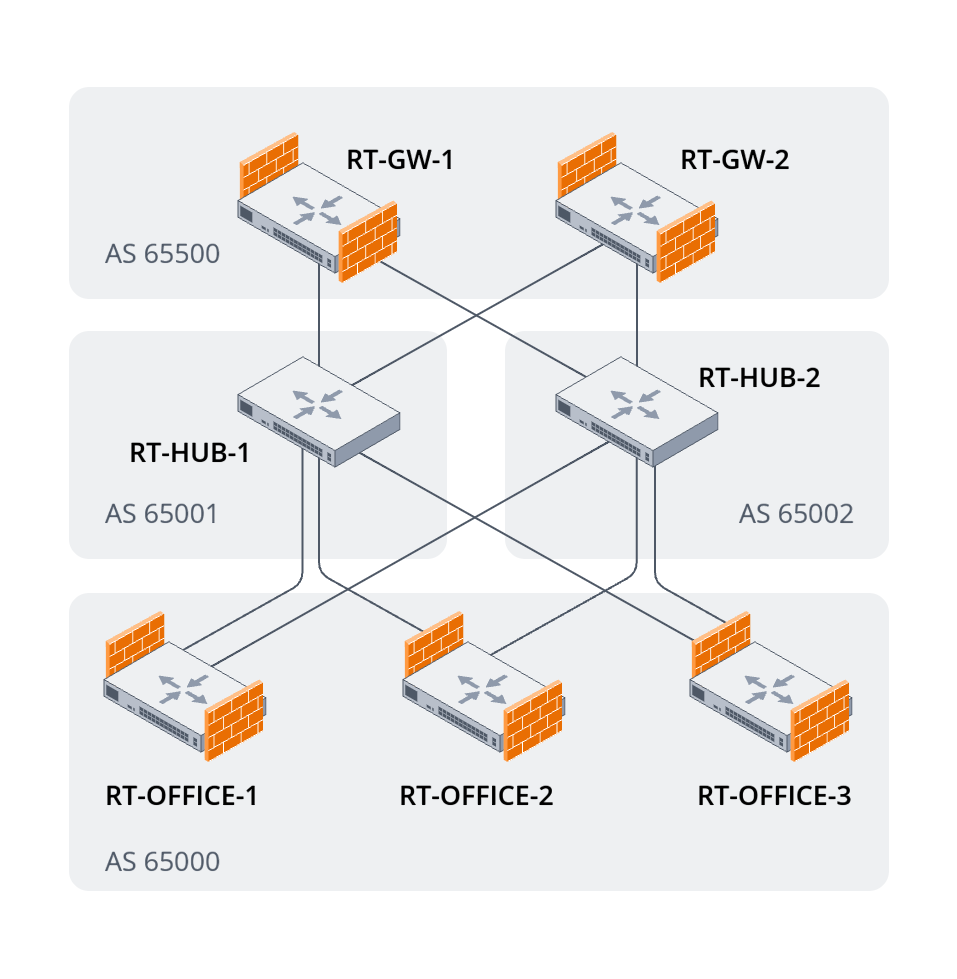
Figure 4. Logical diagram of router membership in autonomous systems
Begin the configuration with DMVPN Hub. For incoming BGP connections from DMVPN Spoke, configure dynamic BGP neighbors. In this case, only the default route traffic will be sent to DMVPN Spoke, so all DMVPN cloud traffic will pass through Hub:
router bgp log-neighbor-changes

router bgp 65001
  peer-group DMVPN_NET_1
    remote-as 65000
    update-source gre 10
    address-family ipv4 unicast
      default-originate
      enable
    exit
  exit
  listen-range 172.16.1.0/24
    peer-group DMVPN_NET_1
    enable
  exit
  enable
exit
|
router bgp log-neighbor-changes

router bgp 65002
  peer-group DMVPN_NET_2
    remote-as 65000
    update-source gre 10
    address-family ipv4 unicast
      default-originate
      enable
    exit
  exit
  listen-range 172.16.2.0/24
    peer-group DMVPN_NET_2
    enable
  exit
  enable
exit
|
Since DMVPN Spoke and DMVPN Hub are located in different autonomous systems, route information will not be advertised by default. Create a route map that allows sending the default route to DMVPN Spoke.
In order to assign RT-HUB-1 the role of the main DMVPN Hub for processing traffic in the DMVPN cloud, increase the BGP protocol metric value in its route map. This will give the DMVPN Spoke a higher priority for the default route in its direction.
Specify the created route map for the IPv4 route family in the existing peer group:
route-map DMVPN_NET_1_OUT
  rule 10
    description "DMZ | Default for DMVPN Spokes"
    match ip address 0.0.0.0/0
    action set metric bgp 100
  exit
exit

router bgp 65001
  peer-group DMVPN_NET_1
    address-family ipv4 unicast
      route-map DMVPN_NET_1_OUT out
    exit
  exit
exit |
route-map DMVPN_NET_2_OUT
  rule 10
    description "DMZ | Default for DMVPN Spokes"
    match ip address 0.0.0.0/0
    action set metric bgp 200
  exit
exit

router bgp 65002
  peer-group DMVPN_NET_2
    address-family ipv4 unicast
      route-map DMVPN_NET_2_OUT out
    exit
  exit
exit
|
Enable BFD support for created BGP neighbors. Take into account the convergence speed of IPsec and mGRE tunnels and increase BFD timers:
ip bfd log-adjacency-changes
ip bfd min-rx-interval 1000
ip bfd min-tx-interval 1000
ip bfd multiplier 8

router bgp 65001
  peer-group DMVPN_NET_1
    fall-over bfd
  exit
exit |
ip bfd log-adjacency-changes
ip bfd min-rx-interval 1000
ip bfd min-tx-interval 1000
ip bfd multiplier 8

router bgp 65002
  peer-group DMVPN_NET_2
    fall-over bfd
  exit
exit |
Allow incoming BGP and BFD traffic to pass through the security zone configured on GRE tunnels:
object-group service BGP
  description "BGP"
  port-range 179
exit
object-group service BFD
  description "BFD"
  port-range 3784
exit

security zone-pair DMVPN_NET_1 self
  rule 20
    description "Permit | BGP | From ANY | To ANY"
    action permit
    match protocol tcp
    match destination-port object-group BGP
    enable
  exit
  rule 30
    description "Permit | BFD | From ANY | To ANY"
    action permit
    match protocol udp
    match destination-port object-group BFD
    enable
  exit
exit
|
object-group service BGP
  description "BGP"
  port-range 179
exit
object-group service BFD
  description "BFD"
  port-range 3784
exit

security zone-pair DMVPN_NET_2 self
  rule 20
    description "Permit | BGP | From ANY | To ANY"
    action permit
    match protocol tcp
    match destination-port object-group BGP
    enable
  exit
  rule 30
    description "Permit | BFD | From ANY | To ANY"
    action permit
    match protocol udp
    match destination-port object-group BFD
    enable
  exit
exit
|
Also, set up BGP neighbors for the central office's Internet gateways, but only static ones. Since the connection settings for both Internet gateways are the same, configure a peer group and specify it in the configuration of static BGP neighbors:
router bgp 65001
  peer-group DMVPN_LAN
    remote-as 65500
    update-source port-channel 1.300
    address-family ipv4 unicast
      enable
    exit
  exit
  neighbor 10.0.0.17
    description "DMZ | RT-GW-1"
    peer-group DMVPN_LAN
    enable
  exit
  neighbor 10.0.0.18
    description "DMZ | RT-GW-2"
    peer-group DMVPN_LAN
    enable
  exit
exit |
router bgp 65002
  peer-group DMVPN_LAN
    remote-as 65500
    update-source port-channel 1.300
    address-family ipv4 unicast
      enable
    exit
  exit
  neighbor 10.0.0.17
    description "DMZ | RT-GW-1"
    peer-group DMVPN_LAN
    enable
  exit
  neighbor 10.0.0.18
    description "DMZ | RT-GW-2"
    peer-group DMVPN_LAN
    enable
  exit
exit
|
Create a route map that allows route information advertising to Internet gateways. Set the same BGP metrics as for DMVPN Spoke:
route-map DMVPN_LAN_OUT
  rule 10
    description "DMVPN | Redistribute to RT-GW"
    action set metric bgp 100
  exit
exit

router bgp 65001
  peer-group DMVPN_LAN
    address-family ipv4 unicast
      route-map DMVPN_LAN_OUT out
    exit
  exit
exit
|
route-map DMVPN_LAN_OUT
  rule 10
    description "DMVPN | Redistribute to RT-GW"
    action set metric bgp 200
  exit
exit

router bgp 65002
  peer-group DMVPN_LAN
    address-family ipv4 unicast
      route-map DMVPN_LAN_OUT out
    exit
  exit
exit
|
Add DMVPN cloud tunnel subnets to the advertised routes. Due to the specified route maps, information about tunnel routes will only be sent to Internet gateways.
router bgp 65001
  address-family ipv4 unicast
    network 172.16.1.0/24
  exit
exit
|
router bgp 65002
  address-family ipv4 unicast
    network 172.16.2.0/24
  exit
exit
|
For static BGP neighbors, also enable BFD protocol support:
router bgp 65001
  peer-group DMVPN_LAN
    fall-over bfd
  exit
exit
|
router bgp 65002
  peer-group DMVPN_LAN
    fall-over bfd
  exit
exit
|
Allow incoming BGP and BFD traffic to pass through the security zone configured on the subinterfaces of aggregated channels facing Internet gateways:
security zone-pair DMVPN_LAN self
  rule 20
    description "Permit | BGP | From ANY | To ANY"
    action permit
    match protocol tcp
    match destination-port object-group BGP
    enable
  exit
  rule 30
    description "Permit | BFD | From ANY | To ANY"
    action permit
    match protocol udp
    match destination-port object-group BFD
    enable
  exit
exit
|
security zone-pair DMVPN_LAN self
  rule 20
    description "Permit | BGP | From ANY | To ANY"
    action permit
    match protocol tcp
    match destination-port object-group BGP
    enable
  exit
  rule 30
    description "Permit | BFD | From ANY | To ANY"
    action permit
    match protocol udp
    match destination-port object-group BFD
    enable
  exit
exit |
Now configure BGP neighbors towards the DMVPN Hub on the Internet gateway side. Due to the template nature of the settings towards the DMVPN Hub, use peer-group. Enable default route advertisement towards the DMVPN Hub, since traffic leaving the DMVPN cloud must be routed to the central office Internet gateways:
router bgp 65500
  peer-group DMVPN_LAN
    update-source port-channel 1.300
    address-family ipv4 unicast
      default-originate
      enable
    exit
  exit
  neighbor 10.0.0.19
    description "DMZ | RT-HUB-1"
    remote-as 65001
    peer-group DMVPN_LAN
    enable
  exit
  neighbor 10.0.0.20
    description "DMZ | RT-HUB-2"
    remote-as 65002
    peer-group DMVPN_LAN
    enable
  exit
  enable
exit
|
router bgp 65500
  peer-group DMVPN_LAN
    update-source port-channel 1.300
    address-family ipv4 unicast
      default-originate
      enable
    exit
  exit
  neighbor 10.0.0.19
    description "DMZ | RT-HUB-1"
    remote-as 65001
    peer-group DMVPN_LAN
    enable
  exit
  neighbor 10.0.0.20
    description "DMZ | RT-HUB-2"
    remote-as 65002
    peer-group DMVPN_LAN
    enable
  exit
  enable
exit
|
Create a route map that allows route information advertising towards Internet gateways.
Special attention should be paid to configuring BGP route metrics. Since each Internet gateway connects to Internet via its own Internet service provider, the default route advertised to the DMVPN Hub should be given higher priority by the Internet gateway that currently has access to the Internet. Since the RT-GW-1 Internet gateway configuration already has a configured tracking object that switches VRRP mastery for users in the central office local network, the same tracking object will be used in the route map to change the metric of the default BGP route that RT-GW-1 advertises to the DMVPN Hub. |
route-map DMVPN_LAN_OUT
  rule 10
    description "DMZ | Default for DMVPN Hub"
    match ip address 0.0.0.0/0
    action set metric bgp 300 track 1 default 100
  exit
exit

router bgp 65500
  peer-group DMVPN_LAN
    address-family ipv4 unicast
      route-map DMVPN_LAN_OUT out
    exit
  exit
exit |
route-map DMVPN_LAN_OUT
  rule 10
    description "DMZ | Default for DMVPN Hub"
    match ip address 0.0.0.0/0
    action set metric bgp 200
  exit
exit

router bgp 65500
  peer-group DMVPN_LAN
    address-family ipv4 unicast
      route-map DMVPN_LAN_OUT out
    exit
  exit
exit |
With this configuration, RT-GW-1 will advertise the default route with a BGP metric of 100 if Internet access is available through its ISP and with a BGP metric of 300 if the connection is lost. |
Enable support for BFD protocol and increase BFD timers in the same way as is done for DMVPN Hub configuration:
ip bfd log-adjacency-changes
ip bfd min-rx-interval 1000
ip bfd min-tx-interval 1000
ip bfd multiplier 8

router bgp 65500
  peer-group DMVPN_LAN
    fall-over bfd
  exit
exit
|
ip bfd log-adjacency-changes
ip bfd min-rx-interval 1000
ip bfd min-tx-interval 1000
ip bfd multiplier 8

router bgp 65500
  peer-group DMVPN_LAN
    fall-over bfd
  exit
exit
|
Allow incoming BGP and BFD traffic to pass through the security zone configured on the subinterfaces of the aggregated channels towards the DMVPN Hub:
object-group service BGP
  description "BGP"
  port-range 179
exit
object-group service BFD
  description "BFD"
  port-range 3784
exit

security zone-pair DMVPN_LAN self
  rule 20
    description "Permit | BGP | From ANY | To ANY"
    action permit
    match protocol tcp
    match destination-port object-group BGP
    enable
  exit
  rule 30
    description "Permit | BFD | From ANY | To ANY"
    action permit
    match protocol udp
    match destination-port object-group BFD
    enable
  exit
exit
|
object-group service BGP
  description "BGP port"
  port-range 179
exit
object-group service BFD
  description "BFD port"
  port-range 3784
exit

security zone-pair DMVPN_LAN self
  rule 20
    description "Permit | BGP | From ANY | To ANY"
    action permit
    match protocol tcp
    match destination-port object-group BGP
    enable
  exit
  rule 30
    description "Permit | BFD | From ANY | To ANY"
    action permit
    match protocol udp
    match destination-port object-group BFD
    enable
  exit
exit
|
Configuring Zone-Based Firewall and Source NAT for remote office users
Since the DMVPN cloud that has now been created allows traffic from remote office users to exit via the central office's Internet gateway, additional firewall and NAT settings must be configured.
Start by allowing traffic from the DMVPN cloud to flow toward the central office's Internet gateways:
security zone-pair DMVPN_NET_1 DMVPN_LAN
  rule 10
    description "Permit | ANY | From DMVPN Cloud 1 | To DMVPN Downlink"
    action permit
    enable
  exit
exit
security zone-pair DMVPN_LAN DMVPN_NET_1
  rule 10
    description "Permit | ANY | From DMVPN Downlink | To DMVPN Cloud 1"
    action permit
    enable
  exit
exit |
security zone-pair DMVPN_NET_2 DMVPN_LAN
  rule 10
    description "Permit | ANY | From DMVPN Cloud 2 | To DMVPN Downlink"
    action permit
    enable
  exit
exit
security zone-pair DMVPN_LAN DMVPN_NET_2
  rule 10
    description "Permit | ANY | From DMVPN Downlink | To DMVPN Cloud 2"
    action permit
    enable
  exit
exit
|
Now allow traffic from the DMVPN cloud to pass through to local users at the central office. To do this, create an IP address profile in which the addresses of the remote office subnets will be specified:
object-group network DMVPN_INET_POOL description "DMZ | DMVPN Cloud Remote LANs" ip prefix 192.168.11.0/24 ip prefix 192.168.12.0/24 ip prefix 192.168.13.0/24 ip prefix 192.168.14.0/24 ip prefix 192.168.15.0/24 exit |
object-group network DMVPN_INET_POOL description "DMZ | DMVPN Cloud Remote LANs" ip prefix 192.168.11.0/24 ip prefix 192.168.12.0/24 ip prefix 192.168.13.0/24 ip prefix 192.168.14.0/24 ip prefix 192.168.15.0/24 exit |
For this profile, allow access to local network users:
security zone-pair DMVPN_LAN CUSTOMER
  rule 10
    description "Permit | ANY | From DMVPN Cloud | To CUSTOMER"
    match source-address object-group network DMVPN_INET_POOL
    action permit
    enable
  exit
exit
security zone-pair CUSTOMER DMVPN_LAN
  rule 10
    description "Permit | ANY | From CUSTOMER | To DMVPN Cloud"
    match destination-address object-group network DMVPN_INET_POOL
    action permit
    enable
  exit
exit
|
security zone-pair DMVPN_LAN CUSTOMER
  rule 10
    description "Permit | ANY | From DMVPN Cloud | To CUSTOMER"
    match source-address object-group network DMVPN_INET_POOL
    action permit
    enable
  exit
exit
security zone-pair CUSTOMER DMVPN_LAN
  rule 10
    description "Permit | ANY | From CUSTOMER | To DMVPN Cloud"
    match destination-address object-group network DMVPN_INET_POOL
    action permit
    enable
  exit
exit
|
Also, allow traffic from the DMVPN cloud to access the Internet:
security zone-pair DMVPN_LAN UNTRUSTED
  rule 10
    description "Permit | ANY | From DMVPN Cloud | To ISP-1"
    match source-address object-group network DMVPN_INET_POOL
    action permit
    enable
  exit
exit
|
security zone-pair DMVPN_LAN UNTRUSTED
  rule 10
    description "Permit | ANY | From DMVPN Cloud | To ISP-2"
    match source-address object-group network DMVPN_INET_POOL
    action permit
    enable
  exit
exit
|
Add DMVPN Source NAT for traffic from the cloud. Perform Source NAT in the NAT pool already created for users of the central office:
nat source
  ruleset SNAT
    rule 30
      description "Source | DMVPN Cloud"
      match source-address object-group network DMVPN_INET_POOL
      action source-nat pool CUSTOMER_PUBLIC_IP
      enable
    exit
  exit
exit
|
nat source
  ruleset SNAT
    rule 30
      description "Source | DMVPN Cloud"
      match source-address object-group network DMVPN_INET_POOL
      action source-nat pool CUSTOMER_PUBLIC_IP
      enable
    exit
  exit
exit
|
At this point, the DMVPN configuration at the central office can be considered complete.