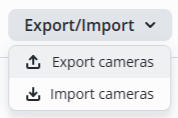
EVI Platform supports uploading cameras from a csv file.
Example of the contents of a csv file.
| name | urlMain | urlSub |
| CAM1 | rtsp://test:test1@cam1.eth:554/ch01/0 | rtsp://test:test1@cam1.eth:554/ch01/0 |
| CAM2 | rtsp://test:test2@cam2.eth/main | rtsp://test:test2@cam2.eth/sub |
To upload cameras from a CSV file, switch to the Cameras page in the Devices section.
Click the Import cameras button, select csv file in the file manager window.

To save the csv file with cameras, switch to the Cameras page in the Devices section.
Click the Export cameras button, select csv file in the file manager window.