The purpose of this document is to demonstrate a provider's solution for deploying an access network section using GPON technology and Eltex equipment as well as demonstrating the practical use of this equipment.
This document will be useful for data network engineers at network providers during the network section design phase when determining the last mile technology to be used in the network section. This document is also recommended when considering the modernization of an access network section built using PON technology.
The proposed solution covers multiple typical connection diagrams using ONTs operating in bridge and router modes.
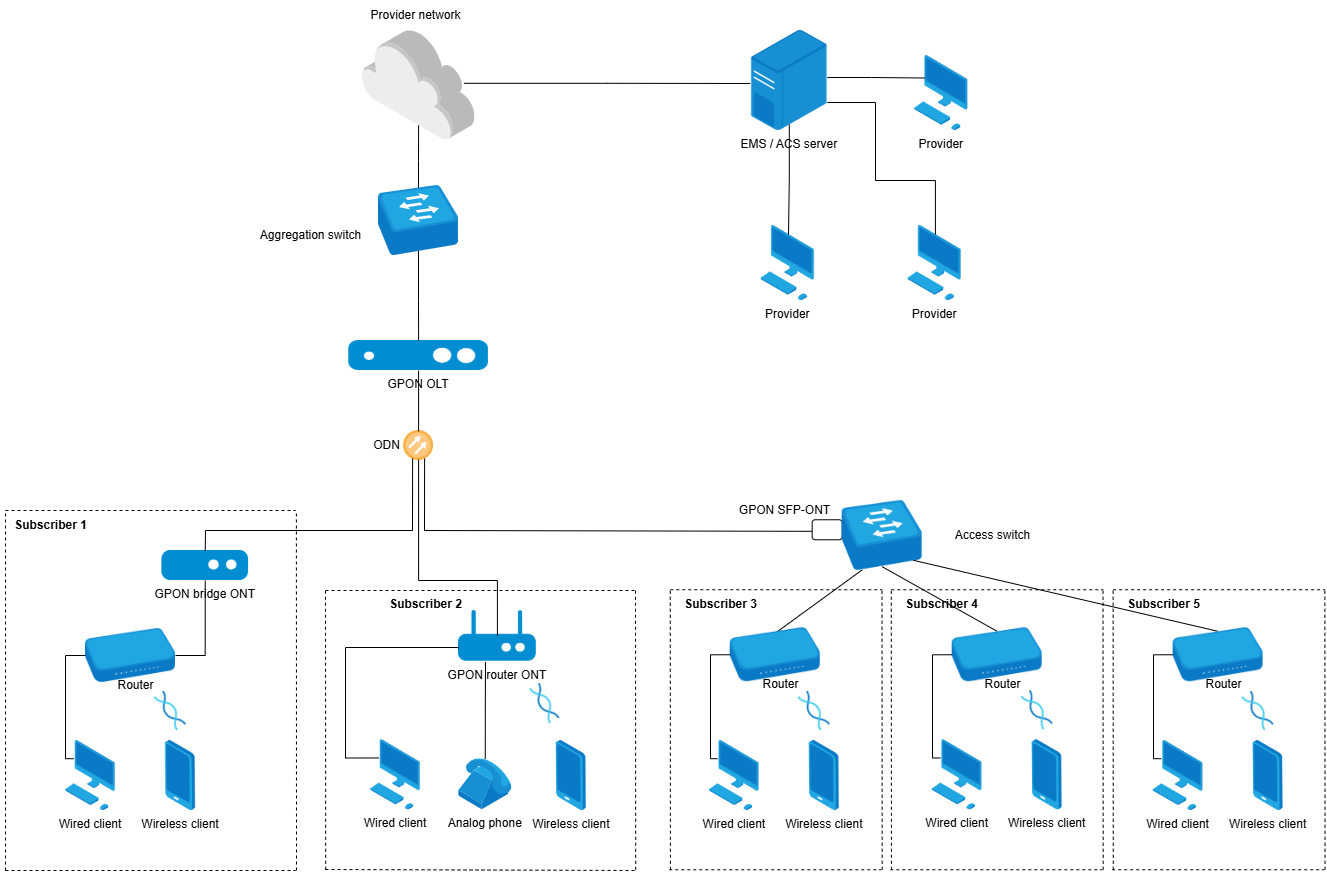
A distinctive feature of this connection scheme is that it ensures transparent transmission of data for various services provided in different VLANs via the ONT. This configuration approach allows various equipment, from access switches to home routers, to be connected to the ONT's LAN interfaces. Thus, both equipment located in the operator's area of responsibility and any home subscriber router can be connected to an ONT configured in bridge mode. It should be noted that configuring ONTs in such configurations is relatively simple and is carried out entirely by OLT means. Management and monitoring can be performed using the Eltex EMS management system, which uses a separate physical or virtual server. In addition to connecting ONTs in bridge mode, ONTs that can be used as full-fledged home routers can also be connected, in particular the ONT NTU-RG series by Eltex. For remote configuration of ONTs operating in router mode, an ACS server can be used that interacts with the ONT via the CWMP protocol of the TR-069 specification. Remote management of internal ONT configurations simplifies the configuration of subscriber terminals, allows for the mass application of standard configuration templates for internal ONT interfaces, and, in the event of a reset, eliminates the need to visit subscribers to configure ONTs. The ACS automatic configuration server can be used in two ways:
The built-in ACS server is not supported on the MA5160 OLT. |
The GPON subscriber equipment line also includes ONTs in the SFP module form factor. This implementation allows active Ethernet equipment (Eltex MES series switches,Eltex ESR series routers) to be connected to the PON network.
Possible variants of equipment to be used in the given diagram:
To connect the PON access segment to the upstream network, it is recommended to use Eltex MES series aggregation switches with support for 1/10G interfaces.
| Model | Number of ports | Port types | MAC table capacity |
|---|---|---|---|
| MES3300-24 | 24 | 24 × 10/100/1000BASE-T, 4 × 10GBASE-R (SFP+)/1000BASE-X(SFP) | 16384 |
The following OLT models can be used as GPON station terminals.
| Model | Number of uplink ports | Types of uplink ports | Number of PON ports | Operating modes of PON ports |
|---|---|---|---|---|
| LTP-8X | 8 | 4 × 10/100/1000BASE-T, 4 × 10/100/1000BASE-T/1000BASE-X 2 × 10GBASE-X (SFP+)/1000BASE-X | 8 | GPON |
| LTP-4X | 4 | 4 × 10/100/1000BASE-T/1000BASE-X 2 × 10GBASE-X (SFP+)/1000BASE-X | 4 | GPON |
| LTP-16N | 8 | 8 × 10GE (SFP+)/1GE (SFP), 1 × 10/100/1000BASE-T (ООВ) | 16 | GPON |
| LTP-8N | 4 | 4 × 10GE (SFP+)/1GE (SFP), 1 × 10/100/1000BASE-T (ООВ) | 8 | GPON |
| MA5160* | 10 for one control board. Up to two boards can be used. | 4 × 25/10/1GE (SFP28/SFP+/SFP) 6 × 100/40GE (QSFP28/QSFP+) | up to 256 | GPON / XGS-PON / Combo GPON+XGS-PON** |
* – Details on implementing the diagram using MA5160 as OLT are provided in Appendix 5. Using the MA5160 OLT in the GPON diagram.
** – The Combo GPON+XGS-PON LC16XG line card is currently under development.
The following ONT models can be used as GPON subscriber terminals connected as bridges.
| Model | Number of LAN ports | Types of LAN ports |
|---|---|---|
| NTU-1 | 1 | 1 × 1G |
| NTU-SFP-200 | 1 | 1 × 1G |
In addition to the listed models, which can only operate in bridge mode, any subscriber terminal capable of operating in router mode can also be configured in this mode.
The following ONT models are recommended for use as GPON subscriber terminals that can also function as subscriber routers.
| Model | Number of LAN ports | Types of LAN ports | Wi-Fi |
|---|---|---|---|
| NTU-RG-5421G-Wac | 4 | 4 × 1G, 1 x FXS | a/b/g/n/ac |
| NTU-RG-5520G-Wax | 4 | 4 × 1G | a/b/g/n/ac/ax |
| NTU-RG-5521G-Wax | 4 | 4 × 1G, FXS | a/b/g/n/ac/ax |
As a home router that can be connected downstream of an ONT in bridge mode, the following devices can be considered for installation:
| Model | WAN interface | Number of LAN ports | Wi-Fi |
|---|---|---|---|
| RG-5440G-Wac | 1 × 1G | 4 × 1G | a/b/g/n/ac |
| RG-1440G-Wac | 1 × 1G | 4 × 1G | a/b/g/n/ac |
To connect the PON segment to the lower-layer access segment, we recommend using Eltex MES series access switches.
| Model | Number of ports | MAC table capacity |
|---|---|---|
| MES2300-24 | 24 | 16384 |
The hardware requirements for the server on which EMS will be installed vary depending on the planned number of OLTs and ONTs to be connected. Recommended operating systems: Ubuntu 20.04 (when installed in conjunction with Eltex.ACS), Ubuntu 22.04.
| Number of devices | Services distribution | CPU core | RAM, GB | HDD, GB | Features |
|---|---|---|---|---|---|
up to 10 OLT | EMS + database | 4, 64-bit x86 CPUs | 8 | 200 | CS core, DBMS |
from 10 to 200 OLT | EMS + database | 4, 64-bit x86 CPUs | 16 | 500 | CS core, DBMS |
from 200 to 400 OLT | EMS | 8, 64-bit x86 CPUs | 32 | 100 | CS core |
| database | 4, 64-bit x86 CPUs | 32 | 1,000 | DBMS |
When installing the Eltex.ACS package on the server in addition to the Eltex.EMS management system, additional hardware resources should be allocated for the ACS service to operate. Recommended OS: Ubuntu 20.04.
| Number of devices (CPE) | CPU | RAM, ГБ | HDD, ГБ |
|---|---|---|---|
| Up to 10000 | 4 core | 8 | 70 and more |
| 10000-20000 | 8 core | 16 | 110 and more |
| 20000-50000 | 8 core or more (AMD Ryzen 5 1600X / Intel® Xeon® E5-2680) | 16GB | 200 |
The hardware requirements for the ACS server must be combined with the requirements for the EMS server when installing ACS+EMS on a single physical server.