External ACS server connection diagram
An external ACS server is a system installed on a separate physical or virtual server located in the service network. An external ACS server can be used in the following variations:
- On a single server with the Eltex.EMS package with ACS management interface integration into the EMS server GUI;
- On a server separate from Eltex.EMS with integration of the ACS management interface into the EMS server GUI;
- As a standalone package with a CLI management interface.
In each of the schemes listed, the interaction between the ONT and the ACS server is direct, with the OLT providing transparent data exchange.
In addition, when using an external ACS server to provide IP addresses to ONT, in the ACS VLAN there should be a DHCP server with a configured address pool for ONT. The DHCP server can be deployed either on a separate server or on the same server as EMS and/or ACS.
In general, the ACS server connection diagram looks like this. VLAN 4093 configuration is used as an example of ONT and ACS server interaction.
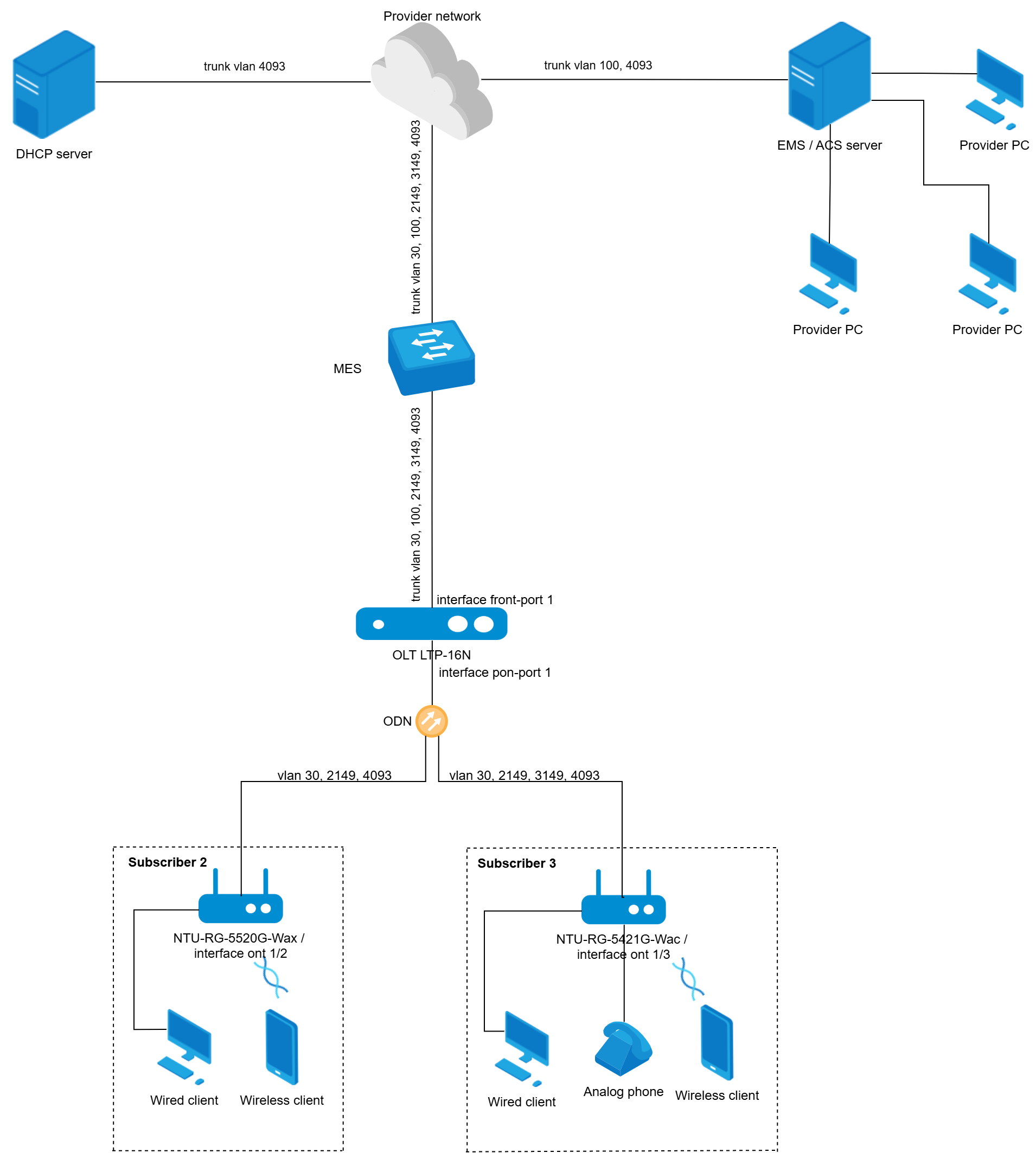
Data exchange is performed in a separate VLAN, similar to ONT exchange with a built-in ACS server of the OLT.
The procedure for installing and configuring the Eltex.ACS package is described in the product documentation and in the knowledge base.
A licensing system is available for Eltex.ACS. For details on purchasing a license, please contact the Eltex sales department. Without a license, there is a restriction on connecting CPE to the ACS server, no more than 100 CPE. |
Configuring cross-connect and management service profiles
LTP-16N(configure)# profile cross-connect ACS_ext LTP-16N(config)(profile-cross-connect-ACS_ext)# outer vid 4093 LTP-16N(config)(profile-cross-connect-ACS_ext)# iphost enable LTP-16N(config)(profile-cross-connect-ACS_ext)# exit LTP-16N(configure)# profile management ACS_ext LTP-16N(config)(profile-management-ACS_ext)# username acs LTP-16N(config)(profile-management-ACS_ext)# password acsacs LTP-16N(config)(profile-management-ACS_ext)# url http://20.1.1.1:9595 LTP-16N(config)(profile-management-ACS_ext)# exit LTP-16N(configure)# do commit LTP-16N(configure)# do save |
Switching to the cross-connect profile configuration mode for the external ACS service for NTU-RG Specifying the service VLAN ID in which the ONT and OLT will interact when working with ACS Enabling the creation of a service WAN IP interface on the ONT using OMCI for working with ACS Exiting the cross-connect profile configuration mode Switching to management profile configuration mode, ACS server information is transmitted to ONT via OMCI Specifying the user name for ONT authorization on the ACS server (default for the external server is “acs”) Specifying the password for ONT authorization on the ACS server (the default for the external server is “acsacs”) Specifying the IP address and access port for the ACS server (by default, the server listens on port 9595) Exiting profile management configuration mode Applying configuration Saving changes to non-volatile memory |
Configuring ONT
After creating the necessary profiles, they must be applied to the ONT. To illustrate this procedure, we will look at the configuration process on previously configured ONT devices of the NTU-RG-5421G-Wac and NTU-RG-5520G-Wac models. Detailed instructions are provided in the Configuring OLT and ONT in CLI (GPON diagram) section of the guide.
LTP-16N(configure)# interface ont 1/2 LTP-16N(config)(if-ont-1/2)# service 3 profile cross-connect ACS_ext dba dba1 LTP-16N(config)(if-ont-1/2)# profile management ACS_ext LTP-16N(config)(if-ont-1/2)# exit LTP-16N(configure)# interface ont 1/3 LTP-16N(config)(if-ont-1/3)# service 4 profile cross-connect ACS_ext dba dba1 LTP-16N(config)(if-ont-1/3)# profile management ACS_ext LTP-16N(config)(if-ont-1/3)# exit LTP-16N(configure)# do commit LTP-16N(configure)# do save |
Switching to interface ont 1/2 editing mode Applying the cross-connect service profile for service 3 (NTU-RG: ACS_ext) and the default dba Applying the management service profile for interaction between ONT and the external ACS server Exiting interface ont editing mode Switching to interface ont 1/3 editing mode Applying the cross-connect service profile for service 4 (NTU-RG: ACS_ext) and the default dba Applying the management service profile for interaction between ONT and the external ACS server Exiting interface ont edit mode Applying the configuration Saving changes to non-volatile memory |