General information
The MA5160 is a modular OLT in an 11U form factor for a standard 19" rack. There are several types of modules for this device:
- FC64 control boards, which coordinate the operation of the modular system and connect the OLT to the operator's upstream network;
- Line cards with PON interfaces, used to connect ONT subscriber terminals. There are several types of line cards:
- LC16G is a line card that contains only GPON interfaces;
- LC16XG is a line card that has XGS-PON interfaces capable of operating in either XGS-PON or GPON mode. In this case, the PON port operating mode is specified separately for each interface. For example, within a single card, one port can operate in GPON mode, while another port can operate in XGS-PON mode. The operating mode of the PON ports is specified in the slot settings.
- LC16C (currently under development) is a line card that contains combo PON interfaces, allowing simultaneous connection to PON interfaces of ONTs operating in both GPON and XGS-PON technologies using specific SFP modules in the OLT that are capable of operating in combo mode. The operating mode of PON ports for cards of this type is non-configurable and has a combo value.
Installing two control modules ensures switch redundancy and increases system throughput. The modules operate in stacking mode (module interfaces are combined into trunk groups using LAG, LACP). All modules have a unified control interface. All line and control modules are connected to each other inside the crate using high-speed buses.
The key advantage of this device is its high subscriber capacity combined with the versatility of technologies used for subscriber connections. In terms of architecture, one line card replaces one pizza-box OLT. For example, the LC16G card is identical in architecture and functionality to the pizza-box LTP-16N OLT, and the LC16XG is identical to the LTX-8 OLT.
Connection diagram
Look at the connection diagram, which is similar to the one in the "Configuring and health checking the equipment (GPON diagram)" section, but with a few differences. In this diagram, LC16G is used as the line card. The initial data for the diagram is as follows:
- VLAN 2149 – Internat service;
- VLAN 30 – IPTV service;
- VLAN 3149 – IP telephony (VoIP) service;
- VLAN 100 – management.
Unlike the original diagram, the diagram in this appendix uses an external ACS server. For this purpose, an additional VLAN 4093 has been added to the diagram.
The MA5160 OLT model does not have a built-in ACS server. |
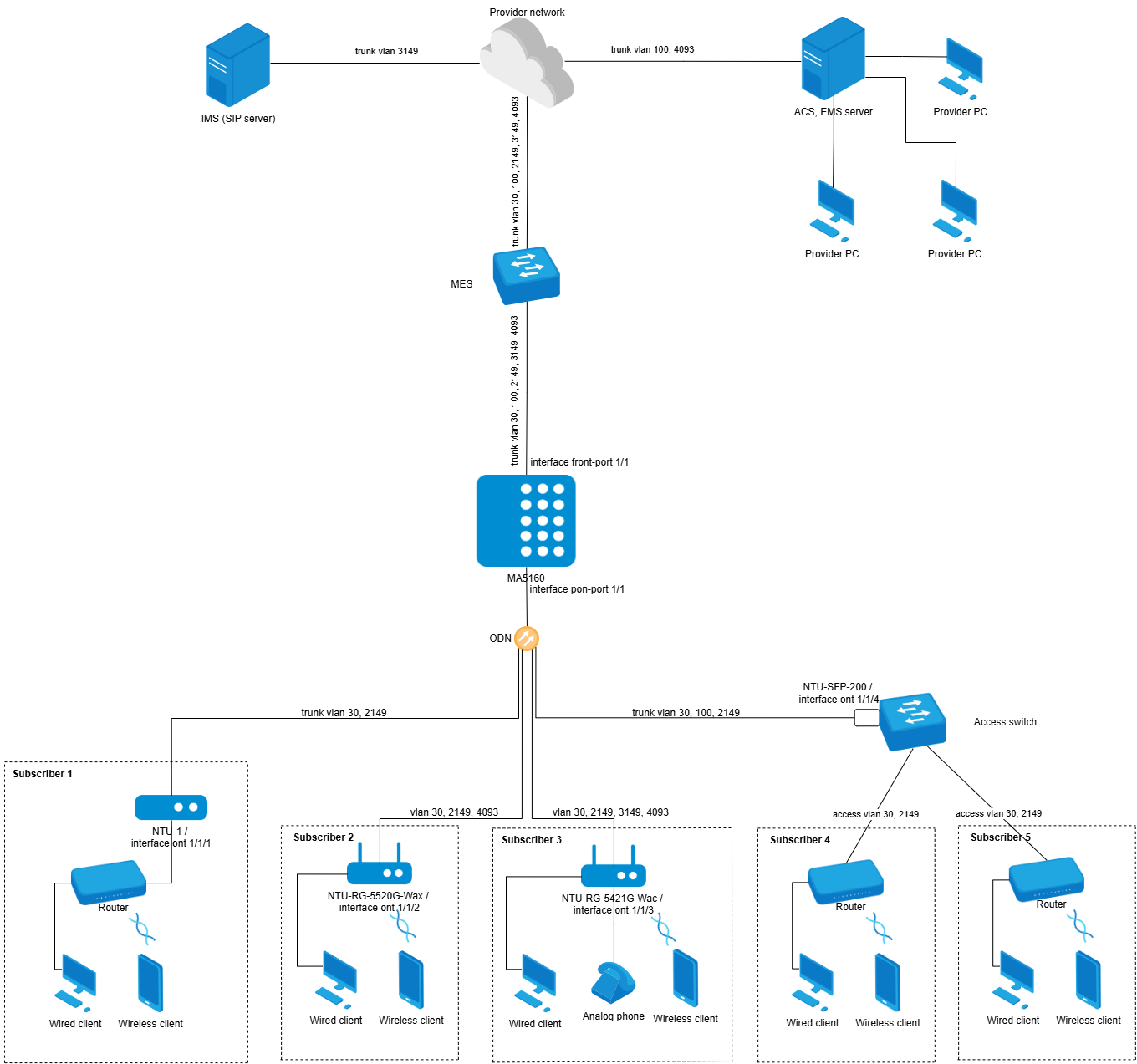
The following is assumed according to this diagram:
- For NTU-1 – connection of the subscriber router directly to the ONT. User devices are connected to the subscriber router;
- For NTU-RG-5520G-Wax and NTU-RG-5421G-Wac, configured in router mode – user devices are connected directly to the ONT;
- For NTU-SFP-200, ONT in SFP module form factor – connection to the access switch. VLAN trunk processing mode is configured on the ONT by means of OLT.
OLT and ONT configuration procedure in CLI
The configuration approach has some syntactic differences from the LTP-N series OLT due to the modular architecture of the MA5160 device. Details on configuring all ONTs are also discussed on the page "Configuring and health checking the equipment (GPON diagram)". The initial configuration of the OLT in terms of management settings for network connection can be performed via the OOB interface or via the console interface. An example of configuring the OLT management parameters for this scheme:
MA5160# configure terminal MA5160(configure)# management ip 10.10.0.25 MA5160(configure)# management mask 255.255.0.0 MA5160(configure)# management gateway 10.10.0.1 MA5160(configure)# management vid 100 MA5160(configure)# interface front-port 1/1 MA5160(config)(if-front-1/1)# vlan allow 100 MA5160(configure)# do commit MA5160(configure)# do confirm |
Switching to OLT configuration mode Specifying the OLT IP address in the management network Specifying the management subnet mask Specifying the default gateway Specifying VLAN for OLT management Switching to the front-port 1/1 uplink interface configuration mode Configuring the management VLAN on the uplink interface Applying configuration Saving changes to non-volatile memory |
Uplink front-port interfaces have double indexes, for example, front-port 1/1. The first index is the control board unit number, and the second is the port number on the control board. Unit number 1 corresponds to the left control board, and 2 corresponds to the right control board. Thus, front-port 1/1 is the first port on the left control board. |
On the MA5160, the confirm command is used to confirm changes made in the configuration (unlike LTX, which uses the save command). |
NTU-1 configuration details:
- Configuration identifier – interface ont 1/1/1;
- Both services (Internet + IPTV) are provided at the LAN port egress in untagged mode;
- Given the specific nature of the services, only one cross-connect service profile is configured for both services.
NTU-RG-5520G-Wax configuration details:
- Identifier in the configuration – interface ont 1/1/2;
- The routable WAN interface of the ONT is configured to work with Internet and IPTV services in different VLANs;
- Both services (Internet + IPTV) are provided at the egress of LAN ports in untagged mode for connecting end users; both services are available from all LAN ports of the ONT;
- Services on the ONT are configured via the built-in OLT ACS server;
- Each service is assigned its own cross-connect profile;
- The ONT has a built-in DHCP server for connecting end users, and NAT is configured for Internet access.
NTU-RG-5421G-Wac configuration details:
- Configuration identifier – interface ont 1/1/3;
- The routable ONT WAN interface is configured to work with Internet, IPTV, and VoIP services in different VLANs. Additionally, the IP WAN interface is configured to work with VoIP;
- Both services (Internet + IPTV) are provided at the LAN ports egress in untagged mode for connecting end users, and both services are available from all ONT LAN ports;
- Services on the ONT are configured via the built-in OLT ACS server.
- Each service is assigned its own cross-connect profile.
- The ONT has a built-in DHCP server for connecting end users, and NAT is configured for Internet access.
- The ONT FXS port is linked to a separate WAN IP interface designed to interact with the upstream SIP server (IMS).
NTU-SFP-200 configuration details:
- Configuration identifier – interface ont 1/1/4;
- Both services (Internet + IPTV) are provided on the uplink of the access switch in tagged mode;
- The device has a single internal Ethernet interface for communication with the switch port to which the NTU-SFP is connected. For OLT, this interface has the LAN 1 identifier, so only one LAN port will be configured for NTU-SFP;
- Each service is assigned its own cross-connect profile;
- A separate service with a configured VLAN for managing the provider's data transmission network is used to control the switch to which the NTU-SFP is connected.
Triple indexes are used to designate ONT interfaces, where the first value corresponds to the line card number, the second to the pon-port number on the specified line card, and the third to the ONT identifier on the channel. Accordingly, pon-port interfaces in the OLT configuration will have double indexes consisting of the line card number and the port number on the card. |
Configuring basic functionality
Configuring cross-connect service profiles
The principle of configuring cross-connect service profiles on the MA5160 is no different from that on the LTP-N.
MA5160# configure terminal MA5160(configure)# profile cross-connect HSI_NTU-1 MA5160(config)(profile-cross-connect-HSI_NTU-1)# ont-mode bridge MA5160(config)(profile-cross-connect-HSI_NTU-1)# bridge group 20 MA5160(config)(profile-cross-connect-HSI_NTU-1)# outer vid 2149 MA5160(config)(profile-cross-connect-HSI_NTU-1)# user vid untagged MA5160(config)(profile-cross-connect-HSI_NTU-1)# multicast enable MA5160(config)(profile-cross-connect-HSI_NTU-1)# exit MA5160(configure)# profile cross-connect HSI_NTU-SFP MA5160(config)(profile-cross-connect-HSI_NTU-SFP)# ont-mode bridge MA5160(config)(profile-cross-connect-HSI_NTU-SFP)# bridge group 30 MA5160(config)(profile-cross-connect-HSI_NTU-SFP)# outer vid 2149 MA5160(config)(profile-cross-connect-HSI_NTU-SFP)# user vid 2149 MA5160(config)(profile-cross-connect-HSI_NTU-SFP)# exit MA5160(configure)# profile cross-connect IPTV_NTU-SFP MA5160(config)(profile-cross-connect-IPTV_NTU-SFP)# ont-mode bridge MA5160(config)(profile-cross-connect-IPTV_NTU-SFP)# bridge group 30 MA5160(config)(profile-cross-connect-IPTV_NTU-SFP)# outer vid 30 MA5160(config)(profile-cross-connect-IPTV_NTU-SFP)# user vid 30 MA5160(config)(profile-cross-connect-IPTV_NTU-SFP)# multicast enable MA5160(config)(profile-cross-connect-IPTV_NTU-SFP)# exit MA5160(configure)# profile cross-connect MGMT_NTU-SFP MA5160(config)(profile-cross-connect-MGMT_NTU-SFP)# ont-mode bridge MA5160(config)(profile-cross-connect-MGMT_NTU-SFP)# bridge group 30 MA5160(config)(profile-cross-connect-MGMT_NTU-SFP)# outer vid 100 MA5160(config)(profile-cross-connect-MGMT_NTU-SFP)# user vid 100 MA5160(config)(profile-cross-connect-MGMT_NTU-SFP)# exit MA5160(configure)# profile cross-connect HSI_NTU-RG MA5160(config)(profile-cross-connect-HSI_NTU-RG)# outer vid 2149 MA5160(config)(profile-cross-connect-HSI_NTU-RG)# user vid 2149 MA5160(config)(profile-cross-connect-HSI_NTU-RG)# exit MA5160(configure)# profile cross-connect IPTV_NTU-RG MA5160(config)(profile-cross-connect-IPTV_NTU-RG)# outer vid 30 MA5160(config)(profile-cross-connect-IPTV_NTU-RG)# user vid 30 MA5160(config)(profile-cross-connect-IPTV_NTU-RG)# multicast enable MA5160(config)(profile-cross-connect-IPTV_NTU-RG)# exit MA5160(configure)# profile cross-connect VOIP_NTU-RG MA5160(config)(profile-cross-connect-VOIP_NTU-RG)# outer vid 3149 MA5160(config)(profile-cross-connect-VOIP_NTU-RG)# user vid 3149 MA5160(config)(profile-cross-connect-VOIP_NTU-RG)# exit MA5160(configure)# profile cross-connect ACS_external MA5160(config)(profile-cross-connect-ACS_external)# outer vid 4094 MA5160(config)(profile-cross-connect-ACS_external)# iphost enable MA5160(config)(profile-cross-connect-ACS_external)# exit MA5160(configure)# do commit MA5160(configure)# do confirm |
Switching to OLT configuration mode Switching to Internet service cross-connect profile configuration mode for NTU-1 Specifying ONT operating mode as bridge Specifying bridge group number (the number can be any but it must match the number in profile ports) Specifying the service VLAN ID for the Internet service Specifying the VLAN ID at the LAN ONT egress Allowing multicast traffic to pass through Exiting cross-connect profile configuration mode Switching to Internet service cross-connect profile configuration mode for NTU-SFP Specifying ONT operating mode as bridge Specifying bridge group number (the number can be any but it must match the number in profile ports) Specifying the service VLAN ID for the Internet service Specifying the VLAN ID for the Internet service arriving at the access switch ingress Exiting cross-connect profile configuration mode Switching to IPTV service cross-connect profile configuration mode for NTU-SFP Specifying ONT operating mode as bridge Specifying bridge group number (the number can be any but it must match the number in profile ports) Specifying the service VLAN ID for the IPTV service Specifying the VLAN ID for the IPTV service arriving at the access switch ingress Allowing multicast traffic to pass through Exiting cross-connect profile configuration mode Switching to management VLAN for switch downsream NTU-SFP cross-connect profile configuration mode Specifying ONT operating mode as bridge Specifying bridge group number (the number can be any but it must match the number in profile ports) Specifying the management VLAN ID Specifying the management VLAN ID received at the access switch ingress Exiting the cross-connect profile configuration mode Switching to the Internet service cross-connect profile configuration mode for NTU-RG Specifying the Internet service VLAN ID Specifying the VLAN ID for the IPTV service arriving at the WAN interface ingress of the ONT Exiting the cross-connect profile configuration mode Switch to the IPTV service cross-connect profile configuration mode for NTU-RG Specifying the service VLAN ID for IPTV Specifying the VLAN ID for the IPTV service arriving at the WAN interface ingress of the ONT Allowing multicast traffic to pass through Exiting the cross-connect profile configuration mode Switching to the cross-connect profile configuration mode for the VoIP service for NTU-RG Specifying the service VLAN ID for VoIP Specifying the VLAN ID for the VoIP service arriving at the WAN interface ingress of the ONT Exiting the cross-connect profile configuration mode Switching to the cross-connect profile configuration mode for the built-in ACS service for NTU-RG Specifying the service VLAN ID in which the ONT and OLT will interact when the ACS is running Enabling the creation of a service WAN IP interface using OMCI on the ONT for working with the ACS Exiting the cross-connect profile configuration mode Applying configuration Saving changes to non-volatile memory |
Configuring ports service profiles
The procedure for configuring service profiles on MA5160 is identical to that for LTP-N.
MA5160# configure terminal MA5160(configure)# profile ports NTU-1 MA5160(config)(profile-ports-NTU-1)# igmp multicast dynamic-entry 1 vid 30 group 224.0.0.1 239.255.255.254 MA5160(config)(profile-ports-NTU-1)# port 1 multicast enable MA5160(config)(profile-ports-NTU-1)# port 1 bridge group 20 MA5160(config)(profile-ports-NTU-1)# port 1 igmp downstream tag-control remove-tag MA5160(config)(profile-ports-NTU-1)# port 1 igmp downstream vid 30 MA5160(config)(profile-ports-NTU-1)# port 1 igmp upstream tag-control add-tag MA5160(config)(profile-ports-NTU-1)# port 1 igmp upstream vid 2149 MA5160(config)(profile-ports-NTU-1)# exit MA5160(configure)# profile ports NTU-SFP MA5160(config)(profile-ports-NTU-SFP)# igmp multicast dynamic-entry 1 vid 30 group 224.0.0.1 239.255.255.254 MA5160(config)(profile-ports-NTU-SFP)# port 1 multicast enable MA5160(config)(profile-ports-NTU-SFP)# port 1 bridge group 30 MA5160(config)(profile-ports-NTU-SFP)# port 1 igmp downstream tag-control pass MA5160(config)(profile-ports-NTU-SFP)# port 1 igmp downstream vid 30 MA5160(config)(profile-ports-NTU-SFP)# port 1 igmp upstream tag-control pass MA5160(config)(profile-ports-NTU-SFP)# port 1 igmp upstream vid 30 MA5160(config)(profile-ports-NTU-SFP)# exit MA5160(configure)# profile ports NTU-RG MA5160(config)(profile-ports-NTU-RG)# igmp multicast dynamic-entry 1 vid 30 group 224.0.0.1 239.255.255.254 MA5160(config)(profile-ports-NTU-RG)# veip multicast enable MA5160(config)(profile-ports-NTU-RG)# veip igmp downstream tag-control pass MA5160(config)(profile-ports-NTU-RG)# veip igmp downstream vid 30 MA5160(config)(profile-ports-NTU-RG)# veip igmp upstream tag-control pass MA5160(config)(profile-ports-NTU-RG)# veip igmp upstream vid 30 MA5160(config)(profile-ports-NTU-RG)# exit MA5160(configure)# do commit MA5160(configure)# do confirm |
Switching to OLT configuration mode Switching to NTU-1 ports profile configuration mode Specifying the allowed multicast group range Enabling multicast processing at LAN port 1 of the ONT Specifying the bridge group number (the number must match the one in cross-connect) Creating a rule to remove a VLAN tag for the downstream multicast stream Specifying the VLAN ID with which the downstream multicast stream arrives from the network Creating a rule to add a VLAN tag for the upstream multicast stream Specifying the VLAN ID with which upstream multicast requests arrive from PON (Internet service VLAN ID) Exiting the ports profile configuration mode Switching to the ports profile configuration mode for NTU-SFP Specifying the allowed range of multicast groups Enabling multicast processing on LAN port 1 of the ONT (for NTU-SFP, enabling MC passage to the switch) Specifying the bridge group number (the number must match the one in cross-connect) Creating a rule to pass multicast traffic downstream without changing the VLAN tag Specifying the VLAN ID with which the downstream multicast stream arrives from the network Creating a rule to pass multicast traffic upstream without changing the VLAN tag Specifying the VLAN ID with which upstream multicast requests arrive from PON Exiting the ports profile configuration mode Switching to the ports profile configuration mode for NTU-RG Specifying the allowed range of multicast groups Enable multicast processing on WAN ONT (for routed mode) Creating a rule to pass multicast traffic downstream without changing the VLAN tag Specifying the VLAN ID with which the downstream multicast stream arrives from the network Creating a rule to pass multicast traffic upstream without changing the VLAN tag Specifying the VLAN ID with which upstream multicast requests arrive from PON Exiting the ports profile configuration mode Applying configuration Saving changes to non-volatile memory |
Configuring VLAN, IGMP snooping, IGMP proxy on OLT
The principle of configuring ports service profiles on MA5160 is, in general, similar to LTX, with a few exceptions. IGMP snooping must be enabled both globally (it will be enabled on control boards) and on slots (line cards). IGMP proxy report is configured only on slots.
MA5160# configure terminal MA5160(configure)# vlan 30 MA5160(config)(vlan-30)# name IPTV MA5160(config)(vlan-30)# exit MA5160(configure)# vlan 2149 MA5160(config)(vlan-2149)# name Internet MA5160(config)(vlan-2149)# exit MA5160(configure)# vlan 3149 MA5160(config)(vlan-3149)# name VoIP MA5160(config)(vlan-3149)# exit MA5160(configure)# vlan 100 MA5160(config)(vlan-100)# name Management MA5160(config)(vlan-100)# exit MA5160(configure)# vlan 4093 MA5160(config)(vlan-4093)# name ACS_external MA5160(config)(vlan-4093)# exit MA5160(configure)# interface front-port 1/1 MA5160(config)(if-front-1/1)# vlan allow 30,100,2149,3149,4093 MA5160(config)(if-front-1/1)# exit MA5160(configure)# ip igmp snooping enable MA5160(configure)# slot 1-16 MA5160(config)(slot-1-16)# ip igmp snooping enable MA5160(config)(slot-1-16)# ip igmp proxy report enable MA5160(config)(slot-1-16)# ip igmp proxy report range 224.0.0.1 239.255.255.254 from 2149 to 30 MA5160(config)(slot-1-16)# exit MA5160(configure)# exit MA5160(configure)# do commit MA5160(configure)# do confirm |
Switching to OLT configuration mode Switching to VLAN 30 (IPTV) editing mode of the internal switch of the FC64 OLT control board Specifying the VLAN name Exiting VLAN editing mode Switching to VLAN 2149 (Internet) editing mode of the internal switch of the FC64 OLT control board Specifying the VLAN name Exiting VLAN editing mode Switching to VLAN 3149 (VoIP) editing mode of the internal switch of the FC64 OLT control board Specifying the VLAN name Exiting VLAN editing mode Switching to VLAN 100 (Management) editing mode of the internal switch of the FC64 OLT control board Specifying the VLAN name Exiting VLAN editing mode Switching to VLAN 4093 (External ACS) editing mode of the internal switch of the FC64 OLT control board Specifying the VLAN name Exiting VLAN editing mode Switching to uplink interface front-port 1/1 editing mode Adding a VLAN to the uplink interface in tagged (general) mode Exiting uplink interface editing mode Enabling IGMP snooping on control boards Entering the slot range 1-16 configuration mode Enabling IGMP snooping on line cards Enabling proxying of client IGMP report requests Creating a rule to forward client IGMP requests received in VLAN 2149 to multicast VLAN 30 Exiting slot range configuration mode Exiting OLT configuration mode Applying configuration Saving changes to non-volatile memory |
Configuring profile management
To ensure interaction between the ONT and ACS server, the ONT must be provided with address information about the server. This information can be transferred from the OLT to the ONT using the OMCI protocol. This is done by configuring profile management and then applying it to the ONT.
MA5160# configure terminal MA5160(configure)# profile management ACS_external MA5160(config)(profile-management-ACS_external)# username acs MA5160(config)(profile-management-ACS_external)# password acsacs MA5160(config)(profile-management-ACS_external)# url http://192.168.155.1:9595 MA5160(config)(profile-management-ACS_external)# exit MA5160(configure)# exit MA5160(configure)# do commit MA5160(configure)# do confirm |
Switching to OLT configuration mode Switching to management profile configuration mode, ACS server information is transferred to ONT via OMCI Specifying user name for ONT authorization on ACS server Specifying password for ONT authorization on ACS server Specifying IP address and access port to ACS server (by default, the server listens on port 9595) Exiting management profile configuration mode Applying configuration Saving changes to non-volatile memory |
Registering line cards and activating ONT
Registering line cards
When connecting line cards, the line card type must be specified manually in the configuration. The pon-type parameter does not require any adjustments. By default, the pon-type parameter has the "gpon" value.
MA5160# configure terminal MA5160(configure)# slot 1 MA5160(config)(slot-1)# type lc16g MA5160(config)(slot-1)# exit MA5160(configure)# exit MA5160# commit MA5160# confirm |
Switching to OLT configuration mode Switching to line slot 1 configuration mode Specifying the line card type — LC16G (GPON) Exiting slot configuration mode Exiting OLT configuration mode Applying configuration Saving changes to non-volatile memory |
ONT registration on OLT and configuration assignment to ONT
The procedure for registering and applying the configuration to the ONT is similar to LTP-N.
MA5160# configure terminal MA5160(configure)# interface ont 1/1/1 MA5160(config)(if-ont-1/1/1)# serial ELTX890001EC MA5160(config)(if-ont-1/1/1)# service 1 profile cross-connect HSI_NTU-1 dba dba2 MA5160(config)(if-ont-1/1/1)# profile ports NTU-1 MA5160(config)(if-ont-1/1/1)# exit MA5160(configure)# interface ont 1/1/2 MA5160(config)(if-ont-1/1/2)# serial ELTXA100001C MA5160(config)(if-ont-1/1/2)# service 1 profile cross-connect HSI_NTU-RG dba dba2 MA5160(config)(if-ont-1/1/2)# service 2 profile cross-connect IPTV_NTU-RG dba dba2 MA5160(config)(if-ont-1/1/2)# service 3 profile cross-connect ACS_external dba dba2 MA5160(config)(if-ont-1/1/2)# profile ports NTU-RG MA5160(config)(if-ont-1/1/2)# profile management ACS_local MA5160(config)(if-ont-1/1/2)# exit MA5160(configure)# interface ont 1/1/3 MA5160(config)(if-ont-1/1/3)# serial ELTX73000140 MA5160(config)(if-ont-1/1/3)# service 1 profile cross-connect HSI_NTU-RG dba dba2 MA5160(config)(if-ont-1/1/3)# service 2 profile cross-connect IPTV_NTU-RG dba dba2 MA5160(config)(if-ont-1/1/3)# service 3 profile cross-connect VOIP_NTU-RG dba dba2 MA5160(config)(if-ont-1/1/3)# service 4 profile cross-connect ACS_external dba dba2 MA5160(config)(if-ont-1/1/3)# profile ports NTU-RG MA5160(config)(if-ont-1/1/3)# profile management ACS_local MA5160(config)(if-ont-1/1/3)# exit MA5160(configure)# interface ont 1/1/4 MA5160(config)(if-ont-1/1/4)# serial ELTX8D00055B MA5160(config)(if-ont-1/1/4)# service 1 profile cross-connect HSI_NTU-SFP dba dba2 MA5160(config)(if-ont-1/1/4)# service 2 profile cross-connect IPTV_NTU-SFP dba dba2 MA5160(config)(if-ont-1/1/4)# service 3 profile cross-connect MGMT_NTU-SFP dba dba2 MA5160(config)(if-ont-1/1/4)# profile ports NTU-SFP MA5160(config)(if-ont-1/1/4)# exit MA5160(configure)# exit MA5160# commit MA5160# confirm |
Switching to OLT configuration mode Switching to interface ont 1/1/1 editing mode (slot number / channel number / ont id on the channel) Specifying PON serial Applying the cross-connect service profile for service 1 (NTU-1: Internet+IPTV) and default dba Applying the ports service profile Exiting interface ont edit mode Switching to interface ont 1/1/2 edit mode Specifying PON serial Applying the cross-connect service profile for service 1 (NTU-RG: Internet) and the default dba Applying the cross-connect service profile for service 2 (NTU-RG: IPTV) and the default dba Applying the cross-connect service profile for service 3 (NTU-RG: ACS) and the default dba Applying the ports service profile Applying the management service profile for ONT and ACS server interaction Exiting interface ont edit mode Switching to interface ont 1/1/3 edit mode Specifying PON serial Applying the cross-connect service profile for service 1 (NTU-RG: Internet) and the default dba Applying the cross-connect service profile for service 2 (NTU-RG: IPTV) and the default dba Applying the cross-connect service profile for service 3 (NTU-RG: VoIP) and the default dba Applying the cross-connect service profile for service 4 (NTU-RG: ACS) and the default dba Applying the ports service profile Applying the management service profile for ONT and ACS server interaction Exiting interface ont edit mode Switching to interface ont 1/1/4 edit mode Specifying PON serial Applying the cross-connect service profile for service 1 (NTU-SFP: Internet) and the default dba Applying the cross-connect service profile for service 2 (NTU-SFP: IPTV) and the default dba Applying the cross-connect service profile for service 3 (NTU-SFP: Management) and the default dba Applying the ports service profile Exiting interface ont edit mode Exiting OLT configuration mode Applying configuration Saving changes to non-volatile memory |
By default, the MA5160 provides two DBA profiles, each corresponding to a specific PON technology. The dba1 profile is designed for XGS-PON ONTs, while dba2 is designed for GPON. |
Checking PON service operation
Performed in the same way as LTP-N. Service operation checking is described in the "Configuring OLT and ONT in CLI (GPON diagram)" section.