Managing user authentication and authorization requires ensuring high availability of the NAC system, since, in the event of its failure, connecting users and endpoints will become impossible.
Eltex-NAICE implements high availability using an Active-Active scheme with a VRRP address. This allows a single RADIUS server to be used in the configuration of network devices and provides redundancy for devices that do not support specifying multiple RADIUS servers. To configure the high-availability scheme, four virtual (or physical) servers must be allocated: two for running NAICE services and two for running the PostgreSQL database, which is responsible for storing system data.
Installing or upgrading a high-availability configuration on a host previously used for operating the system in single-host mode is not allowed. |
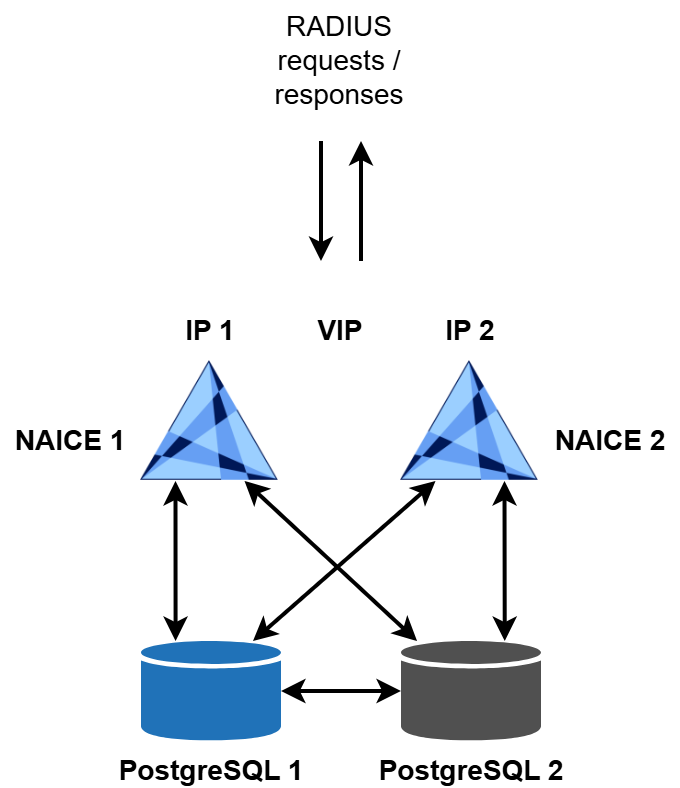
To license a high-availability scheme, two licenses are required, one for each NAICE host. Each license must have its own Product ID while sharing the same license key. |
System requirements for the servers are described in the “High-availability deployment” section of v1.0_3.1 System requirements.
Online installation is supported on all operating systems listed as supported and is described below.
To perform an online installation, the target hosts must have direct Internet access. Using a proxy server or any mechanism that modifies certificates of destination websites accessed during installation is not allowed. |
You must specify IP addresses of the target servers during installation. Using domain names is not permitted. |
The installation is performed using two Ansible playbooks:
install-postgres-cluster.yml.keepalived service are installed using the playbook reservation-naice-services.yml.The addresses of the target hosts on which the installation will be executed are defined in the inventory/hosts-cluster.yml file.
For PostgreSQL, set the addresses in the postgres-cluster section:
# Host group for postgres-cluster installation (primary + standby)
postgres-cluster:
  hosts:
    node_primary:
      ansible_host: <IP address of PostgreSQL node 1>
      ansible_port: 22
      ansible_user: <username>
      ansible_ssh_pass: <password>
      ansible_become_password: <sudo password>
      forwarded_postgresql_port: 5432
      forwarded_ssh_port: 15432
    node_standby:
      ansible_host: <IP address of PostgreSQL node 2>
      ansible_port: 22
      ansible_user: <username>
      ansible_ssh_pass: <password>
      ansible_become_password: <sudo password>
      forwarded_postgresql_port: 5432
forwarded_ssh_port: 15432 |
To install NAICE services with high availability, you must specify the addresses in the reservation section:
# Host group for NAICE high-availability installation
reservation:
  hosts:
    master_host:
      ansible_host: <IP address of NAICE host 1>
      ansible_port: 22
      ansible_user: <username>
      ansible_ssh_pass: <password>
      ansible_become_password: <sudo password>
      keepalived_interface: <interface for VIP address, e.g. eth0>

    backup_host:
      ansible_host: 192.168.0.102
      ansible_port: 22
      ansible_user: <username>
      ansible_ssh_pass: <password>
      ansible_become_password: <sudo password>
      keepalived_interface: <interface for VIP address, e.g. eth0>
  vars:
keepalived_vip: <VIP address, without mask, e.g. 192.168.0.11> |
When performing an online installation, it is not required to specify access credentials for the host from which the playbook is executed in the Local actions section. This section is used only when performing installation in an isolated environment. |
Run the playbook:
ansible-playbook install-postgres-cluster.yml -i inventory/hosts-cluster.yml |
As a result, PostgreSQL will be installed as a cluster on the servers specified in node_primary and node_standby. The master node of the cluster will be located on the node_primary host.
All commands must be executed from an unprivileged user account using sudo. Accessing containers on node_primary and node_standby requires different commands. node_primary: sudo docker exec -it naice-postgres-1 <command> node_standby: sudo docker exec -it naice-postgres-2 <command> |
Checking the location of the Primary node
Log in to the first node specified in node_primary and run the command sudo docker exec -it naice-postgres-1 repmgr -f /opt/bitnami/repmgr/conf/repmgr.conf cluster show:
$ sudo docker exec -it naice-postgres-1 repmgr -f /opt/bitnami/repmgr/conf/repmgr.conf cluster show ID | Name | Role | Status | Upstream | Location | Priority | Timeline | Connection string ------+------------+---------+-----------+------------+----------+----------+----------+--------------------------------------------------------------------------------------- 1001 | postgres-1 | primary | * running | | default | 100 | 1 | user=repmgr password=repmgr host=postgres-1 dbname=repmgr port=5432 connect_timeout=1 1002 | postgres-2 | standby | running | postgres-1 | default | 100 | 1 | user=repmgr password=repmgr host=postgres-2 dbname=repmgr port=5432 connect_timeout=1 |
Log in to the second node specified in node_standby and run the command sudo docker exec -it naice-postgres-2 repmgr -f /opt/bitnami/repmgr/conf/repmgr.conf cluster show:
$ sudo docker exec -it naice-postgres-2 repmgr -f /opt/bitnami/repmgr/conf/repmgr.conf cluster show ID | Name | Role | Status | Upstream | Location | Priority | Timeline | Connection string ------+------------+---------+-----------+------------+----------+----------+----------+--------------------------------------------------------------------------------------- 1001 | postgres-1 | primary | * running | | default | 100 | 1 | user=repmgr password=repmgr host=postgres-1 dbname=repmgr port=5432 connect_timeout=1 1002 | postgres-2 | standby | running | postgres-1 | default | 100 | 1 | user=repmgr password=repmgr host=postgres-2 dbname=repmgr port=5432 connect_timeout=1 |
Checking cluster operation
Log in to the first node specified in node_primary and run the command:
sudo docker exec -it naice-postgres-1 repmgr -f /opt/bitnami/repmgr/conf/repmgr.conf cluster crosscheck |
Log in to the second node specified in node_standby and run the command:
sudo docker exec -it naice-postgres-2 repmgr -f /opt/bitnami/repmgr/conf/repmgr.conf cluster crosscheck |
The commands will perform a health check of the cluster. The output will include a log, and at the end you should see:
debug1: Exit status 0 Name | ID | 1001 | 1002 ------------+------+------+------ postgres-1 | 1001 | * | * postgres-2 | 1002 | * | * |
$ sudo docker exec -it naice-postgres-1 repmgr -f /opt/bitnami/repmgr/conf/repmgr.conf cluster crosscheck debug1: OpenSSH_10.0p2 Debian-7, OpenSSL 3.5.1 1 Jul 2025 debug1: Reading configuration data /home/worker/.ssh/config debug1: /home/worker/.ssh/config line 1: Applying options for postgres-2 debug1: Reading configuration data /etc/ssh/ssh_config debug1: Reading configuration data /etc/ssh/ssh_config.d/20-systemd-ssh-proxy.conf debug1: /etc/ssh/ssh_config line 21: Applying options for * debug1: Connecting to 100.110.2.59 [100.110.2.59] port 15432. debug1: Connection established. debug1: identity file /home/worker/.ssh/id_rsa type 0 debug1: identity file /home/worker/.ssh/id_rsa-cert type -1 debug1: identity file /home/worker/.ssh/id_ecdsa type -1 debug1: identity file /home/worker/.ssh/id_ecdsa-cert type -1 debug1: identity file /home/worker/.ssh/id_ecdsa_sk type -1 debug1: identity file /home/worker/.ssh/id_ecdsa_sk-cert type -1 debug1: identity file /home/worker/.ssh/id_ed25519 type -1 debug1: identity file /home/worker/.ssh/id_ed25519-cert type -1 debug1: identity file /home/worker/.ssh/id_ed25519_sk type -1 debug1: identity file /home/worker/.ssh/id_ed25519_sk-cert type -1 debug1: identity file /home/worker/.ssh/id_xmss type -1 debug1: identity file /home/worker/.ssh/id_xmss-cert type -1 debug1: Local version string SSH-2.0-OpenSSH_10.0p2 Debian-7 debug1: Remote protocol version 2.0, remote software version OpenSSH_10.0p2 Debian-7 debug1: compat_banner: match: OpenSSH_10.0p2 Debian-7 pat OpenSSH* compat 0x04000000 debug1: Authenticating to 100.110.2.59:15432 as 'worker' debug1: load_hostkeys: fopen /home/worker/.ssh/known_hosts2: No such file or directory debug1: load_hostkeys: fopen /etc/ssh/ssh_known_hosts: No such file or directory debug1: load_hostkeys: fopen /etc/ssh/ssh_known_hosts2: No such file or directory debug1: SSH2_MSG_KEXINIT sent debug1: SSH2_MSG_KEXINIT received debug1: kex: algorithm: mlkem768x25519-sha256 debug1: kex: host key algorithm: ssh-ed25519 debug1: kex: server->client cipher: chacha20-poly1305@openssh.com MAC: <implicit> compression: none debug1: kex: client->server cipher: chacha20-poly1305@openssh.com MAC: <implicit> compression: none debug1: expecting SSH2_MSG_KEX_ECDH_REPLY debug1: SSH2_MSG_KEX_ECDH_REPLY received debug1: Server host key: ssh-ed25519 SHA256:JeEGsFXqq6/nkIBh5357L0l3VcC8IKRFTJhfLrzo0ag debug1: load_hostkeys: fopen /home/worker/.ssh/known_hosts2: No such file or directory debug1: load_hostkeys: fopen /etc/ssh/ssh_known_hosts: No such file or directory debug1: load_hostkeys: fopen /etc/ssh/ssh_known_hosts2: No such file or directory debug1: Host '[100.110.2.59]:15432' is known and matches the ED25519 host key. debug1: Found key in /home/worker/.ssh/known_hosts:1 debug1: ssh_packet_send2_wrapped: resetting send seqnr 3 debug1: rekey out after 134217728 blocks debug1: SSH2_MSG_NEWKEYS sent debug1: Sending SSH2_MSG_EXT_INFO debug1: expecting SSH2_MSG_NEWKEYS debug1: ssh_packet_read_poll2: resetting read seqnr 3 debug1: SSH2_MSG_NEWKEYS received debug1: rekey in after 134217728 blocks debug1: SSH2_MSG_EXT_INFO received debug1: kex_ext_info_client_parse: server-sig-algs=<ssh-ed25519,ecdsa-sha2-nistp256,ecdsa-sha2-nistp384,ecdsa-sha2-nistp521,sk-ssh-ed25519@openssh.com,sk-ecdsa-sha2-nistp256@openssh.com,rsa-sha2-512,rsa-sha2-256> debug1: kex_ext_info_check_ver: publickey-hostbound@openssh.com=<0> debug1: kex_ext_info_check_ver: ping@openssh.com=<0> debug1: SSH2_MSG_SERVICE_ACCEPT received debug1: SSH2_MSG_EXT_INFO received debug1: kex_ext_info_client_parse: server-sig-algs=<ssh-ed25519,ecdsa-sha2-nistp256,ecdsa-sha2-nistp384,ecdsa-sha2-nistp521,sk-ssh-ed25519@openssh.com,sk-ecdsa-sha2-nistp256@openssh.com,rsa-sha2-512,rsa-sha2-256> debug1: Authentications that can continue: publickey,password debug1: Next authentication method: publickey debug1: Will attempt key: /home/worker/.ssh/id_rsa RSA SHA256:0G2jNARWuHCusgBcgUXO5X6qN9qII5KqDeYdnkXhczE debug1: Will attempt key: /home/worker/.ssh/id_ecdsa debug1: Will attempt key: /home/worker/.ssh/id_ecdsa_sk debug1: Will attempt key: /home/worker/.ssh/id_ed25519 debug1: Will attempt key: /home/worker/.ssh/id_ed25519_sk debug1: Will attempt key: /home/worker/.ssh/id_xmss debug1: Offering public key: /home/worker/.ssh/id_rsa RSA SHA256:0G2jNARWuHCusgBcgUXO5X6qN9qII5KqDeYdnkXhczE debug1: Server accepts key: /home/worker/.ssh/id_rsa RSA SHA256:0G2jNARWuHCusgBcgUXO5X6qN9qII5KqDeYdnkXhczE Authenticated to 100.110.2.59 ([100.110.2.59]:15432) using "publickey". debug1: channel 0: new session [client-session] (inactive timeout: 0) debug1: Requesting no-more-sessions@openssh.com debug1: Entering interactive session. debug1: pledge: filesystem debug1: client_input_global_request: rtype hostkeys-00@openssh.com want_reply 0 debug1: client_input_hostkeys: searching /home/worker/.ssh/known_hosts for [100.110.2.59]:15432 / (none) debug1: client_input_hostkeys: searching /home/worker/.ssh/known_hosts2 for [100.110.2.59]:15432 / (none) debug1: client_input_hostkeys: hostkeys file /home/worker/.ssh/known_hosts2 does not exist debug1: Remote: /home/worker/.ssh/authorized_keys:1: key options: agent-forwarding port-forwarding pty user-rc x11-forwarding debug1: Remote: /home/worker/.ssh/authorized_keys:1: key options: agent-forwarding port-forwarding pty user-rc x11-forwarding debug1: Sending environment. debug1: channel 0: setting env LANG = "en_US.UTF-8" debug1: Sending command: /opt/bitnami/postgresql/bin/repmgr -f /opt/bitnami/repmgr/conf/repmgr.conf cluster matrix --csv --terse -L NOTICE Learned new hostkey: RSA SHA256:ICTB2pWo5OM7TnpiPFSOan01ZWBfzziuEC1aii94JNk Learned new hostkey: ECDSA SHA256:xgEEQehSK0BNwPJ/QI5cKnOG7PPFW/2c4Wu6VVCniRc Adding new key for [100.110.2.59]:15432 to /home/worker/.ssh/known_hosts: ssh-rsa SHA256:ICTB2pWo5OM7TnpiPFSOan01ZWBfzziuEC1aii94JNk Adding new key for [100.110.2.59]:15432 to /home/worker/.ssh/known_hosts: ecdsa-sha2-nistp256 SHA256:xgEEQehSK0BNwPJ/QI5cKnOG7PPFW/2c4Wu6VVCniRc debug1: update_known_hosts: known hosts file /home/worker/.ssh/known_hosts2 does not exist debug1: pledge: fork debug1: OpenSSH_10.0p2 Debian-7, OpenSSL 3.5.1 1 Jul 2025 debug1: Reading configuration data /home/worker/.ssh/config debug1: /home/worker/.ssh/config line 1: Applying options for postgres-1 debug1: Reading configuration data /etc/ssh/ssh_config debug1: Reading configuration data /etc/ssh/ssh_config.d/20-systemd-ssh-proxy.conf debug1: /etc/ssh/ssh_config line 21: Applying options for * debug1: Connecting to 100.110.2.21 [100.110.2.21] port 15432. debug1: Connection established. debug1: identity file /home/worker/.ssh/id_rsa type 0 debug1: identity file /home/worker/.ssh/id_rsa-cert type -1 debug1: identity file /home/worker/.ssh/id_ecdsa type -1 debug1: identity file /home/worker/.ssh/id_ecdsa-cert type -1 debug1: identity file /home/worker/.ssh/id_ecdsa_sk type -1 debug1: identity file /home/worker/.ssh/id_ecdsa_sk-cert type -1 debug1: identity file /home/worker/.ssh/id_ed25519 type -1 debug1: identity file /home/worker/.ssh/id_ed25519-cert type -1 debug1: identity file /home/worker/.ssh/id_ed25519_sk type -1 debug1: identity file /home/worker/.ssh/id_ed25519_sk-cert type -1 debug1: identity file /home/worker/.ssh/id_xmss type -1 debug1: identity file /home/worker/.ssh/id_xmss-cert type -1 debug1: Local version string SSH-2.0-OpenSSH_10.0p2 Debian-7 debug1: Remote protocol version 2.0, remote software version OpenSSH_10.0p2 Debian-7 debug1: compat_banner: match: OpenSSH_10.0p2 Debian-7 pat OpenSSH* compat 0x04000000 debug1: Authenticating to 100.110.2.21:15432 as 'worker' debug1: load_hostkeys: fopen /home/worker/.ssh/known_hosts: No such file or directory debug1: load_hostkeys: fopen /home/worker/.ssh/known_hosts2: No such file or directory debug1: load_hostkeys: fopen /etc/ssh/ssh_known_hosts: No such file or directory debug1: load_hostkeys: fopen /etc/ssh/ssh_known_hosts2: No such file or directory debug1: SSH2_MSG_KEXINIT sent debug1: SSH2_MSG_KEXINIT received debug1: kex: algorithm: mlkem768x25519-sha256 debug1: kex: host key algorithm: ssh-ed25519 debug1: kex: server->client cipher: chacha20-poly1305@openssh.com MAC: <implicit> compression: none debug1: kex: client->server cipher: chacha20-poly1305@openssh.com MAC: <implicit> compression: none debug1: expecting SSH2_MSG_KEX_ECDH_REPLY debug1: SSH2_MSG_KEX_ECDH_REPLY received debug1: Server host key: ssh-ed25519 SHA256:JeEGsFXqq6/nkIBh5357L0l3VcC8IKRFTJhfLrzo0ag debug1: load_hostkeys: fopen /home/worker/.ssh/known_hosts: No such file or directory debug1: load_hostkeys: fopen /home/worker/.ssh/known_hosts2: No such file or directory debug1: load_hostkeys: fopen /etc/ssh/ssh_known_hosts: No such file or directory debug1: load_hostkeys: fopen /etc/ssh/ssh_known_hosts2: No such file or directory debug1: checking without port identifier debug1: load_hostkeys: fopen /home/worker/.ssh/known_hosts: No such file or directory debug1: load_hostkeys: fopen /home/worker/.ssh/known_hosts2: No such file or directory debug1: load_hostkeys: fopen /etc/ssh/ssh_known_hosts: No such file or directory debug1: load_hostkeys: fopen /etc/ssh/ssh_known_hosts2: No such file or directory Warning: Permanently added '[100.110.2.21]:15432' (ED25519) to the list of known hosts. debug1: check_host_key: hostkey not known or explicitly trusted: disabling UpdateHostkeys debug1: ssh_packet_send2_wrapped: resetting send seqnr 3 debug1: rekey out after 134217728 blocks debug1: SSH2_MSG_NEWKEYS sent debug1: Sending SSH2_MSG_EXT_INFO debug1: expecting SSH2_MSG_NEWKEYS debug1: ssh_packet_read_poll2: resetting read seqnr 3 debug1: SSH2_MSG_NEWKEYS received debug1: rekey in after 134217728 blocks debug1: SSH2_MSG_EXT_INFO received debug1: kex_ext_info_client_parse: server-sig-algs=<ssh-ed25519,ecdsa-sha2-nistp256,ecdsa-sha2-nistp384,ecdsa-sha2-nistp521,sk-ssh-ed25519@openssh.com,sk-ecdsa-sha2-nistp256@openssh.com,rsa-sha2-512,rsa-sha2-256> debug1: kex_ext_info_check_ver: publickey-hostbound@openssh.com=<0> debug1: kex_ext_info_check_ver: ping@openssh.com=<0> debug1: SSH2_MSG_SERVICE_ACCEPT received debug1: SSH2_MSG_EXT_INFO received debug1: kex_ext_info_client_parse: server-sig-algs=<ssh-ed25519,ecdsa-sha2-nistp256,ecdsa-sha2-nistp384,ecdsa-sha2-nistp521,sk-ssh-ed25519@openssh.com,sk-ecdsa-sha2-nistp256@openssh.com,rsa-sha2-512,rsa-sha2-256> debug1: Authentications that can continue: publickey,password debug1: Next authentication method: publickey debug1: Will attempt key: /home/worker/.ssh/id_rsa RSA SHA256:0G2jNARWuHCusgBcgUXO5X6qN9qII5KqDeYdnkXhczE debug1: Will attempt key: /home/worker/.ssh/id_ecdsa debug1: Will attempt key: /home/worker/.ssh/id_ecdsa_sk debug1: Will attempt key: /home/worker/.ssh/id_ed25519 debug1: Will attempt key: /home/worker/.ssh/id_ed25519_sk debug1: Will attempt key: /home/worker/.ssh/id_xmss debug1: Offering public key: /home/worker/.ssh/id_rsa RSA SHA256:0G2jNARWuHCusgBcgUXO5X6qN9qII5KqDeYdnkXhczE debug1: Server accepts key: /home/worker/.ssh/id_rsa RSA SHA256:0G2jNARWuHCusgBcgUXO5X6qN9qII5KqDeYdnkXhczE Authenticated to 100.110.2.21 ([100.110.2.21]:15432) using "publickey". debug1: channel 0: new session [client-session] (inactive timeout: 0) debug1: Requesting no-more-sessions@openssh.com debug1: Entering interactive session. debug1: pledge: network debug1: client_input_global_request: rtype hostkeys-00@openssh.com want_reply 0 debug1: Remote: /home/worker/.ssh/authorized_keys:1: key options: agent-forwarding port-forwarding pty user-rc x11-forwarding debug1: Remote: /home/worker/.ssh/authorized_keys:1: key options: agent-forwarding port-forwarding pty user-rc x11-forwarding debug1: Sending environment. debug1: channel 0: setting env LANG = "en_US.UTF-8" debug1: channel 0: setting env LC_MESSAGES = "POSIX" debug1: Sending command: /opt/bitnami/postgresql/bin/repmgr -f /opt/bitnami/repmgr/conf/repmgr.conf -L NOTICE cluster show --csv --terse debug1: pledge: fork debug1: client_input_channel_req: channel 0 rtype exit-status reply 0 debug1: client_input_channel_req: channel 0 rtype eow@openssh.com reply 0 debug1: channel 0: free: client-session, nchannels 1 Transferred: sent 5176, received 4540 bytes, in 0.1 seconds Bytes per second: sent 34907.6, received 30618.3 debug1: Exit status 0 debug1: client_input_channel_req: channel 0 rtype exit-status reply 0 debug1: client_input_channel_req: channel 0 rtype eow@openssh.com reply 0 debug1: channel 0: free: client-session, nchannels 1 Transferred: sent 5696, received 12764 bytes, in 0.4 seconds Bytes per second: sent 14548.5, received 32601.3 debug1: Exit status 0 Name | ID | 1001 | 1002 ------------+------+------+------ postgres-1 | 1001 | * | * postgres-2 | 1002 | * | * |
Changing the node role to “Primary”
In a PostgreSQL cluster, you can promote the Standby node to the Primary role.
Before performing the role switch, you must ensure that the environment is prepared and that the switch is possible. To verify this, run the following command:
# if the first node is the backup sudo docker exec -it naice-postgres-1 repmgr -f /opt/bitnami/repmgr/conf/repmgr.conf standby switchover --dry-run # if the second node is the backup sudo docker exec -it naice-postgres-2 repmgr -f /opt/bitnami/repmgr/conf/repmgr.conf standby switchover --dry-run |
If successful, the command should end with:
debug1: Exit status 0 INFO: following shutdown command would be run on node "postgres-2": "/opt/bitnami/postgresql/bin/pg_ctl -o "--config-file="/opt/bitnami/postgresql/conf/postgresql.conf" --external_pid_file="/opt/bitnami/postgresql/tmp/postgresql.pid" --hba_file="/opt/bitnami/postgresql/conf/pg_hba.conf"" -w -D "/bitnami/postgresql/data" stop" INFO: parameter "shutdown_check_timeout" is set to 60 seconds INFO: prerequisites for executing STANDBY SWITCHOVER are met |
The command repmgr -f /opt/bitnami/repmgr/conf/repmgr.conf standby switchover --dry-run only checks readiness for the operation. No role change is performed at this stage. |
To perform the actual role switch, run the following command on the node currently acting as Standby:
# if the first node is the backup sudo docker exec -it naice-postgres-1 repmgr -f /opt/bitnami/repmgr/conf/repmgr.conf standby switchover # if the second node is the backup sudo docker exec -it naice-postgres-2 repmgr -f /opt/bitnami/repmgr/conf/repmgr.conf standby switchover |
If the role switch completes successfully, the end of the log will display a message similar to the following (example for switching the Primary role to the second PostgreSQL node):
debug1: Exit status 0 NOTICE: current primary has been cleanly shut down at location 0/9000028 NOTICE: promoting standby to primary DETAIL: promoting server "postgres-2" (ID: 1002) using pg_promote() NOTICE: waiting up to 60 seconds (parameter "promote_check_timeout") for promotion to complete NOTICE: STANDBY PROMOTE successful DETAIL: server "postgres-2" (ID: 1002) was successfully promoted to primary [REPMGR EVENT] Node id: 1002; Event type: standby_promote; Success [1|0]: 1; Time: 2025-11-14 16:40:46.854242+07; Details: server "postgres-2" (ID: 1002) was successfully promoted to primary Looking for the script: /opt/bitnami/repmgr/events/execs/standby_promote.sh [REPMGR EVENT] will execute script '/opt/bitnami/repmgr/events/execs/standby_promote.sh' for the event [REPMGR EVENT::standby_promote] Node id: 1002; Event type: standby_promote; Success [1|0]: 1; Time: 2025-11-14 16:40:46.854242+07; Details: server "postgres-2" (ID: 1002) was successfully promoted to primary [REPMGR EVENT::standby_promote] Locking primary... [REPMGR EVENT::standby_promote] Unlocking standby... NOTICE: node "postgres-2" (ID: 1002) promoted to primary, node "postgres-1" (ID: 1001) demoted to standby [REPMGR EVENT] Node id: 1002; Event type: standby_switchover; Success [1|0]: 1; Time: 2025-11-14 16:40:47.50278+07; Details: node "postgres-2" (ID: 1002) promoted to primary, node "postgres-1" (ID: 1001) demoted to standby Looking for the script: /opt/bitnami/repmgr/events/execs/standby_switchover.sh [REPMGR EVENT] no script '/opt/bitnami/repmgr/events/execs/standby_switchover.sh' found. Skipping... NOTICE: switchover was successful DETAIL: node "postgres-2" is now primary and node "postgres-1" is attached as standby NOTICE: STANDBY SWITCHOVER has completed successfully |
After the switch, the node that previously held the Primary role will be demoted to Standby.
Before starting the installation, make sure that the Primary role belongs to the PostgreSQL node specified in the variable node_primary “ansible_host”. If necessary, perform a Primary role switch. If this requirement is not met, the installation cannot be completed. |
Both database addresses are specified in the NAICE service database connection settings, and database entries can only be made via the primary server. The use of the
The database access addresses are taken from the ansible_host values under the postgres-cluster section in the |
To start the installation, run the playbook:
ansible-playbook reservation-naice-services.yml -i inventory/hosts-cluster.yml |
After the installation is completed, one of the NAICE cluster nodes will take the VRRP master role and bring up the VIP address on its interface. To determine which node currently holds the VIP, run the following command on each node:
ip address show dev <interface name specified in the keepalived_interface variable> |
$ip address show dev eth0
4: eth2: <BROADCAST,MULTICAST,UP,LOWER_UP> mtu 1500 qdisc fq_codel state UP group default qlen 1000
    link/ether 02:00:a5:a1:b2:ce brd ff:ff:ff:ff:ff:ff
    altname enp0s5
    altname ens5
    inet 192.168.0.101/24 brd 192.168.0.255 scope global eth2
       valid_lft forever preferred_lft forever
    inet 192.168.0.103/32 scope global eth2:NAICE
       valid_lft forever preferred_lft forever
    inet6 fe80::a5ff:fea1:b2ce/64 scope link
       valid_lft forever preferred_lft forever
|
$ip a show dev eth2
4: eth2: <BROADCAST,MULTICAST,UP,LOWER_UP> mtu 1500 qdisc fq_codel state UP group default qlen 1000
    link/ether 02:00:a5:a1:b2:cf brd ff:ff:ff:ff:ff:ff
    altname enp0s5
    altname ens5
    inet 192.168.0.102/24 brd 192.168.0.255 scope global eth2
       valid_lft forever preferred_lft forever
    inet6 fe80::a5ff:fea1:b2cf/64 scope link
       valid_lft forever preferred_lft forever
|
The VIP address must be present on only one cluster node. If the address appears on both nodes, this typically indicates a loss of connectivity between them. For VRRP to operate correctly, L2 connectivity is required, as well as the ability to transmit multicast traffic to the VRRP addresses 00:00:5E:00:01:XX (used for VRRP MAC announcement messages as defined in RFC 3768). |
On the host, go to the installation directory (default: /etc/docker-naice) and ensure that the containers are running.
$ sudo docker compose ps -a NAME IMAGE COMMAND SERVICE CREATED STATUS PORTS epg-service naice-build-hosted.registry.eltex.loc/naice/epg-service:1.1-2 "/bin/sh -e /usr/loc…" epg-service 9 minutes ago Up 9 minutes (healthy) 0.0.0.0:8100->8100/tcp, [::]:8100->8100/tcp naice-aquila naice-release.registry.eltex.loc/naice-aquila:1.0 "java -cp @/app/jib-…" naice-aquila 9 minutes ago Up 8 minutes (healthy) 0.0.0.0:49->49/tcp, [::]:49->49/tcp, 0.0.0.0:5703->5703/tcp, [::]:5703->5703/tcp, 0.0.0.0:8091-8092->8091-8092/tcp, [::]:8091-8092->8091-8092/tcp naice-bubo naice-release.registry.eltex.loc/naice-bubo:1.0 "java -cp @/app/jib-…" naice-bubo 9 minutes ago Up 8 minutes (healthy) 0.0.0.0:5704->5704/tcp, [::]:5704->5704/tcp, 0.0.0.0:8093-8094->8093-8094/tcp, [::]:8093-8094->8093-8094/tcp naice-castor naice-release.registry.eltex.loc/naice-castor:1.0 "java -Djava.awt.hea…" naice-castor 9 minutes ago Up 8 minutes (healthy) 0.0.0.0:5705->5705/tcp, [::]:5705->5705/tcp, 0.0.0.0:8095-8096->8095-8096/tcp, [::]:8095-8096->8095-8096/tcp naice-gavia naice-release.registry.eltex.loc/naice-gavia:1.0 "java -cp @/app/jib-…" naice-gavia 9 minutes ago Up 7 minutes (healthy) 0.0.0.0:8080->8080/tcp, [::]:8080->8080/tcp naice-gulo naice-release.registry.eltex.loc/naice-gulo:1.0 "java -cp @/app/jib-…" naice-gulo 9 minutes ago Up 8 minutes (healthy) 0.0.0.0:8089-8090->8089-8090/tcp, [::]:8089-8090->8089-8090/tcp naice-lemmus naice-release.registry.eltex.loc/naice-lemmus:1.0 "java -cp @/app/jib-…" naice-lemmus 9 minutes ago Up 8 minutes (healthy) 0.0.0.0:8083->8083/tcp, [::]:8083->8083/tcp naice-lepus naice-release.registry.eltex.loc/naice-lepus:1.0 "java -cp @/app/jib-…" naice-lepus 9 minutes ago Up 9 minutes (healthy) 0.0.0.0:8087->8087/tcp, [::]:8087->8087/tcp, 0.0.0.0:67->1024/udp, [::]:67->1024/udp naice-mustela naice-release.registry.eltex.loc/naice-mustela:1.0 "java -cp @/app/jib-…" naice-mustela 9 minutes ago Up 8 minutes (healthy) 0.0.0.0:8070-8071->8070-8071/tcp, [::]:8070-8071->8070-8071/tcp naice-nats naice-build-hosted.registry.eltex.loc/naice/nats:0.7.1 "docker-entrypoint.s…" nats 8 hours ago Up 9 minutes (healthy) 0.0.0.0:4222->4222/tcp, [::]:4222->4222/tcp, 0.0.0.0:6222->6222/tcp, [::]:6222->6222/tcp, 0.0.0.0:7777->7777/tcp, [::]:7777->7777/tcp, 0.0.0.0:8222->8222/tcp, [::]:8222->8222/tcp naice-ovis naice-release.registry.eltex.loc/naice-ovis:1.0 "java -cp @/app/jib-…" naice-ovis 9 minutes ago Up 8 minutes (healthy) 0.0.0.0:5701->5701/tcp, [::]:5701->5701/tcp, 0.0.0.0:8084-8085->8084-8085/tcp, [::]:8084-8085->8084-8085/tcp naice-postgres-1 naice-build-hosted.registry.eltex.loc/naice/postgres-repmgr:1.0.6 "/opt/bitnami/script…" postgres-1 8 hours ago Up 8 hours (healthy) 0.0.0.0:5432->5432/tcp, [::]:5432->5432/tcp, 0.0.0.0:15432->22/tcp, [::]:15432->22/tcp naice-radius naice-release.registry.eltex.loc/naice-radius:1.0 "/docker-entrypoint.…" naice-radius 9 minutes ago Up 9 minutes (healthy) 0.0.0.0:1812-1813->1812-1813/udp, [::]:1812-1813->1812-1813/udp, 0.0.0.0:9812->9812/tcp, [::]:9812->9812/tcp naice-sterna naice-release.registry.eltex.loc/naice-sterna:1.0 "/docker-entrypoint.…" naice-sterna 9 minutes ago Up 6 minutes (healthy) 80/tcp, 0.0.0.0:8443->444/tcp, [::]:8443->444/tcp naice-ursus naice-release.registry.eltex.loc/naice-ursus:1.0 "java -cp @/app/jib-…" naice-ursus 9 minutes ago Up 9 minutes (healthy) 0.0.0.0:8081-8082->8081-8082/tcp, [::]:8081-8082->8081-8082/tcp naice-vulpus naice-release.registry.eltex.loc/naice-vulpus:1.0 "java -cp @/app/jib-…" naice-vulpus 9 minutes ago Up 8 minutes (healthy) 0.0.0.0:5702->5702/tcp, [::]:5702->5702/tcp, 0.0.0.0:8086->8086/tcp, [::]:8086->8086/tcp, 0.0.0.0:8088->8088/tcp, [::]:8088->8088/tcp naice-web naice-release.registry.eltex.loc/naice-web:1.0 "/docker-entrypoint.…" naice-web 9 minutes ago Up 6 minutes (healthy) 80/tcp, 0.0.0.0:443->443/tcp, [::]:443->443/tcp, 0.0.0.0:80->4200/tcp, [::]:80->4200/tcp |
In the normal state, all four hosts are functioning.
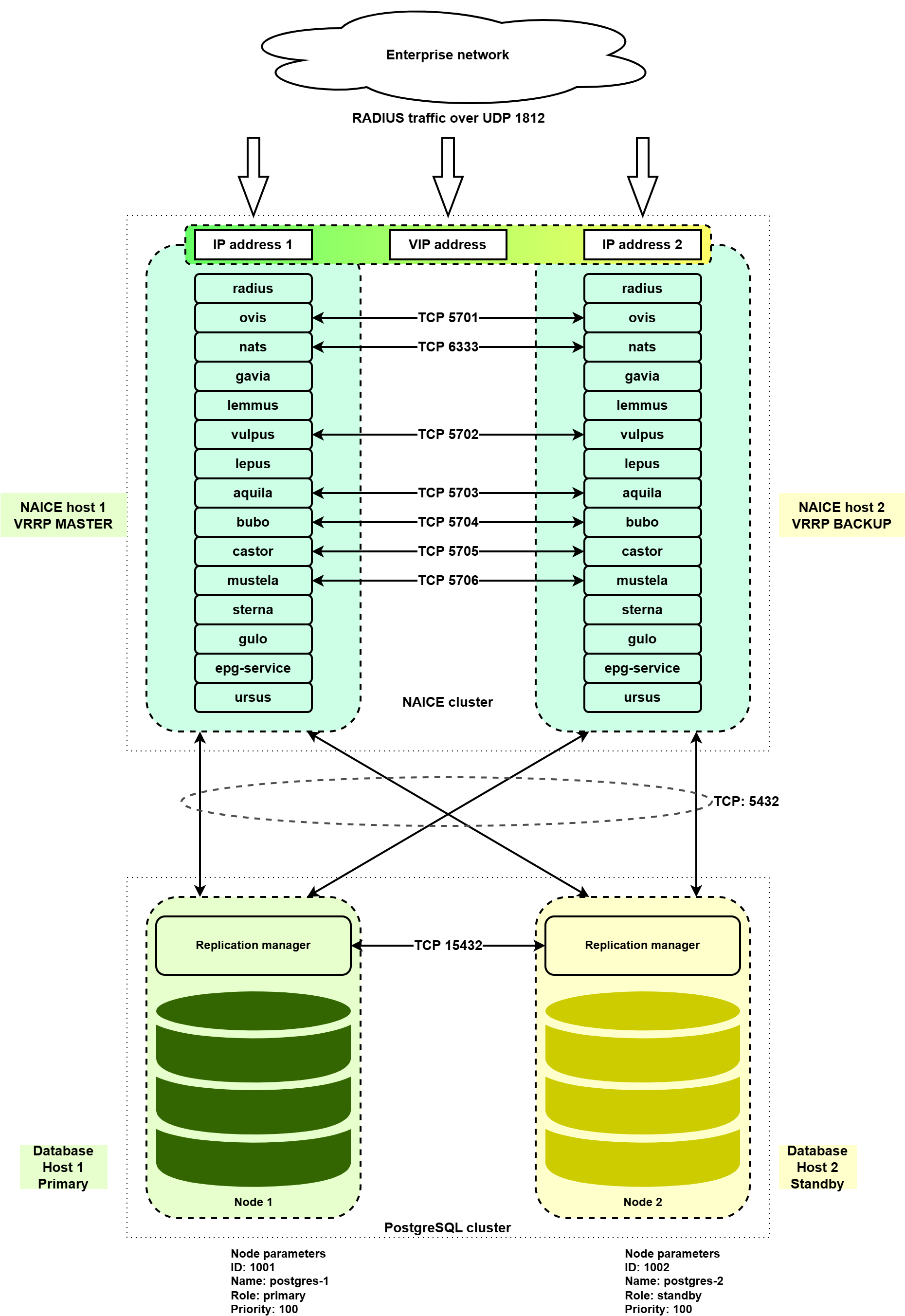
If NAICE Host 1 fails, the following actions will be performed automatically:
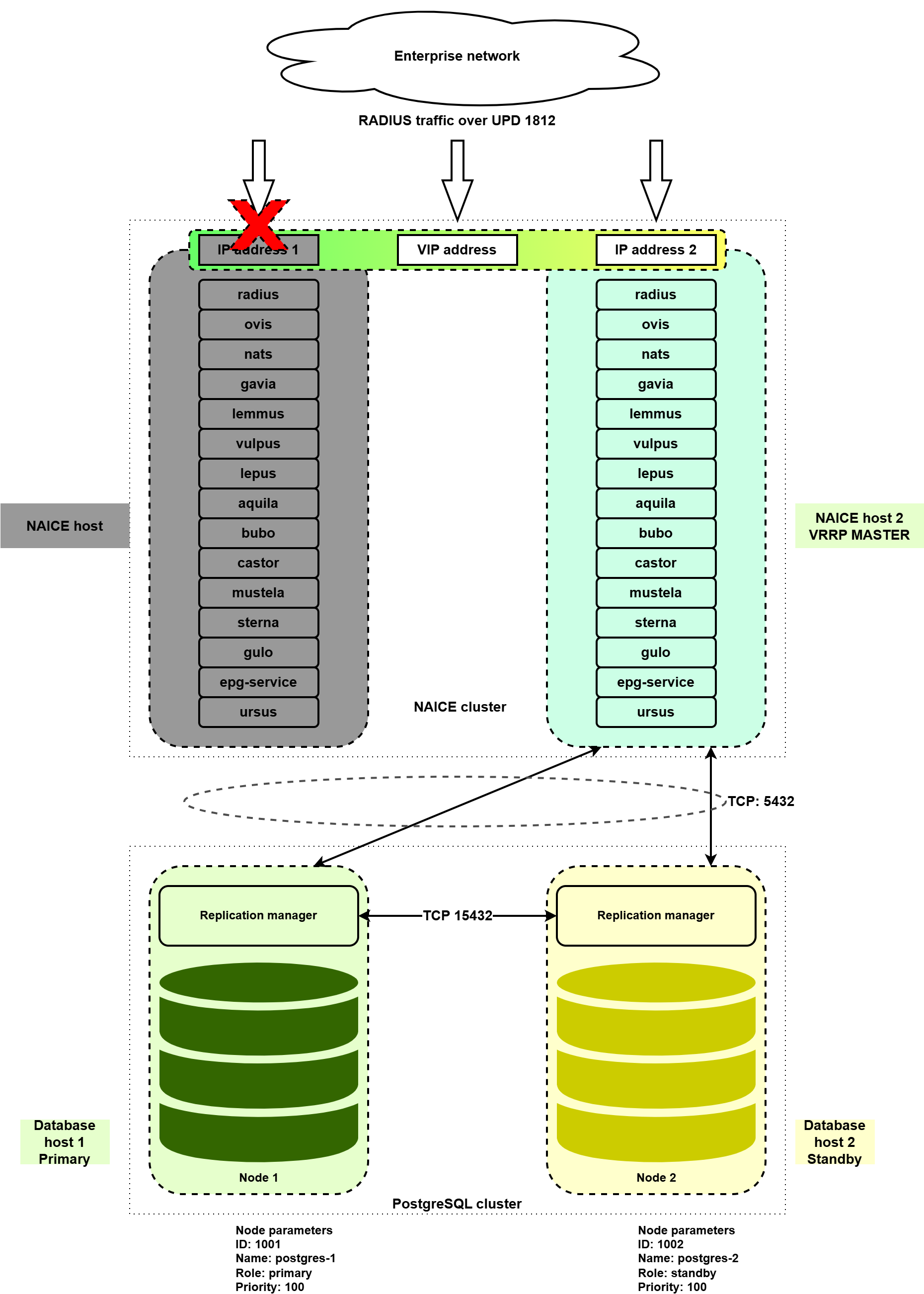
If database host 1 fails, the following actions will be performed automatically:
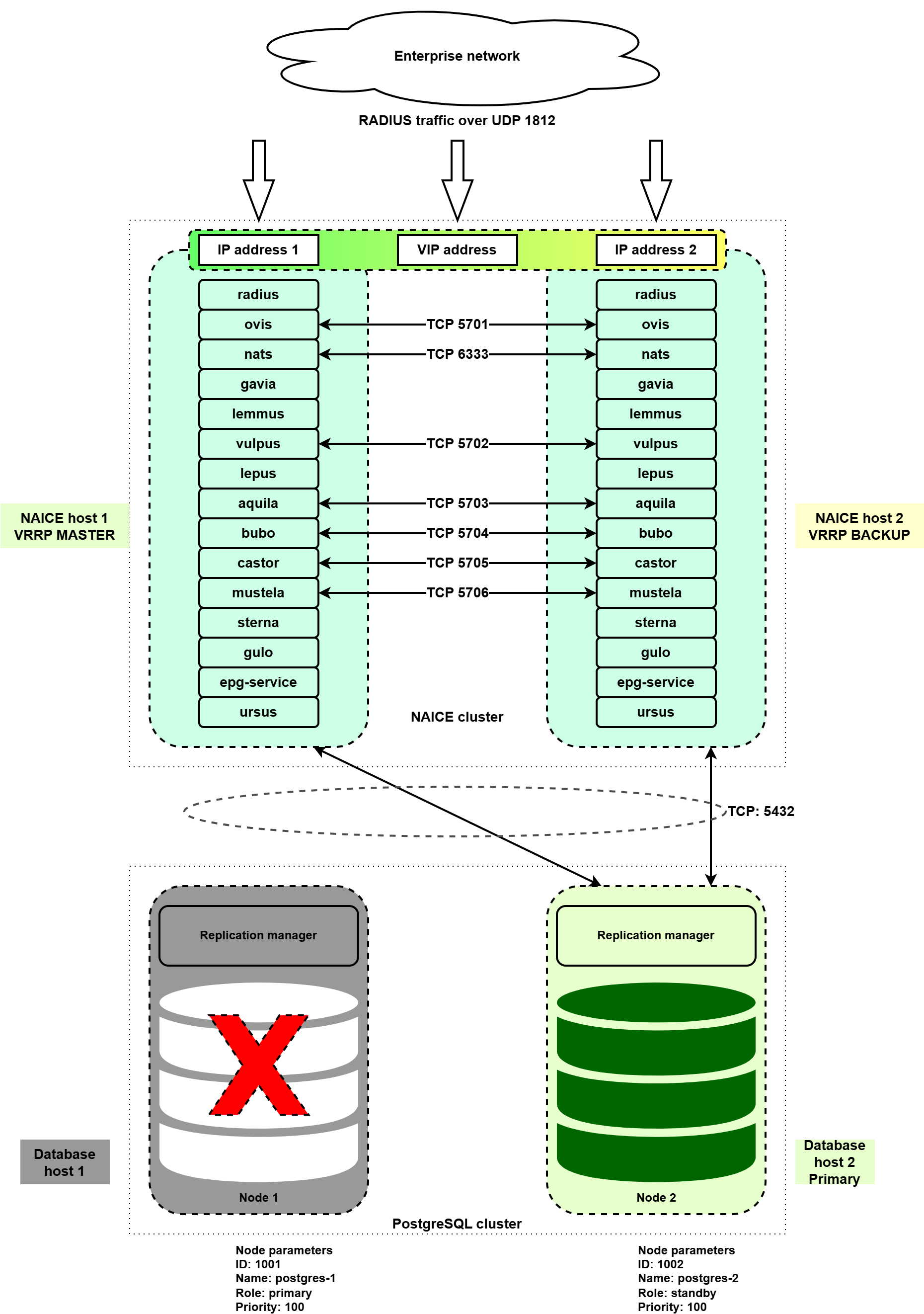
If one of the hosts is completely lost, first restore its initial state: deploy the operating system, configure IP addressing and user accounts as they were before, and then perform the recovery procedure.
On the remaining operational node, create a backup of the data according to the instructions in v1.0_3.7 Creating a database backup.
Redeploy the host corresponding to the failed cluster node, using the same OS, IP addressing, and user configuration as before.
Run the playbook:
ansible-playbook install-postgres-cluster.yml -i inventory/hosts-cluster.yml |
After completing the playbook, check the state of the PostgreSQL database cluster, verify that it is operational, and confirm that authentication and configuration in the GUI are functioning correctly.
Redeploy the host corresponding to the failed cluster node, using the same operating system, IP addressing, and user configuration as before.
Run the playbook:
ansible-playbook reservation-naice-services.yml -i inventory/hosts-cluster.yml |
When the installation is executed again, all NAICE services will be restarted, which will result in a short service interruption (up to 5 minutes). This must be taken into account when planning recovery work. The keepalived service will also be restarted, causing the VRRP master role to switch to the higher-priority instance. If the first NAICE host is being restored, a new self-signed HTTPS certificate will be generated. |
After recovery, verify that authentication is working correctly and ensure that all services are operating properly.