SMG provides several ways to connect to the command line interface:
System of commands for SMG gateway operation in the debug mode
To enter the debug mode, connect to the CLI and enter tracemode command.
Table 30 — Debug mode commands
| Command | Description | ||
|---|---|---|---|
| help | View the list of available commands | ||
| quit | Exit from debug mode | ||
| logout | Exit from debug mode | ||
| exit | Exit from debug mode | ||
| history | Show the list of previously entered commands | ||
| radact [on/off] | Turn RADIUS on/off | ||
| radshow | View the list of requests to RADIUS server | ||
| resolve | Check domain name resolution | ||
| rstat | View RADIUS protocol operation statistics | ||
| q931timers | View Q.931 timer values | ||
| mspping [on/off] <idx> | Enable/disable signal processor querying; idx — signal processor name — 0..5 | ||
| stream [stream] | View E1 stream state or a specific stream state, 'stream' is a stream number (0..15) | ||
| e1stat <stream> | View E1 stream counters | ||
| alarm | View alarm log information | ||
| sync | View synchronization source information | ||
| syncfreq | View synchronization frequency information | ||
| setsync | Forced synchronization source change Parameter — <stream number> | ||
| checkmod | Check number modifier operation for the specific number Parameters: <modifier table><phone number to be checked> | ||
| frmtrace | Enable low-level tracing for E1 signal streams Parameters: <level><stream number><usage>
| ||
| cic <linkset> | View status of channels in the link set, <linkset> is SS7 link set number | ||
| checknum | Check the number with the dial plan | ||
| cfg read | Apply the current configuration; this command will reset and re-initialize E1 streams | ||
| callref | Show information on active SIP calls | ||
| rtpdebug <level> | Enable switch RTP debugging; <level> is a debugging level
| ||
| mspcports | View RTP port state | ||
| mspcshow <device> | View signal processor connection statistics | ||
| sipstat | View SIP call statistics | ||
| sipclrstat | Reset SIP statistics counters | ||
| sipreg | View information on the subscriber or trunk registration Parameters: <user>, <trunk <self|user>> | ||
| sipreg user | View the list of registered subscribers (similar to 'reginfo' command) | ||
| sipreg trunk self | View information on SIP interface trunk registration on the upstream server | ||
| sipreg trunk user | View information on SIP interface subscriber registration on the upstream server | ||
| route | View information on network routes processed by VoIP | ||
| showcall | View information on currently active calls | ||
| license | View information on currently active licenses | ||
| mspreglog | Enable signal processor command tracing | ||
| mspunreglog | Disable signal processor command tracing | ||
| talk | View call statistics | ||
| trunk cps | Information on the current quantity of calls per second for the trunk group Parameters: <idx> — trunk group number | ||
| trunk stat | Information on the current calls for the trunk group Parameters: <idx> — trunk group number | ||
| sys | View system information, firmware version | ||
| hwreboot | Rebooting device | ||
| trace | Tracing functions | ||
| reginfo | Enter information on the registered subscribers | ||
| regcon | This command allows you to return to normal mode after unregcon command execution (if application was not terminated abnormally) | ||
| unregcon | This command is used in extreme cases to identify the accurate location of the application abnormal termination | ||
| stop | Restart the software | ||
Command syntax:
trace start
Command syntax:
trace stop
Command syntax:
trace <POINT> on/off <IDX> <LEVEL>
Parameters:
| <POINT> | argument |
| <IDX> | numeric parameter |
| <LEVEL> | debug level |
Table 31 — Possible arguments (<POINT>)
| Value <POINT> | Command description | Value <IDX> |
| hwpkt | Tracing of packet contents at the first level of exchange between the main application and E1 stream driver | 0..15 |
| stream | E1 stream tracing | 0..15 |
| port | Application operation tracing | Not used |
| isup | SS7 protocol ISUP subsystem operation tracing | Not used |
| mtp3 | SS7 protocol MTP3 level operation tracing for Е1 stream | 0..15 |
| sipt | SIP/-T/-I protocol operation tracing | Not used |
| pril3 | DSS1 protocol third level operation tracing for Е1 stream | 0..15 |
| sw | TDM switch tracing | Not used |
| mspc | IP slips tracing | Not used |
| mspd | Signal processor operation tracing | 0..7 |
| net | 2nd layer data network operation tracing | Not used |
| sync | Synchronization source operation tracing | Not used |
| erl1 | Low-level tracing for the system that transfers messages between the application and SIP module | Not used |
| erl3 | High-level tracing for the system that transfers messages between the application and SIP module | Not used |
| snmp | SNMP protocol operation tracing | Not used |
| np | Dial plan (routing) operation tracing | Not used |
| mod | Modifier operation tracing | Not used |
| alarm | Gateway alarm state tracing | Not used |
| radius | RADIUS protocol operation tracing | Not used |
To configure the device, you should connect to it via Telnet or SSH protocol, or by the RS-232 cable (for access via CLI). Default IP address: 192.168.1.2, mask: 255.255.255.0.
Initial startup username: admin, password: rootpasswd.
Once you have logged in using the default password, the system will ask you to create a new, strong password:
You are required to change your password immediately (root enforced) |
To set a new password, enter the command password. In the ‘Old password:’ field, enter the current password rootpasswd; in the ‘New password:’ field, enter a new password that meets the following security criteria:
If the password does not meet the specified criteria, the user will receive a warning and will need to start the password change procedure again:
Bad password: similar to old password Bad password: too many similar characters |
Далее в строке «Retype password:» следует повторить ввод нового пароля.
Changing password for admin Old password: New password: Retype password: Password for admin changed by admin |
Изменения конфигурации, выполненные через CLI (Command Line Interface) или web-конфигуратор, применяются непосредственно после совершения.
Для сохранения конфигурации в энергонезависимую память устройства необходимо перейти в режим конфигурирования с помощью команды config, далее выполнить команду copy running_to_startup.
Срок действия пароля пользователя составляет 90 дней. |
За неделю до окончания срока действия пароля и после успешной авторизации пользователь получит соответствующее сообщение:
Warning: your password will expire in 6 days |
Если же срок действия пароля уже истёк, то сообщение будет следующее:
You are required to change your password immediately (password aged). |
В случае если пользователь увидел такое сообщение, ему необходимо заново пройти процедуру смены пароля, описанную выше.
Given below is a complete list of commands sorted in alphabetic order.
Table 32 — CLI commands
| Command | Parameter | Value | Action |
|---|---|---|---|
| ? | Show the list of available commands | ||
| alarm global | Show the current alarm information | ||
| alarm list clear | Clear fault events log | ||
| alarm list show | Show fault events log with identification of fault type and status, occurrence time and localization parameters | ||
| config | Enter the device parameter configuration mode | ||
| CPU load statistic | Show CPU load for the last minute | ||
| date | Set the device local date and time | ||
| <DAY> | 1-31 | ||
| <MONTH> | 1-12 | ||
| <YEAR> | 2011-2037 | ||
| <HOURS> | 00-23 | ||
| <MINS> | 00-59 | ||
| dhcp start | Launch DHCP server | ||
| dhcp stop | Stop DHCP server | ||
| exit | Terminate this CLI session | ||
| firmware update tftp | Firmware update without automatic gateway restart | ||
| <FILE> | firmware file name | FILE – firmware file name | |
| <SERVERIP> | IP address in AAA.BBB.CCC.DDD format | SERVERIP – FTP server IP address | |
| firmware update ftp | Firmware update without automatic gateway restart | ||
| <FILE> | firmware file name | FILE – firmware file name | |
| <SERVERIP> | IP address in AAA.BBB.CCC.DDD format | SERVERIP – FTP server IP address | |
| firmware update usb | <FILE> | firmware file name | Firmware update with gateway restart FILE – firmware file name |
| firmware update_and_reboot tftp | Firmware update with gateway restart | ||
| <FILE> | firmware file name | FILE – firmware file name | |
| <SERVERIP> | IP address in AAA.BBB.CCC.DDD format | SERVERIP – TFTP server IP address | |
| firmware update_and_reboot ftp | Firmware update with gateway restart | ||
| <FILE> | firmware file name | FILE – firmware file name | |
| <SERVERIP> | IP address in AAA.BBB.CCC.DDD format | SERVERIP – FTP server IP address | |
| firmware update_and_reboot usb | Firmware update with gateway restart | ||
| <FILE> | firmware file name | FILE – firmware file name | |
| history | View history of entered commands | ||
| license download | Download license from the address specified | ||
| <FILE> | license | ||
| <SERVERIP> | Server IP address in AAA.BBB.CCC.DDD format | ||
| license update | Update the license | ||
| license reset | no/yes | Delete all installed licenses | |
| management | Enter SS7 stream management mode | ||
| mirroring | Enter mirroring management mode | ||
| number check | Availability check for routing by this number. Check is performed by caller and callee masks and also in the database of the configured SIP, PRI and V5.2 subscribers. The check provides the routing possibility data for this number in the defined dial plan:
SIP/PRI/V5.2 abonent ID[11] index [0] — SIP/PRI/V5.2 subscriber [subscriber ID] [database record number for this subscriber] Prefix [6] — routing by prefix [prefix number in the list] | ||
| <NUMPLAN> | 0-15/0-255 | ||
| <NUMBER> | string of no more than 31 characters | ||
| <COMPLETE> | yes/no | ||
| mirroring | Ethernet port mirroring configuration | ||
| password | Change access password via CLI | ||
| pcmdump | Collect packets from the specified E1 stream | ||
| <STREAM> | 0-15 | STREAM – number of stream for capture | |
| <FILE> | string | FILE – file for writing | |
| quit | Terminate this CLI session | ||
| reboot | <YES_NO> | yes/no | Reboot device |
| sh | Go to Linux Shell from CLI | ||
| sntp retry | Send SNTP request to the server for time synchronization | ||
| statistic | Enter the statistics viewing mode | ||
| tcpdump | Capture packets from the Ethernet device | ||
| <DEVICE> | eth0/eth1/local | DEVICE – interface for monitoring | |
| <FILE> | string | FILE – file for packet writing | |
| <SNAPLEN> | 0-65535 | SNAPLEN – byte quantity captured from each packet (0 — full packet capture) | |
| tftp put | Get file via TFTP. This command allows to download the tracings made by tcpdump and pcmdump commands | ||
| <LOCAL_FILE> | string | ||
| <REMOTE_FILE> | string | ||
| <SERVERIP> | IP address in AAA.BBB.CCC.DDD format | ||
| tracemode | Enter the tracing mode | ||
In this mode, you may view the statistics data in accordance with Q.752 ITU-Т guideline tables.
Command syntax:
statistic
Command syntax:
mtp
Execution result:
Change to MTP statistic mode SMG-[STAT]-[MTP]>
Parameters used in MTP traffic statistics viewing commands
| <LINK> | Е1 stream number |
| <LINKSET> | SS7 link set number |
| <TIME1> | amount of time for statistics output (hours) |
| <TIME2> | amount of time for statistics output (minutes) |
Command syntax:
signalling link allstat <LINK> <TIME1> <TIME2>
Example:
SMG-[STAT]-[MTP]> signalling link allstat 8 12 0
Meaning:
8th E1 stream statistics is shown from all tables for 12-hour 00-minute interval.
Q.752 ITU-Т guidelines, Table 15
Command syntax:
message accounting <LINK> <TIME1> <TIME2>
Example:
SMG-[STAT]-[MTP]> message accounting 8 12 0
Execution result:
        +---------------------------------------------------+
        |      SS7 MTP message accounting.    Link   08     |
        +---------------+-----------------+-----------------+
        |     Period:  00:00:00 –  00:00:00 (    0 sec)     |
        +---------------------------------+-----------------+
        |               |     Messages    |      Octets     |
        +---------------+-----------------+-----------------+
        |  Received     |             0   |             0   |
        +---------------+-----------------+-----------------+
        |  Transmitted  |             0   |             0   |
+---------------+-----------------+-----------------+ |
Meaning:
8th E1 stream MTP signaling traffic volume is shown for 12-hour 00-minute interval.
Q.752 ITU-Т guidelines, Table 1
Command syntax:
signalling link faults_and_performance <LINK> <TIME1> <TIME2>
Example:
SMG-[STAT]-[MTP]> signalling link faults_and_performance 8 12 0
Execution result:
+---------------------------------------------------+ | MTP SL faults and performance. Link 08 | +---------------------------------------------------+ | Period: 00:00:00 – 00:00:00 ( 0 sec) | +---------------------------------+-----------------+ | Duration the In-service state | 0 sec | +---------------------------------+-----------------+ | SL failure events all reasons | 0 | +---------------------------------+-----------------+ | Number of SU received in error | 0 | +---------------------------------+-----------------+ |
Meaning:
8th E1 stream signaling link faults and performance counters are shown for 12-hour 00-minute interval.
Q.752 ITU-Т guidelines, Table 2
Command syntax:
signalling link availability <LINK> <TIME1> <TIME2>
Example:
SMG-[STAT]-[MTP]> signalling link availability 8 12 0
Execution result:
        +---------------------------------------------------+
        |         MTP SL availability.      Link  08        |
        +---------------------------------------------------+
        |     Period:  00:00:00 –  00:00:00 (    0 sec)     |
        +---------------------------------+-----------------+
        |  Duration of SL unavailability  |          0 sec  |
+---------------------------------+-----------------+ |
Meaning:
8th E1 stream signalling link unavailability duration is shown for 12-hour 00-minute interval.
Q.752 ITU-Т guidelines, Table 3
Command syntax:
signalling link utilization <LINK> <TIME1> <TIME2>
Example:
SMG-[STAT]-[MTP]> signalling link utilization 8 12 0
Execution result:
        +---------------------------------------------------+
        |         MTP SL utilization.      Link  08         |
        +---------------------------------------------------+
        |     Period:  00:00:00 –  00:00:00 (    0 sec)     |
        +---------------------------------+-----------------+
        |  SIF and SIO octets transmitted |          0      |
        +---------------------------------+-----------------+
        |  SIF and SIO octets received    |          0      |
        +---------------------------------+-----------------+
        |  MSUs discarded due congestion  |          0      |
+---------------------------------+-----------------+ |
Meaning:
8th E1 stream utilization metrics are shown for 12-hour 00-minute interval.
Q.752 ITU-Т guidelines, Table 4
Command syntax:
signalling link availability <LINKSET> <TIME1> <TIME2>
Example:
SMG-[STAT]-[MTP]> signalling link availability 8 12 0
Execution result:
        +---------------------------------------------------+
        |         MTP SL utilization.      Link  08         |
        +---------------------------------------------------+
        |     Period:  00:00:00 –  00:00:00 (    0 sec)     |
        +---------------------------------+-----------------+
        |  SIF and SIO octets transmitted |          0      |
        +---------------------------------+-----------------+
        |  SIF and SIO octets received    |          0      |
        +---------------------------------+-----------------+
        |  MSUs discarded due congestion  |          0      |
+---------------------------------+-----------------+ |
Meaning:
Linkset and route set availability metrics are shown for for the 8th Link for 12-hour 00-minute interval.
Q.752 ITU-Т guidelines, Table 5
Command syntax:
signalling point status <LINK> <TIME1> <TIME2>
Example:
SMG-[STAT]-[MTP]> signalling point status 8 12 0
Execution result:
        +---------------------------------------------------+
        |      MTP signalling point status.   Link  08      |
        +---------------------------------------------------+
        |     Period:  00:00:00 –  00:00:00 (    0 sec)     |
        +---------------------------------+-----------------+
        |  Adjacent SP inaccessible       |          0      |
        +---------------------------------+-----------------+
        |  Duration of SP inaccessible    |          0 sec  |
        +---------------------------------+-----------------+
        |  MSUs discarded due error       |          0      |
+---------------------------------+-----------------+ |
Meaning:
8th E1 stream signalling point metrics are shown for 12-hour 00-minute interval.
Command syntax:
packets
Execution result:
SMG-[STAT]-[PACKETS]>
Command syntax:
show <TIME1> <TIME2>
Parameters:
| <TIME1> | amount of time for statistics output (hours) |
| <TIME2> | amount of time for statistics output (minutes) |
Example:
SMG-[STAT]-[PACKETS]> show 12 0
Execution result:
        +---------------------------------------------------+
        |                 Packet statistic                  |
        +---------------------------------------------------+
        |     Period:  12:00:17 –  13:22:32 ( 4935 sec)     |
        +------------------------------+--------------------+
        |  Packets received            |             0      |
        +------------------------------+--------------------+
        |  Packets transmitted         |             0      |
        +------------------------------+--------------------+
        |  Packets lost                |             0      |
        +------------------------------+--------------------+
        |  Packets lost (percentage)   |      0.000000      |
        +------------------------------+--------------------+
        |  Packets bad                 |             0      |
        +------------------------------+--------------------+
        |  Packets bad (percentage)    |      0.000000      |
        +------------------------------+--------------------+
        |  Packets trip-time average   |             0 ms   |
        +------------------------------+--------------------+
        |  Packets trip-time min       |             0 ms   |
        +------------------------------+--------------------+
        |  Packets trip-time max       |             0 ms   |
+------------------------------+--------------------+ |
Meaning:
QoS statistics for packet traffic data is shown for 12-hour 00-minute interval.
To enter the SS7 stream management mode, execute management command.
SMG> management Entering management mode. SMG-[MGMT]> |
| Command | Parameter | Value | Action |
| ? | Show the list of available commands | ||
| exit | Move to a higher menu level | ||
| history | View history of entered commands | ||
| nslookup | <HOST> | string | Request IP address for host with the name specified HOST – address for request |
| ping host | <HOST> | Send PING request to the host specified | |
| ping ip | <IP> | IP address in AAA.BBB.CCC.DDD format | Send PING request to the IP address specified |
| e1 stat clear | <STREAM> | 0-15 | Reset statistics for the Е1 stream specified |
| e1 stat show | <STREAM> | 0-15 | View statistics for the Е1 stream specified |
| ss7link | <SS7_LINK> | 0-15 | Proceed to the specified SS7 stream parameter management |
| ss7netlink | Proceed to netlink management | ||
| quit | Terminate this CLI session |
To enter this mode, execute ss7link <Link> command in the SS7 stream configuration mode, where <Link> is SS7 stream number that may take values in the range from 0 to 15.
SMG-[MGMT]> ss7link 0 E1[0]. Signaling is SS7 SMG-[MGMT]-[SS7LINK][0]> |
| Command | Parameter | Value | Action |
|---|---|---|---|
| ? | Show the list of available commands | ||
| chan block | <CHAN_INDEX> | 1-31 | Block the specified channel (BLO) |
| chan ccr | Send CCR message and check the channel integrity with this message | ||
| <CHAN_INDEX> | 1-31 | ||
| start | |||
| state | |||
| stop | |||
| chan group block | Block a group of channels | ||
| <CHAN_INDEX_START> | 1-31 | CHAN_INDEX_START – starting E1 channel number in a group | |
| <CHAN_COUNT> | 2-31 | CHAN_COUNT – quantity of channels in a group | |
| chan group reset | Reset channel group | ||
| <CHAN_INDEX_START> | 1-31 | CHAN_INDEX_START – starting E1 channel number in a group | |
| <CHAN_COUNT> | 2-31 | CHAN_COUNT – quantity of channels in a group | |
| chan group unblock | Unblock a group of channels | ||
| <CHAN_INDEX_START> | 1-31 | CHAN_INDEX_START – starting E1 channel number in a group | |
| <CHAN_COUNT> | 2-31 | CHAN_COUNT – quantity of channels in a group | |
| chan rel | <CHAN_INDEX> | 1-31 | Disconnection in the specified channel |
| chan reset | <CHAN_INDEX> | 1-31 | Reset specified channel |
| chan rlc | <CHAN_INDEX> | 1-31 | Confirm disconnection in the specified channel |
| chan unblock | <CHAN_INDEX> | 1-31 | Unblock specified channel |
| exit | Return from this configuration submenu to the upper level | ||
| link clr outage | Clear 'CPU local failure' state for a channel | ||
| link send LFU | Send 'link forced inhibit' message to stream | ||
| link send LIN | Send 'link uninhibit' message to stream | ||
| link send LUN | Send 'link inhibit' message to stream | ||
| link set congestion | Set 'overload' state for a stream | ||
| link set outage | Set 'CPU local failure' state for a stream | ||
| link start emergency | Initiate emergency stream startup | ||
| link start normal | Initiate normal stream startup | ||
| link stop | Stop stream | ||
| quit | Terminate this CLI session | ||
| show info chan | Show information on the channel state in a stream | ||
| show info link | Show information on the stream state | ||
To enter this mode, execute ss7netlink command in the SS7 flow control mode.
SMG-[MGMT]> ss7netlink SMG-[MGMT]-[SS7NETLINK]> |
| Command | Parameters | Value | Actions |
|---|---|---|---|
| ? | Show the list of available commands | ||
| exit | Return from this configuration submenu to the upper level | ||
| history | Show the history of entered commands | ||
| list | Show the list of configured netlinks | ||
| quit | Terminate this CLI session | ||
| show linkset | <LINKSET_IDX> | 0-15 or none | Show the parameters of linkset or all linksets on the device |
In the mode of configuring port mirroring parameters (only for SMG-1016M) to enter this mode, you must execute the mirroring command.
SMG> mirroring Change to the mirroring mode SMG-[MIRRORING]> |
| Command | Parameters | Value | Action |
|---|---|---|---|
| ? | Show the list of available commands | ||
| apply | yes/no | Apply settings | |
| exit | Return from this configuration submenu to the upper level | ||
| quit | Terminate this CLI session | ||
| set | Configure port mirroring: | ||
| <PORT> | CPU/GE_PORT0/GE_PORT1/GE_PORT2/SFP0/SFP1 | PORT – port type | |
| <NAME> | NAME – port designation | ||
| src_in/ | src_in – incoming packet source port — copy frames received from this port (source port) | ||
| src_out/ | src_out – outgoing packet source ports — copy frames sent by this port (source port). | ||
| dst_in/ | dst_in – incoming packet destination port — destination port for copied frames received by selected source ports. | ||
| dst_out | dst_out – outgoing packet destination port — destination port for copied frames sent by selected source ports. | ||
| <ACT> | on/off | ||
| show | Configure port mirroring | ||
To proceed to device parameter configurations/monitoring, execute config command.
For each configuration mode do and top commands are available. The ‘do’ command allows you to execute a command of root CLI menu when being in any configuration submenu. The ‘top’ command allows going to root CLI menu.
SMG> config Entering configuration mode. SMG-[CONFIG]> |
| Command | Parameters | Value | Action |
|---|---|---|---|
| ? | Show the list of available commands | ||
| alarm path | <set> | off or /mnt/sd[abc][1-7]* | Select an external storage device for alarm message storage Off – disabled/mnt/sd[abc][1-7]* — path to storage device for tracing storage |
| access category | Enter access categories' configuration mode | ||
| cdr | Enter CDR record parameter configuration mode | ||
| copy running_to_startup | Write the current configuration into non-volatile memory of the device (into start configuration) | ||
| copy startup_to_running | Restore the current configuration from the start configuration | ||
| count linkset | Show the number of SS7 link sets | ||
| count trunk | Show the number of trunk groups | ||
| count trunk-direction | Show the number of trunk directions | ||
| сount sipt-interface | Show the number of SIP interfaces | ||
| сount radius-profile | Show the number of RADIUS profiles | ||
| count modifiers-table | Show the number of modifier table profiles | ||
| count sipcause-profile | Show the number of Q.850 and sip-reply compliance profiles | ||
| count routing-profile | Show the number of scheduled routing profiles | ||
| count h323-interface | Show the number of h.323 profiles | ||
| count ss7timers | Show the number of SS7 timer profiles | ||
| delete linkset | <OBJECT_INDEX> | Existing number of the link set | Delete SS7 link set |
| delete trunk | <OBJECT_INDEX> | Existing trunk group number | Delete trunk group |
| delete trunk-direction | <OBJECT_INDEX> | Existing trunk direction number | Delete trunk direction |
| delete sipt-interface | <OBJECT_INDEX> | Existing SIP interface number | Delete SIP interface |
| delete radius-profile | <OBJECT_INDEX> | Existing RADIUS profile number | Delete RADIUS profile |
| delete modifiers-table | <OBJECT_INDEX> | Existing modifier table number | Delete modifier table |
| delete sipcause-profile | <OBJECT_INDEX> | Existing q.850 and sip-reply compliance table number | Delete q.850 and sip-reply compliance table |
| delete routing-profile | <OBJECT_INDEX> | Existing scheduled routing table number | Delete scheduled routing table |
| delete h323-interface | <OBJECT_INDEX> | Existing H.323 interface number | Delete H.323 interface |
| delete ss7timers | <OBJECT_INDEX> | Existing SS7 timer profile number | Delete SS7 timer profile |
| delete hunt-group | <OBJECT_INDEX> | Existing call group | Delete call group |
| delete pickup-group | <OBJECT_INDEX> | Existing pickup group | Delete pickup group |
| e1 | <E1_INDEX> | 0-15 | Enter the selected E1 stream configuration mode |
| exit | Move to a higher menu level | ||
| firewall dynamic | Enter dynamic firewall configuration mode | ||
| firewall static | Enter static firewall configuration mode | ||
| ftpd | Enter ftp server configuration mode | ||
| h323 configuration | Enter H.323 protocol configuration mode | ||
| h323 interface | <H323_INDEX> | 0-63 | Enter the configuration mode for the specific interface Н.323 protocol operation |
| history | View history of entered commands | ||
| hunt-group | <hunt-group_INDEX> | 0-31 | Enter the configuration mode for the specific call group operation |
| log path | Apply path settings for tracing storage Configure path for tracing storage: | ||
| <apply> | |||
| <set> | local | local – local storage in RAM | |
| /mnt/sd[abc][1-7]* | /mnt/sd[abc][1-7]* – path to storage device for tracing storage | ||
| <show> | View path settings for tracing storage | ||
| linkset | <LINKSET_INDEX> | 0-15 | Enter the SS7 link set configuration mode |
| modifiers table | <MODTBL_INDEX> | 0-255 | Enter the modifier table configuration mode |
| network | Enter the network parameter configuration mode | ||
| new linkset | Create a new SS7 link set | ||
| new trunk | Create a new trunk group | ||
| new trunk-direction | Create a new trunk direction | ||
| new sipt-interface | Create a new SIP-T interface | ||
| new radius-profile | Create a new RADIUS profile | ||
| new modifiers-table | Create a new modifier table | ||
| new sipcause-profile | Create q.850 and sip-reply compliance table | ||
| new routing-profile | Create scheduled routing table | ||
| new h323-interface | Create H.323 interface | ||
| new ss7timers | Create SS7 timer profil | ||
| new hunt-group | Create call group | ||
| new pickup-group | Create pickup group | ||
| numplan | Enter the dial plan configuration mode | ||
| pbx_profiles | Enter the PBX profile configuration mode | ||
| ports range | <RANGE_PORT> | 1-65535 | Define the range of UDP ports used for voice traffic (RTP) and data transmission via T.38 protocol |
| ports show | Show UDP port configuration | ||
| ports start | <START_PORT> | 1024-65535 | Define the starting UDP port used for voice traffic (RTP) and data transmission via T.38 protocol |
| q931-timers | Enter Q.931 timer configuration mode | ||
| quit | Terminate this CLI session | ||
| radius | Enter RADIUS configuration mode | ||
| record | Enter the conversation recording configuration mode | ||
| reset_config | Reset configuration | ||
| route | Enter the static route configuration mode | ||
| routing profile | <PROFILE_INDEX> | 0-127 | Enter the scheduled routing configuration mode |
| show running main by_step | Show the current main configuration by steps | ||
| show running main whole | Show the current main configuration in full | ||
| show running network | Show the current network configuration | ||
| show running radius_servers | Show the current RADIUS server configuration | ||
| show running snmp | Show the current SNMP configuration | ||
| show startup main by_step | Show the initial main configuration by steps | ||
| show startup main whole | Show the initial main configuration in full | ||
| show startup network | Show the initial network configuration | ||
| show startup radius_servers | Show the initial RADIUS server configuration | ||
| show startup snmp | Show the initial SNMP configuration | ||
| sip configuration | Enter SIP/SIP-T parameter configuration mode | ||
| sip interface | <SIPT_INDEX> | 0-63 | Enter SIP/SIP-T interface parameter configuration mode |
| sip users | Enter SIP/SIP-T subscriber parameter configuration mode | ||
| ss7cat | Enter SS7 category configuration mode | ||
| ss7timers | <SS7_TIMERS_INDEX> | 0-15 | Enter SS7 timer configuration mode |
| submodule-usage | Enter the configuration mode of SM-VP submodule usage | ||
| switch_port | Enter the internal switch configuration mode | ||
| sync | Enter the configuration mode for synchronization parameters | ||
| syslog | Enter the system log parameters configuration mode | ||
| trunk | <TRUNK_INDEX> | 0-63 | Enter the trunk group configuration mode |
| trunk direction | <DIRECTION_INDEX> | 0-31 | Enter the trunk direction configuration mode |
| v5.2 | Enter the configuration mode for V5.2 parameters for the current E1 stream | ||
| upload_config complete/partial ftp/http/scp/tftp/usb | <FILE> | string | Upload the full/part configuration via ftp/http/scp/tftp/usb |
| upload_setup | Switch to the configuration downloading mode | ||
| web protocol set | <PROTOCOL> | HTTP-or-HTTPS/HTTPS-only | Set the access protocol to web interface |
| web protocol show | Show the actrive access protocol to web interface | ||
| web user list | Show the list of WEB users | ||
| web user password | Reset the password of WEB user | ||
| <USER_INDEX> | 0-100 | Index of WEB user | |
| <LEN> | 8-63 | New password length of WEB user | |
To enter this mode, execute cdr command in the configuration mode.
SMG-[CONFIG]> cdr Entering CDR-info mode. SMG-[CONFIG]-[CDR]> |
| Command | Parameter | Value | Action |
|---|---|---|---|
| ? | Show the list of available commands | ||
| archive | CDR data archiving | ||
| <all> | String, 31 characters max. | ||
| <directory> | |||
| category | save | yes/no | Save/do not save subscriber category in CDR files |
| config | Return to Configuration menu | ||
| duration count mode | <CDR_COUNT_MODE> | round-up/round-down/not-round | Rounding up/down or not rounding (write with milliseconds) |
| emptysave | <CDR_EMPTY> | yes/no | Save/do no save empty CDR files |
| enabled | <CDR> | yes/no | Generate/do not generate CDRs |
| exit | Return from this configuration submenu to the upper level | ||
| fields add | <FIELD> | <1-52> | Add specified field in the end of field list (see CDR field list) |
| fields add_all | Set basic set of fields | ||
| fields rem | <FIELD> | <1-52> | Clear the specified field from the list |
| fields rem_all | CLear all fields from the list | ||
| fields default | Set basic set of fields | ||
| fields set <field> | <FIELD_INDEX> | 0-39 | Substitute field on corresponding position with specified field (see CDR field list) |
| field hdrs code_page | CDR file creation mode for russian language (for english only UTF-8) | ||
| <CODE_PAGE> | cp1251 | CP1251 | |
| utf8 | UTF-8 | ||
| translit | Translit | ||
| fields hdrs language | Choose the language for CDR header fields | ||
| <FIELDS_LANG> | eng | English | |
| rus | Russian | ||
| fields hdrs state | Displaying mode for CDR header fields | ||
| <FILL_HDRS> | yes | Emabled | |
| no | Disabled | ||
| fields hdrs show | Show the settings of CDR header fields | ||
| fields show | Show all CDR fields added | ||
| file create mode | <CDR_FILE> | CDR file creation mode: | |
| periodically/ | periodically – with defined period | ||
| once-a-day/ | once-a-day – daily | ||
| once-an-hour | once-an-hour – hourly | ||
| header | <CDR_HEADER> | yes/no | Write/do not write the following header into the beginning of CDR file: SMG. CDR. File started at 'YYYYMMDDhhmmss', where 'YYYYMMDDhhmmss' is the record saving start time |
| history | View history of entered commands | ||
| localdisk | Path to CDR data storage on local drives View CDR data storage path setting | ||
| <set> | /mnt/sd[abc][1-7]* | ||
| <show> | |||
| localkeep period | Time of CDR data storage on a local drive | ||
| <day> | 0-30 | ||
| <hour> | 0-23 | ||
| <min> | 0-59 | ||
| localsave | Save CDR data on a local drive | ||
| <no> | |||
| <yes> | |||
| period day | <CDR_DAY> | 0-30 | Set the time period for CDR generation and saving in the device RAM, days |
| period hour | <CDR_HOUR> | 0-23 | Set the time period for CDR generation and saving in the device RAM, hours |
| period min | <CDR_MIN> | 0-59 | Set the time period for CDR generation and saving in the device RAM, minutes |
| pickup mark | <CDR_ pickup _MARK> | yes/no | Add/do not add additional field 'pickup tag' to CDR |
| quit | Terminate this CLI session | ||
| redirectmark | <CDR_REDIRECT_MARK> | yes/no | Add/do not add additional field 'redirection tag' to CDR |
| redirectsave | <CDR_REDIRECT> | yes/no | Add additional field 'Redirecting number' to CDR, otherwise redirecting number will replace calling party number in redirected calls |
| redirected duration | <CDR_REDIR_DURATION> | yes/no | Specify redirected call duration |
| release initiator mark | <CDR_RELEASE> | yes/no | Save disconnection initiator tag |
| show | Show CDR settings | ||
| show_dirs | Show path to the FTP server access directory | ||
| signature | <CDR_SIGNATURE> | String, 63 characters max. | Specify distinctive feature that will facilitate identification of the device that created the record |
| unsuccess | <CDR_UNSUCC> | yes/no | Store/do not store unsuccessful calls (not resulted in conversation) into CDR files |
| upload archive ftp/tftp | Send archive to FTP/TFTP server | ||
| <ARCHIVE_NAME> | String, 63 characters max. | ||
| <FTP/TFTP_server> | IP address | ||
| upserver enabled | <CDR_UPLOAD> | yes/no | Transfer/do not transfer CDRs to the server |
| upserver ipaddr | <CDR_SERVER_IPADDR> | String, 63 characters max. | Set server IP address |
| upserver login | <CDR_SERVER_LOGIN> | String, 63 characters max. | Set a username to access server |
| upserver passwd | <CDR_SERVER_PASSWD> | String, 63 characters max. | Set a user password to access server |
| upserver path | <CDR_SERVER_PATH> | String, 63 characters max. | Set the path to the folder on the server, in which CDR records will be saved |
| upserver port | <CDR_SERVER_PORT> | 1-65535 | Set server TCP port |
| upserver protocol | <CDR_VIA_PROTO> | FTP/SCP | Set the protocol by which CDRs will be go to the server |
| upserver_reserve enabled | <CDR_RESERV_ENA> | yes/no | Transfer/do not transfer CDRs to the backup server |
| upserver_reserve ipaddr | <CDR_RESERV_IPADDR> | String, 63 characters max. | Set the IP address of the backup server |
| upserver_reserve login | <CDR_RESERV_LOGIN> | String, 63 characters max. | Set a username to access backup server |
| upserver_reserve only_fail | <CDR_RESERV_ONLY_FAIL> | yes/no | Enable/disable saving CDR files to the backup server only if an error occurs when writing to the main one |
| upserver_reserve passwd | <CDR_RESERV_PASSWD> | String, 63 characters max. | Set a user password to access the backup server |
| upserver_reserve path | <CDR_RESERV_PATH> | String, 63 characters max. | Set the path to the folder on the backup server where CDR records will be saved |
| upserver_reserve port | <CDR_RESERV_PORT> | 1-65535 | Set the TCP port of the backup server |
The CDR fields list is used in fields add <field> and fields set <field> <n> commands.
| <field> | Value |
| acct-session-id | RADIUS Account-Session-Id, value of Acct-Session-Id field, that is transmitted to RADIUS by packet of accounting |
| called_in | Called number on input (before modification) |
| called_out | Called number on output (after modification) |
| calling_in | Calling number on input (before modification) |
| calling_out | Calling number on output (after all modifications) |
| device_sign | Distinguishing feature |
| disc_code | Code of disconnection via Q.850 |
| disc _nfo | Call status in case of disconnection |
| duration | Call duration |
| global-callref | Global Call Reference (GCR) field |
| incoming_CID_category | CID category on input (before modification) |
| incoming_description | Caller description–subscriber/trunk (TG) name |
| incoming_E1_chan | Number of incoming E1 channel |
| incoming_E1_stream | Number of incoming E1 stream |
| incoming_ipaddr | Caller IP address |
| incoming_SIP_call_id | SIP Call-ID of incoming call |
| incoming_SS7_category | SS7 category on input (before modification) |
| incoming_SS7_CIC | CIC number of incoming call |
| incoming_type | Caller type |
| pickup_mark | Call pickup mark |
| redir_mark | Call redirection mark |
| release_side_mark | Mark of disconnection initiator |
| numplan_in | Dial plan after that call will be received |
| numplan_out | Dial plan after that call will be transmitted |
| outgoing_CID_category | CID category on input (after modification) |
| outgoing_description | Callee description–subscriber/trunk (TG) |
| outgoing_E1_chan | Number of outgoing E1 channel |
| outgoing_E1_stream | Number of outgoing E1 channel |
| outgoing_ipaddr | IP address of callee |
| outgoing_SIP_call_id | SIP Call-ID of outgoing call |
| outgoing_SS7_category | SS7 category on output (after modification) |
| outgoing_SS7_CIC | CIC number of outgoing call |
| outgoing_type | Callee type |
| radius-rejected | Blocking RADIUS server address |
| redirecting_in | Number of forwarding party on input (before modification) |
| redirecting_out | Number of forwarding party on output (after modification) |
| seq_number | Sequence number |
| connect_time | Connect time |
| disconnect_time | Disconnect time |
| setup_time | Call time |
unique-id | Unique ID |
nai_calling | Indicators showing the number’s origin |
nai_called | |
nai_redir_in | |
nai_redir_out | |
origin_nai_calling | |
origin_nai_called | |
ivr-call-rec-path | Path of the IVR call recording file |
call-rec-path | Path of the call recording file |
call-transfer | Call transfer label |
time_in_queue | Time in queue |
| redir_type | Redirection time |
To enter this mode, execute access category command in the configuration mode.
SMG-[CONFIG]> access category Entering Access-Category mode. SMG-[CONFIG]-[ACCESS-CAT]> |
| Command | Parameter | Value | Action |
|---|---|---|---|
| ? | Show the list of available commands | ||
| config | Return to Configuration menu | ||
| exit | Return from this configuration submenu to the upper level | ||
| quit | Terminate this CLI session | ||
| set access | Define category mutual access permissions: | ||
| <CAT_IDX> | 0-63 | CAT_IDX – configured access category index | |
| <ACCESS_IDX> | 0-63 | ACCESS_IDX – category the access to be configured for | |
| <ACCESSIBLE> | enable/disable | ACCESSIBLE – category access status (available, not available) | |
| set name | Change access category name | ||
| <CAT_IDX> | 0-63 | CAT_IDX – configured access category index | |
| <NAME> | Access category name, 31 character max. (letters, numbers, underscore character '_') | NAME – access category name | |
| show | <CAT_IDX> | 0-63 | Show this access category configuration |
| showall | Show all access categories' configuration | ||
To enter this mode, execute e1 <E1_INDEX> command in the configuration mode, where <E1_INDEX> is Е1 stream number.
SMG-[CONFIG]> e1 0 Entering E1-stream mode. SMG-[CONFIG]-E1[0]> |
| Command | Parameter | Value | Action |
| ? | Show the list of available commands | ||
| alarm | <ON_OFF> | on/off | Enable/disable fault indication for the current E1 stream |
| config | Return to Configuration menu | ||
| crc4 | <ON_OFF> | on/off | Enable/disable CRC4 control for the current E1 stream |
| disabled | Disable the stream operation | ||
Enable the stream operation | |||
| equalizer | <ON_OFF> | on/off | Enable/disable Е1 stream signal attenuation |
| exit | Return from this configuration submenu to the upper level | ||
| history | View history of entered commands | ||
| lapd | Enter LAPD parameters configuration mode for the current E1 stream | ||
| linecode AMI | Set the AMI linear encoding type for the current stream | ||
| linecode HDB3 | Set the HDB3 linear encoding type for the current stream | ||
| name | letter or number or '_', '.', '-'. Max 63 symbols | E1 stream name | |
| q931 | Enter Q.931 signalling configuration mode for the current E1 stream | ||
| quit | Terminate this CLI session | ||
| remalarm | <ON_OFF> | on/off | Enable/disable remote fault indication for the current stream |
| show | Show the current stream configuration | ||
| signaling | <Signaling type> | Q931_USR Q931_NET SS7 SORM V5.2LE SORM-TRANSIT | Set the signalling type for the stream |
| slipIND | <ON_OFF> | on/off | Enable fault indication when slips are identified in the reception path |
| slipTO | <TIMEOUT> | 5sec/10sec/20sec/30sec/45sec/1min/2min/3min/5min/10min/15min/30min/1hour/2hour/6hour | Specify stream parameter polling frequency; if the slip is detected in that stream, PBX will indicate an alarm for the duration of this timeout |
| sorm | Enter the SORM configuration mode for the current E1 stream | ||
| ss7 | Enter the configuration mode for SS7 signalling parameters of the current E1 stream |
This mode is available for Q.931 signalling only (set by signaling). To enter this mode, execute lapd command in the E1 stream configuration mode.
SMG-[CONFIG]-E1[0]> lapd E1[0]. Signaling is Q931 SMG-[CONFIG]-E1[0]-[LAPD]> |
| Command | Parameter | Value | Action |
| ? | Show the list of available commands | ||
| config | Return to Configuration menu | ||
| exit | Return from this configuration submenu to the upper level | ||
| history | View history of entered commands | ||
| N200 | <N200> | 0-255 | Specify the number of connection establishment attempts |
| quit | Terminate this CLI session | ||
| show | Show LAPD configuration | ||
| t200 | <T200> | 0-255 | Set T200 timer value, x100ms |
| t203 | <T203> | 0-255 | Set T203 timer value, x100ms |
This mode is available for Q.931 signalling only (set by signaling command). To enter this mode, execute q931 command in the E1 stream configuration mode.
SMG-[CONFIG]-E1[0]> q931 E1[0]. Signaling is Q931 SMG-[CONFIG]-E1[0]-[Q931]> |
| Command | Parameter | Value | Action | |
|---|---|---|---|---|
| ? | Show the list of available commands | |||
| access category | <CAT_IDX> | 0-31 | Set the access category for a stream | |
| categoryAON | <CAT_AON> | 0-15 | Define Caller ID category for the incoming call | |
| channel on_off | Enable/disable specified channel | |||
| <CHAN_NUM> | [0-31] or ‘all’ | |||
| <on_off> | on/off | |||
| channel access_category | Specify the access category | |||
| <CHAN_NUM> | 1-31 or all | channel number | ||
| <CAT_IDX> | 0-127 | Access category | ||
| chanorder | <CHAN_ORDER> | Specify the channel engagement order: | ||
| up_ring/ | up_ring – sequential forward | |||
| down_ring/ | down_ring – sequential back | |||
| up_start/ | up_start – from the first and forward | |||
| down_start | down_start – from the last and back | |||
| config | Return to Configuration menu | |||
| exit | Return from this configuration submenu to the upper level | |||
| history | View history of entered commands | |||
| InBand in Disconnect | <on_off> | on/off | Enable 'Process PI In-Band in DISCONNECT' option | |
| invokeID | <INVOKE_ID> | 1024-65535 | Set operation call initial identifier (used as a reference number for unique operation call identification) | |
| numplan | <CLD_PLAN_ID> | unknown/ISDN/telephony/National/Privat | Specify dial plan type
| |
| qsig | <ON_OFF> | on/off | Enable/disable QSIG signalling | |
| quit | Terminate this CLI session | |||
| redir in facility | <ON_OFF> | on/off | Enable Redirection option in FACILITY | |
| RestartChannel | <SEND> | send/don’t_send | Send/do not send channel RESTART | |
| RestartInterface | <SEND> | send/don’t_send | Send/do not send interface RESTART | |
| RoutingProfile | <PROF Number> | [0-127] or none | Select scheduled routing profile | |
| SendCatAON | <ON_OFF> | on/off | Enable/disable Caller ID category transmission as the first digit of a number in the SETUP message
| |
| SendDialTone | <ON_OFF> | on/off | Send/do not send the DialTone ready signal into the line during incoming overlap engagement | |
| SendEndOfDial | <ON_OFF> | on/off | Enable/disable 'End of dial' message transmission | |
| show | Show Q.931 signalling parameter configuration | |||
| transit location number | <ON_OFF> | on/off | Allow/disable shifting of the Location Number parameter from incoming SS7/SIP-T message to Calling Party Number parameter of outgoing message SETUP Q931 | |
| trunk | <trunk_index> | 0-31 | Define the trunk group number for the current stream | |
This mode is available only for SORM signaling (set by the signaling command). To enter this mode, execute the sorm command in the E1 stream configuration mode.
SMG-[CONFIG]-E1[0]> sorm E1[0]. Signaling is SORM SMG-[CONFIG]-E1[0]-[SORM]> |
| Command | Parameter | Value | Action |
| ? | Show the list of available commands | ||
| activity | <ON_OFF> | on/off | Enable/disable messaging activity control on L1 |
| сhan1(2) mode | <SORM_MODE> | DCE/DTE | Set mode for chan1 (2). Acceptable modes: DCE, DTE |
| chan1(2) send L3 Reset | <ON_OFF> | on/off | Allow/deny sending L3 reset command to channel1(2) |
| chan1(2) send L3 Restart | <ON_OFF> | on/off | Allow/deny sending L3 restart command to channel 1 |
| chan1(2) send SABME | <ON_OFF> | on/off | Enable/disable balanced asynchronous extended mode (SABME) on channel 1(2) |
| cmd | <CMD_ADDR> | 1/3 | Set command frame address |
| config | Return to Configuration menu | ||
| exit | Return from this configuration submenu to the upper level | ||
| history | View history of entered commands | ||
| mode | Tcp/x25 | Select the signal operating mode of KSL channels | |
| protocol specification | <SPECIFICATION> | order_70/KZ_specification/order_268 | Select the SORM specification |
| quit | Terminate this CLI session | ||
| resp | <RESP_ADDR> | 1/ 3 | Set response frame address |
| show | Show SORM configuration | ||
| tcp interface | <IFACE_NAME> | Select a network interface for organizing a TCP connection | |
| tcp port1 | 10000-65535 | Selecting a virtual TCP port for setting up useful work coefficient 1 | |
| tcp port2 | 10000-65535 | Selecting a virtual TCP port for setting up useful work coefficient 2 | |
| timer 10min | <ON_OFF> | on/off | Enable/disable timeout for receiving commands from the SORM control unit |
This mode is available for SS7 signalling only (set by signaling command). To enter this mode, execute ss7 command in the E1 stream configuration mode.
SMG-[CONFIG]-E1[0]> ss7 E1[0]. Signaling is SS7 SMG-[CONFIG]-E1[0]-[SS7]> |
| Command | Parameter | Value | Action |
|---|---|---|---|
| ? | Show the list of available commands | ||
| CIC fill | Define CIC value for all time slots beginning from 0 | ||
| <CIC> | 0-65535 | CIC – CIC starting number | |
| <step> | 0-255 | step – numbering increment | |
| CIC set | Define CIC value for a single timeslot | ||
| <TIMESLOT> | 0-31 | TIMESLOT – timeslot number | |
| <CIC> | 0-65535 | CIC – CIC value | |
| config | Return to Configuration menu | ||
| channel access_category | Set channel access category | ||
| <CHAN_NUM> | 1-31 or all | Channel number | |
| <CAT_IDX> | 0-127 | Access category | |
| channel Dchan | <D_CHAN> | 0-31 | Set D-channel number for a line 0 — do not use D-channel (voice stream) |
| DPC MTP3 | 0-16383 | Define DPC MTP3 value for the current stream | |
| exit | Return from this configuration submenu to the upper level | ||
| history | View history of entered commands | ||
| linkset | <linkset_index> | 0-15 | Assign SS7 link set for the current stream |
| quit | Terminate this CLI session | ||
| show | Show SS7 signalling parameter configuration | ||
| SLC | <slc> | 0-15 | Set the signal channel identifier in SS7 link set |
To enter this mode, execute firewall dynamic command in the configuration mode.
SMG-[CONFIG]> firewall dynamic Entering dynamic firewallmode. SMG-[CONFIG]-[DYN-FIREWALL ]> |
| Command | Parameter | Value | Action |
|---|---|---|---|
| ? | Show the list of available commands | ||
| blacklist add | <BLACKIP> | IP address in AAA.BBB.CCC.DDD format or subnet in CIDR notation AAA.BBB.CCC.DDD/FF | Add an address to the blacklist |
| blacklist remove by addr | <BLACKIP> | IP address in AAA.BBB.CCC.DDD format or subnet in CIDR notation AAA.BBB.CCC.DDD/FF | Remove an address from the blacklist |
| blacklist remove by pos | <POSITION> | 0-65635 | Remove an address from the blacklist using its position in the list |
| blacklist show all | Show the blacklist | ||
| blacklist show count | Show the number of entries in the list of addresses blocked by dynamic firewall | ||
| blacklist show address | <BLACKIP> | IP address in AAA.BBB.CCC.DDD format or subnet in CIDR notation AAA.BBB.CCC.DDD/FF | Find the specified address in the blacklist |
| blacklist show first | <COUNT> | 0-4095 | Show the defined quantity of addresses from the blacklists starting from the first |
| blacklist show last | <COUNT> | 0-4095 | Show the defined quantity of addresses from the blacklists starting from the last |
| blacklist show position | <POSITION> | 0-65635 | Show the entry stored in the defined position in the blacklist |
| block history show all | View the history of the blacklist | ||
| block show count | Show the number of entries in the blacklist history | ||
| block show address | <BLACKIP> | IP address in AAA.BBB.CCC.DDD format or subnet in CIDR notation AAA.BBB.CCC.DDD/FF | Find the defined address in the blacklist history |
| block show first | <COUNT> | 0-4095 | Show the defined quantity of addresses from the blacklists history starting from the first |
| block show last | <COUNT> | 0-4095 | Show the defined quantity of addresses from the blacklists history starting from the last |
| block show position | <POSITION> | 0-65635 | Show the entry stored in the defined position in the blacklist history |
| blocklist remove by addr | <BLACKIP> | IP address in AAA.BBB.CCC.DDD format or subnet in CIDR notation AAA.BBB.CCC.DDD/FF | Remove the address from the list of automatically blocked addresses |
| blocklist remove by pos | <POSITION> | 0-65635 | Remove the address from the list of automatically blocked addresses using its position in the list |
| blocklist show all | Show the list of automatically blocked addresses | ||
| blocklist show count | Show the number of entries in the automatically blocked addresses list | ||
| blocklist show address | <BLACKIP> | IP address in AAA.BBB.CCC.DDD format or subnet in CIDR notation AAA.BBB.CCC.DDD/FF | Find the defined address in the automatically blocked addresses list |
| blocklist show first | <COUNT> | 0-4095 | Show the defined number of entries in the automatically blocked addresses list starting from the first |
| blocklist show last | <COUNT> | 0-4095 | Show the defined number of entries in the automatically blocked addresses list starting from the last |
| blocklist show position | <POSITION> | 0-65635 | Show the entry stored in the defined position in the automatically blocked addresses list |
| exit | Exit from this configuration submenu to the upper level | ||
| history | View the history of entered commands | ||
| quit | Quit the CLI session | ||
| set block_time | Set time (in seconds) during which the access from a suspicious address will be blocked | ||
| <SERVICE> | SIP/WEB/TELNET/SSH/OTHER | ||
| <BLCKTIME> | 60-352800 | ||
| set enable | <ENA> | on/off | Enable/disable the dynamic firewall |
| set tries | Set the maximum number of access attempts to the service before blocking the host | ||
| <SERVICE> | SIP/WEB/TELNET/SSH/OTHER | ||
| <TRIES> | 1-10 | ||
| set forgive_time | Set forgive time for the service | ||
| <SERVICE> | SIP/WEB/TELNET/SSH/OTHER | ||
| <FORGIVETIME> | 60-352800 | ||
| set increment | Enable progressing blocking for the service | ||
| <SERVICE> | SIP/WEB/TELNET/SSH/OTHER | ||
| <INCREMENT_FLG> | no/yes | ||
| show | Show the settings of dynamic firewall | ||
| whitelist add | <WHITEIP> | IP address in AAA.BBB.CCC.DDD format or subnet in CIDR notation AAA.BBB.CCC.DDD/FF | Add an IP address to the list of addresses denied for automatic blocking |
| whitelist remove by addr | <WHITEIP> | IP address in AAA.BBB.CCC.DDD format or subnet in CIDR notation AAA.BBB.CCC.DDD/FF | Remove an IP address from the list of addresses denied for automatic blocking |
| whitelist remove by pos | <POSITION> | 0-65635 | Remove an IP address from the list of addresses denied for automatic blocking using its position in the list |
| whitelist show all | Show the list of addresses denied for automatic blocking | ||
| whitelist show count | Show the number of entries in the list of addresses denied for automatic blocking | ||
| whitelist show address | <WHITEIP> | IP address in AAA.BBB.CCC.DDD format or subnet in CIDR notation AAA.BBB.CCC.DDD/FF | Find the defined address in the list of addresses denied for automatic blocking |
| whitelist show first | <COUNT> | 0-4095 | Show the defined number of entries in the list of addresses denied for automatic blocking starting from the first |
| whitelist show last | <COUNT> | 0-4095 | Show the defined number of entries in the list of addresses denied for automatic blocking startinf from the last |
| whitelist show position | <POSITION> | 0-65635 | Show the entry stored in the defined position in the list of addresses denied for automatic blocking |
To enter this mode, execute firewall static command in the configuration mode.
SMG-[CONFIG]> firewall static Entering static firewall mode SMG-[CONFIG]-[FIREWALL]> |
| Command | Parameter | Value | Action |
|---|---|---|---|
| ? | Show the list of available commands | ||
| add profile | <PROF_NAME> | you may use letters, numbers, '_' character, 63 characters max. | Add firewall profile |
| add rule | <direction> | Add firewall rule | |
| forward | Rule direction | ||
| input | |||
| output | |||
| <ENABLE> | enable/disable | Enable/disable rule | |
| <RULE_NAME> | Text, 63 characters max. | Rule name | |
| <S_IP> | AAA.BBB.CCC.DDD | Source IP address | |
| <S_MASK> | AAA.BBB.CCC.DDD | Source subnet mask | |
| <R_IP> | AAA.BBB.CCC.DDD | Destination IP address | |
| <R_MASK> | AAA.BBB.CCC.DDD | Destination subnet mask | |
| <PROTO> | Protocol type | ||
| any | |||
| tcp | |||
| udp | |||
| icmp | |||
| tcp+udp | |||
| <S_PORT_START> | 1-65535 | Source starting port | |
| <S_PORT_END> | 1-65535 | Source ending port | |
| <D_PORT_START> | 1-65535 | Destination starting port | |
| <D_PORT_END> | 1-65535 | Destination ending port | |
| <ICMP_TYPE> | ICMP packet type | ||
none | |||
| <ACTION> | Action – action executed by this rule: | ||
| accept | ACCEPT – packets falling under this rule will be accepted by the firewall | ||
| drop | DROP – packets falling under this rule will be rejected by the firewall without informing the party that has sent these packets | ||
| reject | REJECT – packets falling under this rule will be rejected by the firewall; the party that has sent the packet will receive either TCP RST packet or 'ICMP destination unreachable' | ||
| <P_IDX> | 1-65535 | Firewall profile number | |
| add rule geoip | <direction> | Add firewall GeoIP rule | |
| input | The direction of the rule operation | ||
| output | |||
| <ENABLE> | enable/disable | Enable/disable the rule | |
| <RULE_NAME> | Text, max 63 characters | Rule name | |
| <COUNTRY> | Country name | Country to which the address is belong | |
| <PROTO> | Protocol type | ||
| any | |||
| tcp | |||
| udp | |||
| icmp | |||
| tcp+udp | |||
| <S_PORT_START> | 1-65535 | Initial source port | |
| <S_PORT_END> | 1-65535 | Last source port | |
| <D_PORT_START> | 1-65535 | Initial destination port | |
| <D_PORT_END> | 1-65535 | Last destination port | |
| <ICMP_TYPE> | ICMP packet type | ||
| none any echo-reply destination-unreachable network-unreachable host-unreachable protocol-unreachable port-unreachable fragmentation-needed source-route-failed network-unknown host-unknown network-prohibited host-prohibited TOS-network-unreachable TOS-host-unreachable communication-prohibited host-precedence-violation precedence-cutoff source-quench redirect network-redirect host-redirect TOS-network-redirect TOS-host-redirect echo-request router-advertisement router-solicitation time-exceeded ttl-zero-during-transit ttl-zero-during-reassembly parameter-problem ip-header-bad required-option-missing timestamp-request timestamp-reply address-mask-request address-mask-reply | |||
| <ACTION> | Action – an action implemented according to the rule: | ||
| accept | ACCEPT – packets which match the rule will be forwarded by the firewall | ||
| drop | DROP – packets which match the rule will be dropped by the firewall without informing of the transmitted party | ||
| reject | REJECT – packets which match the rule will be dropped by the firewall, and the party transmitted the packet will receive a TCP RST packet or ICMP destination unreachable | ||
| <P_IDX> | 1-65535 | Firewall profile number | |
| add rule string | <direction> | Add firewall rule – check strings | |
| input | The direction of the rule operation | ||
| output | |||
| <ENABLE> | enable/disable | Enable/disable the rule | |
| <RULE_NAME> | Text, max 63 characters | Rule name | |
| <CONTENT> | Text, max 127 characters | Text string which should be in a packet | |
| <S_IP> | AAA.BBB.CCC.DDD | Source IP address | |
| <S_MASK> | AAA.BBB.CCC.DDD | Source subnet mask | |
| <R_IP> | AAA.BBB.CCC.DDD | Destination IP address | |
| <R_MASK> | AAA.BBB.CCC.DDD | Destination subnet mask | |
| <PROTO> | Protocol type | ||
| any | |||
| tcp | |||
| udp | |||
| icmp | |||
| tcp+udp | |||
| <S_PORT_START> | 1-65535 | Start source port | |
| <S_PORT_END> | 1-65535 | End source port | |
| <D_PORT_START> | 1-65535 | Start destination port | |
| <D_PORT_END> | 1-65535 | End destination port | |
| <ICMP_TYPE> | ICMP packet type | ||
none | |||
| <ACTION> | Action – an action implemented according to the rule: | ||
| accept | ACCEPT – packets which match the rule will be forwarded by the firewall | ||
| drop | DROP – packets which match the rule will be dropped by the firewall without informing of the transmitted party | ||
| reject | REJECT – packets which match the rule will be dropped by the firewall, and the party transmitted the packet will receive a TCP RST packet or ICMP destination unreachable | ||
| <P_IDX> | 1-65535 | Firewall profile number | |
| apply | Apply firewall settings | ||
| config | Return to Configuration menu | ||
| del profile | <ID> | 1-65535 | Remove firewall profile |
| del rule | <ID> | 1-65535 | Remove firewall rule |
| exit | Exit from this configuration submenu to the upper level | ||
| modify profile | <ID> | 1-65535 | Firewall profile index |
| <NAME> | you may use letters, numbers, '_' character 63 characters max. | Enter a new name for the device | |
| modify rule | <Type> | action dport_end dport_start enable icmp-type name prof_id proto r_ip r_mask s_ip s_mask sport_end sport_start traffic-type | Modify the firewall rule specified (one of the parameters) |
| <ID> | 1-65535 | ||
| <param> | New value according to this parameter type | ||
| move down | <ID> | 1-65535 | Move the rule one position down |
| move up | <ID> | 1-65535 | Move the rule one position up |
| quit | Terminate this CLI session | ||
| set eth | <PROFILE ID> | 0-65535 | Assign the rule to the network interface PROFILE ID = 0 means that profile will not be used |
| set pptp | <PPP_IDX> | 0-5 | Assign the rule to the interface |
| <PROFILE ID> | 0-65535 | PROFILE ID = 0 means that profile will not be used | |
| set vlan | <VLAN_IDX> | VLAN1…VLAN8 | Assign the rule to the VLAN |
| <PROFILE ID> | 0-65535 | PROFILE ID = 0 means that profile will not be used | |
| show config | Show configuration | ||
| show interfaces | Show interface parameters | ||
| show system | Show system parameters |
To enter this mode, execute ftpd command in the configuration mode.
SMG-[CONFIG]> ftpd Entering ftpd mode. SMG-[CONFIG]-[FTPd]> |
| Command | Parameter | Value | Action |
|---|---|---|---|
| ? | Show the list of available commands | ||
| config | Return to Configuration menu | ||
| exit | Exit from this configuration submenu to the upper level | ||
| quit | Terminate this CLI session | ||
| set enable | <EN> | on/off | Enable/disable FTP server |
| set port | <PORT> | 1-65535 | Specify FTP server port |
| set interface | <IFACE_NAME> | String, 255 characters max. | Specify FTP server network interface |
| set timeout idle | <TIME> | 0-600 | Define idle timeout, in seconds |
| set timeout login | <TIME> | 0-600 | Define authorization timeout, in seconds |
| set timeout session | <TIME> | 0-600 | Define session timeout, in seconds |
| show config | Show FTP server configuration | ||
| show user | Show user configuration | ||
| user add | <USER_NAME> | Add user Specify name for a new user | |
| <PASSWD> | Specify password for a new user | ||
| <CDR_ACCESS> | Define CDR directory access permissions | ||
| <LOG_ACCESS> | Define LOG directory access permissions | ||
| <MNT_ACCESS> | Define MNT directory access permissions (external storages) | ||
| <CFG_ACCESS> | no_access/r/w/r no_access/r/w/r no_access/r/w/r no_access/r/w/r | Set rights for access to CFG catalogue (configuration files) | |
| user del | <IDX> | 1-4 | Remove user |
| user modify access | <IDX> | 0-4 | Modify access permissions of the selected user: |
| <CDR_ACCESS> | no_access/r/w/r | Configure CDR directory access configuration, read/write | |
| <LOG_ACCESS> | no_access/r/w/r | Configure log directory access configuration, read/write | |
| <MNT_ACCESS> | no_access/r/w/r | Configure mnt directory access configuration, read/write | |
| <CFG_ACCESS> | no_access/r/w/r | Configure access to cfg catalogue, read/write | |
| user modify password | <IDX><PASSWD> | 0-4 | Modify password of the selected user |
To enter this mode, execute h323 configuration command in the configuration mode.
SMG-[CONFIG]> h323 configuration Entering H323Config-mode. SMG-[CONFIG]-H323(config)> |
| Command | Parameter | Value | Action |
|---|---|---|---|
| ? | Show the list of available commands | ||
| alias H323ID | <IDX> | String, max 63 characters | Set the gateway name used while registration on the Gatekeeper |
| cisco1700_adaptation | <ON_OFF> | on/off | Enable/disable Cisco1700 adaptation |
| config | Return to Configuration menu | ||
| exit | Exit from this configuration submenu to the upper level | ||
| gatekeeper discover | <ON_OFF> | on/off | Enable/disable GK search mode |
| gatekeeper DSCP | <GK_DSCP_RAS> | 0-63 | Assign the IP diffserv priority for RAS messages |
| gatekeeper H323ID | <GK_H323ID> | String, max 63 characters or none | Set GateKeeper ID. The ‘none’ value removes the ID |
| gatekeeper local subscribers | <ON_OFF> | on/off | Allow registration of local users on the local GK |
| gatekeeper mode | <GK_MODE> | GK operation mode: | |
| none/ | none – do not use | ||
| local/ | local | ||
| remote | remote | ||
| gatekeeper ipaddr | <IPADDR> | AAA.BBB.CCC.DDD | Set a GK IP address |
| gatekeeper keepalive | <KEEPAL> | 10-86400 | Set registration time on the GK |
| gatekeeper port | <PORT> | 1-65535 | Set port for the GK |
| gatekeeper tech-prefix | <GK_TECH_PREFIX> | String, max 255 characters or none | Set technological prefix for the GK. The value ‘none’ removes the prefix. |
| gatekeeper ttl | <TTL> | 90-86400 | Set time for re-registration on the GK |
| gatekeeper use | <ON_OFF> | on/off | Enable/disable GK usage |
| history | View the command history | ||
| iface | <IFACE_NAME> | String, max 255 characters | Set a network interface for H.323 |
| port | <PORT> | 1-65535 | Set local TCP port number for signalling H.323 messages receiving |
| primary DGK H323ID | <DGK_H323ID> | String, max 63 characters or none | Set a main ID for Directory GateKeeper. The ‘none’ value removes the ID |
| primary DGK ipaddr | <DGK_IPADDR> | AAA.BBB.CCC.DDD | Set a main IP address for Directory GateKeeper |
| secondary DGK H323ID | <DGK_H323ID> | String, max 63 characters or none | Set an additional ID for Directory GateKeeper. The ‘none’ value removes the ID |
| secondary DGK ipaddr | <DGK_IPADDR> | AAA.BBB.CCC.DDD | Set an additional IP addresses for Directory GateKeeper |
| quit | Quit the CLI session | ||
| show | Show the settings |
To enter this mode, execute h323 interface <H323_INDEX> command in the configuration mode, where <H323_INDEX> is a number of direction operating via H.323 protocol.
SMG-[CONFIG]> h323 interface 0 Entering H323-mode. SMG-[CONFIG]-H323-INTERFACE[0]> |
| Command | Parameter | Value | Action |
|---|---|---|---|
| ? | Show the list of available commands | ||
| access category | <CAT_IDX> | 0-31 | Define the access category |
| alias H323ID clear | <H323ID> | String, 63 characters max. | Remove the gateway name during registration at the Gatekeeper |
| alias H323ID set | <H323ID> | String, 63 characters max. | Add the gateway name during registration at the Gatekeeper |
| codec disable | <CODEC_IDX> | 0-3 | Disable the defined codec. Codecs are numbered by priority – from 0 (the highest) to 3 (the lowest) |
| codec pte | <CODEC_IDX> | 0-3 | Define payload time |
| <PTE> | 10/20/30/40/50/60/70/80/90 | ||
| codec ptype | <CODEC_IDX> | 0-3 | Define payload type. The ‘static’ value sets the value by default according to the defined codec |
| <PTYPE> | 0-127 or static | ||
| codec set | <CODEC_IDX> | 0-3 | Define used codec |
| <CODEC> | G.711-U/G.711-A/G.729/G.723.1_5.3/G.723.1_6.3 | ||
| config | Back to Configuration menu | ||
| destination clear | Remove interface destination | ||
| destination set | <HOSTNAME> | String, 63 characters max. | Define interface destination |
| DSCP RTP | <DSCP_RTP> | 0-255 | Define DSCP identifier for RTP traffic |
| DSCP SIG | <DSCP_SIG> | 0-255 | Define DSCP identifier for SIG traffic |
| DTMF mime | <DTMF_c> | 0-255 | Define SIP-INFO level |
| DTMF mode | <DTMF_m> | inband/RFC2833/SIP-INFO | DTMF mode for the current interface |
| DTMF payload | <DTMF_p> | 96-127 | Define payload type for RFC2833 |
| ecan | <CANCELLATION> | Set echo cancellation mode: | |
| voice/ | Voice – echo cancellers are enabled | ||
| nlp-off-voice/ | Nlp-off-voice – echo cancellers are enabled in voice mode, non-linear processor (NLP) is disabled. When signal levels on transmission and reception significantly differ, weak signal may become suppressed by the NLP. To avoid this, use this echo canceller operation mode | ||
| modem/ | Modem – echo cancellers are enabled in the modem operation mode (direct component filtering is disabled, NLP control is disabled, CNG is disabled) | ||
| off | Off – do not use echo cancellation (this mode is set by default) | ||
| exit | Exit from this configuration submenu to the upper level. | ||
| faststart | <ON_OFF> | on/off | Enable/disable faststart |
| fax detection | Set the fax detection mode: | ||
| <DETECTION> | no/ | no – disable fax tone detection | |
| callee/ | callee – for the receiving party only | ||
| caller/ | caller – for the transmitting party only | ||
| callee_and_caller | callee_and_caller – for both receiving and transmitting parties | ||
| gain rx | <GAIN> | Set the volume of voice reception (gain of the signal received from the communicating gateway and output to the speaker of the phone unit connected to SMG gateway) | |
| gain tx | <GAIN> | Volume of voice transmission (gain of the signal received from the microphone of the phone unit connected to SMG gateway and transmitted to the communicating gateway) | |
| gatekeeper | <ON_OFF> | on/off | Enable/disable GK |
| h245tunneling | <ON_OFF> | on/off | Enable/disable tunneling |
| history | View history of entered commands | ||
| interface rtp | <IFACE_NAME> | String, 255 characters max. | Select network interface for RTP transfer |
| jitter adaptation period | <JT_AP> | 1000-65535 | Define the time of jitter-buffer adaptation to the lower limit, in milliseconds |
| jitter adjust mode | <JT_AM> | Specify the jitter buffer adjustment mode: | |
| non-immediate/ | non-immediate – gradual | ||
| immediately | immediately – instant | ||
| jitter deletion mode | <JT_DM> | soft/hard | Specify buffer adjustment mode. Defines the method of packet deletion during buffer adjustment to lower limit.
|
| jitter deletion threshold | <JT_DT> | 0-500 | Set the threshold for immediate deletion of a packet, in milliseconds When buffer size grows and packet delay exceeds this threshold, packets will be deleted immediately |
| jitter init | <JT_INIT> | 0-200 | Specify an initial value of adaptive jitter buffer, in milliseconds |
| jitter max | <JT_MAX> | 0-200 | Define the upper limit (maximum size) of adaptive jitter buffer, in milliseconds |
| jitter min | <JT_MIN> | 0-200 | Define the size of fixed jitter buffer or lower limit (minimum size) of adaptive jitter buffer |
| jitter mode | <JT_MODE> | Jitter buffer operation mode: | |
| adaptive/ | adaptive | ||
| non-adaptive | non-adaptive – fixed | ||
| jitter vbd | <JT_VBD> | 0-200 | Define fixed buffer size for data transmission in VBD mode |
| max_active | <MAX_ACTIVE> | 0-65535 | Define the maximum number of active connection for an interface |
| name | <s_name> | you may use letters, numbers, '_' character 31 characters max. | Define а name for H.323 interface |
| nat | <NAT> | enable/disable | Enable/disable NAT |
| numbering plan | <NUMPLAN> | 0-15/0-255 | Select dial plan |
| port | <PORT> | 1-65535 | Define TCP port of the communicating gateway used for SIP signalling reception |
| quit | Terminate this CLI session | ||
| routing_profile | <prof> | 0-127 | Select scheduled routing profile |
| RTCP control | <RTCP_c> | 2-255 | Define the quantity of time periods (RTCP period) during which the opposite party will wait for RTCP protocol packets |
| RTCP period | <RTCP_p> | 5-255 | Define the time period in seconds after which the device sends control packets via RTCP protocol |
| search alternative routes | <ON_OFF> | on/off | Enable the search of alternative routes |
| show config | Show H323 interface information | ||
| src verify | <ON_OFF> | on/off | Enable/disable control of media traffic received from IP address and UDP port specified in SDP communication session description; otherwise the traffic from any IP address and UDP port will be accepted |
| t38 bitrate | <BITRATE> | nolimit/2400/4800/7200/9600/12000/14400 | Specify the maximum transfer rate of fax transmitted via Т.38 protocol |
| t38 disable | Disable fax reception via Т.38 protocol | ||
| t38 enable | Enable fax reception via Т.38 protocol | ||
| t38 fillbitremoval | <ON_OFF> | on/off | Enable/disable padding bit removals and inserts for data that does not relate to ЕСМ |
| t38 pte | <T38_PTE> | 10/20/30/40 | Define Т.38 packet generation frequency in milliseconds |
| t38 ratemgmt | Set the data transfer speed management method | ||
| <T38_RATE_MGMT> | localTCF/ | local TCF – method requires that the TCF tuning signal was generated locally by the recipient gateway | |
| transferredTCF | transferred TCF – method requires that the TCF tuning signal was sent from the sender device to the recipient device | ||
| t38 redundancy | <T38_REDUNDANCY> | off/1/2/3 | Enable redundant frames utilization for error control
|
| trunk | <TRUNK> | 0-31 | Define the trunk group number for an interface |
| VAD_CNG | < ON_OFF > | on/off | Enable/disable voice activity detector/ Comfort noise generator for an interface |
| vbd codec | <CODEC> | G.711-U, G.711-A | Codec used for VBD data transmission |
| vbd enable | Enable V.152 | ||
| vbd disable | Disable V.152 | ||
| vbd payload type | <VBD_p> | Static,96-127 | Payload type used for VBD codec |
To enter this mode, execute hunt-group < hunt-group_INDEX> command in the configuration mode, where <hunt-group _INDEX> is a pickup group number.
SMG-[CONFIG]> hunt-group 0 Entering HuntGroup-mode. SMG-[CONFIG]-HUNT-GROUP[0]> |
| Command | Parameter | Value | Action |
|---|---|---|---|
| ? | Show the list of available commands | ||
| config | Return to Configuration menu | ||
| exit | Return from this configuration submenu to the upper level | ||
| history | View history of entered commands | ||
| move number to | start | Move the number into the beginning of the list | |
| End | Move the number into the end of the list | ||
| position | Move the number to the specific position | ||
| quit | Terminate this CLI session | ||
| set conference number | *,#,D,0-9. Or 'none' for blank(delete) number | Specify conference number | |
| set ltimer | Number in the range 5-255 | Define L-timer of a group call | |
| set mode | (all/seqFisrt/seqNext/seqAllFirst/seqAllNextr) | Define group operation mode | |
| set name | letter or number or '_', '.', '-'. Max 63 symbols | Specify call group name | |
| set number | Define call group member number | ||
| set record-and-notify mode | <MODE> | simultaneous-notification/sequential-notification | Set ‘record and notification’ operation mode – simultaneous/separate |
| set record-and-notify duration | <DURATION> | 15-120 | Set the maximum time for notification record |
| set stimer | Number in the range 5-255 | Set S timer of a one group member call | |
| set number-mask | Max 255 symbols | Set a mask for the call group | |
| set recall-busy | yes/no | Enable/disable the ‘Call back a busy person’ option | |
| set recall-declined | yes/no | Enable/disable the ‘Call back the person who rejected the call’ option | |
| set release-mode | <MODE> | default/silent | Set release mode for a group call – default/silent |
To enter this mode, execute linkset <LINKSET_INDEX> command in the configuration mode, where <LINKSET_INDEX> is a linkset number.
SMG-[CONFIG]> linkset 0 Entering Linkset-mode. SMG-[CONFIG]-LINKSET[0]> |
| Command | Parameter | Value | Action |
|---|---|---|---|
| ? | Show the list of available commands | ||
| access category | <CAT_IDX> | 0-31 | Define the access category for the link set |
| alarm_ind | <ON_OFF> | on/off | Enable/disable fault indication for the specific SS7 link set |
| CCI | <ON_OFF> | on/off | Enable support for the SS7 link set channel integrity check |
| Define the frequency of channel integrity checks during outgoing calls performed through the SS7 link set | |||
| cdpn digit in IAM | <ON_OFF> | on/off | Transmission of the first digit of CdPN number in IAM message for overlap dialing method |
| chan_order | Define the channel engagement order for the current SS7 link set | ||
| up_ring – sequential forward | |||
| down_ring/ | down_ring – sequential back | ||
| up_start/ | up_start – from the first and forward | ||
| down_start/ | down_start – from the last and back | ||
| odd_up_ring/ | odd_up_ring – sequential forward odd | ||
| odd_down_ring/ | odd_down_ring – sequential back odd | ||
| even_up_ring/ | even_up_ring – sequential forward even | ||
| even_down_ring | even_down_ring – sequential back even | ||
| china | <ON_OFF> | on/off | Enable/disable Chinese SS7 protocol specification support |
| combined | <ON_OFF> | on/off | Enable/disable combined mode |
Return to Configuration menu | |||
| DPC | <DPC_ID> | 0-16383 | Define destination point code — DPC |
| emergency alignment | <ON_OFF> | on/off | Emergency phasing in case of a single signal link in linkset |
Return from this configuration submenu to the upper level | |||
| history | View history of entered commands | ||
| hop control | Set the mode for the Hop counter field | ||
| <HOP_CTRL> | decrement | Transit | |
| no_change | Don't change | ||
| preset | Value | ||
| dont_send | Deny | ||
| hop preset | <HOP_PRESET> | [1–31] | Set the hop counter value for the relevant mode |
| hop scale2sip | Hop counter to Max Forwards conversion factor | ||
| <HOP2SIP_SCALE> | scale_1x | The value is translated as it is | |
| scale_2.25x | The value is multiplied by 2.25 and rounded | ||
| scale_4.5x | The value is multiplied by 4.5 and rounded | ||
| scale_8.25x | The value is multiplied by 8.25 and rounded | ||
| ignore hold | <ON_OFF> | off/on | Ignore any CPG received that shows signs of a remote hold or remote retrieval |
| init | <INIT_MODE> | blocked/individual-ublock/group-unblock/group-reset | Define initialization type for the current link set |
| interworking | <INTERWORK> | Configure extraneous signalling systems interaction indicator: | |
| no_change/ | no_change – transfer value from the incoming call without any changes | ||
| no_encountered/ | no_encountered – do not report interaction with a network that does not support the majority of services provided by ISDN network | ||
| encountered | encountered – report interaction at selected locations (ISDN network interacts with the network that does not support the majority of services provided by ISDN network and is unable to use commonly used features) | ||
| name | <s_name> | String, 31 characters max. (letters, numbers and '_' character are allowed for use) | Define the current link set name |
| net_ind | Set the network identifier: | ||
| <NET_IND> | international/ | international – international network | |
| reserved/ | reserved – reserved network | ||
| federal/ | federal – federal network | ||
| national | national – local network | ||
| numbering plan | 0-15 | Select dial plan for a LinkSet | |
| OPC | <OPC_ID> | 0-16383 | Define the origination point code for the current SS7 link set |
| primary linkset | <PRI_LINKSET> | 0-15 | Select the primary SS7 link set for the combined mode operation |
| quit | Terminate this CLI session | ||
| release on suspend | <ON_OFF> | on/off | Enable/disable disconnection message output after suspend message reception |
| reserv linkset | <RES_LINKSET> | 0-15 | Select redundant SS7 link set |
| routing_profile | <prof> | 0-127 | Select scheduled routing profile |
| satellite | <SATELLITE> | override_no_satellite/transit/add_one | Identifies the presence of the satellite channel in operation through this SS7 link set |
| secondary linkset | <SEC_LINKSET> | 0-15 | Select the secondary SS7 link set for the combined mode operation |
| send generic number | <ON_OFF> | off/on | Enable/disable RPID transmission in Generic Number |
| send global Callref | <ON_OFF> | off/on | Enable/disable global Callref transmission in Generic Number |
| show | Show configuration of the current SS7 link set | ||
| ss7timers | <index> | 0-15 | Select SS7 timer profile |
| stream SLC | <ON_OFF> | off/on | Enable/disable “Streams order by SLC” |
| TMR | <TMR> | speech/64kb_unrestricted/3.1KHz_audio/transit | Define the Transmission Medium Requirement for the current SS7 link set |
| trunk | <trunk_index> | 0-31 | Define the trunk group number for the current SS7 link set |
Only available with SS7-Netlink licence, read more in Licenses section. |
Для перехода в данный режим необходимо в режиме конфигурирования группы линий выполнить команду netlink.
To enter this mode, execute netlink command in the lines configuration mode.
SMG-[CONFIG]-LINKSET[0]> netlink Entering SS7 Netlink mode. SMG-[CONFIG]-SS7-NETLINK[0]> |
| Command | Parameter | Value | Note | Action |
|---|---|---|---|---|
| ? | Show the list of available commands | |||
| config | Return to Configuration menu | |||
| exit | Return from this configuration submenu to the upper level | |||
| history | View history of entered commands | |||
| show | Show settings for the current line group | |||
| quit | Terminate this CLI session | |||
| disable | Disable the use of netlink on the line group | |||
| enable | Enable the use of netlink on the line group | |||
| local netiface | <IFACE_NAME> | String, 255 characters max. | Master mode | Local network interface name on which slave devices are expected to connect |
| local port | <LOCPORT> | 1-65535 | Local port to which slave devices are expected to connect | |
| master remote_ip | <REMIP> | IP address in AAA.BBB.CCC.DDD format | Slave mode | IP address of the host device to which the SMG connects |
| <CONN_IDX> | 0-3 | Slave mode connection index | ||
| master remote_port | <REMPORT> | 1-65535 | Host device port to which the SMG is connected | |
| <CONN_IDX> | 0-3 | Slave mode connection index | ||
| slave netiface | <IFACE_NAME> | String, 255 characters max. | Local network interface name from which the connection to the host device is initiated | |
| <CONN_IDX> | 0-3 | Slave mode connection index | ||
| slave port | <LOCPORT> | 1-65535 | Local port from which the connection to the host device is initiated | |
| <CONN_IDX> | 0-3 | Slave mode connection index | ||
To enter this mode, execute ss7timers <SS7_TIMERS_INDEX> command in the configuration mode, where <SS7_TIMERS_INDEX> is a profile number.
SMG-[CONFIG]> ss7timers 0 Entering SS7Timers-mode. SMG-[CONFIG]-SS7-TIMERS[0]> |
| Command | Parameter | Value | Action |
| ? | Show the list of available commands | ||
| config | Return to Configuration menu | ||
| exit | Return from this configuration submenu to the upper level | ||
| history | View history of entered commands | ||
| quit | Terminate this CLI session | ||
| set mtp2 T1 | <TIMER> | 400-500 | Define MTP2 T1 level timer value (x100ms) |
| set mtp2 T2 | <TIMER> | 50-500 | Define MTP2 T2 level timer value (x100ms) |
| set mtp2 T3 | <TIMER> | 10-20 | Define MTP2 T3 level timer value (x100ms) |
| set mtp2 T4 normal | <TIMER> | 75-95 | Define MTP2 T4 normal level timer value (x100ms) |
| set mtp2 T4 emergency | <TIMER> | 4-6 | Define MTP2 T4 emergency level timer value (x100ms) |
| set mtp2 T6 | <TIMER> | 30-60 | Define MTP2 T6 level timer value (x100ms) |
| set mtp2 T7 normal | <TIMER> | 5-20 | Define MTP2 T7 normal level timer value (x100ms) |
| set mtp3 T2 | <TIMER> | 7-20 | Define MTP3 T2 level timer value (x100ms) |
| set mtp3 T4 | <TIMER> | 5-12 | Define MTP3 T4 level timer value (x100ms) |
| set mtp3 T12 | <TIMER> | 8-15 | Define MTP3 T12 level timer value (x100ms) |
| set mtp3 T13 | <TIMER> | 8-15 | Define MTP3 T13 level timer value (x100ms) |
| set mtp3 T14 | <TIMER> | 20-30 | Define MTP3 T14 level timer value (x100ms) |
| set mtp3 T17 | <TIMER> | 8-15 | Define MTP3 T17 level timer value (x100ms) |
| set mtp3 T22 | <TIMER> | 1800-3600 | Define MTP3 T22 level timer value (x100ms) |
| set mtp3 T23 | <TIMER> | 1800-3600 | Define MTP3 T23 level timer value (x100ms) |
| set isup T1 | <TIMER> | 150-600 | Define ISUP T1 level timer value (x100ms) |
| set isup T5 | <TIMER> | 3000-9000 | Define ISUP T5 level timer value (x100ms) |
| set isup T6 | <TIMER> | 100-600 | Define ISUP T6 level timer value (x100ms) |
| set isup T7 | <TIMER> | 200-300 | Define ISUP T7 level timer value (x100ms) |
| set isup T8 | <TIMER> | 150-600 | Define ISUP T1 level timer value (x100ms) |
| set isup T9 | <TIMER> | 300-2400 | Define ISUP T9 level timer value (x100ms) |
| set isup T12 | <TIMER> | 150-600 | Define ISUP T12 level timer value (x100ms) |
| set isup T13 | <TIMER> | 3000-9000 | Define ISUP T13 level timer value (x100ms) |
| set isup T14 | <TIMER> | 150-600 | Define ISUP T14 level timer value (x100ms) |
| set isup T15 | <TIMER> | 3000-9000 | Define ISUP T15 level timer value (x100ms) |
| set isup T16 | <TIMER> | 150-600 | Define ISUP T16 level timer value (x100ms) |
| set isup T17 | <TIMER> | 3000-9000 | Define ISUP T17 level timer value (x100ms) |
| set isup T18 | <TIMER> | 150-600 | Define ISUP T18 level timer value (x100ms) |
| set isup T19 | <TIMER> | 3000-9000 | Define ISUP T19 level timer value (x100ms) |
| set isup T20 | <TIMER> | 150-600 | Define ISUP T20 level timer value (x100ms) |
| set isup T21 | <TIMER> | 3000-9000 | Define ISUP T21 level timer value (x100ms) |
| set isup T22 | <TIMER> | 150-600 | Define ISUP T22 level timer value (x100ms) |
| set isup T23 | <TIMER> | 3000-9000 | Define ISUP T23 level timer value (x100ms) |
| set isup T24 | <TIMER> | 1-20 | Define ISUP T24 level timer value (x100ms) |
| set isup T25 | <TIMER> | 10-100 | Define ISUP T25 level timer value (x100ms) |
| set isup T26 | <TIMER> | 600-1800 | Define ISUP T26 level timer value (x100ms) |
| set isup T33 | <TIMER> | 120-150 | Define ISUP T33 level timer value (x100ms) |
| set isup T34 | <TIMER> | 20-40 | Define ISUP T34 level timer value (x100ms) |
| set isup T35 | <TIMER> | 150-200 | Define ISUP T35 level timer value (x100ms) |
| show | Show configuration |
To enter this mode, execute submodule usage command in the configuration mode.
SMG-[CONFIG]> submodule-usage SMG-[CONFIG]-[SUBMODULE-USAGE]> |
| Command | Parameter | Value | Action |
| ? | Show list of the available commands | ||
| config | Return to the Configuration menu | ||
| history | View a history of the entered commands | ||
| quit | Complete CLI session | ||
| set msp | <INDEX> 0-5 | On/off | Enable/disable submodule SM-VP with selected index |
| show | Show table of submodule usage |
To enter this mode, execute modifiers table <MODTBL_INDEX> command in the configuration mode, where <MODTBL_INDEX> is a table number.
SMG-[CONFIG]-TRUNK[0]> modifiers table Entring TRUNK-Modifiers mode. SMG-[CONFIG]-TRUNK[0]-MODIFIER> |
| Command | Parameter | Value | Action |
|---|---|---|---|
| ? | Show the list of available commands | ||
| add | Add modifier: | ||
| <MODIFIER_MASK> | modifier mask, 255 characters max., should be enclosed in parentheses '(' and ')' | MODIFIER_MASK – modifier mask | |
| [CLD_RULE] | modifier rule, 30 characters max. should be enclosed in quotation marks | CLD_RULE – callee number modification rule | |
| [CLG_RULE] | |||
| caller ID request | <YES_NO> | no/yes | Caller ID request |
| change aoncat | Edit Caller ID category number for the modifier: | ||
| <MODIFIER_INDEX> | 0-512 | MODIFIER_INDEX – modifier number | |
| <AONCAT> | 0-9/any | AONCAT – Caller ID category | |
| change called numbering plan type | Edit modifier dial plan type for the callee number: | ||
| <MODIFIER_INDEX> | 0-8191 | MODIFIER_INDEX – modifier number | |
| <CALLED_NP_TYPE> | nochange; unknown; isdn/telephony; national; private | CALLED_NP_TYPE – callee number modification rule | |
| change called rule | Edit callee number type for the modifier: | ||
| <MODIFIER_INDEX> | 0-8191 | MODIFIER_INDEX – modifier number | |
| <CALLED_RULE> | modifier rule, 30 characters max. should be enclosed in quotation marks | CALLED_RULE – callee number modification rule | |
| change called type | Edit callee number type for the modifier: | ||
| <MODIFIER_INDEX> | 0-8191 | MODIFIER_INDEX – modifier number | |
| <CALLED_TYPE> | NUM_TYPE – subscriber number type: | ||
| unknown/ | unknown – unknown number type | ||
| subscriber/ | Subscriber – used in local call and incoming long-distance call processing | ||
| national/ | National – used in outgoing long-distance call or local call and incoming long-distance call processing instead of the 'Subscriber' | ||
| international/ | International – used in long-distance calls and recording-completing circuits for outgoing international call processing | ||
| network_specific | network_specific – specific network number | ||
| nochange | nochange – keep number type unchanged | ||
| change calling category | Edit Caller ID category number of a calling party for the modifier | ||
| <MODIFIER_INDEX> | 0-8191 | ||
| <CALLING_CAT_AON> | 0-9/nochange | ||
| change calling numbering plan type | Edit modifier dial plan type for the caller number: | ||
| <MODIFIER_INDEX> | 0-8191 | MODIFIER_INDEX – modifier number | |
| <CALLING_NP_TYPE> | nochange/unknown/isdn/telephony/national/private | CALLING_NP_TYPE – dial plan type | |
| change calling presentation | Edit caller presentation modification rule | ||
| <MODIFIER_INDEX> | 0-8191 | ||
| <CALLING_PRESENT> | allowed/restricted/not_available/spare/nochange | ||
| change calling rule | Edit caller number modification rule for the modifier | ||
| <MODIFIER_INDEX> | 0-8191 | MODIFIER_INDEX – modifier number | |
| <CALLING_RULE> | modifier rule, 30 characters max. should be enclosed in quotation marks | CALLING_RULE – caller number modification rule | |
| change calling screen | Edit caller screen indicator modification rule | ||
| <MODIFIER_INDEX> | 0-8191 | ||
| <CALLING_SCREEN> | not_screened/user_passed/user_failed/network/nochange | ||
| change calling type | Edit caller number type for the modifier: | ||
| <MODIFIER_INDEX> | 0-8191 | MODIFIER_INDEX – modifier number | |
| <CALLING_TYPE> | NUM_TYPE – subscriber number type: | ||
| unknown/ | unknown – unknown number type | ||
| subscriber/ | Subscriber – used in local call and incoming long-distance call processing | ||
| national/ | National – used in outgoing long-distance call or local call and incoming long-distance call processing instead of the 'Subscriber' | ||
| international/ | International – used in long-distance calls and recording-completing circuits for outgoing international call processing | ||
| network_specific/ | network_specific – specific network number | ||
| nochange | nochange – keep number type unchanged | ||
| change general access-cat | Edit modifier access general category | ||
| <MODIFIER_INDEX> | 0-8191 | ||
| <ACCESS | 0-31/nochange | ||
| change general numplan | Edit modifier general dial plan | ||
| <MODIFIER_INDEX> | 0-8191 | ||
| <NUMPLAN> | 0-15/nochange | ||
| change mask | Edit modifier mask | ||
| <MODIFIER_INDEX> | 0-8191 | MODIFIER_INDEX – modifier number | |
| <MODIFIER_MASK> | modifier mask, 255 characters max., should be enclosed in parentheses '(' and ')' | MODIFIER_MASK – mask | |
| change modtable | Move modifier into a table with the specified number | ||
| <MODIFIER_INDEX> | 0-8191 | ||
| <NEW_MODTBL_INDEX> | 0-255 | ||
| change numtype | Edit number modifier type | ||
| <MODIFIER_INDEX> | 0-8191 | MODIFIER_INDEX – modifier number | |
| <NUM_TYPE> | NUM_TYPE – subscriber number type: | ||
| unknown/ | unknown – unknown number type | ||
| subscriber/ | Subscriber – used in local call and incoming long-distance call processing | ||
| national/ | National – used in outgoing long-distance call or local call and incoming long-distance call processing instead of the 'Subscriber' | ||
| international/ | International – used in long distance calls and recording-completing circuits for outgoing international call processing | ||
| network_specific/ | network_specific – specific network number | ||
| any | any – any number type | ||
| change type | Change subscriber type for a modifier (caller/callee) | ||
| <MODIFIER_INDEX> | 0-8191 | ||
| <MODIFIER_TYPE> | calling/called | ||
| exit | Exit from this configuration submenu to the upper level | ||
| history | View history of entered commands | ||
| quit | Terminate this CLI session | ||
| remove | <MODIFIER_INDEX> | 0-8191 | Remove the specific modifier |
| show | <MODIFIER_INDEX> | 0-8191 | Show modifier configuration |
| voice channel setup delay | <DELAY> | 0-7 | Voice frequency path forwarding delay |
To enter this mode, execute network command in the configuration mode.
SMG-[CONFIG]> network Entering Network mode. SMG-[CONFIG]-NETWORK> |
| Command | Parameter | Value | Action | |||
|---|---|---|---|---|---|---|
| ? | Show the list of available commands | |||||
| add interface pptpVPNclient | Add a new VPN/PPTP client | |||||
| <LABEL> | you may use letters, numbers, '_', '.', '-', ':' characters, 255 characters max. | LABEL – interface name | ||||
| <IPADDR> | IP address in AAA.BBB.CCC.DDD format, you may use letters, numbers, '_', '.', '-', ':' characters, 63 characters max. | IPADDR – PPTP server IP address | ||||
| <USER> | you may use letters, numbers, '_', '.', '-', ':' characters, 63 characters max. | USER – username | ||||
| <PASS> | PASS – password | |||||
| add interface tagged | Add a new network interface | |||||
| dynamic/static | ||||||
| <LABEL> | you may use letters, numbers, '_', '.', '-', ':' characters, 255 characters max. | LABEL – interface name | ||||
| <VID> | 1-4095 | VID – VLAN ID | ||||
| <IPADDR> | IP address in AAA.BBB.CCC.DDD format | IPADDR – PPTP server IP address | ||||
| <NETMASK> | network mask in AAA.BBB.CCC.DDD format | NETMASK – network mask | ||||
| add interface untagged | Add a new network interface | |||||
| dynamic/static | ||||||
| <LABEL> | you may use letters, numbers, '_', '.', '-', ':' characters, 255 characters max. | LABEL – interface name | ||||
| <IPADDR> | IP address in AAA.BBB.CCC.DDD format | IPADDR – PPTP server IP address | ||||
| <NETMASK> | network mask in AAA.BBB.CCC.DDD format | NETMASK – network | ||||
| config | Return to Configuration menu | |||||
| confirm | Confirm modified network settings and VLAN settings without gateway restart. If you fail to confirm network settings in 1 minute interval, the previous values will be restored | |||||
| dhcp server | Enter DHCP server parameter configuration mode | |||||
| exit | Exit from this configuration submenu to the upper level | |||||
| history | View history of entered commands | |||||
| ntp | Enter NTP configuration mode | |||||
| quit | Terminate this CLI session | |||||
| remove interface | <NET_IFACE_IDX> | 0-39 | Remove the specific interface | |||
| rollback | Rollback changes | |||||
| set interface broadcast | Define broadcast packets address for the specific interface | |||||
| <NET_IFACE_IDX> | 0-39 | |||||
| <BROADCAST> | IP address in AAA.BBB.CCC.DDD format | |||||
| set interface COS | Define 802.1p priority for the specific interface | |||||
| <NET_IFACE_IDX> | 0-39 | |||||
| <COS> | 0-7 | |||||
| set interface dhcp | Obtain network settings dynamically from DHCP server for the specific interface | |||||
| <NET_IFACE_IDX> | 0-39 | |||||
| <ON_OFF> | on/off | |||||
| set interface dhcp_dns | Obtain DNS server IP address dynamically from DHCP server for the specific interface | |||||
| <NET_IFACE_IDX> | 0-39 | |||||
| <ON_OFF> | on/off | |||||
| set interface dhcp_no_gw | Do not obtain gateway settings dynamically from DHCP server for the specific interface | |||||
| <NET_IFACE_IDX> | 0-39 | |||||
| <ON_OFF> | on/off | |||||
| set interface gateway | Define default gateway for the interface | |||||
| <NET_IFACE_IDX> | 0-39 | |||||
| <IPADDR> | IP address in AAA.BBB.CCC.DDD format | |||||
| set interface dhcp_ntp | Obtain NTP settings dynamically from DHCP server for the specific interface | |||||
| <NET_IFACE_IDX> | 0-39 | |||||
| <ON_OFF> | on/off | |||||
| set interface gw_ignore | Ignore gateway configuration for the specific interface | |||||
| <NET_IFACE_IDX> | 0-39 | |||||
| <ON_OFF> | on/off | |||||
| set interface h323 | Enable H323 signalling exchange for the specific interface | |||||
| <NET_IFACE_IDX> | 0-39 | |||||
| <ON_OFF> | on/off | |||||
| set interface ipaddr | Define IP address and network mask for the specific interface | |||||
| <NET_IFACE_IDX> | 0-39 | |||||
| <IPADDR> | IP address in AAA.BBB.CCC.DDD format | |||||
| <NETMASK> | network mask in AAA.BBB.CCC.DDD format | |||||
| set interface network-label | Define а name for the specific interface | |||||
| <NET_IFACE_IDX> | 0-39 | |||||
| <LABEL> | numbers, '_', '.', '-', ':' characters, 255 characters max. | |||||
| set interface radius | Enable RADIUS message transmission through the interface | |||||
| <NET_IFACE_IDX> | 0-39 | |||||
| <ON_OFF> | on/off | |||||
| set interface rtp | Enable RTP packet transmission through the interface | |||||
| <NET_IFACE_IDX> | 0-39 | |||||
| <ON_OFF> | on/off | |||||
| set interface run_at_startup | Launch the interface automatically upon startup (for VPN interface only) | |||||
| <NET_IFACE_IDX> | 0-39 | |||||
| <STARTUP> | on/off | |||||
| set interface serverip | Specify PPTP server IP address | |||||
| <NET_IFACE_IDX> | 0-39 | |||||
| <IPADDR> | IP address in AAA.BBB.CCC.DDD format | |||||
| set interface signaling | Enable SIP message transmission through the interface | |||||
| <NET_IFACE_IDX> | 0-39 | |||||
| <ON_OFF> | on/off | |||||
| set interface snmp | <NET_IFACE_IDX> | 0-39 | Enable SNMP packet transmission through the interface | |||
| <ON_OFF> | on/off | |||||
| set interface ssh | Enable ssh session through the interface | |||||
| <NET_IFACE_IDX> | 0-39 | |||||
| <ON_OFF> | on/off | |||||
| set interface telnet | Enable telnet session through the interface | |||||
| <NET_IFACE_IDX> | 0-39 | |||||
| <ON_OFF> | on/off | |||||
| set interface use_mppe | Enable/disable encryption (for VPN interface only) | |||||
| <NET_IFACE_IDX> | 0-39 | |||||
| <ON_OFF> | on/off | |||||
| set interface user_name | Define user name (for VPN interface only) | |||||
| <NET_IFACE_IDX> | 0-39 | |||||
| <USER> | you may use letters, numbers, '_', '.', '-', ':' characters, 63 characters max. | |||||
| set interface user_pass | Define password (for VPN interface only) | |||||
| <NET_IFACE_IDX> | 0-39 | |||||
| <PASS> | you may use letters, numbers, '_', '.', '-', ':' characters, 63 characters max. | |||||
| set interface VID | Define VID for the interface | |||||
| <NET_IFACE_IDX> | 0-39 | |||||
| <VID> | 1-4095 | |||||
| set interface web | Enable web access through the interface | |||||
| <NET_IFACE_IDX> | 0-39 | |||||
| <ON_OFF> | on/off | |||||
| set settings dns primary | <IPADDR> | IP address in AAA.BBB.CCC.DDD format | Define primary DNS server IP address | |||
| set settings dns secondary | <IPADDR> | IP address in AAA.BBB.CCC.DDD format | Define secondary DNS server IP address | |||
| set settings gateway_iface | <NET_IFACE_NAME> | Name of an interface which gateway should be considered as a primary by default | ||||
| set settings hostname | <HOSTNAME> | you may use letters, numbers, '_', '.', '-', ':' characters, 63 characters max. | Specify host name | |||
| set settings ssh | <PORT> | 1-65535 | Define TCP port for the device access via SSH protocol, default value is 22 | |||
| set settings telnet | <PORT> | 1-65535 | Define TCP port for the device access via Telnet protocol, default value is 23 | |||
| set settings use_ip_list | <ON_OFF> | on/off | Enable/disable IP whitelist utilization | |||
| set settings web | <PORT> | 1-65535 | Define TCP port for web configurator, default is 80 | |||
| show interface by_index | Show settings of the specific network interface | |||||
| show interface list | Show the list of available network interfaces | |||||
| show settings | Show network parameters | |||||
| snmp | Enter SNMP configuration mode | |||||
| ssh restart | Restart SSH process | |||||
If IP address or network mask has been changed or web configurator management has been disabled for the network interface, confirm these settings using confirm command; otherwise the previous configuration will be restored when two minute timeout expires. |
To enter this mode, execute dhcp server command in the network parameter configuration mode.
SMG-[CONFIG]-NETWORK> dhcp server Entering Network mode. SMG-[CONFIG]-[NETWORK]-[DHCPD]> |
| Command | Parameter | Value | Action |
|---|---|---|---|
| ? | Show the list of available commands | ||
| boot_file | <BOOTFILE> | String, 127 characters max. | The name of the configuration file for the Autoprovisioning service, which SMG will announce in option 67 |
| conflicttime | <CONFLICT> | 10-10000000 | Set the time period during which the IP address will remain reserved upon MAC address conflict identification, 10 seconds or more |
| declinetime | <DECLINE> | 10-10000000 | Time period during which the IP address will remain reserved upon the DHCP decline reception, 10 seconds or more |
| dhcpd start | Launch DHCP server | ||
| dhcpd stop | Stop DHCP server | ||
| dns 0/1/2/3 | <DNS> | IP address in AAA.BBB.CCC.DDD format | Obtain DNS server addresses from the operator's networks |
| domain | <DOMAIN> | String, 31 characters max. | Define the domain name used for DHCP clients by default |
| enabled | <ENABLE> | no/yes | Enable/disable DHCP server upon the gateway startup |
| exit | Exit from this configuration submenu to the upper level | ||
| gateway | <GW> | IP address in AAA.BBB.CCC.DDD format | Define default router or gateway address assigned to DHCP server clients |
| interface | <IFACE_NAME> | String, 255 characters max. | Select network interface for DHCP server |
| ipaddr end | <IPADDR> | IP address in AAA.BBB.CCC.DDD format | Define an ending address in the range of assigned IP addresses |
| ipaddr start | <IPADDR> | IP address in AAA.BBB.CCC.DDD format | Define a starting address in the range of assigned IP addresses |
| max_lease | <MAX_LEASE> | 10-10000000 sec | Define the maximum lease time for IP address assigned by DHCP server, 10 seconds or more |
| maxleases | <MAXLEASES> | 1-65535 | Restrict the number of leased addresses |
| min_lease | <MIN_LEASE> | 10-10000000 sec | Define the minimum lease time for IP address assigned by DHCP server, 10 seconds or more |
| netmask | <NETMASK> | IP address in AAA.BBB.CCC.DDD format | Define the network mask |
| ntp announce external server address | <NTP_SERVER> | IP address in AAA.BBB.CCC.DDD format | Define the external NTP server address for announcing via option 42 |
| ntp announce external server enable | <ANNOUNCE_EXT> | no/yes | Allow the announcing of external NTP server via option 42 |
| ntp announce local | <ANNOUNCE_LOCAL> | no/yes | Allow the announcing of local NTP server via option 42 |
| offertime | <OFFER> | 10-10000000 | Set the time period during which the requested IP address will remain reserved, 10 seconds or more |
| quit | Terminate this CLI session | ||
| savetime | <SAVE> | 7200-10000000/off | Set the time interval for saving information on leased addresses to dhcpd.leases file off — do not save the database |
| show config | Show DHCP configuration: usage status, network mask, default gateway, domain addresses, Wins-servers, number of leased addresses, request timeouts | ||
| static_lease add | Assign IP and MAC address static matches: | ||
| <NAME> | String, 63 characters max. | NAME – match name | |
| <IPADDR> | IP address in AAA.BBB.CCC.DDD format | IPADDR – IP address | |
| <MAC> | MAC address in XX:XX:XX:XX:XX:XX format | MAC – МАС address | |
| static_lease remove | <INDEX> | 0-4095 | Remove the specified rule from the static IP and MAC address match table |
| static_lease show | Show static IP and MAC address match table | ||
| tftp_server | <TFTPSERVER> | String, 127 characters max. | The address of the configuration server for the Autoprovisioning service, which SMG will announce in option 66 |
| vendor_specific | <VENDORSPEC> | String, 127 characters max. | Additional parameter that SMG will announce in option 43 |
| wins | <WINS> | IP address in AAA.BBB.CCC.DDD format | Define the primary WINS server IP address for DHCP client usage |
SMG-[CONFIG]-NETWORK> pptp Entering PPTP mode. SMG-[CONFIG]-[NETWORK]-PPTP> |
| Command | Parameter | Value | Action |
|---|---|---|---|
| ? | Show the list of available commands | ||
| add interface | <USER> | String, 31 characters max. | Specify username |
| <PASS> | String, 31 characters max. | Specify password | |
| <IP_SRV> | IP-адрес в формате AAA.BBB.CCC.DDD | Specify PPTP server IP address | |
| <LABEL> | String, 31 characters max. | Specify tag | |
| < MPPE> | On/off | Enable/disable encryption | |
| <STARTUP> | On/off | Run at startup | |
| config | Return to Configuration menu | ||
| exit | Exit from this configuration submenu to the upper level | ||
| history | View history of entered commands | ||
| modify interface | Modify PPTP parameters | ||
| label | String, 31 characters max. | Modify tag | |
| mppe pssword | On/off String, 31 characters max. | Modify encryption activity Modify password | |
| server_ip | IP address in AAA.BBB.CCC.DDDOn/off format | Modify PPTP server IP address Modify automatic PPTP startup | |
| startup username | String, 31 characters max. | Modify username | |
| show | Show PPTP settings | ||
| start interface | <IDX_INERFACE> | 0-16 | Launch PPTP interface immediately |
| status interface | <IDX_INERFACE> | 0-16 | View the state of the specific interface |
| stop interface | <IDX_INERFACE> | 0-16 | Stop PPTP interface immediately |
To enter this mode, execute ntp command in the network parameter configuration mode.
SMG-[CONFIG]-NETWORK> ntp Entering NTP mode. SMG-[CONFIG]-[NETWORK]-NTP> |
| Command | Parameter | Value | Action |
|---|---|---|---|
| ? | Show the list of available commands | ||
| apply | no/yes | Apply/deny NTP settings | |
| config | Return to Configuration menu | ||
| exit | Exit from this configuration submenu to the upper level | ||
| quit | Terminate this CLI session | ||
| restart ntp | no/yes | Restart NTP process | |
| set ntp dhcp | Obtain NTP settings via DHCP from defined interface | ||
| NET_IFACE_IDX | Network interface index | ||
| ON_OFF | off/on | ||
| set ntp local server enable | ON_OFF | off/on | Activate local NTP server to get time from SMG |
| set ntp local server interface | NET_IFACE_IDX | Network interface index | Set up a network interface, on which local NTP server will work |
| set ntp period | NTP_PERIOD | 10-1440 | Set synchronization period time |
| set ntp server | NTP | String, 63 characters max. | Specify the NTP server address with which SMG will synchronize |
| set ntp usage | ON_OFF | off/on | Enable NTP client |
| show config | Show configuration | ||
| timezone set | GMT/GMT+1/GMT-1/GMT+2/GMT-2/GMT+3/GMT-3/GMT+4/GMT-4/GMT+5/GMT-5/GMT+6/GMT-6/GMT+7/GMT-7/GMT+8/GMT-8/GMT+9/GMT-9/GMT+10/GMT-10/GMT+11/GMT-11/GMT+12 | Specify a timezone in reference to UTC | |
| Asia | Select location city in Asia | ||
| Europe | Select location city in Europe | ||
To enter this mode, execute snmp command in the configuration mode.
SMG-[CONFIG]-NETWORK> snmp Entering SNMP mode. SMG-[CONFIG]-SNMP> |
| Command | Parameter | Value | Action |
|---|---|---|---|
| ? | Show the list of available commands | ||
| add | Add SNMP trap transmission rule: | ||
| <TYPE> | trapsink/trap2sink/informsink | TYPE – SNMP message type | |
| <IP> | IP address in AAA.BBB.CCC.DDD format | IP – trap recipient IP address | |
| <COMM> | String, 31 characters max. | COMM – password contained in traps | |
| <PORT> | 1-65535 | PORT – trap recipient UDP port | |
| config | Return to Configuration menu | ||
| create user | Create user (define access login and password) | ||
| <LOGIN> | String, 31 characters max. | ||
| <PASSWD> | Password, 8 to 31 characters | ||
| exit | Exit from this configuration submenu to the upper level | ||
| history | View history of entered commands | ||
| modify community | Modify SNMP trap transmission rule (password contained in traps) | ||
| <IDX> | 0-15 | ||
| <COMM> | String, 31 characters max. | ||
| modify ip | Modify SNMP trap transmission rule (trap recipient address) | ||
| <IDX> | 0-15 | ||
| <IP> | IP address in AAA.BBB.CCC.DDD format | ||
| modify port | Modify SNMP trap transmission rule (trap recipient port) | ||
| <IDX> | 0-15 | ||
| <PORT> | 1-65535 | ||
| modify type | Modify SNMP trap transmission rule (SNMP message type) | ||
| <IDX> | 0-15 | ||
| <TYPE> | trapsink/trap2sink/informsink | ||
| quit | Terminate this CLI session | ||
| remove | <IDX> | 0-15 | Remove SNMP trap transmission rule |
| restart snmpd | Yes/no | Restart SNMP client | |
| ro | <RO> | String, 63 characters max. | Set the password for parameter reading |
| rw | <RW> | String, 63 characters max. | Set the password for parameter reading and writing |
| show | Show SNMP configuration | ||
| syscontact | <SYSCONTACT> | String, 63 characters max. | Specify contact information |
| syslocation | <SYSLOC> | String, 63 characters max. | Specify device location |
| sysname | <SYSNAME> | String, 63 characters max. | Specify device name |
To enter this mode, execute numplan command in the configuration mode.
SMG-[CONFIG]> numplan Entering Numbering-plan mode. SMG-[CONFIG]-[NUMPLAN]> |
| Command | Parameter | Value | Action |
|---|---|---|---|
| ? | Show the list of available commands | ||
| config | Return to Configuration menu | ||
| create prefix | <IDX_Numplan> | 0-15/0-255 | Create prefix in the specified dial plan |
| delete prefix | <IDX Prefix> | Remove the specified prefix | |
| exit | Exit from this configuration submenu to the upper level | ||
| history | View history of entered commands | ||
| prefix | Enter prefix configuration mode | ||
| quit | Terminate this CLI session | ||
| set active | 0-15/0-255 | Define the number of active dial plans | |
| set domain | <IDX> | 0-15/0-255 | Specify domain for registration |
| <DOMAIN> | String, 15 characters max. | ||
| set name | <IDX> | 0-15/0-255 | Define the dial plan name |
| <NAME> | String, 15 characters max. | ||
| show active count | Show the number of active dial plans | ||
| show active list | Show the list of active dial plans | ||
| show list | Show the list of dial plans | ||
| show prefixes | <IDX> | 0-15/0-255no/yes | Show dial plan prefixes with the specific number |
To enter this mode, execute prefix <PREFIX_INDEX> command in the configuration mode, where <PREFIX_INDEX> is a prefix number.
SMG-[CONFIG]-[NUMPLAN]> prefix 0 Entering Prefix-mode. SMG-[CONFIG]-[NUMPLAN]-PREFIX[0]> |
| Command | Parameter | Value | Action |
|---|---|---|---|
| ? | Show the list of available commands | ||
| access category | <CAT_IDX> | 0-31 | Define the access category |
| access check | <ON_OFF> | on/off | Check/do not check the access category |
| called npi | <PFX_CLD_NPI> | transit/unknown/isdn/telephony/national/private | Modify callee number type (transit — keep unchanged) |
| called type | Callee number type modification (transit — keep unchanged) | ||
| <PFX_CLD_TYPE> | unknown/ | Unknown – unknown number type | |
| subscriber/ | Subscriber number – used in local call and incoming long-distance call processing. At that, transmitted number should be as follows: abxxxxx, or bxxxxx, or xxxxx | ||
| national/ | National number – used in outgoing long-distance call or local call and incoming long-distance call processing instead of the 'Subscriber'. At that, transmitted number should be as follows: ABCabxxxxx, or 2abxxxxx, or 10 <international number> | ||
| international/ | International number – used in LD lines and CLR lines for outgoing international call processing. At that, transmitted number should be as follows: <international number> (without the international network exit prefix '10') | ||
| specific_net/ | Specific_net – number type that depends on the network | ||
| transit | Transit – keep unchanged | ||
| command | Select action for a service | ||
| <PFX_COMMAND> | set/ | set – set VAS service | |
| clear/ | clear – cancel VAS service | ||
| control | control – VAS service activity control | ||
| config | Return to Configuration menu | ||
| dial mode | Define the prefix dialling mode: | ||
| <MODE> | nochange/ | nochange – callee number will be sent as it was received from the incoming channel | |
| enblock/ | enblock – callee number will be sent as a block | ||
| overlap | overlap – callee number will be sent with an overlap (by a single digit) | ||
| direction | Define the type of access to the trunk group or direction: | ||
| <PFX_DIRECTION> | local/ | local – local network | |
| emergency/ | emergency – emergency services | ||
| zone/ | zone – zone network | ||
| vedomst/ | vedomst – department network | ||
| toll/ | toll – long-distance network | ||
| international | international – international network | ||
| duration | <PFX_DURATION> | 0-255 | Specify number dialling duration timer, in seconds |
| exit | Exit from this configuration submenu to the upper level | ||
| getCID | <ON_OFF> | on/off | Enable/disable Caller ID request for the prefix routing |
| history | View history of entered commands | ||
| ivr | <IVR_INDEX> | 0-255 | Define IVR scenario for ivr-type prefix |
| mask edit | Enter the prefix mask editing mode | ||
| mask show | Show prefix masks | ||
| modifiers table called | <MODTBL_INDEX> | 0-255 or none | Called number modification table which is used while dial plan changing |
| modifiers table calling | <MODTBL_INDEX> | 0-255 or none | Calling number modification table which is used while dial plan changing |
| name | <s_name> | String, 31 characters max. (letters, numbers and '_' character are allowed for use) | Define a name/description for prefix |
| needCID | <ON_OFF> | on/off | Enable/disable CallerID mandatory information request |
| new access category | <CAT_IDX> | 0-127 | Select new access category for prefix with 'change-numplan' type. |
| new numplan | <PLAN_IDX> | 0-15/0-255 | Select new numbering plan for prefix with 'change-numplan' type |
| numplan | <PLAN_IDX> | 0-15/0-255 | Define dial plan that the prefix belongs to |
| notdial ST | <USE_ST> | yes/no | Disable/enable end dial marker transmission (ST in SS or 'sending complete' in PRI) |
| operator | <OPERATOR> | or/and | Select the logical operator “or/and” |
| pickup-group | <PICKUP_GROUP_INDEX> | 0-254/any | Select group for prefix with 'pickup group' type. Defines certain group or mode in which any group which includes subscriber's number is selected |
| quit | Terminate this CLI session | ||
| service | VAS service type | ||
| <PFX_USER_SERVICE> | cf-unconditional/ | cf-unconditional – call forward unconditional | |
| cf-busy/ | cf-busy – call forward on busy | ||
| cf-no-reply/ | cf-no-reply – call forward on no reply | ||
| cf-out-of-order/ | cf-out-of-order – call forward on out of service | ||
| cf-time/ | cf-time – call on time | ||
| call-pickup/ | call-pickup – call pickup | ||
| conference/ | conference – conference with sequential collection | ||
| clear-all/ | clear-all – clear all services | ||
| intercom/ | intercom – intercom | ||
| paging/ | paging – paging | ||
| fm-unconditional/ | follow me unconditional | ||
| fm-no-response/ | follow me no response | ||
| call-park-set/ | call-park-set | ||
| call-park-get/ | call-park-get | ||
| voice-mail-local/ | voice-mail-local | ||
| voice-mail-remote | voice-mail-remote | ||
| show | Show prefix configuration | ||
| session time | <PFX_SESSION_TIME> | 5-64800 off — no limits | Set the time in seconds by which the duration of a call passing through a prefix is limited |
| session warning time | <PFX_SESSION_TIME_WARN> | 1-300 off — no warn | An option that enables the sound signal warning about the call ending within a specified number of seconds before the end of the call |
| trunk | <TRUNK> | 0-31 | Specify trunk group number or direction |
| type | Define prefix type: | ||
| <PFX_TYPE> | trunk/ | trunk – transition to trunk group | |
| trunk-direction/ | trunk-direction – transition to trunk direction | ||
| change-numplan/ | change-numplan – change dial plan | ||
| modifier/ | modifier – modifier prefix type | ||
| user_service | user_service – VAS prefix | ||
| pickup-group/ | pickup-group – pickup group | ||
| ivr | ivr – select IVR scenario | ||
| vns-task | vns-task – launch VNS task | ||
| vns-task | <VNS_TASK> | [0-254] or none | Reference number of the alert task |
To enter this mode, execute mask edit command in the prefix configuration mode.
SMG-[CONFIG]-PREFIX[0]> mask edit Entering Prefix-Mask mode. SMG-[CONFIG]-PREFIX[0]-MASK> |
| Command | Parameter | Value | Action |
|---|---|---|---|
| ? | Show the list of available commands | ||
| add | Add a new mask into the prefix. You may specify the mask type — for a caller ('calling') or callee ('called'); default mask type is always 'called' | ||
| <PREFIX_MASK> | prefix mask. 255 characters max., should be enclosed in parentheses '(' and ')' | ||
| [PFX_MASK_TYPE] | calling/called [called] | ||
| config | Return to Configuration menu | ||
| history | View history of entered commands | ||
| exit | Exit from this configuration submenu to the upper level | ||
| modify duration | Specify number dialling duration timer | ||
| <PREFIX_MASK_INDEX> | 0-1024 | PREFIX_MASK_INDEX – mask number | |
| <DURATION> | 0-255 | DURATION – timer | |
| modify Ltimer | Define the Long timer | ||
| <PREFIX_MASK_INDEX> | 0-1024 | PREFIX_MASK_INDEX – mask number | |
| <LONG_TIMER> | 0-255 | LONG_TIMER – timer | |
| modify mask | Modify mask | ||
| <PREFIX_MASK_INDEX> | 0-1024 | PREFIX_MASK_INDEX – mask number | |
| <PREFIX_MASK> | prefix mask, 225 characters max, enclosed in round brackets ‘(’ and ‘)’. | PREFIX_MASK – mask | |
| modify prefix | Transfer mask to another prefix | ||
| <PREFIX_MASK_INDEX> | 0-1024 | PREFIX_MASK_INDEX – mask number to be transferred | |
| <PFX_INDEX> | 0-255 | PFX_INDEX – prefix that the mask is being transferred to | |
| modify stimer | Define the Short timer | ||
| <PREFIX_MASK_INDEX> | 0-1024 | PREFIX_MASK_INDEX – mask number | |
| <SHORT_TIMER> | [0-255] | DURATION – timer | |
| modify type | Define the mask type — caller or callee number analysis: | ||
| <PREFIX_MASK_INDEX> | 0-1024 | PREFIX_MASK_INDEX – mask number to be transferred | |
| <PFX_MASK_TYPE> | PFX_MASK_TYPE – mask type: | ||
| calling/ | calling – caller number analysis | ||
| called | called – callee number analysis | ||
| quit | Terminate this CLI session | ||
| remove | <PREFIX_MASK_INDEX> | 0-1024 | Remove mask |
| show | Show mask information | ||
To enter this mode, execute pickup-group <pickup-group_INDEX> command in the configuration mode, where <pickup-group _INDEX> is a pickup group number.
SMG-[CONFIG]> pickup-group 0 Entering pickup-group-mode. SMG-[CONFIG]-PICKUP-GROUP[0]> |
| Command | Parameter | Value | Action |
|---|---|---|---|
| ? | Show the list of available commands | ||
| exit | Return from this configuration submenu to the upper level | ||
| history | View history of entered commands | ||
| member add | <CALL_NUMBER> | symbols(not more then 30): *,#,D,0-9. Or 'none' for blank(delete) number. | Add pickup group member |
| member remove | <GROUP_MEMBER_INDEX> | [0-19] | Remove pickup group member |
| member set number | <GROUP_MEMBER_INDEX> | [0-19] | Define pickup group member number |
| member set user-type | Define call group member type | ||
| <GROUP_MEMBER_INDEX> | [0-19] | ||
| <USER_TYPE> | 0 – 'restricted', | 0 – limited | |
| 1 – 'ordinary', | 1 – common | ||
| 2 – 'privileged' | 2 – privileged | ||
| show | Show the pickup group settings | ||
To enter this mode, execute pbx_profiles command in the configuration mode.
SMG-[CONFIG]> pbx_profiles Entering PBX profiles mode. SMG-[CONFIG]-PBX_PROFILES> |
| Command | Parameter | Value | Action |
|---|---|---|---|
| ? | Show the list of available commands | ||
| add pbx | Add PBX profile with the specified name, prefix number and direct prefix number | ||
| <NAME> | String, 63 characters max. | ||
| <PREFIX> | 1-15 | ||
| <PFX> | 0-255/none | ||
| config | Return to Configuration menu | ||
| exit | Exit from this configuration submenu to the upper level | ||
| flash mode | Flash signal transmission mode | ||
| <PROFILE_INDEX> | 0-31 | ||
| <FLASH> | none/flash1/flash2/flash3 | ||
| history | View history of entered commands | ||
| modifiers table incoming called | Define PBX profile modifier based on the analysis of the callee number received from the incoming channel | ||
| <PROFILE_INDEX> | 0-31 | ||
| <MODTBL_INDEX> | 0-255/none | ||
| modifiers table incoming calling | Define PBX profile modifier based on the analysis of the caller number received from the incoming channel | ||
| <PROFILE_INDEX> | 0-31 | ||
| <MODTBL_INDEX> | 0-255/none | ||
| modify pbx connected number transit | <CONNNUM> | normal/block | Deny 'Connected number' field transmission |
| modify pbx direct_pfx | Transition to the prefix without caller or callee number analysis. It enables switching of all calls coming from SIP subscriber to a trunk group regardless of the dialled number (without mask creation in prefixes) | ||
| <PROFILE_INDEX> | 0-31 | ||
| <PFX> | 0-255/none | ||
| modify pbx inband messages | Transmission of voice message phrases | ||
| <PROFILE_INDEX> | 0-31 | ||
| <YES/no> | |||
| modify pbx name | Rename the specific profile | ||
| <IDX> | 0-31 | ||
| <NAME> | String, 63 characters max. | ||
| modify pbx prefix | Redefine the PBX prefix for the specified profile | ||
| <IDX> | 0-31 | ||
| <PREFIX> | up to 15 digits or none | ||
| modify pbx routing_profile | <IDX> | 0-127 | Select scheduled routing profile |
| timeout busy-signal | <TIMER> | 0-31 | Busy tone timeout for call transfer service |
| timeout cfnr | <TIMER> | 0-31 | Call forward on no reply (CFNR) timeout |
| timeout cfoos | <TIMER> | 0-31 | Call forward on out of service (CFOOS) timeout |
| timeout first-digit | <TIMER> | 0-31 | First digit dial timeout for call transfer service |
| timeout next-digit | <TIMER> | 0-31 | Next digit dial timeout for call transfer service |
| quit | Terminate this CLI session | ||
| remove pbx | <IDX> | 0-31 | Remove PBX profile with the specific number |
| show pbx | Show the PBX profile list | ||
To enter this mode, execute q931-timers command in the configuration mode.
SMG-[CONFIG]> q931-timers Entering q931-timers mode. SMG-[CONFIG]-[q931-T]> |
| Command | Parameter | Value | Action |
|---|---|---|---|
| ? | Show the list of available commands | ||
| config | Return to Configuration menu | ||
| exit | Exit from this configuration submenu to the upper level | ||
| quit | Terminate this CLI session | ||
| set | t301 | 30-360 | Define t301 timer value |
| t302 | 10-25 | Define t302 timer value | |
| t303 | 4-10 | Define t303 timer value | |
| t304 | 20-30 | Define t304 timer value | |
| t305 | 30-40 | Define t305 timer value | |
| t306 | 30-40 | Define t306 timer value | |
| t307 | 180-240 | Define t307 timer value | |
| t308 | 4-10 | Define t308 timer value | |
| t309 | 6-90 | Define t309 timer value | |
| t310 | 10-20 | Define t310 timer value | |
| t312 | 6-12 | Define t312 timer value | |
| t313 | 4-10 | Define t313 timer value | |
| t314 | 4-10 | Define t314 timer value | |
| t316 | 120-240 | Define t316 timer value | |
| t317 | 120-240 | Define t317 timer value | |
| t320 | 30-60 | Define t320 timer value | |
| t321 | 30-60 | Define t321 timer value | |
| t322 | 4-10 | Define t322 timer value | |
| show | Show Q.931 timer configuration |
To enter this mode, execute radius command in the configuration mode.
SMG-[CONFIG]> radius Entering RADIUS mode. SMG-[CONFIG]-RADIUS> |
| Command | Parameter | Value | Action |
|---|---|---|---|
| ? | Show the list of available commands | ||
| acct ipaddr | Define the account server (Accounting) IP address | ||
| <IP_ADDR> | IP address in AAA.BBB.CCC.DDD format | IP_ADDR – IP address | |
| <SRV_IDX> | 0-8 | SRV_IDX – server number | |
| acct port | Define the account server (Accounting) port | ||
| <PORT> | 0-65535 | PORT – port number | |
| <SRV_IDX> | 0-8 | SRV_IDX – server number | |
| acct secret | Define the account server (Accounting) password | ||
| <SECRET> | String, 31 characters max. | SECRET – password | |
| <SRV_IDX> | 0-8 | SRV_IDX – server number | |
| acct server_group | Set the group for accounting server | ||
| <SRV_GROUP_ID> | 0-3 | SRV_GROUP_ID – group number | |
| <SRV_IDX> | 0-7 | SRV_IDX – server number | |
| antifraud acct ipaddr | Set IP address for verification node RADIUS server (Antifraud) | ||
| <IP_ADDR> | IP address in AAA.BBB.CCC.DDD format | IP_ADDR – IP address | |
| <SRV_IDX> | 0-8 | SRV_IDX – server number | |
| antifraud acct port | Set a port for verification node RADIUS server (Antifraud) | ||
| <PORT> | 0-65535 | PORT – port number | |
| <SRV_IDX> | 0-8 | SRV_IDX – server number | |
| antifraud acct secret | Set a password for verification node RADIUS server (Antifraud) | ||
| <SECRET> | string, 31 characters max. | SECRET – password | |
| <SRV_IDX> | 0-8 | SRV_IDX – server number | |
| antifraud acct server_group | Set a group for verification node RADIUS server (Antifraud) | ||
| <SRV_GROUP_ID> | 0-3 | SRV_GROUP_ID – group number | |
| <SRV_IDX> | 0-7 | SRV_IDX – server number | |
| antifraud auth ipaddr | Set an IP adress for verification node RADIUS server (Antifraud) | ||
| <IP_ADDR> | IP address in AAA.BBB.CCC.DDD format | IP_ADDR – IP address | |
| <SRV_IDX> | 0-8 | SRV_IDX – server number | |
| antifraud auth port | Set a port for RADIUS Authorization server (Antifraud) | ||
| <PORT> | 0-65535 | PORT – port number | |
| <SRV_IDX> | 0-8 | SRV_IDX – server number | |
| antifraud auth secret | Set a password for RADIUS Authorization server (Antifraud) | ||
| <SECRET> | string, 31 characters max. | SECRET – password | |
| <SRV_IDX> | 0-8 | SRV_IDX – server number | |
| antifraud auth server_group | Set a group for RADIUS Authorization server (Antifraud) | ||
| <SRV_GROUP_ID> | 0-3 | SRV_GROUP_ID – group number | |
| <SRV_IDX> | 0-7 | SRV_IDX – server number | |
| antifraud deadtime | <DEADTIME> | 1-60 | Server deadtime – the period during which the server is considered inactive |
| disable | Disable blocking in the event of a server failure | ||
| antifraud mode | Set Antifraud mode | ||
| <RADIUS_ANTIFRAUD_MODE> | Off | Interaction disabled | |
| Astarta | Interaction with verification node produced by LLC "Astarta" | ||
| Intek | Interaction with verification node produced by LLC " Hexagon Labs" | ||
| Custom | Interaction with third-party verification nodes | ||
| antifraud proc transit | <RADIUS_ANTIFRAUD_PROC_TRANSIT> | yes/no | Enable the processing of transit calls in Antifrod |
| antifraud request type | Set the value of the xpgk-request-type attribute in Access-Request requests in Custom mode | ||
| <RADIUS_ANTIFRAUD_REQ_TYPE> | Number | xpgk-request-type=number | |
| Check_and_Save | xpgk-request-type=save_call to indicate calls xpgk-request-type=check_call to verify calls | ||
| antifraud retries | <RETRIES> | 1-5 | Set the number of attempts to send the request |
| antifraud send accounting | <RADIUS_ANTIFRAUD_SEND_ACCT> | yes/no | Enable the sending of Accounting requests to verification node |
| antifraud save call block | <RADIUS_ANTIFRAUD_SAVE_CALL_BLOCK> | yes/no | Enable reliable delivery of save_call requests (the call will be continued only after the verification node server respond) |
| antifraud timeout accounting | <TIMEOUT> | 1-100 | Set the time (in х100 ms) within which a response to an accounting request is expected from the server |
| antifraud timeout save | Set the time (in х100 ms) within which a response to an status request is expected from the server | ||
| antifraud timeout check | Set the time (in х100 ms) within which a response to the verification request is expected from the server | ||
| antifraud user | <RADIUS_ANTIFRAUD_USER> | String, 63 characters max. | Set the User-name attribute for Access-Request and Accounting-Request in Astarta mode |
| antifraud password | <RADIUS_ANTIFRAUD_PASSWORD> | String, 127 characters max. | Set the Password attribute for Access-Request and Accounting-Request in Astarta mode |
| auth ipaddr | Set an IP address of authorization server | ||
| <IP_ADDR> | IP address in AAA.BBB.CCC.DDD format | IP_ADDR – IP address | |
| <SRV_IDX> | 0-8 | SRV_IDX – server number | |
| auth local | <AUTH_LOCAL> | no/yes | Allow access to local administrator in case of RADIUS server deny |
| auth port | Set a port of authorization server | ||
| <PORT> | 0-65535 | PORT – port number | |
| <SRV_IDX> | 0-8 | SRV_IDX – server number | |
| auth secret | Set a password for authorization server | ||
| <SECRET> | string, 31 characters max. | SECRET – password | |
| <SRV_IDX> | 0-8 | SRV_IDX – server number | |
| auth server_group | Set a group for authorization server | ||
| <SRV_GROUP_ID> | 0-3 | SRV_GROUP_ID – group number | |
| <SRV_IDX> | 0-7 | SRV_IDX – server number | |
| auth user | <AUTH_USER> | no/yes | web/telnet/ssh users authorization via RADIUS |
| config | Return to Configuration menu | ||
| deadtime | <DEADTIME> | 1-60 | Server unavailability time during failure — amount of time that the server is deemed unavailable (requests will not be sent to it) |
| disable | Disable blocking in the event of a server failure | ||
| exit | Exit from this configuration submenu to the upper level | ||
| history | View history of entered commands | ||
| iface | <IFACE_NAME> | string, 255 characters max. | Specify RADIUS network interface |
| profile | <PROFILE_INDEX> | 0-31 | Proceed to RADIUS profile parameters configuration |
| quit | Terminate this CLI session | ||
| retries | <RETRIES> | 2-5 | Specify the number of request transmission attempts |
| show config | Show the RADIUS server configuration information | ||
| timeout | <TIMEOUT> | 3-10 | Define the amount of time intended for server response (х100ms) |
| voice-msg-table | <TABLE_INDEX> | 0-31 | Select RADIUS responses to voice messages correspondence tables |
To enter this mode, execute profile <PROFILE_INDEX> command in the RADIUS configuration mode, where <PROFILE_INDEX> is a RADIUS profile number.
SMG-[CONFIG]-RADIUS> profile 0 Entering RADIUS-Profile-mode. SMG-[CONFIG]-RADIUS-PROFILE[0]> |
| Command | Parameter | Value | Action |
|---|---|---|---|
| ? | Show the list of available commands | ||
| acct answer | <ON/OFF> | off/on | Enable/disable acct message transmission for call-orig=answer |
| acct CdPN | Define the callee number for Accounting-Request packets: | ||
| <CDPN_MODE> | CdPN-IN/ | CdPN-IN – use callee number prior to modification (received in SETUP/INVITE packet). | |
| CdPN-OUT | CdPN-OUT – use callee number after the modification | ||
| acct CgPN | Define the caller number for Accounting-Request packets: | ||
| <CGPN_MODE> | CgPN-IN/ | CdPN-IN – use caller number prior to modification (received in SETUP/INVITE packet) | |
| CgPN-OUT | CdPN-OUT – use caller number after the modification | ||
| acct duration count mode | <RADIUS_COUNT_MODE> | round-up/ round-down/ not-round | Time rounding parameters: up, down, not rounding (transmit milliseconds) |
| acct originate | <ON/OFF> | off/on | Enable/disable acct message transmission for call-orig=originate |
| acct restrict | Define the outgoing communications restriction during the server fault (server response non-reception): | ||
| <RESTRICT> | none/ | none – allow all calls | |
| zone/ | zone – allow calls to emergency services, local and zone network | ||
| local/ | local – allow calls to emergency services and local network | ||
| emergency/ | emergency – allow calls to emergency services only | ||
| restrict-all | restrict – deny all calls | ||
| acct start | <ON_OFF> | on/off | Enable/disable acct. start message transmission |
| acct stop | <ON_OFF> | on/off | Enable/disable acct. stop message transmission |
| acct update | <ON_OFF> | on/off | Enable/disable acct. update message transmission |
| acct update_period | <PERIOD> | 10sec/ 20sec/ 30sec/ 45sec/ 1min/ 2min/ 3min/ 5min/ 10min/ 15min/ 30min/ 1hour | Acct. update message transmission period |
| acct unsuccessfull | <ON_OFF> | on/off | Enable/disable transmission of information on unsuccessful calls to RADIUS server |
| acct user-name answer | Set a User-Name attribute value in Accounting-Request packets for 'answer' party: | ||
| <USERNAME_MODE> | cgpn/ | cgpn – use a caller phone number as the value | |
| ip_or_stream/ | ip_or_stream – use a caller IP address or number of the stream via which the connection is implemented | ||
| trunk/ | trunk – use a name of the trunk, via which the connection is implemented, as the value | ||
| cdpn/ | cdpn – use a callee number as the value | ||
| initial_cgpn/ | initial_cgpn – use the non-modified phone number of the calling number | ||
| initial_cdpn | initial_cdpn – use a non-modified phone number of the callee number | ||
| acct user-name originate | Set a User-Name attribute value in Accounting-Request for originate party: | ||
| <USERNAME_MODE> | cgpn/ | cgpn – use a caller phone number as the value | |
| ip_or_stream/ | ip_or_stream – use a caller IP address or number of the stream via which the connection is implemented | ||
| trunk/ | trunk – use a name of the trunk, via which the connection is implemented, as the value | ||
| cdpn/ | cdpn – use a callee number as the value | ||
| initial_cgpn/ | initial_cgpn – use a non-modified phone number of the calling number | ||
| initial_cdpn | initial_cdpn – use a non-modified phone number of the callee number | ||
| auth check on seize | <ON_OFF> | on/off | Enable/disable authorization (Authorization) request transmission during the incoming engagement |
| auth check on stop-dial | <ON_OFF> | on/off | Enable/disable authorization (Authorization) request transmission during the end of dial |
| auth check on local-redir | <ON_OFF> | on/off | Enable/disable authorization (Authorization) request transmission during the local redirection |
| auth digestauth | <DIGESTAUTH> | rfc5090/ | Select subscriber authorization algorithm with dynamic registration through the RADIUS server. In DIGEST authorization, the password is transferred as a hash code; thus, it cannot be intercepted during traffic scanning |
| auth emergency-on-REJ | <PERMIT> | not-allow/allow | Enable/disable access to emergency services after reception of connection refuse from server |
| auth framedprotocol | <FRAMED_PROTOCOL> | none/ PPP/ SLIP/ ARAP/ Gandalf/ Xylogics/ X75_Sync | Assign protocol during packet access utilization for RADIUS authentication requests none – packet access will be disabled |
| auth nas port type | <PORT_TYPE> | Async/Sync/ | Define NAS physical port type (server for user authentication), default value is Async |
| auth pass | <PASSWD> | Password, 15 characters max. | Specify User-Password attribute value in the corresponding RADIUS-Authorization packet |
| auth restrict | Define the outgoing communications restriction during the server fault (server response non-reception): | ||
| <RESTRICT> | none/ | none – allow all calls | |
| zone/ | zone – allow calls to emergency services, local and zone network | ||
| local/ | local – allow calls to emergency services and local network | ||
| emergency/ | emergency – allow calls to emergency services only | ||
| restrict-all | restrict-all – deny all calls | ||
| auth service type | <SERVICE_TYPE> | none/Login/ | Type of service, not used by default (none) |
| auth session time | Define the maximum call duration limit on the basis of an attribute value transmitted in Access-Accept from the RADIUS server. | ||
| <SESSION_TIME_MODE> | ignore/ | ignore – ignore the limitation of the maximum call duration | |
| use_RFC_Session_timeout/ | use_rfc_session_timeout – use Session-Timeout attribute value as the maximum call duration timeout | ||
| use_CISCO_h323_credit_time | use_cicso_h323_credit_time – use Session-Time or Cisco VSA h323-credit-time attribute value as the maximum call duration timeout | ||
| auth user-name answer | Set User-Name attribute value in Access–Request packets for answer party: | ||
| <USERNAME_MODE> | cgpn/ | cgpn – use a caller phone number as the value | |
| ip_or_stream/ | ip_or_stream – use a caller IP address or number of the stream via which the connection is implemented | ||
| trunk/ | trunk – use a name of the trunk, via which the connection is implemented, as the value | ||
| cdpn/ | cdpn – use a callee number as the value | ||
| initial_cgpn/ | initial_cgpn – use a non-modified phone number of the calling number | ||
| initial_cdpn | initial_cdpn – use a non-modified phone number of the callee number | ||
| auth user-name originate | Set User-Name attribute value in Access–Request packets for originate party: | ||
| <USERNAME_MODE> | cgpn | cgpn – use a caller phone number as the value | |
| ip_or_stream/ | ip_or_stream – use a caller IP address or number of the stream via which the connection is implemented | ||
| trunk/ | trunk – use a name of the trunk, via which the connection is implemented, as the value | ||
| cdpn/ | cdpn – use a callee number as the value | ||
| initial_cgpn/ | initial_cgpn – use a non-modified phone number of the calling number | ||
| initial_cdpn | initial_cdpn – use a non-modified phone number of the callee number | ||
| auth userpasswd | <ON_OFF> | on/off | Enable/disable custom passwords for SIP subscribers during authorization |
| modifiers table auth mode | MODTABLE_MODE | default/ | An authorization mode of a number in RADIUS |
| restricted | restricted – only numbers, which match masks in the modifiers table, are authorized | ||
| modifiers table acct mode | MODTABLE_MODE | default/ | A number accounting mode in RADIUS |
| restricted | restricted – accounting is available only for numbers, which match masks in the modifiers table | ||
| modifiers table incoming called | <MODTBL_INDEX> | 0-255/none | Define callee (CdPN) number modifier for the incoming connection in relation to Called-Station-Id, xpgk-dst-number-in fields of RADIUS-Authorization and RADIUS-Accounting messages |
| modifiers table incoming calling | <MODTBL_INDEX> | 0-255/none | Define caller (CgPN) number modifier for the incoming connection in relation to Calling-Station-Id, xpgk-src-number-in fields of RADIUS-Authorization and RADIUS-Accounting messages |
| modifiers table incoming redirecting | <MODTBL_INDEX> | 0-255/none | Set the redirection number modifier (RedirPN) in the h323-redirect-number field in the RADIUS-Authorization and RADIUS-Accounting messages |
| modifiers table outgoing called | <MODTBL_INDEX> | 0-255/none | Define callee (CdPN) number modifier for the outgoing connection in relation to xpgk-src-number-out field of RADIUS-Authorization and RADIUS-Accounting messages |
| modifiers table outgoing calling | <MODTBL_INDEX> | 0-255/none | Define caller (CgPN) number modifier for the outgoing connection in relation to xpgk-dst-number-out field of RADIUS-Authorization and RADIUS-Accounting messages |
| config | Return to Configuration menu | ||
| exit | Exit from this configuration submenu to the upper level | ||
| history | View history of entered commands | ||
| quit | Terminate this CLI session | ||
| reset voice-msg-table | Do not use RADIUS responses to voice messages correspondence tables | ||
| server_group | <SRV_GROUP> | 0-3 | A number of a group of RADIUS servers which will be used by the profile |
| set vmt-reply-attribute | h323-return-code/ Reply-Message | Select an attribute that will be used for RADIUS-reject message analysis | |
| set voice-msg-table | <TABLE_IDX> | [0-31] | Select RADIUS responses to voice messages correspondence tables |
| show | Show RADIUS profile configuration | ||
| use acct | <ON_OFF> | on/off | Enable/disable Accounting request transmission to the RADIUS server |
| use auth | <ON_OFF> | on/off | Enable/disable Authorization request transmission to the RADIUS server |
| use antifraud | <ON_OFF> | on/off | Enable/disable Antifraud request transmission to the RADIUS server of the verification node |
| use class as ss7cat | <ON_OFF> | on/off | Use AV-Pair Class for SS7 subscriber category transmission |
| use eltex-vsa | <ON_OFF> | on/off | Enable RCM service |
| use full cisco-vsa | <ON_OFF> | on/off | Use a full Cisco-VSA value for RCM service |
| use porta billing | <ON_OFF> | on/off | Enable/disable PortaBilling |
| use porta routing | <ON_OFF> | on/off | Enable/disable PortaRouting |
| use incoming called | original/processed | Define CdPN number transmitted in xpgk-dst-number-in field of RADIUS-Authorization and RADIUS-Accounting messages | |
| use incoming calling | original/processed | Define CgPN number transmitted in xpgk-dst-number-in field of RADIUS-Authorization and RADIUS-Accounting messages | |
| use snmp | <ON_OFF> | on/off | Send SNMP trap when applying the RADIUS server |
| use utc time | <ON_OFF> | on/off | Use time in UTC format |
To enter this mode, execute auth_calls command in the configuration mode.
SMG1016M-[CONFIG]> auth_calls Entering Auth Calls mode. SMG1016M-[CONFIG]-AUTH_CALLS> |
| Command | Parameter | Value | Action |
|---|---|---|---|
| ? | Show the list of available commands | ||
| add number_pool | FIRST_NUMBER | phone number | Add a pool of numbers – starting number and range |
| RANGE | 1-65535 | ||
| config | Return to Configuration menu | ||
| exit | Exit from this configuration submenu to the upper level | ||
| remove number_pool | INDEX | 0-63 | Delete a pool of numbers by its index |
| remove by id number_pool | POOL_ID | 1-65535 | Delete a pool of numbers by its identifier |
| set access category | CAT_IDX | 0-127 | Set access category |
| set category | CATEGORY | 0-9 | Set caller ID category |
| set number_pool first_number | INDEX | 0-63 | Change the starting phone number in a pool of numbers |
| NUMBER | phone number | ||
| set number_pool range | INDEX | 0-63 | Change a range in a pool of numbers by its index |
| RANGE | 1-65535 | ||
| set by id * | POOL_ID | 1-65535 | The commands work similarly to the set number_pool * commands, but by identifier |
| set numplan | PLAN_IDX | 0-15 or none | Set a dial plan none – remove a dial plan |
| set pbx_profile | PROFILE | 0-15 or none | Set a PBX profile none – remove a PBX profile |
| set radius_profile | RADIUS_PROFILE | 0-31 or no | Set a RADIUS profile none – remove a RADIUS profile |
| set select_mode | Set the mode for selecting numbers from the pool | ||
| SELECT_MODE | sequential/ | sequential | |
| random | random | ||
| show number_pool all | Show all configured pools of numbers | ||
| show number_pool by_id | POOL_ID | 1-65534 | Show a pool of numbers by its identifier |
| show number_pool by_index | INDEX | 0-63 | Show a pool of numbers by its number |
| show user | Show virtual subscriber settings | ||
The menu is available for the devices with Call-record license. Read more detailed information on licenses in the Licenses section. |
To enter this mode, execute record command in the configuration mode.
SMG-[CONFIG]> record Entering Record-setup mode. SMG-[CONFIG]-[RECORD]> |
| Command | Parameter | Value | Action |
|---|---|---|---|
| ? | Show the list of available commands | ||
| exit | Exit from this configuration submenu to the upper level | ||
| ftp enabled | REC_FTP | no/yes | Save call records on the FTP server |
| ftp login | REC_FTPLOGIN | string of up to 63 characters | Login to access to FTP |
| ftp mode recording | Upload mode | ||
| REC_MODE | once-a-day/ | once a day | |
| once-an-hour/ | once an hour | ||
| once-an-minute | once a minute | ||
| ftp passwd | REC_PASSWD | string of up to 63 characters | Password to access to FTP |
| ftp path | REC_FTPPATH | string of up to 63 characters | Path to the files on FTP |
| ftp period day | REC_HOUR | 0-23 | Set hours and minutes of uploading files to FTP for 'once a day' mode |
| REC_MINUTE | 0-59 | ||
| ftp period hour | REC_MINUTE | 0-59 | Set minutes of uploading files to FTP for 'once an hour' mode |
| ftp period n-minutes | REC_MIN | 2-59 | Задать минуты выгрузки для режима с заданным периодом |
| ftp port | REC_FTPPORT | 1-65535 | FTP server port |
| ftp remove-after-upload | REC_FTP_REMOVE | no/yes | Delete records from the local storage after uploading to FTP |
| ftp server | REC_FTPSERVER | string of up to 63 characters | An address or domain name of the FTP server |
| Select an action for full disk: Stop recording/Delete old | |||
| set dirname | none or string of up to 63 characters | Define the name of directory for conversation recording files | |
| set dirname_IVR | none or string of up to 63 characters | Define the name of directory for IVR conversation recording files | |
| set files count per dir | FILECOUNT | 100-65535 or unlimited | The quantity of record files in a single directory |
| set files keep period day | KEEP_DAY | 0-90 | The quantity of days of storing records on the local storage |
| set files keep period hour | KEEP_HOUR | 0-23 | The quantity of hours of storing records on the local storage |
| set filename win_supp_symbols | <WIN_SYM> | no/yes | Заменять неподдерживаемые символы в именах файлов записей разговоров для совместимости с Windows |
| set notification | <NOTIFY_TYPE> | None voice_message | Notification on conversation recording start |
| set path | off/mnt/sd[abc][1-7]* | Define the path to conversation recording files storage | |
To enter this mode1 execute mask command in the configuration mode of call recording settings.
SMG-[CONFIG]-[RECORD]> mask Entering Record-Mask mode. SMG-[CONFIG]-[RECORD]-MASK> |
| Comamnd | Parameter | Value | Action |
|---|---|---|---|
| ? | Show the list of available command | ||
| exit | Exit from this configuration submenu to the upper level | ||
| add | Add a new record mask Parameters: | ||
| REC_MASK_NUMPLAN | 0-255 or all | dial plan (all – any dial plan) | |
| RECORD_MASK | String, max. 255 characters | record mask which should be taken in brackets – “(“ and “)” | |
| REC_MASK_TYPE | number type | ||
| all/ | any | ||
| calling/ | calling | ||
| called | called | ||
| modify category | RECORD_MASK_INDEX | 0-4095 | Change call record categoty for a mask |
| CAT_IDX | 0-31 | ||
| modify direction | Change mask number type to a defined one | ||
| RECORD_MASK_INDEX | 0-4095 | ||
| REC_MASK_TYPE | all/ | ||
| calling/ | |||
| called | |||
| modify mask | Change mask value The mask must be taken in brackets “(“ and “)” | ||
| RECORD_MASK_INDEX | 0-4095 | ||
| PREFIX_MASK | String, max. 255 characters | ||
| modify notification | Notification on a record start | ||
| RECORD_MASK_INDEX | 0-4095 | none – do not notify | |
| NOTIFY_TYPE | voice_message – notify by voice message | ||
| modify numplan | Change a dial plan | ||
| RECORD_MASK_INDEX | 0-4095 or none/voice_message | ||
| REC_MASK_NUMPLAN | 0-255 or all | ||
| remove | RECORD_MASK_INDEX | 0-4095 | Delete a mask |
| show | Show all the masks | ||
To enter this mode, execute route command in the configuration mode.
SMG-[CONFIG]> route Entering route mode. SMG-[CONFIG]-ROUTE> |
| Command | Parameter | Value | Action |
|---|---|---|---|
| ? | Show the list of available commands | ||
| config | Return to Configuration menu | ||
| exit | Exit from this configuration submenu to the upper level | ||
| history | View history of entered commands | ||
| quit | Terminate this CLI session | ||
| route add | Add route: | ||
| <DESTINATION> | IP address in AAA.BBB.CCC.DDD format | DESTINATION – destination IP address | |
| <MASK> | Mask in AAA.BBB.CCC.DDD format | MASK – network mask for the specified IP address | |
| <GATEWAY> | Gateway in AAA.BBB.CCC.DDD format | GATEWAY – gateway IP address | |
| <METRIC> | Unsigned integer value | METRIC – metrics | |
| <IFACE_NAME> | String, 255 characters max. | IFACE_NAME – network interface | |
| <ENABLE> | disable/enable | ENABLE – enable/disable network route | |
| route del | Remove route: | ||
| <IDX> | 0-4095 | IDX – network route index | |
| show | Show the route configuration information | ||
To enter this mode, execute routing profile <PROFILE_INDEX> command in the configuration mode, where <PROFILE_INDEX> is the index of the scheduled routing profile.
SMG-[CONFIG]> routing profile 0 Entering Numplan routing-Profile-mode. SMG-[CONFIG]-NP_ROUTING_PROFILE[0]> |
| Command | Parameter | Value | Action |
|---|---|---|---|
| ? | Show the list of available commands | ||
| config | Return to Configuration menu | ||
| exit | Exit from this configuration submenu to the upper level | ||
| history | View history of entered commands | ||
| quit | Terminate this CLI session | ||
| create | Create a new scheduled routing profile | ||
| modify active_days | Set the duration of the rule (in days) | ||
| <RULE_IDX> | 0-255 | Rule index | |
| <DAYS> | 0-65535 | Number of days | |
| modify days | Set the days of the week on which the rule will apply | ||
| <RULE_IDX> | 0-255 | Rule index | |
| <DAY> | monday/tuesday/wednesday/ thursday/friday/saturday/sunday | Day of the week | |
| <STATE> | on/off | Enable/disable | |
| modify from_first_day | Select the “From the first day” option | ||
| <RULE_IDX> | 0-255 | Rule index | |
| <NO_YES> | no/yes | Enable/disable | |
| modify interval start | Set opening hours (start) (for scheduled routing profiles only) | ||
| <RULE_IDX> | 0-255 | Rule index | |
| <INTERVAL> | 0-11 | Inteval index | |
| <HOUR> | 0-23 | Hours | |
| <MINUTE> | 0/15/30/45 | Minutes | |
| modify interval stop | Set opening hours (end) (for scheduled routing profiles only) | ||
| <RULE_IDX> | 0-255 | Rule index | |
| <INTERVAL> | 0-11 | Interval index | |
| <HOUR> | 0-23 | Hours | |
| <MINUTE> | 0/15/30/45 | Minutes | |
| modify numplan | Set a numbering plan (for scheduled routing profiles only) | ||
| <RULE_IDX> | 0-255 | Rule index | |
| <NUMPLAN> | 0-15 | Numbering plan index | |
| modify profile name | <PROFILE_NAME> | String, 31 characters max. | Set the routing profile name |
| modify profile type | <PROFILE_TYPE> | routing/VNS | Set the profuile type: scheduled rouring or VNS schedule |
| modify repeat_monthly | Select the ‘Repeat every month’ option | ||
| <RULE_IDX> | 0-255 | Rule index | |
| <NO_YES> | no/yes | Enable/disable | |
| modify start date | Set the start date of the rule validity period | ||
| <RULE_IDX> | 0-255 | Rule index | |
| <STDAY> | 1-31 | Day | |
| <STMONTH> | 1-12 | Month | |
| <STYEAR> | 2011-2037 | Year | |
| modify time | Set the alert start time (for VNS profile only) | ||
| <RULE_IDX> | 0-255 | Rule index | |
| <HOUR> | 0-23 | Hours | |
| <MIN> | 0-59 | Minutes | |
| remove | <IDX> | 0-255 | Delete scheduled routing profile |
| show all | Show settings for all rules in the current profile | ||
| show profile | Show current profile settings | ||
| show rule | <IDX> | 0-255 | Show rule settings by rule ID (for the current profile only) |
To enter this mode, execute release cause list <LIST_INDEX> command in the configuration mode, where <LIST_INDEX> is a number of Q.850 release cause list.
SMG1016M-[CONFIG]> release cause list 0 Entering RelCauseList-mode. SMG1016M-[CONFIG]-REL-CAUSE-LIST[0]> |
| Command | Parameter | Value | Action |
| ? | Show the list of available commands | ||
| add cause | <CAUSE> | 1-127 | Add q.850 reason into table |
| config | Return to Configuration menu | ||
| exit | Exit from this configuration submenu to the upper level | ||
| history | View history of entered commands | ||
| quit | Terminate this CLI session | ||
| remove cause | <CAUSE> | 1-127 | Remove q.850 reason from table |
| set name | <LIST_NAME> | letter or number or '_', '.', '-'. Max 63 symbols | Specify table name |
| show | Show table configuration |
To enter this mode, execute sip configuration command in the configuration mode.
SMG-[CONFIG]> sip configuration Entering SIP/SIP-T/SIP-I/SIP-profile config mode. SMG-[CONFIG]-SIP(general)> |
| Command | Parameter | Value | Action |
|---|---|---|---|
| ? | Show the list of available commands | ||
| cause codes KZ | <ON_OFF> | on/off | Enable/disable the specification in accordance with the requirements of the Republic of Kazakhstan |
| config | Return to Configuration menu | ||
| dynamic route profile | <PROFILE> | 0-63 | SIP profile for dynamic routing |
| exit | Exit from this configuration submenu to the upper level | ||
| history | View history of entered commands | ||
| ignore_RURI | no/yes | Ignore/do not ignore address in R-URI. Address information after '@' separator in Request-URI will be ignored; otherwise, the gateway will check if the address information matches to the device IP address and host name, and if there is no match, the call will be rejected | |
| port destination | <PORT> | 1-65535 | Define the server port for syslog messages receiving and transmission |
| port source | <PORT> | 1-65535 | Define SMG port for messages receiving and transmission |
| quit | Terminate this CLI session | ||
| ringing timeout | <RING_TIMER> | 10-255 | Call response timeout |
| save_database | on/off | Save/do not save the information on registered subscribers into the gateway non-volatile memory. It allows you to keep the registered subscribers' database in case of device reboot due to power loss or failure. In case of reboot from the WEB or CLI, the gateway will store the current database into the non-volatile memory regardless of this setting | |
| show | Show SIP-T general configuration | ||
| T1 | <T1_TIMER> | 0-255 | Define SIP timer T1 |
| T2 | <T2_TIMER> | 0-255 | Define SIP timer T2 |
| T4 | <T4_TIMER> | 0-255 | Define SIP timer T4 |
| transport | Define transport layer protocol used for SIP message transmission and reception: | ||
| <TRANSPORT> | UDP-only/ | UDP-only – use UDP protocol only | |
| UDP-prefer/ | UDP-prefer – reception via UDP and TCP. Packets exceeding 1300 bytes will be sent via TCP, under 1300 bytes — via UDP | ||
| TCP-prefer/ | TCP-prefer – reception via UDP and TCP. Transmission via TCP. If TCP connection was not established, transmission will be performed via UDP | ||
| TCP-only – use TCP protocol only | |||
| write_timeout | <TIMEOUT> | 1hour/2hours/4hours/6hours/8hours/ 12hours/16hours | Define archive database update period (from 1 to 16 hours) |
To enter this mode, execute sip interface <SIPT_INDEX> command in the configuration mode, where <SIPT_INDEX> is SIP/SIP–T interface number.
SMG-[CONFIG]> sip interface 0 Entering SIPT-mode. SMG-[CONFIG]-SIP/SIPT/SIPI-INTERFACE[0]> |
| Command | Parameter | Value | Action |
|---|---|---|---|
| ? | Show the list of available commands | ||
| access category | <CAT_IDX> | 0-31 | Define the access category |
| add_def_port_to_ruri | <on/off> | Enabling substitution of the standard port 5060 in the RURI when calling a subscriber registered without a port in the Contact header | |
| alarm indication | <on/off> | Enable interface unavailability fault indication | |
| category mode | <MODE> | none/ | Do not transfer Caller ID category to SIP. Transfer Caller ID category in the specified field, 'none' — do not transfer Caller ID category to SIP |
| CCI | <on/off> | on/off | Enable support for the channel integrity check |
| cdpn default | <CDPN> | Up to 30 digits or 'none' | CDPN by default, in case of calls implemented through the interface with trunk registration |
| cdpn plus sign | <YES/NO> | no/yes | "+" (plus) symbol transmission in international calls. Enables by default |
| cgpn replace | <YES_NO> | no/yes | Take CgPN from the 'Username/Number' parameter; when disabled, use CgPN number received in the incoming call |
| clearchan override | <on/off> | <on/off> | Set ‘clear channel override’ option – announce CLEARMOD codec to second leg when first leg operates in ‘clear channel’ operation mode |
| clearchan transit | <on/off> | <on/off> | Set ‘clear channel transit’ option – transmitted RTP should be exactly the same with the RTP transmitted to the first leg (including packetization time) |
| codec disable | <CODEC_IDX> | 0-5 | Disable defined codec. Codecs are numbered by priority – from 0 (the highest) to 5 (the lowest) |
| codec pte | Set payload time | ||
| <CODEC_IDX> | 0-5 | ||
| <PTE> | 10/20/30/40/50/60/70/80/90 | ||
| codec ptype | Set payload type. The static value sets the default value according to defined codec | ||
| <CODEC_IDX> | 0-5 | ||
| <PTYPE> | 0-127 or static | ||
| codec set | Set codec which is used | ||
| <CODEC_IDX> | 0-5 | ||
| <CODEC> | G.711-U/G.711-A/ G.722/G.726/G.729/G.723.1_5.3/ G.723.1_6.3/CLEARMODE | ||
| command line | <command> | Allowed symbols: [0-9a-zA-Z-_.!~*'();:=+$,%#] always inside []. For clearing use 'none' | SIP advanced settings |
| config | Return to Configuration menu | ||
| display_name_mode | <MODE> | Set the display name mode | |
| dont_change | Don't change | ||
| fill_empty_dname | Fill in the missing name based on the RURI | ||
| replace_with_number | Replace name with the number from RURI | ||
| dont_send | Don't send | ||
| diversion use sip-uri | <YES_NO> | no/yes | When the option is enabled, the number in the Diversion header will always be transmitted as SIP-URI |
| dname_rpid | <YES_NO> | no/yes | Enable/disable the ‘Send DisplayName in the Remote-Party-ID header’ option |
| DSCP RTP | <DSCP_RTP> | 0-255 | Define DSCP identifier for RTP traffic |
| DSCP SIG | <DSCP_SIG> | 0-255 | Define DSCP identifier for SIG traffic |
| DTMF allow_inband_DTMF | <DTMF_ALLOW_INBAND> | no/yes | Allow inband DTMF |
| DTMF mime type | Specify payload type used for DTMF transmission in SIP protocol INFO packets | ||
| <MIME_TYPE> | application/dtmf | application/dtmf – in SIP INFO application/dtmf packets ('*' and '#' are sent as digits 10 and 11) | |
| application/dtmf-relay | application/dtmf-relay – in SIP INFO application/dtmf-relay packets ('*' and '#' are sent as symbols '*' and '#') | ||
| DTMF mode | <DTMF_m> | inband/RFC2833/SIP-INFO/SIP-NOTIFY | DTMF mode for the current interface |
| DTMF payload | <DTMF_p> | 96-127 | Define payload type for RFC2833 |
| DTMF payload-equal | <DTMF_PT_EQ> | (off/on) | Enable/disable option 'Same RFC2833 PT' |
| duplicate enable | <YES_NO> | no/yes | Enable incoming INVITE redundancy mode |
| duplicate primary host | Define address and port of primary duplicate server | ||
| <REM_IPADDR> | IP address in AAA.BBB.CCC.DDD format | ||
| <REM_PORT> | 0-65535 | ||
| duplicate secondary host | Define address and port of back-up duplicate server | ||
| <REM_IPADDR> | IP address in AAA.BBB.CCC.DDD format | ||
| <REM_PORT> | 0-65535 | ||
| early media header | <early media header> | (off/on) | Enable P-Early-Media support (RFC5009) |
| ecan | Set echo cancellation mode: | ||
| <CANCELLATION> | voice/ | Voice – echo cancellers are enabled (this mode is set by default) | |
| nlp-off-voice/ | Nlp-off-voice – echo cancellers are enabled in voice mode, non-linear processor (NLP) is disabled. When signal levels on transmission and reception significantly differ, weak signal may become suppressed by the NLP. To avoid this, use this echo canceller operation mode | ||
| modem/ | Modem – echo cancellers are enabled in the modem operation mode (direct component filtering is disabled, NLP control is disabled, CNG is disabled) | ||
| off | Off – disable echo cancellation | ||
| exit | Exit from this configuration submenu to the upper level | ||
| egress_lines | <COUNT> | 0-65535 | Set the number of outgoing lines per SIP interface 0 — no restrictions |
| history | View history of entered commands | ||
| fax detection | Set the fax detection mode: | ||
| <DETECTION> | no/ | no – disable fax detection | |
| callee/ | callee – for the receiving party only | ||
| caller/ | caller – for the transmitting party only | ||
| callee_and_caller | callee_and_caller – for both receiving and transmitting parties | ||
| fax mode | <MODE> | T38_only/G.711_only/T38_and_G.711 | Select fax transmission mode |
| fill empty display-name | FILL_DNAME | on/off | Fill display-name when the call without display-name is received |
| gain rx | <GAIN> | -140 – 60 | Set the volume of voice reception (gain of the signal received from the communicating gateway and output to the speaker of the phone unit connected to SMG gateway) |
| gain tx | <GAIN> | -140 – 60 | Volume of voice transmission (gain of the signal received from the microphone of the phone unit connected to SMG gateway and transmitted to the communicating gateway) |
| history | View history of entered commands | ||
| hold mode | Call hold by pressing: | ||
| flash/ | flash | ||
| flash/star | flash or * | ||
| flash/hash | flash or # | ||
| flash/star/hash | flash, * or # | ||
| hostname clear | Remove host name of the communicating gateway | ||
| hostname set | <HOSTNAME> | string, 63 characters max. | Define host name of the communicating gateway |
| ignore RURI/To diff | <IGNORE_RURI_TO_DIFF> | off/on | When enabled, the option will not transmit Redirecting and Original Called numbers to SS7 if there are differences in the SIP RURI and To fields |
| inband_signal_with_183_and_sdp | on/off | Issue reply 183/SDP to SIP answer for voice channel forwarding after reception of CALL PROCEEDING or PROGRESS messages from PRI containing progress indicator=8 (In-band signal) | |
| ingress_lines | <COUNT> | 0-65535 | Set the number of incoming lines per SIP interface 0 — no restrictions |
| jitter adaptation period | <JT_AP> | 1000-65535 | Define the time of jitter-buffer adaptation to the lower limit, in milliseconds |
| jitter adjust mode | Specify the jitter buffer adjustment mode: | ||
| <JT_AM> | non-immediate/ | non-immediate – gradual | |
| immediately | immediately – instant | ||
| jitter deletion mode | Specify buffer adjustment mode. Defines the method of packet deletion during buffer adjustment to lower limit: | ||
| <JT_DM> | soft/ | soft – device uses intelligent selection pattern for deletion of packets that exceed the threshold | |
| hard | hard – packets which delay exceeds the threshold will be deleted immediately | ||
| jitter deletion threshold | <JT_DT> | 0-500 | Set the threshold for immediate deletion of a packet, in milliseconds When buffer size grows and packet delay exceeds this threshold, packets will be deleted immediately |
| jitter init | <JT_INIT> | 0-200 | Specify an initial value of adaptive jitter buffer, in milliseconds |
| jitter max | <JT_MAX> | 0-200 | Define the upper limit (maximum size) of adaptive jitter buffer, in milliseconds |
| jitter min | <JT_MIN> | 0-200 | Define the size of fixed jitter buffer or lower limit (minimum size) of adaptive jitter buffer |
| jitter mode | Jitter buffer operation mode: | ||
| <JT_MODE> | adaptive/ | adaptive – adaptive | |
| non-adaptive | non-adaptive – fixed | ||
| jitter vbd | <JT_VBD> | 0-200 | Define fixed buffer size for data transmission in VBD mode |
| keep-alive enable | Enable direction availability control (NAT keep-alive) (for SIP profile only) | ||
| keep-alive disable | Disable direction availability control (NAT keep-alive) (for SIP profile only) | ||
| keep-alive mode | Opposite party availability control mode. | ||
| <KEEP_ALIVE_MODE> | SIP-OPTIONS/ | SIP-OPTIONS – direction availability control that utilizes OPTIONS requests | |
| SIP-NOTIFY/ | SIP-NOTIFY – direction availability control that utilizes NOTIFY requests | ||
| UDP-CRLF | UDP-CRLF – direction availability control that utilizes empty UDP packet transmission | ||
| keep-alive period | <KEEP_ALIVE_PERIOD> | 30-3600 | Request transmission period |
| lines_mode | <LINES_MODE> | common/separate | Line operating mode: combined/separated |
| local ringback | <on/off> | on/off | Enable 'Local ringback for early-media' option |
| login | <LOGIN> | string, 15 characters max. | Specify the name used for authentication |
| max_active | <MAX_ACTIVE> | 0-65535 | Define the maximum number of active connection for an interface |
| mode | <mode> | profile/SIP/SIP-T/SIP-I/SIP-Q | Define interface operation mode (SIP profile is assigned to SIP subscribers) |
| name | <s_name> | you may use letters, numbers, '_' character, 31 characters max. | Define the interface name |
| nat comedia mode | <NAT> | on/off | Enable/disable NAT |
| nat via | <VIA_CHECK> | on/off | Включить/выключить контроль совпадения Via и IP-адреса |
nat sdp in 18x | <NAT_SDP> | on/off | Разрешить отправлять SDP в 18x сообщениях. Опция доступна только при активированной функции sdp_in_18x |
| net-interface rtp | <IFACE_NAME> | string, 255 characters max. | Specify RTP network interface |
| net-interface sig | <IFACE_NAME> | string, 255 characters max. | Specify SIP network interface |
| numbering plan | <NUMPLAN> | 0-15/0-255 | Select dial plan |
| options | <OPTIONS> | enable/disable | Enable direction availability control function that utilizes OPTIONS requests; when the direction is not available, the call will be performed through the redundant trunk group. Also, this function analyzes received OPTIONS message responses, that allows to avoid usage of 100rel, replaces and timer features configured in this direction if the opposite party supports them |
| options period | <OPTIONS_PERIOD> | 30-3600 | Define the time in seconds that should pass for the call to be performed through the redundant trunk group when the direction is not available |
| password | <PASSWD> | string, 15 characters max. | Specify the password used for authentication |
| port | <PORT> | 1-65535 | Define UDP port of the communicating gateway used for SIP signalling reception |
| quit | Terminate this CLI session | ||
| radius profile | <RADIUS_PROFILE> | number [0-31] or 'no' | Define RADIUS profile for the SIP profile interface no — do not use the profile for an interface |
| Re-INVITE a=sendonly | on/off | Разрешить обработку Re-INVITE с a=sendonly | |
| redirection 302 | <REDIRECTION> | on/off | Enable/disable redirection (302) utilization |
| redirection server | <REDIRECT_SERV> | on/off | Redirect/do not redirect the call sent using the public address to the subscriber's private address without the dial plan routing. The routing will be performed directly to the address contained in the reply 302 'contact' header received from the redirection server. You should configure redirection 302 first (redirection 302 command) |
| refer | <REFER> | enable/disable | Enable/disable call transfer with REFER |
| register delay | <REGEXP> | 500-5000 | Minimum 'Register' message transmission interval designed for protection from high traffic caused by simultaneous registration of large number of subscribers |
| register expires | <REGEXP> | 90-64800 | Define the registration renewal time period |
| regmode | <REGMODE> | none/trunk-mode/user-mode/upper-mode | Define the type of registration on the upstream server |
| reliable_1xx_ response | <ON_OFF> | Off/ | Off – 100rel tag transmission disabled |
| Support/support-plus/ | When support option is enabled, INVITE request and 1хх class provisional responses will contain the support: 100rel tag that requires assured confirmation of provisional responses | ||
| require/require-plus | When require option is enabled, INVITE request and 1хх class provisional responses will contain the require: 100rel tag that requires assured confirmation of provisional responses | ||
| routing_profile | <prof> | 0-127 | Select scheduled routing profile |
| RTCP control | <RTCP_c> | 2-255 | Define the quantity of time periods (RTCP period) during which the opposite party will wait for RTCP protocol packets |
| RTCP period | <RTCP_p> | 5-255 | Define the time period in seconds after which the device sends control packets via RTCP protocol |
| RTP loss silence | <RTP_TIMEOUT_SILENCE> | 1-30 | Define the RTP packet timeout for the silence suppression option utilization. Coefficient is a multiplier that applies to the 'RTP-loss timeout' value |
| RTP loss timeout | <RTP_TIMEOUT> | 10-300/off | Set the timeout for waiting for RTP packets |
| sdp_in_18x | <ON_OFF> | on/off | Always include the SDP in preliminary replies |
| send reason preemption | <YES_NO> | no/yes | Enable/disable the substitution of the additional header «Reason: preemption; cause=1; text="Transit release from SIP-peer"» in release messages |
| sipdomain | <SIPDOMAIN> | IP address in AAA.BBB.CCC.DDD format | Define the RTP packet timeout |
| sip_forwards control_forwards | Method for processing the value from the “Max Forwards” header | ||
| <CTRL_FORWARDS> | decrement | Transit | |
| no_change | Don't change | ||
| preset | Value | ||
| dont_send | Deny | ||
| sip_forwards forwards | <SIP_FORWARDS> | [10-255] | Value for the corresponding processing method of Max Forwards header |
| show config | Show the interface information | ||
| sipcause profile | <SIPCAUSE> | [0-63]/none | Select Q.850 and sip-reply compliance profile |
| sms port | <PORT> | 0-65535 | Port for SMS receiving via SMPP and redirecting them to duplication server |
| src verify | <ON_OFF> | on/off | Control the media traffic reception from IP address and UDP port specified in SDP(on) communication session description; otherwise the traffic from any IP address and UDP port will be accepted |
| STUN ip | <IPADDR> | IP address in AAA.BBB.CCC.DDD format | Define STUN server IP address |
| STUN period | <PERIOD> | 10-1800/0 | Define the time interval between requests |
| STUN port | <PORT> | 1-65535 | Define STUN server port for request transmission (default value is 3478) |
| STUN use | <YES_NO> | yes/no | Enable/disable STUN |
| subnet mask clear | Delete subnet mask for incoming calls | ||
| subnet mask set | <SUBNET> | string of up to 63 characters in the form of subnet mask: AAA.BBB.CCC.DDD | Set subnet mask for incoming calls |
| subscribers max_forwardings | <MAX_FORWARDINGS> | 5/10 | Maximum number of redirects between subscribers |
| t38 bitrate | <BITRATE> | nolimit/2400/4800/ 7200/9600/12000/ 14400 | Specify the maximum transfer rate of fax transmitted via Т.38 protocol |
| t38 disable | Disable fax reception via Т.38 protocol | ||
| t38 enable | Enable fax reception via Т.38 protocol | ||
| t38 fillbitremoval | <T38_FBR> | on/off | Enable/disable padding bit removals and inserts for data that does not relate to ЕСМ |
| t38 pte | <T38_PTE> | 10/20/30/40 | Define Т.38 packet generation frequency in milliseconds |
| t38 ratemgmt | Set the data transfer speed management method | ||
| <T38_RATE_MGMT> | localTCF/ | local TCF – method requires that the TCF tuning signal was generated locally by the recipient gateway | |
| transferredTCF | transferred TCF – method requires that the TCF tuning signal was sent from the sender device to the recipient device | ||
| t38 redundancy | <T38_REDUNDANCY> | off/1/2/3 | Enable redundant frames utilization for error control, off — disable |
| timer enable | <YES_NO> | no/yes | Enable/disable RFC4028 SIP session timers |
| timer refresher | <REFRESHER> | uac/uas | Define the party that will perform session renewal |
| timer session Min-SE | <MIN_SE> | 90-32000 | Define the minimum session state control period, in seconds. This period should not exceed session forced termination timeout 'timer sessions expires' |
| timer session expires | <EXPIRES> | 90-64800 | Define the time in seconds that should pass before the forced session termination, if the session is not renewed in time |
| transit sip header | YES_NO | no/yes | Allow transit of SIP headers from this call leg to another |
| trunk | <TRUNK> | 0-31 | Define the trunk group number for an interface |
| trusted network | <YES_NO> | yes/no | Select 'trusted network' option |
| upper_inaccessible_cause | <INACCESSIBLE_CAUSE> | 1-127, 0 – disabled | Fallback code when the upstream server is unavailable in trunk registration mode |
| upper-registration profile | Set the list of transit registration interfaces for the profile | ||
| <UPPER_REG_INDEX> | 0-4 | ||
| <SIP_IFACE_IDX> | 0-254 or none | ||
| username | <USERNAME> | string, 15 characters max. | Specify username for authentication |
| VAD_CNG | <ON_OFF > | on/off | Enable/disable voice activity detector/ Comfort noise generator for an interface |
| Codec used for VBD data transmission | |||
| vbd enable | Enable V.152 | ||
| vbd disable | Disable V.152 | ||
| vbd payload type | <VBD_p> | Static,96-127 | Payload type used for VBD codec |
| flash processing | on/off | Process flash signal | |
To enter this mode, execute sip registration command in the configuration mode.
SMG-[CONFIG]> sip registration Entering sip-registration mode. SMG-[CONFIG]-SIP-REGISTRATION> |
| КCommand | Parameter | Value | Action |
|---|---|---|---|
| ? | Show the list of available commands | ||
| add one | Add a new account | ||
| count | Show the number of created accounts | ||
| exit | Exit from this configuration submenu to the upper level | ||
| history | View history of entered commands | ||
| config | Return to Configuration menu | ||
| quit | Terminate this CLI session | ||
| remove | <INDEX> | 0-3000 | Remove the specified account |
| set authname | Specify the name used for authentication | ||
| <INDEX> | 0-3000 | ||
| <NAME> | String, 63 characters max. | ||
| set authpass | Specify the password used for authentication | ||
| <INDEX> | 0-3000 | ||
| <NAME> | String, 63 characters max. | ||
| set sipdomain | Define the registration domain | ||
| <INDEX> | 0-3000 | ||
| <NAME> | String, 63 characters max. | ||
| set username | Define the user name for registration | ||
| <INDEX> | 0-3000 | ||
| <NAME> | String, 63 characters max. | ||
| show all | Show the information on all created accounts | ||
| show one | <ONE_INDEX> | 0-3000 | Show the information on account with the specified number |
To enter this mode1, execute sip users command in the configuration mode.
1 The menu is only available in the software version that supports the SIP registrator. |
SMG-[CONFIG]> sip users Entering SIP-Users mode. SMG-[CONFIG]-SIP-USERS> |
| Command | Parameter | Value | Action |
|---|---|---|---|
| ? | Show the list of available commands | ||
| add | group/user | Add a new user/dynamic subscribers group | |
| config | Return to Configuration menu | ||
| exit | Exit from this configuration submenu to the upper level | ||
| history | View history of entered commands | ||
| quit | Terminate this CLI session | ||
| remove | <INDEX> | 0-1999/0-2999 | Remove the current user |
| savedb | Save the information on registered subscribers in the gateway non-volatile memory. It allows you to keep the registered subscribers' database in case of device reboot due to power loss or failure. In case of reboot from the WEB or CLI, the gateway will store the current database into the non-volatile memory regardless of this setting | ||
| service user | <INDEX> | 0-1999/0-2999 | Switch to the VAS configuration mode for the specified subscriber |
| service group | <INDEX> | 0-63 | Switch to the VAS configuration mode for the specified group |
| set authorization | Set user authorization mode | ||
| <INDEX> | 0-1999/0-2999 | INDEX – SIP subscriber index | |
| <AUTHMODE> | AUTHMODE – authorization mode: | ||
| none/ | None – do not ask for authorization | ||
| register/ | register – ask while registration, | ||
| register_and_invite | register_and_invite – ask while registration and egress calls ringing | ||
| set user allow unregistered | Allow calls without registration | ||
| <INDEX> | 0-1999/0-2999 | ||
| <ON_OFF> | off/on | ||
| set user access category | Assign the category for the specified subscriber | ||
| <INDEX> | 0-1999/0-2999 | ||
| <CAT_IDX> | 0-31 | ||
| set user access mode | Define the service mode for the specified subscriber | ||
| <INDEX> | 0-1999/0-2999 | ||
| <ACCESS> | Off/On/Off_1/Off_2/Denied_1/Denied_2/Denied_3/Denied_4/Denied_5/Denied_6/Denied_7/Denied_8/Denied_9/Exclude | ||
| set user auth_with_qop | Аутентификация с параметром qop | ||
| <INDEX> | 0-1999/0-2999 | ||
| <ON_OFF> | off/on | ||
| set user blf groupID | Set a monitoring group (BLF subscription group) | ||
| <INDEX> | 0-1999/0-2999 | ||
| <GROUP_ID> | 0-15 | ||
| set user blf subscribers | Set the maximum number of BLF subscribers for the party (subscriber) | ||
| <INDEX> | 0-1999/0-2999 | ||
| <BLF_SUBS> | 0-200 | ||
| set user blf usage | Enable blf | ||
| <INDEX> | 0-1999/0-2999 | ||
| <ON_OFF> | off/on | ||
| set user category | Set a CallerID category for the specified subscriber | ||
| <INDEX> | 0-1999/0-2999 | INDEX – SIP subscriber index | |
| <CATEGORY> | 0-9 | CATEGORY – CallerID category | |
| set user cliro | Enable CLIRO service (define a hidden number) | ||
| <INDEX> | 0-1999/0-2999 | ||
| <ON_OFF> | off/on | ||
| set user display name rule | Displayed name utilization mode: | ||
| <INDEX> | 0-1999/0-2999 | ||
| <USE_DISPLAY_NAME> | received_only/ | received_only – always use only received name | |
| received_prefer/ | received_prefer – if there is no a received displayed name, use a configured displayed name | ||
| configured_only | configured_only – always use a configured displayed name | ||
| set user display name value | Subscriber displayed name none – clear the displayed name | ||
| <INDEX> | 0-1999/0-2999 | ||
| <DISPLAY_NAME> | string of up to 40 characters or none | ||
| set user domain | Set a SIP domain for a subscriber | ||
| <INDEX> | 0-1999/0-2999 | INDEX – SIP subscriber index | |
| <DOMAIN> | string of up to 15 characters | DOMAIN – domain name | |
| set user egress lines | Set the number of simultaneous egress calls, in which the subscriber participates, for lines separate operation mode. The range of available values [1;255] or 0 – no limit | ||
| <INDEX> | 0-1999/0-2999 | ||
| <COUNT> | 1-255 or 0 | ||
| set user group_tag | Set group tag | ||
| <INDEX> | 0-1999/0-2999 | ||
| <GROUP_TAG> | string of up to 64 characters | ||
| set user ingress lines | Set the number of simultaneous ingress calls, in which the subscriber participates, for lines separate operation mode. The range of available values [1;255] or 0 – no limit | ||
| <INDEX> | 0-1999/0-2999 | ||
| <COUNT> | 1-255 or 0 | ||
| set user intercom header | Set a SIP header for intercom | ||
| <HEADER> | AIAA/ | AIAA – Alert-Info: Auto Answer | |
| AII/ | AII – Alert-Info: Intercom' for user | ||
| AIIAA/ | AIIAA – Alert-Info: info=alert-autoanswer | ||
| AIII/ | AIII – Alert-Info: info=intercom | ||
| AIIRA/ | AIIRA – Alert-Info: info=RingAnswer | ||
| AIRA/ | AIRA – Alert-Info: Ring Answer | ||
| AMO/ | AMO – Answer-Mode: Auto | ||
| CIAA/ | CIAA – Call-Info: ;answer-after=0 | ||
| CIESAA/ | CIESAA – Call-Info: =\;answer-after=0 | ||
| CISSAA | CISSAA – Call-Info: \\;answer-after=0 | ||
| <INDEX> | 0-1999/0-2999 | ||
| set user intercom mode | Intercom operation mode | ||
| <INDEX> | 0-1999/0-2999 | ||
| <MODE> | sendonly/ | sendonly – one-sided | |
| sendrecv/ | sendrecv – double-sided | ||
| ordinary/ | ordinary – a common call (without intercom headers transmission) | ||
| reject | reject – do not use intercom | ||
| set user intercom priority | Set the priority for intercom operation | ||
| <INDEX> | 0-1999/0-2999 | ||
| <PRIORITY> | 1-5 | ||
| set user intercom timer | A pause before answer. It is used while SIP headers transmission with answer-auto parameter | ||
| <INDEX> | 0-1999/0-2999 | ||
| <TIMER> | 0-255 | ||
| set user ipaddr | Set an IP address for the specified subscriber | ||
| <INDEX> | 0-1999/0-2999 | ||
| <IPADDR> | IP adress in AAA.BBB.CCC.DDD format | ||
| set user lines | Set the number of simultaneous calls, in which the subscriber participates, for lines common operation mode. The range of available values [1;255] or 0 – no limit | ||
| <INDEX> | 0-1999/0-2999 | ||
| <COUNT> | 1-255 or 0 | ||
| set user lines-mode | The mode of simultaneous calls limiting | ||
| <INDEX> | 0-1999/0-2999 | ||
| <LINES_MODE> | common | сommon – common limiting of ingress and egress calls | |
| separate | separate – separate limiting of ingress and egress calls | ||
| set login | Set user name and password for authentication | ||
| <INDEX> | 0-1999/0-2999 | ||
| <LOGIN> | string of up to 63 characters | ||
| <PASSWORD> | string of up to 63 characters | ||
| set user name | Set SIP subscriber name | ||
| <INDEX> | 0-1999/0-2999 | ||
| <NAME> | string, 31 characters max. | ||
| set user no-source-port-control | Do not consider source-port after registration | ||
| <INDEX> | 0-1999/0-2999 | ||
| <ON_OFF> | off/on | ||
| set user number | Set SIP subscriber number | ||
| <INDEX> | 0-1999/0-2999 | ||
| <NUMBER> | user number | ||
| set user numberAON | Set CallerID number for the specified subscriber | ||
| <INDEX> | 0-1999/0-2999 | ||
| <NUMBER> | user number | ||
| set user numberAON-for-redirection | Use CallerID while redirection | ||
| <INDEX> | 0-1999/0-2999 | ||
| <NUMBER> | user number | ||
| set user numberList | Set additional subscriber number in a specified dial plan | ||
| <INDEX> | 0-1999/0-2999 | ||
| <NUM_IDX> | 0-15/0-255 | ||
| <NUMBER> | [number]/none | none – clear the number | |
| set user numplan | Set dial plan for the subscriber | ||
| <INDEX> | 0-1999/0-2999 | ||
| <PLAN_IDX> | 0-15/0-255 | ||
| set user pbx_profile | Set PBX profile for SIP subscriber | ||
| <INDEX> | 0-1999/0-2999 | ||
| <PROFILE> | 0-31 | ||
| set user Re-INVITE a=sendonly | Enable hold service when re-invite with a=sendonly feature is received | ||
| <INDEX> | 0-63 | ||
| <HOLD> | off/on | ||
| set user redirection | Permit/deny redirection (302) from a subscriber | ||
| <INDEX> | 0-63 | ||
| <REDIRECTION> | off/on | ||
| set group access category | Set access category for subscribers group | ||
| <INDEX> | 0-63 | ||
| <CAT_IDX> | 0-31 | ||
| set group blf groupID | Set BLF monitoring group (BLF susbcribers group) | ||
| <INDEX> | 0-63 | ||
| <GROUP_ID> | 0-15 | ||
| set group blf subscribers | Set the maximum number of blf subscribers for the party (subscriber) | ||
| <INDEX> | 0-63 | ||
| <BLF_SUBS> | 0-200 | ||
| set group blf usage | Enable subscription on events | ||
| <INDEX> | 0-6 | ||
| <ON_OFF> | off/on | ||
| set group category | Set Caller ID category for the specified group | ||
| <INDEX> | 0-63 | INDEX – SIP subscriber index | |
| <CATEGORY> | 0-9 | CATEGORY – CallerID category | |
| set group cliro | Enable CLIRO service (hidden number identification). | ||
| <INDEX> | 0-63 | ||
| <ON_OFF> | off/on | ||
| set group domain | Set SIP-domain for a group | ||
| <INDEX> | 0-63 | INDEX – SIP subscriber index | |
| <DOMAIN> | string of up to 15 characters | DOMAIN – domain name | |
| set group egress lines | Set the quantity of simultaneous egress calls, in which a subscriber of the group participates, for separate line mode. The range of available values [1;255] or 0 – no limit | ||
| <INDEX> | 0-63 | ||
| <COUNT> | 1-255 or 0 | ||
| set group ingress lines | Set the quantity of simultaneous ingress calls, in which a subscriber of the group participates, for separate line mode. The range of available values [1;255] or 0 – no limit | ||
| <INDEX> | 0-63 | ||
| <COUNT> | 1-255 or 0 | ||
| set group intercom header | Set a SIP header for intercom: | ||
| <HEADER> | AIAA/ | AIAA – Alert-Info: Auto Answer | |
| AII/ | AII – Alert-Info: Intercom' for user | ||
| AIIAA/ | AIIAA – Alert-Info: info=alert-autoanswer | ||
| AIII/ | AIII – Alert-Info: info=intercom | ||
| AIIRA/ | AIIRA – Alert-Info: info=RingAnswer | ||
| AIRA/ | AIRA – Alert-Info: Ring Answer | ||
| AMO/ | AMO – Answer-Mode: Auto | ||
| CIAA/ | CIAA – Call-Info: ;answer-after=0 | ||
| CIESAA/ | CIESAA – Call-Info: =\;answer-after=0 | ||
| CISSAA | CISSAA – Call-Info: \\;answer-after=0 | ||
| <INDEX> | 0-63 | ||
| set group intercom mode | Intercom operation mode: | ||
| <INDEX> | 0-63 | ||
| <MODE> | sendonly/ | sendonly – one-sided | |
| sendrecv/ | sendrecv – double-sided | ||
| ordinary/ | ordinary – an ordinary call (without intercom headers transmission) | ||
| reject | reject – do not use intercom | ||
| set group intercom priority | Set the priority for intercom operation | ||
| <INDEX> | 0-63 | ||
| <PRIORITY> | 1-5 | ||
| set group intercom timer | A pause before answer. It is used while SIP headers transmission with answer-auto parameter | ||
| <INDEX> | 0-63 | ||
| <TIMER> | 0-255 | ||
| set group lines | Set the number of simultaneous calls in which a subscriber of the group participates for lines common operation mode. The range of available values [1;255] or 0 – no limit | ||
| <INDEX> | 0-63 | ||
| <COUNT> | 1-255 or 0 | ||
| set group lines-mode | The mode of simultaneous calls limiting. | ||
| <INDEX> | 0-63 | ||
| <LINES_MODE> | common/ | сommon – common limiting of ingress and egress calls | |
| separate | separate – separate limiting of ingress and egress calls | ||
| set group max | Set the quantity of subscribers in the group | ||
| <INDEX> | 0-63 | ||
| <MAX_REG> | 0-1999/0-2999 | ||
| set group name | Set the group name | ||
| <INDEX> | 0-63 | ||
| <NAME> | string, 31 characters max. | ||
| set group numplan | Set the group dial plan | ||
| <INDEX> | 0-63 | ||
| <PLAN_IDX> | 0-15/0-255 | ||
| set group no-source-port-control | Do not consider source-port after registration | ||
| <INDEX> | 0-63 | ||
| <ON_OFF> | off/on | ||
| set group pbx_profile | Set a PBX profile for the group | ||
| <INDEX> | 0-63 | ||
| <PROFILE> | 0-31 | ||
| set group profile | Set a SIP profile for the group | ||
| <INDEX> | 0-63 | ||
| <PROFILE> | 0-31 | ||
| set group Re-INVITE a=sendonly | Enable hold service when re-invite with a=sendonly feature is received | ||
| <INDEX> | 0-63 | ||
| <HOLD> | off/on | ||
| set group redirection | Permit/deny redirection (302) from a group | ||
| <INDEX> | 0-63 | ||
| <REDIRECTION> | off/on | ||
| set group refer | Enable call transfer with the help of REFER message | ||
| <INDEX> | 0-63 | ||
| <REFER> | off/on | ||
| show count | Show the quantity of SIP subscribers | ||
| show list | Show the list of SIP subscribers | ||
| show user | <INDEX> | 0-1999/0-2999 | Display information on a SIP subscriber |
| show group | <INDEX> | 0-63 | Display information on a group |
To enter this mode, execute service <USER_INDEX> command in the RADIUS configuration mode, where USER_INDEX is a SIP subscriber index.
SMG-[CONFIG]-SIP-USERS> service user 0 Entering User-Service mode for user 0 SMG-[CONFIG]-[SIP-USERS][0]-SERVICE> |
| Command | Parameter | Value | Action |
|---|---|---|---|
| ? | Show the list of available commands | ||
| attach service block | Enable VAS for subscriber | ||
| detach service block | Disable VAS for subscriber | ||
| exit | Exit from this configuration submenu to the upper level | ||
| quit | Terminate this CLI session | ||
| set call-pickup enable | <ON_OFF> | off/on | Enable ‘call pickup’ service |
| set cfb enable | <ON_OFF> | off/on | Enable ‘call forwarding on busy’ service |
| set cfb number | <ON_OFF> | number of up to 30 characters or none | Set a number for ‘call forwarding on busy’ none – disable the service. |
| set сfnr enable | <ON_OFF> | off/on | Enable ‘call forwarding on no-reply’ service |
| set сfnr number | <ON_OFF> | number of up to 30 characters or none | Set a number for ‘call forwarding on no-reply’ none – disable the service |
| set cfos enable | <ON_OFF> | off/on | Enable ‘call forwarding on out of service’ service |
| set cfos number | <ON_OFF> | number of up to 30 characters or none | Set a number for ‘call forwarding on out-of-service’ none – disable the service |
| set cfu enable | <ON_OFF> | off/on | Enable ‘call forwarding unconditional’ service |
| set cfu number | <ON_OFF> | number of up to 30 characters or none | Set a number for ‘call forwarding unconditional’ none – disable the service |
| set clear-all enable | <ON_OFF> | off/on | Enable ‘reset all services’ |
| set conf-3way enable | <ON_OFF> | off/on | Enable ‘3-way conference’ service. The ‘call hold’ service must be activated |
| set conference enable | <ON_OFF> | off/on | Enable ’conference add-on’ service |
| set ct enable | <ON_OFF> | off/on | Enable ‘call transfer’ service. The ‘call hold’ service must be activated. |
| set hold enable | <ON_OFF> | off/on | Enable ‘call hold’ service |
| set intercom enable | <ON_OFF> | off/on | Enable ‘intercom’ service |
| setone_touch_record enable | <ON_OFF> | off/on | Enable ’one touch record’ service |
| set password change enable | <ON_OFF> | off/on | Enable ‘change password’ service |
| set password restrict out access active | <ON_OFF> | off/on | Activate a password for ‘password activation’ service. The ‘on’ value makes the password active and call restrictions get invalid |
| set password restrict out access enable | <ON_OFF> | off/on | Enable ‘password activation’ service. The ‘outgoing calls restriction’ service must be activated |
| set password restrict out once enable | <ON_OFF> | off/on | Enable ‘restricted by password’ service. The ‘outgoing calls restriction’ service must be activated first |
| set password value | <VALUE> | string of 4 characters | Set a password for ‘outgoing calls restriction’ service |
| set restrict out enable | <ON_OFF> | off/on | Enable ‘outgoing calls restriction’ service |
| set restrict out value | Outgoing calls restriction mode: | ||
| <ACCESS_MODE> | On/ | On – all calls are permitted | |
| Denied_6/ | Denied_6 – only calls to emergency services are permitted | ||
| Denied_7/ | Denied_7 – only local, department and emergency calls are permitted | ||
| Denied_8 | Denied_8 – only local, department, zone and emergency calls are permitted | ||
| Denied_9 | Denied_9 – only local, department, zone and long-distance calls | ||
| show | Show enabled VAS services | ||
| set anonymous_call enable | <ON_OFF> | off/on | Enable ‘anonymous call’ service |
| set anonymous_call active | <ON_OFF> | off/on | Activate ‘anonymous call’ service |
| set reject_anonymous_calls enable | <ON_OFF> | off/on | Enable ‘reject anonymous calls’service |
| set reject_anonymous_calls active | <ON_OFF> | off/on | Activate ‘reject anonymous calls’ service |
| set reminder enable | <ON_OFF> | off/on | Enable ‘reminder’ service |
| set call_waiting enable | <ON_OFF> | off/on | Enable 'call waiting' service |
| set call_waiting active | <ON_OFF> | off/on | Activate 'call waiting' service |
| set call_waiting mode | <MODE> | on | CW mode, in which the subscriber receives an audio and visual notification |
| visual | CW mode, in which the subscriber receives only visual notification | ||
| ringer | CW mode, in which the subscriber receives only audio notification | ||
| set hgdnd enable | <ON_OFF> | off/on | Activate the ‘Do Not Disturb in Call Group’ service |
| show | Show the current VAS settings | ||
| show count | Show the quantity of free VAS blocks |
To enter this mode, execute service group <USER_INDEX> command (where USER_INDEX is a SIP susbcriber index) in the SIP subscriber configuration mode.
SMG-[CONFIG]-SIP-USERS> service group 0 Entering UserGroup-Service mode for user-group 0 SMG-[CONFIG]-[SIP-USERS][0]-GROUP-SERVICE> |
| Command | Parameter | Value | Action |
| ? | Show the list of available commands | ||
| attach service blocks manual | The mode of VAS activation for the subscribers group is manual | ||
| attach service blocks radius | The mode of VAS activation for the subscribers is through the RADIUS | ||
| detach service block | Disable VAS for the group | ||
| exit | Exit this configuration submenu to the menu on the upper level | ||
| quit | Terminate the current CLI session | ||
| set call-pickup | <ON_OFF> | off/on | Enable ‘call pick-up’ service |
| set cfb | <ON_OFF> | off/on | Enable ‘call forwarding on busy’ service |
| set cfb number | <ON_OFF> | a number of 30 characters or none | Set a number for call forwarding on busy none – disable call forwarding |
| set сfnr | <ON_OFF> | off/on | Enable ‘call forwarding on no-reply’ service |
| set cfos | <ON_OFF> | off/on | Enable ‘call forwarding on out-of-service’ service |
| set cfu | <ON_OFF> | off/on | Enable ‘call forwarding unconditional’ service |
| set clear-all | <ON_OFF> | off/on | Enable ‘reset all services’ |
| set conf-3way | <ON_OFF> | off/on | Enable ‘3-way conference’ service. The ‘call hold’ service must be activated |
| set conference | <ON_OFF> | off/on | Enable ‘conference add-on’ service |
| set ct | <ON_OFF> | off/on | Enable ‘call transfer’ service. The ‘call hold’ service should be activated first |
| set hold | <ON_OFF> | off/on | Enable ‘call hold’ service |
| set intercom | <ON_OFF> | off/on | Enable ‘intercom' service |
| set password change | <ON_OFF> | off/on | Enable ‘change password’ service |
| set password restrict out access enable | <ON_OFF> | off/on | Enable ‘password activation’ service. The ‘outgoing calls restriction’ service should be activated first |
| set password restrict out once enable | <ON_OFF> | off/on | Enable ‘restricted by password’ service. The ‘outgoing calls restriction’ service should be activated first |
| set restrict out enable | <ON_OFF> | off/on | Enable ‘outgoing calls restriction’ service |
| show group-flags | Show the current VAS settings | ||
| show count | Show the quantity of free VAS blocks |
To enter this mode, execute the pri-users command in configuration mode.
SMG-[CONFIG]> pri-users Entering SIP-Users mode. SMG-[CONFIG]-[PRI-USERS]> |
| Command | Parameter | Value | Action |
| ? | Show the list of available commands | ||
| add user | Create a new susbcriber | ||
| <NUMBER> | subscriber number | ||
| <STREAM> | number of Е1 stream 0-15 | ||
| remove by id | <USER_ID> | removed subscriber ID | Remove a subscriber using their ID |
| remove by index | <INDEX> | removed subscriber index | emove a subscriber using their index |
| service | <USER_INDEX> | subscriber index | Move to subscriber VAS management menu |
| set by id access category | Assign an access category using ID | ||
| <USER_ID> | subscriber ID | ||
| <CAT_IDX> | 0-127 | ||
| set by id access_mode | Assign a service mode using ID | ||
| <USER_ID> | subscriber ID | ||
| <ACCESS> | Off/On/Off_1/Off_2/Denied_1/Denied_2/Denied_3/Denied_4/Denied_5/Denied_6/Denied_7/Denied_8/Denied_9/Exclude | ||
| set by id name | Set a name for a subscriber using ID | ||
| <USER_ID> | subscriber ID | ||
| <USER_NAME> | string of 63 characters | ||
| set by id number | Set a number for a subscriber using ID | ||
| <USER_ID> | subscriber ID | ||
| <NUMBER> | subscriber phone number | ||
| set by id pbx_profile | Specify PBX profile using subscriber ID | ||
| <USER_ID> | subscriber ID | ||
| <PROFILE> | 0-15 | ||
| set by id stream | Set stream, where subscriber is located, using subscriber ID | ||
| <USER_ID> | subscriber ID | ||
| <STREAM> | 0-15 | ||
| set by index access category | Assign an access category using subscriber index | ||
| <INDEX> | subscriber index | ||
| <CAT_IDX> | 0-127 | ||
| set by index access_mode | Assign a service mode using subscriber index | ||
| <INDEX> | subscriber index | ||
| <ACCESS> | Off/On/Off_1/Off_2/Denied_1/Denied_2/Denied_3/Denied_4/Denied_5/Denied_6/Denied_7/Denied_8/Denied_9/Exclude | ||
| set by index name | Set a name for a subscriber using subscriber index | ||
| <INDEX> | subscriber index | ||
| <USER_NAME> | string of 63 characters | ||
| set by index number | Set a number using subscriber index | ||
| <INDEX> | subscriber index | ||
| <NUMBER> | subscriber phone number | ||
| set by index pbx_profile | Specify PBX profile using subscriber index | ||
| <INDEX> | subscriber index | ||
| <PROFILE> | 0-15 | ||
| set by index stream | Set stream, where subscriber is located, using subscriber index | ||
| <INDEX> | subscriber index | ||
| <STREAM> | 0-15 | ||
| show all | Show settings for all PRI subscribers | ||
| show by id | <USER_ID> | subscriber ID | Show subscriber setting using subscriber ID |
| show by index | <INDEX> | subscriber index | Show subscriber setting using subscriber index |
| show count | Show the total quantity of PRI subscribers | ||
| show list users | Show the list of PRI subscribers |
To enter this mode, execute service <USER_INDEX> command (where USER_INDEX is a PRI susbcriber index) in PRI subscriber configuration mode.
SMG-[CONFIG]-[PRI-USERS]> service 0 Entering User-Service mode for user 0 SMG-[CONFIG]-[PRI-USERS][0]-SERVICE> |
| Command | Parameter | Value | Action |
| ? | Show the list of available commands | ||
| attach service block | Enable VAS for a subscriber | ||
| detach service block | Disable VAS for a subscriber | ||
| set cfb enable | <ON_OFF> | off/on | Enable ‘call forwarding on busy’ service |
| set cfb number | <ON_OFF> | number of 30 characters or none | Set a number for ‘call forwarding on busy’ service none – disable call forwarding |
| set сfnr enable | <ON_OFF> | off/on | Enable ‘call forwarding on no-reply’ service |
| set сfnr number | <ON_OFF> | number of 30 characters or none | Set a number for ‘call forwarding on no-reply’ service. none – disable call forwarding |
| set cfos enable | <ON_OFF> | off/on | Enable ‘call forwarding on out-of-service’ service |
| set cfos number | <ON_OFF> | number of 30 characters or none | Set a number for ‘call forwarding on out-of-service’ service. none – disable call forwarding |
| set cfu enable | <ON_OFF> | off/on | Enable ‘call forwarding unconditional’ service |
| set cfu number | <ON_OFF> | number of 30 characters or none | Set a number for ‘call forwarding unconditional’ service. none – disable call forwarding |
| show | Show the current VAS settings | ||
| show count | Show the quantity of free VAS blocks |
To enter this mode, execute the pri_profiles command in the configuration mode.
SMG-[CONFIG]> pri_profiles Entering PRI profiles mode. SMG-[CONFIG]-PRI_PROFILES> |
| Command | Parameter | Value | Action |
|---|---|---|---|
| ? | Show the list of available commands | ||
| add pri_profile | <NAME> | string, max 63 characters | Create a PRI profile |
| config | Return to the Configuration menu | ||
| exit | Exit from this configuration submenu to the upper level | ||
| quit | Terminate this CLI session | ||
| remove pri_profile | <PROFILE_INDEX> | 0-31 | Delete PRI profile |
| set mode | <PROFILE_INDEX> <PROFILE_MODE> | 0-31 start_first_forward/start_last_backward | Set the pri profile operating mode (From first forward/From last backward) |
| set modifiers_table outgoing called | <PROFILE_INDEX> <MODTBL_INDEX> | 0-31 0-255/none | Set a modifier for a PRI profile based on the analysis of the called subscriber number transmitted to the outgoing channel |
| set modifiers_table outgoing calling | <PROFILE_INDEX> <MODTBL_INDEX> | 0-31 0-255/none | Set a modifier for a PRI profile based on the analysis of the calling subscriber number transmitted to the outgoing channel |
| set modifiers_table outgoing original_called | <PROFILE_INDEX> <MODTBL_INDEX> | 0-31 0-255/none | Set a modifier for a PRI profile based on the analysis of the original Called party number transmitted to the outgoing channel |
| set modifiers_table outgoing redirecting | <PROFILE_INDEX> <MODTBL_INDEX> | 0-31 0-255/none | Set a modifier for a PRI profile based on the analysis of the redirecting number transmitted to the outgoing channel |
| set name | <PROFILE_INDEX> <NAME> | 0-31 string, max 63 characters | Set PRI profile name |
| show | Show PRI profile settings | ||
| stream_list add | <PROFILE_INDEX><STREAM> | 0-31 1-16 | Add E1(Q.931) stream to PRI profile |
| stream_list remove | <PROFILE_INDEX> <STREAM> | 0-31 1-4 | Remove E1(Q.931) stream from PRI profile |
To enter this mode, execute ss7cat command in the configuration mode.
SMG-[CONFIG]> ss7cat Entering SS7-categories mode. SMG-[CONFIG]-SS7-CAT> |
| Command | Parameter | Value | Action |
|---|---|---|---|
| ? | Show the list of available commands | ||
| config | Return to Configuration menu | ||
| exit | Exit from this configuration submenu to the upper level | ||
| quit | Terminate this CLI session | ||
| set | Set data category: | ||
| <CAT_IDX> | 0-15 | CAT_IDX – category index | |
| <PBX_CAT> | 0-255 | PBX_CAT – Caller ID category | |
| <SS7_CAT> | 0-255 | SS7_CAT – SS7 category | |
| show | Show information on SS7 data category |
To enter this mode,1 execute switch command in the configuration mode.
1 For SMG-1016M only. |
The 802.1q, LACP and QoS_control submenus use a batch method for applying changes. Any changes made must either be applied and confirmed, or saved without being applied. Upon exiting the submenu, any unsaved changes will be lost. |
SMG-[CONFIG]> switch Entering switch control mode. SMG-[CONFIG]-[SWITCH]> |
| Command | Parameter | Value | Action |
|---|---|---|---|
| ? | Show the list of available commands | ||
| 802.1q | Enter the 802.1q configuration mode | ||
| apply mirroring settings | no/yes | Apply mirroring settings | |
| apply port settings | no/yes | Apply port settings | |
| confirm mirroring settings | Confirm mirroring settings. If you fail to confirm settings in 1 minute interval, the previous values will be restored | ||
| confirm port settings | Confirm port settings. If you fail to confirm settings in 1 minute interval, the previous values will be restored | ||
| exit | Exit from this configuration submenu to the upper level | ||
| history | View history of entered commands | ||
| LACP | Enter LACP parameter configuration mode | ||
| QoS_control | Enter the QoS parameter configuration mode | ||
| quit | Terminate this CLI session | ||
| save mirroring | Save mirroring settings without applying | ||
| save vlan | Save VLAN settings without applying | ||
| set mirroring | Configure port mirroring: | ||
| <PORT> | GE_PORT0(0)/GE_PORT1(1)/GE_PORT2(2)/CPU(4)/SFP0(6)/SFP1(7) | PORT – port type | |
| <NAME> | NAME – port designation | ||
| src_in/ | src_in – incoming packet source port — copy frames received from this port (source port) | ||
| src_out/ | src_out – outgoing packet source ports — copy frames sent by this port (source port) | ||
| dst_in/ | dst_in – incoming packet destination port — destination port for copied frames received by selected source ports | ||
| dst_out | dst_out – outgoing packet destination port — destination port for copied frames sent by selected source ports | ||
| <ACT> | on/off | ||
| set port backup | <ON_OFF> | on/off | Enable Dual Homing redundancy |
| <B_MASTER> | GE_PORT0/GE_PORT1/GE_PORT2/SFP0/SFP1 | B_MASTER – master port | |
| B_SLAVE | GE_PORT0/GE_PORT1/GE_PORT2/SFP0/SFP1 | B_SLAVE – slave port | |
| PREEMPTION | PREEMPTION – enable/disable return to master port when it becomes available | ||
| set port default vlan id | Define VLAN ID for this port | ||
| <PORT> | GE_PORT0(0)/GE_PORT1(1)/GE_PORT2(2)/CPU(4)/SFP0(6)/SFP1(7) | ||
| <VLANID> | 0-4095 | ||
| set port egress | Configure packet transmission mode for the current port | ||
| <PORT> | GE_PORT0(0)/GE_PORT1(1)/GE_PORT2(2)/CPU(4)/SFP0(6)/SFP1(7) | ||
| <EGRESS> | EGRESS – packet transmission mode: | ||
| unmodified/ | unmodified – packets will be sent by the port without any changes (i.e. as they came to another switch port) | ||
| untagged/ | untagged – packets will always be sent without VLAN tag by this port | ||
| tagged/ | tagged – packets will always be sent with VLAN tag by this port | ||
| double-tag | double tag – each packet will be sent with two VLAN tags — if received packet was tagged and came with one VLAN tag — if the received packet was untagged | ||
| set port ieee mode | Define the management mode for the tagged packets received at the current port | ||
| <PORT> | GE_PORT0(0)/GE_PORT1(1)/GE_PORT2(2)/CPU(4)/SFP0(6)/SFP1(7) | ||
| <IEEE> | IEEE – packet management mode: | ||
| fallback/ | Fallback – if a packet with VLAN tag is received through this port, and there are records in routing table for this packet, then it falls within a scope of routing rules, specified in the record of this table; otherwise, routing rules specified in 'egress' and 'output' will be applied to it | ||
| check/ | Check – if a packet with VID is received through the port, and there is a record in '802.1q' routing table for this packet, then it falls within a scope of routing rules, specified in the current record of this table, even if this port does not belong to the group of this VID. Routing rules specified in 'egress' and 'output' will not apply to this port | ||
| secure | Secure – if a packet with VID is received through the port, and there is a record in '802.1q' routing table for this packet, then it falls within a scope of routing rules, specified in the current record of this table; otherwise, it is rejected. Routing rules specified in 'egress' and 'output' will not apply to this port | ||
| set port LACP_trunk | Assign LACP trunk for the port specified | ||
| <PORT> | CPU/GE_PORT0/GE_PORT1/GE_PORT2/SFP0/SFP1 | ||
| <LACP> | 0-4 | ||
| set port MAC GE_PORT0 | <MACADDR> | MAC address in XX:XX:XX:XX:XX:XX | Specify MAC address for port |
| set port output | Specify allowed ports for packet transfer: | ||
| <PORT> | GE_PORT0/GE_PORT1/GE_PORT2/CPU/SFP0/SFP1 | PORT – port being configured | |
| <P_DEST> | GE_PORT0/GE_PORT1/GE_PORT2/CPU/SFP0/SFP1 | P_DEST – allowed transmission ports | |
| <ENABLE> | on/off | ||
| set port speed | Specify port operation mode | ||
| <SPEED> | 1000M 100M (full-duplex/half-duplex) 10M(full-duplex/half-duplex) auto | ||
| <PORT> | GE_PORT0/GE_PORT1/GE_PORT2 | ||
| set port vlan enabling | Enable/disable VLAN for this port | ||
| <PORT> | CPU/GE_PORT0/GE_PORT1/GE_PORT2/SFP0/SFP1 | ||
| <ENABLE> | on/off | ||
| set port vlan override | Set the mode for VLAN ID redefinition to a standard one for the current port | ||
| <PORT> | CPU/GE_PORT0/GE_PORT1/GE_PORT2/SFP0/SFP1 | ||
| <OVER> | on/off | ||
| show mirror settings | Show port mirroring parameters | ||
| show port settings | Show port configuration parameters |
To enter this mode, execute 802.1q command in the switch configuration mode.
SMG-[CONFIG]-[SWITCH]> 802.1q Entering 802.1q_control mode. SMG-[CONFIG]-[SWITCH]-[802.1q]> |
| Command | Parameter | Value | Action |
|---|---|---|---|
| ? | Show the list of available commands | ||
| add VTU element | Add a new element to VTU table: | ||
| <VID> | 0-4095 | VID – VLAN identifier | |
| <PRIO> | 0-7 | PRIO – 802.1р priority assigned to packets in this VLAN, when OVER parameter is active (on) | |
| <OVER> | on/off | OVER – override 802.1р priority for this VLAN (yes/no) | |
| <GE_PORT0> | unmodified/untagged/tagged/not_member | PORT – assign actions performed by this port during transfer of a packet with specified VID. Unmodified – packets will be sent by the port without any changes
| |
| <GE_PORT1> | |||
| <GE_PORT2> | |||
| <CPU> | |||
| <SFP0> | |||
| <SFP1> | |||
| apply | <YES_NO> | yes/no | Apply VTU settings |
| confirm | Confirm VTU settings If you fail to confirm settings in 1 minute interval, the previous values will be restored | ||
| exit | Return from this configuration submenu to the upper level | ||
| QoS_control | Enter the QoS configuration mode | ||
| quit | Terminate this CLI session | ||
| remove VTU element | <NUMBER> | 0-4095 | Delete the current VTU table element |
| save | Save VTU settings without applying | ||
| set VTU override | Override/do not override 802.1р priority for this VLAN (yes/no) | ||
| <NUMBER> | 0-4095 | ||
| <OVER> | on/off | ||
| set VTU priority | Define 802.1р priority assigned to packets in this VLAN, if 'set VTU override' parameter is activated | ||
| <NUMBER> | 0-4095 | ||
| <PRIO> | 0-7 | ||
| set VTU settings_CPU | Assign actions performed by this port during transfer of a packet with specified VID. | ||
| <NUMBER> | 0-4095 | ||
| <CPU> | unmodified/ | Unmodified – packets will be sent by the port without any changes | |
| untagged/ | Untagged – packets will always be sent without VLAN tag by this port | ||
| tagged/ | Tagged – packets will always be sent with VLAN tag by this port | ||
| not_member | Not_member – packets with specified VID will not be sent by this port, i. e. the port is not the member of VLAN | ||
| settings_GE_PORT0 | Assign actions performed by this port during transfer of a packet with specified VID. | ||
| <NUMBER> | 0-4095 | ||
| <CPU> | unmodified/ | Unmodified – packets will be sent by the port without any changes | |
| untagged/ | Untagged – packets will always be sent without VLAN tag by this port | ||
| tagged/ | Tagged – packets will always be sent with VLAN tag by this port | ||
| not_member | Not_member – packets with specified VID will not be sent by this port, i. e. the port is not the member of VLAN | ||
| settings_GE_PORT1 | Assign actions performed by this port during transfer of a packet with specified VID. | ||
| <NUMBER> | 0-4095 | ||
| <CPU> | unmodified/ | Unmodified – packets will be sent by the port without any changes | |
| untagged/ | Untagged – packets will always be sent without VLAN tag by this port | ||
| tagged/ | Tagged – packets will always be sent with VLAN tag by this port | ||
| not_member | Not_member – packets with specified VID will not be sent by this port, i. e. the port is not the member of VLAN | ||
| settings_GE_PORT2 | Assign actions performed by this port during transfer of a packet with specified VID. | ||
| <NUMBER> | 0-4095 | ||
| <CPU> | unmodified/ | Unmodified – packets will be sent by the port without any changes | |
| untagged/ | Untagged – packets will always be sent without VLAN tag by this port | ||
| tagged/ | Tagged – packets will always be sent with VLAN tag by this port | ||
| not_member | Not_member – packets with specified VID will not be sent by this port, i. e. the port is not the member of VLAN | ||
| settings_SFP0 | Assign actions performed by this port during transfer of a packet with specified VID. | ||
| <NUMBER> | 0-4095 | ||
| <CPU> | unmodified/ | Unmodified – packets will be sent by the port without any changes | |
| untagged/ | Untagged – packets will always be sent without VLAN tag by this port | ||
| tagged/ | Tagged – packets will always be sent with VLAN tag by this port | ||
| not_member | Not_member – packets with specified VID will not be sent by this port, i. e. the port is not the member of VLAN | ||
| settings_SFP1 | Assign actions performed by this port during transfer of a packet with specified VID. | ||
| <NUMBER> | 0-4095 | ||
| <CPU> | unmodified/ | Unmodified – packets will be sent by the port without any changes | |
| untagged/ | Untagged – packets will always be sent without VLAN tag by this port | ||
| tagged/ | Tagged – packets will always be sent with VLAN tag by this port | ||
| not_member | Not_member – packets with specified VID will not be sent by this port, i.e. the port is not the member of VLAN | ||
| show list | Show element list in VTU table | ||
| show one | <NUMBER> | 0-4095 | Show information on the current VTU table element |
| show table | Show VTU table |
To enter this mode, execute QoS_control command in the switch or 802.1q configuration mode.
SMG-[CONFIG]-[SWITCH]> QoS_control Entering QoS_control mode. SMG-[CONFIG]-[SWITCH]-[QoS]> |
| Command | Parameter | Value | Action |
|---|---|---|---|
| ? | Show the list of available commands | ||
| 802.1q | Return to 802.1q parameter configuration mode | ||
| apply | <YES_NO> | yes/no | Apply QoS settings |
| confirm | Confirm QoS settings. If you fail to confirm settings in 1 minute interval, the previous values will be restored | ||
| exit | Return from this configuration submenu to the upper level | ||
| quit | Terminate this CLI session | ||
| save | Save QoS settings without applying | ||
| set 802.1p_prio_mapping | Distribute packets into queues depending on the 802.1р priority | ||
| <PRIO> | 0-7 | PRIO – 802.1р priority number | |
| <QUEUE> | 0-3 | QUEUE – queue number | |
| set default_VLAN_priority | Define 802.1р priority to untagged packets received by this port. If 802.1р or IP diffserv priority is already assigned to the packet, this setting will not be used ('default vlan priority' will not be applied to packets containing IP header, when one of the QoS modes is in use: DSCP only, DSCP preferred, 802.1p preferred, and also to untagged packets | ||
| <PORT> | GE_PORT0(0)/GE_PORT1(1)/GE_PORT2(2)/CPU(4)/SFP0(6)/SFP1(7) | ||
| <DEFPRIO> | 0-7 | ||
| set diffserv_prio_mapping | Distribute packets into queues depending on the IP diffserv priority | ||
| <NUMBER> | *1 | NUMBER – IP diffserv priority number | |
| <QUEUE> | 0-3 | QUEUE – queue number | |
| set egress_limit | Enable/disable the bandwidth restriction for outgoing port traffic | ||
| <PORT> | GE_PORT0(0)/GE_PORT1(1)/GE_PORT2(2)/CPU(4)/SFP0(6)/SFP1(7) | ||
| <EGRLIM> | on/off | ||
| set egress_rate_limit | <PORT> | GE_PORT0(0)/GE_PORT1(1)/GE_PORT2(2)/CPU(4)/SFP0(6)/SFP1(7) | Enable the bandwidth restriction (in kbps) for outgoing port traffic |
| <EGRRATE> | 0-250000 | ||
| set ingress_limit_mode | Enable restriction mode for traffic coming to the current port. | ||
| <PORT> | GE_PORT0(0)/GE_PORT1(1)/GE_PORT2(2)/CPU(4)/SFP0(6)/SFP1(7) | ||
| <INGRMODE> | INGRMODE – restriction mode: | ||
| off/ | off – no restriction | ||
| all/ | all – restrict all traffic | ||
| mult_flood_broad/ | mult_flood_broad – multicast, broadcast, and flooded unicast traffic will be restricted | ||
| mult_broad/ | mult_broad – multicast and broadcast traffic will be restricted | ||
| broad | broad – only broadcast traffic will be restricted | ||
| set ingress_rate_prio_0/1/2/3 | Define the bandwidth restriction (in kbps) for incoming port traffic for queue 0/1/2/3 | ||
| <PORT> | GE_PORT0(0)/GE_PORT1(1)/GE_PORT2(2)/CPU(4)/SFP0(6)/SFP1(7) | ||
| <INGPRIO> | 0-250000 | ||
| set QoS_mode | Set the QoS utilization mode | ||
| <PORT> | GE_PORT0(0)/GE_PORT1(1)/GE_PORT2(2)/CPU(4)/SFP0(6)/SFP1(7) | ||
| <QOSMODE> | QOSMODE – utilization mode: | ||
| DSCP_only/ | DSCP only – distribute packets into queues based on IP diffserv priority only | ||
| 802.1p_only/ | 802.1p only – distribute packets into queues based on 802.1р priority only | ||
| DSCP_preferred/ | DSCP preferred – distribute packets into queues based on IP diffserv and 802.1р priorities, if both priorities are present in the packet, IP diffserv priority is used for queuing purposes | ||
| 802.1p_preferred | 802.1p preferred – distribute packets into queues based on IP diffserv and 802.1р priorities, if both priorities are present in the packet, 802.1р priority is used for queuing purposes | ||
| set remapping_priority | Remap 802.1р priorities for tagged packets. | ||
| <PORT> | GE_PORT0(0)/GE_PORT1(1)/GE_PORT2(2)/CPU(4)/SFP0(6)/SFP1(7) | PORT – port being configured | |
| <NUM> | 0-7 | NUM – current priority value | |
| <REMAP> | 0-7 | REMAP – new value | |
| show QOS | <PORT> | GE_PORT0(0)/GE_PORT1(1)/GE_PORT2(2)/CPU(4)/SFP0(6)/SFP1(7) | Show QoS configuration parameters for this port |
| show QOS_diffserv | Show parameters of packets distribution into queues depending on the IP diffserv priority | ||
| show QOS_priomap | Show parameters of packets distribution into queues depending on the 802.1p priority |
To enter this mode, execute syslog command in the configuration mode.
SMG-[CONFIG]> syslog Entering syslog mode. SMG-[CONFIG]-SYSLOG> |
| Command | Parameter | Value | Action |
| ? | Show the list of available commands | ||
| alarm | <ALARM> | 0-99 | Send the data on the defined priority level faults 0 — disable data transfer |
| apply | yes/no | Apply system log settings | |
| authlog set | Set server address for syslog messages transmission and operation mode | ||
| IP | IP address in AAA.BBB.CCC.DDD format | ||
| PORT | 1-65535 | ||
| ONOFF | off/on | on/off – enable/disable logging | |
| LOCREM | local/remote | local/remote – 'remote' means transmit logs to syslog server | |
| authlog show | Show current parameters of logging | ||
| calls | <CALLS> | 0-99 | Enable tracing of calls with the defined debug level 0 — disable data transfer |
| config | Return to Configuration menu | ||
| exit | Return from this configuration submenu to the upper level | ||
| h323 | <H323> | 0-99 | Enable H.323 signaling tracing with defined debug level 0 – data will not be transmitted |
| hw | Send E1 stream hardware data with the defined debug level 0 — disable data transfer. | ||
| <E1> | 0-15 | E1 – Е1 stream name | |
| <HW> | 0-99 | HW – priority level | |
| ipaddr | <IPADDR> | IP address in AAA.BBB.CCC.DDD format | Define syslog server IP address |
| isup | <ISUP> | 0-99 | Enable tracing of ISUP subsystem with the defined debug level 0 — disable data transfer |
| msp | <MSP> | 0-99 | Enable tracing of MSP signal processor resources with the defined debug level 0 — disable data transfer |
| port | <PORT> | 1-65535 | Define a local port number |
| Q931 | <Q931> | 0-99 | Enable tracing of Q.931 signalling with the defined debug level 0 — disable data transfer |
| quit | Terminate this CLI session | ||
| radius | <RADIUS> | 0-99 | Enable tracing of RADIUS protocol with the defined debug level 0 — disable data transfer |
| rtp-create | <RTP> | 0-99 | Enable tracing of RTP forwarding creation with the defined debug level 0 — disable data transfer |
| show | Show Syslog configuration information | ||
| sipt | <SIPT> | 0-99 | Enable tracing of SIP-T signalling with the defined debug level 0 — disable data transfer |
| start | Enable data transmission to a syslog server | ||
| stop | Disable data transmission to a syslog server | ||
| userlog | Enable the output of history of entered commands | ||
| <IPADDR> | IP address in AAA.BBB.CCC.DDD format | IPADDR – syslog server IP address | |
| <PORT> | 1-65535 | PORT – syslog server port | |
| <MODE> | MODE – verbosity level of the entered commands log: | ||
| off/ | off – disable entered commands logs generation | ||
| standart/ | standart – messages contain the name of modified parameter | ||
| full | full – messages contain the name of modified parameter as well as parameter values before and after the modification |
To enter the trunk group configuration mode, execute user-voice-files command in the configuration mode.
SMG-[CONFIG]> user-voice-files Entering User voice-files setup mode. SMG-[CONFIG]-USER_VOICE_FILES> |
| Command | Parameter | Value | Action |
| ? | Show the list of available commands | ||
| exit | Return from this configuration submenu to the upper level | ||
| quit | Terminate this CLI session | ||
| remove | <FILE_TYPE> | trunk_busy/trunk_error/number_fail/access_denied_temp/service_restricted/access_restricted/access_unpaid/user_unallocated/user_changing/music_on_hold/number_changed/conf_greeting | Delete a custom file of the defined type |
| set | <FILE_TYPE> | trunk_busy/trunk_error/number_fail/access_denied_temp/service_restricted/access_restricted/access_unpaid/user_unallocated/user_changing/music_on_hold/number_changed/conf_greeting | Enable the utilization of a custom file of the defined type |
| show files | Show uploaded user files | ||
| show usage | Show user files utilization |
To enter the trunk group configuration mode, execute ivr command in the configuration mode.
SMG-[CONFIG]> ivr Entering IVR-setup mode SMG-[CONFIG]-IVR> |
| Command | Parameter | Value | Action |
| ? | Show the list of available commands | ||
| add scenario | Add a new IVR scenario file | ||
| config | Return to Configuration menu | ||
| delete scenario | Remove IVR scenario file | ||
| download scenario | <SRC_PATH_AND_FILE_NAME> <DST_FILE_NAME> <SERVER_IP> | Download scenario from the device via TFTP | |
| exit | Return from this configuration submenu to the upper level | ||
| quit | Terminate this CLI session | ||
| remove scenario | Index [0-255] | Delete IVR scenario | |
| set scenario filename | Index [0-255] | Define IVR scenario file name | |
| set scenario name | Index [0-255] | Define IVR scenario name | |
| set scenario path | default or /mnt/sd[abc][1-7] | Define the IVR scenario storage path | |
| show list scenarios | Show all IVR scenario files | ||
| show path scenario | Show the IVR scenario file storage path | ||
| show scenario | Index [0-255] | Show IVR scenario |
To enter the trunk group configuration mode, execute trunk group <TRUNK_INDEX> command in the configuration mode, where <TRUNK_INDEX> is a trunk group number.
SMG-[CONFIG]> trunk group 0 Entering trunk-mode. SMG-[CONFIG]-TRUNK[0]> |
| Command | Parameter | Value | Action |
|---|---|---|---|
| ? | Show the list of available commands | ||
| channel add | CHAN_INDEX | 0-31 | Add a channel from selected E1 stream to trunk group 'E1-channels' |
| channel order | CHAN_ORDER | successive_forward/successive_backward/start_first_forward/start_last_backward | Select channel order for 'E1 channels' trunk groups or Linkset-Line |
| channel remove | CHAN_INDEX | 0-31 | Remove E1 channel from trunk group 'E1 channels' |
| config | Return to Configuration menu | ||
| cps max | <CPS_MAX> | 0-255 | CPS threshold value that may pass through the trunk group |
| cps warn | <CPS_WARN> | 0-255 | CPS emergency value that when exceeded, will output the warning into the alarm log |
| destination | Assign the trunk group to the Q931 interface, SS7, SIP-T, specified E1 channels or specified SS7 linkset streams | ||
| <TG_ENTRY> | Q.931/SS7/SIPT/E1-channels/Linkset-Line | TG_ENTRY – interface type | |
| <ENTRY_INDEX> | Unsigned integer value | ENTRY_INDEX – object index (number of Q931/SS7 signalling stream, link set, SIP-T interface) | |
| direct prefix | <IDX> | 0-255/none | Define the direct call forwarding from the current trunk group to the specified prefix without caller and callee number analysis |
| disable all | <YES_NO> | yes/no | Enable/disable all incoming and outgoing calls for the current trunk group |
| disable in | Disable all incoming calls for the current trunk group | ||
| disable out | Disable all outgoing calls for the current trunk group | ||
| exit | Exit from this configuration submenu to the upper level | ||
| history | View history of entered commands | ||
| linkset-line add | <LINE_INDEX> | 0-15 | Add E1 stream from selected SS7 Linkset to 'Linkset-Line' trunk group |
| linkset-line remove | <LINE_INDEX> | 0-15 | Remove E1 stream from 'Linkset-Line' trunk group |
| local | <YES_NO> | yes/no | Устанавливать/не устанавливать абонентов данного направления на контроль СОРМ с типом и признаком номера «абонент данной станции» |
| modifiers table incoming called | <MODTBL_INDEX> | 0-255/none | Define trunk group modifier for modifications based on the analysis of the callee number received from the incoming channel |
| modifiers table incoming calling | <MODTBL_INDEX> | 0-255/none | Define trunk group modifier for modifications based on the analysis of the caller number sent to the outgoing channel |
| modifiers table outgoing called | <MODTBL_INDEX> | 0-255/none | Define trunk group modifier for modifications based on the analysis of the callee number sent to the outgoing channel |
| modifiers table outgoing original | <MODTBL_INDEX> | 0-255/none | Define trunk group modifier for modifications based on the analysis of the initial callee number sent to the outgoing channel |
| modifiers table incoming redirecting | <MODTBL_INDEX> | 0-255/none | Define trunk group modifier for modifications based on the analysis of the redirecting subscriber number sent to the outgoing channel |
| modifiers table outgoing calling | <MODTBL_INDEX> | 0-255/none | Define trunk group modifier for modifications based on the analysis of the caller number received from the incoming channel |
| name | <s_name> | you may use letters, numbers, '_' character 31 characters max. | Define trunk group name |
| quit | Terminate this CLI session | ||
| radius profile incoming | <IDX> | 0-31/no | RADIUS profile selection for incoming communications |
| radius profile outgoing | <IDX> | 0-31/no | RADIUS profile selection for outgoing communications |
| recover on egress failure | <RECOVER> | no/yes | Recover calls after failure on incoming leg |
| reserv | <TG_RSV_IDX> | 0-31 | Define the redundant trunk group number |
| show | Show the trunk group configuration |
To enter the trunk direction configuration mode, execute trunk direction <DIRECTION_INDEX> command in the configuration mode, where < DIRECTION _INDEX> is a trunk group number.
SMG-[CONFIG]> trunk direction 0 Entering trunk-mode. SMG-[CONFIG] – TRUNK_DIRECTION[0]> |
| Command | Parameter | Value | Action |
|---|---|---|---|
| ? | Show the list of available commands | ||
| config | Return to Configuration menu | ||
| exit | Return from this configuration submenu to the upper level | ||
| history | View history of entered commands | ||
| list add | <TD_TRUNK> | 0-63 | Add the trunk group with the specified index into direction |
| list remove | <TD_TRUNK> | 0-63 | Remove the trunk group with the specified index from direction |
| mode | Define trunk group selection method for a direction | ||
| successive_forward/ | Sequential forward | ||
| successive_backward/ | Sequential back | ||
| first_forward/ | From the first and forward | ||
| last_backward | From the last and back | ||
| name | <s_name> | string, 63 characters max. | Define trunk direction name |
| quit | Terminate this CLI session | ||
| show | Show the trunk direction settings |
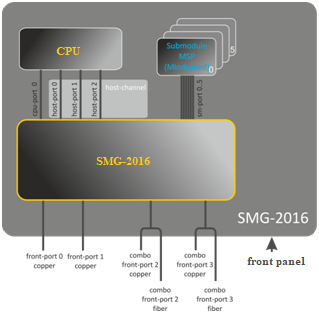
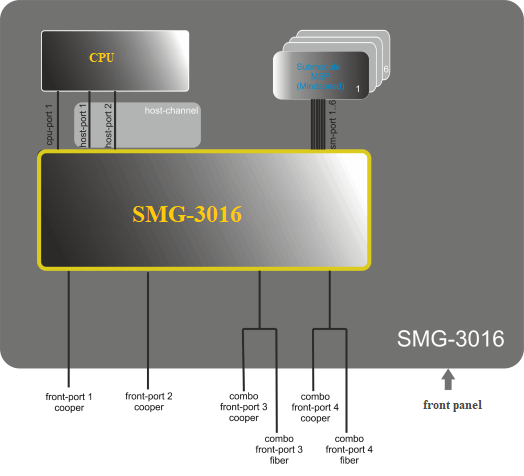
Figure 49 — Switch structure
SMG-2016 switch is equipped with the following interfaces:
SMG-3016 switch is equipped with the following interfaces:
During the switch operation, unit number value equal to 1 will be used.
For SMG-3016, it is necessary to take into account that the port numbering has been changed, the initial front-port= 1. |
This command allows you to enter the SMG-2016/ SMG-3016 switch interface configuration mode.
Syntax:
interface <interface> <number>
Parameters:
<interface> – interface type:
<number> – port number:
For configuration of all ports for a single interface type, use 'all' as the <number> parameter value.
This command disables the interface being configured.
The command in negative form enables the interface being configured.
Syntax:
[no] shutdown
Parameters:
There are no parameters for this command.
Example:
SMG2016-[CONFIG]-[SWITCH]-[if]> shutdown |
Configured interface is disabled.
This command defines the permission for the traffic exchange between the interfaces.
The command in negative form denies the traffic exchange between the interfaces.
Syntax:
[no] bridging to <interface> <range>
Parameters:
<interface> – interface type:
<range> – port number(s) that are allowed to exchange traffic:
Example:
SMG2016-[CONFIG]-[SWITCH]-[if]> bridging to front-port all |
This command enables/disables data flow control mechanism for the interface being configured. Flow control mechanism allows to compensate the transfer rate difference of the transmitter and receiver. If the traffic volume exceeds the specific level, the receiver will send frames informing the transmitter on the necessity to lower the traffic volume and reduce the amount of lost frames. Implementation of this mechanism requires that the remote device also supports this function.
Syntax:
flow-control <act>
Parameter:
<act> – assigned action:
Default value:
off
Example:
SMG2016-[CONFIG]-[SWITCH]-[if]> flow-control on |
The command assigns the specific packet reception rules to the interface:
Syntax:
frame-types <act>
Parameters:
<act> – assigned action:
Default value:
All packets are accepted (both tagged and untagged).
Example:
SMG2016-[CONFIG]-[SWITCH]-[if]> frame-types all |
Untagged traffic reception is enabled for the configured ports.
This command specifies transfer rate value for the configured interface.
Defined modes are as follows: 10Mbps, 100Mbps, 1000Mbps. For 10Mbps or 100Mbps, you should specify the transceiver operation mode: duplex or half-duplex.
Syntax:
speed <rate> [<mode>]
Parameters:
<rate> – transfer rate value: 10M; 100M; 1000Mbps; 10Gbps
<mode> – transceiver operation mode:
Example:
SMG2016-[CONFIG]-[SWITCH]-[if]> speed 10M full-duplex |
10Mbps, duplex interface speed mode is configured.
This command specifies transfer rate value for the configured interface automatically.
Syntax:
speed auto
Parameters:
There are no parameters for this command.
Example:
SMG2016-[CONFIG]-[SWITCH]-[if]> speed auto |
Transfer rate for the port will be configured automatically.
This command allows you to view the SMG-2016 switch interface configuration.
Syntax:
show interfaces configuration <interface> <number>
Parameters:
<interface> – interface type:
<number> – port number:
Example:
SMG2016-[CONFIG]-[SWITCH]> show interfaces configuration front-port all
Port                 Duplex   Speed      Neg        Flow      Admin
                                                    control   State
------------------   ------   --------   --------   -------   -----
front-port   1/0     Full     10 Mbps    Enabled    Off       Up
front-port   1/1     Full     10 Mbps    Disabled   Off       Up
front-port   1/2     Full     10 Mbps    Enabled    Off       Up
front-port   1/3     Full     10 Mbps    Enabled    Off       Up
SMG2016-[CONFIG]-[SWITCH]> |
This command allows you to view the interface or interface group status.
Syntax
show interfaces status <interface> <number>
Parameters:
<interface> – interface type:
<number> – port number:
Example:
SMG2016-[CONFIG]-[SWITCH]> show interfaces status front-port all
Port                 Media     Duplex   Speed      Neg        Flow      Link    Back
                                                              control   State   Pressure
------------------   -------   ------   --------   --------   -------   -----   --------
front-port   1/0     N/A       N/A      N/A        N/A        N/A       Down    N/A
front-port   1/1     copper    Full     10 Mbps    Disabled   Off       Up      Disabled
front-port   1/2     copper    Full     100 Mbps   Enabled    Off       Up      Disabled
front-port   1/3     N/A       N/A      N/A        N/A        N/A       Down    N/A
SMG2016-[CONFIG]-[SWITCH]> |
This command allows you to view the interface or interface group counters.
Syntax:
show interfaces counters <interface> <number>
Parameters:
<interface> – interface type:
<range> – port number(s) that are allowed to exchange traffic:
Example:
SMG2016-[CONFIG]-[SWITCH]> show interfaces counters front-port all MAC MIB counters receive ~~~~~~~~~~~~~~~~~~~~~~~~ Port UC recv MC recv BC recv Octets recv --------------------------------------------------------------------------------- front-port 1/0 0 0 0 0 front-port 1/1 436940 6297 9289 65685375 front-port 1/2 1422764 6077 41999 210652881 front-port 1/3 0 0 0 0 MAC MIB counters sent ~~~~~~~~~~~~~~~~~~~~~ Port UC sent MC sent BC sent Octets sent --------------------------------------------------------------------------------- front-port 1/0 0 0 0 0 front-port 1/1 455819 6087 42006 96955149 front-port 1/2 148842 6280 9296 17450454 front-port 1/3 0 0 0 0 |
Use this command to add FRONT-PORT interfaces into the aggregation group.
The command in negative form (no) removes FRONT-PORT interfaces from the aggregation group.
Syntax:
channel-group <id> [force]
no channel-group
Parameters:
<id> – sequential number of an aggregation group for the port to be added into, possible values [1 .. 4];
Example:
SMG2016-[CONFIG]-[SWITCH]-[if]> channel-group 1 |
All uplink ports are combined into groups 1.
This command allows you to select the channel aggregation mode:
Passive – in this mode, the switch will not initiate creation of a logical link, but will process incoming LACP packets;
Active – in this mode, the switch should establish the aggregated communication link and initialize the negotiation.
Communication links are aggregated when the other party operates in LACP active or passive mode.
The command in negative form (no) defines the default link aggregation mode.
Syntax:
lacp mode <name>
no lacp mode
Parameters:
<name> – mode:
Default value:
active
Example:
SMG2016-[CONFIG]-[SWITCH]-[if]> lacp mode active |
'Active' link aggregation mode is enabled for configured channels.
Use this command to define the channel aggregation mode:
Syntax:
mode <act>
Parameters:
<act> – mode:
Example:
SMG2016-[CONFIG]-[SWITCH]> interface port-channel 1 SMG2016-[CONFIG]-[SWITCH]-[if]> mode lacp |
Link aggregation mode is enabled for the configured interface.
Use this command to define the priority of the configured port. Priority will be specified in the range of [1 .. 65535]. 1 is the highest priority value.
The command in negative form (no) defines the default priority value.
Syntax:
lacp port-priority <priority>
no lacp port-priority
Parameters:
<priority> – priority for the current port; possible values [0 .. 65535].
Default value:
Priority 32768 is specified for all ports
Command mode:
INTERFACE FRONT-PORT
Example:
SMG2016-[CONFIG]-[SWITCH]-[if]> lacp port-priority 256 |
Port priority 256 is specified for all configured ports.
Use this command to define the time interval for transmission of LACPDU control packets.
The command in negative form (no) defines the default time interval for transmission of LACPDU control packets.
Syntax:
lacp rate <rate>
no lacp rate
Parameters:
<rate> – transmission interval:
Default value:
1 second (fast)
Command mode:
INTERFACE FRONT-PORT
Examle:
SMG2016-[CONFIG]-[SWITCH]-[if]> lacp rate slow |
30-second time interval is defined for transmission of LACPDU packets.
Use this command to define the default VID value for packets received by this port.
When an untagged packet or packet with VLAN tag VID value equal to 0 is received, VID value equal to PVID will be defined for such a packet.
Syntax:
pvid <num>
Parameters:
<num> – VLAN port ID, specified in the range of [1 .. 4094].
Default value:
PVID = 1
Command mode:
INTERFACE FRONT-PORT
INTERFACE PORT-CHANNEL
Example:
SMG2016-[CONFIG]-[SWITCH]-[if]> pvid 5 |
PVID 5 is defined for the configured port.
Use this command to enable the STP function for the configured interface.
The command in negative form (no) disables the STP utilization for the interface.
Syntax:
[no] spanning-tree enable
Parameters:
There are no parameters for this command.
Command mode:
INTERFACE FRONT-PORT
INTERFACE PORT-CHANNEL
Example:
SMG2016-[CONFIG]-[SWITCH]-[if]> spanning-tree enable |
STP function is enabled for all front ports.
Use this command to specify the STP operation path cost for the configured interface.
The command in negative form (no) defines the default path cost.
0 is set by default.
Syntax:
spanning-tree pathcost <pathcost>
no spanning-tree pathcost
Parameters:
<pathcost> – path cost, permitted value range is [0..200000000].
Default value:
Path cost value = 0
Command mode:
INTERFACE FRONT-PORT
INTERFACE PORT-CHANNEL
Example:
SMG2016-[CONFIG]-[SWITCH]-[if]> spanning-tree pathcost 1 |
Defined path cost value is 1.
Use this command to specify the STP operation priority for the configured interface.
The command in negative form (no) defines the default STP operation priority value. 128 is set by default.
Syntax:
spanning-tree priority <priority>
no spanning-tree priority
Parameters:
<priority> – priority, may take up values divisible by 16 [0, 16, 32, 48, 64, 80, 96, 112, 128, 144, 160, 176, 192, 208, 224, 240].
Default value:
128
Command mode:
INTERFACE FRONT-PORT
INTERFACE PORT-CHANNEL
Example:
SMG2016-[CONFIG]-[SWITCH]-[if]> spanning-tree priority 144 |
Defined priority is 144.
Use this command to define the connection type as the edge link to the host. In this case, data transmission is enabled automatically for the interface, when the link is established.
The command in negative form (no) restores the default value.
Syntax:
[no] spanning-tree admin-edge
Parameters:
There are no parameters for this command.
Default value:
off
Command mode:
INTERFACE FRONT-PORT
INTERFACE PORT-CHANNEL
Example:
SMG2016-[CONFIG]-[SWITCH]-[if]> spanning-tree admin-edge |
Edge-link connection type is enabled for the configured port.
Use this command to define the p2p connection identification type.
The command in negative form (no) defines the default p2p connection identification type.
Syntax:
spanning-tree admin-p2p <type>
no spanning-tree admin-p2p
Parameters:
<type> – connection identification type:
Default value:
p2p connection type identification is based on BPDU
Command mode:
INTERFACE FRONT-PORT
INTERFACE PORT-CHANNEL
Example:
SMG2016-[CONFIG]-[SWITCH]-[if]> spanning-tree admin-p2p auto |
For the configured port, p2p connection type identification is based on BPDU.
Use this command to set the automatic bridge detection on the configured interface.
The command in negative form (no) disables automatic bridge detection on the configured interface.
Automatic bridge detection function is enabled by default.
Syntax:
[no] spanning-tree auto-edge
Parameters:
There are no parameters for this command.
Command mode:
INTERFACE FRONT-PORT
INTERFACE PORT-CHANNEL
Example:
SMG2016-[CONFIG]-[SWITCH]-[if]> spanning-tree auto-edge |
'Automatic bridge detection' function is enabled.
Use this command to set the MAC address lifetime globally in a table.
The command in negative form (no) defines the default MAC address lifetime.
Syntax:
[no] mac-address-table aging time <aging time>
no mac-address-table aging time
Parameters:
<aging time> – МАС address lifetime, possible values [10 .. 630] seconds.
Default value:
300 seconds
Command mode:
CONFIG-SWITCH
Example:
SMG2016-[CONFIG]-[SWITCH]> mac-address-table aging-time 100 |
Use this command to view the quantity of MAC address records for all front-port, port-channel and slot-channel interfaces.
Syntax:
show mac address-table count
Parameters:
There are no parameters for this command.
Command mode:
CONFIG-SWITCH
Example:
SMG2016-[CONFIG]-[SWITCH]> show mac address-table count 17 valid mac entries |
Use this command to view the MAC address table for the specific interface.
Syntax:
show mac address-table include/exclude interface <interface> <number>
Parameters:
<interface> – interface type:
<number> – port number:
Command mode:
CONFIG-SWITCH
Use this command to enable mirroring operation at the switch ports for incoming/outgoing traffic.
Port mirroring allows to copy the traffic coming from one port to another in order to perform an external analysis.
The command in negative form (no) disables the mirroring operation.
Syntax:
[no] mirror <rx|tx> interface <port> <num>
Parameters:
<rx|tx> – traffic type:
<port> – interface type:
<num> – sequential number of the specified group port (you may specify multiple ports separated by ',' or the port range separated by '-'):
<interface> – interface type:
<number> – port number:
Command mode:
CONFIG-SWITCH
Example:
SMG2016-[CONFIG]-[SWITCH]> mirror rx interface front-port 1/3 |
For incoming traffic going to front-port 1/3 interfaces, the 'port mirroring' operation is enabled. Traffic is copied from slot-ports to analyzer port defined with 'mirror rx analyzer' command.
Use this command to specify a port, that the packets for analysis of traffic incoming/outgoing from/to ports defined with mirror rx port/ mirror tx port command will be copied to.
The command in negative form (no) disables analysis of transferred incoming/outgoing traffic.
Syntax:
[no] mirror <rx|tx> analyzer <interface> <port>
Parameters:
<rx|tx> – traffic type:
<interface> – interface type. As an analyzer port, you may use front-port, port-channel interfaces only.
<port> – sequential number of the front-port group port in <unit/port> format, where:
Command mode:
CONFIG-SWITCH
Example:
SMG2016-[CONFIG]-[SWITCH]> mirror rx analyzer front-port 1/2 |
Data for an external analysis will be mirrored to the front-port 1/2 from the port(s) that have 'incoming traffic mirroring' enabled.
Use this command to add 802.1q tag for the analyzed traffic. For tag value configuration, use mirror <rx/tx> added-tag-config command.
The command in negative form (no) deletes the tag.
Syntax:
[no] mirror add-tag
Parameters:
There are no parameters for this command.
Command mode:
CONFIG-SWITCH
Example:
SMG2016-[CONFIG]-[SWITCH]> mirror add-tag |
Use this command to specify the tag value, that may be added to the analyzed incoming/outgoing traffic.
Syntax:
mirror <rx|tx> added-tag-config vlan <vid> [user-prio <user-prio>]
Parameters:
<vid> – VLAN ID; possible values [1 .. 4094];
<user-prio> – COS priority; possible values [0 .. 7].
Command mode:
CONFIG-SWITCH
Example:
SMG2016-[CONFIG]-[SWITCH]> mirror rx added-tag-config vlan 77 user-prio 5 |
The command specifies the VLAN ID to be used in the mirroring operation when forwarding incoming/outgoing traffic.
Syntax:
[no] mirror <rx|tx> vlan <vid>
Parameters:
<rx|tx> – traffic type:
<vid> – VLAN ID; possible values [1..4094].
Command mode:
CONFIG-SWITCH
Example:
SMG2016-[CONFIG]-[SWITCH]> mirror rx vlan 56 |
To perform Selective Q-in-Q general configuration, you may use SELECTIVE Q-IN-Q COMMON command mode. To define Selective Q-in-Q rule list, you may use SELECTIVE Q-IN-Q LIST command mode.
SELECTIVE Q-IN-Q function allows to assign external SPVLAN (Service Provider's VLAN), substitute Customer VLAN, and block the transmission of traffic based on configured filtering rules by internal VLAN numbers (Customer VLAN).
Use this command to add an external tag based on the internal tag.
The command in negative form (no) removes the defined rule.
Syntax:
[no] add-tag svlan <s-vlan> cvlan <c-vlan>
Parameters:
<s-vlan> – external tag number; possible values [1..4095];
<c-vlan> – internal tag number(s); possible values 1-4094. C-VLAN list values should be separated by ','.
Command mode:
SELECTIVE Q-IN-Q
This command enables VLAN substitution in the required direction.
The command in negative form (no) removes the defined rule.
Syntax:
[no] overwrite-tag new-vlan <new-vlan> old-vlan <old-vlan> <rule_direction>
Parameters:
<new-vlan> – new VLAN number; possible values [1 ..4095];
<old-vlan> – VLAN number that should be substituted; possible values [1 .. 4094];
<rule_direction> – traffic direction:
Command mode:
SELECTIVE Q-IN-Q
This command deletes the Selective Q-in-Q rule for the specified number.
Syntax:
remove <rule_index>
Parameters:
<rule_index> – rule index, possible values [0 .. 511].
Command mode:
SELECTIVE Q-IN-Q
Use this command to delete all Selective Q-in-Q rules.
Syntax:
clear
Parameters:
There are no parameters for this command.
Command mode:
SELECTIVE Q-IN-Q
Use this command to enable Selective Q-in-Q for the configured interface of SMG-2016 switch. The command in negative form (no) disables Selective Q-in-Q on the configured interface.
Syntax:
[no] selective-qinq enable
Parameters:
There are no parameters for this command.
Command mode:
INTERFACE FRONT-PORT
INTERFACE PORT-CHANNEL
Use this command to assign Selective Q-in-Q rule list to the configured interface of SMG-2016 switch.
The command in negative form (no) deletes the assignment.
Syntax:
selective-qinq list <name>
no selective-qinq list
Parameters:
<name> – имя списка правил Selective Q-in-Q
Command mode:
INTERFACE FRONT-PORT
INTERFACE PORT-CHANNEL
Use this command to view the information on Selective Q-in-Q status on the switch interfaces.
Syntax:
show interfaces selective-qinq lists
Use this command to specify the backup interface, that will be used for communication fallback, when the main connection is lost. You can enable backup only for those interfaces where SPANNING TREE protocol is disabled.
The command in negative form (no) removes the setting from the interface.
Syntax:
[no] backup interface <INTERFACE> <INDEX> vlan <VLAN_ID_RANGE>
Parameters:
<INTERFACE> – interface type:
<INDEX> – port number:
<VLAN_ID_RANGE> – possible values:
Command mode:
INTERFACE FRONT-PORT
INTERFACE PORT-CHANNEL
Example:
Global backup
SMG2016-[CONFIG]-[SWITCH]-[if]> no backup interface vlan ignore SMG2016-[CONFIG]-[SWITCH]-[if]> backup interface front-port 1/1 vlan ignore |
Backup in a specific VLAN
SMG2016-[CONFIG]-[SWITCH]-[if]> no backup interface vlan 10 SMG2016-[CONFIG]-[SWITCH]-[if]> backup interface port-channel 1 vlan 10 |
Use this command to specify the packet quantity per second, that will be sent into the active interface during the fallback:
The command in negative form (no) restores the default value (400 packets).
Syntax:
[no] backup-interface mac-per-second <COUNT>
Parameters:
<COUNT> – quantity of MAC addresses per second, possible value [50..400].
Default value:
400 packets
Command mode:
CONFIG SWITCH
Example:
SMG2016-[CONFIG]-[SWITCH]> backup-interface mac-per-second 200 |
Use this command to specify the quantity of packet copies with the same MAC address, that will be sent into the active interface during the fallback:
The command in negative form (no) restores the default value (1 packet).
Syntax:
[no] backup-interface mac-duplicate <COUNT>
Parameters:
<COUNT> – quantity of packet copies, possible value [1..4].
Default value:
1 packet
Command mode:
CONFIG SWITCH
Example:
SMG2016-[CONFIG]-[SWITCH]> backup-interface mac-duplicate 4 |
Use this command to specify the traffic switchover to the main interface when the connection is restored. If the configuration allows the main interface restoration during the backup interface active state, the traffic will be switched to the main interface when the link is established on it. The command in negative form (no) restores the default setting.
Syntax:
[no] backup-interface preemption
Parameters:
There are no parameters for this command.
Default value:
Switchover is disabled.
Command mode:
CONFIG SWITCH
Example:
SMG2016-[CONFIG]-[SWITCH]> backup-interface preemption |
Use this command to view the interface backup configuration.
Syntax:
show interfaces backup
Parameters:
There are no parameters for this command.
Command mode:
CONFIG SWITCH
Example:
SMG2016-[CONFIG]-[SWITCH]> show interfaces backup
   Backup Interface Options:
      Preemption is disabled.
      MAC recovery packets rate 400 pps.
      Recovery packets repeats count 1.

   Backup Interface Pairs
   ~~~~~~~~~~~~~~~~~~~~~~
VID    Master Interface            Backup Interface            State
----   -------------------------   -------------------------   ------------------------------
30     front-port 1/0              front-port 2/0              Master Up/Backup Standby
----   -------------------------   -------------------------   ------------------------------
150 front-port 1/0 front-port 2/0 Master Up/Backup Standby |
This command enables the switch operation via LLDP protocol.
The command in negative form (no) disables LLDP utilization by the switch.
Syntax:
[no] lldp enable
Parameters:
There are no parameters for this command.
Command mode:
CONFIG SWITCH
Example:
SMG2016-[CONFIG]-[SWITCH]> lldp enable |
Use this command to define the amount of time for the receiving device to keep LLDP packets before dropping them.
This value will be transmitted to the receiving party in LLDP update packets; is a divisibility for LLDP timer. Thus, LLDP packet lifetime is calculated by the equation: TTL = min(65535, LLDP-Timer * LLDP-HoldMultiplier).
The command in negative form (no) restores the default value.
Syntax:
lldp hold-multiplier <hold>
no lldp hold-multiplier
Parameters:
<hold> – time, possible value [2 .. 10] seconds.
Default value:
Default value – 4 seconds.
Command mode:
CONFIG SWITCH
Example:
SMG2016-[CONFIG]-[SWITCH]> lldp hold-multiplier 5 |
Use this command to define the minimum amount of time that LLDP port will wait before LLDP reinitialization.
The command in negative form (no) restores the default value.
Syntax:
lldp reinit <reinit>
no lldp reinit
Parameters:
<reinit> – time, possible value [1 .. 10] seconds.
Default value:
Default value – 2 seconds.
Command mode:
CONFIG SWITCH
Example:
SMG2016-[CONFIG]-[SWITCH]> lldp reinit 3 |
Use this command to define the frequency of LLDP information updates transmission by the device.
The command in negative form (no) restores the default value.
Syntax:
lldp timer <timer>
no lldp timer
Parameters:
<timer> – time, possible value [5..32768] seconds.
Default value:
Default value – 30 seconds.
Command mode:
CONFIG SWITCH
Example:
SMG2016-[CONFIG]-[SWITCH]> lldp timer 60 |
Use this command to define the delay between the subsequent LLDP packet transmissions, initiated by changes of values or status in local LLDP MIB database.
We recommend setting this delay less than 0.25* LLDP-Timer.
The command in negative form (no) restores the default value.
Syntax:
lldp tx-delay <txdelay>
no lldp tx-delay
Parameters:
<txdelay> – time, possible value [1..8192] seconds.
Default value:
Default value – 2 seconds.
Command mode:
CONFIG SWITCH
Example:
SMG2016-[CONFIG]-[SWITCH]> lldp tx-delay 3 |
Use this command to define the LLDP packet processing mode, when LLDP is disabled.
The command in negative form (no) restores the default value (filtering).
Syntax:
lldp lldpdu [mode]
no lldp lldpdu
Parameters:
[mode] – LLDP packet processing mode:
Command mode:
CONFIG SWITCH
Example:
SMG2016-[CONFIG]-[SWITCH]> lldp lldpdu flooding |
Use this command to view LLDP configuration on all device physical interfaces, or on specified interfaces only.
Syntax:
show lldp configuration [<interface>< number >]
Parameters:
Optional parameters; if omitted, information for all ports will be shown on display.
[interface] – interface type:
[number] – number of the port (you may specify multiple ports separated by ',' or the port range separated by '-'):
Default value:
Information for all ports will be shown on display.
Command mode:
CONFIG SWITCH
Example:
SMG2016-[CONFIG]-[SWITCH]> show lldp configuration LLDP configuration ~~~~~~~~~~~~~~~~~~ Interface Status Timer (sec) Hold multiplier Reinit delay (sec) Tx delay (sec) ------------- ----------------- ---------- ------------- ----------------- ----------- front-port 1/0 transmit-receive 30 4 2 2 front-port 1/1 transmit-receive 30 4 2 2 front-port 1/2 transmit-receive 30 4 2 2 front-port 1/3 transmit-receive 30 4 2 2 |
Use this command to view the information on the neighbouring devices with the active LLDP protocol.
Syntax:
show lldp neighbor [<interface>< number >]
Parameters:
Optional parameters; if omitted, information for all ports will be shown on display.
[interface] – interface type:
[number] – number of the port (you may specify multiple ports separated by ',' or the port range separated by '-'):
Default value:
Information for all ports will be shown on display.
Command mode:
CONFIG SWITCH
Example:
SMG2016-[CONFIG]-[SWITCH]> show lldp neighbor LLDP neighbors ~~~~~~~~~~~~~~ Interface Device ID Port ID TTL ---------------- ---------------------- ----------------------- ---------- front-port 1/1 02:00:2a:00:07:15 g15 115/120 front-port 1/2 02:00:04:88:7e: front-port 1/3 105/120 SMG2016-[CONFIG]-[SWITCH]> |
Use this command to view LLDP information announced by this port.
Syntax:
show lldp local [<interface>< number >]
Parameters:
Optional parameters; if omitted, information for all ports will be shown on display.
[interface] – interface type:
[number] – number of the port (you may specify multiple ports separated by ',' or the port range separated by '-'):
Default value:
Information for all ports will be shown on display.
Command mode:
CONFIG SWITCH
Example:
SMG2016-[CONFIG]-[SWITCH]> show lldp local LLDP local TLVs ~~~~~~~~~~~~~~~ Interface Device ID Port ID TTL ---------------- ---------------------- ----------------------- ---------- front-port 1/1 02:00:04:88:7c:0a front-port 1/1 120 front-port 1/2 02:00:04:88:7c:0a front-port 1/2 120 |
Use this command to view LLDP statistics for front-port, port-channel interfaces.
Syntax:
show lldp statistics [<interface>< number >]
Parameters:
Optional parameters; if omitted, information for all ports will be shown on display.
[interface] – interface type:
[number] – number of the port (you may specify multiple ports separated by ',' or the port range separated by '-'):
Default value:
Information for all ports will be shown on display.
Command mode:
CONFIG SWITCH
Example:
SMG2016-[CONFIG]-[SWITCH]> show lldp statistics Tables Last Change Time: 0:0:4:28 Tables Inserts: 3 Tables Deletes: 1 Tables Dropped: 0 Tables Ageouts: 0 LLDP statistics ~~~~~~~~~~~~~~~ Interface Tx total Rx total Rx errors Rx discarded TLVs discarded TLVs unrecognized Agouts total front-port 1/0 0 0 0 0 0 0 0 front-port 1/1 6134 6159 0 0 0 0 0 front-port 1/2 6141 6136 0 0 0 0 0 front-port 1/3 0 0 0 0 0 0 0 |
Use this command to view LLDPDU packet processing method for interfaces where LLDP function is disabled.
Syntax:
show lldp lldpdu
Parameters:
There are no parameters for this command.
Command mode:
CONFIG SWITCH
Example:
SMG2016-[CONFIG]-[SWITCH]> show lldp lldpdu Global: flooding |
Use this command to define the priority queue that will be used for packets without any preconfigured rules. Queue with value 7 has the highest priority.
Syntax:
qos default <queue>
Parameters:
< queue > – priority queue number; possible values [0 .. 7].
Default value:
Queue 0 is used by default.
Command mode:
CONFIG SWITCH
Example:
qos default 6 |
Packets without any other specified rules will come to the queue with priority 6.
Use this command to define the rule that will be used for the packet priority field selection.
The traffic prioritization method will be chosen depending on the configured system rules (IEEE 802.1p/DSCP).
The traffic prioritization methods featured by the system are as follows:
Syntax:
qos type <type>
Parameters:
<type> –
traffic prioritization method:
Default value:
All priorities are equal by default.
Command mode:
CONFIG SWITCH
Example:
qos type 2 |
Traffic prioritization will be performed by DSCP/TOS only.
Use this command to define the priority queue parameters:
Packets will be selected to this priority value based on rules defined by qos type command and specified priority values.
The command in negative form (no) removes the record from the queue configuration table.
Syntax:
[no] qos map <type> <field values> to <queue>
Parameters:
<type> – traffic prioritization method:
<field values> – field value used for packet selection, defined depending on the <parameter 1> (field values entered should be comma-separated or represent the range delimited by '-'):
<queue > – priority queue number; possible values [0 .. 7].
Command mode:
CONFIG SWITCH
Example:
qos map 0 7 7 |
For 7th priority queue, priority field value =7 in 802.1Q tag.
Use this command to map the queue statistics collector to queues with the defined criteria.
Syntax:
cntrset <PORT> <UNIT> <SET> <VLAN> <QUEUE> <DROP PRECEDENCE>
Parameters:
< PORT > – accounting port type may take up the following values:
< UNIT > – sequential number of the port:
Command mode:
CONFIG – SWITCH
Example:
cntrset sm-port 1/2 1 22 2 1 |
Use this command to view the queue collector information.
Syntax:
show cntrset <SET>
Parameters:
<SET> – counter number [0 .. 1].
Command mode:
CONFIG – SWITCH
Use this command to view the assigned queue priorities. The queue priority equals 0 by default. Queue priority value is specified in the range of [0 .. 7]; queue with value 7 has the highest priority.
Syntax:
show qos
Parameters:
There are no parameters for this command.
Command mode:
CONFIG – SWITCH
SMG-2016 switch features 2 types of configuration:
Syntax:
show running-config
Parameters:
There are no parameters for this command.
Command mode:
CONFIG – SWITCH
Syntax:
show candidate-config
Parameters:
There are no parameters for this command.
Command mode:
CONFIG – SWITCH
When the SMG-2016 switch configuration is completed, you should apply the configuration in order for it to become active on the device and confirm it in order to avoid the loss of access to the device due to these configuration edits. If you fail to confirm the configuration in 60 seconds, it will be rolled back to the previous running-config.
Syntax:
apply
Parameters:
There are no parameters for this command.
Command mode:
CONFIG – SWITCH
Syntax:
confirm
Parameters:
There are no parameters for this command.
Command mode:
CONFIG – SWITCH
Use this command to return to Configuration menu.
Syntax:
config
Parameters:
There are no parameters for this command.
Command mode:
CONFIG – SWITCH
Use this command to exit from this configuration submenu to the upper level.
Syntax:
exit
Parameters:
There are no parameters for this command.
Command mode:
CONFIG – SWITCH
Use this command to view history of entered commands.
Syntax:
history
Parameters:
There are no parameters for this command.
Command mode:
CONFIG – SWITCH