Beginning from the firmware version 2.15.01, the device features the following VAS:
Starting from firmware version 3.16 the following VAS were added:
Starting from firmware version 3.20 the following VAS were added:
Starting from firmware version 3.20.10 the following VAS were added:
Starting from firmware version 3.404 the following VAS were added:
Starting from firmware version 3.405 the following VAS were added:
Starting from firmware version 3.406.1 the following VAS were added:
VAS functionality becomes available only when additional SMG-VAS license is installed.
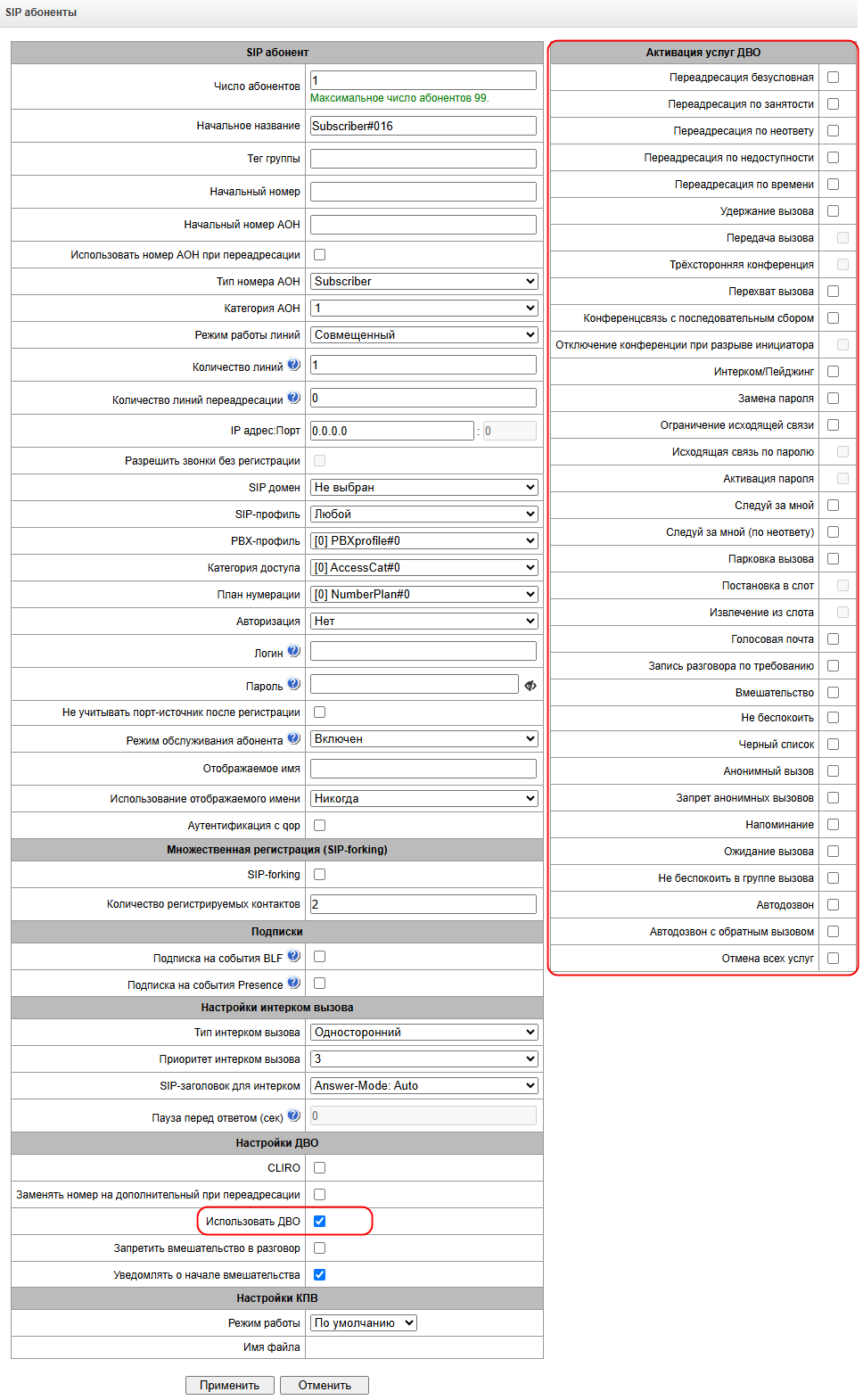
For VAS utilization by a subscriber, select the 'Enable VAS' checkbox in the subscriber settings.
To activate a specific VAS, select the checkbox next to the required service in the 'VAS activation' menu of the subscriber settings.
'Call transfer' service operation requires that the subscriber terminal party supports FLASH transmission via SIP using SIP-INFO, RFC2833 methods. Also, the subscriber terminal party should have an inband, SIP-INFO or RFC2833 DTMF signal transmission methods configured; make sure that the similar method is selected in the subscriber SIP profile configuration.
'Call tranfer' service configuration example
Subscriber A calls Subscriber B; Subscriber B may press FLASH during conversation to put the Subscriber A on hold, at that time, 'Music on hold' will be played to the subscriber A, and Subscriber B will hear 'PBX response' tone; at that, timeouts for dialling the Subscriber C number will be activated, their values are provided below. After the number dial and Subscriber C replу, the options are as follows:
While being in a call state with a Subscriber A, put him on hold with hook flash (R), wait for 'PBX response' tone and dial a Subscriber C number. When Subscriber C answers, the following operations will be possible:
'Call transfer' service timeout – at the moment, these timeouts are at their default values; their configuration will be implemented in future firmware versions.
'Redirection' service configuration may be performed using the corresponding setting in 'SIP subscribers'/'VAS management'/'Required subscriber selection' menu of the web configurator (see section VAS management) or using VAS management from the phone unit (according to RD-45), this method is described below.
VAS configuration from the phone unit (according to GOST 45.49-96)
The subscriber may activate or deactivate the service themselves by dialling specific prefixes on their phone unit. Redirection service prefixes are configured in the dial plan (section Dial plan) add a new prefix with the 'Prefix type'/'VAS prefix' value.
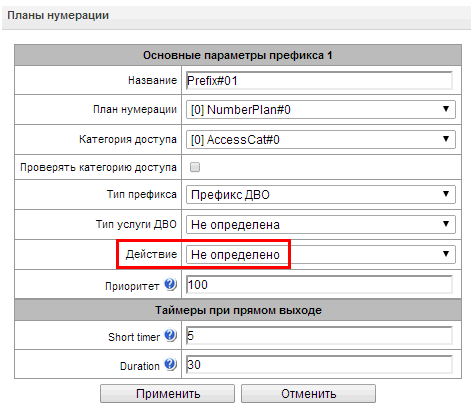
For VAS, it is recommended to use the following prefix values:
Digits 21, 22, 27, 62, 28 may take up any arbitrary value; these examples feature recommended values.
In the subscriber terminal dial plan, you should define VAS management prefixes. Operation with VAS at the gateway is performed after reception of the INVITE message with the required combination of digits from the subscriber terminal. |
'Call transfer' service timeouts are at their default values at the moment; their configuration will be implemented in future firmware versions:
Example of VAS configuration from the phone unit
Objective
The subscriber should configure unconditional forwarding to the number 222333444.
Actions
To deactivate the service, the subscriber should dial #21#.
Example of VAS configuration for 'Call forward on time'
Objective
The subscriber should schedule time forwarding from 12 to 2 p.m. from Mon to Fri to the phone number 222333444.
Actions
This service allows the initiator to establish the conference by consequently adding participants using subscriber hold feature.
When the initiating subscriber hangs up, the rest of the participants receive a ‘Busy’ signal if the initiating subscriber has ‘Disconnect conference by initiator’ option enabled. If VAS is diasbled, then when the initiating subscriber hangs up, the conference will continue to work. The maximum number of participants for all collected conferences for SMG-1016M is 40, for SMG-2016/3016 – 160. One conference can have no more than 40 participants. For example: on the SMG-1016M you can gather one conference for 40 participants, 10 conferences for 4 participants, etc. On SMG-2016/3016 you can gather 4 conferences of 40 participants, 10 conferences of 16 participants, etc.
This functionality can be activated both on analog phones using the R key (short hang up (FLASH)) and on SIP phones using the CONF&TRANSFER/HOLD keys).
Access to the service is managed by the 'Conference' checkbox.
Usage | * 71# <CONF> R <RS> <NUMBER 1> <CONF> R <RS> <NUMBER 2> <CONF> … |
|---|
where:
<NUMBER N> – number of the subscriber participating in a conference;
<CONF> – conference call state;
<RS> – station response signal, waiting for dialing of the subscriber who needs to be added to the conference;
R – short hang up (FLASH), if your telephone does not have a FLASH button, you can use the * or # buttons. To do this, you need to set the option ‘HOLD by’ flash/*/# in the sip profile in the DTMF reception/transmission section;
An example of using a conference call with sequential dialing, when subscriber A gather subscribers B and C into a conference:
Subscriber A makes a call to *71# and hears the welcome message “Welcome to conference", then puts the conference on hold <R> and dials the number of subscriber B, when subscriber B accepts the call, the connection between A and B is disconnected and they are both added to conference, subscriber B hears a welcome message, after which the subscribers A, B are in the conference.
Subscriber A puts the conference on hold again <R> and dials subscriber C number, when subscriber C accepts the call, the connection between A and C is disconnected and they are both added to a conference, subscriber C hears a welcome message, after which subscribers A, B, C are in the conference.
Functionality description for SIP telephones
Usage | CONF TRANSFER <NUMBER 1> TRANSFER <NUMBER 2> CONF <STATE> … |
|---|
Usage | *71# HOLD <NUMBER 1> <CONF> <NUMBER 2> <CONF> HOLD <STATE> … |
|---|
Where:
<NUMBER N> – subscriber number – participant in the conference call;
<STATE> – conference call status;
CONF – conference (should comply with RFC 4579 and the conference number should be identical to ‘Conference’ prefix in the dial plan);
HOLD – call on hold;
TRANSFER – call transfer.
Example of collecting a conference for a SIP phone via CONF&TRANSFER:
Collection from the conversation:
Collection with CONF button:
This service allows to answer the call directed to another subscriber.
Access to service is managed by the VAS 'Call pickup' checkbox.
Usage | * 66 * <NUMBER> # |
|---|
Where:
<NUMBER> – number of the subscriber for call pickup.
This service allows the subscriber to perform the call with automatic phone unit response at the call party B. Note, that used phone units should support Answer-Mode: Auto for RFC 5373.
Access to service is managed by the VAS 'Intercom' checkbox.
Usage | * 80 * <NUMBER> # |
|---|
Where:
<NUMBER> – number of the intercom call subscriber.
Paging call service operates in the similar way to the intercom call but it enables calls to subscriber groups using the conference number. For that, define the call group with the conference number in call group (see section Hunt groups) and add all subscribers using this service into it.
Usage | * 81 * <NUMBER> # |
|---|
Where:
<NUMBER> – conference number of the paging call.
These services provide the opportunity to override restrictions on access to outgoing calls (controlled by ‘Outgoing calls restriction’ service).
For example, if a restriction is set on outgoing communication, then the ‘Resrricted by password’ service makes it possible to cancel the access restriction only for the next attempt to establish an outgoing connection. The ‘Password Activation’ service cancels/sets a restriction on outgoing communication for all subsequent outgoing communication attempts.
The access to the service is managed by checking the ‘Password activation’ box in VAS activation window.
The access to the ‘Restricted by password’ service is managed by checking corresponding box in VAS activation window.
Password activation | * 29 * <PASSWORD> # |
|---|---|
Password deactivation | # 29 # |
Restricted by password | * 32 * <PASSWORD> # |
Where:
<PASSWORD> – private subscriber password.
Услуга «Исходящая связь по паролю» работает корректно только при наличии активированной услуги «Удержание вызова». |
This service allows a subscriber to change a password assigned by PBX service personnel. The access to the service is managed by checking the ‘Change password’ box in VAS activation window.
Change password | * 30 * <PASSWORD1> * <PASSWORD2> * <PASSWORD2> # |
|---|
Where:
<PASSWORD1> – current password;
<PASSWORD2> – a new password, which you need to enter twice. The password must contain 4 characters.
The service allows to establish restriction on outgoing communication for phone calls to some directions. The following groups of communication types are defined:
Group 1 – only calls to emergency services;
Group 2 – only local and emergency calls;
Group 3 – communication types of group 1 and group 2 and zone communication.
The type of communication is set in prefix parameters.
To override restrictions set by this service, you may use ‘Restrict by password’ and ‘Password activation’ services. To reestablish the restrictions, use ‘Password deactivation’ service.
The access to the service is managed by checking the ‘Outgoing calls restriction’ box in VAS activation window.
Activate the servicce | * 34 * <PASSWORD> * N # |
|---|---|
Cancel the service | # 34 * <PASSWORD> # |
Control | * # 34 * <PASSWORD> # |
<N> – a number of a group of permitted outgoing communication.
The service allows to restrict calls on a subscriber and set a whitelist of numbers which are permitted to call the subscriber even in ‘Do Not Disturb’ mode.
The access to the service is managed by checking the ‘Do not disturb’ box in VAS activation window.
Activate the service | * 26 # |
|---|---|
Cancel the service | # 26 # |
Control | * # 26 # |
Add a number to whitelist | * 26 * <NUMBER> # |
Remove a number from whitelist | # 26 * <NUMBER> # |
Remove all numbers from whitelist | # 26 * 0 # # 26 * 00 # |
The service allows to forbid certain numbers to implement calls to a subscriber.
The access to the service is managed by checking the ‘Blacklist’ box in VAS activation window.
Activate the service | * 61 * <PASSWORD> # |
|---|---|
Cancel the service | # 61 * <PASSWORD> # |
Control | * # 61 * <PASSWORD> # |
Add a number to blacklist | * 61 * <PASSWORD> * <NUMBER># |
Remove a number from blacklist | # 61 * <PASSWORD> * <NUMBER># |
Remove all numbers from blacklist | # 61 * <PASSWORD> * 0 # # 61 * <PASSWORD> * 00 # |
This service allows the subscriber to cancel all activated services from their phone unit using a single cancelling procedure. Cancelling procedure includes the service code and password code.
Access to service is managed by checking the ‘Reset all services’ box in VAS category checkbox.
Usage | * 50 # |
|---|
With the ‘Follow me’ service, you can enable call forwarding for all calls from your telephone set to a remote one, using the remote phone. Service use example: a subscriber located outside their workplace wants to activate call forwarding for all calls from their work telephone set to a telephone set which is now ‘at hand’.
Usage
Service activation:
The service involves two telephone sets: local and remote. The subscriber wants to forward all calls from the local telephone set to the remote telephone set.
To do this, first of all, the subscriber should activate the service with or without PIN on the local telephone set (i. e. while being in the workplace the subscriber should enable the use of the service). After that, the subscriber, using their remote phone, can enable call forwarding from the local telephone set to the remote telephone set (if the service activation involved a PIN code, then you will have to enter the PIN; otherwise, the PIN is not needed)
Service deactivation:
Remote call forwarding can be turned off from both remote and local telephone sets. You can deactivate the service only from the local telephone set, with or without a PIN-code.
Service management from the telephone set
The service activation with a temporary PIN code is performed on the local number | * 23 * PIN # |
|---|---|
The service activation without a PIN code is performed on the local number | * 23 # |
Call forwarding from the local to the remote telephone set with a temporary PIN is performed on the remote number | * 23 * PIN * LOCAL_PHONE # |
Call forwarding from the local to the remote telephone set without a PIN is performed on the remote number | * 23 * * LOCAL_PHONE # |
Cancelling call forwarding from the local to the remote telephone set without a temporary PIN code is performed on the remote number | # 23 * * LOCAL_PHONE # |
Cancelling call forwarding from the local to the remote telephone set with a temporary PIN code is performed on the remote number | # 23 * PIN * LOCAL_PHONE # |
Deactivation, is performed on the local number | # 23 # |
Status view, is performed on the local number | * # 23 # |
Where:
Description
Using the ‘Follow me (no response)’ service, you can forward all calls from the local number to the remote number, if a call to the local number has not been answered within the specified time interval.
Usage
The service involves two telephone sets: local and remote. The subscriber wants all calls that come to the local phone and have not been answered within the specified time interval, to be forwarded to the remote telephone set.
Activation/deactivation of the service is performed only on the local phone number. Request for call forwarding is performed on the remote phone.
Service management from the telephone set:
The service activation with a temporary PIN code is performed on the local number | * 25 * PIN # |
|---|---|
The service activation without a PIN code is performed on the local number | * 25 # |
Call forwarding from the local to the remote telephone set with a temporary PIN is performed on the remote number | * 25 * PIN * LOCAL_PHONE # |
Call forwarding from the local to the remote telephone set without a PIN is performed on the remote number | * 25 * * LOCAL_PHONE # |
Cancelling call forwarding from the local to the remote telephone set without a temporary PIN code is performed on the remote number | # 25 * * LOCAL_PHONE # |
Cancelling call forwarding from the local to the remote telephone set without a temporary PIN code is performed on the remote number | #25*PIN*LOCAL_PHONE# |
Deactivation, is performed on the local number | # 25 # |
Status view, is performed on the local number | * # 25 # |
Where:
Description
The ‘Call Park to’ service is intended for placing a call on hold by one subscriber and removing it from hold by another subscriber.
Placing a call into a parking slot is done by performing an unattended transfer during a conversation to the number of the code for placing a call in the slot.
Example of usage
It is necessary to put the subscriber on hold in parking slot number 15.
Service management from the telephone set
| Slot setting | * 57 * <PARKING_SLOT_NUMBER> # |
|---|---|
| Extraction from slot | * 58 * <PARKING_SLOT_NUMBER> # |
Where:
PARKING_SLOT_NUMBER – number of the parking slot in which the subscriber should be placed. If you dial *57# on your telephone, then PARKING_SLOT_NUMBER = number of the initiating subscriber placing into the slot.
Description
The ‘Voice Mail’ service allows subscriber A to leave a message to subscriber B (call from A to B) in case subscriber B is unavailable/does not answer.
After fully listening to a new message, it is marked as old. Also, a message is marked as old if the user presses the digit 1 (go to the next message).
Upon activation, the following voice mail options are available to the subscriber:
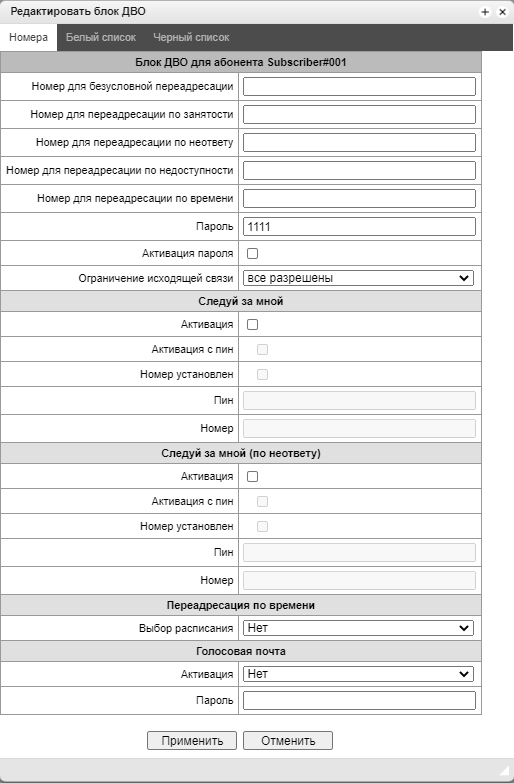
At the moment, the voice mailbox subscription mode (MWI (RFC3842)) is not implemented, thus the subscriber will not be able to find out whether a new voice message has been left or not. To inform about the presence of messages, you neeed to use the voice menu (*90# or *91*Subscriber number with voicemail#). |
The mail from a remote phone can be listened to only if the remote subscriber has a voicemail password set. |
When changing the password through the voice menu, if the old password is not set, just press the hash key. |
Message playing:
To play voice messages, the subscriber dials the code *90# from his/her own phone, dials the code *91# from someone else's phone, and then enters the voice menu.
Usage example:
To activate voice mail, it is necessary to enable the Voice Mail of the VAS for the subscriber.
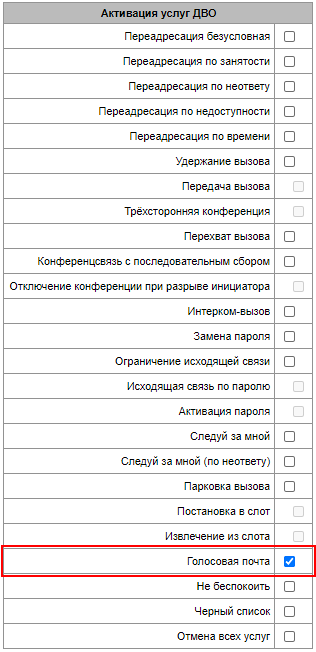
Next, in the ‘VAS Management’ set the desired mode of operation:
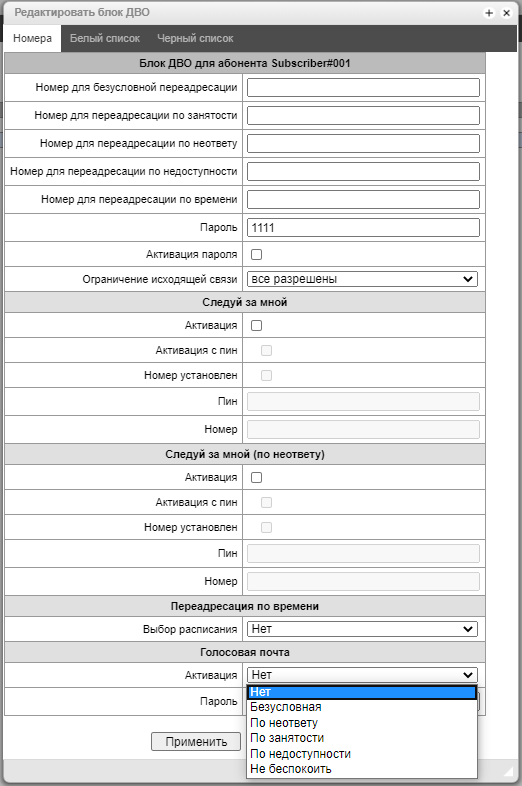
Now, when a call is received by this subscriber, messages will go to voice mail, and the subscriber will be able to listen to them by dialing *90# on their telephone and following the prompts of the voice menu.
The subscriber can also set up the voice mail operating mode, using the voice menu and following its prompts.
From the voice menu, the subscriber can:
The service allows the subscriber to start recording a conversation during a conversation.
Use case:
Subscribers A and B are talking, and A has the ‘One touch record’ service enabled. When during the dialogue, the subscriber A dials code 99, a 3 short sound signals are played, and the recording of the conversation begins. The recording of the conversation stops when the dialogue ends or if the subscriber A dials code 99 again during the dialogue.
If the device is configured to record a conversation by a mask that the talking parties match, and one of them tries to start one touch record, an 3 short sound signals will be played, but a new conversation recording will not start.
If one touch record is activated for both subscribers who are in a dialogue, and both subscribers dial code 99 to start recording, then the 3 short sound signals will be played for both subscribers A and B, but the recording will start only once — after the subscriber's command, who dialed the code first.
Description
The ‘Anonymous Call’ service allows you to make anonymous calls by hiding the phone number and display name of the caller from the call recipient.
The service is configured on SMG in the SIP subscriber settings. The ‘Anonymous call’ option is set in the VAS block.
After this, in the ‘VAS Management’ tab, you can activate and deactivate the service for the subscriber. The subscriber can also control the activation of the service from the telephone.
Service management from the telephone set
Service activation | * 31 # |
|---|---|
Sevice deactivation | # 31 # |
Control | * # 31 # |
Description
The ‘Reject anonymous calls’ service rejects incoming calls if the caller hides from the call recipient's phone number and display name.
The service is configured on SMG in the SIP subscriber settings. In the VAS block, set the option ‘Reject anonymous calls’.
After this, in the ‘VAS Management’ tab, you can activate and deactivate the service for the subscriber. The subscriber can also control the activation of the service from the telephone.
Service management from the telephone set
Service activation | * 16 # |
|---|---|
Sevice deactivation | # 16 # |
Control | * # 16 # |
Description
The ‘Reminder’ service allows you to receive an incoming call to the phone on which you activated this service at a given time. The subscriber, when activating the service, indicates the time of its activation. At the appointed time, the system makes a call to the subscriber. When the subscriber answers the call, an alarm tone is played.
The service is configured on SMG in the SIP subscriber settings. The ‘Reminder’ option is set in the VAS block.
After this, the subscriber can control the activation of the service from the telephone.
Service management from the telephone set
Service activation | * 55 * <HHMM> # |
|---|---|
Sevice deactivation | # 55 # |
Control | * # 55 # |
Description
Услуга «Ожидание вызова» позволяет во время разговора получить уведомление о новом вызове при помощью звукового сигнала либо на дисплее SIP-телефона. Вызывающий абонент при этом будет слышать голосовое сообщение: «Абонент разговаривает, оставайтесь на линии или перезвоните позже».
Услуга настраивается на SMG в настройках SIP-абонента. В блоке ДВО устанавливается опция «Ожидание вызова».
После этого на вкладке «Управление ДВО» можно активировать и деактивировать услугу у абонента и выбирать режим работы услуги. Также абонент может управлять активацией услуги с телефонного аппарата.
Режимы работы услуги «Ожидание вызова»:
В режиме Ringer абоненту, находящемуся в состоянии разговора, при получении сигнала о поступлении нового вызова доступно выполнение следующих операций:
Service management from the telephone set
Service activation | * 43 # |
|---|---|
Sevice deactivation | # 43 # |
Control | * # 43 # |
При несоответствии выбранного режима CW и количества настроенных линий на абоненте в конфигураторе появится сообщение "Количество линий у абонента не соответствует выбранному режиму, смените режим, либо измените количество линий". Для всех режимов ожидающий вызов может быть только один, если приходит еще один вызов, то он отбивается. Повторяющийся сигнал воспроизводится, пока абонент находится в ожидании, если абонент не дождался ответа и завершил вызов, то сигнал прекращается. Для воспроизведения уведомления абоненту, ожидающему вызов, необходимо, чтобы на SIP-профиле/SIP-интерфейсе была включена опция "Всегда передавать SDP в предварительных ответах" |
Description
Услуга «Не беспокоить в группе вызова» позволяет абоненту, участвующему в группе вызова, выходить из группы и возвращаться в неё. Соответственно, в то время, пока услуга будет активна, вызовы на группу не будут распространяться на абонента.
Услуга настраивается на SMG в настройках SIP-абонента. В блоке ДВО устанавливается опция «Не беспокоить в группе вызова».
После этого абонент может управлять активацией услуги с телефонного аппарата.
Service management from the telephone set
Sevice activation | * 48 # |
|---|---|
Sevice deactivation | # 48 # |
Control | * # 48 # |
Description
Услуга «Автодозвон» позволяет абоненту производить автоматические попытки вызова абонента, который в данный момент занят или не отвечает, но может стать доступен в ближайшем будущем.
Услуга настраивается на SMG в настройках SIP-абонента. В блоке ДВО устанавливается опция «Автодозвон».
После этого на вкладке «Управление ДВО» можно настроить параметры работы услуги:
Далее абонент может использовать услугу, набрав фиче-код со своего телефонного аппарата.
Для прекращения попыток автодозвона достаточно положить трубку.
Service management from the telephone set
Запуск | * 38 * <НОМЕР> # |
|---|
Description
Услуга «Автодозвон с обратным вызовом» позволяет абоненту производить автоматические попытки вызова абонента, который в данный момент занят или не отвечает, но может стать доступен в ближайшем будущем, с последующим обратным вызовом абоненту-инициатору.
Услуга настраивается на SMG в настройках SIP-абонента. В блоке ДВО устанавливается опция «Автодозвон с обратным вызовом».
После этого на вкладке «Управление ДВО» можно настроить параметры работы услуги:
Далее абонент может использовать услугу, набрав фиче-код со своего телефонного аппарата. После первой попытки абонент должен положить трубку, последующие попытки происходят без его участия.
Для прекращения попыток автодозвона абонент должен набрать соответствующий фиче-код со своего аппарата.
Service management from the telephone set
Запуск | * 39 * <НОМЕР> # |
|---|---|
Остановка | # 39 * <НОМЕР> # |