Modern tendencies of telecommunication development necessitate operators to search for the most optimal technologies, allowing one to meet rapidly growing needs of subscribers, while maintaining at the same time consistency of business processes, development flexibility and reducing the costs of various services. Wireless technologies are spinning up more and more, and have paced a huge way for short time from unstable low-speed communication networks of low radius to broadband access networks equitable to speed of wired networks with high criteria to the quality of provided services.
The primary purpose of the WOP-3L-EX explosion-proof access point is to provide reliable wireless communication where it is critically needed: in the oil and gas, chemical, mining, and energy industries.
This manual specifies intended purpose, main technical specifications, design, design, safe operation rules, and installation and configuration recommendations for the device.
Symbols
Notes and warnings
Notes contain important information, tips or recommendations on device operation and setup.
Warnings are used to inform the user about harmful situations for the device and the user alike, which could cause malfunction or data loss.
Device description
Purpose
WOP-3L-EX is a next-generation industrial Wi-Fi 6 (IEEE 802.11ax) access point that provides a high-speed and secure wireless network. An explosion-proof access point is ideal for installation at manufacturing facilities in the chemical, oil refining, gas, and other industries in areas with a potentially explosive atmosphere. The explosion protection marking 1Ex db IIC T5 Gb allows the device to be used in hazardous areas of indoor and outdoor installations.
With support for IEEE 802.11n/ax standards, the WOP-3L-EX access point provides data transfer rates of 300 Mbps (2.4 GHz) and 1201 Mbps (5 GHz).
Using MU-MIMO technology and omnidirectional protected antennas, WOP-3L-EX is a versatile solution for corporate networks in hazardous environments.
Device specification
Interfaces:
1 Ethernet 10/100/1000BASE-T (RJ-45) port with PoE;
Wi-Fi 2.4 GHz IEEE 802.11b/g/n;
Wi-Fi 5 GHz IEEE 802.11a/n/ac/ax.
The device is powered via 24 V PoE injector from 220 V.
Using a PoE injector with a voltage different from 24 V will damage the device.
Functions:
WLAN capabilities:
support for IEEE 802.11a/b/g/n/ac/ax;
support for IEEE 802.11r/k/v roaming;
data aggregation, including A-MPDU (Tx/Rx) and A-MSDU (Rx);
WMM-based packet priorities and planning;
dynamic frequency selection (DFS);
support for hidden SSID;
14 virtual access points;
third-party access points detection;
spectrum analyzer;
auto channel selection;
support for APSD.
Network features:
automatic speed negotiation, duplex mode negotiation and MDI-MDI-X switch-over;
VLAN support;
C-VLAN;
Management VLAN;
DHCP client;
GRE;
local switching;
ACL;
NTP;
Syslog;
LLDP.
QoS functions:
bandwidth limiting;
configuring WMM (EDCA) parameters for radio interfaces;
802.1p and DSCP priority.
Security:
centralized authorization via RADIUS server (802.1X WPA/WPA2/WPA3 Enterprise);
WPA/WPA2/WPA3/OWE encryption;
Captive Portal;
authorization via RADIUS server when logging into the device.
centralized authorization via RADIUS server (802.1X WPA/WPA2/WPA3 Enterprise) WPA/WPA2/WPA3/OWE encryption Captive Portal authorization via RADIUS server when logging
MIMO 2×2 for 2.4 GHz; MU-MIMO 2×2 for 5 GHz OFDMA for 5 GHz
Management
Remote management
web interface, Telnet, SSH, CLI, SNMP, NETCONF
Access restriction
by password, authentication via RADIUS server
General parameters
Flash
128 MB SPI-NAND Flash
RAM
128 MB DDR2 RAM
Power supply
Passive PoE 24 V
Power consumption
no more than 8.5 W
Operating temperature range
from -45 to +60 °C
Relative humidity at 25 °C
up to 80 %
Explosion-proof marking
1Ex db IIC Т5 Gb
Ingress protection
IP66
Dimensions (W × H × D)
235 × 503 × 164 mm
Weight
10.2 kg
Service life
no less than 15 years
1 The number of channels and the value of the maximum output power will vary according to the rules of radio frequency regulation in your country.
2 The maximum wireless data rate is defined according to IEEE 802.11 standards. The real bandwidth can be different. Conditions of the network, environment, the amount of traffic, building materials and constructions and network service data can decrease the real bandwidth. The environment can influence the network coverage range.
Radiation patterns
The figures below show the radiation patterns of the device.
Measurement position
AZIMUT (XY)
ELEVATION (YZ)
2.4 GHz band
5 GHz band
Design
The WOP-3L-EX device is made in an explosion-proof enclosure with 1Ex db IIC T5 Gb explosion protection marking.
Main panel
The layout of WOP-3L-EX main panel is shown in Figure 2.
Figure 2 — WOP-3L-EX main panel layout
The WOP-3L-EX main panel feature the following ports and components (Table 2).
Table 2 — Description of ports
Panel element
Description
1
Explosion-proof antennas for 2.4 and 5 GHz bands
2
Cover
3
Cover securing screw
4
Cable gland for Passive PoE power
5
Grounding terminal
Restore the default configuration
To reset the default configuration, press and hold the "RST" button on the PoE injector included in the supply package (for about 10-15 seconds). The device will automatically reboot.
DHCP client will be launched by default. If the address is not obtained via DHCP, the device will have the factory IP address — 192.168.1.10, and the following netmask — 255.255.255.0, and username/password for access via the web interface: admin/password.
Supply package
The supply package includes:
WOP-3L-EX radio access equipment;
Passive PoE 24 V power injector;
Power cord;
Patch cord RJ-45, 5e cat., 1.5m;
User manual on a CD (optional);
Technical passport.
Rules and recommendations for the device installation
This section defines safety rules, installation recommendations, setup procedure and the device starting procedure.
Safety rules
The device should be operated by engineering and technical personnel who have undergone special training in accordance with national laws and relevant standards.
The voltage, current and frequency requirements specified in this manual should be observed.
It is prohibited to change the device technical specifications.
It is prohibited to change the device components without the consent of the manufacturer.
It is prohibited to carry out mechanical modifications with the enclosure (for example, drilling) or make any changes to the device design.
The device can only be used if it is free of damage: cracks, chips on the body, defects in the paintwork, signs of corrosion, etc.
The explosion protection marking of the device should comply with the parameters of the hazardous area.
Do not install this device during a thunderstorm. There may be a risk of lightning strike.
When mounting the device on high-rise structures, comply with established standards and requirements for working at height.
Do not install the device near heat sources or in rooms with temperatures below -45°C or above 60°C.
It is prohibited to insert the cable into the device enclosure without a cable gland.
It is prohibited to connect several grounded nodes in series to the grounding conductor.
Only suitable auxiliary equipment should be connected to the device.
Before connecting measuring instruments and a computer to the device, they should first be grounded. The potential difference between the housings of equipment and measuring instruments should not exceed 1 V.
It is prohibited to operate devices in hazardous areas with open covers and unsealed ports for cable gland and/or control elements.
It is prohibited to operate the device in a hazardous areas without a complete set of fasteners for the enclosure cover.
The connecting fittings installed on the thread lock cannot be dismantled.
Before turning on the device, make sure the cables are intact and securely attached to the connectors.
It is prohibited to troubleshoot when the power supply is on.
Installation recommendations
The recommended installation position: wall/floor.
Before installing the device and turning it on, check the device for visible mechanical defects. If defects are observed, stop the device installation, fill in the corresponding act and contact the supplier.
If the device has been exposed to low temperatures for an extended period, allow it to stay at room temperature for two hours before turning it on. If the device has been exposed to high humidity for an extended period, allow it to stay at normal temperatures for at least 12 hours before turning it on.
After transportation, it is necessary to ensure the reliability of the contact connections; if necessary, reapply the appropriate tightening torque to the clamps.
After performing works inside the device enclosure that has silicone grease on the flanges, before closing the cover, it is necessary to apply a new layer of silicone grease to the explosion-proof contact surfaces of the cover and enclosure.
When placing the device, in order to provide the best Wi-Fi coverage consider the following rules:
Install the device at the center of a wireless network.
Minimize the number of barriers (walls, ceilings, furniture, and etc.) between the access point and other wireless network devices.
Do not install the device near (about 2 m) electrical and radio devices.
It is not recommended to use radiophones and other equipment operating at frequency of 2.4 GHz or 5 GHz, within the range of a Wi-Fi network.
Obstacles like glass/metal constructions, brick/concrete walls, water cans and mirrors can significantly reduce Wi-Fi action radius. Mounting the antenna on the inside of a false ceiling is not recommended, as the metal frame causes multipath propagation and signal attenuation when passing through the false ceiling frame grid.
When installing several access points, cell action radius must overlap with action radius of a neighboring cell at the level from -65 to -70 dBm. It is allowed to reduce the signal level to -75 dBm at cell boundaries, if it is not intended to use VoIP, video streaming and other sensitive to losses traffic in wireless network.
Calculating the number of required access points
When choosing the number of access points needed to cover a room, it is important to estimate the required coverage area. A more accurate estimate requires a radio frequency survey of the room. The approximate coverage radius of the WOP-3L-EX access point when mounted on the ceiling in typical office spaces is: 2.4 GHz — 40–50 m, 5 GHz — 20–30 m. In a completely clear environment, the coverage radius is: 2.4 GHz — up to 100 m, 5 GHz — up to 60 m. Table 5 shows approximate attenuation values.
Table 5 — Attenuation values
Material
Change of signal level, dB
2.4GHz
5 GHz
Organic glass
-0.3
-0.9
Brick
-4.5
-14.6
Glass
-0.5
-1.7
Drywall
-0.5
-0.8
Particle board
-1.6
-1.9
Plywood
-1.9
-1.8
Plaster with wire cloth
-14.8
-13.2
Breeze block
-7
-11
Metal lattice (mesh 13 × 6 mm, metal 2 mm)
-21
-13
Channel selection for neighboring access points
It is recommended to set non-overlapping channels to avoid interchannel interference among neighboring access points.
Figure 3 — General diagram of frequency channel overlap in the range of 2.4 GHz
Example of channel allocation scheme among neighboring access points in frequency range of 2.4 GHz when channel width is 20 MHz, see Figure 4.
Figure 4 — Scheme of channel allocation among neighboring access points in the frequency range of 2.4 GHz when channel width is 20 MHz
Similarly, the procedure of channel allocation is recommended to save for access point allocation between floors, see Figure 5.
Figure 5 — Scheme of channel allocation between neighboring access points that are located between floors
With a channel width of 40 MHz there are no non-overlapping channels in the 2.4 GHz band. In such cases, you should select channels maximally separated from each other.
Figure 6 — Channels used in the 5 GHz band when channel width is 20, 40 or 80 MHz
When installing on a vertical surface, the weight of the device (10.2 kg) should be taken into account.
The device should be mounted on 2 or 4 external mounting points.
The device should fit evenly and tightly to the surface exclusively at the mounting points and should be secured without deforming any parts of the enclosure.
When placing the device on a wall/floor, secure it using anchor bolts or self-tapping screws, dowels, or screws with a diameter of up to 12 mm.
When placing the device on the mounting plate, secure it using an M12 bolt connection.
Figure 7 — Connection dimensions
Figure 8 — Fastening the device using a bolted connection
After installing the device, connect the grounding terminal to the external ground bolt of the device located on the enclosure.
Figure 9 — Grounding the device
Device connection
If the device was previously powered on, you must disconnect the power before proceeding.
Network cable connection
1. Unscrew the nut from the cable gland and remove the sealing sleeve.
Figure 10 — Disassembled cable gland
2. Pass the Ethernet cable through the opening of the cable gland nut and the rubber sleeve.
Figure 11 — Installing the cable gland nut and rubber sleeve on the cable
3. Loosen the cover securing screw using a 2.5 mm Allen key. Then open the device cover by turning it counterclockwise.
Figure 12 — Device cover
4. Pull the cable through the cable gland as shown in Figure 13.
Figure 13 — Pulling the cable through the cable gland
5. Crimp the RJ-45 connector onto the cable.
Figure 14 — Cable with RJ-45 connector
6. Connect the cable to the Ethernet port of the device.
Figure 15 — Connecting an Ethernet cable
7. Insert the rubber sleeve into the cable gland.
Figure 16 — Installing a rubber sleeve
8. Screw the nut onto the cable gland and tighten with a spanner/open-end wrench.
Figure 17 — Installing a cable gland nut
Incorrect installation of the cable gland may compromise the device sealing. The nut must be tightened with a 27 mm spanner/open-end wrench, otherwise the IP66 rating will not be maintained.
9. Close the device cover by turning it clockwise. Then tighten the cover securing screw using a 2.5 mm Allen key.
Figure 18 — Device cover
To prevent device damage, it is recommended to use lightning protection.
Device power
1. Connect the Ethernet cable from WOP-3L-EX to the injector PoE port.
2. Connect the Ethernet cable of your network to the LAN port of the PoE injector.
3. Connect the PoE injector to a 220V outlet using the power cord. After powering on, WOP-3L-EX will boot up within a minute.
4. Click "Log in". The device status monitoring menu will open in a browser window.
5. If necessary, select the information display language.
Applying configuration and discarding changes
Applying configuration
Clicking the button starts the process of saving the configuration to the device flash memory and applying new settings. All settings are applied without device rebooting.
The web interface has a visual indication of the current status of the setting application process (Table 6).
Table 6 — Visual indication of the current status of the setting application process
Image
Status description
Clicking "Apply" button starts the process of saving the configuration to the device flash memory and applying new settings. This is indicated by the icon in the tab name and on the "Apply" button.
The icon in the tab name and on the "Apply" button indicates about successful saving and application of the settings.
2. Discarding changes
The changes can be discarded only before clicking the "Apply" button. If you click the "Apply" button, all changed parameters will be applied and saved to the device memory. After clicking the "Apply" button, return to the previous settings will not be possible.
The button for discarding changes appears as follows: .
Main elements of the web interface
The figure below shows the navigation elements of the web interface.
User interface window is divided into five general areas:
Menu tabs categorize the submenu tabs: Monitoring, Radio, VAP, Network settings, External Services, System.
Interface language selection and "Logout" button designed to terminate a session in the web interface under a given user.
Submenu tabs allows managing the settings field.
Device settings field displays data and configuration.
Information field displays the current firmware version.
"Monitoring" menu
The "Monitoring" menu displays the current system status.
"Wi-Fi Clients" submenu
The "Wi-Fi Clients" submenu displays information about the status of connected Wi-Fi clients.
Information on connected clients is not displayed in real time. In order to update the information on the page, click the "Refresh" button.
# — number of the connected device in the list;
Hostname — network name of the device;
IP address — IP address of the connected device;
MAC — MAC address of the connected device;
Interface — WOP-3L-EX interaction interface with the connected device;
Link Capacity — parameter that displays the efficiency of modulation on the transmission used by an access point. It is calculated based on the number of packets transmitted to the client on each modulation, and the reduction factors. The maximum value is 100% (meaning that all packets are transmitted to the client at maximum modulation for the maximum Nss type supported by the client). The minimum value is 2% (in the case when the packets are transmitted on the modulation Nss1MCS0 for a client with MIMO 3×3 support). The parameter value is calculated for the last 10 seconds;
Link Quality — parameter that displays the status of the link to the client, calculated based on the number of retransmit packets sent to the client. The maximum value is 100% (all transmitted packets were sent on the first attempt), the minimum value is 0% (no packets were successfully sent to the client). The parameter value is calculated for the last 10 seconds;
Link Quality Common — parameter that displays the status of the link to the client, calculated based on the number of retransmit packets sent to the client. The maximum value is 100% (all transmitted packets were sent on the first attempt), the minimum value is 0% (no packets were successfully sent to the client). The parameter value is calculated for the entire client connection time;
RSSI — received signal level, dBm;
SNR — signal-to-noise ratio, dB;
TxRate — channel data rate of transmission, Mbps;
RxRate — channel data rate of receiving, Mbps;
Тx BW — transmission bandwidth, MHz;
Rx BW — reception bandwidth, MHz;
Uptime — Wi-Fi client connection time.
To display more detailed information on a particular client, select it from the list. A detailed description includes the following options:
Total TX/RX, bytes — number of bytes sent/received on the connected device;
Total TX/RX, packets — number of packets sent/received on the connected device;
Data TX/RX, bytes — number of data bytes sent/received on the connected device;
Data TX/RX, packets — number of data packets sent/received on the connected device;
Fails, packets — number of packets sent with errors on the connected device;
TX Period Retry, packets — number of retries of transmission to the connected device in the last 10 seconds;
TX Retry Count, packets — number of retries of transmission to the connected device during the entire connection;
Actual TX/RX Rate, Kbps — current traffic transmission rate at the moment.
"Traffic Statistics" submenu
The "Traffic Statistics" submenu displays the graphs of the transmitted/received traffic rate for the last 3 minutes, as well as statistics on the amount of transmitted/received traffic since the access point was turned on.
The LAN Tx/Rx graph shows the rate of the transmitted/received traffic via Ethernet interface of the access point for the last 3 minutes. The graph is automatically updated every 6 seconds.
The WLAN0 and WLAN1 Tx/Rx graphs show the rate of transmitted/received traffic via Radio 2.4 GHz and Radio 5 GHz interfaces for the last 3 minutes. The graph is automatically updated every 6 seconds.
"Transmit" table description:
Interface — name of the interface;
Total Packets — number of successfully sent packets;
Total Bytes — number of successfully sent bytes;
Total Drop — number of rejected packets;
Errors — number of errors.
"Receive" table description:
Interface — name of the interface;
Total Packets — number of successfully received packets;
Total Bytes — number of successfully received bytes;
Total Drop — number of rejected packets;
Errors — number of errors.
"Scan Environment" submenu
The "Scan Environment" submenu performs scanning of the surrounding radio environment and detects neighboring access points.
To start the scanning process, click the "Scan" button. After the scan is completed, a list of detected access points and information about them will appear:
Last scan was... — date and time of the last scan;
Range — specifies the range of 2.4 GHz or 5 GHz in which the access point was detected;
SSID — SSID of the detected access point;
Security mode — security mode of the detected access point;
MAC — MAC address of the detected access point;
Channel/Bandwidth — radio channel used by the detected access point;
RSSI — the level at which the device receives the signal from the detected access point, dBm.
While scanning the environment, the device radio interface will be temporarily disabled, preventing data transmission to Wi-Fi clients.
"Events" submenu
This section displays a list of real-time informational messages containing the following data:
Date and Time — time when event was generated;
Type — category and importance level of the event;
Service — name of the process that generated the message;
Message — event description.
Table 7 — Description of event importance categories:
Level
Message importance level
Description
0
Emergency
A critical error has occurred in the system, the system may not work properly.
1
Alert
Immediate intervention in the system is required.
2
Critical
A critical error has occurred in the system.
3
Error
An error has occurred in the system.
4
Warning
Warning, non-emergency message.
5
Notice
System notice, non-emergency message.
6
Informational
Informational system messages.
7
Debug
Debugging messages provide the user with information to correctly configure the system.
To receive new messages in the event log, click the "Refresh" button.
If necessary, all old messages can be deleted from the log by clicking the "Clear" button.
"Network Information" submenu
The "Network Information" submenu displays main network settings of the device.
WAN Status:
Interface — name of the bridge interface;
Protocol — protocol used for access to WAN;
IP address — device IP address in external network;
RX Bytes — number of bytes received on WAN;
TX Bytes — number of bytes sent from WAN.
Ethernet:
Link Status — Ethernet port status;
Speed — Ethernet port connection speed;
Duplex — data transfer mode:
Full — full duplex;
Half — half-duplex.
ARP: The ARP table contains mapping information between the IP and MAC addresses of neighboring network devices:
IP address — device IP address;
MAC — device MAC address.
Routes:
Interface — name of the bridge interface;
Destination — IP address of destination host or subnet that the route is established to;
Gateway — IP address of the gateway through which access to the Destination is carried out;
Netmask — subnet mask;
Flags — certain route characteristics.
The flags can have the following values:
U — indicates that the route is created and passable.
H — indicates the route to the specific host.
G — indicates that the route goes through an external gateway. System network interface provides routes in the network with direct connection. All other routes pass through external gateways. G flag is used for all routes except for the routes in the direct connection networks.
R — indicates that the route was likely created by a dynamic routing protocol running on the local system using the reinstate parameter.
D — indicates that the route was added as a result of receiving an ICMP Redirect Message. When the system learns about a route from an ICMP Redirect, the route is added to the routing table to prevent further redirects for subsequent packets sent to the same destination.
M — indicates that the route was modified, likely by a dynamic routing protocol running on the local system using the mod parameter.
A — indicates a buffered route with a corresponding entry in the ARP table.
C — indicates that the route originated from the core routing buffer.
L — indicates that the destination of the route is one of the local system’s IP addresses. Such "local routes" exist only in the routing buffer.
B — indicates that the route destination is a broadcast address. Such "broadcast routes" exist only in the routing buffer.
I — indicates that the route is associated with the loopback interface for a purpose other than loopback communication. Such "internal routes" exist only in the routing buffer.
! — indicates that datagrams sent to this address will be rejected by the system.
"Radio Information" submenu
The "Radio Information" submenu displays the current status of the WOP-3L-EX radio interfaces.
The access point radio interfaces can be in two states: "On" and "Off". The status of each radio interface is shown in the "Status" field.
The Radio status depends on whether the radio interface has virtual access points (VAPs) enabled. In case there is at least one active VAP on the radio interface, the Radio status will be "On", otherwise — "Off".
Depending on the Radio status, the following information is available for monitoring:
"Off":
Status — radio interface state;
MAC — radio interface MAC address;
Mode — radio interface operation mode according to IEEE 802.11 standards.
"On":
Status — radio interface state;
MAC — radio interface MAC address;
Mode — radio interface operation mode according to IEEE 802.11 standards;
Channel — number of the wireless channel on which the radio interface is running;
Channel Bandwidth — bandwidth of the channel on which the radio interface is running.
"Device Information" submenu
The "Device Information" submenu displays main WOP-3L-EX parameters.
Product — device model name;
Hardware Version — device hardware version;
Factory MAC Address — MAC address of the device’s WAN interface, factory set;
Serial Number — device serial number, factory set;
Software Version — device software version;
Backup Version — previously installed software version;
Boot Version — device software boot version;
System Time — current time and date, set in the system;
Uptime — operating time since the last time the device was turned on or rebooted;
CPU Usage — average percentage of CPU load over the last 5 seconds;
Memory Usage — percentage of device RAM usage.
"Radio" menu
The "Radio" menu is used to configure the device’s radio interfaces.
"Radio 2.4 GHz" submenu
The "Radio 2.4 GHz" submenu is used to configure the main parameters of the device’s radio interface operating in the 2.4 GHz band.
Mode — interface operating mode based on the following standards:
IEEE 802.11n;
IEEE 802.11b/g;
IEEE 802.11b/g/n.
Auto Channel — when checked, the device will automatically select the least loaded radio channel for the Wi-Fi interface. When unchecked, manual selection of a static operating channel becomes available;
Channel — selection of the data transmission channel;
Use Limit Channels — when checked, the access point will use a user-defined list of channels to work in automatic channel selection mode. When unchecked or there are no channels in the list, the access point will select the operation channel from all available channels in the given band. 2.4 GHz band channels: 1–13;
Channel Bandwidth, MHz — channel bandwidth, on which the access point operates. The parameter may take values of 20 and 40 MHz;
Primary Channel — parameter can only be changed if the bandwidth of a statically specified channel is equal to 40 MHz. The 40 MHz channel can be considered as consisting of two adjacent 20 MHz channels. These two 20 MHz channels are called primary and secondary channels. The primary channel is used by clients that only support 20 MHz channel bandwidth:
Upper — primary channel will be the upper 20 MHz channel in the 40 MHz band;
Lower — primary channel will be the lower 20 MHz channel in the 40 MHz band.
Transmit Power Limit, dBm — transmitting Wi-Fi signal power adjustment, dBm. May take values between 11 and 16 dBm;
Fixed Transmit Rate — fixed wireless data transmission rate which is defined by IEEE 802.11 standards.
If an unavailable channel is specified in the "Use Limit Channels" list, it will be highlighted in grey. To apply the new configuration to the access point, only available channels (highlighted in blue) must be selected in the "Use Limit Channels" list.
Example. No configuration has been applied to the access point yet. By default, the "Channel Bandwidth" for the Radio 2.4 GHz interface is set to 20 MHz, and the "Use Limit Channels" list contains the following channels: 1, 6, and 11. Suppose the "Channel Bandwidth" is changed to 40 MHz When this parameter is changed from 20 MHz to 40 MHz, the following occurs:
the "Primary Channel" option becomes available for editing, with the default value set to "Lower".
channel 11 in the "Use Limit Channels" list changes its color from blue to grey.
If you change the Channel Width to 40 MHz but do not remove the grey (unavailable) channels from the list, clicking the "Apply" button will result in an error message in the browser: "There are errors in data. Changes were not applied". As a result, the configuration will not be applied to the access point. This happens because the gray-highlighted channels in the "Use Limit Channels" list are not valid based on the current "Primary Channel" setting, which is "Lower" in this case.
The "Advanced" section provides configuration options for additional radio interface parameters.
OBSS Coexistence — automatic channel bandwidth reduction when the channel is loaded. When checked, the mode is enabled;
Short Guard Interval — support for Short Guard Interval. Access point transmits data using 400 ns Guard interval (instead of 800 ns) to clients that also support Short GI;
STBC — Space-Time Block Coding (STBC) method designed to improve data transmission reliability. This option is available only if the selected radio interface includes 802.11n. When checked, the device transmits a single data stream over multiple antennas. When unchecked, a single data stream is not transmitted across multiple antennas;
Beacon Interval, ms — beacon frames transmission period. The frames are transmitted to allow the access point to be detected over the air. The parameter takes values from 20 to 2000 ms, by default — 100 ms;
Fragmentation Threshold — frame fragmentation threshold, bytes. The parameter takes values from 256 to 2346, by default — 2346;
RTS Threshold — specifies the number of bytes after which a Request to Send (RTS) is sent. Decreasing this value may improve access point performance when many clients are connected, but may reduce general bandwidth of wireless network. The parameter takes values from 0 to 2347, by default — 2347;
Frame Aggregation — enabling support for AMPDU/AMSDU;
Short Preamble — use of the packet short preamble;
Broadcast/Multicast Rate Limiting, p/s — when checked, limits the rate of broadcast and multicast traffic over the wireless network. A broadcast traffic rate limit (in packets per second) can be specified in the configuration window;
Legacy Rate Sets — sets of channel rates supported and broadcast by the access point;
Wi-Fi Multimedia (WMM) — enabling of support for Wi-Fi Multimedia (WMM);
ARP Suppression — mechanism for converting ARP requests from Broadcast to Unicast;
DHCP Snooping Mode — selection of DHCP option 82 processing policy. Available values:
ignore — option 82 processing is disabled (default value);
remove — the access point removes option 82;
replace — the access point inserts or replaces option 82. If selected, the following parameters become available:
Option 82 CID format — replacement of the CID parameter value, can take the following values:
APMAC-SSID — replacement of the CID parameter value with <MAC address of the access point>-<SSID name> (default value);
SSID — replacement of the CID parameter value with SSID name, to which the client is connected;
custom — replacement of the CID parameter value with the value specified in the "Option 82 Unique CID":
Option 82 Unique CID — a custom string of up to 52 characters to be used as the CID. If not set, will be used the default value — APMAC-SSID.
Option 82 RID format — replacement of the RID parameter value, can take the following values:
ClientMAC — replacement of the RID content with the MAC address of the client device (default value);
APMAC — replacement of the RID content with the MAC address of the access point;
APdomain — replacement of the RID content with the domain of the access point;
custom — replacement of the RID content with the value specified in the "Option 82 Unique RID":
Option 82 Unique RID — a custom string of up to 63 characters to be used as the RID. If not set, will be used the default value — ClientMAC.
MAC-address format — selection of octet delimiters of the MAC address, which is transmitted in CID and RID:
AA:BB:CC:DD:EE:FF — delimiter is a colon (:) (default value);
AA-BB-CC-DD-EE-FF — delimiter is a dash (-).
Enable QoS — when checked, the configuration of Quality of Service functions is available. This functionality allows overriding EDCA parameters. By default, QoS is always enabled.
The following functions are available for Quality of Service configuration:
AP EDCA parameters — access point settings table (traffic is transmitted from the access point to the client):
Queue — predefined queues for various kinds of traffic:
Data 3 (Background) — low priority queue, high bandwidth (802.1p: cs1, cs2 priorities);
Data 2 (Best Effort) — middle priority queue, middle bandwidth and delay. Most of the traditional IP data is sent to this queue (802.1p: cs0, cs3 priorities);
Data 1 (Video) — high priority queue, minimal delay. In this queue, time-sensitive video data is automatically processed (802.1p: cs4, cs5 priorities);
Data 0 (Voice) — high priority queue, minimal delay. In this queue, time sensitive data is automatically processed, such as: VoIP, streaming video (802.1p: cs6, cs7 priorities).
AIFS — Arbitration Inter-Frame Spacing, defines the waiting time of data frames, measured in slots, takes values 1–255;
cwMin — initial timeout value before resending a frame, specified in milliseconds, takes the values 1, 3, 7, 15, 31, 63, 127, 255, 511, 1023. The value of cwMin cannot exceed the value of cwMax;
cwMax — maximum timeout value before resending a frame, specified in milliseconds, takes the values 1, 3, 7, 15, 31, 63, 127, 255, 511, 1023. The value of cwMax must exceed the value of cwMin;
TXOP Limit — this parameter is used only for data transmitted from the client station to the access point. The transmission capability is the time interval, in milliseconds, when the client WME station has the rights to initiate data transmission over the wireless medium to the access point, the maximum value is 65535 milliseconds.
Station EDCA parameters — table of client station parameter settings (traffic is transmitted from the client station to the access point). For description of table fields, see above.
To apply a new configuration and save settings to non-volatile memory, click the "Apply" button. Click the "Cancel" button to discard the changes.
"Radio 5 GHz" submenu
The "Radio 5 GHz" submenu is used to configure the main parameters of the device’s radio interface operating in the 5 GHz band.
Mode — interface operating mode based on the following standards:
IEEE 802.11ax;
IEEE 802.11a/n/ac;
IEEE 802.11a/n/ac/ax.
Auto Channel — when checked, the device will automatically select the least loaded radio channel for the Wi-Fi interface. When unchecked, manual selection of a static operating channel becomes available;
Channel — selection of the data transmission channel;
Use Limit Channels — when checked, the access point will use a user-defined list of channels to work in automatic channel selection mode. When unchecked or there are no channels in the list, the access point will select the operation channel from all available channels in the given band. 5 GHz band channels: 36–64, 132–144, 149–165;
Channel Bandwidth, MHz — channel bandwidth, on which the access point operates. The parameter may take values of 20, 40 and 80 MHz;
Primary Channel — parameter can only be changed if the bandwidth of a statically specified channel is equal to 40 MHz. The 40 MHz channel can be considered as consisting of two adjacent 20 MHz channels. These two 20 MHz channels are called primary and secondary channels. The primary channel is used by clients that only support 20 MHz channel bandwidth:
Upper — primary channel will be the upper 20 MHz channel in the 40 MHz band;
Lower — primary channel will be the lower 20 MHz channel in the 40 MHz band.
Transmit Power Limit, dBm — transmitting Wi-Fi signal power adjustment, dBm. May take values between 11 and 19 dBm;
Fixed Transmit Rate — fixed wireless data transmission rate which is defined by IEEE 802.11 standards.
If an unavailable channel is specified in the "Use Limit Channels" list, it will be highlighted in grey. To apply the new configuration to the access point, only available channels (highlighted in blue) must be selected in the "Use Limit Channels" list.
Example. No configuration has been applied to the access point yet. By default, the "Channel Bandwidth" for the Radio 5 GHz interface is set to 20 MHz, and the "Use Limit Channels" list contains the following channels: 36, 40, 44, 48. Suppose the "Channel Bandwidth" is changed to 40 MHz When this parameter is changed from 20 MHz to 40 MHz, the following occurs:
the "Primary Channel" option becomes available for editing, with the default value set to "Upper".
channels 36 and 44 in the "Use Limit Channels" list change color from blue to grey.
If you change the Channel Width to 40 MHz but do not remove the grey (unavailable) channels from the list, clicking the "Apply" button will result in an error message in the browser: "There are errors in data. Changes were not applied". As a result, the configuration will not be applied to the access point. This happens because the gray-highlighted channels in the "Use Limit Channels" list are not valid based on the current "Primary Channel" setting, which is "Upper" in this case.
The "Advanced" section provides configuration options for additional radio interface parameters.
OBSS Coexistence— automatic channel bandwidth reduction when the channel is loaded. When checked, the mode is enabled;
DFS Support — dynamic frequency selection mechanism. The mechanism demands wireless devices to scan environment and avoid using channels which coincide with radiolocation system's channels at 5 GHz:
Disabled — mechanism is disabled. DFS channels are not available for selection;
Enabled — mechanism is enabled;
Forced — mechanism is disabled. DFS channels are available for selection.
Short Guard Interval — support for Short Guard Interval. Access point transmits data using 400 ns Guard interval (instead of 800 ns) to clients that also support Short GI;
STBC — Space-Time Block Coding (STBC) method designed to improve data transmission reliability. This option is available only if the selected radio interface includes 802.11n. When checked, the device transmits a single data stream over multiple antennas. When unchecked, a single data stream is not transmitted across multiple antennas;
Beacon Interval, ms — beacon frames transmission period. The frames are transmitted to allow the access point to be detected over the air. The parameter takes values from 20 to 2000 ms, by default — 100 ms;
Fragmentation Threshold — frame fragmentation threshold, bytes. The parameter takes values from 256 to 2346, by default — 2346;
RTS Threshold — specifies the number of bytes after which a Request to Send (RTS) is sent. Decreasing this value may improve access point performance when many clients are connected, but may reduce general bandwidth of wireless network. The parameter takes values from 0 to 2347, by default — 2347;
Frame Aggregation — enabling support for AMPDU/AMSDU;
Short Preamble — use of the packet short preamble;
Broadcast/Multicast Rate Limiting, p/s — when checked, limits the rate of broadcast and multicast traffic over the wireless network. A broadcast traffic rate limit (in packets per second) can be specified in the configuration window;
LegacyRate Sets — sets of channel rates supported and broadcast by the access point;
Wi-Fi Multimedia (WMM) — enabling of support for Wi-Fi Multimedia (WMM);
ARP Suppression — mechanism for converting ARP requests from Broadcast to Unicast;
DHCP Snooping Mode — selection of DHCP option 82 processing policy. Available values:
ignore — option 82 processing is disabled (default value);
remove — the access point removes option 82;
replace — the access point inserts or replaces option 82. If selected, the following parameters become available:
Option 82 CIDformat — replacement of the CID parameter value, can take the following values:
APMAC-SSID — replacement of the CID parameter value with <MAC address of the access point>-<SSID name> (default value);
SSID — replacement of the CID parameter value with SSID name, to which the client is connected;
custom — replacement of the CID parameter value with the value specified in the "Option 82 Unique CID":
Option 82 Unique CID — a custom string of up to 52 characters to be used as the CID. If not set, will be used the default value — APMAC-SSID.
Option 82 RID format — replacement of the RID parameter value, can take the following values:
ClientMAC — replacement of the RID content with the MAC address of the client device (default value);
APMAC — replacement of the RID content with the MAC address of the access point;
APdomain — replacement of the RID content with the domain of the access point;
custom — replacement of the RID content with the value specified in the "Option 82 Unique RID":
Option 82 Unique RID — a custom string of up to 63 characters to be used as the RID. If not set, will be used the default value — ClientMAC.
MAC-address format — selection of octet delimiters of the MAC address, which is transmitted in CID and RID:
AA:BB:CC:DD:EE:FF — delimiter is a colon (:) (default value);
AA-BB-CC-DD-EE-FF — delimiter is a dash (-).
Enable QoS — when checked, the configuration of Quality of Service functions is available. This functionality allows overriding EDCA parameters. By default, QoS is always enabled.
The following functions are available for Quality of Service configuration:
AP EDCA parameters — access point settings table (traffic is transmitted from the access point to the client):
Queue — predefined queues for various kinds of traffic:
Data 3 (Background) — low priority queue, high bandwidth (802.1p: cs1, cs2 priorities);
Data 2 (Best Effort) — middle priority queue, middle bandwidth and delay. Most of the traditional IP data is sent to this queue (802.1p: cs0, cs3 priorities);
Data 1 (Video) — high priority queue, minimal delay. In this queue, time-sensitive video data is automatically processed (802.1p: cs4, cs5 priorities);
Data 0 (Voice) — high priority queue, minimal delay. In this queue, time sensitive data is automatically processed, such as: VoIP, streaming video (802.1p: cs6, cs7 priorities).
AIFS — Arbitration Inter-Frame Spacing, defines the waiting time of data frames, measured in slots, takes values 1–255;
cwMin — initial timeout value before resending a frame, specified in milliseconds, takes the values 1, 3, 7, 15, 31, 63, 127, 255, 511, 1023. The value of cwMin cannot exceed the value of cwMax;
cwMax — maximum timeout value before resending a frame, specified in milliseconds, takes the values 1, 3, 7, 15, 31, 63, 127, 255, 511, 1023. The value of cwMax must exceed the value of cwMin;
TXOP Limit — this parameter is used only for data transmitted from the client station to the access point. The transmission capability is the time interval, in milliseconds, when the client WME station has the rights to initiate data transmission over the wireless medium to the access point, the maximum value is 65535 milliseconds.
Station EDCA parameters — table of client station parameter settings (traffic is transmitted from the client station to the access point). For description of table fields, see above.
To apply a new configuration and save settings to non-volatile memory, click the "Apply" button. Click the "Cancel" button to discard the changes.
"Advanced" submenu
The "Advanced" submenu is used to configure advanced radio interface parameters of the device.
Country — country of access point operation. Check the "Unlock" box to change the country. Depending on the selected value the channel bandwidth and transmit power limit restrictions will be applied. The list of available frequency channels depends on the selected country, which affects the automatic channel selection in the Channel = Auto mode. If the subscriber equipment is licensed for use in a different region, there is a possibility that the connection with the access point will not be established.
Local country regulations settings, including operation within legal frequency channels and output power, is the installer's responsibility.
Selecting the wrong region may result in compatibility issues with different client devices.
Global Isolation — when checked, traffic isolation between clients of different VAPs and different radio interfaces is enabled.
To apply a new configuration and save settings to non-volatile memory, click the "Apply" button. Click the "Cancel" button to discard the changes.
"VAP" menu
The "VAP" menu is used to configure virtual Wi-Fi access points (VAPs).
"Summary" submenu
The "Summary" submenu displays the settings of all VAPs on Radio 2.4 GHz and Radio 5 GHz radio interfaces. The settings for each virtual access point can be viewed in the VAP0–VAP3 sections.
VAP0–VAP6 — sequence number of the virtual access point;
Enabled — when checked, the virtual access point is enabled, otherwise it is disabled;
Security Mode — type of data encryption used on the virtual access point;
VLAN ID — VLAN number from which the tag will be removed when transmitting Wi-Fi traffic to clients connected to this VAP. When traffic flows in the opposite direction, untagged traffic from clients will be tagged with VLAN ID (when VLAN Trunk mode is disabled);
SSID — virtual wireless network name;
Broadcast SSID — when checked, SSID broadcasting is on, otherwise it is disabled;
Band Steer — when checked, the device prioritizes connecting clients to the 5 GHz network. To use this feature, create a VAP with the same SSID on each radio interface and enable the "Band Steer Mode" parameter for them;
Station Isolation — when checked, traffic isolation between clients in the same VAP is enabled.
To apply a new configuration and save settings to non-volatile memory, click the "Apply" button. Click the "Cancel" button to discard the changes.
"VAP" submenu
Common settings:
Enabled — when checked, the virtual access point is enabled, otherwise it is disabled;
VLAN ID — VLAN number from which the tag will be removed when transmitting Wi-Fi traffic to clients connected to this VAP. When traffic flows in the opposite direction, untagged traffic from clients will be tagged with VLAN ID (when VLAN Trunk mode is disabled);
SSID — virtual wireless network name;
Broadcast SSID — when checked, SSID broadcasting is on, otherwise it is disabled;
Band Steer — when checked, the device prioritizes connecting clients to the 5 GHz network. To use this feature, create a VAP with the same SSID on each radio interface and enable the "Band Steer Mode" parameter for them;
Station Isolation — when checked, traffic isolation between clients in the same VAP is enabled;
802.11k/v — enable support for 802.11k/v standards on virtual access point;
Wireless Multicast Forwarding — when checked, traffic towards clients will be converted to Unicast before each client, when disabled, it will pass without modifications;
Priority — selection of prioritization mode. Defines the field based on of which the traffic transmitted to the radio interface will be distributed in WMM queues:
DSCP — will analyze the priority from the DSCP field of the IP packet header;
802.1p — will analyze the priority from the CoS (Class of Service) field of the tagged packets.
Minimal signal — when checked, the function of disabling the client Wi-Fi equipment when the signal level is low (Minimal Signal Level) is enabled. It is necessary to configure the following parameters:
Minimal Signal Level, dBm — signal level below which the client equipment is disconnected from the virtual network;
Roaming Signal Level, dBm — roaming sensitivity level below which the client equipment switches to another access point. The parameter should be higher than the Minimal Signal Level: if the Minimal Signal Level is -75 dBm, then the Roaming Signal Level should be equal to, for example, -70 dBm;
Minimal Signal Timeout, s — period of time after which a decision is made to disconnect the client equipment from the virtual network.
Maximum Stations — maximum allowed number of clients connected to the virtual network;
Security Mode — wireless access security mode:
OWE (Opportunistic Wireless Encryption) — encryption method that provides the security of data transmitted over an unsecured network. In this case, users do not need to do some additional actions and enter a password to connect to the network. When choosing this mode, a non-editable "OWE Transition Mode1" field is displayed, which indicates an interface with an open encryption type with which connectivity is configured in this moment;
1"OWE transition mode" provides backward compatibility with Wi-Fi clients that do not support OWE authentication. When attempting to connect to an open network where"OWE transition mode" is configured, a client that supports OWE will connect to the encrypted network configured on the specified interface, and a client that does not support OWE will connect to the current open network without encryption.
WPA, WPA2, WPA/WPA2, WPA2/WPA3, WPA3 — encryption methods, when selecting one of the methods, the following setting will be available:
WPA key — key/password required to connect to the virtual access point. The key length is from 8 to 63 characters.
WPA-Enterprise, WPA2-Enterprise, WPA/WPA2-Enterprise, WPA2/WPA3-Enterprise, WPA3-Enterprise — wireless channel encryption mode, in which the client is authorized on the centralized RADIUS server. To configure this security mode, specify the parameters of the RADIUS server and the key for the RADIUS server. When selecting a specific security mode, the following settings will be available:
MFP — management frame protection (available for WPA2, WPA3, WPA2/WPA3, WPA2-Enterprise, WPA2/WPA3-Enterprise and WPA3-Enterprise, when selecting other security modes, MFP is set to the Disabled state, when selecting WPA3, WPA3-Enterprise security mode, MFP is set to the Enabled state):
Not Required — management frame protection is disabled;
Capable — protection works if the client supports MFP. Clients without MFP support can connect to this VAP;
Required — management frame protection is enabled, clients that do not support MFP cannot connect.
PMKSA Caching— when checked, enables caching of Enterprise client connection information. When this feature is enabled, the access point remembers the client device after authorization for 12 hours and does not require re-authentication on the RADIUS server if the device reconnects within that period. Enabling this feature reduces roaming time when the client returns to the access point in WPA Enterprise mode. This setting is available only when using Enterprise security modes;
802.11r — fast roaming functionality that works only with clients supporting the IEEE 802.11r standard. 802.11r roaming is possible only between VAPs operating in WPA2 security mode or higher:
802.11r Support — enables support for the 802.11r standard on the VAP;
Manual — when checked, allows manual configuration of roaming parameters;
FT-over-DS — enables the "Over the DS" mode;
R0-key-holder-id — unique key for this VAP, for example, the serial number;
R1-key-holder-id — MAC address of the VAP (can be viewed using the ifconfig command output);
Mobility Domain — the group number within which roaming can occur. Takes values from 0 to 65535;
Remote MAC:
MAC — MAC address of the VAP interface of the remote access point. Maximum number: 256;
Remote-R0-key-holder-id — unique key that must match the "R0-key-holder-id" on the remote AP’s VAP;
Remote-R1-key-holder-id — MAC address of the VAP on the remote AP;
RRB-key-R0 — random key. Must not match the "RRB-key-R1", but must match the "RRB-key-R1" of the remote AP. Key length: 16 characters;
RRB-key-R1 — random key. Must not match the "RRB-key-R0", but must match the "RRB-key-R0" of the remote AP. Key length: 16 characters.
RADIUS:
Domain — user domain;
IP Address of RADIUS Server — RADIUS server IP address;
Port of RADIUS Server — port of the RADIUS server used for authentication and authorization;
Password of RADIUS Server — password for the RADIUS server used for authentication and authorization;
Use Accounting through RADIUS — when checked, "Accounting" messages will be sent to the RADIUS server;
Use Other Settings For Accounting:
IP Address of RADIUS Server for Accounting — address of the RADIUS server used for accounting;
Password of RADIUS Server for Accounting — password for the RADIUS server used for accounting.
Port of RADIUS Server for Accounting — port on the RADIUS server used for collecting accounting data;
Use Periodic Accounting — when checked, Accounting messages will be sent to the RADIUS server at regular intervals. The interval can be configured in the "Accounting Interval" field.
Captive Portal:
When selecting one of the following security modes: Off, WPA, WPA2, WPA/WPA2, WPA3, WPA2/WPA3, a portal authorization setting is available on the VAP.
Enable — when checked, authorization of users in the network will be performed via the virtual portal;
Virtual Portal Name — name of the virtual portal to which the user will be redirected when connecting to the network;
Redirect URL — address of the external virtual portal to which the user will be redirected when connecting to the network.
Shapers:
Enable — activate the setting field;
VAP Limit Down — restriction of bandwidth in the direction from the access point to the clients (in total) connected to this VAP, Kbps;
VAP Limit Up — restriction of bandwidth in the direction from the clients (in total) connected to this VAP to the access point, Kbps;
STA Limit Down — restriction of bandwidth in the direction from the access point to the clients (each separately) connected to this VAP, Kbps;
STA Limit Up — restriction of bandwidth in the direction from the clients (each separately) connected to this VAP, to the access point, Kbps.
MAC ACL:
This subsection is used to configure the lists of MAC addresses of clients that are allowed or denied to this VAP, depending on the selected access policy.
Enabled — when checked, the chosen policy is active;
Policy — access policy. Available options:
Deny — specified MAC addresses will be denied to connect to this VAP, all others will be allowed;
Allow — specified MAC addresses will be allowed to connect to this VAP, all others will be denied.
List of MAC Addresses — list of MAC addresses of clients that are allowed or denied access to this VAP. Can contain up to 128 addresses.
To add an address to the list, click the button and enter the MAC address in the appeared field. To remove an address from the list, click the button in the corresponding line.
If there is a need to add the client that is currently connected to the base station to the list the MAC addresses, click the button at the end of the line and select the desired address from the list, it will automatically be added to the field.
By default, the list displays up to 10 addresses. To see the full list in case it contains more than 10 addresses, click the "Show all" button.
To apply a new configuration and save settings to non-volatile memory, click the "Apply" button. Click the "Cancel" button to discard the changes.
"Network Settings" menu
"System Configuration" submenu
Hostname — network name of the device, specified by string from 1 to 63 characters; latin uppercase and lowercase letters, numbers, hyphen "-" (hyphen can not be the last character in the name);
AP Location — domain of the EMS management system tree host where the access point is located;
Management VLAN:
Disabled — Management VLAN is not used;
Terminating — the mode in which the management VLAN is terminated at the access point (in this case, clients connected via the radio interface do not have access to this VLAN);
Forwarding — the mode in which the management VLAN is also transmitted to the radio interface (with the appropriate VAP configuration).
VLAN ID — the VLAN ID used to access the device, takes values 1-4094;
Protocol — select protocol for connection of the device via Ethernet interface to service provider network:
DHCP — operation mode in which the IP address, subnet mask, DNS server address, default gateway and other parameters required for operation are obtained from DHCP server automatically;
Static — operation mode in which the IP address and all the necessary parameters for WAN interface are assigned statically. If "Static" is selected, the following parameters will be available to set:
Static IP — device WAN interface IP address in the provider network;
Netmask — external subnet mask;
Gateway — address to which the packet is sent if the route in routing table is not found for it.
Primary DNS server, Secondary DNS server — IP address of DNS servers. If DNS servers addresses are not allocated automatically via DHCP, set them manually.
To apply a new configuration and save settings to non-volatile memory, click the "Apply" button. Click the "Cancel" button to discard the changes.
"Access" submenu
The "Access" submenu is used to configure access to the device via the Web interface, Telnet, SSH, NETCONF, and SNMP.
To enable access to the device via the web interface using the HTTP protocol, check the box next to "WEB". In the window that appears, it is possible to change the HTTP port (default is 80). The range of acceptable port values, in addition to the default, is from 1025 to 65535 inclusive;
To enable access to the device via the web interface using the HTTPS protocol, check the box next to "WEB-HTTPS". In the window that appears, it is possible to change the HTTPS port (default is 443). The range of acceptable port values, in addition to the default, is from 1025 to 65535 inclusive;
Ports for the HTTP and HTTPS protocols should not have the same value.
To enable access to the device via Telnet, check the box next to "Telnet";
To enable access to the device via SSH, check the box next to "SSH";
To enable access to the device via NETCONF, check the box next to "NETCONF".
The WOP-3L-EX software allows changing the device configuration, monitoring the status of the base station and its sensors, as well as managing the device using the SNMP protocol.
To change the SNMP settings, check the box next to "SNMP", the following SNMP agent options become available:
roCommunity — a password to read the parameters (default value: public);
rwCommunity — a password to configure (write) parameters (default value: private);
TrapSink — IP address or domain name of SNMPv1-trap message recipient in HOST [COMMUNITY [PORT]] format;
Trap2Sink — IP address or domain name of SNMPv2-trap message recipient in HOST [COMMUNITY [PORT]] format;
InformSink — IP address or domain name of Inform message recipient in HOST [COMMUNITY [PORT]] format;
Sys Name — device name;
Sys Contact — device vendor contact information;
Sys Location — device location information;
Trap community — password enclosed in traps (default value: trap).
The list of objects which are supported for reading and configuring via SNMP is given below:
eltexLtd.1.127.1 — monitoring of access point parameters and connected client devices;
To apply a new configuration and save settings to non-volatile memory, click the "Apply" button. Click the "Cancel" button to discard the changes.
"External Services" menu
"Captive Portal" submenu
The "Captive Portal" submenu is used to enable and configure the APB service at the access point.
The APB service is used to provide portal roaming of clients between access points connected to the service.
Enable — when checked, the access point will connect to the APB service, the address of which is specified in the "Roaming Service URL" field, to provide portal roaming of clients.
Roaming Service URL — APB service address to support roaming in the portal authorization mode. Set in format: "ws://<host>:<port>/apb/broadcast".
To apply a new configuration and save settings to non-volatile memory, click the "Apply" button. Click the "Cancel" button to discard the changes.
"Airtune" submenu
The "AirTune" submenu is used to enable and configure the AirTune service on the access point.
The AirTune service is used for Radio Resource Management and automatic configuration of seamless 802.11 k/r roaming.
Enable — when checked, the point will connect to the AirTune service, the address of which is specified in the "AirTune Service Address" field, to provide Radio Resource Management functions and/or 802.11 k/r roaming;
AirTune URL — AirTune service address. It is specified in the format: "ws://<host>:<port>/apb/rrm".
To apply a new configuration and save settings to non-volatile memory, click the "Apply" button. Click the "Cancel" button to discard the changes.
"System" menu
The "System" menu provides access to system settings, time configuration, device access via different protocols, password change, and firmware update.
"Device Firmware Upgrade" submenu
The "Device Firmware Upgrade" submenu is used to upgrade the device firmware.
Active Version — installed firmware version, which is operating at the moment;
Backup version — installed firmware version which can be used in case of problems with the current active firmware version;
Set active — button used to activate the backup firmware version, this will require a device reboot. The active firmware version will not be set as a backup.
Firmware upgrade
Download the firmware file from https://eltex-co.com/download/. To do this, select WOP-3L-EX from the list of devices and save the file on your computer. After that, click the "Choose File" button in the Firmware Image field and specify the path to the firmware file in .tar.gz format. To start the update process, click the "Start Upgrading" button. The process may take several minutes (its current status will be shown on the page). The device will be automatically rebooted when the upgrade is completed.
Do not switch off or reboot the device during a firmware upgrade.
"Configuration" submenu
The "Configuration" submenu is used to save and update the current configuration.
Backup Configuration
To save current device configuration to local computer click the "Download" button.
Restore Configuration
To upload the configuration file saved on the local computer, use the Restore Configuration item. To update the device configuration click the "Choose File" button, specify a file (in .tar.gz format) and click the "Upload File" button. Uploaded configuration will be applied automatically and does not require device reboot.
Reset to Default Configuration
To reset all the settings to default values, click the "Reset" button. If the "Save access setting" is checked, the configuration settings related to the device access (IP address settings, Telnet/SSH/SNMP/Netconf/Web access settings) will be saved.
"Reboot" submenu
To reboot the device, click the "Reboot" button. The device reboot process takes about 1 minute.
"Authentication" submenu
When logging in via web interface, administrator (default password: password) has the full access to the device: read/write any settings, full device status monitoring.
Factory account for accessing the device: login: admin, password: password.
The "Local Password" section is used to change the factory password for the admin account.
Password — enter a new password;
Confirm Password — confirm a new password.
The "Session Settings" is designed to automatically log the user out of the web interface after a timeout.
Idle Timeout, min — period of user inactivity in minutes after which the session is automatically terminated.
To apply a new configuration and save settings to non-volatile memory, click the "Apply" button. Click the "Cancel" button to discard the changes.
"Log" submenu
The "Log" submenu is used to configure the output of various kinds of debugging messages of the system in order to detect the causes of problems in the operation of the device.
Mode — Syslog agent operation mode:
Local File — log information is stored in a local file and is available in the device web interface on the "Events" submenu;
Server and File — log information is sent to a remote Syslog server and stored in a local file.
Syslog Server Address — IP address or domain name of the Syslog server;
Syslog Server Port — port for incoming Syslog server messages (default value: 514, valid values: from 1 to 65535);
File Size, KB — maximum size of the log file (valid values: from 1 to 1000 KB).
To apply a new configuration and save settings to non-volatile memory, click the "Apply" button. Click the "Cancel" button to discard the changes.
"Date and Time" submenu
The "Date and Time" submenu is used to set the time manually or via the Network Time Protocol (NTP).
Manual
Date and Time — date and time on the device at the current moment. Click the "Edit" button to make corrections:
Date, Time — set the current date and time or click the "Set current date and time" button to synchronize with the device;
Time Zone — allows to set the timezone according to the nearest city for your region from the list;
Enable Daylight Saving Time — when checked, automatic daylight saving change will be performed automatically within the defined time period:
DST Start — day and time, when daylight saving time is starting;
DST End — day and time, when daylight saving time is ending;
DST Offset (minutes) — time period in minutes, on which time offset is performing. The parameter can take value from 0 to 720 minutes.
To apply a new configuration and save settings to non-volatile memory, click the "Apply" button. Click the "Cancel" button to discard the changes.
NTP server
Date and Time — date and time set on the device;
Time Zone — allows to set the timezone according to the nearest city for your region from the list
NTP Server — time synchronization server IP address/domain name. You can specify the address or select from an existing list;
Daylight Saving Time Enable — when checked, automatic daylight saving change will be performed automatically within the defined time period:
DST Start — day and time, when daylight saving time is starting;
DST End — day and time, when daylight saving time is ending;
DST Offset (minutes) — time period in minutes, on which time offset is performing. The parameter can take value from 0 to 720 minutes.
Alternative NTP Addresses — If the primary time synchronization server is unavailable, the device will contact additional time synchronization servers. To add an address to the list, click the "Add" button and enter the server's IP address or domain name in the field that appears. To remove an address from the list, click the button in the corresponding line.
To apply a new configuration and save settings to non-volatile memory, click the "Apply" button. Click the "Cancel" button to discard the changes.
"Troubleshooting" submenu
Troubleshooting File
To download the troubleshooting.tar.gz archive from the device to the local computer, click the "Download" button.
Managing the device using the command line
To display the existing settings of a particular configuration section, enter the show-config command.
To get a hint about the possible values of a configuration parameter, press the key combination [Shift + ?] (in the English keyboard layout).
To get a list of options available for editing in this configuration section, press the Tab key.
To save the settings, enter the save command.
To go back to the previous configuration section, enter the exit command.
To go to the root section, enter the end command.
Connection to the device
By default, WOP-3L-EX is configured to receive the address via DHCP. If this does not happen, you can connect to the device using the factory IP address.
WOP-3L-EX factory IP address: 192.168.1.10, subnet mask: 255.255.255.0.
Connection to the device is performed via SSH/Telnet:
ssh admin@<IP address of the device>, enter the password
telnet<IP address of the device>, enter login and password
Network parameters configuration
WOP-3L-EX(root):/# configure WOP-3L-EX(config):/# interface WOP-3L-EX(config):/interface# br0 WOP-3L-EX(config):/interface/br0# common WOP-3L-EX(config):/interface/br0/common# static-ip X.X.X.X(where X.X.X.X — WOP-3L-EX IP address) WOP-3L-EX(config):/interface/br0/common# netmask X.X.X.X(where X.X.X.X — subnet mask) WOP-3L-EX(config):/interface/br0/common# dns-server-1 X.X.X.X(where X.X.X.X — IP address of the DNS server No. 1) WOP-3L-EX(config):/interface/br0/common# dns-server-2 X.X.X.X(where X.X.X.X — IP address of the DNS server No. 2) WOP-3L-EX(config):/interface/br0/common# protocol static-ip (change operation mode from DHCP to Static-IP) WOP-3L-EX(config):/interface/br0/common# save (save changes)
Adding a static route
WOP-3L-EX(config):/interface/br0/common# exit WOP-3L-EX(config):/interface/br0# exit WOP-3L-EX(config):/interface# exit WOP-3L-EX(config):/# route WOP-3L-EX(config):/route# add default (where default — route name) WOP-3L-EX(config):/route# default WOP-3L-EX(config):/route/default# destination X.X.X.X (where X.X.X.X — IP address of the network or destination node, for default route — 0.0.0.0) WOP-3L-EX(config):/route/default# netmask X.X.X.X (where X.X.X.X — destination network mask, for default route — 0.0.0.0) WOP-3L-EX(config):/route/default# gateway X.X.X.X (where X.X.X.X — gateway IP address) WOP-3L-EX(config):/route/default# save (save changes)
Starting from firmware version 2.2.0, it is possible to set MTU via DHCP (option 26).
The MTU value obtained via DHCP has higher priority than the configured setting.
The MTU size for a bridge should be no larger than the smallest MTU size on the interfaces within this bridge.
WOP-3L-EX(root):/# configure WOP-3L-EX(config):/# interface WOP-3L-EX(config):/interface# br0 WOP-3L-EX(config):/interface/br0# common WOP-3L-EX(config):/interface/br0/common# mtu Х (where Х — MTU size in bytes. Acceptable values: 1–1500. Default value: 1500) WOP-3L-EX(config):/interface/br0/common# save (save changes)
Network parameters configuration via set-management-vlan-mode utility
Obtaining the network parameters via DHCP:
WOP-3L-EX(root):/# set-management-vlan-mode off protocol dhcp
WOP-3L-EX(root):/# set-management-vlan-mode terminating vlan-id Xprotocol dhcp (where X — VLAN ID used for access to the device. Acceptable values: 1–4094)
Static settings:
WOP-3L-EX(root):/# set-management-vlan-mode terminating vlan-id Xprotocol static-ip ip-addr X.X.X.X netmask Y.Y.Y.Y gateway Z.Z.Z.Z (where X — VLAN ID used for access to the device. Acceptable values: 1–4094; X.X.X.X — static IP address; Y.Y.Y.Y — subnet mask; Z.Z.Z.Z — gateway)
Obtaining the network parameters via DHCP:
WOP-3L-EX(root):/# set-management-vlan-mode forwarding vlan-id Xprotocol dhcp (where X — VLAN ID used for access to the device. Acceptable values: 1–4094)
Static settings:
WOP-3L-EX(root):/# set-management-vlan-mode forwarding vlan-id X protocol static-ip ip-addr X.X.X.X netmask Y.Y.Y.Y gateway Z.Z.Z.Z (where X — VLAN ID used for access to the device. Acceptable values: 1–4094; X.X.X.X — static IP address; Y.Y.Y.Y — subnet mask; Z.Z.Z.Z — gateway)
WOP-3L-EX(root):/# save (save changes)
Remote control configuration
WOP-3L-EX(root):/# configure WOP-3L-EX(config):/# ssh WOP-3L-EX(config):/ssh# enable true(remote control via SSH. To disable, enter false. Default value: true) WOP-3L-EX(config):/ssh# port X(where Х — SSH server port. Default value: 22) WOP-3L-EX(config):/ssh# session-limit X(where Х — maximum number of SSH sessions. Default value: 5) WOP-3L-EX(config):/ssh# save(save changes)
WOP-3L-EX(root):/# configure WOP-3L-EX(config):/# telnet WOP-3L-EX(config):/telnet# enable true (remote control via Telnet. To disable, enterfalse. Default value: false) WOP-3L-EX(config):/telnet# port X (where Х — port. Default value: 23) WOP-3L-EX(config):/telnet# session-limit X (where Х — maximum number of Telnet sessions. Default value: 5) WOP-3L-EX(config):/telnet# save (save changes)
WOP-3L-EX(root):/# configure WOP-3L-EX(config):/# snmp WOP-3L-EX(config):/snmp# enable true(SNMP management. To disable, enterfalse. Default value: true) WOP-3L-EX(config):/snmp# rocommunity public(where public — password to read parameters) WOP-3L-EX(config):/snmp# rwcommunity private(where private — password to write parameters) WOP-3L-EX(config):/snmp# trapsink Х.Х.Х.Х (where Х.Х.Х.Х — IP address or domain name of the SNMPv1 trap message receiver in the format HOST [COMMUNITY [PORT]]) WOP-3L-EX(config):/snmp# trap2sink Х.Х.Х.Х(where Х.Х.Х.Х — IP address or domain name of the SNMPv2 trap message receiver in the format HOST [COMMUNITY [PORT]]) WOP-3L-EX(config):/snmp# informsink Х.Х.Х.Х (where Х.Х.Х.Х — IP address or domain name of the Inform message receiver in the format HOST [COMMUNITY [PORT]]) WOP-3L-EX(config):/snmp# sysnameWOP-3L-EX(where WOP-3L-EX — system name of the device. Default value: WOP-3L-EX) WOP-3L-EX(config):/snmp# syscontact Contact(where Contact — contact information of the device manufacturer. Default value: Contact) WOP-3L-EX(config):/snmp# syslocation Russia(where Russia — device location information. Default value: Russia) WOP-3L-EX(config):/snmp# trapcommunity trap (where trap — password contained in traps. Default value: trap) WOP-3L-EX(config):/snmp# save(save changes)
WOP-3L-EX(root):/# configure WOP-3L-EX(config):/# snmp WOP-3L-EX(config):/snmp# enable true(SNMP management. To disable, enterfalse. Default value: true) WOP-3L-EX(config):/snmp# view (defines the range of OIDs available to specific user groups) WOP-3L-EX(config):/snmp/view# add inc-all WOP-3L-EX(config):/snmp/view# inc-all WOP-3L-EX(config):/snmp/view/inc-all# rule (defines access rights for different user groups to specific MIB parts) WOP-3L-EX(config):/snmp/view/inc-all/rule# add 1 WOP-3L-EX(config):/snmp/view/inc-all/rule# 1 WOP-3L-EX(config):/snmp/view/inc-all/rule/1# type included (where included — action type. Acceptable values: included — adding a specified OID, excluded — excluding a specified OID) WOP-3L-EX(config):/snmp/view/inc-all/rule/1# subtree .1 (where .1 — specified OID. If a view with type = included and OID .1 is used as a read-view in a group, then OID .1 and all its children will be readable. If type = excluded, then all OIDs except .1 and its children will be accessible) WOP-3L-EX(config):/snmp/view/inc-all/rule/1# exit WOP-3L-EX(config):/snmp/view/inc-all/rule# exit WOP-3L-EX(config):/snmp/view/inc-all# exit WOP-3L-EX(config):/snmp/view# exit WOP-3L-EX(config):/snmp# group (specifies ranges of OIDs for reading and writing, determines the security level) WOP-3L-EX(config):/snmp/group# add rw (where rw — group name. Used to assign users to the group) WOP-3L-EX(config):/snmp/group# rw WOP-3L-EX(config):/snmp/group/rw# read-view inc-all (where inc-all — view for reading parameters. Defines the range of OIDs available for reading) WOP-3L-EX(config):/snmp/group/rw# write-view inc-all (where inc-all — view for writing parameters. Defines the range of OIDs available for writing) WOP-3L-EX(config):/snmp/group/rw# security-level priv(where priv — security level. Acceptable values: noauth — no security, auth — authorization of requests by username and password is used, priv — authorization of requests by username and password is used, as well as encryption of the request and response) WOP-3L-EX(config):/snmp/group/rw# auth-type MD5 (where MD5 — authorization method. Acceptable values: MD5, SHA. It is used, if security-level = auth or priv. If not specified, MD5 is used) WOP-3L-EX(config):/snmp/group/rw# priv-type DES (where DES — encryption method. Acceptable values: DES, AES. It is used, if security-level = priv. If not specified, DES is used) WOP-3L-EX(config):/snmp/group/rw# exit WOP-3L-EX(config):/snmp/group# exit WOP-3L-EX(config):/snmp# user (user account. It is linked to a specific group and contains the name and passwords for authorization and encryption) WOP-3L-EX(config):/snmp/user# add admin (where admin — user name. Used when authorizing requests, and can also be assigned to target) WOP-3L-EX(config):/snmp/user# admin WOP-3L-EX(config):/snmp/user/admin# group rw (where rw — the group to which the user is added) WOP-3L-EX(config):/snmp/user/admin# auth-password password (where password — password for authorization. If a group has security-level = auth or priv, and auth-password is not specified, then the user will not be available) WOP-3L-EX(config):/snmp/user/admin# priv-password password (where password — password for encryption. If a group has security-level = priv, and priv-password is not specified, then the user will not be available) WOP-3L-EX(config):/snmp/user/admin# exit WOP-3L-EX(config):/snmp/user# exit WOP-3L-EX(config):/snmp# target (generates traps for specified hosts. This is optional. Analogue of trapsink and trap2sink for SNMPv3) WOP-3L-EX(config):/snmp/target# add target1 WOP-3L-EX(config):/snmp/target# target1 WOP-3L-EX(config):/snmp/target/target1# host Х.Х.Х.Х (where Х.Х.Х.Х — IP address of the host to which traps will be sent) WOP-3L-EX(config):/snmp/target/target1# port X (where Х — port number to which the traps will be sent) WOP-3L-EX(config):/snmp/target/target1# user admin (where admin — user name used to generate traps. On the remote side, the user should be configured similarly. If an inactive user is specified (they do not have one of the required passwords set), then the target will also be inactive) WOP-3L-EX(config):/snmp/target/target1# exit WOP-3L-EX(config):/snmp/target# exit WOP-3L-EX(config):/snmp# snmpv3-only true (enable access denial to all OIDs via SNMPv1, SNMPv2. To disable, enterfalse. Default value: false) WOP-3L-EX(config):/snmp# save (save changes)
Virtual Wi-Fi access points (VAP) configuration
When configuring a VAP, keep in mind that the interface names in the 2.4 GHz band start with wlan0, in the 5 GHz band with wlan1.
Table 8 — Commands for configuring security mode on VAP
Security mode
Command to configure the security mode
No password
mode off
WPA
mode WPA
WPA2
mode WPA2
WPA/WPA2
mode WPA_WPA2
WPA3
mode WPA3
WPA2/WPA3
mode WPA2_WPA3
OWE
mode OWE
WPA-Enterprise
mode WPA_1X
WPA2-Enterprise
mode WPA2_1X
WPA/WPA2-Enterprise
mode WPA_WPA2_1X
WPA2/WPA3-Enterprise
mode WPA2_WPA3_1X
WPA3-Enterprise
mode WPA3_1X
Examples of VAP configuration with different security modes for Radio 5 GHz (wlan1) are provided below.
Configuration of VAP without encryption
WOP-3L-EX(root):/# configure WOP-3L-EX(config):/# interface WOP-3L-EX(config):/interface# wlan1-va0 WOP-3L-EX(config):/interface/wlan1-va0# vap WOP-3L-EX(config):/interface/wlan1-va0/vap# ssid 'SSID_WOP-3L-EX_open' (change SSID name) WOP-3L-EX(config):/interface/wlan1-va0/vap# ap-security WOP-3L-EX(config):/interface/wlan1-va0/vap/ap-security# mode off(encryption mode off — no password) WOP-3L-EX(config):/interface/wlan1-va0/vap/ap-security# exit WOP-3L-EX(config):/interface/wlan1-va0/vap# radius WOP-3L-EX(config):/interface/wlan1-va0/vap/radius# acct-enable true(enable sending of "Accounting" messages to the RADIUS server. Default value: false) WOP-3L-EX(config):/interface/wlan1-va0/vap/radius# acct-address X.X.X.X(where X.X.X.X — IP address of RADIUS server used for accounting) WOP-3L-EX(config):/interface/wlan1-va0/vap/radius# acct-password secret(where secret — password for RADIUS server used for accounting) WOP-3L-EX(config):/interface/wlan1-va0/vap/radius# acct-periodic true(enable periodic sending of "Accounting" messages to the RADIUS server. Default value: false) WOP-3L-EX(config):/interface/wlan1-va0/vap/radius# acct-interval 600(interval for sending "Accounting" messages to the RADIUS server) WOP-3L-EX(config):/interface/wlan1-va0/vap/radius# exit WOP-3L-EX(config):/interface/wlan1-va0/vap# exit WOP-3L-EX(config):/interface/wlan1-va0# common WOP-3L-EX(config):/interface/wlan1-va0/common# enabled true (enable VAP) WOP-3L-EX(config):/interface/wlan1-va0/common# save(save changes)
Configuration of VAP with OWE encryption
WOP-3L-EX(root):/# configure WOP-3L-EX(config):/# interface WOP-3L-EX(config):/interface# wlan1-va0 WOP-3L-EX(config):/interface/wlan1-va0# vap WOP-3L-EX(config):/interface/wlan1-va0/vap# ssid 'SSID_WOP-3L-EX_owe' (change SSID name) WOP-3L-EX(config):/interface/wlan1-va0/vap# ap-security WOP-3L-EX(config):/interface/wlan1-va0/vap/ap-security# mode OWE (encryption mode OWE — encrypted connection without entering a password. Only Wi-Fi 6 clients will be able to connect in this mode) WOP-3L-EX(config):/interface/wlan1-va0/vap/ap-security# exit WOP-3L-EX(config):/interface/wlan1-va0/vap# radius WOP-3L-EX(config):/interface/wlan1-va0/vap/radius# acct-enable true (enable sending of "Accounting" messages to the RADIUS server. Default value: false) WOP-3L-EX(config):/interface/wlan1-va0/vap/radius# acct-address X.X.X.X (where X.X.X.X — IP address of RADIUS server, used for accounting) WOP-3L-EX(config):/interface/wlan1-va0/vap/radius# acct-password secret (where secret — password for RADIUS server used for accounting) WOP-3L-EX(config):/interface/wlan1-va0/vap/radius# acct-periodic true(enable periodic sending of "Accounting" messages to the RADIUS server. Default value: false) WOP-3L-EX(config):/interface/wlan1-va0/vap/radius# acct-interval 600 (interval for sending "Accounting" messages to the RADIUS server) WOP-3L-EX(config):/interface/wlan1-va0/vap/radius# exit WOP-3L-EX(config):/interface/wlan1-va0/vap# exit WOP-3L-EX(config):/interface/wlan1-va0# common WOP-3L-EX(config):/interface/wlan1-va0/common# enabled true (enable VAP) WOP-3L-EX(config):/interface/wlan1-va0/common# save (save changes)
Configuration of VAP with OWE and OWE Transition Mode
Only Wi-Fi 6 clients can connect to a VAP with OWE security mode. In order for other clients to be able to connect to such a VAP, it is required to configure OWE Transition Mode. In this mode, Wi-Fi 6 clients will be connected in OWE security mode, and all other clients will be connected in open mode.
WOP-3L-EX(root):/# configure WOP-3L-EX(config):/# interface WOP-3L-EX(config):/interface# wlan1-va0(set up a hidden VAP with OWE encryption. Wi-Fi 6 clients will implicitly connect to it) WOP-3L-EX(config):/interface/wlan1-va0# vap WOP-3L-EX(config):/interface/wlan1-va0/vap# ssid 'SSID_WOP-3L-EX_owe'(change SSID name) WOP-3L-EX(config):/interface/wlan1-va0/vap# hidden true (hide VAP) WOP-3L-EX(config):/interface/wlan1-va0/vap# ap-security WOP-3L-EX(config):/interface/wlan1-va0/vap/ap-security# mode OWE (encryption mode OWE — encrypted connection without entering a password. Only Wi-Fi 6 clients will be able to connect in this mode) WOP-3L-EX(config):/interface/wlan1-va0/vap/ap-security# owe-transition-interface wlan1-va1(specify an open VAP to which the connection will occur. The Wi-Fi 6 clients will implicitly work with the current VAP with OWE encryption, and other clients will work with the open VAP) WOP-3L-EX(config):/interface/wlan1-va0/vap/ap-security# exit WOP-3L-EX(config):/interface/wlan1-va0/vap# exit WOP-3L-EX(config):/interface/wlan1-va0# common WOP-3L-EX(config):/interface/wlan1-va0/common# enabled true(enable VAP) WOP-3L-EX(config):/interface/wlan1-va0/common#exit WOP-3L-EX(config):/interface/wlan1-va0# exit WOP-3L-EX(config):/interface# wlan1-va1 (set up VAP without encryption) WOP-3L-EX(config):/interface/wlan1-va1# vap WOP-3L-EX(config):/interface/wlan1-va1/vap# ssid 'SSID_WOP-3L-EX_open' (change SSID name) WOP-3L-EX(config):/interface/wlan1-va1/vap# ap-security(go to the security settings block on the VAP) WOP-3L-EX(config):/interface/wlan1-va1/vap/ap-security# mode off(encryption mode off — no password) WOP-3L-EX(config):/interface/wlan1-va1/vap/ap-security# owe-transition-interface wlan1-va0(specify a VAP with OWE encryption mode, to which Wi-Fi 6 clients will be implicitly connected, other clients will be connected to the VAP without encryption) WOP-3L-EX(config):/interface/wlan1-va1/vap/ap-security# exit WOP-3L-EX(config):/interface/wlan1-va1/vap# exit WOP-3L-EX(config):/interface/wlan1-va1# common WOP-3L-EX(config):/interface/wlan1-va1/common# enabled true (enable VAP) WOP-3L-EX(config):/interface/wlan1-va1/common# exit WOP-3L-EX(config):/interface/wlan1-va1# save(save changes)
Configuration of VAP with WPA-Personal security mode
WOP-3L-EX(root):/# configure WOP-3L-EX(config):/# interface WOP-3L-EX(config):/interface# wlan1-va0 WOP-3L-EX(config):/interface/wlan1-va0# vap WOP-3L-EX(config):/interface/wlan1-va0/vap# ssid 'SSID_WOP-3L-EX_Wpa2' (change SSID name) WOP-3L-EX(config):/interface/wlan1-va0/vap# ap-security WOP-3L-EX(config):/interface/wlan1-va0/vap/ap-security# mode WPA_WPA2 (encryption mode — WPA/WPA2) WOP-3L-EX(config):/interface/wlan1-va0/vap/ap-security# key-wpa password123 (key/password required to connect to the virtual access point. The key must be between 8 and 63 characters long) WOP-3L-EX(config):/interface/wlan1-va0/vap/ap-security# exit WOP-3L-EX(config):/interface/wlan1-va0/vap# radius WOP-3L-EX(config):/interface/wlan1-va0/vap/radius# acct-enable true (enable sending of "Accounting" messages to the RADIUS server. Default value: false) WOP-3L-EX(config):/interface/wlan1-va0/vap/radius# acct-address X.X.X.X (where X.X.X.X — IP address of the RADIUS server used for accounting) WOP-3L-EX(config):/interface/wlan1-va0/vap/radius# acct-password secret (where secret — password for the RADIUS server used for accounting) WOP-3L-EX(config):/interface/wlan1-va0/vap/radius# acct-periodic true(enable periodic sending of "Accounting" messages to the RADIUS server. Default value: false) WOP-3L-EX(config):/interface/wlan1-va0/vap/radius# acct-interval 600 (interval for sending "Accounting" messages to the RADIUS server) WOP-3L-EX(config):/interface/wlan1-va0/vap/radius# exit WOP-3L-EX(config):/interface/wlan1-va0/vap# exit WOP-3L-EX(config):/interface/wlan1-va0# common WOP-3L-EX(config):/interface/wlan1-va0/common# enabled true(enable VAP) WOP-3L-EX(config):/interface/wlan1-va0/common# save (save changes)
Configuration of VAP with Enterprise authorization
WOP-3L-EX(root):/# configure WOP-3L-EX(config):/# interface WOP-3L-EX(config):/interface# wlan1-va0 WOP-3L-EX(config):/interface/wlan1-va0# vap WOP-3L-EX(config):/interface/wlan1-va0/vap# ssid 'SSID_WOP-3L-EX _enterprise' (change SSID name) WOP-3L-EX(config):/interface/wlan1-va0/vap# ap-security WOP-3L-EX(config):/interface/wlan1-va0/vap/ap-security# mode WPA_WPA2_1X (encryption mode — WPA/WPA2-Enterprise) WOP-3L-EX(config):/interface/wlan1-va0/vap/ap-security# exit WOP-3L-EX(config):/interface/wlan1-va0/vap# radius WOP-3L-EX(config):/interface/wlan1-va0/vap/radius# domain root (where root — user domain) WOP-3L-EX(config):/interface/wlan1-va0/vap/radius# auth-address X.X.X.X (where X.X.X.X — IP address of RADIUS server) WOP-3L-EX(config):/interface/wlan1-va0/vap/radius# auth-port X (where Х — port of RADIUS server used for authentication and authorization. Default value: 1812) WOP-3L-EX(config):/interface/wlan1-va0/vap/radius# auth-password secret (where secret — password for RADIUS server used for authentication and authorization) WOP-3L-EX(config):/interface/wlan1-va0/vap/radius# acct-enable true (enable sending of "Accounting" messages to the RADIUS server. Default value:false) WOP-3L-EX(config):/interface/wlan1-va0/vap/radius# acct-address X.X.X.X (where X.X.X.X — IP address of RADIUS server used for accounting) WOP-3L-EX(config):/interface/wlan1-va0/vap/radius# acct-password secret (where secret — password for RADIUS server used for accounting) WOP-3L-EX(config):/interface/wlan1-va0/vap/radius# acct-periodic true(enable periodic sending of "Accounting" messages to the RADIUS server. Default value: false) WOP-3L-EX(config):/interface/wlan1-va0/vap/radius# acct-interval 600 (interval for sending "Accounting" messages to the RADIUS server) WOP-3L-EX(config):/interface/wlan1-va0/vap/radius# exit WOP-3L-EX(config):/interface/wlan1-va0/vap# exit WOP-3L-EX(config):/interface/wlan1-va0# common WOP-3L-EX(config):/interface/wlan1-va0/common# enabled true(enable VAP) WOP-3L-EX(config):/interface/wlan1-va0/common# save (save changes)
Configuration of VAP with Captive Portal
WOP-3L-EX(root):/# configure WOP-3L-EX(config):/# interface WOP-3L-EX(config):/interface# wlan1-va0 WOP-3L-EX(config):/interface/wlan1-va0# vap WOP-3L-EX(config):/interface/wlan1-va0/vap# vlan-id X(where X — VLAN-ID on VAP) WOP-3L-EX(config):/interface/wlan1-va0/vap# ap-security WOP-3L-EX(config):/interface/wlan1-va0/vap/ap-security# mode off (encryption mode off — no password) WOP-3L-EX(config):/interface/wlan1-va0/vap/ap-security# exit WOP-3L-EX(config):/interface/wlan1-va0/vap# ssid 'Portal_WOP-3L-EX' (change SSID name) WOP-3L-EX(config):/interface/wlan1-va0/vap# captive-portal WOP-3L-EX(config):/interface/wlan1-va0/vap/captive-portal# scenarios WOP-3L-EX(config):/interface/wlan1-va0/vap/captive-portal/scenarios# scenario-redirect WOP-3L-EX(config):/interface/wlan1-va0/vap/captive-portal/scenarios/scenario-redirect# redirect-url http://<IP>:<PORT>/eltex_portal/ (specify URL of virtual portal) WOP-3L-EX(config):/interface/wlan1-va0/vap/captive-portal/scenarios/scenario-redirect# index 1 WOP-3L-EX(config):/interface/wlan1-va0/vap/captive-portal/scenarios/scenario-redirect# virtual-portal-name default (specify portal name. Default value: default) WOP-3L-EX(config):/interface/wlan1-va0/vap/captive-portal/scenarios/scenario-redirect# exit WOP-3L-EX(config):/interface/wlan1-va0/vap/captive-portal/scenarios# exit WOP-3L-EX(config):/interface/wlan1-va0/vap/captive-portal# apb-mac-auth true(enable MAC authorization of portal users via the APB service (available only with SoftWLC version 1.34.1 and later). Default value: false) WOP-3L-EX(config):/interface/wlan1-va0/vap/captive-portal# enabled true WOP-3L-EX(config):/interface/wlan1-va0/vap/captive-portal# exit WOP-3L-EX(config):/interface/wlan1-va0/vap# radius WOP-3L-EX(config):/interface/wlan1-va0/vap/radius# domain root (where root — user domain) WOP-3L-EX(config):/interface/wlan1-va0/vap/radius# acct-enable true (enable sending of "Accounting" messages to the RADIUS server. Default value:false) WOP-3L-EX(config):/interface/wlan1-va0/vap/radius# acct-address X.X.X.X (where Х.Х.Х.Х — IP address of RADIUS server used for accounting) WOP-3L-EX(config):/interface/wlan1-va0/vap/radius# acct-password secret (where secret — password for RADIUS server used for accounting) WOP-3L-EX(config):/interface/wlan1-va0/vap/radius# acct-periodic true(enable periodic sending of "Accounting" messages to the RADIUS server. Default value: false) WOP-3L-EX(config):/interface/wlan1-va0/vap/radius# acct-interval 600 (interval for sending "Accounting" messages to the RADIUS server) WOP-3L-EX(config):/interface/wlan1-va0/vap/radius# exit WOP-3L-EX(config):/interface/wlan1-va0/vap# exit WOP-3L-EX(config):/interface/wlan1-va0# common WOP-3L-EX(config):/interface/wlan1-va0/common# enabled true (enable VAP) WOP-3L-EX(config):/interface/wlan1-va0/common# save (save changes)
Configuration of VAP with external Captive Portal
WOP-3L-EX(root):/# configure WOP-3L-EX(config):/# interface WOP-3L-EX(config):/interface# wlan1-va0 WOP-3L-EX(config):/interface/wlan1-va0# vap WOP-3L-EX(config):/interface/wlan1-va0/vap# vlan-id X(where X — VLAN-ID on VAP) WOP-3L-EX(config):/interface/wlan1-va0/vap# ap-security WOP-3L-EX(config):/interface/wlan1-va0/vap/ap-security# mode off (encryption mode off — no password) WOP-3L-EX(config):/interface/wlan1-va0/vap/ap-security# exit WOP-3L-EX(config):/interface/wlan1-va0/vap# ssid 'Portal_WOP-3L-EX' (change SSID name) WOP-3L-EX(config):/interface/wlan1-va0/vap# captive-portal WOP-3L-EX(config):/interface/wlan1-va0/vap/captive-portal# verification-mode external-portal (enable external portal support. Default value: portal) WOP-3L-EX(config):/interface/wlan1-va0/vap/captive-portal# scenarios WOP-3L-EX(config):/interface/wlan1-va0/vap/captive-portal/scenarios# scenario-redirect WOP-3L-EX(config):/interface/wlan1-va0/vap/captive-portal/scenarios/scenario-redirect# redirect-url "https://X.X.X.X/<NAS_ID>/?switch_url=<SWITCH_URL>&ap_mac=<AP_MAC>&client_mac=<CLIENT_MAC> &wlan=<SSID>&original-url=<ORIGINAL_URL>&nas-ip=<NAS_IP>&ap_location=<AP_LOCATION>&nas_id=<NAS_ID>" (specify the URL of the external virtual portal according to the table9) WOP-3L-EX(config):/interface/wlan1-va0/vap/captive-portal/scenarios/scenario-redirect# exit WOP-3L-EX(config):/interface/wlan1-va0/vap/captive-portal/scenarios# exit WOP-3L-EX(config):/interface/wlan1-va0/vap/captive-portal# enabled true (enable captive-portal feature) WOP-3L-EX(config):/interface/wlan1-va0/vap/captive-portal# exit WOP-3L-EX(config):/interface/wlan1-va0/vap# radius WOP-3L-EX(config):/interface/wlan1-va0/vap/radius# auth-address X.X.X.X (where Х.Х.Х.Х — IP address of the RADIUS server used for authorization) WOP-3L-EX(config):/interface/wlan1-va0/vap/radius# auth-password secret (where secret — password for the RADIUS server used for authorization) WOP-3L-EX(config):/interface/wlan1-va0/vap/radius# exit WOP-3L-EX(config):/interface/wlan1-va0/vap# save (save changes)
WOP-3L-EX(config):/interface/wlan1-va0/vap/captive-portal# preauth-filter-mode acl (determines the basis for filtering traffic from unauthorized clients. Acceptable values: acl,white-list. Default value: white-list) WOP-3L-EX(config):/interface/wlan1-va0/vap/captive-portal# http-auth false (disable HTTP authorization. Default value: true) WOP-3L-EX(config):/interface/wlan1-va0/vap/captive-portal# ipv4-acl ipv4_list(where ipv4_list — ipv4-acl rule list name) WOP-3L-EX(config):/interface/wlan1-va0/vap/captive-portal# url-acl url_list(where url_list — url-ac rule list name) WOP-3L-EX(config):/interface/wlan1-va0/vap/captive-portal# filter-dns-by-acl true(enable filtering DNS requests by preauth-acl rules. Default value: false) WOP-3L-EX(config):/interface/wlan1-va0/vap/captive-portal# client-mac-format XX-XX-XX-XX-XX-XX(where XX-XX-XX-XX-XX-XX — client's MAC address format, which will be substituted for <AP_MAC>in requests to an external portal. Acceptable values:XX-XX-XX-XX-XX-XX,XX:XX:XX:XX:XX:XX, XXXXXXXXXXXX, xx-xx-xx-xx-xx-xx, xx:xx:xx:xx:xx:xx, xxxxxxxxxxxx. Default value: xxxxxxxxxxxx) WOP-3L-EX(config):/interface/wlan1-va0/vap/captive-portal# nas-id-format XX-XX-XX-XX-XX-XX(where XX-XX-XX-XX-XX-XX — format of the access point MAC address, which will be substituted for <NAS_ID>in requests to an external portal. Acceptable values:XX-XX-XX-XX-XX-XX, XX:XX:XX:XX:XX:XX,XXXXXXXXXXXX,xx-xx-xx-xx-xx-xx,xx:xx:xx:xx:xx:xx,xxxxxxxxxxxx. Default value: xxxxxxxxxxxx) WOP-3L-EX(config):/interface/wlan1-va0/vap/captive-portal# disconnect-on-reject true (parameter responsible for disconnecting the client after receiving an Access-Reject. To disable, enter false) WOP-3L-EX(config):/interface/wlan1-va0/vap/captive-portal# exit WOP-3L-EX(config):/interface/wlan1-va0/vap# radius WOP-3L-EX(config):/interface/wlan1-va0/vap/radius# use-macaddr-as-password true(send the client's MAC address as a password in RADIUS requests. Default value: false) WOP-3L-EX(config):/interface/wlan1-va0/vap/radius# macaddr-format XX-XX-XX-XX-XX-XX (where XX-XX-XX-XX-XX-XX — client's MAC address format, which will be used in RADIUS requests. The functionality works only if use-macaddr-as-password = true. Acceptable values: XX-XX-XX-XX-XX-XX,XX:XX:XX:XX:XX:XX,XXXXXXXXXXXX,xx-xx-xx-xx-xx-xx, xx:xx:xx:xx:xx:xx,xxxxxxxxxxxx. Default value: xxxxxxxxxxxx) WOP-3L-EX(config):/interface/wlan1-va0/vap/radius# exit WOP-3L-EX(config):/interface/wlan1-va0/vap# save (save changes)
To learn about the operation algorithm with the external portal, see the diagram.
Table 9 — Setting up a URL template for external Captive Portal
Parameter
Description
<NAS_ID>
NAS ID set on VAP or in the system. If neither of these parameters is set, then the MAC address of the access point will be used as NAS ID in RADIUS and HTTP(S) packets
<SWITCH_URL>
Domain name that is shown to the client when redirected
<AP_MAC>
MAC address of the access point
<CLIENT_MAC>
MAC address of the client
<SSID>
SSID
<ORIGINAL_URL>
URL that the client originally requested
<NAS_IP>
IP address of the access point
<AP_LOCATION>
AP-location of the access point
Configuration of an alternative RADIUS server on VAP
This functionality is only available for portal and Enterprise authentication modes.
WOP-3L-EX(root):/# configure WOP-3L-EX(config):/# interface WOP-3L-EX(config):/interface# wlan1-va0 WOP-3L-EX(config):/interface/wlan1-va0# vap WOP-3L-EX(config):/interface/wlan1-va0/vap# radius (configuration of the primary RADIUS server) WOP-3L-EX(config):/interface/wlan1-va0/vap/radius# backup(configuration of an alternative RADIUS server) WOP-3L-EX(config):/interface/wlan1-va0/vap/radius/backup# add <IP address of alternative RADIUS server in the configuration>(creation of the configuration section for the alternative RADIUS server. Maximum number: 4) WOP-3L-EX(config):/interface/wlan1-va0/vap/radius/backup# X.X.X.X (where X.X.X.X — IP address of the alternative RADIUS server in the configuration) WOP-3L-EX(config):/interface/wlan1-va0/vap/radius/backup/X.X.X.X# auth-address X.X.X.X (where X.X.X.X — IP address of RADIUS server) WOP-3L-EX(config):/interface/wlan1-va0/vap/radius/backup/X.X.X.X# auth-port X (where Х — port of RADIUS server used for authentication and authorization. Default value: 1812) WOP-3L-EX(config):/interface/wlan1-va0/vap/radius/backup/X.X.X.X# auth-password secret (where secret — password for RADIUS server used for authentication and authorization) WOP-3L-EX(config):/interface/wlan1-va0/vap/radius/backup/X.X.X.X# acct-address X.X.X.X (where X.X.X.X — IP address of RADIUS server used for accounting) WOP-3L-EX(config):/interface/wlan1-va0/vap/radius/backup/X.X.X.X# acct-port X(where Х — port of RADIUS server used for accounting. Default value: 1813) WOP-3L-EX(config):/interface/wlan1-va0/vap/radius/backup/X.X.X.X# acct-password secret (where secret — password for RADIUS server used for accounting) WOP-3L-EX(config):/interface/wlan1-va0/vap/radius/backup/X.X.X.X# order 1(where order — RADIUS server priority. If the priority has not been explicitly specified, it is assumed to be 0. In this case, servers are selected in the order RADIUS servers were added to the configuration) WOP-3L-EX(config):/interface/wlan1-va0/vap/radius/backup/X.X.X.X# save (save changes)
Configuration of repeated requests to RADIUS server
WOP-3L-EX(root):/# configure WOP-3L-EX(config):/# interface WOP-3L-EX(config):/interface# wlan1-va0 WOP-3L-EX(config):/interface/wlan1-va0# vap WOP-3L-EX(config):/interface/wlan1-va0/vap# radius WOP-3L-EX(config):/interface/wlan1-va0/vap/radius# auth-retry-count X(where Х — number of Access-Requests sent to the RADIUS server if the RADIUS server does not respond. Acceptable values: 0–32000. If the parameter is 0, one Access-Request will be sent. Default value: 4) WOP-3L-EX(config):/interface/wlan1-va0/vap/radius# auth-retry-timeout X(where Х — timeout to wait for a response from the RADIUS server in seconds before resending the Access-Request. Acceptable values: 0–32000. Default value: 2) WOP-3L-EX(config):/interface/wlan1-va0/vap/radius# acct-retry-count X(where Х — number of Accounting-Request (Start) packets sent if the RADIUS server does not respond. Acceptable values: 0–32000. If the parameter is 0, then one Accounting-Request (Start) will be sent. Default value: 4) WOP-3L-EX(config):/interface/wlan1-va0/vap/radius# acct-retry-timeout X(where Х — timeout to wait for a response from the RADIUS server in seconds before resending Accounting-Request (Start) packets. Acceptable values: 0–32000. Default value: 2) WOP-3L-EX(config):/interface/wlan1-va0/vap/radius# save (save changes)
Advanced VAP settings
WOP-3L-EX(config):/interface/wlan1-va0/vap# vlan-id X (where X — VLAN ID number on VAP)
WOP-3L-EX(config):/interface/wlan1-va0/vap# vlan-group X,Y-Z(where X,Y-Z — VLAN ID numbers, which can be assigned on VAP. Acceptable values: 1–4094. If the vlan-group parameter is configured, the vlan-id parameter will be ignored)
WOP-3L-EX(config):/interface/wlan1-va0/vap# band-steer-mode true (enabling Band Steer mode. To disable, enterfalse)
WOP-3L-EX(config):/interface/wlan1-va0/vap# vlan-trunk true (enabling VLAN Trunk on VAP. To disable, enterfalse)
WOP-3L-EX(config):/interface/wlan1-va0/vap# general-vlan-mode true (enabling General VLAN on SSID. To disable, enterfalse) WOP-3L-EX(config):/interface/wlan1-va0/vap# general-vlan-id X (where X — General VLAN number)
WOP-3L-EX(config):/interface/wlan1-va0/vap# priority-by-dscp false (priority analysis from CoS field (Class of Service) of the tagged packets. Default value: true. In this case, the priority from DSCP header field of the IP packet is analyzed)
WOP-3L-EX(config):/interface/wlan1-va0/vap# mfp required(enable management frame protection. required— requires MFP support from client, clients that do not support MFP will not be able to connect. capable— compatible with MFP; clients that do not support MFP can connect. To disable, enteroff)
WOP-3L-EX(config):/interface/wlan1-va0/vap/radius# tls-enable true (use TLS for authorization process. To disable, enterfalse)
WOP-3L-EX(config):/interface/wlan1-va0/vap# hidden true (enable hidden SSID. To disable, enter false)
WOP-3L-EX(config):/interface/wlan1-va0/vap# station-isolation true (enable traffic isolation between clients within a single VAP. To disable, enter false)
WOP-3L-EX(config):/interface/wlan1-va0/vap# sta-limit X (where X — maximum number of clients connected to the virtual network)
WOP-3L-EX(config):/interface/wlan1-va0/vap# arp-inspectiontrue (enable traffic checking for source IP address spoofing in ARP packets. To disable, enter false.Default value: false)
WOP-3L-EX(config):/interface/wlan1-va0/vap# uplink-ipv4-acl X (where Х — name of ACL list, that will be applied on VAP)
WOP-3L-EX(config):/interface/wlan1-va0/vap# wmf-bss-enable true (enable multicast traffic replication on the VAP. To disable, enter false)
WOP-3L-EX(config):/interface/wlan1-va0/vap# check-signal-enable true(enable the use of Minimal Signal functionality. To disable, enterfalse) WOP-3L-EX(config):/interface/wlan1-va0/vap# min-signal X (where X — RSSI threshold value, when reached, the point will disconnect the client from the VAP. The parameter can take values from -100 to -1) WOP-3L-EX(config):/interface/wlan1-va0/vap# check-signal-timeout X (where X — time period in seconds, after which the decision is made to disconnect the client equipment from the virtual network) WOP-3L-EX(config):/interface/wlan1-va0/vap# roaming-signal X(where X — RSSI threshold value, when reached, the client equipment is switched to another access point. The parameter can take values from -100 to -1. The roaming-signal parameter must be higher than min-signal: if min-signal = -75 дБм, then roaming-signal should be -70 dBm, for example) WOP-3L-EX(config):/interface/wlan1-va0/vap# save (save changes)
WOP-3L-EX(config):/interface/wlan1-va0/vap# local-switching true (enable local switching. To disable, enterfalse. Default value: disabled)
Configuring traffic shaper from clients (each separately) connected to this VAP towards access point:
WOP-3L-EX(config):/interface/wlan1-va0/vap# shaper-per-sta-rx WOP-3L-EX(config):/interface/wlan1-va0/vap/shaper-per-sta-rx# value X(where X — maximum speed in kbps) WOP-3L-EX(config):/interface/wlan1-va0/vap/shaper-per-sta-rx# mode kbps (enable shaper. Acceptable values:kbps— kilobits per second,pps— packets per second,off— disabled) WOP-3L-EX(config):/interface/wlan1-va0/vap/shaper-per-sta-rx# exit WOP-3L-EX(config):/interface/wlan1-va0/vap# save (save changes)
Configuring traffic shaper from access point towards clients (each separately) connected to this VAP:
WOP-3L-EX(config):/interface/wlan1-va0/vap# shaper-per-sta-tx WOP-3L-EX(config):/interface/wlan1-va0/vap/shaper-per-sta-tx# value X (where X — maximum speed in kbps) WOP-3L-EX(config):/interface/wlan1-va0/vap/shaper-per-sta-tx# mode kbps(enable shaper. Acceptable values:kbps— kilobits per second,pps— packets per second,off— disabled) WOP-3L-EX(config):/interface/wlan1-va0/vap/shaper-per-sta-tx# exit WOP-3L-EX(config):/interface/wlan1-va0/vap# save (save changes)
Configuring traffic shaper from clients (in total) connected to this VAP towards access point:
WOP-3L-EX(config):/interface/wlan1-va0/vap# shaper-per-vap-rx WOP-3L-EX(config):/interface/wlan1-va0/vap/shaper-per-vap-rx# value X (where X — maximum speed in kbps) WOP-3L-EX(config):/interface/wlan1-va0/vap/shaper-per-vap-rx# mode kbps(enable shaper. Acceptable values:kbps— kilobits per second,pps— packets per second,off— disabled) WOP-3L-EX(config):/interface/wlan1-va0/vap/shaper-per-vap-rx# exit WOP-3L-EX(config):/interface/wlan1-va0/vap# save (save changes)
Configuring traffic shaper from access point towards clients (in total) connected to this VAP:
WOP-3L-EX(config):/interface/wlan1-va0/vap# shaper-per-vap-tx WOP-3L-EX(config):/interface/wlan1-va0/vap/shaper-per-vap-tx# value X (where X — maximum speed in kbps) WOP-3L-EX(config):/interface/wlan1-va0/vap/shaper-per-vap-tx# mode kbps (enable shaper. Acceptable values:kbps— kilobits per second,pps— packets per second,off— disabled) WOP-3L-EX(config):/interface/wlan1-va0/vap/shaper-per-vap-tx# exit WOP-3L-EX(config):/interface/wlan1-va0/vap# save (save changes)
Configuring traffic shaper from client towards access point: WOP-3L-EX(config):/interface/wlan1-va0/vap# shaper-bcast-rx WOP-3L-EX(config):/interface/wlan1-va0/vap/shaper-bcast-rx#value X(where X — maximum speed in kbps or pps) WOP-3L-EX(config):/interface/wlan1-va0/vap/shaper-bcast-rx#mode kbps(enable shaper. Acceptable values:kbps— kilobits per second,pps— packets per second,off— disabled) WOP-3L-EX(config):/interface/wlan1-va0/vap/shaper-bcast-rx#exit WOP-3L-EX(config):/interface/wlan1-va0/vap#save(save changes)
Configuring traffic shaper from access point towards client: WOP-3L-EX(config):/interface/wlan1-va0/vap#shaper-bcast-tx WOP-3L-EX(config):/interface/wlan1-va0/vap/shaper-bcast-tx#value X(where X — maximum speed in kbps or pps) WOP-3L-EX(config):/interface/wlan1-va0/vap/shaper-bcast-tx#mode kbps(enable shaper. Acceptable values:kbps— kilobits per second,pps— packets per second,off— disabled) WOP-3L-EX(config):/interface/wlan1-va0/vap/shaper-bcast-tx#exit WOP-3L-EX(config):/interface/wlan1-va0/vap#save(save changes)
Configuring traffic shaper from client towards access point: WOP-3L-EX(config):/interface/wlan1-va0/vap#shaper-mcast-rx WOP-3L-EX(config):/interface/wlan1-va0/vap/shaper-mcast-rx#value X (where X — maximum speed in kbps or pps) WOP-3L-EX(config):/interface/wlan1-va0/vap/shaper-mcast-rx#mode kbps (enable shaper. Acceptable values:kbps— kilobits per second,pps— packets per second,off— disabled) WOP-3L-EX(config):/interface/wlan1-va0/vap/shaper-mcast-rx#exit WOP-3L-EX(config):/interface/wlan1-va0/vap#save(save changes)
Configuring traffic shaper from access point towards client: WOP-3L-EX(config):/interface/wlan1-va0/vap#shaper-mcast-tx WOP-3L-EX(config):/interface/wlan1-va0/vap/shaper-mcast-tx#value X(where X — maximum speed in kbps or pps) WOP-3L-EX(config):/interface/wlan1-va0/vap/shaper-mcast-tx#mode kbps (enable shaper. Acceptable values:kbps— kilobits per second,pps— packets per second,off— disabled) WOP-3L-EX(config):/interface/wlan1-va0/vap/shaper-mcast-tx#exit WOP-3L-EX(config):/interface/wlan1-va0/vap#save(save changes)
WOP-3L-EX(config):/interface/wlan1-va0/vap# acl WOP-3L-EX(config):/interface/wlan1-va0/vap/acl# mode local(select the local mode — checking MAC addresses from the list on the device) WOP-3L-EX(config):/interface/wlan1-va0/vap/acl# mac WOP-3L-EX(config):/interface/wlan1-va0/vap/acl/mac# add XX:XX:XX:XX:XX:XX (where XX:XX:XX:XX:XX:XX — MAC address of the device to be allowed/denied access. To remove an address from the list, use del) WOP-3L-EX(config):/interface/wlan1-va0/vap/acl/mac# exit WOP-3L-EX(config):/interface/wlan1-va0/vap/acl# policy allow (policy selection. Acceptable values:allow — allow connections only from clients with MAC addresses included in the list; deny— deny connections from clients with MAC addresses included in the list. Default value: deny) WOP-3L-EX(config):/interface/wlan1-va0/vap/acl# enable true (enable MAC access control. To disable, enterfalse) WOP-3L-EX(config):/interface/wlan1-va0/vap/acl# exit WOP-3L-EX(config):/interface/wlan1-va0/vap#save(save changes)
WOP-3L-EX(config):/interface/wlan1-va0/vap# acl WOP-3L-EX(config):/interface/wlan1-va0/vap/acl# mode radius(select the radius mode — checking MAC addresses via RADIUS server) WOP-3L-EX(config):/interface/wlan1-va0/vap/acl# policy allow (select the priority. Acceptable values:allow — allow connections only to those clients approved by the RADIUS server; deny— deny connections to clients approved by the RADIUS server. Default value: deny) WOP-3L-EX(config):/interface/wlan1-va0/vap/acl# enable true(enable MAC access control via RADIUS server. To disable, enter false) WOP-3L-EX(config):/interface/wlan1-va0/vap/acl# exit WOP-3L-EX(config):/interface/wlan1-va0/vap# radius WOP-3L-EX(config):/interface/wlan1-va0/vap/radius# domain root (where root — user domain) WOP-3L-EX(config):/interface/wlan1-va0/vap/radius# auth-address X.X.X.X (where X.X.X.X — IP address of the RADIUS server) WOP-3L-EX(config):/interface/wlan1-va0/vap/radius# auth-port X (where Х — RADIUS server port used for authentication and authorization. Default: 1812) WOP-3L-EX(config):/interface/wlan1-va0/vap/radius# auth-password secret (where secret — RADIUS server password used for authentication and authorization) WOP-3L-EXL(config):/interface/wlan1-va0/vap/radius# acct-enable true (enable sending "Accounting" messages to the RADIUS server. Default: false) WOP-3L-EX(config):/interface/wlan1-va0/vap/radius# acct-address X.X.X.X (where X.X.X.X — IP address of the RADIUS server used for accounting) WOP-3L-EX(config):/interface/wlan1-va0/vap/radius# acct-password secret (where secret — password of the RADIUS server used for accounting) WOP-3L-EX(config):/interface/wlan1-va0/vap/radius# acct-periodic true(enable periodic sending of "Accounting" messages to the RADIUS server. Default: false) WOP-3L-EX(config):/interface/wlan1-va0/vap/radius# acct-interval 600 (interval for sending "Accounting" messages to the RADIUS server) WOP-3L-EX(config):/interface/wlan1-va0/vap/radius# exit WOP-3L-EX(config):/interface/wlan1-va0/vap# save(save changes)
If it is required by security policy to implement protection against connections of users duplicating the MAC address of a wired device (gateway, PC, etc.), use the fdb-filtering setting, which has the following operating modes: on-connect mode blocks all connection attempts via Wi-Fi if the MAC address has already been learned on the Ethernet port of the access point; by-eth-eventmode disconnects a connected client via Wi-Fi if its MAC address has been learned on the Ethernet port of the access point (the mode helps clear the old client record when roaming); full mode combines the functionality of the previous modes: blocks the connection of a new user via Wi-Fi and disconnects the previously connected one if its MAC address matches with the device connected to the Ethernet interface.
When setting the full and on-connect modes, the roaming of Wi-Fi clients may deteriorate. During operation, all broadcast packets from the client are received by other access points in the network, causing the client's MAC address to be learned on all access points of the network. As a result, during roaming, if the MAC address is already present on the Ethernet port of the target access point, reconnection may take a long of time.
Each VAP on the access points should be configured individually, eg. AP1(wlan1)↔AP2(wlan1), AP1(wlan0)↔AP2(wlan0), AP1(wlan1)↔AP3(wlan1), etc.
Below is the example of 802.11r configuring on two access points: AP1 and AP2.
WOP-3L-EX(config):/interface/wlan1-va0/vap/ft-config# enabled false WOP-3L-EX(config):/interface/wlan1-va0/vap/ft-config# r1-key-holder-id E8:28:C1:FC:D6:80 (MAC address of the VAP. Can be viewed with ifconfig) WOP-3L-EX(config):/interface/wlan1-va0/vap/ft-config# r0-key-holder-id 12345 (unique key for this VAP) WOP-3L-EX(config):/interface/wlan1-va0/vap/ft-config# mobility-domain 100(domain must match on remote VAPs) WOP-3L-EX(config):/interface/wlan1-va0/vap/ft-config# mac WOP-3L-EX(config):/interface/wlan1-va0/vap/ft-config/mac# addE4:5A:D4:E2:C4:B0 (MAC address of VAP interface of remote access point — AP2) WOP-3L-EX(config):/interface/wlan1-va0/vap/ft-config/mac# E4:5A:D4:E2:C4:B0 WOP-3L-EX(config):/interface/wlan1-va0/vap/ft-config/mac/E4:5A:D4:E2:C4:B0# r0-kh-id 23456 (unique key of remote VAP AP2 — r0-key-holder-id) WOP-3L-EX(config):/interface/wlan1-va0/vap/ft-config/mac/E4:5A:D4:E2:C4:B0# r1-kh-id E4:5A:D4:E2:C4:B0(MAC address of remote VAP on AP2) WOP-3L-EX(config):/interface/wlan1-va0/vap/ft-config/mac/E4:5A:D4:E2:C4:B0# r0-kh-key 0102030405060708 (random key. Must not match the r1-kh-key of AP1, but must match the r1-kh-key of the remote AP2) WOP-3L-EX(config):/interface/wlan1-va0/vap/ft-config/mac/E4:5A:D4:E2:C4:B0# r1-kh-key 0001020304050607(random key. Must not match the r0-kh-key of AP1, but must match the r0-kh-key of the remote AP2) WOP-3L-EX(config):/interface/wlan1-va0/vap/ft-config/mac/E4:5A:D4:E2:C4:B0# exit WOP-3L-EX(config):/interface/wlan1-va0/vap/ft-config/mac# exit WOP-3L-EX(config):/interface/wlan1-va0/vap/ft-config# enabled true (enable access point operation based on 802.11r protocol) WOP-3L-EX(config):/interface/wlan1-va0/vap/ft-config# save (save changes)
WOP-3L-EX(config):/interface/wlan1-va0/vap/ft-config# enabled false WOP-3L-EX(config):/interface/wlan1-va0/vap/ft-config# r1-key-holder-id E4:5A:D4:E2:C4:B0 (MAC address of the VAP. Can be viewed withifconfig) WOP-3L-EX(config):/interface/wlan1-va0/vap/ft-config# r0-key-holder-id 23456 (unique key for this VAP) WOP-3L-EX(config):/interface/wlan1-va0/vap/ft-config# mobility-domain 100(domain must match on remote VAPs) WOP-3L-EX(config):/interface/wlan1-va0/vap/ft-config# mac WOP-3L-EX(config):/interface/wlan1-va0/vap/ft-config/mac# addE8:28:C1:FC:D6:80(MAC address of VAP interface of remote access point — AP1) WOP-3L-EX(config):/interface/wlan1-va0/vap/ft-config/mac# E8:28:C1:FC:D6:80 WOP-3L-EX(config):/interface/wlan1-va0/vap/ft-config/mac/E8:28:C1:FC:D6:80# r0-kh-id 12345 (unique key of remote VAP AP1 — r0-key-holder-id) WOP-3L-EX(config):/interface/wlan1-va0/vap/ft-config/mac/E8:28:C1:FC:D6:80# r1-kh-id E8:28:C1:FC:D6:80(MAC address of remote VAP on AP1) WOP-3L-EX(config):/interface/wlan1-va0/vap/ft-config/mac/E8:28:C1:FC:D6:80# r0-kh-key 0001020304050607 (random key. Must not match the r1-kh-key of AP2, but must match the r1-kh-key of the remote AP1 WOP-3L-EX(config):/interface/wlan1-va0/vap/ft-config/mac/E8:28:C1:FC:D6:80# r1-kh-key 0102030405060708(random key. Must not match the r0-kh-key of AP2, but must match the r0-kh-key of the remote AP1) WOP-3L-EX(config):/interface/wlan1-va0/vap/ft-config/mac/E8:28:C1:FC:D6:80# exit WOP-3L-EX(config):/interface/wlan1-va0/vap/ft-config/mac# exit WOP-3L-EX(config):/interface/wlan1-va0/vap/ft-config# enabled true (enable access point operation based on 802.11r protocol) WOP-3L-EX(config):/interface/wlan1-va0/vap/ft-config# save (save changes)
802.11k configuration
Roaming based on 802.11k protocol can be configured between any types of networks (open/secure). If the access point is configured to operate with 802.11k protocol, when a client connects, the access point sends the list of "friendly" access points to which the client can switch in a roaming process. The list contains information about access points' MAC addresses and channels they work with.
The use of 802.11k allows to reduce the time for finding another network when roaming, since the client does not need to scan channels on which there are no target access points available for switching.
This type of roaming is available only for client devices supporting 802.11k.
Below is an example of configuring 802.11k on an access point — making a list of "friendly" access points.
WOP-3L-EX(config):/interface/wlan1-va0/vap/w80211kv-config# enabled false WOP-3L-EX(config):/interface/wlan1-va0/vap/w80211kv-config# mac WOP-3L-EX(config):/interface/wlan1-va0/vap/w80211kv-config/mac# add E8:28:C1:FC:D6:90 (where E8:28:C1:FC:D6:90 — MAC address of "friendly" access point) WOP-3L-EX(config):/interface/wlan1-va0/vap/w80211kv-config/mac# E8:28:C1:FC:D6:90 WOP-3L-EX(config):/interface/wlan1-va0/vap/w80211kv-config/mac/E8:28:C1:FC:D6:90# channel 132 (where 132 — channel on which access point with E8:28:C1:FC:D6:90 MAC address operates) WOP-3L-EX(config):/interface/wlan1-va0/vap/w80211kv-config/mac/E8:28:C1:FC:D6:90# exit WOP-3L-EX(config):/interface/wlan1-va0/vap/w80211kv-config/mac# add E8:28:C1:FC:D6:70(where E8:28:C1:FC:D6:70 — MAC address of "friendly" access point) WOP-3L-EX(config):/interface/wlan1-va0/vap/w80211kv-config/mac# E8:28:C1:FC:D6:70 WOP-3L-EX(config):/interface/wlan1-va0/vap/w80211kv-config/mac/E8:28:C1:FC:D6:70# channel 36 (where 36 — channel on which access point with E8:28:C1:FC:D6:70 MAC address operates) WOP-3L-EX(config):/interface/wlan1-va0/vap/w80211kv-config/mac/E8:28:C1:FC:D6:70# exit WOP-3L-EX(config):/interface/wlan1-va0/vap/w80211kv-config/mac# exit WOP-3L-EX(config):/interface/wlan1-va0/vap/w80211kv-config# enabled true (enable access point operation based on 802.11k protocol) WOP-3L-EX(config):/interface/wlan1-va0/vap/w80211kv-config# save (save changes)
802.11v configuration
Roaming based on 802.11v protocol can be configured between any types of networks (open/secure). If the access point is configured to operate with 802.11v protocol, the device sends a special BSS Transition packet toward the client at the request of an administrator or controller (AirTune). This packet contains a recommendation for the client to initiate roaming. Whether the client device follows the recommendation of the access point cannot be guaranteed, as the final decision to switch to another access point is always made on the client side. When used in combination with the 802.11k standard, the BSS Transition Management message also includes a list of recommended access points for roaming. This list provides details on which channel each access point operates and the wireless standard used (IEEE 802.11n/ac/ax). The client then analyzes the environment and makes a decision based on signal strength, channel load, and the configuration of the remote access point.
This type of roaming is available only for client devices supporting 802.11v.
WOP-3L-EX(config):/interface/wlan1-va0/vap/w80211kv-config# enabled true(enable access point operation based on 802.11k/v protocol) WOP-3L-EX(config):/interface/wlan1-va0/vap/w80211kv-config# save(save changes)
AirTune configuration
WOP-3L-EX(config):/# airtune WOP-3L-EX(config):/airtune# airtune_service_url ws://192.168.1.20:8099/apb/rrm(where 192.168.1.20 — IP address of the server on which the AirTune service is installed) WOP-3L-EX(config):/airtune# dca true (enable dynamic channel allocation functionality. To disable, enterfalse) WOP-3L-EX(config):/airtune# tpc true (enable automatic power control functionality. To disable, enterfalse) WOP-3L-EX(config):/airtune# load-balance-80211v true (enable client balancing functionality. To disable, enterfalse) WOP-3L-EX(config):/airtune# enabled true (enable interaction with the AirTune service. To disable, enterfalse) WOP-3L-EX(config):/airtune# save(save changes)
To enable automatic 802.11r configuration via the AirTune service on the access point, the 802.11r functionality must be enabled. To do this, apply the following settings:
WOP-3L-EX(config):/interface/wlan1-va0/vap/ft-config# enabled true (enable access point operation based on 802.11r protocol) WOP-3L-EX(config):/interface/wlan1-va0/vap/ft-config# save (save changes)
To enable automatic 802.11k/v configuration via the AirTune service on the access point, the 802.11k/v functionality must be enabled on the SSID. To do this, apply the following settings:
WOP-3L-EX(config):/interface/wlan1-va0/vap/w80211kv-config# enabled true (enable 802.11k/v protocol support on a virtual access point) WOP-3L-EX(config):/interface/wlan1-va0/vap/w80211kv-config# save(save changes)
Radio configuration
By default, automatic channel selection is used on the Radio. To manually set the channel or change the transmit power, use the following commands:
WOP-3L-EX(root):/# configure WOP-3L-EX(config):/# interface WOP-3L-EX(config):/interface# wlan0 WOP-3L-EX(config):/interface/wlan0# wlan WOP-3L-EX(config):/interface/wlan0/wlan# radio WOP-3L-EX(config):/interface/wlan0/wlan/radio# channel X (where X — number of the static channel on which the access point will operate) WOP-3L-EX(config):/interface/wlan0/wlan/radio# auto-channel false (disable Auto Channel. To enable, entertrue) WOP-3L-EX(config):/interface/wlan0/wlan/radio# use-limit-channels false (disable Use Limit Channels. To enable, entertrue) WOP-3L-EX(config):/interface/wlan0/wlan/radio# bandwidth X(where X — channel width. The parameter can take the following values: Radio 1: 20, 40; Radio 2: 20, 40, 80) WOP-3L-EX(config):/interface/wlan0/wlan/radio# tx-power X (where X — power level, dBm. The parameter can take the following values: Radio 1: 11–16 dBm; Radio 2: 11–19 dBm) WOP-3L-EX(config):/interface/wlan0/wlan/radio# tx-power-min X (where X — minimum power level, dBm. The parameter can take the following values: Radio 1: 11–16 dBm; Radio 2: 11–19 dBm) WOP-3L-EX(config):/interface/wlan0/wlan/radio# tx-power-max X(where X — maximum power level, dBm. The parameter can take the following values: Radio 1: 11–16 dBm; Radio 2: 11–19 dBm) WOP-3L-EX(config):/interface/wlan0/wlan/radio# save (save changes)
Channels available for selection for radio 2.4 GHz:
The parameters tx-power-min and tx-power-max are only applicable when operating with the AirTune service is enabled.
Advanced Radio settings
WOP-3L-EX(config):/interface/wlan0/wlan/radio# country X (where X — select the country where the device is located. Possible values:EU, RU, ALL. Default: RU)
WOP-3L-EX(config):/interface/wlan0/wlan/radio# use-limit-channels true (enable use of limited list of channels in auto-channel selection mode. To disable, enterfalse) WOP-3L-EX(config):/interface/wlan0/wlan/radio# limit-channels '1 6 11'(where 1, 6, 11 — channels of range in which the configurable radio interface can operate)
WOP-3L-EX(config):/interface/wlan0/wlan/radio# control-sideband lower (parameter can take values: lower, upper. Default value: for Radio 1: lower; for Radio 2: upper)
WOP-3L-EX(config):/interface/wlan0/wlan/radio# sgi true (enable the use of a Short Guard Interval for data transmission of 400 ns instead of 800 ns. To disable, enter false)
WOP-3L-EX(config):/interface/wlan0/wlan/radio# stbc true (enable the Space-Time Block Coding (STBC) method, aimed at improving the reliability of data transmission. To disable, enter false)
WOP-3L-EX(config):/interface/wlan0/wlan/radio# aggregation true (enable aggregation on Radio — support for AMPDU/AMSDU. To disable, enterfalse)
WOP-3L-EX(config):/interface/wlan0/wlan/radio# short-preamble true (enable the short packet preamble. To disable, enterfalse)
WOP-3L-EX(config):/interface/wlan0/wlan/radio# wmm true (enable the support for WMM (Wi-Fi Multimedia). To disable, enterfalse)
Configuration is available only on Radio 5 GHz (wlan1)
WOP-3L-EX(config):/interface/wlan1/wlan/radio# dfs X (where X — DFS mechanism operating mode. Acceptable values: forced — mechanism is disable, DFS channels are available for selection; auto — mechanism is enabled; disabled — mechanism is disabled, DFS channels are unavailable for selection)
WOP-3L-EX(config):/interface/wlan0/wlan/radio# obss-coex true (enables automatic channel width change from 40 MHz to 20 MHz when the radio air is congested. To disable, enter false)
WOP-3L-EX(config):/interface/wlan0/wlan/radio# tx-broadcast-limit X (where X — restricting broadcast/multicast traffic over the wireless network, the limit for broadcast traffic is specified in packets per second)
WOP-3L-EX(config):/interface/wlan0/wlan/radio# qos WOP-3L-EX(config):/interface/wlan0/wlan/radio/qos# enable true (enable the use of Quality of Service (QoS) functions. To disable, enter false) WOP-3L-EX(config):/interface/wlan0/wlan/radio/qos# edca-ap (configure QoS parameters of the access point, traffic is transmitted from the access point to the client) WOP-3L-EX(config):/interface/wlan0/wlan/radio/qos/edca-ap# bk (configure QoS parameters for low-priority high-bandwidth queues, 802.1p priorities: cs1, cs2) WOP-3L-EX(config):/interface/wlan0/wlan/radio/qos/edca-ap/bk# aifs X (where X — waiting time for frames of data, measured in slots. Acceptable values: 1–255) WOP-3L-EX(config):/interface/wlan0/wlan/radio/qos/edca-ap/bk# cwmin X (where X — initial value of the waiting time before resending a frame, specified in milliseconds. Acceptable values: 1, 3, 7, 15, 31, 63, 127, 255, 511, 1023. The cwMin value cannot exceed the cwMax value) WOP-3L-EX(config):/interface/wlan0/wlan/radio/qos/edca-ap/bk# cwmax X (where X — maximum value of the waiting time before resending a frame, specified in milliseconds. Acceptable values: 1, 3, 7, 15, 31, 63, 127, 255, 511, 1023. The value of cwMax must exceed the value of cwMin) WOP-3L-EX(config):/interface/wlan0/wlan/radio/qos/edca-ap/bk# txop X (where X — time interval, in milliseconds, in which the client WME station is allowed to initiate data transmission over the wireless environment to the access point. Maximum value is 65535 ms) WOP-3L-EX(config):/interface/wlan0/wlan/radio/qos/edca-ap/bk# exit WOP-3L-EX(config):/interface/wlan0/wlan/radio/qos/edca-ap# exit WOP-3L-EX(config):/interface/wlan0/wlan/radio/qos# edca-sta (configure QoS parameters of the client station, traffic is transmitted from the client station to the access point) WOP-3L-EX(config):/interface/wlan0/wlan/radio/qos#save(save changes)
The configuration procedure for edca-sta is similar to that of edca-ap. Configuring parameters for the be, vi, and vo queues is similar to configuring parameters for the bk queue.
Configuring DHCP option 82
DHCP option 82 is configured separately for each radio interface. This section provides examples of configuring option 82 for Radio 2.4 GHz — wlan0.
DHCP snooping operating modes:
ignore — option 82 processing is disabled. Default value;
replace — access point substitutes or replaces the value of option 82;
remove — access point removes the value of option 82.
WOP-3L-EX(root):/# configure WOP-3L-EX(config):/# interface WOP-3L-EX(config):/interface# wlan0 (configuring will be done for Radio 2.4 GHz. To configure option 82 on Radio 5 GHz, enterwlan1) WOP-3L-EX(config):/interface/wlan0# common WOP-3L-EX(config):/interface/wlan0/common# dhcp-snooping WOP-3L-EX(config):/interface/wlan0/common/dhcp-snooping# dhcp-snooping-modereplace(selection of DHCP snooping operation in the mode of replacement or substitution of option 82) WOP-3L-EX(config):/interface/wlan0/common/dhcp-snooping# save(save changes)
If the option 82 replace processing policy is configured on the radio interface, the following parameters become available for configuration:
WOP-3L-EX(config):/interface/wlan0/common/dhcp-snooping# dhcp-option-82-CID-format custom(wherecustom — replacement of the CID content with the value specified in the dhcp-option-82-custom-CID parameter. The parameter can take values: APMAC-SSID — replacement of the CID content with <MAC address of the access point>-<SSID name>. SSID —replacement of the CID content with SSID name, to which the client is connected. Default value:APMAC-SSID) WOP-3L-EX(config):/interface/wlan0/common/dhcp-snooping# dhcp-option-82-RID-format custom (where custom — replacement of the RID content with the value specified in the dhcp-option-82-custom-RID parameter.The parameter can take values: ClientMAC— replacement of the RID content with MAC address of the client device. APMAC—replacement of the RID content with MAC address of the access point. APdomain — replacement of the RID content with the domain where the access point is located. Default value: ClientMAC) WOP-3L-EX(config):/interface/wlan0/common/dhcp-snooping# dhcp-option-82-custom-CID longstring(where longstring— value from 1 to 52 characters, which will be transmitted in CID. If the value ofdhcp-option-82-custom-CID parameter is not defined, the access point will change the CID to the default value: <MAC address of the access point>-<SSID name>) WOP-3L-EX(config):/interface/wlan0/common/dhcp-snooping# dhcp-option-82-custom-RID longstring (where longstring—value from 1 to 63 characters, which will be transmitted in RID. If the value ofdhcp-option-82-custom-RIDparameter is not defined,the access point will change the RID to the default value: MAC address of the client device) WOP-3L-EX(config):/interface/wlan0/common/dhcp-snooping# dhcp-option-82-MAC-format radius (selecting octet delimiter of the MAC address which is transmitted in RID and CID.radius— a dash is used as a delimiter: AA-BB-CC-DD-EE-FF; default—a colon is used as a delimiter: AA:BB:CC:DD:EE:FF) WOP-3L-EX(config):/interface/wlan0/common/dhcp-snooping# save(save changes)
Configuring DHCP replication
This configuration enables the functionality of converting broadcast DHCP responses from the server to unicast when they are transmitted to the wireless client.
This allows to increase the stability of DHCP exchange between client and server in the radio environment.
This is a global configuration that applies to all VAP radio interfaces.
Below is the DHCP replication configuration for Radio 5 GHz (wlan1).
ARP suppression is configured separately for each radio interface. This section provides examples of ARP suppression configuration for Radio 2.4 GHz — wlan0.
After ARP suppression is enabled, the recipient's MAC address is replaced.
WOP-3L-EX(root):/# configure WOP-3L-EX(config):/# interface WOP-3L-EX(config):/interface# wlan0 WOP-3L-EX(config):/interface/wlan0# common WOP-3L-EX(config):/interface/wlan0/common# arp-suppression WOP-3L-EX(config):/interface/wlan0/common/arp-suppression# enabled true (enable ARP suppression. Disabled by default: false) WOP-3L-EX(config):/interface/wlan0/common/arp-suppression# drop-unknown-arp-ip true(ARP replication management. If the parameter is set to true, packets with an unknown destination IP address are discarded. If the parameter is set to false, packets will be broadcast. Enabled by default: true. Only works when ARP suppression is enabled) WOP-3L-EX(config):/interface/wlan0/common/arp-suppression# save(save changes)
WOP-3L-EX(root):/# manage-config download tftp <IP address of the TFTP server> (example: manage-config download tftp 192.168.1.15)
WOP-3L-EX(root):/# manage-config upload tftp <IP address of the TFTP server> <Configuration file name> (example: manage-config upload tftp 192.168.1.15 config.json) WOP-3L-EX(root):/# manage-config apply (apply configuration to the access point)
Device reboot
WOP-3L-EX(root):/# reboot
WOP-3L-EX(root):/# reboot delay X (where X — time in seconds after which a delayed device reboot will occur. Acceptable values: 0–86400)
WOP-3L-EX(root):/# reboot at hh:mm:ss(where hh:mm:ss — time at which the scheduled device reboot will occur. Acceptable values: hh:mm, hh:mm:ss)
WOP-3L-EX(root):/# reboot cancel
Configuring the authentication mode
The device has a factory user account of admin with a password of password. This account cannot be deleted. You can change your password using the following commands.
WOP-3L-EX(root):/# configure WOP-3L-EX(config):/# authentication WOP-3L-EX(config):/authentication# admin-password <New password for admin account>(from 1 to 64 characters, including Latin letters and digits) WOP-3L-EX(config):/authentication# save(save changes)
It is possible to create additional users for local authentication as well as authentication via RADIUS.
New users should be assigned one of two roles: admin — a user with this role will have full access to configure and monitor the base station; viewer — a user with this role will only have access to base station monitoring.
WOP-3L-EX(root):/# configure WOP-3L-EX(config):/# authentication WOP-3L-EX(config):/authentication# user WOP-3L-EX(config):/authentication/user# add userX(where userX — new account name. To delete, enter del) WOP-3L-EX(config):/authentication/user# userX WOP-3L-EX(config):/authentication/user/userX# login userX(where userX — new account name) WOP-3L-EX(config):/authentication/user/userX# password<password for the userX account>(from 1 to 64 characters, including Latin letters and digits) WOP-3L-EX(config):/authentication/user/userX# role admin(user is given configuration rights. Acceptable value:viewer— the account will only have access to monitoring) WOP-3L-EX(config):/authentication/user/userX# save(save changes)
To authenticate via a RADIUS server, you need to configure access parameters to it.
WOP-3L-EX(root):/# configure WOP-3L-EX(config):/# authentication WOP-3L-EX(config):/authentication# radius WOP-3L-EX(config):/authentication/radius# auth-address X.X.X.X(where X.X.X.X — IP address of the RADIUS server) WOP-3L-EX(config):/authentication/radius# auth-port X(where Х — port of the RADIUS server, which is used for authentication and authorization. Default value: 1812) WOP-3L-EX(config):/authentication/radius# auth-password secret(where secret — key of the RADIUS server, which is used for authentication and authorization) WOP-3L-EX(config):/authentication/radius# exit WOP-3L-EX(config):/authentication# radius-auth true(enable authentication mode via RADIUS server. To disable, enterfalse) WOP-3L-EX(config):/authentication# save(save changes)
When authenticating via a RADIUS server, it is necessary to create a local account that is similar to the account on the RADIUS server. In this case, the local account should have a specified role with access rights (admin or viewer). If the RADIUS server is unavailable, authentication will be performed using the local account.
WOP-3L-EX(root):/# configure WOP-3L-EX(config):/# authentication WOP-3L-EX(config):/authentication# session-idle-timeout X(where X — idle session timeout, is used to configure a policy on how long users are inactive in the web interface before the session is automatically terminated. Acceptable values: 0–10080. To disable the functionality, set 0. Default: 15) WOP-3L-EX(config):/authentication# save(save changes)
Configuring the date and time
WOP-3L-EX(root):/# configure WOP-3L-EX(config):/# date-time WOP-3L-EX(config):/date-time# modentp (enable NTP operation mode) WOP-3L-EX(config):/date-time# ntp WOP-3L-EX(config):/date-time/ntp# server <IP address of the NTP server> (NTP server configuration) WOP-3L-EX(config):/date-time/ntp# alt-servers (configuring alternative NTP servers) WOP-3L-EX(config):/date-time/ntp/alt-servers# add <Domain name/IP address of NTP server in the configuration> (creating a configuration section for an alternative NTP server. Maximum number: 8. To delete, enter del) WOP-3L-EX(config):/date-time/ntp/alt-servers# exit WOP-3L-EX(config):/date-time/ntp#exit WOP-3L-EX(config):/date-time# common WOP-3L-EX(config):/date-time/common# timezone 'Asia/Novosibirsk (Novosibirsk)'(timezone configuration) WOP-3L-EX(config):/date-time/common# save(save changes)
Advanced system settings
WOP-3L-EX(root):/# configure WOP-3L-EX(config):/# system WOP-3L-EX(config):/system# global-station-isolation true (enable global traffic isolation between clients of different VAPs and different radio interfaces. To disable, enterfalse) WOP-3L-EX config):/system# save (save changes)
WOP-3L-EX(root):/# configure WOP-3L-EX(config):/# system WOP-3L-EX(config):/system# hostname WOP-3L-EX _room2 (where WOP-3L-EX_room2 — new device name. The parameter can take values from 1 to 63 characters: capital and lowercase Latin letters, digits, hyphen character "-" (hyphen can not be the last character in name). Default value: WOP-3L-EX) WOP-3L-EX(config):/system# save (save changes)
WOP-3L-EX(root):/# configure WOP-3L-EX(config):/# system WOP-3L-EX(config):/system# ap-location ap.test.root (where ap.test.root — EMS management system device tree node domain, where access point is located. Default value: root) WOP-3L-EX(config):/system# save (save changes)
WOP-3L-EX(root):/# configure WOP-3L-EX(config):/# system WOP-3L-EX(config):/system# nas-id Lenina_1.Novovsibirsk.root (where Lenina_1.Novovsibirsk.root — identifier of this access point. The parameter is intended to identify the device on the RADIUS server if RADIUS expects a value other than the MAC address. Default value: MAC address of the access point) WOP-3L-EX(config):/system# save (save changes)
WOP-3L-EX(root):/# configure WOP-3L-EX(config):/# lldp WOP-3L-EX(config):/lldp# enabled true(enable the LLDP. To disable, enterfalse. Default value: true) WOP-3L-EX(config):/lldp# tx-interval Х (where Х — changing the period for sending LLDP messages. Acceptable values: 1–86400. Default value: 30) WOP-3L-EX(config):/lldp# system-name WOP-3L-EX_reserv(where WOP-3L-EX_reserv — new device name. Default value: WOP-3L-EX) WOP-3L-EX(config):/lldp# save(save changes)
Configuring Captive Portal
WOP-3L-EX(root):/# configure WOP-3L-EX(config):/# captive-portal WOP-3L-EX(config):/captive-portal# ap-ip-alias <Domain name> (domain name to which clients will be redirected. Default value: redirect.loc) WOP-3L-EX(config):/captive-portal# tinyproxy-https true (enable client redirection via HTTPS. To redirect via HTTP, enterfalse. Default value: false) WOP-3L-EX(config):/captive-portal# save(save changes)
A DNS request for the domain name specified in ap-ip-alias will be intercepted by the access point. A response will be sent to this request, and the response will contain the IP address of the access point.
WOP-3L-EX(root):/# configure WOP-3L-EX(config):/# captive-portal WOP-3L-EX(config):/captive-portal# web-redirector WOP-3L-EX(config):/captive-portal/web-redirector# param-names WOP-3L-EX(config):/captive-portal/web-redirector/param-names# redirect_url original_url(configure the name of the parameter containing the original URL requested by the client. The client will be redirected to this URL if the authorization is successful) WOP-3L-EX(config):/captive-portal/web-redirector/param-names# error_url err_url (configure the name of the parameter containing the URL where the client will be redirected in case of an authorization error) WOP-3L-EX(config):/captive-portal/web-redirector/param-names# username login (configure the name of the parameter containing the login for the client) WOP-3L-EX(config):/captive-portal/web-redirector/param-names# password pass (configure the name of the parameter containing the password for the client) WOP-3L-EX(config):/captive-portal/web-redirector/param-names# save(save changes)
The configuration is needed if the parameter names in the http response with code 302 differ from the default names accepted by the access point.
For values in parameters redirect_url, error_url, username, password use only Latin characters of any case, as well as the symbols $\-_.!*'() with a length from 0 to 255 characters.
WOP-3L-EX(root):/# configure WOP-3L-EX(config):/# captive-portal WOP-3L-EX(config):/captive-portal# web-redirector WOP-3L-EX(config):/captive-portal/web-redirector# captive-adaptive true (enable adaptive mode of portal authorization for iOS devices. To disable, enter false. Default: false) WOP-3L-EX(config):/captive-portal/web-redirector# save(save changes)
When adaptive mode is enabled, minimizing the authorization window on iOS devices will not cause the disconnection.
WOP-3L-EX(root):/# configure WOP-3L-EX(config):/# acl WOP-3L-EX(config):/acl# ipv4 WOP-3L-EX(config):/acl/ipv4# add ipv4_list(create a list of ACL rules) WOP-3L-EX(config):/acl/ipv4# ipv4_list WOP-3L-EX(config):/acl/ipv4/ipv4_list# entry WOP-3L-EX(config):/acl/ipv4/ipv4_list/entry# add 0 (create ACL rules) WOP-3L-EX(config):/acl/ipv4/ipv4_list/entry# 0 WOP-3L-EX(config):/acl/ipv4/ipv4_list/entry/0# action permit (specify an action for the rule. Acceptable options: permit — allow, deny — prohibit) WOP-3L-EX(config):/acl/ipv4/ipv4_list/entry/0# protocol-mode any (configure the protocol operating mode according to which the rule will be processed. Acceptable values: any — any protocol,value — specific protocol) WOP-3L-EX(config):/acl/ipv4/ipv4_list/entry/0# protocol gre (select the protocol. Acceptable values:gre, icmp,igmp, tcp,udp) WOP-3L-EX(config):/acl/ipv4/ipv4_list/entry/0# src-port-start X(where Х — source start port) WOP-3L-EX(config):/acl/ipv4/ipv4_list/entry/0# src-port-end X(where Х — source end port. Used only for src-port-mode range) WOP-3L-EX(config):/acl/ipv4/ipv4_list/entry/0# src-mode host (configure the source filtering mode. Acceptable options: any— any source, host — filtering by host address, network — filtering by network address) WOP-3L-EX(config):/acl/ipv4/ipv4_list/entry/0# src-ip X.X.X.X (where X.X.X.X — IP address of the source host) WOP-3L-EX(config):/acl/ipv4/ipv4_list/entry/0# src-mask X.X.X.X(where X.X.X.X — source host subnet mask) WOP-3L-EX(config):/acl/ipv4/ipv4_list/entry/0#src-port-mode any (configure the source port operating mode. Acceptable options: any — any mode, eq — equal, gt — greater, lt — less, neq— not equal, range — port range) WOP-3L-EX(config):/acl/ipv4/ipv4_list/entry/0# dst-mode host (configure the destination filtering mode.Acceptable options: any — any source, host — filtering by host address,network — filtering by network address) WOP-3L-EX(config):/acl/ipv4/ipv4_list/entry/0# dst-ip X.X.X.X (where X.X.X.X — IP address of the destination host) WOP-3L-EX(config):/acl/ipv4/ipv4_list/entry/0# dst-mask X.X.X.X (where X.X.X.X — destination host subnet mask) WOP-3L-EX(config):/acl/ipv4/ipv4_list/entry/0#dst-port-mode any (configure the destination port operating mode. Acceptable options: any — any mode,eq — equal,gt —greater,lt — less, neq — not equal, range — port range) WOP-3L-EX(config):/acl/ipv4/ipv4_list/entry/0# dst-port-start X (where Х — destination start port) WOP-3L-EX(config):/acl/ipv4/ipv4-acl/ipv4_list/entry/0# dst-port-end X (where Х — destination end port. Used only for dst-port-mode range) WOP-3L-EX(config):/acl/ipv4/ipv4-acl/ipv4_list/entry/0# save (save changes)
WOP-3L-EX(root):/# configure WOP-3L-EX(config):/# acl WOP-3L-EX(config):/acl# url WOP-3L-EX(config):/acl/url# add url_list(create a list of ACL rules) WOP-3L-EX(config):/acl/url# url_list WOP-3L-EX(config):/acl/url/url_list# action permit (specify the action for list. Acceptable options: permit — allow, deny — prohibit) WOP-3L-EX(config):/acl/url/url_list# entry WOP-3L-EX(config):/acl/url/url_list/entry# add 0 (create ACL rules) WOP-3L-EX(config):/acl/url/url_list/entry# 0 WOP-3L-EX(config):/acl/url/url_list/entry/0# domain <Domain name> (specify a domain or regular expression) WOP-3L-EX(config):/acl/url/url_list/entry/0# save(save changes)
Portal Certificate Management
WOP-3L-EX(root):/# manage-certificates portal upload tftp <TFTP server IP address> <File name> (example: manage-certificates portal upload tftp 192.168.1.15 portal.pem)
WOP-3L-EX(root):/# manage-certificates portal upload http <URL for uploading the software file> (example: manage-certificates portal upload http http://192.168.1.100:8080/files/portal.pem)
The APB service is used to provide portal roaming of clients between access points connected to the service.
WOP-3L-EX(root):/# configure WOP-3L-EX(config):/# captive-portal WOP-3L-EX(config):/captive-portal# apbd WOP-3L-EX(config):/captive-portal/apbd# roam_service_url <APB service address> (example: roam_service_url ws://192.168.1.100:8090/apb/broadcast) WOP-3L-EX(config):/captive-portal/apbd# enabled true (enable the APB service. To disable it, enter false) WOP-3L-EX(config):/captive-portal/apbd# save (save changes)
Configuring DAS server
The DAS server functionality ensures processing of dynamic RADIUS authorization requests by access points.
WOP-3L-EX(root):/# configure WOP-3L-EX(config):/# das-server WOP-3L-EX(config):/das-server# enabled true (enable DAS server. To disable, enter false) WOP-3L-EX(config):/das-server# port X (where Х — DAS server port. Default: 3799) WOP-3L-EX(config):/das-server# auth-password secret (where secret — password for DAS server, used when encrypting RADIUS requests) WOP-3L-EX(config):/das-server# save (save changes)
Configuring Radar mode
The functionality is designed to collect information about client devices within the access point's coverage area and transmit data to a collector server.
Configuring radar with data sending via HTTP
WOP-3L-EX(root):/# configure WOP-3L-EX(config):/#radar WOP-3L-EX(config):/radar# enabled true(enable radar functionality. To disable, enterfalse) WOP-3L-EX(config):/radar# url http://host:port/service(specify a URL to a service that will receive data from the access point in JSON format. Data can be transmitted via HTTP/HTTPS) WOP-3L-EX(config):/radar# scan-interfaceall (where all — interface on which scanning will work. Acceptable values: wlan0 — 2.4 GHz interface, wlan1 — 5 GHz interface, all — 2.4 GHz and 5 GHz simultaneously. Default: all) WOP-3L-EX(config):/radar# send-interval X (where Х — interval for sending data to the collector. Acceptable values: 1-3600. Default: 5 seconds) WOP-3L-EX(config):/radar# mac-source"probe data" (where probe data— select the type of data collected over the air. Acceptable values: probe — only probe request, assoc — only assoc, data — only data, all — all types of packages. Default: all) WOP-3L-EX(config):/radar# scan-channel-timeout X (where Х — time for scanning one channel. Acceptable values: 100-60000. Default: 200 ms) WOP-3L-EX(config):/radar# scan-limit-channels-2g "1 6 11" (where 1, 6, 11 — channels for scanning in the 2.4 GHz range. Empty value — all available channels are scanned) WOP-3L-EX(config):/radar# scan-limit-channels-5g "36 40 44 48" (where 36, 40, 44, 48 — channels for scanning in the 5 GHz range. Empty value — all available channels are scanned) WOP-3L-EX(config):/radar# save(save changes)
Configuring radar with data sending via MQTT protocol
WOP-3L-EX(root):/# configure WOP-3L-EX(config):/# radar WOP-3L-EX(config):/radar# url mqtt://host:port/service(specify a URL to a service that will receive data from the access point via MQTT protocol. Example: mqtt://rtls.eltex.nsk.ru:1883/) WOP-3L-EX(config):/radar# mqtt-username eltex (where eltex — username. Required for authorization on the collection service) WOP-3L-EX(config):/radar# mqtt-password password (where password — password. Required for authorization on the collection service) WOP-3L-EX(config):/radar# mqtt-topic input_mqtt_topic(specify URL identifier of entities is specified in the exchange between the access point and the collector via MQTT protocol) WOP-3L-EX(config):/radar# scan-mode passive (where passive — radar operating mode. Acceptable values: active — access point only scans the air and does not provide service to clients; passive — access point provides service to clients, does not scan the air, and transmits data to connected clients. Default: active) WOP-3L-EX(config):/radar# scan-interfaceall (where all — interface on which scanning will work. Acceptable values: wlan0 — 2.4 GHz interface, wlan1 — 5 GHz interface, all — 2.4 GHz and 5 GHz simultaneously. Default: all) WOP-3L-EX(config):/radar# send-interval X (where Х — interval for sending data to the collector. Acceptable values: 1-3600. Default: 5 seconds) WOP-3L-EX(config):/radar# mac-source"probe data" (where probe data— select the type of data collected over the air. Acceptable values: probe — only probe request, assoc — only assoc, data — only data, all — all types of packages. Default: all) WOP-3L-EX(config):/radar# scan-channel-timeout X (where Х — time for scanning one channel. Acceptable values: 100-60000. Default: 200 ms) WOP-3L-EX(config):/radar# scan-limit-channels-2g "1 6 11" (where 1, 6, 11 — channels to scan in the 2.4 GHz range. Empty value — all available channels are scanned) WOP-3L-EX(config):/radar# scan-limit-channels-5g "36 40 44 48" (where 36, 40, 44, 48 — channels for scanning in the 5 range. Empty value — all available channels are scanned) WOP-3L-EX(config):/radar# scan-min-signal X (where X — signal strength threshold. If the access point sees a client with a strength below the specified level, the client's MAC address is not transmitted to the collector, and the client is not considered detected. Acceptable values: -100-0. Default:0, function is disabled) WOP-3L-EX(config):/radar# enabled true(enable radar function. To disable, enter false) WOP-3L-EX(config):/radar# save(save changes)
Monitoring
Wi-Fi clients
To display monitoring of connected Wi-Fi clients, use the command:
monitoring associated-clients <mac address of client 1> ... <mac address of client N> filter <parameter 1> ... <parameter N>,
where <mac address of client 1> ... <mac address of client N> — MAC addresses of customer devices, connected to the access point. In order to display information for all customers, instead of <mac address of client> enter all;
filter — a special word followed by the monitoring parameters required for output by client/clients;
WOP-3L-EX(root):/# monitoring associated-clients bc:2e:f6:cc:85:46 (it is possible to specify several MAC addresses, for example,monitoring associated-clients bc:2e:f6:cc:85:46 32:5b:60:62:e0:a4)
WOP-3L-EX(root):/# monitoring associated-clients 32:5b:60:62:e0:a4 filter hw-addr ip-addr tx-rate rx-rate uptime (display of a limited number of monitoring parameters for a certain client, it is possible to specify several MAC addresses)
WOP-3L-EX(root):/# monitoring associated-clients all filter hw-addr rssi-1 rssi-2 wireless-mode interface (display of a limited number of monitoring parameters for all clients)
#        ip                mac
------  ----------------   -----------------
0        192.168.1.1       02:00:48:xx:xx:xx
1        192.168.1.151     2c:fd:a1:xx:xx:xx
WOP-3L-EX(root):/# monitoring route
Destination       Gateway           Mask              Flags      Interface
--------------    ---------------  ---------------   -------     ---------
0.0.0.0           192.168.1.1      0.0.0.0            UG         br0
192.168.1.0       0.0.0.0          255.255.255.0      U          br0
WOP-3L-EX(root):/# monitoring lldp
System capability legend:
        B - Bridge; R - Router; W - Wlan Access Point; T - Telephone;
        D - DOCSIS Cable Device; H - Host; r - Repeater; O - Other;

Port        Device ID           Port ID         System Name    Capabilities   TTL
---------   -----------------   -------------   ------------   ------------   ----
eth0        e0:d9:e3:xx:xx:xx   gi 0/16         MES            B,R            120
Wireless interfaces
WOP-3L-EX(root):/# monitoring radio-interface
   name                     | wlan0
   rfid                     | 0
   status                   | on
   band                     | 2.4 GHz
   hwaddr                   | EC:B1:E0:xx:xx:xx
   tx-power                 | 16 dBm
   connection-status        | AP mode
   operation-mode           | vap
   noise-1                  | -100 dBm
   noise-2                  | -100 dBm
   utilization              | 0%
   channel                  | 1
   frequency                | 2412 MHz
   bandwidth                | 20 MHz
   mode                     | b/g/n
   thermal                  | 22

   name                     | wlan1
   rfid                     | 1
   status                   | on
   band                     | 5 GHz
   hwaddr                   | EC:B1:E0:xx:xx:xx
   tx-power                 | 19 dBm
   connection-status        | AP mode
   operation-mode           | vap
   noise-1                  | -89 dBm
   noise-2                  | -89 dBm
   utilization              | 7%
   channel                  | 40
   frequency                | 5200 MHz
   bandwidth                | 20 MHz
   mode                     | a/n/ac/ax
   thermal                  | 44
VAP
Event logging
WOP-3L-EX(root):/# monitoring events
Jan  23 00:00:07 WOP-3L-EX daemon.info syslogd[925]: started: BusyBox v1.21.1

Jan  23 00:00:09 WOP-3L-EX daemon.info configd[955]: The AP startup configuration was loaded successfully.

Jan  1 03:00:14 WOP-3L-EX daemon.info networkd[987]: Networkd started

Jan  1 03:01:17 WOP-3L-EX daemon.info networkd[987]: DHCP-client: Interface br0 obtained lease on 192.168.1.15.

Jan 23 07:17:14 WOP-3L-EX daemon.info monitord[1055]: event: 'associated' mac: E4:0E:EE:BD:AE:6B ssid: 'WOP-3L-EX_2.4GHz' int0
Air scanning
While scanning the environment, the device radio interface will be disabled, which will make it impossible to transfer data to Wi-Fi clients during scanning.
Spectrum analyzer
The spectrum analyzer provides information on channel congestion in the 2.4 and 5 GHz bands. The result is displayed as a percentage.
While the spectrum analyzer is running, all clients are disconnected from the access point. Clients will reconnect only after the spectrum analyzer has finished its operation.
The analysis of all radio channels in both bands takes approximately 5 minutes.
The spectrum analyzer analyzes all channels in the range, regardless of the settings on the radio interface.
For more information on configuring the radio interface via CLI, see the Radio configuration section.
This command is not available for created users, it is only available for admin.
WOP-3L-EX(root):/# get-troubleshooting-file
After executing the command, an archive named troubleshooting.tar.gz will be created, containing troubleshooting data and information about the device status.
The troubleshooting.tar.gz archive can be downloaded from the device via the TFTP protocol to the server.
This protocol is not available for created users, it is only available for admin.
WOP-3L-EX(root):/# tftp -pl troubleshooting.tar.gz <IP address of TFTP server>
troubleshooting.tar. 100% |********************************| 62755 0:00:00 ETA
The troubleshooting.tar.gz archive can be downloaded from your device to your server/PC via SCP protocol:
This protocol is not available for created users, it is only available for admin.
scp <User>@<IP address of access point>:troubleshooting.tar.gz troubleshooting.tar.gz(example: scpadmin@192.168.1.15:troubleshooting.tar.gz troubleshooting.tar.gz. This command is executed on the server/PC)
Auxiliary utilities
The traceroute utility
The utility shows which nodes (routers) the packet passes through, how much time it takes to process the packet at each node.
This utility is not available for created users, it is only available for admin.
WOP-3L-EX(root):/# traceroute <tested host>
The tcpdump utility
The tcpdump utility allows capturing packets on the specified interface.
To get information on how to work with the utility, use the following command:
This utility is not available for created users, it is only available for admin.
WOP-3L-EX(config):/# tcpdump --help
Traffic capture from any active interface
For example, it is possible to enable packet capture on the Ethernet interface.
WOP-3L-EX(root):/# tcpdump -i eth0
Capturing Ethernet interface packets and save to file.
The access point must have any VAP enabled in the range from which the traffic will be captured.
It is necessary to enable a special interface that captures all packets from the air on the working channel of the access point.
WOP-3L-EX(root):/# configure WOP-3L-EX(config):/# interface WOP-3L-EX(config):/interface# radioX(for 2.4 GHz range — radio0, for 5 GHz range — radio1) WOP-3L-EX(config):/interface/radioX# common WOP-3L-EX(config):/interface/radioX/common# enabled true
WOP-3L-EX(root):/# tcpdump -i radio1
Configuring remote traffic dump capture
The remote-capture section performs remote recording of a traffic dump. The device supports the RPCAP protocol, which allows recording a traffic dump from the device interface on a remote machine in online mode.
To remotely capture packets from radio interfaces, it is required to connect the interfaces radio0 and radio1 from the previous step.
WOP-3L-EX(root):/# configure WOP-3L-EX(config):/#remote-capture WOP-3L-EX(config):/remote-capture# enabled true (true — enabling. To disable, enterfalse) WOP-3L-EX(config):/remote-capture# disable-authentication true (disable the authentication requirement when adding a remote interface on a remote host. Default value: false — authentication required) WOP-3L-EX(config):/remote-capture#port 2002 (2002 — port number used to connect the remote machine. The parameter takes values from 1025 to 65530. Default value: 2002) WOP-3L-EX(config):/remote-capture#save(save changes)
For remote connection, use the RPCAP protocol, specify the device IP address and port. For this purpose, you can use a program such as Wireshark. Then get a list of interfaces available for sniffing from the device, select one of them and start capturing the dump from the remote interface.
Uploading a traffic dump file from an access point to a server
This command is executed on the server/PC.
This command is not available for created users, it is only available for admin.
scp <User>@<IP address of the device>:tcpdump.pcap tcpdump.pcap(example: scp admin@192.168.1.15:tcpdump.pcap tcpdump.pcap)
The iperf utility
This utility is used to start a traffic flow from one device to another. The sending side is called the client, the receiving side is called the server.
To get information on how to work with the utility, use the following command:
This utility is not available for created users, it is only available for admin.
WOP-3L-EX(root):/# iperf --help
Example of starting a traffic flow from AP to server:
root@server:/# iperf -s
WOP-3L-EX(root):/# iperf -c X.X.X.X(where X.X.X.X— IP address of the server)
List of changes
Document version
Issue
Revisions
Version 1.1
05.2026
Synchronization with firmware version 2.11.2
Added:
6.9.4 "Authentication" submenu
6.9.7 "Troubleshooting" submenu
7.3.9 Configuration of repeated requests to RADIUS server
7.12 Configuring DAS server
7.13 Configuring Radar mode
8.2.4 Uploading a traffic dump file from an access point to a server
Changed:
6.5.3 "Advanced" submenu
6.9.6.2 NTP server
7.2.2 Remote control configuration
7.3.7 Configuration of VAP with external Captive Portal
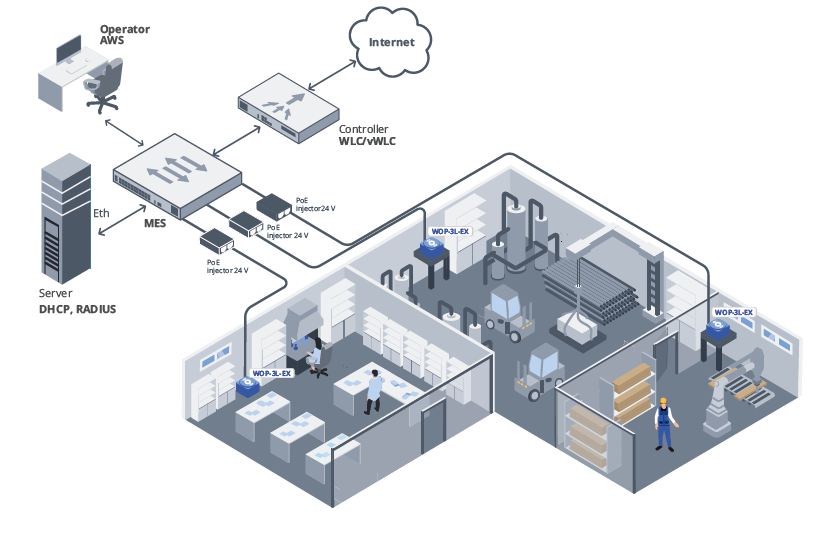
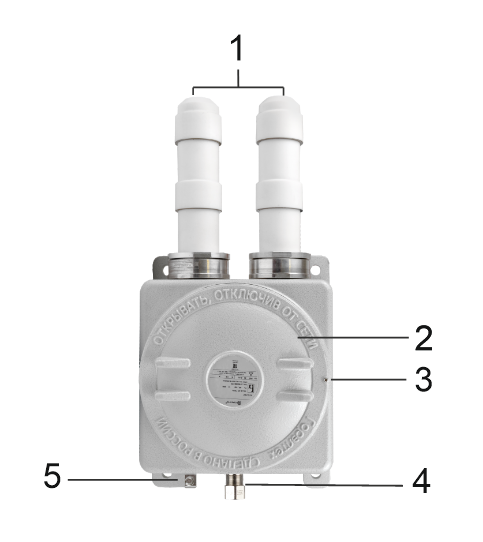
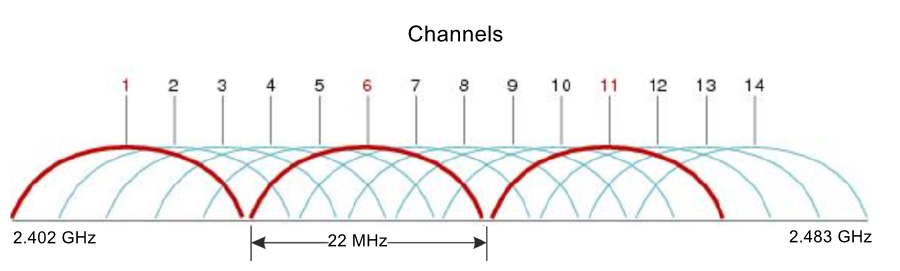
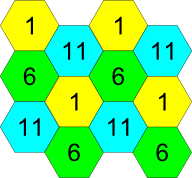
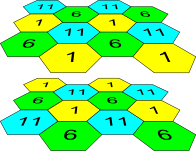
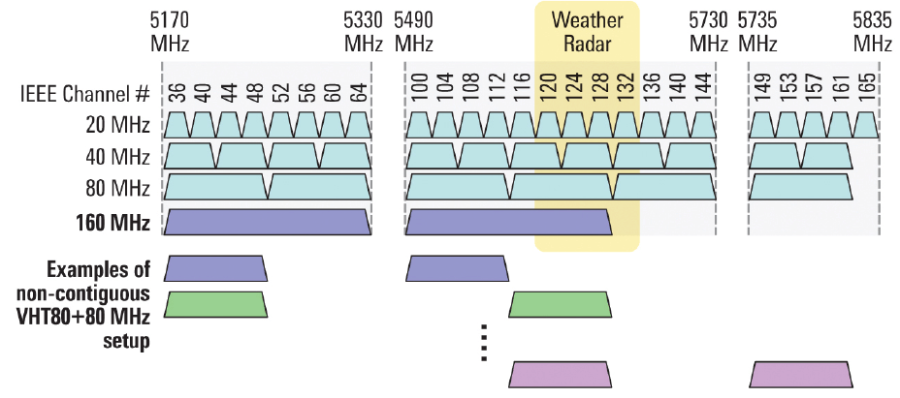
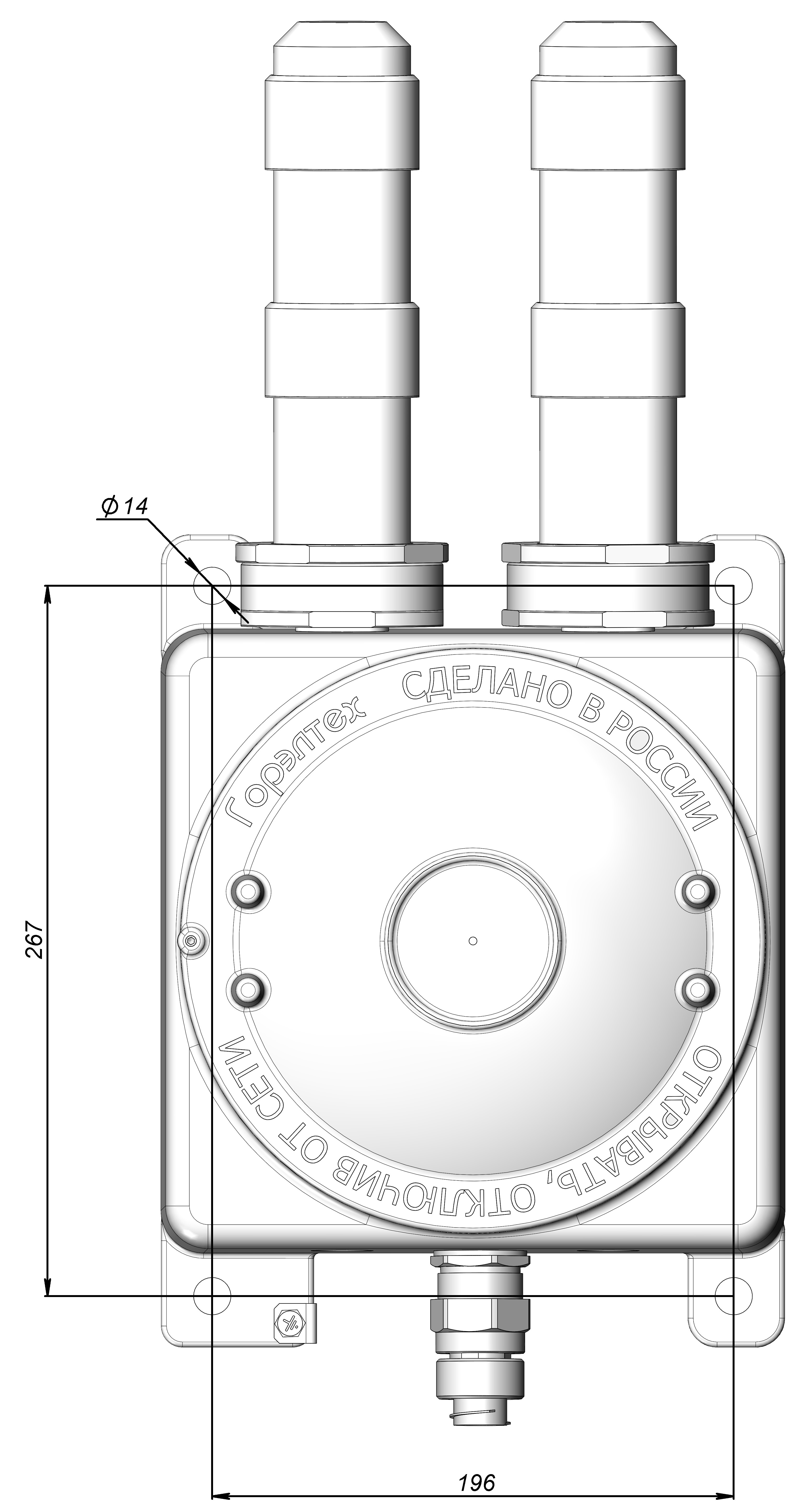
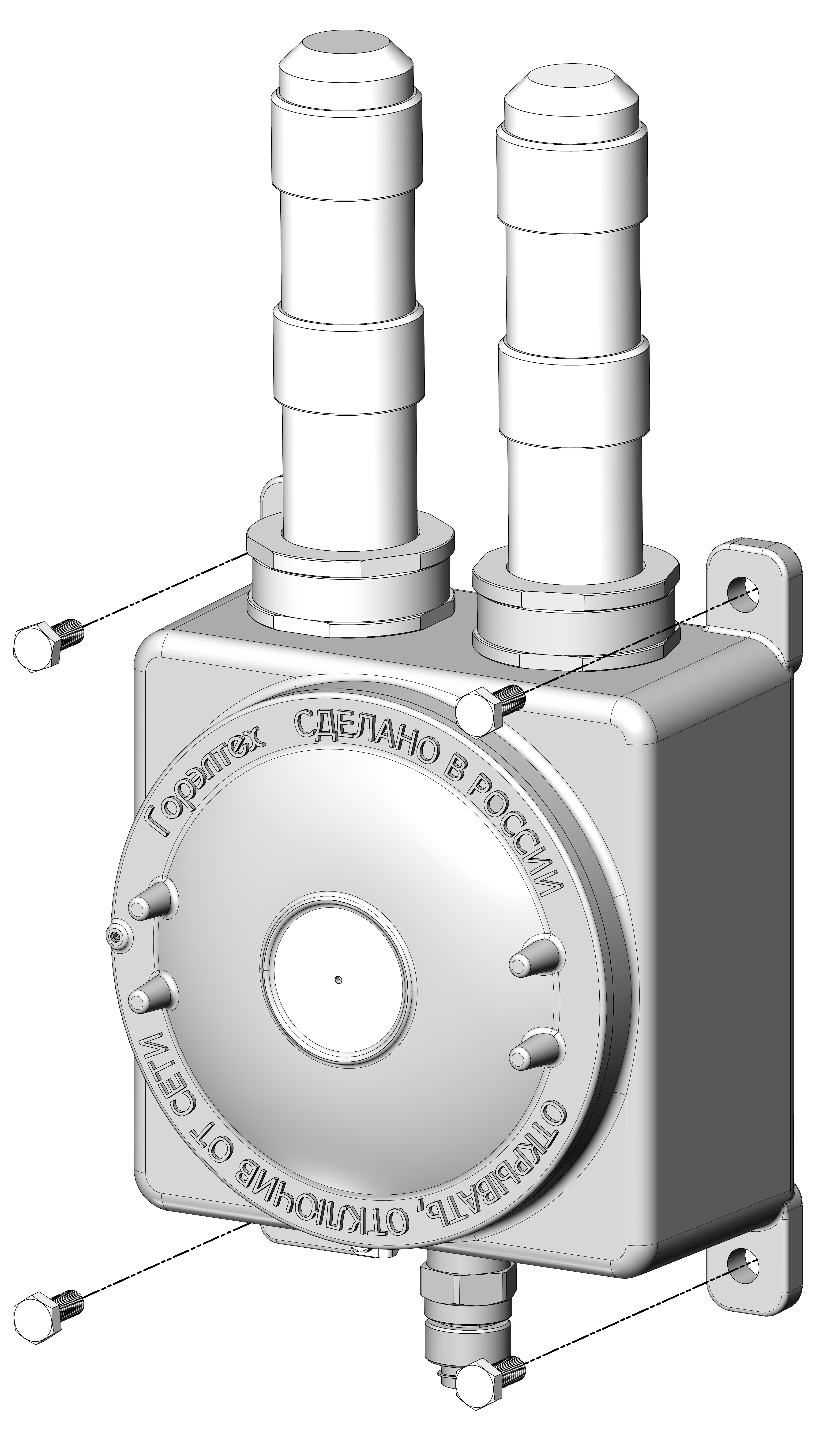
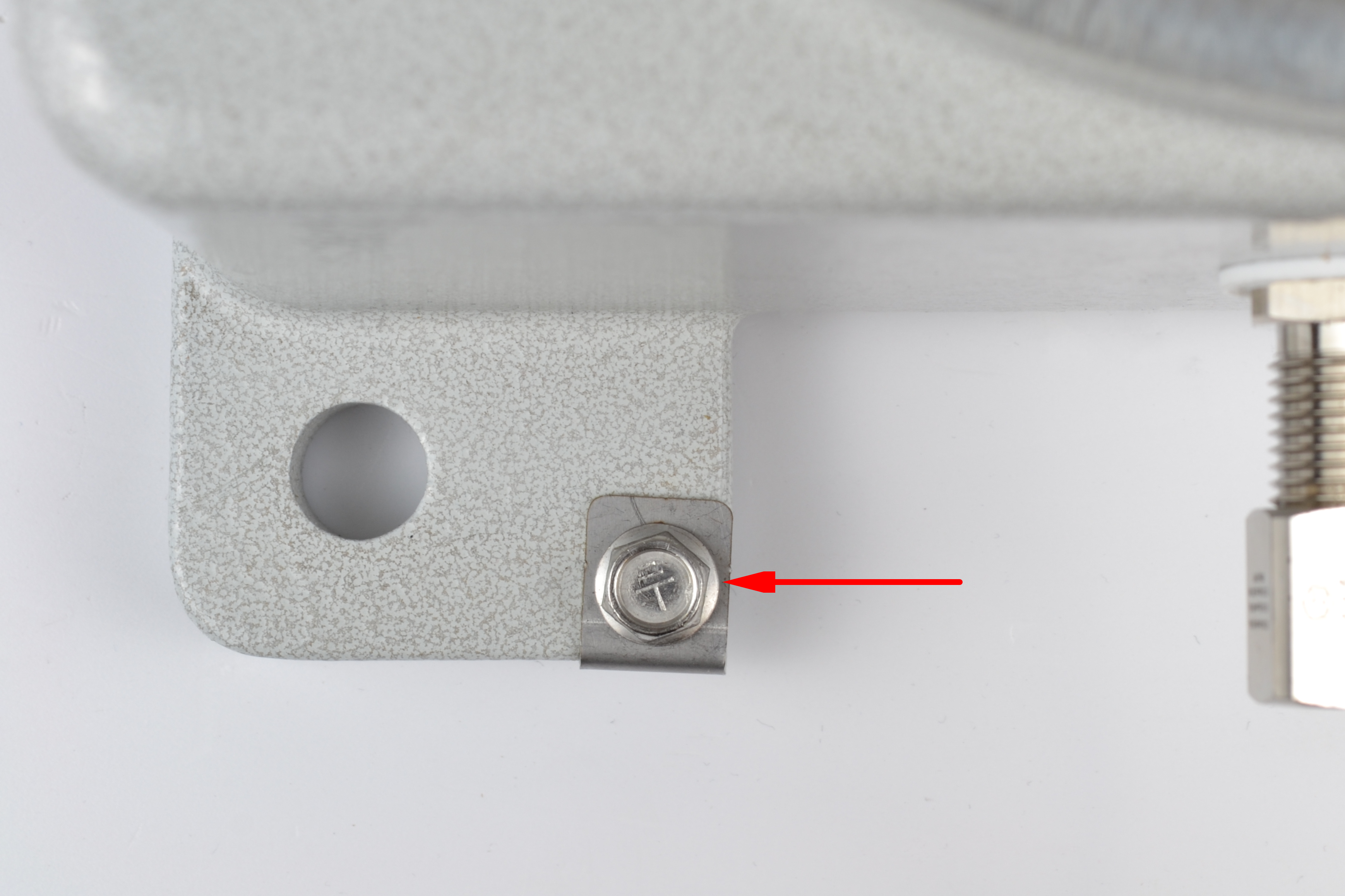
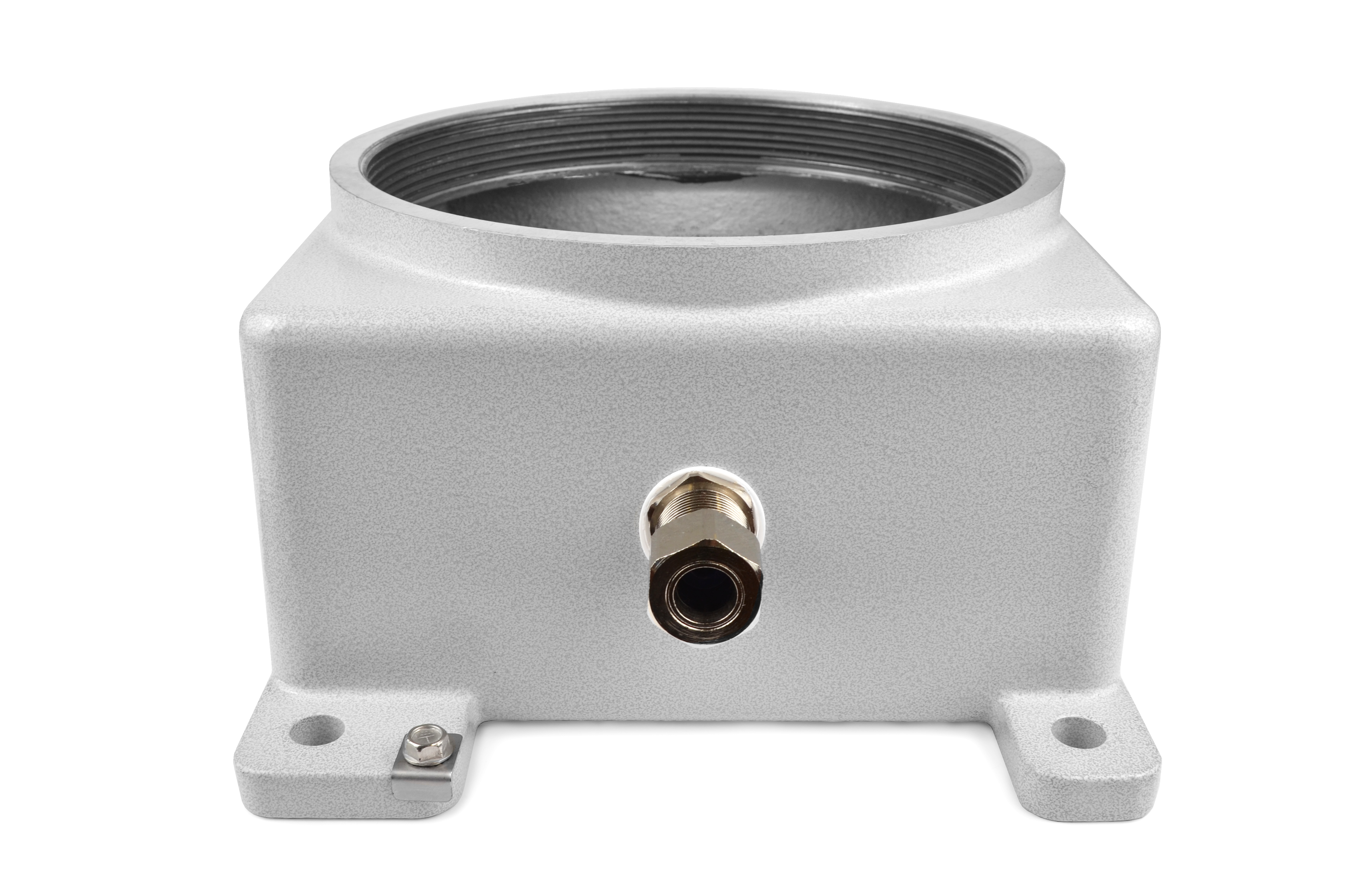
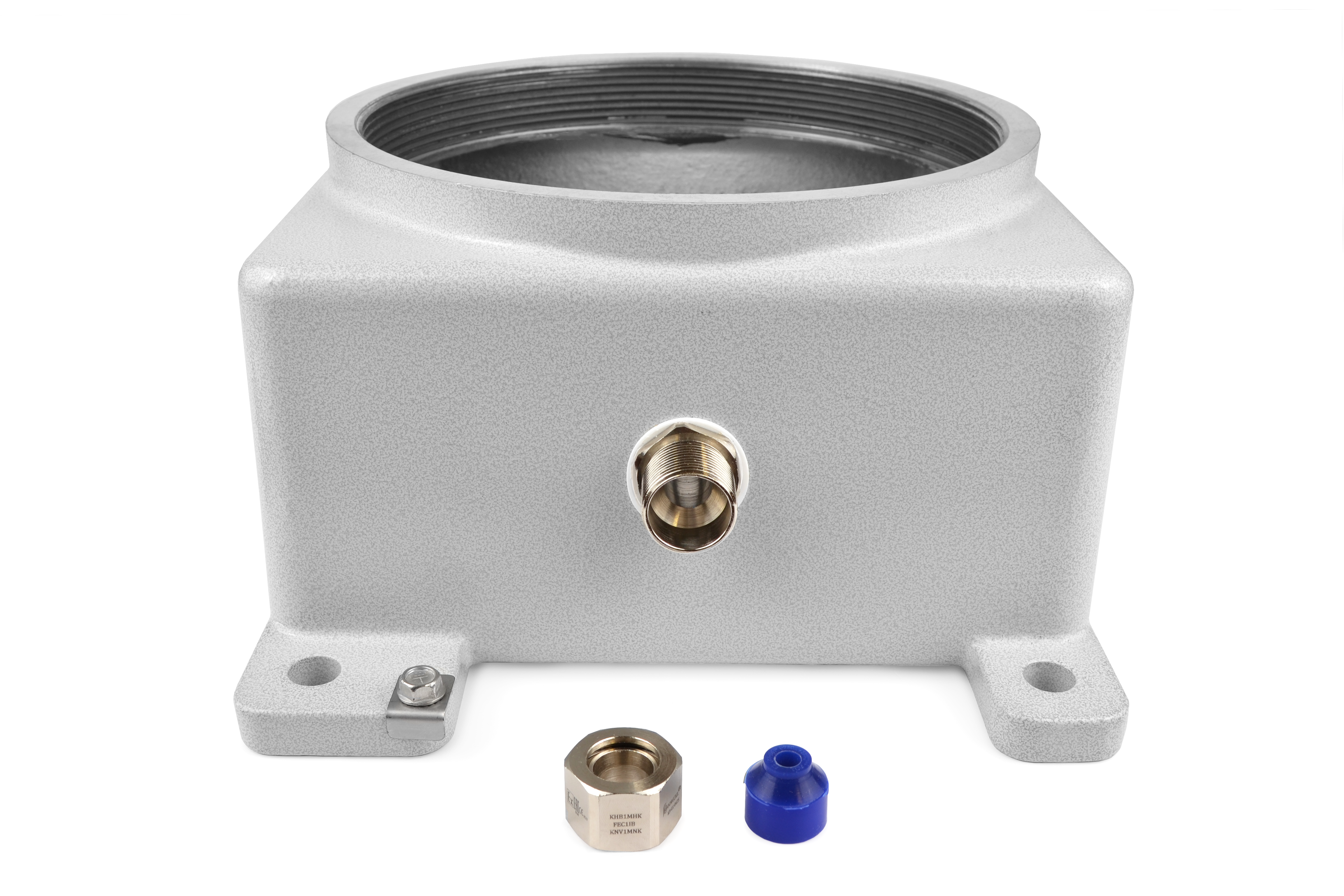
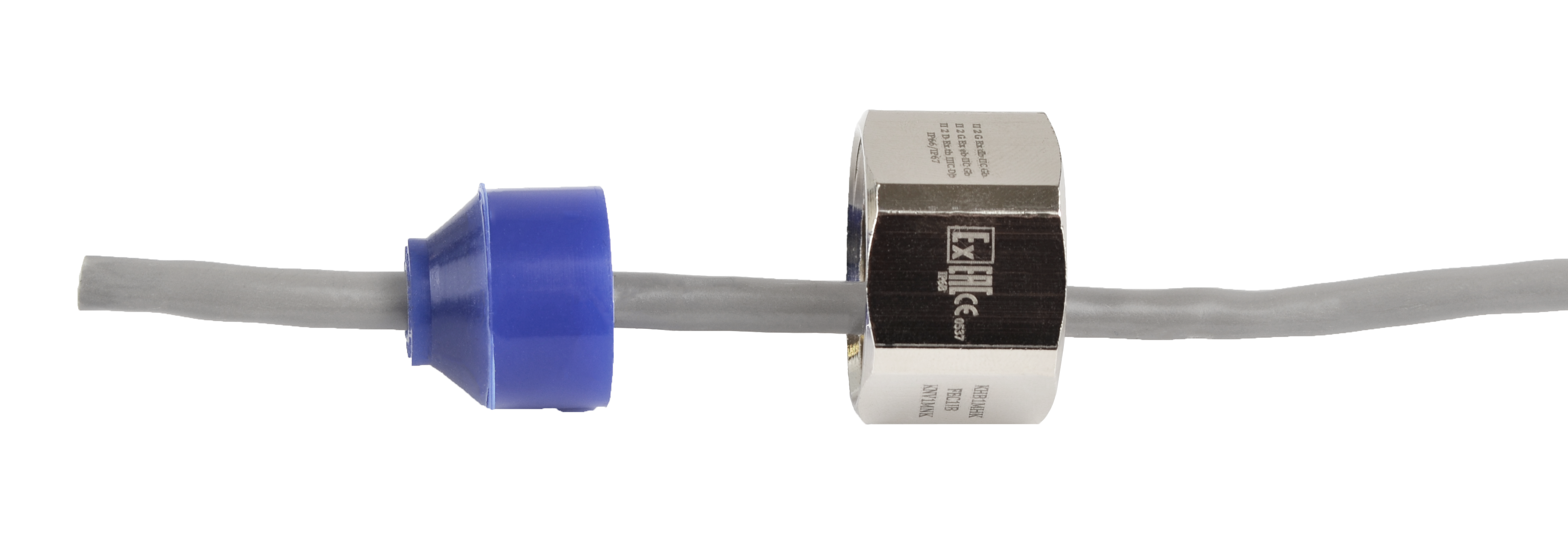
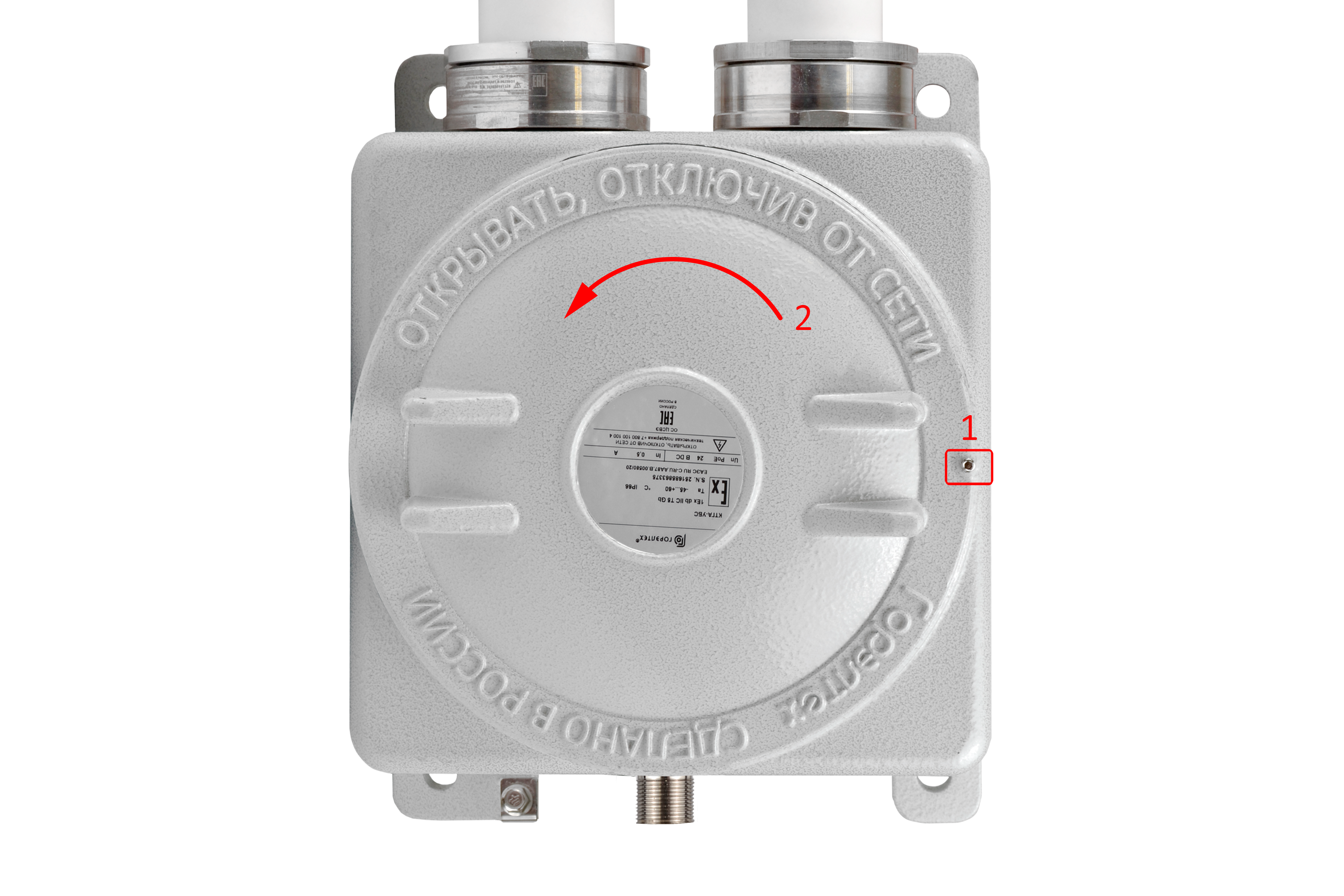
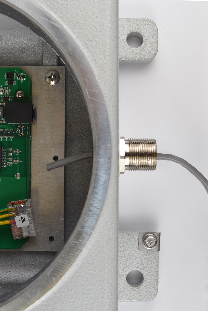
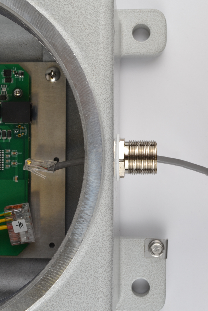
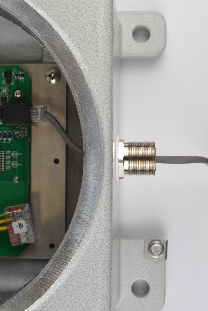
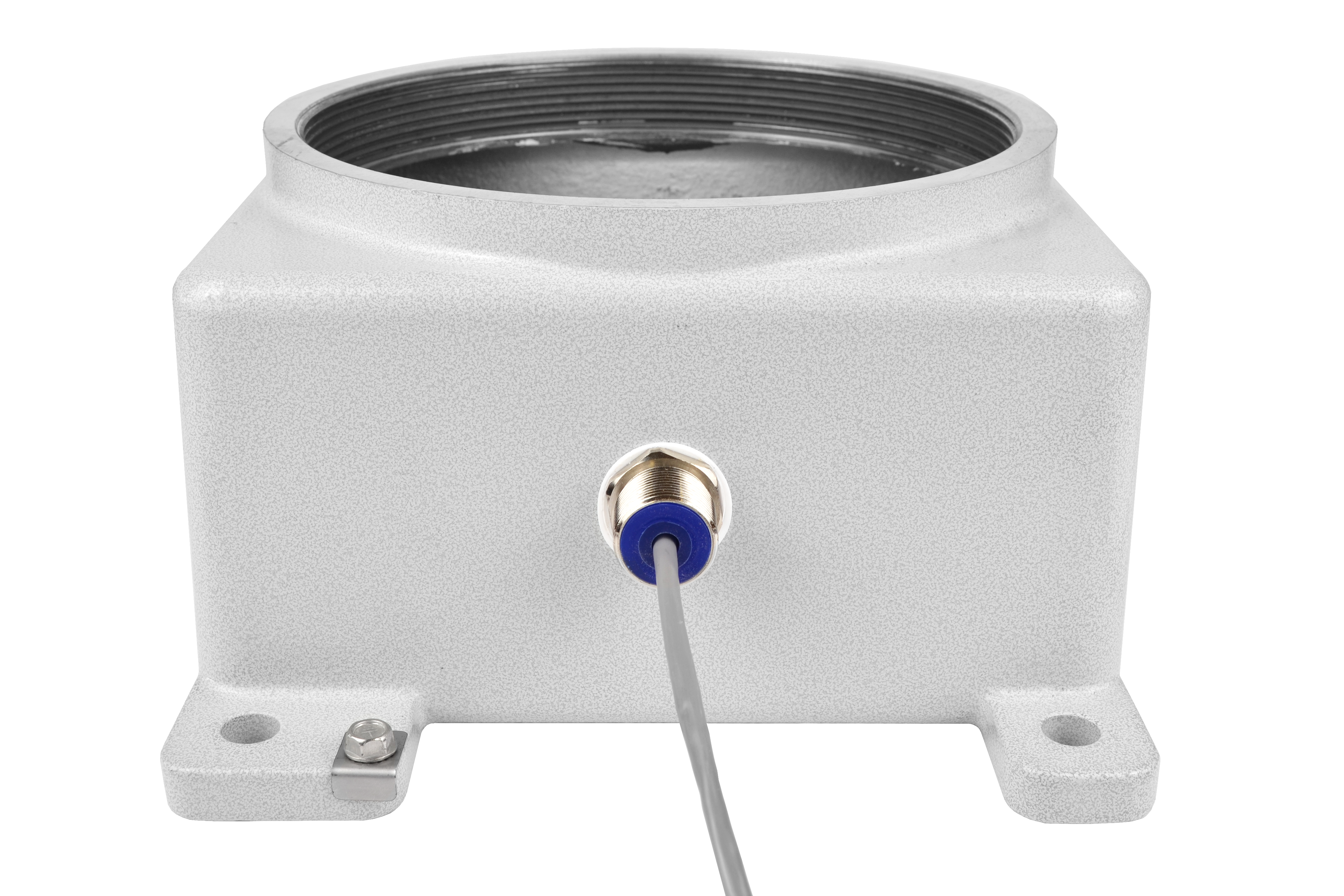
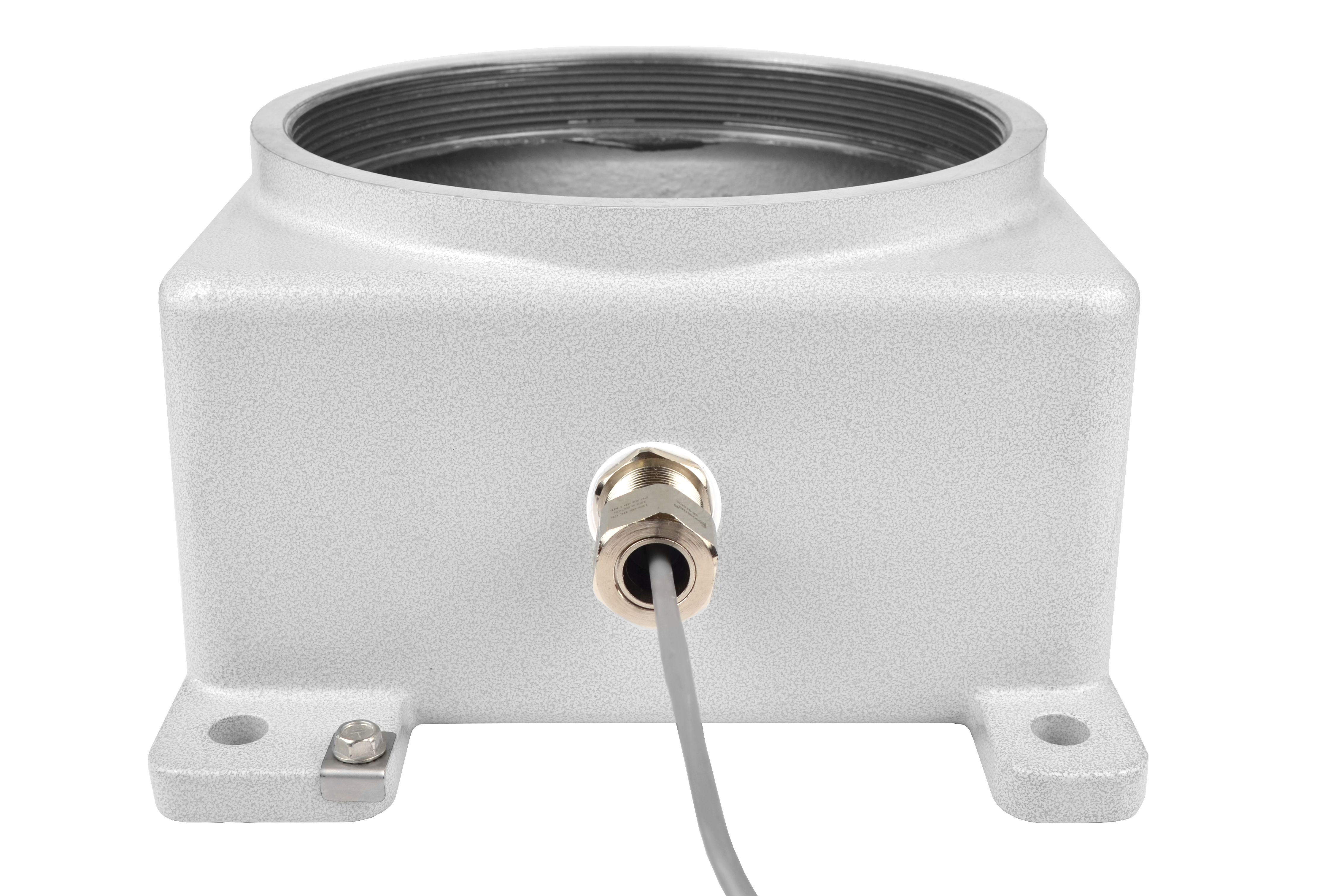
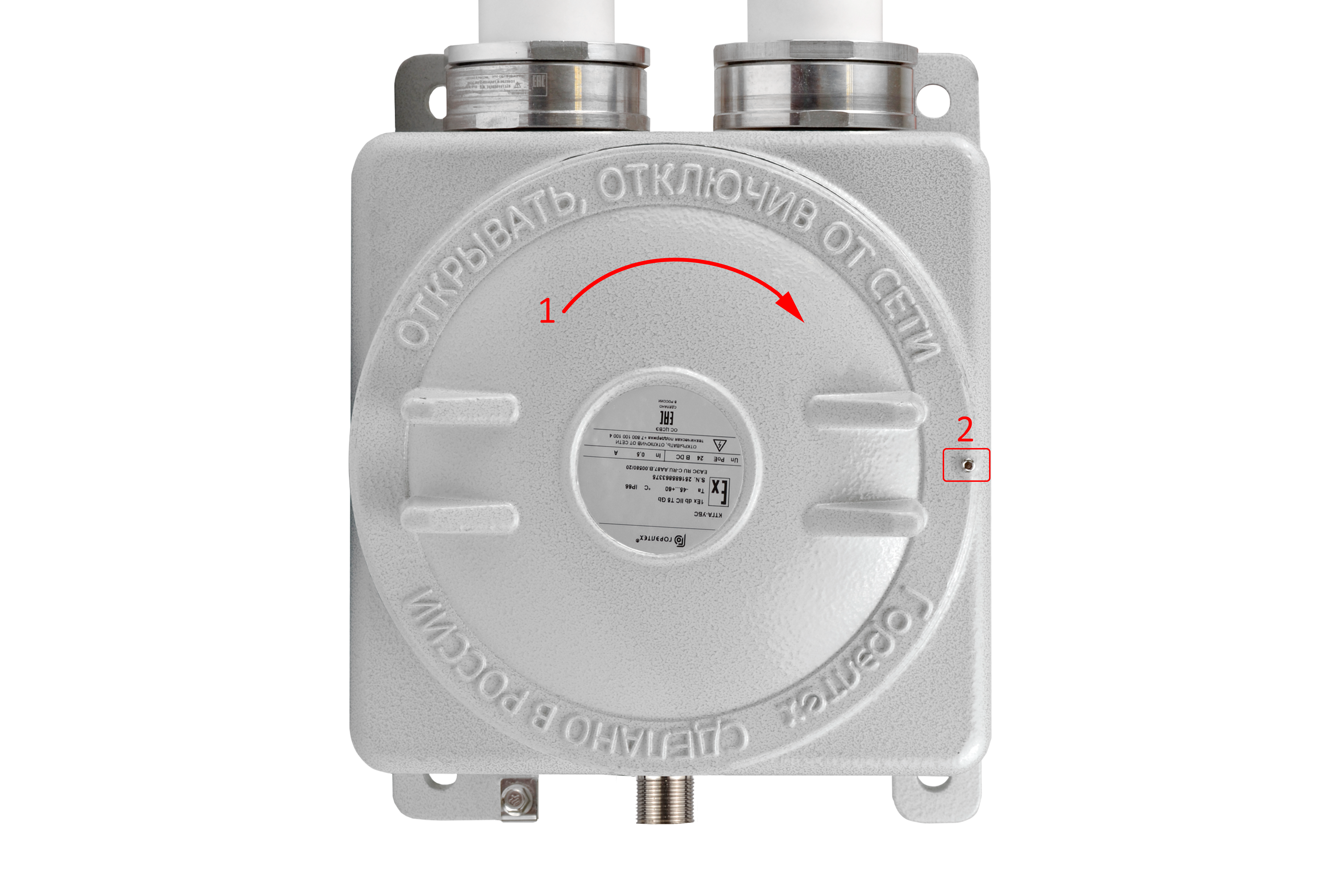
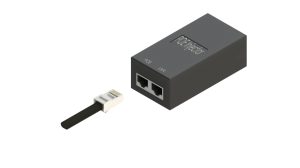
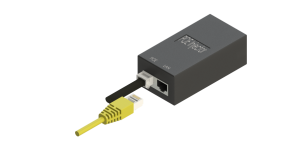
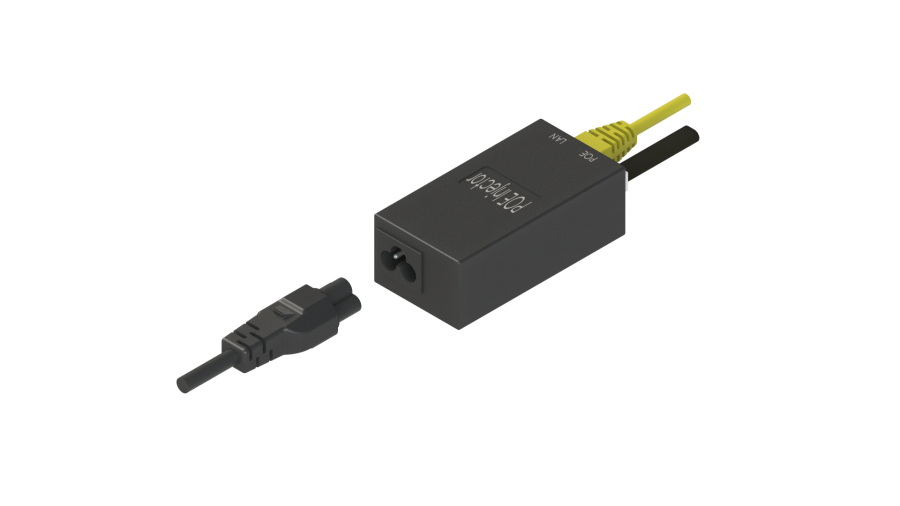
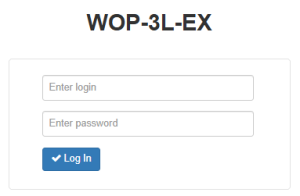
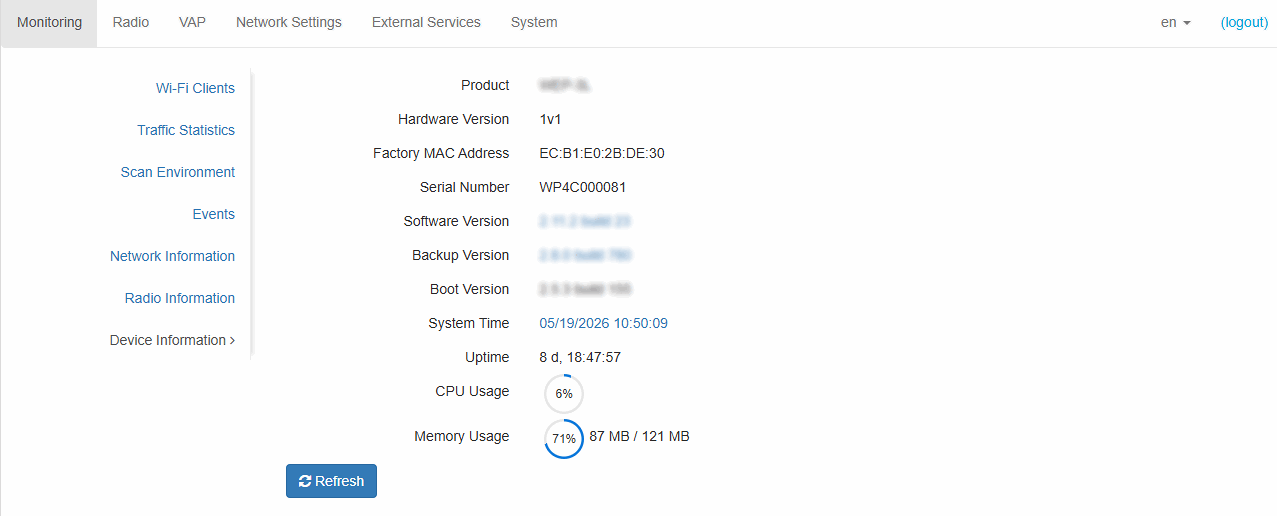
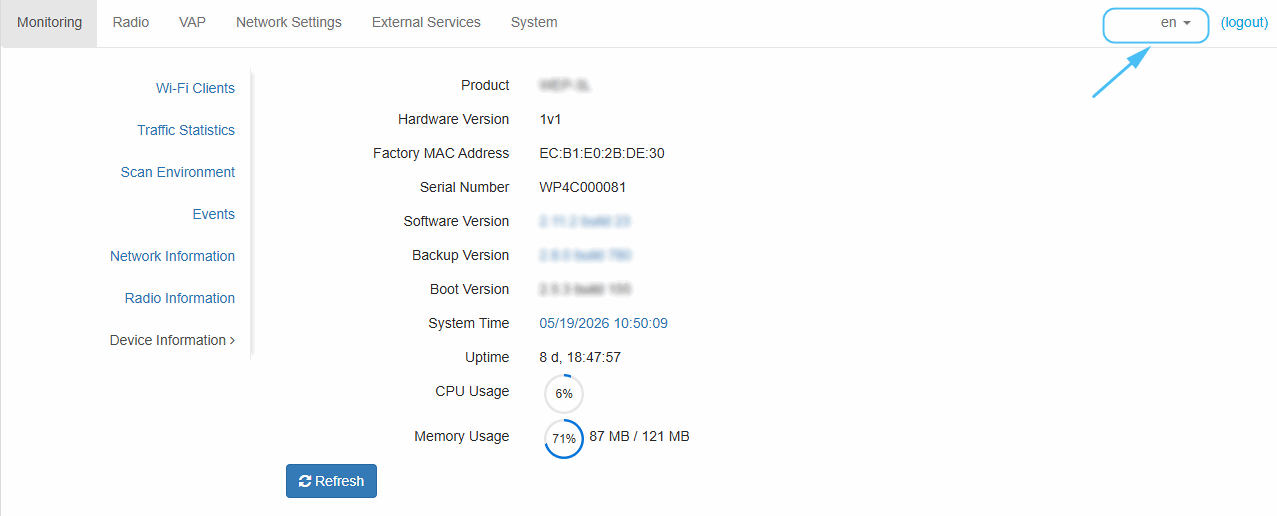
 .
. 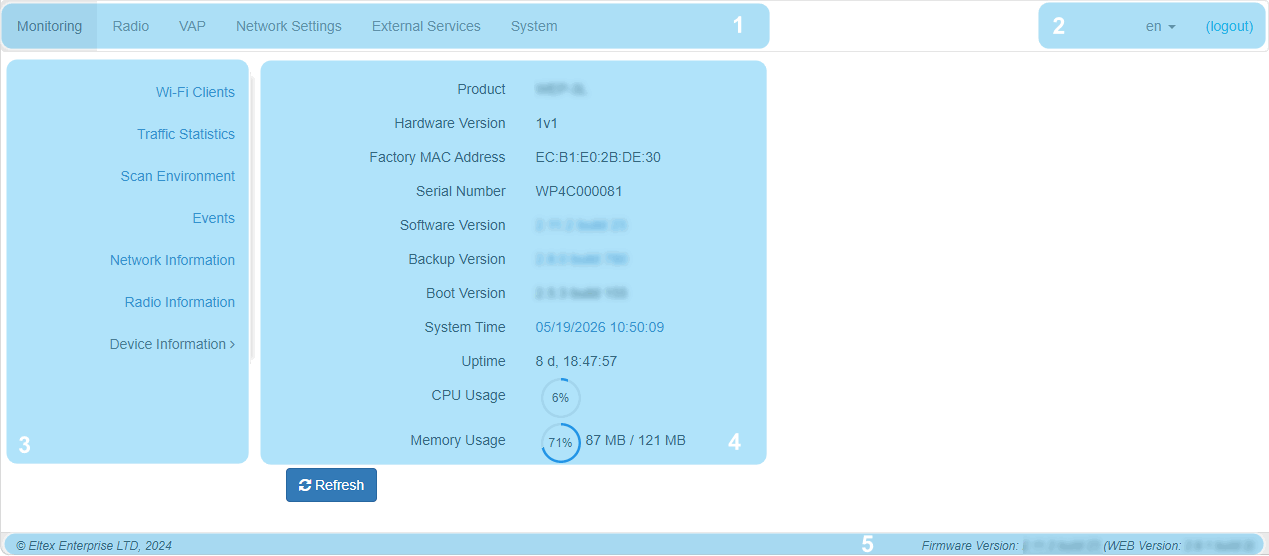
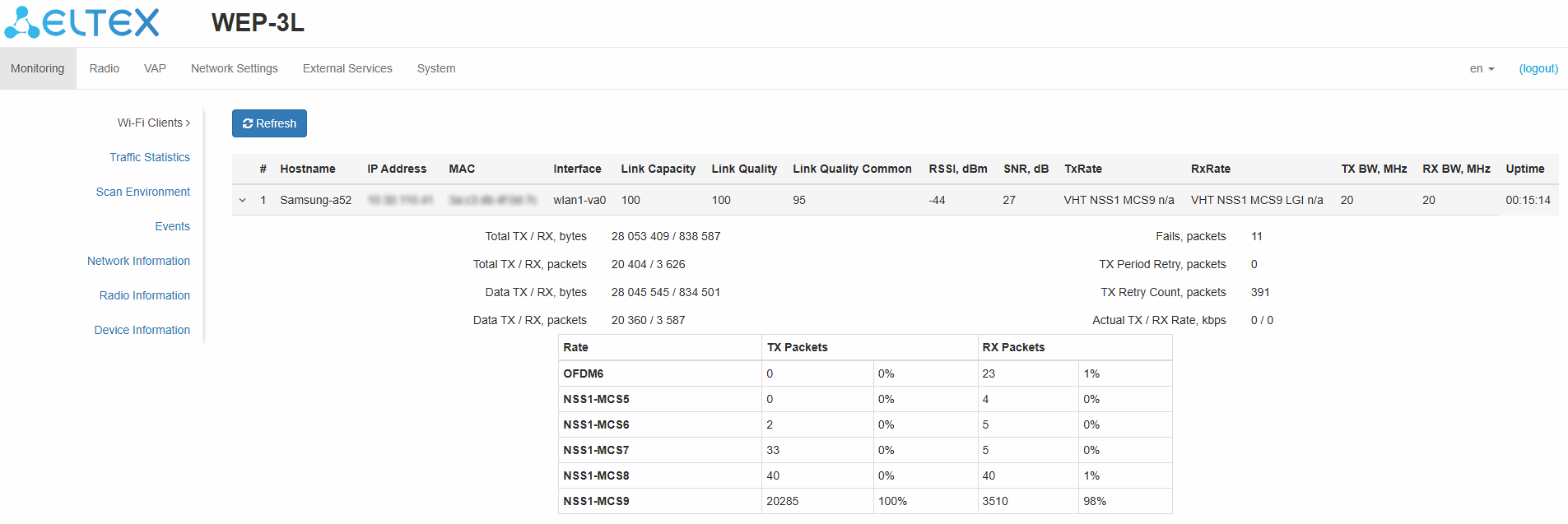
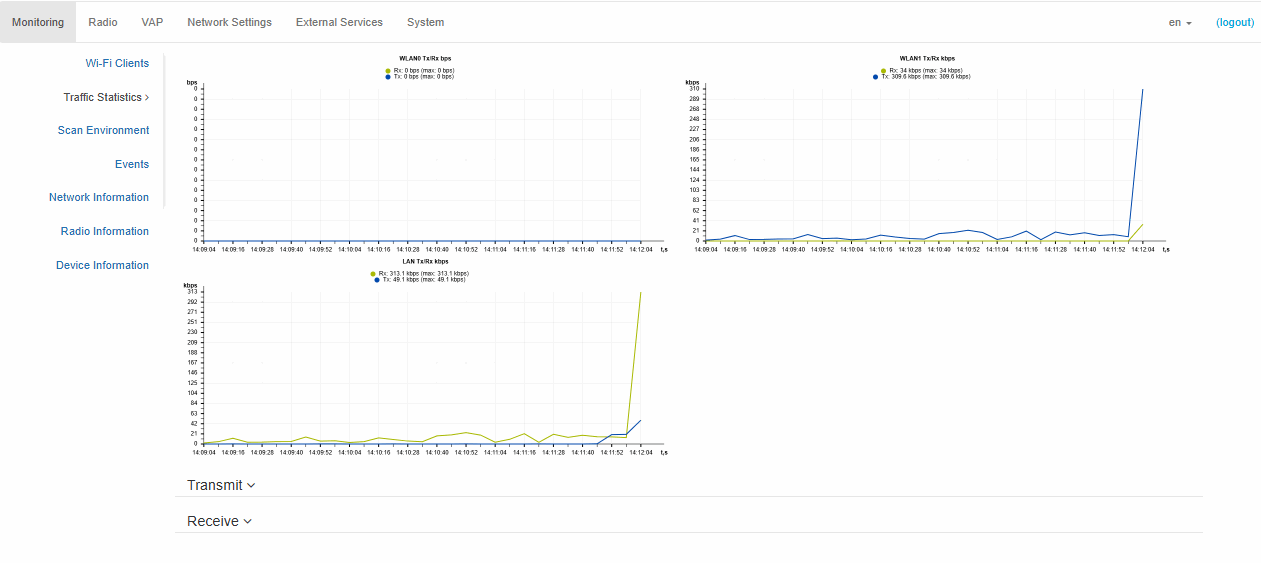
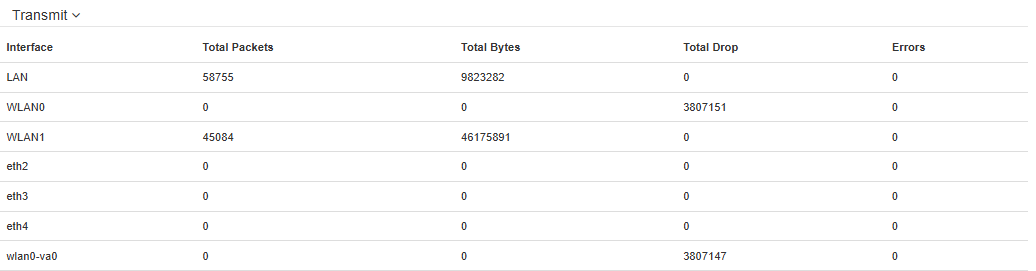
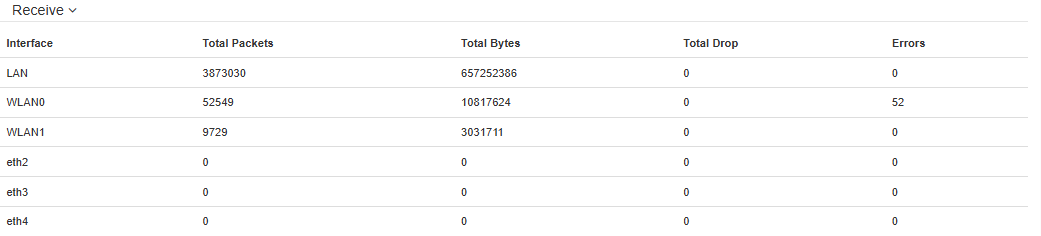
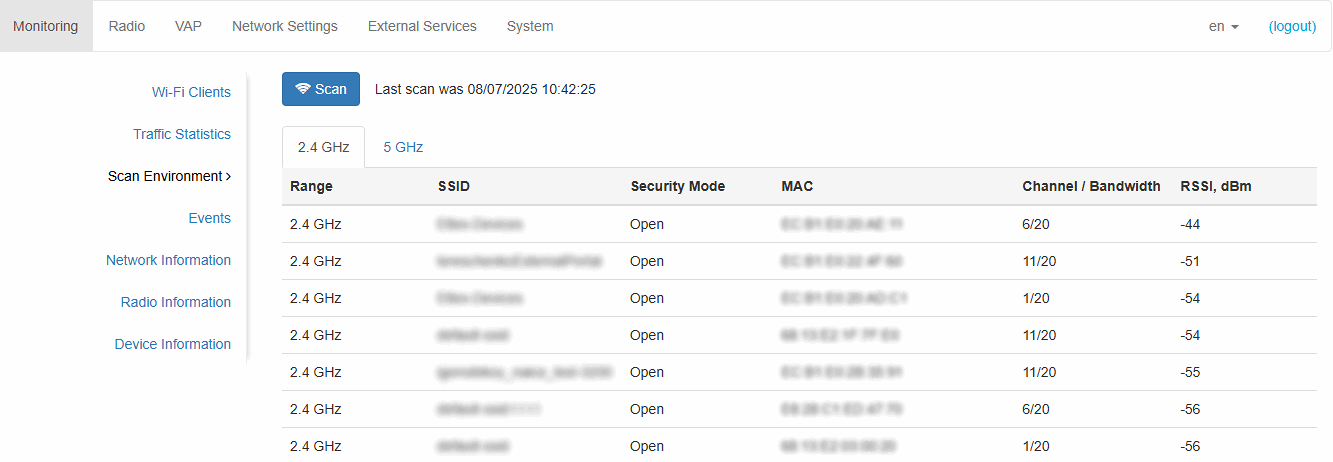
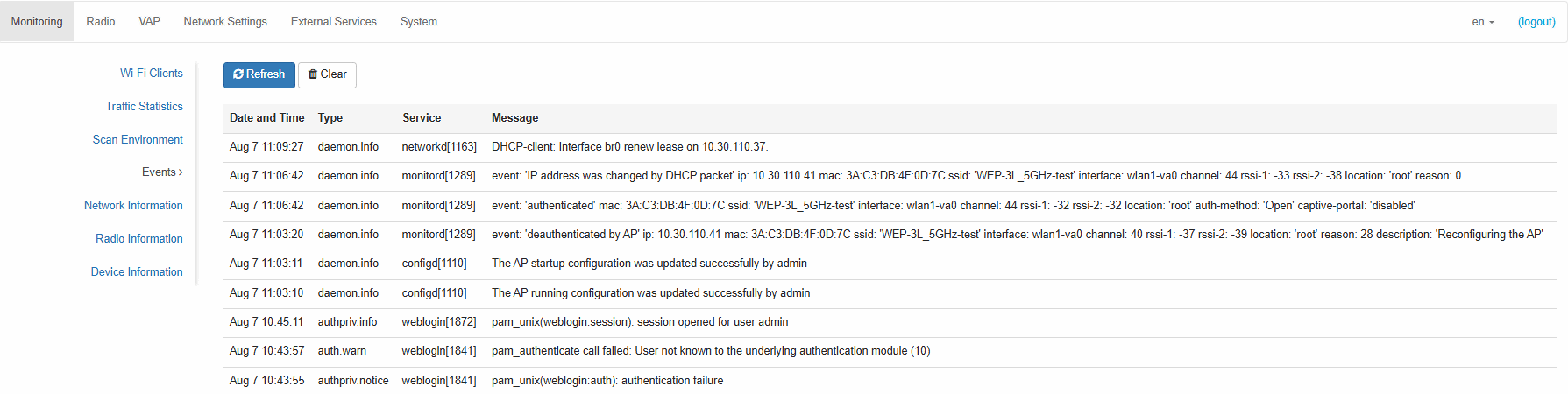
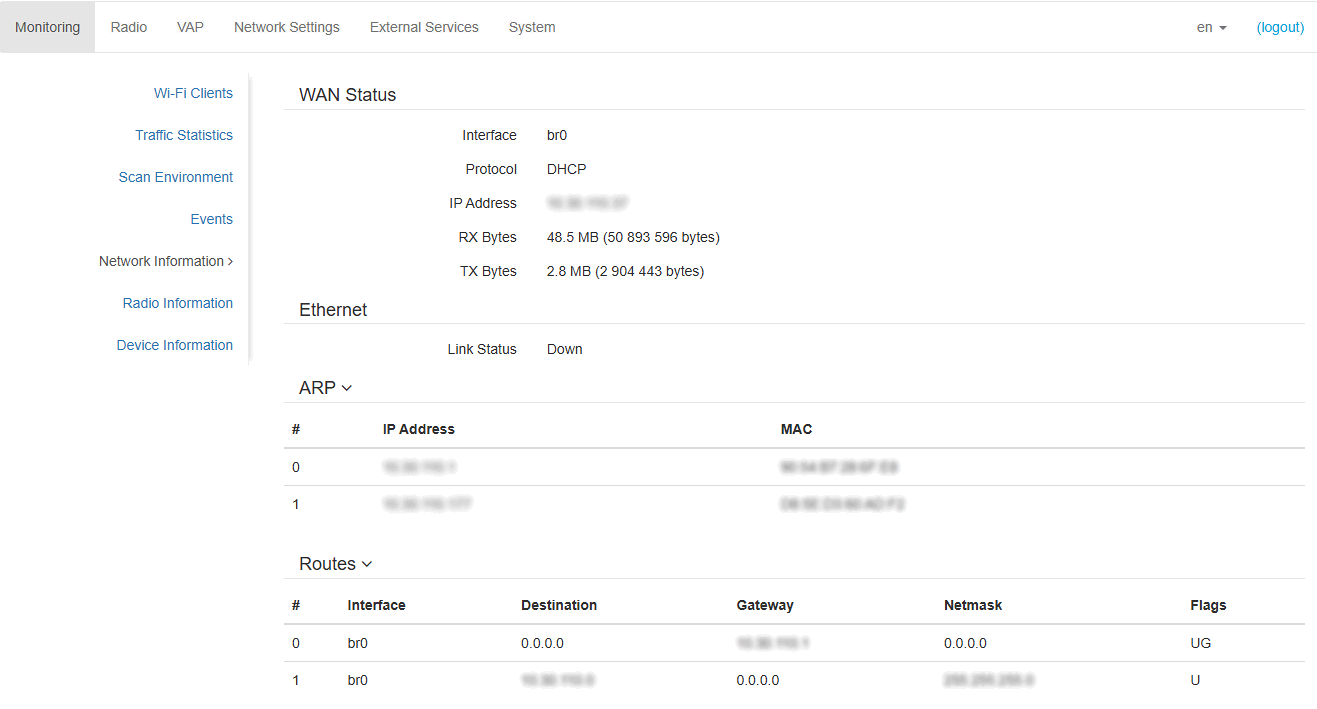
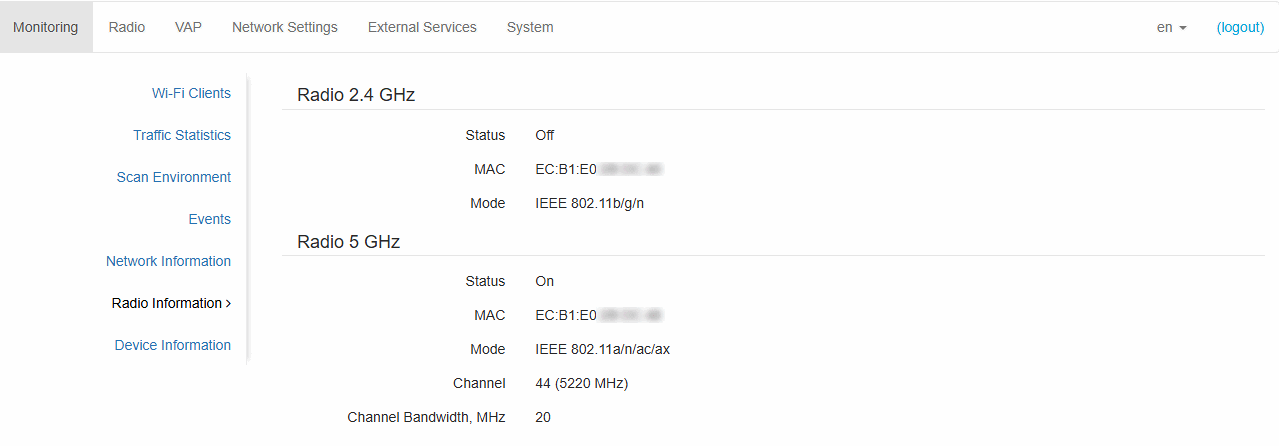
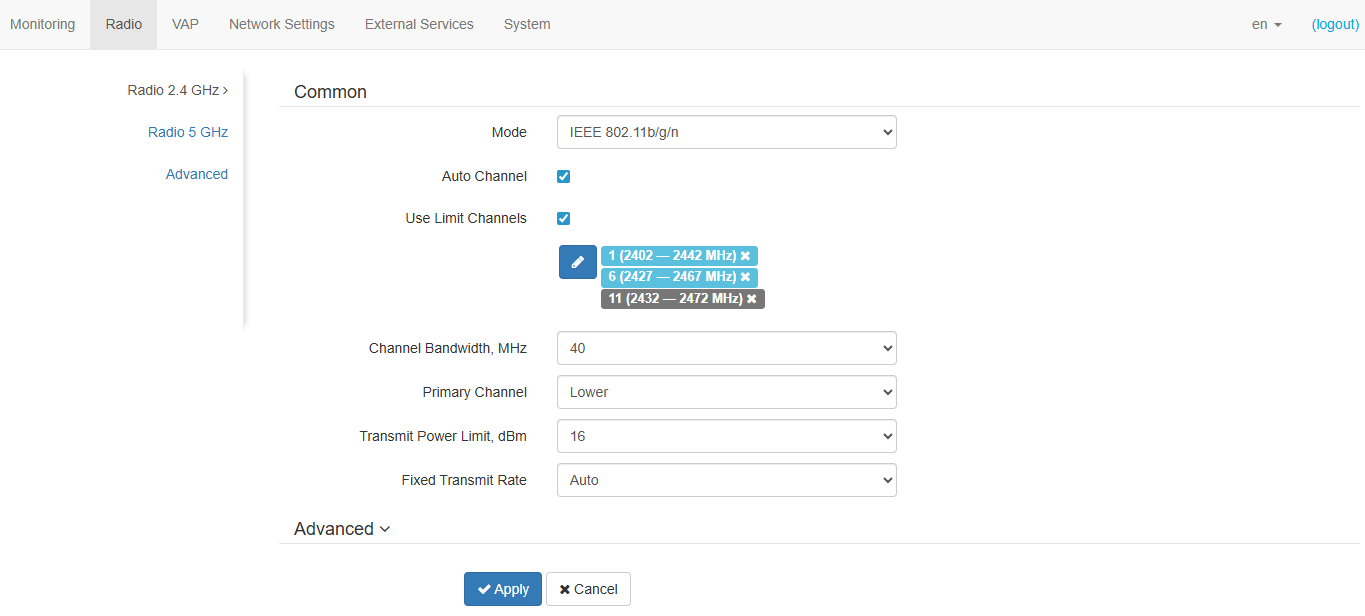
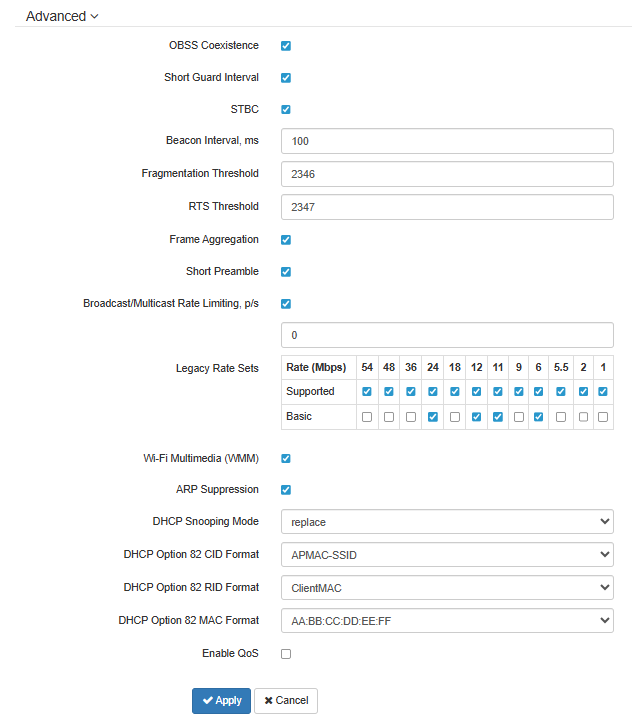
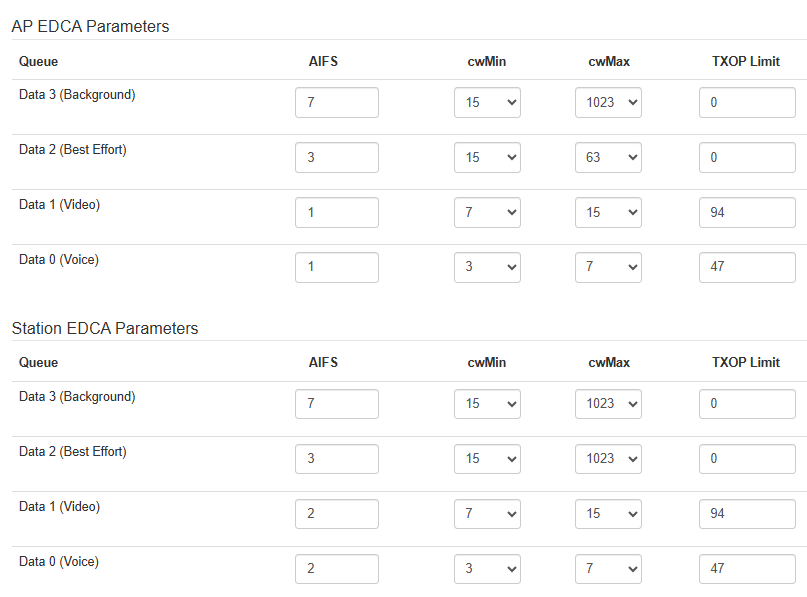
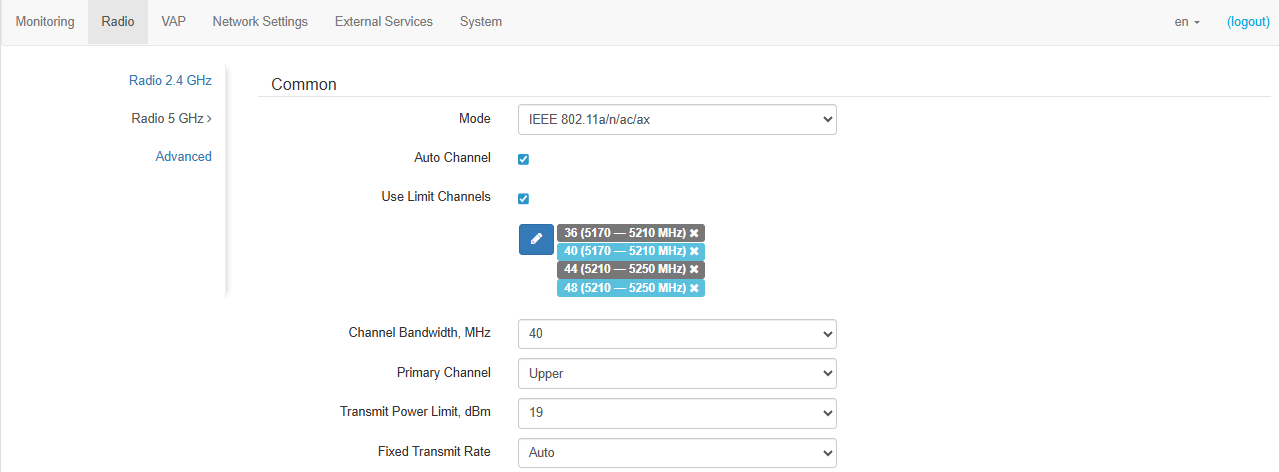
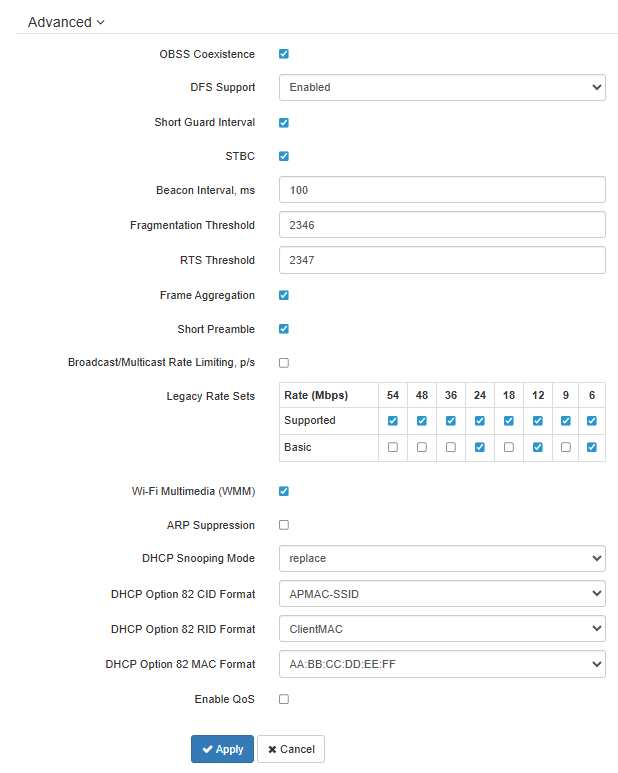
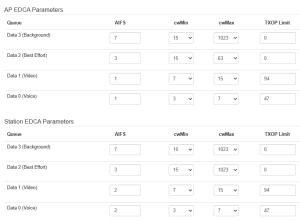
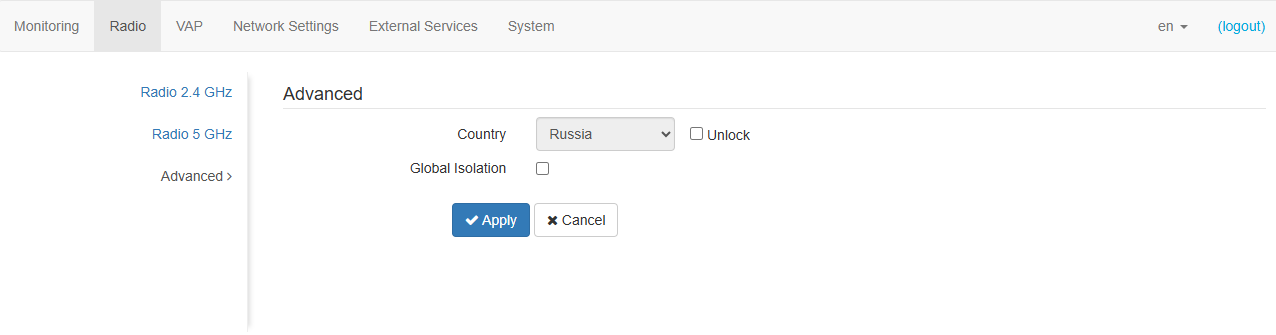
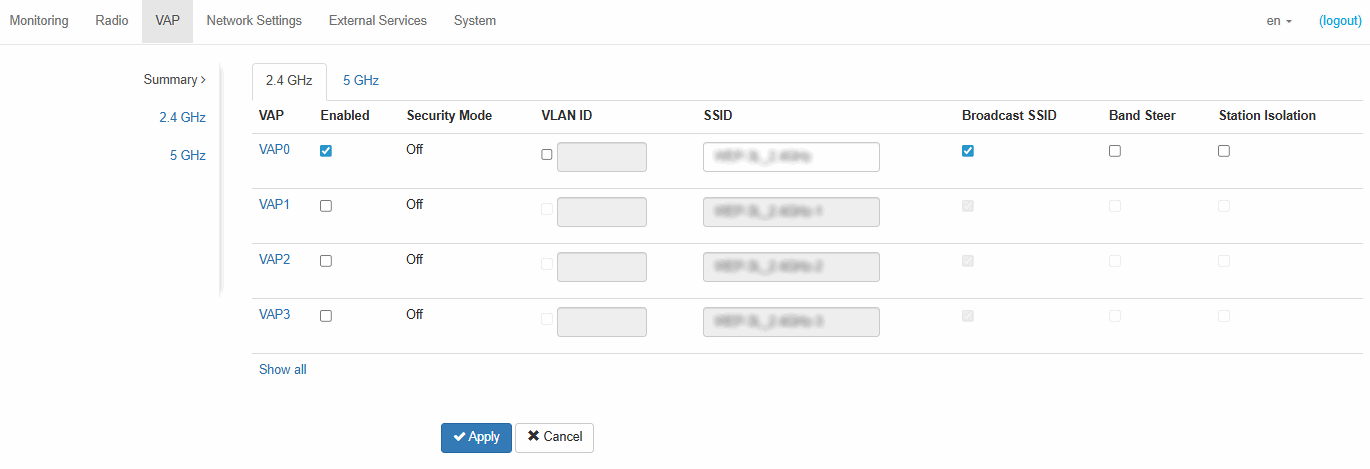
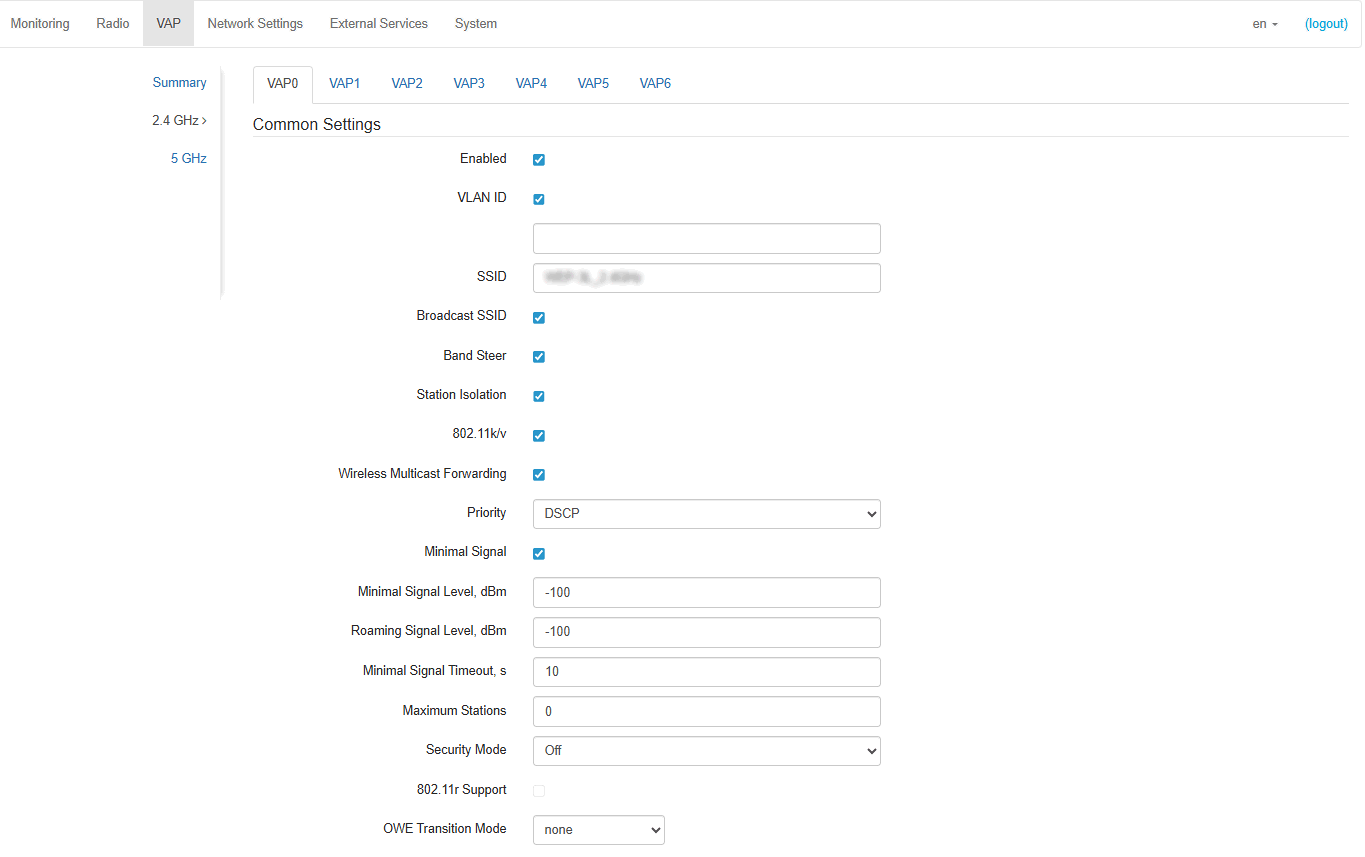 Common settings: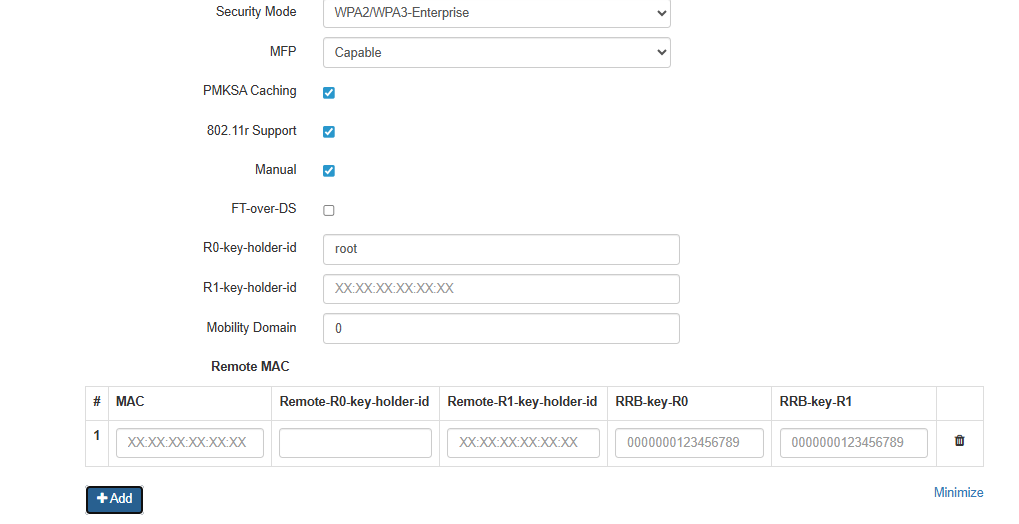
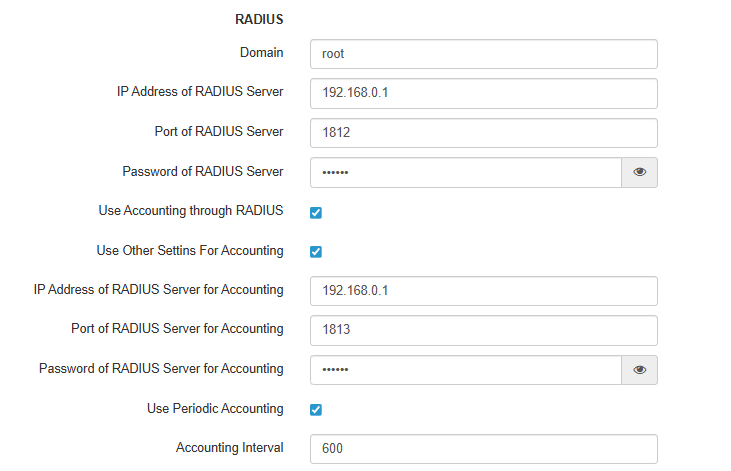
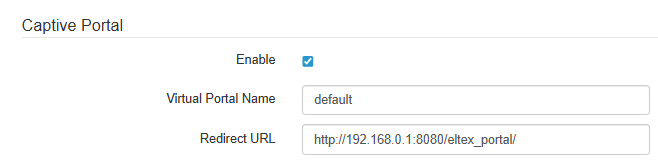
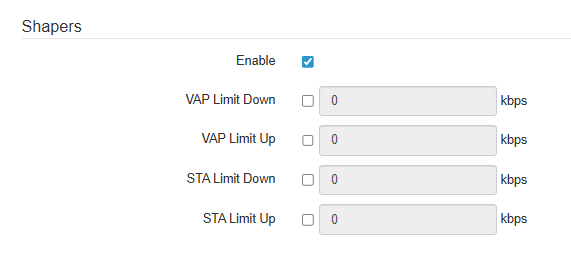
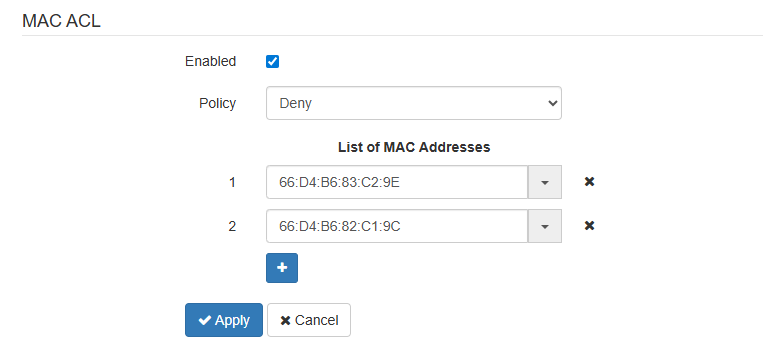
 button and enter the MAC address in the appeared field. To remove an address from the list, click the
  button in the corresponding line.
 at the end of the line and select the desired address from the list, it will automatically be added to the field.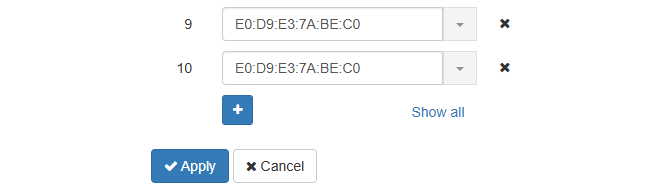
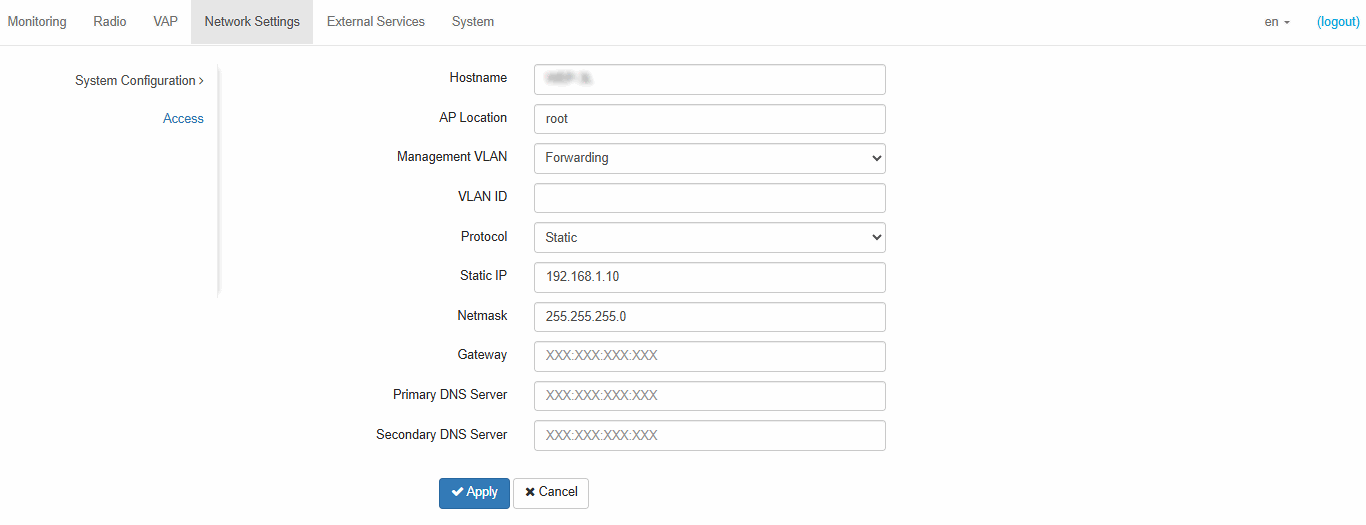
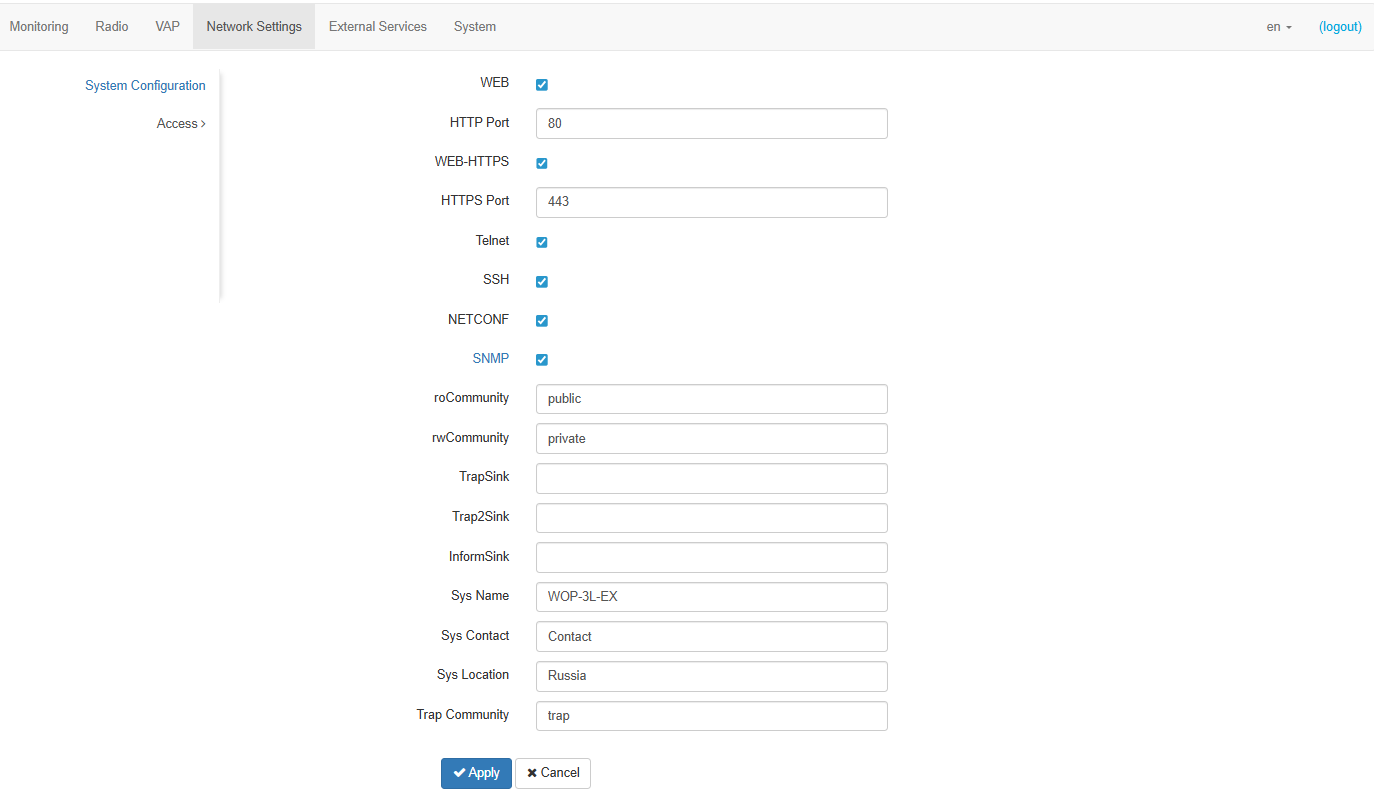
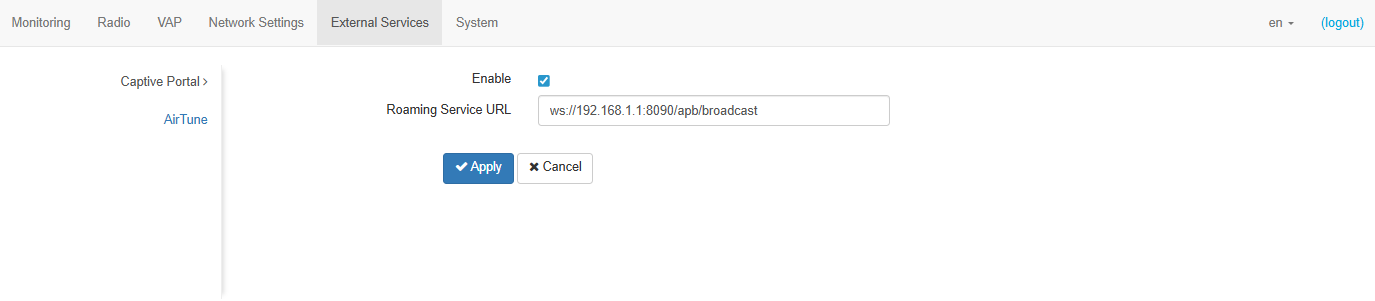

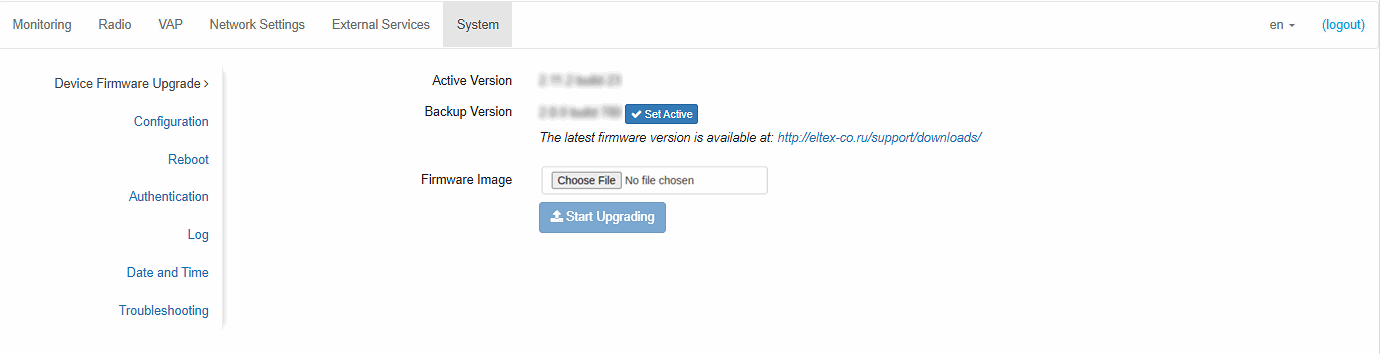
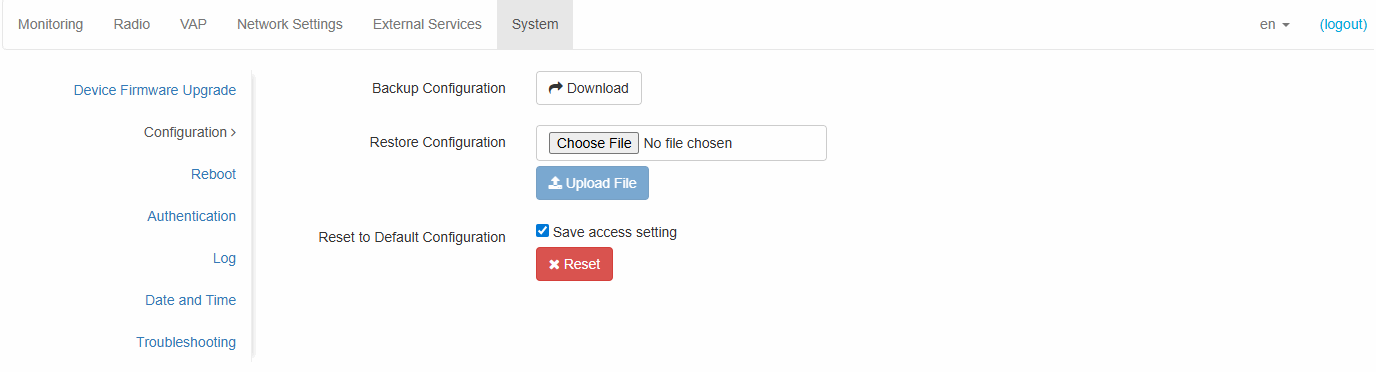
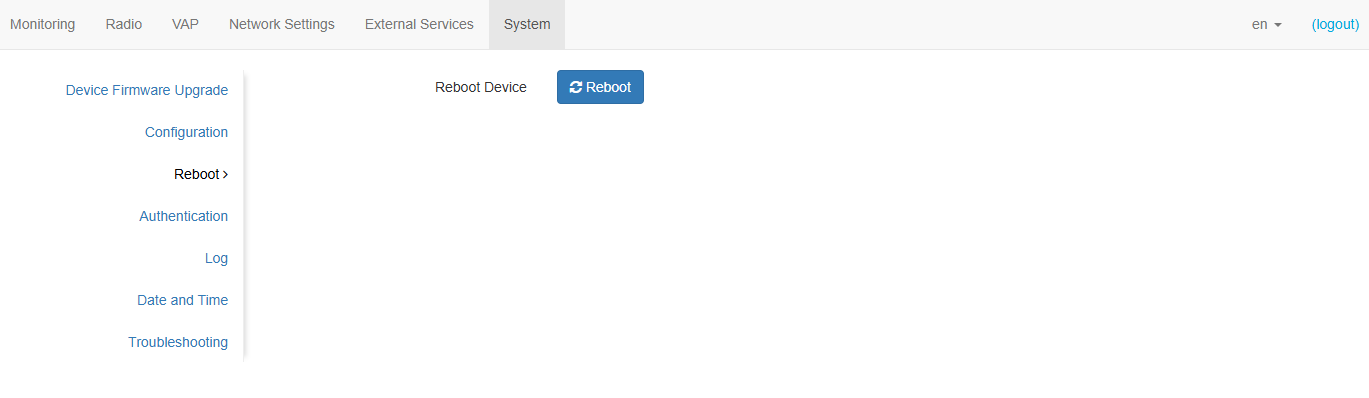
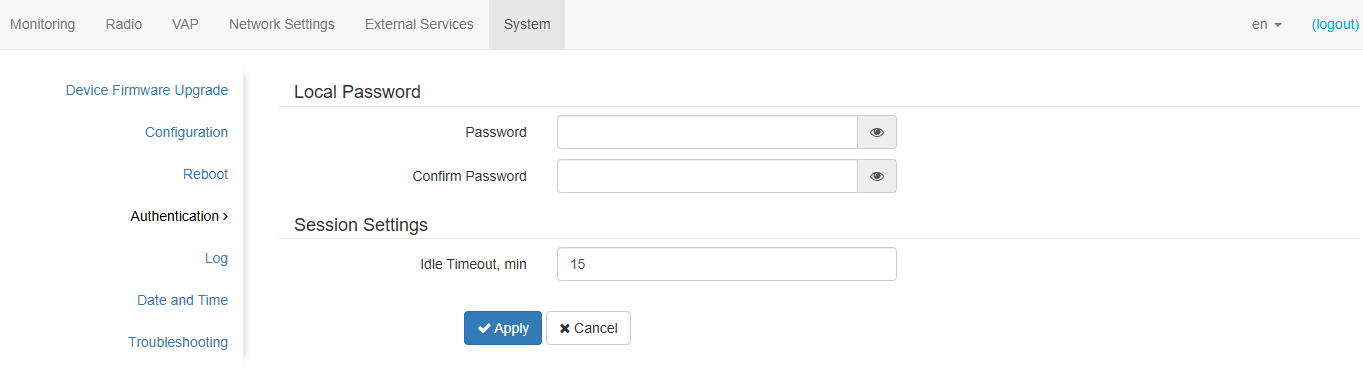
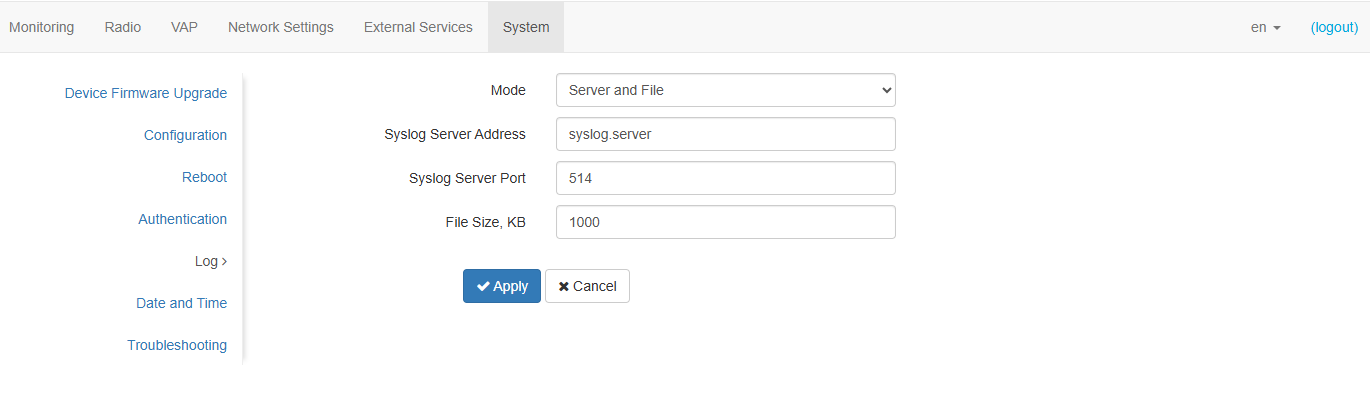
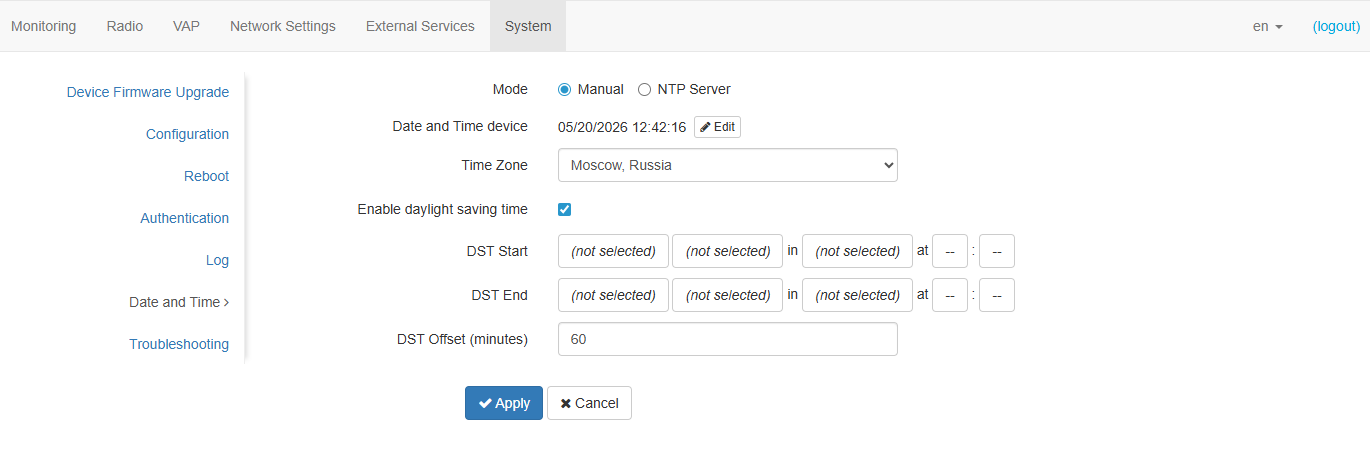
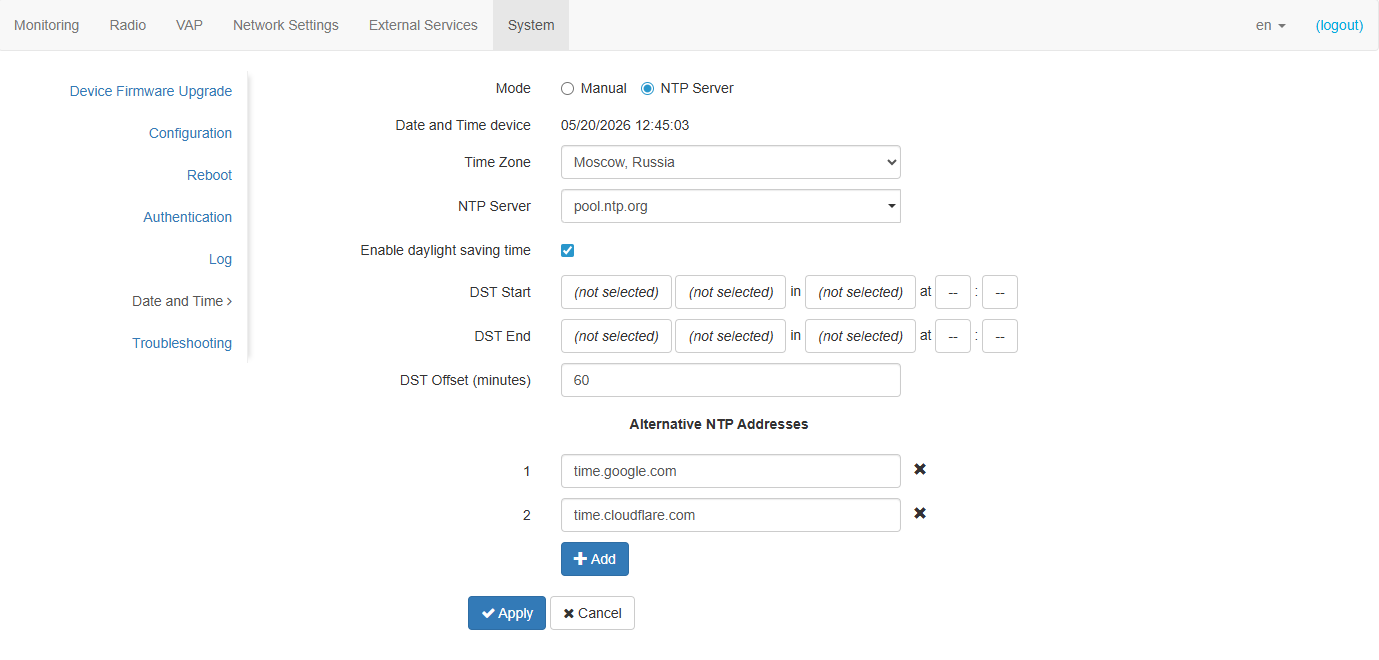
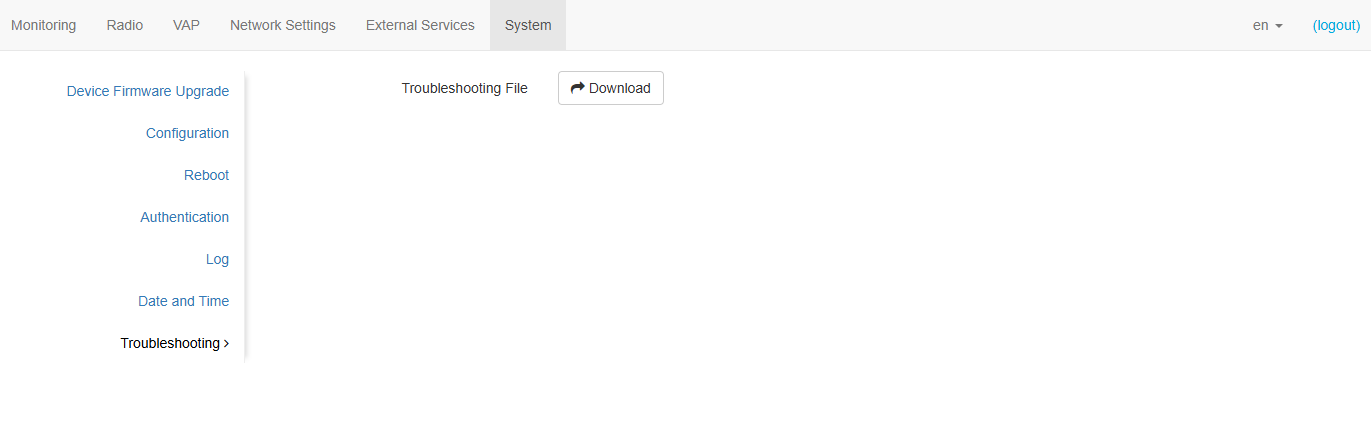
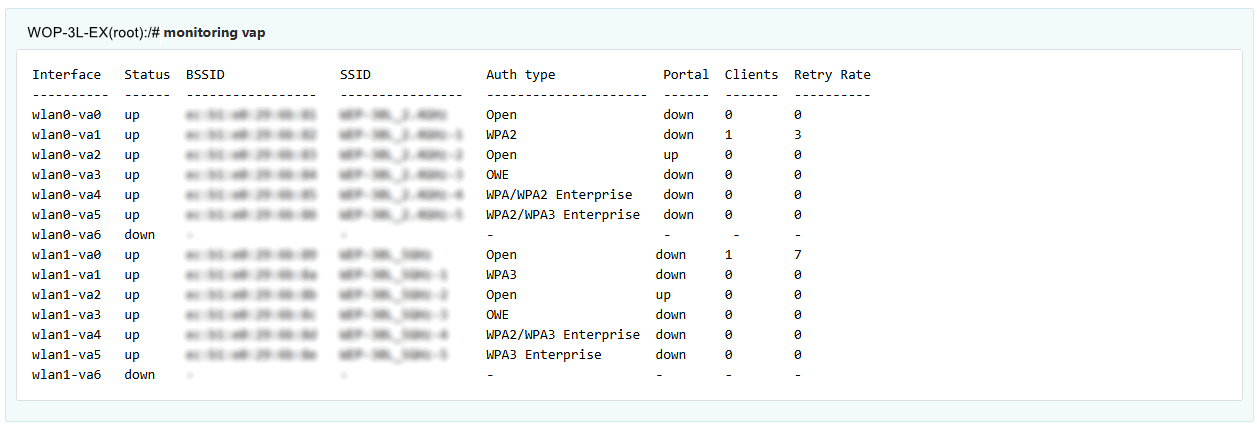
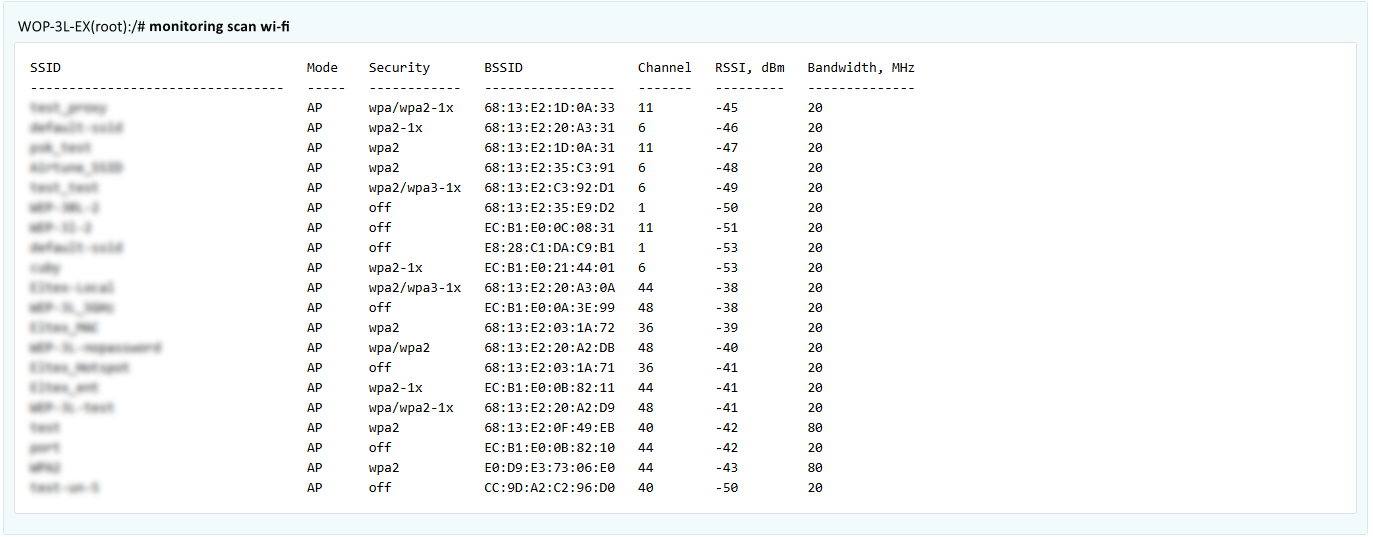
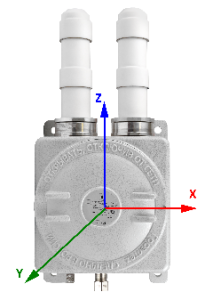
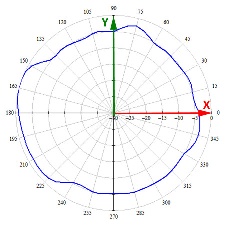
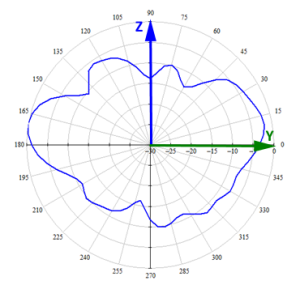
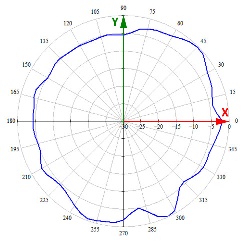
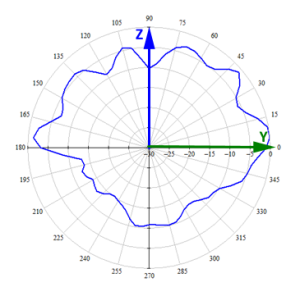
 button starts the process of saving the configuration to the device flash memory and applying new settings. All settings are applied without device rebooting.