Managing user authentication and authorization requires ensuring high availability of the NAC system, since, in the event of its failure, connecting users and endpoints will become impossible.
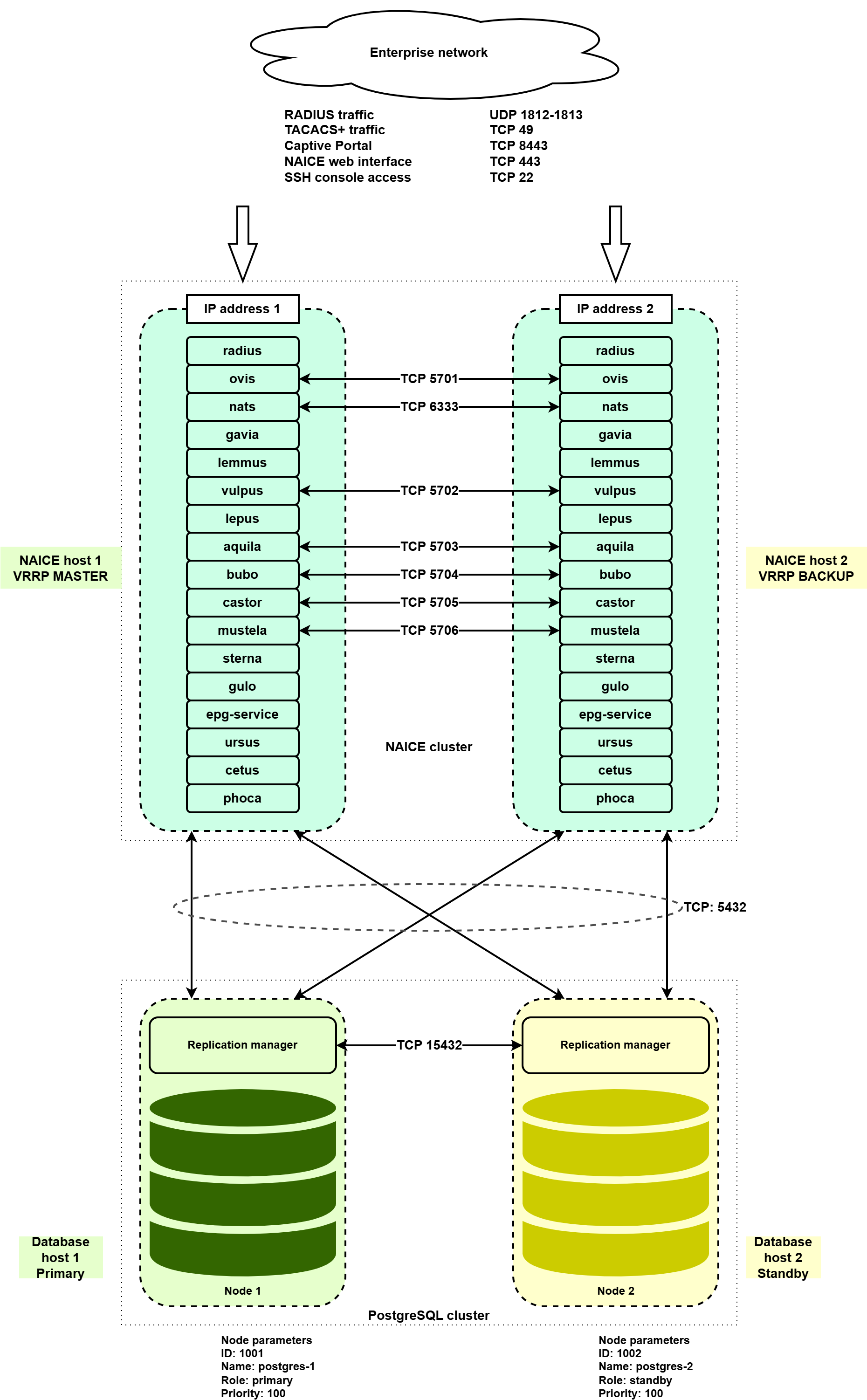
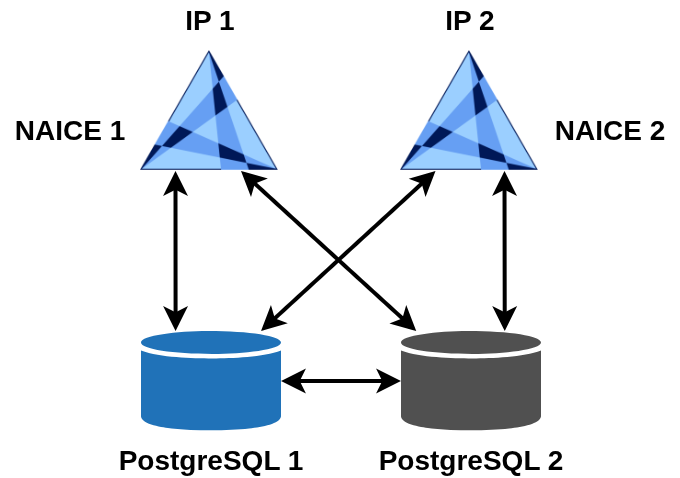
Eltex-NAICE high availability is implemented using an Active-Active scheme, where each node has its own IP address. The network equipment must be configured to interact with two RADIUS/TACACS+ servers. Service availability detection is performed by the network equipment side. To configure the high-availability scheme, four virtual (or physical) servers must be allocated: two for running NAICE services and two for running the PostgreSQL database, which is responsible for storing system data.
Installing or upgrading a high-availability configuration on a host previously used for operating the system in single-host mode is not allowed. |
To license a high-availability scheme, two licenses are required, one for each NAICE host. Each license must have its own Product ID while sharing the same license key. |
|
System requirements for the servers are described in the “High-availability deployment” section of v1.1_3.1 System requirements.
Both online and offline installation methods are supported.
Online installation is supported on all operating systems listed as supported and is described below.
Offline installation in an isolated network is described in section v1.1_3.4.1 High-availability installation in an isolated network (using VRRP).
To perform an online installation, the target hosts must have direct Internet access. Using a proxy server or any mechanism that modifies certificates of destination websites accessed during installation is not allowed. |
You must specify IP addresses of the target servers during installation. Using domain names is not permitted. |
The installation is performed using two Ansible playbooks:
install-postgres-cluster.yml.keepalived service are installed using the playbook reservation-naice-services.yml.For correct interaction with an identity source of the ACTIVE DIRECTORY type, it is necessary to create two computer accounts that will be used for interaction via the netlogon protocol during user password verification. Each NAICE node must use a separate computer account. To do this, specify the following variables in the group_vars/all.yml variables file:
Save the file before running the NAICE installation playbook.
|
The addresses of the target hosts on which the installation will be executed are defined in the inventory/hosts-cluster.yml file.
For PostgreSQL, set the addresses in the postgres-cluster section:
# Host group for postgres-cluster installation (primary + standby)
postgres-cluster:
  hosts:
    node_primary:
      ansible_host: <IP address of PostgreSQL node 1>
      ansible_port: 22
      ansible_user: <username>
      ansible_ssh_pass: <password>
      ansible_become_password: <sudo password>
      forwarded_postgresql_port: 5432
      forwarded_ssh_port: 15432
    node_standby:
      ansible_host: <IP address of PostgreSQL node 2>
      ansible_port: 22
      ansible_user: <username>
      ansible_ssh_pass: <password>
      ansible_become_password: <sudo password>
      forwarded_postgresql_port: 5432
forwarded_ssh_port: 15432 |
To install NAICE services with high availability, you must specify the addresses in the geo section:
# Host group for NAICE high-availability installation
geo:
  hosts:
    master_host:
      ansible_host: <IP address of NAICE host 1>
      ansible_port: 22
      ansible_user: <username>
      ansible_ssh_pass: <password>
      ansible_become_password: <sudo password>

    backup_host:
      ansible_host: <IP address of NAICE host 1>
      ansible_port: 22
      ansible_user: <username>
      ansible_ssh_pass: <password>
ansible_become_password: <sudo password> |
When performing an online installation, it is not required to specify access credentials for the host from which the playbook is executed in the Local actions section. This section is used only when performing installation in an isolated environment. |
Run the playbook:
ansible-playbook install-postgres-cluster.yml -i inventory/hosts-geo.yml |
As a result, PostgreSQL will be installed as a cluster on the servers specified in node_primary and node_standby. The master node of the cluster will be located on the node_primary host.
Before starting the installation, make sure that the Primary role belongs to the PostgreSQL node specified in the variable node_primary “ansible_host”. If necessary, perform a Primary role switch. If this requirement is not met, the installation cannot be completed. |
Both database addresses are specified in the NAICE service database connection settings, and database entries can only be made via the primary server. The use of the
The database access addresses are taken from the ansible_host values under the postgres-cluster section in the |
To start the installation, run the playbook:
ansible-playbook geo-naice-services.yml -i inventory/hosts-geo.yml |
Once the NAICE cluster installation is complete, the containers on both nodes should be in a healthy state.
On the hosts, navigate to the installation directory (by default, /etc/docker-naice) and verify that the containers are running.
$ sudo docker compose ps -a NAME IMAGE COMMAND SERVICE CREATED STATUS PORTS epg-service hub.eltex-co.ru/naice/epg-service:1.1-3 "/bin/sh -e /usr/loc…" epg-service 6 minutes ago Up 6 minutes (healthy) 0.0.0.0:8100->8100/tcp, [::]:8100->8100/tcp naice-aquila hub.eltex-co.ru/naice/naice-aquila:1.1 "java -cp @/app/jib-…" naice-aquila 6 minutes ago Up 4 minutes (healthy) 0.0.0.0:5703->5703/tcp, [::]:5703->5703/tcp, 0.0.0.0:8091-8092->8091-8092/tcp, [::]:8091-8092->8091-8092/tcp, 0.0.0.0:49->1049/tcp, [::]:49->1049/tcp naice-bubo hub.eltex-co.ru/naice/naice-bubo:1.1 "java -cp @/app/jib-…" naice-bubo 6 minutes ago Up 4 minutes (healthy) 0.0.0.0:5704->5704/tcp, [::]:5704->5704/tcp, 0.0.0.0:8093->8093/tcp, [::]:8093->8093/tcp naice-castor hub.eltex-co.ru/naice/naice-castor:1.1 "java -Djava.awt.hea…" naice-castor 6 minutes ago Up 4 minutes (healthy) 0.0.0.0:5705->5705/tcp, [::]:5705->5705/tcp, 0.0.0.0:8095->8095/tcp, [::]:8095->8095/tcp naice-cetus hub.eltex-co.ru/naice/naice-cetus:1.1 "java -cp @/app/jib-…" naice-cetus 6 minutes ago Up 4 minutes (healthy) 0.0.0.0:8099->8099/tcp, [::]:8099->8099/tcp naice-gavia hub.eltex-co.ru/naice/naice-gavia:1.1 "java -cp @/app/jib-…" naice-gavia 6 minutes ago Up 3 minutes (healthy) 0.0.0.0:8080->8080/tcp, [::]:8080->8080/tcp naice-gulo hub.eltex-co.ru/naice/naice-gulo:1.1 "java -cp @/app/jib-…" naice-gulo 6 minutes ago Up 4 minutes (healthy) 0.0.0.0:8089->8089/tcp, [::]:8089->8089/tcp naice-lemmus hub.eltex-co.ru/naice/naice-lemmus:1.1 "java -cp @/app/jib-…" naice-lemmus 6 minutes ago Up 4 minutes (healthy) 0.0.0.0:8083->8083/tcp, [::]:8083->8083/tcp naice-lepus hub.eltex-co.ru/naice/naice-lepus:1.1 "java -cp @/app/jib-…" naice-lepus 6 minutes ago Up 4 minutes (healthy) 0.0.0.0:8087->8087/tcp, [::]:8087->8087/tcp, 0.0.0.0:67->1024/udp, [::]:67->1024/udp naice-mustela hub.eltex-co.ru/naice/naice-mustela:1.1 "java -cp @/app/jib-…" naice-mustela 6 minutes ago Up 4 minutes (healthy) 0.0.0.0:8070->8070/tcp, [::]:8070->8070/tcp naice-nats hub.eltex-co.ru/naice/nats:1.1.7 "docker-entrypoint.s…" nats 6 minutes ago Up 6 minutes (healthy) 0.0.0.0:4222->4222/tcp, [::]:4222->4222/tcp, 0.0.0.0:6222->6222/tcp, [::]:6222->6222/tcp, 0.0.0.0:7777->7777/tcp, [::]:7777->7777/tcp, 0.0.0.0:8222->8222/tcp, [::]:8222->8222/tcp naice-ovis hub.eltex-co.ru/naice/naice-ovis:1.1 "java -cp @/app/jib-…" naice-ovis 6 minutes ago Up 4 minutes (healthy) 0.0.0.0:5701->5701/tcp, [::]:5701->5701/tcp, 0.0.0.0:8084->8084/tcp, [::]:8084->8084/tcp naice-phoca hub.eltex-co.ru/naice/naice-phoca:1.1 "java -cp @/app/jib-…" naice-phoca 6 minutes ago Up 5 minutes (healthy) 0.0.0.0:8097->8097/tcp, [::]:8097->8097/tcp naice-radius hub.eltex-co.ru/naice/naice-radius:1.1 "/docker-entrypoint.…" naice-radius 6 minutes ago Up 6 minutes (healthy) 0.0.0.0:1812-1813->1812-1813/udp, [::]:1812-1813->1812-1813/udp, 0.0.0.0:9812->9812/tcp, [::]:9812->9812/tcp naice-sterna hub.eltex-co.ru/naice/naice-sterna:1.1 "/docker-entrypoint.…" naice-sterna 6 minutes ago Up 3 minutes (healthy) 80/tcp, 0.0.0.0:8443->444/tcp, [::]:8443->444/tcp naice-ursus hub.eltex-co.ru/naice/naice-ursus:1.1 "java -cp @/app/jib-…" naice-ursus 6 minutes ago Up 5 minutes (healthy) 0.0.0.0:8081->8081/tcp, [::]:8081->8081/tcp naice-vulpus hub.eltex-co.ru/naice/naice-vulpus:1.1 "java -cp @/app/jib-…" naice-vulpus 6 minutes ago Up 4 minutes (healthy) 0.0.0.0:5702->5702/tcp, [::]:5702->5702/tcp, 0.0.0.0:8086->8086/tcp, [::]:8086->8086/tcp, 0.0.0.0:8088->8088/tcp, [::]:8088->8088/tcp naice-web hub.eltex-co.ru/naice/naice-web:1.1 "/docker-entrypoint.…" naice-web 6 minutes ago Up 2 minutes (healthy) 80/tcp, 0.0.0.0:443->443/tcp, [::]:443->443/tcp, 0.0.0.0:80->4200/tcp, [::]:80->4200/tcp |
In the normal state, all four hosts are functioning.
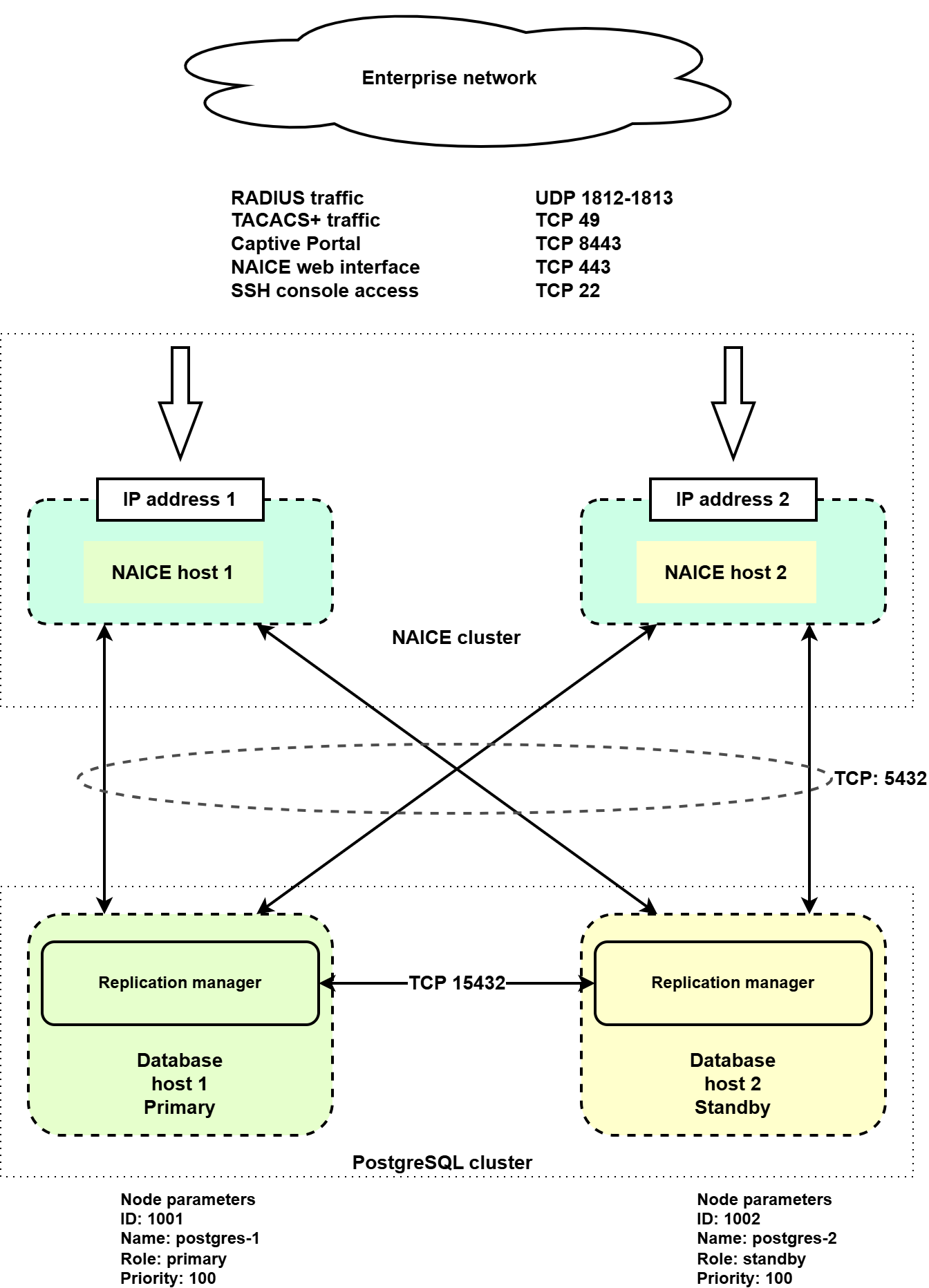
If NAICE Host 1 fails, the following actions will be performed automatically:
For details regarding the behavior of network equipment when working with two RADIUS/TACACS+ server hosts and for correct configuration recommendations, refer to the documentation for the corresponding equipment. |
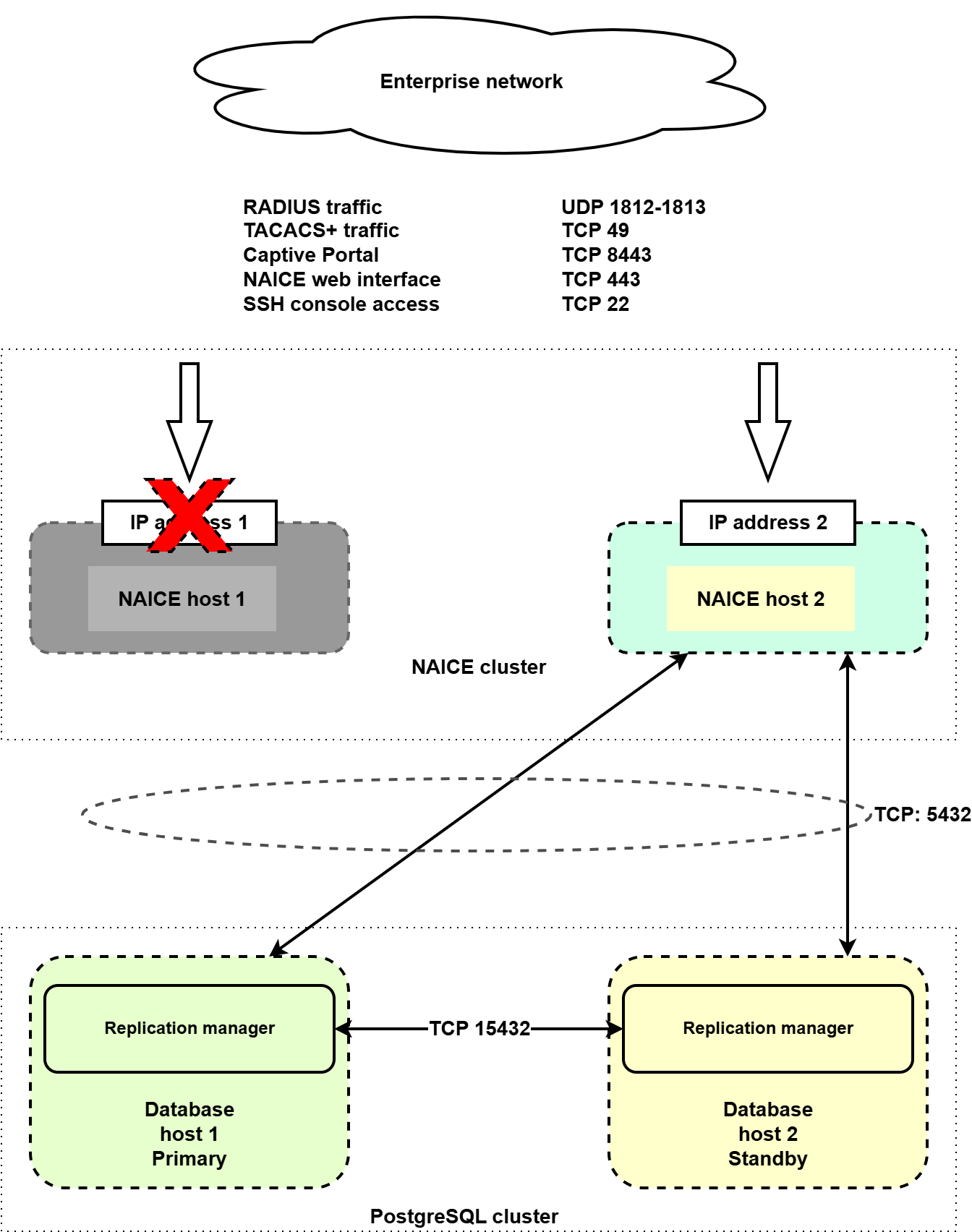
If database host 1 fails, the following actions will be performed automatically:
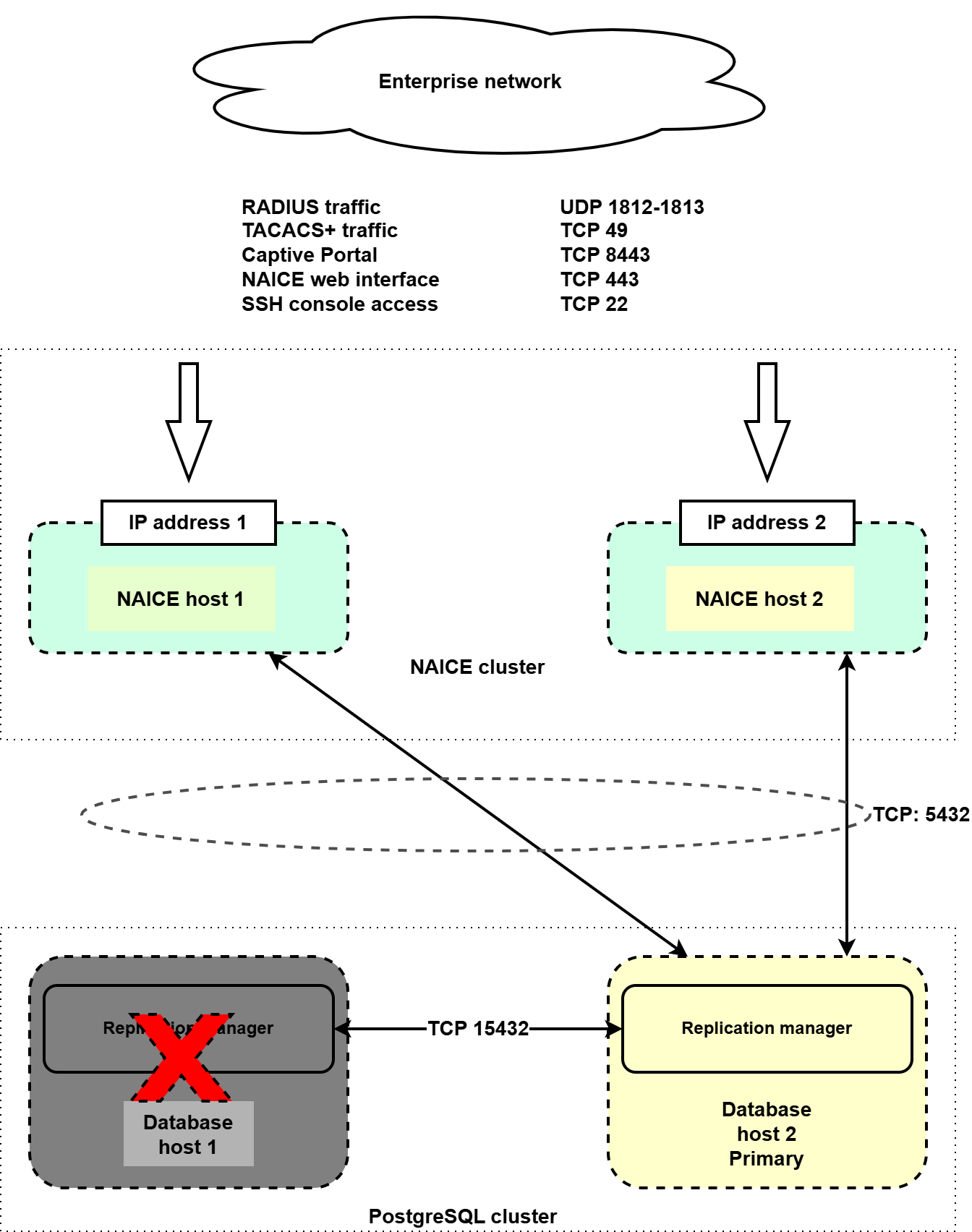
If one of the hosts is completely lost, first restore its initial state: deploy the operating system, configure IP addressing and user accounts as they were before, and then perform the recovery procedure.
On the remaining operational node, create a backup of the data according to the instructions in v1.1_3.8 Creating and restoring database backup.
Redeploy the host corresponding to the failed cluster node, using the same OS, IP addressing, and user configuration as before.
Run the playbook:
ansible-playbook install-postgres-cluster.yml -i inventory/hosts-geo.yml |
After completing the playbook, check the state of the PostgreSQL database cluster, verify that it is operational, and confirm that authentication and configuration in the GUI are functioning correctly.
Redeploy the host corresponding to the failed cluster node, using the same operating system, IP addressing, and user configuration as before.
Run the playbook:
ansible-playbook geo-naice-services.yml -i inventory/hosts-geo.yml |
When the installation is executed again, all NAICE services will be restarted, which will result in a short service interruption (up to 5 minutes). This must be taken into account when planning recovery work. |
After recovery, verify that authentication is working correctly and ensure that all services are operating properly.