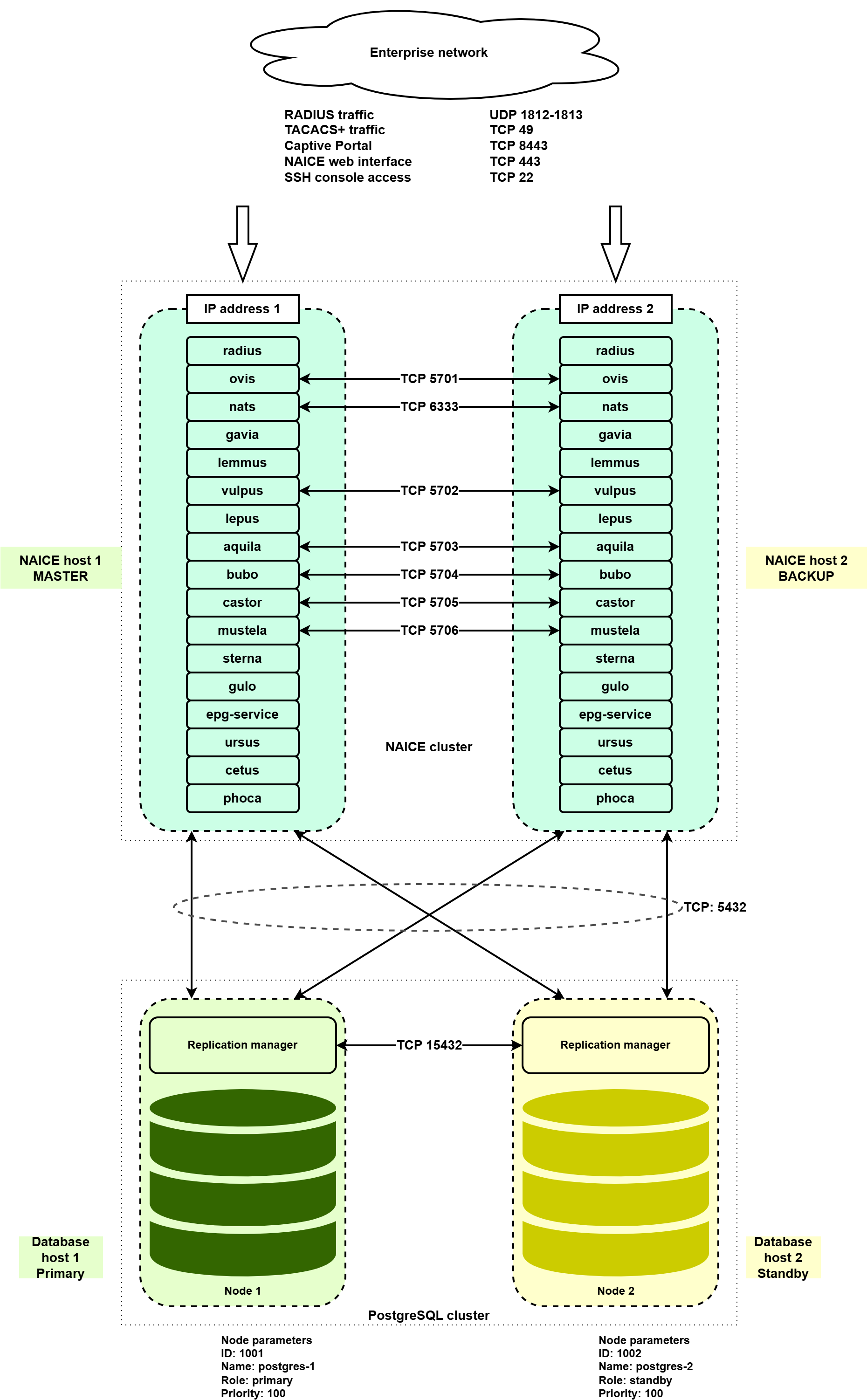
Managing user authentication and authorization requires ensuring high availability of the NAC system, since, in the event of its failure, connecting users and endpoints will become impossible.
Eltex NAICE high availability is implemented using an Active-Active scheme, where each node has its own IP address. The network equipment must be configured to interact with two RADIUS/TACACS+ servers. Service availability detection is performed by the network equipment side. To configure the high-availability scheme, four virtual (or physical) servers must be allocated: two for running NAICE services and two for running the PostgreSQL database, which is responsible for storing system data.
Installing or upgrading a high-availability configuration on a host previously used for operating the system in single-host mode is not allowed. |
The procedure for switching from a stand-alone installation to a high-availability configuration is described in v1.2_3.9.5 Updating PostgreSQL during the transition from a stand-alone installation to a high-availability configuration.
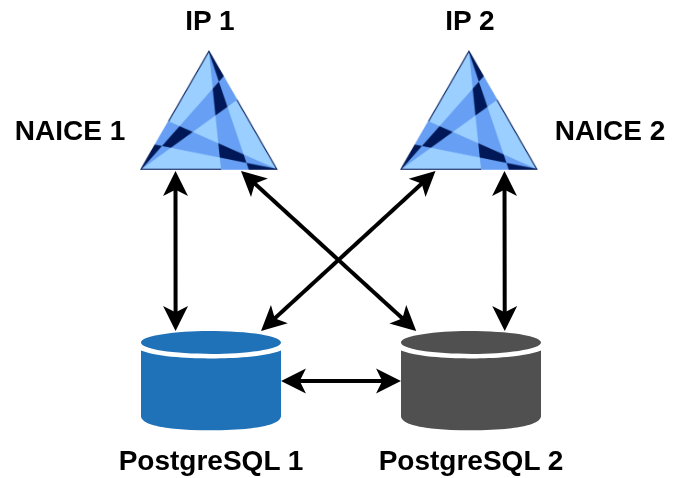
To license a high-availability scheme, two licenses are required, one for each NAICE host. Each license must have its own Product ID while sharing the same license key. |
|
System requirements for the servers are described in the “High-availability deployment” section of v1.2_3.1 System requirements.
Both online and offline installation methods are supported.
Online installation is supported on all operating systems listed as supported and is described below.
Offline installation in an isolated network is described in section v1.2_3.6.1 High-availability installation in an isolated network (without using VRRP).
To perform an online installation, the target hosts must have direct Internet access. Using a proxy server or any mechanism that modifies certificates of destination websites accessed during installation is not allowed. |
You must specify IP addresses of the target servers during installation. Using domain names is not permitted. |
The installation is performed using two Ansible playbooks:
install-postgres-cluster.yml.keepalived service are installed using the playbook reservation-naice-services.yml.The addresses of the target hosts on which the installation will be executed are defined in the inventory/hosts-cluster.yml file.
For PostgreSQL, set the addresses in the postgres-cluster section:
# Host group for postgres-cluster installation (primary + standby)
postgres-cluster:
  hosts:
    node_primary:
      ansible_host: <IP address of PostgreSQL host 1>
      ansible_port: 22
      ansible_user: <username>
      ansible_ssh_pass: <password>
      ansible_become_password: <sudo password>
      forwarded_postgresql_port: 5432
      forwarded_ssh_port: 15432
    node_standby:
      ansible_host: <IP address of PostgreSQL host 2>
      ansible_port: 22
      ansible_user: <username>
      ansible_ssh_pass: <password>
      ansible_become_password: <sudo password>
      forwarded_postgresql_port: 5432
forwarded_ssh_port: 15432 |
To install NAICE services with high availability, you must specify the addresses in the geo section:
# Host group for NAICE high-availability installation
geo:
  hosts:
    master_host:
      ansible_host: <IP address of NAICE host 1>
      ansible_port: 22
      ansible_user: <username>
      ansible_ssh_pass: <password>
      ansible_become_password: <sudo password>

    backup_host:
      ansible_host: <IP address of NAICE host 2>
      ansible_port: 22
      ansible_user: <username>
      ansible_ssh_pass: <password>
ansible_become_password: <sudo password> |
When performing an online installation, it is not required to specify access credentials for the host from which the playbook is executed in the Local actions section. This section is used only when performing installation in an isolated environment. |
Three Docker networks are used for NAICE services:
The variables used to configure Docker networks are defined in the group_vars/networks.yml file. The subnet, IP address range, and gateway are specified for each network.
Example contents of the group_vars/networks.yml file:
--- # Variables for configuring Docker networks docker_network_unmasked: subnet: "172.18.0.0/20" ip_range: "172.18.8.0/21" gateway: "172.18.0.1" docker_network_external: subnet: "172.20.0.0/20" ip_range: "172.20.8.0/21" gateway: "172.20.0.1" docker_network_internal: subnet: "172.21.0.0/20" ip_range: "172.21.8.0/21" gateway: "172.21.0.1" |
The example shows the default values. If the networks overlap with existing networks in your infrastructure, you must change the network settings in the group_vars/networks.yml file before installing NAICE. Instructions for changing Docker networks on an already installed NAICE system are provided in the v1.2_3.13 Changing Docker networks article.
Run the playbook:
ansible-playbook install-postgres-cluster.yml -i inventory/hosts-geo.yml |
As a result, PostgreSQL will be installed as a cluster on the servers specified in node_primary and node_standby. The master node of the cluster will be located on the node_primary host.
Before starting the installation, make sure that the Primary role belongs to the PostgreSQL node specified in the variable node_primary “ansible_host”. If necessary, perform a Primary role switch. If this requirement is not met, the installation cannot be completed. |
Both database addresses are specified in the NAICE service database connection settings, and database entries can only be made via the primary server. The use of the
The database access addresses are taken from the ansible_host values under the postgres-cluster section in the |
To start the installation, run the playbook:
ansible-playbook geo-naice-services.yml -i inventory/hosts-geo.yml |
2 Once the NAICE cluster installation is complete, the containers on both nodes should be in a healthy state.
On the hosts, navigate to the installation directory (by default, /etc/docker-naice) and verify that the containers are running.
$ sudo docker compose ps -a NAME IMAGE COMMAND SERVICE CREATED STATUS PORTS epg-service naice-build-hosted.registry.eltex.loc/naice/epg-service:1.3-2 "/bin/sh -e /usr/loc…" epg-service 6 minutes ago Up 5 minutes (healthy) naice-aquila naice-release.registry.eltex.loc/naice-aquila:1.2 "java -cp @/app/jib-…" naice-aquila About a minute ago Up About a minute (healthy) 0.0.0.0:8091->8091/tcp, [::]:8091->8091/tcp, 0.0.0.0:49->1049/tcp, [::]:49->1049/tcp naice-bubo naice-release.registry.eltex.loc/naice-bubo:1.2 "java -cp @/app/jib-…" naice-bubo 5 minutes ago Up 3 minutes (healthy) 0.0.0.0:8093->8093/tcp, [::]:8093->8093/tcp naice-castor naice-release.registry.eltex.loc/naice-castor:1.2 "java -Djava.awt.hea…" naice-castor 5 minutes ago Up 3 minutes (healthy) 0.0.0.0:8095->8095/tcp, [::]:8095->8095/tcp naice-cetus naice-release.registry.eltex.loc/naice-cetus:1.2 "java -cp @/app/jib-…" naice-cetus 5 minutes ago Up 3 minutes (healthy) 0.0.0.0:8099->8099/tcp, [::]:8099->8099/tcp naice-gavia naice-release.registry.eltex.loc/naice-gavia:1.2 "java -cp @/app/jib-…" naice-gavia 5 minutes ago Up About a minute (healthy) 0.0.0.0:8080->8080/tcp, [::]:8080->8080/tcp naice-gulo naice-release.registry.eltex.loc/naice-gulo:1.2 "java -cp @/app/jib-…" naice-gulo 5 minutes ago Up 3 minutes (healthy) 0.0.0.0:8089->8089/tcp, [::]:8089->8089/tcp naice-lemmus naice-release.registry.eltex.loc/naice-lemmus:1.2 "java -cp @/app/jib-…" naice-lemmus 5 minutes ago Up 3 minutes (healthy) 0.0.0.0:8083->8083/tcp, [::]:8083->8083/tcp naice-lepus naice-release.registry.eltex.loc/naice-lepus:1.2 "java -cp @/app/jib-…" naice-lepus 5 minutes ago Up 3 minutes (healthy) 0.0.0.0:8087->8087/tcp, [::]:8087->8087/tcp, 0.0.0.0:67->1024/udp, [::]:67->1024/udp naice-mustela naice-release.registry.eltex.loc/naice-mustela:1.2 "java -cp @/app/jib-…" naice-mustela 5 minutes ago Up 3 minutes (healthy) 0.0.0.0:8070->8070/tcp, [::]:8070->8070/tcp naice-nats naice-build-hosted.registry.eltex.loc/naice/nats:1.2.2 "docker-entrypoint.s…" nats 6 minutes ago Up 5 minutes (healthy) 4222/tcp, 6222/tcp, 7777/tcp, 8222/tcp naice-ovis naice-release.registry.eltex.loc/naice-ovis:1.2 "java -cp @/app/jib-…" naice-ovis 5 minutes ago Up 3 minutes (healthy) 0.0.0.0:8084->8084/tcp, [::]:8084->8084/tcp naice-phoca naice-release.registry.eltex.loc/naice-phoca:1.2 "java -cp @/app/jib-…" naice-phoca 6 minutes ago Up 5 minutes (healthy) 0.0.0.0:8097->8097/tcp, [::]:8097->8097/tcp naice-radius naice-release.registry.eltex.loc/naice-radius:1.2 "/docker-entrypoint.…" naice-radius 4 minutes ago Up 4 minutes (healthy) 0.0.0.0:1812-1813->1812-1813/udp, [::]:1812-1813->1812-1813/udp, 0.0.0.0:9812->9812/tcp, [::]:9812->9812/tcp naice-sterna naice-release.registry.eltex.loc/naice-sterna:1.2 "/docker-entrypoint.…" naice-sterna About a minute ago Up About a minute (healthy) 0.0.0.0:32888->80/tcp, [::]:32888->80/tcp, 0.0.0.0:8443->444/tcp, [::]:8443->444/tcp naice-ursus naice-release.registry.eltex.loc/naice-ursus:1.2 "java -cp @/app/jib-…" naice-ursus 5 minutes ago Up 4 minutes (healthy) 0.0.0.0:8081->8081/tcp, [::]:8081->8081/tcp naice-vulpus naice-release.registry.eltex.loc/naice-vulpus:1.2 "java -cp @/app/jib-…" naice-vulpus 5 minutes ago Up 3 minutes (healthy) 0.0.0.0:8086->8086/tcp, [::]:8086->8086/tcp naice-web naice-release.registry.eltex.loc/naice-web:1.2 "/docker-entrypoint.…" naice-web About a minute ago Up 59 seconds (healthy) 0.0.0.0:443->443/tcp, [::]:443->443/tcp, 0.0.0.0:32889->80/tcp, [::]:32889->80/tcp, 0.0.0.0:80->4200/tcp, [::]:80->4200/tcp |
In the normal state, all four hosts are functioning.
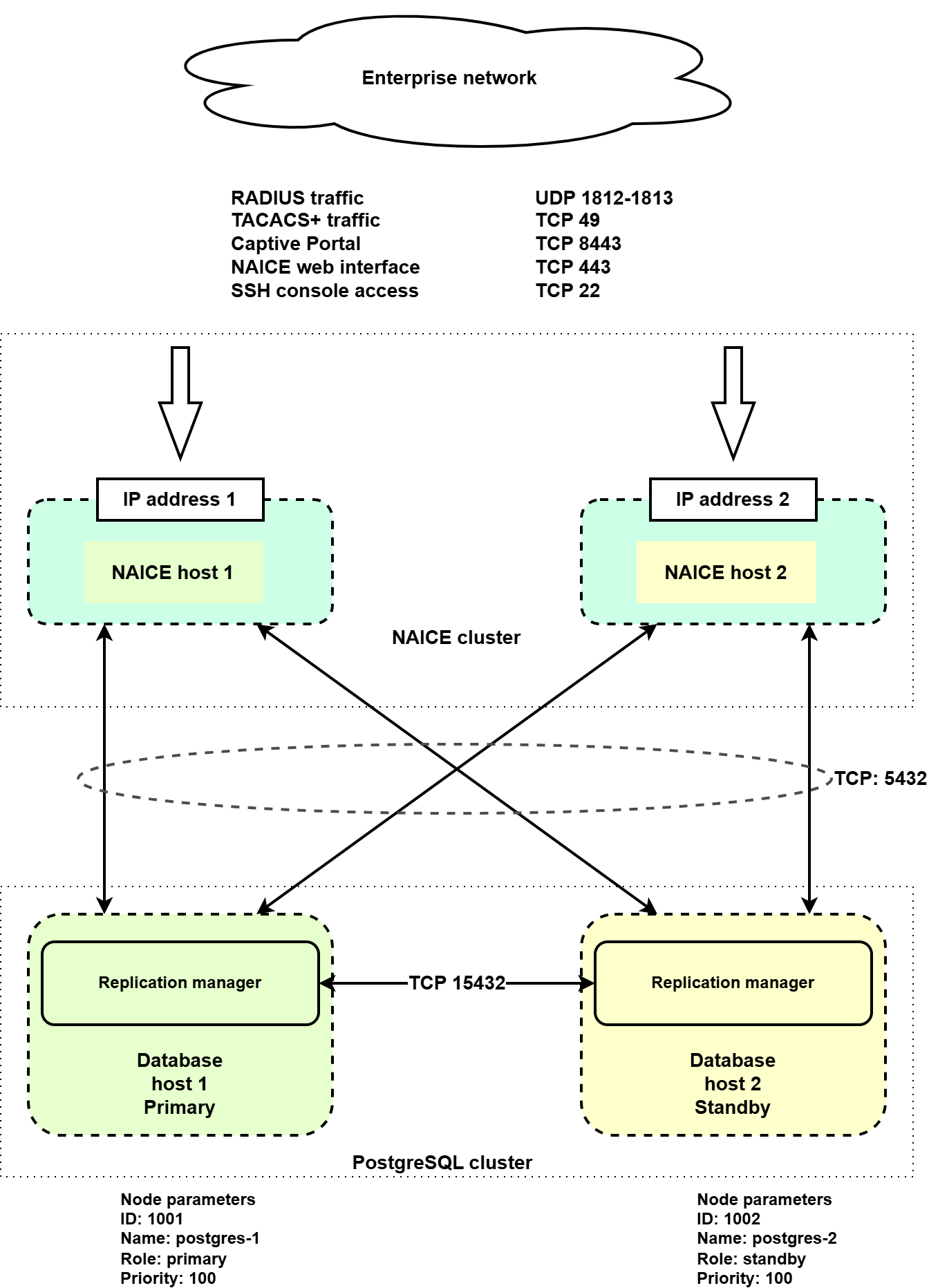
If NAICE Host 1 fails, the following actions will be performed automatically:
For details regarding the behavior of network equipment when working with two RADIUS/TACACS+ server hosts and for correct configuration recommendations, refer to the documentation for the corresponding equipment. |
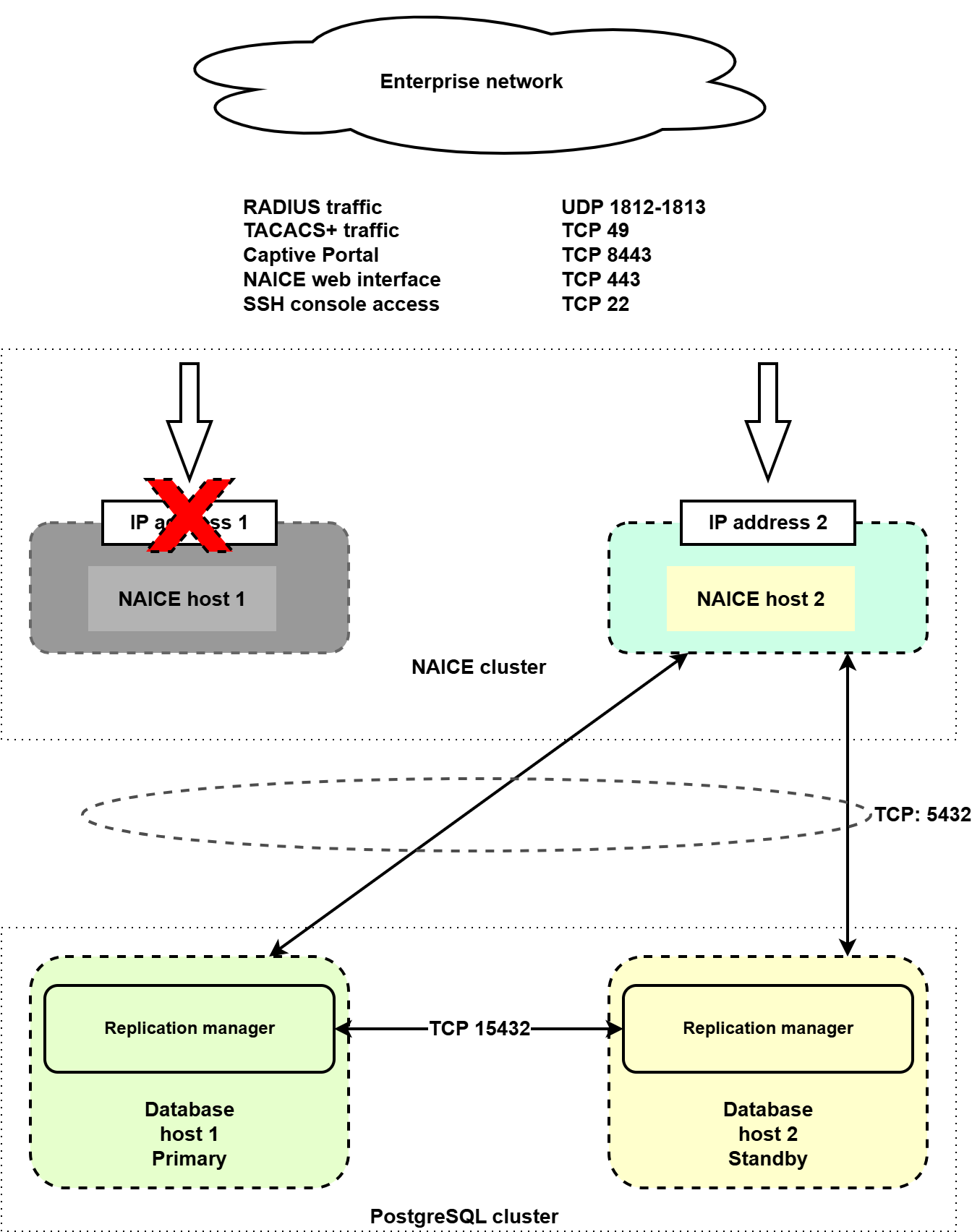
If database host 1 fails, the following actions will be performed automatically:
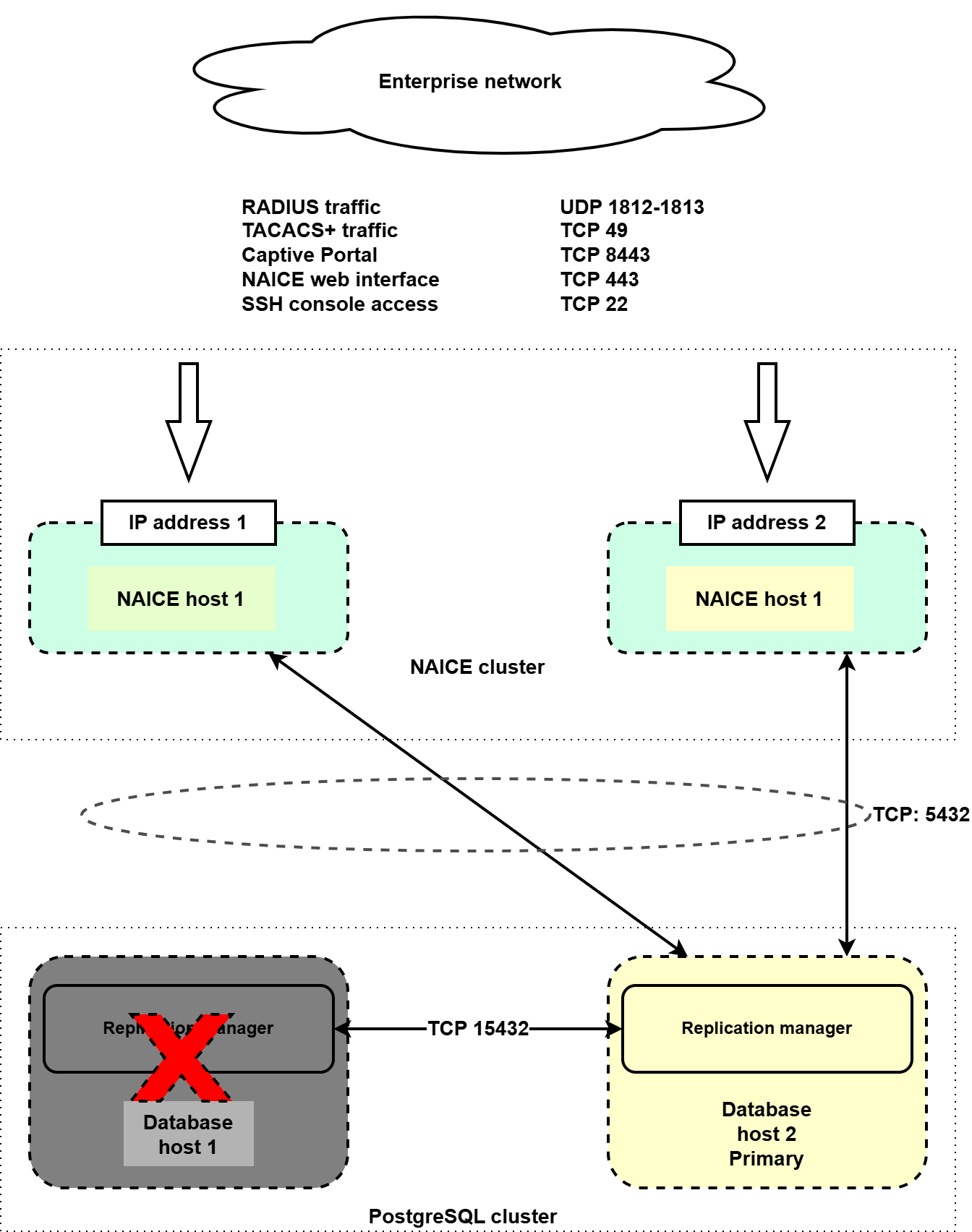
If one of the hosts is completely lost, first restore its initial state: deploy the operating system, configure IP addressing and user accounts as they were before, and then perform the recovery procedure.
On the remaining operational node, create a backup of the data according to the instructions in v1.2_3.10 Creating and restoring database backup.
Redeploy the host corresponding to the failed cluster node, using the same OS, IP addressing, and user configuration as before.
Run the playbook:
ansible-playbook install-postgres-cluster.yml -i inventory/hosts-geo.yml |
After completing the playbook, check the state of the PostgreSQL database cluster, verify that it is operational, and confirm that authentication and configuration in the GUI are functioning correctly.
Redeploy the host corresponding to the failed cluster node, using the same operating system, IP addressing, and user configuration as before.
Run the playbook:
ansible-playbook geo-naice-services.yml -i inventory/hosts-geo.yml |
When the installation is executed again, all NAICE services will be restarted, which will result in a short service interruption (up to 5 minutes). This must be taken into account when planning recovery work. |
After recovery, verify that authentication is working correctly and ensure that all services are operating properly.