
Initial status of the branch office network
Take a look at example of connecting a small office to a DMVPN cloud, where there is one ISP providing Internet access via a white statically assigned IP address:
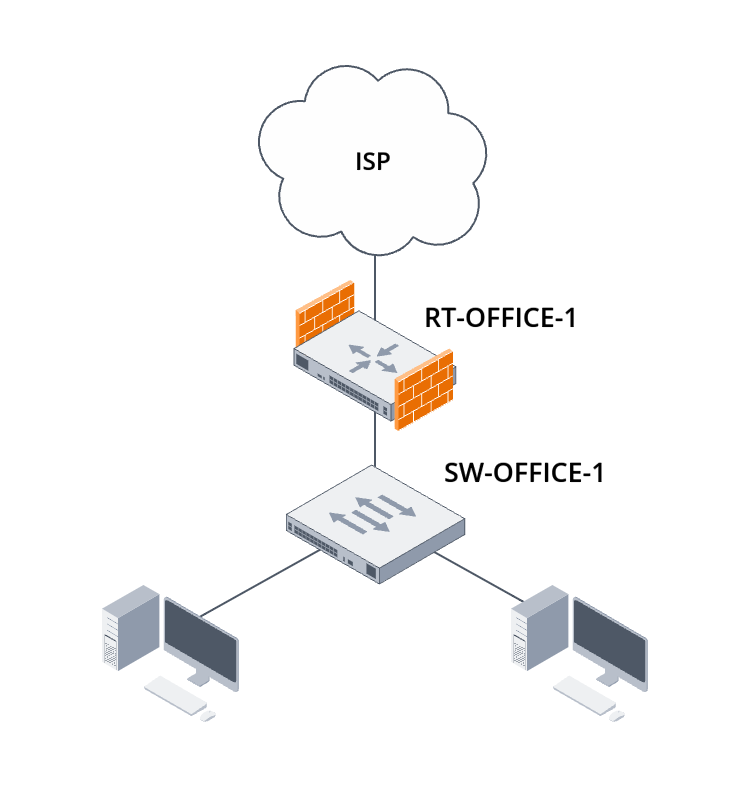
Figure 5. Diagram of connecting a branch office router with a static IP address to the provider's network
The office local area network is provided by a single access switch, which is connected directly to the router at the network border. Assign names to the devices right away for convenience in further configuration.
Organizing the local network segment of a branch office
As part of this guide, examine a simple access switch configuration for connecting the equipment of a branch office to a border router. The parameters of the office's local network are described in Table 7.
Table 7. Local network parameters for branch office No. 1
| Purpose | VLAN | Subnet |
|---|---|---|
| Local area network of the branch office No. 1 | 100 | 192.168.11.0/24 |
Configure the client ports on the access switch in general mode and assign the required VLAN ID to untagged traffic:
Configure the port towards the router as a trunk port for the required VLAN ID:
After that, terminate the tagged traffic on the physical subinterface of the border router:
Add a security zone for the subinterface and allow incoming ICMP traffic incoming to the router from this security zone:
Connecting to an Internet service provider using static addressing
Examine connecting to the Internet, taking into account the data provided by the Internet service provider for configuring static addressing on the interface.
Table 8. Data for configuring static IP addressing on the border router of branch office No. 1
| Parameter | Value |
|---|---|
| Router IP | 203.0.114.2 |
| Network mask | 255.255.255.128 |
| Gateway IP | 203.0.114.1 |
In this example, the Internet service provider provides a public (white) IP address for static addressing configuration. In cases where the Internet service provider provides a private (grey) IP address for configuration with subsequent NAT conversion to public IP addressing, the configuration will be similar and the presence of the Internet service provider’s NAT will not affect the connection of the branch office to the central office via the DMVPN cloud.
Using the data provided by the Internet service provider, configure the network interface and static routing. The interface will be moved to a separate so-called Front-VRF.
A connection scheme in which the transport network for a certain virtual network is moved to a separate network namespace is called Front-Door VRF. This scheme of organizing transport for a virtual network offers the following advantages:
- the ability to use the default route in both virtual and transport networks;
- no intersection of routing information between the transport and virtual networks;
- an additional level of security for the virtual network, since traffic from it cannot enter the transport network without configured encapsulation into a tunnel.
Specify a separate security zone for this network interface and allow ICMP traffic incoming to the router from this security zone:
Configuring IKEv2 and IPsec tunneling on DMVPN Spoke
Configuring IPsec for the future DMVPN cloud is an important part of this guide. Correct IPsec configuration ensures the privacy and security of traffic between offices. IKE and IPsec parameters shown in Table 9 will be used in further configuration.
Table 9. IKE and IPsec parameters used to configure IPsec tunneling on the DMVPN Spoke router of branch office No. 1.
| RT-OFFICE-1 | ||
|---|---|---|
| IKE parameters | Encryption algorithm | AES-256 |
| Hashing algorithm | SHA2-256 | |
| Diffie-Hellman group | 19 | |
| IKE session lifetime in seconds | 86400 | |
| IKE session identifier | spoke1.company.loc | |
| Interval for sending DPD messages | 40 | |
| Total timeout for DPD message response | 160 | |
| Action when DPD timeout occurs | Terminating the IKE session | |
| IPsec parameters | Encryption algorithm | AES-256 |
| Hashing algorithm | SHA2-256 | |
| Diffie-Hellman group for a PFS mechanism | 19 | |
| IPsec session lifetime in seconds | 28800 | |
| IPsec session lifetime in kilobytes | 4608000 | |
| Early reauthentication for IKE session/Early rekeying interval for IPsec session in seconds | 3600 | |
| Threshold value of IKE session early reauthentication/Threshold value of IPsec session early rekeying in kilobytes | 86400 | |
IPsec configuration begins with configuring encryption algorithm sets for the IKE protocol:
Next, create an IKE authentication keyring. Since domain names are going to be used as IPsec neighbor identifiers in further configuration, domain names will also be used in the keyring:
Create an IKE policy. It includes encryption algorithm sets, authentication method selection and IKE session lifetime:
Create a set of IKE gateways.
Due to the specifics of IPsec configuration in the DMVPN scheme on ESR service routers, multiple IPsec VPN policies must be created on routers acting as DMVPN Spokes: one for connecting to other DMVPN Spokes and one for each configured DMVPN Hub. For example, in this guide, the connection will be established via one Internet service provider to two DMVPN Hubs, which means that three IPsec VPN policies must be created during the configuration and therefore three IKE gateways.
- To use IKE version 2, the "version v2-only" command is required, otherwise the tunnel will use IKE version 1.
- Support for MOBIKE protocol must be disabled, as in the DMVPN scheme it can lead to errors in creating tunnels between DMVPN Hub and DMVPN Spoke.
- If the gateway is bound to an interface using the "local interface" command, it is possible to bind the local network to the address on this interface with the "local network dynamic" command.
- In the DMVPN scheme, only GRE traffic goes through IPsec tunnels, so it is correct to specify the "protocol gre" key in the "local network" and "remote network" commands.
Configure the policy for duplicate IKE sessions to replace existing IKE sessions when duplicates occur:
Create a set of encryption algorithms specifically for the IPsec tunnel:
Next create an IPsec policy. It includes sets of encryption algorithms and the lifetime of the IPsec session directly responsible for encrypting user traffic:
Finally, all IKE and IPsec settings can be combined into general VPN profiles. As with IKE gateways, three IPsec VPN profiles will be created. For IPsec VPN profiles used on GRE tunnels in the DMVPN scheme, it is necessary to enable transport mode:
Allow traffic associated with IPsec tunnels to pass through. To do this, first describe the port profiles for the IKE protocol and the encrypted traffic of the IKE and ESP protocols packaged in UDP:
Allow incoming IPsec tunnel traffic:
Configuring mGRE tunnels on DMVPN Spoke
Configure GRE tunnels in multipoint mode with NHRP protocol support on DMVPN Spoke. Since two DMVPN Hubs are deployed in the central office with addresses from two different ISPs, the connection to them will be made using two separate mGRE tunnels. The main parameters of the GRE tunnels for connecting to both DMVPN Hubs are shown in Table 10.
Table 10. GRE tunnel parameters on the DMVPN Spoke router of branch office No. 1
| DMVPN Hub | DMVPN Cloud | GRE tunnel number | DMVPN Spoke tunnel addressing | DMVPN Hub tunnel address | NBMA address of DMVPN Hub | GRE tunnel key | Lifetime of NHRP entries in seconds |
|---|---|---|---|---|---|---|---|
| RT-HUB-1 | ISP-1 Cloud | 11 | 172.16.1.11/24 | 172.16.1.1 | 203.0.113.4 | 1000 | 600 |
| RT-HUB-2 | ISP-2 Cloud | 12 | 172.16.2.11/24 | 172.16.2.1 | 203.0.113.132 | 2000 | 600 |
First, change the general settings for GRE tunnels on each DMVPN Hub. These settings include:
- multipoint mode;
- key value;
- TTL value;
- MTU size;
- adjust-mss TCP value;
- tunnel IP address;
- interface from which the GRE tunnel will be established;
- transport VRF name.
From the perspective of the NHRP protocol, DMVPN Spoke routers act as NHRP clients, which, after registering in the DMVPN cloud on one or more DMVPN Hubs, can request information about other members of the DMVPN cloud from them. In this regard, for DMVPN Spoke to work correctly, it is necessary to describe the NHRP protocol settings for connecting to both DMVPN Hubs.
To correctly establish Spoke-to-Spoke tunnels, where routing directs all traffic to the DMVPN Hub, enable the “ip nhrp shortcut” option, which activates the DMVPN Spoke's response to special NHRP “Traffic Indication” messages that the DMVPN Hub will send in response to packets destined for another DMVPN Spoke. Processing such a message will result in the construction of a Spoke-to-Spoke tunnel and traffic between DMVPN Spokes will flow directly, bypassing the DMVPN Hub.
This scheme for organizing routing and establishing Spoke-to-Spoke tunnels in DMVPN clouds is commonly referred to as DMVPN Phase 3.
Due to the nature of decapsulation of traffic from IPsec tunnels operating in transport encapsulation mode, decrypted traffic ends up on the same network interface that terminates the IPsec tunnel. Therefore, the firewall rules on the DMVPN Spoke must allow not only encrypted IPsec packets, but also GRE packets that arrive at the interface after decryption.
To filter traffic within the DMVPN cloud, a separate security zone must be created and assigned to GRE tunnels. Allow incoming ICMP traffic to pass through this zone:
Configuring routing for DMVPN cloud operation at the central office
Configure BGP neighbors facing the DMVPN Hub:
Since DMVPN Spoke and DMVPN Hub are located in different autonomous systems, route information will not be advertised by default. Create a route map that allows sending routes to local network on DMVPN Hub.
Specify the created route map for the IPv4 route family in the created BGP neighbors. Also, add the local network to the advertised routes:
Enable BFD support for created BGP neighbors. Increase BFD timers, taking into account the convergence speed of IPsec and mGRE tunnels:
Allow incoming BGP and BFD traffic to pass through the security zone configured on GRE tunnels:
Configuring Zone-Based Firewall for local area network
Since the DMVPN cloud that has now been created allows traffic of local users at the branch office to exit via the central office's Internet gateway, additional firewall settings are required.
Allow transit traffic from the local network to pass to the DMVPN cloud:
At this point, DMVPN configuration in the branch office can be considered complete.