
The state of DMVPN cloud
After completing the DMVPN Hub and DMVPN Spoke configuration steps described earlier, the diagram of communication between central and branch offices:
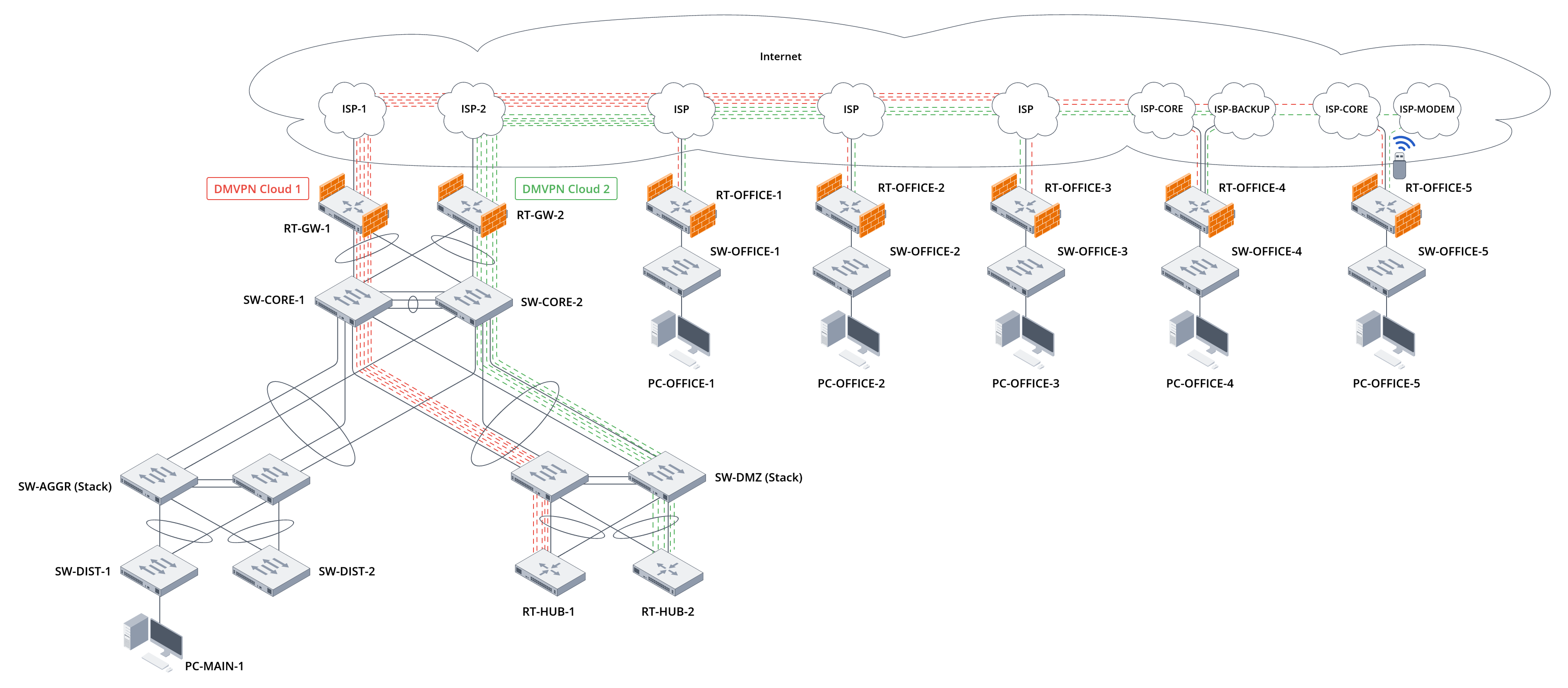
Figure 10. Diagram of communication between the central and branch offices after finishing configuration
In this diagram, two DMVPN clouds are created, the hosts of which are described in Tables 29 and 30:
Table 29. Description of DMVPN Cloud 1 hosts
| Hostname | DMVPN role | Tunnel IP address | NBMA IP address | NAT-OA IP address | Local networks | Test hosts in local networks |
|---|---|---|---|---|---|---|
| RT-HUB-1 | Hub | 172.16.1.1/24 | 203.0.113.4 | 10.0.0.2 | 10.100.0.0/24 | 10.100.0.10 |
| RT-OFFICE-1 | Spoke | 172.16.1.11/24 | 203.0.114.2 | -- | 192.168.11.0/24 | 192.168.11.10 |
| RT-OFFICE-2 | Spoke | 172.16.1.12/24 | 203.0.114.130 | -- | 192.168.12.0/24 | 192.168.12.10 |
| RT-OFFICE-3 | Spoke | 172.16.1.13/24 | 203.0.115.2 | 10.0.0.19 | 192.168.13.0/24 | 192.168.13.10 |
| RT-OFFICE-4 | Spoke | 172.16.1.14/24 | 203.10.0.2 | -- | 192.168.14.0/24 | 192.168.14.10 |
| RT-OFFICE-5 | Spoke | 172.16.1.15/24 | 203.11.1.2 | -- | 192.168.15.0/24 | 192.168.15.10 |
Table 30. Description of DMVPN Cloud 2 hosts
| Hostname | DMVPN role | Tunnel IP address | NBMA IP address | NAT-OA IP address | Local networks | Test hosts in local networks |
|---|---|---|---|---|---|---|
| RT-HUB-2 | Hub | 172.16.2.1/24 | 203.0.113.132 | 10.0.0.10 | 10.100.0.0/24 | 10.100.0.10 |
| RT-OFFICE-1 | Spoke | 172.16.2.11/24 | 203.0.114.2 | -- | 192.168.11.0/24 | 192.168.11.10 |
| RT-OFFICE-2 | Spoke | 172.16.2.12/24 | 203.0.114.130 | -- | 192.168.12.0/24 | 192.168.12.10 |
| RT-OFFICE-3 | Spoke | 172.16.2.13/24 | 203.0.115.2 | 10.0.0.19 | 192.168.13.0/24 | 192.168.13.10 |
| RT-OFFICE-4 | Spoke | 172.16.2.14/24 | 203.10.1.2 | -- | 192.168.14.0/24 | 192.168.14.10 |
| RT-OFFICE-5 | Spoke | 172.16.2.15/24 | 203.11.2.2 | -- | 192.168.15.0/24 | 192.168.15.10 |
Due to the configuration of the BGP protocol, traffic passing through Cloud 1 hosts has the highest priority.
Testing network connectivity between local networks at the central and branch offices
To test the local network connectivity between the central and branch offices, send traffic from the branch office test hosts to the central office local network test host:
In all four traces, traffic goes through the border router of the branch offices and the DMVPN Cloud 1 cloud to the DMVPN Hub RT-HUB-1, then to the border router of the central office RT-GW-1, and then reaches the test host in the local network of the central office.
Check the correctness of traffic flow in the opposite direction:
Traffic follows the same route in the opposite direction. The task of ensuring connectivity between the central and branch offices has been accomplished.
Testing the ability of branch office hosts to access the Internet via the central office's Internet gateway
To test whether the hosts at the branch offices can access the Internet via the central office's Internet gateway, send traffic from the test hosts at the branch offices to a public resource on the Internet. Use the Google Public DNS address, which is used as the target for the SLA test on the central office's RT-GW-1 router, as this resource:
In all four traces, traffic goes through the border router of the branch offices and the DMVPN Cloud 1 cloud to the DMVPN Hub RT-HUB-1, then to the border router of the central office RT-GW-1, and then reaches the public resource on the Internet. In the case of RT-OFFICE-4, when switching to the backup channel, traffic will go through the backup provider to RT-HUB-2.
Organizing access for hosts in branch offices to the Internet via the central office border router has been accomplished.
Testing network connectivity between local networks at branch offices
To test network connectivity between local networks at branch offices, transmit traffic between test hosts in the local networks at branch offices.
When creating Spoke-to-Spoke tunnels, it is important to consider the limitations imposed by NAT on the Internet service provider side. If two DMVPN Spokes are located behind the Source NAT of their Internet service providers, they will not be able to establish a direct connection between each other.
Start by checking the connectivity between branch offices No. 1 and No. 2:
Note that the first route goes through DMVPN Hub RT-HUB-1 because without a Spoke-to-Spoke tunnel between the branch offices, traffic between the offices goes through DMVPN Hub:
After creating a Spoke-to-Spoke tunnel, a short route appears directly towards the Spoke neighbor:
You can see the Spoke-to-Spoke tunnel construction in the corresponding commands on both DMVPN Spokes:
Since the GRE tunnel between DMVPN Spokes is secured with IPsec technology, it is also possible to verify the correct configuration of the Spoke-to-Spoke IPsec tunnel using show commands:
Thus, the task of establishing direct network connectivity between local networks at branch offices has been completed.