The aim of this guide is to show a solution for creating a wired data transmission network infrastructure based on GPON technology, using an enterprise network as an example. In this case, an example of deploying a hotel network will be used.
GPON is an access technology that uses a passive optical network (PON) as the transport medium between optical network terminals (ONT) and optical line terminals (OLT). The common components of all PON networks are optical fiber and passive (non-powered) elements such as splitters, combiners, etc. Thus, the key advantage of PON networks is that there is no need to use active elements (amplifiers, signal repeaters) that require additional power in the OLT↔ONT section.
The main advantages of the technology are: the use of a single OLT for multiple subscriber devices, optimal use of bandwidth, as well as higher signal transmission range on the optical network, higher transmission speeds, and higher subscriber density compared to ETTH technologies. GPON technology enables data transfer speeds of up to 2.5 Gbps downstream and up to 1.25 Gbps upstream per GPON port.
Hints contain small explanations to help with learning to use the equipment more quickly, or additional information. |
Notes contain important information about setting up the equipment. |
Warnings inform the user of situations that may cause harm, incorrect system operation or loss of data. |
OLT. An optical line terminal is station equipment installed at the carrier's communication node. It is used in xPON (GPON, XGS-PON) technology as an aggregation node for connecting multiple subscriber terminals operating on this technology.
ONT. An optical network terminal is subscriber equipment installed at the subscriber's premises.
Bridge mode is an ONT operating mode in which services are transmitted transparently via the ONT. This mode requires additional equipment (PC or router) to be connected behind the ONT. In this connection layout, equipment connected to the ONT's LAN interfaces establishes a direct connection with the carrier's network equipment.
IGMP (Internet Group Management Protocol). A protocol for managing IPTV multicast streams in IPv4 networks.
Multicast is a type of group communication where data transmission is addressed to a group of destination computers simultaneously.
Profile cross-connect is a configuration profile for ONT services that is responsible for forming a logical data transmission link between the OLT and ONT in a specific VLAN.
Profile ports is a configuration profile for ONT services that is responsible for configuring the internal parameters of ONT LAN interfaces, forming rules for traffic passing through ONT, and actions with multicast traffic passing through ONT.
Profile management a configuration profile for ONT services that is responsible for configuring the parameters of ONT interaction with the ACS server.
ACS (Automatic Configuration Server) – CPE automatic configuration server (ONT).
The proposed network section diagram includes a GPON access section for connecting end-user devices. It is assumed that a separate subscriber terminal will be installed in each room. All subscriber terminals are aggregated on an OLT installed in the technical room. Connection to the higher-level enterprise network can be made by connecting to an aggregation switch or directly to a router, depending on the enterprise network architecture. The general diagram will look as follows.
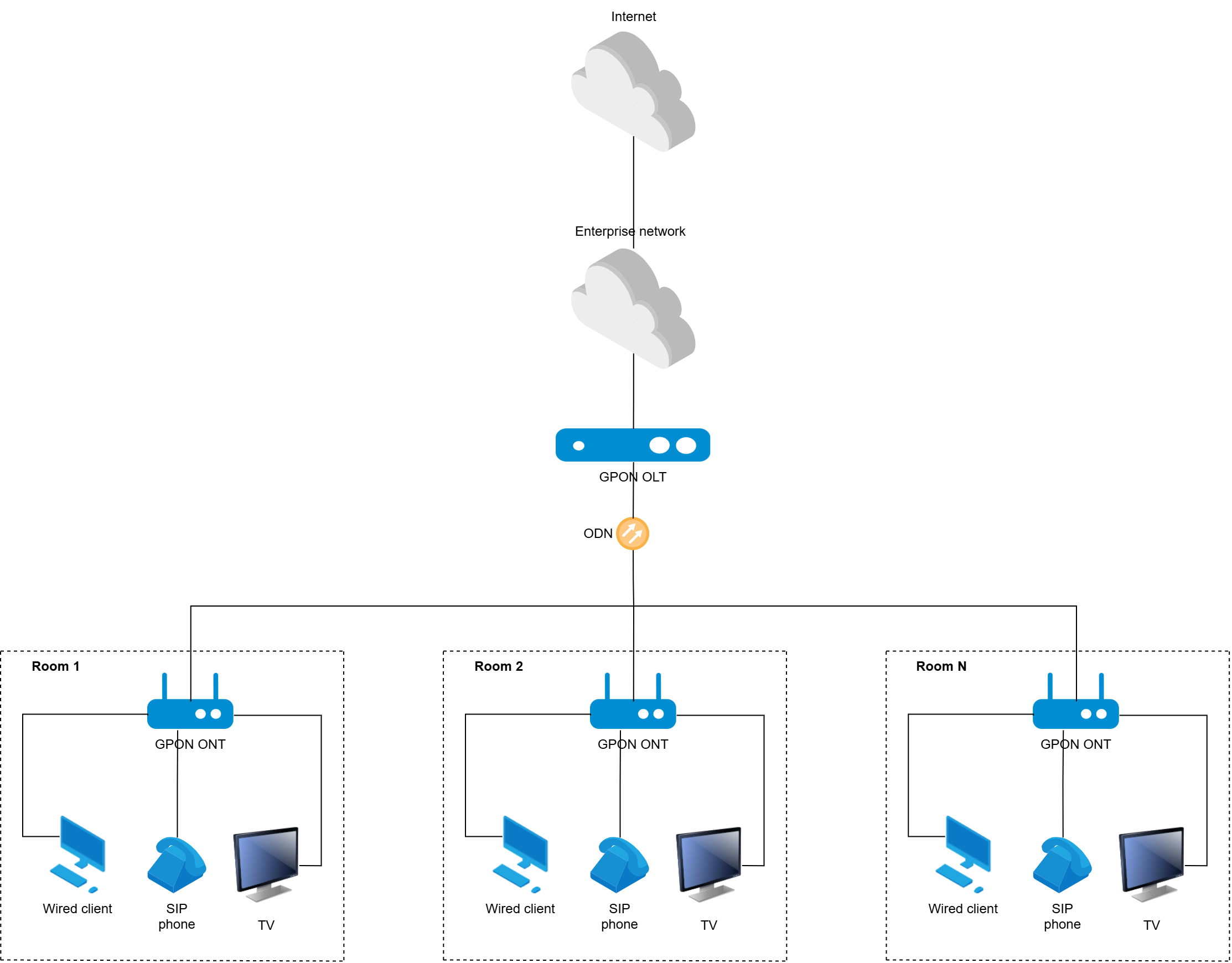
This diagram shows the logical connection between the OLT and ONT. It is assumed that the ONTs will be located directly in the rooms. Up to 128 ONTs can be connected to one GPON channel. Pizza-box format OLTs (LTP-8N, LTP-16N) have 8 and 16 GPON ports, respectively. Thus, the total number of ONTs that can be connected to one OLT is 1024 or 2048 ONTs, which may be sufficient to meet the needs of hotels. ONTs with 4 LAN ports can be used as subscriber terminals. In accordance with the cable plan for rooms, the structured cabling can be configured to have three or four 8P8C RJ-45 sockets in the room, each of which will be switched to a separate ONT LAN port. GPON technology allows each LAN port to be configured separately for specific services, each of which will be provided in its own unique VLAN. For example, the following distribution can be implemented:
This diagram does not include providing Wi-Fi connection via GPON. The implementation of Wi-Fi using access points and an Eltex controller is discussed in the guide Wi-Fi hotel network (hotel Wi-Fi diagram) guide.
This guide does not cover the creation of cable infrastructure. However, it should be noted that the fiber optic line for the GPON distribution network must be designed and constructed correctly with the optical budget taken into account.
Possible variants of equipment to be used for the given diagram include the following:
Following OLT models can be used as the GPON station terminals.
| Model | Number of uplink ports | Type of uplink ports | Number of PON ports | Operation mode of PON ports |
|---|---|---|---|---|
| Eltex LTP-8N | 4 | 4 x 10GE (SFP+)/1GE (SFP) | 8 | GPON |
| Eltex LTP-16N | 8 | 8 x 10GE (SFP+)/1GE (SFP) | 16 | GPON |
Following ONT models can be used as the GPON subscriber terminals.
| Model | Number of LAN ports | Type of LAN ports |
|---|---|---|
| NTU-RG-5420G-Wac | 4 | 4 x 1G |
The choice of this ONT model is determined by the number of ports available on the ONT and the number of clients that need to be connected via Ethernet in each room. These devices have a Wi-Fi module that can be disabled via software. Disabling the module for this configuration is necessary so that the Wi-Fi transceivers installed in the ONT do not affect the radio waves in the rooms and do not create unnecessary interference for the operation of Wi-Fi access points. The procedure for disabling Wi-Fi on the ONT is described in the OLT/ONT configuration section.
Assume that three services – high-speed Internet, IPTV and IP telephony – need to be provided to each room and, accordingly, to each ONT. The architecture for providing services to end users located in rooms is VLAN per service. Each of the services is received by the OLT from the higher-level enterprise network in its service VLAN:
The following VLANs are additionally used:
This diagram assumes that the OLT is included in the enterprise management network. VLAN 100 will be used as an example. It is assumed that this VLAN is also used to manage other hosts in the enterprise network. Depending on the current enterprise network diagram, this VLAN's number can be changed to another during configuration.
This diagram also requires disabling the Wi-Fi modules, which are enabled by default. For this purpose, the built-in ACS (Automatic Configuration Server) on the OLT will be used, interacting with the ONT via CWMP. A template for disabling Wi-Fi transceivers will be created on the ACS server and applied to all ONTs. VLAN 4094, which exists only within the OLT, is configured for ONT interaction with the ACS server.
TV broadcasting in this example is implemented using multicast. It is assumed that there is a multicast source in VLAN 2149 on the enterprise network, or that multicast is supplied by the service provider and enters VLAN 2149 on the enterprise network. Depending on the current enterprise network layout, the number of this VLAN may be changed to another during configuration.
In this example, the telephony service is implemented as a VoIP service by connecting SIP phones to the LAN ports of ONTs in the rooms. It is assumed that there is a SIP server in VLAN 3149 on the enterprise network, or that the VoIP service is supplied by the service provider and enters VLAN 3149 on the enterprise network. Depending on the current enterprise network layout, the number of this VLAN may be changed to another during configuration.
SIP phones are configured manually on the phones themselves or in a centralized manner using the enterprise network or service provider resources. In this case, OLT+ONT act as a bridge for transparent transmission of telephony service traffic to the network.
The detailed diagram of the configuration is provided below.
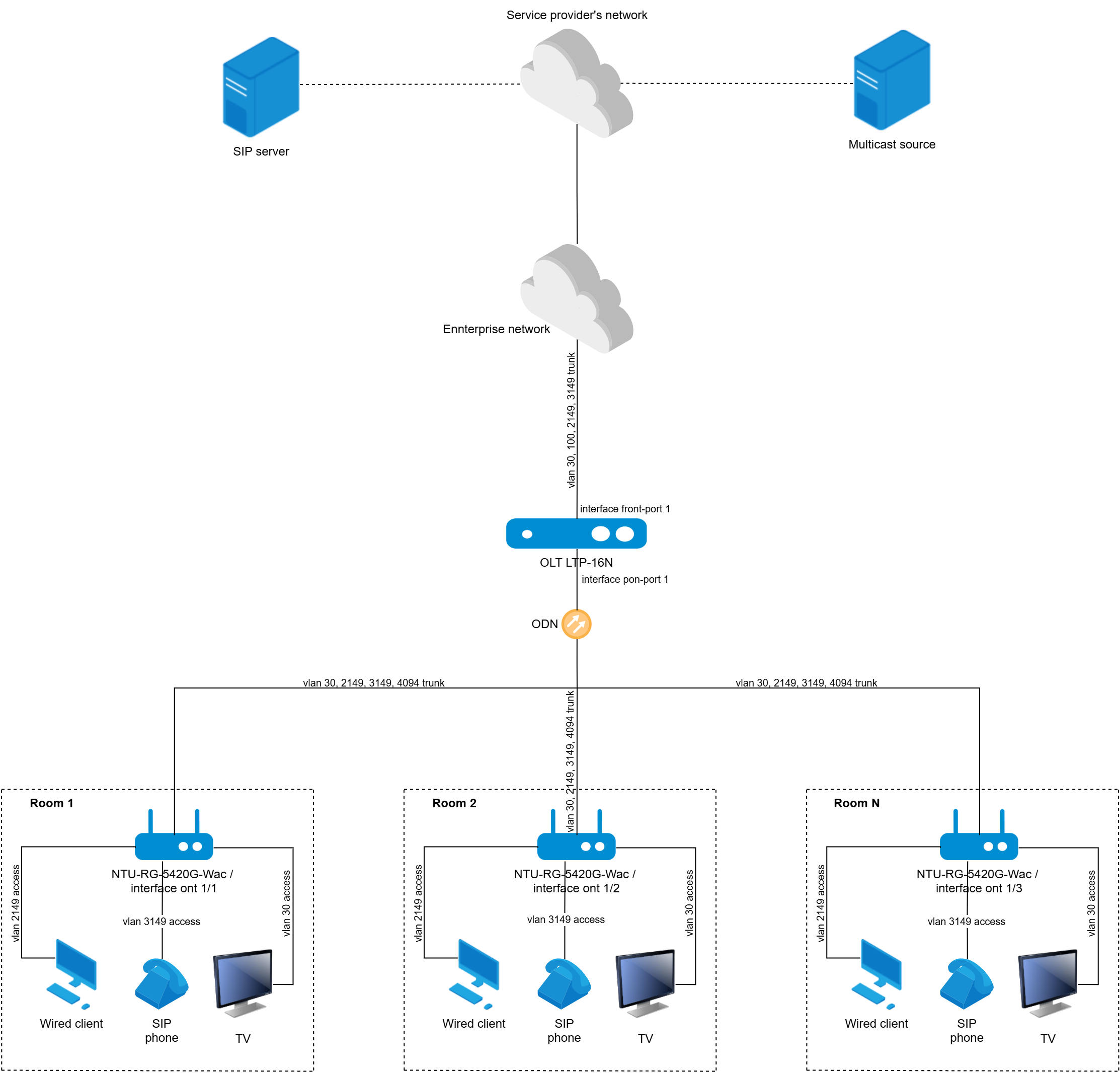
This section describes the procedures for configuring OLT and ONT functionality. As an example, we will configure the PON part for OLT LTP-16N and three ONT NTU-RG-5420G-Wac to implement this layout. All subscriber terminals in this example are physically connected to the same PON tree on the OLT PON port 1 interface. It is necessary to configure service VLANs on uplink interfaces in which subscriber services are provided for communication with the higher-level enterprise network, as well as on OLT downlink PON interfaces and ONT LAN interfaces for end customers to receive services. The higher-level network, in turn, connects to the provider's network. Internet, IPTV, and VoIP services can be supplied by the service provider.
The initial OLT configuration in terms of management settings for network connection can be performed via the OOB interface or via the console interface. For more details on configuring management parameters, refer to the OLT user documentation and the user manual. Example of configuring OLT management parameters for this layout:
LTP-16N# configure terminal #switching to OLT configuration mode LTP-16N(configure)# management ip 10.10.0.4 #specifying IP addres of the OLT in the management network LTP-16N(configure)# management mask 255.255.0.0 #specifying the management subnet mask LTP-16N(configure)# management gateway 10.10.0.1 #specifying the default route LTP-16N(configure)# management vid 100 #specifying VLAN for OLT management LTP-16N(configure)# interface front-port 1 LTP-16N(config)(if-front-1)# vlan allow 100 #configuring management VLAN on the OLT uplink interface LTP-16N(configure)# do commit #applying configuration LTP-16N(configure)# do save #saving the changes to the non-volatile memory |
LTP-16N# configure terminal #switching to OLT configuration mode LTP-16N(configure)# profile cross-connect Internet #switching to the Internet service profile configuration mode LTP-16N(config)(profile-cross-connect-Internet)# ont-mode bridge #specifying ONT operating mode as bridge LTP-16N(config)(profile-cross-connect-Internet)# bridge group 20 #specifying the bridge group number (any number, must match the number in profile ports) LTP-16N(config)(profile-cross-connect-Internet)# outer vid 2149 #specifying the service VLAN ID for the Internet service LTP-16N(config)(profile-cross-connect-Internet)# user vid untagged #specifying the VLAN ID at the egress of the LAN ONT LTP-16N(config)(profile-cross-connect-Internet)# exit LTP-16N(configure)# profile cross-connect VoIP #switching to the VoIP service profile configuration mode LTP-16N(config)(profile-cross-connect-VoIP)# ont-mode bridge LTP-16N(config)(profile-cross-connect-VoIP)# bridge group 30 LTP-16N(config)(profile-cross-connect-VoIP)# outer vid 3149 LTP-16N(config)(profile-cross-connect-VoIP)# user vid untagged LTP-16N(config)(profile-cross-connect-VoIP)# exit LTP-16N(configure)# profile cross-connect IPTV #switching to the IPTV service profile configuration mode LTP-16N(config)(profile-cross-connect-IPTV)# ont-mode bridge LTP-16N(config)(profile-cross-connect-IPTV)# bridge group 40 LTP-16N(config)(profile-cross-connect-IPTV)# outer vid 30 LTP-16N(config)(profile-cross-connect-IPTV)# user vid untagged LTP-16N(config)(profile-cross-connect-IPTV)# multicast enable LTP-16N(config)(profile-cross-connect-IPTV)# exit LTP-16N(configure)# profile cross-connect ACS #switching to the ACS profile configuration mode LTP-16N(config)(profile-cross-connect-ACS)# ont-mode bridge LTP-16N(config)(profile-cross-connect-ACS)# outer vid 4094 LTP-16N(config)(profile-cross-connect-ACS)# iphost enable #enable creating an L3 WAN interface on ONT for the service LTP-16N(config)(profile-cross-connect-ACS)# exit LTP-16N(configure)# profile ports Services LTP-16N(config)(profile-ports-Services)# igmp multicast dynamic-entry 1 vid 30 group 224.0.0.1 239.255.255.254 #specifying the allowed range of multicast groups for ONT LTP-16N(config)(profile-ports-Services)# port 1 bridge group 30 #specifying the bridge group number for the VoIP service for LAN1 LTP-16N(config)(profile-ports-Services)# port 2 multicast enable #enabling multicast processing on LAN2 LTP-16N(config)(profile-ports-Services)# port 2 bridge group 40 #specifying the bridge group number for the IPTV service for LAN2 LTP-16N(config)(profile-ports-Services)# port 2 igmp downstream tag-control remove-tag #rule for removing the VLAN tag for downstream multicast LTP-16N(config)(profile-ports-Services)# port 2 igmp downstream vid 30 #VLAN ID for downstream multicast traffic LTP-16N(config)(profile-ports-Services)# port 2 igmp upstream tag-control add-tag #rule for adding VLAN tag for upstream multicast LTP-16N(config)(profile-ports-Services)# port 2 igmp upstream vid 30 #VLAN ID for upstream multicast traffic LTP-16N(config)(profile-ports-Services)# port 3 bridge group 20 #specifying the bridge group number of the Internet service for LAN3 LTP-16N(config)(profile-ports-Services)# port 4 bridge group 20 #specifying the bridge group number of the Internet service for LAN4 LTP-16N(config)(profile-ports-Services)# exit LTP-16N(configure)# profile management ACS #creating a profile for ONT interaction with the ACS server LTP-16N(config)(profile-management-ACS)# username acs LTP-16N(config)(profile-management-ACS)# password acsacs LTP-16N(config)(profile-management-ACS)# url http://192.168.200.1 LTP-16N(config)(profile-management-ACS)# exit LTP-16N(config)# do commit #applying configuration LTP-16N(config)# do save #saving the changes to the non-volatile memory |
LTP-16N(configure)# vlan 30 #switching to edit mode for VLAN 30 of the internal OLT switch LTP-16N(config)(vlan-30)# name IPTV #specifying the VLAN name LTP-16N(config)(vlan-30)# exit LTP-16N(configure)# vlan 2149 #switching to edit mode for VLAN 2149 of the internal OLT switch LTP-16N(config)(vlan-2149)# name Internet #specifying the VLAN name LTP-16N(config)(vlan-2149)# exit LTP-16N(configure)# vlan 3149 #switching to edit mode for VLAN 3149 of the internal OLT switch LTP-16N(config)(vlan-3149)# name VoIP #specifying the VLAN name LTP-16N(config)(vlan-3149)# exit LTP-16N(configure)# interface front-port 1 #switching to edit mode for the front-port 1 uplink interface LTP-16N(config)(if-front-1)# vlan allow 30,2149,3149 #adding vlan to uplink interface in tagged mode (general) LTP-16N(config)(if-front-1)# do commit LTP-16N(config)(if-front-1)# exit LTP-16N(configure)# ip igmp snooping enable #enabling igmp snooping LTP-16N(configure)# do commit LTP-16N(configure)# do save LTP-16N(configure)# exit |
LTP-16N# configure terminal #switching to OLT configuration mode LTP-16N(configure)# ip acs #switching to built-in ACS server configuration mode LTP-16N(config)(acs)# acs-server enable #enabling the built-in ACS server LTP-16N(config)(acs)# acs-server vlan 4094 #configuring VLAN for the built-in ACS; this VLAN will only operate within the OLT LTP-16N(config)(acs)# dhcp-server enable #activating the built-in DHCP server for interaction between the ONT and ACS servers LTP-16N(config)(acs)# dhcp-server option-43 enable #activating option 43 on the built-in DHCP server to transfer information about the ACS server to the ONT LTP-16N(config)(acs)# dhcp-server range 192.168.200.2 192.168.207.254 #configuring the address pool of the built-in DHCP server available for assignment to ONT (corresponds to ACS subnet) LTP-16N(config)(acs)# exit LTP-16N(configure)# do commit LTP-16N(configure)# do save |
The subnet used for the ACS server operation must not overlap with other subnets (e.g, the management subnet) configured on the OLT. |
LTP-16N# show interface ont 1 connected #displaying list of connected ONTs and their PON-serial (ONTs must be connected to the OLT when entering the command) LTP-16N# configure terminal #switching to OLT configuration mode LTP-16N(configure)# interface ont 1/1 #switch to ont 1/1 editing mode (link number / ont id on the link) LTP-16N(config)(if-ont-1/1)# serial ELTX8500011C #specifying pon-serial of the ONT (can be copied from the list of connected devices) LTP-16N(config)(if-ont-1/1)# description HotelRoom_101 #specifying ONT descripton, the room number can be specified here LTP-16N(config)(if-ont-1/1)# service 1 profile cross-connect Internet dba dba1 #assigning the cross-connect profile for Internet service to the ONT LTP-16N(config)(if-ont-1/1)# service 2 profile cross-connect VoIP dba dba1 #assigning the cross-connect profile for VoIP service to the ONT LTP-16N(config)(if-ont-1/1)# service 3 profile cross-connect IPTV dba dba1 #assigning the cross-connect profile for IPTV service to the ONT LTP-16N(config)(if-ont-1/1)# service 4 profile cross-connect ACS dba dba1 #assigning the cross-connect profile for the TR-069 service to the ONT LTP-16N(config)(if-ont-1/1)# profile ports Services #assigning the ports profile to the ONT LTP-16N(config)(if-ont-1/1)# profile management ACS #assigning the management profile to the ONT LTP-16N(config)(if-ont-1/1)# exit LTP-16N(configure)# interface ont 1/2 #switching to ONT configuration mode 1/2 LTP-16N(config)(if-ont-1/2)# serial ELTX850000F4 #specifying pon-serial of the ONT LTP-16N(config)(if-ont-1/2)# description HotelRoom_102 #specifying ONT descripton, the room number can be specified here LTP-16N(config)(if-ont-1/2)# service 1 profile cross-connect Internet dba dba1 #assigning the cross-connect profile for Internet service to the ONT LTP-16N(config)(if-ont-1/2)# service 2 profile cross-connect VoIP dba dba1 #assigning the cross-connect profile for VoIP service to the ONT LTP-16N(config)(if-ont-1/2)# service 3 profile cross-connect IPTV dba dba1 #assigning the cross-connect profile for IPTV service to the ONT LTP-16N(config)(if-ont-1/2)# service 4 profile cross-connect ACS dba dba1 #assigning the cross-connect profile for the TR-069 service to the ONT LTP-16N(config)(if-ont-1/2)# profile ports Services #assigning the ports profile to the ONT LTP-16N(config)(if-ont-1/2)# profile management ACS #assigning the management profile to the ONT LTP-16N(config)(if-ont-1/2)# exit LTP-16N(configure)# interface ont 1/3 #switching to ONT configuration mode 1/3 LTP-16N(config)(if-ont-1/3)# serial ELTX850000E0 #specifying pon-serial of the ONT LTP-16N(config)(if-ont-1/3)# description HotelRoom_103 #specifying ONT descripton, the room number can be specified here LTP-16N(config)(if-ont-1/3)# service 1 profile cross-connect Internet dba dba1 #assigning the cross-connect profile for Internet service to the ONT LTP-16N(config)(if-ont-1/3)# service 2 profile cross-connect VoIP dba dba1 #assigning the cross-connect profile for VoIP service to the ONT LTP-16N(config)(if-ont-1/3)# service 3 profile cross-connect IPTV dba dba1 #assigning the cross-connect profile for IPTV service to the ONT LTP-16N(config)(if-ont-1/3)# service 4 profile cross-connect ACS dba dba1 #assigning the cross-connect profile for the TR-069 service to the ONT LTP-16N(config)(if-ont-1/3)# profile ports Services #assigning the ports profile to the ONT LTP-16N(config)(if-ont-1/3)# profile management ACS #assigning the management profile to the ONT LTP-16N(config)(if-ont-1/3)# exit LTP-16N(configure)# do commit LTP-16N(configure)# do save LTP-16N(configure)# exit |
When configuring ONT services in the example, the default bandwidth allocation profile dba1 is assigned. This profile can be used for all ONT services. For more information on configuring dba profiles, refer to the OLT user manual, which can be found on the official Eltex website. |
Please note: Working with ONT in the built-in ACS CLI is done via PON serial ONT. The PON serial display format in the ACS CLI is always in HEX, regardless of the format configured in the main OLT CLI. For example, when the serial number ELTX8500011C is displayed in the main CLI, the same serial number will be displayed as 454C54588500011C in the ACS CLI. If necessary, the PON serial display format in the main CLI can be converted to HEX using the |
LTP-16N# show interface ont 1 connected #display list of connected ONTs and their PON-serial numbers (ONTs must be in OK status) LTP-16N# show mac interface pon-port 1 #display list of MAC addresses from connected ONTs; at least the addresses in the ACS service svid (svid 4094) must be present LTP-16N# acs #switch to working with built-in ACS server of the OLT LTP-16N(acs)# profile #switch to working with configuration profiles of the built-in ACS server LTP-16N(acs-profile)# add profile no_wi-fi #create a profile named “no_wi-fi” (the profile name can be different) LTP-16N(acs-profile)# profile no_wi-fi #switch to the editing mode of the created profile to specify the parameters that disable the 2.4 and 5GHz Wi-Fi modules LTP-16N(acs-profile-name='no_wi-fi')# set property "InternetGatewayDevice.LANDevice.1.WLANConfiguration.1.Enable" "0" nocheck LTP-16N(acs-profile-name='no_wi-fi')# set property "InternetGatewayDevice.LANDevice.1.WLANConfiguration.5.Enable" "0" nocheck LTP-16N(acs-profile-name='no_wi-fi')# exit #exit ACS profile editing mode LTP-16N(acs-profile)# exit LTP-16N(acs)# ont #switch to working with ONT LTP-16N(acs-ont)# show list all #view the list of ONTs detected on the built-in ACS server. The list should contain all previously activated ONTs LTP-16N(acs-ont)# ont 454C54588500011C #switch to working with a specific ONT LTP-16N(acs-ont-sn='454C54588500011C')# set profile no_wi-fi #assign the ACS profile LTP-16N(acs-ont-sn='454C54588500011C')# exit #stop working with a specific ONT LTP-16N(acs-ont)# ont 454C5458850000F4 #repeate previous actions for all ONT being cofigured LTP-16N(acs-ont-sn='454C5458850000F4')# set profile no_wi-fi LTP-16N(acs-ont-sn='454C5458850000F4')# exit LTP-16N(acs-ont)# ont 454C5458850000E0 LTP-16N(acs-ont-sn='454C5458850000E0')# set profile no_wi-fi LTP-16N(acs-ont-sn='454C5458850000E0')# exit LTP-16N(acs-ont)# exit LTP-16N(acs)# exit #exit to the main CLI LTP-16N# send omci default interface ont 1/1-3 #to apply settings via TR-069, it is recommended to reset the ONT to factory settings |
LTP-16N# show interface ont 1/1-3 state #checking ONT status after configuration LTP-16N# show mac interface ont 1/1-3 #checking the MAC address table for addresses connected to ONT devices LTP-16N# show interface ont 1/1-3 ports #checking the status of ONT LAN ports (if necessary) LTP-16N# show ip igmp snooping groups vlan 30 #checking multicast group subscriptions when turning on the TV channel on ONT |
The DHCP Snooping feature makes it possible to monitor DHCP user sessions from the ONT. Also, enabling DHCP Snooping is necessary for the DHCP Option 82 substitution feature to work, which allows modifying DHCP user requests by adding additional vendor-specific tags to DHCP packets. A complete list of possible parameters (lexemes) that can be added is provided in the OLT user manual.
LTP-16N# configure terminal #switch to OLT configuration mode LTP-16N(configure)# ip dhcp #switch to dhcp block configuration mode LTP-16N(config)(dhcp)# snooping enable #enable snooping LTP-16N(config)(dhcp)# exit LTP-16N(configure)# profile dhcp-opt82 test #switch to creating and editing dhcp-opt-82 profile named "test" LTP-16N(config)(profile-dhcp-opt82-test)# overwrite-opt82 enable LTP-16N(config)(profile-dhcp-opt82-test)# circuit-id format %PONSERIAL%/%ONTID% #specifying the circuit-id tag format LTP-16N(config)(profile-dhcp-opt82-test)# remote-id format %OPT82_RID% #specifying the remote-id tag format LTP-16N(config)(profile-dhcp-opt82-test)# exit LTP-16N(configure)# ip dhcp #The created profile can be applied globally on the OLT for all ONTs and service VLANs: LTP-16N(config)(dhcp)# opt82 profile test #Alternatively, the profile can be applied globally to all ONTs, but for a specific VLAN: LTP-16N(config)(dhcp)# opt82 profile test vid 2149 #The profile can also be applied selectively to ONT: LTP-16N(config)(dhcp)# exit LTP-16N(configure)# interface ont 1/1 LTP-16N(config)(if-ont-1/1)# service 1 custom dhcp-opt82-profile service_1 LTP-16N(config)(if-ont-1/1)# exit LTP-16N(configure)# exit LTP-16N# commit LTP-16N# save #With DHCP snooping enabled, user DHCP sessions can be monitored: LTP-16N# show ip dhcp sessions interface ont 1/1 #selectively by ONT (or a range of ONTs) LTP-16N# show ip dhcp sessions interface pon-port 1 #by all ONTs of the specified PON port (or range of PON ports) LTP-16N# show ip dhcp sessions vlan 2149 #by the specified S-VLAN |
The OLT web interface can be used to configure and monitor the OLT status. By default, the web interface is disabled and must be enabled via the CLI.
LTP-16N# configure terminal LTP-16N(configure)# ip web enable #enabling WEB service #There are multiple privilege levels for WEB - administrator/operator/viewer. By default, only the user named admin with administrator rights has access to WEB. Examples of editing privileges for WEB: LTP-16N(configure)# user admin web-privilege operator #changing the WEB access level to operator for the existing admin user LTP-16N(configure)# user webadmin password webpassword web-privilege administrator #creating a webadmin user with administrator-level WEB privileges LTP-16N(configure)# user monitoring password monitoring web-privilege viewer #create a user named monitoring with WEB viewer level privileges LTP-16N(configure)# no user operator web-privilege #deny WEB access to the operator user LTP-16N(configure)# do commit LTP-16N(configure)# do save |
Now, let's check out the main sections of the OLT web interface that can be used to monitor OLTs and the subscriber terminals connected to them.
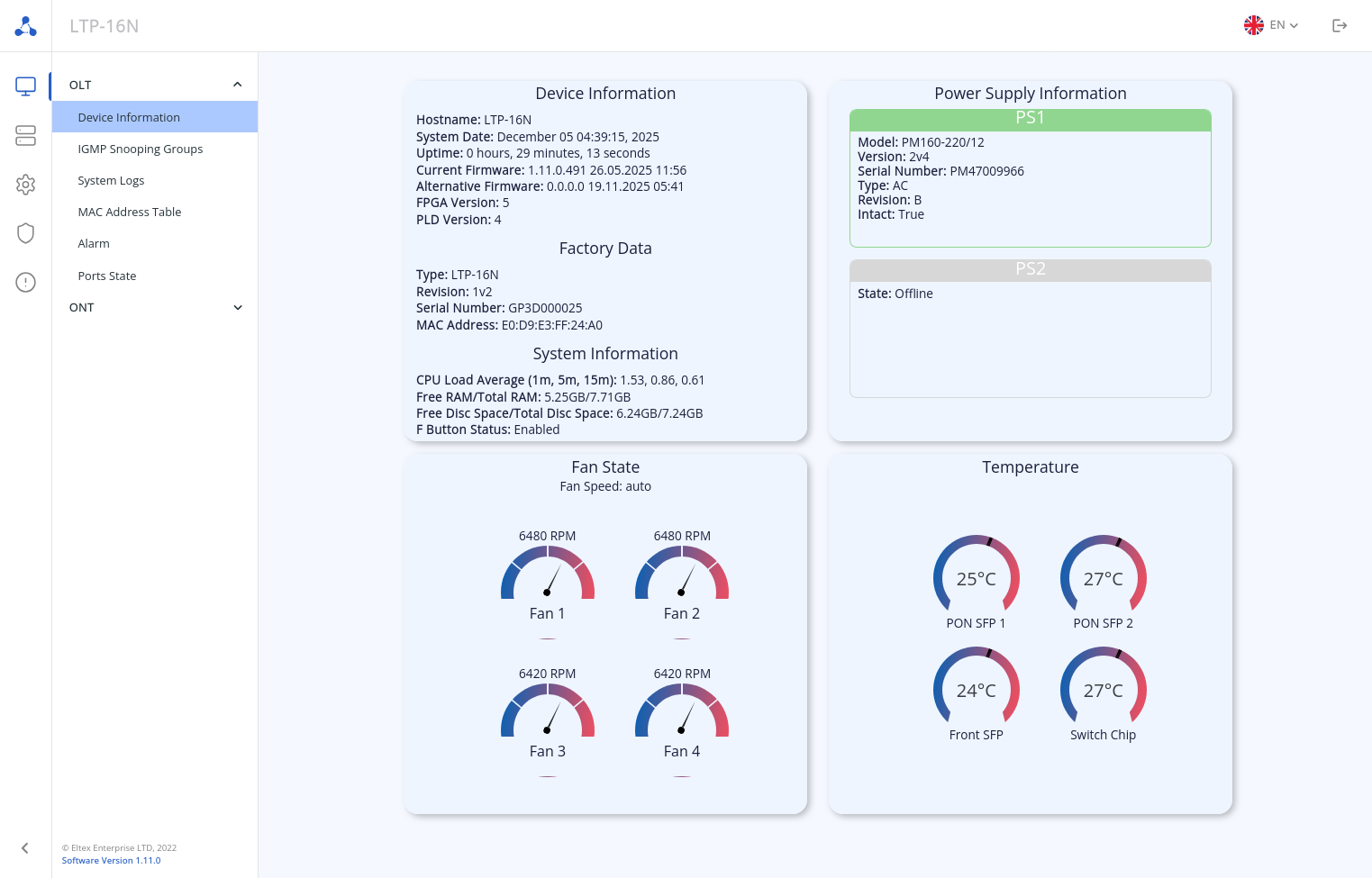
"Monitoring → OLT → Device Information" page: This page displays basic information about the device: hostname, system time, uptime, firmware version, power supply information, built-in sensor temperature readings, fan status, etc.
|
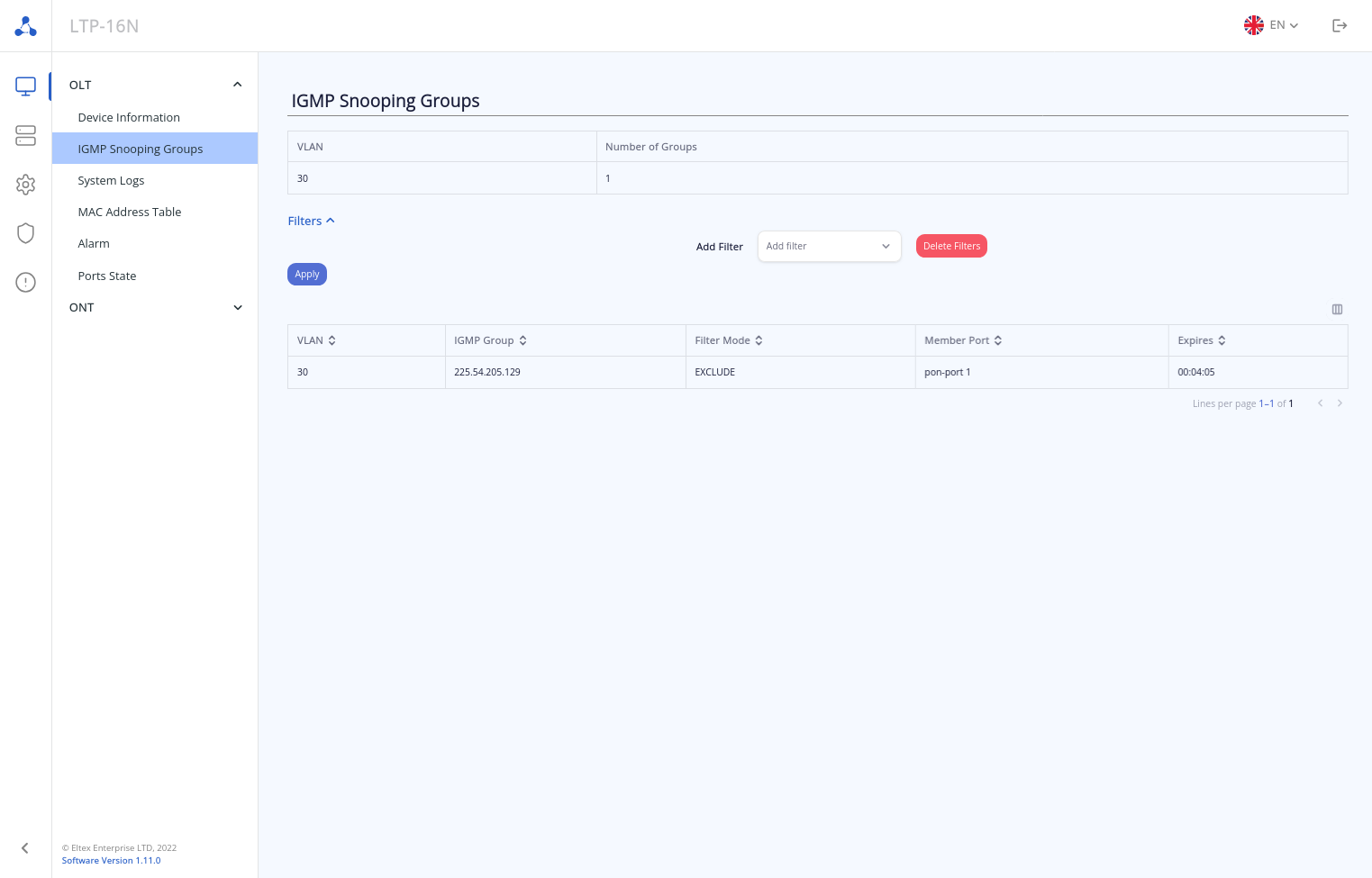
"Monitoring → OLT → IGMP Snooping Groups" page: This page displays information about IGMP groups requested on all OLT ports. The information is presented in two tables:
The number of rows displayed in the table can be changed, and various filters can be applied to the information output.
|
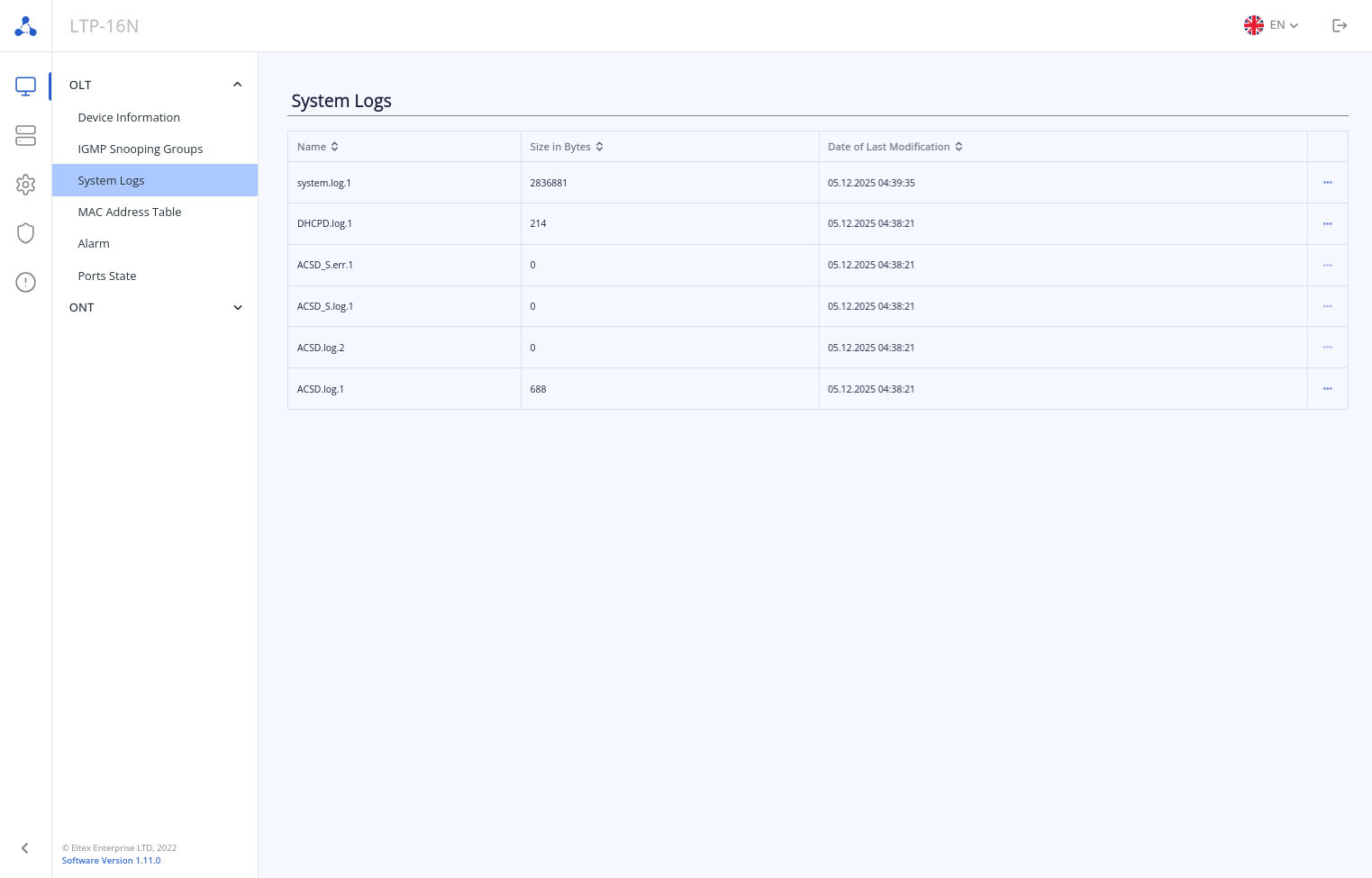
"Monitoring → OLT → System Logs" page: This page contains a list of files with information about system operation (log files). The last 500 lines of the log file can be viewed in the web interface. To view the entire file, you need to download it.
|
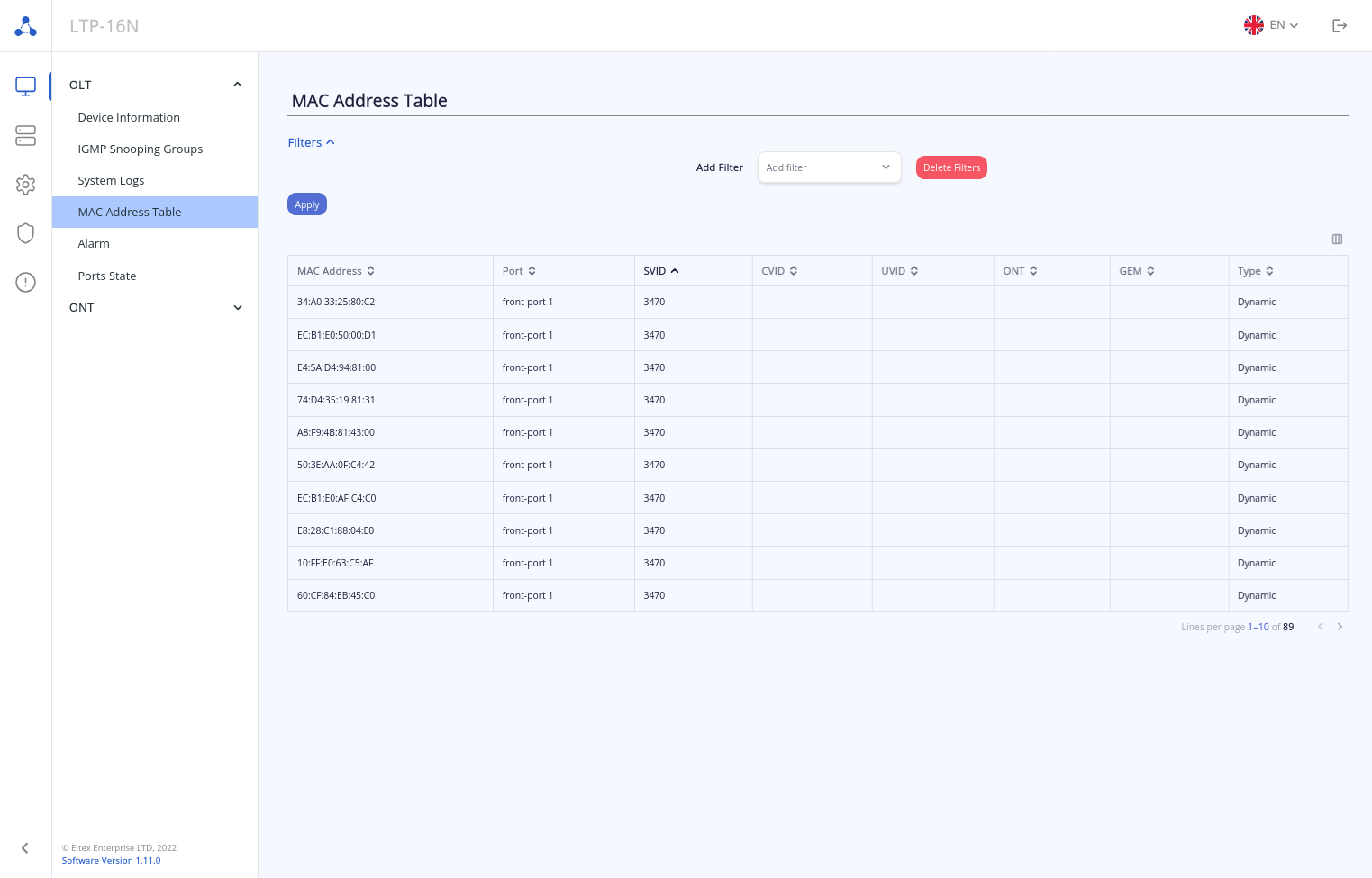
"Monitoring → OLT → MAC Address Table" page: This page displays all MAC addresses trained on the OLT. Below the table, the number of rows displayed can be changed to 10, 20, 50, or 100. For convenience, a group of filters or sorting by the selected table column can be used to search for MAC addresses.
|
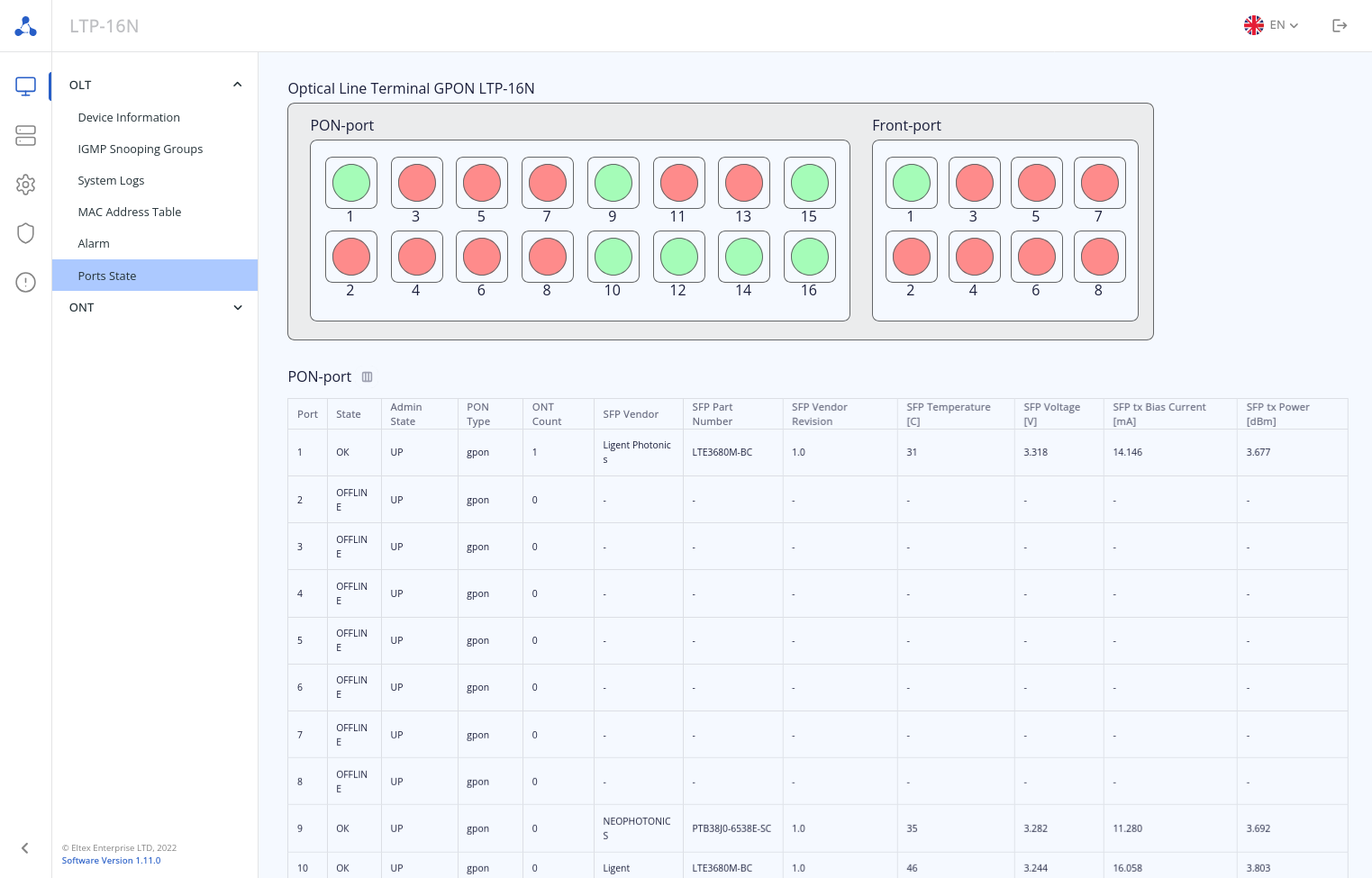
"Monitoring → OLT → Ports State" page: This page contains three main blocks of information:
The graphical display of OLT makes it possible to perform operations for each port (by calling up the menu with the right mouse button). Reconfiguration and disconnection operations are available for the PON port. For the Front port, only disconnection is available. The PON-port and Front-port tables contain basic information about the status of the ports without the possibility of editing.
|
"Monitoring → ONT → DHCP Sessions" page: This page displays data about currently active DHCP sessions. The information is read-only and only available when DHCP snooping is enabled.
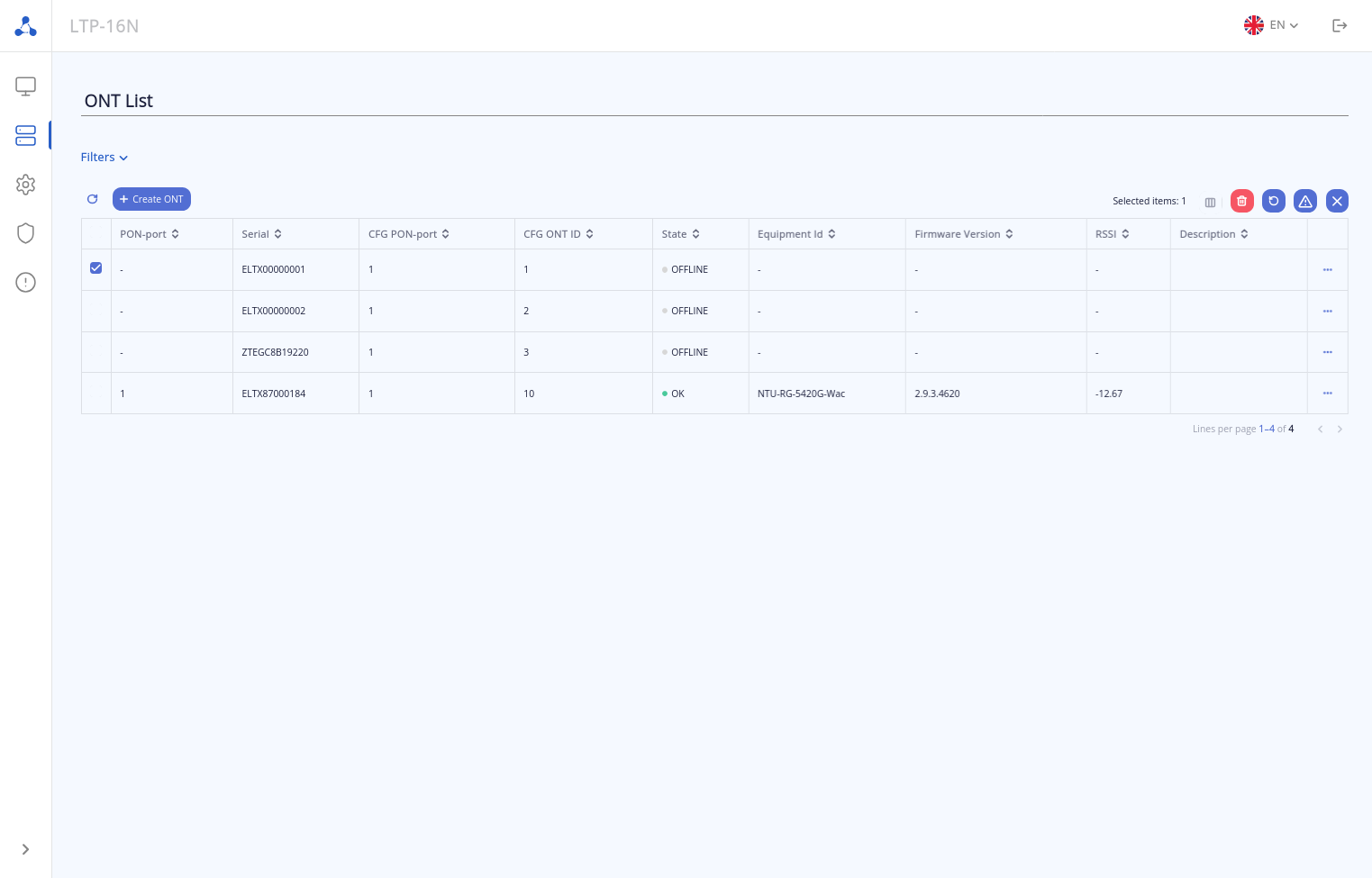
"ONT List" page: This section displays information about all ONTs registered on the device and physically connected to ONT PON channels. Above the table are buttons for creating a new ONT configuration and changing the configuration of existing ONTs as well as quick action icons for ONTs (reboot, reconfigure, reset to factory settings). The icons for operations with configuration and quick actions become active when one or more ONTs are selected. The following icons are available:
 – creating an ONT configuration;
 – from left to right: delete ONT configuration, reboot ONT, reconfigure ONT, reset ONT to factory settings.
In the table opposite each ONT, an additional context menu of actions with the selected ONTs is available –  . By clicking this button, the following actions are available:
General view of the page:
|
Below is the configuration that is set up in this guide in text format. This configuration corresponds to the OLT configuration structure and can be uploaded to the OLT either by pasting the content via a terminal using a Telnet/SSH/Console connection, or by saving the configuration to a file server on the management network and then uploading the configuration file to the OLT over the network. The upload is performed using the command:
LTP-16N# copy tftp://192.168.11.100/config.txt fs://config #tftp - protocol used to download a file over the network; ftp and http can also be used #192.168.11.100 - address of the file server on the management network #config.txt - name of the configuration file on the server #fs://config - local configuration storage on the OLT |
Pre-made configuration:
configure terminal
    management ip 10.10.0.4
    management mask 255.255.0.0
    management gateway 10.10.0.1
    management vid 100
    profile cross-connect Internet
        ont-mode bridge
        bridge group 20
        outer vid 2149
    exit
    profile cross-connect VoIP
        ont-mode bridge
        bridge group 30
        outer vid 3149
    exit
    profile cross-connect IPTV
        ont-mode bridge
        bridge group 40
        outer vid 30
        multicast enable
    exit
    profile cross-connect ACS
        ont-mode bridge
        outer vid 4094
        iphost enable
    exit
    profile ports Services
        igmp multicast dynamic-entry 1 vid 30 group 224.0.0.1 239.255.255.254
        port 1 bridge group 30
        port 2 multicast enable
        port 2 bridge group 40
        port 2 igmp downstream tag-control remove-tag
        port 2 igmp downstream vid 30
        port 2 igmp upstream tag-control add-tag
        port 2 igmp upstream vid 30
        port 3 bridge group 20
        port 4 bridge group 20
    exit
    profile management ACS
        url http://192.168.200.1
        username acs
        password acsacs
    exit
    profile dhcp-opt82 test
        circuit-id format "%PONSERIAL%/%ONTID%"
        remote-id format "%OPT82_RID%"
        overwrite-opt82 enable
    exit
    ip dhcp
        snooping enable vlan 1-4094
        opt82 profile test vid 2149
    exit
    vlan 30
        name "IPTV"
    exit
    vlan 2149
        name "Internet"
    exit
    vlan 3149
        name "VoIP"
    exit
    interface ont 1/1
        description "HotelRoom_101"
        serial ELTX8500011C
        profile management "ACS"
        profile ports "Services"
        service 1 profile cross-connect "Internet" dba "dba1"
        service 2 profile cross-connect "VoIP" dba "dba1"
        service 3 profile cross-connect "IPTV" dba "dba1"
        service 4 profile cross-connect "ACS" dba "dba1"
    exit
    interface ont 1/2
        description "HotelRoom_102"
        serial ELTX850000F4
        profile management "ACS"
        profile ports "Services"
        service 1 profile cross-connect "Internet" dba "dba1"
        service 2 profile cross-connect "VoIP" dba "dba1"
        service 3 profile cross-connect "IPTV" dba "dba1"
        service 4 profile cross-connect "ACS" dba "dba1"
    exit
    interface ont 1/3
        description "HotelRoom_103"
        serial ELTX850000E0
        profile management "ACS"
        profile ports "Services"
        service 1 profile cross-connect "Internet" dba "dba1"
        service 2 profile cross-connect "VoIP" dba "dba1"
        service 3 profile cross-connect "IPTV" dba "dba1"
        service 4 profile cross-connect "ACS" dba "dba1"
    exit
    ip igmp snooping enable
    interface front-port 1
        vlan allow 30,100,2149,3149
    exit
    ip acs
        acs-server enable
        acs-server vlan 4094
        dhcp-server enable
        dhcp-server option-43 enable
        dhcp-server range 192.168.200.2 192.168.207.254
    exit
    ip web enable
exit
acs
profile
add profile "no_wi-fi"
profile "no_wi-fi"
set property "InternetGatewayDevice.LANDevice.1.WLANConfiguration.1.Enable" "0" nocheck
set property "InternetGatewayDevice.LANDevice.1.WLANConfiguration.5.Enable" "0" nocheck
exit
exit
ont
add ont "454C54588500011C" profile="no_wi-fi"
add ont "454C5458850000F4" profile="no_wi-fi"
add ont "454C5458850000E0" profile="no_wi-fi"
exit
exit
commit
exit
|
Before uploading the configuration to the OLT, the configuration parameters can be edited in a text editor. This way, VLAN numbers, ONT serial numbers and other parameters can be changed.