Before installation, please read the Personnel and equipment requirements. |
When installing Ubuntu-22.04, it is not suggested to specify the time zone (default time is UTC). It is necessary to set it manually (for correct operation of the video archive, access calendars, etc.), for example
sudo timedatectl set-timezone Asia/Novosibirsk |
For example, Novosibirsk city: timedatectl list-timezones | grep "Novosibirsk" |
It is necessary to update the operating system before installation.
sudo apt update sudo apt upgrade |
All components are installed on the one server. The following packages will be installed: evi-core, evi-scud, evi-live, evi-archive, evi-analyzer, evi-web, evi-video-client, evi-analytics. |
Upload the evi-1.5.0_install.sh script to the user's working directory on the server.
The script is designed for installing the server part on a clean system. |
wget --no-check-certificate https://archive.eltex-co.ru/evi-raw/evi-1.5.0/evi-1.5.0_install.sh |
In the same directory, run the following command in the server console:
sudo bash evi-1.5.0_install.sh |
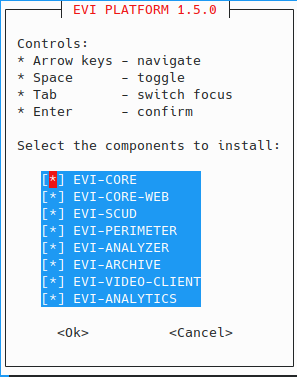
In the dialogue box, tick the item with the Space bar, press Enter to confirm the installation.
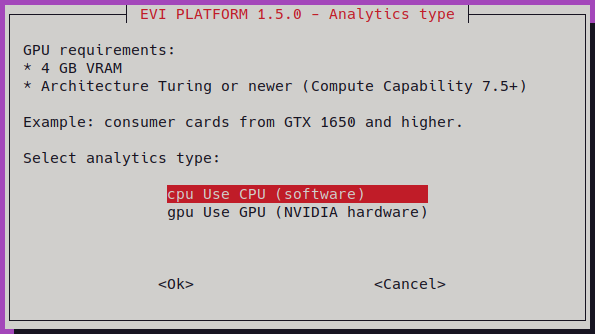
If EVI-ANALYTICS is selected, a dialog box will appear asking you to choose the component which the service will use to run:
If version 1.4.x is installed, a dialog box will appear during installation prompting you to migrate the database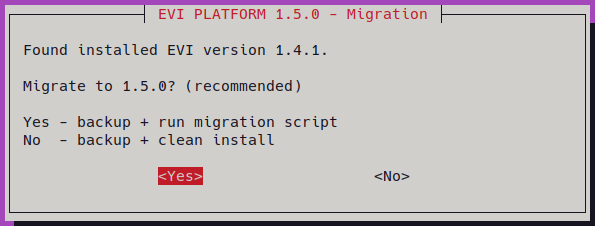
Upon completion, the following output should appear:
[INFO] WEB app is available at https://192.168.50.50 [INFO] user: admin [INFO] password: password [INFO] Documentation: https://docs.eltex-co.ru/display/en/EVI+Platform [INFO] Installation complete |
The installation is successfully completed.