The state of DMVPN cloud

After completing the DMVPN Hub and DMVPN Spoke configuration steps described earlier, the diagram of communication between central and branch offices:
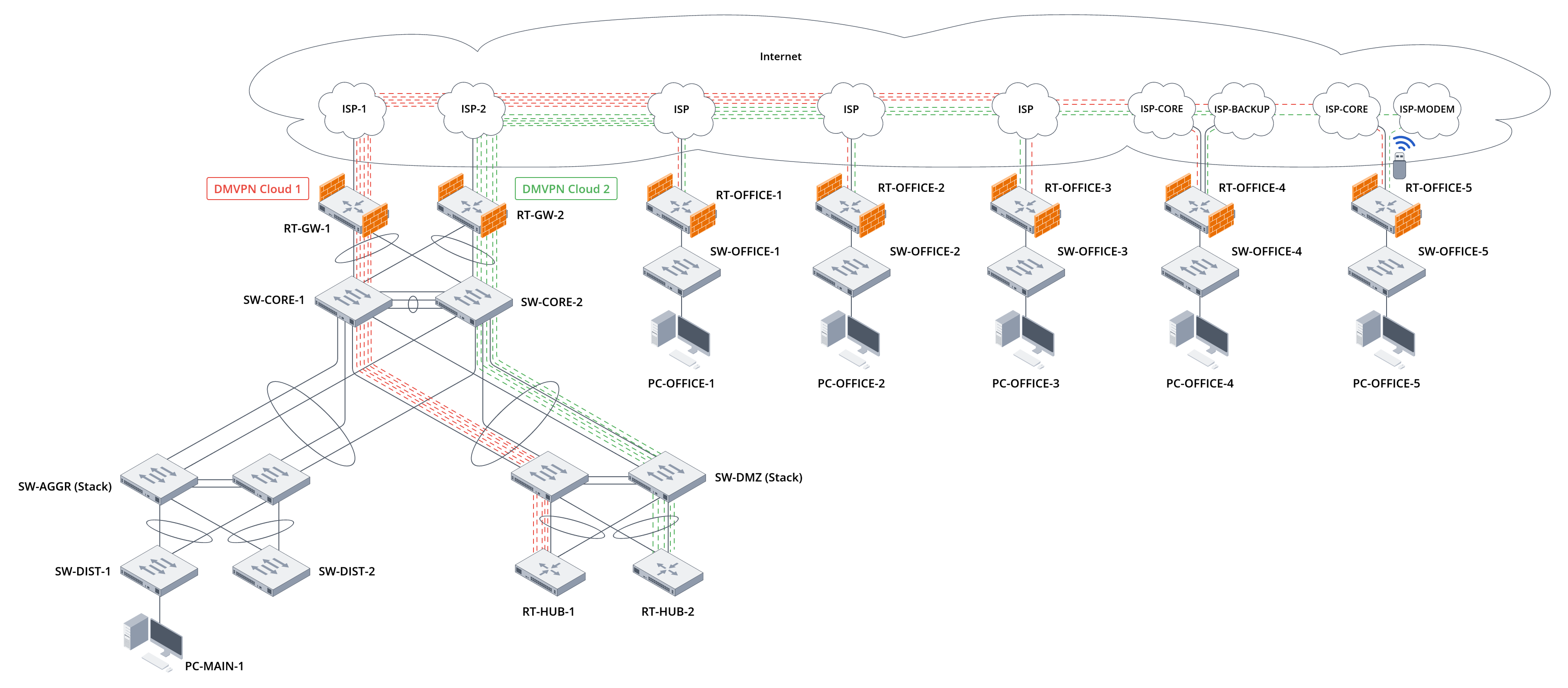

Figure 10. Diagram of communication between the central and branch offices after finishing configuration


In this diagram, two DMVPN clouds are created, the hosts of which are described in Tables 29 and 30:

Table 29. Description of DMVPN Cloud 1 hosts

HostnameDMVPN roleTunnel IP addressNBMA IP addressNAT-OA IP addressLocal networksTest hosts in local networks
RT-HUB-1Hub172.16.1.1/24203.0.113.410.0.0.210.100.0.0/2410.100.0.10
RT-OFFICE-1Spoke172.16.1.11/24203.0.114.2--192.168.11.0/24192.168.11.10
RT-OFFICE-2Spoke172.16.1.12/24203.0.114.130--192.168.12.0/24192.168.12.10
RT-OFFICE-3Spoke172.16.1.13/24203.0.115.210.0.0.19192.168.13.0/24192.168.13.10
RT-OFFICE-4Spoke172.16.1.14/24203.10.0.2--192.168.14.0/24192.168.14.10
RT-OFFICE-5Spoke172.16.1.15/24203.11.1.2--192.168.15.0/24 192.168.15.10


Table 30. Description of DMVPN Cloud 2 hosts

HostnameDMVPN roleTunnel IP addressNBMA IP addressNAT-OA IP addressLocal networksTest hosts in local networks
RT-HUB-2Hub172.16.2.1/24203.0.113.13210.0.0.1010.100.0.0/2410.100.0.10
RT-OFFICE-1Spoke172.16.2.11/24203.0.114.2--192.168.11.0/24192.168.11.10
RT-OFFICE-2Spoke172.16.2.12/24203.0.114.130--192.168.12.0/24192.168.12.10
RT-OFFICE-3Spoke172.16.2.13/24203.0.115.210.0.0.19192.168.13.0/24192.168.13.10
RT-OFFICE-4Spoke172.16.2.14/24203.10.1.2--192.168.14.0/24192.168.14.10
RT-OFFICE-5Spoke172.16.2.15/24203.11.2.2--192.168.15.0/24192.168.15.10

Due to the configuration of the BGP protocol, traffic passing through Cloud 1 hosts has the highest priority.

Testing network connectivity between local networks at the central and branch offices

To test the local network connectivity between the central and branch offices, send traffic from the branch office test hosts to the central office local network test host:

PC-OFFICE-1
PC-OFFICE-1> trace 10.100.0.10 -P 1
trace to 10.100.0.10, 8 hops max (ICMP), press Ctrl+C to stop
 1   192.168.11.1   1.552 ms  1.210 ms  0.974 ms
 2   172.16.1.1   7.707 ms  4.928 ms  7.621 ms
 3   10.0.0.17   8.376 ms  7.745 ms  7.625 ms
 4   10.100.0.10   20.117 ms  13.788 ms  13.121 ms

PC-OFFICE-1>


PC-OFFICE-2
PC-OFFICE-2> trace 10.100.0.10 -P 1
trace to 10.100.0.10, 8 hops max (ICMP), press Ctrl+C to stop
 1   192.168.12.1   2.138 ms  1.453 ms  1.416 ms
 2   172.16.1.1   6.186 ms  6.279 ms  5.792 ms
 3   10.0.0.17   8.624 ms  9.118 ms  9.530 ms
 4   10.100.0.10   15.535 ms  15.239 ms  13.179 ms

PC-OFFICE-2>


PC-OFFICE-3
PC-OFFICE-3> trace 10.100.0.10 -P 1
trace to 10.100.0.10, 8 hops max (ICMP), press Ctrl+C to stop
 1   192.168.13.1   2.224 ms  1.161 ms  1.375 ms
 2   172.16.1.1   6.960 ms  5.476 ms  6.133 ms
 3   10.0.0.17   8.270 ms  8.451 ms  8.255 ms
 4   10.100.0.10   13.426 ms  13.581 ms  12.973 ms

PC-OFFICE-3>


PC-OFFICE-4
PC-OFFICE-4> trace 10.100.0.10 -P 1
trace to 10.100.0.10, 8 hops max (ICMP), press Ctrl+C to stop
 1   192.168.14.1   2.135 ms  2.487 ms   2.301 ms
 2   172.16.1.1      4.652 ms  4.781 ms   4.934 ms
 3   10.0.0.17       7.118 ms  6.984 ms   7.256 ms
 4   10.100.0.10    11.472 ms  11.689 ms  11.305 ms

PC-OFFICE-4>


PC-OFFICE-5
PC-OFFICE-5> trace 10.100.0.10 -P 1
trace to 10.100.0.10, 8 hops max (ICMP), press Ctrl+C to stop
 1   192.168.15.1   3.135 ms  2.127 ms   1.051 ms
 2   172.16.1.1      5.652 ms  4.781 ms   4.934 ms
 3   10.0.0.17       7.118 ms  6.984 ms   7.256 ms
 4   10.100.0.10    11.472 ms  11.689 ms  11.305 ms

PC-OFFICE-5>


In all four traces, traffic goes through the border router of the branch offices and the DMVPN Cloud 1 cloud to the DMVPN Hub RT-HUB-1, then to the border router of the central office RT-GW-1, and then reaches the test host in the local network of the central office.

Check the correctness of traffic flow in the opposite direction:

PC-MAIN-1
PC-MAIN-1> trace 192.168.11.10 -P 1
trace to 192.168.11.10, 8 hops max (ICMP), press Ctrl+C to stop
 1   10.100.0.253   3.749 ms  3.790 ms  3.918 ms
 2   10.0.0.19   6.015 ms  6.176 ms  6.993 ms
 3   172.16.1.11   10.447 ms  10.522 ms  11.192 ms
 4   192.168.11.10   17.515 ms  11.905 ms  12.482 ms

PC-MAIN-1> trace 192.168.12.10 -P 1
trace to 192.168.12.10, 8 hops max (ICMP), press Ctrl+C to stop
 1   10.100.0.253   5.130 ms  4.361 ms  4.237 ms
 2   10.0.0.19   7.018 ms  6.919 ms  7.396 ms
 3   172.16.1.12   11.474 ms  11.307 ms  11.225 ms
 4   192.168.12.10   16.137 ms  12.332 ms  13.266 ms

PC-MAIN-1> trace 192.168.13.10 -P 1
trace to 192.168.13.10, 8 hops max (ICMP), press Ctrl+C to stop
 1   10.100.0.253   5.197 ms  4.011 ms  3.632 ms
 2   10.0.0.19   6.795 ms  7.380 ms  7.240 ms
 3   172.16.1.13   11.794 ms  11.581 ms  10.762 ms
 4   192.168.13.10   16.382 ms  13.713 ms  13.573 ms

PC-MAIN-1> trace 192.168.14.10 -P 1
trace to 192.168.111.10, 8 hops max (ICMP), press Ctrl+C to stop
 1   10.100.0.253    2.914 ms   3.121 ms   2.876 ms
 2   10.0.0.19       5.438 ms   5.612 ms   5.807 ms
 3   172.16.1.14     9.254 ms   9.487 ms   9.139 ms
 4   192.168.14.10 14.026 ms  13.842 ms  14.318 ms

PC-MAIN-1>


Traffic follows the same route in the opposite direction. The task of ensuring connectivity between the central and branch offices has been accomplished.

Testing the ability of branch office hosts to access the Internet via the central office's Internet gateway

To test whether the hosts at the branch offices can access the Internet via the central office's Internet gateway, send traffic from the test hosts at the branch offices to a public resource on the Internet. Use the Google Public DNS address, which is used as the target for the SLA test on the central office's RT-GW-1 router, as this resource:

PC-OFFICE-1
PC-OFFICE-1> trace 8.8.4.4 -P 1
trace to 8.8.4.4, 8 hops max (ICMP), press Ctrl+C to stop
 1   192.168.11.1   1.209 ms  1.277 ms  0.943 ms
 2   172.16.1.1   4.009 ms  4.114 ms  4.852 ms
 3   10.0.0.17   7.451 ms  9.083 ms  8.903 ms
 4   8.8.4.4   10.684 ms  9.153 ms  9.615 ms

PC-OFFICE-1>


PC-OFFICE-2
PC-OFFICE-2> trace 8.8.4.4 -P 1
trace to 8.8.4.4, 8 hops max (ICMP), press Ctrl+C to stop
 1   192.168.12.1   1.320 ms  1.559 ms  1.601 ms
 2   172.16.1.1   5.674 ms  4.563 ms  4.574 ms
 3   10.0.0.17   7.090 ms  9.078 ms  9.021 ms
 4   8.8.4.4   10.217 ms  9.714 ms  9.431 ms

PC-OFFICE-2>


PC-OFFICE-3
PC-OFFICE-3> trace 8.8.4.4 -P 1
trace to 8.8.4.4, 8 hops max (ICMP), press Ctrl+C to stop
 1   192.168.13.1   1.544 ms  0.913 ms  0.980 ms
 2   172.16.1.1   6.232 ms  5.428 ms  6.033 ms
 3   10.0.0.17   7.810 ms  9.463 ms  9.381 ms
 4   8.8.4.4   10.592 ms  9.201 ms  10.021 ms

PC-OFFICE-3>


PC-OFFICE-4
PC-OFFICE-4> trace 8.8.4.4 -P 1
trace to 8.8.4.4, 8 hops max (ICMP), press Ctrl+C to stop
 1   192.168.14.1   2.317 ms   2.109 ms   2.284 ms
 2   172.16.1.1      4.932 ms   5.187 ms   5.046 ms
 3   10.0.0.17       8.612 ms   8.437 ms   8.751 ms
 4   8.8.4.4        12.398 ms  11.976 ms  12.184 ms

PC-OFFICE-4>


In all four traces, traffic goes through the border router of the branch offices and the DMVPN Cloud 1 cloud to the DMVPN Hub RT-HUB-1, then to the border router of the central office RT-GW-1, and then reaches the public resource on the Internet. In the case of RT-OFFICE-4, when switching to the backup channel, traffic will go through the backup provider to RT-HUB-2.

Organizing access for hosts in branch offices to the Internet via the central office border router has been accomplished.

Testing network connectivity between local networks at branch offices

To test network connectivity between local networks at branch offices, transmit traffic between test hosts in the local networks at branch offices.

When creating Spoke-to-Spoke tunnels, it is important to consider the limitations imposed by NAT on the Internet service provider side. If two DMVPN Spokes are located behind the Source NAT of their Internet service providers, they will not be able to establish a direct connection between each other.

Start by checking the connectivity between branch offices No. 1 and No. 2:

PC-OFFICE-1
PC-OFFICE-1> trace 192.168.12.10 -P 1           
trace to 192.168.12.10, 8 hops max (ICMP), press Ctrl+C to stop
 1   192.168.11.1   1.613 ms  1.409 ms  1.204 ms
 2   172.16.1.1   6.748 ms  6.157 ms  5.106 ms
 3     *  *  *
 4     *  *  *
 5     *  *  *
 6     *192.168.12.10   5.101 ms  4.041 ms

PC-OFFICE-1> trace 192.168.12.10 -P 1
trace to 192.168.12.10, 8 hops max (ICMP), press Ctrl+C to stop
 1   192.168.11.1   1.566 ms  1.168 ms  1.151 ms
 2   172.16.1.12   2.043 ms  1.828 ms  1.749 ms
 3   192.168.12.10   3.609 ms  3.319 ms  3.879 ms

PC-OFFICE-1>


Note that the first route goes through DMVPN Hub RT-HUB-1 because without a Spoke-to-Spoke tunnel between the branch offices, traffic between the offices goes through DMVPN Hub:

RT-OFFICE-1
PC-OFFICE-1> trace 8.8.4.4 -P 1
trace to 8.8.4.4, 8 hops max (ICMP), press Ctrl+C to stop
 1   192.168.11.1   1.209 ms  1.277 ms  0.943 ms
 2   172.16.1.1   4.009 ms  4.114 ms  4.852 ms
 3   10.0.0.17   7.451 ms  9.083 ms  8.903 ms
 4   8.8.4.4   10.684 ms  9.153 ms  9.615 ms

PC-OFFICE-1>


After creating a Spoke-to-Spoke tunnel, a short route appears directly towards the Spoke neighbor:

RT-OFFICE-1
RT-OFFICE-1# show ip route 192.168.12.10
Codes: C - connected, S - static, R - RIP derived,
       O - OSPF derived, IA - OSPF inter area route,
       E1 - OSPF external type 1 route, E2 - OSPF external type 2 route,
       B - BGP derived, D - DHCP derived, K - kernel route, V - VRRP route,
       i - IS-IS, L1 - IS-IS level-1, L2 - IS-IS level-2, ia - IS-IS inter area,
       H - NHRP, * - FIB route
H     * 192.168.12.0/24    [20/0]            via 172.16.1.12 on gre 11         [nhrp 08:13:15] 
RT-OFFICE-1#


You can see the Spoke-to-Spoke tunnel construction in the corresponding commands on both DMVPN Spokes:

RT-OFFICE-1
RT-OFFICE-1# show ip nhrp peers 
 Flags: E - unique, R - nhs, U - used, L - lower-up
        C - connected, G - group, Q - qos, N - nat
        P - protected, I - Redirect-ignored, X - undefined

Tunnel address         NBMA address       Tunnel      Expire      Created          Type              Flags        
                                                      (h:m:s)     (d,h:m:s)                                       
--------------------   ----------------   ---------   ---------   --------------   ---------------   ----------   
172.16.1.1             203.0.113.4        gre 11      --          00,00:02:12      static            RULCN        
172.16.1.12            203.0.114.130      gre 11      00:08:55    00,00:01:04      cached            ULC          
172.16.2.1             203.0.113.132      gre 12      --          00,00:02:12      static            RULCN        
RT-OFFICE-1# show ip nhrp shortcut-routes 
Network                Nexthop            Tunnel      Expire      Created          
                                                      (h:m:s)     (d,h:m:s)        
--------------------   ----------------   ---------   ---------   --------------   
192.168.12.0/24        172.16.1.12        gre 11      00:08:50    00,00:01:09      
RT-OFFICE-1# show ip route nhrp 
H     * 172.16.1.1/32      [20/0]            dev gre 11                        [nhrp 06:34:49] 
H     * 172.16.2.1/32      [20/0]            dev gre 12                        [nhrp 06:34:49] 
H     * 192.168.12.0/24    [20/0]            via 172.16.1.12 on gre 11         [nhrp 08:13:15] 
H     * 172.16.1.12/32     [20/0]            dev gre 11                        [nhrp 08:13:15] 
RT-OFFICE-1#


RT-OFFICE-2
RT-OFFICE-2# show ip nhrp peers 
 Flags: E - unique, R - nhs, U - used, L - lower-up
        C - connected, G - group, Q - qos, N - nat
        P - protected, I - Redirect-ignored, X - undefined

Tunnel address         NBMA address       Tunnel      Expire      Created          Type              Flags        
                                                      (h:m:s)     (d,h:m:s)                                       
--------------------   ----------------   ---------   ---------   --------------   ---------------   ----------   
172.16.1.1             203.0.113.4        gre 11      --          00,00:01:58      static            RULCN        
172.16.1.11            203.0.114.2        gre 11      00:08:47    00,00:01:12      cached            ULC          
172.16.2.1             203.0.113.132      gre 12      --          00,00:01:58      static            RULCN        
RT-OFFICE-2# show ip nhrp shortcut-routes 
Network                Nexthop            Tunnel      Expire      Created          
                                                      (h:m:s)     (d,h:m:s)        
--------------------   ----------------   ---------   ---------   --------------   
192.168.11.0/24        172.16.1.11        gre 11      00:08:51    00,00:01:08      
RT-OFFICE-2# show ip route nhrp 
H     * 172.16.1.11/32     [20/0]            dev gre 11                        [nhrp 08:13:07] 
H     * 172.16.1.1/32      [20/0]            dev gre 11                        [nhrp 06:31:42] 
H     * 172.16.2.1/32      [20/0]            dev gre 12                        [nhrp 06:31:42] 
H     * 192.168.11.0/24    [20/0]            via 172.16.1.11 on gre 11         [nhrp 08:13:16] 
RT-OFFICE-2#


Since the GRE tunnel between DMVPN Spokes is secured with IPsec technology, it is also possible to verify the correct configuration of the Spoke-to-Spoke IPsec tunnel using show commands:

RT-OFFICE-1
RT-OFFICE-1# show security ipsec vpn status vrf ISP 
Name                              Local host        Remote host       Initiator spi        Responder spi        State         
-------------------------------   ---------------   ---------------   ------------------   ------------------   -----------   
DMVPN_IPSEC_VPN_HUB_1             203.0.114.2       203.0.113.4       0x7be4dd13b45a79de   0x7cc308ff27b8bb02   Established   
DMVPN_IPSEC_VPN_HUB_2             203.0.114.2       203.0.113.132     0x56d29dc230bb2807   0x69cebbeffdac1c62   Established   
DMVPN_IPSEC_VPN_SPOKES            203.0.114.2       203.0.114.130     0x846182470c9f5c62   0xdb34e43634ee6c31   Established   
RT-OFFICE-1# show security ipsec vpn status vrf ISP DMVPN_IPSEC_VPN_SPOKES 
Currently active IKE SA:
    Name:                            DMVPN_IPSEC_VPN_SPOKES
    State:                           Established
    Version:                         v2-only
    Unique ID:                       5
    Local host:                      203.0.114.2
    Remote host:                     203.0.114.130
    Role:                            Responder
    Initiator spi:                   0x846182470c9f5c62
    Responder spi:                   0xdb34e43634ee6c31
    Encryption algorithm:            aes256
    Authentication algorithm:        sha2-256
    Diffie-Hellman group:            19
    Established (d,h:m:s):           00,00:00:55 ago
    Rekey time (d,h:m:s):            00,00:00:00
    Reauthentication time (d,h:m:s): 00,23:46:17
    Child IPsec SAs:
        Name:                            DMVPN_IPSEC_VPN_SPOKES-8
        State:                           Installed
        Protocol:                        esp
        Mode:                            Transport
        Encryption algorithm:            aes256
        Authentication algorithm:        sha2-256
        Rekey time (d,h:m:s):            00,07:43:11
        Life time (d,h:m:s):             00,07:59:05
        Established (d,h:m:s):           00,00:00:55 ago
        Traffic statistics: 
            Input bytes:                 1028
            Output bytes:                1044
            Input packets:               9
            Output packets:              10
        -------------------------------------------------------------
RT-OFFICE-1#


RT-OFFICE-2
RT-OFFICE-2# show security ipsec vpn status vrf ISP 
Name                              Local host        Remote host       Initiator spi        Responder spi        State         
-------------------------------   ---------------   ---------------   ------------------   ------------------   -----------   
DMVPN_IPSEC_VPN_HUB_1             203.0.114.130     203.0.113.4       0xb393e4870f63e598   0xf550029c9282d410   Established   
DMVPN_IPSEC_VPN_HUB_2             203.0.114.130     203.0.113.132     0x89525537c9da1ce9   0x612d39cfa5913ad9   Established   
DMVPN_IPSEC_VPN_SPOKES            203.0.114.130     203.0.114.2       0x846182470c9f5c62   0xdb34e43634ee6c31   Established   
RT-OFFICE-2# show security ipsec vpn status vrf ISP DMVPN_IPSEC_VPN_SPOKES 
Currently active IKE SA:
    Name:                            DMVPN_IPSEC_VPN_SPOKES
    State:                           Established
    Version:                         v2-only
    Unique ID:                       9
    Local host:                      203.0.114.130
    Remote host:                     203.0.114.2
    Role:                            Initiator
    Initiator spi:                   0x846182470c9f5c62
    Responder spi:                   0xdb34e43634ee6c31
    Encryption algorithm:            aes256
    Authentication algorithm:        sha2-256
    Diffie-Hellman group:            19
    Established (d,h:m:s):           00,00:00:55 ago
    Rekey time (d,h:m:s):            00,00:00:00
    Reauthentication time (d,h:m:s): 00,01:31:17
    Child IPsec SAs:
        Name:                            DMVPN_IPSEC_VPN_SPOKES-12
        State:                           Installed
        Protocol:                        esp
        Mode:                            Transport
        Encryption algorithm:            aes256
        Authentication algorithm:        sha2-256
        Rekey time (d,h:m:s):            00,06:13:09
        Life time (d,h:m:s):             00,07:59:05
        Established (d,h:m:s):           00,00:00:55 ago
        Traffic statistics: 
            Input bytes:                 1044
            Output bytes:                1028
            Input packets:               10
            Output packets:              9
        -------------------------------------------------------------
RT-OFFICE-2#


Thus, the task of establishing direct network connectivity between local networks at branch offices has been completed.

  • Нет меток