LTP-8X, LTP-4X optical line terminals
Application to the user manual
LTP-X Quick Configuration Manual
Firmware version 3.46.0
Notes and warnings
Notes contain important information, tips or recommendations on device operation and configuration.
Warnings are used to inform the user about situations that may cause harm to a software and hardware complex, lead to malfunction or data loss.
Annotation
This manual specifies the following:
Safety rules and Installation procedure:
- Connection to the OLT LTP-X (hereinafter – the device) command line interface;
- OLT network parameters configuration;
- VLAN configuration to provide different services on switch;
- IGMP configuration on switch;
- Creation and modification of ONT profiles: Cross-connect, Ports, Management;
- Creation and modification of OLT profiles: pppoe-ia, dhcp-ra;
- Addition of ONT subscriber devices.
The following scheme is given as an example, figure 1:
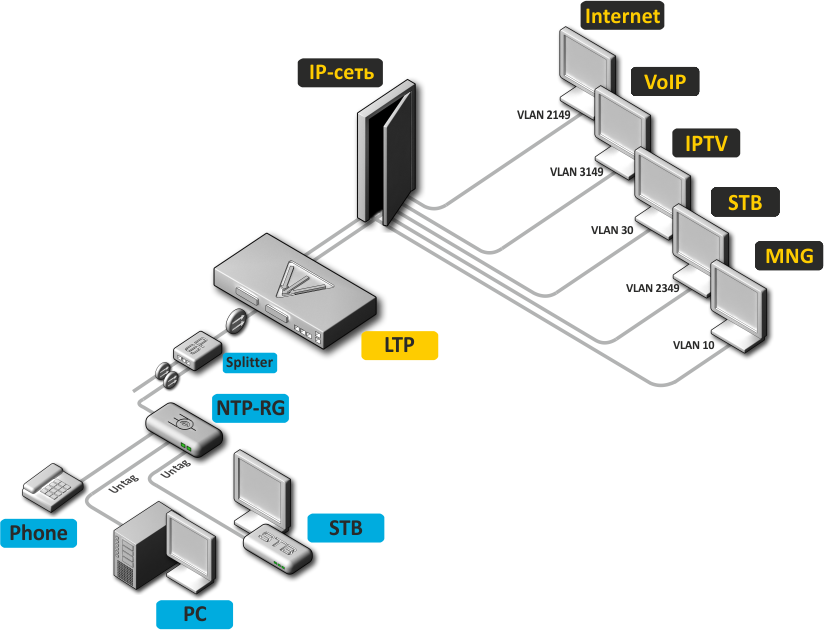
Figure 1 — Example of network configuration
Service type | VLAN used |
|---|---|
Internet | 2149 |
VoIP | 3149 |
IPTV (multicast) | 30 |
STB | 2349 |
MNG-ONT (acs) | 4094 |
MNG OLT | 4000 |
It is required any PC application with support for Telnet or SSH protocol operation or direct connection via the console port (e.g. HyperTerminal).
Safety rules and installation procedure
Safety requirements
General requirements
Any operations with the terminal should comply to the "Safety Regulations for Operation of Consumer's Electrical Installations".
Operations with the terminal should be carried out only by personnel authorised in accordance with the safety requirements.
- Before operating the device, all engineers should undergo special training.
- The terminal should be connected only to properly functioning supplementary equipment.
- The device could be permanently used provided the following requirements are met:
- ambient temperature from -5 to +40 °C;
- relative humidity up to 80 % at +25 °C;
- atmosphere pressure from 6,0×10⁴ to 10,7×10⁴ Pa (from 450 to 800 mm Hg).
- Do not expose the terminal to mechanical shocks and vibrations, as well as smoke, dust, water, and chemicals.
- To avoid components overheating which may result in device malfunction, do not block air vents or place objects on the equipment.
Electrical safety requirements
- Prior to connecting the device to a power source, ensure that the equipment case is grounded with an earth bonding point. The earthing wire should be securely connected to the earth bonding point. The resistance between the earth bonding point and earthing busbar should be less than 0.1 Ω.
- PC and measurement instruments should be grounded prior to connection to the terminal. The potential difference between the equipment case and the cases of the instruments should be less than 1V.
- Prior to turning the device on, ensure that all cables are undamaged and securely connected.
- Make sure the device is off, when installing or removing the case.
- Replacement of power modules is carried out:
- for LTP-X rev.B only when the power is off;
- for LTP-X rev.C/rev.D without turning off the power.
- SFP transceivers can be installed or removed without turning off the power.
Terminal installation
Check the device for visible mechanical damage before installing and turning it on. In case of any damage, stop the installation, fill in a corresponding document and contact your supplier. If the terminal was exposed to low temperatures for a long time before installation, leave it for 2 hours at ambient temperature prior to operation. If the device was exposed to high humidity for a long time, leave it for at least 12 hours in normal conditions prior to turning it on.
Support brackets mounting
The delivery package includes support brackets for rack installation and mounting screws to fix the terminal case on the brackets. To install the support brackets:
- Step 1. Align four mounting holes in the support bracket with the corresponding holes in the side panel of the device.
- Step 2. Use a screwdriver to screw the support bracket to the case.
- Step 3. Repeat steps 1 and 2 for the second support bracket.
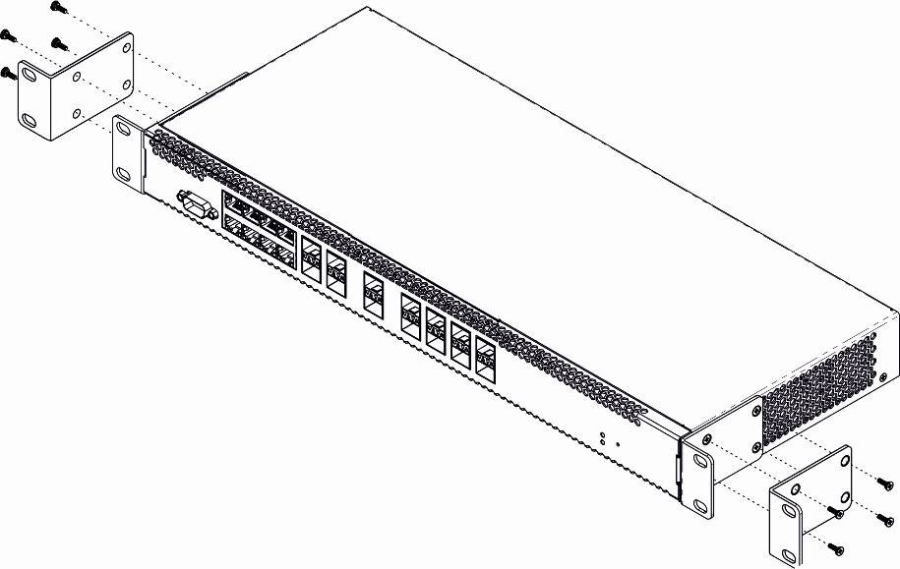
Figure 2 — Support brackets mounting
Terminal rack installation
To install the terminal into the rack:
- Step 1. Attach the terminal to the vertical guides of the rack.
- Step 2. Align mounting holes in the support bracket with the corresponding holes in the rack guides. Use the holes of the same level on both sides of the guides to ensure the device horizontal installation.
- Step 3. Use a screwdriver to screw the terminal to the rack.
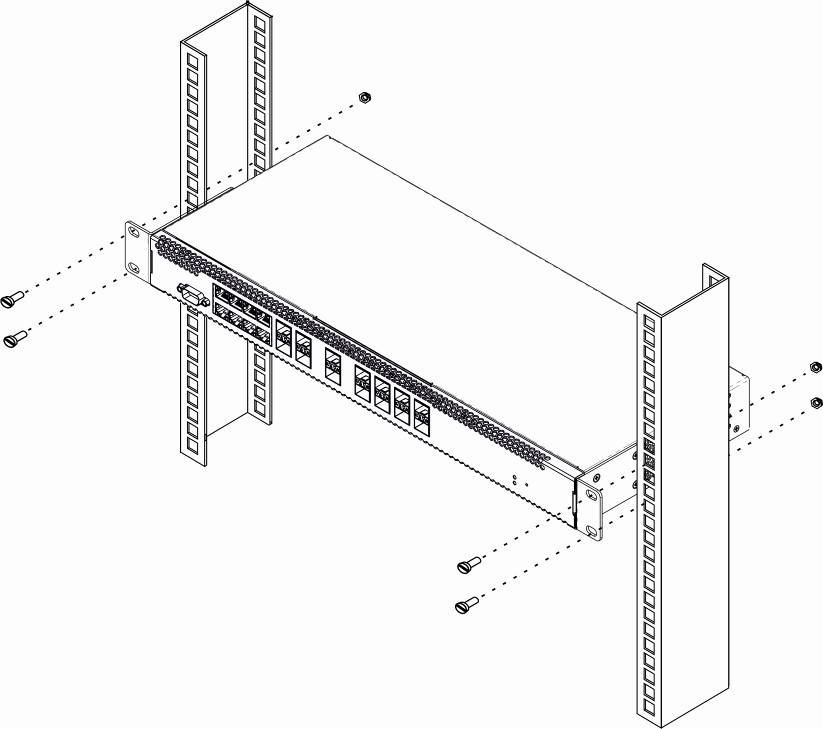
Figure 3 — Device rack installation
The terminal is horizontally ventilated. The side panels have air vents. Do not block the air vents to avoid components overheating and subsequent terminal malfunction.
To avoid overheating and provide necessary ventilation of the terminal, sufficient space should be provided above and below the terminal, not less than 10 cm.
Power module installation
Depending on power supply requirements, terminals can be supplemented with either an AC power module, 220 V, 50 Hz, or a DC power supply module, 48 V. The installation location for the power module for LTP-X rev.B is shown in figure 4.
The installation location for the power module for LTP-X rev.C/rev.D is shown in figure 5.
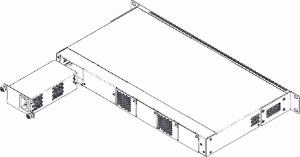
Figure 4 — Power module installation for LTP-X rev.B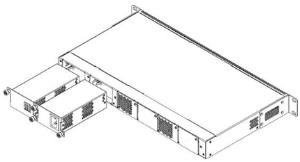
Figure 5 — Power module installation for LTP-X rev.C/rev.D
To install a power module:
- Step 1. Install the power module into the socket shown in figure above;
- Step 2. Screw the power module to the case;
- Step 3. Turn the power on.
Connecting to power supply
- Step 1. Mount the device. In case of installation to a 19" form-factor rack, mount the support brackets from the delivery package to the rack.
- Step 2. Ground the case of the device. This should be done prior to connecting the device to the power supply. An insulated multiconductor wire should be used for earthing. The device grounding and the earthing wire section should comply with Electric Installation Code. The earth bonding point is located at the right bottom corner of the rear panel.
- Step 3. If you intend to connect a PC or another device to the switch console port, the device must be properly grounded as well.
- Step 4. Connect the power supply cable to the device.
- Step 5. Turn the device on and check the front panel LEDs to make sure the terminal is in normal operating conditions.
Connecting to the Command Line Interface (CLI)
Connecting via Telnet/SSH
Connect the network data cable to one of the 'GE Port' or 'Combo GE' of LTP-X. The following factory settings are used for SSH/Telnet connection:
- Default IP: 192.168.1.2
- Default mask: 255.255.255.0
- Default GW: 0.0.0.0
- Login: admin
- Password: password
login:admin
Password: password
For security reasons, it is recommended to change the factory password when connecting for the first time (see Section Changing the user password).
If the device does not connect with the factory IP address, connect to it via the COM port using the terminal program and check the network settings (see Connecting via serial port).
Connecting via serial port
A null modem cable is used for connection. The null modem cable pin designation is given in Appendix С. RS-232 null-modem cable pin designation.
To connect via the serial port, the following settings must be set:
- Speed: 115200 bit/s
- Data bits: 8 bits
- Parity: no
- Stop bits: 1
- Flow control: none
- Login: admin
- Password: password
For security reasons, it is recommended to change the factory password when connecting for the first time (see Section Changing the user password).
Check the network settings with the show management command.
Check the network settings
LTP-X# show management
    Network:
        Hostname:                                      'LTP-X'
        Ipaddr:                                        192.168.1.2
        Netmask:                                       255.255.255.0
        Vlan management:                               1
        Gateway:                                       0.0.0.0
        Vlan prio:                                     7
        Dscp:                                          63
Changing the user password
Go to the configuration mode
LTP-X# configure terminal

Show created users
LTP-X(config)# do show users config

Set the new password for admin
LTP-X(config)# user admin password XXXX

Set the new password for root
LTP-X(config)# user root password XXXX

Apply the configuration
LTP-X(config)# do commit

Save the configuration
LTP-X(config)# do save
LTP-X network parameters configuration
For remote management of LTP-X, you should set network parameters of the device according to the settings of the network that you intend to use. Changing the network parameters of the device is recommended when connecting to the CLI via a serial interface.
Go to the configuration mode
LTP-X# configure terminal
Set the required network settings, e.g. IP=192.168.205.105, Mask=255.255.255.0, Gateway=192.168.205.230, VLAN=4000.
LTP-X(config)# management ip 192.168.205.105
LTP-X(config)# management mask 255.255.255.0
LTP-X(config)# management gateway 192.168.205.230
LTP-X(config)# management vid 4000
LTP-X(config)# exit

Check the network settings
LTP-X# show management
    Network:
        Hostname:                                      'LTP-X'
        Ipaddr:                                        192.168.205.105
        Netmask:                                       255.255.255.0
        Vlan management:                               4000
        Gateway:                                       192.168.205.230
        Vlan prio:                                     7
        Dscp:                                          63
        Additional vlan:                               <list is empty>

The new network settings will be applied after applying/saving the configuration with the commit, save commands without rebooting the device:

Apply the configuration
LTP-X# commit

Save the configuration
LTP-X# save

If VLAN will be used for control (in this example, VID=4000), you should add it to the SWITCH configuration:

Go to the SWITCH mode
LTP-X# switch

SWITCH configuration mode
LTP-X(switch)# configure terminal

Add the required VLAN
LTP-X(switch)(config)# vlan 4000

Receive the traffic in VLAN from front-port 0
LTP-X(switch)(config-vlan)# tagged front-port 0
LTP-X(switch)(config-vlan)# exit
Apply the configuration
LTP-X(switch)(config)# commit
LTP-X(switch)(config)# exit
LTP-X(switch)# exit

Save the configuration
LTP-X# save
OLT LTP-X firmware update
For proper operation of LTP-X, it is recommended to update the firmware. The actual firmware version can be checked in the vendor's technical support section.
Upload the firmware file to the TFTP server (as an example, firmware version 3.40.0-build2358).
Next, download this file to LTP-X using the following command.
Specify firmware file name and TFTP server address
LTP-8X# copy tftp://192.168.205.250/ltp-8x-revc-revd-3.40.0-build2358.fw.bin fs://firmware
    Check free memory...ok
    Downloading system firmware..
    ............................................................
    ............................................................
    ..............................................
    System firmware successfully downloaded
    Updating system firmware..
        Current board version:     6
        Current firmware version:  3.38.2.16
        New firmware version:      3.40.0.2358
        Update device mtd7
            Erase flash...
            Done.
            Write data...
            Done.
            Done.
        Success
        Update device mtd8
            Erase flash...
            Done.
            Write data...
            Done.
            Done.
        Success
        Update device mtd5
            Erase flash...
            Done.
            Write data...
            Done.
            Done.
        Success
        Update device mtd6
            Erase flash...
            Done.
            Write data...
            Done.
            Done.
        Success
    System firmware successfully updated

LTP-8X#
Reboot the device using the reboot command.
Reboot device
LTP-X# reboot
    Do you really want to reboot the system now? (y/n)  y
After LTP-8X loading, the firmware version can be found by the show version command.
LTP-8X# show version
Eltex LTP-8X:rev.C software version 3.40.0 build 2358 on 10.12.2018 15:32
SNMP, SYSLOG, NTP, IP Source GUARD services configuration
SNMP configuration
SNMP is a protocol designed for monitoring and managing network devices.
Go to the configuration mode
LTP-X# configure terminal

Enable SNMP
LTP-X(config)# ip snmp enable

Specify version v2 and EMS server address
LTP-X(config)# ip snmp traps 192.168.205.200 type v2

Check SNMP parameters
LTP-X(config)# do show ip snmp
    Snmp:
        Enabled:                                       true
        Access control:                                false
        Allow ip:                                      <list is empty>
        Traps [0]:
            Type:                                      v2
            Ipaddr:                                    192.168.205.200
        Version:                                       v2
        Community read-only [0]:                       'QwYva0dvS3N'
        Community read-only [1]:                       'QwYva0dvS3N'
        Community read-only [2]:                       'QwYva0dvS3N'
        Community read-write [0]:                      'LQtfx9v3m9+qA=='
        Community read-write [1]:                      'LQtfx9v3m9+qA=='
        Community read-write [2]:                      'LQtfx9v3m9+qA=='
        Trap community:                                '9qXUEDwUMAg'
        Location:                                      'unknown'
        Contact:                                       'admin'
        Alias:    									   <for showing use separate command>
        EngineID:                                      0xEF20CAF8234E12401216B17D85
        Users:                                         <for showing use separate command>

Apply the configuration
LTP-X(config)# do commit

Save the configuration
LTP-X(config)# do save
SYSLOG configuration
Syslog is a protocol designed for sending system event messages and error notifications to remote servers.
Go to the configuration mode
LTP-X# configure terminal

Specify syslog server address *
LTP-X(config)# logging remote 192.168.205.200

Check syslog settings
LTP-X(config)# do show logging
    Log:
        Remote syslog:                                 192.168.205.200
        Port:                                          514
        Size:                                          16384
        Origin-id:
            Type:                                      ip
        Save logs between boots:                       false
        Log input commands:                            false
        Destinations:
            System:                                    notice
            Console:                                   critical
            Remote shells:                             critical
            File:                                      notice

Apply the configuration
LTP-X(config)# do commit

Save the configuration
LTP-X(config)# do save
* - up to 4 servers can be secified at the same time.
NTP configuration
NTP is a protocol designed for time synchronization between the network device and the server.
Go to the configuration mode
LTP-X# configure terminal

Enable NTP service
LTP-X(config)# ip ntp enable

Specify NTP server address
LTP-X(config)# ip ntp ip 192.168.205.200

Specify timezone
LTP-X(config)# ip ntp timezone 7
Check NTP settings
LTP-X(config)# do show ip ntp
    Ntp:
        Enabled:                true
        Ntpserver:              192.168.205.200
        Interval:               3600
        Timezone:               7
        Daylightsaving:         false

Apply the configuration
LTP-X(config)# do commit

Save the configuration
LTP-X(config)# do save
IP Source Guard configuration
Starting from version 3.26.0, OLT supports the IP Source Guard functionality, which allows you to limit the unauthorized use of IP addresses on the network. The verification is carried out by binding the IP address to the source MAC address for a specific service on a specific ONT.
Go to the configuration mode
LTP-X# configure terminal

Enable Source Guard service
LTP-X(config)# ip source-guard enable

Set the mode
LTP-X(config)# ip source-guard mode dynamic
To add static bindings, use the following command:
LTP-X(config)# ip source-guard bind ip <IP> mac <MAC> interface-ont <ONT> service <NUM>
Where:
- IP — IP address of client equipment in X.X.X.X format;
- MAC — client equipment MAC address in format of ХХ.ХХ.ХХ.ХХ.ХХ.ХХ;
- ONT — ONT identifier in format of Х/Y (Channel ID/ONT ID);
- NUM — ONT service number, through which traffic with specific addresses will be transmitted.
DHCP RA (broadcast — unicast relay) configuration
To reduce the broadcast traffic and avoid responses from illegal DHCP servers, unicast messages can be configured to interact with the specified DHCP Relay Agent. Relay Agent can be individually started for each separate VLAN. The service allows processing only for the packets, which have only one 802.1q tag.
Create an L3 interface by specifying the IP address of the VLAN the service is provided for. If the address of the DHCP server is in the same network as the management interface, skip Step 3. If the DHCP server is in the VLAN, which is specified in cross-connect, the IP address of the interface being created should be in the same network as the DHCP server, and you should skip Step 3.
Add VLAN
LTP-X(switch)(config)# vlan 2000

Set IP address for VLAN 2000
LTP-X(switch)(config-vlan)# ip address 10.10.10.1/32
Specify DHCP server address.
Specify DHCP server IP address
LTP-X(switch)(config-vlan)# ip dhcp relay 192.168.56.1
Create an L3 interface by specifying the IP address of the VLAN, which is used for switching in the network where the DHCP server is located.
Add VLAN
LTP-X(switch)(config)# vlan 1209
LTP-X(switch)(config-vlan)# ip address 192.168.209.240/24
If the address of the DHCP server is located after the router available after the specified L3 interface, configure a static route.
LTP-X(config)# ip route prefix 192.168.56.0 mask 24 gateway 192.168.209.5
LTP-X(switch)(config-vlan)# ip address 192.168.209.240/24
SWITCH configuration
Go to the SWITCH mode
LTP-X# switch

SWITCH configuration mode
LTP-X(switch)# configure

Add all required VLANs
LTP-X(switch)(config)# vlan 2149,2349,30,3149,4094

Transmit tagged to all pon ports*
LTP-X(switch)(config-vlan-range)# tagged pon-port 0 – 7

Receive the traffic in VLAN from front-port 0
LTP-X(switch)(config-vlan-range)# tagged front-port 0

Go to the configuration mode
LTP-X(switch)(config-vlan-range)# exit

Apply the configuration
LTP-X(switch)(config)# commit
LTP-X(switch)(config)# exit
LTP-X(switch)# exit

Save the configuration
LTP-X# save
* The command is applicable for:
LTP-8Х rev.B with HW_revision 2vХ.
LTP-8Х rev.С/rev.D with HW_revision 1vХ.
For LTP-4X rev.B/LTP-4X rev.C/rev.D, the tagged pon-port 0 – 3 command is applied.
The hardware version of LTP-X can be found using the following command.
LTP-8X# show system environment
    System information:
        CPU load average (1m, 5m, 15m):   0.83  2.35  1.48
        Free RAM/Total RAM (Mbytes):      279/495
        Temperature (sensor1/sensor2):    35C/48C
        Reset button:                     enabled

        Fan configured speed, %:          auto
        Fan minimum speed, %:             15
        Fan speed levels, %:              16 27 39 51 64 76 88 100
        Fan state (fan0/fan1):            6300rpm 6450rpm
        PLD FW version:                   14

        TYPE:                             LTP-8X-rev.C
        HW_revision:                      1v1
        SN:                               GP2B000024
        MAC:                              A8:F9:4B:8B:50:00
        Power supply information:
        Module 1: PM150 220/12 1vX
                Type: Alternate current(AC)
                Intact: 1
        Module 2: PM150 220/12 1vX
                Type: Alternate current(AC)
                Intact: 1
If you do not save the settings, after restarting, the device will return to the last saved configuration.
IGMP configuration
Enable IGMP SNOOPING globally
LTP-X(switch)(config)# ip igmp snooping

VLAN 30 configuration mode
LTP-X(switch)(config)# vlan 30

Enable IGMP SNOOPING in VLAN multicast
LTP-X(switch)(config-vlan)# ip igmp snooping enable

Enable IGMP proxying
LTP-X(switch)(config-vlan)# ip igmp snooping querier enable

Enable IGMP-report proxying
LTP-X(switch)(config-vlan)# exit
LTP-X(switch)(config)# ip igmp proxy report enable

Specify IGMP address range for proxying from unicast to multicast VLANs
LTP-X(switch)(config)# ip igmp proxy report range 224.0.0.1 239.255.255.255 from 2349 to 30

Apply the configuration
LTP-X(switch)(config)# commit
LTP-X(switch)(config)# exit
LTP-X(switch)# exit

Save the configuration
LTP-X# save
CROSS_CONNECT, PORTS profiles configuration for ONT
Go to the configuration mode
LTP-X# configure terminal

Select datapath model 2
LTP-X(config)# gpon olt model 2

Create and switch to a Cross-Connect profile for the ONT Internet service
LTP-X(config)# profile cross-connect INTERNET
LTP-X(config-cross-connect)("INTERNET")#

Specify the service VLAN of the Internet service
LTP-X(config-cross-connect)("INTERNET")# outer vid 2149

Specify inner VLAN of Internet service on ONT
LTP-X(config-cross-connect)("INTERNET")# user vid 10
LTP-X(config-cross-connect)("INTERNET")# exit

Create and switch to a Cross-Connect profile for the ONT SIP VoIP service
LTP-X(config)# profile cross-connect VOIP

Specify the service VLAN of the VoIP service
LTP-X(config-cross-connect)("VOIP")# outer vid 3149

Specify inner VLAN of VoIP service on ONT
LTP-X(config-cross-connect)("VOIP")# user vid 12
LTP-X(config-cross-connect)("VOIP")# exit

Create and switch to a Cross-Connect profile for the multicast service
LTP-X(config)# profile cross-connect MC_IPTV

Specify the service VLAN of the multicast service
LTP-X(config-cross-connect)(" MC_IPTV ")# outer vid 30

Specify inner VLAN of multicast service on ONT
LTP-X(config-cross-connect)(" MC_IPTV ")# user vid 30

Specify multicast service type
LTP-X(config-cross-connect)(" MC_IPTV ")# type multicast
LTP-X(config-cross-connect)(" MC_IPTV ")# exit

Create and switch to a Cross-Connect profile for the ONT UC_IPTV service
LTP-X(config)# profile cross-connect UC_IPTV

Specify the service VLAN of the STB unicast service
LTP-X(config-cross-connect)(" UC_IPTV ")# outer vid 2349

Specify inner VLAN of STB unicast service on ONT
LTP-X(config-cross-connect)(" UC_IPTV ")# user vid 11
LTP-X(config-cross-connect)(" UC_IPTV ")# exit

Create and switch to a Cross-Connect profile for the ONT management service
LTP-X(config)# profile cross-connect ACS

Specify service VLAN for management service
LTP-X(config-cross-connect)("ACS")# outer vid 4094

Specify inner VLAN for management service in ONT
LTP-X(config-cross-connect)("ACS")# user vid untagged

Specify management service type
LTP-X(config-cross-connect)("ACS")# type management
LTP-X(config-cross-connect)("ACS")# exit

Create and switch to multicast profile
LTP-X(config)# profile ports NTP-RG

Enable IGMP Proxy on NTP VoIP interface
LTP-X(config-ports)("NTP-RG")# veip multicast

Configuration of IGMP traffic mapping in 30th VLAN
LTP-X(config-ports)("NTP-RG")# veip upstream vid 30

Configuration of multicast mapping in 30th VLAN
LTP-X(config-ports)(" NTP-RG ")# veip downstream vid 30

VLAN multicast configuration, in which the range of the following groups comes
LTP-X(config-ports)(" NTP-RG ")# igmp multicast dynamic-entry 0 vid 30

Configuration of the range of multicast groups
LTP-X(config-ports)(" NTP-RG ")# igmp multicast dynamic-entry 0 group 224.0.0.1 239.255.255.255

Apply the configuration
LTP-X(config-ports)(" NTP-RG ")# do commit

Save the configuration
LTP-X(config-ports)(" NTP-RG ")# do save
If you do not save the settings, after restarting, the device will return to the last saved configuration.
PPPoE Intermedia Agent, DHCP Relay Agent — OLT profiles configuration
PPPoE Intermedia Agent configuration
Go to the configuration mode
LTP-X# configure terminal

Add and switch to profile configuration
LTP-X(config)# profile pppoe-ia 1

Enable Agent
LTP-X(config-pppoe-ia)("1")# enable

Set the maximum number of PPPoE sessions for a profile
LTP-X(config-pppoe-ia)("1")# sessions-limit 8094

Set the maximum number of PPPoE sessions for a single ONT
LTP-X(config-pppoe-ia)("1")# sessions-limit per-user 4

Configure circuit_id format
LTP-X(config-pppoe-ia)("1")# format circuit-id %HOSTNAME%%ONTID%

Configure remote_id format
LTP-X(config-pppoe-ia)("1")# format remote-id %HOSTNAME%%ONTID%

Apply the configuration
LTP-X(config-pppoe-ia)("1")# do commit

Save the configuration
LTP-X(config-pppoe-ia)("1")# do save

Assign pppoe-ia 1 profile on OLT
LTP-X(config-pppoe-ia)("1")# exit
LTP-X(config)# gpon olt profile pppoe-ia 1

Apply the configuration
LTP-X(config)# do commit

Save the configuration
LTP-X(config # do save
If Auto reconfigure GPON port (Auto reconfigure GPON-port: true) is not set in OLT configuration, then OLT chips must be reconfigured to apply pppoe-ia profile settings.
Reconfiguration is performed by the following command.
LTP-X# reconfigure olt all
For LTP-4X:
LTP-X# reconfigure olt
DHCP Relay Agent configuration
Go to the configuration mode
LTP-X# configure terminal

Add and switch to the DHCP profile configuration menu
LTP-X(config)# profile dhcp-ra 1

Enable Agent
LTP-X(config-dhcp-ra)("1")# enable

Send HOSTNAME LTP-X and id ONT in information about which port the request for DHCP relay came from
LTP-X(config-dhcp-ra)("1")# overwrite-option82 circuit-id %HOSTNAME%%ONTID%

Transmit the HOSTNAME LTP-X and id ONT in the identifier of the DHCP relay itself
LTP-X(config-dhcp-ra)("1")# overwrite-option82 remote-id %HOSTNAME%%ONTID%

Apply the configuration
LTP-X(config-dhcp-ra)("1")# do commit

Save the configuration
LTP-X(config-dhcp-ra)("1")# do save

Assign the required configuration profile globally
LTP-X(config)# gpon olt profile dhcp-ra 1

Assign profile 1 on VLAN 3149
LTP-X(config)# gpon olt profile dhcp-ra 1 vid 3149

Apply the configuration
LTP-X(config)# do commit

Save the configuration
LTP-X(config)# do save

View OLT configuration
LTP-X# show gpon olt configuration
        Block duplicated mac:                          enabled
        Disable rogue ONT:                             disabled
        Ont block time:                                5
        Dhcpra shaper:                                 100
        Profile pppoe-ia:                              1
        OLT Profile PPPoE Intermediate Agent           1
        Profile dhcp-ra:                               1
        OLT Profile DHCP Relay Agent                   1
        Profile dhcpv6-ra:                             dhcpv6-ra-00      OLT Profile DHCP Relay Agent 0
        Profile dhcp-ra per VLAN 3149 [0]:
            Profile:                                   1
           OLT Profile DHCP Relay Agent 1
        Profile dhcpv6-ra per VLAN:					   <list is empty>
        Datapath:
            Model:                                     model2
            Broadcast gem port:                        4095
            Multicast gem port:                        4094
        Encryption:
            Enable:                                    false
            Key update interval:                       1
        Unactivated timeout:                           60
        ONT authentication mode:                       both
        Auto reconfigure ONT:                          true
        Auto reconfigure GPON-port:                    true
        Auto reconfigure OLT:                          true
        PLOAM password in alarm:                       false
        Auto-activation ONT:                           false
		Default template:                              unassigned
With this configuration, for all VLANs except 3149, the DHCP Relay Agent profile 0 will be used.
To apply the DHCP-RA profile settings, it is required to reconfigure the OLT chips, if in the OLT configuration it is not set the "Auto reconfigure GPON-port: true" parameter.
Reconfiguration is performed by the following command.
LTP-X# reconfigure olt all
For LTP-4X:
LTP-X# reconfigure olt
Adding and configuring ONT
It is necessary to add ONT 454C54580800F6B1 to the configuration, to tree 0 ONT ID 1 and assign all the required profiles to it to provide services.
View connected but not added ONT
LTP-X# show interface ont 0-7 unactivated
-----------------------------------
GPON-port 0 ONT unactivated list
-----------------------------------
 ##  Serial          ONT ID  GPON-port Status      RSSI[dBm]  Version    EquipmentID  Description
  1 454C54580800F6B1  n/a      0       UNACTIVATED   n/a      n/a         n/a          n/a

Go to the configuration mode
LTP-X# configure terminal

Go to tree 0 ONT ID 1
LTP-X(config)# interface ont 0/1

Assign the required ONT to this position
LTP-X(config)(if-ont-0/1)# serial 454C54580800F6B1

Assign ports NTP-RG profile
LTP-X(config)(if-ont-0/1)# profile ports NTP-RG

Assign cross-connect INTERNET profile
LTP-X(config)(if-ont-0/1)# service 0 profile cross-connect INTERNET

Assign cross-connect VOIP profile
LTP-X(config)(if-ont-0/1)# service 1 profile cross-connect VOIP

Assign cross-connect MC_IPTV profile
LTP-X(config)(if-ont-0/1)# service 2 profile cross-connect MC_IPTV

Assign cross-connect UC_IPTV profile
LTP-X(config)(if-ont-0/1)# service 3 profile cross-connect UC_IPTV

Assign cross-connect ACS profile
LTP-X(config)(if-ont-0/1)# service 4 profile cross-connect ACS

Assign default dba profile 'dba 0' to all services used:
LTP-X(config)(if-ont-0/1)# service 0 profile  dba dba-00
LTP-X(config)(if-ont-0/1)# service 1 profile  dba dba-00
LTP-X(config)(if-ont-0/1)# service 2 profile  dba dba-00
LTP-X(config)(if-ont-0/1)# service 3 profile  dba dba-00
LTP-X(config)(if-ont-0/1)# service 4 profile  dba dba-00

Apply the configuration
LTP-X(config)(if-ont-0/1)# do commit

Save the configuration
LTP-X(config)(if-ont-0/1)# do save
After executing the commands in section 10 of this manual, it is recommended to reset the subscriber terminal to factory configuration.
LTP-X# send omci restore interface ont 0/1
After reloading the device, it is necessary to check all services.
View a list of connected ONTs added to the configuration
LTP-X# show interface ont 0-7 online
-----------------------------------
GPON-port 0 ONT online list
-----------------------------------

## Serial           ONT ID  GPON-port  Status  RSSI[dBm]    Version      EquipmentID  Description
1  454C54580800F6B1  1      0          OK      -25.38       3.22.0.1493  NTU-RG

Total ONT count: 1
ONT configuration template
To simplify the configuration of the same type of ONT, you can use a pre-prepared configuration template 'Template', which will subsequently be assigned to the ONT.
Go to the configuration mode
LTP-X# configure terminal

Create and switch to TP template
LTP-X(config)# template TP

Assign ports profile for this template
LTP-X(ont-template)("TP")# profile ports NTP-RG

Assign cross-connect INTERNET profile on service 0 of TP template
LTP-X(ont-template)("TP")# service 0 profile cross-connect   INTERNET

Assign cross-connect VOIP profile on service 1 of TP template
LTP-X(ont-template)("TP")# service 1 profile cross-connect   VOIP

Assign cross-connect MC_IPTV profile on service 2 of TP template
LTP-X(ont-template)("TP")# service 2 profile cross-connect   MC_IPTV

Assign cross-connect STB profile on service 3 of TP template
LTP-X(ont-template)("TP")# service 3 profile cross-connect   UC_IPTV

Assign cross-connect ACS profile on service 4 of TP template
LTP-X(ont-template)("TP")# service 4 profile cross-connect   ACS

Assign default dba profile 'dba-00' to all services used:
LTP-X(ont-template)("TP")# service 0 profile dba dba-00
LTP-X(ont-template)("TP")# service 1 profile dba dba-00
LTP-X(ont-template)("TP")# service 2 profile dba dba-00
LTP-X(ont-template)("TP")# service 3 profile dba dba-00
LTP-X(ont-template)("TP")# service 4 profile dba dba-00

Apply the configuration
LTP-X(ont-template)("TP")# do commit

Save the configuration
LTP-X(ont-template)("TP")# do save

Add ONT 454C54580800F6B2:

Go to the configuration mode
LTP-X# configure terminal

Go to tree 0 ONT ID 10
LTP-X(config)# interface ont 0/10

Assign the required ONT to this position
LTP-X(config)(if-ont-0/10)# serial 454C54580800F6B2

Assign the TP template to this position
LTP-X(config)(if-ont-0/10)# template TP

Apply the configuration
LTP-X(config)(if-ont-0/10)# do commit
Save the configuration
LTP-X(config)(if-ont-0/10)# do save
The configuration of the ONT 454C54580800F6B2 will be similar to the configuration of the ONT 454C54580800F6B1 from Section 11, but to add ONT it is enough to execute only 2 commands. When viewing the ONT configuration by the [T] markers, it is easy to distinguish the template configuration parameters from the usual ones.
LTP-8X(config)(if-ont-0/10)# do show interface ont 0/10 configuration
-----------------------------------
[ONT0/10] configuration
-----------------------------------

    Description:                                       ''
    Enabled:                                           true
    Serial:                                            ELTX0800F6B1
    Password:                                          '0000000000'
[T] Fec up:                                            false
[T] Downstream broadcast:                              true
[T] Ber interval:                                      none
[T] Ber update period:                                 60
[T] Rf port state:                                     disabled
[T] Omci error tolerant:                               false
    Service [0]:
[T] Profile cross connect:                    INTERNET     ONT Profile Cross Connect 1
[T] Profile dba:                              dba-00       ONT Profile DBA 0
        Custom cross connect:                 disabled
    Service [1]:
[T] Profile cross connect:                    VOIP         ONT Profile Cross Connect 2
[T] Profile dba:                              dba-00       ONT Profile DBA 0
        Custom cross connect:                 disabled
    Service [2]:
[T] Profile cross connect:                    MC_IPTV      ONT Profile Cross Connect 3
[T] Profile dba:                              dba-00       ONT Profile DBA 0
        Custom cross connect:                 disabled
    Service [3]:
[T] Profile cross connect:                    UC_IPTV      ONT Profile Cross Connect 4
[T] Profile dba:                              dba-00       ONT Profile DBA 0
        Custom cross connect:                 disabled
    Service [4]:
[T] Profile cross connect:                    ACS          ONT Profile Cross Connect 5
[T] Profile dba:                              dba-00       ONT Profile DBA 0
        Custom cross connect:                 disabled
    Service [5]:
[T] Profile cross connect:                    unassigned
[T] Profile dba:                              dba-00       ONT Profile DBA 0
        Custom cross connect:                 disabled
[T] Profile shaping:                          shaping-00   ONT Profile Shaping 0
[T] Profile ports:                            NTP-RG       ONT Profile Ports 1
[T] Profile management:                       unassigned
[T] Profile scripting:                        unassigned
    Custom model:                             none
    Template:                                 TP           ONT Template 1
LTP-8X(config)(if-ont-0/10)#
Configuration of LTP for operation with the internal ACS server
LTP-4X/8X rev.B and LTP-4X/8X rev.C/rev.D equipment contains in its software a built-in ACS server that allows automatic configuration of ONTs belonging to this OLT.
Enable internal ACS server
LTP-X(config)# ip acs server enable

Specify the number of VLAN in which the ACS server will operate
LTP-X(config)# ip acs server vid 4094

Enable the DHCP server to issue an IP to the ONT
LTP-X(config)# ip dhcp server enable

Enable adding option 43 to DHCP packets
LTP-X(config)# ip dhcp server option-43

Specify a range of addresses to be issued to customers
LTP-X(config)# ip dhcp server range "192.168.200.2" "192.168.201.254"

Apply the configuration
LTP-X(config)#do commit

Save the configuration
LTP-X(config)#do save

Go to the SWITCH mode
LTP-X# switch

SWITCH configuration mode
LTP-X(switch)# configure

Set the VLAN ID to connect to ACS
LTP-X(switch)(config)# vlan 4094

Transmit tagged to all pon ports*
LTP-X(switch)(config-vlan)# tagged pon-port 0 – 7

Apply the configuration
LTP-X(switch)(config-vlan)# exit
LTP-X(switch)(config)# commit
LTP-X(switch)(config)# exit
LTP-X(switch)# exit

Save the configuration
LTP-X# save

Go to the configuration mode
LTP-X# configure terminal

Create and switch to a Cross-Connect profile for the ONT management service
LTP-X(config)# profile cross-connect ACS
Specify service VLAN for management service
LTP-X(config-cross-connect)("ACS")# outer vid 4094
LTP-X(config-cross-connect)("ACS")# type management

Apply the configuration
LTP-X(config-cross-connect)("ACS")# do commit

Save the configuration
LTP-X(config-cross-connect)("ACS")# do save
* The command is applicable for:
LTP-8Х rev.B with HW_revision 2vХ.
LTP-8Х rev.С/rev.D with HW_revision 1vХ.
For LTP-4X rev.B/LTP-4X rev.C/rev.D, the tagged pon-port 0 – 3 command is applied.
For operation of ONT with built-in ACS, it is necessary to assign the created CC and Management profiles to this ONT in the same way as described in Section Adding and configuring ONT.
Configuration of ACS profile for ONT
LTP-X> acs

Switch to the ONT profile configuration mode
(acs)# profile

Add profile for ONT TEST
(acs-profiles)# add profile TEST

Switch to the TEST profile configuration mode
(acs-profiles)# profile TEST
(acs-profile-name='TEST'

Paste the profile from APPENDIX A.
(acs-profile-name='TEST')commit
(acs-profile-name='TEST')
For the convenience of working with ACS profiles for ONT, you can download the required profile via FTP/TFTP protocol.
Example of profile downloading
LTP-8x# copy tftp://10.0.0.1/acs-config fs://acs-config
The downloaded configuration should be in the form of executable commands on the OLT to configure the required profile. The specified commands will be transparently and automatically transmitted to the CLI without completely deleting the configuration of the current profiles.
File example
profile
add profile test1
profile test1
set property InternetGatewayDevice.LANDevice.1.WLANConfiguration.1.PreSharedKey.1.X_ELTEX_RU_UserDefinedPSK    1 nocheck
set property InternetGatewayDevice.LANDevice.1.WLANConfiguration.1.RadioEnabled    1 nocheck
Adding and configuring a subscriber via ACS
(acs)#

Switch to the subscriber configuration mode
(acs)# user

Add subscriber IVANOV
(acs-user)# add user IVANOV

Switch to the subscriber IVANOV configuration mode
(acs-user)# user IVANOV

Set the ONT serial number for subscriber IVANOV
(acs-user-subscriber='IVANOV')# set pon_serial 454C54580800F6B1

Set the ACS profile for subscriber IVANOV
(acs-user-subscriber='IVANOV')# set profile TEST

Set the login for PPPoE session
(acs-user-subscriber='IVANOV')# set ppp_login test

Set the password for PPPoE session
(acs-user-subscriber='IVANOV')# set ppp_password TEST

Set SIP PROXY address
(acs-user-subscriber='IVANOV')# set sip_proxy 212.122.111.55

Enable phone port 1
(acs-user-subscriber='IVANOV')# set voice1_enable enabled

Set the phone number for port 1
(acs-user-subscriber='IVANOV')# set voice1_number 34234234

Set the password for port 1 phone number
(acs-user-subscriber='IVANOV')# set voice1_password test
ONT firmware update via ACS
Ensure that the correct date and time are set on LTP-X.
Switch to the ACS configuration mode
LTP-X> acs

Switch to ONT firmware parameters configuration mode
(acs)firmware

Specify TFTP server address and firmware file name
(acs-firmware)copy 192.168.16.26 ntp-rg-3.22.1.14.fw.bin

View list of uploaded files
(acs-firmware)show files

View list of update profiles
(acs-firmware)show list

Add update profile
(acs-firmware)add firmware 1

Switch to profile edit
(acs-firmware)firmware 1

View profile configuration
(acs-firmware_config-fw id='1')show config

Set firmware file for this profile
(acs-firmware_config-fw id='1')set file ntp-rg-3.22.1.14.fw.bin

Add a configuration profile (corresponding to those ONTs that require firmware updates). The list of profiles is available in the section (acs-profile) by the command 'show list'
(acs-firmware_config-fw id='1')add profile TEST
The next time the ONT contacts ACS, the firmware will update and the ONT will automatically restart.
If you have any questions, contact the ELTEX technical support service.
Appendix A. Example of ACS profile for NTP-RG14XXG-W/NTU-RG14XXG-W
set property "InternetGatewayDevice.LANDevice.1.LANHostConfigManagement.DHCPServerEnable" "1" nocheck
set property "InternetGatewayDevice.LANDevice.1.LANHostConfigManagement.DomainName" "HomeLAN" nocheck
set property "InternetGatewayDevice.LANDevice.1.LANHostConfigManagement.IPInterface.1.Enable" "1" nocheck
set property "InternetGatewayDevice.LANDevice.1.LANHostConfigManagement.IPInterface.1.IPInterfaceAddressingType" "Static" nocheck
set property "InternetGatewayDevice.LANDevice.1.LANHostConfigManagement.IPInterface.1.IPInterfaceIPAddress" "192.168.1.1" nocheck
set property "InternetGatewayDevice.LANDevice.1.LANHostConfigManagement.IPInterface.1.IPInterfaceSubnetMask" "255.255.255.0" nocheck
set property "InternetGatewayDevice.LANDevice.1.LANHostConfigManagement.IPRouters" "192.168.1.1" nocheck
set property "InternetGatewayDevice.LANDevice.1.LANHostConfigManagement.MaxAddress" "192.168.1.254" nocheck
set property "InternetGatewayDevice.LANDevice.1.LANHostConfigManagement.MinAddress" "192.168.1.2" nocheck
set property "InternetGatewayDevice.LANDevice.1.LANHostConfigManagement.SubnetMask" "255.255.255.0" nocheck
set property "InternetGatewayDevice.Layer2Bridging.Bridge.1.BridgeEnable" "TRUE" nocheck
set property "InternetGatewayDevice.Layer2Bridging.Bridge.1.BridgeName" "brHSI" nocheck
set property "InternetGatewayDevice.Layer2Bridging.Bridge.1.BridgeStandard" "802.1Q" nocheck
set property "InternetGatewayDevice.Layer2Bridging.Bridge.1.VLANID" "10" nocheck
set property "InternetGatewayDevice.Layer2Bridging.Bridge.2.BridgeEnable" "1" nocheck
set property "InternetGatewayDevice.Layer2Bridging.Bridge.2.BridgeName" "brVoIP" nocheck
set property "InternetGatewayDevice.Layer2Bridging.Bridge.2.BridgeStandard" "802.1Q" nocheck
set property "InternetGatewayDevice.Layer2Bridging.Bridge.2.VLANID" "12" nocheck
set property "InternetGatewayDevice.Layer2Bridging.Bridge.3.BridgeEnable" "1" nocheck
set property "InternetGatewayDevice.Layer2Bridging.Bridge.3.BridgeName" "brIPTV" nocheck
set property "InternetGatewayDevice.Layer2Bridging.Bridge.3.BridgeStandard" "802.1Q" nocheck
set property "InternetGatewayDevice.Layer2Bridging.Bridge.3.VLANID" "11" nocheck
set property "InternetGatewayDevice.Layer2Bridging.Bridge.4.BridgeEnable" "1" nocheck
set property "InternetGatewayDevice.Layer2Bridging.Bridge.4.BridgeName" "MC" nocheck
set property "InternetGatewayDevice.Layer2Bridging.Bridge.4.BridgeStandard" "802.1Q" nocheck
set property "InternetGatewayDevice.Layer2Bridging.Bridge.4.VLANID" "30" nocheck
set property "InternetGatewayDevice.Layer2Bridging.Filter.1.AdmitOnlyVLANTagged" "FALSE" nocheck
set property "InternetGatewayDevice.Layer2Bridging.Filter.1.FilterBridgeReference" "1" nocheck
set property "InternetGatewayDevice.Layer2Bridging.Filter.1.FilterEnable" "TRUE" nocheck
set property "InternetGatewayDevice.Layer2Bridging.Filter.1.FilterInterface" "9" nocheck
set property "InternetGatewayDevice.Layer2Bridging.Filter.1.VLANIDFilter" "-1" nocheck
set property "InternetGatewayDevice.Layer2Bridging.Filter.10.AdmitOnlyVLANTagged" "0" nocheck
set property "InternetGatewayDevice.Layer2Bridging.Filter.10.FilterBridgeReference" "3" nocheck
set property "InternetGatewayDevice.Layer2Bridging.Filter.10.FilterEnable" "1" nocheck
set property "InternetGatewayDevice.Layer2Bridging.Filter.10.FilterInterface" "3" nocheck
set property "InternetGatewayDevice.Layer2Bridging.Filter.10.VLANIDFilter" "-1" nocheck
set property "InternetGatewayDevice.Layer2Bridging.Filter.11.AdmitOnlyVLANTagged" "0" nocheck
set property "InternetGatewayDevice.Layer2Bridging.Filter.11.FilterBridgeReference" "3" nocheck
set property "InternetGatewayDevice.Layer2Bridging.Filter.11.FilterEnable" "1" nocheck
set property "InternetGatewayDevice.Layer2Bridging.Filter.11.FilterInterface" "4" nocheck
set property "InternetGatewayDevice.Layer2Bridging.Filter.11.VLANIDFilter" "-1" nocheck
set property "InternetGatewayDevice.Layer2Bridging.Filter.12.AdmitOnlyVLANTagged" "0" nocheck
set property "InternetGatewayDevice.Layer2Bridging.Filter.12.FilterBridgeReference" "4" nocheck
set property "InternetGatewayDevice.Layer2Bridging.Filter.12.FilterEnable" "1" nocheck
set property "InternetGatewayDevice.Layer2Bridging.Filter.12.FilterInterface" "9" nocheck
set property "InternetGatewayDevice.Layer2Bridging.Filter.12.VLANIDFilter" "-1" nocheck
set property "InternetGatewayDevice.Layer2Bridging.Filter.13.AdmitOnlyVLANTagged" "0" nocheck
set property "InternetGatewayDevice.Layer2Bridging.Filter.13.FilterBridgeReference" "4" nocheck
set property "InternetGatewayDevice.Layer2Bridging.Filter.13.FilterEnable" "1" nocheck
set property "InternetGatewayDevice.Layer2Bridging.Filter.13.FilterInterface" "13" nocheck
set property "InternetGatewayDevice.Layer2Bridging.Filter.13.VLANIDFilter" "-1" nocheck
set property "InternetGatewayDevice.Layer2Bridging.Filter.2.AdmitOnlyVLANTagged" "FALSE" nocheck
set property "InternetGatewayDevice.Layer2Bridging.Filter.2.FilterBridgeReference" "1" nocheck
set property "InternetGatewayDevice.Layer2Bridging.Filter.2.FilterEnable" "TRUE" nocheck
set property "InternetGatewayDevice.Layer2Bridging.Filter.2.FilterInterface" "1" nocheck
set property "InternetGatewayDevice.Layer2Bridging.Filter.2.VLANIDFilter" "-1" nocheck
set property "InternetGatewayDevice.Layer2Bridging.Filter.3.AdmitOnlyVLANTagged" "FALSE" nocheck
set property "InternetGatewayDevice.Layer2Bridging.Filter.3.FilterBridgeReference" "1" nocheck
set property "InternetGatewayDevice.Layer2Bridging.Filter.3.FilterEnable" "TRUE" nocheck
set property "InternetGatewayDevice.Layer2Bridging.Filter.3.FilterInterface" "2" nocheck
set property "InternetGatewayDevice.Layer2Bridging.Filter.3.VLANIDFilter" "-1" nocheck
set property "InternetGatewayDevice.Layer2Bridging.Filter.4.AdmitOnlyVLANTagged" "0" nocheck
set property "InternetGatewayDevice.Layer2Bridging.Filter.4.FilterBridgeReference" "1" nocheck
set property "InternetGatewayDevice.Layer2Bridging.Filter.4.FilterEnable" "1" nocheck
set property "InternetGatewayDevice.Layer2Bridging.Filter.4.FilterInterface" "5" nocheck
set property "InternetGatewayDevice.Layer2Bridging.Filter.4.VLANIDFilter" "-1" nocheck
set property "InternetGatewayDevice.Layer2Bridging.Filter.5.AdmitOnlyVLANTagged" "0" nocheck
set property "InternetGatewayDevice.Layer2Bridging.Filter.5.FilterBridgeReference" "1" nocheck
set property "InternetGatewayDevice.Layer2Bridging.Filter.5.FilterEnable" "1" nocheck
set property "InternetGatewayDevice.Layer2Bridging.Filter.5.FilterInterface" "11" nocheck
set property "InternetGatewayDevice.Layer2Bridging.Filter.5.VLANIDFilter" "-1" nocheck
set property "InternetGatewayDevice.Layer2Bridging.Filter.6.AdmitOnlyVLANTagged" "0" nocheck
set property "InternetGatewayDevice.Layer2Bridging.Filter.6.FilterBridgeReference" "1" nocheck
set property "InternetGatewayDevice.Layer2Bridging.Filter.6.FilterEnable" "1" nocheck
set property "InternetGatewayDevice.Layer2Bridging.Filter.6.FilterInterface" "10" nocheck
set property "InternetGatewayDevice.Layer2Bridging.Filter.6.VLANIDFilter" "-1" nocheck
set property "InternetGatewayDevice.Layer2Bridging.Filter.7.AdmitOnlyVLANTagged" "0" nocheck
set property "InternetGatewayDevice.Layer2Bridging.Filter.7.FilterBridgeReference" "2" nocheck
set property "InternetGatewayDevice.Layer2Bridging.Filter.7.FilterEnable" "1" nocheck
set property "InternetGatewayDevice.Layer2Bridging.Filter.7.FilterInterface" "9" nocheck
set property "InternetGatewayDevice.Layer2Bridging.Filter.7.VLANIDFilter" "-1" nocheck
set property "InternetGatewayDevice.Layer2Bridging.Filter.8.AdmitOnlyVLANTagged" "0" nocheck
set property "InternetGatewayDevice.Layer2Bridging.Filter.8.FilterBridgeReference" "2" nocheck
set property "InternetGatewayDevice.Layer2Bridging.Filter.8.FilterEnable" "1" nocheck
set property "InternetGatewayDevice.Layer2Bridging.Filter.8.FilterInterface" "12" nocheck
set property "InternetGatewayDevice.Layer2Bridging.Filter.8.VLANIDFilter" "-1" nocheck
set property "InternetGatewayDevice.Layer2Bridging.Filter.9.AdmitOnlyVLANTagged" "1" nocheck
set property "InternetGatewayDevice.Layer2Bridging.Filter.9.FilterBridgeReference" "3" nocheck
set property "InternetGatewayDevice.Layer2Bridging.Filter.9.FilterEnable" "1" nocheck
set property "InternetGatewayDevice.Layer2Bridging.Filter.9.FilterInterface" "9" nocheck
set property "InternetGatewayDevice.Layer2Bridging.Filter.9.VLANIDFilter" "-1" nocheck
set property "InternetGatewayDevice.Layer2Bridging.Marking.1.EthernetPriorityMark" "3" nocheck
set property "InternetGatewayDevice.Layer2Bridging.Marking.1.MarkingBridgeReference" "1" nocheck
set property "InternetGatewayDevice.Layer2Bridging.Marking.1.MarkingEnable" "TRUE" nocheck
set property "InternetGatewayDevice.Layer2Bridging.Marking.1.MarkingInterface" "9" nocheck
set property "InternetGatewayDevice.Layer2Bridging.Marking.1.VLANIDMark" "10" nocheck
set property "InternetGatewayDevice.Layer2Bridging.Marking.1.VLANIDMarkOverride" "TRUE" nocheck
set property "InternetGatewayDevice.Layer2Bridging.Marking.1.VLANIDUntag" "FALSE" nocheck
set property "InternetGatewayDevice.Layer2Bridging.Marking.2.EthernetPriorityMark" "3" nocheck
set property "InternetGatewayDevice.Layer2Bridging.Marking.2.MarkingBridgeReference" "1" nocheck
set property "InternetGatewayDevice.Layer2Bridging.Marking.2.MarkingEnable" "TRUE" nocheck
set property "InternetGatewayDevice.Layer2Bridging.Marking.2.MarkingInterface" "1" nocheck
set property "InternetGatewayDevice.Layer2Bridging.Marking.2.VLANIDMark" "-1" nocheck
set property "InternetGatewayDevice.Layer2Bridging.Marking.2.VLANIDMarkOverride" "FALSE" nocheck
set property "InternetGatewayDevice.Layer2Bridging.Marking.2.VLANIDUntag" "TRUE" nocheck
set property "InternetGatewayDevice.Layer2Bridging.Marking.3.EthernetPriorityMark" "3" nocheck
set property "InternetGatewayDevice.Layer2Bridging.Marking.3.MarkingBridgeReference" "1" nocheck
set property "InternetGatewayDevice.Layer2Bridging.Marking.3.MarkingEnable" "TRUE" nocheck
set property "InternetGatewayDevice.Layer2Bridging.Marking.3.MarkingInterface" "2" nocheck
set property "InternetGatewayDevice.Layer2Bridging.Marking.3.VLANIDMark" "-1" nocheck
set property "InternetGatewayDevice.Layer2Bridging.Marking.3.VLANIDMarkOverride" "FALSE" nocheck
set property "InternetGatewayDevice.Layer2Bridging.Marking.3.VLANIDUntag" "TRUE" nocheck
set property "InternetGatewayDevice.Layer2Bridging.Marking.4.EthernetPriorityMark" "3" nocheck
set property "InternetGatewayDevice.Layer2Bridging.Marking.4.MarkingBridgeReference" "1" nocheck
set property "InternetGatewayDevice.Layer2Bridging.Marking.4.MarkingEnable" "1" nocheck
set property "InternetGatewayDevice.Layer2Bridging.Marking.4.MarkingInterface" "5" nocheck
set property "InternetGatewayDevice.Layer2Bridging.Marking.4.VLANIDMark" "-1" nocheck
set property "InternetGatewayDevice.Layer2Bridging.Marking.4.VLANIDMarkOverride" "0" nocheck
set property "InternetGatewayDevice.Layer2Bridging.Marking.4.VLANIDUntag" "1" nocheck
set property "InternetGatewayDevice.Layer2Bridging.Marking.5.EthernetPriorityMark" "1" nocheck
set property "InternetGatewayDevice.Layer2Bridging.Marking.5.MarkingBridgeReference" "2" nocheck
set property "InternetGatewayDevice.Layer2Bridging.Marking.5.MarkingEnable" "1" nocheck
set property "InternetGatewayDevice.Layer2Bridging.Marking.5.MarkingInterface" "9" nocheck
set property "InternetGatewayDevice.Layer2Bridging.Marking.5.VLANIDMark" "12" nocheck
set property "InternetGatewayDevice.Layer2Bridging.Marking.5.VLANIDMarkOverride" "1" nocheck
set property "InternetGatewayDevice.Layer2Bridging.Marking.5.VLANIDUntag" "0" nocheck
set property "InternetGatewayDevice.Layer2Bridging.Marking.6.EthernetPriorityMark" "2" nocheck
set property "InternetGatewayDevice.Layer2Bridging.Marking.6.MarkingBridgeReference" "3" nocheck
set property "InternetGatewayDevice.Layer2Bridging.Marking.6.MarkingEnable" "1" nocheck
set property "InternetGatewayDevice.Layer2Bridging.Marking.6.MarkingInterface" "9" nocheck
set property "InternetGatewayDevice.Layer2Bridging.Marking.6.VLANIDMark" "11" nocheck
set property "InternetGatewayDevice.Layer2Bridging.Marking.6.VLANIDMarkOverride" "1" nocheck
set property "InternetGatewayDevice.Layer2Bridging.Marking.6.VLANIDUntag" "0" nocheck
set property "InternetGatewayDevice.Layer2Bridging.Marking.7.EthernetPriorityMark" "2" nocheck
set property "InternetGatewayDevice.Layer2Bridging.Marking.7.MarkingBridgeReference" "3" nocheck
set property "InternetGatewayDevice.Layer2Bridging.Marking.7.MarkingEnable" "1" nocheck
set property "InternetGatewayDevice.Layer2Bridging.Marking.7.MarkingInterface" "3" nocheck
set property "InternetGatewayDevice.Layer2Bridging.Marking.7.VLANIDMark" "-1" nocheck
set property "InternetGatewayDevice.Layer2Bridging.Marking.7.VLANIDMarkOverride" "0" nocheck
set property "InternetGatewayDevice.Layer2Bridging.Marking.7.VLANIDUntag" "1" nocheck
set property "InternetGatewayDevice.Layer2Bridging.Marking.8.EthernetPriorityMark" "2" nocheck
set property "InternetGatewayDevice.Layer2Bridging.Marking.8.MarkingBridgeReference" "3" nocheck
set property "InternetGatewayDevice.Layer2Bridging.Marking.8.MarkingEnable" "1" nocheck
set property "InternetGatewayDevice.Layer2Bridging.Marking.8.MarkingInterface" "4" nocheck
set property "InternetGatewayDevice.Layer2Bridging.Marking.8.VLANIDMark" "-1" nocheck
set property "InternetGatewayDevice.Layer2Bridging.Marking.8.VLANIDMarkOverride" "0" nocheck
set property "InternetGatewayDevice.Layer2Bridging.Marking.8.VLANIDUntag" "1" nocheck
set property "InternetGatewayDevice.Layer2Bridging.Marking.9.EthernetPriorityMark" "1" nocheck
set property "InternetGatewayDevice.Layer2Bridging.Marking.9.MarkingBridgeReference" "4" nocheck
set property "InternetGatewayDevice.Layer2Bridging.Marking.9.MarkingEnable" "1" nocheck
set property "InternetGatewayDevice.Layer2Bridging.Marking.9.MarkingInterface" "9" nocheck
set property "InternetGatewayDevice.Layer2Bridging.Marking.9.VLANIDMark" "30" nocheck
set property "InternetGatewayDevice.Layer2Bridging.Marking.9.VLANIDMarkOverride" "1" nocheck
set property "InternetGatewayDevice.Layer2Bridging.Marking.9.VLANIDUntag" "0" nocheck
set property "InternetGatewayDevice.Services.VoiceService.1.VoiceProfile.1.DigitMap" "x.T" nocheck
set property "InternetGatewayDevice.Services.VoiceService.1.VoiceProfile.1.DigitMapEnable" "1" nocheck
set property "InternetGatewayDevice.Services.VoiceService.1.VoiceProfile.1.Line.1.PhyReferenceList" "1" nocheck
set property "InternetGatewayDevice.Services.VoiceService.1.VoiceProfile.1.Line.2.PhyReferenceList" "2" nocheck
set property "InternetGatewayDevice.Services.VoiceService.1.VoiceProfile.1.SIP.OutboundProxyPort" "5060" nocheck
set property "InternetGatewayDevice.Services.VoiceService.1.VoiceProfile.1.SIP.RegisterExpires" "610" nocheck
set property "InternetGatewayDevice.Services.VoiceService.1.VoiceProfile.1.SIP.RegistrarServerPort" "5060" nocheck
set property "InternetGatewayDevice.Services.VoiceService.1.VoiceProfile.1.SIP.RegistrationPeriod" "600" nocheck
set property "InternetGatewayDevice.Services.VoiceService.1.VoiceProfile.1.SIP.UserAgentPort" "5060" nocheck
set property "InternetGatewayDevice.Services.VoiceService.1.X_WANReferenceList" "12" nocheck
set property "InternetGatewayDevice.WANDevice.1.WANConnectionDevice.1.WANIPConnection.1.AddressingType" "DHCP" nocheck
set property "InternetGatewayDevice.WANDevice.1.WANConnectionDevice.1.WANIPConnection.1.ConnectionType" "IP_Routed" nocheck
set property "InternetGatewayDevice.WANDevice.1.WANConnectionDevice.1.WANIPConnection.1.DHCPClient.SentDHCPOption.1.Enable" "1" nocheck
set property "InternetGatewayDevice.WANDevice.1.WANConnectionDevice.1.WANIPConnection.1.DHCPClient.SentDHCPOption.1.Tag" "60" nocheck
set property "InternetGatewayDevice.WANDevice.1.WANConnectionDevice.1.WANIPConnection.1.DHCPClient.SentDHCPOption.1.Value" "Vk9JUF9OVFAtUkc=" nocheck
set property "InternetGatewayDevice.WANDevice.1.WANConnectionDevice.1.WANIPConnection.1.Enable" "1" nocheck
set property "InternetGatewayDevice.WANDevice.1.WANConnectionDevice.1.WANIPConnection.1.Name" "VoIP_IPoE" nocheck
set property "InternetGatewayDevice.WANDevice.1.WANConnectionDevice.1.WANIPConnection.2.AddressingType" "Static" nocheck
set property "InternetGatewayDevice.WANDevice.1.WANConnectionDevice.1.WANIPConnection.2.ConnectionType" "IP_Routed" nocheck
set property "InternetGatewayDevice.WANDevice.1.WANConnectionDevice.1.WANIPConnection.2.DefaultGateway" "10.0.0.1" nocheck
set property "InternetGatewayDevice.WANDevice.1.WANConnectionDevice.1.WANIPConnection.2.Enable" "1" nocheck
set property "InternetGatewayDevice.WANDevice.1.WANConnectionDevice.1.WANIPConnection.2.ExternalIPAddress" "10.10.10.10" nocheck
set property "InternetGatewayDevice.WANDevice.1.WANConnectionDevice.1.WANIPConnection.2.Name" "MC_IPoE" nocheck
set property "InternetGatewayDevice.WANDevice.1.WANConnectionDevice.1.WANIPConnection.2.SubnetMask" "255.0.0.0" nocheck
set property "InternetGatewayDevice.WANDevice.1.WANConnectionDevice.1.WANIPConnection.2.X_BROADCOM_COM_IGMPEnabled" "1" nocheck
set property "InternetGatewayDevice.WANDevice.1.WANConnectionDevice.1.WANPPPConnection.1.ConnectionTrigger" "AlwaysOn" nocheck
set property "InternetGatewayDevice.WANDevice.1.WANConnectionDevice.1.WANPPPConnection.1.ConnectionType" "IP_Routed" nocheck
set property "InternetGatewayDevice.WANDevice.1.WANConnectionDevice.1.WANPPPConnection.1.Enable" "1" nocheck
set property "InternetGatewayDevice.WANDevice.1.WANConnectionDevice.1.WANPPPConnection.1.IdleDisconnectTime" "0" nocheck
set property "InternetGatewayDevice.WANDevice.1.WANConnectionDevice.1.WANPPPConnection.1.Name" "HSI_PPP" nocheck
set property "InternetGatewayDevice.WANDevice.1.WANConnectionDevice.1.WANPPPConnection.1.NATEnabled" "1" nocheck
APPENDIX B. Example of setting private parameters for NTP-RG14XXG/NTP-RG14XXG-W
set property "InternetGatewayDevice.WANDevice.1.WANConnectionDevice.1.WANPPPConnection.1.Username" "szt" nocheck
set property "InternetGatewayDevice.WANDevice.1.WANConnectionDevice.1.WANPPPConnection.1.Password" "szt" nocheck
set property "InternetGatewayDevice.Services.VoiceService.1.VoiceProfile.1.Line.1.CallingFeatures.CallerIDName" "111" nocheck
set property "InternetGatewayDevice.Services.VoiceService.1.VoiceProfile.1.Line.1.DirectoryNumber" "111" nocheck
set property "InternetGatewayDevice.Services.VoiceService.1.VoiceProfile.1.Line.1.Enable" "Enabled" nocheck
set property "InternetGatewayDevice.Services.VoiceService.1.VoiceProfile.1.Line.1.SIP.AuthPassword" "111" nocheck
set property "InternetGatewayDevice.Services.VoiceService.1.VoiceProfile.1.Line.1.SIP.AuthUserName" "111" nocheck
set property "InternetGatewayDevice.Services.VoiceService.1.VoiceProfile.1.Line.2.CallingFeatures.CallerIDName" "222" nocheck
set property "InternetGatewayDevice.Services.VoiceService.1.VoiceProfile.1.Line.2.DirectoryNumber" "222" nocheck
set property "InternetGatewayDevice.Services.VoiceService.1.VoiceProfile.1.Line.2.Enable" "Enabled" nocheck
set property "InternetGatewayDevice.Services.VoiceService.1.VoiceProfile.1.Line.2.SIP.AuthPassword" "222" nocheck
set property "InternetGatewayDevice.Services.VoiceService.1.VoiceProfile.1.Line.2.SIP.AuthUserName" "222" nocheck
set property "InternetGatewayDevice.Services.VoiceService.1.VoiceProfile.1.SIP.OutboundProxy" "test.ru" nocheck
set property "InternetGatewayDevice.Services.VoiceService.1.VoiceProfile.1.SIP.RegistrarServer" "test.ru" nocheck
set property "InternetGatewayDevice.Services.VoiceService.1.VoiceProfile.1.SIP.UserAgentDomain" "test.ru" nocheck
APPENDIX C. RS-232 NULL-MODEM CABLE PIN DESIGNATION
LTP-8X, LTP-4/8X rev.B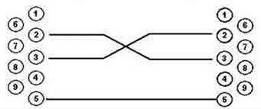
DB-9 socket DB-9 socket
LTP-4/8X rev.C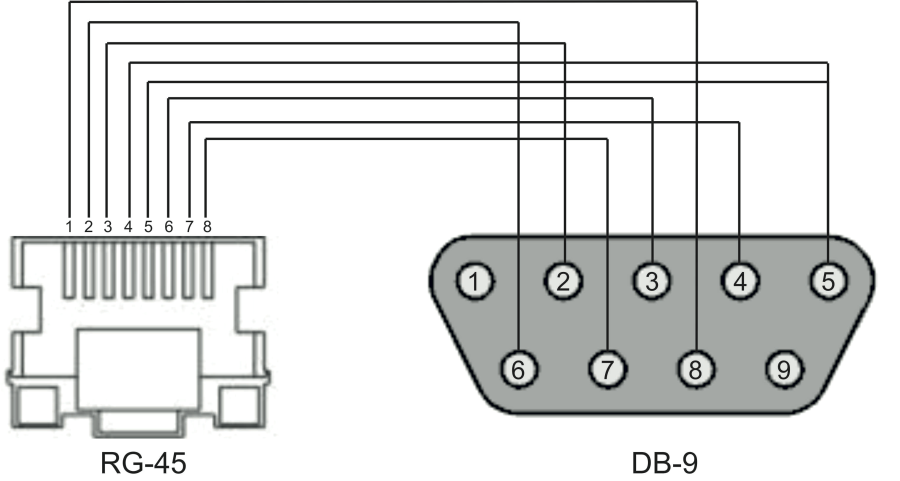
Appendix D. ONT NTU-1 configuration
Objective
Configure the terminal in bridge mode, data transmission to the ONT side will be carried out in VLAN 2149.
Solution
A distinctive feature of ONT NTU-1 is its operation only in bridge mode; full configuration is performed by OLT via OMCI protocol without using an ACS server. Add the required VLAN to the LTP switch configuration.
Go to the SWITCH mode
LTP-X# switch

SWITCH configuration mode
LTP-X(switch)# configure

Add the required VLAN
LTP-X(switch)(config)# vlan 2149

Receive the traffic in VLAN from frontport 0
LTP-X(switch)(config-vlan)# tagged front-port 0

Transmit tagged to all pon ports*
LTP-X(switch)(config-vlan)# tagged pon-port 0 – 7
LTP-X(switch)(config-vlan)# exit

Apply the configuration
LTP-X(switch)(config)# commit
LTP-X(switch)(config)# exit
LTP-X(switch)# exit
* The command is applicable for:
LTP-8Х rev.B with HW_revision 2vХ.
LTP-8Х rev.С with HW_revision 1vХ.
For LTP-4X rev.B, the tagged pon-port 0 – 3 command is applied.
Cross-connect and Ports profile configuration
Go to the configuration mode
LTP-X# configure terminal

Create and switch to a Cross-Connect profile for the NTU-1
LTP-X(config)# profile cross-connect NTU1

Set bridge operation mode
LTP-X(config-cross-connect)("NTU1")# bridge

Assign the given Cross-connect to bridge group 20
LTP-X(config-cross-connect)("NTU1")# bridge group 20
Specify service VLAN for the given service
LTP-X(config-cross-connect)("NTU1")# outer vid 2149
LTP-X(config-cross-connect)("NTU1")# exit

Create and switch to profile for the NTU-1
LTP-X(config)# profile ports NTU1

Add port 0 to bridge group 20
LTP-X(config-ports)("NTU1")# port 0 bridge group 20

Apply the configuration
LTP-X(config-ports)("NTU1")# do commit

Save the configuration
LTP-X(config-ports)("NTU1")# do save
Adding and configuring ONT NTU-1.
Go to the configuration mode
LTP-X# configure terminal

Go to tree 0 ONT ID 3
LTP-X(config)# interface ont 0/3

Assign the required ONT to this position
LTP-X(config)(if-ont-0/3)# serial 454C545862000078

Assign ports NTU-1 profile
LTP-X(config)(if-ont-0/3)# profile ports NTU1

Assign cross-connect NTU-1 profile
LTP-X(config)(if-ont-0/3)# service 0 profile cross-connect NTU1

Assign default DBA profile
LTP-X(config)(if-ont-0/3)# service 0 profile dba dba-00

Apply the configuration
LTP-X(config)(if-ont-0/3)# do commit

Save the configuration
LTP-X(config)(if-ont-0/3)# do save
Configuration example for transmitting multiple VLANs in TRUNK mode via ONT NTU-1
In the current firmware version, it is possible to transmit up to 8 VLANs in trunk mode via ONT NTU-1.
In the example, transmission of VLANs 100 and 200 will be considered.
Add the required VLAN to the LTP switch configuration.
Go to the SWITCH mode
LTP-X# switch

SWITCH configuration mode
LTP-X(switch)# configure
Add the required VLAN
LTP-X(switch)(config)# vlan 100,200

Receive the traffic in VLAN from frontport 0
LTP-X(switch)(config-vlan)# tagged front-port 0

Transmit tagged to all pon ports*
LTP-X(switch)(config-vlan)# tagged pon-port 0 – 7

Apply the configuration
LTP-X(switch)(config-vlan)# exit
LTP-X(switch)(config)# commit
LTP-X(switch)(config)# exit
LTP-X(switch)# exit
* The command is applicable for:
LTP-8Х rev.B with version HW_revision 2vХ.
LTP-8Х rev.С with HW_revision 1vХ.
For LTP-4X rev.B, the tagged pon-port 0 – 3 command is applied.
Cross-connect and Ports profile configuration
Go to the configuration mode
LTP-X# configure terminal

Create and switch to a Cross-Connect profile for the NTU-1
LTP-X(config)# profile cross-connect NTU100

Set bridge operation mode
LTP-X(config-cross-connect)("NTU100")# bridge

Assign the given Cross-connect to bridge group 20
LTP-X(config-cross-connect)("NTU100")# bridge group 20

Specify service VLAN for the given service
LTP-X(config-cross-connect)("NTU100")# outer vid 100

Specify user VLAN for the given service
LTP-X(config-cross-connect)("NTU100")# user vid 100
LTP-X(config-cross-connect)("NTU100")# exit

Create and switch to a Cross-Connect profile for the NTU-1
LTP-X(config)# profile cross-connect NTU200

Assign the given Cross-connect to bridge group 20
LTP-X(config-cross-connect)("NTU200")# bridge group 20

Specify service VLAN for the given service
LTP-X(config-cross-connect)("NTU200")# outer vid 200

Specify user VLAN for the given service
LTP-X(config-cross-connect)("NTU200")# user vid 200
LTP-X(config-cross-connect)("NTU200")# exit
Create and switch to profile for the NTU-1
LTP-X(config)# profile ports NTU1

Add port 0 to bridge group 20
LTP-X(config-ports)("NTU1")# port 0 bridge group 20

Apply the configuration
LTP-X(config-ports)("NTU1")# do commit

Save the configuration
LTP-X(config-ports)("NTU1")# do save
Adding and configuring ONT NTU-1.
Go to the configuration mode
LTP-X# configure terminal

Go to tree 0 ONT ID 3
LTP-X(config)# interface ont 0/3

Assign the required ONT to this position
LTP-X(config)(if-ont-0/3)# serial 454C545862000078

Assign ports NTU1 profile
LTP-X(config)(if-ont-0/3)# profile ports NTU1

Assign cross-connect NTU-1 profile
LTP-X(config)(if-ont-0/3)# service 0 profile cross-connect NTU100

Assign default DBA profile
LTP-X(config)(if-ont-0/3)# service 0 profile dba dba-00

Assign cross-connect NTU-1 profile
LTP-X(config)(if-ont-0/3)# service 1 profile cross-connect NTU200

Assign default DBA profile
LTP-X(config)(if-ont-0/3)# service 1 profile dba dba-00

Apply the configuration
LTP-X(config)(if-ont-0/3)# do commit
APPENDIX E. ONT SFP-ONU configuration
Objective
Configure the terminal in bridge mode, data transmission to the ONT side will be carried out in VLAN 2149.
Solution
A distinctive feature of ONT SFP-ONU is its operation only in bridge mode; full configuration is performed by OLT using OMCI protocol without using an ACS server.
Add the required VLAN to the LTP switch configuration.
Go to the SWITCH mode
LTP-X# switch

SWITCH configuration mode
LTP-X(switch)# configure

Add the required VLAN
LTP-X(switch)(config)# vlan 2149

Receive the traffic in VLAN from frontport 0
LTP-X(switch)(config-vlan)# tagged front-port 0

Transmit tagged to all pon ports*
LTP-X(switch)(config-vlan)# tagged pon-port 0 – 7
LTP-X(switch)(config-vlan)# exit

Apply the configuration
LTP-X(switch)(config)# commit
LTP-X(switch)(config)# exit
LTP-X(switch)# exit
* The command is applicable for:
LTP-8Х rev.B with version HW_revision 2vХ.
LTP-8Х rev.С with HW_revision 1vХ.
For LTP-4X rev.B, the tagged pon-port 0 – 3 command is applied.
Cross-connect and Ports profile configuration.
Go to the configuration mode
LTP-X# configure terminal

Create and switch to a Cross-Connect profile for the NTU-1
LTP-X(config)# profile cross-connect SFP

Set bridge operation mode
LTP-X(config-cross-connect)("NTU1")# bridge

Assign the given Cross-connect to bridge group 20
LTP-X(config-cross-connect)("NTU1")# bridge group 20
Specify service VLAN for the given service
LTP-X(config-cross-connect)("NTU1")# outer vid 2149
LTP-X(config-cross-connect)("NTU1")# exit

Create and switch to profile for the SFP-ONU
LTP-X(config)# profile ports SFPONU

Add port 0 to bridge group 20
LTP-X(config-ports)("NTU1")# port 0 bridge group 20

Apply the configuration
LTP-X(config-ports)("NTU1")# do commit

Save the configuration
LTP-X(config-ports)("NTU1")# do save
Adding and configuring ONT SFP-ONU.
Go to the configuration mode
LTP-X# configure terminal

Go to tree 0 ONT ID 3
LTP-X(config)# interface ont 0/3

Assign the required ONT to this position
LTP-X(config)(if-ont-0/3)# serial 454C545862000078

Assign ports SFPONU profile
LTP-X(config)(if-ont-0/3)# profile ports SFPONU

Assign cross-connect SFP-ONU profile
LTP-X(config)(if-ont-0/3)# service 0 profile cross-connect SFP

Assign default DBA profile
LTP-X(config)(if-ont-0/3)# service 0 profile dba dba-00

Apply the configuration
LTP-X(config)(if-ont-0/3)# do commit

Save the configuration
LTP-X(config)(if-ont-0/3)# do save
Configuration example for transmitting multiple VLANs in TRUNK mode via ONT SFP-ONU
In the current firmware version, it is possible to transmit up to 8 VLANs in trunk mode via ONT SFP-ONU.
In the example, transmission of VLANs 100 and 200 will be considered.
Add the required VLAN to the LTP switch configuration.
Go to the SWITCH mode
LTP-X# switch

SWITCH configuration mode
LTP-X(switch)# configure
Add the required VLAN
LTP-X(switch)(config)# vlan 100,200

Receive the traffic in VLAN from frontport 0
LTP-X(switch)(config-vlan)# tagged front-port 0

Transmit tagged to all pon ports
LTP-X(switch)(config-vlan)# tagged pon-port 0 – 7

Apply the configuration
LTP-X(switch)(config-vlan)# exit
LTP-X(switch)(config)# commit
LTP-X(switch)(config)# exit
LTP-X(switch)# exit
Cross-connect and Ports profile configuration.
Go to the configuration mode
LTP-X# configure terminal

Create and switch to a Cross-Connect profile for the SFP-ONU
LTP-X(config)# profile cross-connect SFP100

Set bridge operation mode
LTP-X(config-cross-connect)("SFP100")# bridge

Assign the given Cross-connect to bridge group 20
LTP-X(config-cross-connect)("SFP100")# bridge group 20

Specify service VLAN for the given service
LTP-X(config-cross-connect)("SFP100")# outer vid 100

Specify user VLAN for the given service
LTP-X(config-cross-connect)("SFP100")# user vid 100
LTP-X(config-cross-connect)("SFP100")# exit

Create and switch to a Cross-Connect profile for the SFP-ONU
LTP-X(config)# profile cross-connect SFP200

Assign the given Cross-connect to bridge group 20
LTP-X(config-cross-connect)("SFP200")# bridge group 20

Specify service VLAN for the given service
LTP-X(config-cross-connect)("SFP200")# outer vid 200

Specify user VLAN for the given service
LTP-X(config-cross-connect)("SFP200")# user vid 200
LTP-X(config-cross-connect)("SFP200")# exit

Create and switch to profile for the SFP-ONU
LTP-X(config)# profile ports SFPONU

Add port 0 to bridge group 20
LTP-X(config-ports)("SFPONU")# port 0 bridge group 20

Apply the configuration
LTP-X(config-ports)("SFPONU ")# do commit
Save the configuration
LTP-X(config-ports)("SFPONU ")# do save
Adding and configuring ONT SFP-ONU.
Go to the configuration mode
LTP-X# configure terminal

Go to tree 0 ONT ID 3
LTP-X(config)# interface ont 0/3

Assign the required ONT to this position
LTP-X(config)(if-ont-0/3)# serial 454C545862000078

Assign ports SFPONU profile
LTP-X(config)(if-ont-0/3)# profile ports SFPONU

Assign cross-connect SFP-ONU profile
LTP-X(config)(if-ont-0/3)# service 0 profile cross-connect SFP100

Assign default DBA profile
LTP-X(config)(if-ont-0/3)# service 0 profile dba dba-00

Assign cross-connect SFP-ONU profile
LTP-X(config)(if-ont-0/3)# service 1 profile cross-connect SFP200

Assign default DBA profile
LTP-X(config)(if-ont-0/3)# service 1 profile dba dba-00

Apply the configuration
LTP-X(config)(if-ont-0/3)# do commit
Configuration example for transmission via ONT SFP-ONU VLANs in TRUNK mode, several VLANs in Selective-tunnel mode and other VLANs in Tunnel mode
In firmware versions older than 3.26.0, it is possible to organize the trunk tunnel services through SFP-ONU.
VLAN 300 (multicast) and QinQ VLAN 1100 and 1200 (Internet) come to the uplink OLT. It is necessary to let them pass to the switch integrated in the OLT via SFP-ONU.
Consider the procedure of OLT configuration for the above diagram.
Step 1. Configure the switch.
LTP-X(switch)(config)# vlan 300,1100,1200
LTP-X(switch)(config-vlan-range)# tagged pon-port 0
LTP-X(switch)(config-vlan-range)# front-port 0
LTP-X(switch)(config-vlan-range)# commit
Step 2. Configure cross-connect profiles.
LTP-X(config)# profile cross-connect cc-tunnel
LTP-X(config-cross-connect)("cc-tunnel")# bridge
LTP-X(config-cross-connect)("cc-tunnel")# bridge group 10
LTP-X(config-cross-connect)("cc-tunnel")# tag-mode tunnel
LTP-X(config-cross-connect)("cc-tunnel")# exit
LTP-X(config)# profile cross-connect "cc-selecttunnel"
LTP-X(config-cross-connect)("cc-selecttunnel")# bridge
LTP-X(config-cross-connect)("cc-selecttunnel")# bridge group 10
LTP-X(config-cross-connect)("cc-selecttunnel")# tag-mode selective-tunnel
LTP-X(config-cross-connect)("cc-selecttunnel")# exit
LTP-X(config)# profile cross-connect "cc-single"
LTP-X(config-cross-connect)("cc-single")# bridge
LTP-X(config-cross-connect)("cc-single")# bridge group 10
LTP-X(config-cross-connect)("cc-single")# user vid 300
LTP-X(config-cross-connect)("cc-single")# exit
Step 3. Configure ports profiles.
LTP-X(config)# profile ports bridge-10
LTP-X(config-ports)("bridge-10")# port 0 bridge group 10
Step 4. Configure address-table profile by specifying the VLANs used for tunnels and assign the profile to GPON ports.
LTP-X(config)# profile address-table at-tunnel
LTP-X(config-address-table)("at-tunnel")# s-vlan 1100 use c-vlan
LTP-X(config-address-table)("at-tunnel")# s-vlan 1200 use c-vlan
LTP-X(config-address-table)("at-tunnel")# exit
LTP-X(config)# interface gpon-port 0
LTP-X(config)(if-gpon-0)# profile address-table at-tunnel
Step 5. Configure SFP-ONU to be used for switch connection.
LTP-X(config)# interface ont 0/0
LTP-X(config)(if-ont-0/0)# serial "454C545300000001"
LTP-X(config)(if-ont-0/0)# service 0 profile cross-connect cc-tunnel dba dba-00
LTP-X(config)(if-ont-0/0)# service 1 profile cross-connect cc-selecttunnel dba dba-00
LTP-X(config)(if-ont-0/0)# service 2 profile cross-connect cc-single dba dba-00
LTP-X(config)(if-ont-0/0)# profile ports "bridge-10"
LTP-X(config)(if-ont-0/0)# service 0 custom svid 1100
LTP-X(config)(if-ont-0/0)# service 1 custom svid 1200
LTP-X(config)(if-ont-0/0)# service 1 selective-tunnel uvid 201-203
LTP-X(config)(if-ont-0/0)# service 2 custom svid 300
APPENDIX F. ONT/GPON interface status table
ONT status description
ONT status | Description |
|---|---|
UNACTIVATED | ONT has no configurations |
ALLOCATED | ONT detected |
AUTHINPROGRESS | ONT authentication is in progress |
AUTHFAILED | Authentication failed |
AUTHOK | Authentication successfully completed |
PRECONFIG | Preparing ONT for configuration |
CFGINPROGRESS | ONT configuration is in progress |
CFGFAILED | Configuration failed |
OK | ONT is in operation |
BLOCKED | ONT is blocked |
MIBRESET | ONT MIB reset |
FAILED | ONT has a critical failure |
FWUPDATING | ONT firmware update is in progress |
DISABLED | ONT is disabled (technically blocked) |
GPON interface states
Value | Description |
|---|---|
INITED | The channel is initialised |
CFGINPROGRESS | The channel configuration is in progress |
CFGFAILED | The channel configuration completed with error |
OK | The channel is in operation |
FAILED | The channel is out of operation |
DISABLED | The channel is disabled |
TECHNICAL SUPPORT
For technical assistance in issues related to handling Eltex Ltd. equipment, please, address to Service Center of the company:
Feedback form on the website: https://eltex-co.com/support/
Servicedesk: https://servicedesk.eltex-co.ru
Visit ELTEX official website to get the relevant technical documentation and software for Eltex Ltd. equipment:
Official website: https://eltex-co.com/
Download center: https://eltex-co.com/support/downloads