Оглавление
| Предупреждение |
|---|
Before installation, please read the Personnel and equipment requirements. |
Setting the time zone
When installing Ubuntu-22.04, it is not suggested to specify the time zone (default time is UTC). It is necessary to set it manually (for correct operation of the video archive, access calendars, etc.), for example
...
| Подсказка | ||
|---|---|---|
| ||
For example, Novosibirsk city: timedatectl list-timezones | grep "Novosibirsk" |
Ubuntu 22.04 operating system update
It is necessary to update the operating system before installation.
| Блок кода | ||
|---|---|---|
| ||
sudo apt update sudo apt upgrade |
Platform installation in mono-auto mode
| Подсказка |
|---|
All components are installed on the one server. The following packages will be installed: evi-core, evi-scud, evi-live, evi-archive, evi-analyzer, evi-web, evi-video-client, evi-analytics. |
...
| Предупреждение |
|---|
The script is designed for installing the server part on a clean system. |
Downloading and extracting the script
| Блок кода | ||
|---|---|---|
| ||
wget --no-check-certificate https://archive.eltex-co.ru/evi-raw/evi-1.5.0/evi-1.5.0_install.sh |
Running the installation script
In the same directory, run the following command in the server console:
...
- EVI-CORE, EVI-CORE-WEB, EVI-SCUD, EVI-PERIMETER, EVI-ANALYZER, EVI-ARCHIVE — corresponding modules will be installed: evi-core, evi-core-web, evi-scud, evi-perimeter, evi-analyzer, evi-archive;
- EVI-VIDEO-CLIENT — desktop graphical Linux application will be installed. For more information, see the EVI Video Client desktop application section.
- EVI-ANALYTICS — video analytics module will be installed (requires a discrete graphics card).
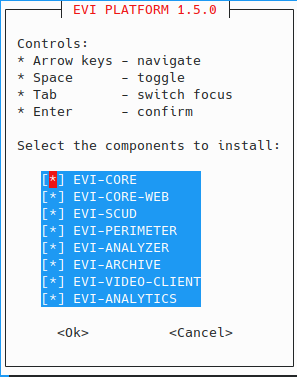
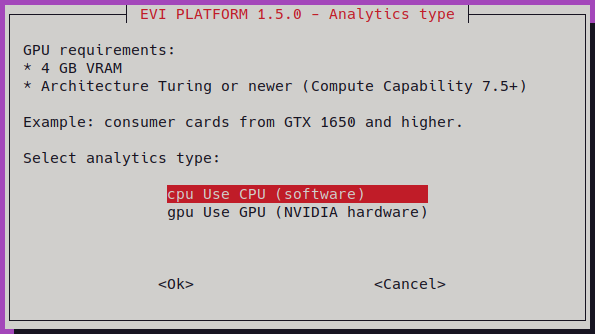
If EVI-ANALYTICS is selected, a dialog box will appear asking you to choose the component which the service will use to run:
- CPU — central processing unit;
- GPU — graphics card.
If version 1.4.x is installed, a dialog box will appear during installation prompting you to migrate the database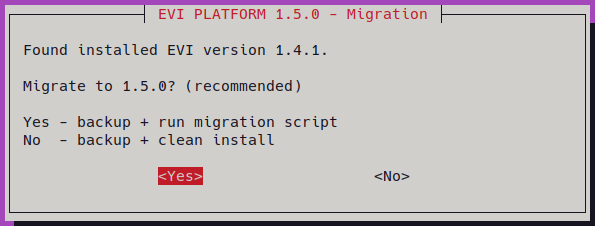
Upon completion, the following output should appear:
...