...
If you want to add a new SSID to the APs in a separate VLAN, you have to configure that VLAN on all switches. If your network is large, this is quite difficult to do. To simplify networking, an ESR is used to build tunnels between the APs and the router that hide the MAC addresses of Wi-Fi customers and do not clog the tables of the network equipment through which the tunnels pass. With this setup, the switches do not know what VLANs are being used within the tunnel, hence you do not have to configure them.
Configuring ESR
Configuring ESR when connecting an AP via L2 access network (WiFi L2 diagram)
The architecture of the solution, when connecting APs via an L2 network, assumes that there will be VLANs allocated for the AP management subnet and VLANs allocated for the SSID user subnet. A new separate VLAN will be allocated for each additional SSID. All VLANs will be terminated on the ESR. This connection scheme is called WiFi L2.
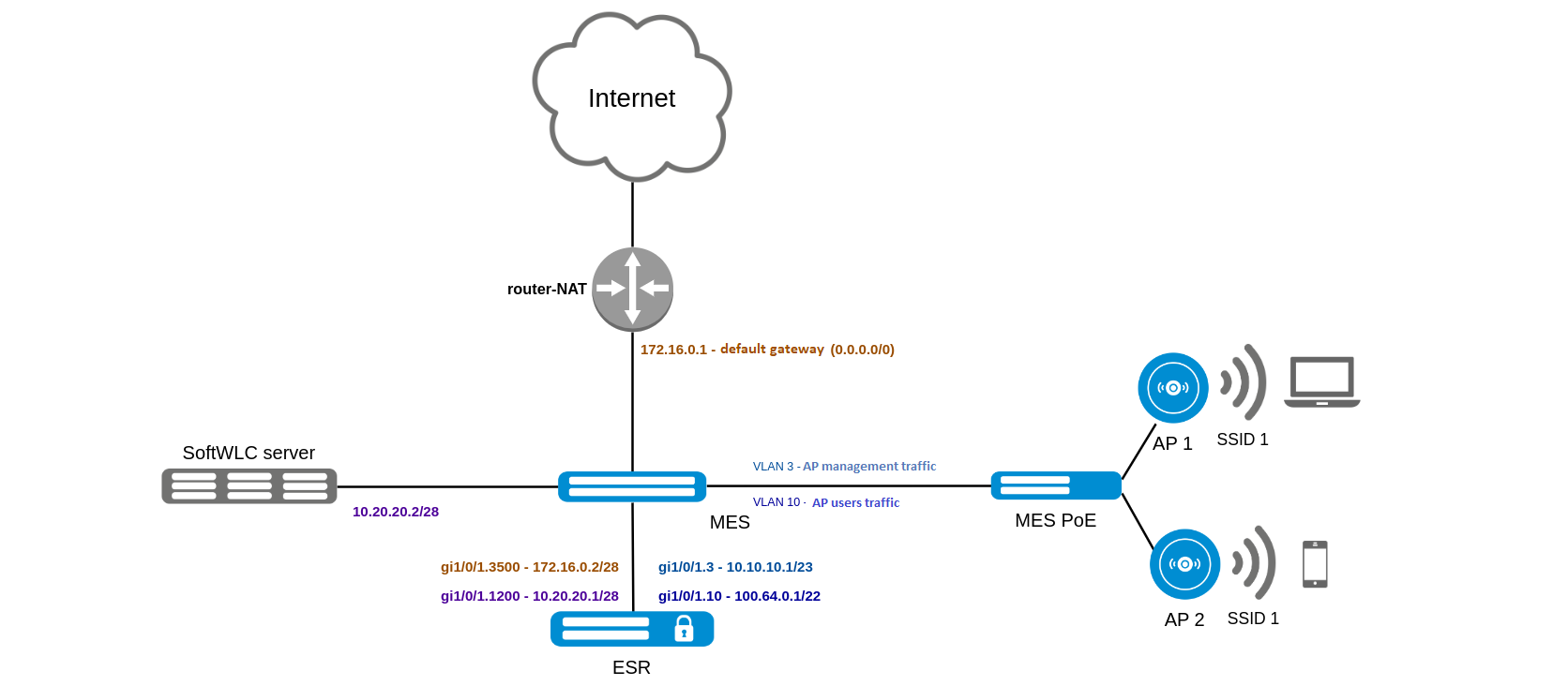
Configuring ESR when connecting an AP via L2 access network (WiFi L3 diagram)
Allocating and configuring VLAN when connecting new APs can be not an easy task. It is also not always possible to provide L2 channel from AP to ESR. In this case, it is necessary to use the scheme of connecting APs via the L3 network of the operator. The architecture of the solution assumes that the operator's access network provides L3 connectivity between the ESR, SoftWLC and the primary address of the AP. In this case AP builds L2 GRE (EoGRE) tunnels, that eliminates the need to run VLAN via the operator's access network from AP to ESR. It is enough to terminate AP's VLAN on any router or L3 switch supporting DHCP-relay to give the AP a primary address with option 43 containing ESR addresses for building GRE tunnels. On the ESR side, the automatic building of counter tunnels function (wireless-controller) is configured. This connection scheme is called WiFi L3.
...
Instructions for configuring ESR reservation can be found in BRAS/BRAS in vrf. L3 WiFi – setup guide with reservation
BRAS functions in L3 switching scheme are supported by Eltex ESR-100/200/1000/1200/1500/1700 service routers. This functions enable to identify Wi-Fi users connecting to access points manufactured by different manufacturers. In general, the following functions are required from BRAS:
...
Instructions for configuring a DHCP server can be found here.
Configuring the option 43
...
To learn how to configure option 43 on the DHCP server, see the link.
Preparing for installation
The first step is to install the SoftWLC controller on the server. Detailed instructions for installation can be found here.
To install SoftWLC in a minimal configuration, a server must have the following parameters:
RAM at least 8 GB
CPU >= 2200 MHz
Hard drive memory >= 35 GB
Internet connection
Ubuntu Server 18.04 LTS operating system
Read more about server requirements at the link.
Reserving a SoftWLC
Reservation of SoftWLC controllers is necessary to synchronize critical system files (settings, firmware files, data uploads), MySQL databases, MongoDB databases, and DHCP servers. This scheme ensures availability of service and up-to-date data on both controllers in case of one controller failure, network unavailability, or power supply problems.
...
Documentation on configuring reservation can be found here.
Initializing an AP
To start working with the AP with the controller, the AP must be initialized in the EMS. In order for the device to come to initialization, perform the following:
...
This point is described in details in the following documentation: Quickstart, AP initialization.
Creating an SSID with Enterprise authorization
...
To configure an SSID with Enterprise authorization, use the following instruction.
Eltex-radius has an option to proxy to a third-party server.
When a wireless client wants to connect to a Wi-Fi network, it sends an access request to the wireless access point. After the access point receives the user credentials, it sends this information to the eltex-radius server which will forward the connection request to the external radius server. The external radius server analyzes this request and allows or denies the credentials. If the credentials entered are correct, we will be able to connect to the wireless network without any problem, otherwise an authentication error will be returned.
...
- Enable Captive Portal mode in the access point settings;
- Create a new SSID with the Hotspot authorization type;
- Add SSID binding to the AP;
- Add a tariff plan for RADIUS;
- Activate a tariff plan on the portal.
The step-by-step instruction for configuration can be found here.