Available for SMG-3016 only.
In the transit scheme of interaction with the geographical separation of SMG from SSW, signaling as well as the media is processed on the server with softswich (by default, msr is installed on the host with ssw). As a result, when calling within one SMG, all media had to be sent through SSW (figure 60).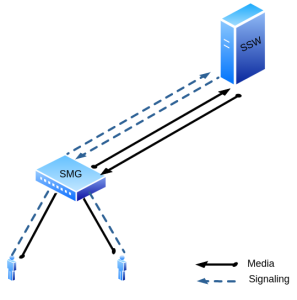
Figure 60 — MSR is on the SSW
For such cases, a media server was installed on the SMG. When a connection is established, SSW indicates MSR on SMG as a media processor, as a result of which rtp does not go to the upstream server, but processed locally on the SMG (figure 61).
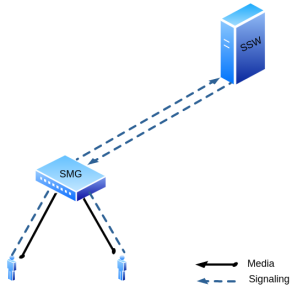
Figure 61 — MSR is on the SMG
Media server settings
The media server activation is only available with an SMG-MSR license, more details about licenses see in the Licenses section.
In the configuration file, which is located at the path /etc/config/ecss_msr_ena, the line ECSS_MSR_ENA=no should be replaced with ECSS_MSR_ENA=yes.
The whole setup comes down to changing the configuration file located at /etc/config/config.xml
To edit the file, you can use the vi. editor on the SMG (vi /etc/config/config.xml).
The settings of configuration files can be changed in the directory: /etc/ecss/ecss-media-server/conf.d for the config.xml file
This PAC is not designed for a large number of simultaneous calls and has performance limitations.
For the G711 codec, it is strongly recommended to make no more than 150 simultaneous calls.
For G729 codec, it is strongly recommended to make no more than 25 simultaneous calls
in case of using one thread-cnt (see default file example), in case of using two thread-cnt, the number of calls is increased up to 50.
Media server launch
The media server starts automatically when the system starts.
To operate, the service uses the configuration from the file
/etc/config/config.xml
When changing the configuration, you should restart the ecss-media-server service.
To do this, terminate the ecss-media-server process and it will start with a new configuration.
pkill -2 ecss-media-server
Example of setting up MSR with Softswitch
The necessary MSR settings on the SMG are made in the shell command string.
Changing the configuration is done by changing the config.xml file
vi /etc/config/config.xml
In our case it will look like this:
<config>
    <general log-level="3" max-calls="1000" max-in-group="3"
	tread-cnt="2" syslog="no"/>
    <transport bind-addr="192.168.114.79" port="5080" transport="udp" />
    <media use-vad="no" port-start="15000" port-range="5000" rtcp-timeout="15" />
    <codec pcma="1" pcmu="2" g729="3" ilbc="4" gsm="5" g722="6"/>
    <accounts>
         <dynamic msr_name="msr.smg" realm="sip:192.168.114.90:5000" dtmf_mode="rfc+inband+info" auth_name="user" auth_password="password" />
    </accounts>
    <pbyte>
        <mcc bind-addr="192.168.114.79" port="51000" />
    </pbyte>
    <conf_dir path="/etc/config/conf.d"/>
</config>
where:
- 192.168.114.79 – IP address of SMG,
- 192.168.114.90 – IP address of SSW.
You should restart MSR for the changes to take effect.
pkill -2 ecss-media-server
If the configuration is correct, the MSR will send the registration to the IP address of SSW:
REGISTER sip:192.168.114.90:5000 SIP/2.0
Via: SIP/2.0/UDP 192.168.114.79:5080;rport;branch=z9hG4bKPjuUBlvIWbHOrgYXYLRVCBkWRcJvNmZX4w
Max-Forwards: 70
From: <sip:bond1.1@msr.smg>;tag=ruTwS9WQ7HaSalkcdz9J9NJBpCntQUGl
To: <sip:bond1.1@msr.smg>
Call-ID: Nm96ZyfgH9ND8ZFDXhUzsQcDrYnw7hRq
CSeq: 1 REGISTER
P-Eltex-MSR-Iface-Name: bond1.1
P-Eltex-MSR-Iface-Addr: 192.168.114.79
P-Eltex-MSR-CC-Addr: 192.168.114.79
P-Eltex-MSR-CC-Port: 51000
P-Eltex-MSR-Name: msr.smg
P-Eltex-Max-Calls: 1000
User-Agent: Eltex media-server 3.14.11.1
Contact: <sip:bond1.1@192.168.114.79:5080>
Expires: 3600
Allow: PRACK, INVITE, ACK, BYE, CANCEL, UPDATE, INFO, SUBSCRIBE, NOTIFY, REFER, MESSAGE, OPTIONS
Content-Length:  0
On the softswitch side, this MSR should be declared (the command is executed in cocon):
system/media/resource/declare core1@ecss1 contact bond1.1@msr.smg default local true
To check the status, use the command:
system/media/resource/list