To be able to monitor in real time emergency situations occurring on the device it is necessary to configure work with the monitoring system.
The absence of any accidents is considered normal operation; when an emergency event occurs, the device state changes to emergency, and when all current alarms are normalized normal operating condition is restored.
Possible device status indications:
- light indication on the front panel – Alarm LED (indication of the Alarm LED is described in the Device light indication),
- indication of the most critical accident in the header of the web configurator (more detailed information is provided in the operation log),
- transmission of accident events to the monitoring system via the SNMP protocol (trap, inform).
Events for which emergency conditions are generated are divided into unconditional and optional:
- Unconditional – accidents, the issuance of indications about which is not configurable, these include:
- CONFIG – critical error, configuration file error;
- SIPT-MODULE – critical accident, failure of the software module responsible for the operation IP telephony;
- SM-VP DEVICE – accident, malfunction of the SM-VP IP submodule;
- SYNC – an accident when the synchronization source is lost, or a warning during operation from a low-priority synchronization source;
- CDR-FTP – critical alarm, alarm or warning, occurs when there is an error transferring CDR data to an FTP server, the level of failure is determined by the volume of CDR data awaiting transmission to the server;
- PM-POWER-STATE – warning about the lack of voltage at the output of one of the installed power supplies.
- Optional – accidents, the indication of which is configured by the corresponding settings, these include:
- STREAM – critical accident, E1 stream is not working;
- STREAM-REMOTE – warning, remote E1 stream failure;
- STREAM-SLIP – warning on slip stream;
These alarms are configured in the setting of the physical parameters of E1 stream (section Physical settings). - LINKSET – critical accident, SS7 linkset is not in operation;
- SS7LINK – accident, problems on the SS7 signal channel;
- TRUNK-CPS – exceeding the specified number of calls per second on a trunk group.
These accidents are configured in the settings of SS7 linkset (section SS7 Linkset).
By default, indication of optional alarms is disabled, i. e. when interacting with monitoring systems, it is necessary to configure alarm indication for all active E1 strems and SS7 Linksets.
To interact with the monitoring system via SNMP protocol, you must enable SNMP protocol and configure the retrieval of SNMP TRAP or INFORM messages to the IP address of the monitoring server.
Setting parameters via the web configurator
- Configuring the indication of optional alarms when configuring the E1 stream (‘E1 streams/Physical parameters’ menu, see Physical settings).
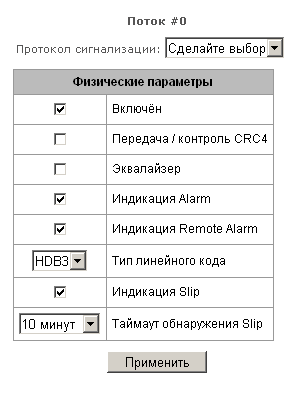
To indicate LOS and AIS failures on the E1 stream, you must set the ‘Alarm Indication’ flag.
To indicate an RAI failure, you must set the ‘Remote Alarm Indication’ flag.
To indicate slippage (SLIP) on a stream, you must set the ‘Indication SLIP’ and configure the SLIP detection timeout.
Configuring the indication of optional alarms when configuring SS7 Linkset (‘Call routing/SS7 Linkset’ menu, see SS7 Linkset).
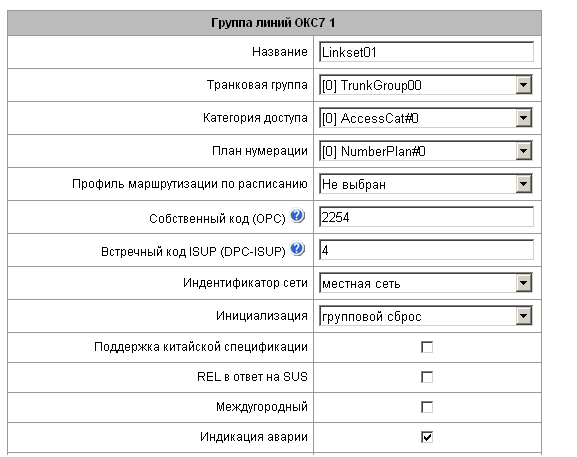
To indicate an alarm about SS7 Linkset failure, set the ‘Alarm Indication’ flag.
- The SNMP protocol is enabled in the ‘TCP/IP Settings/Network interfaces’ menu (section Network interfaces).
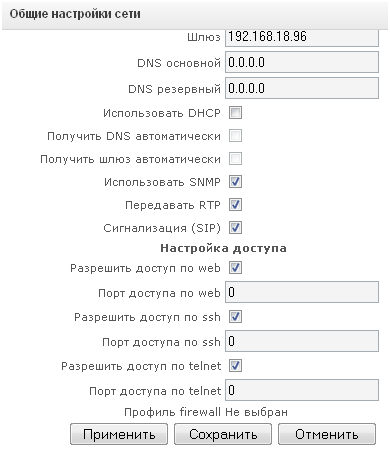
To configure, set the ‘Use SNMP’ flag.
- SNMP traps are configured in the ‘Network Services/SNMP’ menu (section SNMP settings).
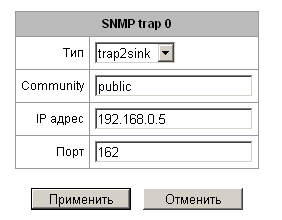
To configure, specify the type of SNMP message (TRAPv1, TRAPv2, INFORM), password (Community), IP address and port of the SNMP trap receiver.
After setting up and applying the configuration, restart the SNMP agent by clicking ‘Restart SNMPd’ button.