Available only for SMG-2016/3016.
Starting from version 3.14.0, the redundancy function is implemented on SMG. This function is enabled automatically by installing an additional SMG-RESERVE license on the master device and SMG-RESERVE-SLAVE on the redundant one. The principle of operation is that the slave device is in sleep mode (SLAVE), it performs no functions and has no IP address on the network, monitors the main device (MASTER) constantly and, as soon as the MASTER fails, the SLAVE takes over all functions, completely replacing the failed MASTER device. To completely duplicate the functions, the slave device constantly updates the current configuration and other necessary files from the main device.
После смены старшинства в случае аварии либо вручную все установленные соединения будут разрушены. Вызовы, которые обслуживал предыдущий MASTER завершаются, все новые вызовы начинает обслуживать новый MASTER.
The SLAVE device activation occurs after connecting it to the MASTER device by creating a LAN and WAN connection between them. As soon as the two devices see each other via these links, the lifetime of the SLAVE device will be updated to 720 hours. This is the time of full operation of the SLAVE device without MASTER (in case MASTER failed for some reason and was disconnected from the SLAVE device). If the pair is assembled successfully and the gateway with the SMG-RESERVE license performs the MASTER role, the time on the gateway with the SMG-RESERVE-SLAVE license is restored to 720 hours.
To restore the lifetime on the SLAVE device, there muct be two connections, both via LAN and WAN links. The recovery time is 5 minutes.
If the lifetime of the SLAVE device ends:
- If there is a connected gateway with the SMG-RESERVE license — switchover will be made (a gateway with the SMG-RESERVE license will become a MASTER device);
- If there is no connected gateway with the SMG-RESERVE license — termination of active connections and operation (similar to the completion of the "demo" operation mode) will occur.
To provide redundancy functions, use only the same type of SMG-2016 devices.
Рекомендуемый порядок обновления устройств в резерве:
- Обновить устройство, которое является SLAVE.
- Убедиться, что резерв встал в работу. MASTER видит SLAVE на локальном и глобальном линках.
- Сделать смену старшинства. На MASTER раздел "Резервирование".
- Убедиться, что смена старшинства прошла успешно и новый MASTER работает.
Обновить новый SLAVE.
При обновлении резерва на версию 3.407.1 из-за обновления библиотек OpenSSH после обновления SLAVE устройства к нему пропадет доступ через web-интерфейс, при этом связь MASTER-SLAVE сохранится. Рекомендуется обновлять устройства по следующему алгоритму
- Обновить устройство, которое является SLAVE
- Убедиться, что резерв встал в работу. MASTER видит SLAVE на локальном и глобальном линках (доступ до web-интерфейса SLAVE пропадет)
- Обновить MASTER (после того как MASTER уйдет в перезапуск автоматически произойдет смена старшинства)
- Дождаться загрузки устройства, убедиться, что резерв встал в работу и появился доступ до web-интерфейса SLAVE
The typical connection schemes are below:
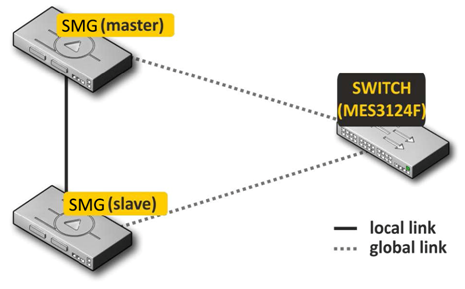
Figure 54 – Redundancy scheme with one switch
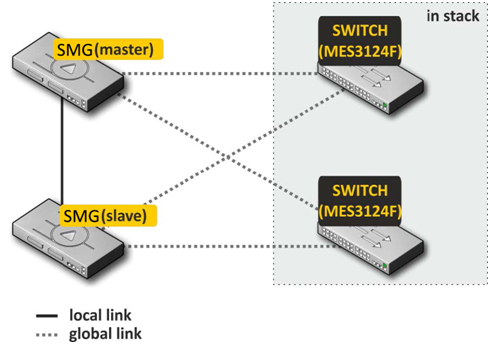
Figure 55 – Redundancy scheme with teo switches in stack
There are 2 types of front ports for redundancy at the device — local and global ones. For SMG-2016 ports 0 and 1 can be used as local, and 2, 3 as global ports. When connecting devices, communication is required via local and global link simultaneously. The redundancy scheme works via IPv6 protocol, devices exchange configuration and other necessary files to keep information up-to-date periodically during operation. VLAN 4091 is used for communication via the local link, and VLAN 4092 is used via the global one. In case of an interruption of the local link, the devices exchange files via the global link.
If one of the links connection is broken, the device initiates an alarm.
Procedure for redundancy connection and configuring
The case of connecting to two MES switches in stack will be considered (figure 55). Initial state: two SMG of the same type with the reserve license, two MES switches in stack. The stack configuration on the switches is performed in accordance with operation manuals for these switches.
Firstly, it's necessary to configure service VLANs at the switches. VLAN 4092 must be allowed on the ports where global SMG links will be connected. The ports must also pass traffic of other VLANs configured on the SMG. Also, the ports to which SMG will be connected must be combined into a port-channel. The final scheme at this stage will look like this:
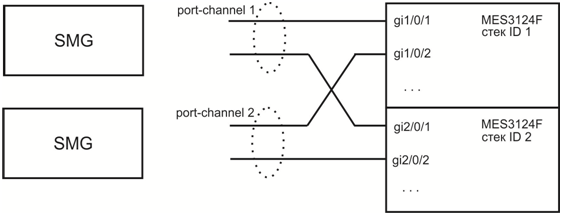
Figure 56 – The scheme of combining ports in port-chanel
Next, the master SMG should be connected. At this stage, only global links are connected. After that, SMG is put into operation and becomes the master. The scheme at this stage will look like this:
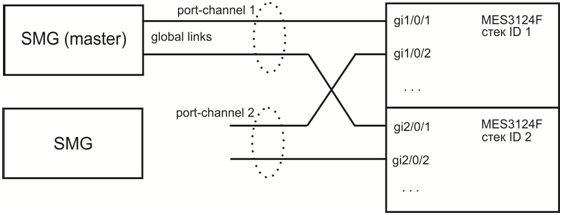
Figure 57 – Connection scheme of master SMG
After that, a slave SMG is connected to the master one via local link. It takes some time for devices to detect each other and start to work as a slave-master pair (see the Monitoring – Reservation section). The scheme at this stage will look like this:
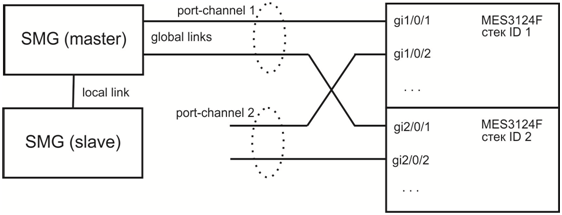
Figure 58 – Connection scheme of slave SMG
After the master-slave pair has been formed, global links can be connected to the slave device:
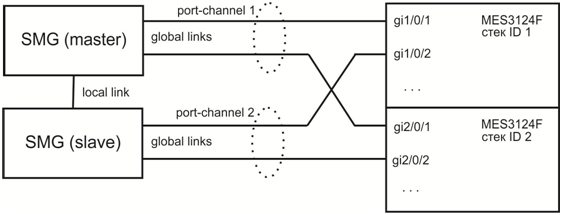
Figure 59 – Global links connection scheme
At this step, redundancy scheme is completely assembled. It's necessary to ensure in “monitoring” web section that SMGs see each other both via the local and via the global link.
If problems occur with establishing a master-slave relationship, or lack of visibility on local and global links, please check that all configuration steps were performed correctly.
Master determination
The following algorithm is used to determine which of the devices will be MASTER or SLAVE:
- If local links are not active when the device is turned on, then the device becomes MASTER;
- If global links are not active when the device is turned on, then the device becomes SLAVE;
- If a SLAVE is connected to a MASTER device during operation, there will be no switchover;
- If you connect a MASTER to another MASTER device during operation, then MASTER will be determined based on the serial number: whoever has a larger serial number will become a MASTER.
Block diagrams for master determination:
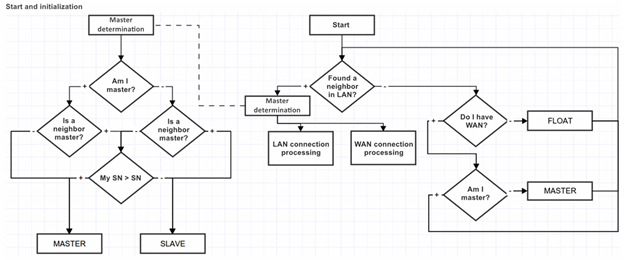
Processing connection via global or local link:
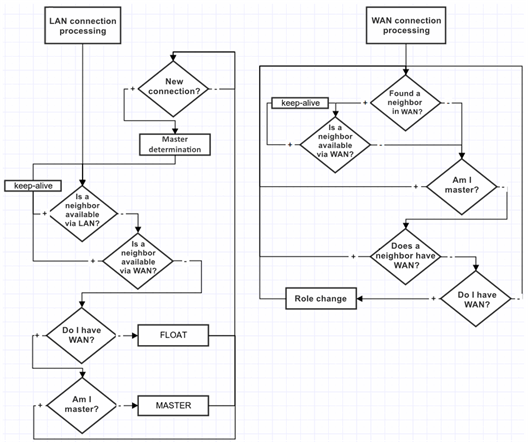
When connecting a device to already operating one, it is necessary to disconnect all WAN links on the connected device, connect the LAN link to the operating (MASTER) SMG, wait for approval, then connect the WAN links to the SLAVE (otherwise the newly connected device may be identified as a MASTER and transfer its outdated working files).
Working files are transferred immediately after connecting to the MASTER, every time when saving the configuration on flash, 10 seconds after each configuration change and periodically every 180 seconds.
List of files to be transferred between devices:
- configuration file recorded in flash;
- current running configuration file;
- crypto keys for creating ssh tunnels;
- database of registered subscribers;
- linux users files;
- user password files for web interface and CLI;
- all dynamic firewall access lists;
- keys and certificates for the https protocol.
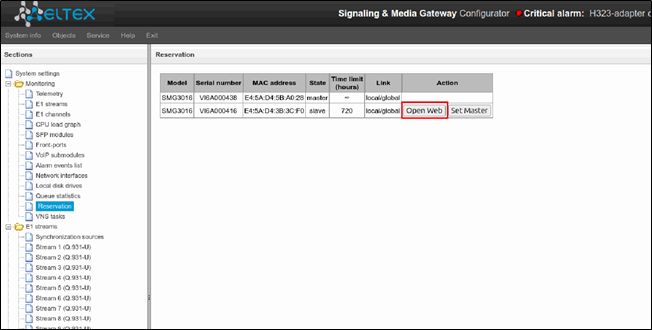
During operation, a user can access SLAVE web interface. To do this go to the tab ‘Monitoring’ — ‘Reservation’ — ‘open Web’, or follow the link http://<MASTER IP-address>:8080/login, where instead of 192.168.0.100 enter the MASTER IP address.
Redundancy of E1 streams
Starting from version 3.17.0, the E1 streams redundancy function is implemented on SMG. This function is activated automatically by installing an additional SMG-RESERVE-E1 license (SMG-RESERVE or SMG-RESERVE-SLAVE license is required). The principle of operation is the following: E1 streams stay turned off on the slave device, thereby eliminating the influence of PDCs “connected in parallel”. It allows to connect the streams from the master and slave devices in parallel at the patch panel, without affecting each other.
After device switchover, respective streams are switched between master and slave gateways. Active connections are destroyed during switchover.
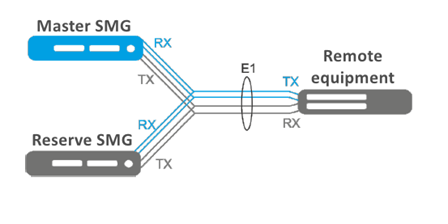
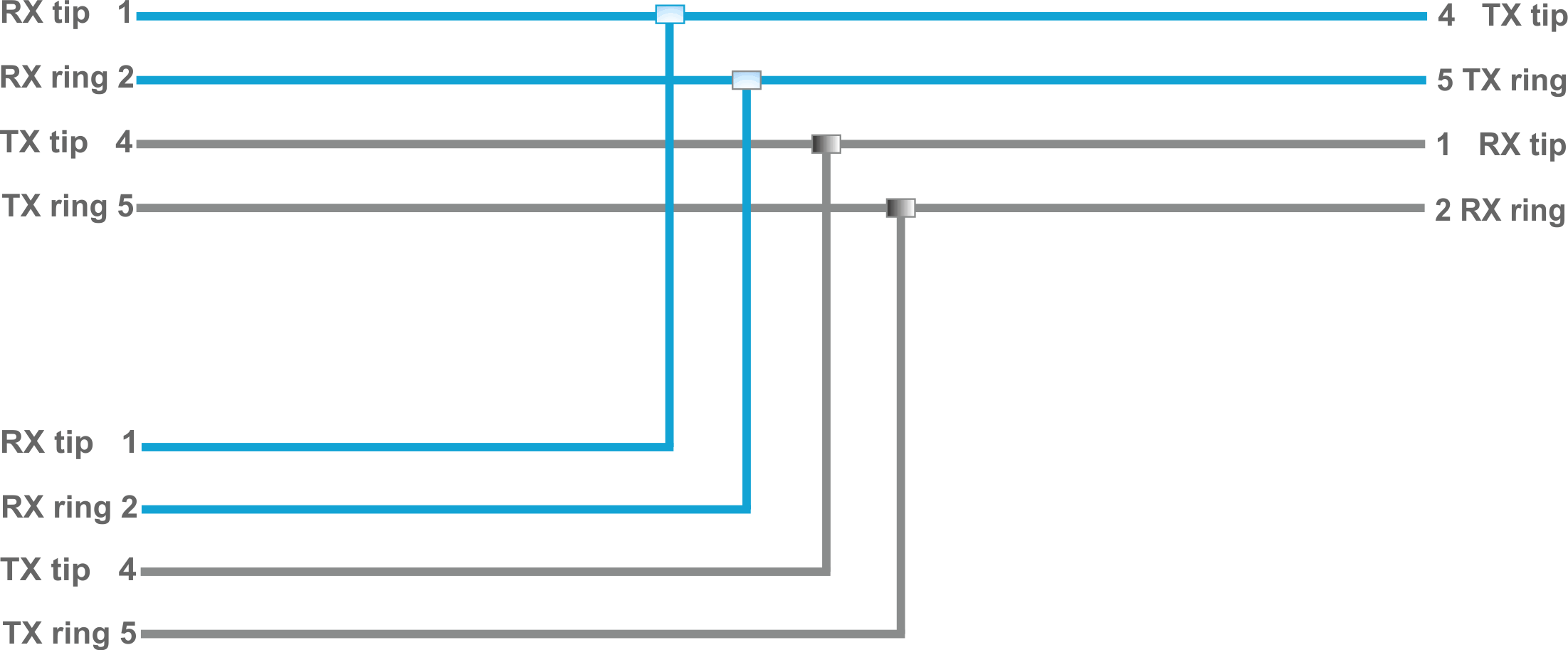
Схема распайки кабеля для резервирования Е1