SMG configuration for the integration of signalling and media streams from TDM and VoIP networks + SMG acting as an IP PBX
Use case
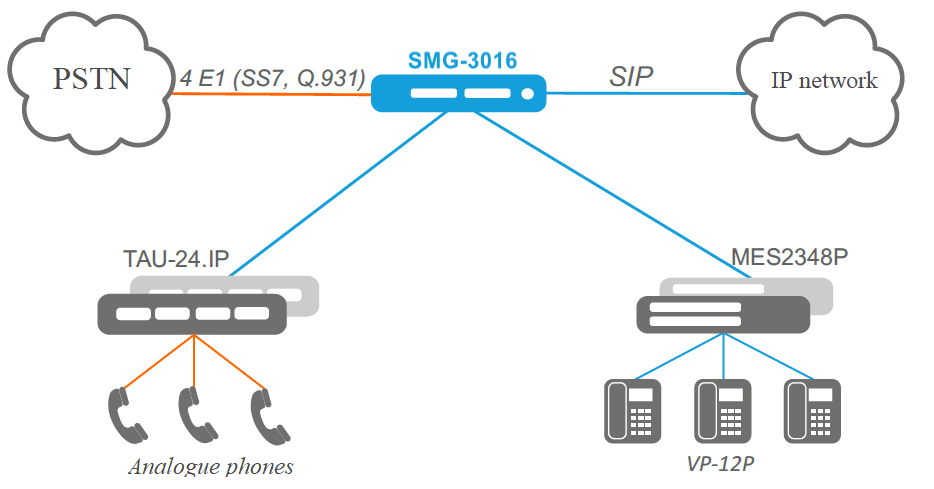
SMG configuration procedure
1. Configure the SIP profile to enable subscriber registration on SMG:
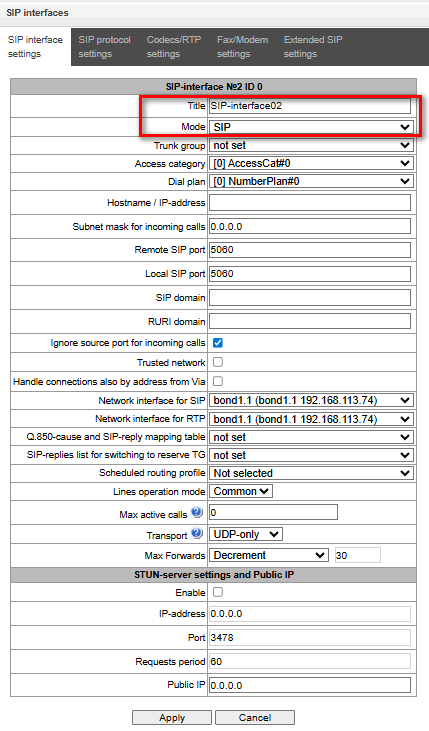
- Enter to menu Call routing → SIP interfaces.
- Create SIP interface, by
 or using Objects → Add an object.
 - Enter profile name.
- Choose mode SIP profile.
- Enter remote and local SIP ports.
- Choose network interface for SIP and RTP.
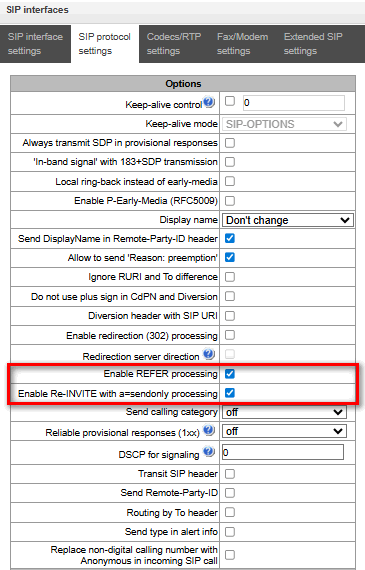
- Move to SIP protocol settings, activate Enable REFER processing and Enable Re-INVITE with a=sendonly» — necessary for the proper functioning of services such as call hold and call transfer.
- Click Apply.
2. Configure the SIP interface to enable communication with the IP network:
- Create one more SIP interface.
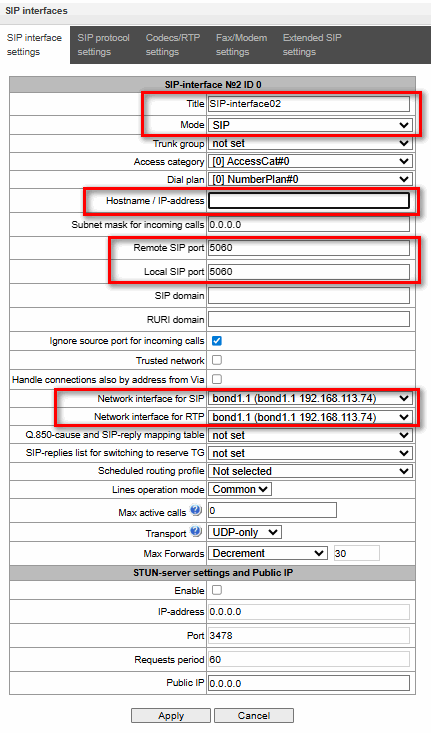
- Enter interface name.
- Choose mode SIP.
- In the Hostname/IP address field, enter the domain name or IP address of the other party.
- Enter remote and local SIP ports.
- Choose network interface for SIP and RTP.
- Move to section SIP protocl settings, check Enable REFER processing and «Enable Re-INVITE with a=sendonly.
- Click Apply.
3. Configure E1 circuit for receiving incoming calls from the PBX:
- Enter to Е1 streams → Е1 streams.
- To configure the physical parameters of the required E1 stream, select it and click the icon
 or double-click on the relevant stream.
 - If necessary, enter a descriptive name.
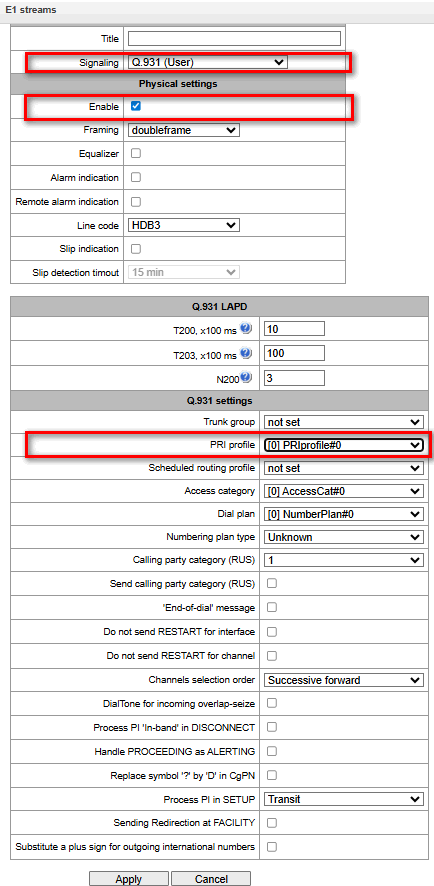
- Select the signalling protocol depending on the remote party. In this case, it is assumed that the remote party is configured for Q.931 (Network) signalling, so select Q.931 (User).
- Check Enable.
- In the Q.931 Settings section, select a PRI profile from the drop-down list.
- Click Apply.
4. Trunk group configuration:
- Enter to the Routing → Trunk groups.
- Create trunk group by or Objects → Add an object.
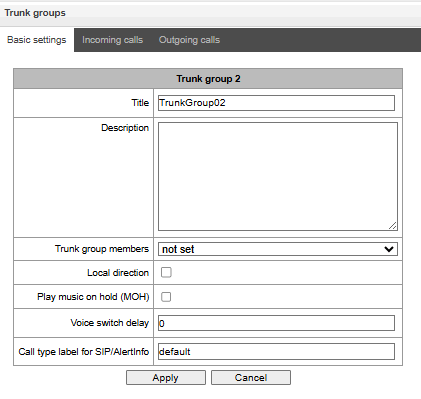
- Enter trunk group name.
- In Trunk group members choose SIP interface created in step 2;
- Click Apply.
- Repeat the trunk group creation, described above.
- In Trunk group members include E1 stream created in step 3.
- Click Apply.
5. Dial plan configuration:
- Enter to Dial plans → Plan #0.
- Create dial plan prefix, by or или через меню Objects → Add an object.
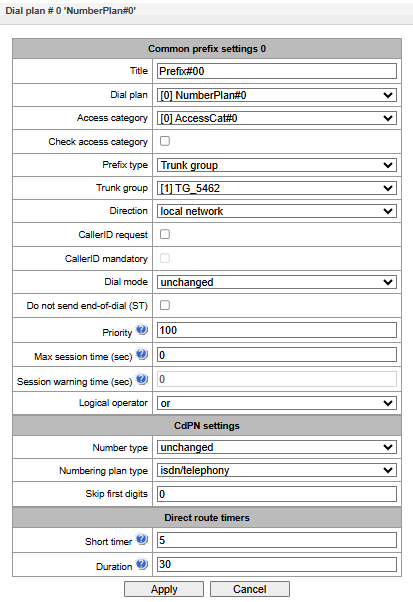
- Make sure that prefix type is compatible with Trunk group.
- Choose IP network, created in step 4.
- Click .
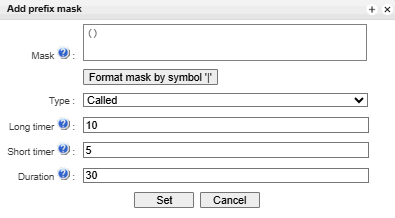
- Enter the mask in the appropriate field (the mask must be enclosed in parentheses), for example, (7x.), so that all outgoing calls to any numbers beginning with 7 will be routed to the current prefix.
- Click Set then Apply.
- Repeat the procedure for creating a prefix described above.
- Select the trunk group for outgoing calls to the PSTN, created in step 4, from the drop-down list.
- Click Next.
- In the list of masks that appears at the bottom of the page, create a new prefix mask by clicking .
- Enter the mask in the corresponding field (the mask must be enclosed in parentheses), for example, (9x.), so that all outgoing calls to any numbers starting with 9 will be routed to the current prefix.
- Click Set then Apply.
6. Subscriber creation:
- Enter to Subscribers → SIP subscribers.
- The form for creating SIP subscribers can be opened by clicking or Objects → Add an object.
- In the form, specify the required number of subscribers, the starting number (subsequent numbers will be generated automatically), the number of lines, and the SIP profile created in step 1.
- Set the registration authorisation mode, but without authorising calls using With Register; enter a username and password – these will be shared by all subscribers – or leave the fields blank, in which case the subscriber number will be used as the username and a random password will be generated.
- In the VAS Settings section, tick the Enable VAS checkbox, and in the list that appears on the right, select the required services by ticking their checkboxes.
- Click Apply.
- The next step is to register the SIP clients and the subscriber gateway on SMG. You can view the registration status in the Monitoring tab (Subscribers → SIP Subscribers → Monitoring).
7. Result
Once successfully registered, subscribers will be able to receive calls from the PSTN and IP network, make calls to one another and use VAS services, as well as make outgoing calls to the PSTN and IP network. The current configuration also allows transit calls between the PSTN and IP network to be passed through.
To save the settings to non-volatile memory, go to the Service menu and select Save configuration to FLASH.