
Схема:
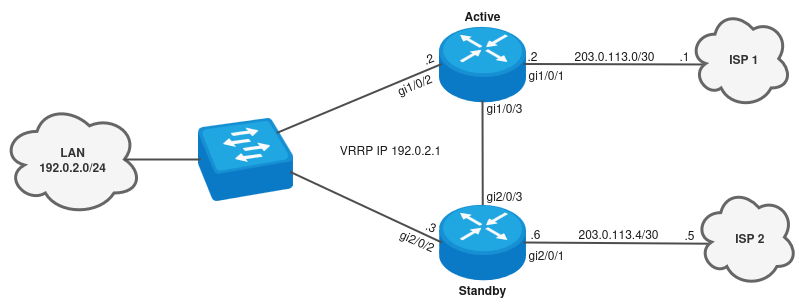
Задача: Настроить кластер в схеме с двумя провайдерами. С помощью кластера необходимо обеспечить резервирование доступа в интернет для LAN-подсети 192.0.2.0/24. Также с помощью SLA-тестов и track необходимо огранизовать перключение VRRP-мастерства для LAN в зависимости от доступности провайдера, а также переключение машрута по молучанию через резервное соединение gi1/0/3 и 2/0/3.
1. Настройка маршрутизаторов
1) Первичная настройка кластера
Подробная настройка кластера описана в документации ESR-Series. Руководство по эксплуатации в разделе Управление кластеризацией.
Настроим hostname на маршрутизаторах согласно схеме, а также сменим unit id на Standby устройстве и перезагрузим маршрутизатор:
Active:esr# configure terminal esr(config)# hostname Active unit 1esr(config)# hostname Standby unit 2esr(config)# endesr# commit Active# confirm
Standby:esr# configure terminal esr(config)# hostname Active unit 1esr(config)# hostname Standby unit 2esr(config)# endesr# commit Active# confirmActive# Active# set unit id 2Unit ID will be 2 after rebootActive# reload system Do you really want to reload system now? (y/N): y
...
...
...
Standby login: adminPassword:
********************************************* Welcome to ESR-15R *********************************************
Standby# Standby#
Перед настройкой кластерного интерфейса предварительно узнаем MAC-адреса устройств:
Active# show system | include MACSystem MAC address: 68:13:E2:7F:55:1AStandby# show system | include MACSystem MAC address: 68:13:E2:7F:5D:CC
Для синхронизации кластера между устройствами используются интерфейсы маршрутизаторов gi1/0/3 и gi2/0/3.
Сам кластерный интерфейс можно настроить только на bridge, поэтому создадим bridge и привяжем данный bridge к sub-интерфейсу gi1/0/3.10 и gi2/0/3.10.
Для определения Active и Standby между маршрутизаторами используется мастерство VRRP, поэтому для unit 1 настроим VRRP priority больше, чем у unit 2.
Также создадим security-zone Cluster и разрешим протокол vrrp в зону self для синхронизации:
Принцип работ Zone-Based Stateful Firewall описан в статье https://docs.eltex-co.ru/x/VxBeIw
Active# configure Active(config)# clusterActive(config-cluster)# cluster-interface bridge 1Active(config-cluster)# unit 1Active(config-cluster-unit)# mac-address 68:13:e2:7f:55:1aActive(config-cluster-unit)# exitActive(config-cluster)# unit 2Active(config-cluster-unit)# mac-address 68:13:e2:7f:5d:ccActive(config-cluster-unit)# exitActive(config-cluster)# enableActive(config-cluster)# exitActive(config)# Active(config)# security zone ClusterActive(config-security-zone)# exitActive(config)# Active(config)# bridge 1Active(config-bridge)# vlan 1Active(config-bridge)# security-zone ClusterActive(config-bridge)# ip address 198.51.100.2/29 unit 1Active(config-bridge)# ip address 198.51.100.3/29 unit 2Active(config-bridge)# vrrp 1Active(config-vrrp)# ip address 198.51.100.1/29Active(config-vrrp)# priority 150 unit 1Active(config-vrrp)# priority 120 unit 2Active(config-vrrp)# group 1Active(config-vrrp)# enableActive(config-vrrp)# exitActive(config-bridge)# enableActive(config-bridge)# exitActive(config)# Active(config)# interface gigabitethernet 1/0/3.10Active(config-if-sub)# bridge-group 1Active(config-if-sub)# exitActive(config)# Active(config)# interface gigabitethernet 2/0/3.10Active(config-if-sub)# bridge-group 1Active(config-if-sub)# exitActive(config)# Active(config)# security zone-pair Cluster selfActive(config-security-zone-pair)# rule 1Active(config-security-zone-pair-rule)# action permitActive(config-security-zone-pair-rule)# match protocol vrrpActive(config-security-zone-pair-rule)# enableActive(config-security-zone-pair-rule)# exitActive(config-security-zone-pair)# exitActive(config)# exit Active# Active# commit Active# confirm
Standby# configure terminal Standby(config)# Standby(config)# clusterStandby(config-cluster)# cluster-interface bridge 1Standby(config-cluster)# unit 1Standby(config-cluster-unit)# mac-address 68:13:e2:7f:55:1aStandby(config-cluster-unit)# exitStandby(config-cluster)# unit 2Standby(config-cluster-unit)# mac-address 68:13:e2:7f:5d:ccStandby(config-cluster-unit)# exitStandby(config-cluster)# enableStandby(config-cluster)# exitStandby(config)# Standby(config)# security zone ClusterStandby(config-security-zone)# exitStandby(config)# Standby(config)# bridge 1Standby(config-bridge)# vlan 1Standby(config-bridge)# security-zone ClusterStandby(config-bridge)# ip address 198.51.100.2/29 unit 1Standby(config-bridge)# ip address 198.51.100.3/29 unit 2Standby(config-bridge)# vrrp 1Standby(config-vrrp)# ip address 198.51.100.1/29Standby(config-vrrp)# priority 150 unit 1Standby(config-vrrp)# priority 120 unit 2Standby(config-vrrp)# group 1Standby(config-vrrp)# enableStandby(config-vrrp)# exitStandby(config-bridge)# enableStandby(config-bridge)# exitStandby(config)# Standby(config)# interface gigabitethernet 1/0/3.10Standby(config-if-sub)# bridge-group 1Standby(config-if-sub)# exitStandby(config)# Standby(config)# interface gigabitethernet 2/0/3.10Standby(config-if-sub)# bridge-group 1Standby(config-if-sub)# exitStandby(config)# Standby(config)# security zone-pair Cluster selfStandby(config-security-zone-pair)# rule 1Standby(config-security-zone-pair-rule)# action permitStandby(config-security-zone-pair-rule)# match protocol vrrpStandby(config-security-zone-pair-rule)# enableStandby(config-security-zone-pair-rule)# exitStandby(config-security-zone-pair)# exitStandby(config)# exit Standby# Standby# commit Standby# confirm
Соединим gi1/0/3 и gi2/0/3 между собой и проверим синхронизацию Cluster:
Active# show cluster status Unit Hostname Role MAC address State IP address ---- -------------------- ---------- ----------------- -------------- --------------- 1* Active Active 68:13:e2:7f:55:1a Joined 198.51.100.2 2 Standby Standby 68:13:e2:7f:5d:cc Joined 198.51.100.3 Active# show cluster sync status System part Synced ---------------------- ------ candidate-config Yes running-config Yes SW version Yes licence Yes licence (After reboot) Yes date Yes
Standby# show cluster status Unit Hostname Role MAC address State IP address ---- -------------------- ---------- ----------------- -------------- --------------- 1 Active Active 68:13:e2:7f:55:1a Joined 198.51.100.2 2* Standby Standby 68:13:e2:7f:5d:cc Joined 198.51.100.3 Standby# show cluster sync status System part Synced ---------------------- ------ candidate-config Yes running-config Yes SW version Yes licence Yes licence (After reboot) Yes date Yes
Маршрутизаторы успешно синхронизировались.
Если маршрутизаторы синхронизировались по Role (в выводе команды show cluster status) как Active и Standby, то для принудительной синхронизации Standby со стороны Active необходимо выполнить команду sync cluster system force, после чего будет происходить синхронизация всех параметров и перезагрузка маршрутизатора со стороны Standby.
Active# sync cluster system force
Unit 2 'Standby': system synchronization was started
После синхронизации маршрутизаторов - конфигурация кластера будет осуществляться только на Active.
2) Настройка кластера в сторону LAN-подсети
Для начала создадим security zone LAN, а также разрешим обработку VRRP-пакетов из зоны LAN в зону self:
Active# configure Active(config)# security zone LANActive(config-security-zone)# exitActive(config)# Active(config)# security zone-pair LAN selfActive(config-security-zone-pair)# rule 1Active(config-security-zone-pair-rule)# action permitActive(config-security-zone-pair-rule)# match protocol vrrpActive(config-security-zone-pair-rule)# enableActive(config-security-zone-pair-rule)# exitActive(config-security-zone-pair)# exitActive(config)#
Далее настроим интерфейсы gi1/0/2 и gi2/0/2 согласно схеме.
При настройке VRRP для Active сделаем приоритет ниже, чем у Standby. Приоритет для Active будем повышать с помощью track в 4-ом пункте (Настройка маршрутизации, track и sla-тестов).
Active(config)# Active(config)# interface gigabitethernet 1/0/2Active(config-if-gi)# security-zone LANActive(config-if-gi)# ip address 192.0.2.2/24Active(config-if-gi)# vrrp 2Active(config-vrrp)# ip address 192.0.2.1/24Active(config-vrrp)# priority 110Active(config-vrrp)# enableActive(config-vrrp)# exitActive(config-if-gi)# exitActive(config)# Active(config)# interface gigabitethernet 2/0/2Active(config-if-gi)# security-zone LANActive(config-if-gi)# ip address 192.0.2.3/24Active(config-if-gi)# vrrp 2Active(config-vrrp)# ip address 192.0.2.1/24Active(config-vrrp)# priority 120Active(config-vrrp)# enableActive(config-vrrp)# exitActive(config-if-gi)# exitActive(config)# exit Active# commit Active# confirm
После подключения интерфейсов статусы VRRP-процессов будут следующие:
Active# show vrrp
Unit 1* 'Active' ----------------Virtual router Virtual IP Priority Preemption State Inherit Sync group ID -------------- --------------------------------- -------- ---------- ------ ------- ------------- 1 198.51.100.1/29 150 Enabled Master -- 1 2 192.0.2.1/24 110 Enabled Backup -- --
Unit 2 'Standby' ----------------Virtual router Virtual IP Priority Preemption State Inherit Sync group ID -------------- --------------------------------- -------- ---------- ------ ------- ------------- 1 198.51.100.1/29 120 Enabled Backup -- 1 2 192.0.2.1/24 120 Enabled Master -- --
3) Настройка кластера в сторону провайдеров
Для начала создадим две security zone WAN_unit_1 и WAN_unit_2. Данные зоны необходимы для фильтрации трафика в сторону ISP, а также для NAT.
Также разрешим прохождение трафика из зоны LAN в зону WAN_unit_1 и в зону WAN_unit_2.
Active# configure Active(config)# Active(config)# security zone WAN_unit_1Active(config-security-zone)# exitActive(config)# Active(config)# security zone WAN_unit_2Active(config-security-zone)# exitActive(config)# Active(config)# security zone-pair LAN WAN_unit_1Active(config-security-zone-pair)# rule 1Active(config-security-zone-pair-rule)# action permitActive(config-security-zone-pair-rule)# enableActive(config-security-zone-pair-rule)# exitActive(config-security-zone-pair)# exitActive(config)# security zone-pair LAN WAN_unit_2Active(config-security-zone-pair)# rule 1Active(config-security-zone-pair-rule)# action permitActive(config-security-zone-pair-rule)# enableActive(config-security-zone-pair-rule)# exitActive(config-security-zone-pair)# exitActive(config)#
Настроим интерфейсы gi1/0/1 и gi2/0/1 согласно схеме:
Active(config)# Active(config)# interface gigabitethernet 1/0/1Active(config-if-gi)# security-zone WAN_unit_1Active(config-if-gi)# ip address 203.0.113.2/30Active(config-if-gi)# exitActive(config)# Active(config)# interface gigabitethernet 2/0/1Active(config-if-gi)# security-zone WAN_unit_2Active(config-if-gi)# ip address 203.0.113.6/30Active(config-if-gi)# exitActive(config)#
Настроим NAT для исходящего трафика из соответствующей зоны:
Более подробные описания команд и настройки NAT есть в документации ESR-Series. Руководство по эксплуатации в разделе Управление сервисами.
Active(config)# Active(config)# nat sourceActive(config-snat)# pool unit_1Active(config-snat-pool)# ip address-range 203.0.113.2Active(config-snat-pool)# exitActive(config-snat)# pool unit_2Active(config-snat-pool)# ip address-range 203.0.113.6Active(config-snat-pool)# exitActive(config-snat)# ruleset s_nat_unit_1Active(config-snat-ruleset)# to zone WAN_unit_1Active(config-snat-ruleset)# rule 1Active(config-snat-rule)# action source-nat pool unit_1Active(config-snat-rule)# enableActive(config-snat-rule)# exitActive(config-snat-ruleset)# exitActive(config-snat)# ruleset s_nat_unit_2Active(config-snat-ruleset)# to zone WAN_unit_2Active(config-snat-ruleset)# rule 1Active(config-snat-rule)# action source-nat pool unit_2Active(config-snat-rule)# enableActive(config-snat-rule)# exitActive(config-snat-ruleset)# exitActive(config-snat)# exitActive(config)# exit Active# Active# commit Active# confirm
4) Настройка маршрутизации, track и sla-тестов
Настроим SLA-тесты для юнитизированных IP-адресов, а также track, к которым будут привязаны данные SLA-тесты.
Предварительно перед настройкой SLA-тестов необходимо создать object-group network, в которой указываются IP-адреса с определенным Unit. Данная object-group network будет использоваться в качестве source ip в конфигурации SLA-тестов.
Active# configure Active(config)# Active(config)# object-group network unit_ip_for_slaActive(config-object-group-network)# ip address-range 203.0.113.2 unit 1Active(config-object-group-network)# ip address-range 203.0.113.6 unit 2Active(config-object-group-network)# exitActive(config)# ip sla logging statusActive(config)# ip slaActive(config)# ip sla test 1Active(config-sla-test)# icmp-echo 203.0.113.1 source-ip object-group unit_ip_for_slaActive(config-sla-test)# enableActive(config-sla-test)# exitActive(config)# ip sla test 2Active(config-sla-test)# icmp-echo 203.0.113.5 source-ip object-group unit_ip_for_slaActive(config-sla-test)# enableActive(config-sla-test)# exitActive(config)# ip sla schedule 1 life forever start-time nowActive(config)# ip sla schedule 2 life forever start-time nowActive(config)# Active(config)# track 1Active(config-track)# track sla test 1Active(config-track)# enableActive(config-track)# exitActive(config)# track 2Active(config-track)# track sla test 2Active(config-track)# enableActive(config-track)# exitActive(config)#
Далее создадим статические маршруты по умолчанию для каждого unit и привяжем к ним соответствующие track:
Active(config)# ip route 0.0.0.0/0 203.0.113.1 track 1 unit 1Active(config)# ip route 0.0.0.0/0 203.0.113.5 track 2 unit 2Active(config)#
Далее повысим приоритет VRRP-процесса со стороны Active, чтобы при доступности ISP1 - трафик передавался через Active-маршрутизатор:
Active(config)# Active(config)# interface gigabitethernet 1/0/2Active(config-if-gi)# vrrp 2Active(config-vrrp)# priority track 1 increment 40Active(config-vrrp)# exitActive(config-if-gi)# exitActive(config)# exit Active# Active# commit Active# confirm
В результате, при доступности ISP в таблице маршрутизации появится маршрут по умолчанию, а также Active станет Master для LAN-подсети 192.0.2.0/24:
Active# show ip sla test statistics 1Test number: 1Description: --Test status: SuccessfulTransmitted packets: 100Lost packets: 0 (0.00%)Lost packets in forward direction: --Lost packets in reverse direction: --One-way delay forward min/avg/max: --One-way delay reverse min/avg/max: --One-way jitter forward: --One-way jitter reverse: --Two-way delay min/avg/max: 0.56/0.60/0.81 millisecondsTwo-way jitter min/avg/max: 0.03/0.04/0.06 millisecondsDuplicate packets: --Out of sequence packets in forward direction: --Out of sequence packets in reverse direction: --Number of successes: 10 (100.00%)Number of failures: 0 (0.00%)Active# show track 1Track 1: State: Up Changes count: 1 (last 00,00:12:35) Mode: And Delay up: 0s Delay down: 0s Description: --
Conditions:
Type ID State Mode Last change (d,h:m:s) VRF --------- -------------------- ----- -------------- ------------------------- -------------------------------- SLA 1 True State success 00,00:12:35 --
Actions:
Static routes: 0.0.0.0/0 via 203.0.113.1: InstalledVRRPs: ID 2 priority of the interface gigabitethernet 1/0/2 : 150Active# show ip route static S * 0.0.0.0/0 [1/0] via 203.0.113.1 on gi1/0/1 [static 15:35:24] Active# show vrrp
Unit 1* 'Active' ----------------Virtual router Virtual IP Priority Preemption State Inherit Sync group ID -------------- --------------------------------- -------- ---------- ------ ------- ------------- 1 198.51.100.1/29 150 Enabled Master -- 1 2 192.0.2.1/24 150 Enabled Master -- --
Unit 2 'Standby' ----------------Virtual router Virtual IP Priority Preemption State Inherit Sync group ID -------------- --------------------------------- -------- ---------- ------ ------- ------------- 1 198.51.100.1/29 120 Enabled Backup -- 1 2 192.0.2.1/24 120 Enabled Backup -- --
Standby# show ip sla test statistics 2Test number: 2Description: --Test status: SuccessfulTransmitted packets: 100Lost packets: 0 (0.00%)Lost packets in forward direction: --Lost packets in reverse direction: --One-way delay forward min/avg/max: --One-way delay reverse min/avg/max: --One-way jitter forward: --One-way jitter reverse: --Two-way delay min/avg/max: 0.52/0.59/0.82 millisecondsTwo-way jitter min/avg/max: 0.03/0.04/0.05 millisecondsDuplicate packets: --Out of sequence packets in forward direction: --Out of sequence packets in reverse direction: --Number of successes: 10 (100.00%)Number of failures: 0 (0.00%)Standby# show track 2Track 2: State: Up Changes count: 1 (last 00,00:06:00) Mode: And Delay up: 0s Delay down: 0s Description: --
Conditions:
Type ID State Mode Last change (d,h:m:s) VRF --------- -------------------- ----- -------------- ------------------------- -------------------------------- SLA 2 True State success 00,00:06:00 --
Actions:
Static routes: 0.0.0.0/0 via 203.0.113.5: InstalledStandby# show ip route static S * 0.0.0.0/0 [1/0] via 203.0.113.5 on gi2/0/1 [static 15:35:23]
5) Настройка gi1/0/3 и gi2/0/3 для резервирования доступа в интернет
Может возникнуть ситуация, когда интерфейсы gi1/0/2 и gi2/0/1 или gi2/0/2 и gi1/0/1 находятся в Down, тогда для передачи транзитного трафика можеи использоваться линк между Active и Standby, а именно gi1/0/3 и gi2/0/3.
Настроим интерфейсы gi1/0/3 и gi2/0/3, а также отнесем данные интерфейсы к security zone LAN и настроим соответствующее разрешающее правило для прохождения трафика из зоны LAN в зону LAN:
Active# configure Active(config)# interface gigabitethernet 1/0/3Active(config-if-gi)# security-zone LANActive(config-if-gi)# ip address 198.51.100.129/30Active(config-if-gi)# exitActive(config)# Active(config)# interface gigabitethernet 2/0/3Active(config-if-gi)# security-zone LANActive(config-if-gi)# ip address 198.51.100.130/30Active(config-if-gi)# exitActive(config)# Active(config)# security zone-pair LAN LANActive(config-security-zone-pair)# rule 1Active(config-security-zone-pair-rule)# action permitActive(config-security-zone-pair-rule)# enableActive(config-security-zone-pair-rule)# exitActive(config-security-zone-pair)# exitActive(config)#
Далее настроим маршруты до LAN и IP-адресов ISP, которые находятся за Active и Standby маршрутизаторами, через gi1/0/3 и gi2/0/3:
Active(config)# ip route 192.0.2.0/24 198.51.100.130 unit 1Active(config)# ip route 192.0.2.0/24 198.51.100.129 unit 2Active(config)# ip route 203.0.113.5/32 198.51.100.130 unit 1Active(config)# ip route 203.0.113.1/32 198.51.100.129 unit 2
Настроим аналогичные SLA-тесты с Track и привяжим их к резервным маршрутам по умолчанию с метрикой 10:
Active(config)# Active(config)# object-group network unit_ip_for_sla_2Active(config-object-group-network)# ip address-range 198.51.100.129 unit 1Active(config-object-group-network)# ip address-range 198.51.100.130 unit 2Active(config-object-group-network)# exitActive(config)# Active(config)# ip slaActive(config)# ip sla test 3Active(config-sla-test)# icmp-echo 203.0.113.5 source-ip object-group unit_ip_for_sla_2Active(config-sla-test)# enableActive(config-sla-test)# exitActive(config)# ip sla test 4Active(config-sla-test)# icmp-echo 203.0.113.1 source-ip object-group unit_ip_for_sla_2Active(config-sla-test)# enableActive(config-sla-test)# exitActive(config)# ip sla schedule 3 life forever start-time nowActive(config)# ip sla schedule 4 life forever start-time nowActive(config)# Active(config)# track 3Active(config-track)# track sla test 3Active(config-track)# enableActive(config-track)# exitActive(config)# track 4Active(config-track)# track sla test 4Active(config-track)# enableActive(config-track)# exitActive(config)# Active(config)# ip route 0.0.0.0/0 198.51.100.130 track 3 10 unit 1Active(config)# ip route 0.0.0.0/0 198.51.100.129 track 4 10 unit 2Active(config)# Active(config)# exitActive# Active# commitActive# confirm
Разрешим прохождение асинхронного трафика с помощью команды ip firewall sessions unknown permit:
Active# configure Active(config)# ip firewall sessions unknown permitActive(config)# exit Active# Active# commit Active# confirm
После применения конфигурации и поднятых линков проверим наличия резервного статического маршрута на Active и Standby:
Active# show ip sla test statistics 3Test number: 3Description: --Test status: SuccessfulTransmitted packets: 100Lost packets: 0 (0.00%)Lost packets in forward direction: --Lost packets in reverse direction: --One-way delay forward min/avg/max: --One-way delay reverse min/avg/max: --One-way jitter forward: --One-way jitter reverse: --Two-way delay min/avg/max: 0.98/1.05/1.17 millisecondsTwo-way jitter min/avg/max: 0.03/0.04/0.04 millisecondsDuplicate packets: --Out of sequence packets in forward direction: --Out of sequence packets in reverse direction: --Number of successes: 10 (100.00%)Number of failures: 0 (0.00%)Active# show track 3Track 3: State: Up Changes count: 2 (last 00,00:05:16) Mode: And Delay up: 0s Delay down: 0s Description: --
Conditions:
Type ID State Mode Last change (d,h:m:s) VRF --------- -------------------- ----- -------------- ------------------------- -------------------------------- SLA 3 True State success 00,00:05:16 --
Actions:
Static routes: 0.0.0.0/0 via 198.51.100.130 metric 10: InstalledActive# show ip route static S * 0.0.0.0/0 [1/0] via 203.0.113.1 on gi1/0/1 [static 15:35:24] S 0.0.0.0/0 [1/10] via 198.51.100.130 on gi1/0/3 [static 17:19:04] S * 203.0.113.5/32 [1/0] via 198.51.100.130 on gi1/0/3 [static 17:19:01]
Standby# show ip sla test statistics 4Test number: 4Description: --Test status: SuccessfulTransmitted packets: 100Lost packets: 0 (0.00%)Lost packets in forward direction: --Lost packets in reverse direction: --One-way delay forward min/avg/max: --One-way delay reverse min/avg/max: --One-way jitter forward: --One-way jitter reverse: --Two-way delay min/avg/max: 1.00/1.15/1.34 millisecondsTwo-way jitter min/avg/max: 0.04/0.05/0.07 millisecondsDuplicate packets: --Out of sequence packets in forward direction: --Out of sequence packets in reverse direction: --Number of successes: 10 (100.00%)Number of failures: 0 (0.00%)Standby# show track 4Track 4: State: Up Changes count: 2 (last 00,00:06:16) Mode: And Delay up: 0s Delay down: 0s Description: --
Conditions:
Type ID State Mode Last change (d,h:m:s) VRF --------- -------------------- ----- -------------- ------------------------- -------------------------------- SLA 4 True State success 00,00:06:16 --
Actions:
Static routes: 0.0.0.0/0 via 198.51.100.129 metric 10: InstalledStandby# show ip route static S * 0.0.0.0/0 [1/0] via 203.0.113.5 on gi2/0/1 [static 15:35:23] S 0.0.0.0/0 [1/10] via 198.51.100.129 on gi2/0/3 [static 17:19:02] S * 203.0.113.1/32 [1/0] via 198.51.100.129 on gi2/0/3 [static 17:18:59]
6) Итоговая конфигурация кластера:
2. Проверка резервирования
После настройки маршрутизаторов и подключения линков трафик будет ходить через Active: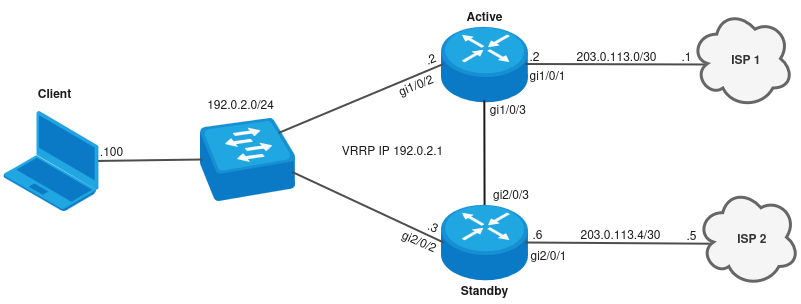
Пустим транзитный трафик со стоны Client в сторону ISP:
Client# ping 77.88.8.8 PING 77.88.8.8 (77.88.8.8) 56 bytes of data.!!!!! --- 77.88.8.8 ping statistics --- 5 packets transmitted, 5 received, 0% packet loss, time 4006ms rtt min/avg/max/mdev = 0.812/0.857/0.903/0.051 ms
Вывод оперативных команд со стороны Active:
Active# show vrrp
Unit 1* 'Active' ----------------Virtual router Virtual IP Priority Preemption State Inherit Sync group ID -------------- --------------------------------- -------- ---------- ------ ------- ------------- 1 198.51.100.1/29 150 Enabled Master -- 1 2 192.0.2.1/24 150 Enabled Master -- --
Unit 2 'Standby' ----------------Virtual router Virtual IP Priority Preemption State Inherit Sync group ID -------------- --------------------------------- -------- ---------- ------ ------- ------------- 1 198.51.100.1/29 120 Enabled Backup -- 1 2 192.0.2.1/24 120 Enabled Backup -- --
Active# show ip route 0.0.0.0Codes: C - connected, S - static, R - RIP derived, O - OSPF derived, IA - OSPF inter area route, E1 - OSPF external type 1 route, E2 - OSPF external type 2 route, B - BGP derived, D - DHCP derived, K - kernel route, V - VRRP route, i - IS-IS, L1 - IS-IS level-1, L2 - IS-IS level-2, ia - IS-IS inter area, H - NHRP, * - FIB routeS * 0.0.0.0/0 [1/0] via 203.0.113.1 on gi1/0/1 [static 09:30:13] S 0.0.0.0/0 [1/10] via 198.51.100.130 on gi1/0/3 [static 09:36:18] Active# show ip sla test statistics 1Test number: 1Description: --Test status: SuccessfulTransmitted packets: 100Lost packets: 0 (0.00%)Lost packets in forward direction: --Lost packets in reverse direction: --One-way delay forward min/avg/max: --One-way delay reverse min/avg/max: --One-way jitter forward: --One-way jitter reverse: --Two-way delay min/avg/max: 0.55/0.60/0.75 millisecondsTwo-way jitter min/avg/max: 0.02/0.03/0.05 millisecondsDuplicate packets: --Out of sequence packets in forward direction: --Out of sequence packets in reverse direction: --Number of successes: 10 (100.00%)Number of failures: 0 (0.00%)Active# show ip sla test statistics 3Test number: 3Description: --Test status: SuccessfulTransmitted packets: 100Lost packets: 0 (0.00%)Lost packets in forward direction: --Lost packets in reverse direction: --One-way delay forward min/avg/max: --One-way delay reverse min/avg/max: --One-way jitter forward: --One-way jitter reverse: --Two-way delay min/avg/max: 0.85/1.03/1.19 millisecondsTwo-way jitter min/avg/max: 0.04/0.04/0.05 millisecondsDuplicate packets: --Out of sequence packets in forward direction: --Out of sequence packets in reverse direction: --Number of successes: 10 (100.00%)Number of failures: 0 (0.00%)Active# show track 1Track 1: State: Up Changes count: 7 (last 00,01:25:07) Mode: And Delay up: 0s Delay down: 0s Description: --
Conditions:
Type ID State Mode Last change (d,h:m:s) VRF --------- -------------------- ----- -------------- ------------------------- -------------------------------- SLA 1 True State success 00,01:25:07 --
Actions:
Static routes: 0.0.0.0/0 via 203.0.113.1: InstalledVRRPs: ID 2 priority of the interface gigabitethernet 1/0/2 : 150Active# show track 3Track 3: State: Up Changes count: 6 (last 00,01:19:06) Mode: And Delay up: 0s Delay down: 0s Description: --
Conditions:
Type ID State Mode Last change (d,h:m:s) VRF --------- -------------------- ----- -------------- ------------------------- -------------------------------- SLA 3 True State success 00,01:19:06 --
Actions:
Static routes: 0.0.0.0/0 via 198.51.100.130 metric 10: InstalledActive# show ip firewall sessions protocol icmp inside-source-address 192.0.2.100 Codes: E - expected, U - unreplied, A - assured, C - confirmed
Prot Aging Inside source Inside destination Outside source Outside destination Pkts Bytes Status ----- ---------- --------------------- --------------------- --------------------- --------------------- ---------- ---------- ------ icmp 29 192.0.2.100 77.88.8.8 203.0.113.2 77.88.8.8 -- -- C Active# show ip nat translations inside-source-address 192.0.2.100Prot Inside source Inside destination Outside source Outside destination Pkts Bytes ---- --------------------- --------------------- --------------------- --------------------- ---------- ---------- icmp 192.0.2.100 77.88.8.8 203.0.113.2 77.88.8.8 -- --
Рассмотрим несколько вариантов падения линка с выводом оперативных команд:
1) Падение линка gi1/0/1 или недоступность ISP1: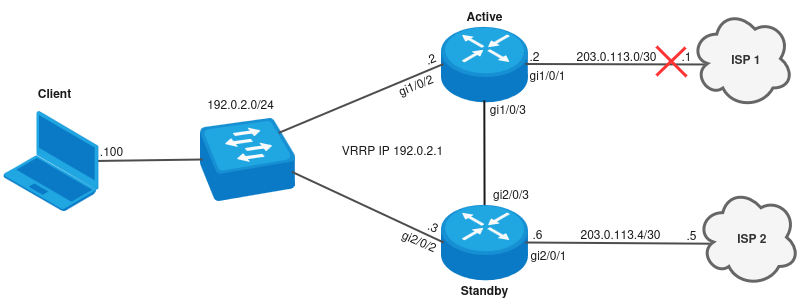
В таком случае SLA-1 тест перейдет в состояние Fail, после чего track-1 перейдет в состояние down - в результате пропадет маршрут по умолчанию через ISP 1, понизится VRRP-приоритет Active в сторону LAN-подсети и трафик будет ходить через Standby. Также со стороны Standby упадет SLA-4 тест и пропадет резервный маршрут по умолчанию через gi2/0/3.
Вывод оперативных команд со стороны Active после недоступности ISP 1:
2025-08-27T11:08:27+00:00 %IP_SLA-I-STATUS: (test 1) State changed to fail2025-08-27T11:08:30+00:00 %VRRP-I-INSTANCE: VRRP2 Received higher prio advert 1202025-08-27T11:08:30+00:00 %VRRP-I-INSTANCE: VRRP2 Entering BACKUP state
Active# show ip sla test statistics 1Test number: 1Description: --Test status: FailTransmitted packets: 0Lost packets: 0 (0.00%)Lost packets in forward direction: --Lost packets in reverse direction: --One-way delay forward min/avg/max: --One-way delay reverse min/avg/max: --One-way jitter forward: --One-way jitter reverse: --Two-way delay min/avg/max: 0.00/0.00/0.00 millisecondsTwo-way jitter min/avg/max: 0.00/0.00/0.00 millisecondsDuplicate packets: --Out of sequence packets in forward direction: --Out of sequence packets in reverse direction: --Number of successes: 3 (30.00%)Number of failures: 7 (70.00%)Active# show track 1Track 1: State: Down Changes count: 8 (last 00,00:01:07) Mode: And Delay up: 0s Delay down: 0s Description: --
Conditions:
Type ID State Mode Last change (d,h:m:s) VRF --------- -------------------- ----- -------------- ------------------------- -------------------------------- SLA 1 False State success 00,00:01:07 --
Actions:
Static routes: 0.0.0.0/0 via 203.0.113.1: Not installedVRRPs: ID 2 priority of the interface gigabitethernet 1/0/2 : 110Active# show vrrp
Unit 1* 'Active' ----------------Virtual router Virtual IP Priority Preemption State Inherit Sync group ID -------------- --------------------------------- -------- ---------- ------ ------- ------------- 1 198.51.100.1/29 150 Enabled Master -- 1 2 192.0.2.1/24 110 Enabled Backup -- --
Unit 2 'Standby' ----------------Virtual router Virtual IP Priority Preemption State Inherit Sync group ID -------------- --------------------------------- -------- ---------- ------ ------- ------------- 1 198.51.100.1/29 120 Enabled Backup -- 1 2 192.0.2.1/24 120 Enabled Master -- --
Active# show ip route 0.0.0.0Codes: C - connected, S - static, R - RIP derived, O - OSPF derived, IA - OSPF inter area route, E1 - OSPF external type 1 route, E2 - OSPF external type 2 route, B - BGP derived, D - DHCP derived, K - kernel route, V - VRRP route, i - IS-IS, L1 - IS-IS level-1, L2 - IS-IS level-2, ia - IS-IS inter area, H - NHRP, * - FIB routeS * 0.0.0.0/0 [1/10] via 198.51.100.130 on gi1/0/3 [static 09:36:18]
Пустим транзитный трафик со стоны Client в сторону ISP:
Client# ping 77.88.8.8PING 77.88.8.8 (77.88.8.8) 56 bytes of data.!!!!!--- 77.88.8.8 ping statistics ---5 packets transmitted, 5 received, 0% packet loss, time 4005msrtt min/avg/max/mdev = 1.323/1.421/1.480/0.058 ms
Вывод оперативных команд со стороны Standby:
2025-08-27T11:08:23+00:00 %IP_SLA-I-STATUS: (test 4) State changed to fail2025-08-27T11:08:29+00:00 %VRRP-I-INSTANCE: VRRP2 forcing a new MASTER election2025-08-27T11:08:30+00:00 %VRRP-I-INSTANCE: VRRP2 Transition to MASTER state2025-08-27T11:08:31+00:00 %VRRP-I-INSTANCE: VRRP2 Entering MASTER state
Standby# show ip sla test statistics 4Test number: 4Description: --Test status: FailTransmitted packets: 0Lost packets: 0 (0.00%)Lost packets in forward direction: --Lost packets in reverse direction: --One-way delay forward min/avg/max: --One-way delay reverse min/avg/max: --One-way jitter forward: --One-way jitter reverse: --Two-way delay min/avg/max: 0.00/0.00/0.00 millisecondsTwo-way jitter min/avg/max: 0.00/0.00/0.00 millisecondsDuplicate packets: --Out of sequence packets in forward direction: --Out of sequence packets in reverse direction: --Number of successes: 0 (0.00%)Number of failures: 10 (100.00%)Standby# show track 4Track 4: State: Down Changes count: 11 (last 00,00:06:23) Mode: And Delay up: 0s Delay down: 0s Description: --
Conditions:
Type ID State Mode Last change (d,h:m:s) VRF --------- -------------------- ----- -------------- ------------------------- -------------------------------- SLA 4 False State success 00,00:06:23 --
Actions:
Static routes: 0.0.0.0/0 via 198.51.100.129 metric 10: Not installedStandby# show vrrp
Unit 1 'Active' ---------------Virtual router Virtual IP Priority Preemption State Inherit Sync group ID -------------- --------------------------------- -------- ---------- ------ ------- ------------- 1 198.51.100.1/29 150 Enabled Master -- 1 2 192.0.2.1/24 110 Enabled Backup -- --
Unit 2* 'Standby' -----------------Virtual router Virtual IP Priority Preemption State Inherit Sync group ID -------------- --------------------------------- -------- ---------- ------ ------- ------------- 1 198.51.100.1/29 120 Enabled Backup -- 1 2 192.0.2.1/24 120 Enabled Master -- --
Standby# show ip sla test statistics 2Test number: 2Description: --Test status: SuccessfulTransmitted packets: 100Lost packets: 0 (0.00%)Lost packets in forward direction: --Lost packets in reverse direction: --One-way delay forward min/avg/max: --One-way delay reverse min/avg/max: --One-way jitter forward: --One-way jitter reverse: --Two-way delay min/avg/max: 0.51/0.60/0.81 millisecondsTwo-way jitter min/avg/max: 0.03/0.05/0.08 millisecondsDuplicate packets: --Out of sequence packets in forward direction: --Out of sequence packets in reverse direction: --Number of successes: 10 (100.00%)Number of failures: 0 (0.00%)Standby# show track 2Track 2: State: Up Changes count: 5 (last 00,01:38:44) Mode: And Delay up: 0s Delay down: 0s Description: --
Conditions:
Type ID State Mode Last change (d,h:m:s) VRF --------- -------------------- ----- -------------- ------------------------- -------------------------------- SLA 2 True State success 00,01:38:44 --
Actions:
Static routes: 0.0.0.0/0 via 203.0.113.5: InstalledStandby# show ip route 0.0.0.0Codes: C - connected, S - static, R - RIP derived, O - OSPF derived, IA - OSPF inter area route, E1 - OSPF external type 1 route, E2 - OSPF external type 2 route, B - BGP derived, D - DHCP derived, K - kernel route, V - VRRP route, i - IS-IS, L1 - IS-IS level-1, L2 - IS-IS level-2, ia - IS-IS inter area, H - NHRP, * - FIB routeS * 0.0.0.0/0 [1/0] via 203.0.113.5 on gi2/0/1 [static 09:36:23] Standby# show ip firewall sessions protocol icmp inside-source-address 192.0.2.100 Codes: E - expected, U - unreplied, A - assured, C - confirmed
Prot Aging Inside source Inside destination Outside source Outside destination Pkts Bytes Status ----- ---------- --------------------- --------------------- --------------------- --------------------- ---------- ---------- ------ icmp 29 192.0.2.100 77.88.8.8 203.0.113.6 77.88.8.8 -- -- C Standby# show ip nat translations inside-source-address 192.0.2.100Prot Inside source Inside destination Outside source Outside destination Pkts Bytes ---- --------------------- --------------------- --------------------- --------------------- ---------- ---------- icmp 192.0.2.100 77.88.8.8 203.0.113.6 77.88.8.8 -- --
Далее может возникнуть ситуация, когда кроме падения gi1/0/1 или недоступности ISP 1, может упасть линк gi2/0/2:
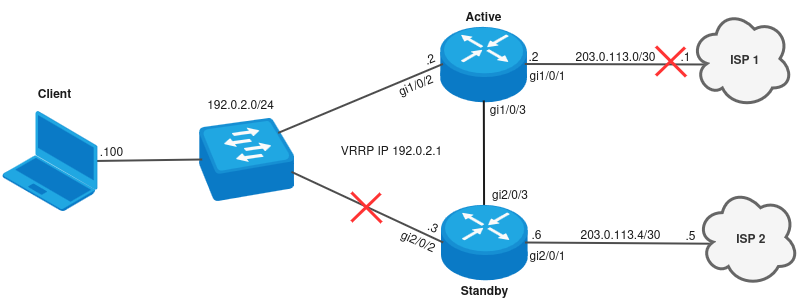
В таком случае трафик сначало направится на Active, а после на Standby в сторону ISP 2.
Пустим транзитный трафик со стоны Client в сторону ISP:
Client# ping 77.88.8.8PING 77.88.8.8 (77.88.8.8) 56 bytes of data.!!!!!--- 77.88.8.8 ping statistics ---5 packets transmitted, 5 received, 0% packet loss, time 4006msrtt min/avg/max/mdev = 1.839/1.891/1.937/0.057 ms
Вывод оперативных команд со стороны Active:
2025-08-27T11:27:41+00:00 %VRRP-I-INSTANCE: VRRP2 Transition to MASTER state2025-08-27T11:27:42+00:00 %VRRP-I-INSTANCE: VRRP2 Entering MASTER stateActive# show vrrp
Unit 1* 'Active' ----------------Virtual router Virtual IP Priority Preemption State Inherit Sync group ID -------------- --------------------------------- -------- ---------- ------ ------- ------------- 1 198.51.100.1/29 150 Enabled Master -- 1 2 192.0.2.1/24 110 Enabled Master -- --
Unit 2 'Standby' ----------------Virtual router Virtual IP Priority Preemption State Inherit Sync group ID -------------- --------------------------------- -------- ---------- ------ ------- ------------- 1 198.51.100.1/29 120 Enabled Backup -- 1 2 192.0.2.1/24 120 Enabled Fault -- --
Active# show ip route 0.0.0.0Codes: C - connected, S - static, R - RIP derived, O - OSPF derived, IA - OSPF inter area route, E1 - OSPF external type 1 route, E2 - OSPF external type 2 route, B - BGP derived, D - DHCP derived, K - kernel route, V - VRRP route, i - IS-IS, L1 - IS-IS level-1, L2 - IS-IS level-2, ia - IS-IS inter area, H - NHRP, * - FIB routeS * 0.0.0.0/0 [1/10] via 198.51.100.130 on gi1/0/3 [static 09:36:18] Active# show ip firewall sessions protocol icmp inside-source-address 192.0.2.100 Codes: E - expected, U - unreplied, A - assured, C - confirmed
Prot Aging Inside source Inside destination Outside source Outside destination Pkts Bytes Status ----- ---------- --------------------- --------------------- --------------------- --------------------- ---------- ---------- ------ icmp 20 192.0.2.100 77.88.8.8 192.0.2.100 77.88.8.8 -- -- C
Вывод оперативных команд со стороны Standby:
2025-08-27T11:27:38+00:00 %LINK-W-DOWN: gigabitethernet 2/0/2 changed state to down2025-08-27T11:27:38+00:00 %LINK-W-DOWN: interface vrrp.2 changed state to down2025-08-27T11:27:38+00:00 %VRRP-I-INSTANCE: VRRP2 Entering FAULT state2025-08-27T11:27:38+00:00 %VRRP-I-INSTANCE: VRRP2 Now in FAULT stateStandby# show ip firewall sessions protocol icmp inside-source-address 192.0.2.100 Codes: E - expected, U - unreplied, A - assured, C - confirmed
Prot Aging Inside source Inside destination Outside source Outside destination Pkts Bytes Status ----- ---------- --------------------- --------------------- --------------------- --------------------- ---------- ---------- ------ icmp 7 192.0.2.100 77.88.8.8 203.0.113.6 77.88.8.8 -- -- C Standby# show ip nat translations inside-source-address 192.0.2.100Prot Inside source Inside destination Outside source Outside destination Pkts Bytes ---- --------------------- --------------------- --------------------- --------------------- ---------- ---------- icmp 192.0.2.100 77.88.8.8 203.0.113.6 77.88.8.8 -- --
2) Падение линка gi1/0/2: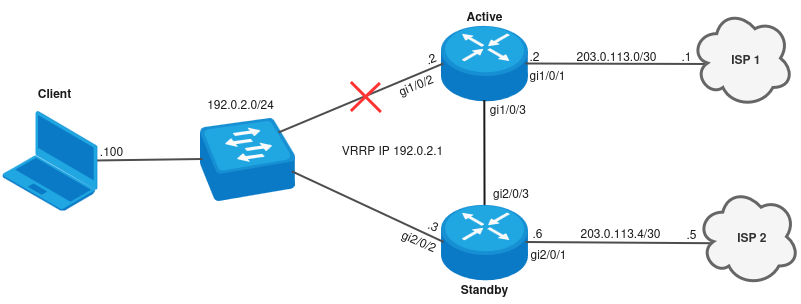
При таком падении линков будет переключение мастерства на Standby и трафик будет ходить через Standby.
Вывод оперативной информации со стороны Active:
2025-08-27T12:00:38+00:00 %LINK-W-DOWN: gigabitethernet 1/0/2 changed state to down2025-08-27T12:00:38+00:00 %LINK-W-DOWN: interface vrrp.2 changed state to down2025-08-27T12:00:38+00:00 %VRRP-I-INSTANCE: VRRP2 Entering FAULT state2025-08-27T12:00:38+00:00 %VRRP-I-INSTANCE: VRRP2 Now in FAULT stateActive# show vrrp
Unit 1* 'Active' ----------------Virtual router Virtual IP Priority Preemption State Inherit Sync group ID -------------- --------------------------------- -------- ---------- ------ ------- ------------- 1 198.51.100.1/29 150 Enabled Master -- 1 2 192.0.2.1/24 150 Enabled Fault -- --
Unit 2 'Standby' ----------------Virtual router Virtual IP Priority Preemption State Inherit Sync group ID -------------- --------------------------------- -------- ---------- ------ ------- ------------- 1 198.51.100.1/29 120 Enabled Backup -- 1 2 192.0.2.1/24 120 Enabled Master -- --
Пустим транзитный трафик со стоны Client в сторону ISP:
Client# ping 77.88.8.8PING 77.88.8.8 (77.88.8.8) 56 bytes of data.!!!!!--- 77.88.8.8 ping statistics ---5 packets transmitted, 5 received, 0% packet loss, time 4006msrtt min/avg/max/mdev = 1.314/1.457/1.851/0.200 ms
Вывод оперативной информации со стороны Standby:
Standby# show vrrp
Unit 1 'Active' ---------------Virtual router Virtual IP Priority Preemption State Inherit Sync group ID -------------- --------------------------------- -------- ---------- ------ ------- ------------- 1 198.51.100.1/29 150 Enabled Master -- 1 2 192.0.2.1/24 150 Enabled Fault -- --
Unit 2* 'Standby' -----------------Virtual router Virtual IP Priority Preemption State Inherit Sync group ID -------------- --------------------------------- -------- ---------- ------ ------- ------------- 1 198.51.100.1/29 120 Enabled Backup -- 1 2 192.0.2.1/24 120 Enabled Master -- --
Standby# show track 2Track 2: State: Up Changes count: 5 (last 00,02:27:09) Mode: And Delay up: 0s Delay down: 0s Description: --
Conditions:
Type ID State Mode Last change (d,h:m:s) VRF --------- -------------------- ----- -------------- ------------------------- -------------------------------- SLA 2 True State success 00,02:27:09 --
Actions:
Static routes: 0.0.0.0/0 via 203.0.113.5: InstalledStandby# show track 4Track 4: State: Up Changes count: 12 (last 00,00:08:22) Mode: And Delay up: 0s Delay down: 0s Description: --
Conditions:
Type ID State Mode Last change (d,h:m:s) VRF --------- -------------------- ----- -------------- ------------------------- -------------------------------- SLA 4 True State success 00,00:08:22 --
Actions:
Static routes: 0.0.0.0/0 via 198.51.100.129 metric 10: InstalledStandby# show ip firewall sessions protocol icmp inside-source-address 192.0.2.100 Codes: E - expected, U - unreplied, A - assured, C - confirmed
Prot Aging Inside source Inside destination Outside source Outside destination Pkts Bytes Status ----- ---------- --------------------- --------------------- --------------------- --------------------- ---------- ---------- ------ icmp 21 192.0.2.100 77.88.8.8 203.0.113.6 77.88.8.8 -- -- C Standby# show ip nat translations inside-source-address 192.0.2.100Prot Inside source Inside destination Outside source Outside destination Pkts Bytes ---- --------------------- --------------------- --------------------- --------------------- ---------- ---------- icmp 192.0.2.100 77.88.8.8 203.0.113.6 77.88.8.8 -- --
Далее может возникнуть ситуация, когда кроме падения gi1/0/2, может упасть линк gi2/0/1 или станет недоступен ISP 2: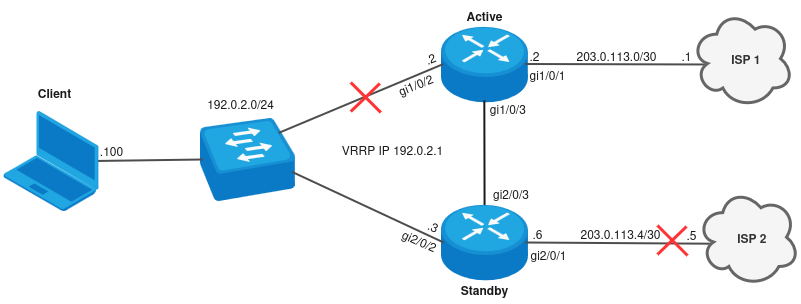
При таком падении линков SLA-2 тест перейдет в состояние Fail, после чего track-2 перейдет в состояние down и пропадет маршрут по умолчанию через ISP 2. Трафик будте ходить сначало на Standby, а после передаваться на Active в сторону ISP 1.
Со стороны Active упадет SLA-3 и, соответственно, пропадет резервный маршрут по умолчанию.
Пустим транзитный трафик со стоны Client в сторону ISP:
Client# ping 77.88.8.8PING 77.88.8.8 (77.88.8.8) 56 bytes of data.!!!!!--- 77.88.8.8 ping statistics ---5 packets transmitted, 5 received, 0% packet loss, time 4003msrtt min/avg/max/mdev = 1.220/1.327/1.464/0.092 ms
Вывод оперативной информации со стороны Standby:
2025-08-27T12:12:52+00:00 %IP_SLA-I-STATUS: (test 2) State changed to failStandby# show ip sla test statistics 2Test number: 2Description: --Test status: FailTransmitted packets: 0Lost packets: 0 (0.00%)Lost packets in forward direction: --Lost packets in reverse direction: --One-way delay forward min/avg/max: --One-way delay reverse min/avg/max: --One-way jitter forward: --One-way jitter reverse: --Two-way delay min/avg/max: 0.00/0.00/0.00 millisecondsTwo-way jitter min/avg/max: 0.00/0.00/0.00 millisecondsDuplicate packets: --Out of sequence packets in forward direction: --Out of sequence packets in reverse direction: --Number of successes: 0 (0.00%)Number of failures: 10 (100.00%)Standby# show track 2Track 2: State: Down Changes count: 6 (last 00,00:02:35) Mode: And Delay up: 0s Delay down: 0s Description: --
Conditions:
Type ID State Mode Last change (d,h:m:s) VRF --------- -------------------- ----- -------------- ------------------------- -------------------------------- SLA 2 False State success 00,00:02:35 --
Actions:
Static routes: 0.0.0.0/0 via 203.0.113.5: Not installedStandby# show vrrp
Unit 1 'Active' ---------------Virtual router Virtual IP Priority Preemption State Inherit Sync group ID -------------- --------------------------------- -------- ---------- ------ ------- ------------- 1 198.51.100.1/29 150 Enabled Master -- 1 2 192.0.2.1/24 150 Enabled Fault -- --
Unit 2* 'Standby' -----------------Virtual router Virtual IP Priority Preemption State Inherit Sync group ID -------------- --------------------------------- -------- ---------- ------ ------- ------------- 1 198.51.100.1/29 120 Enabled Backup -- 1 2 192.0.2.1/24 120 Enabled Master -- -- Standby# show ip route 0.0.0.0Codes: C - connected, S - static, R - RIP derived, O - OSPF derived, IA - OSPF inter area route, E1 - OSPF external type 1 route, E2 - OSPF external type 2 route, B - BGP derived, D - DHCP derived, K - kernel route, V - VRRP route, i - IS-IS, L1 - IS-IS level-1, L2 - IS-IS level-2, ia - IS-IS inter area, H - NHRP, * - FIB routeS * 0.0.0.0/0 [1/10] via 198.51.100.129 on gi2/0/3 [static 11:55:11] Standby# show ip firewall sessions protocol icmp inside-source-address 192.0.2.100 Codes: E - expected, U - unreplied, A - assured, C - confirmed
Prot Aging Inside source Inside destination Outside source Outside destination Pkts Bytes Status ----- ---------- --------------------- --------------------- --------------------- --------------------- ---------- ---------- ------ icmp 11 192.0.2.100 77.88.8.8 192.0.2.100 77.88.8.8 -- -- C
Вывод оперативной информации со стороны Active:
2025-08-27T12:12:51+00:00 %IP_SLA-I-STATUS: (test 3) State changed to fail
Active# show ip sla test statistics 3Test number: 3Description: --Test status: FailTransmitted packets: 0Lost packets: 0 (0.00%)Lost packets in forward direction: --Lost packets in reverse direction: --One-way delay forward min/avg/max: --One-way delay reverse min/avg/max: --One-way jitter forward: --One-way jitter reverse: --Two-way delay min/avg/max: 0.00/0.00/0.00 millisecondsTwo-way jitter min/avg/max: 0.00/0.00/0.00 millisecondsDuplicate packets: --Out of sequence packets in forward direction: --Out of sequence packets in reverse direction: --Number of successes: 1 (10.00%)Number of failures: 9 (90.00%)Active# show track 3Track 3: State: Down Changes count: 7 (last 00,00:01:30) Mode: And Delay up: 0s Delay down: 0s Description: --
Conditions:
Type ID State Mode Last change (d,h:m:s) VRF --------- -------------------- ----- -------------- ------------------------- -------------------------------- SLA 3 False State success 00,00:01:30 --
Actions:
Static routes: 0.0.0.0/0 via 198.51.100.130 metric 10: Not installedActive# show ip route 0.0.0.0Codes: C - connected, S - static, R - RIP derived, O - OSPF derived, IA - OSPF inter area route, E1 - OSPF external type 1 route, E2 - OSPF external type 2 route, B - BGP derived, D - DHCP derived, K - kernel route, V - VRRP route, i - IS-IS, L1 - IS-IS level-1, L2 - IS-IS level-2, ia - IS-IS inter area, H - NHRP, * - FIB routeS * 0.0.0.0/0 [1/0] via 203.0.113.1 on gi1/0/1 [static 11:55:15]
Active# show ip firewall sessions protocol icmp inside-source-address 192.0.2.100 Codes: E - expected, U - unreplied, A - assured, C - confirmed
Prot Aging Inside source Inside destination Outside source Outside destination Pkts Bytes Status ----- ---------- --------------------- --------------------- --------------------- --------------------- ---------- ---------- ------ icmp 25 192.0.2.100 77.88.8.8 203.0.113.2 77.88.8.8 -- -- C Active# show ip nat translations inside-source-address 192.0.2.100Prot Inside source Inside destination Outside source Outside destination Pkts Bytes ---- --------------------- --------------------- --------------------- --------------------- ---------- ---------- icmp 192.0.2.100 77.88.8.8 203.0.113.2 77.88.8.8 -- --