General description
By default, user authentication via the EAP-PEAP protocol uses the Eltex certificate issued by a public certification authority (hereinafter referred to as CA), so no actions on the certificate are typically required from the client side for its validation. This certificate is issued for one year and requires renewal upon expiration.
The certificate is updated with each new NAICE release. Manual renewal is required for outdated versions. If necessary, any third-party certificate can also be used.
The certificate current at the time of this NAICE version release: radius_certs_to_27012027.tar.gz
User authentication via the EAP-TLS protocol requires the issuance of client certificates, which means that only the customer's certificate can be used as the server certificate. By default, NAICE has placeholder certificates installed as the EAP-TLS certificates for the correct operation of the RADIUS server, however, for actual user authentication they must be replaced with the customer's own certificate.
This procedure describes the sequence of actions for replacing the preinstalled RADIUS certificates for EAP-PEAP and EAP-TLS with user-specific ones.
Requirements and limitations
General requirements
- Eltex NAICE does not provide a built-in certificate management solution. Certificate issuance and lifecycle management must be handled by third-party software (for example, a Windows Server Certification Authority or the OpenSSL utility).
Requirements for certificates used by the NAICE-RADIUS service
- The certificate must be in .crt, .cer or .pem format.
- The certificate must be encoded in BASE64 format. DER encoding is not supported.
- The private key file must have the .pem or .key extension.
- The key must be encoded in BASE64 format according to the PKCS #1 or PKCS #8 standard.
- The key must be encrypted using the AES algorithm or have no encryption.
- The certificate and private key must be provided in separate files (importing certificate containers is not supported).
- The private key password must not contain the following characters: "$", " ' ", " " ", " ` ", brackets, or spaces.
- The EAP-PEAP and EAP-TLS can use different certificates for each protocol.
- Only one separate certificate can be used for each protocol (EAP-PEAP and EAP-TLS).
- The certificate used by NAICE-RADIUS must contain the following attributes:
- Subject: CN;
- X509v3 Key Usage: Digital Signature, Key Encipherment;
- X509v3 Extended Key Usage: TLS Web Server Authentication, TLS Web Client Authentication.
- The certificate used by the user must contain the following attributes:
- Subject: CN;
- X509v3 Key Usage: Digital Signature, Key Encipherment;
- X509v3 Extended Key Usage: TLS Web Client Authentication.
Requirements for the OCSP server
- The Microsoft Windows Server OCSP server implementation is supported.
- Only HTTP mode is supported (without TLS encryption).
- The client certificate status can only be checked when EAP-TLS authentication is used.
Certificate installation
Certificate installation is performed in two stages:
- uploading certificates to the Certificate store;
- selecting the uploaded certificates for use in the RADIUS server settings.
Uploading certificates to the Certificate store
For user authentication via the EAP-PEAP protocol, only the server certificate needs to be uploaded, and it must contain the entire certificate chain, including the certificates of the root CA and all intermediate CAs (see Certificate preparation when the RADIUS certificate is issued by an intermediate CA). The server certificate must be first in the chain.
For user authentication via the EAP-TLS protocol, you must upload the Certification Authority (CA) certificate as a trusted certificate, and upload the server certificate separately.
This difference in approaches is due to the fact that in EAP-TLS authentication, it is the CA certificate that is used to verify the authenticity of the client certificate. In EAP-PEAP authentication, the client certificate is not used, so this verification is not required.
Uploading server certificates
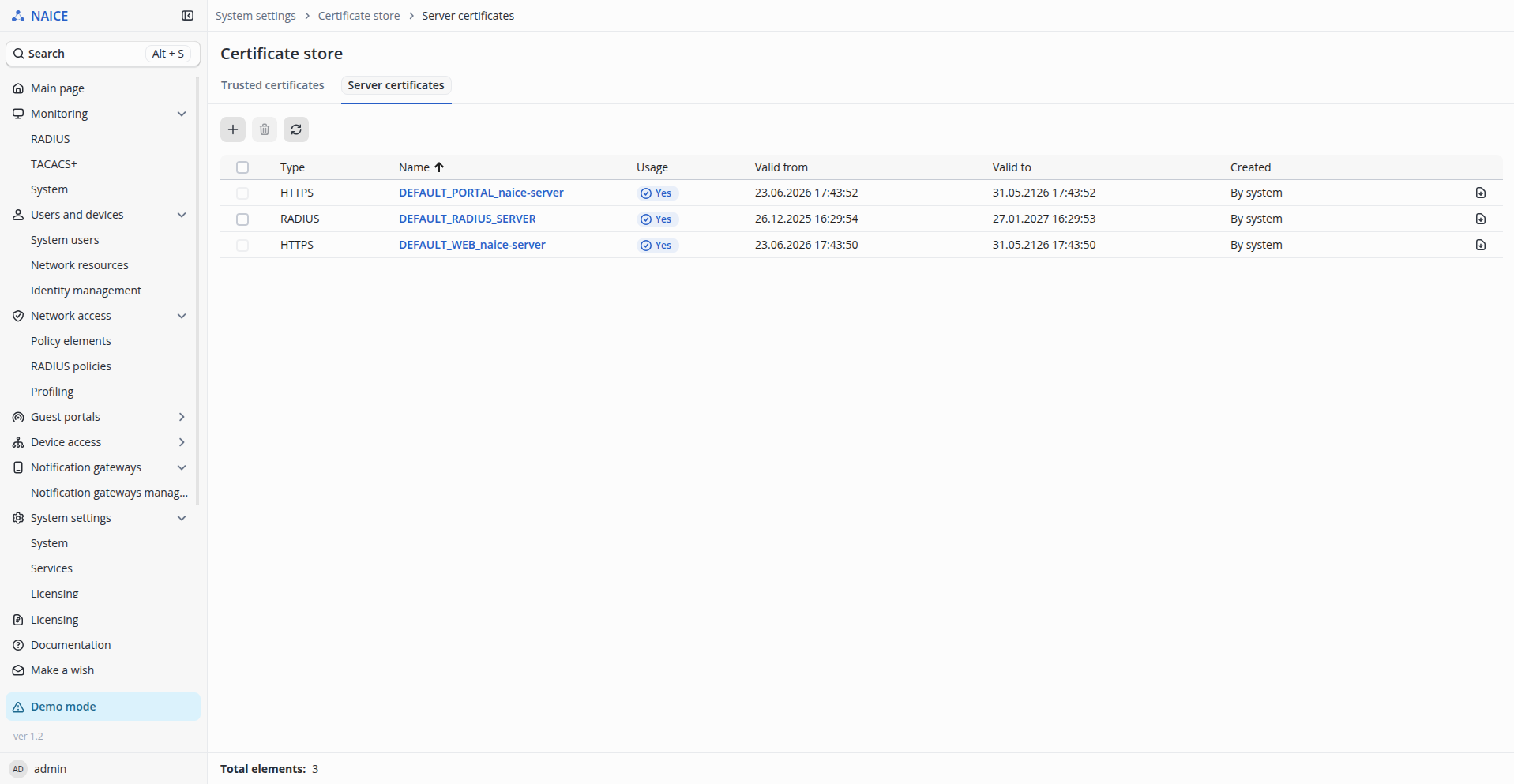
To upload your own server certificates to NAICE, go to the System settings → Certificate store → Server certificates page (access requires the system user to have the privilege to edit system settings). The page contains a table that already has an entry for the built-in default certificate DEFAULT_RADIUS_SERVER. Right after installation, this certificate is used as the server certificate for both EAP-PEAP and EAP-TLS authorization.
 To open the certificate upload form, click
  . In the form, select certificate type — RADIUS.
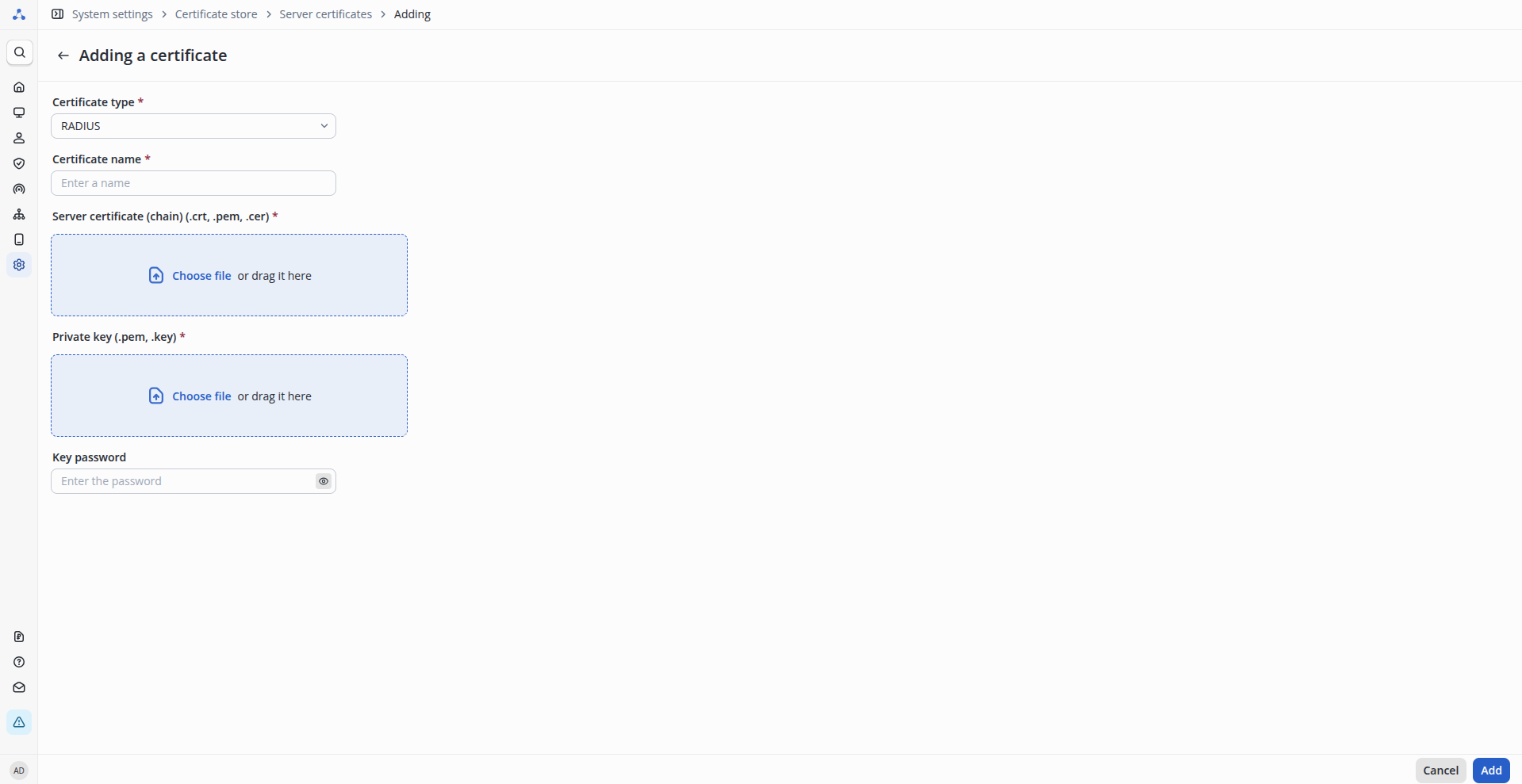
Fill in the remaining form fields:
- Certificate name — a custom certificate name of up to 200 characters;
- Server certificate — upload the certificate file. The certificate must meet the requirements.
- Private key — upload the certificate private key file. The private key must meet the requirements.
- Key password — specify the private key password (if applicable).
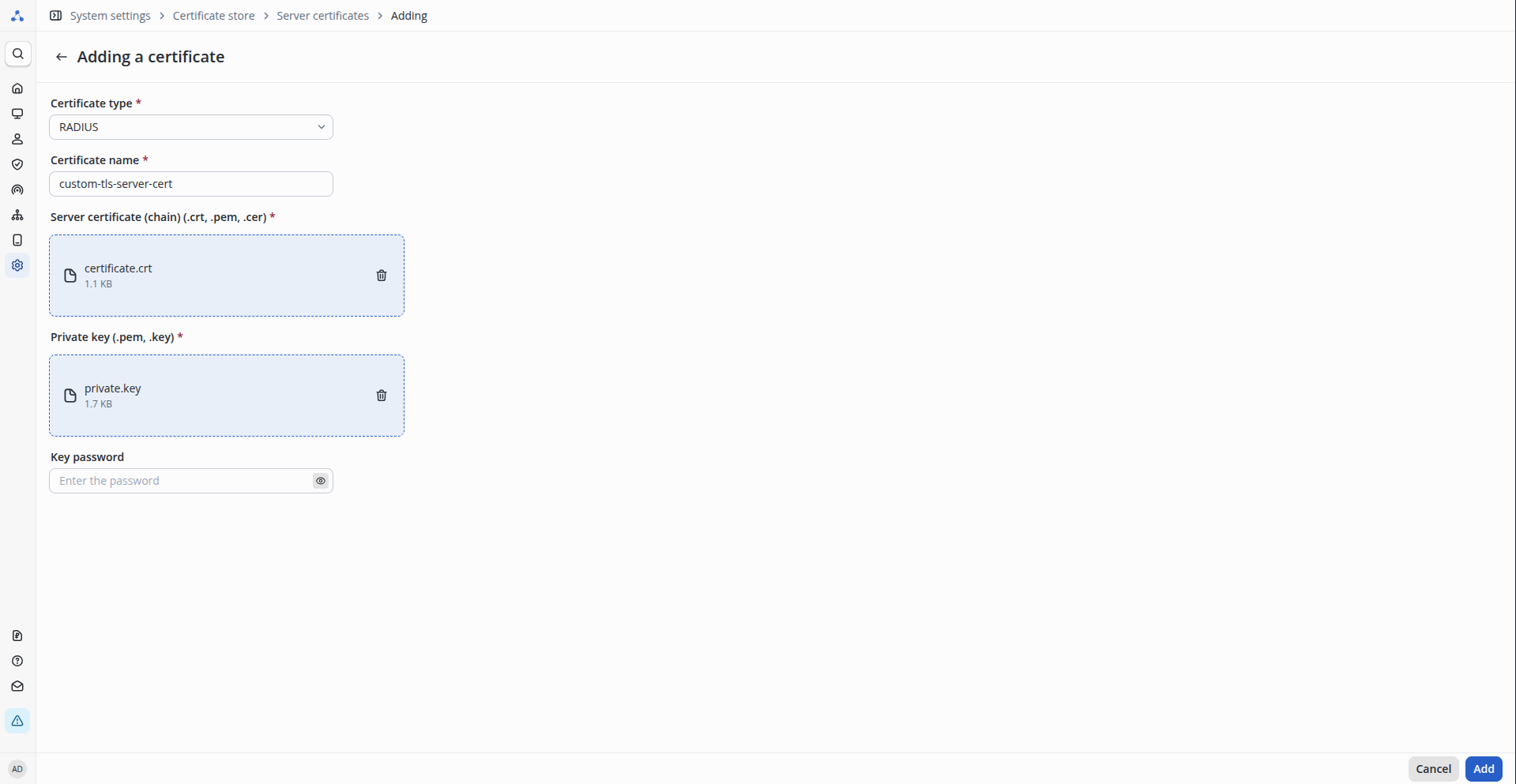
After specifying all the required settings, click the Add button. The certificate will undergo initial validation during upload. This includes checking whether it meets the requirements, whether the private key matches the certificate, and whether the certificate is within its validity period. If all checks pass, the certificate will be uploaded, and a new entry will appear in the server certificates table:
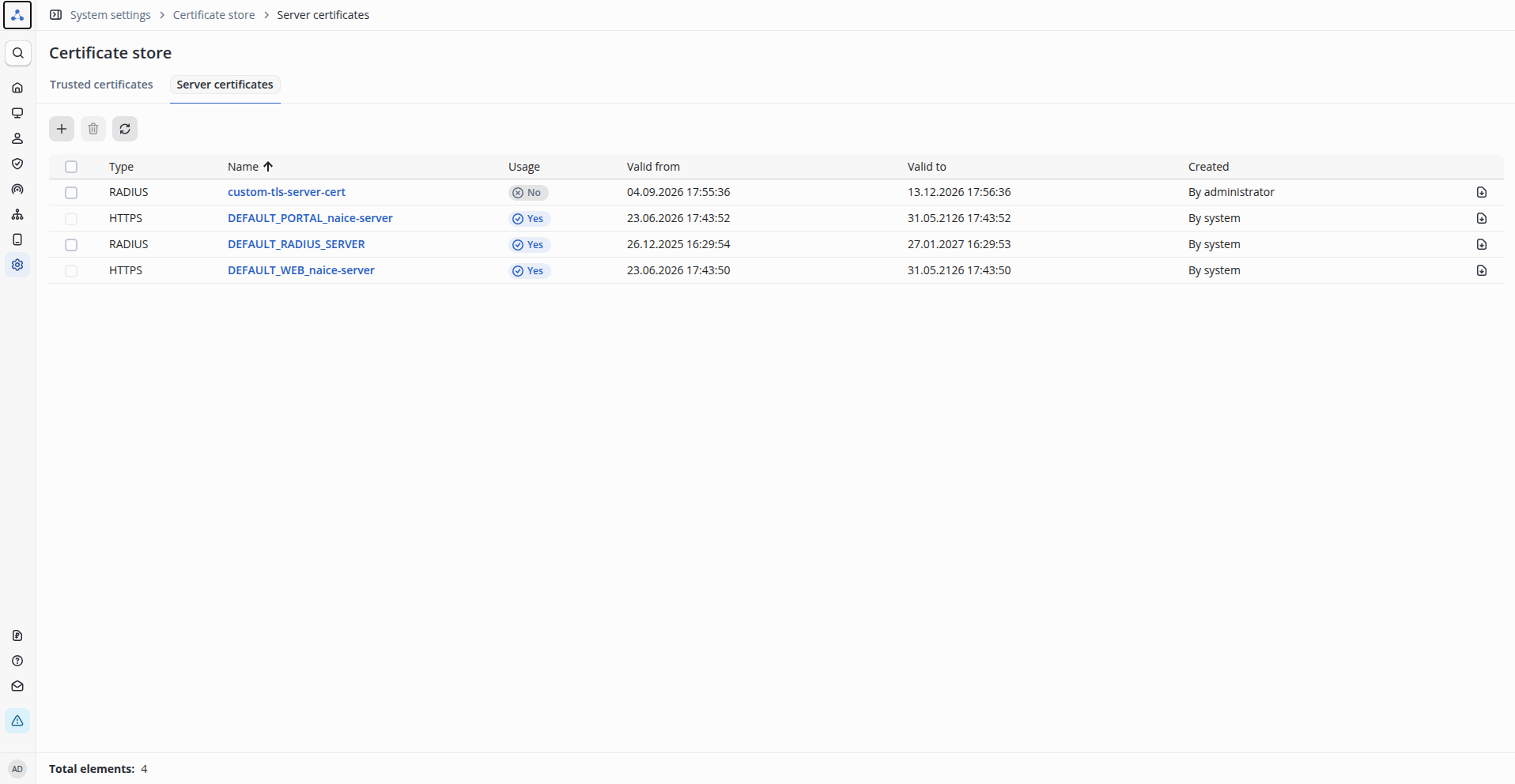
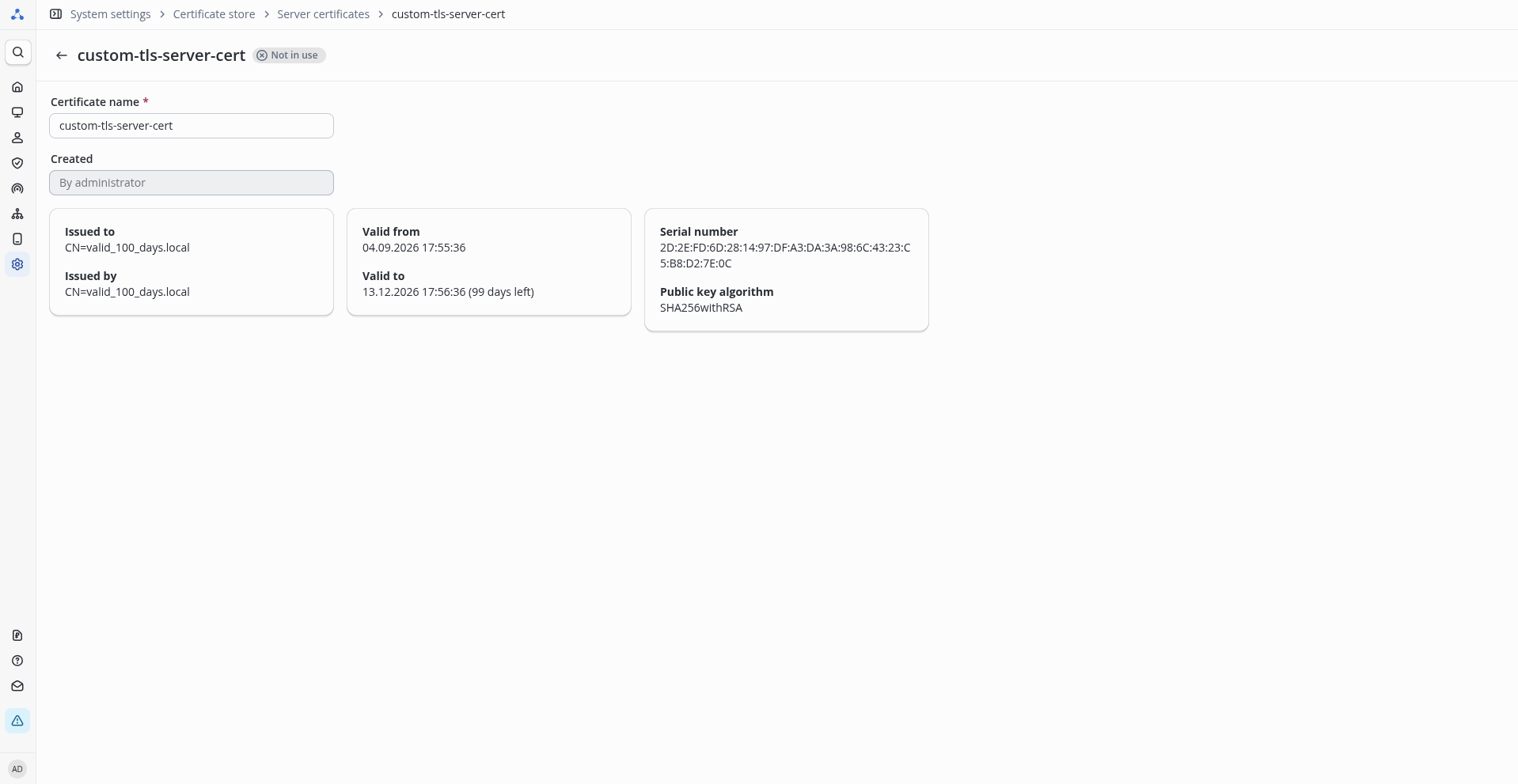
If needed, you can view detailed certificate information by clicking the certificate name in the table:
The process of uploading server certificates for EAP-PEAP and EAP-TLS is identical.
Uploading the CA certificate for EAP-TLS
For user authentication via the EAP-TLS protocol, the Certification Authority (CA) certificate must be uploaded separately. To upload the certificate, go to the System settings → Certificate store → Trusted certificates page (access requires the system user to have the privilege to edit system settings). The page contains a table that already has an entry for the built-in default certificate DEFAULT_RADIUS_CA. This certificate is a "placeholder" based on the built-in certificate for EAP-PEAP.
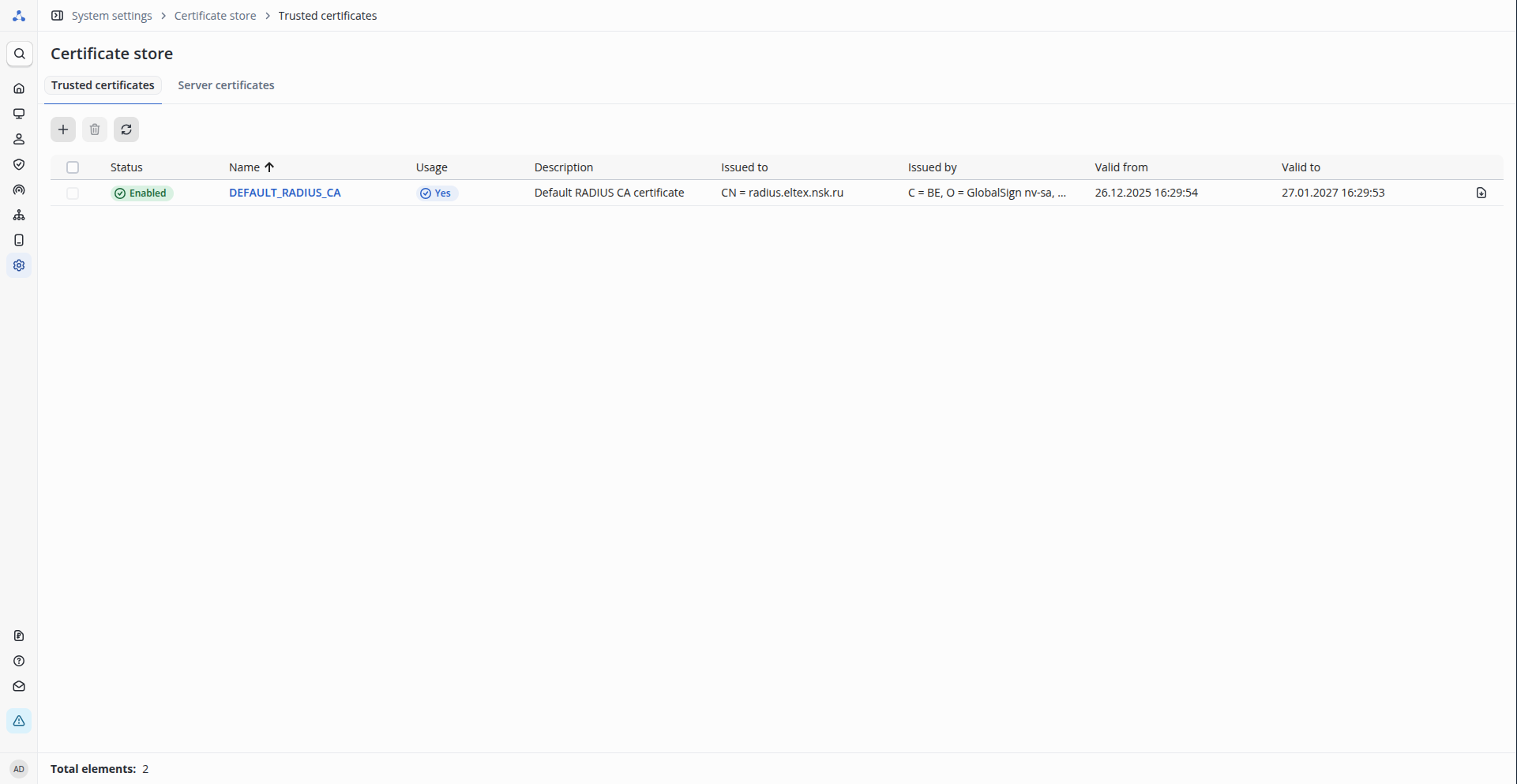
To upload your own certificate, click . The certificate upload form opens:
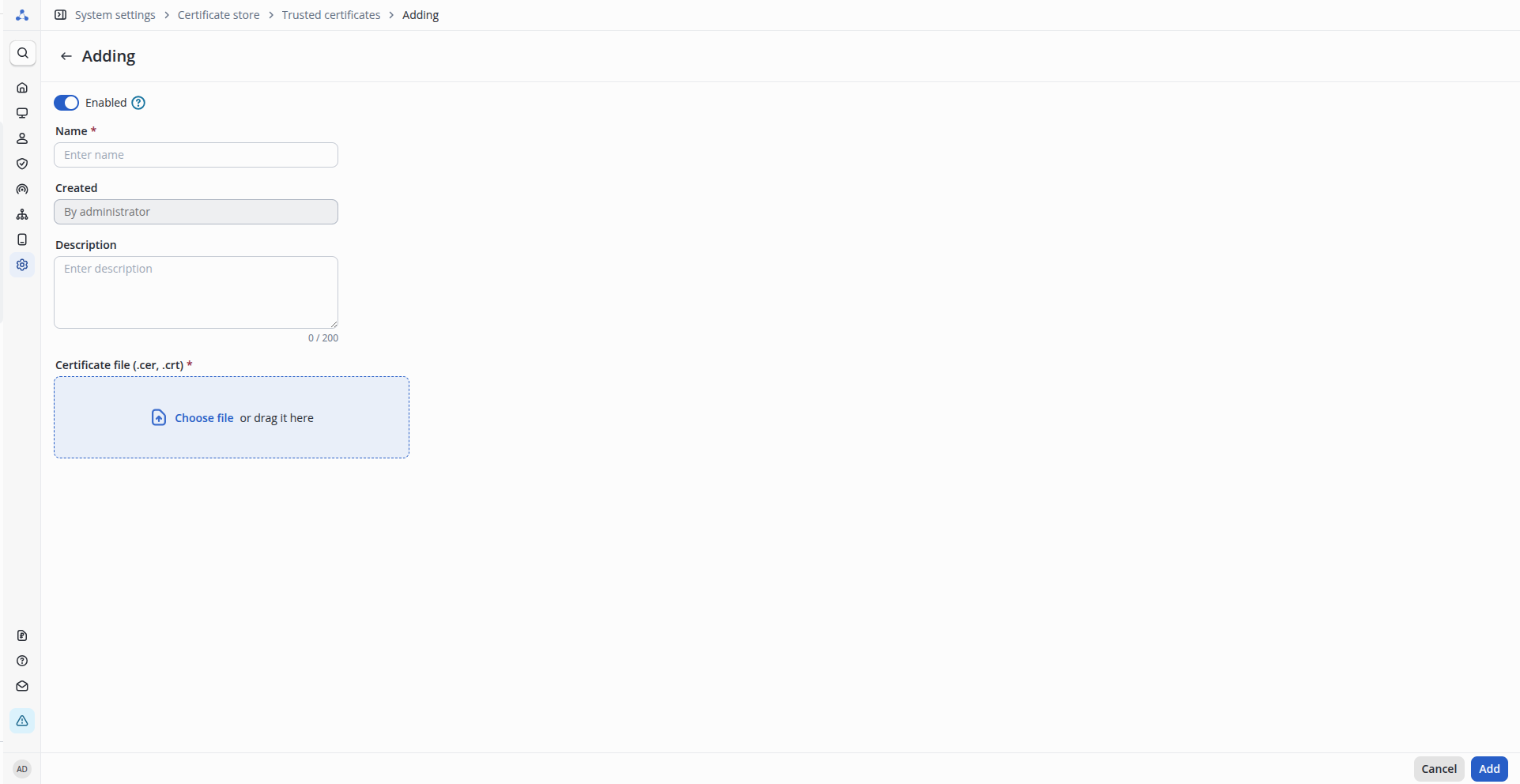
Fill in the form fields:
- Name — a custom certificate name of up to 200 characters;
- Certificate file — upload the CA certificate file. The certificate must meet the requirements.
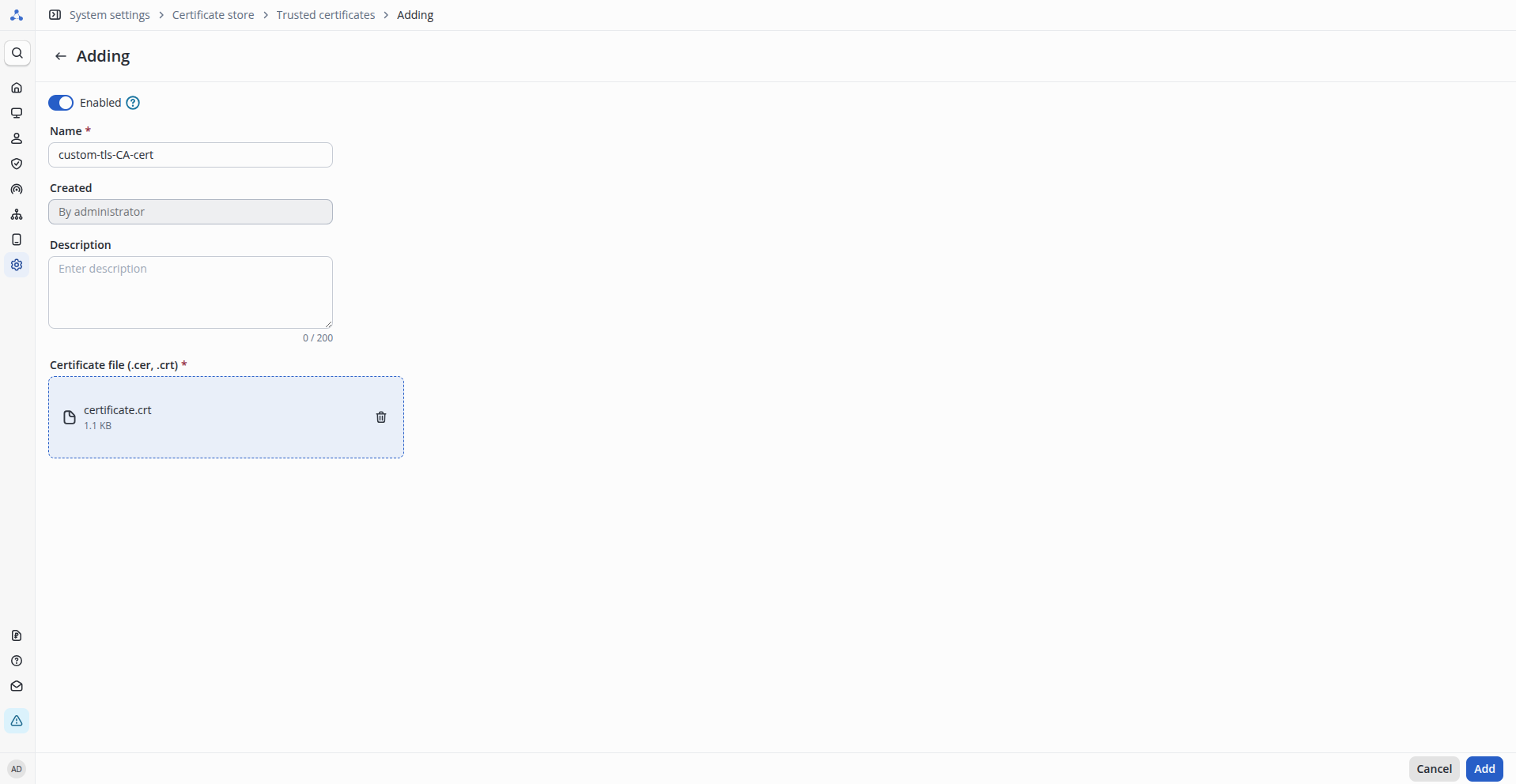
After specifying all the required settings, click the Add button. The certificate will undergo initial validation during upload. This includes checking whether it meets the requirements, whether the private key matches the certificate, and whether the certificate is within its validity period. If all checks pass, the certificate will be uploaded, and a new entry will appear in the server certificates table:
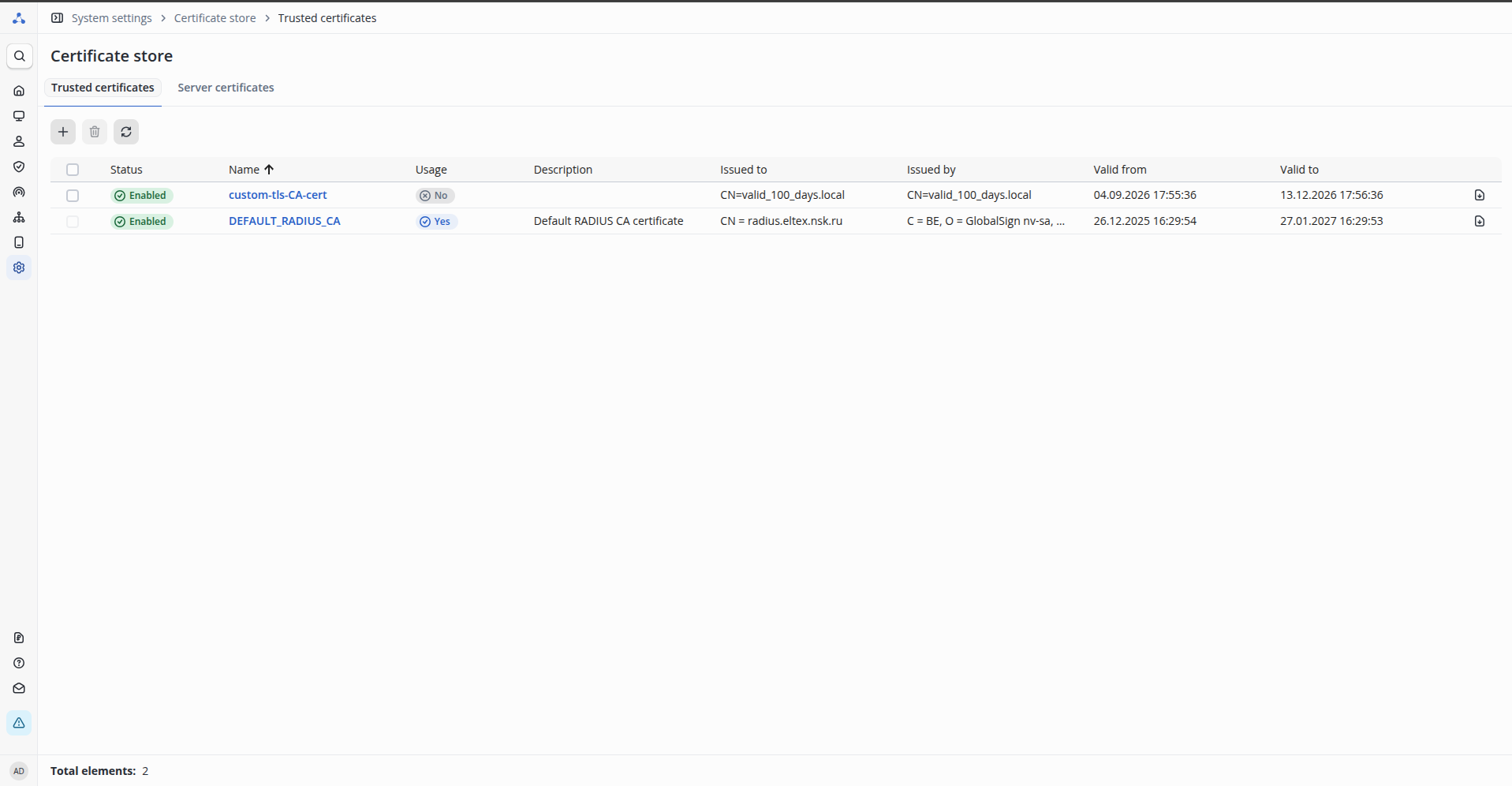
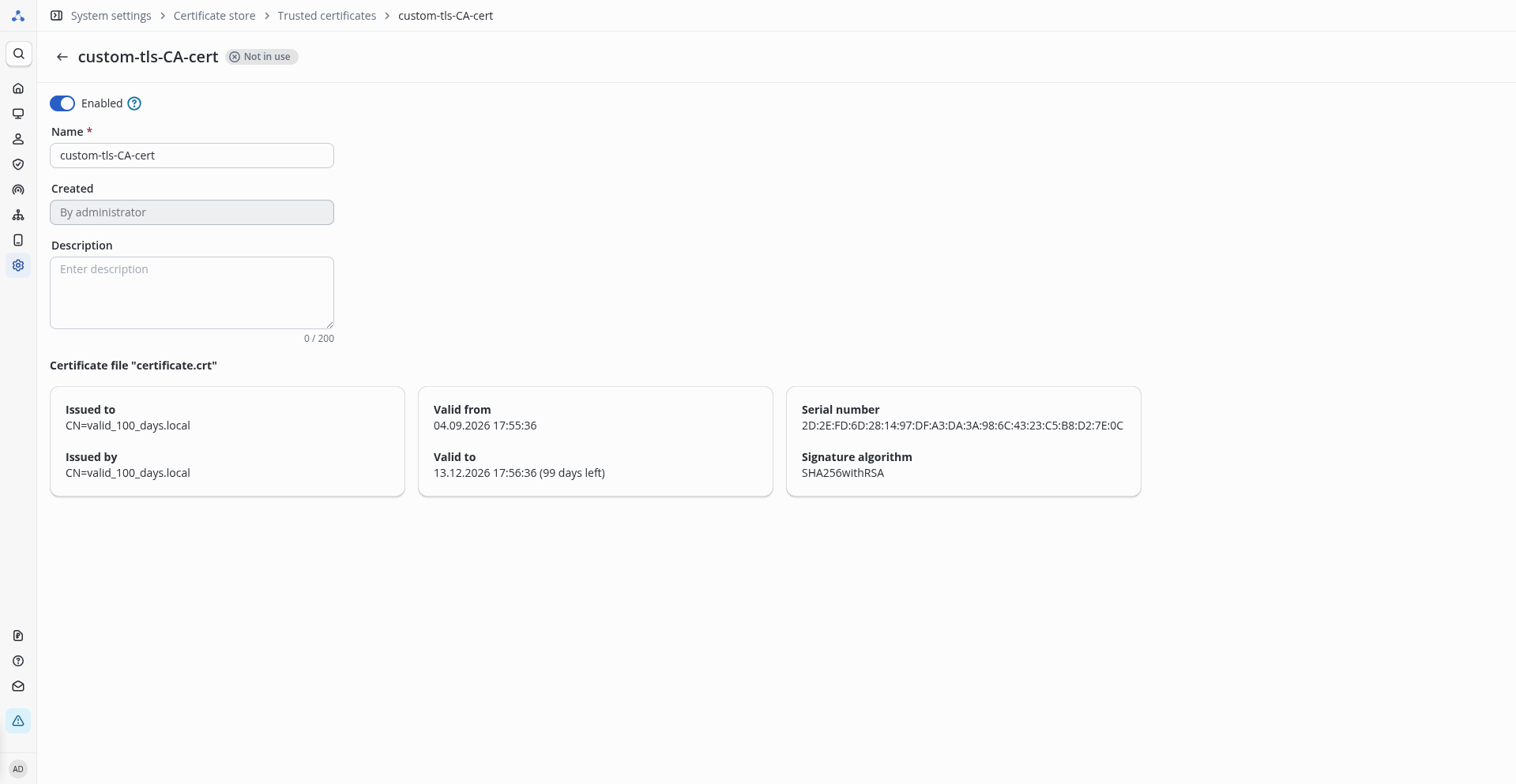
If needed, you can view detailed certificate information by clicking the certificate name in the table:
Configuring certificate usage
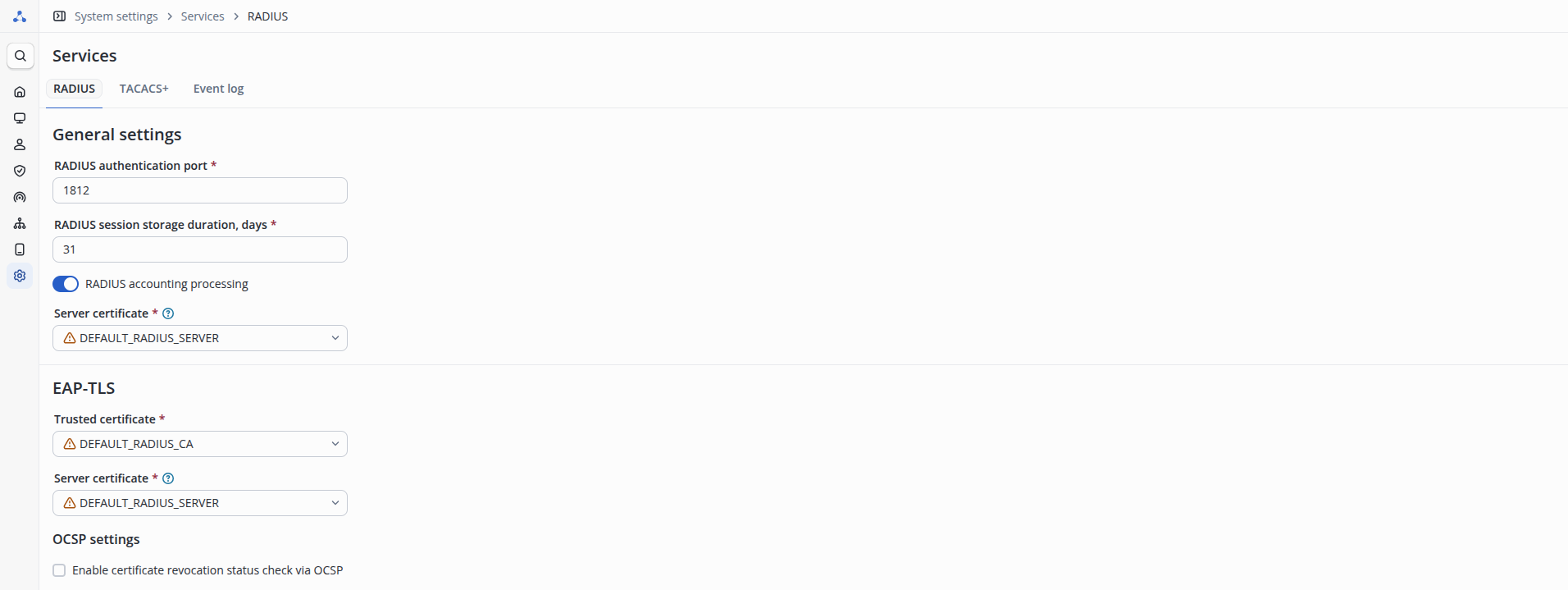
At the previous step, the certificates were uploaded to the storage. Now, configure their use by the RADIUS server. To do this, go to the System settings → Services → RADIUS page. This page contains the settings of the RADIUS server as part of NAICE.
Configuring the certificate for EAP-PEAP
The certificate used during EAP-PEAP authentication is configured in the General settings block.
Select the previously uploaded server certificate from the Server certificate list.
Configuring the certificates for EAP-TLS
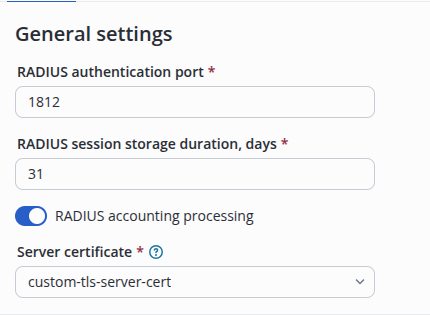
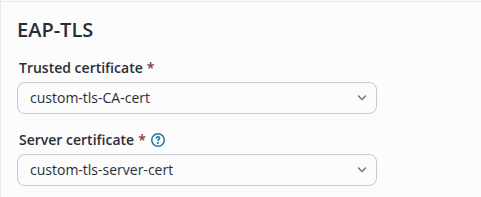
The certificates used during EAP-TLS authentication are configured in the EAP-TLS block.
Select the previously uploaded CA certificate from the Trusted certificate list, and the previously uploaded server certificate from the Server certificate list.
Configuring OCSP for EAP-TLS
OCSP (Online Certificate Status Protocol) — a protocol that allows checking whether a certificate has been revoked before the end of its validity period. Configuring OCSP in RADIUS provides additional security by preventing the use of revoked certificates during authentication.
NAICE supports checking certificate revocation via the OCSP protocol. The requirements for the OCSP server are specified in Requirements for the OCSP server.
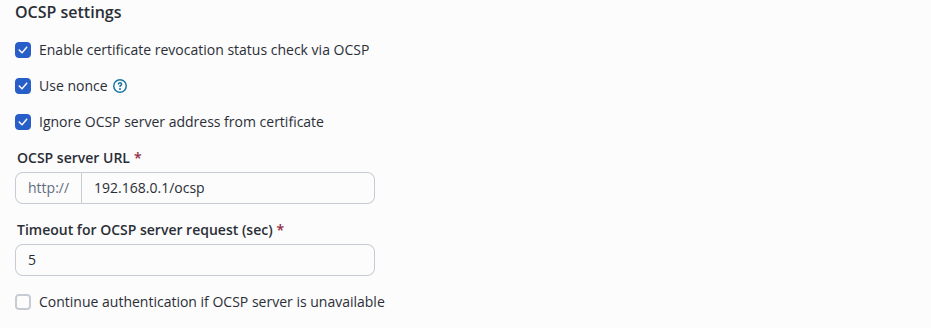
The following parameters are available:
- Enable certificate revocation status check via OCSP — a check box that enables or disables OCSP checking. When enabled, additional settings become available.
- Use nonce — a check box that enables using a nonce to ensure the freshness of the certificate status response (described in RFC 8954). Before enabling this feature, it is recommended to verify that the OCSP server supports this mechanism.
- Ignore OCSP server address from the certificate — a check box that allows specifying your own OCSP server address, ignoring the address embedded in the certificate. When enabled, the address input field becomes available.
- OCSP server URL — the OCSP server address. The "http://" prefix is added automatically and does not need to be specified.
- Timeout for OCSP server request (sec) — the maximum time to wait for a response from the OCSP server, in seconds.
- Continue authentication if OCSP server is unavailable — a check box that enables the soft-fail mode. When enabled, authentication continues even if the OCSP server is unavailable.
After completing all the settings, apply them by clicking the Save button.
Appendices
Creating a certificate request
If necessary, you can create a certificate request for issuing a RADIUS certificate for EAP-TLS operation directly on the NAICE server or on the host from which the Ansible playbooks are run, using the openssl utility that is included in Linux distributions:
openssl req -newkey rsa:2048 -nodes -keyout trusted_server.key -out naice.crs -subj "/CN=naice.test.loc" -addext "keyUsage = digitalSignature, keyEncipherment" -addext "extendedKeyUsage = serverAuth, clientAuth"
As a result, two files will be created:
- the key (without password protection in the example shown) with the filename
trusted_server.key (you can use a different filename if necessary); - the certificate request
naice.crs.
Using the certificate request file, issue the RADIUS server certificate through the CA used in your organization (for example, based on Windows Server) with the name trusted_server_chain.crt or any other required name.
Issuing certificates using OpenSSL
The command examples shown use OpenSSL version 3.0.13 for issuing certificates.
Issuing the root CA certificate
Issue the root CA certificate:
openssl req -x509 -new -newkey rsa:2048 -keyout ca.key -out ca.crt -days 3650 -subj "/C=RU/ST=Russia/L=Test/O=Test ORG/OU=QA/CN=ca.test.loc" -addext "keyUsage = digitalSignature, keyEncipherment, keyCertSign"
Enter the password for the CA certificate key. This password will be required when issuing any certificate:
$openssl req -x509 -new -newkey rsa:2048 -keyout ca.key -out ca.crt -days 3650 -subj "/C=RU/ST=Russia/L=Test/O=Test ORG/OU=QA/CN=ca.test.loc" -addext "keyUsage = digitalSignature, keyEncipherment, keyCertSign"

Enter PEM pass phrase:
Verifying - Enter PEM pass phrase:
-----
If a password for the certificate key is not required, add the -nodes option when generating the certificate key:
openssl req -x509 -new -newkey rsa:2048 -nodes -keyout ca.key -out ca.crt -days 3650 -subj "/C=RU/ST=Russia/L=Test/O=Test ORG/OU=QA/CN=ca.test.loc" -addext "keyUsage = digitalSignature, keyEncipherment, keyCertSign"
As a result, two files will be created: ca.pem and ca.key.
Preparing files for issuing server and user certificates
Issuing a certificate for NAICE-RADIUS
Create a configuration file server.cnf, which will be responsible for signing the certificate request for the server:
[ signing_req ]
keyUsage               = digitalSignature, keyEncipherment
extendedKeyUsage       = serverAuth, clientAuth
Create a certificate request for the RADIUS server:
openssl req -new -newkey rsa:2048 -keyout radius.key -out radius.csr -subj "/C=RU/ST=Russia/L=Test City/O=Tester's ORG/OU=QA/CN=radius.test.loc"
Issue the certificate based on the previously created request using the server.cnf configuration file:
openssl x509 -req -in radius.csr -CA ca.crt -CAkey ca.key -CAcreateserial -extfile server.cnf -extensions signing_req -out radius.crt
As a result, you will get two files that will be required in the NAICE-RADIUS configuration: radius.crt and radius.key.
Issuing a user certificate (for EAP-TLS authentication)
Create a configuration file clients.cnf, which will be responsible for signing the certificate request for the server:
[ signing_req ]
keyUsage               = digitalSignature, keyEncipherment
extendedKeyUsage       = clientAuth
Create a certificate request for the RADIUS server:
openssl req -new -newkey rsa:2048 -keyout client1.key -out client1.csr -subj "/C=RU/ST=Russia/L=Test City/O=Tester's ORG/OU=QA/CN=client.test.loc"
Issue the certificate based on the previously created request using the server.cnf configuration file:
openssl x509 -req -in client1.csr -CA ca.crt -CAkey ca.key -CAcreateserial -extfile clients.cnf -extensions signing_req -out client1.crt
As a result, two files will be created that will be required in the user configuration: client1.crt and client1.key.
Certificate conversion
Certificates created by a Windows Server CA can be in DER encoding. Such a certificate must be converted before it can be used by NAICE-RADIUS or by a user on a Linux OS. The conversion can be performed with the OpenSSL utility:
openssl x509 -inform der -in client1.cer -out client1.crt
To use the certificate on a Windows OS, it must be converted to the certificate container format. The conversion can be performed with the OpenSSL utility (you will need to enter the certificate key password and set the container password):
openssl pkcs12 -export -out client1.pfx -inkey client1.key -in client1.crt
Extracting certificates from the container (you will need to enter the container password):
openssl pkcs12 -in client1.pfx -nokeys -out client1.pem
Note that if the container contains several certificates, all of them will be extracted and written to a single file.
Extracting the certificate key from the container (you will need to enter the container password and set the private key password):
openssl pkcs12 -in client1.pfx -nocerts -aes256 -out client1.key
Extracting the PEM certificate key if the key and certificates are written to a single file (you will need to enter and re-enter the key password):
openssl rsa -aes128 -in client1.pem -out client1.key
If the RADIUS certificate is issued by an intermediate certification authority, for example:
eyJleHRTcnZJbnRlZ1R5cGUiOiIiLCJnQ2xpZW50SWQiOiIiLCJjcmVhdG9yTmFtZSI6ItCh0LDQs9Cw0YLQtdC70YzRj9C9INCg0LXQs9C40L3QsCDQnNC40YXQsNC50LvQvtCy0L3QsCIsIm91dHB1dFR5cGUiOiJibG9jayIsImxhc3RNb2RpZmllck5hbWUiOiLQodCw0LPQsNGC0LXQu9GM0Y/QvSDQoNC10LPQuNC90LAg0JzQuNGF0LDQudC70L7QstC90LAiLCJsYW5ndWFnZSI6InJ1IiwiZGlhZ3JhbURpc3BsYXlOYW1lIjoiIiwic0ZpbGVJZCI6IiIsImF0dElkIjoiNzU1NzI4Njk3IiwiZGlhZ3JhbU5hbWUiOiJjZXJ0aWZpY2F0ZV9jaGFpbiIsImFzcGVjdCI6IiIsImxpbmtzIjoiYXV0byIsImNlb05hbWUiOiJ2MS4yXzMuMTIgVXBkYXRpbmcvcmVwbGFjaW5nIFJBRElVUyBjZXJ0aWZpY2F0ZXMgZm9yIEVBUC1QRUFQL1RMUyIsInRic3R5bGUiOiJ0b3AiLCJjYW5Db21tZW50IjpmYWxzZSwiZGlhZ3JhbVVybCI6IiIsImNzdkZpbGVVcmwiOiIiLCJib3JkZXIiOnRydWUsIm1heFNjYWxlIjoiMSIsIm93bmluZ1BhZ2VJZCI6NzU1NzI4NjgyLCJlZGl0YWJsZSI6ZmFsc2UsImNlb0lkIjo3NTU3Mjg2ODIsInBhZ2VJZCI6IiIsImxib3giOnRydWUsInNlcnZlckNvbmZpZyI6eyJlbWFpbHByZXZpZXciOiIxIn0sIm9kcml2ZUlkIjoiIiwicmV2aXNpb24iOjEsIm1hY3JvSWQiOiJhNWZkM2MxNC0xZWVjLTQ1NzktYWMzMi1iMzk0YTI0MjdmOTMiLCJwcmV2aWV3TmFtZSI6ImNlcnRpZmljYXRlX2NoYWluLnBuZyIsImxpY2Vuc2VTdGF0dXMiOiJPSyIsInNlcnZpY2UiOiIiLCJpc1RlbXBsYXRlIjoiIiwid2lkdGgiOiIxNzEiLCJzaW1wbGVWaWV3ZXIiOmZhbHNlLCJsYXN0TW9kaWZpZWQiOjE3OTA5Mjc2MjEwMDAsImV4Y2VlZFBhZ2VXaWR0aCI6ZmFsc2UsIm9DbGllbnRJZCI6IiJ9
all certificates must be combined into the RADIUS certificate file: RADIUS certificate + Root CA certificate + Intermediate CA certificate. The RADIUS certificate must be the first certificate in the chain.
-----BEGIN CERTIFICATE-----
MIIGWzCCBUOgAwIBAgIMBNXcuv+bBBRmpm3UMA0GCSqGSIb3DQEBCwUAMFUxCzAJ
BgNVBAYTAkJFMRkwFwYDVQQKExBHbG9iYWxTaWduIG52LXNhMSswKQYDVQQDEyJH
bG9iYWxTaWduIEdDQyBSNiBBbHBoYVNTTCBDQSAyMDIzMB4XDTI0MTIyMDEwNTEz
OFoXDTI2MDEyMTEwNTEzN1owHjEcMBoGA1UEAxMTcmFkaXVzLmVsdGV4Lm5zay5y
dTCCASIwDQYJKoZIhvcNAQEBBQADggEPADCCAQoCggEBAOdAarCHDAJoebbDZx8K
p+iUn688IRAVpF9u1cV4T7yun6VQeemArfJok3zXW53j81Xq8aR8LY4gw63puNb9
gcqTL8ZJpM3yY1nHl329gKkf6ZS2w/GZiQNRMLNyw5B1vqVhezEDQKRmACASmOd1
xdS0zQ/0f7fqypMxZxcYouxZ02uPjmOcGtx78S1BiAx20Iv2fXdqL/JXsI1MPRWl
O/bp++bB3HowvxwsbILMAVWVNg1xQUIyiWB1HbqB2qwgLOy3FjgIfLWwHPrvWWSu
xIirWv3FukYZRmuWhlNy954Kz2r15otD+wQU/lZDyTUeS43r4vMzeLMCH2i2h+er
vxkCAwEAAaOCA2AwggNcMA4GA1UdDwEB/wQEAwIFoDAMBgNVHRMBAf8EAjAAMIGZ
BggrBgEFBQcBAQSBjDCBiTBJBggrBgEFBQcwAoY9aHR0cDovL3NlY3VyZS5nbG9i
YWxzaWduLmNvbS9jYWNlcnQvZ3NnY2NyNmFscGhhc3NsY2EyMDIzLmNydDA8Bggr
BgEFBQcwAYYwaHR0cDovL29jc3AuZ2xvYmFsc2lnbi5jb20vZ3NnY2NyNmFscGhh
c3NsY2EyMDIzMFcGA1UdIARQME4wCAYGZ4EMAQIBMEIGCisGAQQBoDIKAQMwNDAy
BggrBgEFBQcCARYmaHR0cHM6Ly93d3cuZ2xvYmFsc2lnbi5jb20vcmVwb3NpdG9y
eS8wRAYDVR0fBD0wOzA5oDegNYYzaHR0cDovL2NybC5nbG9iYWxzaWduLmNvbS9n
c2djY3I2YWxwaGFzc2xjYTIwMjMuY3JsMB4GA1UdEQQXMBWCE3JhZGl1cy5lbHRl
eC5uc2sucnUwHQYDVR0lBBYwFAYIKwYBBQUHAwEGCCsGAQUFBwMCMB8GA1UdIwQY
MBaAFL0Ft/OKkzxzy3n6D4USoXeWGJF0MB0GA1UdDgQWBBSqZzd9zjFQvu61Uxrg
E8gGJIxoTzCCAYAGCisGAQQB1nkCBAIEggFwBIIBbAFqAHcAZBHEbKQS7KeJHKIC
LgC8q08oB9QeNSer6v7VA8l9zfAAAAGT47HRPwAABAMASDBGAiEAkyjBkbwzfwbZ
VOfe22J4OeqHpiky5YEXLRICATmZD6wCIQDth4L09ZQEyPnr2mTvnNNmQvmGrhCa
LFN9QAReVDvV9AB3AFZs1aN2voPf40K2dcScIySYp2m6w4LLq0mjh32asy0BAAAB
k+Ox0gQAAAQDAEgwRgIhAPxn5SvlwnORCxsZdXBVX4oW5JVZmk5hy5WZS55zV44Z
AiEA1FhnlnJ+ur9gK/ZLEytByFysdKgfamL/45PVx9g3Nf4AdgAOV5S8866pPjMb
LJkHs/eQ35vCPXEyJd0hqSWsYcVOIQAAAZPjsdREAAAEAwBHMEUCIQD4pO5DogLo
MoAKL9/CQqHKRXrKgAOuEqaSiAVsHZji3gIgDKSViGFbdPWOUwZYjx4RnxxNjKCm
gPG0i9W8CXfoJMEwDQYJKoZIhvcNAQELBQADggEBAIhNMgrrcdECOrE4bM88EmPK
JzbJqvGk1WRBUeyTe3LoCF0Rbu9bZZXwUwCPTiYKGcTTiOHjDYLo3ITDIDO8mq5f
ialpZv3hKZRoH7BZhRS3PNMwclK5RxeugJuz3oXrzJUoFSE3SwfStBH0BEPUC3zV
rJwshEuZOzpsOUkqLksOIoUlqhJRMwyYyhduhHFFugy+qU7UZ6gg3P0w0EIaBJsR
I41WCOlA3q2at465E7QTl3ZxHZQ6aOs+RKJW9y5KVT4nLW70vKQBsu5TIpHxOuav
dXVjvXaWWpB3a9EosZ/95OwO4ahK7bTsxF8bst7Ynb+6nt8HAXZM1RObOAzDrwM=
-----END CERTIFICATE-----
-----BEGIN CERTIFICATE-----
MIIFgzCCA2ugAwIBAgIORea7A4Mzw4VlSOb/RVEwDQYJKoZIhvcNAQEMBQAwTDEg
MB4GA1UECxMXR2xvYmFsU2lnbiBSb290IENBIC0gUjYxEzARBgNVBAoTCkdsb2Jh
bFNpZ24xEzARBgNVBAMTCkdsb2JhbFNpZ24wHhcNMTQxMjEwMDAwMDAwWhcNMzQx
MjEwMDAwMDAwWjBMMSAwHgYDVQQLExdHbG9iYWxTaWduIFJvb3QgQ0EgLSBSNjET
MBEGA1UEChMKR2xvYmFsU2lnbjETMBEGA1UEAxMKR2xvYmFsU2lnbjCCAiIwDQYJ
KoZIhvcNAQEBBQADggIPADCCAgoCggIBAJUH6HPKZvnsFMp7PPcNCPG0RQssgrRI
xutbPK6DuEGSMxSkb3/pKszGsIhrxbaJ0cay/xTOURQh7ErdG1rG1ofuTToVBu1k
ZguSgMpE3nOUTvOniX9PeGMIyBJQbUJmL025eShNUhqKGoC3GYEOfsSKvGRMIRxD
aNc9PIrFsmbVkJq3MQbFvuJtMgamHvm566qjuL++gmNQ0PAYid/kD3n16qIfKtJw
LnvnvJO7bVPiSHyMEAc4/2ayd2F+4OqMPKq0pPbzlUoSB239jLKJz9CgYXfIWHSw
1CM69106yqLbnQneXUQtkPGBzVeS+n68UARjNN9rkxi+azayOeSsJDa38O+2HBNX
k7besvjihbdzorg1qkXy4J02oW9UivFyVm4uiMVRQkQVlO6jxTiWm05OWgtH8wY2
SXcwvHE35absIQh1/OZhFj931dmRl4QKbNQCTXTAFO39OfuD8l4UoQSwC+n+7o/h
bguyCLNhZglqsQY6ZZZZwPA1/cnaKI0aEYdwgQqomnUdnjqGBQCe24DWJfncBZ4n
WUx2OVvq+aWh2IMP0f/fMBH5hc8zSPXKbWQULHpYT9NLCEnFlWQaYw55PfWzjMpY
rZxCRXluDocZXFSxZba/jJvcE+kNb7gu3GduyYsRtYQUigAZcIN5kZeR1Bonvzce
MgfYFGM8KEyvAgMBAAGjYzBhMA4GA1UdDwEB/wQEAwIBBjAPBgNVHRMBAf8EBTAD
AQH/MB0GA1UdDgQWBBSubAWjkxPioufi1xzWx/B/yGdToDAfBgNVHSMEGDAWgBSu
bAWjkxPioufi1xzWx/B/yGdToDANBgkqhkiG9w0BAQwFAAOCAgEAgyXt6NH9lVLN
nsAEoJFp5lzQhN7craJP6Ed41mWYqVuoPId8AorRbrcWc+ZfwFSY1XS+wc3iEZGt
Ixg93eFyRJa0lV7Ae46ZeBZDE1ZXs6KzO7V33EByrKPrmzU+sQghoefEQzd5Mr61
55wsTLxDKZmOMNOsIeDjHfrYBzN2VAAiKrlNIC5waNrlU/yDXNOd8v9EDERm8tLj
vUYAGm0CuiVdjaExUd1URhxN25mW7xocBFymFe944Hn+Xds+qkxV/ZoVqW/hpvvf
cDDpw+5CRu3CkwWJ+n1jez/QcYF8AOiYrg54NMMl+68KnyBr3TsTjxKM4kEaSHpz
oHdpx7Zcf4LIHv5YGygrqGytXm3ABdJ7t+uA/iU3/gKbaKxCXcPu9czc8FB10jZp
nOZ7BN9uBmm23goJSFmH63sUYHpkqmlD75HHTOwY3WzvUy2MmeFe8nI+z1TIvWfs
pA9MRf/TuTAjB0yPEL+GltmZWrSZVxykzLsViVO6LAUP5MSeGbEYNNVMnbrt9x+v
JJUEeKgDu+6B5dpffItKoZB0JaezPkvILFa9x8jvOOJckvB595yEunQtYQEgfn7R
8k8HWV+LLUNS60YMlOH1Zkd5d9VUWx+tJDfLRVpOoERIyNiwmcUVhAn21klJwGW4
5hpxbqCo8YLoRT5s1gLXCmeDBVrJpBA=
-----END CERTIFICATE-----
-----BEGIN CERTIFICATE-----
MIIFjDCCA3SgAwIBAgIQfx8skC6D0OO2+zvuR4tegDANBgkqhkiG9w0BAQsFADBM
MSAwHgYDVQQLExdHbG9iYWxTaWduIFJvb3QgQ0EgLSBSNjETMBEGA1UEChMKR2xv
YmFsU2lnbjETMBEGA1UEAxMKR2xvYmFsU2lnbjAeFw0yMzA3MTkwMzQzMjVaFw0y
NjA3MTkwMDAwMDBaMFUxCzAJBgNVBAYTAkJFMRkwFwYDVQQKExBHbG9iYWxTaWdu
IG52LXNhMSswKQYDVQQDEyJHbG9iYWxTaWduIEdDQyBSNiBBbHBoYVNTTCBDQSAy
MDIzMIIBIjANBgkqhkiG9w0BAQEFAAOCAQ8AMIIBCgKCAQEA00Jvk5ADppO0rgDn
j1M14XIb032Aas409JJFAb8cUjipFOth7ySLdaWLe3s63oSs5x3eWwzTpX4BFkzZ
bxT1eoJSHfT2M0wZ5QOPcCIjsr+YB8TAvV2yJSyq+emRrN/FtgCSTaWXSJ5jipW8
SJ/VAuXPMzuAP2yYpuPcjjQ5GyrssDXgu+FhtYxqyFP7BSvx9jQhh5QV5zhLycua
n8n+J0Uw09WRQK6JGQ5HzDZQinkNel+fZZNRG1gE9Qeh+tHBplrkalB1g85qJkPO
J7SoEvKsmDkajggk/sSq7NPyzFaa/VBGZiRRG+FkxCBniGD5618PQ4trcwHyMojS
FObOHQIDAQABo4IBXzCCAVswDgYDVR0PAQH/BAQDAgGGMB0GA1UdJQQWMBQGCCsG
AQUFBwMBBggrBgEFBQcDAjASBgNVHRMBAf8ECDAGAQH/AgEAMB0GA1UdDgQWBBS9
BbfzipM8c8t5+g+FEqF3lhiRdDAfBgNVHSMEGDAWgBSubAWjkxPioufi1xzWx/B/
yGdToDB7BggrBgEFBQcBAQRvMG0wLgYIKwYBBQUHMAGGImh0dHA6Ly9vY3NwMi5n
bG9iYWxzaWduLmNvbS9yb290cjYwOwYIKwYBBQUHMAKGL2h0dHA6Ly9zZWN1cmUu
Z2xvYmFsc2lnbi5jb20vY2FjZXJ0L3Jvb3QtcjYuY3J0MDYGA1UdHwQvMC0wK6Ap
oCeGJWh0dHA6Ly9jcmwuZ2xvYmFsc2lnbi5jb20vcm9vdC1yNi5jcmwwIQYDVR0g
BBowGDAIBgZngQwBAgEwDAYKKwYBBAGgMgoBAzANBgkqhkiG9w0BAQsFAAOCAgEA
fMkkMo5g4mn1ft4d4xR2kHzYpDukhC1XYPwfSZN3A9nEBadjdKZMH7iuS1vF8uSc
g26/30DRPen2fFRsr662ECyUCR4OfeiiGNdoQvcesM9Xpew3HLQP4qHg+s774hNL
vGRD4aKSKwFqLMrcqCw6tEAfX99tFWsD4jzbC6k8tjSLzEl0fTUlfkJaWpvLVkpg
9et8tD8d51bymCg5J6J6wcXpmsSGnksBobac1+nXmgB7jQC9edU8Z41FFo87BV3k
CtrWWsdkQavObMsXUPl/AO8y/jOuAWz0wyvPnKom+o6W4vKDY6/6XPypNdebOJ6m
jyaILp0quoQvhjx87BzENh5s57AIOyIGpS0sDEChVDPzLEfRsH2FJ8/W5woF0nvs
BTqfYSCqblQbHeDDtCj7Mlf8JfqaMuqcbE4rMSyfeHyCdZQwnc/r9ujnth691AJh
xyYeCM04metJIe7cB6d4dFm+Pd5ervY4x32r0uQ1Q0spy1VjNqUJjussYuXNyMmF
HSuLQQ6PrePmH5lcSMQpYKzPoD/RiNVD/PK0O3vuO5vh3o7oKb1FfzoanDsFFTrw
0aLOdRW/tmLPWVNVlAb8ad+B80YJsL4HXYnQG8wYAFb8LhwSDyT9v+C1C1lcIHE7
nE0AAp9JSHxDYsma9pi4g0Phg3BgOm2euTRzw7R0SzU=
-----END CERTIFICATE-----
while openssl x509 -noout -text; do :; done < trusted_server_chain.crt

Certificate:
    Data:
        Version: 3 (0x2)
        Serial Number:
            04:d5:dc:ba:ff:9b:04:14:66:a6:6d:d4
        Signature Algorithm: sha256WithRSAEncryption
        Issuer: C=BE, O=GlobalSign nv-sa, CN=GlobalSign GCC R6 AlphaSSL CA 2023
        Validity
            Not Before: Dec 20 10:51:38 2024 GMT
            Not After : Jan 21 10:51:37 2026 GMT
        Subject: CN=radius.eltex.nsk.ru
        Subject Public Key Info:
            Public Key Algorithm: rsaEncryption
                Public-Key: (2048 bit)
                Modulus:
                    00:e7:40:6a:b0:87:0c:02:68:79:b6:c3:67:1f:0a:
                    a7:e8:94:9f:af:3c:21:10:15:a4:5f:6e:d5:c5:78:
                    4f:bc:ae:9f:a5:50:79:e9:80:ad:f2:68:93:7c:d7:
                    5b:9d:e3:f3:55:ea:f1:a4:7c:2d:8e:20:c3:ad:e9:
                    b8:d6:fd:81:ca:93:2f:c6:49:a4:cd:f2:63:59:c7:
                    97:7d:bd:80:a9:1f:e9:94:b6:c3:f1:99:89:03:51:
                    30:b3:72:c3:90:75:be:a5:61:7b:31:03:40:a4:66:
                    00:20:12:98:e7:75:c5:d4:b4:cd:0f:f4:7f:b7:ea:
                    ca:93:31:67:17:18:a2:ec:59:d3:6b:8f:8e:63:9c:
                    1a:dc:7b:f1:2d:41:88:0c:76:d0:8b:f6:7d:77:6a:
                    2f:f2:57:b0:8d:4c:3d:15:a5:3b:f6:e9:fb:e6:c1:
                    dc:7a:30:bf:1c:2c:6c:82:cc:01:55:95:36:0d:71:
                    41:42:32:89:60:75:1d:ba:81:da:ac:20:2c:ec:b7:
                    16:38:08:7c:b5:b0:1c:fa:ef:59:64:ae:c4:88:ab:
                    5a:fd:c5:ba:46:19:46:6b:96:86:53:72:f7:9e:0a:
                    cf:6a:f5:e6:8b:43:fb:04:14:fe:56:43:c9:35:1e:
                    4b:8d:eb:e2:f3:33:78:b3:02:1f:68:b6:87:e7:ab:
                    bf:19
                Exponent: 65537 (0x10001)
        X509v3 extensions:
            X509v3 Key Usage: critical
                Digital Signature, Key Encipherment
            X509v3 Basic Constraints: critical
                CA:FALSE
            Authority Information Access:
                CA Issuers - URI:http://secure.globalsign.com/cacert/gsgccr6alphasslca2023.crt
                OCSP - URI:http://ocsp.globalsign.com/gsgccr6alphasslca2023
            X509v3 Certificate Policies:
                Policy: 2.23.140.1.2.1
                Policy: 1.3.6.1.4.1.4146.10.1.3
                  CPS: https://www.globalsign.com/repository/
            X509v3 CRL Distribution Points:
                Full Name:
                  URI:http://crl.globalsign.com/gsgccr6alphasslca2023.crl
            X509v3 Subject Alternative Name:
                DNS:radius.eltex.nsk.ru
            X509v3 Extended Key Usage:
                TLS Web Server Authentication, TLS Web Client Authentication
            X509v3 Authority Key Identifier:
                BD:05:B7:F3:8A:93:3C:73:CB:79:FA:0F:85:12:A1:77:96:18:91:74
            X509v3 Subject Key Identifier:
                AA:67:37:7D:CE:31:50:BE:EE:B5:53:1A:E0:13:C8:06:24:8C:68:4F
            CT Precertificate SCTs:
                Signed Certificate Timestamp:
                    Version   : v1 (0x0)
                    Log ID    : 64:11:C4:6C:A4:12:EC:A7:89:1C:A2:02:2E:00:BC:AB:
                                4F:28:07:D4:1E:35:27:AB:EA:FE:D5:03:C9:7D:CD:F0
                    Timestamp : Dec 20 10:51:41.759 2024 GMT
                    Extensions: none
                    Signature : ecdsa-with-SHA256
                                30:46:02:21:00:93:28:C1:91:BC:33:7F:06:D9:54:E7:
                                DE:DB:62:78:39:EA:87:A6:29:32:E5:81:17:2D:12:02:
                                01:39:99:0F:AC:02:21:00:ED:87:82:F4:F5:94:04:C8:
                                F9:EB:DA:64:EF:9C:D3:66:42:F9:86:AE:10:9A:2C:53:
                                7D:40:04:5E:54:3B:D5:F4
                Signed Certificate Timestamp:
                    Version   : v1 (0x0)
                    Log ID    : 56:6C:D5:A3:76:BE:83:DF:E3:42:B6:75:C4:9C:23:24:
                                98:A7:69:BA:C3:82:CB:AB:49:A3:87:7D:9A:B3:2D:01
                    Timestamp : Dec 20 10:51:41.956 2024 GMT
                    Extensions: none
                    Signature : ecdsa-with-SHA256
                                30:46:02:21:00:FC:67:E5:2B:E5:C2:73:91:0B:1B:19:
                                75:70:55:5F:8A:16:E4:95:59:9A:4E:61:CB:95:99:4B:
                                9E:73:57:8E:19:02:21:00:D4:58:67:96:72:7E:BA:BF:
                                60:2B:F6:4B:13:2B:41:C8:5C:AC:74:A8:1F:6A:62:FF:
                                E3:93:D5:C7:D8:37:35:FE
                Signed Certificate Timestamp:
                    Version   : v1 (0x0)
                    Log ID    : 0E:57:94:BC:F3:AE:A9:3E:33:1B:2C:99:07:B3:F7:90:
                                DF:9B:C2:3D:71:32:25:DD:21:A9:25:AC:61:C5:4E:21
                    Timestamp : Dec 20 10:51:42.532 2024 GMT
                    Extensions: none
                    Signature : ecdsa-with-SHA256
                                30:45:02:21:00:F8:A4:EE:43:A2:02:E8:32:80:0A:2F:
                                DF:C2:42:A1:CA:45:7A:CA:80:03:AE:12:A6:92:88:05:
                                6C:1D:98:E2:DE:02:20:0C:A4:95:88:61:5B:74:F5:8E:
                                53:06:58:8F:1E:11:9F:1C:4D:8C:A0:A6:80:F1:B4:8B:
                                D5:BC:09:77:E8:24:C1
    Signature Algorithm: sha256WithRSAEncryption
    Signature Value:
        88:4d:32:0a:eb:71:d1:02:3a:b1:38:6c:cf:3c:12:63:ca:27:
        36:c9:aa:f1:a4:d5:64:41:51:ec:93:7b:72:e8:08:5d:11:6e:
        ef:5b:65:95:f0:53:00:8f:4e:26:0a:19:c4:d3:88:e1:e3:0d:
        82:e8:dc:84:c3:20:33:bc:9a:ae:5f:89:a9:69:66:fd:e1:29:
        94:68:1f:b0:59:85:14:b7:3c:d3:30:72:52:b9:47:17:ae:80:
        9b:b3:de:85:eb:cc:95:28:15:21:37:4b:07:d2:b4:11:f4:04:
        43:d4:0b:7c:d5:ac:9c:2c:84:4b:99:3b:3a:6c:39:49:2a:2e:
        4b:0e:22:85:25:aa:12:51:33:0c:98:ca:17:6e:84:71:45:ba:
        0c:be:a9:4e:d4:67:a8:20:dc:fd:30:d0:42:1a:04:9b:11:23:
        8d:56:08:e9:40:de:ad:9a:b7:8e:b9:13:b4:13:97:76:71:1d:
        94:3a:68:eb:3e:44:a2:56:f7:2e:4a:55:3e:27:2d:6e:f4:bc:
        a4:01:b2:ee:53:22:91:f1:3a:e6:af:75:75:63:bd:76:96:5a:
        90:77:6b:d1:28:b1:9f:fd:e4:ec:0e:e1:a8:4a:ed:b4:ec:c4:
        5f:1b:b2:de:d8:9d:bf:ba:9e:df:07:01:76:4c:d5:13:9b:38:
        0c:c3:af:03
Certificate:
    Data:
        Version: 3 (0x2)
        Serial Number:
            45:e6:bb:03:83:33:c3:85:65:48:e6:ff:45:51
        Signature Algorithm: sha384WithRSAEncryption
        Issuer: OU=GlobalSign Root CA - R6, O=GlobalSign, CN=GlobalSign
        Validity
            Not Before: Dec 10 00:00:00 2014 GMT
            Not After : Dec 10 00:00:00 2034 GMT
        Subject: OU=GlobalSign Root CA - R6, O=GlobalSign, CN=GlobalSign
        Subject Public Key Info:
            Public Key Algorithm: rsaEncryption
                Public-Key: (4096 bit)
                Modulus:
                    00:95:07:e8:73:ca:66:f9:ec:14:ca:7b:3c:f7:0d:
                    08:f1:b4:45:0b:2c:82:b4:48:c6:eb:5b:3c:ae:83:
                    b8:41:92:33:14:a4:6f:7f:e9:2a:cc:c6:b0:88:6b:
                    c5:b6:89:d1:c6:b2:ff:14:ce:51:14:21:ec:4a:dd:
                    1b:5a:c6:d6:87:ee:4d:3a:15:06:ed:64:66:0b:92:
                    80:ca:44:de:73:94:4e:f3:a7:89:7f:4f:78:63:08:
                    c8:12:50:6d:42:66:2f:4d:b9:79:28:4d:52:1a:8a:
                    1a:80:b7:19:81:0e:7e:c4:8a:bc:64:4c:21:1c:43:
                    68:d7:3d:3c:8a:c5:b2:66:d5:90:9a:b7:31:06:c5:
                    be:e2:6d:32:06:a6:1e:f9:b9:eb:aa:a3:b8:bf:be:
                    82:63:50:d0:f0:18:89:df:e4:0f:79:f5:ea:a2:1f:
                    2a:d2:70:2e:7b:e7:bc:93:bb:6d:53:e2:48:7c:8c:
                    10:07:38:ff:66:b2:77:61:7e:e0:ea:8c:3c:aa:b4:
                    a4:f6:f3:95:4a:12:07:6d:fd:8c:b2:89:cf:d0:a0:
                    61:77:c8:58:74:b0:d4:23:3a:f7:5d:3a:ca:a2:db:
                    9d:09:de:5d:44:2d:90:f1:81:cd:57:92:fa:7e:bc:
                    50:04:63:34:df:6b:93:18:be:6b:36:b2:39:e4:ac:
                    24:36:b7:f0:ef:b6:1c:13:57:93:b6:de:b2:f8:e2:
                    85:b7:73:a2:b8:35:aa:45:f2:e0:9d:36:a1:6f:54:
                    8a:f1:72:56:6e:2e:88:c5:51:42:44:15:94:ee:a3:
                    c5:38:96:9b:4e:4e:5a:0b:47:f3:06:36:49:77:30:
                    bc:71:37:e5:a6:ec:21:08:75:fc:e6:61:16:3f:77:
                    d5:d9:91:97:84:0a:6c:d4:02:4d:74:c0:14:ed:fd:
                    39:fb:83:f2:5e:14:a1:04:b0:0b:e9:fe:ee:8f:e1:
                    6e:0b:b2:08:b3:61:66:09:6a:b1:06:3a:65:96:59:
                    c0:f0:35:fd:c9:da:28:8d:1a:11:87:70:81:0a:a8:
                    9a:75:1d:9e:3a:86:05:00:9e:db:80:d6:25:f9:dc:
                    05:9e:27:59:4c:76:39:5b:ea:f9:a5:a1:d8:83:0f:
                    d1:ff:df:30:11:f9:85:cf:33:48:f5:ca:6d:64:14:
                    2c:7a:58:4f:d3:4b:08:49:c5:95:64:1a:63:0e:79:
                    3d:f5:b3:8c:ca:58:ad:9c:42:45:79:6e:0e:87:19:
                    5c:54:b1:65:b6:bf:8c:9b:dc:13:e9:0d:6f:b8:2e:
                    dc:67:6e:c9:8b:11:b5:84:14:8a:00:19:70:83:79:
                    91:97:91:d4:1a:27:bf:37:1e:32:07:d8:14:63:3c:
                    28:4c:af
                Exponent: 65537 (0x10001)
        X509v3 extensions:
            X509v3 Key Usage: critical
                Certificate Sign, CRL Sign
            X509v3 Basic Constraints: critical
                CA:TRUE
            X509v3 Subject Key Identifier:
                AE:6C:05:A3:93:13:E2:A2:E7:E2:D7:1C:D6:C7:F0:7F:C8:67:53:A0
            X509v3 Authority Key Identifier:
                AE:6C:05:A3:93:13:E2:A2:E7:E2:D7:1C:D6:C7:F0:7F:C8:67:53:A0
    Signature Algorithm: sha384WithRSAEncryption
    Signature Value:
        83:25:ed:e8:d1:fd:95:52:cd:9e:c0:04:a0:91:69:e6:5c:d0:
        84:de:dc:ad:a2:4f:e8:47:78:d6:65:98:a9:5b:a8:3c:87:7c:
        02:8a:d1:6e:b7:16:73:e6:5f:c0:54:98:d5:74:be:c1:cd:e2:
        11:91:ad:23:18:3d:dd:e1:72:44:96:b4:95:5e:c0:7b:8e:99:
        78:16:43:13:56:57:b3:a2:b3:3b:b5:77:dc:40:72:ac:a3:eb:
        9b:35:3e:b1:08:21:a1:e7:c4:43:37:79:32:be:b5:e7:9c:2c:
        4c:bc:43:29:99:8e:30:d3:ac:21:e0:e3:1d:fa:d8:07:33:76:
        54:00:22:2a:b9:4d:20:2e:70:68:da:e5:53:fc:83:5c:d3:9d:
        f2:ff:44:0c:44:66:f2:d2:e3:bd:46:00:1a:6d:02:ba:25:5d:
        8d:a1:31:51:dd:54:46:1c:4d:db:99:96:ef:1a:1c:04:5c:a6:
        15:ef:78:e0:79:fe:5d:db:3e:aa:4c:55:fd:9a:15:a9:6f:e1:
        a6:fb:df:70:30:e9:c3:ee:42:46:ed:c2:93:05:89:fa:7d:63:
        7b:3f:d0:71:81:7c:00:e8:98:ae:0e:78:34:c3:25:fb:af:0a:
        9f:20:6b:dd:3b:13:8f:12:8c:e2:41:1a:48:7a:73:a0:77:69:
        c7:b6:5c:7f:82:c8:1e:fe:58:1b:28:2b:a8:6c:ad:5e:6d:c0:
        05:d2:7b:b7:eb:80:fe:25:37:fe:02:9b:68:ac:42:5d:c3:ee:
        f5:cc:dc:f0:50:75:d2:36:69:9c:e6:7b:04:df:6e:06:69:b6:
        de:0a:09:48:59:87:eb:7b:14:60:7a:64:aa:69:43:ef:91:c7:
        4c:ec:18:dd:6c:ef:53:2d:8c:99:e1:5e:f2:72:3e:cf:54:c8:
        bd:67:ec:a4:0f:4c:45:ff:d3:b9:30:23:07:4c:8f:10:bf:86:
        96:d9:99:5a:b4:99:57:1c:a4:cc:bb:15:89:53:ba:2c:05:0f:
        e4:c4:9e:19:b1:18:34:d5:4c:9d:ba:ed:f7:1f:af:24:95:04:
        78:a8:03:bb:ee:81:e5:da:5f:7c:8b:4a:a1:90:74:25:a7:b3:
        3e:4b:c8:2c:56:bd:c7:c8:ef:38:e2:5c:92:f0:79:f7:9c:84:
        ba:74:2d:61:01:20:7e:7e:d1:f2:4f:07:59:5f:8b:2d:43:52:
        eb:46:0c:94:e1:f5:66:47:79:77:d5:54:5b:1f:ad:24:37:cb:
        45:5a:4e:a0:44:48:c8:d8:b0:99:c5:15:84:09:f6:d6:49:49:
        c0:65:b8:e6:1a:71:6e:a0:a8:f1:82:e8:45:3e:6c:d6:02:d7:
        0a:67:83:05:5a:c9:a4:10
Certificate:
    Data:
        Version: 3 (0x2)
        Serial Number:
            7f:1f:2c:90:2e:83:d0:e3:b6:fb:3b:ee:47:8b:5e:80
        Signature Algorithm: sha256WithRSAEncryption
        Issuer: OU=GlobalSign Root CA - R6, O=GlobalSign, CN=GlobalSign
        Validity
            Not Before: Jul 19 03:43:25 2023 GMT
            Not After : Jul 19 00:00:00 2026 GMT
        Subject: C=BE, O=GlobalSign nv-sa, CN=GlobalSign GCC R6 AlphaSSL CA 2023
        Subject Public Key Info:
            Public Key Algorithm: rsaEncryption
                Public-Key: (2048 bit)
                Modulus:
                    00:d3:42:6f:93:90:03:a6:93:b4:ae:00:e7:8f:53:
                    35:e1:72:1b:d3:7d:80:6a:ce:34:f4:92:45:01:bf:
                    1c:52:38:a9:14:eb:61:ef:24:8b:75:a5:8b:7b:7b:
                    3a:de:84:ac:e7:1d:de:5b:0c:d3:a5:7e:01:16:4c:
                    d9:6f:14:f5:7a:82:52:1d:f4:f6:33:4c:19:e5:03:
                    8f:70:22:23:b2:bf:98:07:c4:c0:bd:5d:b2:25:2c:
                    aa:f9:e9:91:ac:df:c5:b6:00:92:4d:a5:97:48:9e:
                    63:8a:95:bc:48:9f:d5:02:e5:cf:33:3b:80:3f:6c:
                    98:a6:e3:dc:8e:34:39:1b:2a:ec:b0:35:e0:bb:e1:
                    61:b5:8c:6a:c8:53:fb:05:2b:f1:f6:34:21:87:94:
                    15:e7:38:4b:c9:cb:9a:9f:c9:fe:27:45:30:d3:d5:
                    91:40:ae:89:19:0e:47:cc:36:50:8a:79:0d:7a:5f:
                    9f:65:93:51:1b:58:04:f5:07:a1:fa:d1:c1:a6:5a:
                    e4:6a:50:75:83:ce:6a:26:43:ce:27:b4:a8:12:f2:
                    ac:98:39:1a:8e:08:24:fe:c4:aa:ec:d3:f2:cc:56:
                    9a:fd:50:46:66:24:51:1b:e1:64:c4:20:67:88:60:
                    f9:eb:5f:0f:43:8b:6b:73:01:f2:32:88:d2:14:e6:
                    ce:1d
                Exponent: 65537 (0x10001)
        X509v3 extensions:
            X509v3 Key Usage: critical
                Digital Signature, Certificate Sign, CRL Sign
            X509v3 Extended Key Usage:
                TLS Web Server Authentication, TLS Web Client Authentication
            X509v3 Basic Constraints: critical
                CA:TRUE, pathlen:0
            X509v3 Subject Key Identifier:
                BD:05:B7:F3:8A:93:3C:73:CB:79:FA:0F:85:12:A1:77:96:18:91:74
            X509v3 Authority Key Identifier:
                AE:6C:05:A3:93:13:E2:A2:E7:E2:D7:1C:D6:C7:F0:7F:C8:67:53:A0
            Authority Information Access:
                OCSP - URI:http://ocsp2.globalsign.com/rootr6
                CA Issuers - URI:http://secure.globalsign.com/cacert/root-r6.crt
            X509v3 CRL Distribution Points:
                Full Name:
                  URI:http://crl.globalsign.com/root-r6.crl
            X509v3 Certificate Policies:
                Policy: 2.23.140.1.2.1
                Policy: 1.3.6.1.4.1.4146.10.1.3
    Signature Algorithm: sha256WithRSAEncryption
    Signature Value:
        7c:c9:24:32:8e:60:e2:69:f5:7e:de:1d:e3:14:76:90:7c:d8:
        a4:3b:a4:84:2d:57:60:fc:1f:49:93:77:03:d9:c4:05:a7:63:
        74:a6:4c:1f:b8:ae:4b:5b:c5:f2:e4:9c:83:6e:bf:df:40:d1:
        3d:e9:f6:7c:54:6c:af:ae:b6:10:2c:94:09:1e:0e:7d:e8:a2:
        18:d7:68:42:f7:1e:b0:cf:57:a5:ec:37:1c:b4:0f:e2:a1:e0:
        fa:ce:fb:e2:13:4b:bc:64:43:e1:a2:92:2b:01:6a:2c:ca:dc:
        a8:2c:3a:b4:40:1f:5f:df:6d:15:6b:03:e2:3c:db:0b:a9:3c:
        b6:34:8b:cc:49:74:7d:35:25:7e:42:5a:5a:9b:cb:56:4a:60:
        f5:eb:7c:b4:3f:1d:e7:56:f2:98:28:39:27:a2:7a:c1:c5:e9:
        9a:c4:86:9e:4b:01:a1:b6:9c:d7:e9:d7:9a:00:7b:8d:00:bd:
        79:d5:3c:67:8d:45:16:8f:3b:05:5d:e4:0a:da:d6:5a:c7:64:
        41:ab:ce:6c:cb:17:50:f9:7f:00:ef:32:fe:33:ae:01:6c:f4:
        c3:2b:cf:9c:aa:26:fa:8e:96:e2:f2:83:63:af:fa:5c:fc:a9:
        35:d7:9b:38:9e:a6:8f:26:88:2e:9d:2a:ba:84:2f:86:3c:7c:
        ec:1c:c4:36:1e:6c:e7:b0:08:3b:22:06:a5:2d:2c:0c:40:a1:
        54:33:f3:2c:47:d1:b0:7d:85:27:cf:d6:e7:0a:05:d2:7b:ec:
        05:3a:9f:61:20:aa:6e:54:1b:1d:e0:c3:b4:28:fb:32:57:fc:
        25:fa:9a:32:ea:9c:6c:4e:2b:31:2c:9f:78:7c:82:75:94:30:
        9d:cf:eb:f6:e8:e7:b6:1e:bd:d4:02:61:c7:26:1e:08:cd:38:
        99:eb:49:21:ee:dc:07:a7:78:74:59:be:3d:de:5e:ae:f6:38:
        c7:7d:ab:d2:e4:35:43:4b:29:cb:55:63:36:a5:09:8e:eb:2c:
        62:e5:cd:c8:c9:85:1d:2b:8b:41:0e:8f:ad:e3:e6:1f:99:5c:
        48:c4:29:60:ac:cf:a0:3f:d1:88:d5:43:fc:f2:b4:3b:7b:ee:
        3b:9b:e1:de:8e:e8:29:bd:45:7f:3a:1a:9c:3b:05:15:3a:f0:
        d1:a2:ce:75:15:bf:b6:62:cf:59:53:55:94:06:fc:69:df:81:
        f3:46:09:b0:be:07:5d:89:d0:1b:cc:18:00:56:fc:2e:1c:12:
        0f:24:fd:bf:e0:b5:0b:59:5c:20:71:3b:9c:4d:00:02:9f:49:
        48:7c:43:62:c9:9a:f6:98:b8:83:43:e1:83:70:60:3a:6d:9e:
        b9:34:73:c3:b4:74:4b:35
Could not find certificate from <stdin>
For proper EAP-TLS operation, the trusted_server.crt CA certificate file must contain the certificate of the intermediate CA that issued the RADIUS certificate.
For EAP-PEAP, any CA certificate may be used as trusted_server.crt: Root CA certificate, Intermediate CA certificate, RADIUS certificate, since EAP-PEAP does not request or perform validation of the client certificate. However, if a certificate chain is used, the RADIUS certificate must be the first certificate in the chain.