
Aim of the guide
The aim of this guide is to demonstrate a solution for providing telephone communication to a small business or isolated branch office with a small number (up to 250) of subscribers.
Connections via the DSS1 (E1) protocol are used to communicate with PSTN. The physical implementation of the E1 stream to the telecommunications carrier is not covered in this document and can be implemented using various equipment, such as TopGATE optical multiplexers.
Using the SMG-500 IP PBX by Eltex is optimal for this task.
Proposed network diagram
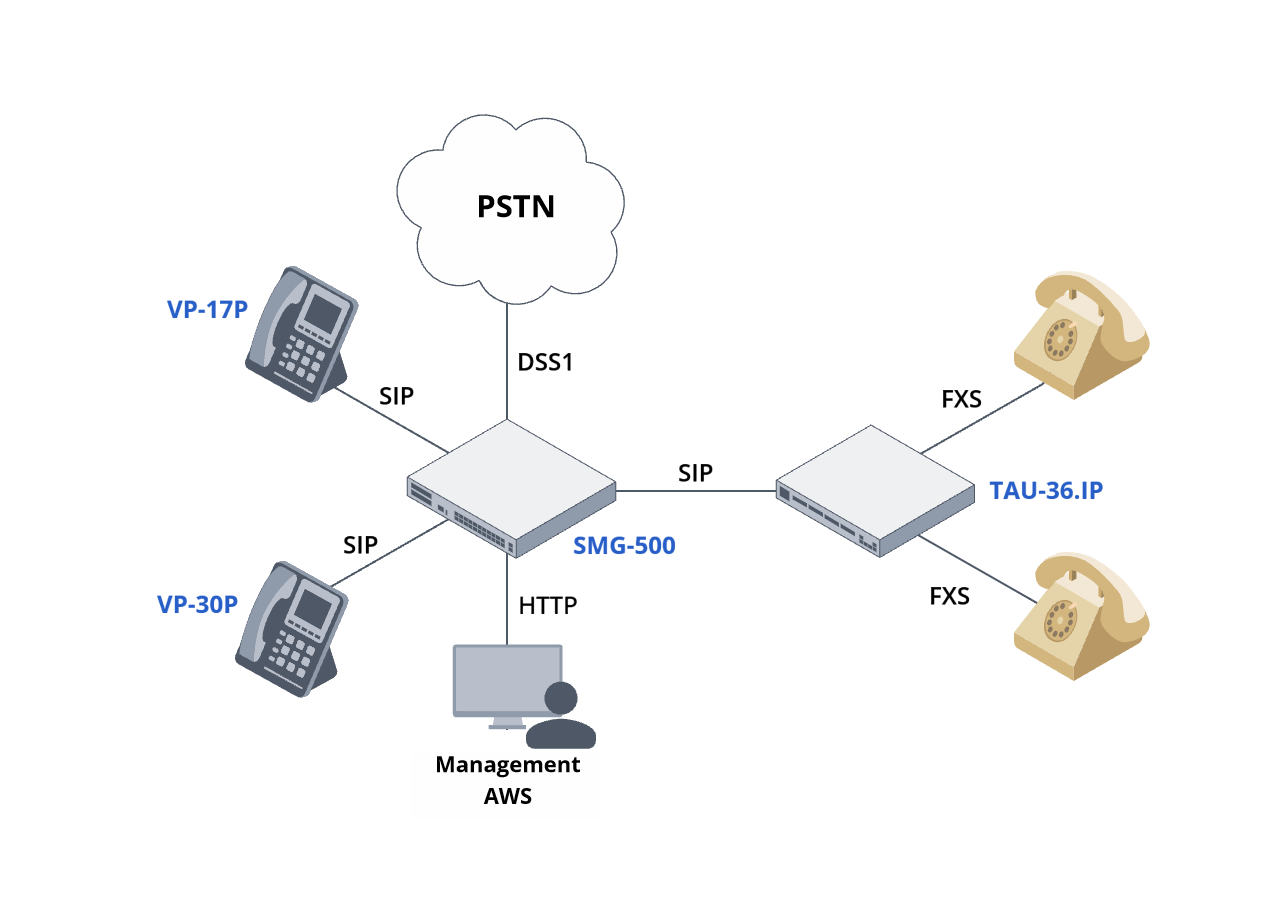
Network diagram
Diagram description
The telephony core is the SMG-500 IP PBX.
IP phones are registered on the SMG-500 via a network of Ethernet switches.
Analog phones are connected to IP PBX via subscriber gateways, such as TAU-36.IP.
The subscriber gateway is connected to IP PBX via an Ethernet network. Subscribers are registered on the PBX via SIP.
Used types of Ethernet ports
The following Ethernet interface names are used in this guide:
| Port designation | Port purpose | Port requirements |
|---|---|---|
| A1 | SMG-500 IP PBX connection port | Trunk port with specified native VLAN |
| Px | IP phone connection ports | Access port with Voice VLAN and PoE |
| Tx | Ports for connecting analog TAU gateways | Access port |
| M1 | Port for connecting AWS, which is used to configure and manage an IP PBX and phones. | Access port |
Used VLANs
In the guide the following virtual local area networks (VLAN) are used.
| VLAN name | VLAN purpose | Ports included in VLAN |
|---|---|---|
| Mgm_Vlan | PBX management | A1 – untagged |
| Data_Vlan | Telephony signalling and media traffic | A1 – tagged |
Traffic restrictions between VLANs
Permissions required for this example.
| From \ In | Mgm_Vlan | Data_Vlan |
|---|---|---|
| Mgm_Vlan | Allow HTTP, HTTPS | |
| Data_Vlan |
IP addressing and dial plan
For demonstration purposes, this guide will use the following:
Dial plan:
- Internal phones:
- Three-digit dial: ххх
- Numbers used in the example: 200 – 419
- Numbers 380 through 415 inclusive are assigned to subscribers with analog telephones connected via TAU-36.IP.
- Three-digit dial: ххх
- PSTN phones:
- Area code (383). Within the area, seven digits: ххххххх
- Our office has been assigned the following numbers: (383)9741001 – 9741010
- Incoming calls from the PSTN to numbers 974100хare forwarded to internal 20х numbers accordingly.
- Number 9741010 is used for outgoing PSTN calls for subscribers who do not have a linked city number.
IP addressing:
- Telephony network (Data_Vlan):
- Network : 192.0.2.0/24
- VLAN ID: 92
- Default gateway: 192.0.2.1
- SMG-500 IP PBX: 192.0.2.10
- TAU-36.IP subscriber gateway: 192.0.2.16
- IP phones: 192.0.2.20 – 192.0.2.240
- Management VLAN (Mgm_Vlan):
- Network: 192.168.1.0/24
- SMG-500 IP PBX: 192.168.1.10
- Addresses of services:
- NTP server: 192.0.2.1
Tables for configuration are available via the link.
Before configuring IP telephony, ensure that the data network is functioning properly. Check the network connectivity.
Equipment configuration
SMG has a dynamic firewall enabled by default, which automatically blocks device access in case of multiple unsuccessful authorization attempts. This may be inconvenient during the configuration process. It is recommended to disable the dynamic firewall according to the instructions before starting the configuration. It is recommended to enable the dynamic firewall after completing the configuration for security reasons.
Minimum required configuration
Configuring IP PBX
The SMG-500 IP PBX is configured via a web interface. Default account details:
- Username: admin
- Password: rootpasswd
The necessary IP PBX configuration includes the following steps:
Configuring the management interface
Follow the instructions to change the IP settings on the main interface. Specify:
- Network name: Mgm_Vlan
- IP address: 192.168.1.10
- Network mask: 255.255.255.0
- Gateway: 0.0.0.0 – the gateway will not be used for this interface.
- Disable all services except “Web Management”.
Adding an interface for telephony
Follow the instructions to add and configure an interface for RTP and SIP traffic:
- Network name: Data_Vlan
- VLAN ID: 92
- IP address: 192.0.2.10
- Network mask: 255.255.255.0
- Gateway: 192.0.2.1
- Check the “SIP signaling” and “Forward RTP” boxes.
Configuring network parameters
Follow the instructions to change the used interface gateway to 
Configuring date and time
For IP telephony to function correctly, set the current date and time on the device.
Time and date are configured on an NTP server.
For automatic time synchronization via NTP on SMG-500 the NTP server on the ESR router or L3 MES switch with the 192.0.2.1 address is used
To configure NTP synchronization, use the instructions to specify the NTP server address:
- Time server (NTP): 192.0.2.1
- Time zone: select the required time zone.
Creating an SIP profile
Follow the instructions to create a SIP profile.
In the “Name” field, enter “SIP subscribers”.
In the “Network interface for SIP” and “Network interface for RTP” fields, select 
Creating SIP subscribers
Follow the instructions to create SIP subscribers. When creating, specify the following:
- Number of subscribers: 220
- Starting number: 200
- SIP profile: SIP subscribers
- Password: 1234
Configuring a DHCP server
IP phones require IP addresses to operate. These can be configured manually on each device or assigned using a DHCP server. Configure the DHCP server according to the instructions.
Specify the following parameters:
- Source address: 192.0.2.20
- Destination address: 192.0.2.240
- Subnet mask: 255.255.255.0
- Gateway/router address: 192.0.2.1
Saving the configuration
After completing the initial configuration, it is recommended to save the device configuration.
Configuring the connection to PSTN
To connect the company's telephone network to the public telephone network, you will need to configure a trunk to the PBX and configure the routing of calls received from the city and sent to the city. For incoming routing, the B number will also need to be modified to connect an external number such as 73831234567 to one of the internal numbers. For outgoing routing, the A number will need to be modified to an external number.
Configuring the E1 interface for PSTN access
Follow the instructions to configure the E1 stream. When configuring, specify the following:
- Stream 1:
- Name: to PSTN;
- Check with your provider to agree on the signaling protocol.
- Synchronization sources: Stream1.
Creating a trunk group
Follow the instructions to create a trunk group. When creating, specify the following:
- Name: TG in PSTN.
- Group members: Stream 1.
Configuring modification of incoming calls from PSTN
Follow the instructions to create a table of modifiers named «Subsitution of B-number from PSTN».
Follow the instructions to create a modification of the B-number for calls from PSTN in the “Subsitution of B-number from PSTN” modifier table. When creating, specify the following:
- Number mask: (7383974100[1-9])
- Modification rule for CdPN/Original CdPN: --------20$
Follow the instructions to assign the modification to a trunk group. When creating, specify the following:
- Add: CdPN.
- CdPN: Subsitution of B-number from PSTN.
Configuring routing to PSTN numbers
Follow the instructions to create a prefix in the dial plan. When creating, specify the following:
- Name: in PSTN.
- Trunk group: TG in PSTN.
- Mask: (xxxxxxx|[78][3489]xxxxxxxxx|810x.)
Configuring number modifications for calls going to PSTN
Follow the instructions to create a table of modifiers named "B-number to E.164".
Follow the instructions to create three B-number modifications for calls to PSTN.
- Modification of "local" numbers
- Number mask: (xxxxxxx)
- Modification rule for CdPN/Original CdPN: +7383$
- Modification of long-distance numbers
- Number mask: (8[3489]xxxxxxxxx)
- Modification rule for CdPN/Original CdPN: 7$
- Modification of international numbers
- Number mask: (810x.)
- Modification rule for CdPN/Original CdPN: ---$
Follow the instructions to create a table of modifiers named «A-number to Е.164 PSTN»
Follow the instructions to create two A-number modifications for calls to PSTN.
- Modification of numbers 201–209 to numbers 7941001–7941009
- Number mask: (20[1-9])
- Modification rule for CgPN/RedirPN/Generic/Location: +738397410-$
- modification of the rest of the numbers to number 9741010
- Number mask: (xxx)
- Modification rule for CgPN/RedirPN/Generic/Location: +73839741010!
Follow the instructions to assign modification to a trunk group for outgoing calls. When creating, specify the following:
- Add: CdPN.
- Add: CgPN.
- CdPN: B-number in E.164.
- CgPN: A-number in E.164 PSTN.
Saving the SMG-500 configuration
Save the configuration of the device.
Connecting IP phones
VP-17P and VP-30P phones can be powered by switches using PoE technology or from a 230 V network via personal power supplies.
If the phones are turned on after applying all of the above settings, they will receive IP addresses automatically.
The first phone turned on will receive the 192.0.2.20 address, the second one will receive the 192.0.2.21 address, and so on.
If the MAC addresses of the phones are known (written on a sticker on the back of each device), it is possible to find out the correspondence between the devices and addresses by opening the “Network Services” → “DHCP Server” menu of the SMG-500 web interface. The list of MAC addresses and IP addresses is located at the bottom of the page in the “Assigned IP Addresses” table.
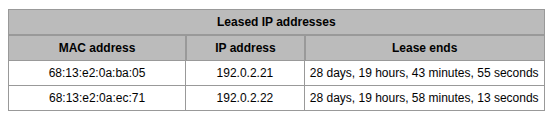
On the phone, the IP address can be found in “Menu” → ‘Status’ → “Network.”
The IP address of the phone will be needed to configure it via the web interface.
Configuring the phone
Follow the instructions to configure the phones.
Fill in the following fields:
- Phone number: values from 200 to 419 without repetitions.
- Username: value similar to the previous field.
- Password: 1234
- SIP proxy server: 192.0.2.10
- Registration server: 192.0.2.10
Connecting analog phones
Analog phones are connected to the SMG-500 IP PBX via TAU series analog gateways.
Configuring the TAU-36.IP analog gateway
The TAU-36.IP analog gateway (referred to as TAU) is configured via the web interface as shown in the example below.
- Default IP address: 192.168.1.2
- Default username: admin
- Default password: rootpasswd
The necessary TAU configuration includes the following steps:
Configuring the connection to the local network
Follow the instructions to configure the TAU:
- IP address: 192.0.2.16
- Network mask: 255.255.255.0
- Gateway: 192.0.2.1
Configuring date and time
Since TAU does not have a built-in clock, time synchronization from an external server is required to use real time for monitoring and statistics. For automatic time synchronization via NTP with TAU, an NTP server located on the local network or on the Internet must be available. SMG-500 cannot act as an NTP server.
Follow the instructions to configure synchronization with the following parameters:
- Enable NTP
 .
. - NTP server address: 192.0.2.1
- Allow periodic synchronization.
- Synchronization period: 3600
Configuring the SIP profile
Follow the instructions to configure the SIP profile. When configuring, specify:
- Operating mode: «Parking».
- Proxy address / Registrar address / Use registration 1: 192.0.2.10/192.0.2.10/Check the checkbox.
Creating subscribers
Follow the instructions to create subscribers with numbers 380–415. When creating, specify the following:
- In the “Starting number” field, enter: 380
Specifying subscriber login details
Follow the instructions to specify subscriber login details. In the ("1-18", "19-36") port group tabs, go through all subscribers. In the port cards, specify:
- Name for authentication/authorization: the value is equal to the value in the “Phone number” field.
- Password for authentication/authorization: 1234
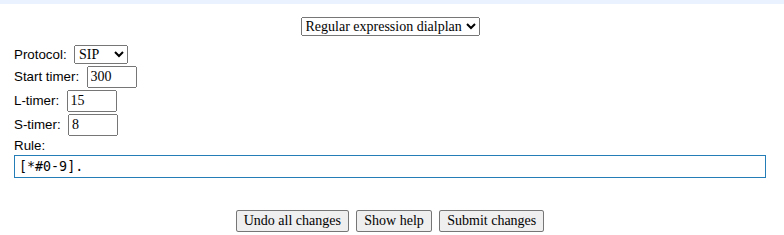
Configuring a dialing plan
Follow the instructions to set up a dialing plan. Select "Regular expression dialplan." In the "Rule:" field, enter "[*#0-9]"
Saving the configuration
All settings are stored in the TAU's RAM and will be lost upon reboot if not saved. To save the current configuration, select one of the following items from the main menu: “Network settings”/‘PBX’/“Switch”

and click the “Save” button in the lower right corner.
Configuring additional functionality
If the dynamic firewall was disabled before starting the configuration, it is recommended to enable it according to the instructions.